鸿蒙next开发:在自绘编辑框中使用输入法
·
往期鸿蒙全套实战文章必看:(附带鸿蒙全栈学习资料)
在自绘编辑框中使用输入法
在输入法框架中,可以通过getController方法获取到InputMethodController实例来绑定输入法并监听输入法应用的各种操作,比如插入、删除、选择、光标移动等。这样就可以在自绘编辑框中使用输入法,并实现更加灵活和自由的编辑操作。
开发步骤
-
开发者在自绘编辑框中使用输入法时,首先需要在DevEco Studio工程中新建一个ets文件,命名为自定义控件的名称,本示例中命名为CustomInput,在文件中定义一个自定义控件,并从@kit.IMEKit中导入inputMethod。
import { inputMethod } from '@kit.IMEKit';


@Component
export struct CustomInput {
  build() {
  }
}-
在控件中,使用Text组件作为自绘编辑框的文本显示组件,使用状态变量inputText作为Text组件要显示的内容。
import { inputMethod } from '@kit.IMEKit';


@Component
export struct CustomInput {
  @State inputText: string = ''; // inputText作为Text组件要显示的内容。

  build() {
    Text(this.inputText) // Text组件作为自绘编辑框的文本显示组件。
      .fontSize(16)
      .width('100%')
      .lineHeight(40)
      .id('customInput')
      .height(45)
      .border({ color: '#554455', radius: 30, width: 1 })
      .maxLines(1)
  }
}-
在控件中获取inputMethodController实例,并在文本点击时调用controller示例的attach方法绑定和拉起软键盘,并注册监听输入法插入文本、删除等方法,本示例仅展示插入、删除。
import { inputMethod } from '@kit.IMEKit';


@Component
export struct CustomInput {
  @State inputText: string = ''; // inputText作为Text组件要显示的内容。
  private isAttach: boolean = false;
  private inputController: inputMethod.InputMethodController = inputMethod.getController();


  build() {
    Text(this.inputText) // Text组件作为自绘编辑框的文本显示组件。
      .fontSize(16)
      .width('100%')
      .lineHeight(40)
      .id('customInput')
      .onBlur(() => {
        this.off();
      })
      .height(45)
      .border({ color: '#554455', radius: 30, width: 1 })
      .maxLines(1)
      .onClick(() => {
        this.attachAndListener(); // 点击控件
      })
  }


  async attachAndListener() { // 绑定和设置监听
    focusControl.requestFocus('CustomInput');
    await this.inputController.attach(true, {
      inputAttribute: {
        textInputType: inputMethod.TextInputType.TEXT,
        enterKeyType: inputMethod.EnterKeyType.SEARCH
      }
    });
    if (!this.isAttach) {
      this.inputController.on('insertText', (text) => {
        this.inputText += text;
      })
      this.inputController.on('deleteLeft', (length) => {
        this.inputText = this.inputText.substring(0, this.inputText.length - length);
      })
      this.isAttach = true;
    }
  }


  off() {
    this.isAttach = false;
    this.inputController.off('insertText');
    this.inputController.off('deleteLeft');
  }
}-
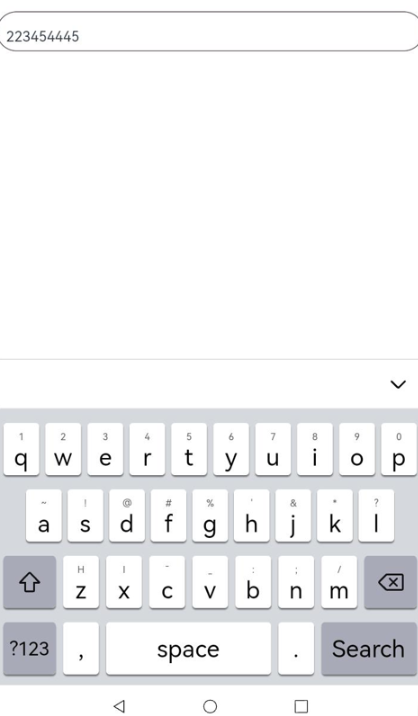
在应用界面布局中引入该控件即可,此处假设使用界面为Index.ets和控件CustomInput.ets在同一目录下。
示例效果图import { CustomInput } from './CustomInput'; // 导入控件 @Entry @Component struct Index { build() { Column() { CustomInput() // 使用控件 } } }


讨论HarmonyOS开发技术,专注于API与组件、DevEco Studio、测试、元服务和应用上架分发等。
更多推荐


 4
4 0
0- 0


 已为社区贡献513条内容

所有评论(0)