HarmonyOS NEXT 实战:吉他和弦查询器开发全记录
🎸 HarmonyOS NEXT 实战:吉他和弦查询器开发全记录
从零搭建一款支持 52 个和弦指法展示、Canvas 指板绘制、变调夹计算的鸿蒙原生应用
一、项目背景
作为一个吉他入门玩家,练琴时最常遇到的问题就是:忘了某个和弦怎么按。虽然手机上有很多现成的和弦App,但作为一个鸿蒙开发者,为什么不自己写一个呢?
正好最近在深入学习 HarmonyOS NEXT(API 23)的 ArkTS + ArkUI 声明式开发,于是决定做一款吉他和弦查询器,涵盖三个核心功能:
- 📋 和弦分类查询 — 按 Major / Minor / 7th / sus 等类型浏览 52 个常用和弦
- 🎨 指板图展示 — 用 Canvas 绘制 6 线 5 品的吉他指板,标注手指位置、横按、空弦标记
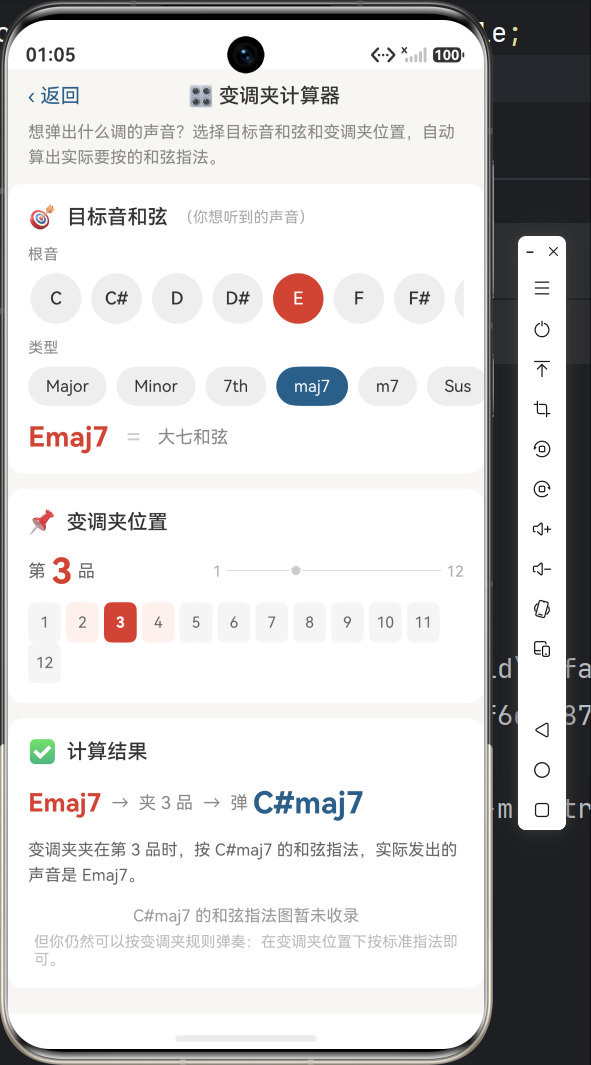
- 🎛️ 变调夹计算器 — 选目标音和弦 + 变调夹品格 → 自动算出实际要按的指法
二、技术选型
| 层面 | 选择 |
|---|---|
| 开发语言 | ArkTS(HarmonyOS NEXT 声明式 DSL) |
| UI 框架 | ArkUI 声明式组件 |
| 绘图 | Canvas + CanvasRenderingContext2D |
| 页面路由 | @kit.ArkUI router |
| 数据持久化 | (未使用,和弦数据为静态库) |
| 编译工具 | hvigor |
| API 版本 | 23(compatibleSdkVersion 6.1.0(23)) |
| 目标设备 | Phone |
三、项目结构
entry/src/main/ets/
├── entryability/
│   └── EntryAbility.ets              # 应用入口
├── pages/
│   ├── Index.ets                     # 首页 — 和弦分类 + 搜索
│   ├── ChordDetail.ets               # 和弦详情 — 指板图 + 指法说明
│   └── CapoTool.ets                  # 变调夹计算器
├── model/
│   ├── ChordData.ets                 # 数据类型定义(Chord, BarreInfo 等)
│   └── ChordLibrary.ets              # 52 个和弦数据 + 变调夹算法
└── components/
    └── FretboardView.ets             # Canvas 指板绘制可复用组件
四、核心实现详解
4.1 数据结构设计
首先定义和弦的数据模型。每个和弦包含 6 根弦的品格位置、手指编号、横按信息等:
// ChordData.ets
export interface BarreInfo {
  fret: number;
  startString: number;
  endString: number;
}

export interface Chord {
  name: string;          // "C", "Am", "G7"
  type: ChordType;       // MAJOR / MINOR / SEVENTH ...
  category: ChordCategory; // OPEN / BARRE / JAZZ
  frets: number[];       // 6 根弦: -1=不弹, 0=空弦, 1+=品格
  fingers: number[];     // 6 根弦: 0=不按, 1=食指...4=小指
  barre?: BarreInfo;     // 横按(可选)
  notes?: string[];      // 每根弦的音名
  description?: string;  // 指法说明文字
}
设计要点:
frets数组映射从 6弦(低E) 到 1弦(高e),符合吉他手从上往下看的习惯- 品格值
-1表示该弦不弹(显示 ✕),0表示空弦(显示 ○) BarreInfo独立为接口而不是内联类型,因为 ArkTS strict mode 不允许接口属性中使用对象字面量类型
4.2 52 个和弦的工厂函数模式
一开始我用对象字面量数组定义和弦数据:
// ❌ 这种写法在 ArkTS strict mode 会编译报错
const OPEN_MAJOR: Chord[] = [
  {
    name: 'C',
    type: ChordType.MAJOR,
    // ...
  },
];
ArkTS 编译器报了 20 多个 arkts-no-untyped-obj-literals 错误。原因是 ArkTS strict mode 要求对象字面量必须能明确推断到已声明的 class 或 interface,而 Chord 包含多个可选属性(barre?、notes?、description?),类型推断会失败。
解决方案:定义工厂函数
function chord(
  name: string, type: ChordType, category: ChordCategory,
  frets: number[], fingers: number[],
  description: string,
  notes?: string[],
  barre?: BarreInfo
): Chord {
  const r: Chord = { name, type, category, frets, fingers, description };
  if (notes !== undefined) { r.notes = notes; }
  if (barre !== undefined) { r.barre = barre; }
  return r;
}
这样每个和弦只需一行函数调用,类型由返回值自动推断:
const OPEN_MAJOR: Chord[] = [
  chord('C', ChordType.MAJOR, ChordCategory.OPEN, [-1,3,2,0,1,0], [0,3,2,0,1,0],
    '无名指5弦3品 · 中指4弦2品 · 食指2弦1品', ['-','C','E','G','C','E']),
  chord('F', ChordType.MAJOR, ChordCategory.BARRE, [1,1,2,3,3,1], [1,1,2,3,4,1],
    '食指横按1品 · 中指3弦2品 · 无名指4弦3品 · 小指5弦3品',
    ['F','C','F','A','C','F'], { fret: 1, startString: 6, endString: 1 }),
  // ... 更多和弦
];
4.3 Canvas 指板图绘制
这是整个 App 最复杂的部分。我需要用 Canvas 画出一个标准的吉他指板图。
指板图布局:
      ○   ○   ●   ○   ○   ○       ← 空弦/不弹标记
   ┌──┬──┬──┬──┬──┬──┬──┐        ← 上枕(粗线)
1  │  │  │  │  │  │  │  │        ← 品号
   ├──┼──┼──┼──┼──┼──┼──┤
2  │  │  │●2│  │  │  │  │        ← 手指位置圆点 + 编号
   ├──┼──┼──┼──┼──┼──┼──┤
3  │  │●1│  │  │  │  │  │
   ├──┼──┼──┼──┼──┼──┼──┤
4  │●3│  │  │  │  │  │  │
   ├──┼──┼──┼──┼──┼──┼──┤
5  │  │  │  │  │  │  │  │
     6   5   4   3   2   1       ← 弦编号(6弦最粗)
关键绘制逻辑:
drawFretboard(): void {
  const ctx = this.context;
  const w = ctx.width;
  const h = ctx.height;

  // 1. 计算间距
  const stringSpacing = drawW / 5;  // 6弦 = 5个间隔
  const fretSpacing = drawH / 5;    // 5品 = 5个间隔

  // 2. 绘制品丝(横线)
  for (let f = 0; f <= 5; f++) {
    // ... 从 pt 开始画 6 条水平线
  }

  // 3. 绘制弦(竖线)— 6弦最粗,1弦最细
  const stringWidths = [3.2, 2.8, 2.4, 2.0, 1.6, 1.2];
  for (let s = 0; s < 6; s++) {
    ctx.lineWidth = stringWidths[s];
    // ... 画竖线
  }

  // 4. 绘制手指圆点 + 指法编号
  for (let s = 0; s < 6; s++) {
    const fret = frets[s];
    if (fret <= 0) continue;
    // 绘制实心圆
    ctx.arc(x, y, dotRadius, 0, Math.PI * 2);
    ctx.fillStyle = isRoot ? '#D14334' : '#2B5F8A';
    // 绘制指法编号
    ctx.fillText(fingers[s].toString(), x, y);
  }

  // 5. 处理横按(粗矩形条)
  if (chord.barre) {
    // 绘制覆盖多根弦的横按指示
  }

  // 6. 绘制空弦 ○ / 不弹 ✕
  for (let s = 0; s < 6; s++) {
    if (frets[s] === 0) drawOpenCircle();
    else if (frets[s] === -1) drawMuteX();
  }
}
重绘的坑: Canvas 的 onReady 回调只在组件首次挂载时触发一次。当 @Prop chord 变化时(如在变调夹计算器中切换和弦),Canvas 不会自动重绘。
// ❌ 第一次 ok,换和弦后不更新
Canvas(this.context)
  .onReady(() => { this.drawFretboard(); })

// ✅ 使用 @Watch + setTimeout 强制重绘
@Prop @Watch('onChordChange') chord: Chord;

onChordChange(): void {
  setTimeout(() => { this.drawFretboard(); }, 50);
}
4.4 变调夹计算算法
变调夹的原理很简单:夹在第 N 品时,空弦音升高 N 个半音。想弹出 C 大调的声音,夹 3 品时,实际需要按 A 和弦的指法。
export function applyCapo(chordName: string, capoFret: number): string {
  // 12 个半音
  const noteNames = ['C', 'C#', 'D', 'D#', 'E', 'F', 'F#', 'G', 'G#', 'A', 'A#', 'B'];

  // 提取根音(如 "Cmaj7" → 根音 "C")
  const rootMatch = chordName.match(/^([A-G][#b]?)(.*)$/);
  let root = rootMatch[1];
  const suffix = rootMatch[2];

  // 降号转升号统一处理
  if (root.includes('b')) {
    const flatMap = { 'Bb': 'A#', 'Db': 'C#', 'Eb': 'D#', 'Gb': 'F#', 'Ab': 'G#' };
    root = flatMap[root] ?? root;
  }

  // 实际按的根音 = 目标根音 - 变调夹品格(半音)
  const rootIndex = noteNames.indexOf(root);
  const actualIndex = (rootIndex - capoFret + 12) % 12;

  return noteNames[actualIndex] + suffix;
}
4.5 页面导航与参数传递
使用 @kit.ArkUI 的 router 模块实现页面跳转和传参:
// 首页 → 详情页
router.pushUrl({
  url: 'pages/ChordDetail',
  params: {
    chordName: chord.name,
    chordType: chord.type
  }
});

// 详情页接收参数
aboutToAppear(): void {
  const params = router.getParams() as Record<string, Object>;
  this.chordName = params['chordName'] as string;
  this.chordType = params['chordType'] as ChordType;
}
五、编译问题排查记录
5.1 hvigor daemon 缓存污染
第一次编译报了一堆 ValuesBucket 类型错误,但引用的文件路径却是上一个项目的(6.4/2/MyApplication)。这是 hvigor daemon 缓存了之前项目的编译数据。
解决: hvigorw --stop-daemon 重启 daemon,或在编译命令加 --daemon 让 daemon 在新目录重新启动。
5.2 ArkTS strict mode 的 4 类编译错误
| 错误码 | 含义 | 修复 |
|---|---|---|
arkts-no-obj-literals-as-types |
接口中使用了内联对象类型 | 提取为独立 BarreInfo 接口 |
arkts-no-untyped-obj-literals |
对象字面量不能匹配到已声明类型 | 改用工厂函数 chord() |
arkts-no-noninferrable-arr-literals |
数组元素类型不可推断 | 同上 |
arkts-no-any-unknown |
使用了隐式 any |
ForEach 回调补全参数类型 |
5.3 .flexWrap() / .wrap() 不存在
在 Row 组件上调用 flexWrap(FlexWrap.Wrap) 报错 —— Row 没有这个属性。改成 Flex 组件后使用 .wrap() 属性又报错。
正确写法:
// ✅ Flex 的 wrap 是构造参数,不是链式调用
Flex({ wrap: FlexWrap.Wrap }) {
  // 子组件会自动换行
}
5.4 运行时 TypeError: Cannot read property length of undefined
编译通过后模拟器闪退,Index.ets:147 报 Cannot read property length of undefined。
原因: 我用了 get displayChords() getter。在 ArkUI 状态管理机制中,getter 可能在 aboutToAppear 完成前就被首次渲染调用了,此时 @State 数组还是初始化的空数组。
修复: 移除 getter,改用 @State displayList: Chord[] + 手动 updateDisplay() 调用。在 aboutToAppear 和每次状态变更(搜索输入、分类切换)后都显式调用:
aboutToAppear(): void {
  this.chordGroups = getAllChordGroups();
  this.allChords = getAllChords();
  this.updateDisplay();  // 首次填充
}

updateDisplay(): void {
  if (this.searchQuery.length > 0) {
    this.displayList = searchChords(this.searchQuery);
  } else if (...) {
    this.displayList = this.allChords;
  } else {
    this.displayList = this.chordGroups[this.currentCategory].chords;
  }
}
六、最终效果
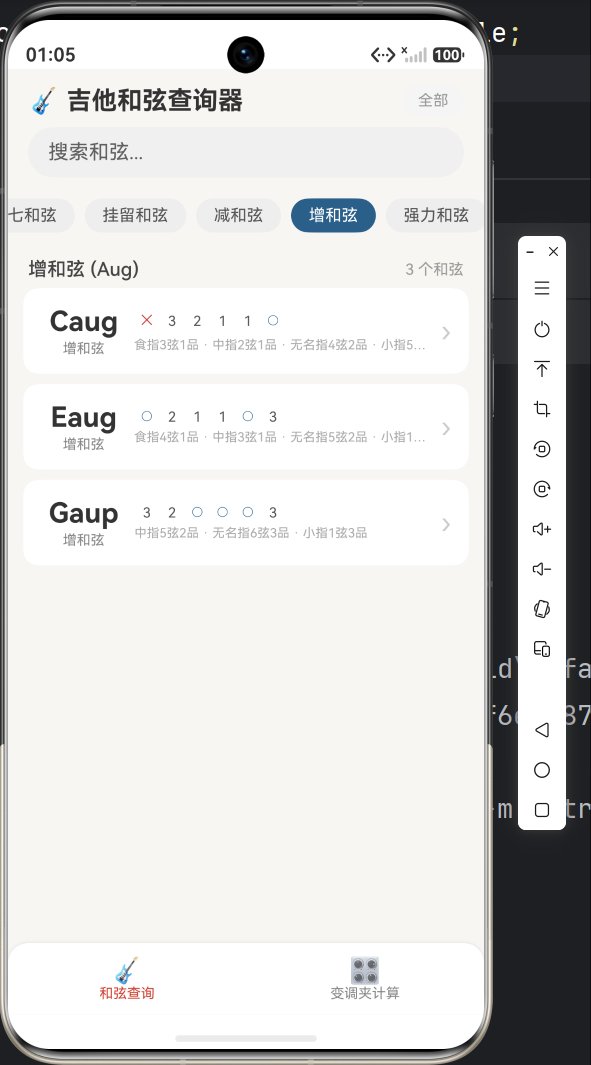
首页 — 和弦分类浏览
- 顶部显示 9 个分类标签(Major / Minor / 7th / maj7 / m7 / Sus / Dim / Aug / Power)
- 搜索框支持按和弦名称实时过滤
- 和弦卡片显示名称、类型、六根弦的缩略指法
和弦详情页 — 指板图
- Canvas 绘制指板,6弦由粗到细
- 手指位置用彩色圆点标注,根音红色高亮
- 指法编号(1=食指 2=中指 3=无名指 4=小指)
- 横按用长条矩形指示
- 空弦 ○ / 不弹 ✕ 标记
- 底部显示组成音和同类型推荐
变调夹计算器
- 选择目标音和弦的根音(12 个半音)和类型
- 选择变调夹品格(1-12 品网格)
- 实时计算结果:「C → 夹3品 → 弹 A」
- 如果库中有结果和弦,显示对应的指板图
七、项目地址
核心文件:
| 文件 | 行数 | 功能 |
|---|---|---|
model/ChordLibrary.ets |
~380 | 52个和弦数据 + 变调夹算法 |
components/FretboardView.ets |
~300 | Canvas 指板绘制 |
pages/Index.ets |
~300 | 首页 + 搜索 |
pages/ChordDetail.ets |
~325 | 详情页 |
pages/CapoTool.ets |
~380 | 变调夹计算器 |
八、总结
这次开发踩了不少 ArkTS strict mode 的坑,总结几条经验:
- ArkTS 不是 TypeScript — 即使是 JS/TS 老手,也需要重新熟悉 ArkTS 的严格类型规则(禁止
any、禁止内联对象类型、数组字面量需要明确推断) @Stategetter 不可靠 — 计算属性用 getter +@State组合在首次渲染时可能出问题,建议直接用@State变量 + 手动更新- Canvas 重绘需要技巧 —
onReady只触发一次,结合@Watch+setTimeout或者.key()强制重建 Canvas 组件 - 工厂函数是 ArkTS 的好朋友 — 当接口有可选属性时,用工厂函数替代对象字面量可以避免大批量类型推断错误
如果你也在学习 HarmonyOS NEXT 开发,希望这篇文章对你有帮助。欢迎在评论区交流!

讨论HarmonyOS开发技术,专注于API与组件、DevEco Studio、测试、元服务和应用上架分发等。
更多推荐

 5
5 0
0- 0


 已为社区贡献50条内容

所有评论(0)