HarmonyOS Navigation 路由体系深度解析:NavDestination + NavPathStack
页面跳转是每个 App 的基础功能。HarmonyOS 提供了Navigation三件套来管理页面路由。本项目从MainPage跳转到就使用了这套路由体系。本篇详细讲解 NavPathStack 的各种方法,以及如何实现参数传递、返回值获取、路由拦截等进阶功能。Navigation 路由体系通过管理页面栈,跳转并传参,pop返回并传递结果,的onReady回调接收参数。
文章目录
前言
页面跳转是每个 App 的基础功能。HarmonyOS 提供了 Navigation + NavDestination + NavPathStack 三件套来管理页面路由。本项目从 MainPage 跳转到 GasStationPage 就使用了这套路由体系。
本篇详细讲解 NavPathStack 的各种方法,以及如何实现参数传递、返回值获取、路由拦截等进阶功能。
一、路由体系回顾
1.1 三个核心组件的关系
Navigation(路由容器)
├── 维护一个 NavPathStack(路由栈)
├── 渲染当前栈顶页面
└── NavDestination(具体的子页面)
    ├── 通过 @Builder 函数注册
    └── 通过 pushPathByName 跳转到
1.2 本项目路由配置
路由映射(自动扫描): GasStationPage.ets 文件顶部导出了一个 @Builder 函数:
// GasStationPage.ets
@Builder
export function GasStationPageBuilder() {
  GasStationPage();
}
配合 route_map.json(或自动扫描)将 'GasStationPage' 名称映射到这个 Builder 函数。
跳转调用(MainPage):
// MainPage.ets
Row() {
  // ...
}
.onClick(() => {
  this.pageInfos.pushPathByName('GasStationPage', true);
  //                                ↑ 路由名称    ↑ 是否带动画
})
接收目标页(GasStationPage):
// GasStationPage.ets
NavDestination() {
  // ... 页面内容
}
.onReady((context: NavDestinationContext) => {
  // 获取路由栈(用于在子页面内部进行路由操作)
  this.pageInfos = context.pathStack;
})
二、NavPathStack 常用方法
2.1 跳转方法
// 创建路由栈(在 @Entry 页面中)
const pathStack: NavPathStack = new NavPathStack();

// 方式1:按名称跳转
pathStack.pushPathByName('DetailPage', { id: '001', name: '望京站' });

// 方式2:按名称跳转(带动画控制)
pathStack.pushPathByName('DetailPage', null, false); // false = 不带动画

// 方式3:跳转并等待返回值(async/await)
const result = await pathStack.pushPathByName('SelectPage', null, true);
console.log(`返回值:${JSON.stringify(result)}`); // 获取 SelectPage 的返回结果

// 方式4:替换当前页(不入栈,直接替换)
pathStack.replacePath({ name: 'LoginPage', param: {} });

// 方式5:跳转到路由栈中已有的页面(不重复入栈)
pathStack.moveToTop('MainPage');
2.2 返回方法
// 返回上一页
pathStack.pop();

// 返回上一页并传递结果
pathStack.pop({ status: 'success', selectedId: '001' });

// 返回到指定路由(弹出多层)
pathStack.popToName('MainPage');

// 清空路由栈(回到根页面)
pathStack.clear();

// 获取当前栈的深度
const depth = pathStack.size(); // 栈中页面数量
三、页面间传参详解
3.1 传递参数(pushPathByName 第二个参数)
// 跳转时传参
pathStack.pushPathByName('StationDetailPage', {
  stationId: '001',
  stationName: '望京石化',
  latitude: 40.0046,
  longitude: 116.4823
});
3.2 接收参数(在目标页中)
@Component
struct StationDetailPage {
  @State stationId: string = '';
  @State stationName: string = '';
  private latitude: number = 0;
  private longitude: number = 0;

  build() {
    NavDestination() {
      Column({ space: 16 }) {
        Text(`ID: ${this.stationId}`)
        Text(`名称: ${this.stationName}`)
        Text(`坐标: ${this.latitude}, ${this.longitude}`)
      }
      .padding(24)
    }
    .onReady((context: NavDestinationContext) => {
      // 获取路由参数
      const params = context.pathInfo.param as Record<string, string | number>;

      this.stationId = params['stationId'] as string;
      this.stationName = params['stationName'] as string;
      this.latitude = params['latitude'] as number;
      this.longitude = params['longitude'] as number;
    })
    .title(this.stationName)
  }
}
四、完整实战:三页面路由示例
4.1 页面结构
MainListPage(列表页)
    ↓ pushPathByName('StationDetail', {id})
StationDetailPage(详情页)
    ↓ pushPathByName('MapPage', {lat, lng})
MapPage(地图页)
    ↓ pop({navigated: true})
StationDetailPage(接收返回值)
    ↓ pop()
MainListPage
4.2 代码实现
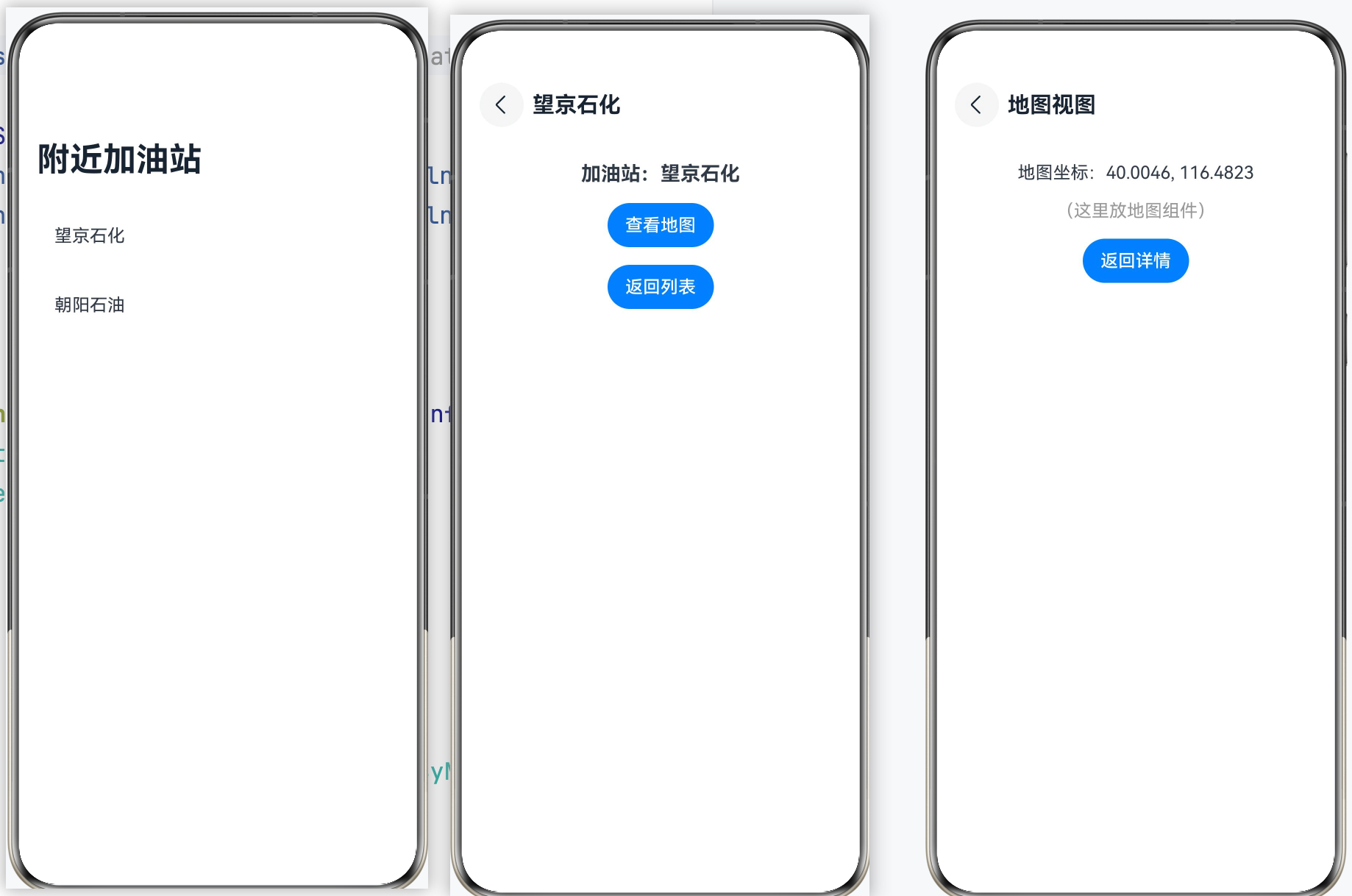
 // ====== 根容器(app的最外层)======
@Entry
@Component
struct AppRoot {
    @Provide pageInfos: NavPathStack = new NavPathStack();

    @Builder
    pageBuilder(name: string, param: Object) {
        if (name === 'StationDetail') {
            StationDetailPage()
        } else if (name === 'MapPage') {
            MapPage()
        }
    }

    build() {
        Navigation(this.pageInfos) {
            MainListPage()
        }
        .navDestination(this.pageBuilder)
        .hideNavBar(false)
        .title('附近加油站')
        .width('100%')
        .height('100%')
    }
}

interface StationInfo {
    id: string;
    name: string;
    lat: number;
    lng: number;
}

interface MapParams {
    lat: number;
    lng: number;
}
// ====== 列表页 ======
@Component
struct MainListPage {
    @Consume pageInfos: NavPathStack; // 从父级 Navigation 继承路由栈

    private stations:StationInfo[] = [
        { id: '001', name: '望京石化', lat: 40.0046, lng: 116.4823 },
        { id: '002', name: '朝阳石油', lat: 39.9219, lng: 116.4386 },
    ];

    build() {
        List({ space: 12 }) {
            ForEach(this.stations, (station:StationInfo) => {
                ListItem() {
                    Text(station.name)
                        .fontSize(16)
                        .padding(16)
                        .width('100%')
                        .backgroundColor('#FFFFFF')
                        .borderRadius(12)
                        .onClick(() => {
                            this.pageInfos.pushPathByName('StationDetail', station);
                        })
                }
            })
        }
        .padding(16)
    }
}

// ====== 详情页 ======
@Component
struct StationDetailPage {
    @State stationInfo: Record<string, string | number> = {};
    pageInfos: NavPathStack = new NavPathStack();

    build() {
        NavDestination() {
            Column({ space: 16 }) {
                Text(`加油站:${this.stationInfo['name'] as string}`)
                    .fontSize(18).fontWeight(FontWeight.Bold)

                Button('查看地图')
                    .onClick(() => {
                        const params: MapParams = {
                            lat: this.stationInfo['lat'] as number,
                            lng: this.stationInfo['lng'] as number
                        };
                        this.pageInfos.pushPathByName('MapPage', params);
                    })

                Button('返回列表')
                    .onClick(() => { this.pageInfos.pop(); })
            }
            .padding(24)
        }
        .onReady((context: NavDestinationContext) => {
            this.pageInfos = context.pathStack;
            this.stationInfo = context.pathInfo.param as Record<string, string | number>;
        })
        .title(this.stationInfo['name'] as string || '详情')
    }
}

// ====== 地图页 ======
@Component
struct MapPage {
    @State lat: number = 0;
    @State lng: number = 0;
    pageInfos: NavPathStack = new NavPathStack();

    build() {
        NavDestination() {
            Column({ space: 16 }) {
                Text(`地图坐标:${this.lat.toFixed(4)}, ${this.lng.toFixed(4)}`)
                    .fontSize(16)
                Text('(这里放地图组件)')
                    .fontColor('#999999')

                Button('返回详情')
                    .onClick(() => {
                        // 返回并传递结果
                        this.pageInfos.pop({ navigated: true, timestamp: Date.now() });
                    })
            }
            .padding(24)
            .justifyContent(FlexAlign.Center)
        }
        .onReady((context: NavDestinationContext) => {
            this.pageInfos = context.pathStack;
            const params = context.pathInfo.param as Record<string, number>;
            this.lat = params['lat'];
            this.lng = params['lng'];
        })
        .title('地图视图')
    }
}
五、NavDestination 生命周期
NavDestination() {
  // 页面内容
}
.onReady((context: NavDestinationContext) => {
  // ① 页面准备完成,可以获取路由参数
  this.pageInfos = context.pathStack;
  this.params = context.pathInfo.param;
})
.onWillAppear(() => {
  // ② 页面将要出现(动画开始前)
  console.log('页面将要出现');
})
.onAppear(() => {
  // ③ 页面已完全出现
  console.log('页面已出现');
})
.onWillDisappear(() => {
  // ④ 页面将要消失(动画开始前)
  console.log('页面将要消失');
})
.onDisappear(() => {
  // ⑤ 页面已消失
  console.log('页面已消失,可以清理资源');
})
.onBackPressed(() => {
  // ⑥ 拦截返回键(返回 true = 已处理,不执行默认返回)
  if (this.hasUnsavedChanges) {
    this.showSaveDialog(); // 弹出保存对话框
    return true; // 阻止默认返回行为
  }
  return false; // 允许正常返回
})
本项目中的生命周期:
// GasStationPage.ets
NavDestination() { /* ... */ }
.onReady((context: NavDestinationContext) => {
  this.pageInfos = context.pathStack; // 获取路由栈
})
.onWillAppear(() => {
  // 页面将要显示时初始化地图
  this.init().then(() => {
    setTimeout(() => {
      this.isShow = true; // 500ms后显示弹窗
    }, Constants.TIME);
  });
})
总结
Navigation 路由体系通过 NavPathStack 管理页面栈,pushPathByName 跳转并传参,pop 返回并传递结果,NavDestination 的 onReady 回调接收参数。掌握路由栈的深度管理(push/pop/popToName/clear)和生命周期回调(onWillAppear/onWillDisappear/onBackPressed),你就能构建任意复杂的多页面应用。

讨论HarmonyOS开发技术,专注于API与组件、DevEco Studio、测试、元服务和应用上架分发等。
更多推荐

 0
0 0
0- 0


 已为社区贡献131条内容

所有评论(0)