鸿蒙(HarmonyOS)原生应用开发之毛玻璃层叠布局示例
毛玻璃层叠布局示例
一、引言
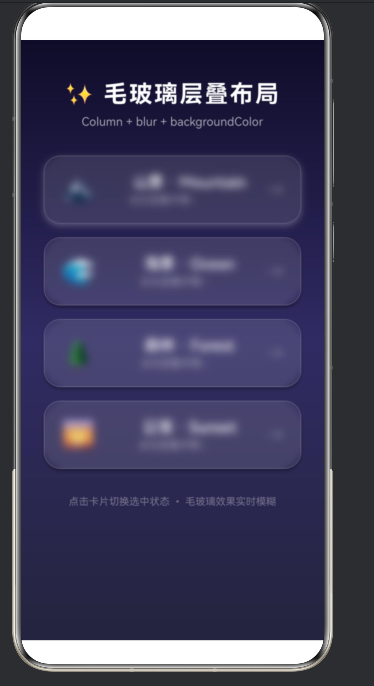
在鸿蒙(HarmonyOS)原生应用开发中,毛玻璃(Frosted Glass)效果是一种流行的UI设计风格,它通过半透明背景配合高斯模糊,营造出类似磨砂玻璃的视觉效果。本文将以项目中的毛玻璃层叠布局为例,深入探讨如何使用ArkTS语言实现这一精美效果。
毛玻璃效果的核心在于:Column容器作为垂直排列基础,配合.blur()方法实现模糊效果,再加上半透明背景色和阴影,共同构建出层次感丰富的视觉体验。本文将从原理到实践,全面解析毛玻璃层叠布局的实现方式。
二、毛玻璃效果原理
2.1 视觉效果分析
毛玻璃效果主要包含以下几个视觉层次:
-
背景层:可以是纯色、渐变或图片,作为底层背景
-
模糊层:半透明白色或浅色覆盖层,施加高斯模糊
-
内容层:放置在模糊层之上的文字、图标等内容
2.2 核心技术要点
| 技术点 | 实现方式 | 效果说明 |
|--------|----------|----------|
| 高斯模糊 | .blur(value) | 模糊程度,值越大越模糊(单位px) |
| 半透明背景 | backgroundColor('rgba(...)') | 提供模糊基底,增强层次感 |
| 边框效果 | borderWidth() + borderColor() | 模拟玻璃边缘反光 |
| 阴影效果 | .shadow() | 增强立体感和层次感 |
| 动画过渡 | .animation() | 平滑的状态切换效果 |
2.3 毛玻璃效果的数学原理
高斯模糊是一种常用的图像模糊算法,其核心思想是对图像中的每个像素点进行加权平均,权重由高斯函数决定:
G(x, y) = (1 / (2 * π * σ²)) * e^(-(x² + y²) / (2 * σ²))
其中:
-
σ(sigma)表示标准差,决定模糊程度 -
x, y表示像素相对于中心的坐标
三、项目核心代码解析
3.1 项目结构概述
本项目的毛玻璃层叠布局位于 entry/src/main/ets/pages/Index.ets 文件中,主要包含以下核心组件:
@Entry

@Component

struct FrostedGlassDemo {

  @State currentIndex: number = 0;

  @State cardData: string[] = [

    '🏔️ 山景 · Mountain',

    '🌊 海景 · Ocean',

    '🌲 森林 · Forest',

    '🌅 日落 · Sunset'

  ];

  build() {

    // 核心布局代码

  }

}
3.2 层叠结构设计
整个布局采用 Stack 容器实现层叠效果:
Stack() {

  // 第一层:渐变背景

  Column()

    .width('100%')

    .height('100%')

    .linearGradient({

      direction: GradientDirection.Bottom,

      colors: [

        ['#0f0c29', 0],

        ['#302b63', 0.5],

        ['#24243e', 1.0]

      ]

    })

  // 第二层:毛玻璃卡片内容

  Column() {

    // 标题和卡片列表

  }

  .width('100%')

  .height('100%')

  .blur(2)  // 轻微模糊融合背景

}
3.3 渐变背景实现
渐变背景使用 linearGradient 方法创建从深蓝到紫色的渐变效果:
.linearGradient({

  direction: GradientDirection.Bottom,  // 从顶部到底部

  colors: [

    ['#0f0c29', 0],      // 起始颜色,位置0%

    ['#302b63', 0.5],    // 中间颜色,位置50%

    ['#24243e', 1.0]     // 结束颜色,位置100%

  ]

})
3.4 毛玻璃卡片实现
每张卡片都采用以下样式组合实现毛玻璃效果:
Column() {

  Row() {

    Text(item.slice(0, 2))    // Emoji图标

      .fontSize(32)

      .margin({ right: 16 })


    Column() {

      Text(item.slice(2))      // 标题文字

        .fontSize(18)

        .fontWeight(FontWeight.Medium)

        .fontColor('#FFFFFF')


      Text('点击查看详情 ›')

        .fontSize(12)

        .fontColor('rgba(255,255,255,0.5)')

        .margin({ top: 4 })

    }

    .alignItems(HorizontalAlign.Start)


    Text('→')

      .fontSize(20)

      .fontColor('rgba(255,255,255,0.4)')

  }

  .width('100%')

  .alignItems(VerticalAlign.Center)

  .justifyContent(FlexAlign.SpaceBetween)

}

// 毛玻璃核心样式

.width('85%')

.padding(20)

.margin({ bottom: 16 })

.backgroundColor('rgba(255, 255, 255, 0.12)')   // 12%透明度白色

.blur(24)                                        // 24px高斯模糊

.borderRadius(20)                                // 圆角

.borderWidth(1)

.borderColor('rgba(255, 255, 255, 0.15)')       // 15%透明度边框
四、毛玻璃效果的关键技术详解
4.1 blur()方法深度解析
blur() 方法用于为组件施加高斯模糊效果:
.blur(24) // 24像素的高斯模糊
参数说明:
-
值越大,模糊效果越明显
-
通常取值范围为 8-32px
-
值为0时无模糊效果
4.2 半透明背景色设计
半透明背景色是毛玻璃效果的关键:
.backgroundColor('rgba(255, 255, 255, 0.12)')
颜色值分析:
-
rgba(255, 255, 255, 0.12)表示白色,透明度12% -
透明度范围通常在 0.1-0.2 之间
-
深色背景下使用白色半透明,浅色背景下使用黑色半透明
4.3 边框效果增强
边框用于模拟玻璃边缘的反光效果:
.borderWidth(1)

.borderColor('rgba(255, 255, 255, 0.15)')
设计要点:
-
边框宽度通常为1px
-
边框颜色透明度略高于背景色
-
增强玻璃的质感和层次感
4.4 阴影效果实现
阴影用于增强卡片的立体感:
.shadow({

  radius: this.currentIndex === index ? 20 : 8,

  color: this.currentIndex === index

    ? 'rgba(255, 255, 255, 0.25)'

    : 'rgba(0, 0, 0, 0.3)',

  offsetX: 0,

  offsetY: 8

})
阴影参数说明:
-
radius:阴影模糊半径 -
color:阴影颜色(选中时为白色发光,未选中时为黑色阴影) -
offsetX/Y:阴影偏移量
4.5 动画过渡效果
动画使状态切换更加平滑:
.animation({

  duration: 300,           // 动画时长300毫秒

  curve: Curve.FastOutSlowIn  // 缓动曲线

})
五、交互设计与状态管理
5.1 点击交互实现
通过 onClick 实现卡片点击交互:
.onClick(() => {

  this.currentIndex = index;

  console.info(`[毛玻璃示例] 选中卡片: ${index} - ${item}`);

})
5.2 状态驱动的样式变化
使用状态变量控制选中状态:
@State currentIndex: number = 0;  // 当前选中卡片索引

// 根据状态动态调整样式

.shadow({

  radius: this.currentIndex === index ? 20 : 8,

  color: this.currentIndex === index

    ? 'rgba(255, 255, 255, 0.25)'

    : 'rgba(0, 0, 0, 0.3)',

  offsetX: 0,

  offsetY: 8

})
5.3 数据驱动渲染
使用 ForEach 实现动态卡片列表:
@State cardData: string[] = [

  '🏔️ 山景 · Mountain',

  '🌊 海景 · Ocean',

  '🌲 森林 · Forest',

  '🌅 日落 · Sunset'

];

ForEach(this.cardData, (item: string, index: number) => {

  Column() {

    // 卡片内容

  }

  .onClick(() => {

    this.currentIndex = index;

  })

}, (item: string) => item)  // key生成器
六、毛玻璃布局的性能优化
6.1 blur性能注意事项
虽然毛玻璃效果视觉效果出色,但过度使用可能影响性能:
| 注意事项 | 说明 |
|----------|------|
| 模糊半径 | 过大的blur值会显著增加GPU计算量 |
| 组件数量 | 大量模糊组件会导致性能下降 |
| 动画模糊 | 避免在动画过程中改变blur值 |
6.2 优化策略
// ✅ 推荐:使用静态模糊值

.blur(24)

// ❌ 不推荐:动态改变模糊值

.blur(this.isActive ? 32 : 16)

// ✅ 推荐:对容器整体模糊而非每个子组件

Column() {

  // 多个子组件

}

.blur(2)  // 容器轻微模糊
6.3 条件渲染优化
// ✅ 推荐:使用条件渲染

if (showCard) {

  Column() { /* 毛玻璃卡片 */ }

}

// ❌ 不推荐:渲染隐藏的模糊组件

Column() { /* 毛玻璃卡片 */ }

.visibility(Visibility.Hidden)
七、毛玻璃效果的变体实现
7.1 深色毛玻璃
针对浅色背景的深色毛玻璃效果:
Column() {

  // 内容

}

.backgroundColor('rgba(0, 0, 0, 0.15)')  // 黑色半透明

.blur(20)

.borderColor('rgba(0, 0, 0, 0.2)')
7.2 彩色毛玻璃
带有色彩倾向的毛玻璃效果:
Column() {

  // 内容

}

.backgroundColor('rgba(100, 150, 255, 0.1)')  // 蓝色倾向

.blur(16)

.borderColor('rgba(100, 150, 255, 0.2)')
7.3 双层毛玻璃
多层叠加的毛玻璃效果:
Stack() {

  Column()

    .width('100%')

    .height('100%')

    .backgroundColor('rgba(255, 255, 255, 0.08)')

    .blur(12)

  Column() {

    // 内容

  }

  .backgroundColor('rgba(255, 255, 255, 0.15)')

  .blur(24)

}
八、毛玻璃效果在不同场景的应用
8.1 卡片列表
如本项目所示,毛玻璃卡片是最常见的应用场景:
Column() {

  ForEach(this.data, (item) => {

    Column() {

      // 卡片内容

    }

    .backgroundColor('rgba(255, 255, 255, 0.12)')

    .blur(24)

    .borderRadius(20)

  })

}
8.2 底部导航栏
毛玻璃效果用于底部导航栏:
Column() {

  Row() {

    // 导航项

  }

  .width('100%')

  .height(60)

  .backgroundColor('rgba(255, 255, 255, 0.8)')

  .blur(16)

  .borderRadius({ topLeft: 20, topRight: 20 })

}
8.3 弹窗/模态框
毛玻璃效果用于弹窗背景:
Stack() {

  // 遮罩层

  Column()

    .width('100%')

    .height('100%')

    .backgroundColor('rgba(0, 0, 0, 0.5)')

  // 弹窗内容

  Column() {

    // 内容

  }

  .width(300)

  .backgroundColor('rgba(255, 255, 255, 0.95)')

  .blur(20)

  .borderRadius(24)

}
8.4 侧边栏/抽屉
毛玻璃效果用于侧边栏:
Column() {

  // 侧边栏内容

}

.width(280)

.height('100%')

.backgroundColor('rgba(255, 255, 255, 0.9)')

.blur(20)
九、毛玻璃效果与其他布局组件的组合
9.1 Column与Row组合
Column() {

  Row() {

    Image('avatar.png')

      .width(48)

      .height(48)

      .borderRadius(24)


    Column() {

      Text('用户名')

        .fontSize(16)

        .fontWeight(FontWeight.Medium)


      Text('在线')

        .fontSize(12)

        .fontColor('#00c853')

    }

    .margin({ left: 12 })

  }

  .width('100%')

  .padding(16)

}

.width('85%')

.backgroundColor('rgba(255, 255, 255, 0.12)')

.blur(24)

.borderRadius(16)
9.2 Stack与Column组合
Stack() {

  // 背景图

  Image('background.jpg')

    .width('100%')

    .height('100%')

    .objectFit(ImageFit.Cover)

  // 毛玻璃遮罩

  Column() {

    Text('标题')

      .fontSize(28)

      .fontWeight(FontWeight.Bold)

      .fontColor('#FFFFFF')

  }

  .width('100%')

  .height('100%')

  .backgroundColor('rgba(0, 0, 0, 0.3)')

  .blur(8)

}
9.3 Grid与Column组合
Column() {

  Grid() {

    ForEach([1, 2, 3, 4], (index) => {

      GridItem() {

        Column() {

          Text(`功能${index}`)

            .fontSize(16)

        }

        .width('100%')

        .height(80)

        .backgroundColor('rgba(255, 255, 255, 0.1)')

        .blur(12)

        .borderRadius(12)

        .justifyContent(FlexAlign.Center)

      }

    })

  }

  .columnsTemplate('1fr 1fr')

  .columnsGap(12)

  .rowsGap(12)

  .width('90%')

}

.width('100%')

.height('100%')

.backgroundColor('#1a1a2e')
十、响应式毛玻璃布局
10.1 自适应不同屏幕尺寸
@Entry

@Component

struct ResponsiveGlass {

  @State screenWidth: number = 0;

  build() {

    Column() {

      Column() {

        // 毛玻璃卡片内容

      }

      .width(this.screenWidth >= 720 ? '60%' : '85%')

      .backgroundColor('rgba(255, 255, 255, 0.12)')

      .blur(this.screenWidth >= 720 ? 32 : 24)

    }

    .width('100%')

    .height('100%')

    .onSizeChange((width: number) => {

      this.screenWidth = width;

    })

  }

}
10.2 动态模糊程度
根据屏幕尺寸调整模糊程度:
.blur(this.screenWidth >= 720 ? 32 : this.screenWidth >= 480 ? 28 : 24)
十一、常见问题与解决方案
11.1 问题1:模糊效果不明显
现象:毛玻璃效果很淡,几乎看不到
原因:背景色透明度太高或模糊值太小
解决方案:
// ❌ 问题代码

.backgroundColor('rgba(255, 255, 255, 0.05)')

.blur(8)

// ✅ 解决方案

.backgroundColor('rgba(255, 255, 255, 0.12)')

.blur(24)
11.2 问题2:内容也被模糊
现象:卡片内的文字和图标也被模糊了
原因:模糊作用在容器上,影响了所有子组件
解决方案:
// ❌ 问题代码

Column() {

  Text('内容')  // 被模糊

}

.blur(24)

// ✅ 解决方案:使用Stack分离模糊层和内容层

Stack() {

  Column()

    .width('100%')

    .height('100%')

    .backgroundColor('rgba(255, 255, 255, 0.12)')

    .blur(24)

  Column() {

    Text('内容')  // 不被模糊

  }

  .width('100%')

  .height('100%')

}
11.3 问题3:边界模糊不自然
现象:卡片边缘模糊效果不自然,有明显边界
原因:borderRadius与blur值不匹配
解决方案:
// ❌ 问题代码

.borderRadius(8)

.blur(24)

// ✅ 解决方案:圆角应大于等于模糊值

.borderRadius(20)

.blur(24)
11.4 问题4:性能问题
现象:页面卡顿,滑动不流畅
原因:过多的模糊组件或过大的模糊值
解决方案:
// ❌ 问题代码

ForEach(largeData, (item) => {

  Column() { /* 内容 */ }

  .blur(32)

})

// ✅ 解决方案:减少模糊组件数量,降低模糊值

ForEach(largeData, (item) => {

  Column() { /* 内容 */ }

  .blur(16)  // 降低模糊值

})

// 或者使用列表虚拟化

List() {

  LazyForEach(dataSource, (item) => {

    ListItem() {

      Column() { /* 内容 */ }

      .blur(24)

    }

  })

}
十二、完整实现代码
以下是项目中毛玻璃层叠布局的完整实现代码:
import { BusinessError } from '@kit.BasicServicesKit';

@Entry

@Component

struct FrostedGlassDemo {

  @State currentIndex: number = 0;

  @State cardData: string[] = [

    '🏔️ 山景 · Mountain',

    '🌊 海景 · Ocean',

    '🌲 森林 · Forest',

    '🌅 日落 · Sunset'

  ];

  build() {

    Stack() {

      Column()

        .width('100%')

        .height('100%')

        .linearGradient({

          direction: GradientDirection.Bottom,

          colors: [

            ['#0f0c29', 0],

            ['#302b63', 0.5],

            ['#24243e', 1.0]

          ]

        })

      Column() {

        Text('✨ 毛玻璃层叠布局')

          .fontSize(28)

          .fontWeight(FontWeight.Bold)

          .fontColor('#FFFFFF')

          .margin({ top: 48, bottom: 8 })

          .letterSpacing(2)

        Text('Column + blur + backgroundColor')

          .fontSize(14)

          .fontColor('rgba(255,255,255,0.6)')

          .margin({ bottom: 32 })

        ForEach(this.cardData, (item: string, index: number) => {

          Column() {

            Row() {

              Text(item.slice(0, 2))

                .fontSize(32)

                .margin({ right: 16 })

              Column() {

                Text(item.slice(2))

                  .fontSize(18)

                  .fontWeight(FontWeight.Medium)

                  .fontColor('#FFFFFF')

                Text('点击查看详情 ›')

                  .fontSize(12)

                  .fontColor('rgba(255,255,255,0.5)')

                  .margin({ top: 4 })

              }

              .alignItems(HorizontalAlign.Start)

              Text('→')

                .fontSize(20)

                .fontColor('rgba(255,255,255,0.4)')

            }

            .width('100%')

            .alignItems(VerticalAlign.Center)

            .justifyContent(FlexAlign.SpaceBetween)

          }

          .width('85%')

          .padding(20)

          .margin({ bottom: 16 })

          .backgroundColor('rgba(255, 255, 255, 0.12)')

          .blur(24)

          .borderRadius(20)

          .borderWidth(1)

          .borderColor('rgba(255, 255, 255, 0.15)')

          .onClick(() => {

            this.currentIndex = index;

            console.info(`[毛玻璃示例] 选中卡片: ${index} - ${item}`);

          })

          .shadow({

            radius: this.currentIndex === index ? 20 : 8,

            color: this.currentIndex === index

              ? 'rgba(255, 255, 255, 0.25)'

              : 'rgba(0, 0, 0, 0.3)',

            offsetX: 0,

            offsetY: 8

          })

          .animation({

            duration: 300,

            curve: Curve.FastOutSlowIn

          })

        }, (item: string) => item)

        Text('点击卡片切换选中状态 • 毛玻璃效果实时模糊')

          .fontSize(12)

          .fontColor('rgba(255,255,255,0.35)')

          .margin({ top: 16, bottom: 48 })

      }

      .width('100%')

      .height('100%')

      .alignItems(HorizontalAlign.Center)

      .justifyContent(FlexAlign.Start)

      .padding({ top: 0 })

      .blur(2)

    }

    .width('100%')

    .height('100%')

  }

}
十三、总结
13.1 毛玻璃效果的核心价值
毛玻璃效果在现代UI设计中具有以下优势:
-
视觉层次感:通过模糊和半透明创造深度感
-
内容突出:毛玻璃背景使前景内容更加清晰
-
现代感:符合当前流行的设计趋势
-
美观性:柔和的视觉效果提升用户体验
13.2 实现要点总结
| 步骤 | 实现内容 | 关键代码 |
|------|----------|----------|
| 1 | 创建背景层 | linearGradient() |
| 2 | 创建模糊容器 | .blur(24) |
| 3 | 设置半透明背景 | backgroundColor('rgba(...)') |
| 4 | 添加边框效果 | borderWidth() + borderColor() |
| 5 | 添加阴影效果 | .shadow() |
| 6 | 添加交互动画 | .animation() |
13.3 最佳实践
-
适度使用:避免过度使用毛玻璃效果
-
性能优先:注意模糊值的设置,避免性能问题
-
对比明显:确保内容与背景有足够对比度
-
响应式适配:根据屏幕尺寸调整效果
通过本文的学习,相信您已经掌握了鸿蒙ArkTS中毛玻璃层叠布局的实现方法。毛玻璃效果是现代UI设计的重要组成部分,合理使用可以显著提升应用的视觉质量和用户体验。
文档版本:v1.0
生成日期:2026年6月9日
适用范围:HarmonyOS NEXT ArkTS开发
本文基于项目中的毛玻璃层叠布局示例编写,详细介绍了毛玻璃效果的实现原理、核心技术和最佳实践。通过理论讲解与实际代码相结合的方式,帮助开发者全面掌握这一精美的UI设计技术。

讨论HarmonyOS开发技术,专注于API与组件、DevEco Studio、测试、元服务和应用上架分发等。
更多推荐
 2
2 0
0- 0


 已为社区贡献7条内容

所有评论(0)