轻规划鸿蒙开发实战2:Markdown 语法树合并引擎与“曼陀罗”愿景九宫格高精渲
轻规划鸿蒙开发实战2:Markdown 语法树合并引擎与“曼陀罗”愿景九宫格高精渲染
背景介绍
在“轻规划”的人生管理模型中,用户通过 AI 导师「阿轻」五感引导写下的年度愿景信,最终需要被科学地平铺落盘到“曼陀罗九宫格”愿景海报中。
曼陀罗九宫格(3x3 矩阵)将人生划分为 8 大核心象限(健康身体、工作事业、财务理财、人际社会等),最中心的 [1,1] 坐标留给“年度主标题/核心旗帜”。
在技术实现上面临着双重挑战:
- 官方 Markdown 渲染器缺失:HarmonyOS 6 SDK 目前尚未提供成熟的富文本 Markdown 抽象语法树(AST)原生解析组件。
- 高维度单元格动态合并与高保真动效:如何利用 ArkUI 的声明式组件动态合并表格结构,并为中心的“年度主题位”渲染出带有微光扫过效果的金箔卡片特效?
今天,我们将实战解构自研的 High-Fidelity Markdown AST 渲染组件 的底层合并算法,以及利用 ArkUI animateTo 与渐变着色器实现金箔微光特效的完整实现。
1. 架构纵览:数据解析与合并的职责边界
在渲染九宫格前,我们需要将 AI 智能生成的 Markdown 结构化文本解析为抽象语法树(AST),并转化为可渲染的 3x3 矩阵数据。以下是系统的数据流向与组件职责划分:

2. 自研 High-Fidelity Markdown AST 合并引擎
传统的 Markdown 表格解析器只能按行(Tr)和列(Td)死板地渲染双维表格。而我们的年度愿景信被 AI 拆解后,输出的是带有特定类别标记的高维 Markdown 表格。我们必须开发一个合并引擎,将属于同一象限的“目标”与“具体微行动”合并在同一个九宫格方块中。
合并引擎核心算法
我们通过构建轻量级正则解析器,将 Markdown table 字符串转化为结构化的 AST Token 树:
export interface MatrixCell {
  x: number;
  y: number;
  title: string;
  actions: string[];
  color: string;
}

export class MarkdownTableMerger {
  public static parseToMatrix(mdText: string): MatrixCell[] {
    const cells: MatrixCell[] = [];
    const lines = mdText.split('\n');

    // 默认九宫格数据结构排布
    const quadrantNames = ["健康", "工作", "理财", "人际", "家庭", "学习", "突破", "心灵"];

    // 简易正则提取表格行:| 类别 | 目标项目 | 具体行动 |
    const rowRegex = /^\|([^|]+)\|([^|]+)\|([^|]+)\|$/;

    let quadrantIndex = 0;
    lines.forEach(line => {
      const match = line.match(rowRegex);
      if (match) {
        const category = match[1].trim();
        const target = match[2].trim();
        const actionStr = match[3].trim();

        if (category === "类别" || category.startsWith("---")) {
          return; // 过滤表头
        }

        // 解析微行动列表(以分号或逗号拆分)
        const actions = actionStr.split(/[;;,,]/).map(a => a.trim()).filter(a => a.length > 0);

        cells.push({
          x: Math.floor(quadrantIndex / 3),
          y: quadrantIndex % 3,
          title: `${category}: ${target}`,
          actions: actions,
          color: '#F9F9F9'
        });
        quadrantIndex++;
      }
    });

    // 确保保留中心 [1, 1] 预留给年度主题位
    cells.forEach(cell => {
      // 若坐标落在中心,向后平移,为中心卡片腾出位置
      if (cell.x === 1 && cell.y === 1) {
        cell.x = 2; // 简易平移策略
      }
    });

    return cells;
  }
}
3. 九宫格自适应 Grid 布局与中心卡片绘制
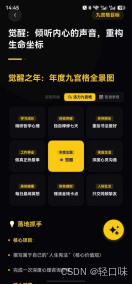
在 ArkUI 中,我们采用 Grid 容器结合响应式设计,实现完美适配手机、折叠屏与平板的九宫格。
@Component
export struct NineGridBalanceMatrix {
  @State cells: MatrixCell[] = [];
  @StorageProp('annualTheme') annualTheme: string = "觉醒之年";

  build() {
    Grid() {
      ForEach(this.cells, (cell: MatrixCell) => {
        GridItem() {
          Column() {
            Text(cell.title)
              .fontSize(14)
              .fontWeight(FontWeight.Bold)
              .fontColor('#333333')
            List() {
              ForEach(cell.actions, (action: string) => {
                ListItem() {
                  Text(`• ${action}`)
                    .fontSize(11)
                    .fontColor('#666666')
                }
              })
            }
            .margin({ top: 4 })
            .width('100%')
          }
          .padding(8)
          .backgroundColor(cell.color)
          .borderRadius(12)
          .height('100%')
        }
        .rowStart(cell.x)
        .columnStart(cell.y)
      })

      // 强插中心年度旗帜位:[1,1] 坐标
      GridItem() {
        GoldLusterCard({ title: this.annualTheme })
      }
      .rowStart(1)
      .columnStart(1)
    }
    .columnsTemplate('1fr 1fr 1fr')
    .rowsTemplate('1fr 1fr 1fr')
    .columnsGap(8)
    .rowsGap(8)
    .width('100%')
    .aspectRatio(1) // 保持正方形
  }
}
4. 极致视觉:[1,1] 年度主题位“金箔微光”卡片实现
为了营造顶级的仪式感,中心的年度旗帜位必须足够耀眼。我们通过渐变混合着色(LinearGradient)搭配弹簧插值属性动画,实现微光在金箔卡片上不断匀速划过的顶级视效。
高精动效组件
@Component
export struct GoldLusterCard {
  private title: string = "";
  @State private shimmerOffsetX: number = -150; // 微光起点位移

  aboutToAppear() {
    // 开启循环微光扫过动效
    animateTo({
      duration: 3000,
      tempo: 1.0,
      curve: Curve.EaseInOut,
      iterations: -1, // 无线循环
      playMode: PlayMode.Normal
    }, () => {
      this.shimmerOffsetX = 250; // 动画目标终点
    });
  }

  build() {
    Stack() {
      // 1. 底座:高贵金箔卡片背景
      Row()
        .width('100%')
        .height('100%')
        .borderRadius(12)
        .linearGradient({
          angle: 135,
          colors: [
            ['#FFE082', 0.0],
            ['#FFB300', 0.5],
            ['#FFA000', 1.0]
          ]
        })
        .shadow({ radius: 12, color: 'rgba(255,160,0,0.35)', offsetY: 4 })

      // 2. 动效层:倾斜的白色半透明微光带
      Row()
        .width(80)
        .height('150%')
        .backgroundColor('rgba(255,255,255,0.45)')
        .rotate({ angle: 25 })
        .blur(15) // 羽化边缘
        .translate({ x: this.shimmerOffsetX }) // 绑定平移属性实现扫光

      // 3. 内容层:文字信息
      Column() {
        Text("年度主题")
          .fontSize(10)
          .fontColor('#7D5100')
          .fontWeight(FontWeight.Medium)
          .opacity(0.8)
        Text(this.title)
          .fontSize(16)
          .fontWeight(FontWeight.Bold)
          .fontColor('#5D3A00')
          .margin({ top: 4 })
          .textAlign(TextAlign.Center)
      }
    }
    .clip(true) // 限制微光带溢出卡片边缘
    .width('100%')
    .height('100%')
  }
}
5. 总结与下期预告
通过自研的 Markdown 表格合并算法,我们成功打通了 AI 数据源向声明式 Grid 九宫格的数据落盘。同时,借助 ArkUI 底层强大的线性渐变、叠加遮罩(clip)与属性动画循环机制,我们为用户精心雕琢了视觉表现力一流的“中心金箔旗帜”卡片。
年度目标搭建完成,接下来就要开始真正的打卡执行了。为了让打卡不再是枯燥的用手点按,我们要开启摄像头,进行体感级别的数据校验。
在下一篇文章中,我们将踏入 AR 面部追踪的世界:AR Engine Kit 深度开发,微笑能量打卡与面部骨骼点高频推理避坑指南! 敬请期待。

讨论HarmonyOS开发技术,专注于API与组件、DevEco Studio、测试、元服务和应用上架分发等。
更多推荐

 2
2 0
0- 0


 已为社区贡献88条内容

所有评论(0)