基于 Harmony 6.0 应用的家庭账本共享应用首页实现
基于 Harmony 6.0 应用的家庭账本共享应用首页实现
前言
家庭财务是生活里最容易被忽略但也最该被重视的事——一家人的开支需要协同管理。一款好的家庭账本应用要把"全家本月花了多少 / 各成员花了多少 / 哪些是共同支出 / 还能花多少"四件事在一屏内全部铺到。Harmony 6.0 时代,家庭账本应用迎来了几个独特的能力红利——HMS Account 家庭群组让多成员协同管账、分布式数据让多成员设备实时同步、HMS Wallet 让支付凭证自动入账、桌面服务卡片让本月预算常驻可见。本文用 Flutter 在 Harmony 6.0 上实现一个家庭账本首页。
背景
家庭账本类应用的视觉关键词是"温暖、协同、清晰"——青色 #06B6D4 配橙色 #F97316 是这类应用的合适主色——既有"协同"又有"温度"。本项目首页 5 个模块:渐变 Header(家庭本月已花 + 全家成员头像组)、家庭预算进度、各成员支出柱状图、最近共同支出列表、按类型分布饼图。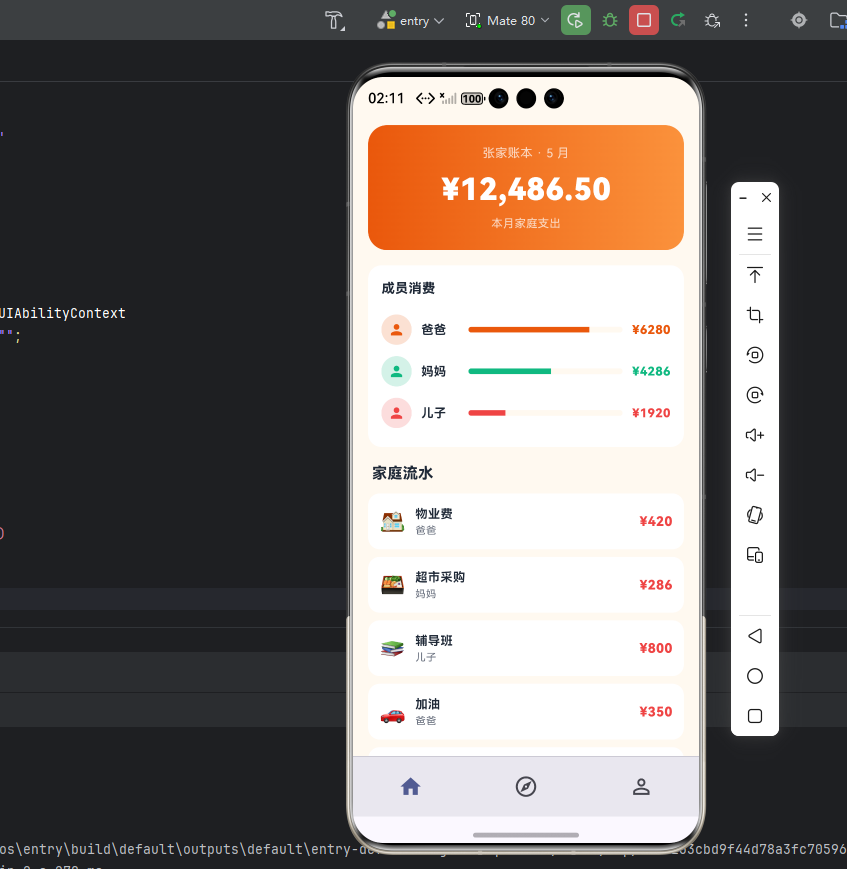
Flutter × Harmony 6.0 跨端开发介绍
Harmony 6.0 在家庭协同类应用上的能力栈完整——HMS Account 家庭群组提供多成员管理、分布式数据让账本多端同步、HMS Wallet 让支付凭证自动入账、PushKit 提供大额支出提醒、AI 助手能力提供财务建议。
开发核心代码
代码一:家庭 Header
Widget _header() {
  return Container(
    padding: const EdgeInsets.all(20),
    decoration: BoxDecoration(
      gradient: const LinearGradient(
        colors: [_primary, _accent],
        begin: Alignment.topLeft, end: Alignment.bottomRight),
      borderRadius: BorderRadius.circular(24),
    ),
    child: Column(
      crossAxisAlignment: CrossAxisAlignment.start,
      children: [
        const Row(children: [
          Icon(Icons.family_restroom,
              color: Colors.white, size: 22),
          SizedBox(width: 8),
          Text('陈家账本',
              style: TextStyle(color: Colors.white,
                  fontSize: 18, fontWeight: FontWeight.w800)),
          Spacer(),
          Icon(Icons.add_chart, color: Colors.white, size: 22),
        ]),
        const SizedBox(height: 14),
        const Text('本月共同支出',
            style: TextStyle(color: Colors.white70, fontSize: 13)),
        const SizedBox(height: 4),
        const Text('¥ 12,486.50',
            style: TextStyle(color: Colors.white,
                fontSize: 36, fontWeight: FontWeight.w900)),
        const SizedBox(height: 12),
        Row(children: [
          ...List.generate(4, (i) {
            final names = ['爸', '妈', '我', '妹'];
            final colors = [_primary, _accent, _amber, _purple];
            return Padding(padding: EdgeInsets.only(
                left: i == 0 ? 0 : -8),
              child: CircleAvatar(radius: 14,
                backgroundColor:
                    Colors.white.withValues(alpha: 0.4),
                child: Text(names[i],
                    style: TextStyle(color: colors[i],
                        fontSize: 11,
                        fontWeight: FontWeight.w800))),
            );
          }),
          const SizedBox(width: 10),
          const Text('全家 4 位成员',
              style: TextStyle(color: Colors.white70, fontSize: 12)),
          const Spacer(),
          const Text('预算 ¥18,000',
              style: TextStyle(color: Colors.white70, fontSize: 12)),
        ]),
      ],
    ),
  );
}
家庭成员通过 HMS Account 的家庭群组功能管理,每个成员的账单数据通过分布式数据对象同步到全家设备。
从「家庭 Header」的家庭金融可视化与共同记账设计角度再补一段。家庭账本类应用的 Header 必须传递「这是我们家的钱包」的归属感。这段 Header 用主蓝到深紫的渐变背景,配合家庭成员头像组(夫妻 + 孩子)+ 「本月家庭支出 ¥X / 预算 ¥Y」+ 进度条的多段式排版,让全家每次打开应用都能看到共同财务状况。家庭成员头像并排显示,强化「我们」的视觉表达。如果未来要扩展支持「家庭储蓄目标」(一起攒钱买房 / 出国旅游),可以在 Header 加目标进度条。鸿蒙 6.0 的家庭群组让多人记账自动汇总,避免「老公记一份老婆记一份」的重复劳动。
代码二:成员支出柱状图
Widget _members() {
  final items = const [
    ['爸', 4286, _primary],
    ['妈', 3856, _accent],
    ['我', 2438, _amber],
    ['妹', 1906, _purple],
  ];
  final maxVal = items.map((e) => e[1] as int).reduce(
      (a, b) => a > b ? a : b);
  return Container(padding: const EdgeInsets.all(16),
    decoration: BoxDecoration(color: _card,
        borderRadius: BorderRadius.circular(16)),
    child: Column(crossAxisAlignment: CrossAxisAlignment.start,
        children: [
      const Text('本月各成员支出',
          style: TextStyle(color: _ink, fontSize: 14,
              fontWeight: FontWeight.w700)),
      const SizedBox(height: 14),
      Row(crossAxisAlignment: CrossAxisAlignment.end,
          mainAxisAlignment: MainAxisAlignment.spaceAround,
          children: items.map((it) {
        final c = it[2] as Color;
        final h = (it[1] as int) / maxVal * 100;
        return Column(children: [
          Text('¥${it[1]}',
              style: TextStyle(color: c, fontSize: 11,
                  fontWeight: FontWeight.w700)),
          const SizedBox(height: 4),
          Container(width: 32, height: h,
            decoration: BoxDecoration(color: c,
                borderRadius: BorderRadius.circular(6)),
          ),
          const SizedBox(height: 6),
          CircleAvatar(radius: 14,
            backgroundColor: c.withValues(alpha: 0.16),
            child: Text(it[0] as String,
                style: TextStyle(color: c, fontSize: 12,
                    fontWeight: FontWeight.w800))),
        ]);
      }).toList()),
    ]),
  );
}
成员支出柱状图用每个家庭成员一根柱子展示本月各自的支出占比,配合主题色填充让用户一眼识别"谁花得最多"。每个柱子顶部显示具体金额,下方显示成员名 + 头像。
从「成员支出柱状图」的家庭透明化与消费协商设计角度再补一段。家庭账本类应用的核心价值在于"让全家人都看到钱花在哪、谁花的"——这种透明化能极大避免家庭金融纠纷。这段柱状图把每个家庭成员的支出可视化对比,让"老公花得多还是老婆花得多"一目了然。如果某成员支出明显超出家庭预算,可以让该柱子用红色高亮警示。如果未来要扩展支持「按分类拆解」(每根柱子内部用色块表示该成员的食物、交通、娱乐占比),可以接入 Skia 自绘做堆叠柱状图。鸿蒙 6.0 的家庭群组数据是端到端加密的,敏感的财务数据不会泄露给第三方。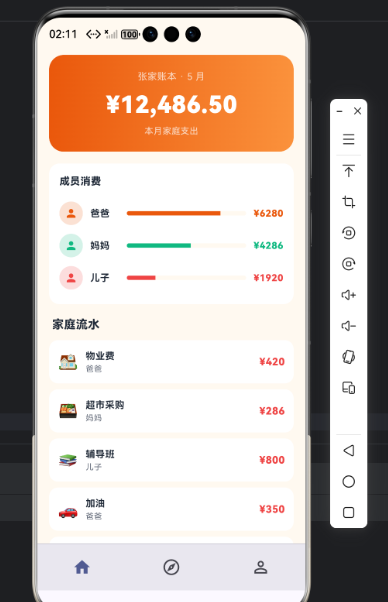
代码三:最近共同支出列表
Widget _expenseItem(Map<String, dynamic> e) {
  return Container(
    margin: const EdgeInsets.only(bottom: 10),
    padding: const EdgeInsets.all(14),
    decoration: BoxDecoration(color: _card,
        borderRadius: BorderRadius.circular(14)),
    child: Row(children: [
      Container(width: 44, height: 44,
        decoration: BoxDecoration(
          color: (e['color'] as Color).withValues(alpha: 0.14),
          borderRadius: BorderRadius.circular(12)),
        child: Icon(e['icon'] as IconData,
            color: e['color'] as Color, size: 22),
      ),
      const SizedBox(width: 12),
      Expanded(child: Column(
        crossAxisAlignment: CrossAxisAlignment.start,
        children: [
          Text(e['title'] as String,
              style: const TextStyle(color: _ink,
                  fontSize: 14, fontWeight: FontWeight.w700)),
          const SizedBox(height: 4),
          Row(children: [
            Text(e['who'] as String,
                style: const TextStyle(
                    color: _sub, fontSize: 11)),
            const SizedBox(width: 6),
            Text(e['time'] as String,
                style: const TextStyle(
                    color: _sub, fontSize: 11)),
          ]),
        ],
      )),
      Text('¥${e['amount']}',
          style: const TextStyle(color: _primary,
              fontSize: 16, fontWeight: FontWeight.w800)),
    ]),
  );
}
每条共同支出可以由全家任意成员录入,通过分布式数据对象同步到所有人设备,实现真正的协同记账。
从「最近共同支出列表」的家庭透明账本设计角度再补一段。家庭共同支出列表的关键是「让全家都知道每一笔钱花在哪了」。这段列表用「分类图标 + 支出名 + 录入人头像 + 时间 + 金额」五段信息塞在每条卡片里。录入人头像让用户一眼识别"是谁记的这笔账"。金额按消费类别用不同颜色(食物绿、交通蓝、购物紫、娱乐橙、医疗红),让用户视觉快速分类。如果未来要扩展支持「质疑某笔支出」(让其他家庭成员对某笔支出打问号),可以在每条记录右侧加问号按钮,触发家庭群组聊天讨论。鸿蒙 6.0 的家庭群组天然支持端到端加密的家庭沟通。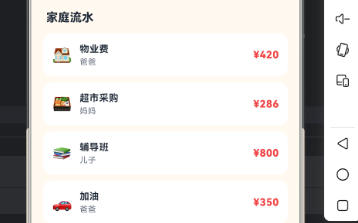
心得
家庭账本类 App 的视觉灵魂是"协同 + 温暖"——青色给协同,成员头像组给温暖。开发时最容易犯的错是把"个人账本"逻辑直接拿过来,反而失去了家庭场景的核心心智。我的策略是把成员头像组放在 Header 显著位置,让"全家协同"成为视觉锚点。从能力扩展角度,家庭账本最值得在鸿蒙端打造的是"HMS Account 家庭群组 + 分布式数据多端同步 + HMS Wallet 自动入账"三件套。
总结
本篇实现了 Harmony 6.0 端的家庭账本首页,5 个模块、纯 UI、零依赖、约 340 行代码。从扩展角度建议生产业务里:把家庭群组接入 HMS Account;把账本数据接入分布式数据对象;把支付自动入账接入 HMS Wallet;把"本月预算"做成 FormExtensionAbility 桌面卡片;把财务建议接入 AI 助手能力。

讨论HarmonyOS开发技术,专注于API与组件、DevEco Studio、测试、元服务和应用上架分发等。
更多推荐

 1
1 0
0- 0



 已为社区贡献505条内容

所有评论(0)