HarmonyOS 7.0 Skill开发实战:让你的App能力被AI智能体“一句话调用“
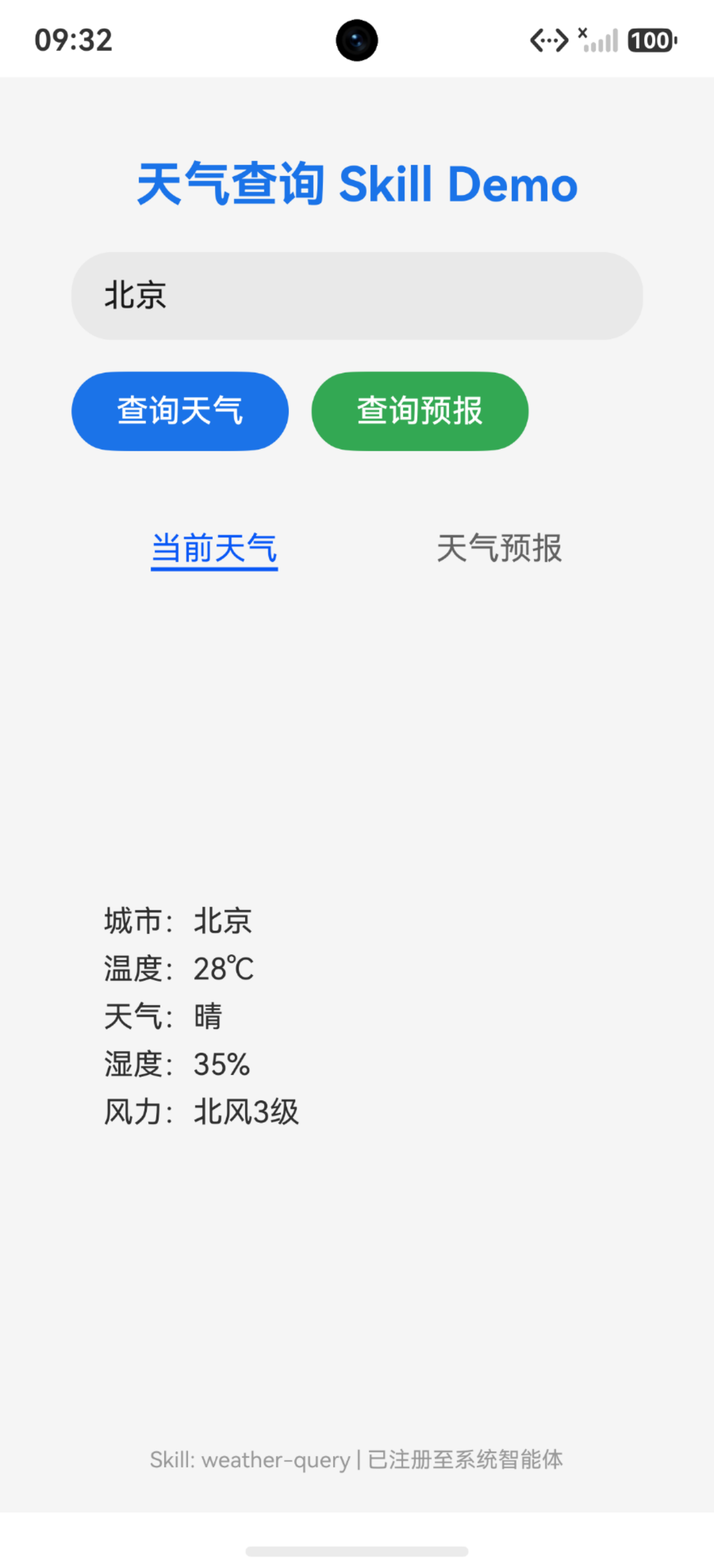
从API 26开始,HarmonyOS给开发者带来了一个特别香的能力——Skill。简单说,它让你App里的业务功能可以被系统AI智能体直接调度,用户说一句话,AI就能帮你调起对应App的功能,而你几乎不用改原来的代码。
一、Skill是个啥?为啥要搞它?
想象一下这个场景:用户对小艺说"帮我查一下明天北京天气",然后你的天气App就被自动调起来返回了结果——用户甚至不需要手动打开你的App。
这就是Skill干的事。它本质是一个声明式的能力外化机制:
- 你写一份SKILL.md,告诉系统"我这个Skill能干啥、怎么调、返回啥"
- 你写一个ArkTS入口脚本,当个"薄适配层",把AI传进来的参数转交给App内部已有的业务代码
- 在module.json5里注册一下,绑定到某个Ability上
就这样,你的App能力就对外开放了,而且原来业务代码一行都不用改。
注意:只支持Stage模型,FA模型用不了。
二、整体架构长啥样?
先看目录结构,以一个"天气查询Skill"为例:
Application/
├── AppScope/
│   ├── app.json5
│   └── resources/
└── entry/
    ├── skills/                          ← 【固定值】Skill根目录
    │   └── weather-query/               ← Skill名,跟SKILL.md的name一致
    │       ├── scripts/                 ← 【固定值】脚本目录
    │       │   └── WeatherSkill.ets     ← 入口脚本
    │       └── SKILL.md                 ← 【固定值】描述文件
    └── src/
        └── main/
            ├── ets/
            │   ├── entryability/
            │   │   └── EntryAbility.ets
            │   └── service/
            │       └── WeatherService.ets  ← App内已有的业务服务
            ├── module.json5
            └── resources/
几个关键点:
skills/目录名是固定的,必须放模块根目录下scripts/也是固定的- Skill目录名、SKILL.md里的name、module.json5里的name,三者必须完全一致
三、一步步来,手把手搞定
Step 1:配置module.json5
在 entry/src/main/module.json5 的 module 标签下加上 skillProfiles:
{
  "module": {
    // ... 其他配置

    "skillProfiles": [
      {
        "name": "weather-query",           // 跟SKILL.md的name、目录名保持一致
        "abilityName": "EntryAbility",      // 关联的Ability
        "srcEntries": [                     // 脚本路径列表
          "../../skills/weather-query/scripts/WeatherSkill.ets"
        ]
      }
    ],

    "requestPermissions": [                 // Skill需要的权限
      { "name": "ohos.permission.INTERNET" },
      { "name": "ohos.permission.LOCATION" }
    ]
  }
}
这里的 srcEntries 路径是相对于 src/main/ 的,所以要用 ../../ 回到模块根目录再进 skills/。
Step 2:实现ArkTS入口脚本
入口脚本就是那个"薄适配层",它只干三件事:接参数 → 调业务 → 报结果。
2.1 导入依赖
import { scriptManager } from '@kit.AbilityKit';
import { BusinessError } from '@kit.BasicServicesKit';
import { WeatherService, WeatherInfo, ForecastResult } from '../../../src/main/ets/service/WeatherService';
2.2 定义入口类
用 export default 导出一个类,类里每个 public async 方法对应SKILL.md里声明的一项能力:
- 方法名必须和SKILL.md的
functionName严格一致 - 第一个参数类型固定为
scriptManager.ArkTSScriptInfo
export default class WeatherSkill {
  public async queryWeather(info: scriptManager.ArkTSScriptInfo, ...argv: string[]): Promise<void> {
    // 具体实现见下文
  }

  public async queryForecast(info: scriptManager.ArkTSScriptInfo, ...argv: string[]): Promise<void> {
    // 同理
  }
}
2.3 解析和校验参数
AI智能体传进来的参数都在 argv 里,按位置排列,咱们得自己做校验:
// queryWeather:需要城市名,日期可选
const city: string = argv.length > 0 ? argv[0].trim() : '';
const date: string = argv.length > 1 ? argv[1].trim() : '';
if (city.length === 0) {
  // 城市都没传,直接走错误分支
  const payload: Record<string, Object> = {
    'type': 'result',
    'status': 'failed',
    'errCode': 'ERR_INVALID_PARAMS',
    'errMsg': 'city is required',
    'suggestion': '你想查哪个城市的天气呢?'
  };
  await this.report(info, { code: -1, result: payload });
  return;
}
// queryForecast:城市必传,天数可选(默认7天)
const city: string = argv.length > 0 ? argv[0].trim() : '';
if (city.length === 0) {
  const payload: Record<string, Object> = {
    'type': 'result',
    'status': 'failed',
    'errCode': 'ERR_INVALID_PARAMS',
    'errMsg': 'city is required',
    'suggestion': '请告诉我你想查哪个城市的预报'
  };
  await this.report(info, { code: -1, result: payload });
  return;
}
const days: number = argv.length > 1 ? parseInt(argv[1], 10) : 7;
if (days < 1 || days > 15) {
  const payload: Record<string, Object> = {
    'type': 'result',
    'status': 'failed',
    'errCode': 'ERR_INVALID_PARAMS',
    'errMsg': 'days must be between 1 and 15',
    'suggestion': '目前只支持查询1到15天的预报哦'
  };
  await this.report(info, { code: -1, result: payload });
  return;
}
2.4 调用业务实现 + 构造结果回传
校验通过后,调App内部已有的业务接口,然后把结果按SKILL.md声明的契约封装成 ExecuteResult,通过 completeArkTSScriptInApp 回传:
public async queryWeather(info: scriptManager.ArkTSScriptInfo, ...argv: string[]): Promise<void> {
  const city: string = argv.length > 0 ? argv[0].trim() : '';
  const date: string = argv.length > 1 ? argv[1].trim() : '';

  if (city.length === 0) {
    const payload: Record<string, Object> = {
      'type': 'result',
      'status': 'failed',
      'errCode': 'ERR_INVALID_PARAMS',
      'errMsg': 'city is required',
      'suggestion': '你想查哪个城市的天气呢?'
    };
    await this.report(info, { code: -1, result: payload });
    return;
  }

  try {
    const weather: WeatherInfo = WeatherService.getCurrentWeather(city, date);

    const data: Record<string, Object> = {
      'city': weather.city,
      'temperature': weather.temperature,
      'condition': weather.condition,
      'humidity': weather.humidity,
      'wind': weather.wind
    };
    const payload: Record<string, Object> = {
      'type': 'result',
      'status': 'success',
      'data': data
    };
    await this.report(info, { code: 0, result: payload });
  } catch (e) {
    const err = e as BusinessError;
    if (err.code === 404) {
      const payload: Record<string, Object> = {
        'type': 'result',
        'status': 'failed',
        'errCode': 'ERR_NOT_FOUND',
        'data': { 'searchedCity': city },
        'suggestion': `暂时没有找到${city}的天气数据`
      };
      await this.report(info, { code: -1, result: payload });
    } else {
      const payload: Record<string, Object> = {
        'type': 'result',
        'status': 'failed',
        'errCode': 'ERR_INTERNAL',
        'errMsg': err.message,
        'suggestion': '查询天气出了点问题,稍后再试试吧'
      };
      await this.report(info, { code: -1, result: payload });
    }
  }
}
2.5 report方法——唯一的回包出口
建议把 completeArkTSScriptInApp 的调用统一封装到一个私有方法里,别在每个业务分支里重复写:
private async report(info: scriptManager.ArkTSScriptInfo, result: scriptManager.ExecuteResult): Promise<void> {
  try {
    await scriptManager.completeArkTSScriptInApp(info.context, info.requestCode, result);
  } catch (e) {
    const err = e as BusinessError;
    console.error(`completeArkTSScriptInApp failed, code: ${err.code}, message: ${err.message}`);
  }
}
这里用到两个关键接口成员:
info.context:绑定的Ability上下文,系统传进来的info.requestCode:当前请求的标识码,回包时必须原样传回
Step 3:编写SKILL.md——整个机制的灵魂
SKILL.md是系统智能体做"意图→能力"匹配的唯一依据。写得好不好,直接决定你的Skill会不会被正确触发。
3.1 元数据(YAML Front Matter)
---
name: weather-query
description: 提供城市天气查询与未来天气预报能力,响应"北京天气"、"明天上海热不热"、"未来一周深圳天气预报"等天气类指令
---
name 必须三处一致(目录名、SKILL.md的name、module.json5的name),description 要简洁,这是AI做初次筛选的关键依据。
3.2 触发场景
用自然语言写,帮AI搞清楚"什么时候该调我、什么时候不该调我":
## 触发场景

当用户询问**某个城市的天气或预报**时调用。典型话术:

- "北京今天天气怎么样"
- "明天上海热不热"
- "深圳未来一周天气预报"
- "广州下雨了吗"

不调用的情况:

- 用户说"帮我设个明天7点的闹钟"——这是闹钟功能,跟天气无关
- 用户说"今天适合跑步吗"——这是运动建议,除非明确提到天气查询
- 用户说"这张天空照片真好看"——这是社交评价,不是查天气
- 用户说"帮我关空调"——这是智能家居控制,不是天气查询
划重点:边界说明特别重要!不写清楚的话,AI很容易误触发。比如"今天适合出门吗"这种话,如果你的Skill只查天气不做出行建议,就要明确排除。
3.3 能力1:queryWeather的参数契约
### 场景1:查询天气(queryWeather)

#### 执行参数

exec-cli(command: ohos-arkTSScript --skillName 'weather-query' --scriptPath 'scripts/WeatherSkill.ets' --functionName 'queryWeather' --args '{
    "arg1": "北京",
    "arg2": "明天"
}'
)

参数Schema:

```json
{
  "args": {
    "type": "object",
    "properties": {
      "arg1": {
        "type": "string",
        "description": "城市名,如北京、上海、深圳"
      },
      "arg2": {
        "type": "string",
        "description": "日期,如今天、明天、后天,可选"
      }
    },
    "required": ["arg1"]
  }
}
几个要点:
- `command` 固定写 `ohos-arkTSScript`
- `skillName` 跟SKILL.md的name一致
- `scriptPath` 是相对于Skill目录的脚本路径
- `functionName` 必须跟入口脚本的public方法名**严格对应**
- `args` 的Schema决定了AI能传什么参数进来,`required` 标记必填项

#### 3.4 能力1:queryWeather的返回值契约

先把所有可能的返回结果列出来:

```markdown
#### 执行返回值

结果示例:

// 1. 查询成功
{
    "type": "result",
    "status": "success",
    "data": {
        "city": "北京",
        "temperature": "28℃",
        "condition": "晴",
        "humidity": "35%",
        "wind": "北风3级"
    }
}

// 2. 参数缺失
{
    "type": "result",
    "status": "failed",
    "errCode": "ERR_INVALID_PARAMS",
    "errMsg": "city is required",
    "suggestion": "你想查哪个城市的天气呢?"
}

// 3. 城市未找到
{
    "type": "result",
    "status": "failed",
    "errCode": "ERR_NOT_FOUND",
    "data": { "searchedCity": "阿凡达" },
    "suggestion": "暂时没有找到阿凡达的天气数据"
}

// 4. 内部错误
{
    "type": "result",
    "status": "failed",
    "errCode": "ERR_INTERNAL",
    "errMsg": "network timeout",
    "suggestion": "查询天气出了点问题,稍后再试试吧"
}
然后给出整体的JSON Schema约束:
{
  "type": "object",
  "required": ["type", "status"],
  "properties": {
    "type":      { "type": "string", "const": "result" },
    "status":    { "type": "string", "enum": ["success", "failed"] },
    "data":      { "type": "object" },
    "errCode":   { "type": "string", "enum": ["ERR_INVALID_PARAMS", "ERR_NOT_FOUND", "ERR_INTERNAL"] },
    "errMsg":    { "type": "string", "minLength": 1 },
    "suggestion":{ "type": "string", "minLength": 1 }
  },
  "oneOf": [
    { "required": ["data"], "properties": { "status": { "const": "success" } } },
    { "required": ["errMsg", "suggestion"], "properties": { "errCode": { "const": "ERR_INVALID_PARAMS" } } },
    { "required": ["data", "suggestion"], "properties": { "errCode": { "const": "ERR_NOT_FOUND" } } },
    { "required": ["errMsg", "suggestion"], "properties": { "errCode": { "const": "ERR_INTERNAL" } } }
  ]
}
3.5 能力2:queryForecast的参数契约
### 场景2:查询天气预报(queryForecast)

#### 执行参数

exec-cli(command: ohos-arkTSScript --skillName 'weather-query' --scriptPath 'scripts/WeatherSkill.ets' --functionName 'queryForecast' --args '{
    "arg1": "深圳",
    "arg2": "7"
}'
)

参数Schema:

```json
{
  "args": {
    "type": "object",
    "properties": {
      "arg1": {
        "type": "string",
        "description": "城市名,如深圳、杭州"
      },
      "arg2": {
        "type": "string",
        "description": "预报天数,1-15,默认7"
      }
    },
    "required": ["arg1"]
  }
}
执行返回值
// 1. 查询成功
{
“type”: “result”,
“status”: “success”,
“data”: {
“city”: “深圳”,
“forecastDays”: 7,
“forecast”: [
{ “date”: “6月18日”, “high”: “33℃”, “low”: “26℃”, “condition”: “多云” },
{ “date”: “6月19日”, “high”: “32℃”, “low”: “25℃”, “condition”: “阵雨” }
]
}
}
// 2. 参数非法(天数超范围)
{
“type”: “result”,
“status”: “failed”,
“errCode”: “ERR_INVALID_PARAMS”,
“errMsg”: “days must be between 1 and 15”,
“suggestion”: “目前只支持查询1到15天的预报哦”
}
## 四、核心接口速查

整个Skill机制涉及的核心接口其实很少,就仨:

| 接口 | 说明 |
|------|------|
| `ExecuteResult` | 脚本执行结果,包含 `code`(结果码)、`result`(结果内容)、`uris`(授权URI列表)、`flags`(URI读写权限) |
| `ArkTSScriptInfo` | 入口函数的首参,包含 `requestCode`(请求标识)和 `context`(Ability上下文) |
| `completeArkTSScriptInApp(context, requestCode, result)` | 上报执行结果,Promise异步回调 |

`ExecuteResult` 的完整结构:

```typescript
interface ExecuteResult {
  code: number;                      // 结果码,0为成功
  result?: Record<string, Object>;   // 脚本执行结果
  uris?: Array<string>;              // 需授权给调用方的URI列表
  flags?: number;                    // URI读写权限
}
五、开发避坑指南
总结几个容易踩的坑:
-
名字一致性:Skill目录名、SKILL.md的name字段、module.json5的skillProfiles里的name,三个地方必须完全一样,少一个下划线都不行,否则注册不上。
-
方法名严格匹配:入口脚本里的public方法名必须跟SKILL.md里的functionName一模一样,大小写都别搞错。
-
第一个参数类型固定:入口方法的第一个参数必须是
scriptManager.ArkTSScriptInfo,这是系统注入的上下文,不能换、不能省。 -
argv是string数组:AI传进来的参数全是string,需要自己做类型转换(比如
parseInt),同时做好校验和容错。 -
必须调用completeArkTSScriptInApp:不管成功还是失败,都必须调用这个接口回传结果,否则系统侧会一直等着,超时后认为执行失败。
-
suggestion字段很重要:失败时一定要填
suggestion,这是AI转述给用户的提示语,写得好用户体验就好,写得烂用户就一脸懵。 -
触发场景要写清楚边界:SKILL.md里"不调用的情况"一定要认真写,否则你的Skill会被AI在各种奇怪的场景下误触发。
-
srcEntries路径:是相对于
src/main/的相对路径,所以要从../../skills/开始写,别直接写skills/。
六、整体调用流程
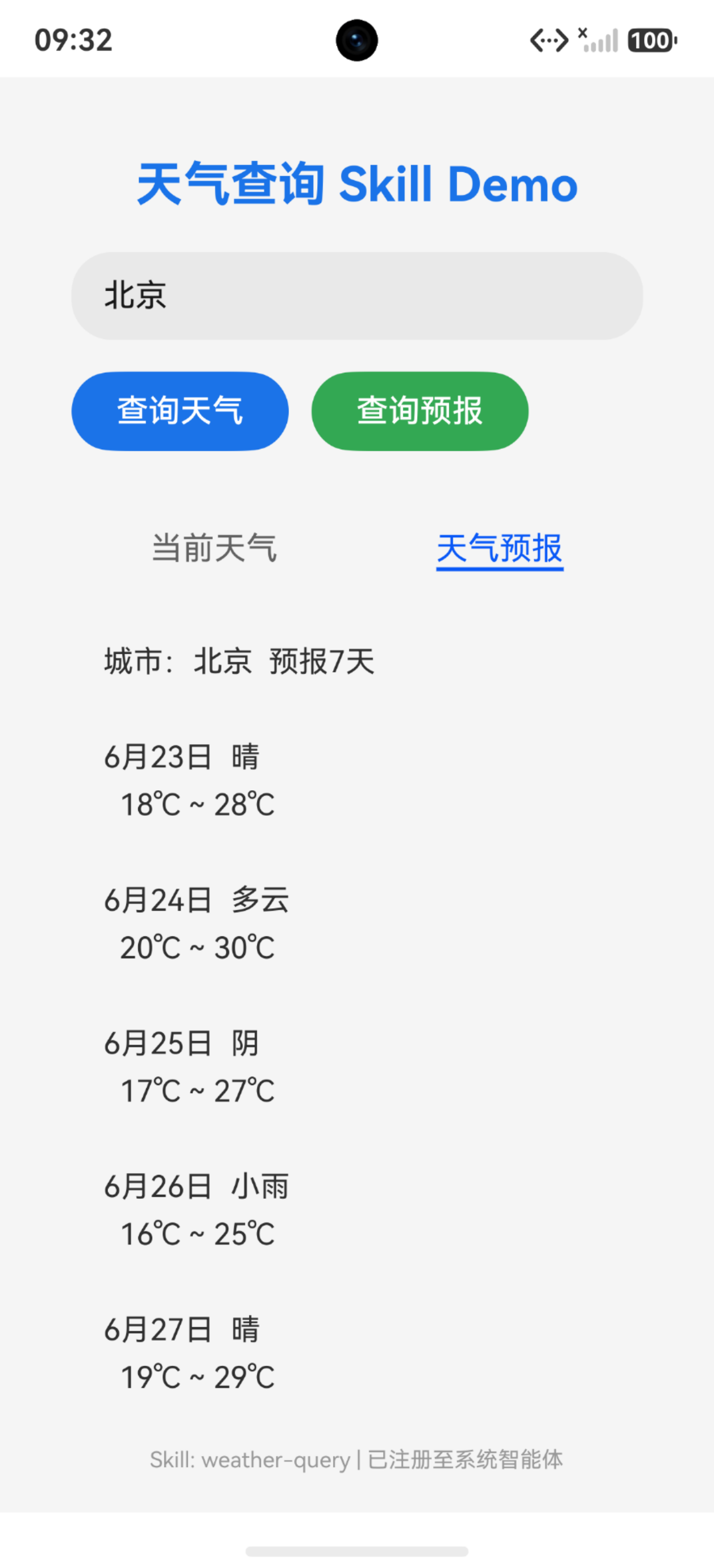
用一张流程图串一下整个调用链路:
用户语音/文字输入
       ↓
  系统智能体解析意图
       ↓
  匹配SKILL.md的触发场景
       ↓
  按exec-cli构造调用参数(遵循args Schema)
       ↓
  调用入口脚本对应方法(argv传入)
       ↓
  入口脚本解析参数 → 校验 → 调用App业务接口
       ↓
  按返回值契约构造ExecuteResult
       ↓
  调用completeArkTSScriptInApp回传结果
       ↓
  系统智能体按result内容生成自然语言回复用户
七、写在最后
Skill这个机制的设计思路其实挺优雅的——声明式契约 + 薄适配层,把"能力描述"和"能力实现"彻底解耦。对AI来说,它只需要读懂SKILL.md就能调度你的能力;对你来说,只需要写个入口脚本做参数转换,原有业务代码完全不用动。
HarmonyOS 7.0这波是在认真做AI生态基础设施,Skill本质上就是App和AI之间的"USB接口"——标准化、即插即用。如果你的App有对外暴露能力的诉求(而且谁没有呢?),建议尽早熟悉这套机制,先人一步把Skill接入做好,等AI生态起来的时候你就是最早吃到红利的那批。
本文基于HarmonyOS API 26(7.0)编写,Skill相关接口起始版本为26.0.0,仅支持Stage模型。

讨论HarmonyOS开发技术,专注于API与组件、DevEco Studio、测试、元服务和应用上架分发等。
更多推荐

 2
2 0
0- 0


 已为社区贡献50条内容

所有评论(0)