HarmonyOS 7.0 LoginWithHuaweiIDButton 新特性实战:多语言文本 + 自定义动效,登录按钮终于能“整活“了
做过华为账号登录的同学都知道,以前那个
LoginWithHuaweiIDButton组件——说好听了叫"开箱即用",说难听了叫"没法定制"。按钮文字锁死中文、样式就那么几款、想加个酷炫动效?想都别想。HarmonyOS 7.0(API 26)终于补上了这两块短板:setLocale 多语言文本 + canvasAnimationParams 自定义动效画布。下面我来详细拆解。
一、先搞清楚这两个新特性到底解决了什么问题
1.1 setLocale:按钮文本多语言
以前的痛点:按钮文字只能跟系统语言走。如果你的App面向海外用户,系统语言是英语,但你想让按钮强制显示中文(或者反过来),做不到。
现在:通过 controller.setLocale('en-US') 一行代码,按钮文字立即切换成对应语言。支持30+种语言,覆盖全球主流市场。
关键细节:
- 当传入的 locale 无效或系统不支持时,自动 fallback 到系统语言,不会崩
- 设置后立即生效,无需重建组件
- 链式调用,返回 controller 本身,方便连写
1.2 canvasAnimationParams:自定义动效画布
以前的痛点:登录按钮只有静态样式和系统内置的 loading 圈圈,想做个品牌专属的点击动画?没门。
现在:在 BUTTON_CUSTOM 样式下,通过 extraStyle.canvasAnimationParams 获取一个画布,你可以在上面绘制任意动画——推荐用 Lottie 动效。
适用场景:
- 点击登录时播放品牌 Logo 动画
- Loading 态播放自定义转场动画
- 成功/失败态播放对应的反馈动画
二、接口详解
2.1 setLocale
controller.setLocale(locale: string): LoginWithHuaweiIDButtonController
| 参数 | 类型 | 必填 | 说明 |
|---|---|---|---|
| locale | string | 是 | 地区语言代码 |
| 返回值 | LoginWithHuaweiIDButtonController | — | 支持链式调用 |
常见 locale 速查:
| locale | 语言 |
|---|---|
zh-CN |
中文(简体) |
zh-HK |
繁体中文(香港) |
zh-TW |
繁体中文(中国台湾) |
en-US |
英语(美国) |
en-GB |
英语(英国) |
ja |
日语 |
ko |
韩语 |
fr |
法语 |
de |
德语 |
es |
西班牙语 |
ru |
俄语 |
ar |
阿拉伯语 |
th |
泰语 |
vi |
越南语 |
pt |
葡萄牙语 |
id |
印尼语 |
ms |
马来语 |
2.2 ExtraStyle 新增字段
ExtraStyle 在 API 26 新增了 canvasAnimationParams 字段:
interface ExtraStyle {
  buttonStyle?: ButtonStyle;                    // 按钮样式(颜色、大小)
  customButtonStateStyles?: StateStyles;         // 多态样式(按压/聚焦/正常)
  textAndIconButtonParams?: TextAndIconButtonParams; // 图文混合参数
  iconButtonParams?: IconButtonParams;           // 纯图标按钮参数
  canvasAnimationParams?: CanvasAnimationParams;  // 【API 26 新增】自定义动效画布
}
注意:canvasAnimationParams 仅对 BUTTON_CUSTOM 类型的按钮生效!
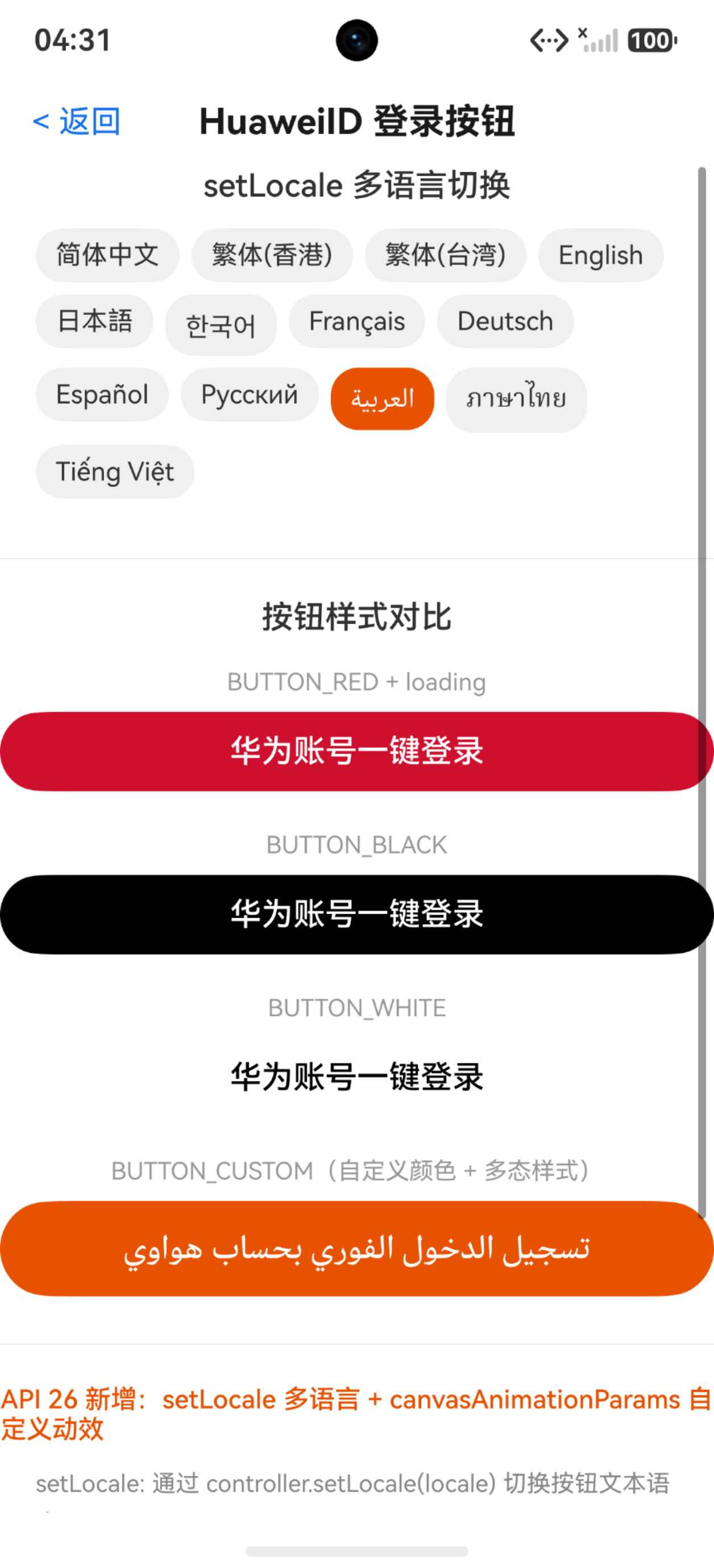
三、实战Demo:一个页面看尽多语言 + 自定义样式
下面的 Demo 展示了:
- 通过下拉选择切换按钮文本语言
BUTTON_CUSTOM自定义按钮样式- 配置 loading 态展示
import { loginComponentManager, LoginWithHuaweiIDButton } from '@kit.AccountKit';
import { BusinessError } from '@kit.BasicServicesKit';

interface LocaleItem {
  label: string;
  code: string;
}

@Entry
@Component
struct HuaweiIDLoginDemo {
  controller: loginComponentManager.LoginWithHuaweiIDButtonController = new loginComponentManager.LoginWithHuaweiIDButtonController();
  @State currentLocale: string = 'zh-CN';
  @State currentStyle: loginComponentManager.Style = loginComponentManager.Style.BUTTON_RED;
  @State logMessage: string = '等待操作...';

  private localeList: LocaleItem[] = [
    { label: '中文(简体)', code: 'zh-CN' },
    { label: '中文(繁体-香港)', code: 'zh-HK' },
    { label: '中文(繁体-台湾)', code: 'zh-TW' },
    { label: 'English (US)', code: 'en-US' },
    { label: 'English (UK)', code: 'en-GB' },
    { label: '日本語', code: 'ja' },
    { label: '한국어', code: 'ko' },
    { label: 'Français', code: 'fr' },
    { label: 'Deutsch', code: 'de' },
    { label: 'Español', code: 'es' },
    { label: 'Русский', code: 'ru' },
    { label: 'العربية', code: 'ar' },
    { label: 'ภาษาไทย', code: 'th' },
    { label: 'Tiếng Việt', code: 'vi' },
  ];

  aboutToAppear(): void {
    this.controller.onClickLoginWithHuaweiIDButton((err: BusinessError, credential: loginComponentManager.HuaweiIDCredential) => {
      if (err) {
        this.logMessage = `登录失败: code=${err.code}, msg=${err.message}`;
        return;
      }
      this.logMessage = `登录成功! AuthorizationCode: ${credential.authorizationCode}`;
    });
  }

  build() {
    Scroll() {
      Column() {
        Text('华为账号登录按钮 Demo')
          .fontSize(24)
          .fontWeight(FontWeight.Bold)
          .fontColor('#1a1a1a')
          .margin({ top: 40, bottom: 8 })

        Text('API 26 新特性:setLocale + canvasAnimationParams')
          .fontSize(13)
          .fontColor('#888888')
          .margin({ bottom: 24 })

        // 语言切换区
        Text('文本多语言切换(setLocale)')
          .fontSize(16)
          .fontWeight(FontWeight.Medium)
          .margin({ bottom: 12 })

        Flex({ wrap: FlexWrap.Wrap, justifyContent: FlexAlign.Start, alignContent: FlexAlign.Start }) {
          ForEach(this.localeList, (item: LocaleItem) => {
            Text(item.label)
              .fontSize(13)
              .fontColor(this.currentLocale === item.code ? '#ffffff' : '#333333')
              .backgroundColor(this.currentLocale === item.code ? '#e65100' : '#f0f0f0')
              .padding({ left: 10, right: 10, top: 6, bottom: 6 })
              .borderRadius(14)
              .margin({ right: 6, bottom: 6 })
              .onClick(() => {
                this.currentLocale = item.code;
                this.controller.setLocale(item.code);
                this.logMessage = `语言已切换: ${item.label} (${item.code})`;
              })
          })
        }
        .width('90%')
        .margin({ bottom: 24 })

        // 按钮样式切换区
        Text('按钮样式展示')
          .fontSize(16)
          .fontWeight(FontWeight.Medium)
          .margin({ bottom: 12 })

        // 红色标准按钮
        Column() {
          Text('Style.BUTTON_RED + loading')
            .fontSize(12)
            .fontColor('#999999')
            .margin({ bottom: 8 })

          LoginWithHuaweiIDButton({
            params: {
              style: loginComponentManager.Style.BUTTON_RED,
              borderRadius: 24,
              loginType: loginComponentManager.LoginType.QUICK_LOGIN,
              supportDarkMode: true,
              extraStyle: {
                buttonStyle: new loginComponentManager.ButtonStyle().loadingStyle({ show: true })
              }
            },
            controller: this.controller
          })
        }
        .margin({ bottom: 20 })

        // 黑色按钮
        Column() {
          Text('Style.BUTTON_BLACK')
            .fontSize(12)
            .fontColor('#999999')
            .margin({ bottom: 8 })

          LoginWithHuaweiIDButton({
            params: {
              style: loginComponentManager.Style.BUTTON_BLACK,
              borderRadius: 24,
              loginType: loginComponentManager.LoginType.QUICK_LOGIN,
            },
            controller: this.controller
          })
        }
        .margin({ bottom: 20 })

        // 白色按钮
        Column() {
          Text('Style.BUTTON_WHITE')
            .fontSize(12)
            .fontColor('#999999')
            .margin({ bottom: 8 })

          LoginWithHuaweiIDButton({
            params: {
              style: loginComponentManager.Style.BUTTON_WHITE,
              borderRadius: 24,
              loginType: loginComponentManager.LoginType.QUICK_LOGIN,
            },
            controller: this.controller
          })
        }
        .margin({ bottom: 20 })

        // 自定义按钮(BUTTON_CUSTOM)- 展示 canvasAnimationParams
        Column() {
          Text('Style.BUTTON_CUSTOM(自定义颜色 + 动效画布)')
            .fontSize(12)
            .fontColor('#999999')
            .margin({ bottom: 8 })

          LoginWithHuaweiIDButton({
            params: {
              style: loginComponentManager.Style.BUTTON_CUSTOM,
              borderRadius: 28,
              loginType: loginComponentManager.LoginType.QUICK_LOGIN,
              extraStyle: {
                buttonStyle: new loginComponentManager.ButtonStyle()
                  .fontColor('#ffffff')
                  .backgroundColor('#e65100')
                  .buttonSize({ height: 48 })
                  .loadingStyle({ show: true }),
                customButtonStateStyles: {
                  normal: {
                    backgroundColor: '#e65100',
                    fontColor: '#ffffff'
                  },
                  pressed: {
                    backgroundColor: '#bf360c',
                    fontColor: '#ffffff'
                  },
                  focused: {
                    backgroundColor: '#e65100',
                    fontColor: '#ffffff'
                  }
                },
                canvasAnimationParams: new loginComponentManager.CanvasAnimationParams()
              }
            },
            controller: this.controller
          })
        }
        .margin({ bottom: 20 })

        // 纯图标按钮
        Column() {
          Text('图标按钮 + IconButtonParams')
            .fontSize(12)
            .fontColor('#999999')
            .margin({ bottom: 8 })

          LoginWithHuaweiIDButton({
            params: {
              style: loginComponentManager.Style.BUTTON_RED,
              borderRadius: 20,
              loginType: loginComponentManager.LoginType.QUICK_LOGIN,
              extraStyle: {
                iconButtonParams: new loginComponentManager.IconButtonParams()
              }
            },
            controller: this.controller
          })
        }
        .margin({ bottom: 24 })

        // 日志区
        Column() {
          Text('操作日志')
            .fontSize(14)
            .fontWeight(FontWeight.Medium)
            .margin({ bottom: 8 })

          Text(this.logMessage)
            .fontSize(13)
            .fontColor('#333333')
            .width('100%')
            .padding(12)
            .borderRadius(8)
            .backgroundColor('#f5f5f5')
        }
        .width('90%')
        .margin({ bottom: 32 })
      }
      .width('100%')
      .alignItems(HorizontalAlign.Center)
    }
    .width('100%')
    .height('100%')
    .backgroundColor('#ffffff')
  }
}
四、setLocale 多语言效果对照
| locale | 按钮文本(一键登录) |
|---|---|
zh-CN |
华为账号一键登录 |
zh-TW |
華為帳號一鍵登錄 |
en-US |
Sign in with HUAWEI ID |
ja |
HUAWEI IDでサインイン |
ko |
HUAWEI ID로 로그인 |
fr |
Se connecter avec HUAWEI ID |
de |
Mit HUAWEI ID anmelden |
ar |
تسجيل الدخول بحساب HUAWEI ID |
一键切换,不需要重启App、不需要重建组件,调用 setLocale 立刻生效。做全球化App的同学终于不用头疼了。
五、canvasAnimationParams 自定义动效怎么用?
核心思路三步走:
Step 1:使用 BUTTON_CUSTOM 样式
只有 BUTTON_CUSTOM 类型才支持 canvas 画布:
style: loginComponentManager.Style.BUTTON_CUSTOM
Step 2:配置 canvasAnimationParams
在 extraStyle 中传入 CanvasAnimationParams:
extraStyle: {
  buttonStyle: new loginComponentManager.ButtonStyle()
    .fontColor('#ffffff')
    .backgroundColor('#ff6d00')
    .buttonSize({ height: 48 }),
  canvasAnimationParams: new loginComponentManager.CanvasAnimationParams()
}
Step 3:在画布上绘制动画
推荐使用 Lottie 动效。CanvasAnimationParams 提供了画布区域,开发者可以在按钮的空闲区域渲染自定义的动画效果,比如:
- 点击涟漪:点击按钮时从点击位置扩散的波纹
- 品牌动画:点击后播放品牌 Logo 的缩放/旋转动效
- Loading 进度:替换系统默认的圆圈,换成自己的品牌 Loading
六、ExtraStyle 完整字段速查
| 字段 | 类型 | 说明 | 起始版本 |
|---|---|---|---|
buttonStyle |
ButtonStyle | 按钮颜色、大小、loading样式 | 5.0.0(12) |
customButtonStateStyles |
StateStyles | 按压/聚焦/正常/禁用多态样式 | 5.0.0(12) |
textAndIconButtonParams |
TextAndIconButtonParams | 图文混合参数(图标与文字间距) | 5.0.0(12) |
iconButtonParams |
IconButtonParams | 纯图标按钮参数(图标半径) | 5.0.0(12) |
canvasAnimationParams |
CanvasAnimationParams | 自定义动效画布 | 26.0.0 |
七、开发避坑指南
-
setLocale 不等于系统语言切换:它只影响按钮文本,不改变App其他部分的语言。想全局切换还是得用
i18n模块。 -
无效 locale 会静默降级:传了个
"xx-YY"这种不存在的 locale,不会报错,按钮会自动回退到系统语言。所以你不需要自己做 locale 校验。 -
canvasAnimationParams 仅对 BUTTON_CUSTOM 生效:用了
BUTTON_RED/BUTTON_BLACK等预设样式,传了 canvasAnimationParams 也没用,会被忽略。 -
链式调用很好用:
controller.setLocale('en-US').enableLogging()这种写法完全合法,setLocale 返回的是 controller 本身。 -
loadingStyle 和 canvasAnimationParams 可以共存:loading 圈圈是系统提供的兜底效果,如果你在画布上画了自己的动画,两者不会冲突。
-
自定义按钮必须设置 fontColor 和 backgroundColor:用了
BUTTON_CUSTOM但不设颜色?按钮会是透明的。这不算 bug,是"给你自由你就得负责"。 -
controller 先创建再使用:
onClickLoginWithHuaweiIDButton等回调必须在组件渲染前注册好,否则首次点击可能收不到事件。
八、总结
HarmonyOS 7.0 对 LoginWithHuaweiIDButton 的这两项增强,看似是小更新,实则是大进步:
- setLocale 解决了全球化 App 的刚需——登录按钮文本要跟随业务语言而非系统语言,这在出海场景下是刚需
- canvasAnimationParams 打开了品牌定制的大门——登录按钮不再是一个冰冷的系统控件,而是可以承载品牌动画的交互载体
以前做华为账号登录,按钮那块基本是"黑盒";现在终于有了足够的控制力。如果你的 App 正在做出海或者品牌升级,这两个特性值得第一时间用上。
本文基于HarmonyOS API 26(7.0)编写,LoginWithHuaweiIDButton的setLocale和canvasAnimationParams接口起始版本为26.0.0,仅支持Stage模型。

讨论HarmonyOS开发技术,专注于API与组件、DevEco Studio、测试、元服务和应用上架分发等。
更多推荐
 0
0 0
0- 0


 已为社区贡献50条内容

所有评论(0)