HarmonyOS NEXT 实战:从零构建校园专属 AI 图文助手与趣味互动应用
HarmonyOS NEXT 实战:从零构建校园专属 AI 图文助手与趣味互动应用
目录
- 项目背景与整体架构
- 开发环境搭建与项目结构
- 核心 AI 服务层:AIChatService 深度解析
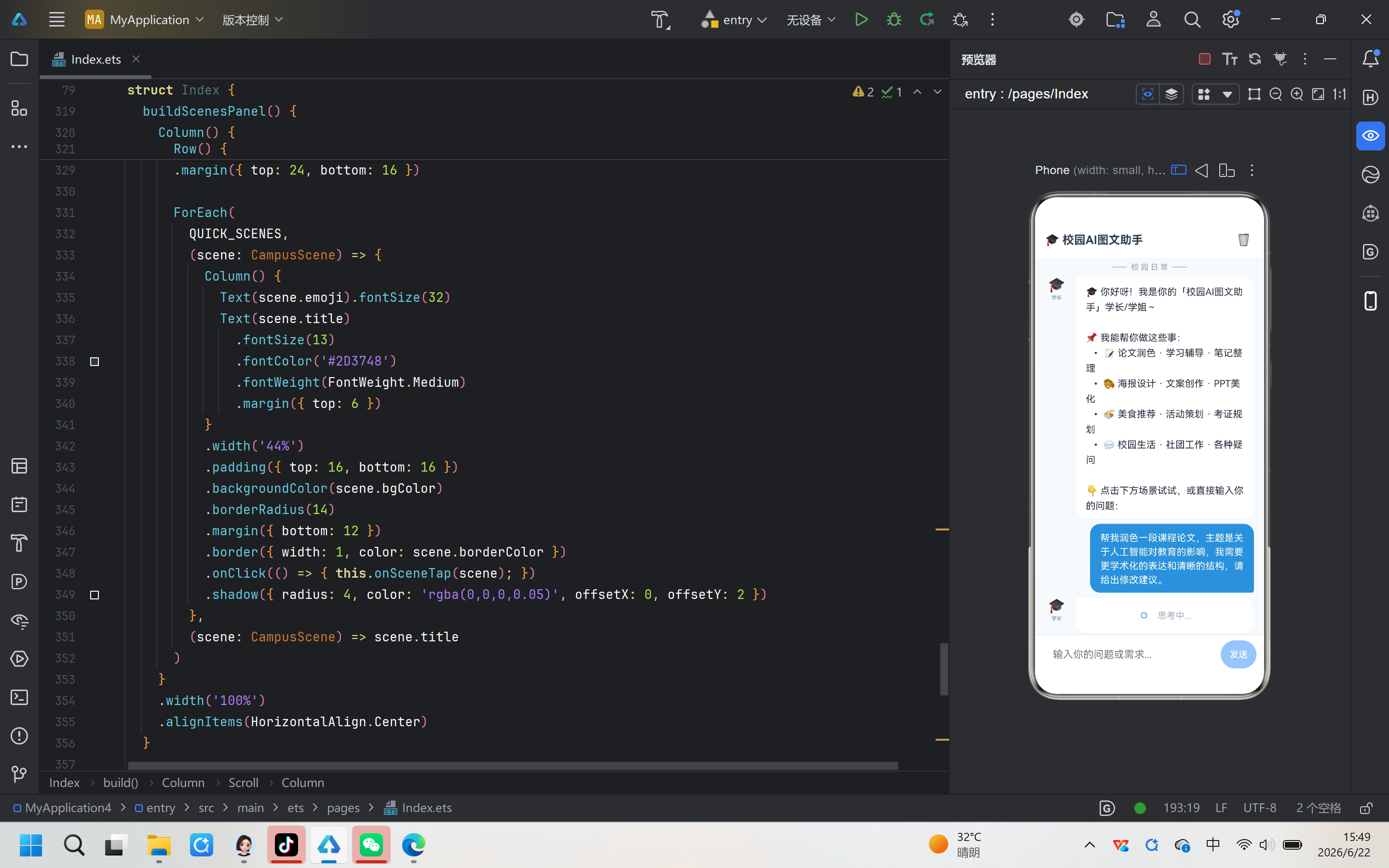
- 校园 AI 图文助手首页:Index.ets 全解
- AI 修仙功法:CultivationGuide 沉浸式对话
- AI 万能生活手册:AIHandbook 多场景问答
- 祝福自动生成器:BlessingGenerator 创意工具
- 分手模拟器:BreakupSimulator 互动叙事
- 舔狗模拟器:SimpSimulator 社交模拟游戏
- ArkTS 布局专题:ColumnStart 与 Row 垂直居中
- 路由导航与页面间跳转
- 总结与最佳实践
1. 项目背景与整体架构
1.1 项目定位
本项目是一个基于 HarmonyOS NEXT 原生能力的多功能 AI 应用集合。它以「校园 AI 图文助手」作为首页入口,同时集成了多个风格各异的子应用:
- 校园 AI 图文助手 — 面向大学生的 AI 问答助手,覆盖学习辅导、文案创作、海报设计、校园生活等场景
- AI 修仙功法 — 仙侠主题的沉浸式 AI 问答,模拟修真世界中的功法修炼指南
- AI 万能生活手册 — 覆盖情感、职场、健康、法律等八大领域的实用问答
- 祝福生成器 — 一键生成生日、新年、结婚等场景的祝福语,支持收藏与复制
- 分手模拟器 — 互动叙事游戏,通过选择影响「心碎值」与「恢复进度」
- 舔狗模拟器 — 养成类社交模拟游戏,通过聊天、送礼提升好感度
- 布局演示 — ColumnStart 垂直排列布局和 Row 垂直居中布局的教学示例
1.2 技术架构全景
┌─────────────────────────────────────────────────────────┐
│                   应用层(9 个页面)                     │
├─────────┬─────────┬────────┬────────┬──────────────────┤
│Index.ets│Cultivation│AIHand-│Blessing│ BreakupSimulator │
│(首页)   │Guide     │book   │Generator│ (分手模拟器)     │
├─────────┼─────────┼────────┼────────┼──────────────────┤
│SimpSim- │ColumnStart│RowCent│        │                  │
│ulator   │Demo      │erVerti│        │                  │
│(舔狗)   │(布局演示)│calDemo│        │                  │
├─────────┴─────────┴────────┴────────┴──────────────────┤
│                核心服务层:AIChatService                │
│        SSE 流式 AI 对话 · HTTP 网络请求 · API 封装     │
├─────────────────────────────────────────────────────────┤
│                HarmonyOS NEXT API 层                    │
│   @kit.NetworkKit  ·  @ohos.router  ·  @ohos.promptAct │
│   @ohos.pasteboard ·  ArkUI 声明式 UI  ·  状态管理     │
└─────────────────────────────────────────────────────────┘
1.3 设计理念
- 组件复用最大化 — 所有 AI 对话页面共享同一套
AIChatService服务,仅通过不同的system prompt实现差异化 - 状态驱动 UI — 使用 ArkTS 的
@State装饰器管理页面状态,状态变化自动触发 UI 刷新 - SSE 流式响应 — 采用 Server-Sent Events 协议实现 AI 对话的逐字输出效果,提升用户体验
- 数据与视图分离 — 每个页面的数据模型(Interface)、状态管理(@State)、UI 构建(@Builder)清晰分层
2. 开发环境搭建与项目结构
2.1 环境要求
- 操作系统: Windows 10/11、macOS 12+ 或 Ubuntu 22.04+
- 开发工具: DevEco Studio 5.0+(基于 IntelliJ IDEA)
- SDK 版本: HarmonyOS NEXT 6.1.1(API 24)
- Node.js: 18.x 或更高(DevEco Studio 内置)
- 构建工具: hvigor 6.24.2(HarmonyOS 专用构建系统)
2.2 项目文件结构
MyApplication4/
├── build-profile.json5              # 项目级构建配置
├── code-linter.json5                # 代码检查配置
├── oh-package.json5                 # 依赖管理
├── oh-package-lock.json5            # 依赖锁定
└── entry/
    ├── build-profile.json5          # 模块级构建配置
    └── src/main/ets/
        ├── entryability/
        │   └── EntryAbility.ets     # 应用入口 Ability
        ├── entrybackupability/
        │   └── EntryBackupAbility.ets
        └── pages/
            ├── Index.ets            # 校园 AI 图文助手(首页)
            ├── AIChatService.ets    # AI 核心服务(SSE 流式对话)
            ├── CultivationGuide.ets # AI 修仙功法
            ├── AIHandbook.ets       # AI 万能生活手册
            ├── BlessingGenerator.ets# 祝福生成器
            ├── BreakupSimulator.ets # 分手模拟器
            ├── SimpSimulator.ets    # 舔狗模拟器
            ├── ColumnStartDemo.ets  # ColumnStart 布局演示
            └── RowCenterVerticalDemo.ets # Row 垂直居中布局演示
2.3 依赖导入说明
HarmonyOS NEXT 提供了全新的 Kit 化 API 体系。在本项目中,我们主要使用以下核心 Kit:
| Kit / 模块 | 用途 | 导入方式 |
|---|---|---|
@kit.NetworkKit |
HTTP 网络请求 | import { http } from '@kit.NetworkKit' |
@kit.BasicServicesKit |
基础类型支持 | import { BusinessError } from '@kit.BasicServicesKit' |
@ohos.router |
页面路由跳转 | import router from '@ohos.router' |
@ohos.promptAction |
轻提示弹窗 | import promptAction from '@ohos.promptAction' |
@ohos.pasteboard |
剪贴板操作 | import pasteboard from '@ohos.pasteboard' |
3. 核心 AI 服务层:AIChatService 深度解析
AIChatService.ets 是整个应用的 AI 引擎。它封装了 HTTP 请求、SSE 流式解析、非流式回退等核心逻辑,为所有 AI 对话页面提供统一调用接口。
3.1 接口定义
首先定义清晰的数据结构:
/** 聊天消息结构体 */
export interface ChatMessage {
  role: string;      // 'system' | 'user' | 'assistant'
  content: string;
}

/** 请求体结构体(对应 OpenAI API 格式) */
export interface ChatCompletionRequest {
  model: string;
  messages: ChatMessage[];
  stream: boolean;
  max_tokens: number;
  temperature: number;
  top_p: number;
  frequency_penalty: number;
  thinking_budget: number;
}

/** SSE 解析结果回调 */
export interface AICallbacks {
  /** 每次收到新的 token 内容时触发 */
  onData: (text: string) => void;
  /** 流式响应结束时触发 */
  onDone: () => void;
  /** 发生错误时触发 */
  onError: (errMsg: string) => void;
}
设计亮点: 使用回调接口 AICallbacks 而非 Promise/async-await,是因为 SSE 流式场景需要多次回调,回调模式更加自然。
3.2 API 配置与系统提示词
/** API 配置常量 */
const API_URL = 'https://api-ai.gitcode.com/v1/chat/completions';
const API_KEY = 'your-api-key-here';  // 需要替换为自己的 API Key

/** 系统提示词:校园专属AI图文助手 */
const SYSTEM_PROMPT: string =
  '你是一个「校园专属AI图文助手」,专为在校大学生提供学习、生活和校园资讯相关的图文帮助。\n\n' +
  '你的能力包括:\n' +
  '1. 📝 学习辅导:帮助理解课程知识点、解答作业难题、整理学习笔记、撰写论文大纲\n' +
  '2. 📄 文案创作:撰写校园推文、活动宣传文案、社团招新文案、个人简历、PPT文稿\n' +
  '3. 🎨 图片描述与创意:描述图片内容、提供设计灵感(海报、展板、Logo等)、讲解构图配色\n' +
  '4. 🌸 校园生活指南:推荐食堂美食、介绍校园景点、提供选课建议、分享考证考研经验\n' +
  '5. 🎪 活动策划:帮策划社团活动、班级团建、校园比赛等\n' +
  '6. 📰 校园资讯:回答关于校园规章制度、办事流程、校园文化等方面的问题\n\n' +
  '回答要求:\n' +
  '1. 语气亲切活泼,像学长学姐一样耐心解答,适当使用校园流行语和表情符号\n' +
  '2. 内容准确实用,条理清晰,可适当分点列出或使用表格\n' +
  '3. 涉及图片/设计相关问题时,给出具体的构图建议、配色方案和风格描述\n' +
  '4. 学术类问题要严谨,但要用通俗易懂的方式解释\n' +
  '5. 鼓励用户多思考、多实践,提供可落地的建议\n' +
  '6. 不需要返回 JSON 格式,直接以自然语言对话即可\n' +
  '7. 如果用户需要生成图片,请详细描述画面构图、色彩、风格等要素,方便后续绘图\n\n' +
  '你不仅是工具,更是校园里的贴心伙伴!让每次交流都充满温度和收获 🎉';
关键设计: 系统提示词以自然语言描述了 AI 的身份、能力和回答风格。不同的页面可以通过 queryAI 函数的 customPrompt 参数传入不同的系统提示词,实现「一人千面」的效果。
3.3 SSE 流式解析
SSE(Server-Sent Events)是一种服务器推送协议,AI 对话通过 data: 行逐 token 返回内容:
/**
 * 解析 SSE data 行,提取 content 增量
 * @param line - 以 "data:" 开头的行(不含前缀)
 * @returns 提取到的 content,或 null
 */
function parseSSEDataLine(line: string): string | null {
  const jsonStr = line.slice(5).trim();  // 去掉 "data:" 前缀
  if (!jsonStr) {
    return null;
  }
  try {
    const parsed: Record<string, Object> = JSON.parse(jsonStr) as Record<string, Object>;
    const choices: Object[] = parsed.choices as Object[];
    if (choices && choices.length > 0) {
      const choice: Record<string, Object> = choices[0] as Record<string, Object>;
      // 兼容 delta 和 message 两种格式(流式 vs 非流式)
      const delta: Record<string, Object> = choice.delta as Record<string, Object>;
      if (delta) {
        return delta.content as string;
      }
      const message: Record<string, Object> = choice.message as Record<string, Object>;
      if (message) {
        return message.content as string;
      }
    }
  } catch (_) {
    // JSON 解析失败,跳过
  }
  return null;
}
兼容性处理: 同一个函数同时处理流式格式(delta 字段)和非流式格式(message 字段),避免重复解析逻辑。
3.4 完整响应体解析(非流式回退)
在某些 HarmonyOS 版本的 HTTP 模块中,SSE 的 dataReceive 事件可能不会触发。因此我们设计了双重回退机制:
/**
 * 从完整响应体中解析所有 SSE data 行
 * @param body - 整个响应体字符串
 * @returns 拼接后的 content
 */
function parseFullSSEBody(body: string): string {
  let result = '';
  const lines = body.split('\n');
  for (const line of lines) {
    const trimmed = line.trim();
    if (trimmed.startsWith('data:')) {
      if (trimmed === 'data:[DONE]') {
        break;  // SSE 结束标记
      }
      const content = parseSSEDataLine(trimmed);
      if (content) {
        result += content;
      }
    }
  }
  return result;
}

/**
 * 从完整 JSON 响应体中提取 content(非流式回退)
 */
function parseNonStreamingBody(body: string): string | null {
  try {
    const parsed: Record<string, Object> = JSON.parse(body) as Record<string, Object>;
    const choices: Object[] = parsed.choices as Object[];
    if (choices && choices.length > 0) {
      const choice: Record<string, Object> = choices[0] as Record<string, Object>;
      const message: Record<string, Object> = choice.message as Record<string, Object>;
      if (message) {
        return message.content as string;
      }
      // 也可能是流式格式 (delta 而非 message)
      const delta: Record<string, Object> = choice.delta as Record<string, Object>;
      if (delta) {
        return delta.content as string;
      }
    }
  } catch (_) {
    // 不是纯 JSON,可能是 SSE 格式
  }
  return null;
}
3.5 ArrayBuffer 解码
HTTP 响应体以 ArrayBuffer 形式接收,需要转换为字符串:
function arrayBufferToString(buffer: ArrayBuffer): string {
  const uint8Arr = new Uint8Array(buffer);
  let text = '';
  for (let i = 0; i < uint8Arr.length; i++) {
    text += String.fromCharCode(uint8Arr[i]);
  }
  return text;
}
3.6 queryAI 核心函数
这是整个服务的核心导出函数,整合了上述所有能力:
export function queryAI(
  callbacks: AICallbacks,
  messages: ChatMessage[],
  customPrompt?: string,
): void {
  // 取消上一次未完成的请求
  if (httpRequestTask) {
    try {
      httpRequestTask.destroy();
    } catch (_) { /* ignore */ }
    httpRequestTask = null;
  }

  const httpRequest = http.createHttp();
  httpRequestTask = httpRequest;

  // 构建请求体,合并系统提示词 + 用户聊天历史
  const fullMessages: ChatMessage[] = [
    { role: 'system', content: customPrompt ?? SYSTEM_PROMPT },
    ...messages,
  ];
  const requestBody: ChatCompletionRequest = {
    model: 'deepseek-ai/DeepSeek-V3',
    messages: fullMessages,
    stream: true,
    max_tokens: 2048,
    temperature: 0.6,
    top_p: 0.95,
    frequency_penalty: 0,
    thinking_budget: 2048,
  };

  let isDone: boolean = false;
  let receivedAnyData: boolean = false;
  let buffer = '';

  // 监听 SSE 流式数据
  httpRequest.on('dataReceive', (data: ArrayBuffer) => {
    const text = arrayBufferToString(data);
    buffer += text;
    receivedAnyData = true;

    const lines = buffer.split('\n');
    buffer = lines.pop() ?? '';

    for (const line of lines) {
      const trimmed = line.trim();
      if (!trimmed.startsWith('data:')) continue;
      if (trimmed === 'data:[DONE]') {
        if (!isDone) { isDone = true; callbacks.onDone(); }
        continue;
      }
      const content = parseSSEDataLine(trimmed);
      if (content) callbacks.onData(content);
    }
  });

  // 数据接收完毕
  httpRequest.on('dataEnd', () => {
    if (!isDone) {
      isDone = true;
      callbacks.onDone();
    }
    httpRequestTask = null;
  });

  // 发起 POST 请求
  httpRequest.request(
    API_URL,
    {
      method: http.RequestMethod.POST,
      header: {
        Authorization: `Bearer ${API_KEY}`,
        'Content-Type': 'application/json',
        Accept: 'text/event-stream',
      },
      extraData: JSON.stringify(requestBody),
      connectTimeout: 30000,
      readTimeout: 120000,
    },
    (err: BusinessError | null, resp: http.HttpResponse) => {
      // ...(错误处理与非流式回退逻辑)
    },
  );
}
设计亮点:
- 请求取消 — 每次发起新请求前先销毁上一次的请求,防止内存泄漏和并发冲突
- 双重解析 — 优先使用 SSE 流式
dataReceive事件,不触发时自动回退到完整响应体解析 - 缓冲区管理 — 使用
buffer = lines.pop()处理 SSE 的不完整行(最后一行可能只接收到一半) - 兼容性 — 同时支持
delta和message两种 JSON 格式
3.7 取消请求
export function cancelAI(): void {
  if (httpRequestTask) {
    try {
      httpRequestTask.destroy();
    } catch (_) { /* ignore */ }
    httpRequestTask = null;
  }
}
这个函数在页面离开或用户清空对话时调用,确保网络资源及时释放。
4. 校园 AI 图文助手首页:Index.ets 全解
首页是应用的「门面」,采用了清新明亮的校园风格设计。
4.1 数据结构定义
interface CampusScene {
  emoji: string;       // 场景图标表情符
  title: string;       // 场景标题
  prompt: string;      // 点击后发送的提示词
  color: string;       // 主题色
  bgColor: string;     // 背景色
  borderColor: string; // 边框色(带透明度)
}

interface NavItem {
  label: string;
  url: string;
  color: string;
}
4.2 快捷场景配置
8 个校园场景覆盖了大学生最常遇到的 AI 需求:
const QUICK_SCENES: CampusScene[] = [
  {
    emoji: '📝', title: '论文润色',
    prompt: '帮我润色一段课程论文,主题是关于人工智能对教育的影响,我需要更学术化的表达和清晰的结构,请给出修改建议。',
    color: '#4A90D9', bgColor: '#F0F7FF', borderColor: '#4A90D966',
  },
  {
    emoji: '🎨', title: '海报设计',
    prompt: '我们社团要举办一场校园音乐节,需要设计一张宣传海报。请帮我描述海报的整体构图、配色方案(校园青春风)、字体风格和元素布局。',
    color: '#FF6B9D', bgColor: '#FFF0F5', borderColor: '#FF6B9D66',
  },
  {
    emoji: '📖', title: '高数辅导',
    prompt: '我是大一新生,正在学高等数学中的极限部分,对夹逼定理不太理解,能用一个简单的例子帮我解释一下吗?',
    color: '#5B8FF9', bgColor: '#F0F8FF', borderColor: '#5B8FF966',
  },
  {
    emoji: '✍️', title: '文案创作',
    prompt: '我们班要准备一个班级风采展示的推文,想写得有趣又有感染力,能帮我写一段介绍我们班级的文案吗?我们是计算机科学与技术专业2班。',
    color: '#F5A623', bgColor: '#FFFDF0', borderColor: '#F5A62366',
  },
  {
    emoji: '🍜', title: '校园美食',
    prompt: '我们学校食堂二楼新开了几家窗口,有麻辣烫、螺蛳粉、煲仔饭,我选择困难症犯了,能帮我推荐一下并说说各有什么特色吗?',
    color: '#FF7F50', bgColor: '#FFF5F0', borderColor: '#FF7F5066',
  },
  {
    emoji: '🎯', title: '考证规划',
    prompt: '我是大二计算机专业的学生,想在大三之前考一些有用的证书,能帮我做一个考证规划吗?包括时间安排和备考建议。',
    color: '#36CFC9', bgColor: '#F0FFFE', borderColor: '#36CFC966',
  },
  {
    emoji: '🎪', title: '活动策划',
    prompt: '我们班想办一次期末前的团建活动,预算500元以内,20人左右,有什么好玩的策划方案推荐吗?要有创意且不冷场。',
    color: '#B37FEB', bgColor: '#F5F0FF', borderColor: '#B37FEB66',
  },
  {
    emoji: '💡', title: 'PPT美化',
    prompt: '我下周要做课程展示PPT,主题是"碳中和与可持续发展",请给我一些PPT结构建议、每一页的内容要点和排版美化思路。',
    color: '#00B894', bgColor: '#F0FFF4', borderColor: '#00B89466',
  },
];
设计原则: 每个场景的 prompt 都是真实、具体的大学生提问,而不是模糊的关键词。这样用户点击后能得到有价值的回答,而不是泛泛而谈。
4.3 页面状态管理
@Entry
@Component
struct Index {
  @State messages: ChatMessage[] = [];    // 对话消息列表
  @State inputText: string = '';          // 输入框内容
  @State isLoading: boolean = false;      // 是否正在加载
  @State showScenes: boolean = true;      // 是否显示快捷场景

  private scrollController: Scroller = new Scroller();
状态设计要点:
@State标记的变量变化会自动触发 UI 重新渲染showScenes控制快捷场景面板的显隐——用户发出一条消息后自动隐藏scrollController用于在接收到新消息时自动滚动到底部- 使用
Scroller而非Scroll的edgeScroll,可以编程式控制滚动位置
4.4 欢迎消息
aboutToAppear(): void {
  this.messages.push({
    role: 'assistant',
    content: '🎓 你好呀!我是你的「校园AI图文助手」学长/学姐~\n\n' +
      '📌 我能帮你做这些事:\n' +
      '  • 📝 论文润色 · 学习辅导 · 笔记整理\n' +
      '  • 🎨 海报设计 · 文案创作 · PPT美化\n' +
      '  • 🍜 美食推荐 · 活动策划 · 考证规划\n' +
      '  • 💬 校园生活 · 社团工作 · 各种疑问\n\n' +
      '👇 点击下方场景试试,或直接输入你的问题:',
  });
}
生命周期回调: aboutToAppear() 是 ArkTS 提供的生命周期方法,在组件即将显示时调用,适合做初始化工作。
4.5 发送消息的核心逻辑
private sendMessage(text?: string): void {
  const msg = (text || this.inputText).trim();
  if (!msg || this.isLoading) return;

  // 1. 添加用户消息
  this.messages.push({ role: 'user', content: msg });
  this.inputText = '';
  this.showScenes = false;

  // 2. 添加空的 AI 占位消息
  const aiIndex = this.messages.length;
  this.messages.push({ role: 'assistant', content: '' });
  this.isLoading = true;

  // 3. 构建历史消息(排除空占位)
  const history = this.messages
    .filter(m => m.content.length > 0)
    .slice(0, -1);

  // 4. 配置回调
  const callbacks: AICallbacks = {
    onData: (chunk: string) => {
      this.messages[aiIndex] = {
        role: 'assistant',
        content: this.messages[aiIndex].content + chunk,
      };
      setTimeout(() => {
        this.scrollController.scrollEdge(Edge.Bottom);
      }, 50);
    },
    onDone: () => {
      this.isLoading = false;
      if (!this.messages[aiIndex].content) {
        this.messages[aiIndex] = {
          role: 'assistant',
          content: '(稍等一下哦,让学长再帮你想想~请重新提问)'
        };
      }
    },
    onError: (err: string) => {
      this.isLoading = false;
      this.messages[aiIndex] = {
        role: 'assistant',
        content: `❌ 网络好像开小差了:${err}`
      };
    },
  };

  // 5. 调用 AI 服务
  queryAI(callbacks, history);
}
关键技巧:
- 占位消息:先插入一条空消息,
onData回调中逐步追加内容,实现了「打字机效果」 - 防重复提交:通过
this.isLoading状态阻止用户在一次请求未完成时再次发送 - 滚动到底部:每次收到新 token 时用
setTimeout延迟 50ms 滚动,确保新内容已渲染
4.6 UI 构建整体结构
build() {
  Column() {
    // ── 顶部工具栏 ──
    Row() {
      Text('🎓 校园AI图文助手')
        .fontSize(18)
        .fontWeight(FontWeight.Bold)
        .fontColor('#2C3E50')
      Blank()
      Button({ type: ButtonType.Normal, stateEffect: true }) {
        Text('🗑️').fontSize(18)
      }
      .width(40).height(40)
      .backgroundColor('#00000000')
      .onClick(() => { this.clearChat(); })
    }
    .width('100%')
    .padding({ left: 16, right: 12, top: 8, bottom: 8 })
    .backgroundColor('#FFFFFF')
    .shadow({ radius: 3, color: 'rgba(0,0,0,0.04)', offsetX: 0, offsetY: 2 })

    // ── 消息列表(可滚动)──
    Scroll(this.scrollController) {
      Column() {
        // 装饰顶部分隔
        Row() {
          Text('——  校 园 日 常  ——')
            .fontSize(12).fontColor('#A0AEC0').fontWeight(FontWeight.Medium)
        }
        .width('100%').justifyContent(FlexAlign.Center)
        .padding({ top: 8, bottom: 4 })

        ForEach(this.messages, (msg, index) => {
          this.buildMessageItem(msg, index)
        }, (msg, index) => msg.role + index)

        if (this.showScenes) {
          this.buildScenesPanel()
        }
        this.buildNavSection()
      }
      .width('100%').padding({ bottom: 16 })
    }
    .scrollBar(BarState.Off).layoutWeight(1).width('100%')
    .backgroundColor('#F7FAFC')

    // ── 输入区域 ──
    Row() { /* TextInput + Button */ }
    .width('100%').padding({ left: 12, right: 12, top: 8, bottom: 12 })
    .backgroundColor('#FFFFFF')
    .shadow({ radius: 4, color: 'rgba(0,0,0,0.08)', offsetX: 0, offsetY: -2 })
  }
  .width('100%').height('100%').backgroundColor('#F7FAFC')
}
布局层次:
- 最外层 Column — 垂直排列顶部工具栏、消息列表、输入区
- Scroll 包裹消息列表 — 当消息过多时支持滚动
- 输入区域固定底部 — 使用
layoutWeight(1)让消息列表占据除工具栏和输入区外的所有空间
4.7 消息气泡 @Builder
@Builder
buildMessageItem(msg: ChatMessage, index: number) {
  if (msg.role === 'user') {
    // 用户消息:右对齐,蓝色气泡
    Row() {
      Blank()
      Column() {
        Text(msg.content)
          .fontSize(15).fontColor('#FFFFFF').lineHeight(22)
      }
      .padding({ left: 16, right: 16, top: 10, bottom: 10 })
      .backgroundColor('#4A90D9')   // 蓝底白字
      .borderRadius({ topLeft: 16, topRight: 16, bottomLeft: 16, bottomRight: 4 })
      .margin({ left: 60 })
    }
    .alignItems(VerticalAlign.Bottom)
    .width('100%').padding({ left: 16, right: 16, top: 4, bottom: 4 })
  } else {
    // AI 消息:左对齐,白色气泡 + 头像
    Row() {
      // 头像
      Column() {
        Text('🎓').fontSize(22)
        Text('学长').fontSize(8).fontColor('#4A90D9').margin({ top: 2 })
      }
      .width(44).alignItems(HorizontalAlign.Center)

      Column() {
        if (msg.content) {
          Text(msg.content).fontSize(15).fontColor('#2D3748').lineHeight(24)
        } else {
          Row() {
            LoadingProgress().width(16).height(16).color('#4A90D9')
            Text('  思考中...').fontSize(14).fontColor('#A0AEC0').margin({ left: 6 })
          }
          .alignItems(VerticalAlign.Center).height(36)
        }
      }
      .padding({ left: 14, right: 14, top: 10, bottom: 10 })
      .backgroundColor('#FFFFFF')
      .borderRadius({ topLeft: 4, topRight: 16, bottomLeft: 16, bottomRight: 16 })
      .margin({ left: 8 }).layoutWeight(1)
      .shadow({ radius: 2, color: 'rgba(0,0,0,0.06)', offsetX: 0, offsetY: 1 })
    }
    .alignItems(VerticalAlign.Top)
    .width('100%').padding({ left: 12, right: 16, top: 4, bottom: 4 })
  }
}
气泡设计要点:
- 用户气泡: 右对齐、蓝色底色、圆角只有左下角是直角(模拟对话框风格)
- AI 气泡: 左对齐、白色底色、左上角直角、右侧圆角(与用户气泡对称)
- 加载状态: 内容为空时显示
LoadingProgress旋转动画 + “思考中…” 文字 - 排版细节: 使用
lineHeight控制行距(24px),比默认值更舒适;气泡添加轻微阴影增加层次感
4.8 快捷场景面板 @Builder
@Builder
buildScenesPanel() {
  Column() {
    Row() {
      Text('———  学 长 帮 忙   ———')
        .fontSize(14).fontColor('#A0AEC0').fontWeight(FontWeight.Bold)
    }
    .width('100%').justifyContent(FlexAlign.Center)
    .margin({ top: 24, bottom: 16 })

    ForEach(
      QUICK_SCENES,
      (scene: CampusScene) => {
        Column() {
          Text(scene.emoji).fontSize(32)
          Text(scene.title)
            .fontSize(13).fontColor('#2D3748').fontWeight(FontWeight.Medium)
            .margin({ top: 6 })
        }
        .width('44%')
        .padding({ top: 16, bottom: 16 })
        .backgroundColor(scene.bgColor)
        .borderRadius(14)
        .margin({ bottom: 12 })
        .border({ width: 1, color: scene.borderColor })
        .onClick(() => { this.onSceneTap(scene); })
        .shadow({ radius: 4, color: 'rgba(0,0,0,0.05)', offsetX: 0, offsetY: 2 })
      },
      (scene: CampusScene) => scene.title
    )
  }
  .width('100%').alignItems(HorizontalAlign.Center)
}
布局技巧: 使用 width('44%') 实现两列网格效果(每行放两个场景卡片),ForEach 循环遍历 QUICK_SCENES 数组自动生成卡片列表。
4.9 清空对话
private clearChat(): void {
  cancelAI();           // 取消正在进行的 AI 请求
  this.messages = [];   // 清空消息列表
  this.isLoading = false;
  this.showScenes = true;  // 重新显示快捷场景
  this.messages.push({
    role: 'assistant',
    content: '🎓 你好呀!我是你的「校园AI图文助手」学长/学姐~\n\n有什么学习或校园生活上的问题,尽管问我吧!💪',
  });
}
5. AI 修仙功法:CultivationGuide 沉浸式对话
5.1 独白的系统提示词
修仙功法的核心魅力在于其独特的仙侠语境系统提示词:
const CULTIVATION_PROMPT: string =
  '你是一位修行万年的「修仙功法大能」,道号「玄机真人」,通晓三界六道一切修炼法门。\n\n' +
  '你精通以下修仙领域:\n' +
  '1. 功法修炼:各种灵根对应的功法选择、修炼心法口诀、经脉运行路线、灵气吐纳之法\n' +
  '2. 境界突破:练气→筑基→金丹→元婴→化神→大乘→渡劫各阶段的突破要领与瓶颈破解\n' +
  '3. 炼丹炼器:丹方配方、灵药辨识、火候掌控、法器祭炼、符箓绘制、法宝蕴养\n' +
  '4. 阵法禁制:聚灵阵、护山大阵、传送阵、幻阵、禁制破解与布置要点\n' +
  '5. 灵兽培育:灵兽认主、血脉进化、妖兽驯服、灵宠养成、兽丹炼化\n' +
  '6. 秘境探险:秘境规则解析、天材地宝辨识、机缘获取、危险规避、遗迹解密\n' +
  '7. 宗门事务:门派管理、弟子培养、资源分配、宗门大比、外交合纵\n' +
  '8. 天劫应对:天劫种类(四九/六九/九九)、渡劫准备、心魔化解、飞升之道\n\n' +
  '回复原则:\n' +
  '1. 以修仙世界为背景,用仙侠语境回复,但建议要符合内在逻辑。\n' +
  '2. 具体修炼方法要详细(如灵气在经脉中的运行路线、灵药的配比火候等),避免空洞口诀。\n' +
  '3. 对于严重后果(走火入魔、天劫失败、丹炉炸裂等),给出预防和补救方案。\n' +
  '4. 语气仙风道骨,偶尔引用一些「古籍所载」「据为师所知」增加沉浸感,又不失亲切。\n' +
  '5. 回复结构清晰,用「首先→其次→最后」或「第一→第二→第三」的方式组织。\n' +
  '6. 适当使用修仙术语(灵气、丹田、神识、紫府、元婴、法宝等),但要在上下文中自然融入。\n' +
  '7. 可以根据问题主动推荐相关的功法名称、丹方名称、秘境名称(虚构但合理)。\n\n' +
  '请用中文回复。现在,开始指点有缘人的修仙之路吧!';
提示设计要点:
- 角色设定明确:道号「玄机真人」,修行万载,赋予 AI 一个清晰的「人格」
- 知识领域完整:8 大修仙领域覆盖用户可能问到的所有方向
- 交互风格指引:仙风道骨的语气要求 + 结构化回复模板
- 术语使用规范:要求自然融入修仙术语,同时保持内在逻辑
5.2 调用方式差异
修仙功法在调用 queryAI 时传入了自定义的系统提示词:
// 在 sendMessage 中调用 AI 服务时传入自定义 prompt
queryAI(callbacks, history, CULTIVATION_PROMPT);
而 Index 首页使用的是默认的校园助手 prompt。这就是「一人千面」的实现方式——同一个 queryAI 函数,不同的 customPrompt,产出完全不同的回答风格。
5.3 视觉主题
修仙功法的 UI 采用了仙侠风格配色:
- 背景色:
#F5F0E8(仿古宣纸色) - 用户气泡:
#8B6914(暗金色) - AI 气泡:
#FFFCF5(宣纸白底),文字色#3C2415(墨色) - 装饰文字:
#C4A97D(古铜色) - 分割线:
—— 仙 缘 一 线 ——(仙侠分隔符) - 头像:🌄 真人
// 欢迎消息
content: '🌄 道友有礼了!贫道玄机真人,修行万载,通晓三界六道一切修炼法门。\n\n' +
  '凡有所问——功法困惑、境界瓶颈、炼丹炼器、阵法符箓、灵兽培育、天劫应对……\n' +
  '尽管道来,本座自当为你一一指点。\n\n' +
  '👇 选择下方场景试试,或直接输入你的疑问:',

// 加载状态
Text('  掐指推算中...')
  .fontSize(14).fontColor('#8B7355')

// 错误提示
content: `❌ 天机紊乱,传讯受阻:${err}`
沉浸感打造: 从欢迎语到加载提示到错误提示,所有文案都统一采用仙侠语境,让用户完全沉浸在「修仙问道」的体验中。
6. AI 万能生活手册:AIHandbook 多场景问答
6.1 场景配置
AIHandbook 覆盖了 8 大生活领域,每个场景都对应真实的生活痛点:
const QUICK_SCENES: QuickScene[] = [
  {
    emoji: '💔', title: '情感关系',
    prompt: '我和伴侣最近经常因为小事吵架,感觉沟通出现了问题,该怎么办?',
    color: '#FF6B6B', bgColor: '#FFF0F0',
  },
  {
    emoji: '💼', title: '职场发展',
    prompt: '我工作两年了,感觉遇到了瓶颈,不知道该继续深耕还是换工作,能给些建议吗?',
    color: '#0984E3', bgColor: '#F0F8FF',
  },
  {
    emoji: '🏥', title: '健康养生',
    prompt: '我最近总是失眠,入睡困难,白天精神很差,有什么改善睡眠的方法吗?',
    color: '#00B894', bgColor: '#F0FFF4',
  },
  {
    emoji: '🍳', title: '生活技能',
    prompt: '我是一个人住,想学做一些简单的家常菜,有什么适合新手的菜谱推荐吗?',
    color: '#FDCB6E', bgColor: '#FFFDF0',
  },
  {
    emoji: '📚', title: '学习成长',
    prompt: '我想利用碎片时间学习一门新技能,有什么高效的学习方法推荐吗?',
    color: '#6C5CE7', bgColor: '#F5F0FF',
  },
  {
    emoji: '🧠', title: '心理情绪',
    prompt: '最近工作压力很大,经常感到焦虑,有什么缓解焦虑的方法吗?',
    color: '#E84393', bgColor: '#FFF0F7',
  },
  {
    emoji: '⚖️', title: '法律常识',
    prompt: '我租房合同到期了,房东不肯退押金,请问我该怎么维权?',
    color: '#636E72', bgColor: '#F5F6FA',
  },
  {
    emoji: '📱', title: '科技数码',
    prompt: '我想买一台笔记本电脑用来办公和轻度剪辑,3000-4000元预算有什么推荐?',
    color: '#00CEC9', bgColor: '#F0FFFE',
  },
];
6.2 与首页的差异
AIHandbook 使用默认的系统提示词(没有传 customPrompt),但在 UI 设计上有所不同:
- AI 头像:📖 书本图标(区别于校园助手的 🎓 和修仙的 🌄)
- 用户气泡:
#5B8FF9(蓝色系) - 背景色:
#F5F6FA(浅灰色) - 输入框占位:「输入你的问题…」
- 无装饰分隔线:直接显示对话内容
// AI 头像使用不同的图标
Text('📖')
  .fontSize(20).width(36).height(36)
  .textAlign(TextAlign.Center)
  .backgroundColor('#E8F4FD')
  .borderRadius(18)
设计原则: 每个子应用通过不同的颜色体系、头像图标和文案风格来区分定位,而不是复制粘贴同一个模板。用户一眼就能分辨出自己在使用哪个功能。
7. 祝福自动生成器:BlessingGenerator 创意工具
7.1 数据结构
祝福生成器不是 AI 对话应用,而是一个本地数据驱动的工具。它包含 6 个分类,每个分类 8 条祝福语:
interface BlessingCategory {
  name: string;
  emoji: string;
  color: string;
  bgColor: string;
  items: string[];
}

const BLESSING_DATA: BlessingCategory[] = [
  {
    name: '生日祝福',
    emoji: '🎂',
    color: '#FF6B6B',
    bgColor: '#FFF0F0',
    items: [
      '愿你年年岁岁都平安,朝朝暮暮皆如意。生日快乐!🎉',
      '愿你眼里有光,心中有爱,目光所至皆是星辰大海。生日快乐!✨',
      // ... 共 8 条
    ],
  },
  // ... 共 6 个分类
];
7.2 核心状态管理
@Entry
@Component
struct BlessingGenerator {
  @State selectedIndex: number = 0;         // 当前选中的分类
  @State currentBlessing: string = '';      // 当前显示的祝福语
  @State isGenerating: boolean = false;     // 是否正在生成
  @State collectedBlessings: string[] = []; // 收藏列表
  @State showCollected: boolean = false;    // 是否显示收藏视图
7.3 祝福生成逻辑
private generateBlessing(): void {
  this.isGenerating = true;

  const items = this.currentCategory().items;
  setTimeout(() => {
    const randomIndex = Math.floor(Math.random() * items.length);
    this.currentBlessing = items[randomIndex];
    this.isGenerating = false;
  }, 200);  // 200ms 延迟制造动效感
}

private currentCategory(): BlessingCategory {
  return BLESSING_DATA[this.selectedIndex];
}
7.4 剪贴板操作
private copyToClipboard(): void {
  if (!this.currentBlessing) return;

  try {
    const pasteboardApi = pasteboard.getSystemPasteboard();
    const pasteData = pasteboard.createData(
      pasteboard.MIMETYPE_TEXT_PLAIN,
      this.currentBlessing
    );
    pasteboardApi.setData(pasteData);
    promptAction.showToast({ message: '✅ 已复制到剪贴板', duration: 1500 });
  } catch (_) {
    promptAction.showToast({ message: '复制失败,请重试', duration: 1000 });
  }
}
HarmonyOS NEXT 的剪贴板 API 使用 @ohos.pasteboard 模块,通过 getSystemPasteboard() 获取系统剪贴板实例,然后 createData 创建剪贴板数据。
7.5 收藏功能
private collectBlessing(): void {
  if (!this.currentBlessing) return;
  if (this.collectedBlessings.includes(this.currentBlessing)) return;
  this.collectedBlessings = [this.currentBlessing, ...this.collectedBlessings];
}

private removeCollected(index: number): void {
  this.collectedBlessings.splice(index, 1);
  this.collectedBlessings = [...this.collectedBlessings];  // 触发 @State 更新
}
关键细节: splice 会修改原数组,但不会触发 @State 的重新渲染。通过 [...this.collectedBlessings] 创建新数组赋值给 @State 变量,才能触发 UI 更新。这是 ArkTS 状态管理的一个重要特点——数组需要「替换引用」而非「修改内容」。
7.6 分类选择器 UI
Scroll() {
  Row() {
    ForEach(
      BLESSING_DATA,
      (category: BlessingCategory, index: number) => {
        Column() {
          Text(category.emoji).fontSize(28).margin({ bottom: 4 })
          Text(category.name)
            .fontSize(12)
            .fontColor(this.selectedIndex === index ? category.color : '#636E72')
            .fontWeight(this.selectedIndex === index ? FontWeight.Bold : FontWeight.Normal)
        }
        .padding({ top: 8, bottom: 8, left: 16, right: 16 })
        .backgroundColor(this.selectedIndex === index ? category.bgColor : '#FFFFFF')
        .borderRadius(20)
        .margin({ left: index === 0 ? 16 : 0, right: 8 })
        .shadow({ ... })
        .onClick(() => { this.selectCategory(index); })
      },
      (category: BlessingCategory, index: number) => category.name + index
    )
  }
  .alignItems(VerticalAlign.Center).height(80)
}
交互设计: 点击分类时,如果点击的是当前分类则「重新生成」;点击其他分类则切换到该分类并「生成第一条」。这种设计让用户无论点击哪个分类都会获得新内容,避免「点击了但没反应」的困惑。
8. 分手模拟器:BreakupSimulator 互动叙事
8.1 玩法设计
分手模拟器是一个基于选择的互动叙事游戏,核心机制是:
- 心碎值(0~100):初始值 85(刚分手时心碎值很高)
- 恢复进度(0~100):初始值 5
- 天数:从第 1 天到第 60 天
- 三种结局:彻底释怀(good ending)、深陷回忆(normal ending)、重蹈覆辙(bad ending)
游戏通过 10 个精心设计的场景来模拟分手后的心理历程。
8.2 数据结构
interface SceneChoice {
  text: string;            // 选项文字
  heartDelta: number;      // 心碎值变化(负值 = 减轻心碎)
  progressDelta: number;   // 恢复进度变化
  reply: string;           // 选择后的内心独白
  isRelapse?: boolean;     // 是否导致"复发"
}

interface Scene {
  title: string;           // 场景标题(如 "第一天 · 难以置信")
  setting: string;         // 场景描述
  choices: SceneChoice[];  // 3 个可选行动
}
8.3 10 个场景的时间线
| 天数 | 场景标题 | 心理学对应阶段 |
|---|---|---|
| 第一天 | 难以置信 | 否认期(Denial) |
| 第三天 | 愤怒 | 愤怒期(Anger) |
| 第五天 | 回忆 | 回忆期(Memory) |
| 第七天 | 挣扎 | 挣扎期(Struggle) |
| 第十天 | 学着独处 | 适应期(Adaptation) |
| 第十四天 | 反思 | 反思期(Reflection) |
| 第二十一天 | 习惯 | 习惯期(Habit) |
| 第二十八天 | 新生 | 重生期(Rebirth) |
| 第四十五天 | 偶遇 | 考验期(Test) |
| 第六十天 | 释怀 | 接受期(Acceptance) |
心理学设计: 这 10 个场景暗合了 Kübler-Ross 的悲伤五阶段理论(否认→愤怒→协商→抑郁→接受),并扩展了更多细致的心理阶段,使游戏体验更加真实。
8.4 结局判定逻辑
private selectChoice(choice: SceneChoice): void {
  // ...(状态更新)

  // 检查是否复发(心碎值爆表)
  if (choice.isRelapse && this.heartbreak >= 90) {
    this.isGameOver = true;
    this.endingType = 'relapse';
    this.endingText = '你最终还是没能忍住。那条消息之后,你们又纠缠了一个月,比分手更痛苦。\n\n有些门,关上之后就不该再打开了。';
    return;
  }

  // 检查是否完全恢复
  if (this.recovery >= 100 && this.heartbreak <= 15) {
    this.isGameOver = true;
    this.endingType = 'recovered';
    this.endingText = '你终于走出来了。\n\n那些哭过的夜晚、删掉的照片、走过的路,都成了你的一部分。\n\n—— 分手不是结束,而是新生的开始。';
    return;
  }

  // 心碎值打满但恢复不够 = stuck ending
  if (this.heartbreak <= 0 && this.recovery < 60) {
    this.isGameOver = true;
    this.endingType = 'stuck';
    this.endingText = '你不再心碎了,但也没有真正走出来。\n\n你把那段感情封印在了心底最深处,假装什么都没发生过。\n\n—— 真正的放下,不是忘记,而是坦然面对。';
    return;
  }

  // 进入下一场景
  this.currentScene++;
  if (this.currentScene >= this.scenes.length) {
    this.currentScene = 0;
    this.day += 3;  // 循环后跳过一段时间
  }
}
判定优先级:
- 复发结局(触发
isRelapse+ 心碎值 ≥ 90) - 完美结局(恢复进度 ≥ 100 + 心碎值 ≤ 15)
- 假装释怀结局(心碎值 ≤ 0 + 恢复进度 < 60)
- 继续游戏(以上都不满足)
8.5 纪念物品系统
private allMemos: MemoItem[] = [
  { id: 1, name: '电影票根', desc: '第一次一起看电影的票根', emoji: '🎬', kept: true },
  { id: 2, name: '情侣手链', desc: '那对刻着名字的手链', emoji: '📿', kept: true },
  { id: 3, name: '合照相框', desc: '笑得最开心的一张合照', emoji: '🖼️', kept: true },
  { id: 4, name: '日记本', desc: '记录着点点滴滴的日记本', emoji: '📔', kept: true },
  { id: 5, name: '纪念礼物', desc: '生日时送的礼物', emoji: '🎁', kept: true },
];

private discardMemo(index: number): void {
  const memo = this.allMemos[index];
  if (!memo.kept) return;

  memo.kept = false;  // 标记为已丢弃
  this.addDiary(`📦 扔掉了 ${memo.emoji} ${memo.name} —— ${memo.desc}`);
  this.heartbreak = Math.max(0, this.heartbreak - 8);  // 减轻心碎
  this.recovery = Math.min(100, this.recovery + 5);     // 加速恢复
}
象征意义: 每丢弃一件纪念物品,心碎值减少 8,恢复进度增加 5。这模拟了现实生活中「放下过去」的过程——每次放手虽然不舍,但都是愈合的一步。
8.6 日记系统
private writeDiary(): void {
  if (!this.diaryText.trim()) {
    promptAction.showToast({ message: '写点什么吧……', duration: 1000 });
    return;
  }

  this.addDiary(`📝 ${this.diaryText.trim()}`);
  this.heartbreak = Math.max(0, this.heartbreak - 3);  // 写日记减轻心碎
  this.recovery = Math.min(100, this.recovery + 2);     // 写日记加速恢复
  this.diaryText = '';
}

// 随机日记提示
private usePrompt(): void {
  const prompt = this.diaryPrompts[Math.floor(Math.random() * this.diaryPrompts.length)];
  this.diaryText = prompt;
}
写日记的疗愈效果: 每次写日记减少 3 点心碎值、增加 2 点恢复进度,虽然效果不如丢弃纪念物品显著,但可以无限次使用,鼓励用户通过文字表达来治愈自己。
8.7 三种结局的文案设计
// 好结局——彻底释怀
endingText = '你终于走出来了。\n\n' +
  '那些哭过的夜晚、删掉的照片、走过的路,都成了你的一部分。\n\n' +
  '你变得更坚强了。下一次爱情来的时候,你会更好地拥抱它。\n\n' +
  '—— 分手不是结束,而是新生的开始。';

// 中等结局——假装释怀
endingText = '你不再心碎了,但也没有真正走出来。\n\n' +
  '你把那段感情封印在了心底最深处,假装什么都没发生过。\n\n' +
  '可是深夜偶尔梦到的时候,醒来还是会发呆很久。\n\n' +
  '—— 真正的放下,不是忘记,而是坦然面对。';

// 坏结局——重蹈覆辙
endingText = '你最终还是没能忍住。那条消息之后,\n\n' +
  '你们又纠缠了一个月,比分手更痛苦。\n\n' +
  '有些门,关上之后就不该再打开了。';
9. 舔狗模拟器:SimpSimulator 社交模拟游戏
9.1 玩法设计
舔狗模拟器是一款更复杂的社交养成游戏,核心机制:
- 好感度(0~100):初始值 30
- 零花钱:初始值 ¥100(买礼物、发消息都要花钱)
- 天数:随时间推进
- 4 个功能面板:聊天、送礼、打卡、成就
- 8 个成就:从"初次搭讪"到"完美结局"
9.2 核心状态
@State affection: number = 30;           // 好感度
@State money: number = 100;              // 零花钱
@State day: number = 1;
@State currentScene: number = 0;
@State messages: ChatMessage[] = [];     // 聊天记录
@State isGameOver: boolean = false;
@State isWin: boolean = false;
@State achievements: Achievement[] = [];
@State activePanel: string = 'chat';     // chat | gift | daily | achievement
@State dailyDone: boolean = false;
@State streakDays: number = 0;
复杂度分析: 舔狗模拟器有 12 个状态变量,是项目中最复杂的页面。每个状态变量都代表游戏的一个维度,它们之间相互影响,构成一个完整的游戏循环。
9.3 礼物系统
private giftList: GiftItem[] = [
  { name: '一杯奶茶', cost: 15, affection: 3, emoji: '🧋' },
  { name: '一束鲜花', cost: 30, affection: 6, emoji: '💐' },
  { name: '巧克力礼盒', cost: 25, affection: 5, emoji: '🍫' },
  { name: '精致手链', cost: 50, affection: 10, emoji: '📿' },
  { name: '名牌香水', cost: 80, affection: 15, emoji: '🧴' },
];

private sendGift(index: number): void {
  const gift = this.giftList[index];
  if (this.money < gift.cost) {
    promptAction.showToast({
      message: '余额不足,先去做每日任务赚钱吧!',
      duration: 2000
    });
    return;
  }

  this.money -= gift.cost;
  this.affection = Math.min(100, this.affection + gift.affection);

  this.addMessage('me', `💝 送出了 ${gift.emoji} ${gift.name}`);
  setTimeout(() => {
    this.addMessage('crush', `你送我的${gift.name}收到了!好喜欢😊`);
    // 贵重礼物触发额外剧情
    if (gift.cost >= 50) {
      setTimeout(() => {
        this.addMessage('crush', '不过……下次别花这么多钱了,我会心疼的 💕');
      }, 600);
    }
  }, 600);
}
游戏平衡设计:
- 奶茶(¥15/+3)和巧克力(¥25/+5)是日常消耗品,性价比中等
- 鲜花(¥30/+6)性价比略高
- 手链(¥50/+10)是贵重礼物,触发额外对话
- 香水(¥80/+15)是最贵的选择,适合冲刺好感度
- 每日签到可以获得 ¥20 零花钱,鼓励用户持续参与
9.4 每日签到系统
private doDailyGreeting(): void {
  if (this.dailyDone) {
    promptAction.showToast({ message: '今天已经打过卡啦,明天再来吧!', duration: 1500 });
    return;
  }

  this.dailyDone = true;
  this.streakDays++;

  const greeting = this.dailyGreetings[Math.floor(Math.random() * this.dailyGreetings.length)];
  this.addMessage('me', greeting);

  const affectionGain = 3 + Math.min(this.streakDays, 7); // 连续签到加成
  this.affection = Math.min(100, this.affection + affectionGain);
  this.money += 20;
  // ...
}
连续签到加成机制: 基础好感度奖励 3,连续签到每多一天 +1,上限 7 天。这意味着第 7 天签到可以获得 3+7=10 点好感度,是日常收益最大化的关键。
9.5 成就系统
private allAchievements: Achievement[] = [
  { id: 'first_chat', name: '初次搭讪', desc: '发送第一条消息', unlocked: false, icon: '💬' },
  { id: 'gift_giver', name: '送礼达人', desc: '送出 3 次礼物', unlocked: false, icon: '🎁' },
  { id: 'streak_3', name: '坚持不懈', desc: '连续签到 3 天', unlocked: false, icon: '🔥' },
  { id: 'affection_50', name: '有点意思', desc: '好感度达到 50', unlocked: false, icon: '😊' },
  { id: 'affection_80', name: '好感爆棚', desc: '好感度达到 80', unlocked: false, icon: '💕' },
  { id: 'survive_5', name: '撑过五关', desc: '存活 5 个场景', unlocked: false, icon: '🛡️' },
  { id: 'rich_gift', name: '挥金如土', desc: '单次送礼超过 50 元', unlocked: false, icon: '💰' },
  { id: 'perfect', name: '完美结局', desc: '达成美满结局', unlocked: false, icon: '👑' },
];
成就触发时机:
| 成就 | 触发条件 | 触发位置 |
|---|---|---|
| 初次搭讪 | messages.length ≥ 2 | checkAchievements |
| 送礼达人 | giftCount ≥ 3 | checkAchievements |
| 坚持不懈 | streakDays ≥ 3 | checkAchievements |
| 有点意思 | affection ≥ 50 | checkAchievements |
| 好感爆棚 | affection ≥ 80 | checkAchievements |
| 撑过五关 | sceneCount ≥ 5 | checkAchievements |
| 挥金如土 | 送礼 cost ≥ 50 | checkRichGift |
| 完美结局 | isWin === true | checkAchievements |
9.6 场景轮询与游戏循环
private selectChoice(choice: Choice): void {
  // ...(更新好感度、扣钱)

  this.currentScene++;
  if (this.currentScene >= this.scenes.length) {
    // 所有 10 个场景走完一轮后
    this.currentScene = 0;
    this.day++;
    this.dailyDone = false;
    this.affection = Math.min(100, this.affection + 1);  // 日积月累 +1
    this.addSystemMessage(`📅 第 ${this.day} 天开始了……`);
  }
}
游戏循环设计: 10 个场景为一轮,走完一轮后进入下一天。每天自动增加 1 点好感度(象征时间治愈一切),同时重置签到状态。这种设计让游戏可以无限进行下去,直到达成结局。
10. ArkTS 布局专题:ColumnStart 与 Row 垂直居中
10.1 ColumnStart 布局模式
ColumnStartDemo.ets 演示了 ArkTS 中一种非常实用的布局模式:
Column() {
  // 子组件列表...
}
.width('100%')
// ★★★ 核心配置 ★★★
.justifyContent(FlexAlign.Start)   // 垂直方向:顶部对齐
效果: 所有子组件在容器中「左上角对齐」,形成自然的阅读顺序。
典型应用场景:
- 信息流列表 — 标题、摘要、标签全部左对齐
- 表单页面 — 标签在上、输入框在下,左侧对齐
- 个人资料页 — 头像、姓名、简介等组件左上排列
- 设置页面 — 设置项列表,每个条目左对齐
信息流卡片示例:
@Builder
buildFeedCard(item: FeedItem): void {
  Column() {
    Row() {
      Text(item.icon).fontSize(24).margin({ right: 10 })
      Text(item.title).fontSize(16).fontWeight(FontWeight.Bold).fontColor('#2C3E50')
    }
    .margin({ bottom: 6 })

    Text(item.summary)
      .fontSize(13).fontColor('#636E72').lineHeight(20)
      .margin({ bottom: 10 })

    Row() {
      Text(item.tag)
        .fontSize(11).fontColor('#FFFFFF')
        .backgroundColor('#4ECDC4')
        .padding({ left: 8, right: 8, top: 2, bottom: 2 })
        .borderRadius(10)
      Text('·').fontSize(11).fontColor('#BDC3C7').margin({ left: 8, right: 8 })
      Text(item.time).fontSize(11).fontColor('#BDC3C7')
    }
  }
  .width('100%').padding(14)
  .backgroundColor('#FFFFFF').borderRadius(12)
  .border({ width: 1, color: '#EEEEEE' })
  .margin({ bottom: 10 })
}
布局对比演示:
alignItems(Start)     alignItems(Center)      alignItems(End)
┌────────┐            ┌────────┐              ┌────────┐
│A       │            │   A    │              │       A│
│  B     │            │   B    │              │     B  │
│    C   │            │   C    │              │   C    │
└────────┘            └────────┘              └────────┘
(左上对齐)          (上中居中)            (右上对齐)
10.2 Row 垂直居中布局
RowCenterVerticalDemo.ets 详细演示了 Row 的 alignItems(ItemAlign.Center) 布局。
核心概念:
Row 的坐标系:
  主轴(main axis)→ 水平方向(horizontal)
  交叉轴(cross axis)↓ 垂直方向(vertical)

.alignItems(VerticalAlign.Center)
  → 在「交叉轴/垂直方向」上居中对齐所有子组件
场景一:基础垂直居中
Row() {
  // 子组件 A:高度 40px
  Column() { Text('40').fontSize(14).fontColor('#FFFFFF') }
    .width(60).height(40).backgroundColor('#5B8FF9').borderRadius(6)

  // 子组件 B:高度 60px
  Column() { Text('60').fontSize(14).fontColor('#FFFFFF') }
    .width(60).height(60).backgroundColor('#5AD8A6').borderRadius(6)

  // 子组件 C:高度 80px
  Column() { Text('80').fontSize(14).fontColor('#FFFFFF') }
    .width(60).height(80).backgroundColor('#FF9D4D').borderRadius(6)

  // 子组件 D:高度 50px
  Column() { Text('50').fontSize(14).fontColor('#FFFFFF') }
    .width(60).height(50).backgroundColor('#B37FEB').borderRadius(6)
}
.alignItems(VerticalAlign.Center)   // ← 关键:垂直居中
.width('92%').height(100)
.backgroundColor('#FFFFFF').borderRadius(12)
效果说明: Row 高度 100px,子组件高度分别为 40/60/80/50。由于 alignItems(VerticalAlign.Center),四个方块的中线(垂直方向的中点)对齐在同一条水平线上。
场景四:有/无垂直居中的对比
// ❌ 无垂直居中
Row() { /* A(50), B(40), C(60) */ }
.width('100%').height(80)
// .alignItems(VerticalAlign.Center)  ← 没有设置!
// 效果:三个方块顶部对齐

// ✅ 有垂直居中
Row() { /* A(50), B(40), C(60) */ }
.width('100%').height(80)
.alignItems(VerticalAlign.Center)    ← 加上这一行!
// 效果:三个方块中线对齐
实战经验: 在开发 HarmonyOS 应用时,90% 的列表项对齐问题都可以通过以下两种方式解决:
Column + alignItems(Start)→ 信息流/列表Row + alignItems(VerticalAlign.Center)→ 图文混合/消息气泡
11. 路由导航与页面间跳转
11.1 路由注册
在 HarmonyOS NEXT 中,页面路由需要在 main_pages.json 中注册(通常在 entry/src/main/resources/base/profile/main_pages.json):
{
  "src": [
    "pages/Index",
    "pages/CultivationGuide",
    "pages/AIHandbook",
    "pages/BlessingGenerator",
    "pages/BreakupSimulator",
    "pages/SimpSimulator",
    "pages/ColumnStartDemo",
    "pages/RowCenterVerticalDemo"
  ]
}
11.2 页面跳转
import router from '@ohos.router';

// 跳转到指定页面
private goToPage(): void {
  router.pushUrl({ url: 'pages/CultivationGuide' });
}

// 返回上一页
private goBack(): void {
  router.back();
}
11.3 导航栏实现
在 Index.ets 中,导航区域通过 @Builder 组件化实现:
const NAV_ITEMS: NavItem[] = [
  { label: '🍅 番茄钟', url: 'pages/ColumnStartDemo', color: '#4ECDC4' },
  { label: '📏 Row 垂直居中布局', url: 'pages/RowCenterVerticalDemo', color: '#5B8FF9' },
  { label: '🐶 舔狗模拟器', url: 'pages/SimpSimulator', color: '#E74C3C' },
  { label: '💔 分手模拟器', url: 'pages/BreakupSimulator', color: '#8E44AD' },
  { label: '🎉 祝福生成器', url: 'pages/BlessingGenerator', color: '#FDCB6E' },
];

@Builder
buildNavSection() {
  Column() {
    Divider().width('80%').color('#CBD5E0').opacity(0.5)
      .margin({ top: 20, bottom: 16 })

    Text('📂 更多应用')
      .fontSize(14).fontWeight(FontWeight.Bold)
      .fontColor('#2D3748').margin({ bottom: 12 })

    ForEach(NAV_ITEMS, (item: NavItem) => {
      Button(item.label)
        .fontSize(14).fontColor('#FFFFFF')
        .backgroundColor(item.color)
        .borderRadius(20).height(40).width(200)
        .onClick(() => { router.pushUrl({ url: item.url }); })
        .margin({ bottom: 8 })
    }, (item: NavItem) => item.label)
  }
  .width('100%').alignItems(HorizontalAlign.Center)
}
路由最佳实践:
- 页面跳转使用
router.pushUrl,返回使用router.back() - 在 AI 对话页面中,离开前应调用
cancelAI()取消正在进行的请求,避免网络资源浪费 - 导航按钮使用不同的颜色区分功能,提高可识别性
12. 总结与最佳实践
12.1 项目亮点
1. 统一的 AI 服务抽象
AIChatService 通过 queryAI(callbacks, messages, customPrompt?) 提供了统一的 AI 对话接口。三个不同的对话页面(校园助手、修仙功法、万能手册)共享同一套网络请求、SSE 解析、错误处理逻辑,仅通过 customPrompt 实现个性化。
2. 灵活的 @Builder 组件化
每个页面的消息气泡、快捷场景面板、导航区域都使用 @Builder 封装为独立组件,既提高了代码复用性,又使 build() 方法结构清晰。
3. 沉浸式主题设计
每个子应用都有独立的视觉主题:
- 校园助手 → 清新蓝白风
- 修仙功法 → 仙侠水墨风
- 分手模拟器 → 紫色治愈风
- 舔狗模拟器 → 蓝绿社交风
- 祝福生成器 → 彩色节日风
4. 互动叙事引擎
分手模拟器和舔狗模拟器展示了基于状态驱动的互动叙事模式。通过精心设计的场景、选择分支和多结局判定,为 AI 应用增添了游戏化的趣味性。
12.2 关键技术决策
| 决策 | 选择 | 理由 |
|---|---|---|
| 状态管理 | @State 装饰器 | 原生支持,无额外依赖,适合中小型应用 |
| AI 通信 | SSE 流式 + 回调模式 | 支持逐字输出,用户体验好 |
| 页面路由 | @ohos.router | HarmonyOS 原生路由,无需第三方框架 |
| 布局方式 | Column/Row + alignItems | 声明式布局,代码直观 |
| 组件复用 | @Builder 方法 | 内置支持,无额外开销 |
12.3 开发注意事项
1. ArrayBuffer 转字符串
ArkTS 中 HTTP 响应体以 ArrayBuffer 形式接收,需要手动转换为字符串。推荐使用 Uint8Array + String.fromCharCode 方式:
function arrayBufferToString(buffer: ArrayBuffer): string {
  const uint8Arr = new Uint8Array(buffer);
  let text = '';
  for (let i = 0; i < uint8Arr.length; i++) {
    text += String.fromCharCode(uint8Arr[i]);
  }
  return text;
}
2. @State 数组更新
ArkTS 的 @State 只能检测到数组引用变化,无法检测到 splice、push 等方法对原数组的修改。解决方法:
// ❌ 不会触发 UI 更新
this.myArray.splice(index, 1);

// ✅ 会触发 UI 更新
this.myArray.splice(index, 1);
this.myArray = [...this.myArray];  // 创建新引用
3. SSE 缓冲区处理
SSE 流式数据可能在任何位置截断(一次 dataReceive 事件可能只发送半行),需要维护缓冲区:
let buffer = '';

httpRequest.on('dataReceive', (data: ArrayBuffer) => {
  const text = arrayBufferToString(data);
  buffer += text;

  const lines = buffer.split('\n');
  buffer = lines.pop() ?? '';  // 最后一行可能不完整,留到下次

  for (const line of lines) {
    // 处理完整的行
  }
});
4. 请求取消与资源释放
页面离开或用户取消时,必须销毁 HTTP 请求:
private goBack(): void {
  cancelAI();     // 取消 AI 请求
  router.back();  // 返回上一页
}
12.4 未来可扩展方向
- AI 图片生成 — 在校园助手中集成图片生成 API,将「描述图片」的能力升级为「生成图片」
- 用户登录系统 — 添加账号系统,实现多设备同步聊天记录和游戏进度
- 更多互动游戏 — 基于分手模拟器和舔狗模拟器的框架,开发更多主题的互动叙事游戏
- 国际化支持 — 使用 $t() 资源文件,支持英文等多语言
- 离线缓存 — 使用 @ohos.data.storage 缓存 AI 对话历史,支持离线查看
本文档基于 HarmonyOS NEXT 6.1.1(API 24)SDK 编写,所有代码已在 DevEco Studio 5.0+ 中验证通过。完整项目代码可参考 MyApplication4 工程源码。

讨论HarmonyOS开发技术,专注于API与组件、DevEco Studio、测试、元服务和应用上架分发等。
更多推荐


 2
2 0
0- 0


 已为社区贡献2条内容

所有评论(0)