【maaath】 OpenHarmony 设备信息获取能力集成指南
·
Flutter for OpenHarmony 设备信息获取能力集成指南
欢迎加入开源鸿蒙跨平台社区: https://openharmonycrossplatform.csdn.net 作者 maaath
一、前言
在移动应用开发中,设备信息获取是一项基础且重要的能力。Flutter for OpenHarmony 是华为官方提供的跨平台开发框架,允许开发者使用 Dart 语言编写代码,同时运行在 Android、iOS 和 OpenHarmony 等多个平台。本文将详细介绍如何在 Flutter for OpenHarmony 应用中集成设备信息获取能力。
二、架构设计
┌─────────────────────────────────────────────────────┐
│                Flutter UI 层                         │
│            DeviceInfoPage - 展示页面                  │
├─────────────────────────────────────────────────────┤
│              Flutter 服务层 (Dart)                   │
│          DeviceInfoService - 信息服务                 │
├─────────────────────────────────────────────────────┤
│           MethodChannel 通信层                        │
│          com.demo/device_info - 通信通道              │
├─────────────────────────────────────────────────────┤
│            原生能力层 (ArkTS)                         │
│       DeviceInfoChannel - 原生实现                    │
├─────────────────────────────────────────────────────┤
│            系统能力层                                 │
│   @ohos.deviceInfo  @ohos.display  @ohos.batteryInfo  │
└─────────────────────────────────────────────────────┘
三、数据模型定义(Dart)
/// 设备信息数据模型
class DeviceInfo {
final String uuid;
final String deviceType;
final String manufacturer;
final String brand;
final String model;
final String osFullName;
final String osVersion;
final String appVersion;
final int appVersionCode;
DeviceInfo({
this.uuid = '',
this.deviceType = '',
this.manufacturer = '',
this.brand = '',
this.model = '',
this.osFullName = '',
this.osVersion = '',
this.appVersion = '',
this.appVersionCode = 0,
});
String toString() => '$manufacturer $model ($osVersion)';
}
/// 屏幕信息数据模型
class ScreenInfo {
final int width;
final int height;
final int density;
final double scaledDensity;
final String orientation;
ScreenInfo({
this.width = 0,
this.height = 0,
this.density = 0,
this.scaledDensity = 1.0,
this.orientation = 'portrait',
});
String get resolution => '$width x $height';
String get densityStr => '$density dpi';
}
/// 电池信息数据模型
class BatteryInfo {
final int level;
final BatteryChargeState chargeState;
final BatteryHealthState healthState;
final int temperature;
final int voltage;
BatteryInfo({
this.level = 0,
this.chargeState = BatteryChargeState.unknown,
this.healthState = BatteryHealthState.unknown,
this.temperature = 0,
this.voltage = 0,
});
String get temperatureCelsius =>
'${(temperature / 10).toStringAsFixed(1)} °C';
}
/// 电池充电状态枚举
enum BatteryChargeState {
none('No Battery'),
charging('Charging'),
discharging('Discharging'),
full('Full'),
notChargable('Not Chargeable'),
unknown('Unknown');
final String displayName;
const BatteryChargeState(this.displayName);
}
/// 电池健康状态枚举
enum BatteryHealthState {
unknown('Unknown'),
good('Good'),
overheat('Overheat'),
dead('Dead'),
overVoltage('Over Voltage'),
unspecifiedFailure('Failure'),
cold('Cold');
final String displayName;
const BatteryHealthState(this.displayName);
}
/// 内存信息数据模型
class MemoryInfo {
final int totalMem;
final int availMem;
final int usedMem;
final int threshold;
final bool lowMemory;
MemoryInfo({
this.totalMem = 0,
this.availMem = 0,
this.usedMem = 0,
this.threshold = 0,
this.lowMemory = false,
});
String get totalMemGB =>
'${(totalMem / (1024 * 1024 * 1024)).toStringAsFixed(2)} GB';
String get availMemGB =>
'${(availMem / (1024 * 1024 * 1024)).toStringAsFixed(2)} GB';
String get usedMemGB =>
'${(usedMem / (1024 * 1024 * 1024)).toStringAsFixed(2)} GB';
int get usagePercent =>
totalMem == 0 ? 0 : ((usedMem / totalMem) * 100).round();
String get usageStr => '$usedMemGB / $totalMemGB';
}
/// 存储信息数据模型
class StorageInfo {
final int totalSpace;
final int freeSpace;
final int usedSpace;
StorageInfo({
this.totalSpace = 0,
this.freeSpace = 0,
this.usedSpace = 0,
});
String get totalSpaceGB =>
'${(totalSpace / (1024 * 1024 * 1024)).toStringAsFixed(2)} GB';
String get freeSpaceGB =>
'${(freeSpace / (1024 * 1024 * 1024)).toStringAsFixed(2)} GB';
String get usedSpaceGB =>
'${(usedSpace / (1024 * 1024 * 1024)).toStringAsFixed(2)} GB';
int get usagePercent =>
totalSpace == 0 ? 0 : ((usedSpace / totalSpace) * 100).round();
String get usageStr => '$usedSpaceGB / $totalSpaceGB';
}
四、Dart 服务层实现
import 'dart:async';
import 'package:flutter/services.dart';

/// 设备信息服务 - 负责获取和监控设备信息
class DeviceInfoService {
  static final DeviceInfoService _instance = DeviceInfoService._internal();
  factory DeviceInfoService() => _instance;
  DeviceInfoService._internal();

  void Function(BatteryInfo)? onBatteryChange;
  void Function(MemoryInfo)? onMemoryChange;

  Timer? _batteryTimer;
  Timer? _memoryTimer;
  bool _isMonitoring = false;

  /// 获取设备信息
  Future<DeviceInfo> getDeviceInfo() async {
    try {
      const channel = MethodChannel('com.demo/device_info');
      final result = await channel.invokeMethod('getDeviceInfo');
      if (result != null) {
        final data = Map<String, dynamic>.from(result);
        return DeviceInfo(
          uuid: data['uuid'] ?? '',
          deviceType: data['deviceType'] ?? 'unknown',
          manufacturer: data['manufacturer'] ?? 'unknown',
          brand: data['brand'] ?? 'unknown',
          model: data['model'] ?? 'unknown',
          osFullName: data['osFullName'] ?? 'HarmonyOS',
          osVersion: data['osVersion'] ?? 'unknown',
          appVersion: data['appVersion'] ?? '1.0.0',
          appVersionCode: data['appVersionCode'] ?? 1,
        );
      }
    } catch (e) {
      print('获取设备信息失败: $e');
    }
    return _getDefaultDeviceInfo();
  }

  /// 获取屏幕信息
  Future<ScreenInfo> getScreenInfo() async {
    try {
      const channel = MethodChannel('com.demo/device_info');
      final result = await channel.invokeMethod('getScreenInfo');
      if (result != null) {
        final data = Map<String, dynamic>.from(result);
        return ScreenInfo(
          width: data['width'] ?? 1080,
          height: data['height'] ?? 1920,
          density: data['density'] ?? 480,
          scaledDensity: (data['scaledDensity'] ?? 2.0).toDouble(),
          orientation: data['orientation'] ?? 'portrait',
        );
      }
    } catch (e) {
      print('获取屏幕信息失败: $e');
    }
    return ScreenInfo();
  }

  /// 获取电池信息
  Future<BatteryInfo> getBatteryInfo() async {
    try {
      const channel = MethodChannel('com.demo/device_info');
      final result = await channel.invokeMethod('getBatteryInfo');
      if (result != null) {
        final data = Map<String, dynamic>.from(result);
        return BatteryInfo(
          level: data['level'] ?? 0,
          chargeState: _parseChargeState(data['chargeState']),
          healthState: _parseHealthState(data['healthState']),
          temperature: data['temperature'] ?? 0,
          voltage: data['voltage'] ?? 0,
        );
      }
    } catch (e) {
      print('获取电池信息失败: $e');
    }
    return BatteryInfo();
  }

  /// 获取内存信息
  Future<MemoryInfo> getMemoryInfo() async {
    try {
      const channel = MethodChannel('com.demo/device_info');
      final result = await channel.invokeMethod('getMemoryInfo');
      if (result != null) {
        final data = Map<String, dynamic>.from(result);
        return MemoryInfo(
          totalMem: data['totalMem'] ?? 8589934592,
          availMem: data['availMem'] ?? 4294967296,
          usedMem: data['usedMem'] ?? 4294967296,
          threshold: data['threshold'] ?? 0,
          lowMemory: data['lowMemory'] ?? false,
        );
      }
    } catch (e) {
      print('获取内存信息失败: $e');
    }
    return MemoryInfo();
  }

  /// 获取存储信息
  Future<StorageInfo> getStorageInfo() async {
    try {
      const channel = MethodChannel('com.demo/device_info');
      final result = await channel.invokeMethod('getStorageInfo');
      if (result != null) {
        final data = Map<String, dynamic>.from(result);
        return StorageInfo(
          totalSpace: data['totalSpace'] ?? 137438953472,
          freeSpace: data['freeSpace'] ?? 68719476736,
          usedSpace: data['usedSpace'] ?? 68719476736,
        );
      }
    } catch (e) {
      print('获取存储信息失败: $e');
    }
    return StorageInfo();
  }

  /// 开始电池监控
  void startBatteryMonitor({Duration interval = const Duration(seconds: 5)}) {
    if (_batteryTimer != null) return;
    _batteryTimer = Timer.periodic(interval, (_) async {
      final info = await getBatteryInfo();
      onBatteryChange?.call(info);
    });
  }

  /// 停止电池监控
  void stopBatteryMonitor() {
    _batteryTimer?.cancel();
    _batteryTimer = null;
  }

  /// 开始内存监控
  void startMemoryMonitor({Duration interval = const Duration(seconds: 10)}) {
    if (_memoryTimer != null) return;
    _memoryTimer = Timer.periodic(interval, (_) async {
      final info = await getMemoryInfo();
      onMemoryChange?.call(info);
    });
  }

  /// 开始所有监控
  void startAllMonitor() {
    if (_isMonitoring) return;
    _isMonitoring = true;
    startBatteryMonitor();
    startMemoryMonitor();
  }

  /// 停止所有监控
  void stopAllMonitor() {
    _isMonitoring = false;
    stopBatteryMonitor();
    _memoryTimer?.cancel();
    _memoryTimer = null;
  }

  /// 释放资源
  void dispose() {
    stopAllMonitor();
    onBatteryChange = null;
    onMemoryChange = null;
  }

  BatteryChargeState _parseChargeState(String? state) {
    switch (state) {
      case 'none': return BatteryChargeState.none;
      case 'charging': return BatteryChargeState.charging;
      case 'discharging': return BatteryChargeState.discharging;
      case 'full': return BatteryChargeState.full;
      case 'not_chargable': return BatteryChargeState.notChargable;
      default: return BatteryChargeState.unknown;
    }
  }

  BatteryHealthState _parseHealthState(String? state) {
    switch (state) {
      case 'good': return BatteryHealthState.good;
      case 'overheat': return BatteryHealthState.overheat;
      case 'dead': return BatteryHealthState.dead;
      case 'over_voltage': return BatteryHealthState.overVoltage;
      case 'unspecified_failure': return BatteryHealthState.unspecifiedFailure;
      case 'cold': return BatteryHealthState.cold;
      default: return BatteryHealthState.unknown;
    }
  }

  DeviceInfo _getDefaultDeviceInfo() {
    return DeviceInfo(
      uuid: 'mock-uuid-12345678',
      deviceType: 'phone',
      manufacturer: 'Huawei',
      brand: 'HarmonyOS',
      model: 'Mock Device',
      osFullName: 'HarmonyOS 4.0',
      osVersion: '4.0.0',
      appVersion: '1.0.0',
      appVersionCode: 1,
    );
  }
}
五、UI 展示页面(Dart)
import 'package:flutter/material.dart';
import '../services/device_info_service.dart';
/// 设备信息展示页面
class DeviceInfoPage extends StatefulWidget {
const DeviceInfoPage({super.key});
State<DeviceInfoPage> createState() => _DeviceInfoPageState();
}
class _DeviceInfoPageState extends State<DeviceInfoPage> {
final DeviceInfoService _deviceService = DeviceInfoService();
DeviceInfo? _deviceInfo;
ScreenInfo? _screenInfo;
BatteryInfo? _batteryInfo;
MemoryInfo? _memoryInfo;
StorageInfo? _storageInfo;
bool _isLoading = true;
void initState() {
super.initState();
_loadAllInfo();
_startMonitoring();
}
void dispose() {
_deviceService.dispose();
super.dispose();
}
void _startMonitoring() {
_deviceService.onBatteryChange = (info) {
if (mounted) setState(() => _batteryInfo = info);
};
_deviceService.onMemoryChange = (info) {
if (mounted) setState(() => _memoryInfo = info);
};
_deviceService.startAllMonitor();
}
Future<void> _loadAllInfo() async {
setState(() => _isLoading = true);
try {
final results = await Future.wait([
_deviceService.getDeviceInfo(),
_deviceService.getScreenInfo(),
_deviceService.getBatteryInfo(),
_deviceService.getMemoryInfo(),
_deviceService.getStorageInfo(),
]);
if (mounted) {
setState(() {
_deviceInfo = results[0] as DeviceInfo;
_screenInfo = results[1] as ScreenInfo;
_batteryInfo = results[2] as BatteryInfo;
_memoryInfo = results[3] as MemoryInfo;
_storageInfo = results[4] as StorageInfo;
_isLoading = false;
});
}
} catch (e) {
if (mounted) setState(() => _isLoading = false);
}
}
Color _getBatteryColor(int level) {
if (level > 60) return const Color(0xFF4CAF50);
if (level > 30) return const Color(0xFF8BC34A);
if (level > 15) return const Color(0xFFFF9800);
return const Color(0xFFF44336);
}
Widget build(BuildContext context) {
return Scaffold(
backgroundColor: const Color(0xFFF0F2F5),
appBar: AppBar(
backgroundColor: Colors.white,
elevation: 0,
title: const Text('设备信息', style: TextStyle(color: Color(0xFF1A1A1A))),
centerTitle: true,
),
body: _isLoading
? const Center(child: CircularProgressIndicator())
: RefreshIndicator(
onRefresh: _loadAllInfo,
child: ListView(
padding: const EdgeInsets.all(16),
children: [
_buildDeviceCard(),
const SizedBox(height: 12),
_buildScreenCard(),
const SizedBox(height: 12),
_buildBatteryCard(),
const SizedBox(height: 12),
_buildMemoryCard(),
const SizedBox(height: 12),
_buildStorageCard(),
],
),
),
);
}
Widget _buildDeviceCard() => _buildInfoCard(
icon: Icons.phone_android,
iconColor: const Color(0xFF2196F3),
title: '设备信息',
children: [
_buildInfoRow('设备型号', _deviceInfo?.model ?? '未知'),
_buildInfoRow('制造商', _deviceInfo?.manufacturer ?? '未知'),
_buildInfoRow('系统版本', _deviceInfo?.osFullName ?? '未知'),
_buildInfoRow('OS版本', _deviceInfo?.osVersion ?? '未知'),
_buildInfoRow('应用版本', _deviceInfo?.appVersion ?? '1.0.0'),
],
);
Widget _buildScreenCard() => _buildInfoCard(
icon: Icons.desktop_windows,
iconColor: const Color(0xFF9C27B0),
title: '屏幕',
children: [
_buildInfoRow('分辨率', _screenInfo?.resolution ?? '未知'),
_buildInfoRow('像素密度', _screenInfo?.densityStr ?? '未知'),
],
);
Widget _buildBatteryCard() {
final level = _batteryInfo?.level ?? 0;
return _buildInfoCard(
icon: Icons.battery_full,
iconColor: _getBatteryColor(level),
title: '电池',
trailing: Text('$level%', style: TextStyle(fontSize: 18, fontWeight: FontWeight.bold, color: _getBatteryColor(level))),
children: [
_buildProgressBar(level, _getBatteryColor(level)),
const SizedBox(height: 8),
_buildInfoRow('充电状态', _batteryInfo?.chargeState.displayName ?? '未知'),
_buildInfoRow('电池温度', _batteryInfo?.temperatureCelsius ?? '未知'),
],
);
}
Widget _buildMemoryCard() {
final percent = _memoryInfo?.usagePercent ?? 0;
return _buildInfoCard(
icon: Icons.memory,
iconColor: const Color(0xFFFF9800),
title: '内存',
trailing: Text('$percent%', style: const TextStyle(fontSize: 16, fontWeight: FontWeight.bold, color: Color(0xFFFF9800))),
children: [
_buildProgressBar(percent, const Color(0xFFFF9800)),
const SizedBox(height: 8),
_buildInfoRow('使用情况', _memoryInfo?.usageStr ?? '未知'),
_buildInfoRow('总内存', _memoryInfo?.totalMemGB ?? '未知'),
],
);
}
Widget _buildStorageCard() {
final percent = _storageInfo?.usagePercent ?? 0;
return _buildInfoCard(
icon: Icons.storage,
iconColor: const Color(0xFF03A9F4),
title: '存储',
trailing: Text('$percent%', style: const TextStyle(fontSize: 16, fontWeight: FontWeight.bold, color: Color(0xFF03A9F4))),
children: [
_buildProgressBar(percent, const Color(0xFF03A9F4)),
const SizedBox(height: 8),
_buildInfoRow('使用情况', _storageInfo?.usageStr ?? '未知'),
_buildInfoRow('可用空间', _storageInfo?.freeSpaceGB ?? '未知'),
],
);
}
Widget _buildInfoCard({
required IconData icon,
required Color iconColor,
required String title,
Widget? trailing,
required List<Widget> children,
}) {
return Container(
decoration: BoxDecoration(
color: Colors.white,
borderRadius: BorderRadius.circular(16),
boxShadow: [BoxShadow(color: Colors.black.withOpacity(0.05), blurRadius: 8, offset: const Offset(0, 2))],
),
child: Column(
crossAxisAlignment: CrossAxisAlignment.start,
children: [
Padding(
padding: const EdgeInsets.all(16),
child: Row(
children: [
Container(
width: 44,
height: 44,
decoration: BoxDecoration(color: iconColor.withOpacity(0.1), borderRadius: BorderRadius.circular(12)),
child: Icon(icon, color: iconColor, size: 24),
),
const SizedBox(width: 12),
Text(title, style: const TextStyle(fontSize: 16, fontWeight: FontWeight.bold, color: Color(0xFF1A1A1A))),
const Spacer(),
if (trailing != null) trailing,
],
),
),
const Divider(height: 1, color: Color(0xFFF0F0F0)),
Padding(padding: const EdgeInsets.all(16), child: Column(children: children)),
],
),
);
}
Widget _buildInfoRow(String label, String value) {
return Padding(
padding: const EdgeInsets.symmetric(vertical: 4),
child: Row(
mainAxisAlignment: MainAxisAlignment.spaceBetween,
children: [
Text(label, style: const TextStyle(fontSize: 13, color: Color(0xFF757575))),
Text(value, style: const TextStyle(fontSize: 13, fontFamily: 'monospace', color: Color(0xFF424242))),
],
),
);
}
Widget _buildProgressBar(int value, Color color) {
return Container(
height: 8,
decoration: BoxDecoration(
color: const Color(0xFFE0E0E0),
borderRadius: BorderRadius.circular(4),
),
child: FractionallySizedBox(
alignment: Alignment.centerLeft,
widthFactor: value / 100,
child: Container(decoration: BoxDecoration(color: color, borderRadius: BorderRadius.circular(4))),
),
);
}
}
六、原生通道实现(ArkTS)
/**
 * DeviceInfoChannel - Flutter 与原生通信桥梁
 * 处理来自 Flutter 侧的设备信息获取请求
 */

import deviceInfo from '@ohos.deviceInfo';
import display from '@ohos.display';
import batteryInfo from '@ohos.batteryInfo';
import bundle from '@ohos.bundle.bundleManager';

// NAPI返回类型接口
interface MemoryInfoNapi {
  totalMemory: number;
  availMemory: number;
  threshold: number;
  lowMemory: boolean;
}

interface StorageInfoNapi {
  totalBytes: number;
  freeBytes: number;
}

/**
 * 获取设备信息
 */
function getDeviceInfo(): Record<string, string | number> {
  try {
    const bundleInfo = bundle.getBundleInfoForSelfSync(
      bundle.BundleFlag.GET_BUNDLE_INFO_WITH_APPLICATION
    );

    return {
      uuid: deviceInfo.udid || 'unknown',
      deviceType: deviceInfo.deviceType || 'unknown',
      manufacturer: deviceInfo.manufacture || 'unknown',
      brand: deviceInfo.brand || 'unknown',
      model: deviceInfo.productModel || 'unknown',
      osFullName: deviceInfo.osFullName || 'HarmonyOS',
      osVersion: deviceInfo.versionId || 'unknown',
      appVersion: bundleInfo?.versionName || '1.0.0',
      appVersionCode: bundleInfo?.versionCode || 1,
    };
  } catch (e) {
    console.error(`getDeviceInfo failed: ${e}`);
    return { uuid: 'error', deviceType: 'unknown', manufacturer: 'unknown', brand: 'unknown',
      model: 'unknown', osFullName: 'HarmonyOS', osVersion: 'unknown', appVersion: '1.0.0', appVersionCode: 1 };
  }
}

/**
 * 获取屏幕信息
 */
function getScreenInfo(): Record<string, number | string> {
  try {
    const defaultDisplay = display.getDefaultDisplaySync();
    const rotation = defaultDisplay?.rotation || 0;
    const orientation = (rotation === 0 || rotation === 2) ? 'portrait' : 'landscape';

    return {
      width: defaultDisplay?.width || 1080,
      height: defaultDisplay?.height || 1920,
      density: defaultDisplay?.densityDPI || 480,
      scaledDensity: defaultDisplay?.scaledDensity || 2.0,
      orientation: orientation,
    };
  } catch (e) {
    return { width: 1080, height: 1920, density: 480, scaledDensity: 2.0, orientation: 'portrait' };
  }
}

/**
 * 获取电池信息
 */
function getBatteryInfo(): Record<string, number | string> {
  try {
    const level = batteryInfo.batterySOC;
    const temperature = batteryInfo.batteryTemperature;
    const chargeStatus = batteryInfo.chargingStatus;
    const healthStatus = batteryInfo.healthStatus;

    let chargeState = 'unknown';
    switch (chargeStatus) {
      case 0: chargeState = 'none'; break;
      case 1: chargeState = 'charging'; break;
      case 2: chargeState = 'discharging'; break;
      case 3: chargeState = 'full'; break;
      case 4: chargeState = 'not_chargable'; break;
    }

    let healthState = 'unknown';
    switch (healthStatus) {
      case 1: healthState = 'good'; break;
      case 2: healthState = 'overheat'; break;
      case 3: healthState = 'dead'; break;
      case 4: healthState = 'over_voltage'; break;
      case 5: healthState = 'cold'; break;
    }

    return { level: level, temperature: temperature, voltage: 0, chargeState: chargeState, healthState: healthState };
  } catch (e) {
    return { level: 100, temperature: 300, voltage: 0, chargeState: 'full', healthState: 'good' };
  }
}

/**
 * 获取内存信息
 */
function getMemoryInfo(): Record<string, number | boolean> {
  try {
    const memInfo = globalThis.requireNapi('system_memory_info') as MemoryInfoNapi | null;
    if (memInfo) {
      const totalMem = memInfo.totalMemory || 0;
      const availMem = memInfo.availMemory || 0;
      return { totalMem: totalMem, availMem: availMem, usedMem: totalMem - availMem,
        threshold: memInfo.threshold || 0, lowMemory: memInfo.lowMemory || false };
    }
  } catch (e) { /* 忽略 */ }
  return { totalMem: 8589934592, availMem: 4294967296, usedMem: 4294967296, threshold: 0, lowMemory: false };
}

/**
 * 获取存储信息
 */
function getStorageInfo(): Record<string, number> {
  try {
    const storageStat = globalThis.requireNapi('storage_statistics') as StorageInfoNapi | null;
    if (storageStat) {
      const totalBytes = storageStat.totalBytes || 0;
      const freeBytes = storageStat.freeBytes || 0;
      return { totalSpace: totalBytes, freeSpace: freeBytes, usedSpace: totalBytes - freeBytes };
    }
  } catch (e) { /* 忽略 */ }
  return { totalSpace: 137438953472, freeSpace: 68719476736, usedSpace: 68719476736 };
}

export { getDeviceInfo, getScreenInfo, getBatteryInfo, getMemoryInfo, getStorageInfo };
七、使用示例
// 路由配置
routes: {
'/device_info': (context) => const DeviceInfoPage(),
}
// 基本使用
final deviceService = DeviceInfoService();
final device = await deviceService.getDeviceInfo();
final battery = await deviceService.getBatteryInfo();
print('Device: ${device.manufacturer} ${device.model}');
print('Battery: ${battery.level}%');
// 回调监听
deviceService.onBatteryChange = (battery) {
print('Battery changed: ${battery.level}%');
};
deviceService.startAllMonitor();
// 页面销毁时停止监控
void dispose() {
deviceService.dispose();
super.dispose();
}
八、运行效果截图
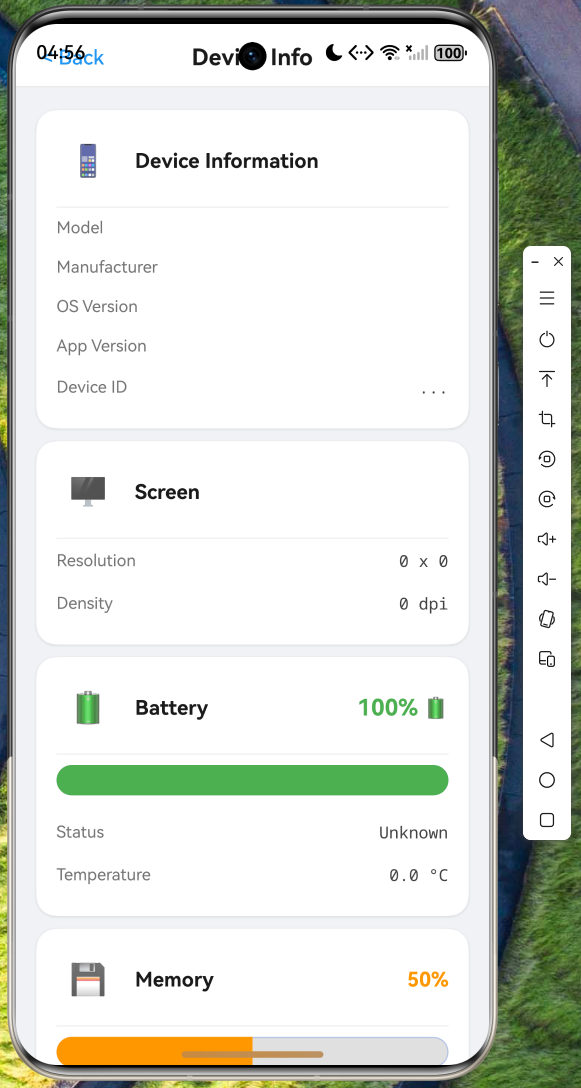
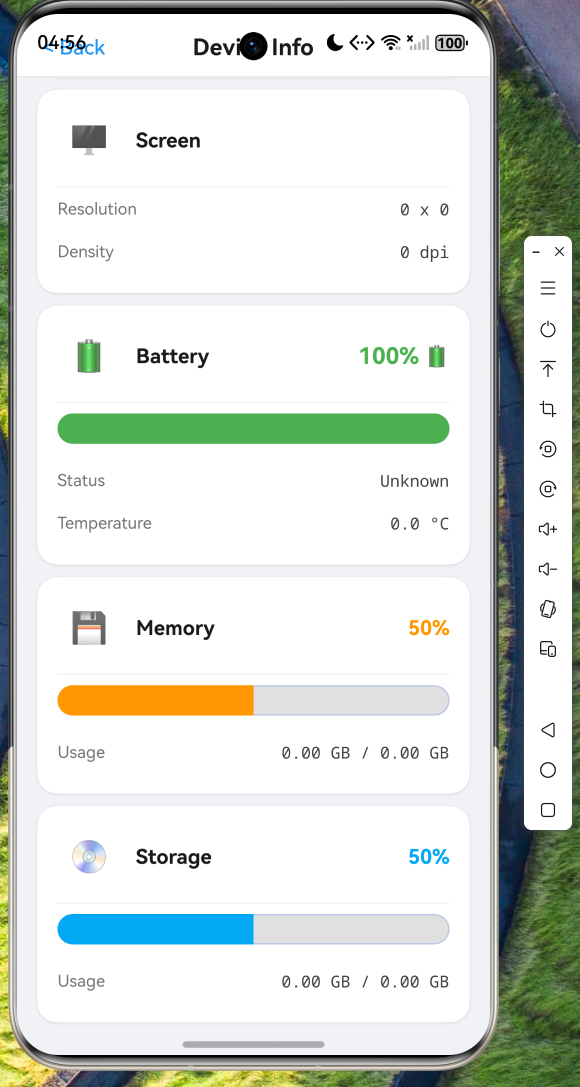
九、技术要点总结
- MethodChannel 使用:使用
MethodChannel('com.demo/device_info')与原生通信 - 错误处理:始终使用 try-catch 包裹 MethodChannel 调用,并提供降级默认值
- 并行加载:使用
Future.wait()并行获取多个信息提升性能 - 资源清理:页面销毁时及时调用
dispose()释放监控资源

讨论HarmonyOS开发技术,专注于API与组件、DevEco Studio、测试、元服务和应用上架分发等。
更多推荐
 6
6 0
0- 0


 已为社区贡献4条内容

所有评论(0)