HarmonyOS NEXT 实战:从零开发「骰子模拟器」应用
HarmonyOS NEXT 实战:从零开发「骰子模拟器」应用
本文记录了使用 HarmonyOS NEXT 和 ArkTS 开发一个功能完整的骰子模拟器应用的完整过程,涵盖动画效果、主题切换、历史记录等核心功能实现。
一、项目背景
骰子是生活中常见的随机工具,从桌游到决策场景都有广泛应用。开发一个骰子模拟器应用,不仅能学习到 HarmonyOS 的核心开发技能,还能深入理解动画系统、状态管理等重要概念。
项目亮点
- ✨ 滚动动画:模拟真实骰子的翻滚效果
- 🎨 主题切换:支持 5 种精心设计的配色方案
- 📊 历史记录:自动记录最近 10 次投掷结果
- 💡 交互设计:支持点击骰子或按钮两种操作方式
- 🎯 状态管理:多状态协同控制,确保交互流畅
二、开发环境
| 项目 | 版本/说明 |
|---|---|
| 操作系统 | Windows 10/11 |
| 开发工具 | DevEco Studio 5.0+ |
| HarmonyOS SDK | API 23 (6.1.0) 最低版本 |
| 目标 SDK | API 24 (6.1.1) |
| 开发语言 | ArkTS (TypeScript 超集) |
| 运行环境 | HarmonyOS NEXT 手机/模拟器 |
三、项目结构解析
MyApplication/
├── AppScope/                    # 应用全局资源
│   ├── app.json5               # 应用配置
│   └── resources/base/
│       └── element/
│           └── string.json      # 应用名称等
├── entry/                       # 主模块
│   ├── src/main/
│   │   ├── ets/
│   │   │   ├── entryability/
│   │   │   │   └── EntryAbility.ets  # 应用入口
│   │   │   └── pages/
│   │   │       └── Index.ets         # 主页面 ⭐
│   │   └── resources/
│   │       ├── base/
│   │       │   ├── element/
│   │       │   │   ├── color.json
│   │       │   │   └── string.json
│   │       │   ├── media/
│   │       │   └── profile/
│   │       │       └── main_pages.json
│   │       └── dark/                 # 暗色主题
│   ├── build-profile.json5
│   └── module.json5
├── build-profile.json5
└── hvigorfile.ts
核心文件:
Index.ets:主页面,包含所有 UI 和业务逻辑module.json5:模块配置,声明 Ability 和权限main_pages.json:页面路由表
四、功能设计与数据模型
4.1 功能需求分析
| 功能模块 | 说明 |
|---|---|
| 骰子显示 | 显示当前点数,支持 1-6 点 |
| 投掷动画 | 模拟骰子翻滚的视觉效果 |
| 主题切换 | 5 种配色方案可选 |
| 历史记录 | 记录最近 10 次投掷结果和时间 |
| 统计显示 | 显示总投掷次数 |
4.2 数据模型设计
4.2.1 投掷记录接口
interface DiceRecord {
  value: number;   // 点数:1-6
  time: string;    // 投掷时间:HH:MM:SS
}
4.2.2 主题配置接口
interface DiceTheme {
  name: string;    // 主题名称
  bg: string;      // 背景颜色
  dot: string;     // 点数颜色
  border: string;  // 边框颜色
}
这种设计将数据和样式分离,便于后续扩展和维护。
4.3 状态变量设计
| 变量名 | 类型 | 初始值 | 说明 |
|---|---|---|---|
| currentValue | number | 1 | 当前显示的点数 |
| isRolling | boolean | false | 是否正在投掷 |
| rollCount | number | 0 | 当前投掷次数(动画用) |
| totalRolls | number | 0 | 总投掷次数 |
| history | DiceRecord[] | [] | 历史记录数组 |
| diceColor | string | ‘#FFFFFF’ | 骰子背景色 |
| dotColor | string | ‘#1C1C1E’ | 点数颜色 |
五、核心代码实现
5.1 组件初始化
@Entry
@Component
struct Index {
  // ========== 状态变量 ==========
  @State currentValue: number = 1;
  @State isRolling: boolean = false;
  @State rollCount: number = 0;
  @State totalRolls: number = 0;
  @State history: DiceRecord[] = [];
  @State diceColor: string = '#FFFFFF';
  @State dotColor: string = '#1C1C1E';

  // ========== 主题配置 ==========
  readonly diceColors: DiceTheme[] = [
    { name: '经典白', bg: '#FFFFFF', dot: '#1C1C1E', border: '#D1D1D6' },
    { name: '复古红', bg: '#FF3B30', dot: '#FFFFFF', border: '#C41A1A' },
    { name: '深邃蓝', bg: '#007AFF', dot: '#FFFFFF', border: '#0040DD' },
    { name: '翡翠绿', bg: '#34C759', dot: '#FFFFFF', border: '#248A3D' },
    { name: '暗夜黑', bg: '#1C1C1E', dot: '#FFFFFF', border: '#000000' },
  ];

  // ========== 辅助方法 ==========
  getCurrentTheme(): DiceTheme {
    for (let i: number = 0; i < this.diceColors.length; i++) {
      if (this.diceColors[i].bg === this.diceColor) {
        return this.diceColors[i];
      }
    }
    return this.diceColors[0];
  }
}
设计说明:
@State装饰器确保状态变化时 UI 自动更新readonly标记常量数组,避免不必要的响应式开销- 主题配置包含背景色、点数色、边框色三个维度
5.2 投掷逻辑实现
rollDice(): void {
  // 防止重复触发
  if (this.isRolling) return;
  this.isRolling = true;

  // 快速切换数字产生滚动动效
  let frame: number = 0;
  const interval = setInterval(() => {
    this.currentValue = Math.floor(Math.random() * 6) + 1;
    frame++;

    // 8 帧后停止
    if (frame >= 8) {
      clearInterval(interval);

      // 生成最终结果
      const finalValue: number = Math.floor(Math.random() * 6) + 1;
      this.currentValue = finalValue;
      this.isRolling = false;
      this.totalRolls++;

      // 记录历史
      const now = new Date();
      const timeStr =
        `${now.getHours().toString().padStart(2, '0')}:` +
        `${now.getMinutes().toString().padStart(2, '0')}:` +
        `${now.getSeconds().toString().padStart(2, '0')}`;

      const newRecord: DiceRecord = { value: finalValue, time: timeStr };

      // 新记录插入到数组开头
      const temp: DiceRecord[] = [newRecord];
      for (let j: number = 0; j < this.history.length; j++) {
        temp.push(this.history[j]);
      }
      this.history = temp;

      // 保留最近 10 条记录
      if (this.history.length > 10) {
        const temp2: DiceRecord[] = [];
        for (let k: number = 0; k < 10; k++) {
          temp2.push(this.history[k]);
        }
        this.history = temp2;
      }
    }
  }, 60);  // 每 60ms 切换一次
}
实现要点:
- 防重复触发:通过
isRolling标志位防止动画期间重复点击 - 动画效果:使用
setInterval每 60ms 切换一次点数,共切换 8 次 - 时间格式化:使用
padStart补零,确保格式统一(如09:05:03) - 历史记录管理:
- 新记录插入数组开头
- 超过 10 条时删除最旧记录
- 数组操作:通过临时数组实现插入和截取(ArkTS 数组操作限制)
5.3 主题切换实现
changeTheme(theme: DiceTheme): void {
  this.diceColor = theme.bg;
  this.dotColor = theme.dot;
}
切换主题时,只需更新两个状态变量,UI 会自动响应变化。
5.4 骰子点数绘制
使用 @Builder 装饰器构建可复用的 UI 片段:
@Builder
buildDiceFace() {
  Column() {
    if (this.currentValue === 1) {
      // 单点:居中显示
      Text('●').fontSize(48).fontColor(this.dotColor)

    } else if (this.currentValue === 2) {
      // 两点:对角排列
      Row() {
        Column() { Text('●').fontSize(24).fontColor(this.dotColor) }.width('50%')
        Column() { Text('●').fontSize(24).fontColor(this.dotColor) }.width('50%')
      }.width(120).justifyContent(FlexAlign.SpaceAround)

    } else if (this.currentValue === 3) {
      // 三点:对角线排列
      Row() {
        Column() { Text('●').fontSize(20).fontColor(this.dotColor) }.width('33%')
        Column() { Text('●').fontSize(24).fontColor(this.dotColor) }.width('33%')
        Column() { Text('●').fontSize(20).fontColor(this.dotColor) }.width('33%')
      }.width(140).justifyContent(FlexAlign.SpaceAround)

    } else if (this.currentValue === 4) {
      // 四点:四个角落
      Column({ space: 12 }) {
        Row({ space: 24}) {
          Text('●').fontSize(24).fontColor(this.dotColor)
          Text('●').fontSize(24).fontColor(this.dotColor)
        }
        Row({ space: 24}) {
          Text('●').fontSize(24).fontColor(this.dotColor)
          Text('●').fontSize(24).fontColor(this.dotColor)
        }
      }

    } else if (this.currentValue === 5) {
      // 五点:四角 + 中心
      Column({ space: 10 }) {
        Row({ space: 18 }) {
          Text('●').fontSize(20).fontColor(this.dotColor)
          Text('●').fontSize(20).fontColor(this.dotColor)
          Text('●').fontSize(20).fontColor(this.dotColor)
        }
        Row({ space: 18 }) {
          Text('').fontSize(20)
          Text('●').fontSize(24).fontColor(this.dotColor)
          Text('').fontSize(20)
        }
        Row({ space: 18 }) {
          Text('●').fontSize(20).fontColor(this.dotColor)
          Text('●').fontSize(20).fontColor(this.dotColor)
          Text('●').fontSize(20).fontColor(this.dotColor)
        }
      }

    } else {
      // 六点:两行三列
      Column({ space: 8 }) {
        Row({ space: 14 }) {
          Text('●').fontSize(20).fontColor(this.dotColor)
          Text('●').fontSize(20).fontColor(this.dotColor)
          Text('●').fontSize(20).fontColor(this.dotColor)
        }
        Row({ space: 14 }) {
          Text('●').fontSize(20).fontColor(this.dotColor)
          Text('●').fontSize(20).fontColor(this.dotColor)
          Text('●').fontSize(20).fontColor(this.dotColor)
        }
        Row({ space: 14 }) {
          Text('●').fontSize(20).fontColor(this.dotColor)
          Text('●').fontSize(20).fontColor(this.dotColor)
          Text('●').fontSize(20).fontColor(this.dotColor)
        }
      }
    }
  }
  .width(160)
  .height(160)
  .justifyContent(FlexAlign.Center)
  .alignItems(HorizontalAlign.Center)
}
设计思路:
| 点数 | 布局方式 | 视觉效果 |
|---|---|---|
| 1 点 | 单个居中 | ● |
| 2 点 | Row 水平排列 | ● ○ ○ ● |
| 3 点 | Row 水平排列 | ● ○ ● ○ ● |
| 4 点 | Column + Row,2×2 | ● ● / ● ● |
| 5 点 | Column + Row,3×3 稀疏 | ● ● ● / ○ ● ○ / ● ● ● |
| 6 点 | Column + Row,2×3 | ● ● ● / ● ● ● |
六、UI 布局实现
6.1 主容器布局
build() {
  Column() {
    // 标题区域
    // 骰子主体
    // 投掷按钮
    // 主题选择
    // 历史记录
  }
  .width('100%')
  .height('100%')
  .backgroundColor('#FFFFFF')
  .padding(20)
  .alignItems(HorizontalAlign.Center)
}
6.2 标题区域
Text('🎲 骰子模拟器')
  .fontSize(26)
  .fontWeight(FontWeight.Bold)
  .fontColor('#1C1C1E')
  .margin({ top: 30, bottom: 4 })

Text(`已投掷 ${this.totalRolls} 次`)
  .fontSize(14)
  .fontColor('#8E8E93')
  .margin({ bottom: 20 })
6.3 骰子主体
Column() {
  this.buildDiceFace()
}
.width(180)
.height(180)
.backgroundColor(this.diceColor)
.borderRadius(24)
.border({ width: 3, color: this.getCurrentTheme().border })
.shadow({ radius: 12, color: '#20000000', offsetY: 4 })
.justifyContent(FlexAlign.Center)
.alignItems(HorizontalAlign.Center)
.opacity(this.isRolling ? 0.7 : 1.0)
.animation({ duration: 200 })
.onClick(() => {
  this.rollDice();
})
视觉效果:
- 圆角卡片(24px)
- 阴影效果(模拟立体感)
- 投掷时透明度降低(0.7)
- 点击触发投掷
6.4 投掷按钮
Button(this.isRolling ? '🎲 投掷中...' : '🎲 掷骰子')
  .type(ButtonType.Capsule)
  .width(200)
  .height(50)
  .backgroundColor('#007AFF')
  .fontSize(18)
  .fontWeight(FontWeight.Bold)
  .margin({ top: 24 })
  .enabled(!this.isRolling)
  .onClick(() => {
    this.rollDice();
  })
交互设计:
- 投掷时按钮禁用(
enabled(!this.isRolling)) - 文字动态变化:“掷骰子” ↔ “投掷中…”
- 蓝色胶囊样式,符合 iOS 设计规范
6.5 主题选择器
Text('选择主题')
  .fontSize(14)
  .fontColor('#8E8E93')
  .margin({ top: 20, bottom: 8 })

Row({ space: 10 }) {
  ForEach(this.diceColors, (theme: DiceTheme) => {
    Column() {
      Row() {
        Text(theme.name)
          .fontSize(11)
          .fontColor(theme.bg === '#1C1C1E' ? '#FFFFFF' : '#1C1C1E')
      }
      .width(60)
      .height(28)
      .backgroundColor(theme.bg)
      .borderRadius(14)
      .border({
        width: this.diceColor === theme.bg ? 2 : 1,
        color: this.diceColor === theme.bg ? '#007AFF' : theme.border
      })
      .justifyContent(FlexAlign.Center)
      .onClick(() => {
        this.changeTheme(theme);
      })
    }
  })
}
设计要点:
- 使用
ForEach循环渲染主题按钮 - 当前主题显示蓝色边框高亮
- 深色主题(暗夜黑)文字显示白色
6.6 历史记录列表
if (this.history.length > 0) {
  // 标题栏
  Row() {
    Text('📋 投掷记录')
      .fontSize(16)
      .fontWeight(FontWeight.Bold)
      .fontColor('#1C1C1E')
    Blank()
    Text('清空')
      .fontSize(13)
      .fontColor('#FF3B30')
      .onClick(() => {
        this.clearHistory();
      })
  }
  .width('100%')
  .margin({ top: 20, bottom: 8 })
  .padding({ left: 4, right: 4 })

  // 记录列表
  Column({ space: 4 }) {
    ForEach(this.history, (record: DiceRecord) => {
      Row() {
        Text(`🎲 ${record.value}`)
          .fontSize(18)
          .fontWeight(FontWeight.Bold)
          .fontColor('#1C1C1E')
        Blank()
        Text(record.time)
          .fontSize(12)
          .fontColor('#8E8E93')
      }
      .width('100%')
      .padding({ left: 14, right: 14, top: 10, bottom: 10 })
      .backgroundColor('#F2F2F7')
      .borderRadius(10)
    })
  }
  .width('100%')
}
列表项设计:
- 左侧显示骰子图标和点数
- 右侧显示投掷时间
- 灰色圆角卡片背景
6.7 空状态提示
else if (this.totalRolls === 0) {
  Text('点击骰子或按钮开始投掷 🎲')
    .fontSize(14)
    .fontColor('#C7C7CC')
    .margin({ top: 24 })
}
七、配置文件详解
7.1 模块配置(module.json5)
{
  "module": {
    "name": "entry",
    "type": "entry",
    "description": "$string:module_desc",
    "mainElement": "EntryAbility",
    "deviceTypes": [
      "phone"
    ],
    "deliveryWithInstall": true,
    "installationFree": false,
    "pages": "$profile:main_pages",
    "abilities": [
      {
        "name": "EntryAbility",
        "srcEntry": "./ets/entryability/EntryAbility.ets",
        "description": "$string:EntryAbility_desc",
        "icon": "$media:layered_image",
        "label": "$string:EntryAbility_label",
        "startWindowIcon": "$media:startIcon",
        "startWindowBackground": "$color:start_window_background",
        "exported": true,
        "skills": [
          {
            "entities": [
              "entity.system.home"
            ],
            "actions": [
              "ohos.want.action.home"
            ]
          }
        ]
      }
    ]
  }
}
关键配置说明:
| 字段 | 说明 |
|---|---|
| deviceTypes | 支持的设备类型(phone/tablet/tv) |
| pages | 页面路由配置文件 |
| abilities | Ability 声明 |
| skills | 定义可响应的 Intent |
| exported | 是否允许其他应用调用 |
7.2 构建配置(build-profile.json5)
{
  "app": {
    "products": [
      {
        "name": "default",
        "signingConfig": "default",
        "targetSdkVersion": "6.1.1(24)",
        "compatibleSdkVersion": "6.1.0(23)",
        "runtimeOS": "HarmonyOS",
        "buildOption": {
          "strictMode": {
            "caseSensitiveCheck": true,
            "useNormalizedOHMUrl": true
          }
        }
      }
    ]
  }
}
版本说明:
compatibleSdkVersion:最低兼容版本(API 23)targetSdkVersion:目标 SDK 版本(API 24)strictMode:启用严格模式,提升代码质量
7.3 字符串资源(string.json)
{
  "string": [
    {
      "name": "module_desc",
      "value": "骰子模拟器"
    },
    {
      "name": "EntryAbility_desc",
      "value": "掷骰子应用,支持多种主题"
    },
    {
      "name": "EntryAbility_label",
      "value": "骰子模拟器"
    }
  ]
}
资源引用:
- 在代码中使用
$string:module_desc引用 - 便于国际化和统一管理
八、运行与调试
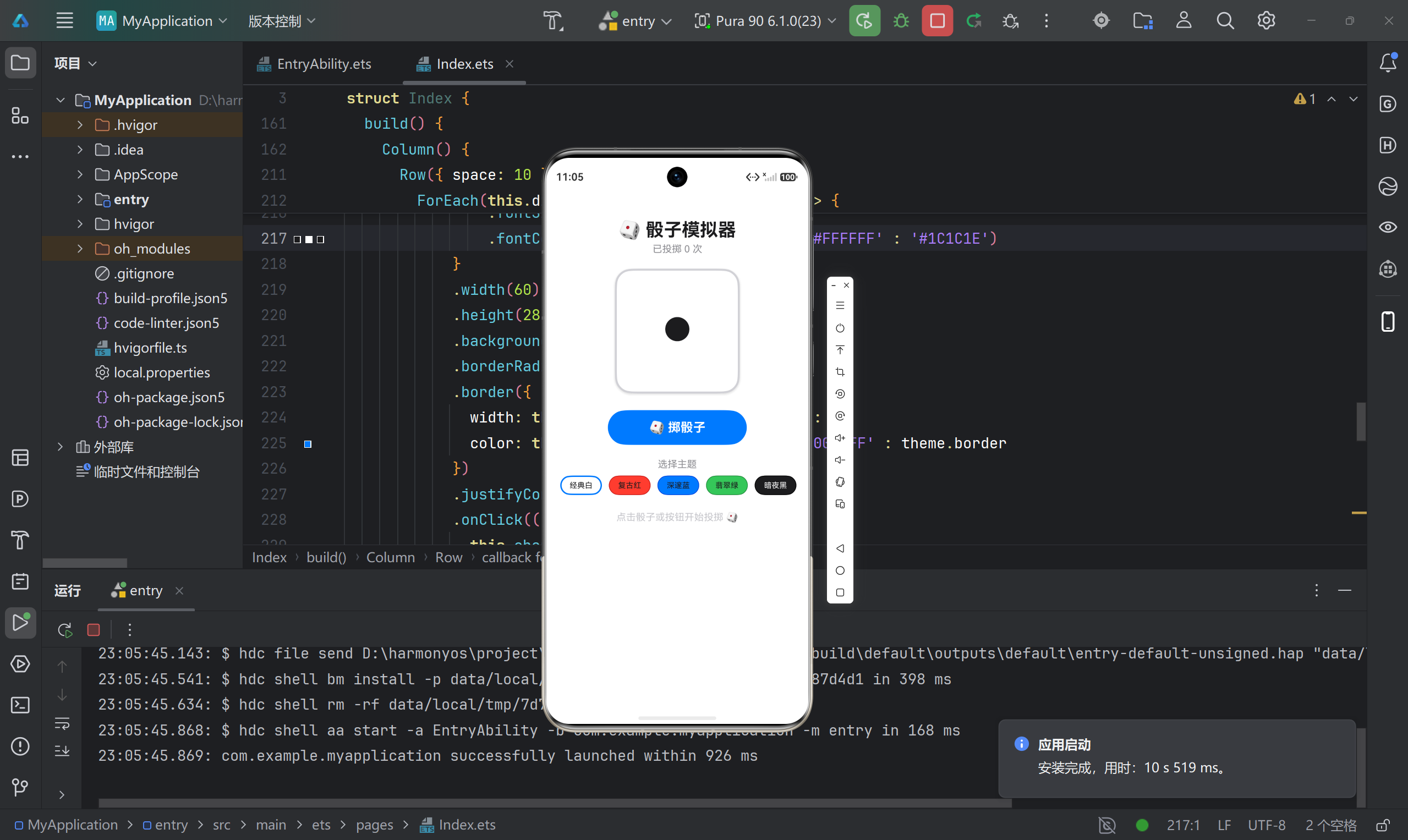
九、功能演示
9.1 初始状态
应用启动后,骰子显示 1 点,提示"点击骰子或按钮开始投掷"。
9.2 投掷过程
- 点击骰子:直接点击骰子区域触发投掷
- 点击按钮:点击"掷骰子"按钮触发投掷
- 动画效果:骰子点数快速切换 8 次,最终停在随机点数
9.3 主题切换
点击主题按钮,骰子颜色立即切换:
| 主题 | 背景色 | 点数色 | 视觉效果 |
|---|---|---|---|
| 经典白 | 白色 | 黑色 | 简洁经典 |
| 复古红 | 红色 | 白色 | 醒目热烈 |
| 深邃蓝 | 蓝色 | 白色 | 沉稳专业 |
| 翡翠绿 | 绿色 | 白色 | 清新活力 |
| 暗夜黑 | 黑色 | 白色 | 神秘酷炫 |
9.4 历史记录
每次投掷后,结果自动记录到历史列表:
- 最新记录显示在最上方
- 显示点数和投掷时间
- 最多保留 10 条记录
- 可点击"清空"按钮清除所有记录
十、踩坑记录与解决方案
10.1 动画防抖问题
问题描述: 快速连续点击骰子,导致动画混乱。
解决方案:
rollDice(): void {
  if (this.isRolling) return;  // 防止重复触发
  this.isRolling = true;
  // ... 动画逻辑
}
要点: 使用 isRolling 标志位作为锁,确保动画期间不响应新的点击。
10.2 数组操作限制
问题描述: ArkTS 不支持 unshift()、splice() 等数组方法。
解决方案:
// ❌ 错误写法(不支持)
this.history.unshift(newRecord);
this.history.splice(10);

// ✅ 正确写法(创建新数组)
const temp: DiceRecord[] = [newRecord];
for (let j: number = 0; j < this.history.length; j++) {
  temp.push(this.history[j]);
}
this.history = temp;
要点: 通过临时数组实现插入和截取操作。
10.3 主题边框高亮
问题描述: 如何在选中主题时显示高亮边框?
解决方案:
.border({
  width: this.diceColor === theme.bg ? 2 : 1,  // 选中时加粗
  color: this.diceColor === theme.bg ? '#007AFF' : theme.border  // 选中时蓝色
})
要点: 使用条件表达式动态设置边框样式。
10.4 时间格式化
问题描述: 如何确保时间格式统一(如 09:05:03)?
解决方案:
const now = new Date();
const timeStr =
  `${now.getHours().toString().padStart(2, '0')}:` +
  `${now.getMinutes().toString().padStart(2, '0')}:` +
  `${now.getSeconds().toString().padStart(2, '0')}`;
要点: 使用 padStart(2, '0') 补零。
10.5 @Builder 装饰器使用
问题描述: 如何复用复杂的 UI 片段?
解决方案:
@Builder
buildDiceFace() {
  // 骰子点数绘制逻辑
}

// 在 build() 中调用
Column() {
  this.buildDiceFace()
}
要点: @Builder 定义的 UI 片段可以在多处复用,减少重复代码。
10.6 条件渲染嵌套
问题描述: 多层条件渲染逻辑混乱。
解决方案:
if (this.history.length > 0) {
  // 显示历史记录
} else if (this.totalRolls === 0) {
  // 显示空状态提示
}
要点: 使用 if-else if 结构,确保同一时间只显示一种状态。
十一、项目总结
11.1 技术要点回顾
| 技术点 | 说明 |
|---|---|
| @State | 响应式状态管理 |
| @Builder | 可复用 UI 片段 |
| setInterval | 定时器实现动画 |
| ForEach | 循环渲染列表 |
| 条件渲染 | if 语句控制显示 |
| 接口定义 | interface 数据模型 |
11.2 架构设计
用户交互
    ↓
状态管理 (@State)
    ↓
业务逻辑 (rollDice / changeTheme)
    ↓
UI 渲染 (@Builder + build)
    ↓
历史记录
11.3 性能优化
- 避免过度状态化:
diceColors使用readonly,不触发响应式 - 动画流畅性:使用
setInterval而非递归,避免调用栈溢出 - 列表渲染优化:限制历史记录最多 10 条,避免内存泄漏
- 防抖处理:通过
isRolling标志位防止重复触发
11.4 扩展方向
- 多骰子支持:支持同时投掷 2 个或多个骰子
- 自定义点数:支持 D4、D8、D10、D12、D20 等多种骰子类型
- 震动反馈:投掷时触发手机震动
- 音效支持:添加骰子滚动音效
- 数据持久化:使用 Preferences 保存历史记录和主题偏好
- 统计图表:展示各点数出现频率的饼图或柱状图
附录:常见问题 FAQ
Q1: 动画卡顿怎么办?
A: 检查 setInterval 的间隔时间,建议不低于 50ms。同时确保动画期间没有执行耗时操作。
Q2: 主题切换后历史记录消失?
A: 主题切换只改变样式,不影响历史记录数据。检查是否有其他代码错误导致状态重置。
Q3: 如何适配不同屏幕尺寸?
A: 使用百分比宽度(如 width('100%'))和相对单位,避免使用固定像素值。
Q4: 如何添加更多主题?
A: 在 diceColors 数组中添加新的主题配置即可:
readonly diceColors: DiceTheme[] = [
  // 现有主题...
  { name: '紫罗兰', bg: '#AF52DE', dot: '#FFFFFF', border: '#8B3AA8' },
];
Q5: 如何持久化历史记录?
A: 使用 Preferences API:
import preferences from '@ohos.data.preferences';

// 保存数据
await preferences.put('history', JSON.stringify(this.history));

// 读取数据
const data = await preferences.get('history', '[]');
this.history = JSON.parse(data);
项目信息:
- 最低 SDK:API 23 (6.1.0)
- 目标 SDK:API 24 (6.1.1)
- 开发工具:DevEco Studio 5.0+

讨论HarmonyOS开发技术,专注于API与组件、DevEco Studio、测试、元服务和应用上架分发等。
更多推荐
 3
3 0
0- 0


 已为社区贡献68条内容

所有评论(0)