Harmonyos应用实例72. 观察物体:3D视图探索
2. 观察物体:3D视图探索
知识点:能辨认从前面、上面、左面观察到的几何体的形状。
功能:展示一个由小正方体搭建的3D立体模型,学生可以通过手指滑动屏幕旋转模型,并点击不同视角按钮(前面、上面、左面),应用显示对应视角的平面图形,培养空间想象力。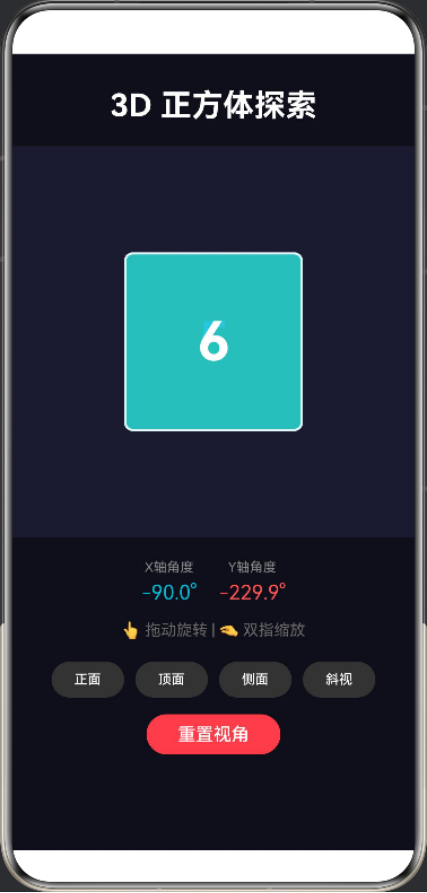 ng)
ng)
@Entry
@Component
struct Cube3D {
@State rotationX: number = 25
@State rotationY: number = -35
@State currentFace: number = 1
private readonly cubeSize: number = 150
build() {
Column({ space: 20 }) {
Text(‘🎲 3D 正方体探索’)
.fontSize(28)
.fontWeight(FontWeight.Bold)
.fontColor(‘#FFFFFF’)
.margin({ top: 40, bottom: 20 })
  // 3D展示区域
  Stack() {
    // 正方体 - 使用Stack叠加六个面
    Stack() {
      // 前面 - 红色
      this.buildFace('1', '#FF5252', 0, 0, 6)

      // 后面 - 蓝色
      this.buildFace('2', '#448AFF', 0, 0, 1)

      // 右面 - 绿色
      this.buildFace('3', '#69F0AE', 75, 0, 5)

      // 左面 - 紫色
      this.buildFace('4', '#E040FB', -75, 0, 2)

      // 顶面 - 黄色
      this.buildFace('5', '#FFD740', 0, -75, 4)

      // 底面 - 青色
      this.buildFace('6', '#00BCD4', 0, 75, 3)
    }
    .width(this.cubeSize)
    .height(this.cubeSize)
    .rotate({ angle: this.rotationX + this.rotationY })
  }
  .width('100%')
  .height(320)
  .backgroundColor('#1A1A2E')
  .gesture(
    PanGesture()
      .onActionUpdate((event) => {
        this.rotationY += event.offsetX * 0.3
        this.rotationX -= event.offsetY * 0.3
      })
  )

  // 当前面显示
  Text(`当前显示: ${this.getFaceName()}`)
    .fontSize(16)
    .fontColor('#888888')
    .margin({ top: 10 })

  // 控制按钮
  Row({ space: 8 }) {
    Button('前面')
      .width(60)
      .height(32)
      .fontSize(11)
      .backgroundColor('#FF5252')
      .onClick(() => { this.currentFace = 1; this.resetRotation() })

    Button('后面')
      .width(60)
      .height(32)
      .fontSize(11)
      .backgroundColor('#448AFF')
      .onClick(() => { this.currentFace = 2; this.resetRotation() })

    Button('右面')
      .width(60)
      .height(32)
      .fontSize(11)
      .backgroundColor('#69F0AE')
      .onClick(() => { this.currentFace = 3; this.resetRotation() })

    Button('左面')
      .width(60)
      .height(32)
      .fontSize(11)
      .backgroundColor('#E040FB')
      .onClick(() => { this.currentFace = 4; this.resetRotation() })
  }
  .margin({ top: 15 })

  Row({ space: 8 }) {
    Button('顶面')
      .width(60)
      .height(32)
      .fontSize(11)
      .backgroundColor('#FFD740')
      .onClick(() => { this.currentFace = 5; this.resetRotation() })

    Button('底面')
      .width(60)
      .height(32)
      .fontSize(11)
      .backgroundColor('#00BCD4')
      .onClick(() => { this.currentFace = 6; this.resetRotation() })

    Button('旋转')
      .width(60)
      .height(32)
      .fontSize(11)
      .backgroundColor('#333333')
      .onClick(() => { this.startRotation() })

    Button('重置')
      .width(60)
      .height(32)
      .fontSize(11)
      .backgroundColor('#666666')
      .onClick(() => { this.resetAll() })
  }

  // 提示文字
  Text('👆 拖动旋转 | 点击按钮切换视角')
    .fontSize(14)
    .fontColor('#666666')
    .margin({ top: 20 })

  // 正方体信息
  Column({ space: 5 }) {
    Text('正方体特征:')
      .fontSize(14)
      .fontColor('#888888')
    Text('• 6个面、12条棱、8个顶点')
      .fontSize(12)
      .fontColor('#666666')
    Text('• 每个面都是正方形')
      .fontSize(12)
      .fontColor('#666666')
    Text('• 相对的面互相平行')
      .fontSize(12)
      .fontColor('#666666')
  }
  .margin({ top: 20 })
  .alignItems(HorizontalAlign.Start)
}
.width('100%')
.height('100%')
.backgroundColor('#0F0F1A')
}
@Builder
buildFace(label: string, color: string, offsetX: number, offsetY: number, zIndex: number) {
Stack() {
Column()
.width(this.cubeSize)
.height(this.cubeSize)
.backgroundColor(color)
.border({ width: 3, color: ‘#FFFFFF’ })
.borderRadius(12)
  Text(label)
    .fontSize(56)
    .fontWeight(FontWeight.Bold)
    .fontColor('#FFFFFF')
}
.width(this.cubeSize)
.height(this.cubeSize)
.position({ x: offsetX, y: offsetY })
.zIndex(zIndex)
}
getFaceName(): string {
const names = [‘’, ‘前面’, ‘后面’, ‘右面’, ‘左面’, ‘顶面’, ‘底面’]
return names[this.currentFace] || ‘未知’
}
resetRotation() {
this.rotationX = 0
this.rotationY = 0
}
startRotation() {
this.rotationX = 25
this.rotationY = -35
}
resetAll() {
this.rotationX = 25
this.rotationY = -35
this.currentFace = 1
}
}

讨论HarmonyOS开发技术,专注于API与组件、DevEco Studio、测试、元服务和应用上架分发等。
更多推荐

 2
2 0
0- 0


 已为社区贡献400条内容

所有评论(0)