Harmonyos应用实例207:双曲线的渐近线逼近
·
9. 双曲线的渐近线逼近
对应章节:3.2 双曲线
功能简介:
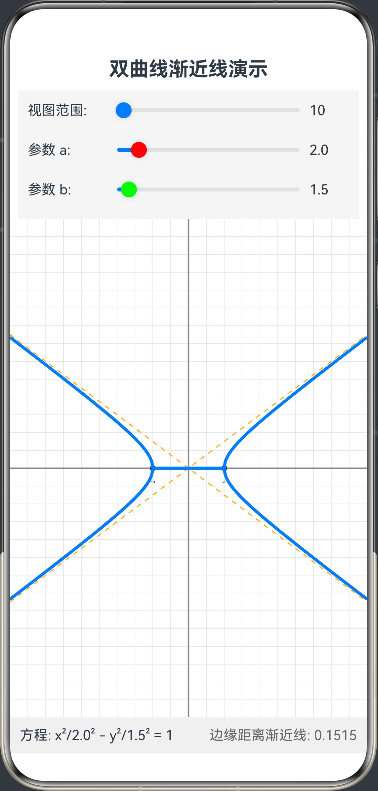
绘制双曲线 x2a2−y2b2=1\frac{x^2}{a^2} - \frac{y^2}{b^2} = 1a2x2−b2y2=1 及其渐近线 y=±baxy = \pm \frac{b}{a}xy=±abx。支持缩放视图,当视图范围扩大时,可以直观看到双曲线的分支无限贴近渐近线,帮助学生理解“渐近”的极限思想。
@Entry
@Component
struct HyperbolaAsymptoteVisualization {
  private settings: RenderingContextSettings = new RenderingContextSettings(true);
  private context: CanvasRenderingContext2D = new CanvasRenderingContext2D(this.settings);

  // 画布尺寸
  private canvasWidth: number = 0;
  private canvasHeight: number = 0;

  // 双曲线参数
  @State a: number = 2.0; // 实轴半轴长
  @State b: number = 1.5; // 虚轴半轴长

  // 视图控制参数:表示视图半径(逻辑单位)
  // 初始为 10,扩大到 100 可以看到渐近效果
  @State viewRadius: number = 10;

  // 辅助数据
  @State distanceToAsymptote: string = "0.00";

  aboutToAppear() {
    // 初始化
  }

  // 核心绘制逻辑
  private drawScene() {
    if (!this.context || this.canvasWidth === 0) return;

    // 1. 清空画布
    this.context.clearRect(0, 0, this.canvasWidth, this.canvasHeight);
    this.context.save();

    // 2. 计算坐标变换参数
    // 为了保持图形比例(1:1),scale 取决于短边
    const minDimension = Math.min(this.canvasWidth, this.canvasHeight);
    // scale: 每逻辑单位对应多少像素
    const scale = minDimension / (2 * this.viewRadius);

    // 屏幕中心坐标
    const centerX = this.canvasWidth / 2;
    const centerY = this.canvasHeight / 2;

    // 3. 绘制网格和坐标轴
    this.drawGrid(centerX, centerY, scale);

    // 4. 绘制渐近线 y = ±(b/a)x
    // 我们需要画穿过整个屏幕的直线
    // 逻辑坐标范围是 [-viewRadius, viewRadius]
    const logicBound = this.viewRadius;

    // 渐近线在这个范围内的端点
    const asy_x1 = -logicBound;
    const asy_y1 = -logicBound * (this.b / this.a); // y = (b/a)x
    const asy_x2 = logicBound;
    const asy_y2 = logicBound * (this.b / this.a);

    this.context.lineWidth = 1;
    this.context.strokeStyle = '#FFA500'; // 橙色渐近线
    this.context.setLineDash([5, 5]); // 虚线

    // 绘制 y = (b/a)x
    this.drawLine(centerX + asy_x1 * scale, centerY - asy_y1 * scale,
      centerX + asy_x2 * scale, centerY - asy_y2 * scale);
    // 绘制 y = -(b/a)x
    this.drawLine(centerX + asy_x1 * scale, centerY + asy_y1 * scale,
      centerX + asy_x2 * scale, centerY + asy_y2 * scale);

    this.context.setLineDash([]); // 恢复实线

    // 5. 绘制双曲线 x^2/a^2 - y^2/b^2 = 1
    this.context.lineWidth = 3;
    this.context.strokeStyle = '#007DFF'; // 蓝色双曲线

    // 绘制上半支和下半支
    // 优化:遍历像素点比遍历逻辑点更平滑
    // 只绘制 |x| >= a 的部分

    // 右支 (x > 0)
    this.context.beginPath();
    let started = false;

    // 遍历屏幕 x 像素
    for (let screenX = 0; screenX <= this.canvasWidth; screenX++) {
      // 屏幕坐标转逻辑坐标
      let logicX = (screenX - centerX) / scale;

      // 只有在双曲线定义域内才绘制
      if (Math.abs(logicX) >= this.a) {
        // 计算逻辑 y: y = b * sqrt(x^2/a^2 - 1)
        let val = (logicX * logicX) / (this.a * this.a) - 1;
        if (val >= 0) {
          let logicY = this.b * Math.sqrt(val);

          // 绘制上半支 (屏幕 y 需要反转)
          let screenYUp = centerY - logicY * scale;
          // 绘制下半支
          let screenYDown = centerY + logicY * scale;

          if (!started) {
            this.context.moveTo(screenX, screenYUp);
            started = true;
          } else {
            this.context.lineTo(screenX, screenYUp);
          }
        }
      }
    }
    this.context.stroke();

    // 绘制下半支 (重新路径)
    this.context.beginPath();
    started = false;
    for (let screenX = 0; screenX <= this.canvasWidth; screenX++) {
      let logicX = (screenX - centerX) / scale;
      if (Math.abs(logicX) >= this.a) {
        let val = (logicX * logicX) / (this.a * this.a) - 1;
        if (val >= 0) {
          let logicY = this.b * Math.sqrt(val);
          let screenYDown = centerY + logicY * scale;
          if (!started) {
            this.context.moveTo(screenX, screenYDown);
            started = true;
          } else {
            this.context.lineTo(screenX, screenYDown);
          }
        }
      }
    }
    this.context.stroke();

    // 绘制左支 (逻辑对称,只需将屏幕 x 倒过来算一遍即可,或者简单通过绘制右支的镜像)
    // 为了代码简洁,利用 Canvas 的 scale(-1, 1) 画右支的镜像
    this.context.save();
    this.context.translate(centerX, centerY);
    this.context.scale(-1, 1); // X轴镜像
    this.context.translate(-centerX, -centerY);

    // 重新绘制右支代码块(此时会画在左边)
    this.context.beginPath();
    started = false;
    for (let screenX = 0; screenX <= this.canvasWidth; screenX++) {
      // ...同上逻辑...
      let logicX = (screenX - centerX) / scale; // 注意:由于坐标系翻转,这里的计算逻辑其实是相对于翻转后的坐标系
      // 简单起见,直接复用上面的计算逻辑
      if (Math.abs(logicX) >= this.a) {
        let val = (logicX * logicX) / (this.a * this.a) - 1;
        if (val >= 0) {
          let logicY = this.b * Math.sqrt(val);
          let screenYUp = centerY - logicY * scale;
          if (!started) { this.context.moveTo(screenX, screenYUp); started = true; }
          else { this.context.lineTo(screenX, screenYUp); }
        }
      }
    }
    this.context.stroke();

    this.context.beginPath();
    started = false;
    for (let screenX = 0; screenX <= this.canvasWidth; screenX++) {
      let logicX = (screenX - centerX) / scale;
      if (Math.abs(logicX) >= this.a) {
        let val = (logicX * logicX) / (this.a * this.a) - 1;
        if (val >= 0) {
          let logicY = this.b * Math.sqrt(val);
          let screenYDown = centerY + logicY * scale;
          if (!started) { this.context.moveTo(screenX, screenYDown); started = true; }
          else { this.context.lineTo(screenX, screenYDown); }
        }
      }
    }
    this.context.stroke();
    this.context.restore();

    // 6. 计算并在边缘显示距离
    // 选取当前视图右边界处的距离
    let edgeX = this.viewRadius;
    if (edgeX > this.a) {
      // 双曲线 y
      let yCurve = this.b * Math.sqrt((edgeX * edgeX) / (this.a * this.a) - 1);
      // 渐近线 y
      let yAsymp = edgeX * (this.b / this.a);
      let dist = Math.abs(yAsymp - yCurve);
      this.distanceToAsymptote = dist.toFixed(4);
    } else {
      this.distanceToAsymptote = "--";
    }

    this.context.restore();
  }

  // 绘制网格
  private drawGrid(cx: number, cy: number, scale: number) {
    this.context.lineWidth = 0.5;
    this.context.strokeStyle = '#E0E0E0';

    // 计算需要多少条线
    // 动态步长:根据缩放级别自动调整网格密度
    let step = 1; // 默认逻辑步长 1
    if (this.viewRadius > 20) step = 5;
    if (this.viewRadius > 50) step = 10;
    if (this.viewRadius > 100) step = 20;

    let pixelStep = step * scale;

    // 垂直线
    for (let x = cx % pixelStep; x < this.canvasWidth; x += pixelStep) {
      this.drawLine(x, 0, x, this.canvasHeight);
    }
    // 水平线
    for (let y = cy % pixelStep; y < this.canvasHeight; y += pixelStep) {
      this.drawLine(0, y, this.canvasWidth, y);
    }

    // 坐标轴
    this.context.strokeStyle = '#888888';
    this.context.lineWidth = 1.5;
    this.drawLine(0, cy, this.canvasWidth, cy); // X轴
    this.drawLine(cx, 0, cx, this.canvasHeight); // Y轴

    // 标注 a 和 -a 的位置
    this.context.fillStyle = '#333';
    this.context.font = '14px sans-serif';
    this.context.textAlign = 'center';
    // 标记 a
    if (cx + this.a * scale < this.canvasWidth) {
      this.context.beginPath();
      this.context.arc(cx + this.a * scale, cy, 3, 0, 6.28);
      this.context.fill();
      this.context.fillText("a", cx + this.a * scale, cy + 15);
    }
    // 标记 -a
    if (cx - this.a * scale > 0) {
      this.context.beginPath();
      this.context.arc(cx - this.a * scale, cy, 3, 0, 6.28);
      this.context.fill();
      this.context.fillText("-a", cx - this.a * scale, cy + 15);
    }
  }

  private drawLine(x1: number, y1: number, x2: number, y2: number) {
    this.context.beginPath();
    this.context.moveTo(x1, y1);
    this.context.lineTo(x2, y2);
    this.context.stroke();
  }

  build() {
    Column() {
      // 标题与说明
      Row() {
        Text('双曲线渐近线演示')
          .fontSize(20)
          .fontWeight(FontWeight.Bold)
      }
      .padding(10)

      // 控制面板
      Column() {
        Row() {
          Text('视图范围: ')
            .width(80)
            .fontSize(14)
          Slider({ value: this.viewRadius, min: 5, max: 200, step: 1, style: SliderStyle.OutSet })
            .width('60%')
            .blockColor('#007DFF')
            .onChange((value: number) => {
              this.viewRadius = value;
              this.drawScene();
            })
          Text(`${this.viewRadius.toFixed(0)}`)
            .width(40)
            .fontSize(14)
        }

        Row() {
          Text('参数 a: ')
            .width(80)
            .fontSize(14)
          Slider({ value: this.a, min: 1, max: 10, step: 0.1, style: SliderStyle.OutSet })
            .width('60%')
            .blockColor('#FF0000')
            .onChange((value: number) => {
              this.a = value;
              this.drawScene();
            })
          Text(`${this.a.toFixed(1)}`)
            .width(40)
            .fontSize(14)
        }

        Row() {
          Text('参数 b: ')
            .width(80)
            .fontSize(14)
          Slider({ value: this.b, min: 1, max: 10, step: 0.1, style: SliderStyle.OutSet })
            .width('60%')
            .blockColor('#00FF00')
            .onChange((value: number) => {
              this.b = value;
              this.drawScene();
            })
          Text(`${this.b.toFixed(1)}`)
            .width(40)
            .fontSize(14)
        }
      }
      .padding({ left: 10, right: 10, bottom: 10 })
      .backgroundColor('#F5F5F5')

      // 画布区域
      Canvas(this.context)
        .width('100%')
        .layoutWeight(1)
        .backgroundColor('#FFFFFF')
        .onReady(() => {
          this.drawScene();
        })
        .onAreaChange((oldValue: Area, newValue: Area) => {
          this.canvasWidth = Number(newValue.width);
          this.canvasHeight = Number(newValue.height);
          // 初始绘制由 onReady 触发,尺寸改变时重绘
          this.drawScene();
        })

      // 数据反馈面板
      Row() {
        Text(`方程: x²/${this.a.toFixed(1)}² - y²/${this.b.toFixed(1)}² = 1`)
          .fontSize(14)
        Blank()
        Text(`边缘距离渐近线: ${this.distanceToAsymptote}`)
          .fontSize(14)
          .fontColor('#666')
      }
      .width('100%')
      .padding(10)
      .backgroundColor('#F0F0F0')
    }
    .width('100%')
    .height('100%')
  }
}

讨论HarmonyOS开发技术,专注于API与组件、DevEco Studio、测试、元服务和应用上架分发等。
更多推荐



 0
0 0
0- 0


 已为社区贡献402条内容

所有评论(0)