Flutter鸿蒙开发:XSS防护详解
·
Flutter鸿蒙开发:XSS防护详解
欢迎加入开源鸿蒙跨平台社区! https://openharmonycrossplatform.csdn.net
一、前言
XSS(跨站脚本攻击)是Web应用中最常见的安全漏洞之一。本文将详细介绍如何在Flutter鸿蒙应用中实现XSS防护功能,包括输入过滤、输出转义和威胁检测等内容。
二、效果展示
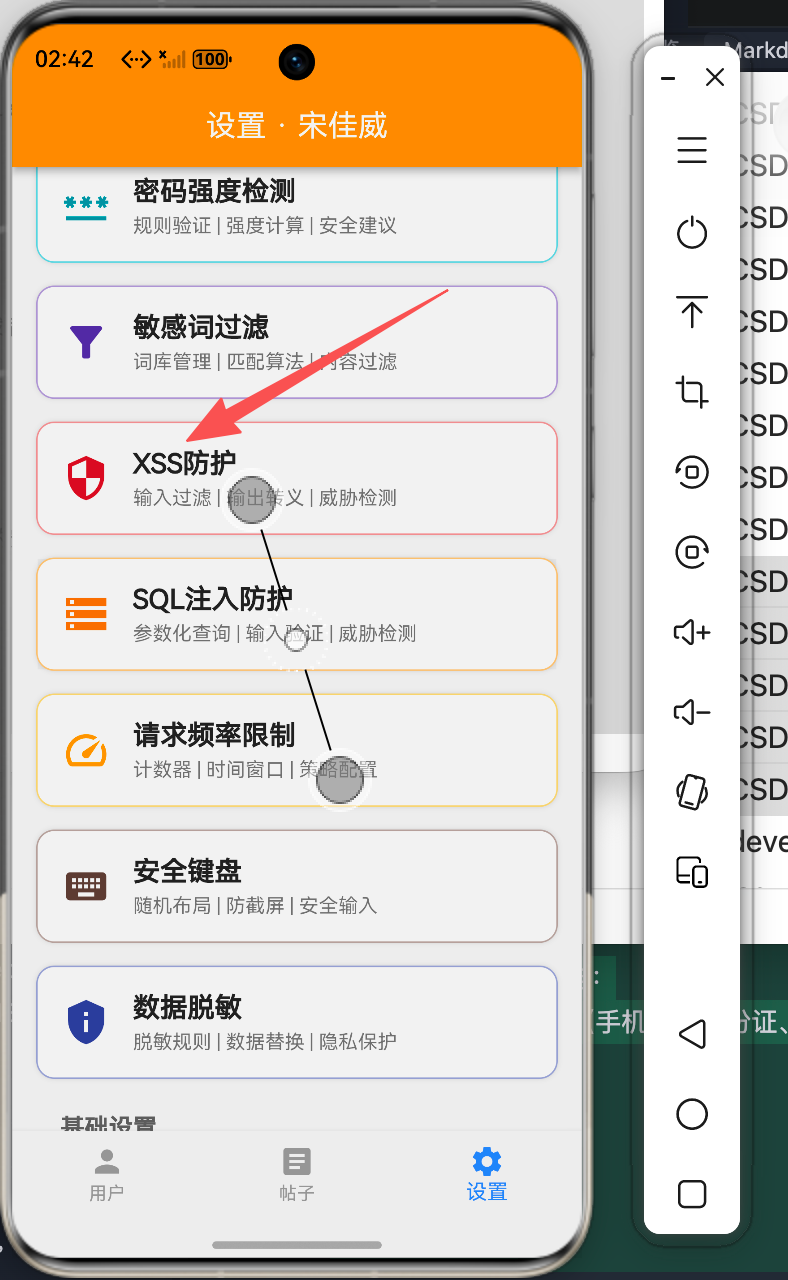
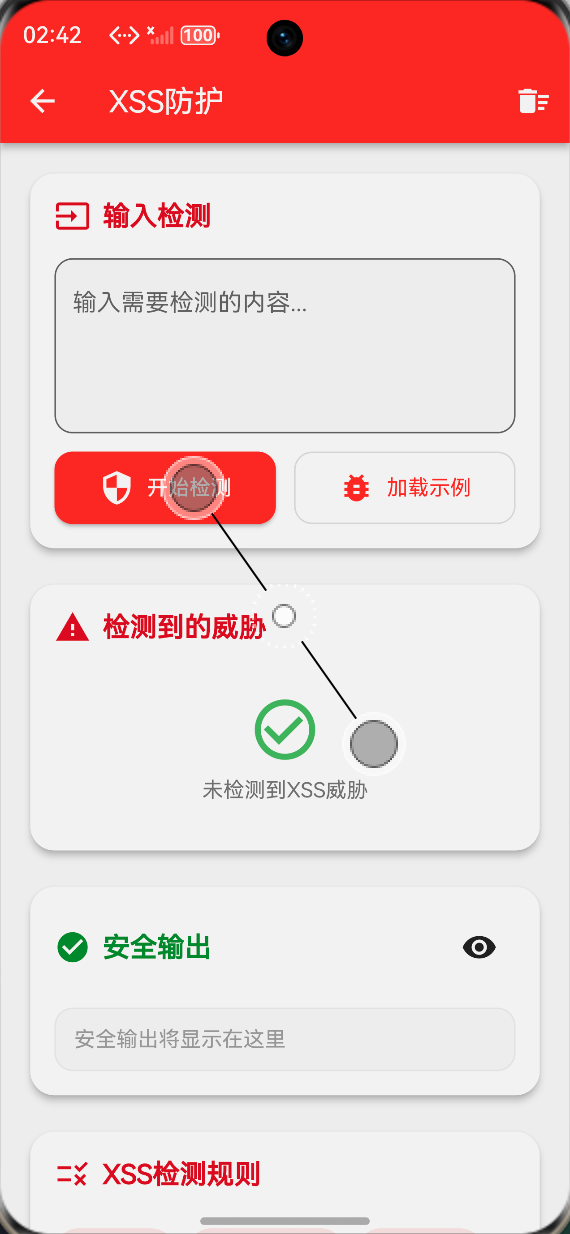
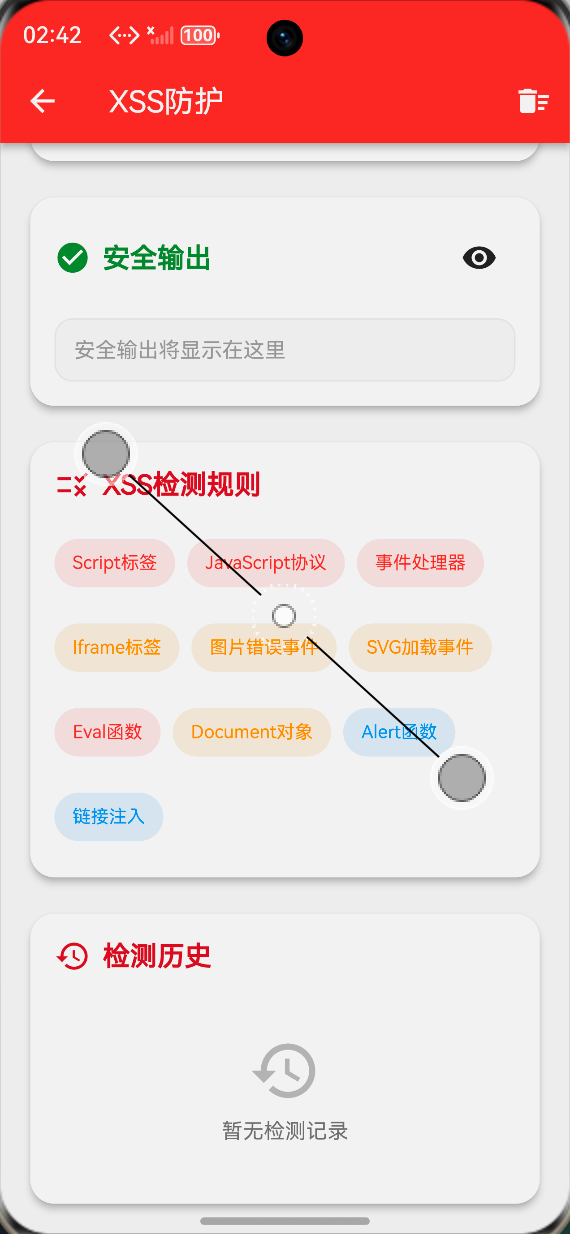
本组件实现了以下功能:
- XSS威胁模式检测
- 输入内容过滤
- HTML实体转义
- 威胁等级分类(高危、中危、低危)
- 处理历史记录
三、技术要点
3.1 XSS攻击模式识别
final List<XssPattern> _xssPatterns = [
  XssPattern(r'<script.*?>.*?</script>', 'Script标签', '高危'),
  XssPattern(r'javascript:', 'JavaScript协议', '高危'),
  XssPattern(r'on\w+\s*=', '事件处理器', '高危'),
  XssPattern(r'<iframe.*?>', 'Iframe标签', '中危'),
  XssPattern(r'<img.*?onerror', '图片错误事件', '中危'),
  XssPattern(r'<svg.*?onload', 'SVG加载事件', '中危'),
  XssPattern(r'eval\s*\(', 'Eval函数', '高危'),
  XssPattern(r'document\.', 'Document对象', '中危'),
  XssPattern(r'alert\s*\(', 'Alert函数', '低危'),
  XssPattern(r'<a.*?href\s*=', '链接注入', '低危'),
];
3.2 HTML实体转义
String _escapeHtml(String input) {
return input
.replaceAll('&', '&')
.replaceAll('<', '<')
.replaceAll('>', '>')
.replaceAll('"', '"')
.replaceAll("'", ''')
.replaceAll('/', '/');
}
四、完整实现
4.1 威胁模型定义
class XssPattern {
  final String pattern;
  final String name;
  final String severity;

  XssPattern(this.pattern, this.name, this.severity);
}

class XssThreat {
  final String pattern;
  final String match;
  final int position;
  final String severity;

  XssThreat({
    required this.pattern,
    required this.match,
    required this.position,
    required this.severity,
  });
}

class XssHistory {
  final String original;
  final String sanitized;
  final int threatCount;
  final DateTime time;

  XssHistory({
    required this.original,
    required this.sanitized,
    required this.threatCount,
    required this.time,
  });
}
4.2 输入分析核心逻辑
void _analyzeInput() {
  final input = _inputController.text;
  if (input.isEmpty) {
    setState(() {
      _originalInput = '';
      _sanitizedOutput = '';
      _detectedThreats.clear();
    });
    return;
  }

  setState(() {
    _originalInput = input;
    _detectedThreats.clear();

    String sanitized = input;

    for (var pattern in _xssPatterns) {
      final regex = RegExp(pattern.pattern, caseSensitive: false);
      final matches = regex.allMatches(input);

      for (var match in matches) {
        _detectedThreats.add(XssThreat(
          pattern: pattern.name,
          match: match.group(0) ?? '',
          position: match.start,
          severity: pattern.severity,
        ));
      }

      sanitized = sanitized.replaceAll(regex, '');
    }

    sanitized = _escapeHtml(sanitized);

    _sanitizedOutput = sanitized;

    _history.insert(0, XssHistory(
      original: _originalInput,
      sanitized: _sanitizedOutput,
      threatCount: _detectedThreats.length,
      time: DateTime.now(),
    ));

    if (_history.length > 20) {
      _history.removeLast();
    }
  });
}
4.3 威胁等级显示
Color _getSeverityColor(String severity) {
  switch (severity) {
    case '高危':
      return Colors.red;
    case '中危':
      return Colors.orange;
    case '低危':
      return Colors.green;
    default:
      return Colors.grey;
  }
}

IconData _getSeverityIcon(String severity) {
  switch (severity) {
    case '高危':
      return Icons.dangerous;
    case '中危':
      return Icons.warning;
    case '低危':
      return Icons.info;
    default:
      return Icons.error_outline;
  }
}
五、界面实现
5.1 输入区域
Container(
  padding: const EdgeInsets.all(16),
  decoration: BoxDecoration(
    color: Theme.of(context).cardColor,
    borderRadius: BorderRadius.circular(12),
    border: Border.all(color: Colors.red.shade200),
  ),
  child: Column(
    crossAxisAlignment: CrossAxisAlignment.start,
    children: [
      Row(
        children: [
          Icon(Icons.edit_note, color: Colors.red.shade700),
          const SizedBox(width: 8),
          const Text('输入测试内容', style: TextStyle(fontSize: 16, fontWeight: FontWeight.bold)),
        ],
      ),
      const SizedBox(height: 12),
      TextField(
        controller: _inputController,
        maxLines: 4,
        decoration: InputDecoration(
          hintText: '输入可能包含XSS攻击的文本...',
          border: OutlineInputBorder(borderRadius: BorderRadius.circular(8)),
          suffixIcon: IconButton(
            icon: const Icon(Icons.clear),
            onPressed: () {
              _inputController.clear();
              _analyzeInput();
            },
          ),
        ),
        onChanged: (value) => _analyzeInput(),
      ),
    ],
  ),
)
5.2 威胁检测结果
if (_detectedThreats.isNotEmpty)
  Container(
    margin: const EdgeInsets.only(top: 16),
    padding: const EdgeInsets.all(16),
    decoration: BoxDecoration(
      color: Theme.of(context).cardColor,
      borderRadius: BorderRadius.circular(12),
      border: Border.all(color: Colors.orange.shade200),
    ),
    child: Column(
      crossAxisAlignment: CrossAxisAlignment.start,
      children: [
        Row(
          children: [
            Icon(Icons.warning_amber, color: Colors.orange.shade700),
            const SizedBox(width: 8),
            Text('检测到 ${_detectedThreats.length} 个威胁',
              style: const TextStyle(fontSize: 16, fontWeight: FontWeight.bold)),
          ],
        ),
        const SizedBox(height: 12),
        ...List.generate(_detectedThreats.length, (index) {
          final threat = _detectedThreats[index];
          return Container(
            margin: const EdgeInsets.only(bottom: 8),
            padding: const EdgeInsets.all(12),
            decoration: BoxDecoration(
              color: _getSeverityColor(threat.severity).withOpacity(0.1),
              borderRadius: BorderRadius.circular(8),
            ),
            child: Row(
              children: [
                Icon(_getSeverityIcon(threat.severity),
                  color: _getSeverityColor(threat.severity), size: 20),
                const SizedBox(width: 8),
                Expanded(
                  child: Column(
                    crossAxisAlignment: CrossAxisAlignment.start,
                    children: [
                      Text(threat.pattern, style: const TextStyle(fontWeight: FontWeight.bold)),
                      Text('位置: ${threat.position}', style: const TextStyle(fontSize: 12)),
                      Text('匹配: ${threat.match}',
                        style: const TextStyle(fontSize: 12, color: Colors.grey)),
                    ],
                  ),
                ),
                Container(
                  padding: const EdgeInsets.symmetric(horizontal: 8, vertical: 4),
                  decoration: BoxDecoration(
                    color: _getSeverityColor(threat.severity),
                    borderRadius: BorderRadius.circular(12),
                  ),
                  child: Text(threat.severity,
                    style: const TextStyle(color: Colors.white, fontSize: 12)),
                ),
              ],
            ),
          );
        }),
      ],
    ),
  ),
六、最佳实践
6.1 输入验证原则
- 永远不要信任用户输入:所有输入都应该被视为潜在的危险内容
- 白名单优于黑名单:使用白名单验证允许的字符,而不是黑名单过滤危险字符
- 最小权限原则:只允许必要的输入格式和长度
6.2 输出转义策略
// 根据输出上下文选择转义策略
String escapeForHtml(String input) {
return input
.replaceAll('&', '&')
.replaceAll('<', '<')
.replaceAll('>', '>');
}
String escapeForJavaScript(String input) {
return input
.replaceAll('\\', '\\\\')
.replaceAll('"', '\\"')
.replaceAll("'", "\\'")
.replaceAll('\n', '\\n')
.replaceAll('\r', '\\r');
}
String escapeForUrl(String input) {
return Uri.encodeComponent(input);
}
6.3 安全配置建议
// 推荐的安全配置
class SecurityConfig {
  static const int maxInputLength = 10000;
  static const bool enableHtmlEscape = true;
  static const bool enableJavaScriptEscape = true;
  static const bool stripDangerousTags = true;
  static const List<String> allowedTags = ['b', 'i', 'u', 'p', 'br'];
}
七、总结
XSS防护是应用安全的重要组成部分。通过本文介绍的方法,开发者可以:
- 识别常见的XSS攻击模式
- 实现有效的输入过滤机制
- 正确转义输出内容
- 建立完善的安全防护体系
在实际开发中,建议结合服务端验证和客户端验证,构建多层次的安全防护机制。
八、参考资料
- OWASP XSS防护指南
- Flutter安全最佳实践
- 鸿蒙应用安全开发指南

讨论HarmonyOS开发技术,专注于API与组件、DevEco Studio、测试、元服务和应用上架分发等。
更多推荐

 0
0 0
0- 0


 已为社区贡献20条内容

所有评论(0)