第50篇|导入到保险箱:同一个入口如何进入不同数据域
第50篇|导入到保险箱:同一个入口如何进入不同数据域
第 50 篇接着导入流程往下走。普通相册和保险箱都需要导入系统照片,但它们的数据域不同:普通照片参与相册、地图和分享,私密照片进入保险箱,必须受解锁状态和隐私边界控制。
项目没有为保险箱复制一套导入逻辑,而是在 importSystemAlbumPhotos(scope) 里用 scope 决定记录可见性、选中项、状态文案和同步提示。这是训练营里非常值得保留的工程习惯:入口复用,数据域分流。
这一篇继续围绕 21 天「智能相机开发实战」训练营展开。阅读时可以先看界面效果,再顺着函数名回到 DevEco Studio 定位实现,最后把成功态、取消态和失败态串成一个可复现闭环。
本篇目标
- 理解
scope: gallery | vault如何分流同一个导入入口。 - 掌握
visibility字段在普通相册和保险箱中的作用。 - 导入私密照片后保留解锁态和选中项。
- 避免普通相册、保险箱和云同步之间的数据混淆。
对应源码位置
entry/src/main/ets/pages/Index.etsentry/src/main/ets/services/GalleryRecordService.ets
一、保险箱不是新照片类型,而是同一模型的可见性分区
从模型角度看,私密照片仍然是 GalleryMoment,它依然有 backPath、frontPath、地点、时间、备注和 AI 字段。差异在 visibility,普通相册写 public,保险箱写 private。
这种设计让导出、分享、云同步和详情展示可以复用同一批字段,同时列表渲染和权限控制只要按可见性筛选。
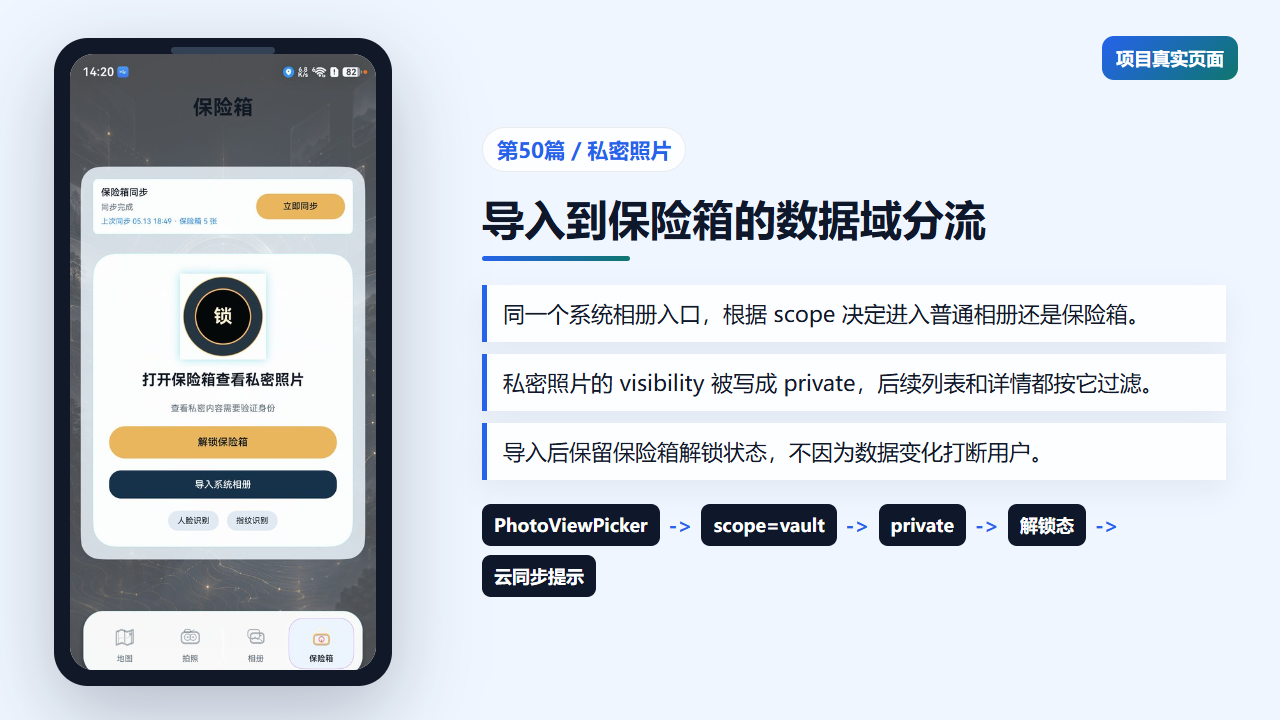
保险箱页展示私密照片的数据域入口
二、同一个导入口根据 scope 写入不同可见性
importSystemAlbumPhotos 进入循环后,并不会关心用户点的是哪个页面按钮,直到记录创建完成才根据 scope 写入 visibility。这让复制、建模和本地智能摘要都保持一致。
如果为保险箱单独写一份导入函数,后续只要普通导入新增字段,保险箱就容易漏改。现在核心流程只维护一份,风险明显更低。
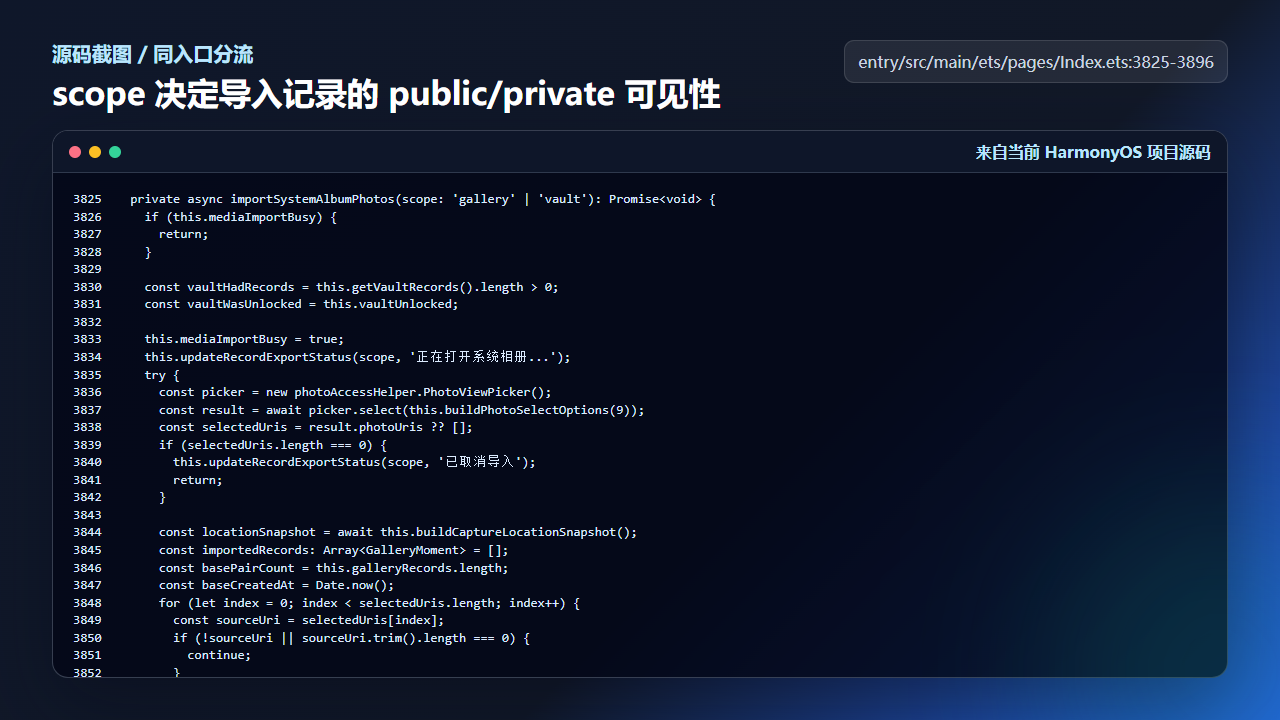
scope 控制导入记录进入 public 或 private 数据域
  private async importSystemAlbumPhotos(scope: 'gallery' | 'vault'): Promise<void> {
    if (this.mediaImportBusy) {
      return;
    }

    const vaultHadRecords = this.getVaultRecords().length > 0;
    const vaultWasUnlocked = this.vaultUnlocked;

    this.mediaImportBusy = true;
    this.updateRecordExportStatus(scope, '正在打开系统相册...');
    try {
      const picker = new photoAccessHelper.PhotoViewPicker();
      const result = await picker.select(this.buildPhotoSelectOptions(9));
      const selectedUris = result.photoUris ?? [];
      if (selectedUris.length === 0) {
        this.updateRecordExportStatus(scope, '已取消导入');
        return;
      }

      const locationSnapshot = await this.buildCaptureLocationSnapshot();
      const importedRecords: Array<GalleryMoment> = [];
      const basePairCount = this.galleryRecords.length;
      const baseCreatedAt = Date.now();
      for (let index = 0; index < selectedUris.length; index++) {
        const sourceUri = selectedUris[index];
        if (!sourceUri || sourceUri.trim().length === 0) {
          continue;
        }

        const createdAt = baseCreatedAt + index;
        const targetPath = this.buildImportedPhotoFilePath(createdAt, index, sourceUri);
        await this.copyPickedPhotoToSandbox(sourceUri, targetPath);
        const record = GalleryRecordService.createRecord({
          id: `import_${createdAt}_${index}`,
          createdAt: createdAt,
          pairIndex: basePairCount + index + 1,
          place: locationSnapshot.place,
          memoryTitle: locationSnapshot.memoryTitle,
          latitude: locationSnapshot.latitude,
          longitude: locationSnapshot.longitude,
          backPath: targetPath,
          frontPath: targetPath,
          watermarkStyle: 'none',
          watermarkText: ''
        });
        const readyRecord = GalleryRecordService.applyLocalInsight(record);
        readyRecord.visibility = scope === 'vault' ? 'private' : 'public';
        importedRecords.push(readyRecord);
      }

      if (importedRecords.length === 0) {
        this.updateRecordExportStatus(scope, '没有可导入的照片');
        return;
      }

      const importedIds = importedRecords.map((record: GalleryMoment) => record.id);
      const nextRecords = importedRecords.concat(
        this.galleryRecords.filter((record: GalleryMoment) => !importedIds.includes(record.id))
      );
      await this.persistGalleryRecords(nextRecords);
      await this.refreshGalleryMediaStateAfterMutation(importedRecords[0].id, scope);

      if (scope === 'vault') {
        this.cloudSyncStatusText = this.cloudSyncIdentity ? '保险箱照片已保存,正在同步' : '登录华为账号后同步保险箱';
        this.vaultSelectedId = importedRecords[0].id;
        this.vaultUnlocked = vaultWasUnlocked || !vaultHadRecords;
        this.vaultStatusText = this.vaultUnlocked
          ? `已导入 ${importedRecords.length} 张私密照片`
          : `已导入 ${importedRecords.length} 张私密照片,解锁后查看`;
      } else {
        this.gallerySelectedId = importedRecords[0].id;
        this.selectedGalleryGroupKey = this.buildGalleryRecordGroupKey(importedRecords[0]);
vaultWasUnlocked 和 vaultHadRecords 的提前记录也很重要。导入动作不应该意外改变用户正在浏览保险箱的体验。
三、保险箱页面只读取 private 记录
保险箱的选中、打开和详情帧都从 getVaultRecords 或 getFeaturedVaultRecord 出发。打开详情前还会检查 vaultUnlocked,未解锁时直接返回。
这类判断放在页面动作入口,比单纯隐藏按钮更稳。因为 UI 可能因为状态刷新出现短暂错位,动作函数仍然要守住隐私边界。
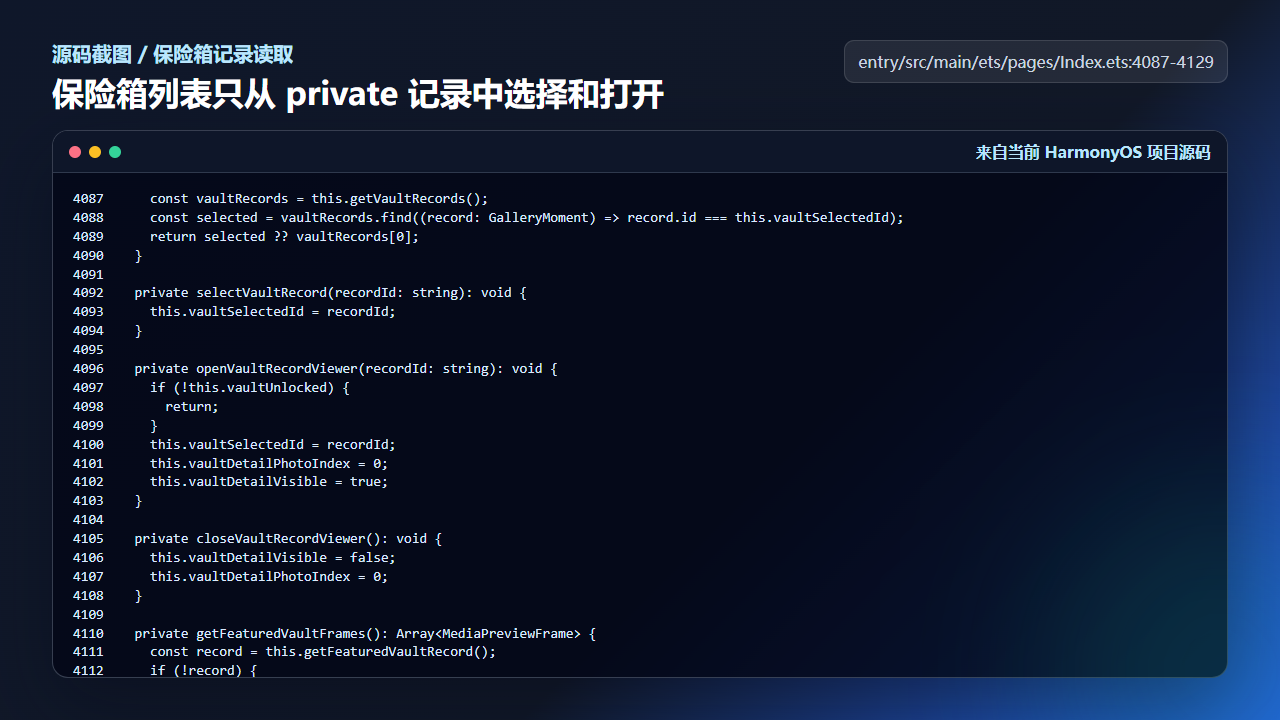
保险箱只允许在解锁后打开 private 记录
    const vaultRecords = this.getVaultRecords();
    const selected = vaultRecords.find((record: GalleryMoment) => record.id === this.vaultSelectedId);
    return selected ?? vaultRecords[0];
  }

  private selectVaultRecord(recordId: string): void {
    this.vaultSelectedId = recordId;
  }

  private openVaultRecordViewer(recordId: string): void {
    if (!this.vaultUnlocked) {
      return;
    }
    this.vaultSelectedId = recordId;
    this.vaultDetailPhotoIndex = 0;
    this.vaultDetailVisible = true;
  }

  private closeVaultRecordViewer(): void {
    this.vaultDetailVisible = false;
    this.vaultDetailPhotoIndex = 0;
  }

  private getFeaturedVaultFrames(): Array<MediaPreviewFrame> {
    const record = this.getFeaturedVaultRecord();
    if (!record) {
      return [];
    }
    return this.getGalleryDetailFrames(record);
  }

  private getVaultPreviewRecords(): Array<GalleryMoment> {
    const featuredRecord = this.getFeaturedVaultRecord();
    if (!featuredRecord) {
      return [];
    }
    return this.getVaultRecords()
      .filter((record: GalleryMoment) => record.id !== featuredRecord.id)
      .slice(0, 3);
  }

  private cloneGalleryRecord(record: GalleryMoment): GalleryMoment {
    return {
保险箱的体验不是“把图片换个列表放”,而是每个入口都要确认当前是否允许访问私密记录。
四、记录复制时保留隐私字段并标记同步脏数据
cloneGalleryRecord 会保留 visibility、ownerKey、云端修订号和云端资源缓存,同时把 syncDirty 标成 true。这说明记录只要被用户修改,就要进入后续同步判断。
私密照片最怕“编辑后忘记同步”或“同步时丢失可见性”。统一克隆函数能让普通相册和保险箱都遵守同一套字段保留规则。
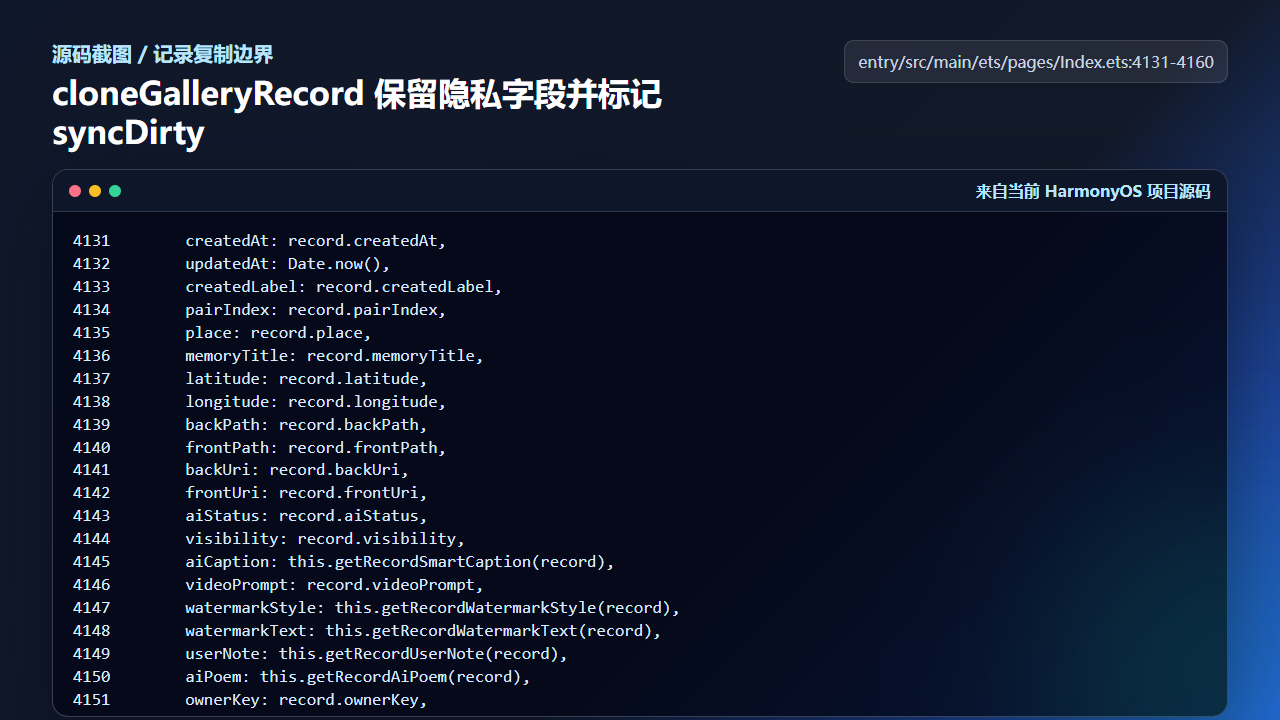
cloneGalleryRecord 保留 visibility 并标记 syncDirty
      createdAt: record.createdAt,
      updatedAt: Date.now(),
      createdLabel: record.createdLabel,
      pairIndex: record.pairIndex,
      place: record.place,
      memoryTitle: record.memoryTitle,
      latitude: record.latitude,
      longitude: record.longitude,
      backPath: record.backPath,
      frontPath: record.frontPath,
      backUri: record.backUri,
      frontUri: record.frontUri,
      aiStatus: record.aiStatus,
      visibility: record.visibility,
      aiCaption: this.getRecordSmartCaption(record),
      videoPrompt: record.videoPrompt,
      watermarkStyle: this.getRecordWatermarkStyle(record),
      watermarkText: this.getRecordWatermarkText(record),
      userNote: this.getRecordUserNote(record),
      aiPoem: this.getRecordAiPoem(record),
      ownerKey: record.ownerKey,
      syncDirty: true,
      cloudRevision: record.cloudRevision ?? 0,
      cloudBackAssetDataUrl: record.cloudBackAssetDataUrl ?? '',
      cloudFrontAssetDataUrl: record.cloudFrontAssetDataUrl ?? ''
    };
  }

  private lockVault(): void {
    this.vaultUnlocked = false;
如果后续给保险箱增加本地加密、指纹解锁或云端密文同步,也建议从这个字段闭环继续扩展。
工程检查清单
- 普通相册和保险箱共用导入口,但用
scope分流结果。 visibility是数据域边界,不只是 UI 文案。- 保险箱动作入口必须检查解锁状态。
- 记录复制不能丢失 ownerKey、cloudRevision 和 syncDirty。
- 私密照片导入后状态提示要与云同步和解锁态一致。
今日练习
- 导入一张照片到普通相册,再导入一张到保险箱,比较两条记录的
visibility。 - 在未解锁状态尝试打开保险箱详情,确认动作函数不会继续执行。
- 思考如果要加“仅本地保存,不同步云端”的开关,应该落在哪个字段上。
训练营后面的文章会继续按“真实页面效果 -> 源码定位 -> 状态闭环 -> 可验证结果”的节奏推进。每一篇都尽量让你能拿着代码直接回到项目里复现,而不是只停留在概念说明。

讨论HarmonyOS开发技术,专注于API与组件、DevEco Studio、测试、元服务和应用上架分发等。
更多推荐


 56
56 0
0- 0


 已为社区贡献281条内容

所有评论(0)