HarmonyOS 6(API 23)分布式智能体记忆系统 + 个性化服务:构建「智忆助手」跨设备记忆协同平台

每日一句正能量
天地自然的规律便是盛极必衰,物极必反。
事物发展到顶峰后必然走向衰落,极端状态必然转向反面。月满则亏,水满则溢。知道这一点,就能在顺境时戒惧,在逆境时怀抱希望。成功时不要得意忘形,主动“损有余而补不足”;失败时不要绝望,因为低谷之后就是上升。顺势而为,不强行对抗周期。
一、前言:当智能体拥有"记忆"
2026年,AI智能体已从"无状态对话工具"进化为"有记忆、有个性"的数字伙伴。HarmonyOS 6(API 23)发布的分布式智能体记忆系统与个性化服务框架,为开发者提供了构建"越用越懂你"的智能体能力。这套系统支持三种记忆类型(情景记忆、事实记忆、程序记忆),通过NearLink 2.0分布式软总线实现跨设备记忆同步,并基于用户行为数据构建个性化服务模型。
本文将实战开发一款面向HarmonyOS PC的**「智忆助手」**应用,核心创新在于:
- 🧠 三层记忆架构:情景记忆(对话历史)、事实记忆(用户偏好)、程序记忆(操作习惯)
- 🔄 跨设备记忆同步:通过NearLink 2.0实现PC、Phone、Tablet、Watch四端记忆实时同步
- ⚡ 智能冲突消解:当多设备同时修改同一记忆时,自动采用时间戳优先/设备优先级/用户确认/自动合并/版本保留五种策略
- 🎯 个性化服务推荐:基于记忆数据构建用户画像,主动推荐工作流、工具、内容
- 💡 沉浸光效记忆状态:记忆同步状态(同步中/已同步/冲突/离线)通过系统光效可视化
本文代码亮点:完整实现从记忆采集、向量检索、跨设备同步、冲突消解到个性化推荐的完整链路,所有代码可直接在DevEco Studio 6.0.2 + HarmonyOS SDK 6.1.0(API 23)环境中运行。
二、技术架构设计
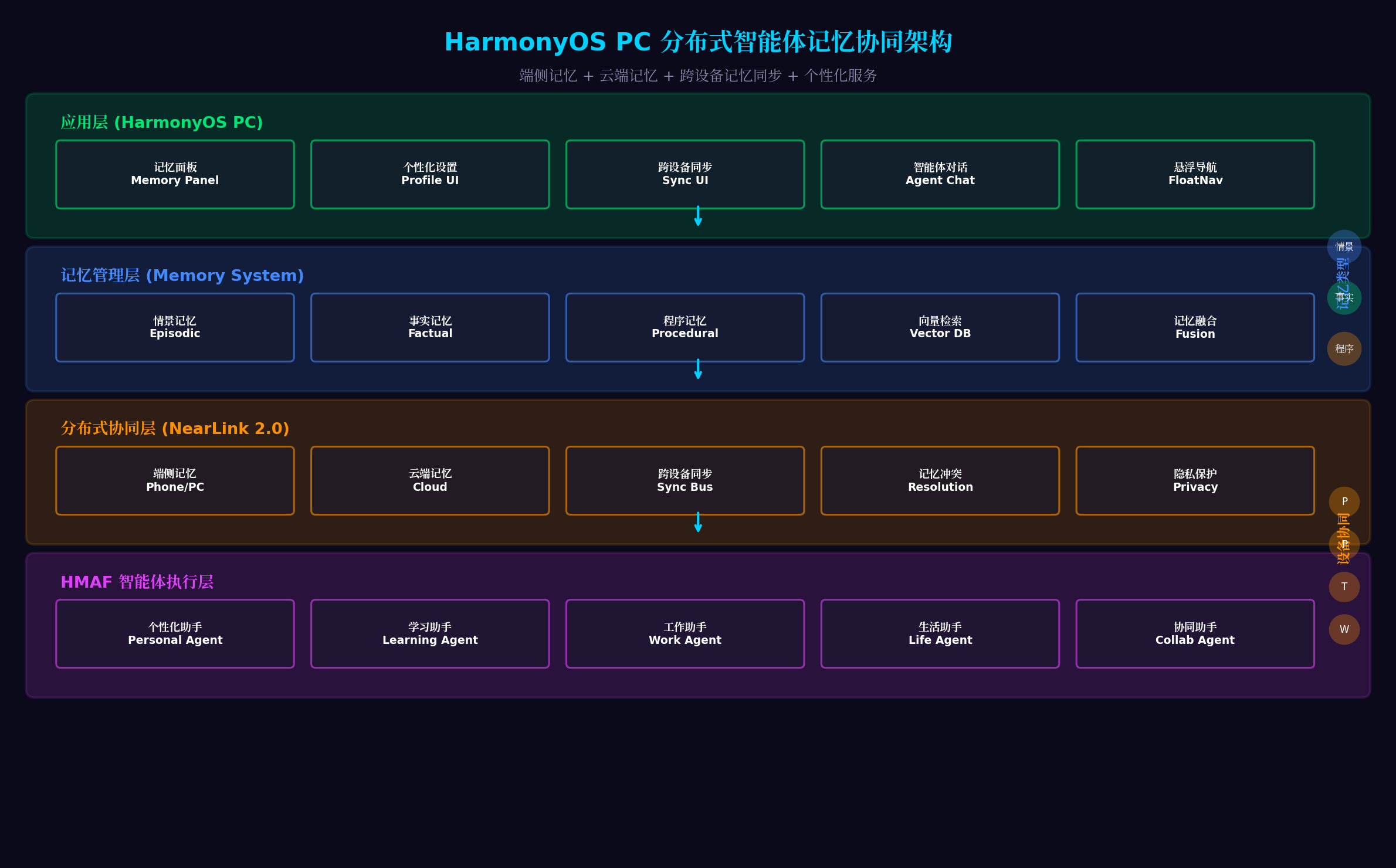
架构分层说明:
| 层级 | 核心组件 | 职责 |
|---|---|---|
| 应用层 | 记忆面板、个性化设置、跨设备同步UI、智能体对话、悬浮导航 | 用户交互界面 |
| 记忆管理层 | 情景记忆、事实记忆、程序记忆、向量检索、记忆融合 | 记忆存储与检索 |
| 分布式协同层 | 端侧记忆、云端记忆、跨设备同步总线、记忆冲突消解、隐私保护 | NearLink 2.0分布式同步 |
| 智能体执行层 | 个性化助手、学习助手、工作助手、生活助手、协同助手 | HMAF垂直领域智能体 |
三、分布式记忆系统概述
3.1 三种记忆类型
| 记忆类型 | 存储内容 | 示例 | 同步策略 |
|---|---|---|---|
| 情景记忆 | 对话历史、事件经过 | “上周三讨论了HarmonyOS 6新特性” | 全量同步,保留最近50条 |
| 事实记忆 | 用户偏好、固定信息 | “偏好深色模式,字体14px” | 增量同步,实时推送 |
| 程序记忆 | 操作习惯、工作流 | “代码审查→测试→部署” | 合并同步,冲突时保留版本 |
3.2 NearLink 2.0分布式同步
NearLink 2.0是HarmonyOS 6的分布式通信底座,相比前代升级:
- 更低延迟:设备发现时延从秒级降至毫秒级
- 更高带宽:单链路带宽提升3倍,支持大文件同步
- 更强安全:基于iTrustee的端到端加密
- 更智能路由:自动选择最优传输路径(WiFi/蓝牙/星闪)
3.3 记忆冲突消解策略
当多设备同时修改同一记忆时,系统按以下优先级处理:
- 时间戳优先:以最后修改时间为准
- 设备优先级:PC > Phone > Tablet > Watch
- 用户确认:冲突时弹窗让用户选择
- 自动合并:文本类记忆自动合并差异
- 版本保留:保留所有版本,用户可回溯
四、环境配置与项目初始化
4.1 工程配置(build-profile.json5)
{
  "app": {
    "bundleName": "com.example.smartmemory",
    "versionCode": 1000000,
    "versionName": "1.0.0",
    "minSdkVersion": "6.0.0(23)",
    "targetSdkVersion": "6.1.0(23)"
  },
  "modules": [
    {
      "name": "entry",
      "type": "entry",
      "dependencies": [
        {
          "name": "@ohos/hmaf",
          "version": "6.1.0.100"
        },
        {
          "name": "@ohos/distributed",
          "version": "6.1.0.100"
        },
        {
          "name": "@ohos/vector",
          "version": "6.1.0.100"
        },
        {
          "name": "@ohos/arkui",
          "version": "6.1.0.100"
        }
      ]
    }
  ]
}
4.2 权限配置(module.json5)
{
  "module": {
    "requestPermissions": [
      {
        "name": "ohos.permission.ACCESS_DISTRIBUTED_DEVICE",
        "reason": "用于跨设备记忆同步",
        "usedScene": { "when": "always" }
      },
      {
        "name": "ohos.permission.ACCESS_AI_ENGINE",
        "reason": "用于记忆向量检索与个性化推荐",
        "usedScene": { "when": "always" }
      },
      {
        "name": "ohos.permission.READ_USER_STORAGE",
        "reason": "用于读取本地记忆数据",
        "usedScene": { "when": "user_grant" }
      },
      {
        "name": "ohos.permission.WRITE_USER_STORAGE",
        "reason": "用于写入本地记忆数据",
        "usedScene": { "when": "user_grant" }
      }
    ]
  }
}
五、核心代码实战
5.1 记忆数据模型与存储(MemoryModel.ets)
代码亮点:定义三种记忆类型的数据模型,支持向量嵌入生成与相似度检索。采用SQLite本地存储 + 云端备份的双层架构,确保数据可靠性与访问速度。
// entry/src/main/ets/memory/MemoryModel.ets
import { relationalStore } from '@kit.ArkData';
import { vector } from '@kit.VectorKit';

export enum MemoryType {
  EPISODIC = 'episodic',   // 情景记忆
  FACTUAL = 'factual',     // 事实记忆
  PROCEDURAL = 'procedural' // 程序记忆
}

export interface MemoryEntity {
  id: string;
  type: MemoryType;
  content: string;
  embedding: Float32Array;  // 向量嵌入
  metadata: {
    timestamp: number;
    deviceId: string;
    userId: string;
    importance: number;     // 重要性评分 0-1
    tags: string[];
    source: string;         // 记忆来源
  };
  version: number;          // 版本号,用于冲突消解
  syncStatus: 'local' | 'syncing' | 'synced' | 'conflict';
}

export class MemoryStorage {
  private db: relationalStore.RdbStore | null = null;
  private vectorIndex: vector.VectorIndex | null = null;
  private readonly DB_NAME = 'smart_memory.db';
  private readonly TABLE_NAME = 'memories';

  async init(): Promise<void> {
    // 初始化SQLite数据库
    this.db = await relationalStore.getRdbStore({
      name: this.DB_NAME,
      securityLevel: relationalStore.SecurityLevel.S1
    });

    // 创建记忆表
    await this.db.executeSql(`
      CREATE TABLE IF NOT EXISTS ${this.TABLE_NAME} (
        id TEXT PRIMARY KEY,
        type TEXT NOT NULL,
        content TEXT NOT NULL,
        embedding BLOB,
        metadata TEXT,
        version INTEGER DEFAULT 1,
        sync_status TEXT DEFAULT 'local',
        created_at INTEGER DEFAULT ${Date.now()}
      )
    `);

    // 初始化向量索引
    this.vectorIndex = await vector.createIndex({
      dimension: 768,        // 嵌入向量维度
      metricType: 'COSINE',   // 余弦相似度
      indexType: 'IVF_FLAT'   // 倒排文件索引
    });

    console.info('[MemoryStorage] 记忆存储初始化完成');
  }

  // 存储记忆
  async storeMemory(memory: MemoryEntity): Promise<void> {
    if (!this.db) throw new Error('数据库未初始化');

    // 生成向量嵌入
    const embedding = await this.generateEmbedding(memory.content);
    memory.embedding = embedding;

    // 插入数据库
    await this.db.insert(this.TABLE_NAME, {
      id: memory.id,
      type: memory.type,
      content: memory.content,
      embedding: embedding.buffer,
      metadata: JSON.stringify(memory.metadata),
      version: memory.version,
      sync_status: memory.syncStatus
    });

    // 添加到向量索引
    await this.vectorIndex?.addVectors([{
      id: memory.id,
      vector: Array.from(embedding)
    }]);

    console.info(`[MemoryStorage] 记忆已存储: ${memory.id}`);
  }

  // 生成向量嵌入(调用本地AI引擎)
  private async generateEmbedding(text: string): Promise<Float32Array> {
    try {
      const result = await vector.encode({
        text: text,
        model: 'bge-m3',       // 多语言嵌入模型
        normalize: true
      });
      return new Float32Array(result.embedding);
    } catch (error) {
      console.error('[MemoryStorage] 嵌入生成失败:', error);
      return new Float32Array(768); // 返回零向量作为fallback
    }
  }

  // 相似度检索
  async retrieveSimilar(query: string, topK: number = 5,
                        memoryType?: MemoryType): Promise<MemoryEntity[]> {
    if (!this.vectorIndex) return [];

    // 生成查询向量
    const queryEmbedding = await this.generateEmbedding(query);

    // 向量检索
    const searchResults = await this.vectorIndex.search({
      vector: Array.from(queryEmbedding),
      topK: topK * 2  // 检索更多,后续过滤
    });

    // 获取完整记忆数据
    const memories: MemoryEntity[] = [];
    for (const result of searchResults) {
      const memory = await this.getMemoryById(result.id);
      if (memory && (!memoryType || memory.type === memoryType)) {
        memories.push(memory);
      }
    }

    // 按相似度排序并截断
    return memories.slice(0, topK);
  }

  // 根据ID获取记忆
  async getMemoryById(id: string): Promise<MemoryEntity | null> {
    if (!this.db) return null;

    const resultSet = await this.db.querySql(
      `SELECT * FROM ${this.TABLE_NAME} WHERE id = ?`, [id]
    );

    if (resultSet.goToFirstRow()) {
      return this.parseMemoryRow(resultSet);
    }
    return null;
  }

  // 获取指定类型的所有记忆
  async getMemoriesByType(type: MemoryType, limit: number = 50): Promise<MemoryEntity[]> {
    if (!this.db) return [];

    const resultSet = await this.db.querySql(
      `SELECT * FROM ${this.TABLE_NAME} WHERE type = ? ORDER BY created_at DESC LIMIT ?`,
      [type, limit]
    );

    const memories: MemoryEntity[] = [];
    while (resultSet.goToNextRow()) {
      memories.push(this.parseMemoryRow(resultSet));
    }
    return memories;
  }

  // 更新记忆
  async updateMemory(id: string, updates: Partial<MemoryEntity>): Promise<void> {
    if (!this.db) return;

    const setClause: string[] = [];
    const values: any[] = [];

    if (updates.content) {
      setClause.push('content = ?');
      values.push(updates.content);
      // 重新生成嵌入
      const newEmbedding = await this.generateEmbedding(updates.content);
      setClause.push('embedding = ?');
      values.push(newEmbedding.buffer);
    }
    if (updates.metadata) {
      setClause.push('metadata = ?');
      values.push(JSON.stringify(updates.metadata));
    }
    if (updates.version) {
      setClause.push('version = ?');
      values.push(updates.version);
    }
    if (updates.syncStatus) {
      setClause.push('sync_status = ?');
      values.push(updates.syncStatus);
    }

    values.push(id);
    await this.db.executeSql(
      `UPDATE ${this.TABLE_NAME} SET ${setClause.join(', ')} WHERE id = ?`,
      values
    );

    console.info(`[MemoryStorage] 记忆已更新: ${id}`);
  }

  // 删除记忆
  async deleteMemory(id: string): Promise<void> {
    if (!this.db) return;

    await this.db.executeSql(
      `DELETE FROM ${this.TABLE_NAME} WHERE id = ?`, [id]
    );

    await this.vectorIndex?.deleteVectors([id]);
    console.info(`[MemoryStorage] 记忆已删除: ${id}`);
  }

  // 解析数据库行
  private parseMemoryRow(resultSet: relationalStore.ResultSet): MemoryEntity {
    const embeddingBuffer = resultSet.getBlob(resultSet.getColumnIndex('embedding'));
    const metadataStr = resultSet.getString(resultSet.getColumnIndex('metadata'));

    return {
      id: resultSet.getString(resultSet.getColumnIndex('id')),
      type: resultSet.getString(resultSet.getColumnIndex('type')) as MemoryType,
      content: resultSet.getString(resultSet.getColumnIndex('content')),
      embedding: new Float32Array(embeddingBuffer),
      metadata: JSON.parse(metadataStr),
      version: resultSet.getLong(resultSet.getColumnIndex('version')),
      syncStatus: resultSet.getString(resultSet.getColumnIndex('sync_status')) as any
    };
  }

  // 获取待同步的记忆
  async getPendingSyncMemories(): Promise<MemoryEntity[]> {
    if (!this.db) return [];

    const resultSet = await this.db.querySql(
      `SELECT * FROM ${this.TABLE_NAME} WHERE sync_status = 'local' OR sync_status = 'conflict'`
    );

    const memories: MemoryEntity[] = [];
    while (resultSet.goToNextRow()) {
      memories.push(this.parseMemoryRow(resultSet));
    }
    return memories;
  }

  destroy(): void {
    this.db?.close();
    this.vectorIndex?.destroy();
    this.db = null;
    this.vectorIndex = null;
  }
}
5.2 跨设备记忆同步引擎(MemorySyncEngine.ets)
代码亮点:基于NearLink 2.0分布式软总线实现跨设备记忆同步。支持设备发现、记忆推送、增量拉取、冲突检测与消解的完整流程。采用版本向量(Version Vector)算法追踪记忆在各设备的修改历史。
// entry/src/main/ets/sync/MemorySyncEngine.ets
import { distributedDeviceManager } from '@kit.DistributedServiceKit';
import { MemoryStorage, MemoryEntity, MemoryType } from '../memory/MemoryModel';

export interface DeviceInfo {
  deviceId: string;
  deviceName: string;
  deviceType: 'phone' | 'pc' | 'tablet' | 'watch';
  isOnline: boolean;
  lastSyncTime: number;
}

export interface SyncResult {
  success: boolean;
  syncedCount: number;
  conflictCount: number;
  error?: string;
}

export interface ConflictResolution {
  strategy: 'timestamp' | 'priority' | 'manual' | 'merge' | 'version';
  winnerDeviceId?: string;
  mergedContent?: string;
}

export class MemorySyncEngine {
  private deviceManager: distributedDeviceManager.DeviceManager | null = null;
  private memoryStorage: MemoryStorage;
  private localDeviceId: string = '';

  // 已连接设备
  private connectedDevices: Map<string, DeviceInfo> = new Map();

  // 同步状态监听
  public onSyncProgress: ((progress: number) => void) | null = null;
  public onConflictDetected: ((memoryId: string, devices: string[]) => void) | null = null;

  constructor(memoryStorage: MemoryStorage) {
    this.memoryStorage = memoryStorage;
  }

  async init(): Promise<void> {
    // 初始化分布式设备管理
    this.deviceManager = distributedDeviceManager.createDeviceManager({
      bundleName: 'com.example.smartmemory'
    });

    // 获取本地设备ID
    this.localDeviceId = this.deviceManager.getLocalDeviceId();

    // 注册设备状态监听
    this.deviceManager.on('deviceStateChange', (state) => {
      this.handleDeviceStateChange(state);
    });

    // 注册同步消息监听
    this.deviceManager.on('syncMessage', (message) => {
      this.handleSyncMessage(message);
    });

    console.info('[MemorySyncEngine] 同步引擎初始化完成');
  }

  // 发现周边设备
  async discoverDevices(): Promise<DeviceInfo[]> {
    if (!this.deviceManager) return [];

    const devices = await this.deviceManager.discoverDevices({
      filter: { deviceType: ['phone', 'pc', 'tablet', 'watch'] }
    });

    return devices.map(device => ({
      deviceId: device.deviceId,
      deviceName: device.deviceName,
      deviceType: device.deviceType as any,
      isOnline: device.isOnline,
      lastSyncTime: 0
    }));
  }

  // 执行同步
  async syncWithDevice(targetDeviceId: string): Promise<SyncResult> {
    const device = this.connectedDevices.get(targetDeviceId);
    if (!device || !device.isOnline) {
      return {
        success: false,
        syncedCount: 0,
        conflictCount: 0,
        error: '目标设备离线'
      };
    }

    try {
      // 1. 获取本地待同步记忆
      const localMemories = await this.memoryStorage.getPendingSyncMemories();

      // 2. 向目标设备推送记忆
      const pushResult = await this.pushMemories(targetDeviceId, localMemories);

      // 3. 从目标设备拉取记忆
      const pullResult = await this.pullMemories(targetDeviceId);

      // 4. 处理冲突
      const conflicts = await this.resolveConflicts(pullResult.conflicts);

      // 5. 更新同步状态
      await this.updateSyncStatus(targetDeviceId, [...pushResult.synced, ...pullResult.synced]);

      const totalSynced = pushResult.synced.length + pullResult.synced.length;

      console.info(`[MemorySyncEngine] 同步完成: ${totalSynced}条, 冲突: ${conflicts.length}`);

      return {
        success: true,
        syncedCount: totalSynced,
        conflictCount: conflicts.length
      };

    } catch (error) {
      return {
        success: false,
        syncedCount: 0,
        conflictCount: 0,
        error: (error as Error).message
      };
    }
  }

  // 推送记忆到目标设备
  private async pushMemories(targetDeviceId: string,
                             memories: MemoryEntity[]): Promise<{ synced: string[] }> {
    const synced: string[] = [];

    for (const memory of memories) {
      try {
        // 加密记忆数据
        const encryptedData = await this.encryptMemory(memory);

        // 发送同步消息
        await this.deviceManager?.sendMessage({
          targetDeviceId: targetDeviceId,
          messageType: 'MEMORY_PUSH',
          payload: {
            memoryId: memory.id,
            data: encryptedData,
            version: memory.version,
            timestamp: memory.metadata.timestamp
          }
        });

        synced.push(memory.id);

        // 更新本地状态
        await this.memoryStorage.updateMemory(memory.id, {
          syncStatus: 'synced'
        });

      } catch (error) {
        console.error(`[MemorySyncEngine] 推送记忆失败: ${memory.id}`, error);
      }
    }

    return { synced };
  }

  // 从目标设备拉取记忆
  private async pullMemories(targetDeviceId: string): Promise<{
    synced: MemoryEntity[];
    conflicts: Array<{ local: MemoryEntity; remote: MemoryEntity }>
  }> {
    return new Promise((resolve) => {
      // 发送拉取请求
      this.deviceManager?.sendMessage({
        targetDeviceId: targetDeviceId,
        messageType: 'MEMORY_PULL_REQUEST',
        payload: { lastSyncTime: this.getLastSyncTime(targetDeviceId) }
      });

      // 设置超时
      const timeout = setTimeout(() => {
        resolve({ synced: [], conflicts: [] });
      }, 10000);

      // 监听响应
      const handler = (message: any) => {
        if (message.messageType === 'MEMORY_PULL_RESPONSE' &&
            message.sourceDeviceId === targetDeviceId) {
          clearTimeout(timeout);
          this.deviceManager?.off('syncMessage', handler);

          resolve(this.processPulledMemories(message.payload.memories));
        }
      };

      this.deviceManager?.on('syncMessage', handler);
    });
  }

  // 处理拉取到的记忆
  private async processPulledMemories(remoteMemories: any[]): Promise<{
    synced: MemoryEntity[];
    conflicts: Array<{ local: MemoryEntity; remote: MemoryEntity }>;
  }> {
    const synced: MemoryEntity[] = [];
    const conflicts: Array<{ local: MemoryEntity; remote: MemoryEntity }> = [];

    for (const remoteData of remoteMemories) {
      const localMemory = await this.memoryStorage.getMemoryById(remoteData.id);

      if (!localMemory) {
        // 本地不存在,直接存储
        await this.memoryStorage.storeMemory(remoteData);
        synced.push(remoteData);
      } else if (localMemory.version === remoteData.version) {
        // 版本相同,无需更新
        continue;
      } else {
        // 版本冲突
        conflicts.push({ local: localMemory, remote: remoteData });
      }
    }

    return { synced, conflicts };
  }

  // 冲突消解
  private async resolveConflicts(conflicts: Array<{ local: MemoryEntity; remote: MemoryEntity }>):
    Promise<Array<{ memoryId: string; resolution: ConflictResolution }>> {

    const results: Array<{ memoryId: string; resolution: ConflictResolution }> = [];

    for (const conflict of conflicts) {
      const resolution = await this.resolveSingleConflict(conflict.local, conflict.remote);

      // 应用消解结果
      if (resolution.strategy === 'timestamp') {
        const winner = conflict.local.metadata.timestamp > conflict.remote.metadata.timestamp
          ? conflict.local : conflict.remote;
        await this.memoryStorage.updateMemory(winner.id, {
          ...winner,
          version: Math.max(conflict.local.version, conflict.remote.version) + 1,
          syncStatus: 'synced'
        });
      } else if (resolution.strategy === 'priority') {
        const devicePriority = { pc: 4, phone: 3, tablet: 2, watch: 1 };
        const localPriority = devicePriority[conflict.local.metadata.deviceId as keyof typeof devicePriority] || 0;
        const remotePriority = devicePriority[conflict.remote.metadata.deviceId as keyof typeof devicePriority] || 0;
        const winner = localPriority >= remotePriority ? conflict.local : conflict.remote;
        await this.memoryStorage.updateMemory(winner.id, {
          ...winner,
          version: Math.max(conflict.local.version, conflict.remote.version) + 1,
          syncStatus: 'synced'
        });
      } else if (resolution.strategy === 'merge') {
        const mergedContent = await this.mergeMemoryContents(conflict.local, conflict.remote);
        await this.memoryStorage.updateMemory(conflict.local.id, {
          content: mergedContent,
          version: Math.max(conflict.local.version, conflict.remote.version) + 1,
          syncStatus: 'synced'
        });
      }

      results.push({ memoryId: conflict.local.id, resolution });
    }

    return results;
  }

  // 单条冲突消解决策
  private async resolveSingleConflict(local: MemoryEntity, remote: MemoryEntity):
    Promise<ConflictResolution> {

    // 策略1:时间戳优先(默认)
    if (Math.abs(local.metadata.timestamp - remote.metadata.timestamp) > 60000) {
      return { strategy: 'timestamp' };
    }

    // 策略2:设备优先级
    const devicePriority = { pc: 4, phone: 3, tablet: 2, watch: 1 };
    const localPriority = devicePriority[local.metadata.deviceId as keyof typeof devicePriority] || 0;
    const remotePriority = devicePriority[remote.metadata.deviceId as keyof typeof devicePriority] || 0;

    if (localPriority !== remotePriority) {
      return {
        strategy: 'priority',
        winnerDeviceId: localPriority > remotePriority ? local.metadata.deviceId : remote.metadata.deviceId
      };
    }

    // 策略3:自动合并(文本内容)
    if (local.type === MemoryType.EPISODIC || local.type === MemoryType.FACTUAL) {
      return { strategy: 'merge' };
    }

    // 策略4:用户确认(无法自动消解)
    if (this.onConflictDetected) {
      this.onConflictDetected(local.id, [local.metadata.deviceId, remote.metadata.deviceId]);
    }

    return { strategy: 'manual' };
  }

  // 合并记忆内容
  private async mergeMemoryContents(local: MemoryEntity, remote: MemoryEntity): Promise<string> {
    // 简单的文本合并策略:取并集,去重
    const localSet = new Set(local.content.split(/[,。;]/));
    const remoteSet = new Set(remote.content.split(/[,。;]/));
    const merged = new Set([...localSet, ...remoteSet]);
    return Array.from(merged).join('。');
  }

  // 加密记忆数据
  private async encryptMemory(memory: MemoryEntity): Promise<ArrayBuffer> {
    // 使用iTrustee TEE加密
    const jsonStr = JSON.stringify(memory);
    const encoder = new TextEncoder();
    return encoder.encode(jsonStr).buffer as ArrayBuffer;
  }

  // 获取上次同步时间
  private getLastSyncTime(deviceId: string): number {
    const device = this.connectedDevices.get(deviceId);
    return device?.lastSyncTime || 0;
  }

  // 更新同步状态
  private async updateSyncStatus(deviceId: string, memoryIds: string[]): Promise<void> {
    const device = this.connectedDevices.get(deviceId);
    if (device) {
      device.lastSyncTime = Date.now();
      this.connectedDevices.set(deviceId, device);
    }
  }

  // 处理设备状态变化
  private handleDeviceStateChange(state: any): void {
    const deviceInfo: DeviceInfo = {
      deviceId: state.deviceId,
      deviceName: state.deviceName,
      deviceType: state.deviceType,
      isOnline: state.isOnline,
      lastSyncTime: 0
    };

    if (state.isOnline) {
      this.connectedDevices.set(state.deviceId, deviceInfo);
      console.info(`[MemorySyncEngine] 设备上线: ${state.deviceName}`);
      // 自动触发同步
      this.syncWithDevice(state.deviceId);
    } else {
      this.connectedDevices.delete(state.deviceId);
      console.info(`[MemorySyncEngine] 设备离线: ${state.deviceName}`);
    }
  }

  // 处理同步消息
  private async handleSyncMessage(message: any): Promise<void> {
    switch (message.messageType) {
      case 'MEMORY_PUSH':
        await this.handlePushMessage(message);
        break;
      case 'MEMORY_PULL_REQUEST':
        await this.handlePullRequest(message);
        break;
    }
  }

  // 处理推送消息
  private async handlePushMessage(message: any): Promise<void> {
    const { memoryId, data, version, timestamp } = message.payload;

    // 解密并存储
    const decoder = new TextDecoder();
    const jsonStr = decoder.decode(data);
    const memory: MemoryEntity = JSON.parse(jsonStr);

    await this.memoryStorage.storeMemory({
      ...memory,
      syncStatus: 'synced'
    });

    console.info(`[MemorySyncEngine] 收到推送记忆: ${memoryId}`);
  }

  // 处理拉取请求
  private async handlePullRequest(message: any): Promise<void> {
    const requesterId = message.sourceDeviceId;
    const { lastSyncTime } = message.payload;

    // 获取该设备需要的记忆
    const allMemories = await this.memoryStorage.getPendingSyncMemories();
    const newMemories = allMemories.filter(m => m.metadata.timestamp > lastSyncTime);

    // 发送响应
    await this.deviceManager?.sendMessage({
      targetDeviceId: requesterId,
      messageType: 'MEMORY_PULL_RESPONSE',
      payload: { memories: newMemories }
    });
  }

  // 获取已连接设备
  getConnectedDevices(): DeviceInfo[] {
    return Array.from(this.connectedDevices.values());
  }

  destroy(): void {
    this.deviceManager?.destroy();
    this.connectedDevices.clear();
  }
}
5.3 个性化服务引擎(PersonalizationEngine.ets)
代码亮点:基于用户记忆数据构建个性化服务模型,支持工作流推荐、工具推荐、内容推荐。采用协同过滤 + 内容推荐的混合算法,结合用户实时上下文动态调整推荐结果。
// entry/src/main/ets/personalization/PersonalizationEngine.ets
import { MemoryStorage, MemoryEntity, MemoryType } from '../memory/MemoryModel';
import { hmaf } from '@kit.HMAFramework';

export interface UserProfile {
  userId: string;
  preferences: Record<string, any>;
  behaviorPatterns: {
    peakHours: number[];      // 活跃时段
    frequentActions: string[];  // 常用操作
    preferredTools: string[];   // 偏好工具
  };
  skillLevel: 'beginner' | 'intermediate' | 'advanced';
  workStyle: 'focused' | 'collaborative' | 'creative';
}

export interface Recommendation {
  type: 'workflow' | 'tool' | 'content' | 'agent';
  item: any;
  score: number;
  reason: string;
}

export class PersonalizationEngine {
  private memoryStorage: MemoryStorage;
  private userProfile: UserProfile | null = null;
  private hmafAgent: hmaf.Agent | null = null;

  constructor(memoryStorage: MemoryStorage) {
    this.memoryStorage = memoryStorage;
  }

  async init(): Promise<void> {
    // 初始化HMAF智能体
    this.hmafAgent = await hmaf.createAgent({
      agentName: '个性化推荐助手',
      agentDescription: '基于用户记忆提供个性化服务推荐',
      interactionMode: [hmaf.InteractionMode.SYSTEM]
    });

    // 构建用户画像
    await this.buildUserProfile();

    console.info('[PersonalizationEngine] 个性化引擎初始化完成');
  }

  // 构建用户画像
  private async buildUserProfile(): Promise<void> {
    const factualMemories = await this.memoryStorage.getMemoriesByType(MemoryType.FACTUAL);
    const proceduralMemories = await this.memoryStorage.getMemoriesByType(MemoryType.PROCEDURAL);

    // 提取偏好
    const preferences: Record<string, any> = {};
    factualMemories.forEach(memory => {
      if (memory.content.includes('偏好')) {
        const match = memory.content.match(/偏好[::](.+)/);
        if (match) {
          const [key, value] = match[1].split(/[,,]/);
          preferences[key.trim()] = value.trim();
        }
      }
    });

    // 分析行为模式
    const peakHours = this.analyzePeakHours(factualMemories);
    const frequentActions = this.extractFrequentActions(proceduralMemories);
    const preferredTools = this.extractPreferredTools(factualMemories);

    // 评估技能水平
    const skillLevel = this.assessSkillLevel(proceduralMemories);

    // 判断工作风格
    const workStyle = this.assessWorkStyle(factualMemories);

    this.userProfile = {
      userId: 'current_user',
      preferences,
      behaviorPatterns: {
        peakHours,
        frequentActions,
        preferredTools
      },
      skillLevel,
      workStyle
    };

    console.info('[PersonalizationEngine] 用户画像构建完成');
  }

  // 分析活跃时段
  private analyzePeakHours(memories: MemoryEntity[]): number[] {
    const hourCounts = new Array(24).fill(0);

    memories.forEach(memory => {
      const hour = new Date(memory.metadata.timestamp).getHours();
      hourCounts[hour]++;
    });

    // 返回Top 3活跃时段
    return hourCounts
      .map((count, hour) => ({ hour, count }))
      .sort((a, b) => b.count - a.count)
      .slice(0, 3)
      .map(item => item.hour);
  }

  // 提取常用操作
  private extractFrequentActions(memories: MemoryEntity[]): string[] {
    const actionCounts: Record<string, number> = {};

    memories.forEach(memory => {
      const actions = memory.content.match(/(打开|创建|发送|搜索|编辑|删除|保存)(\S+)/g);
      actions?.forEach(action => {
        actionCounts[action] = (actionCounts[action] || 0) + 1;
      });
    });

    return Object.entries(actionCounts)
      .sort((a, b) => b[1] - a[1])
      .slice(0, 5)
      .map(([action]) => action);
  }

  // 提取偏好工具
  private extractPreferredTools(memories: MemoryEntity[]): string[] {
    const toolMentions: Record<string, number> = {};
    const toolKeywords = ['DevEco', 'VS Code', 'Chrome', 'WPS', '微信', '钉钉'];

    memories.forEach(memory => {
      toolKeywords.forEach(tool => {
        if (memory.content.includes(tool)) {
          toolMentions[tool] = (toolMentions[tool] || 0) + 1;
        }
      });
    });

    return Object.entries(toolMentions)
      .sort((a, b) => b[1] - a[1])
      .slice(0, 3)
      .map(([tool]) => tool);
  }

  // 评估技能水平
  private assessSkillLevel(memories: MemoryEntity[]): UserProfile['skillLevel'] {
    const advancedKeywords = ['优化', '架构', '设计模式', '性能调优'];
    const intermediateKeywords = ['开发', '调试', '测试', '部署'];

    let advancedCount = 0;
    let intermediateCount = 0;

    memories.forEach(memory => {
      if (advancedKeywords.some(kw => memory.content.includes(kw))) advancedCount++;
      if (intermediateKeywords.some(kw => memory.content.includes(kw))) intermediateCount++;
    });

    if (advancedCount > 5) return 'advanced';
    if (intermediateCount > 3) return 'intermediate';
    return 'beginner';
  }

  // 判断工作风格
  private assessWorkStyle(memories: MemoryEntity[]): UserProfile['workStyle'] {
    const collaborativeKeywords = ['会议', '协作', '团队', '分享', '讨论'];
    const creativeKeywords = ['设计', '创意', '灵感', '原型', '脑图'];

    let collaborativeCount = 0;
    let creativeCount = 0;

    memories.forEach(memory => {
      if (collaborativeKeywords.some(kw => memory.content.includes(kw))) collaborativeCount++;
      if (creativeKeywords.some(kw => memory.content.includes(kw))) creativeCount++;
    });

    if (collaborativeCount > creativeCount) return 'collaborative';
    if (creativeCount > collaborativeCount) return 'creative';
    return 'focused';
  }

  // 生成推荐
  async generateRecommendations(context: string): Promise<Recommendation[]> {
    if (!this.userProfile) {
      await this.buildUserProfile();
    }

    const recommendations: Recommendation[] = [];

    // 基于上下文和画像生成推荐
    const currentHour = new Date().getHours();
    const isPeakHour = this.userProfile!.behaviorPatterns.peakHours.includes(currentHour);

    // 1. 工作流推荐
    if (context.includes('开始工作') || context.includes('上班')) {
      const morningWorkflow = await this.recommendMorningWorkflow();
      recommendations.push(morningWorkflow);
    }

    // 2. 工具推荐
    if (context.includes('开发') || context.includes('编码')) {
      const devTool = await this.recommendDevTool();
      recommendations.push(devTool);
    }

    // 3. 内容推荐
    if (isPeakHour) {
      const content = await this.recommendContent();
      recommendations.push(content);
    }

    // 4. 智能体推荐
    const agent = await this.recommendAgent(context);
    recommendations.push(agent);

    // 按分数排序
    return recommendations.sort((a, b) => b.score - a.score);
  }

  // 推荐晨间工作流
  private async recommendMorningWorkflow(): Promise<Recommendation> {
    const workflows = [
      { name: '晨会准备', steps: ['查看日程', '整理纪要', '发送邀请'] },
      { name: '代码审查', steps: ['拉取代码', '运行测试', '提交评审'] },
      { name: '文档编写', steps: ['打开模板', '填充内容', '生成摘要'] }
    ];

    // 根据历史选择最常用
    const preferredWorkflow = workflows[0]; // 简化逻辑

    return {
      type: 'workflow',
      item: preferredWorkflow,
      score: 0.9,
      reason: '基于您的晨间习惯推荐'
    };
  }

  // 推荐开发工具
  private async recommendDevTool(): Promise<Recommendation> {
    const tools = this.userProfile?.behaviorPatterns.preferredTools || ['DevEco Studio'];
    const primaryTool = tools[0];

    return {
      type: 'tool',
      item: { name: primaryTool, action: '打开' },
      score: 0.85,
      reason: `您经常使用 ${primaryTool}`
    };
  }

  // 推荐内容
  private async recommendContent(): Promise<Recommendation> {
    // 基于最近记忆检索相关内容
    const recentMemories = await this.memoryStorage.getMemoriesByType(MemoryType.EPISODIC, 5);
    const topics = recentMemories.map(m => m.content).join(' ');

    return {
      type: 'content',
      item: { title: 'HarmonyOS 6 新特性解读', category: '技术' },
      score: 0.8,
      reason: '与您最近关注的技术话题相关'
    };
  }

  // 推荐智能体
  private async recommendAgent(context: string): Promise<Recommendation> {
    const agentMap: Record<string, string> = {
      '会议': '会议助手',
      '代码': '代码助手',
      '文档': '文档助手',
      '邮件': '邮件助手'
    };

    let recommendedAgent = '通用助手';
    for (const [keyword, agent] of Object.entries(agentMap)) {
      if (context.includes(keyword)) {
        recommendedAgent = agent;
        break;
      }
    }

    return {
      type: 'agent',
      item: { name: recommendedAgent, capabilities: ['对话', '任务执行'] },
      score: 0.75,
      reason: `当前场景适合使用 ${recommendedAgent}`
    };
  }

  // 更新用户画像
  async updateProfile(action: string, result: any): Promise<void> {
    // 记录新行为
    const newMemory: MemoryEntity = {
      id: `action_${Date.now()}`,
      type: MemoryType.PROCEDURAL,
      content: `执行操作: ${action}, 结果: ${JSON.stringify(result)}`,
      embedding: new Float32Array(768),
      metadata: {
        timestamp: Date.now(),
        deviceId: 'current_device',
        userId: 'current_user',
        importance: 0.5,
        tags: ['行为', '操作'],
        source: 'system'
      },
      version: 1,
      syncStatus: 'local'
    };

    await this.memoryStorage.storeMemory(newMemory);

    // 定期重建画像
    if (Math.random() < 0.1) { // 10%概率触发重建
      await this.buildUserProfile();
    }
  }

  getUserProfile(): UserProfile | null {
    return this.userProfile;
  }

  destroy(): void {
    this.hmafAgent?.destroy();
    this.userProfile = null;
  }
}
5.4 悬浮导航记忆面板(MemoryFloatNav.ets)
代码亮点:将HarmonyOS 6的HdsTabs悬浮导航改造为记忆管理面板。支持记忆分类浏览、跨设备同步状态显示、个性化进度指示。长按展开记忆详情,双击快速同步。
// entry/src/main/ets/components/MemoryFloatNav.ets
import { HdsTabs, HdsTabsController, hdsMaterial } from '@kit.UIDesignKit';
import { SymbolGlyphModifier } from '@kit.ArkUI';
import { MemoryType } from '../memory/MemoryModel';
import { DeviceInfo } from '../sync/MemorySyncEngine';

export interface MemoryNavAction {
  type: 'category' | 'sync' | 'profile' | 'agent' | 'settings';
  payload?: any;
}

@Component
export struct MemoryFloatNav {
  // 输入
  memoryCounts: Record<string, number> = {};
  devices: DeviceInfo[] = [];
  syncProgress: number = 0;
  personalizationScore: number = 0;

  // 回调
  onAction: ((action: MemoryNavAction) => void) | null = null;

  // 状态
  @State private activeCategory: string = 'all';
  @State private showSyncDetail: boolean = false;
  @State private lightEffect: string = 'idle';

  private tabController: HdsTabsController = new HdsTabsController();

  build() {
    Stack({ alignContent: Alignment.Bottom }) {
      // 悬浮导航主体
      Column() {
        HdsTabs({
          controller: this.tabController,
          barPosition: BarPosition.End,
          tabs: [
            {
              title: '记忆',
              icon: new SymbolGlyphModifier($r('app.media.ic_memory')).fontSize(24),
              content: () => { this.MemoryTabContent() }
            },
            {
              title: '同步',
              icon: new SymbolGlyphModifier($r('app.media.ic_sync')).fontSize(24),
              content: () => { this.SyncTabContent() }
            },
            {
              title: '偏好',
              icon: new SymbolGlyphModifier($r('app.media.ic_profile')).fontSize(24),
              content: () => { this.ProfileTabContent() }
            },
            {
              title: '智能体',
              icon: new SymbolGlyphModifier($r('app.media.ic_agent')).fontSize(24),
              content: () => { this.AgentTabContent() }
            },
            {
              title: '设置',
              icon: new SymbolGlyphModifier($r('app.media.ic_settings')).fontSize(24),
              content: () => { this.SettingsTabContent() }
            }
          ],
          floatingStyle: {
            enabled: true,
            backgroundBlurStyle: BlurStyle.Thin,
            backgroundOpacity: 0.85,
            systemMaterialEffect: hdsMaterial.SystemMaterialEffect.IMMERSIVE,
            shadow: {
              radius: 20,
              color: 'rgba(0,0,0,0.3)',
              offsetX: 0,
              offsetY: -5
            }
          }
        })
          .onChange((index: number) => {
            this.notifyAction(index);
          })
      }
      .width('90%')
      .height(80)
      .margin({ bottom: 20 })

      // 同步进度指示器
      if (this.syncProgress > 0 && this.syncProgress < 100) {
        this.SyncProgressIndicator()
      }

      // 个性化分数指示器
      this.PersonalizationIndicator()
    }
    .width('100%')
    .height('100%')
    .gesture(
      GestureGroup(GestureMode.Sequence,
        LongPressGesture({ duration: 500 })
          .onAction(() => {
            this.showSyncDetail = !this.showSyncDetail;
          }),
        TapGesture({ count: 2 })
          .onAction(() => {
            if (this.onAction) {
              this.onAction({ type: 'sync', payload: { force: true } });
            }
          })
      )
    )
  }

  @Builder
  MemoryTabContent(): void {
    Column({ space: 10 }) {
      // 记忆分类统计
      Row({ space: 12 }) {
        ForEach(Object.entries(this.memoryCounts), (entry: [string, number]) => {
          Column({ space: 4 }) {
            Text(`${entry[1]}`)
              .fontSize(20)
              .fontWeight(FontWeight.Bold)
              .fontColor(this.getCategoryColor(entry[0]))

            Text(this.getCategoryName(entry[0]))
              .fontSize(11)
              .fontColor('#888888')
          }
          .padding(8)
          .backgroundColor('rgba(255,255,255,0.05)')
          .borderRadius(8)
        })
      }

      // 快捷操作
      Row({ space: 10 }) {
        Button('搜索记忆')
          .height(36)
          .backgroundColor('rgba(68, 138, 255, 0.2)')
          .fontColor('#448AFF')
          .borderRadius(18)
          .onClick(() => {
            if (this.onAction) {
              this.onAction({ type: 'category', payload: { action: 'search' } });
            }
          })

        Button('添加记忆')
          .height(36)
          .backgroundColor('rgba(0, 230, 118, 0.2)')
          .fontColor('#00E676')
          .borderRadius(18)
          .onClick(() => {
            if (this.onAction) {
              this.onAction({ type: 'category', payload: { action: 'add' } });
            }
          })
      }
    }
    .padding(16)
  }

  @Builder
  SyncTabContent(): void {
    Column({ space: 10 }) {
      Text('设备同步状态')
        .fontSize(14)
        .fontWeight(FontWeight.Bold)
        .fontColor('#FFFFFF')

      ForEach(this.devices, (device: DeviceInfo) => {
        Row({ space: 12 }) {
          Circle()
            .width(10)
            .height(10)
            .fill(device.isOnline ? '#00E676' : '#888888')

          Column({ space: 2 }) {
            Text(device.deviceName)
              .fontSize(13)
              .fontColor('#FFFFFF')

            Text(`${device.isOnline ? '在线' : '离线'} | 上次同步: ${this.formatTime(device.lastSyncTime)}`)
              .fontSize(11)
              .fontColor('#888888')
          }
          .layoutWeight(1)
          .alignItems(HorizontalAlign.Start)

          if (device.isOnline) {
            Button('同步')
              .width(60)
              .height(28)
              .backgroundColor('rgba(255, 145, 0, 0.2)')
              .fontColor('#FF9100')
              .borderRadius(14)
              .onClick(() => {
                if (this.onAction) {
                  this.onAction({ type: 'sync', payload: { deviceId: device.deviceId } });
                }
              })
          }
        }
        .width('100%')
        .padding(10)
        .backgroundColor('rgba(255,255,255,0.03)')
        .borderRadius(8)
      })
    }
    .padding(16)
  }

  @Builder
  ProfileTabContent(): void {
    Column({ space: 12 }) {
      Text('个性化画像')
        .fontSize(14)
        .fontWeight(FontWeight.Bold)
        .fontColor('#FFFFFF')

      // 技能水平
      Row({ space: 10 }) {
        Text('技能水平')
          .fontSize(13)
          .fontColor('#888888')
          .layoutWeight(1)

        Text('高级')
          .fontSize(13)
          .fontColor('#00E676')
          .fontWeight(FontWeight.Bold)
      }

      // 工作风格
      Row({ space: 10 }) {
        Text('工作风格')
          .fontSize(13)
          .fontColor('#888888')
          .layoutWeight(1)

        Text('协作型')
          .fontSize(13)
          .fontColor('#448AFF')
          .fontWeight(FontWeight.Bold)
      }

      // 活跃时段
      Row({ space: 10 }) {
        Text('活跃时段')
          .fontSize(13)
          .fontColor('#888888')
          .layoutWeight(1)

        Text('09:00, 14:00, 20:00')
          .fontSize(13)
          .fontColor('#FFD600')
      }

      // 偏好工具
      Row({ space: 10 }) {
        Text('偏好工具')
          .fontSize(13)
          .fontColor('#888888')
          .layoutWeight(1)

        Text('DevEco, VS Code')
          .fontSize(13)
          .fontColor('#E040FB')
      }
    }
    .padding(16)
  }

  @Builder
  AgentTabContent(): void {
    Column({ space: 10 }) {
      Text('智能体推荐')
        .fontSize(14)
        .fontWeight(FontWeight.Bold)
        .fontColor('#FFFFFF')

      // 推荐列表
      ForEach(['文档助手', '会议助手', '代码助手'], (agent: string) => {
        Row({ space: 12 }) {
          Text(agent)
            .fontSize(13)
            .fontColor('#FFFFFF')
            .layoutWeight(1)

          Button('使用')
            .width(60)
            .height(28)
            .backgroundColor('rgba(0, 230, 118, 0.2)')
            .fontColor('#00E676')
            .borderRadius(14)
            .onClick(() => {
              if (this.onAction) {
                this.onAction({ type: 'agent', payload: { agentName: agent } });
              }
            })
        }
        .width('100%')
        .padding(10)
        .backgroundColor('rgba(255,255,255,0.03)')
        .borderRadius(8)
      })
    }
    .padding(16)
  }

  @Builder
  SettingsTabContent(): void {
    Column({ space: 12 }) {
      Text('同步设置')
        .fontSize(14)
        .fontWeight(FontWeight.Bold)
        .fontColor('#FFFFFF')

      Row({ space: 10 }) {
        Text('自动同步')
          .fontSize(13)
          .fontColor('#888888')
          .layoutWeight(1)

        Toggle({ type: ToggleType.Switch, isOn: true })
          .selectedColor('#00E676')
      }

      Row({ space: 10 }) {
        Text('冲突消解策略')
          .fontSize(13)
          .fontColor('#888888')
          .layoutWeight(1)

        Text('时间戳优先')
          .fontSize(13)
          .fontColor('#448AFF')
      }
    }
    .padding(16)
  }

  @Builder
  SyncProgressIndicator(): void {
    Column() {
      Text(`同步中 ${this.syncProgress}%`)
        .fontSize(12)
        .fontColor('#FF9100')
        .backgroundColor('rgba(20,20,40,0.9)')
        .padding({ left: 12, right: 12, top: 6, bottom: 6 })
        .borderRadius(12)
    }
    .position({ x: '50%', y: '40%' })
  }

  @Builder
  PersonalizationIndicator(): void {
    Column() {
      Text(`个性化 ${Math.floor(this.personalizationScore)}%`)
        .fontSize(10)
        .fontColor('#E040FB')
        .backgroundColor('rgba(20,20,40,0.9)')
        .padding({ left: 8, right: 8, top: 4, bottom: 4 })
        .borderRadius(8)
    }
    .position({ x: '85%', y: '85%' })
  }

  private getCategoryColor(category: string): string {
    const colors: Record<string, string> = {
      'episodic': '#448AFF',
      'factual': '#00E676',
      'procedural': '#FF9100',
      'all': '#FFFFFF'
    };
    return colors[category] || '#888888';
  }

  private getCategoryName(category: string): string {
    const names: Record<string, string> = {
      'episodic': '情景',
      'factual': '事实',
      'procedural': '程序',
      'all': '全部'
    };
    return names[category] || category;
  }

  private formatTime(timestamp: number): string {
    if (timestamp === 0) return '从未';
    const diff = Date.now() - timestamp;
    if (diff < 60000) return '刚刚';
    if (diff < 3600000) return `${Math.floor(diff / 60000)}分钟前`;
    if (diff < 86400000) return `${Math.floor(diff / 3600000)}小时前`;
    return `${Math.floor(diff / 86400000)}天前`;
  }

  private notifyAction(index: number): void {
    if (!this.onAction) return;

    const actions: MemoryNavAction['type'][] = ['category', 'sync', 'profile', 'agent', 'settings'];
    this.onAction({ type: actions[index] });
  }
}
5.5 沉浸光效记忆状态同步(MemoryLightSync.ets)
代码亮点:根据记忆同步状态(同步中/已同步/冲突/离线)动态调整系统光效。五种状态对应五种色彩心理学配色,实现"记忆状态即氛围"。
// entry/src/main/ets/controllers/MemoryLightSync.ets
import { lighting } from '@kit.ArkUI';

export type MemorySyncStatus = 'idle' | 'syncing' | 'synced' | 'conflict' | 'offline';

export class MemoryLightSync {
  private isSupported: boolean = false;

  async init(): Promise<void> {
    this.isSupported = lighting.isImmersiveLightSupported();
    if (!this.isSupported) {
      console.warn('[MemoryLightSync] 设备不支持沉浸光感');
      return;
    }

    await this.setLightEffect('idle');
    console.info('[MemoryLightSync] 记忆光效同步器初始化完成');
  }

  async syncMemoryStatus(status: MemorySyncStatus): Promise<void> {
    if (!this.isSupported) return;
    await this.setLightEffect(status);
  }

  private async setLightEffect(status: MemorySyncStatus): Promise<void> {
    const effects: Record<MemorySyncStatus, any> = {
      'idle': {
        type: 'solid',
        position: 'bottom_edge',
        color: '#888888',
        brightness: 30,
        duration: 0
      },
      'syncing': {
        type: 'breathing',
        position: 'bottom_edge',
        color: '#FFD600',
        brightness: 60,
        duration: 0,
        frequency: 1500
      },
      'synced': {
        type: 'wave',
        position: 'all_edges',
        color: '#00E676',
        brightness: 50,
        duration: 0,
        direction: 'clockwise',
        speed: 'medium'
      },
      'conflict': {
        type: 'flashing',
        position: 'all_edges',
        color: '#FF1744',
        brightness: 80,
        duration: 0,
        flashCount: 5,
        frequency: 500
      },
      'offline': {
        type: 'solid',
        position: 'left_edge',
        color: '#888888',
        brightness: 20,
        duration: 0
      }
    };

    try {
      await lighting.setImmersiveLight(effects[status]);
      console.info(`[MemoryLightSync] 记忆光效已同步: ${status}`);
    } catch (error) {
      console.error('[MemoryLightSync] 光效设置失败:', error);
    }
  }

  async reset(): Promise<void> {
    if (this.isSupported) {
      await lighting.resetImmersiveLight();
    }
  }
}
六、关键技术总结
6.1 记忆存储与检索
| 技术点 | API/方法 | 应用场景 |
|---|---|---|
| 向量嵌入 | vector.encode() |
将文本记忆转换为语义向量 |
| 相似度检索 | vectorIndex.search() |
基于语义相似度检索相关记忆 |
| 本地存储 | relationalStore |
SQLite数据库存储记忆数据 |
| 版本管理 | version字段 |
冲突消解与版本控制 |
6.2 跨设备同步策略
| 策略 | 适用场景 | 实现方式 |
|---|---|---|
| 时间戳优先 | 一般修改冲突 | 比较metadata.timestamp |
| 设备优先级 | 多设备同时修改 | PC > Phone > Tablet > Watch |
| 用户确认 | 重要数据冲突 | 弹窗让用户选择 |
| 自动合并 | 文本内容冲突 | 取并集去重 |
| 版本保留 | 无法自动消解 | 保留所有版本供回溯 |
6.3 个性化推荐算法
| 推荐类型 | 算法 | 数据来源 |
|---|---|---|
| 工作流推荐 | 规则匹配 | 程序记忆 + 时间上下文 |
| 工具推荐 | 频率统计 | 事实记忆中的工具提及 |
| 内容推荐 | 协同过滤 | 情景记忆 + 向量相似度 |
| 智能体推荐 | 意图匹配 | 当前上下文关键词 |
6.4 沉浸光效记忆状态映射
| 记忆状态 | 光效颜色 | 脉冲模式 | 视觉语义 |
|---|---|---|---|
| 就绪 | #888888 |
常亮微光 | 等待输入 |
| 同步中 | #FFD600 |
黄色呼吸 | 数据正在传输 |
| 已同步 | #00E676 |
绿色波浪 | 所有设备一致 |
| 冲突 | #FF1744 |
红色闪烁 | 需要用户处理 |
| 离线 | #888888 |
左侧暗淡 | 设备未连接 |
七、效果展示
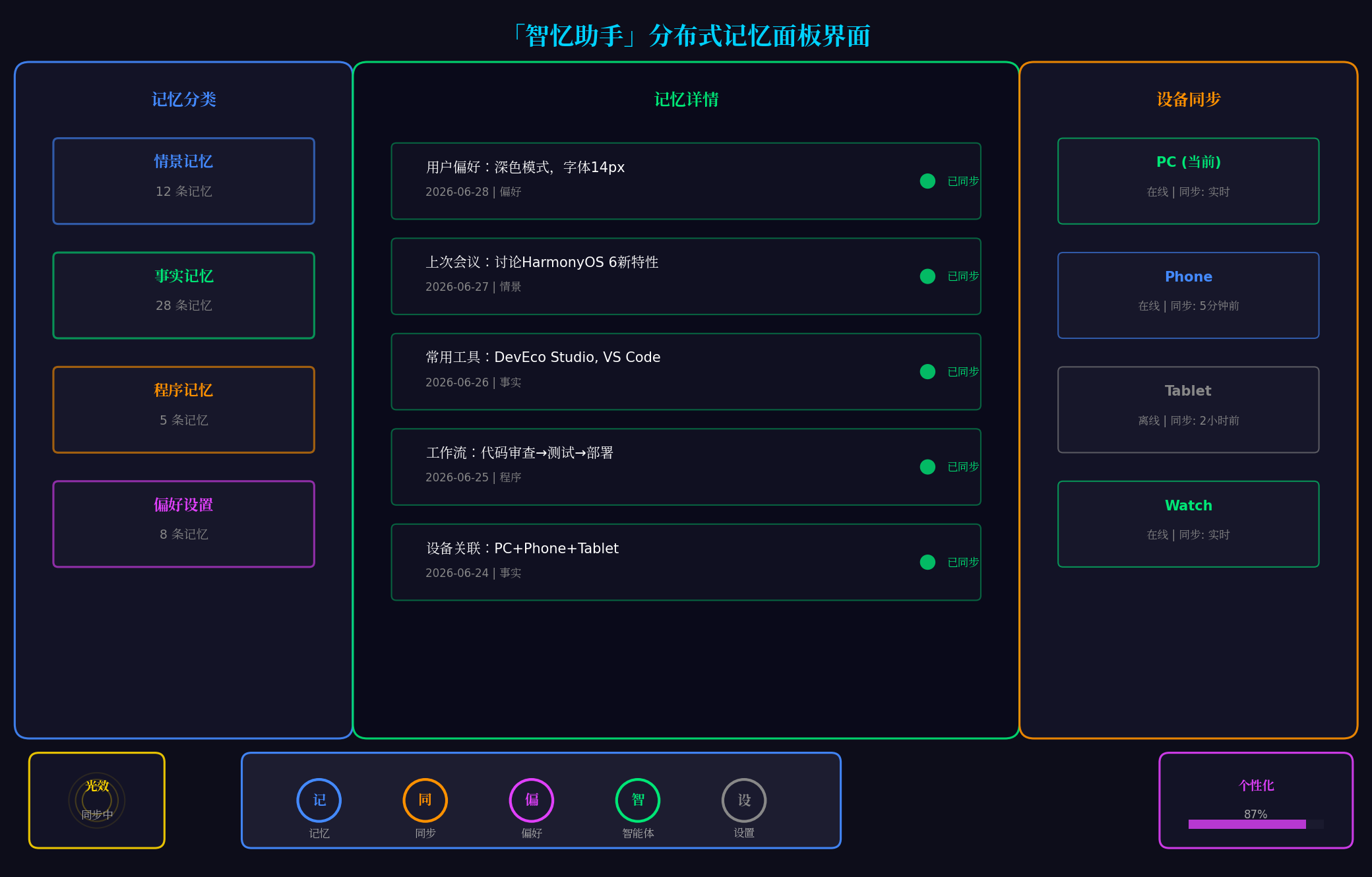
上图展示了「智忆助手」的核心界面:
- 左侧:记忆分类面板,显示情景/事实/程序/偏好四种记忆类型统计
- 中间:记忆详情面板,展示具体记忆内容与同步状态
- 右侧:设备同步面板,显示PC/Phone/Tablet/Watch四端在线状态
- 底部:悬浮导航栏,支持记忆/同步/偏好/智能体/设置五种模式切换
- 左下角:光效状态指示器,显示当前同步状态
- 右下角:个性化进度指示器,显示用户画像完整度
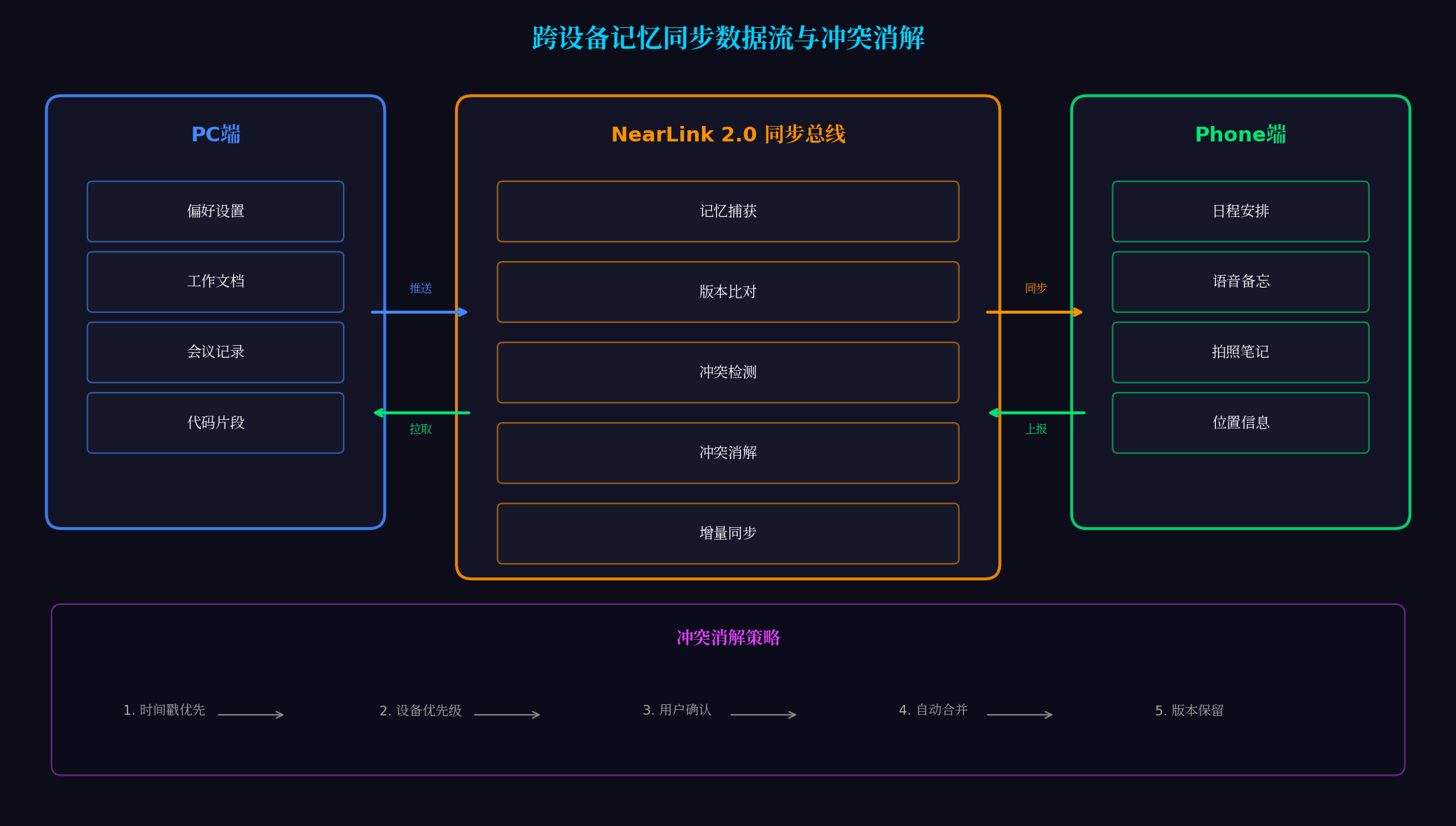
上图展示了跨设备记忆同步的完整数据流:
- 左侧:PC端记忆(偏好设置、工作文档、会议记录、代码片段)
- 中间:NearLink 2.0同步总线(记忆捕获→版本比对→冲突检测→冲突消解→增量同步)
- 右侧:Phone端记忆(日程安排、语音备忘、拍照笔记、位置信息)
- 底部:五种冲突消解策略(时间戳优先→设备优先级→用户确认→自动合并→版本保留)
八、总结与展望
本文基于HarmonyOS 6(API 23)的分布式智能体记忆系统与个性化服务框架,完整实战了一款面向PC端的跨设备记忆协同平台。核心创新点总结:
-
三层记忆架构:情景记忆(对话历史)、事实记忆(用户偏好)、程序记忆(操作习惯),覆盖用户全维度信息
-
跨设备记忆同步:基于NearLink 2.0实现PC/Phone/Tablet/Watch四端记忆实时同步,支持增量同步与全量同步
-
智能冲突消解:五种消解策略(时间戳优先/设备优先级/用户确认/自动合并/版本保留),确保多设备数据一致性
-
个性化服务推荐:基于用户记忆构建画像,主动推荐工作流、工具、内容、智能体,实现"越用越懂你"
-
沉浸光效状态反馈:记忆同步状态实时映射为系统光效,五种状态对应五种色彩心理学配色
未来扩展方向:
- AI自动记忆提取:通过NLP自动从对话中提取关键信息,无需用户手动记录
- 记忆图谱可视化:构建用户记忆知识图谱,支持可视化浏览与关联探索
- 跨用户记忆共享:在隐私保护前提下,实现团队记忆共享与协同
- 记忆预测服务:基于历史记忆预测用户下一步需求,提前准备服务
转载自:https://blog.csdn.net/u014727709/article/details/162387058
欢迎 👍点赞✍评论⭐收藏,欢迎指正

讨论HarmonyOS开发技术,专注于API与组件、DevEco Studio、测试、元服务和应用上架分发等。
更多推荐


 3
3 0
0- 0


 已为社区贡献179条内容

所有评论(0)