HarmonyOS应用<趣答>开发第1篇:Question模型设计与字段详解——题库数据结构深度解析
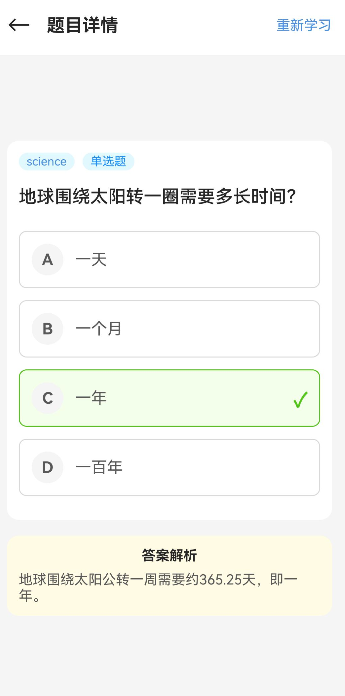
📖 引言
在知识问答学习应用中,题目数据是整个系统的核心。如何设计一个既能满足当前需求,又具备良好扩展性的题目数据模型,是每个开发者都需要认真思考的问题。
本文将详细讲解 Question 模型的完整设计,包括字段定义、题目类型、数据校验等核心内容。通过本文,你将掌握:
- 如何设计完整且可扩展的题目数据模型
- 如何支持多种题目类型(单选、多选、判断、填空)
- 如何进行数据校验和错误处理
- 如何在实际项目中使用 Question 模型
🎯 学习目标
完成本文后,你将能够:
- ✅ 理解 Question 模型的完整字段定义和用途
- ✅ 掌握四种题目类型的数据结构设计
- ✅ 实现题目数据的校验逻辑
- ✅ 在实际项目中创建和管理题目数据
💡 需求分析
功能模块设计
| 模块 | 功能描述 | 技术要点 |
|---|---|---|
| 题目数据存储 | 存储题目的完整信息,包括内容、选项、答案、解析等 | TypeScript 接口定义、可选字段 |
| 题目类型支持 | 支持单选题、多选题、判断题、填空题四种类型 | 枚举定义、条件渲染 |
| 数据校验 | 确保题目数据的完整性和正确性 | 字段验证、类型检查 |
| 知识点管理 | 通过知识点标签进行题目分类和推荐 | 字符串字段、扩展性设计 |
🛠️ 核心实现
步骤1: 定义 Question 接口
功能说明
Question 接口是题库数据的核心模型,用于表示单个题目的完整信息。它包含了题目展示、答题、解析所需的所有字段。
完整代码
// models/Question.ts

/**
 * 题目类型枚举
 */
export enum QuestionType {
  SINGLE_CHOICE = '单选题',
  MULTIPLE_CHOICE = '多选题',
  TRUE_FALSE = '判断题',
  FILL_BLANK = '填空题'
}

/**
 * 题目选项接口
 */
export interface QuestionOption {
  label: string;        // 选项标签,如 'A'、'B'、'C'、'D'
  content: string;      // 选项内容
  isCorrect: boolean;   // 是否为正确选项
}

/**
 * 题目接口
 */
export interface Question {
  id: string;                    // 题目的唯一标识
  subjectId: string;             // 所属学科 ID
  levelId: string;               // 所属关卡 ID
  type: QuestionType;            // 题目类型
  content: string;               // 题目内容
  options?: QuestionOption[];    // 选项列表(选择题专用)
  answer: string | string[];     // 正确答案
  explanation: string;           // 答案解析
  knowledgePoint: string;        // 知识点标签
  difficulty: number;            // 难度等级(1-4)
  source: string;                // 题目来源
  createdAt: string;             // 创建时间
  imageUrl?: string;             // 题目配图 URL(可选)
}
代码解析
1. QuestionType 枚举设计
export enum QuestionType {
  SINGLE_CHOICE = '单选题',
  MULTIPLE_CHOICE = '多选题',
  TRUE_FALSE = '判断题',
  FILL_BLANK = '填空题'
}
原理:
- 使用枚举确保题目类型的类型安全
- 枚举值为中文显示名称,便于直接用于 UI 展示
- 四种类型覆盖了常见的题目形式
示例:
// ✅ 正确:使用枚举值
const type: QuestionType = QuestionType.SINGLE_CHOICE;

// ❌ 错误:使用字符串
const type: QuestionType = '单选题' as QuestionType;
2. QuestionOption 接口设计
export interface QuestionOption {
  label: string;
  content: string;
  isCorrect: boolean;
}
原理:
label: 选项标识符,通常为大写字母(A、B、C、D)content: 选项的具体内容isCorrect: 标记该选项是否为正确答案,用于多选题
注意事项:
- 单选题:只有一个选项的
isCorrect为true - 多选题:可能有多个选项的
isCorrect为true - 判断题和填空题不需要此接口
3. Question 接口字段说明
| 字段名 | 类型 | 必填 | 说明 |
|---|---|---|---|
id |
string |
✅ | 题目唯一标识,格式为 {subject}_{counter} |
subjectId |
string |
✅ | 学科标识:history、geography、science、life、literature、math、sports |
levelId |
string |
✅ | 关卡标识,格式为 {subject}_level_{difficulty} |
type |
QuestionType |
✅ | 题目类型枚举值 |
content |
string |
✅ | 题目正文内容 |
options |
QuestionOption[] |
❌ | 选择题选项,判断题和填空题可省略 |
answer |
string | string[] |
✅ | 正确答案 |
explanation |
string |
✅ | 答案解析 |
knowledgePoint |
string |
✅ | 知识点标签 |
difficulty |
number |
✅ | 难度等级,1-4 分别对应入门级、中级、高级、专家级 |
source |
string |
✅ | 题目来源 |
createdAt |
string |
✅ | 创建时间,格式为 YYYY-MM-DD |
imageUrl |
string |
❌ | 题目配图 URL(可选) |
步骤2: 创建单选题实例
功能说明
单选题是最常见的题目类型,用户从多个选项中选择一个正确答案。
完整代码
// 创建单选题示例
const singleChoiceQuestion: Question = {
  id: 'math_1001',
  subjectId: 'math',
  levelId: 'math_level_1',
  type: QuestionType.SINGLE_CHOICE,
  content: '以下哪个是质数?',
  options: [
    { label: 'A', content: '15', isCorrect: false },
    { label: 'B', content: '23', isCorrect: true },
    { label: 'C', content: '25', isCorrect: false },
    { label: 'D', content: '33', isCorrect: false }
  ],
  answer: 'B',
  explanation: '质数是指在大于1的自然数中,除了1和它本身以外不再有其他因数的自然数。23只能被1和23整除,因此是质数。',
  knowledgePoint: '质数与合数',
  difficulty: 1,
  source: '初中数学',
  createdAt: '2024-01-01'
};
代码解析
1. answer 字段格式
answer: 'B' // 单选题:单个字母
原理:
- 单选题的
answer是一个字符串,表示正确选项的标签 - 与
options数组中isCorrect: true的选项的label对应
示例:
// ✅ 正确:answer 与正确选项的 label 一致
answer: 'B'  // 对应 options[1].label

// ❌ 错误:answer 与正确选项的 label 不一致
answer: 'A'  // 但正确选项是 B
2. options 数组设计
options: [
  { label: 'A', content: '15', isCorrect: false },
  { label: 'B', content: '23', isCorrect: true },
  { label: 'C', content: '25', isCorrect: false },
  { label: 'D', content: '33', isCorrect: false }
]
注意事项:
- 单选题只有一个选项的
isCorrect为true label必须唯一且按顺序排列content应简洁明了,避免过长
步骤3: 创建判断题实例
功能说明
判断题只有两个选项(正确/错误),用户需要判断题目陈述的对错。
完整代码
// 创建判断题示例
const trueFalseQuestion: Question = {
  id: 'science_2001',
  subjectId: 'science',
  levelId: 'science_level_2',
  type: QuestionType.TRUE_FALSE,
  content: '水的沸点在标准大气压下是100摄氏度。',
  answer: 'A',  // A 代表正确,B 代表错误
  explanation: '在标准大气压(1个标准大气压)下,纯水的沸点确实是100摄氏度。',
  knowledgePoint: '水的物理性质',
  difficulty: 2,
  source: '初中物理',
  createdAt: '2024-01-01'
};
代码解析
1. 判断题的 answer 格式
answer: 'A' // A 代表正确,B 代表错误
原理:
- 判断题的
answer使用约定的字母表示 'A'表示正确(True)'B'表示错误(False)
注意事项:
- 判断题不需要
options字段 answer必须是'A'或'B'- UI 层需要将
'A'转换为"正确",'B'转换为"错误"
示例:
// ✅ 正确:判断题不使用 options
const question: Question = {
  type: QuestionType.TRUE_FALSE,
  answer: 'A',
  // 没有 options 字段
};

// ❌ 错误:判断题不应该有 options
const question: Question = {
  type: QuestionType.TRUE_FALSE,
  answer: 'A',
  options: [  // 不应该有这个字段
    { label: 'A', content: '正确', isCorrect: true },
    { label: 'B', content: '错误', isCorrect: false }
  ]
};
步骤4: 创建多选题实例
功能说明
多选题有多个正确答案,用户需要选择所有正确的选项。
完整代码
// 创建多选题示例
const multipleChoiceQuestion: Question = {
  id: 'history_3001',
  subjectId: 'history',
  levelId: 'history_level_3',
  type: QuestionType.MULTIPLE_CHOICE,
  content: '以下哪些是中国古代四大发明?',
  options: [
    { label: 'A', content: '造纸术', isCorrect: true },
    { label: 'B', content: '印刷术', isCorrect: true },
    { label: 'C', content: '蒸汽机', isCorrect: false },
    { label: 'D', content: '火药', isCorrect: true }
  ],
  answer: ['A', 'B', 'D'],
  explanation: '中国古代四大发明是指造纸术、印刷术、火药和指南针。蒸汽机是英国工业革命时期的发明。',
  knowledgePoint: '中国古代科技',
  difficulty: 3,
  source: '中国历史',
  createdAt: '2024-01-01'
};
代码解析
1. 多选题的 answer 格式
answer: ['A', 'B', 'D'] // 多选题:字母数组
原理:
- 多选题的
answer是一个字符串数组 - 数组包含所有正确选项的
label - 数组顺序不影响判断结果
示例:
// ✅ 正确:answer 是数组,包含所有正确选项
answer: ['A', 'B', 'D']

// ✅ 正确:顺序不同也可以
answer: ['D', 'A', 'B']

// ❌ 错误:answer 是字符串
answer: 'A,B,D'

// ❌ 错误:缺少正确选项
answer: ['A', 'B']  // 缺少 D
2. 多选题的 options 设计
options: [
  { label: 'A', content: '造纸术', isCorrect: true },
  { label: 'B', content: '印刷术', isCorrect: true },
  { label: 'C', content: '蒸汽机', isCorrect: false },
  { label: 'D', content: '火药', isCorrect: true }
]
注意事项:
- 多选题可能有多个选项的
isCorrect为true answer数组必须包含所有isCorrect: true的选项的label- 至少有两个正确选项
步骤5: 实现数据校验
功能说明
为了确保题目数据的完整性和正确性,需要实现数据校验逻辑。
完整代码
// utils/QuestionValidator.ts

import { Question, QuestionType } from '../models/Question';

/**
 * 题目数据校验类
 */
export class QuestionValidator {
  /**
   * 校验题目数据
   * @param question 待校验的题目
   * @returns 校验结果
   */
  static validate(question: Question): { isValid: boolean; errors: string[] } {
    const errors: string[] = [];

    // 1. 检查必填字段
    if (!question.id) {
      errors.push('题目 ID 不能为空');
    }
    if (!question.subjectId) {
      errors.push('学科 ID 不能为空');
    }
    if (!question.levelId) {
      errors.push('关卡 ID 不能为空');
    }
    if (!question.content) {
      errors.push('题目内容不能为空');
    }
    if (!question.answer) {
      errors.push('答案不能为空');
    }
    if (!question.explanation) {
      errors.push('解析不能为空');
    }
    if (!question.knowledgePoint) {
      errors.push('知识点不能为空');
    }
    if (!question.source) {
      errors.push('题目来源不能为空');
    }

    // 2. 检查难度范围
    if (question.difficulty < 1 || question.difficulty > 4) {
      errors.push('难度等级必须在 1-4 之间');
    }

    // 3. 检查选择题必须有选项
    if ([QuestionType.SINGLE_CHOICE, QuestionType.MULTIPLE_CHOICE].includes(question.type)) {
      if (!question.options || question.options.length === 0) {
        errors.push('选择题必须包含选项');
      } else {
        // 检查选项格式
        question.options.forEach((option, index) => {
          if (!option.label) {
            errors.push(`选项 ${index + 1} 的 label 不能为空`);
          }
          if (!option.content) {
            errors.push(`选项 ${index + 1} 的 content 不能为空`);
          }
        });
      }
    }

    // 4. 检查多选题答案格式
    if (question.type === QuestionType.MULTIPLE_CHOICE && !Array.isArray(question.answer)) {
      errors.push('多选题的 answer 必须是数组');
    }

    // 5. 检查判断题答案格式
    if (question.type === QuestionType.TRUE_FALSE && typeof question.answer !== 'string') {
      errors.push('判断题的 answer 必须是字符串');
    }

    // 6. 检查日期格式
    const dateRegex = /^\d{4}-\d{2}-\d{2}$/;
    if (!dateRegex.test(question.createdAt)) {
      errors.push('创建时间格式必须为 YYYY-MM-DD');
    }

    return {
      isValid: errors.length === 0,
      errors
    };
  }

  /**
   * 校验答案是否正确
   * @param question 题目
   * @param userAnswer 用户答案
   * @returns 是否正确
   */
  static checkAnswer(question: Question, userAnswer: string | string[]): boolean {
    if (question.type === QuestionType.MULTIPLE_CHOICE) {
      // 多选题:比较数组
      const userAnswers = Array.isArray(userAnswer) ? userAnswer : [userAnswer];
      const correctAnswers = Array.isArray(question.answer) ? question.answer : [question.answer];

      // 排序后比较
      return JSON.stringify(userAnswers.sort()) === JSON.stringify(correctAnswers.sort());
    } else {
      // 单选题和判断题:直接比较字符串
      return userAnswer === question.answer;
    }
  }
}
代码解析
1. 必填字段检查
if (!question.id) {
  errors.push('题目 ID 不能为空');
}
原理:
- 检查所有必填字段是否有值
- 空字符串、
null、undefined都会被判定为无效 - 收集所有错误信息,一次性返回
示例:
// ✅ 正确:所有必填字段都有值
const question: Question = {
  id: 'math_1001',
  subjectId: 'math',
  levelId: 'math_level_1',
  type: QuestionType.SINGLE_CHOICE,
  content: '题目内容',
  answer: 'A',
  explanation: '解析',
  knowledgePoint: '知识点',
  difficulty: 1,
  source: '来源',
  createdAt: '2024-01-01'
};

// ❌ 错误:缺少必填字段
const question: Question = {
  id: 'math_1001',
  // 缺少 subjectId
  levelId: 'math_level_1',
  // ...
};
2. 难度范围检查
if (question.difficulty < 1 || question.difficulty > 4) {
  errors.push('难度等级必须在 1-4 之间');
}
原理:
- 难度等级必须在 1-4 之间
- 1:入门级,2:中级,3:高级,4:专家级
注意事项:
- 不支持小数
- 必须是正整数
3. 选择题选项检查
if ([QuestionType.SINGLE_CHOICE, QuestionType.MULTIPLE_CHOICE].includes(question.type)) {
  if (!question.options || question.options.length === 0) {
    errors.push('选择题必须包含选项');
  }
}
原理:
- 单选题和多选题必须有选项
- 判断题和填空题不需要选项
示例:
// ✅ 正确:单选题有选项
const question: Question = {
  type: QuestionType.SINGLE_CHOICE,
  options: [
    { label: 'A', content: '选项A', isCorrect: true },
    { label: 'B', content: '选项B', isCorrect: false }
  ]
};

// ❌ 错误:单选题没有选项
const question: Question = {
  type: QuestionType.SINGLE_CHOICE,
  // 缺少 options
};
4. 答案校验
static checkAnswer(question: Question, userAnswer: string | string[]): boolean {
  if (question.type === QuestionType.MULTIPLE_CHOICE) {
    const userAnswers = Array.isArray(userAnswer) ? userAnswer : [userAnswer];
    const correctAnswers = Array.isArray(question.answer) ? question.answer : [question.answer];
    return JSON.stringify(userAnswers.sort()) === JSON.stringify(correctAnswers.sort());
  } else {
    return userAnswer === question.answer;
  }
}
原理:
- 多选题:比较数组,排序后比较(顺序不影响结果)
- 单选题和判断题:直接比较字符串
示例:
// 多选题示例
const question: Question = {
  type: QuestionType.MULTIPLE_CHOICE,
  answer: ['A', 'B', 'D']
};

// ✅ 正确:顺序不同也可以
QuestionValidator.checkAnswer(question, ['D', 'A', 'B']);  // true

// ✅ 正确:顺序相同
QuestionValidator.checkAnswer(question, ['A', 'B', 'D']);  // true

// ❌ 错误:缺少选项
QuestionValidator.checkAnswer(question, ['A', 'B']);  // false

// 单选题示例
const question: Question = {
  type: QuestionType.SINGLE_CHOICE,
  answer: 'B'
};

// ✅ 正确
QuestionValidator.checkAnswer(question, 'B');  // true

// ❌ 错误
QuestionValidator.checkAnswer(question, 'A');  // false
⚠️ 常见问题与解决方案
问题1: 多选题答案格式错误
现象:
多选题的 answer 字段使用字符串格式,导致答案校验失败。
错误代码:
// ❌ 错误:多选题的 answer 使用字符串
const question: Question = {
  type: QuestionType.MULTIPLE_CHOICE,
  answer: 'A,B,D',  // 错误格式
  options: [
    { label: 'A', content: '造纸术', isCorrect: true },
    { label: 'B', content: '印刷术', isCorrect: true },
    { label: 'C', content: '蒸汽机', isCorrect: false },
    { label: 'D', content: '火药', isCorrect: true }
  ]
};
正确代码:
// ✅ 正确:多选题的 answer 使用数组
const question: Question = {
  type: QuestionType.MULTIPLE_CHOICE,
  answer: ['A', 'B', 'D'],  // 正确格式
  options: [
    { label: 'A', content: '造纸术', isCorrect: true },
    { label: 'B', content: '印刷术', isCorrect: true },
    { label: 'C', content: '蒸汽机', isCorrect: false },
    { label: 'D', content: '火药', isCorrect: true }
  ]
};
规则/建议:
- 单选题和判断题:
answer使用字符串 - 多选题:
answer必须使用字符串数组 - 使用
QuestionValidator.validate()进行校验
问题2: 判断题不应该有 options 字段
现象:
判断题添加了 options 字段,导致数据冗余和逻辑混乱。
错误代码:
// ❌ 错误:判断题不应该有 options
const question: Question = {
  type: QuestionType.TRUE_FALSE,
  content: '水的沸点在标准大气压下是100摄氏度。',
  answer: 'A',
  options: [  // 不应该有这个字段
    { label: 'A', content: '正确', isCorrect: true },
    { label: 'B', content: '错误', isCorrect: false }
  ]
};
正确代码:
// ✅ 正确:判断题不需要 options
const question: Question = {
  type: QuestionType.TRUE_FALSE,
  content: '水的沸点在标准大气压下是100摄氏度。',
  answer: 'A'  // A 代表正确,B 代表错误
};
规则/建议:
- 判断题和填空题不需要
options字段 - UI 层根据题目类型自动生成选项
- 判断题:A=正确,B=错误
问题3: 题目 ID 格式不规范
现象:
题目 ID 格式不统一,导致数据管理和查询困难。
错误代码:
// ❌ 错误:ID 格式不规范
const question1: Question = {
  id: 'question_001',  // 不包含学科信息
  subjectId: 'math',
  // ...
};

const question2: Question = {
  id: '1001',  // 纯数字
  subjectId: 'math',
  // ...
};
正确代码:
// ✅ 正确:ID 格式为 {subject}_{counter}
const question: Question = {
  id: 'math_1001',  // 学科_序号
  subjectId: 'math',
  levelId: 'math_level_1',
  // ...
};
规则/建议:
- ID 格式:
{subjectId}_{counter} counter使用递增的数字- 确保全局唯一性
问题4: 难度等级超出范围
现象:
难度等级设置为 0 或 5,导致逻辑错误。
错误代码:
// ❌ 错误:难度等级超出范围
const question: Question = {
  difficulty: 0,  // 错误:最小值为 1
  // ...
};

const question: Question = {
  difficulty: 5,  // 错误:最大值为 4
  // ...
};
正确代码:
// ✅ 正确:难度等级在 1-4 之间
const question: Question = {
  difficulty: 1,  // 入门级
  // ...
};

const question: Question = {
  difficulty: 4,  // 专家级
  // ...
};
规则/建议:
- 难度等级:1=入门级,2=中级,3=高级,4=专家级
- 必须是 1-4 之间的整数
- 使用
QuestionValidator.validate()进行校验
问题5: 日期格式不正确
现象:createdAt 字段使用不标准的日期格式,导致解析错误。
错误代码:
// ❌ 错误:日期格式不标准
const question: Question = {
  createdAt: '2024/01/01',  // 使用斜杠
  // ...
};

const question: Question = {
  createdAt: '2024-1-1',  // 月份和日期没有补零
  // ...
};
正确代码:
// ✅ 正确:使用标准格式 YYYY-MM-DD
const question: Question = {
  createdAt: '2024-01-01',  // 标准格式
  // ...
};
规则/建议:
- 日期格式:
YYYY-MM-DD - 月份和日期必须补零
- 使用正则表达式校验:
/^\d{4}-\d{2}-\d{2}$/
📝 本章小结
核心知识点
本文详细讲解了 Question 模型的设计与实现,主要包括:
1. Question 接口设计
- 包含 14 个字段,覆盖题目的完整信息
- 支持可选字段(
options、imageUrl) - 使用联合类型支持多种答案格式
2. 题目类型支持
- 单选题:
answer为字符串,options为数组 - 多选题:
answer为字符串数组,options为数组 - 判断题:
answer为字符串(A/B),不需要options - 填空题:
answer为字符串,不需要options
3. 数据校验
- 必填字段检查
- 难度范围检查
- 选项格式检查
- 答案格式检查
最佳实践总结
✅ 题目 ID 格式
id: 'math_1001' // {subjectId}_{counter}
✅ 多选题答案格式
answer: ['A', 'B', 'D'] // 字符串数组
✅ 判断题答案格式
answer: 'A' // A=正确,B=错误
✅ 数据校验
const result = QuestionValidator.validate(question);
if (!result.isValid) {
  console.error(result.errors);
}
下一步预告
在下一篇文章中,我们将:
- 🎨 讲解 User 模型的设计与用户数据管理
- 📚 介绍用户设置、学习统计等嵌套接口
- 🏷️ 探索用户数据持久化方案
🔗 相关链接
- 项目源码: Atomgit仓库
💡 提示: 建议结合项目源码阅读,动手实践效果更好!

讨论HarmonyOS开发技术,专注于API与组件、DevEco Studio、测试、元服务和应用上架分发等。
更多推荐


 26
26 0
0- 0


 已为社区贡献70条内容

所有评论(0)