【Flutter x HarmonyOS 6】挑战详情页面的UI设计
之前我们聊了挑战列表页面的 UI 设计,但点击某个挑战后,其实会进入挑战详情页面。而从详情页面,又能进入挑战计时页面和挑战尝试详情页面。这篇我们专门看看这几个页面的 UI 设计。
一、挑战详情页面
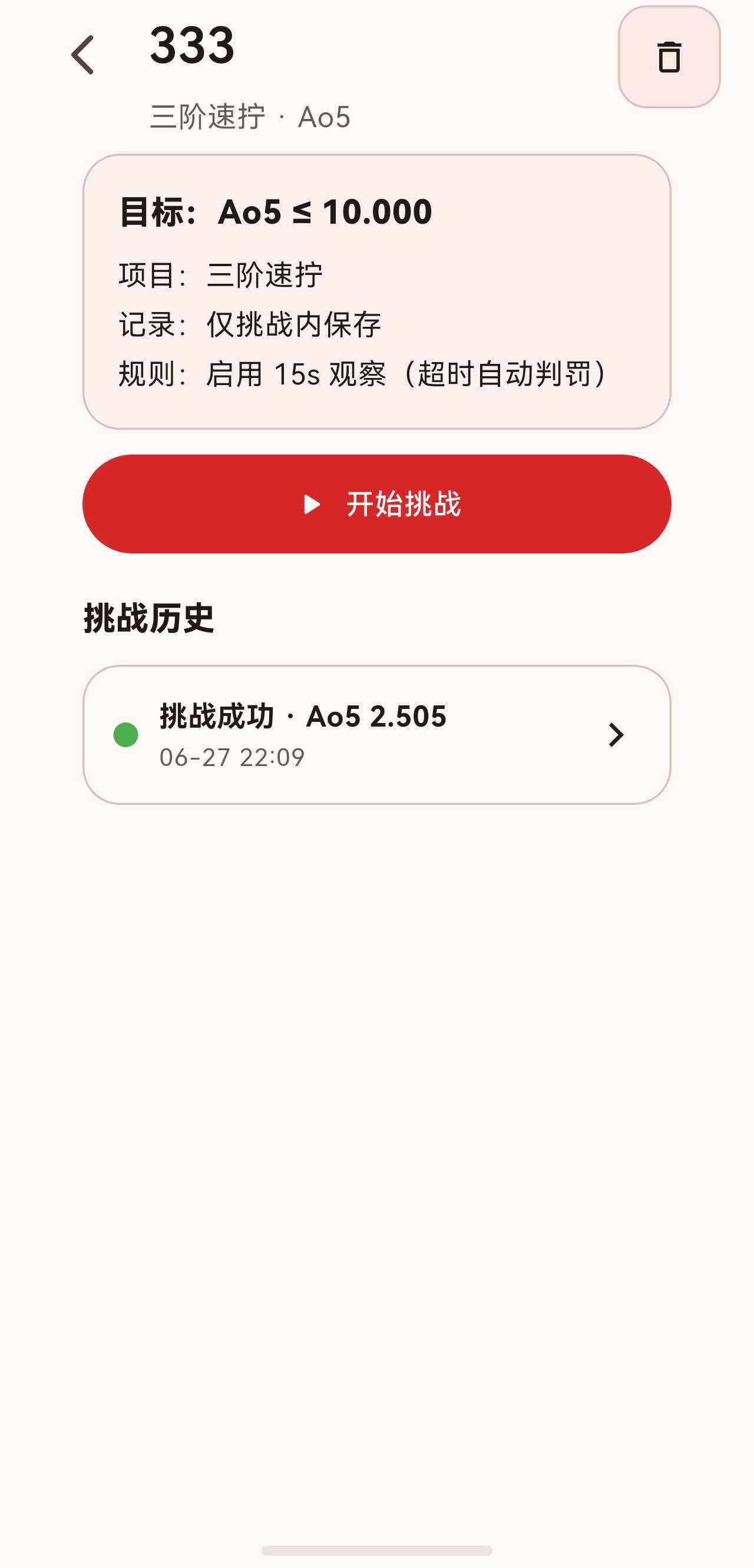
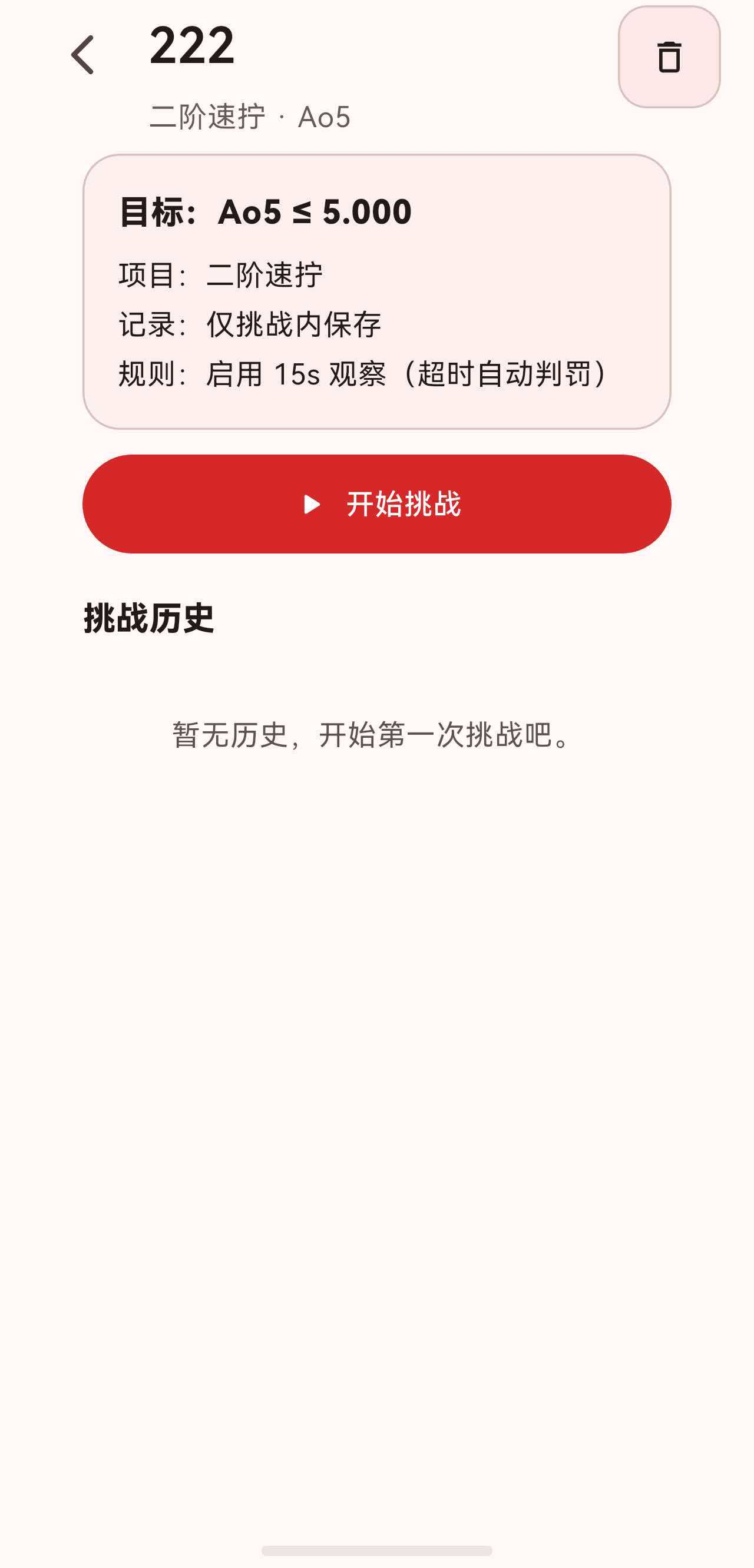
ChallengeDetailPage 是挑战的核心信息页,展示配置摘要、进行中的挑战、操作按钮和历史列表。
class ChallengeDetailPage extends StatelessWidget {
const ChallengeDetailPage({super.key, required this.challengeId});
final String challengeId;
Widget build(BuildContext context) {
final controller = context.watch<ChallengesController>();
final challenge = controller.findChallengeById(challengeId);
if (challenge == null) {
return const Scaffold(body: Center(child: Text('挑战不存在')));
}
final attempts = controller.attemptsForChallenge(challengeId);
ChallengeAttempt? ongoingAttempt;
for (final attempt in attempts) {
if (!attempt.isFinished) {
ongoingAttempt = attempt;
break;
}
}
final finishedAttempts = attempts.where((a) => a.isFinished).toList();
return SectionedPage(
title: challenge.name,
subtitle: Text('${challenge.event.chineseName} · ${challenge.averageType.label}'),
actions: [
SectionHeaderIconButton(
tooltip: '删除挑战',
icon: Icons.delete_outline,
onPressed: () => _confirmDelete(context, challenge),
),
],
child: ListView(
physics: const BouncingScrollPhysics(),
padding: const EdgeInsets.fromLTRB(16, 0, 16, 24),
children: [
_ChallengeSummaryCard(challenge: challenge),
const SizedBox(height: 12),
if (ongoingAttempt != null) ...[
_OngoingAttemptCard(...),
const SizedBox(height: 12),
],
FilledButton.icon(
onPressed: () { /* 开始或继续挑战 */ },
icon: const Icon(Icons.play_arrow_rounded),
label: Text(ongoingAttempt == null ? '开始挑战' : '继续挑战'),
style: FilledButton.styleFrom(padding: const EdgeInsets.symmetric(vertical: 14)),
),
const SizedBox(height: 20),
Text('挑战历史', style: Theme.of(context).textTheme.titleMedium?.copyWith(fontWeight: FontWeight.w800)),
const SizedBox(height: 10),
if (finishedAttempts.isEmpty)
Padding(
padding: const EdgeInsets.symmetric(vertical: 24),
child: Text(
'暂无历史,开始第一次挑战吧。',
style: Theme.of(context).textTheme.bodyMedium?.copyWith(
color: Theme.of(context).textTheme.bodyMedium?.color?.withOpacity(0.75),
),
textAlign: TextAlign.center,
),
)
else
...finishedAttempts.map(
(attempt) => Padding(
padding: const EdgeInsets.only(bottom: 10),
child: _AttemptTile(
challenge: challenge,
attemptId: attempt.id,
onTap: () {
Navigator.of(context).push(
MaterialPageRoute<void>(
builder: (_) => ChallengeAttemptDetailPage(
challengeId: challengeId,
attemptId: attempt.id,
),
),
);
},
),
),
),
],
),
);
}
}
页面内容从上到下依次是:
- 摘要卡片:挑战的核心配置。
- 进行中卡片(条件显示):当前未完成的挑战进度。
- 操作按钮:开始或继续挑战。
- 挑战历史:已完成的挑战列表,或空状态提示。
二、挑战摘要卡片
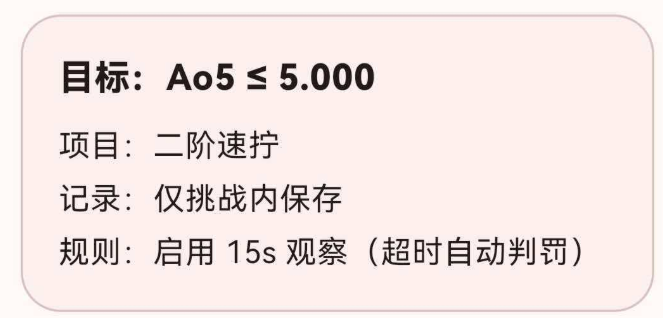
摘要卡片展示挑战的核心配置信息:
class _ChallengeSummaryCard extends StatelessWidget {
const _ChallengeSummaryCard({required this.challenge});
final Challenge challenge;
Widget build(BuildContext context) {
final theme = Theme.of(context);
return Container(
padding: const EdgeInsets.all(16),
decoration: BoxDecoration(
borderRadius: BorderRadius.circular(18),
color: theme.colorScheme.surfaceVariant.withOpacity(0.35),
border: Border.all(color: theme.colorScheme.outlineVariant),
),
child: Column(
crossAxisAlignment: CrossAxisAlignment.start,
children: [
Text(
'目标:${challenge.averageType.label} ≤ ${_formatDuration(challenge.targetDuration)}',
style: theme.textTheme.titleMedium?.copyWith(fontWeight: FontWeight.w800),
),
const SizedBox(height: 8),
Text(
'项目:${challenge.event.chineseName}',
style: theme.textTheme.bodyMedium,
),
const SizedBox(height: 4),
Text(
'记录:${challenge.includeInRecords ? '计入记录/统计' : '仅挑战内保存'}',
style: theme.textTheme.bodyMedium,
),
const SizedBox(height: 4),
Text(
'规则:${challenge.enableInspectionAndPenalty ? '启用 15s 观察(超时自动判罚)' : '不启用 15s 观察'}',
style: theme.textTheme.bodyMedium,
),
],
),
);
}
}
卡片包含四行信息:
- 目标:挑战类型和目标时间,如 “目标:ao5 ≤ 10.000”。
- 项目:魔方项目名称。
- 记录:是否计入记录和统计。
- 规则:是否启用 15 秒观察及自动判罚。
三、进行中的挑战卡片
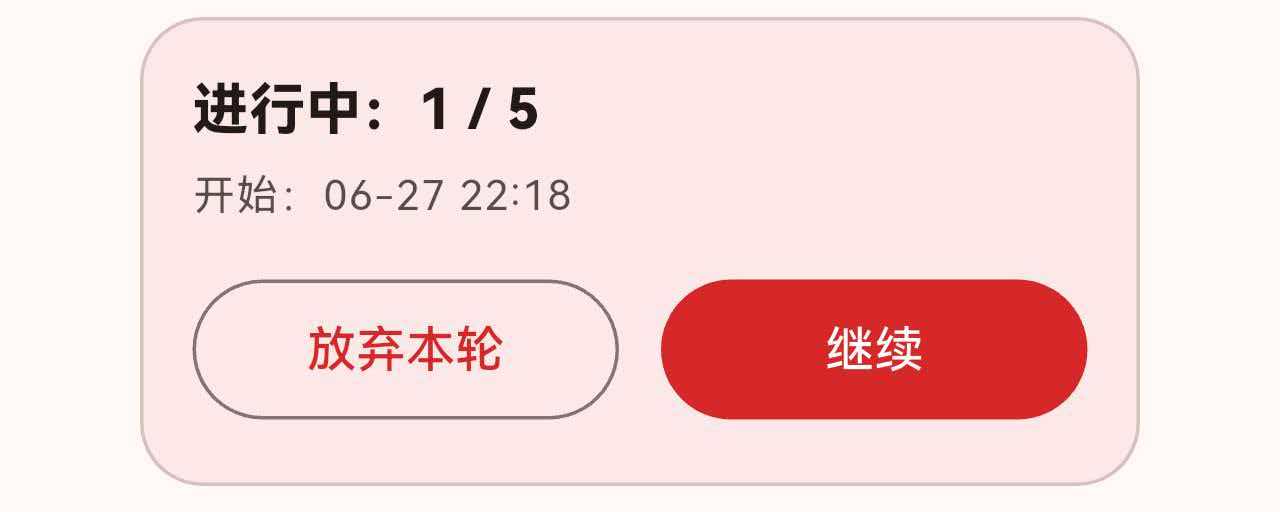
如果有未完成的挑战,在摘要卡片和操作按钮之间显示一个特殊卡片:
class _OngoingAttemptCard extends StatelessWidget {
const _OngoingAttemptCard({
required this.attempt,
required this.total,
required this.onContinue,
required this.onAbandon,
});
final ChallengeAttempt? attempt;
final int total;
final VoidCallback onContinue;
final VoidCallback onAbandon;
Widget build(BuildContext context) {
final attempt = this.attempt;
if (attempt == null) {
return const SizedBox.shrink();
}
final theme = Theme.of(context);
final done = attempt.solves.length;
final progressText = '进行中:$done / $total';
final startedText = '开始:${_formatDate(attempt.startedAt)}';
return Container(
padding: const EdgeInsets.all(14),
decoration: BoxDecoration(
borderRadius: BorderRadius.circular(18),
color: theme.colorScheme.primary.withOpacity(0.08),
border: Border.all(color: theme.colorScheme.outlineVariant),
),
child: Column(
crossAxisAlignment: CrossAxisAlignment.start,
children: [
Text(
progressText,
style: theme.textTheme.titleMedium?.copyWith(
fontWeight: FontWeight.w800,
),
),
const SizedBox(height: 4),
Text(
startedText,
style: theme.textTheme.bodySmall?.copyWith(
color: theme.textTheme.bodySmall?.color?.withOpacity(0.75),
),
),
const SizedBox(height: 12),
Row(
children: [
Expanded(
child: OutlinedButton(
onPressed: onAbandon,
child: const Text('放弃本轮'),
),
),
const SizedBox(width: 12),
Expanded(
child: FilledButton(
onPressed: onContinue,
child: const Text('继续'),
),
),
],
),
],
),
);
}
}
这个卡片的设计要点:
-
背景色:使用主色 8% 透明度,比摘要卡片更突出,暗示"这里有未完成的操作"。
-
进度信息:显示当前完成数和总数,如 “进行中:3 / 5”。
-
双按钮布局:两个按钮等宽排列,"放弃本轮"用
OutlinedButton(弱操作),"继续"用FilledButton(强操作)。
3.1 条件显示
if (ongoingAttempt != null) ...[
  _OngoingAttemptCard(
    attempt: ongoingAttempt,
    total: challenge.averageType.windowSize,
    onContinue: () => _resumeAttempt(context, challenge, ongoingAttempt!),
    onAbandon: () => _confirmAbandonAttempt(context, ongoingAttempt!.id, challenge),
  ),
  const SizedBox(height: 12),
],
使用 if + 展开运算符 ...,当没有进行中的挑战时,整个卡片不渲染。
3.2 操作按钮文案
FilledButton.icon(
  onPressed: () {
    if (ongoingAttempt != null) {
      _resumeAttempt(context, challenge, attempt);
    } else {
      _startChallenge(context, challenge);
    }
  },
  icon: const Icon(Icons.play_arrow_rounded),
  label: Text(ongoingAttempt == null ? '开始挑战' : '继续挑战'),
  style: FilledButton.styleFrom(padding: const EdgeInsets.symmetric(vertical: 14)),
)
按钮文案根据是否有进行中的挑战动态切换:
- 无进行中:显示"开始挑战"。
- 有进行中:显示"继续挑战"。
四、挑战历史列表
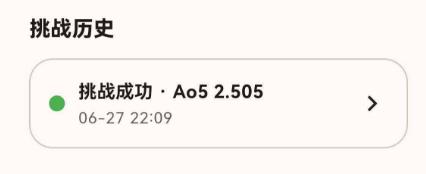
4.1 历史项卡片
class _AttemptTile extends StatelessWidget {
const _AttemptTile({
required this.challenge,
required this.attemptId,
required this.onTap,
});
final Challenge challenge;
final String attemptId;
final VoidCallback onTap;
Widget build(BuildContext context) {
final controller = context.watch<ChallengesController>();
final attempt = controller.findAttemptById(attemptId);
if (attempt == null) {
return const SizedBox.shrink();
}
final theme = Theme.of(context);
final succeeded = attempt.succeeded ?? false;
final statusText = succeeded ? '挑战成功' : '未达标';
final avgText = attempt.averageDuration == null
? 'DNF'
: _formatDuration(attempt.averageDuration);
return InkWell(
borderRadius: BorderRadius.circular(18),
onTap: onTap,
child: Container(
padding: const EdgeInsets.all(14),
decoration: BoxDecoration(
borderRadius: BorderRadius.circular(18),
color: theme.colorScheme.surface,
border: Border.all(color: theme.colorScheme.outlineVariant),
),
child: Row(
children: [
Container(
width: 12,
height: 12,
decoration: BoxDecoration(
color: succeeded ? Colors.green : theme.colorScheme.error,
shape: BoxShape.circle,
),
),
const SizedBox(width: 10),
Expanded(
child: Column(
crossAxisAlignment: CrossAxisAlignment.start,
children: [
Text(
'$statusText · ${challenge.averageType.label} $avgText',
style: theme.textTheme.titleSmall?.copyWith(fontWeight: FontWeight.w700),
),
const SizedBox(height: 2),
Text(
_formatDate(attempt.startedAt),
style: theme.textTheme.bodySmall?.copyWith(
color: theme.textTheme.bodySmall?.color?.withOpacity(0.7),
),
),
],
),
),
const Icon(Icons.chevron_right),
],
),
),
);
}
}
历史项的布局:横向排列,从左到右依次是:
- 状态圆点:12×12 的圆形,成功为绿色,失败为红色。
- 信息区域:两行文字——状态+平均时间、开始时间。
- 箭头图标:提示可点击查看详情。
4.2 空历史状态
if (finishedAttempts.isEmpty)
  Padding(
    padding: const EdgeInsets.symmetric(vertical: 24),
    child: Text(
      '暂无历史,开始第一次挑战吧。',
      style: Theme.of(context).textTheme.bodyMedium?.copyWith(
        color: Theme.of(context).textTheme.bodyMedium?.color?.withOpacity(0.75),
      ),
      textAlign: TextAlign.center,
    ),
  )
没有历史时,居中显示提示文案,语气鼓励用户行动。
五、挑战计时页面
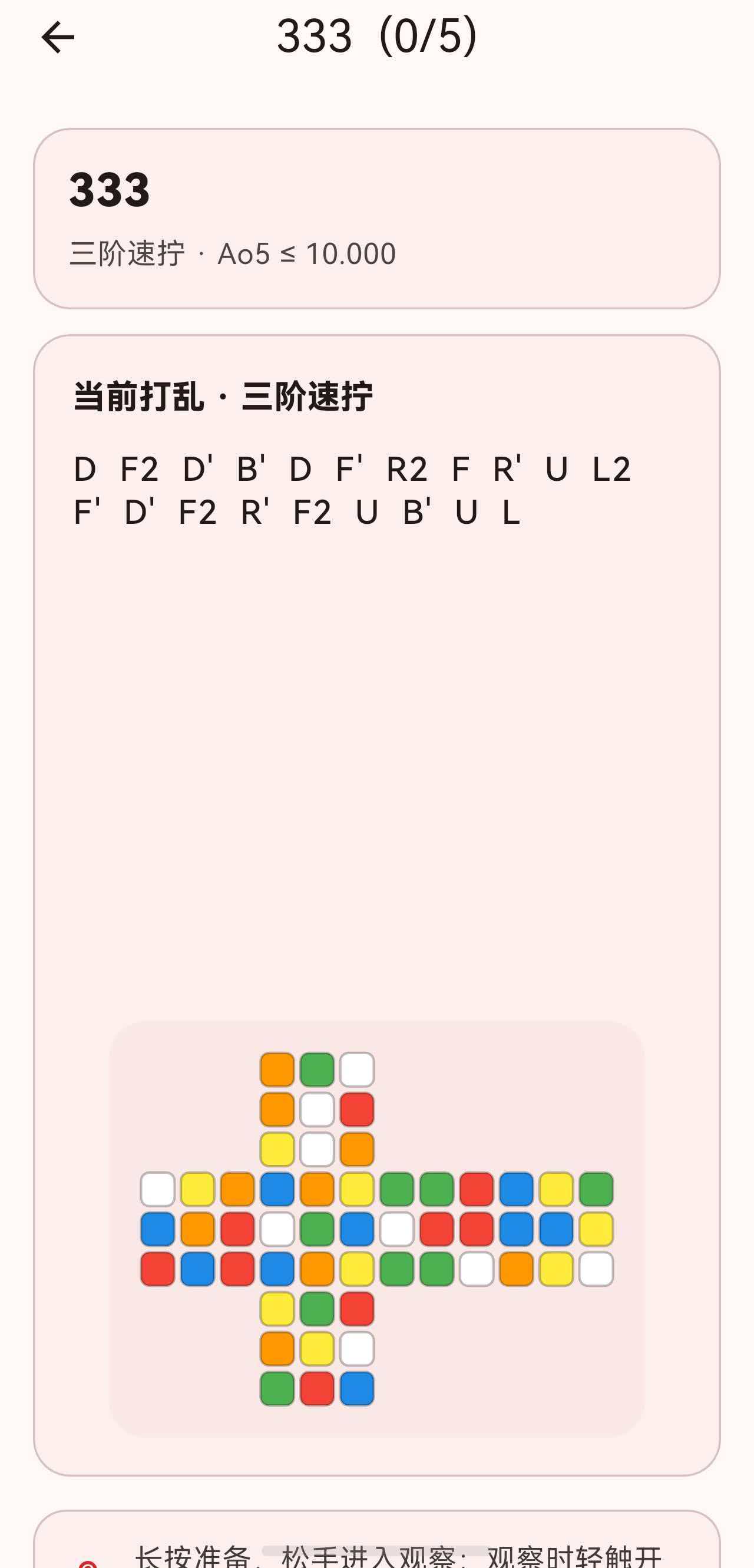
点击"开始挑战"或"继续挑战"后,进入 ChallengeTimerPage。这是一个全屏的计时界面,与普通计时页类似,但多了挑战相关的信息卡片。
5.1 页面整体结构
class _ChallengeTimerViewState extends State<_ChallengeTimerView>
with SingleTickerProviderStateMixin {
Widget build(BuildContext context) {
final timerState = context.watch<TimerController>().state;
final showAppBar = timerState.phase == TimerPhase.idle;
return WillPopScope(
onWillPop: () async => await _confirmAbandon(),
child: Scaffold(
extendBodyBehindAppBar: !showAppBar,
appBar: showAppBar
? AppBar(
title: Text('${challenge.name} ($done/$total)'),
centerTitle: true,
)
: null,
body: GestureDetector(
onLongPressStart: _handleLongPressStart,
onLongPressEnd: _handleLongPressEnd,
onLongPressCancel: _handleLongPressCancel,
onTapUp: timerState.phase == TimerPhase.running
? (_) => _handleTapStop()
: null,
child: Stack(
children: [
ListView(
children: [
_ChallengeHeaderCard(...),
_ChallengeScrambleCard(...),
_HintCard(...),
_AttemptSolvesCard(...),
],
),
if (timerState.phase != TimerPhase.idle)
Positioned.fill(
child: _FullScreenTimerOverlay(...),
),
],
),
),
),
);
}
}
页面有两种状态:
- 空闲时:显示 AppBar + 信息卡片列表。
- 计时/观察时:隐藏 AppBar,叠加全屏计时覆盖层。
5.2 挑战信息头部卡片
class _ChallengeHeaderCard extends StatelessWidget {
Widget build(BuildContext context) {
final theme = Theme.of(context);
return Container(
padding: const EdgeInsets.all(16),
decoration: BoxDecoration(
borderRadius: BorderRadius.circular(18),
color: theme.colorScheme.surfaceVariant.withOpacity(0.35),
border: Border.all(color: theme.colorScheme.outlineVariant),
),
child: Column(
crossAxisAlignment: CrossAxisAlignment.start,
children: [
Text(
title,
style: theme.textTheme.titleLarge?.copyWith(fontWeight: FontWeight.w800),
),
const SizedBox(height: 6),
Text(
subtitle, // 如 "三阶魔方 · ao5 ≤ 10.000"
style: theme.textTheme.bodyMedium?.copyWith(
color: theme.textTheme.bodyMedium?.color?.withOpacity(0.8),
),
),
],
),
);
}
}
5.3 打乱卡片
打乱卡片展示当前打乱公式和展开图:
class _ChallengeScrambleCard extends StatelessWidget {
Widget build(BuildContext context) {
final theme = Theme.of(context);
final moves = scramble
.split(' ')
.map((move) => move.trim())
.where((move) => move.isNotEmpty)
.toList();
final showBeginnerScramble =
context.watch<AppSettingsService>().beginnerFriendlyScrambleEnabled &&
variant == PuzzleVariant.threeByThree;
return Container(
padding: const EdgeInsets.all(18),
decoration: BoxDecoration(
borderRadius: BorderRadius.circular(18),
color: theme.colorScheme.surfaceVariant.withOpacity(0.35),
border: Border.all(color: theme.colorScheme.outlineVariant),
),
child: Column(
crossAxisAlignment: CrossAxisAlignment.start,
children: [
Text(
eventName.isEmpty ? '当前打乱' : '当前打乱 · $eventName',
style: theme.textTheme.titleMedium?.copyWith(fontWeight: FontWeight.w800),
),
const SizedBox(height: 12),
// 打乱文字
SizedBox(
height: 260,
child: _ScaleDownToFit(
alignment: Alignment.topLeft,
child: Column(
mainAxisSize: MainAxisSize.min,
crossAxisAlignment: CrossAxisAlignment.start,
children: [
Text(
moves.join(' '),
style: theme.textTheme.titleMedium?.copyWith(
fontFamily: 'RobotoMono',
letterSpacing: 0.8,
height: 1.3,
),
),
if (showBeginnerScramble) ...[
const SizedBox(height: 10),
Text(
'动作:$beginnerScrambleText',
style: theme.textTheme.bodyMedium?.copyWith(
height: 1.35,
color: theme.textTheme.bodyMedium?.color?.withOpacity(0.78),
),
),
],
],
),
),
),
const SizedBox(height: 18),
// 展开图
AnimatedSwitcher(
duration: const Duration(milliseconds: 200),
child: showScrambleNet
? Center(
child: ClipRRect(
borderRadius: BorderRadius.circular(18),
child: Container(
width: cubeSize,
padding: const EdgeInsets.all(14),
color: theme.colorScheme.surfaceVariant.withOpacity(0.4),
child: Builder(
builder: (context) {
if (variant.isCube) {
return CubeNetView(scramble: scramble, variant: variant);
}
if (variant == PuzzleVariant.megaminx) {
return MegaminxNetView(scramble: scramble);
}
if (variant == PuzzleVariant.pyraminx) {
return PyraminxNetView(scramble: scramble);
}
return const SizedBox.shrink();
},
),
),
),
)
: Container(
child: Row(
children: [
Icon(Icons.hide_image_outlined, color: theme.colorScheme.onSurfaceVariant),
const SizedBox(width: 12),
Expanded(
child: Text('展开图已关闭,可在设置中重新启用。', ...),
),
],
),
),
),
],
),
);
}
}
打乱卡片的设计要点:
- 等宽字体:打乱文字使用
RobotoMono,每个字母等宽,方便阅读。 - 初学者提示:三阶项目支持中文动作提示(如"R=右上"),跟随设置页开关。
- 展开图:根据魔方类型渲染不同的展开图组件(Cube / Megaminx / Pyraminx)。
- 自适应缩放:
_ScaleDownToFit组件确保长打乱公式不会溢出。
5.4 本轮成绩卡片
计时页面底部实时展示已完成的成绩:
class _AttemptSolvesCard extends StatelessWidget {
Widget build(BuildContext context) {
final theme = Theme.of(context);
final solves = attempt.solves;
final done = solves.length;
final newestFirst = context.watch<AppSettingsService>()
.challengeAttemptDetailNewestFirst;
return Container(
padding: const EdgeInsets.all(16),
decoration: BoxDecoration(
borderRadius: BorderRadius.circular(18),
color: theme.colorScheme.surfaceVariant.withOpacity(0.35),
border: Border.all(color: theme.colorScheme.outlineVariant),
),
child: Column(
crossAxisAlignment: CrossAxisAlignment.start,
children: [
Row(
children: [
Expanded(
child: Text(
'本轮成绩',
style: theme.textTheme.titleMedium?.copyWith(fontWeight: FontWeight.w800),
),
),
Text(
'$done/$total',
style: theme.textTheme.labelLarge?.copyWith(
color: theme.colorScheme.primary,
fontWeight: FontWeight.w800,
),
),
],
),
const SizedBox(height: 12),
if (visibleCount == 0)
Text('暂无成绩,完成一把后会显示在这里。', ...)
else
...List.generate(visibleCount, (i) {
final index = newestFirst ? (done - 1) - i : (startIndex + i);
final solve = solves[index];
return Padding(
padding: EdgeInsets.only(bottom: i == visibleCount - 1 ? 0 : 10),
child: Container(
padding: const EdgeInsets.symmetric(horizontal: 14, vertical: 12),
decoration: BoxDecoration(
borderRadius: BorderRadius.circular(16),
color: theme.colorScheme.surface,
border: Border.all(color: theme.colorScheme.outlineVariant),
),
child: Row(
children: [
Container(
width: 28,
height: 28,
alignment: Alignment.center,
decoration: BoxDecoration(
color: theme.colorScheme.primary.withOpacity(0.12),
borderRadius: BorderRadius.circular(10),
),
child: Text(
'${index + 1}',
style: theme.textTheme.labelLarge?.copyWith(
color: theme.colorScheme.primary,
fontWeight: FontWeight.w800,
),
),
),
const SizedBox(width: 12),
Expanded(
child: Text(
timeText,
style: theme.textTheme.titleMedium?.copyWith(fontWeight: FontWeight.w800),
),
),
if (penaltyLabel.isNotEmpty)
Padding(
padding: const EdgeInsets.only(right: 8),
child: Text(
penaltyLabel,
style: theme.textTheme.bodyMedium?.copyWith(
color: theme.colorScheme.primary,
fontWeight: FontWeight.w700,
),
),
),
],
),
),
);
}),
],
),
);
}
}
成绩项的设计:
- 序号徽章:28×28 圆角矩形,主色背景 12% 透明度,显示序号。
- 时间文字:加粗显示有效时间。
- 罚时标签:如果有罚时,在右侧显示 “+2” 或 “DNF”。
- 排序:支持"最新在前"和"最早在前",跟随设置页偏好。
5.5 全屏计时覆盖层
当用户长按准备、观察或计时时,叠加一个全屏覆盖层:
class _FullScreenTimerOverlay extends StatelessWidget {
Widget build(BuildContext context) {
final theme = Theme.of(context);
String primaryText;
String secondaryText;
Color? primaryColor;
if (state.phase == TimerPhase.running) {
primaryText = _formatDuration(state.liveDuration);
secondaryText = '轻触屏幕任意位置即可结束';
} else if (state.phase == TimerPhase.inspection) {
if (isDnf) {
primaryText = 'DNF';
primaryColor = theme.colorScheme.error;
secondaryText = '已超过 17s,成绩将记为 DNF。轻触开始计时(记录为 DNF)';
} else if (isPlusTwo) {
primaryText = '+2';
primaryColor = Colors.orangeAccent;
secondaryText = '已超过 15s 未开始,成绩将 +2。轻触立即开始计时';
} else {
primaryText = remainingSeconds.toStringAsFixed(1);
secondaryText = '≤15s 正常;15-17s +2;>17s DNF。轻触开始计时';
}
} else {
primaryText = '松手立即开始';
secondaryText = '保持长按以准备';
}
return IgnorePointer(
ignoring: !isVisible,
child: AnimatedOpacity(
duration: const Duration(milliseconds: 200),
opacity: isVisible ? 1 : 0,
child: GestureDetector(
onTap: state.phase == TimerPhase.inspection ? onTapDuringInspection : null,
child: DecoratedBox(
decoration: BoxDecoration(
gradient: LinearGradient(
colors: [
Colors.black.withOpacity(0.94),
Colors.black.withOpacity(0.86),
],
begin: Alignment.topCenter,
end: Alignment.bottomCenter,
),
),
child: SafeArea(
child: Center(
child: Column(
mainAxisSize: MainAxisSize.min,
children: [
Text(primaryText, style: theme.textTheme.displayLarge?.copyWith(
color: primaryColor ?? Colors.white,
fontWeight: FontWeight.w700,
letterSpacing: 1.6,
)),
const SizedBox(height: 14),
Text(secondaryText, style: theme.textTheme.titleMedium?.copyWith(
color: Colors.white70,
)),
],
),
),
),
),
),
),
);
}
}
覆盖层的设计要点:
- 黑色渐变背景:从上到下 94%→86% 不透明度,覆盖底部信息卡片。
- 主文字:
displayLarge字号,居中显示计时时间、观察倒计时或提示文案。 - 辅助文字:
titleMedium字号,白色 70% 不透明度,说明当前状态和操作方式。 - 观察状态颜色:正常为白色,+2 为橙色,DNF 为红色。
- 淡入淡出:使用
AnimatedOpacity,200ms 过渡。
六、挑战尝试详情页面
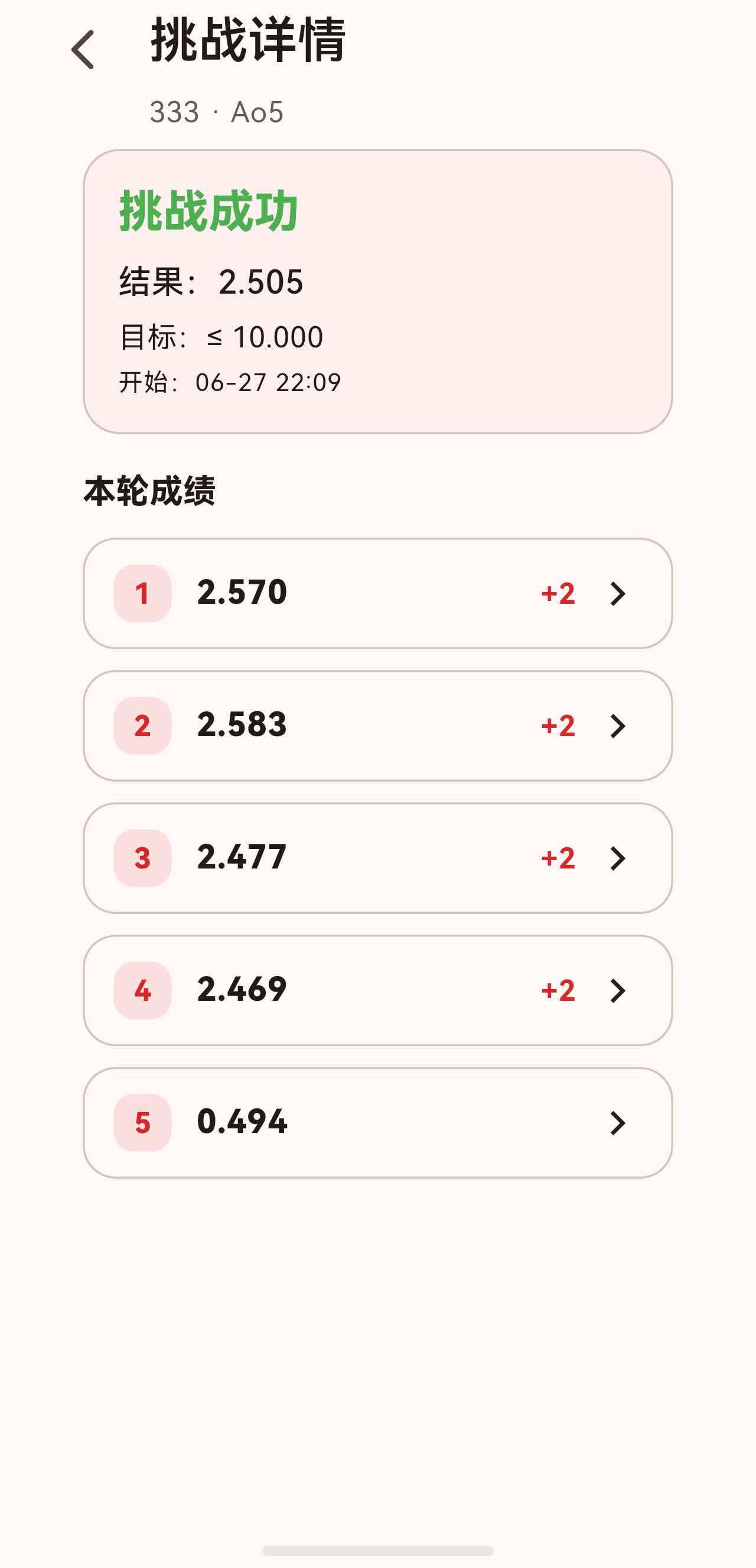
在详情页面点击某条挑战历史,进入 ChallengeAttemptDetailPage,展示该次挑战的完整成绩列表:
class ChallengeAttemptDetailPage extends StatelessWidget {
const ChallengeAttemptDetailPage({
super.key,
required this.challengeId,
required this.attemptId,
});
Widget build(BuildContext context) {
final challengesController = context.watch<ChallengesController>();
final challenge = challengesController.findChallengeById(challengeId);
final attempt = challengesController.findAttemptById(attemptId);
if (challenge == null || attempt == null) {
return const Scaffold(body: Center(child: Text('记录不存在')));
}
return SectionedPage(
title: '挑战详情',
subtitle: Text('${challenge.name} · ${challenge.averageType.label}'),
child: ListView(
physics: const BouncingScrollPhysics(),
padding: const EdgeInsets.fromLTRB(16, 0, 16, 24),
children: [
_AttemptSummary(attempt: attempt, target: challenge.targetDuration),
const SizedBox(height: 16),
Text('本轮成绩', style: Theme.of(context).textTheme.titleMedium?.copyWith(fontWeight: FontWeight.w800)),
const SizedBox(height: 10),
...List.generate(attempt.solves.length, (index) {
final solve = attempt.solves[index];
return Padding(
padding: const EdgeInsets.only(bottom: 10),
child: _SolveTile(
index: index,
solve: solve,
onTap: () => _openSolveDetail(context, attempt, index),
),
);
}),
],
),
);
}
}
6.1 尝试摘要卡片
class _AttemptSummary extends StatelessWidget {
Widget build(BuildContext context) {
final theme = Theme.of(context);
final succeeded = attempt.succeeded ?? false;
final aoText = attempt.averageDuration == null
? 'DNF'
: _formatDuration(attempt.averageDuration);
return Container(
padding: const EdgeInsets.all(16),
decoration: BoxDecoration(
borderRadius: BorderRadius.circular(18),
color: theme.colorScheme.surfaceVariant.withOpacity(0.35),
border: Border.all(color: theme.colorScheme.outlineVariant),
),
child: Column(
crossAxisAlignment: CrossAxisAlignment.start,
children: [
Text(
succeeded ? '挑战成功' : '未达标',
style: theme.textTheme.titleLarge?.copyWith(
fontWeight: FontWeight.w800,
color: succeeded ? Colors.green : theme.colorScheme.error,
),
),
const SizedBox(height: 8),
Text('结果:$aoText', style: theme.textTheme.titleMedium),
const SizedBox(height: 4),
Text('目标:≤ ${_formatDuration(target)}', style: theme.textTheme.bodyMedium),
const SizedBox(height: 4),
Text('开始:${_formatDate(attempt.startedAt)}', style: theme.textTheme.bodySmall),
],
),
);
}
}
摘要卡片的标题行使用颜色区分结果:
- 成功:绿色文字"挑战成功"。
- 未达标:红色文字"未达标"。
6.2 成绩列表项
class _SolveTile extends StatelessWidget {
Widget build(BuildContext context) {
final theme = Theme.of(context);
final effective = solve.effectiveDuration;
final timeText = effective == null ? 'DNF' : _formatDuration(effective);
final penaltyLabel = solve.penalty == SolvePenalty.none
? ''
: (solve.penalty == SolvePenalty.plusTwo ? '+2' : 'DNF');
return InkWell(
borderRadius: BorderRadius.circular(16),
onTap: onTap,
child: Container(
padding: const EdgeInsets.symmetric(horizontal: 14, vertical: 12),
decoration: BoxDecoration(
borderRadius: BorderRadius.circular(16),
color: theme.colorScheme.surface,
border: Border.all(color: theme.colorScheme.outlineVariant),
),
child: Row(
children: [
Container(
width: 28,
height: 28,
alignment: Alignment.center,
decoration: BoxDecoration(
color: theme.colorScheme.primary.withOpacity(0.12),
borderRadius: BorderRadius.circular(10),
),
child: Text(
'${index + 1}',
style: theme.textTheme.labelLarge?.copyWith(
color: theme.colorScheme.primary,
fontWeight: FontWeight.w800,
),
),
),
const SizedBox(width: 12),
Expanded(
child: Text(
timeText,
style: theme.textTheme.titleMedium?.copyWith(fontWeight: FontWeight.w800),
),
),
if (penaltyLabel.isNotEmpty)
Padding(
padding: const EdgeInsets.only(right: 8),
child: Text(
penaltyLabel,
style: theme.textTheme.bodyMedium?.copyWith(
color: theme.colorScheme.primary,
fontWeight: FontWeight.w700,
),
),
),
const Icon(Icons.chevron_right),
],
),
),
);
}
}
成绩项与计时页面的成绩卡片设计一致:
- 序号徽章 + 时间 + 罚时标签 + 箭头。
- 点击可查看成绩详情(打乱公式、备注等)。
七、总结
这篇我们专门梳理了挑战详情相关页面的 UI 设计:
- 挑战详情页面:摘要卡片 + 进行中卡片 + 操作按钮 + 历史列表,条件显示逻辑清晰。
- 进行中卡片:主色半透明背景突出,双按钮布局区分强弱操作。
- 挑战计时页面:空闲时展示信息卡片,计时/观察时叠加全屏覆盖层,黑色渐变背景 + 大字号时间。
- 打乱卡片:等宽字体 + 展开图 + 初学者提示,自适应缩放。
- 本轮成绩卡片:序号徽章 + 时间 + 罚时,支持排序偏好。
- 尝试详情页面:摘要卡片用颜色区分成功/失败,成绩列表与计时页风格统一。
挑战详情页面的 UI 设计,核心是在有限空间内清晰展示挑战的状态和进度,同时在不同交互阶段(浏览、计时、复盘)之间流畅切换。

讨论HarmonyOS开发技术,专注于API与组件、DevEco Studio、测试、元服务和应用上架分发等。
更多推荐



 51
51 0
0- 0


 已为社区贡献3条内容

所有评论(0)