《HarmonyOS技术精讲-Core File Kit》第3篇:文件读写——从文本到二进制数据
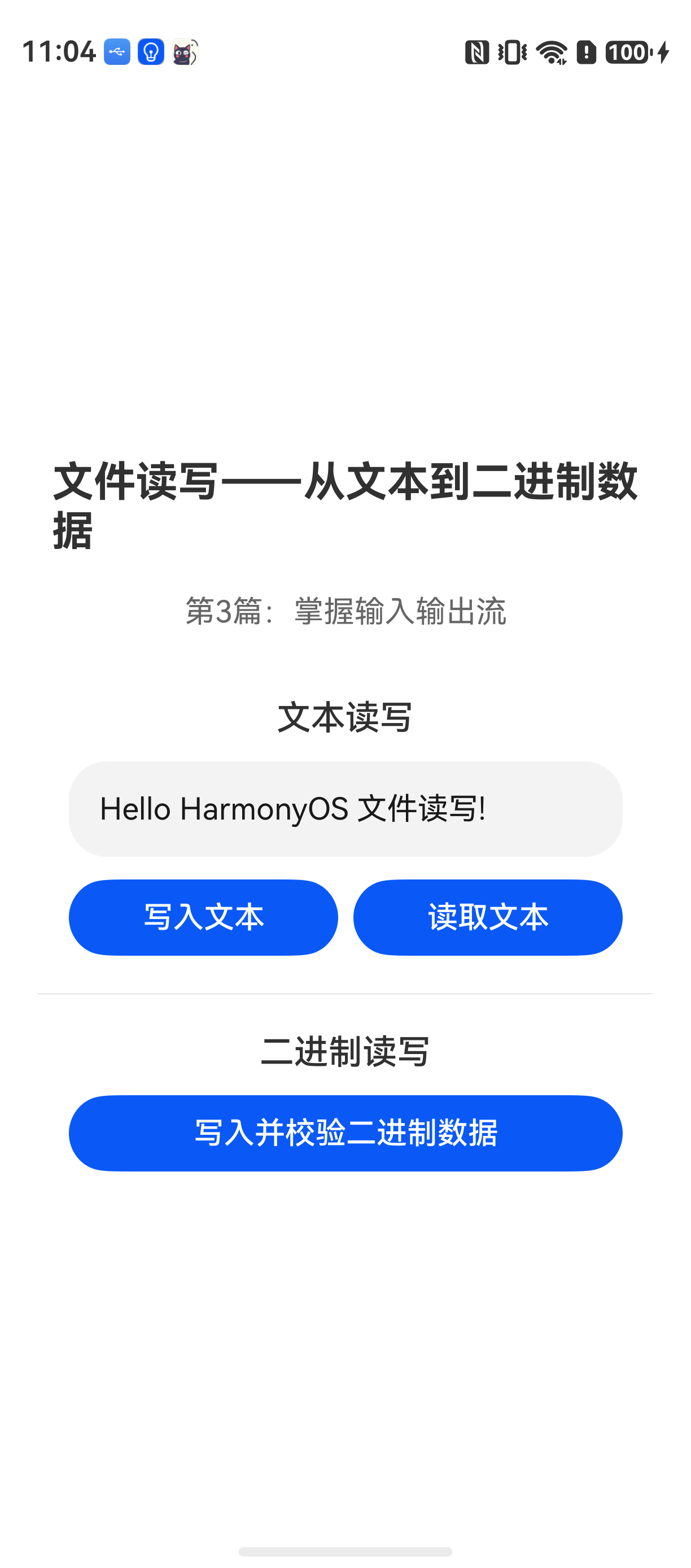
文件读写:从文本到二进制数据
HarmonyOS NEXT 开发里,文件读写这个 API 经常被误用。很多人第一次接触 Core File Kit 时,会发现官方示例能运行,但实际项目里总会出现各种意外——要么文件路径不对,要么写进去的内容读不出来,要么读取大文件直接卡死。
这个功能本身不复杂,但真正麻烦的是沙箱路径的理解和流式读取的处理。这篇文章会从文本和二进制数据两个场景入手,把标准操作和常见问题一次说清楚。
Core File Kit 解决了什么问题
在 HarmonyOS 应用开发中,所有文件操作都基于沙箱机制。应用无法随意访问系统目录,只能操作自己的沙箱目录下的文件。Core File Kit 提供了统一的文件读写能力,底层封装了沙箱路径解析和文件描述符管理。
跟直接用 fs 模块相比,Core File Kit 的几个关键差异:
| 能力 | fs 模块 | Core File Kit |
|---|---|---|
| 沙箱路径 | 需手动拼接 | 自动解析 |
| 流式读取 | 需手动创建流 | 内置流式接口 |
| 二进制支持 | 需 ArrayBuffer | 直接支持 |
| 异步异常处理 | 基础 | 更完善 |
实际开发中,推荐优先使用 Core File Kit 提供的高阶 API,特别是 fileManager.readText 和 writeText 这类封装好的方法,能减少不少错误处理代码。
环境说明
DevEco Studio 版本:DevEco Studio 6.1.0 及以上
HarmonyOS SDK 版本:HarmonyOS 6.1.0(23) 及以上
目标设备:手机
核心实现:文本读写
先从最常见的文本文件开始。这段代码用于向沙箱目录写入一段文本,然后读取并打印出来。
// TextRW.ets
import { fileManager } from '@kit.CoreFileKit';
import { common } from '@kit.AbilityKit';

export class TextRW {
  private context: common.Context;

  constructor(context: common.Context) {
    this.context = context;
  }

  // 写入文本文件
  async writeText(fileName: string, content: string): Promise<void> {
    try {
      // 获取沙箱目录路径
      const sandboxPath = this.context.cacheDir;
      const filePath = sandboxPath + '/' + fileName;

      // 写入文本(自动创建文件,如果不存在)
      await fileManager.writeText(filePath, content);
      console.info(`写入成功: ${filePath}`);
    } catch (error) {
      console.error(`写入失败: ${error.code}, ${error.message}`);
      throw error;
    }
  }

  // 读取文本文件
  async readText(fileName: string): Promise<string> {
    try {
      const sandboxPath = this.context.cacheDir;
      const filePath = sandboxPath + '/' + fileName;

      // 读取文本
      const content = await fileManager.readText(filePath);
      console.info(`读取内容: ${content}`);
      return content;
    } catch (error) {
      console.error(`读取失败: ${error.code}, ${error.message}`);
      throw error;
    }
  }
}
注意事项:
writeText会覆盖文件内容,如果文件不存在则自动创建readText要求文件必须存在,否则会抛出错误- 沙箱路径建议使用
cacheDir或tempDir,避免持久化数据累积
核心实现:二进制数据读写
实际项目中,文件读写不仅是文本,更多时候是图片、音频等二进制数据。
// BinaryRW.ets
import { fileManager } from '@kit.CoreFileKit';
import { common } from '@kit.AbilityKit';

export class BinaryRW {
  private context: common.Context;

  constructor(context: common.Context) {
    this.context = context;
  }

  // 写入二进制数据(如图片字节)
  async writeArrayBuffer(fileName: string, buffer: ArrayBuffer): Promise<void> {
    try {
      const sandboxPath = this.context.cacheDir;
      const filePath = sandboxPath + '/' + fileName;

      // 写入二进制数据
      await fileManager.writeArrayBuffer(filePath, buffer);
      console.info(`二进制写入成功: ${filePath}`);
    } catch (error) {
      console.error(`二进制写入失败: ${error.code}, ${error.message}`);
      throw error;
    }
  }

  // 读取二进制数据并验证
  async readAndVerifyArrayBuffer(fileName: string, originalBuffer: ArrayBuffer): Promise<boolean> {
    try {
      const sandboxPath = this.context.cacheDir;
      const filePath = sandboxPath + '/' + fileName;

      // 读取二进制数据
      const readBuffer = await fileManager.readArrayBuffer(filePath);

      // 验证数据一致性
      const originalView = new Uint8Array(originalBuffer);
      const readView = new Uint8Array(readBuffer);

      if (originalView.length !== readView.length) {
        console.warn('数据长度不一致');
        return false;
      }

      for (let i = 0; i < originalView.length; i++) {
        if (originalView[i] !== readView[i]) {
          console.warn(`数据不一致: 位置 ${i}`);
          return false;
        }
      }

      console.info('数据验证通过');
      return true;
    } catch (error) {
      console.error(`读取验证失败: ${error.code}, ${error.message}`);
      return false;
    }
  }
}
为什么这样写更稳定:
- 使用
ArrayBuffer而不是Uint8Array作为参数,因为writeArrayBuffer和readArrayBuffer原生支持ArrayBuffer - 验证环节使用
Uint8Array逐字节比较,避免引用比较陷阱 - 异步回调里处理所有异常,防止未捕获错误导致崩溃
核心实现:流式读取大文件
对于大文件,一次性读取会撑爆内存。Core File Kit 提供了流式接口:
// StreamRW.ets
import { fileManager } from '@kit.CoreFileKit';
import { common } from '@kit.AbilityKit';

export class StreamRW {
  private context: common.Context;

  constructor(context: common.Context) {
    this.context = context;
  }

  // 流式写入大文件
  async writeLargeFile(fileName: string, data: ArrayBuffer): Promise<void> {
    try {
      const sandboxPath = this.context.cacheDir;
      const filePath = sandboxPath + '/' + fileName;

      // 创建可写流
      const stream = await fileManager.createWriteStream(filePath);

      // 分段写入
      const chunkSize = 1024 * 1024; // 1MB
      let offset = 0;
      while (offset < data.byteLength) {
        const end = Math.min(offset + chunkSize, data.byteLength);
        const chunk = data.slice(offset, end);
        await stream.write(chunk);
        offset = end;
      }

      // 关闭流
      await stream.close();
      console.info('流式写入完成');
    } catch (error) {
      console.error(`流式写入失败: ${error.code}, ${error.message}`);
      throw error;
    }
  }

  // 流式读取大文件
  async readLargeFile(fileName: string, onChunk: (chunk: ArrayBuffer) => void): Promise<void> {
    try {
      const sandboxPath = this.context.cacheDir;
      const filePath = sandboxPath + '/' + fileName;

      // 创建可读流
      const stream = await fileManager.createReadStream(filePath);

      // 分段读取
      const chunkSize = 1024 * 1024; // 1MB
      let readBuffer: ArrayBuffer;
      do {
        readBuffer = await stream.read(chunkSize);
        if (readBuffer.byteLength > 0) {
          onChunk(readBuffer);
        }
      } while (readBuffer.byteLength > 0);

      // 关闭流
      await stream.close();
      console.info('流式读取完成');
    } catch (error) {
      console.error(`流式读取失败: ${error.code}, ${error.message}`);
      throw error;
    }
  }
}
流式读写要点:
createWriteStream返回的流会自动处理文件创建和写入read方法返回的ArrayBuffer长度可能小于请求的大小,这是正常行为- 必须手动调用
close()释放资源,否则会触发系统警告
常见问题 1:沙箱路径错误
现象:写入文件后,在指定路径找不到文件,或读取时报错 “No such file or directory”。
原因:开发者混用了 this.context.filesDir 和 this.context.cacheDir,或者手动拼接路径时用了错误的根目录。
解决方案:
// 错误方式
const wrongPath = '/data/storage/el2/base/haps/entry/cache/file.txt';

// 正确方式
const correctPath = this.context.cacheDir + '/file.txt';
常见问题 2:读取大文件导致 OOM
现象:读取超过 100MB 的文件时,应用直接闪退。
原因:使用了 readArrayBuffer 一次性读取整个文件,内存撑爆。
解决方案:改用流式读取,分段处理。如果确实需要全部数据,可以:
// 分段拼接
const chunks: ArrayBuffer[] = [];
const stream = await fileManager.createReadStream(filePath);
let chunk: ArrayBuffer;
while ((chunk = await stream.read(1024 * 1024)).byteLength > 0) {
  chunks.push(chunk);
}
await stream.close();
// 合并
const totalLength = chunks.reduce((sum, c) => sum + c.byteLength, 0);
const fullBuffer = new ArrayBuffer(totalLength);
const fullView = new Uint8Array(fullBuffer);
let offset = 0;
for (const c of chunks) {
  fullView.set(new Uint8Array(c), offset);
  offset += c.byteLength;
}
最佳实践
-
统一管理文件路径:不要到处写路径拼接,封装一个工具类集中管理沙箱路径,避免路径错误散落在各个模块中。
-
优先使用流式接口:即使当前文件不大,也要养成用流的习惯。线上用户上传的文件大小不可控,流式接口是防 OOM 的第一道防线。
-
写后立即读校验:特别是二进制数据写入后,建议立即读取并逐字节校验,防止写入过程中因为系统异常导致数据损坏。这点在处理图片、配置文件时尤其重要。
Demo 入口
// Index.ets
import { TextRW } from './TextRW';
import { BinaryRW } from './BinaryRW';
import { common } from '@kit.AbilityKit';

@Entry
@Component
struct Index {
  build() {
    Row() {
      Column() {
        Button('写入文本')
          .onClick(async () => {
            const context = getContext(this) as common.Context;
            const textRW = new TextRW(context);
            await textRW.writeText('test.txt', 'Hello HarmonyOS');
            const content = await textRW.readText('test.txt');
            console.info('读取结果: ' + content);
          })

        Button('写入二进制')
          .onClick(async () => {
            const context = getContext(this) as common.Context;
            const binaryRW = new BinaryRW(context);
            const buffer = new ArrayBuffer(1024);
            const view = new Uint8Array(buffer);
            view.fill(0x41); // 填充 'A'
            await binaryRW.writeArrayBuffer('test.bin', buffer);
            const result = await binaryRW.readAndVerifyArrayBuffer('test.bin', buffer);
            console.info('验证结果: ' + result);
          })
      }
      .width('100%')
    }
    .height('100%')
  }
}
FAQ
Q:为什么写入后立即读取会返回空字符串?
A:检查是否在写入完成前就开始读取。writeText 和 readText 都是异步操作,必须 await 确保顺序执行。
Q:读取文件时,为什么有时候能读到内容,有时候读不到?
A:最常见原因是文件路径写死了,没有根据沙箱环境动态获取。建议每次都通过 this.context.cacheDir 拼接路径,而不是硬编码。
Q:writeArrayBuffer 写入后,读取的 ArrayBuffer 大小不一致?
A:检查是否在写入过程中有其他线程修改了文件,或者磁盘空间不足导致写入不完整。建议在写入后立即读取校验。
示例代码地址:项目地址

讨论HarmonyOS开发技术,专注于API与组件、DevEco Studio、测试、元服务和应用上架分发等。
更多推荐



 2
2 0
0- 0


 已为社区贡献8条内容

所有评论(0)