HarmonyOS应用<趣答>开发第11篇:首页组件设计与实现——打造吸引用户的入口页面
·
📖 引言
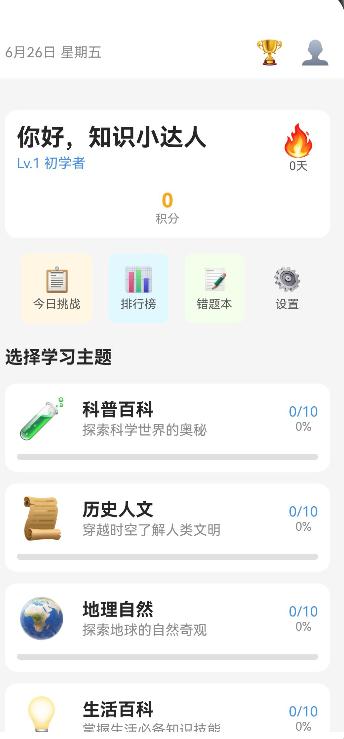
在知识问答学习应用中,首页是用户进入应用后首先看到的页面,也是吸引用户继续使用的关键入口。一个设计良好的首页应该能够展示用户的学习进度、提供便捷的导航、激发用户的学习动力。
本文将详细讲解首页组件的设计与实现,包括页面布局、组件划分、交互逻辑等核心内容。通过本文,你将掌握:
- 如何设计首页的整体布局结构
- 如何实现核心组件(进度展示、快捷入口、成就展示等)
- 如何处理用户交互和页面导航
- 如何在实际项目中优化首页性能
🎯 学习目标
完成本文后,你将能够:
- ✅ 理解首页的核心功能和布局设计
- ✅ 实现进度卡片、快捷入口、成就展示等组件
- ✅ 处理页面导航和用户交互
- ✅ 优化首页加载性能
💡 需求分析
功能模块设计
| 模块 | 功能描述 | 技术要点 |
|---|---|---|
| 用户信息区 | 展示用户头像、昵称、等级、积分 | 数据绑定、动态更新 |
| 学习进度 | 展示今日学习情况、连续打卡天数 | 实时统计、动画效果 |
| 快捷入口 | 快速进入关卡选择、错题本、成就等 | 图标导航、点击交互 |
| 成就展示 | 展示最近解锁的成就 | 滚动展示、稀有度标识 |
| 推荐内容 | 推荐学习内容、热门关卡 | 数据推荐、动态更新 |
🛠️ 核心实现
步骤1: 首页布局设计
功能说明
设计首页的整体布局结构,包括顶部用户信息区、中间内容区和底部导航。
完整代码
// pages/HomePage/HomePage.ets

@Entry
@Component
struct HomePage {
  @State user: User | null = null;
  @State dailyStats: DailyStatistics = {
    questionsAnswered: 0,
    correctRate: 0,
    scoreEarned: 0,
    timeSpent: 0
  };
  @State recentAchievements: Achievement[] = [];
  @State featuredLevels: Level[] = [];

  build() {
    Column({ space: 16 }) {
      // 顶部用户信息区
      this.UserInfoSection()

      // 学习进度卡片
      this.ProgressCard()

      // 快捷入口
      this.QuickEntrySection()

      // 成就展示
      this.AchievementSection()

      // 推荐关卡
      this.FeaturedSection()
    }
    .padding({ top: 20, left: 16, right: 16, bottom: 16 })
    .backgroundColor('#f5f5f5')
    .height('100%')
    .onAppear(() => {
      this.loadData();
    })
  }

  /**
   * 用户信息区
   */
  @Builder
  UserInfoSection() {
    if (!this.user) return;

    Row({ space: 12 }) {
      // 用户头像
      Image(this.user.avatar)
        .width(72)
        .height(72)
        .borderRadius(36)
        .backgroundColor('#e0e0e0')

      // 用户信息
      Column({ space: 4 }) {
        Text(this.user.nickname)
          .fontSize(20)
          .fontWeight(FontWeight.Bold)
          .color('#333')

        Row({ space: 8 }) {
          Text(`Lv.${this.user.level}`)
            .fontSize(14)
            .color('#666')

          Text(`积分: ${this.user.totalScore}`)
            .fontSize(14)
            .color('#FF9800')
        }
      }

      // 连续打卡标识
      Stack({ alignContent: Alignment.Center }) {
        Circle()
          .width(40)
          .height(40)
          .fill('#FF9800')

        Column({ space: 2 }) {
          Text(this.user.consecutiveDays.toString())
            .fontSize(16)
            .fontWeight(FontWeight.Bold)
            .color('#fff')

          Text('天')
            .fontSize(10)
            .color('#fff')
        }
      }
    }
    .width('100%')
    .padding(16)
    .backgroundColor('#fff')
    .borderRadius(16)
    .shadow({ radius: 4, color: 'rgba(0,0,0,0.1)', offsetY: 2 })
  }

  /**
   * 学习进度卡片
   */
  @Builder
  ProgressCard() {
    Column({ space: 12 }) {
      Row() {
        Text('今日学习')
          .fontSize(16)
          .fontWeight(FontWeight.Bold)
          .color('#333')

        Text(new Date().toLocaleDateString('zh-CN', { month: 'long', day: 'numeric', weekday: 'long' }))
          .fontSize(12)
          .color('#999')
      }
      .width('100%')
      .justifyContent(FlexAlign.SpaceBetween)

      Grid() {
        GridItem() {
          this.StatItem('答题数', this.dailyStats.questionsAnswered.toString(), '道', '#4CAF50')
        }
        GridItem() {
          this.StatItem('正确率', `${Math.round(this.dailyStats.correctRate * 100)}%`, '', '#2196F3')
        }
        GridItem() {
          this.StatItem('获得积分', this.dailyStats.scoreEarned.toString(), '分', '#FF9800')
        }
        GridItem() {
          this.StatItem('用时', this.formatTime(this.dailyStats.timeSpent), '', '#9C27B0')
        }
      }
      .columnsTemplate('1fr 1fr 1fr 1fr')
      .columnsGap(12)
      .width('100%')
    }
    .width('100%')
    .padding(16)
    .backgroundColor('#fff')
    .borderRadius(16)
    .shadow({ radius: 4, color: 'rgba(0,0,0,0.1)', offsetY: 2 })
  }

  /**
   * 统计项组件
   */
  @Builder
  StatItem(title: string, value: string, unit: string, color: string) {
    Column({ space: 4 }) {
      Text(value + unit)
        .fontSize(20)
        .fontWeight(FontWeight.Bold)
        .color(color)

      Text(title)
        .fontSize(12)
        .color('#999')
    }
    .width('100%')
    .height(80)
    .justifyContent(FlexAlign.Center)
    .backgroundColor('#fafafa')
    .borderRadius(12)
  }

  /**
   * 快捷入口区
   */
  @Builder
  QuickEntrySection() {
    Column({ space: 12 }) {
      Text('快捷入口')
        .fontSize(16)
        .fontWeight(FontWeight.Bold)
        .color('#333')
        .width('100%')
        .textAlign(TextAlign.Start)

      Grid() {
        GridItem() {
          this.EntryItem('关卡挑战', '开始学习', 'https://example.com/icons/level.png', '#4CAF50')
        }
        GridItem() {
          this.EntryItem('错题本', '复习巩固', 'https://example.com/icons/wrong.png', '#F44336')
        }
        GridItem() {
          this.EntryItem('成就', '查看荣誉', 'https://example.com/icons/achievement.png', '#FF9800')
        }
        GridItem() {
          this.EntryItem('排行榜', '竞争排名', 'https://example.com/icons/rank.png', '#9C27B0')
        }
      }
      .columnsTemplate('1fr 1fr')
      .columnsGap(12)
      .rowsGap(12)
      .width('100%')
    }
    .width('100%')
  }

  /**
   * 入口项组件
   */
  @Builder
  EntryItem(title: string, desc: string, icon: string, color: string) {
    Column({ space: 8 }) {
      Stack({ alignContent: Alignment.Center }) {
        Circle()
          .width(48)
          .height(48)
          .fill(color + '20')

        Image(icon)
          .width(24)
          .height(24)
      }

      Text(title)
        .fontSize(14)
        .fontWeight(FontWeight.Medium)
        .color('#333')

      Text(desc)
        .fontSize(12)
        .color('#999')
    }
    .width('100%')
    .padding(16)
    .backgroundColor('#fff')
    .borderRadius(16)
    .shadow({ radius: 4, color: 'rgba(0,0,0,0.05)', offsetY: 2 })
    .onClick(() => {
      this.handleEntryClick(title);
    })
  }

  /**
   * 成就展示区
   */
  @Builder
  AchievementSection() {
    if (this.recentAchievements.length === 0) return;

    Column({ space: 12 }) {
      Row() {
        Text('近期成就')
          .fontSize(16)
          .fontWeight(FontWeight.Bold)
          .color('#333')

        Text('查看全部')
          .fontSize(12)
          .color('#2196F3')
      }
      .width('100%')
      .justifyContent(FlexAlign.SpaceBetween)

      Scroll({ direction: Axis.Horizontal }) {
        Row({ space: 12 }) {
          ForEach(this.recentAchievements, (achievement: Achievement) => {
            this.AchievementCard(achievement)
          })
        }
        .padding({ right: 16 })
      }
    }
    .width('100%')
  }

  /**
   * 成就卡片组件
   */
  @Builder
  AchievementCard(achievement: Achievement) {
    const rarityColor = this.getRarityColor(achievement.rarity);

    Column({ space: 8 }) {
      Stack({ alignContent: Alignment.Center }) {
        Circle()
          .width(56)
          .height(56)
          .fill(rarityColor + '20')

        Image(achievement.icon)
          .width(28)
          .height(28)
      }

      Text(achievement.name)
        .fontSize(12)
        .fontWeight(FontWeight.Medium)
        .color('#333')
        .maxLines(1)
        .width(64)

      Text(this.getRarityText(achievement.rarity))
        .fontSize(10)
        .color(rarityColor)
        .backgroundColor(rarityColor + '20')
        .padding({ left: 6, right: 6, top: 2, bottom: 2 })
        .borderRadius(4)
    }
    .width(80)
    .padding(12)
    .backgroundColor('#fff')
    .borderRadius(16)
    .shadow({ radius: 4, color: 'rgba(0,0,0,0.05)', offsetY: 2 })
  }

  /**
   * 推荐关卡区
   */
  @Builder
  FeaturedSection() {
    if (this.featuredLevels.length === 0) return;

    Column({ space: 12 }) {
      Row() {
        Text('推荐关卡')
          .fontSize(16)
          .fontWeight(FontWeight.Bold)
          .color('#333')

        Text('更多')
          .fontSize(12)
          .color('#2196F3')
      }
      .width('100%')
      .justifyContent(FlexAlign.SpaceBetween)

      Column({ space: 12 }) {
        ForEach(this.featuredLevels, (level: Level) => {
          this.LevelCard(level)
        })
      }
    }
    .width('100%')
  }

  /**
   * 关卡卡片组件
   */
  @Builder
  LevelCard(level: Level) {
    Row({ space: 12 }) {
      Image(level.icon)
        .width(64)
        .height(64)
        .borderRadius(12)
        .backgroundColor('#f0f0f0')

      Column({ space: 4 }) {
        Row({ space: 8 }) {
          Text(level.name)
            .fontSize(16)
            .fontWeight(FontWeight.Bold)
            .color('#333')

          Text(this.getDifficultyText(level.difficulty))
            .fontSize(10)
            .color(this.getDifficultyColor(level.difficulty))
            .backgroundColor(this.getDifficultyColor(level.difficulty) + '20')
            .padding({ left: 6, right: 6, top: 2, bottom: 2 })
            .borderRadius(4)
        }

        Text(level.description)
          .fontSize(12)
          .color('#999')
          .maxLines(1)

        Row({ space: 16 }) {
          Text(`${level.questionCount}题`)
            .fontSize(12)
            .color('#666')

          Text(`${this.formatTime(level.timeLimit)}`)
            .fontSize(12)
            .color('#666')

          Text(`奖励: ${level.rewards.baseScore}分`)
            .fontSize(12)
            .color('#FF9800')
        }
      }

      Button('开始')
        .width(64)
        .height(32)
        .backgroundColor('#4CAF50')
        .fontColor('#fff')
        .fontSize(14)
        .borderRadius(8)
        .onClick(() => {
          this.navigateToLevel(level.id);
        })
    }
    .width('100%')
    .padding(12)
    .backgroundColor('#fff')
    .borderRadius(16)
    .shadow({ radius: 4, color: 'rgba(0,0,0,0.05)', offsetY: 2 })
  }

  /**
   * 加载数据
   */
  private async loadData() {
    // 获取用户信息
    const userResult = await UserService.getInstance().getCurrentUser();
    if (userResult.success && userResult.data) {
      this.user = userResult.data;
    }

    // 获取今日统计
    await this.loadDailyStats();

    // 获取最近成就
    if (this.user) {
      const achievements = AchievementService.getInstance().getUnlockedAchievements(this.user);
      if (achievements.data) {
        this.recentAchievements = achievements.data.slice(-4);
      }
    }

    // 获取推荐关卡
    const levels = LevelService.getInstance().getAllLevels();
    if (levels.data) {
      this.featuredLevels = levels.data.slice(0, 3);
    }
  }

  /**
   * 加载今日统计
   */
  private async loadDailyStats() {
    // 模拟今日统计数据
    this.dailyStats = {
      questionsAnswered: 25,
      correctRate: 0.84,
      scoreEarned: 280,
      timeSpent: 1800
    };
  }

  /**
   * 处理入口点击
   */
  private handleEntryClick(title: string) {
    switch (title) {
      case '关卡挑战':
        router.pushUrl({ url: 'pages/LevelSelect/LevelSelect' });
        break;
      case '错题本':
        router.pushUrl({ url: 'pages/WrongBook/WrongBook' });
        break;
      case '成就':
        router.pushUrl({ url: 'pages/Achievement/Achievement' });
        break;
      case '排行榜':
        router.pushUrl({ url: 'pages/Rank/Rank' });
        break;
    }
  }

  /**
   * 导航到关卡
   */
  private navigateToLevel(levelId: string) {
    router.pushUrl({ url: `pages/Quiz/Quiz?levelId=${levelId}` });
  }

  /**
   * 格式化时间
   */
  private formatTime(seconds: number): string {
    const mins = Math.floor(seconds / 60);
    const secs = seconds % 60;
    if (mins > 0) {
      return `${mins}分${secs}秒`;
    }
    return `${secs}秒`;
  }

  /**
   * 获取稀有度颜色
   */
  private getRarityColor(rarity: Rarity): string {
    const colors: Record<Rarity, string> = {
      [Rarity.COMMON]: '#4CAF50',
      [Rarity.RARE]: '#2196F3',
      [Rarity.EPIC]: '#9C27B0',
      [Rarity.LEGENDARY]: '#FF9800'
    };
    return colors[rarity];
  }

  /**
   * 获取稀有度文本
   */
  private getRarityText(rarity: Rarity): string {
    const texts: Record<Rarity, string> = {
      [Rarity.COMMON]: '普通',
      [Rarity.RARE]: '稀有',
      [Rarity.EPIC]: '史诗',
      [Rarity.LEGENDARY]: '传说'
    };
    return texts[rarity];
  }

  /**
   * 获取难度颜色
   */
  private getDifficultyColor(difficulty: Difficulty): string {
    const colors: Record<Difficulty, string> = {
      [Difficulty.EASY]: '#4CAF50',
      [Difficulty.MEDIUM]: '#FF9800',
      [Difficulty.HARD]: '#F44336',
      [Difficulty.EXPERT]: '#9C27B0'
    };
    return colors[difficulty];
  }

  /**
   * 获取难度文本
   */
  private getDifficultyText(difficulty: Difficulty): string {
    const texts: Record<Difficulty, string> = {
      [Difficulty.EASY]: '简单',
      [Difficulty.MEDIUM]: '中等',
      [Difficulty.HARD]: '困难',
      [Difficulty.EXPERT]: '专家'
    };
    return texts[difficulty];
  }
}

/**
 * 今日统计接口
 */
interface DailyStatistics {
  questionsAnswered: number;
  correctRate: number;
  scoreEarned: number;
  timeSpent: number;
}
代码解析
1. 首页布局结构
2. 组件划分
| 组件 | 功能 | 位置 |
|---|---|---|
UserInfoSection |
用户信息展示 | 顶部 |
ProgressCard |
今日学习统计 | 用户信息下方 |
QuickEntrySection |
快捷入口导航 | 进度卡片下方 |
AchievementSection |
近期成就展示 | 快捷入口下方 |
FeaturedSection |
推荐关卡展示 | 成就展示下方 |
步骤2: 用户信息区组件
功能说明
展示用户头像、昵称、等级、积分和连续打卡天数。
代码解析
@Builder
UserInfoSection() {
  Row({ space: 12 }) {
    // 用户头像
    Image(this.user.avatar)
      .width(72)
      .height(72)
      .borderRadius(36)

    // 用户信息
    Column({ space: 4 }) {
      Text(this.user.nickname)
        .fontSize(20)
        .fontWeight(FontWeight.Bold)

      Row({ space: 8 }) {
        Text(`Lv.${this.user.level}`)
        Text(`积分: ${this.user.totalScore}`)
      }
    }

    // 连续打卡标识
    Stack({ alignContent: Alignment.Center }) {
      Circle()
        .width(40)
        .height(40)
        .fill('#FF9800')

      Column({ space: 2 }) {
        Text(this.user.consecutiveDays.toString())
        Text('天')
      }
    }
  }
}
设计要点:
- 使用圆形头像
- 等级和积分信息展示
- 连续打卡天数使用醒目的橙色圆形标识
步骤3: 学习进度卡片
功能说明
展示今日学习统计数据,包括答题数、正确率、获得积分和用时。
代码解析
@Builder
ProgressCard() {
  Column({ space: 12 }) {
    Row() {
      Text('今日学习')
        .fontSize(16)
        .fontWeight(FontWeight.Bold)

      Text(new Date().toLocaleDateString('zh-CN', { weekday: 'long' }))
        .fontSize(12)
        .color('#999')
    }

    Grid() {
      GridItem() { this.StatItem('答题数', '25', '道', '#4CAF50') }
      GridItem() { this.StatItem('正确率', '84%', '', '#2196F3') }
      GridItem() { this.StatItem('获得积分', '280', '分', '#FF9800') }
      GridItem() { this.StatItem('用时', '30分', '', '#9C27B0') }
    }
    .columnsTemplate('1fr 1fr 1fr 1fr')
  }
}
设计要点:
- 使用 Grid 布局展示四个统计项
- 每个统计项使用不同颜色区分
- 显示日期信息
步骤4: 快捷入口区
功能说明
提供快速导航入口,包括关卡挑战、错题本、成就和排行榜。
代码解析
@Builder
QuickEntrySection() {
  Grid() {
    GridItem() {
      this.EntryItem('关卡挑战', '开始学习', 'icon_level.png', '#4CAF50')
    }
    GridItem() {
      this.EntryItem('错题本', '复习巩固', 'icon_wrong.png', '#F44336')
    }
    GridItem() {
      this.EntryItem('成就', '查看荣誉', 'icon_achievement.png', '#FF9800')
    }
    GridItem() {
      this.EntryItem('排行榜', '竞争排名', 'icon_rank.png', '#9C27B0')
    }
  }
  .columnsTemplate('1fr 1fr')
  .columnsGap(12)
  .rowsGap(12)
}
设计要点:
- 2x2 网格布局
- 每个入口有图标、标题和描述
- 点击触发页面导航
步骤5: 成就展示区
功能说明
展示用户最近解锁的成就,按稀有度显示不同颜色。
代码解析
@Builder
AchievementCard(achievement: Achievement) {
  const rarityColor = this.getRarityColor(achievement.rarity);

  Column({ space: 8 }) {
    Stack({ alignContent: Alignment.Center }) {
      Circle()
        .width(56)
        .height(56)
        .fill(rarityColor + '20')

      Image(achievement.icon)
        .width(28)
        .height(28)
    }

    Text(achievement.name)
      .fontSize(12)

    Text(this.getRarityText(achievement.rarity))
      .fontSize(10)
      .color(rarityColor)
      .backgroundColor(rarityColor + '20')
      .padding({ left: 6, right: 6 })
      .borderRadius(4)
  }
}
设计要点:
- 根据稀有度显示不同颜色
- 圆形背景展示成就图标
- 显示成就名称和稀有度标签
⚠️ 常见问题与解决方案
问题1: 数据加载慢导致页面空白
现象:
页面加载时数据未及时返回,导致页面空白或显示默认值。
错误代码:
// ❌ 错误:直接使用未加载的数据
@State user: User | null = null;

build() {
  Text(this.user.nickname)  // 可能为 null,导致错误
}
正确代码:
// ✅ 正确:添加空值检查
@State user: User | null = null;

build() {
  if (!this.user) {
    Text('加载中...')
      .fontSize(16)
      .color('#999')
  } else {
    Text(this.user.nickname)
  }
}
规则/建议:
- 在使用数据前进行空值检查
- 显示加载状态
- 使用异步加载并等待数据
问题2: 列表渲染性能问题
现象:
成就展示和推荐关卡列表渲染时出现卡顿。
错误代码:
// ❌ 错误:没有使用懒加载
Scroll({ direction: Axis.Horizontal }) {
  Row({ space: 12 }) {
    ForEach(allAchievements, (item) => {
      this.AchievementCard(item)  // 一次性渲染所有
    })
  }
}
正确代码:
// ✅ 正确:限制显示数量
Scroll({ direction: Axis.Horizontal }) {
  Row({ space: 12 }) {
    ForEach(allAchievements.slice(0, 4), (item) => {  // 只渲染前4个
      this.AchievementCard(item)
    })
  }
}
规则/建议:
- 限制列表显示数量
- 使用懒加载
- 优化列表项组件
问题3: 导航参数传递错误
现象:
点击推荐关卡后,目标页面无法正确获取关卡ID。
错误代码:
// ❌ 错误:没有正确传递参数
Button('开始')
  .onClick(() => {
    router.pushUrl({ url: 'pages/Quiz/Quiz' });  // 没有传递 levelId
  })
正确代码:
// ✅ 正确:传递关卡ID参数
Button('开始')
  .onClick(() => {
    router.pushUrl({ url: `pages/Quiz/Quiz?levelId=${level.id}` });
  })
规则/建议:
- 使用 URL 参数传递数据
- 在目标页面使用
router.getParams()获取参数 - 确保参数格式正确
问题4: 图片加载失败显示异常
现象:
头像或图标加载失败时显示空白或破碎图片图标。
错误代码:
// ❌ 错误:没有处理加载失败
Image(user.avatar)
  .width(72)
  .height(72)
正确代码:
// ✅ 正确:添加加载失败处理
Image(user.avatar)
  .width(72)
  .height(72)
  .backgroundColor('#e0e0e0')  // 显示背景色
  .onError(() => {
    // 加载失败时显示默认头像
    Image('https://example.com/default_avatar.png')
      .width(72)
      .height(72)
  })
规则/建议:
- 设置默认背景色
- 添加错误处理回调
- 使用默认图片替代
问题5: 时间格式化显示异常
现象:
学习用时显示为原始秒数,用户体验不佳。
错误代码:
// ❌ 错误:直接显示秒数
Text(this.dailyStats.timeSpent)  // 显示 1800
正确代码:
// ✅ 正确:格式化时间显示
Text(this.formatTime(this.dailyStats.timeSpent))  // 显示 30分0秒

private formatTime(seconds: number): string {
  const mins = Math.floor(seconds / 60);
  const secs = seconds % 60;
  return `${mins}分${secs}秒`;
}
规则/建议:
- 将秒数转换为分钟和秒
- 使用用户友好的格式
- 考虑本地化显示
📝 本章小结
核心知识点
本文详细讲解了首页组件的设计与实现,主要包括:
1. 页面布局设计
- 顶部用户信息区
- 学习进度卡片
- 快捷入口区
- 成就展示区
- 推荐关卡区
2. 核心组件实现
- 用户信息组件
- 统计卡片组件
- 快捷入口组件
- 成就卡片组件
- 关卡卡片组件
3. 交互逻辑
- 页面导航
- 数据加载
- 事件处理
最佳实践总结
✅ 空值检查
if (!this.user) {
  Text('加载中...')
} else {
  Text(this.user.nickname)
}
✅ 列表优化
ForEach(items.slice(0, 4), (item) => {
  this.ItemCard(item)
})
✅ 导航参数传递
router.pushUrl({ url: `pages/Quiz/Quiz?levelId=${level.id}` });
✅ 时间格式化
formatTime(seconds: number): string {
  const mins = Math.floor(seconds / 60);
  const secs = seconds % 60;
  return `${mins}分${secs}秒`;
}
下一步预告
在下一篇文章中,我们将:
- 🎨 讲解关卡选择页组件设计
- 📚 介绍学科选择和关卡列表展示
- 🏷️ 探索关卡解锁状态和进度显示
🔗 相关链接
- 项目源码: Atomgit仓库
💡 提示: 建议结合项目源码阅读,动手实践效果更好!

讨论HarmonyOS开发技术,专注于API与组件、DevEco Studio、测试、元服务和应用上架分发等。
更多推荐

 0
0 0
0- 0


 已为社区贡献69条内容

所有评论(0)