HarmonyOS应用<趣答>开发第12篇:答题页组件设计与交互——打造沉浸式答题体验
·
📖 引言
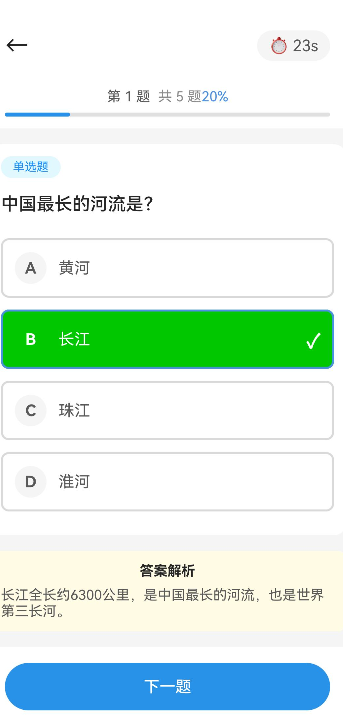
答题页是知识问答学习应用的核心页面,用户在这里完成题目作答、使用工具辅助答题、查看答题进度。一个设计良好的答题页应该提供清晰的题目展示、流畅的交互体验和实时的进度反馈。
本文将详细讲解答题页的设计与实现,包括题目展示、选项选择、计时器、工具使用等核心功能。通过本文,你将掌握:
- 如何设计答题页的整体布局和交互流程
- 如何实现计时器和进度条
- 如何处理选项选择和答案判断
- 如何实现工具使用(提示、跳过、刷新、双倍积分)
- 如何优化答题体验
🎯 学习目标
完成本文后,你将能够:
- ✅ 理解答题页的核心功能和布局设计
- ✅ 实现题目展示和选项选择
- ✅ 实现计时器和进度条
- ✅ 实现工具系统(提示、跳过、刷新、双倍积分)
- ✅ 处理答题流程和结果计算
💡 需求分析
功能模块设计
| 模块 | 功能描述 | 技术要点 |
|---|---|---|
| 顶部信息栏 | 显示关卡名称、当前题目、总题目数 | 数据绑定、动态更新 |
| 计时器 | 显示剩余时间,倒计时提醒 | 定时器、时间格式化 |
| 进度条 | 显示答题进度 | 动态宽度、动画效果 |
| 题目展示 | 显示题目内容和选项 | 富文本展示、选项布局 |
| 工具区 | 提示、跳过、刷新、双倍积分 | 工具状态管理、使用限制 |
| 答题按钮 | 确认答案并进入下一题 | 状态切换、动画效果 |
🛠️ 核心实现
步骤1: 答题页布局设计
功能说明
设计答题页的整体布局结构,包括顶部信息栏、计时器、进度条、题目展示区、工具区和答题按钮。
完整代码
// pages/Quiz/Quiz.ets

@Entry
@Component
struct QuizPage {
  @State levelId: string = '';
  @State currentQuestionIndex: number = 0;
  @State questions: Question[] = [];
  @State selectedOption: string = '';
  @State timeRemaining: number = 0;
  @State isAnswered: boolean = false;
  @State showResult: boolean = false;
  @State quizResult: QuizResult | null = null;

  // 工具状态
  @State hintUsed: boolean = false;
  @State skipUsed: boolean = false;
  @State refreshUsed: boolean = false;
  @State doubleScoreUsed: boolean = false;

  // 计时器
  private timer: number | null = null;

  build() {
    Column({ space: 0 }) {
      if (!this.showResult) {
        // 答题状态
        Column({ space: 16 }) {
          // 顶部信息栏
          this.TopBar()

          // 进度条
          this.ProgressBar()

          // 题目展示区
          this.QuestionArea()

          // 工具区
          this.ToolBar()

          // 答题按钮
          this.AnswerButton()
        }
        .width('100%')
        .height('100%')
        .padding({ top: 20, left: 16, right: 16, bottom: 20 })
        .backgroundColor('#f5f5f5')
      } else {
        // 结果状态
        this.ResultScreen()
      }
    }
    .onAppear(() => {
      this.initQuiz();
    })
    .onDisappear(() => {
      this.stopTimer();
    })
  }

  /**
   * 顶部信息栏
   */
  @Builder
  TopBar() {
    Row({ space: 16 }) {
      Image('https://example.com/icons/back.png')
        .width(24)
        .height(24)
        .onClick(() => {
          if (prompt.showDialog({
            title: '确认退出',
            message: '退出后本次答题进度将不会保存',
            buttons: [
              { text: '取消' },
              { text: '确认退出', isDefault: true }
            ]
          }).result === 1) {
            router.back();
          }
        })

      Column({ space: 4 }) {
        Text('关卡挑战')
          .fontSize(14)
          .color('#666')

        Text(`第 ${this.currentQuestionIndex + 1} / ${this.questions.length} 题`)
          .fontSize(16)
          .fontWeight(FontWeight.Bold)
          .color('#333')
      }

      Blank()

      // 计时器
      Stack({ alignContent: Alignment.Center }) {
        Circle()
          .width(48)
          .height(48)
          .fill(this.timeRemaining <= 30 ? '#F44336' : '#4CAF50')

        Text(this.formatTime(this.timeRemaining))
          .fontSize(14)
          .fontWeight(FontWeight.Bold)
          .color('#fff')
      }
    }
    .width('100%')
    .height(60)
    .alignItems(VerticalAlign.Center)
  }

  /**
   * 进度条
   */
  @Builder
  ProgressBar() {
    const progress = ((this.currentQuestionIndex + 1) / this.questions.length) * 100;

    Column({ space: 8 }) {
      Stack({ alignContent: Alignment.Start }) {
        Blank()
          .width('100%')
          .height(8)
          .backgroundColor('#eee')
          .borderRadius(4)

        Row() {
          Blank()
            .width(`${progress}%`)
            .height(8)
            .backgroundColor('#4CAF50')
            .borderRadius(4)
            .transition({ type: TransitionType.Insert, scale: { x: 1 } })
        }
      }

      Text(`${Math.round(progress)}%`)
        .fontSize(12)
        .color('#999')
        .width('100%')
        .textAlign(TextAlign.End)
    }
    .width('100%')
  }

  /**
   * 题目展示区
   */
  @Builder
  QuestionArea() {
    if (this.currentQuestionIndex >= this.questions.length) return;

    const question = this.questions[this.currentQuestionIndex];

    Column({ space: 16 }) {
      // 题目类型标签
      Text(this.getQuestionTypeText(question.type))
        .fontSize(12)
        .color('#fff')
        .backgroundColor(this.getQuestionTypeColor(question.type))
        .padding({ left: 8, right: 8, top: 4, bottom: 4 })
        .borderRadius(4)
        .width('fit-content')

      // 题目内容
      Text(question.content)
        .fontSize(18)
        .fontWeight(FontWeight.Medium)
        .color('#333')
        .lineHeight(28)
        .width('100%')

      // 选项列表
      Column({ space: 12 }) {
        ForEach(question.options, (option: Option, index: number) => {
          this.OptionItem(option, index)
        })
      }
    }
    .width('100%')
    .padding(20)
    .backgroundColor('#fff')
    .borderRadius(16)
    .shadow({ radius: 4, color: 'rgba(0,0,0,0.05)', offsetY: 2 })
  }

  /**
   * 选项项组件
   */
  @Builder
  OptionItem(option: Option, index: number) {
    const optionLetter = String.fromCharCode(65 + index); // A, B, C, D
    const isSelected = this.selectedOption === option.key;
    const isCorrect = option.isCorrect;
    const showAnswer = this.isAnswered;

    Row({ space: 12 }) {
      // 选项字母
      Stack({ alignContent: Alignment.Center }) {
        Circle()
          .width(32)
          .height(32)
          .fill(this.getOptionBackgroundColor(isSelected, isCorrect, showAnswer))

        Text(optionLetter)
          .fontSize(14)
          .fontWeight(FontWeight.Bold)
          .color(this.getOptionTextColor(isSelected, isCorrect, showAnswer))
      }

      // 选项内容
      Text(option.content)
        .fontSize(16)
        .color(this.getOptionTextColor(isSelected, isCorrect, showAnswer))
        .flexGrow(1)
        .textAlign(TextAlign.Start)

      // 勾选/正确/错误图标
      if (showAnswer) {
        if (isCorrect) {
          Image('https://example.com/icons/correct.png')
            .width(24)
            .height(24)
            .fillColor('#4CAF50')
        } else if (isSelected && !isCorrect) {
          Image('https://example.com/icons/wrong.png')
            .width(24)
            .height(24)
            .fillColor('#F44336')
        }
      } else if (isSelected) {
        Image('https://example.com/icons/check.png')
          .width(24)
          .height(24)
          .fillColor('#4CAF50')
      }
    }
    .width('100%')
    .height(56)
    .padding({ left: 16, right: 16 })
    .backgroundColor(showAnswer && isCorrect ? '#E8F5E9' : showAnswer && isSelected && !isCorrect ? '#FFEBEE' : '#fafafa')
    .borderRadius(12)
    .borderWidth(isSelected && !showAnswer ? 2 : 0)
    .borderColor(isSelected && !showAnswer ? '#4CAF50' : 'transparent')
    .onClick(() => {
      if (!this.isAnswered) {
        this.selectOption(option.key);
      }
    })
  }

  /**
   * 工具区
   */
  @Builder
  ToolBar() {
    Grid() {
      GridItem() {
        this.ToolItem('提示', 'https://example.com/icons/hint.png', !this.hintUsed && !this.isAnswered, '#FF9800', () => this.useHint())
      }
      GridItem() {
        this.ToolItem('跳过', 'https://example.com/icons/skip.png', !this.skipUsed && !this.isAnswered, '#2196F3', () => this.useSkip())
      }
      GridItem() {
        this.ToolItem('刷新', 'https://example.com/icons/refresh.png', !this.refreshUsed && !this.isAnswered, '#9C27B0', () => this.useRefresh())
      }
      GridItem() {
        this.ToolItem('双倍', 'https://example.com/icons/double.png', !this.doubleScoreUsed, '#FF5722', () => this.useDoubleScore())
      }
    }
    .columnsTemplate('1fr 1fr 1fr 1fr')
    .columnsGap(12)
    .width('100%')
    .height(80)
  }

  /**
   * 工具项组件
   */
  @Builder
  ToolItem(title: string, icon: string, enabled: boolean, color: string, onClick: () => void) {
    Column({ space: 4 }) {
      Stack({ alignContent: Alignment.Center }) {
        Circle()
          .width(44)
          .height(44)
          .fill(enabled ? color + '20' : '#eee')

        Image(icon)
          .width(22)
          .height(22)
          .fillColor(enabled ? color : '#ccc')
      }

      Text(title)
        .fontSize(12)
        .color(enabled ? '#333' : '#999')
    }
    .width('100%')
    .height('100%')
    .justifyContent(FlexAlign.Center)
    .backgroundColor('#fff')
    .borderRadius(12)
    .onClick(() => {
      if (enabled) {
        onClick();
      }
    })
  }

  /**
   * 答题按钮
   */
  @Builder
  AnswerButton() {
    Button(this.isAnswered ? '下一题' : '确认答案')
      .width('100%')
      .height(52)
      .backgroundColor(this.selectedOption && !this.isAnswered ? '#4CAF50' : '#ccc')
      .fontColor('#fff')
      .fontSize(18)
      .fontWeight(FontWeight.Bold)
      .borderRadius(12)
      .enabled(this.selectedOption !== '' || this.isAnswered)
      .onClick(() => {
        if (this.isAnswered) {
          this.nextQuestion();
        } else {
          this.submitAnswer();
        }
      })
  }

  /**
   * 结果屏幕
   */
  @Builder
  ResultScreen() {
    if (!this.quizResult) return;

    Column({ space: 20 }) {
      // 结果图标
      Stack({ alignContent: Alignment.Center }) {
        Circle()
          .width(120)
          .height(120)
          .fill(this.quizResult.stars >= 2 ? '#4CAF50' : this.quizResult.stars === 1 ? '#FF9800' : '#F44336')

        Column({ space: 8 }) {
          Row({ space: 4 }) {
            ForEach([1, 2, 3], (star: number) => {
              Image(star <= this.quizResult!.stars ? 'https://example.com/icons/star_filled.png' : 'https://example.com/icons/star_empty.png')
                .width(32)
                .height(32)
                .fillColor('#FFC107')
            })
          }

          Text(this.getResultTitle(this.quizResult.stars))
            .fontSize(24)
            .fontWeight(FontWeight.Bold)
            .color('#fff')
        }
      }

      // 统计信息
      Column({ space: 12 }) {
        Row({ space: 32 }) {
          Column({ space: 4 }) {
            Text(`${this.quizResult.correctCount}/${this.quizResult.totalQuestions}`)
              .fontSize(28)
              .fontWeight(FontWeight.Bold)
              .color('#4CAF50')

            Text('答对')
              .fontSize(12)
              .color('#999')
          }

          Column({ space: 4 }) {
            Text(`${Math.round(this.quizResult.accuracy * 100)}%`)
              .fontSize(28)
              .fontWeight(FontWeight.Bold)
              .color('#2196F3')

            Text('正确率')
              .fontSize(12)
              .color('#999')
          }

          Column({ space: 4 }) {
            Text(this.quizResult.scoreEarned.toString())
              .fontSize(28)
              .fontWeight(FontWeight.Bold)
              .color('#FF9800')

            Text('获得积分')
              .fontSize(12)
              .color('#999')
          }
        }
      }
      .width('100%')
      .padding(20)
      .backgroundColor('#fff')
      .borderRadius(16)

      // 操作按钮
      Column({ space: 12 }) {
        Button('返回关卡')
          .width('100%')
          .height(48)
          .backgroundColor('#4CAF50')
          .fontColor('#fff')
          .fontSize(16)
          .fontWeight(FontWeight.Bold)
          .borderRadius(12)
          .onClick(() => {
            router.pushUrl({ url: 'pages/LevelSelect/LevelSelect' });
          })

        Button('再玩一次')
          .width('100%')
          .height(48)
          .backgroundColor('#fff')
          .fontColor('#4CAF50')
          .fontSize(16)
          .fontWeight(FontWeight.Bold)
          .borderRadius(12)
          .borderWidth(2)
          .borderColor('#4CAF50')
          .onClick(() => {
            this.restartQuiz();
          })
      }
    }
    .width('100%')
    .height('100%')
    .padding({ top: 60, left: 24, right: 24 })
    .backgroundColor('#f5f5f5')
    .justifyContent(FlexAlign.Center)
  }

  /**
   * 初始化答题
   */
  private async initQuiz() {
    // 获取关卡ID
    const params = router.getParams();
    this.levelId = params?.levelId || '';

    // 获取题目
    const result = QuizService.getInstance().createSession(this.levelId);
    if (result.success && result.data) {
      this.questions = result.data.questions;
      this.timeRemaining = result.data.timeLimit;
      this.startTimer();
    }
  }

  /**
   * 开始计时器
   */
  private startTimer() {
    this.timer = setInterval(() => {
      if (this.timeRemaining > 0) {
        this.timeRemaining--;
      } else {
        this.timeUp();
      }
    }, 1000) as unknown as number;
  }

  /**
   * 停止计时器
   */
  private stopTimer() {
    if (this.timer) {
      clearInterval(this.timer);
      this.timer = null;
    }
  }

  /**
   * 时间到
   */
  private timeUp() {
    this.stopTimer();
    this.submitAnswer(true);
  }

  /**
   * 选择选项
   */
  private selectOption(optionKey: string) {
    this.selectedOption = optionKey;
  }

  /**
   * 提交答案
   */
  private async submitAnswer(isTimeout: boolean = false) {
    if (!isTimeout && !this.selectedOption) return;

    this.stopTimer();
    this.isAnswered = true;

    // 判断答案
    const currentQuestion = this.questions[this.currentQuestionIndex];
    const isCorrect = this.selectedOption === currentQuestion.options.find(o => o.isCorrect)?.key;

    // 更新答题记录
    QuizService.getInstance().submitAnswer(this.levelId, this.currentQuestionIndex, this.selectedOption, isCorrect);

    // 延迟后进入下一题
    setTimeout(() => {
      if (this.currentQuestionIndex < this.questions.length - 1) {
        this.nextQuestion();
      } else {
        this.finishQuiz();
      }
    }, 2000);
  }

  /**
   * 下一题
   */
  private nextQuestion() {
    this.currentQuestionIndex++;
    this.selectedOption = '';
    this.isAnswered = false;

    // 重置计时器
    const result = QuizService.getInstance().createSession(this.levelId);
    if (result.success && result.data) {
      this.timeRemaining = result.data.timeLimit;
      this.startTimer();
    }
  }

  /**
   * 完成答题
   */
  private async finishQuiz() {
    const result = QuizService.getInstance().finishSession(this.levelId);
    if (result.success && result.data) {
      this.quizResult = result.data;
      this.showResult = true;

      // 检查成就
      const user = UserService.getInstance().getCurrentUser().data;
      if (user) {
        await AchievementService.getInstance().checkAndUnlockAchievements(user);
      }
    }
  }

  /**
   * 重新开始
   */
  private restartQuiz() {
    this.currentQuestionIndex = 0;
    this.selectedOption = '';
    this.isAnswered = false;
    this.showResult = false;
    this.quizResult = null;
    this.hintUsed = false;
    this.skipUsed = false;
    this.refreshUsed = false;
    this.doubleScoreUsed = false;
    this.initQuiz();
  }

  /**
   * 使用提示
   */
  private useHint() {
    if (this.hintUsed || this.isAnswered) return;

    this.hintUsed = true;
    const currentQuestion = this.questions[this.currentQuestionIndex];
    // 提示逻辑:隐藏一个错误选项
    // 这里可以实现具体的提示功能
    prompt.showToast({ message: '已使用提示,排除一个错误选项' });
  }

  /**
   * 使用跳过
   */
  private useSkip() {
    if (this.skipUsed || this.isAnswered) return;

    this.skipUsed = true;
    // 跳过当前题目
    this.isAnswered = true;
    setTimeout(() => {
      if (this.currentQuestionIndex < this.questions.length - 1) {
        this.nextQuestion();
      } else {
        this.finishQuiz();
      }
    }, 1000);
    prompt.showToast({ message: '已跳过此题' });
  }

  /**
   * 使用刷新
   */
  private useRefresh() {
    if (this.refreshUsed || this.isAnswered) return;

    this.refreshUsed = true;
    // 刷新选项顺序
    const currentQuestion = this.questions[this.currentQuestionIndex];
    currentQuestion.options = this.shuffleOptions([...currentQuestion.options]);
    this.selectedOption = '';
    prompt.showToast({ message: '已刷新选项顺序' });
  }

  /**
   * 使用双倍积分
   */
  private useDoubleScore() {
    if (this.doubleScoreUsed) return;

    this.doubleScoreUsed = true;
    QuizService.getInstance().setDoubleScore(this.levelId);
    prompt.showToast({ message: '已开启双倍积分模式' });
  }

  /**
   * 打乱选项顺序
   */
  private shuffleOptions(options: Option[]): Option[] {
    for (let i = options.length - 1; i > 0; i--) {
      const j = Math.floor(Math.random() * (i + 1));
      [options[i], options[j]] = [options[j], options[i]];
    }
    return options;
  }

  /**
   * 格式化时间
   */
  private formatTime(seconds: number): string {
    const mins = Math.floor(seconds / 60);
    const secs = seconds % 60;
    return `${mins.toString().padStart(2, '0')}:${secs.toString().padStart(2, '0')}`;
  }

  /**
   * 获取题目类型文本
   */
  private getQuestionTypeText(type: QuestionType): string {
    const texts: Record<QuestionType, string> = {
      [QuestionType.SINGLE]: '单选题',
      [QuestionType.MULTIPLE]: '多选题',
      [QuestionType.JUDGE]: '判断题',
      [QuestionType.FILL]: '填空题'
    };
    return texts[type];
  }

  /**
   * 获取题目类型颜色
   */
  private getQuestionTypeColor(type: QuestionType): string {
    const colors: Record<QuestionType, string> = {
      [QuestionType.SINGLE]: '#4CAF50',
      [QuestionType.MULTIPLE]: '#9C27B0',
      [QuestionType.JUDGE]: '#2196F3',
      [QuestionType.FILL]: '#FF9800'
    };
    return colors[type];
  }

  /**
   * 获取选项背景色
   */
  private getOptionBackgroundColor(isSelected: boolean, isCorrect: boolean, showAnswer: boolean): string {
    if (showAnswer && isCorrect) return '#4CAF50';
    if (showAnswer && isSelected && !isCorrect) return '#F44336';
    if (isSelected && !showAnswer) return '#4CAF50';
    return '#ddd';
  }

  /**
   * 获取选项文本颜色
   */
  private getOptionTextColor(isSelected: boolean, isCorrect: boolean, showAnswer: boolean): string {
    if (showAnswer && isCorrect) return '#fff';
    if (showAnswer && isSelected && !isCorrect) return '#fff';
    if (isSelected && !showAnswer) return '#fff';
    return '#666';
  }

  /**
   * 获取结果标题
   */
  private getResultTitle(stars: number): string {
    if (stars === 3) return '完美通关';
    if (stars === 2) return '顺利通关';
    if (stars === 1) return '勉强过关';
    return '未通过';
  }
}

/**
 * 答题结果接口
 */
interface QuizResult {
  stars: number;
  correctCount: number;
  totalQuestions: number;
  accuracy: number;
  scoreEarned: number;
}
代码解析
1. 页面布局结构
2. 组件划分
| 组件 | 功能 | 位置 |
|---|---|---|
TopBar |
返回按钮、题目进度、计时器 | 顶部 |
ProgressBar |
答题进度条 | 信息栏下方 |
QuestionArea |
题目内容和选项 | 主体区域 |
ToolBar |
四个工具按钮 | 题目下方 |
AnswerButton |
确认答案/下一题 | 底部 |
ResultScreen |
答题结果展示 | 完成后显示 |
步骤2: 计时器实现
功能说明
实现倒计时计时器,显示剩余时间,时间不足时显示红色警告。
代码解析
@Builder
TopBar() {
  Stack({ alignContent: Alignment.Center }) {
    Circle()
      .width(48)
      .height(48)
      .fill(this.timeRemaining <= 30 ? '#F44336' : '#4CAF50')

    Text(this.formatTime(this.timeRemaining))
      .fontSize(14)
      .fontWeight(FontWeight.Bold)
      .color('#fff')
  }
}

private startTimer() {
  this.timer = setInterval(() => {
    if (this.timeRemaining > 0) {
      this.timeRemaining--;
    } else {
      this.timeUp();
    }
  }, 1000) as unknown as number;
}

private formatTime(seconds: number): string {
  const mins = Math.floor(seconds / 60);
  const secs = seconds % 60;
  return `${mins.toString().padStart(2, '0')}:${secs.toString().padStart(2, '0')}`;
}
设计要点:
- 使用圆形显示时间
- 剩余30秒以下变红
- 时间格式化为 MM:SS
步骤3: 选项选择逻辑
功能说明
实现选项选择和答案判断,显示正确/错误状态。
代码解析
@Builder
OptionItem(option: Option, index: number) {
  const optionLetter = String.fromCharCode(65 + index);
  const isSelected = this.selectedOption === option.key;
  const isCorrect = option.isCorrect;
  const showAnswer = this.isAnswered;

  Row({ space: 12 }) {
    Stack({ alignContent: Alignment.Center }) {
      Circle()
        .width(32)
        .height(32)
        .fill(this.getOptionBackgroundColor(isSelected, isCorrect, showAnswer))

      Text(optionLetter)
        .fontSize(14)
        .fontWeight(FontWeight.Bold)
        .color(this.getOptionTextColor(isSelected, isCorrect, showAnswer))
    }

    Text(option.content)
      .fontSize(16)
      .color(this.getOptionTextColor(isSelected, isCorrect, showAnswer))

    if (showAnswer) {
      if (isCorrect) {
        Image('correct.png')
          .width(24)
          .height(24)
          .fillColor('#4CAF50')
      } else if (isSelected && !isCorrect) {
        Image('wrong.png')
          .width(24)
          .height(24)
          .fillColor('#F44336')
      }
    } else if (isSelected) {
      Image('check.png')
        .width(24)
        .height(24)
        .fillColor('#4CAF50')
    }
  }
  .onClick(() => {
    if (!this.isAnswered) {
      this.selectOption(option.key);
    }
  })
}
设计要点:
- 选项字母自动生成(A、B、C、D)
- 选中状态用绿色标识
- 答案显示后,正确答案绿色,错误选中红色
步骤4: 工具系统实现
功能说明
实现四个工具:提示、跳过、刷新、双倍积分。
代码解析
@Builder
ToolBar() {
  Grid() {
    GridItem() {
      this.ToolItem('提示', 'hint.png', !this.hintUsed && !this.isAnswered, '#FF9800', () => this.useHint())
    }
    GridItem() {
      this.ToolItem('跳过', 'skip.png', !this.skipUsed && !this.isAnswered, '#2196F3', () => this.useSkip())
    }
    GridItem() {
      this.ToolItem('刷新', 'refresh.png', !this.refreshUsed && !this.isAnswered, '#9C27B0', () => this.useRefresh())
    }
    GridItem() {
      this.ToolItem('双倍', 'double.png', !this.doubleScoreUsed, '#FF5722', () => this.useDoubleScore())
    }
  }
  .columnsTemplate('1fr 1fr 1fr 1fr')
}

private useHint() {
  this.hintUsed = true;
  prompt.showToast({ message: '已使用提示,排除一个错误选项' });
}

private useSkip() {
  this.skipUsed = true;
  this.isAnswered = true;
  setTimeout(() => {
    if (this.currentQuestionIndex < this.questions.length - 1) {
      this.nextQuestion();
    } else {
      this.finishQuiz();
    }
  }, 1000);
}

private useRefresh() {
  this.refreshUsed = true;
  const currentQuestion = this.questions[this.currentQuestionIndex];
  currentQuestion.options = this.shuffleOptions([...currentQuestion.options]);
  this.selectedOption = '';
}

private useDoubleScore() {
  this.doubleScoreUsed = true;
  QuizService.getInstance().setDoubleScore(this.levelId);
}
设计要点:
- 每个工具只能使用一次
- 工具使用后禁用(灰色显示)
- 双倍积分可以在答题过程中随时开启
⚠️ 常见问题与解决方案
问题1: 计时器内存泄漏
现象:
页面关闭后计时器仍在运行,导致内存泄漏。
错误代码:
// ❌ 错误:没有在页面关闭时清理计时器
onAppear(() => {
  this.startTimer();
})
正确代码:
// ✅ 正确:在页面消失时停止计时器
onAppear(() => {
  this.startTimer();
})
.onDisappear(() => {
  this.stopTimer();
})
规则/建议:
- 在
onDisappear生命周期中清理计时器 - 使用
clearInterval停止定时器 - 处理定时器为空的情况
问题2: 选项状态显示异常
现象:
选项选择后状态没有正确更新,或者答案显示后颜色不正确。
错误代码:
// ❌ 错误:没有正确判断状态
.fill(isSelected ? '#4CAF50' : '#ddd')
正确代码:
// ✅ 正确:考虑答题状态和正确答案
.fill(this.getOptionBackgroundColor(isSelected, isCorrect, showAnswer))
规则/建议:
- 使用专门的方法判断颜色
- 考虑三种状态:答题中选中、答案显示正确、答案显示错误选中
- 保持状态一致性
问题3: 工具使用后状态未更新
现象:
使用工具后,工具按钮没有变成禁用状态。
错误代码:
// ❌ 错误:没有更新工具状态
private useHint() {
  prompt.showToast({ message: '已使用提示' });
}
正确代码:
// ✅ 正确:更新状态并禁用工具
private useHint() {
  this.hintUsed = true;
  prompt.showToast({ message: '已使用提示' });
}
规则/建议:
- 使用工具后设置对应的状态变量为 true
- 在 ToolItem 中检查状态变量决定是否可用
- 更新 UI 显示
问题4: 答题进度计算错误
现象:
进度条显示的进度与实际答题进度不一致。
错误代码:
// ❌ 错误:进度计算错误
const progress = (this.currentQuestionIndex / this.questions.length) * 100;
正确代码:
// ✅ 正确:进度从1开始计算
const progress = ((this.currentQuestionIndex + 1) / this.questions.length) * 100;
规则/建议:
- 进度应该是 (当前题目 + 1) / 总题目数
- 使用
Math.round()四舍五入显示 - 确保进度条动画平滑
问题5: 页面返回未确认
现象:
用户误触返回按钮,导致答题进度丢失。
错误代码:
// ❌ 错误:直接返回
Image('back.png')
  .onClick(() => {
    router.back();
  })
正确代码:
// ✅ 正确:弹出确认对话框
Image('back.png')
  .onClick(() => {
    if (prompt.showDialog({
      title: '确认退出',
      message: '退出后本次答题进度将不会保存',
      buttons: [{ text: '取消' }, { text: '确认退出', isDefault: true }]
    }).result === 1) {
      router.back();
    }
  })
规则/建议:
- 在返回前显示确认对话框
- 提示用户进度不会保存
- 提供取消和确认选项
📝 本章小结
核心知识点
本文详细讲解了答题页的设计与实现,主要包括:
1. 页面布局设计
- 顶部信息栏(返回按钮、题目进度、计时器)
- 进度条(显示答题进度)
- 题目展示区(题目内容、选项列表)
- 工具区(提示、跳过、刷新、双倍积分)
- 答题按钮(确认答案/下一题)
2. 核心功能实现
- 计时器(倒计时、警告提示)
- 选项选择(选中状态、答案判断)
- 工具系统(四种工具、使用限制)
- 结果展示(星级评价、统计信息)
3. 交互逻辑
- 答题流程控制
- 计时器管理
- 状态切换动画
最佳实践总结
✅ 计时器管理
onAppear(() => { this.startTimer(); })
.onDisappear(() => { this.stopTimer(); })
✅ 选项状态判断
getOptionBackgroundColor(isSelected, isCorrect, showAnswer) {
  if (showAnswer && isCorrect) return '#4CAF50';
  if (showAnswer && isSelected && !isCorrect) return '#F44336';
  if (isSelected && !showAnswer) return '#4CAF50';
  return '#ddd';
}
✅ 工具使用限制
enabled: boolean,  // 根据状态判断是否可用
onClick(() => {
  if (enabled) { onClick(); }
})
✅ 返回确认
if (prompt.showDialog({...}).result === 1) {
  router.back();
}
下一步预告
在下一篇文章中,我们将:
- 🎨 讲解结果页组件设计与展示
- 📚 介绍答题结果展示、成就解锁动画、分享功能
- 🏷️ 探索数据统计和用户反馈
🔗 相关链接
- 项目源码: Atomgit仓库
💡 提示: 建议结合项目源码阅读,动手实践效果更好!

讨论HarmonyOS开发技术,专注于API与组件、DevEco Studio、测试、元服务和应用上架分发等。
更多推荐


 3
3 0
0- 0


 已为社区贡献69条内容

所有评论(0)