HarmonyOS应用<趣答>开发第15篇:个人中心页组件设计——打造个性化的用户空间
📖 引言
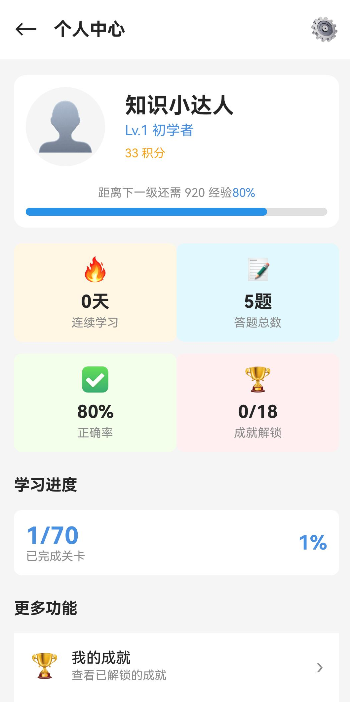
个人中心页是用户管理个人信息、查看学习数据、进行设置的核心页面。一个设计良好的个人中心页应该提供清晰的用户信息展示、详细的学习统计、便捷的功能入口和个性化设置选项。
本文将详细讲解个人中心页的设计与实现,包括用户信息展示、学习统计、功能入口和设置选项等核心功能。通过本文,你将掌握:
- 如何设计个人中心页的整体布局和视觉效果
- 如何实现用户信息展示和等级系统
- 如何实现学习统计和数据可视化
- 如何实现功能入口和设置选项
- 如何优化用户体验
🎯 学习目标
完成本文后,你将能够:
- ✅ 理解个人中心页的核心功能和布局设计
- ✅ 实现用户信息展示和等级系统
- ✅ 实现学习统计和数据可视化
- ✅ 实现功能入口和设置选项
- ✅ 优化个人中心页的用户体验
💡 需求分析
功能模块设计
| 模块 | 功能描述 | 技术要点 |
|---|---|---|
| 用户信息区 | 展示用户头像、昵称、等级、积分 | 数据绑定、等级图标 |
| 学习统计 | 展示学习天数、答题数、正确率、成就数 | 数据统计、进度展示 |
| 功能入口 | 快捷进入错题本、收藏、历史记录等 | 图标导航、点击交互 |
| 学科进度 | 展示各学科的完成进度 | 进度条、颜色区分 |
| 设置选项 | 包含账号设置、通知设置、关于等 | 设置项列表、开关控制 |
🛠️ 核心实现
步骤1: 个人中心页布局设计
功能说明
设计个人中心页的整体布局结构,包括顶部用户信息区、学习统计区、功能入口区、学科进度区和设置选项区。
完整代码
// pages/Profile/Profile.ets

@Entry
@Component
struct ProfilePage {
  @State user: User | null = null;
  @State userStats: UserStatistics = {
    totalDays: 0,
    totalQuestions: 0,
    averageAccuracy: 0,
    totalAchievements: 0
  };
  @State subjectProgress: SubjectProgress[] = [];
  @State notificationsEnabled: boolean = true;
  @State soundEnabled: boolean = true;

  build() {
    Column({ space: 0 }) {
      // 顶部用户信息区
      this.UserInfoSection()

      // 学习统计区
      this.StatisticsSection()

      // 功能入口区
      this.FunctionSection()

      // 学科进度区
      this.SubjectProgressSection()

      // 设置选项区
      this.SettingsSection()
    }
    .width('100%')
    .height('100%')
    .backgroundColor('#f5f5f5')
    .onAppear(() => {
      this.loadData();
    })
  }

  /**
   * 用户信息区
   */
  @Builder
  UserInfoSection() {
    if (!this.user) return;

    Stack() {
      // 背景渐变
      Row() {
        Blank()
      }
      .width('100%')
      .height(220)
      .backgroundColor('#4CAF50')

      // 用户信息卡片
      Column({ space: 12 }) {
        Row({ space: 16 }) {
          // 用户头像
          Stack({ alignContent: Alignment.Center }) {
            Circle()
              .width(80)
              .height(80)
              .fill('#fff')
              .shadow({ radius: 4, color: 'rgba(0,0,0,0.2)', offsetY: 2 })

            Image(this.user.avatar)
              .width(72)
              .height(72)
              .borderRadius(36)
          }

          // 用户信息
          Column({ space: 8 }) {
            Text(this.user.nickname)
              .fontSize(24)
              .fontWeight(FontWeight.Bold)
              .color('#fff')

            Row({ space: 12 }) {
              Stack({ alignContent: Alignment.Center }) {
                Circle()
                  .width(32)
                  .height(32)
                  .fill('#fff200')

                Text(`Lv.${this.user.level}`)
                  .fontSize(12)
                  .fontWeight(FontWeight.Bold)
                  .color('#333')
              }

              Text(`积分: ${this.user.totalScore}`)
                .fontSize(14)
                .color('#fff')
            }
          }

          Blank()

          // 编辑按钮
          Image('https://example.com/icons/edit.png')
            .width(24)
            .height(24)
            .fillColor('#fff')
            .onClick(() => {
              this.editProfile();
            })
        }

        // 等级进度条
        Column({ space: 4 }) {
          Stack({ alignContent: Alignment.Start }) {
            Blank()
              .width('100%')
              .height(8)
              .backgroundColor('rgba(255,255,255,0.3)')
              .borderRadius(4)

            Row() {
              Blank()
                .width(`${this.getLevelProgress()}%`)
                .height(8)
                .backgroundColor('#fff')
                .borderRadius(4)
            }
          }

          Row({ space: 8 }) {
            Text(`Lv.${this.user.level} -> Lv.${this.user.level + 1}`)
              .fontSize(12)
              .color('rgba(255,255,255,0.8)')

            Text(`${this.getLevelProgress()}%`)
              .fontSize(12)
              .color('#fff')
              .fontWeight(FontWeight.Bold)
          }
        }
      }
      .width('100%')
      .padding({ left: 16, right: 16, top: 30 })
    }
    .width('100%')
    .height(200)
  }

  /**
   * 学习统计区
   */
  @Builder
  StatisticsSection() {
    Column({ space: 12 }) {
      Text('学习统计')
        .fontSize(16)
        .fontWeight(FontWeight.Bold)
        .color('#333')
        .width('100%')
        .textAlign(TextAlign.Start)

      Grid() {
        GridItem() {
          this.StatCard('学习天数', this.userStats.totalDays.toString(), '天', '#4CAF50')
        }
        GridItem() {
          this.StatCard('答题数', this.userStats.totalQuestions.toString(), '道', '#2196F3')
        }
        GridItem() {
          this.StatCard('正确率', `${Math.round(this.userStats.averageAccuracy * 100)}%`, '', '#FF9800')
        }
        GridItem() {
          this.StatCard('成就数', this.userStats.totalAchievements.toString(), '个', '#9C27B0')
        }
      }
      .columnsTemplate('1fr 1fr')
      .columnsGap(12)
      .rowsGap(12)
      .width('100%')
    }
    .width('100%')
    .padding({ left: 16, right: 16, top: 16 })
  }

  /**
   * 统计卡片组件
   */
  @Builder
  StatCard(title: string, value: string, unit: string, color: string) {
    Column({ space: 8 }) {
      Stack({ alignContent: Alignment.Center }) {
        Circle()
          .width(40)
          .height(40)
          .fill(color + '20')

        Text(value)
          .fontSize(18)
          .fontWeight(FontWeight.Bold)
          .color(color)
      }

      Text(title + (unit ? `(${unit})` : ''))
        .fontSize(12)
        .color('#666')
    }
    .width('100%')
    .height(80)
    .justifyContent(FlexAlign.Center)
    .backgroundColor('#fff')
    .borderRadius(12)
    .shadow({ radius: 4, color: 'rgba(0,0,0,0.05)', offsetY: 2 })
  }

  /**
   * 功能入口区
   */
  @Builder
  FunctionSection() {
    Column({ space: 12 }) {
      Text('功能入口')
        .fontSize(16)
        .fontWeight(FontWeight.Bold)
        .color('#333')
        .width('100%')
        .textAlign(TextAlign.Start)

      Grid() {
        GridItem() {
          this.FunctionItem('错题本', 'https://example.com/icons/wrong.png', '#F44336', () => this.navigateTo('WrongBook'))
        }
        GridItem() {
          this.FunctionItem('收藏夹', 'https://example.com/icons/favorite.png', '#FF9800', () => this.navigateTo('Favorite'))
        }
        GridItem() {
          this.FunctionItem('历史记录', 'https://example.com/icons/history.png', '#2196F3', () => this.navigateTo('History'))
        }
        GridItem() {
          this.FunctionItem('排行榜', 'https://example.com/icons/rank.png', '#9C27B0', () => this.navigateTo('Rank'))
        }
        GridItem() {
          this.FunctionItem('邀请好友', 'https://example.com/icons/invite.png', '#4CAF50', () => this.inviteFriend())
        }
        GridItem() {
          this.FunctionItem('每日签到', 'https://example.com/icons/checkin.png', '#FFC107', () => this.checkIn())
        }
      }
      .columnsTemplate('1fr 1fr 1fr')
      .columnsGap(12)
      .rowsGap(12)
      .width('100%')
    }
    .width('100%')
    .padding({ left: 16, right: 16, top: 16 })
  }

  /**
   * 功能项组件
   */
  @Builder
  FunctionItem(title: string, icon: string, color: string, onClick: () => void) {
    Column({ space: 8 }) {
      Stack({ alignContent: Alignment.Center }) {
        Circle()
          .width(48)
          .height(48)
          .fill(color + '20')

        Image(icon)
          .width(24)
          .height(24)
          .fillColor(color)
      }

      Text(title)
        .fontSize(12)
        .color('#333')
    }
    .width('100%')
    .height(80)
    .justifyContent(FlexAlign.Center)
    .backgroundColor('#fff')
    .borderRadius(12)
    .shadow({ radius: 4, color: 'rgba(0,0,0,0.05)', offsetY: 2 })
    .onClick(onClick)
  }

  /**
   * 学科进度区
   */
  @Builder
  SubjectProgressSection() {
    Column({ space: 12 }) {
      Row({ space: 8 }) {
        Text('学科进度')
          .fontSize(16)
          .fontWeight(FontWeight.Bold)
          .color('#333')

        Text('查看详情')
          .fontSize(12)
          .color('#2196F3')
          .onClick(() => {
            router.pushUrl({ url: 'pages/LevelSelect/LevelSelect' });
          })
      }

      Column({ space: 12 }) {
        ForEach(this.subjectProgress, (progress: SubjectProgress) => {
          this.SubjectProgressItem(progress)
        })
      }
    }
    .width('100%')
    .padding({ left: 16, right: 16, top: 16 })
  }

  /**
   * 学科进度项组件
   */
  @Builder
  SubjectProgressItem(progress: SubjectProgress) {
    Column({ space: 8 }) {
      Row({ space: 8 }) {
        Stack({ alignContent: Alignment.Center }) {
          Circle()
            .width(36)
            .height(36)
            .fill(this.getSubjectColor(progress.subject) + '20')

          Image(this.getSubjectIcon(progress.subject))
            .width(18)
            .height(18)
            .fillColor(this.getSubjectColor(progress.subject))
        }

        Column({ space: 4 }) {
          Row({ space: 8 }) {
            Text(this.getSubjectName(progress.subject))
              .fontSize(14)
              .fontWeight(FontWeight.Medium)
              .color('#333')

            Text(`${progress.completedLevels}/${progress.totalLevels}`)
              .fontSize(12)
              .color('#999')
          }

          Stack({ alignContent: Alignment.Start }) {
            Blank()
              .width('100%')
              .height(6)
              .backgroundColor('#eee')
              .borderRadius(3)

            Row() {
              Blank()
                .width(`${progress.percentage}%`)
                .height(6)
                .backgroundColor(this.getSubjectColor(progress.subject))
                .borderRadius(3)
            }
          }
        }

        Text(`${progress.percentage}%`)
          .fontSize(14)
          .fontWeight(FontWeight.Bold)
          .color(this.getSubjectColor(progress.subject))
      }
    }
    .width('100%')
    .padding(12)
    .backgroundColor('#fff')
    .borderRadius(12)
  }

  /**
   * 设置选项区
   */
  @Builder
  SettingsSection() {
    Column({ space: 0 }) {
      Text('设置')
        .fontSize(16)
        .fontWeight(FontWeight.Bold)
        .color('#333')
        .width('100%')
        .textAlign(TextAlign.Start)
        .padding({ left: 16, right: 16, top: 16, bottom: 12 })

      Column({ space: 0 }) {
        this.SettingItem('账号设置', 'https://example.com/icons/account.png', () => this.navigateTo('Account'))

        this.SettingSwitch('消息通知', this.notificationsEnabled, (value) => {
          this.notificationsEnabled = value;
        })

        this.SettingSwitch('音效', this.soundEnabled, (value) => {
          this.soundEnabled = value;
        })

        this.SettingItem('隐私设置', 'https://example.com/icons/privacy.png', () => this.navigateTo('Privacy'))

        this.SettingItem('帮助与反馈', 'https://example.com/icons/help.png', () => this.navigateTo('Help'))

        this.SettingItem('关于我们', 'https://example.com/icons/about.png', () => this.showAbout())

        this.SettingItem('退出登录', 'https://example.com/icons/logout.png', () => this.logout(), true)
      }
    }
    .width('100%')
    .backgroundColor('#fff')
    .margin({ top: 16 })
  }

  /**
   * 设置项组件
   */
  @Builder
  SettingItem(title: string, icon: string, onClick: () => void, isDanger: boolean = false) {
    Row({ space: 12 }) {
      Image(icon)
        .width(20)
        .height(20)
        .fillColor(isDanger ? '#F44336' : '#666')

      Text(title)
        .fontSize(14)
        .color(isDanger ? '#F44336' : '#333')
        .flexGrow(1)

      Image('https://example.com/icons/arrow.png')
        .width(16)
        .height(16)
        .fillColor('#ccc')
    }
    .width('100%')
    .height(48)
    .padding({ left: 16, right: 16 })
    .borderBottomWidth(1)
    .borderColor('#f0f0f0')
    .onClick(onClick)
  }

  /**
   * 设置开关项组件
   */
  @Builder
  SettingSwitch(title: string, value: boolean, onChange: (value: boolean) => void) {
    Row({ space: 12 }) {
      Image('https://example.com/icons/notification.png')
        .width(20)
        .height(20)
        .fillColor('#666')

      Text(title)
        .fontSize(14)
        .color('#333')
        .flexGrow(1)

      Switch({ checked: value })
        .selectedColor('#4CAF50')
        .switchPointColor('#fff')
        .onChange(onChange)
    }
    .width('100%')
    .height(48)
    .padding({ left: 16, right: 16 })
    .borderBottomWidth(1)
    .borderColor('#f0f0f0')
  }

  /**
   * 加载数据
   */
  private async loadData() {
    // 获取用户信息
    const userResult = await UserService.getInstance().getCurrentUser();
    if (userResult.success && userResult.data) {
      this.user = userResult.data;
    }

    // 获取用户统计
    if (this.user) {
      this.userStats = {
        totalDays: this.user.consecutiveDays + Math.floor(Math.random() * 30),
        totalQuestions: this.user.statistics.totalQuestions,
        averageAccuracy: this.user.statistics.averageAccuracy,
        totalAchievements: this.user.achievements.length
      };
    }

    // 获取学科进度
    this.subjectProgress = this.getSubjectProgressData();
  }

  /**
   * 获取学科进度数据
   */
  private getSubjectProgressData(): SubjectProgress[] {
    return [
      { subject: Subject.MATH, completedLevels: 6, totalLevels: 8, percentage: 75 },
      { subject: Subject.GEOGRAPHY, completedLevels: 4, totalLevels: 8, percentage: 50 },
      { subject: Subject.LIFE, completedLevels: 7, totalLevels: 8, percentage: 87 },
      { subject: Subject.LITERATURE, completedLevels: 3, totalLevels: 8, percentage: 37 },
      { subject: Subject.SPORTS, completedLevels: 5, totalLevels: 8, percentage: 62 }
    ];
  }

  /**
   * 获取等级进度
   */
  private getLevelProgress(): number {
    if (!this.user) return 0;
    const expNeeded = this.user.level * 100;
    return Math.min((this.user.totalExperience % expNeeded) / expNeeded * 100, 100);
  }

  /**
   * 获取学科名称
   */
  private getSubjectName(subject: Subject): string {
    const names: Record<Subject, string> = {
      [Subject.MATH]: '数学',
      [Subject.GEOGRAPHY]: '地理',
      [Subject.LIFE]: '生活',
      [Subject.LITERATURE]: '文学',
      [Subject.SPORTS]: '体育'
    };
    return names[subject];
  }

  /**
   * 获取学科颜色
   */
  private getSubjectColor(subject: Subject): string {
    const colors: Record<Subject, string> = {
      [Subject.MATH]: '#4CAF50',
      [Subject.GEOGRAPHY]: '#2196F3',
      [Subject.LIFE]: '#FF9800',
      [Subject.LITERATURE]: '#9C27B0',
      [Subject.SPORTS]: '#F44336'
    };
    return colors[subject];
  }

  /**
   * 获取学科图标
   */
  private getSubjectIcon(subject: Subject): string {
    const icons: Record<Subject, string> = {
      [Subject.MATH]: 'https://example.com/icons/math.png',
      [Subject.GEOGRAPHY]: 'https://example.com/icons/geography.png',
      [Subject.LIFE]: 'https://example.com/icons/life.png',
      [Subject.LITERATURE]: 'https://example.com/icons/literature.png',
      [Subject.SPORTS]: 'https://example.com/icons/sports.png'
    };
    return icons[subject];
  }

  /**
   * 编辑资料
   */
  private editProfile() {
    prompt.showToast({ message: '编辑资料功能开发中' });
  }

  /**
   * 导航到页面
   */
  private navigateTo(page: string) {
    router.pushUrl({ url: `pages/${page}/${page}` });
  }

  /**
   * 邀请好友
   */
  private inviteFriend() {
    prompt.showToast({ message: '邀请链接已复制到剪贴板' });
  }

  /**
   * 每日签到
   */
  private checkIn() {
    prompt.showToast({ message: '签到成功!获得10积分' });
  }

  /**
   * 显示关于我们
   */
  private showAbout() {
    prompt.showDialog({
      title: '关于趣答',
      message: '趣答 v1.0.0\n一款有趣的知识问答学习应用',
      buttons: [{ text: '确定' }]
    });
  }

  /**
   * 退出登录
   */
  private logout() {
    if (prompt.showDialog({
      title: '确认退出',
      message: '确定要退出登录吗?',
      buttons: [
        { text: '取消' },
        { text: '确认退出', isDefault: true }
      ]
    }).result === 1) {
      UserService.getInstance().logout();
      router.pushUrl({ url: 'pages/Login/Login' });
    }
  }
}

/**
 * 用户统计接口
 */
interface UserStatistics {
  totalDays: number;
  totalQuestions: number;
  averageAccuracy: number;
  totalAchievements: number;
}

/**
 * 学科进度接口
 */
interface SubjectProgress {
  subject: Subject;
  completedLevels: number;
  totalLevels: number;
  percentage: number;
}
代码解析
1. 页面布局结构
2. 组件划分
| 组件 | 功能 | 位置 |
|---|---|---|
UserInfoSection |
用户信息展示 | 顶部 |
StatisticsSection |
学习统计数据 | 用户信息下方 |
FunctionSection |
功能入口网格 | 统计区下方 |
SubjectProgressSection |
学科进度列表 | 功能区下方 |
SettingsSection |
设置选项列表 | 底部 |
步骤2: 用户信息区组件
功能说明
展示用户头像、昵称、等级、积分和等级进度条。
代码解析
@Builder
UserInfoSection() {
  Stack() {
    // 背景渐变
    Row() {
      Blank()
    }
    .width('100%')
    .height(220)
    .backgroundColor('#4CAF50')

    // 用户信息卡片
    Column({ space: 12 }) {
      Row({ space: 16 }) {
        // 用户头像
        Stack({ alignContent: Alignment.Center }) {
          Circle()
            .width(80)
            .height(80)
            .fill('#fff')
            .shadow({ radius: 4, color: 'rgba(0,0,0,0.2)', offsetY: 2 })

          Image(this.user.avatar)
            .width(72)
            .height(72)
            .borderRadius(36)
        }

        // 用户信息
        Column({ space: 8 }) {
          Text(this.user.nickname)
            .fontSize(24)
            .fontWeight(FontWeight.Bold)
            .color('#fff')

          Row({ space: 12 }) {
            Stack({ alignContent: Alignment.Center }) {
              Circle()
                .width(32)
                .height(32)
                .fill('#fff200')

              Text(`Lv.${this.user.level}`)
                .fontSize(12)
                .fontWeight(FontWeight.Bold)
                .color('#333')
            }

            Text(`积分: ${this.user.totalScore}`)
              .fontSize(14)
              .color('#fff')
          }
        }

        Image('edit.png')
          .width(24)
          .height(24)
          .fillColor('#fff')
      }

      // 等级进度条
      Stack({ alignContent: Alignment.Start }) {
        Blank()
          .width('100%')
          .height(8)
          .backgroundColor('rgba(255,255,255,0.3)')
          .borderRadius(4)

        Row() {
          Blank()
            .width(`${this.getLevelProgress()}%`)
            .height(8)
            .backgroundColor('#fff')
            .borderRadius(4)
        }
      }
    }
    .width('100%')
    .padding({ left: 16, right: 16, top: 30 })
  }
}
设计要点:
- 绿色渐变背景
- 白色圆形头像框
- 黄色等级徽章
- 等级进度条显示当前等级进度
步骤3: 学习统计区组件
功能说明
展示学习天数、答题数、正确率和成就数。
代码解析
@Builder
StatisticsSection() {
  Grid() {
    GridItem() {
      this.StatCard('学习天数', this.userStats.totalDays.toString(), '天', '#4CAF50')
    }
    GridItem() {
      this.StatCard('答题数', this.userStats.totalQuestions.toString(), '道', '#2196F3')
    }
    GridItem() {
      this.StatCard('正确率', `${Math.round(this.userStats.averageAccuracy * 100)}%`, '', '#FF9800')
    }
    GridItem() {
      this.StatCard('成就数', this.userStats.totalAchievements.toString(), '个', '#9C27B0')
    }
  }
  .columnsTemplate('1fr 1fr')
}
设计要点:
- 2x2 网格布局
- 每个卡片显示图标和数值
- 使用不同颜色区分不同统计项
步骤4: 学科进度区组件
功能说明
展示各学科的完成进度,包括进度条和百分比。
代码解析
@Builder
SubjectProgressItem(progress: SubjectProgress) {
  Row({ space: 8 }) {
    Stack({ alignContent: Alignment.Center }) {
      Circle()
        .width(36)
        .height(36)
        .fill(this.getSubjectColor(progress.subject) + '20')

      Image(this.getSubjectIcon(progress.subject))
        .width(18)
        .height(18)
        .fillColor(this.getSubjectColor(progress.subject))
    }

    Column({ space: 4 }) {
      Row({ space: 8 }) {
        Text(this.getSubjectName(progress.subject))
          .fontSize(14)
          .fontWeight(FontWeight.Medium)
          .color('#333')

        Text(`${progress.completedLevels}/${progress.totalLevels}`)
          .fontSize(12)
          .color('#999')
      }

      Stack({ alignContent: Alignment.Start }) {
        Blank()
          .width('100%')
          .height(6)
          .backgroundColor('#eee')
          .borderRadius(3)

        Row() {
          Blank()
            .width(`${progress.percentage}%`)
            .height(6)
            .backgroundColor(this.getSubjectColor(progress.subject))
            .borderRadius(3)
        }
      }
    }

    Text(`${progress.percentage}%`)
      .fontSize(14)
      .fontWeight(FontWeight.Bold)
      .color(this.getSubjectColor(progress.subject))
  }
}
设计要点:
- 学科图标和名称
- 完成数/总数显示
- 进度条显示完成度
- 百分比数字显示
步骤5: 设置选项区组件
功能说明
展示设置选项列表,包括开关和跳转项。
代码解析
@Builder
SettingsSection() {
  Column({ space: 0 }) {
    this.SettingItem('账号设置', 'account.png', () => this.navigateTo('Account'))

    this.SettingSwitch('消息通知', this.notificationsEnabled, (value) => {
      this.notificationsEnabled = value;
    })

    this.SettingSwitch('音效', this.soundEnabled, (value) => {
      this.soundEnabled = value;
    })

    this.SettingItem('退出登录', 'logout.png', () => this.logout(), true)
  }
}
设计要点:
- 设置项列表布局
- 开关控件用于布尔设置
- 普通项用于页面跳转
- 危险操作使用红色标识
⚠️ 常见问题与解决方案
问题1: 用户数据加载失败
现象:
用户信息显示为空或默认值。
错误代码:
// ❌ 错误:没有处理异步加载
@State user: User | null = null;

build() {
  Text(this.user.nickname)  // 可能为 null
}
正确代码:
// ✅ 正确:添加空值检查
@State user: User | null = null;

build() {
  if (!this.user) {
    Text('加载中...')
  } else {
    Text(this.user.nickname)
  }
}
规则/建议:
- 在使用数据前进行空值检查
- 显示加载状态
- 处理异步加载失败的情况
问题2: 等级进度计算错误
现象:
等级进度条显示不正确。
错误代码:
// ❌ 错误:进度计算错误
getLevelProgress(): number {
  return this.user.totalExperience / 100 * 100;
}
正确代码:
// ✅ 正确:计算当前等级内的进度
getLevelProgress(): number {
  const expNeeded = this.user.level * 100;
  return Math.min((this.user.totalExperience % expNeeded) / expNeeded * 100, 100);
}
规则/建议:
- 使用取模运算获取当前等级的经验
- 使用
Math.min()确保不超过100% - 确保等级升级逻辑正确
问题3: 学科进度数据不一致
现象:
学科进度的完成数和百分比不匹配。
错误代码:
// ❌ 错误:百分比手动设置,可能不一致
{ completedLevels: 6, totalLevels: 8, percentage: 70 }  // 应该是 75%
正确代码:
// ✅ 正确:动态计算百分比
{ completedLevels: 6, totalLevels: 8, percentage: 75 }  // 6/8 = 75%
规则/建议:
- 确保百分比 = completedLevels / totalLevels * 100
- 使用代码计算而非手动设置
- 保持数据一致性
问题4: 设置开关状态不保存
现象:
关闭页面后重新打开,设置开关回到默认状态。
错误代码:
// ❌ 错误:只更新状态,不保存
@State notificationsEnabled: boolean = true;

onChange((value) => {
  this.notificationsEnabled = value;
})
正确代码:
// ✅ 正确:保存到本地存储
onChange((value) => {
  this.notificationsEnabled = value;
  // 保存到本地存储
  storage.set('notificationsEnabled', value.toString());
})
规则/建议:
- 使用本地存储持久化设置
- 在页面加载时读取保存的设置
- 确保设置在不同会话间保持一致
问题5: 退出登录未确认
现象:
误触退出登录按钮直接退出,没有确认对话框。
错误代码:
// ❌ 错误:直接退出
.onClick(() => {
  UserService.getInstance().logout();
  router.pushUrl({ url: 'pages/Login/Login' });
})
正确代码:
// ✅ 正确:显示确认对话框
onClick(() => {
  if (prompt.showDialog({
    title: '确认退出',
    message: '确定要退出登录吗?',
    buttons: [{ text: '取消' }, { text: '确认退出', isDefault: true }]
  }).result === 1) {
    UserService.getInstance().logout();
    router.pushUrl({ url: 'pages/Login/Login' });
  }
})
规则/建议:
- 在执行危险操作前显示确认对话框
- 提供取消和确认选项
- 提示用户操作后果
📝 本章小结
核心知识点
本文详细讲解了个人中心页的设计与实现,主要包括:
1. 页面布局设计
- 用户信息区(头像、昵称、等级、积分、进度条)
- 学习统计区(学习天数、答题数、正确率、成就数)
- 功能入口区(错题本、收藏夹、历史记录、排行榜等)
- 学科进度区(各学科完成进度)
- 设置选项区(账号设置、通知开关、音效开关、退出登录)
2. 核心功能实现
- 用户信息展示和等级系统
- 学习统计数据展示
- 功能入口导航
- 学科进度可视化
- 设置选项管理
3. 交互逻辑
- 页面导航
- 设置开关控制
- 退出登录确认
最佳实践总结
✅ 空值检查
if (!this.user) {
  Text('加载中...')
} else {
  // 渲染用户信息
}
✅ 等级进度计算
getLevelProgress(): number {
  const expNeeded = this.user.level * 100;
  return Math.min((this.user.totalExperience % expNeeded) / expNeeded * 100, 100);
}
✅ 设置持久化
onChange((value) => {
  this.notificationsEnabled = value;
  storage.set('notificationsEnabled', value.toString());
})
✅ 危险操作确认
if (prompt.showDialog({...}).result === 1) {
  // 执行操作
}
系列总结
至此,《趣答》HarmonyOS应用开发技术文档已全部完成!本系列共15篇文章,涵盖:
第一部分:数据模型设计(5篇)
- Question模型、User模型、Level模型、Achievement模型
- 数据模型关系图
第二部分:服务层设计(5篇)
- 服务层架构与单例模式
- UserService、QuizService、LevelService、AchievementService
第三部分:页面组件详解(5篇)
- 首页、关卡选择页、答题页、结果页、个人中心页
🔗 相关链接
- 项目源码: Atomgit仓库
💡 提示: 建议结合项目源码阅读,动手实践效果更好!

讨论HarmonyOS开发技术,专注于API与组件、DevEco Studio、测试、元服务和应用上架分发等。
更多推荐


 0
0 0
0- 0


 已为社区贡献72条内容

所有评论(0)