《敏感数据加密存储:HarmonyOS安全首选项应用》:ArkTS 数据持久化与密码学工程全案解析
文章目录
前言
在移动应用开发的浩瀚版图中,数据持久化(Data Persistence) 是不可或缺的基石。然而,当我们需要在本地存储用户的账号密码、OAuth Token、交易密钥或隐私配置时,简单的“明文落盘”无异于将用户的核心资产暴露在裸奔状态。
在 Android 和 iOS 早期,开发者常常需要引入臃肿的第三方加密库(如 SQLCipher 或各种自行封装的 AES 工具类),不仅增加了安装包体积,还极其容易因为“密钥硬编码在代码里”而被逆向工程师轻易破解。
HarmonyOS 从底层重塑了安全存储的范式。无论是极其轻量的加密首选项(Encrypted Preferences),还是达到金融级安全标准的通用密钥库系统(HUKS, HarmonyOS Universal KeyStore),都将密码学工程中最复杂的密钥派生、硬件 TEE(可信执行环境)隔离和加解密算法,封装成了开箱即用的 ArkTS API。
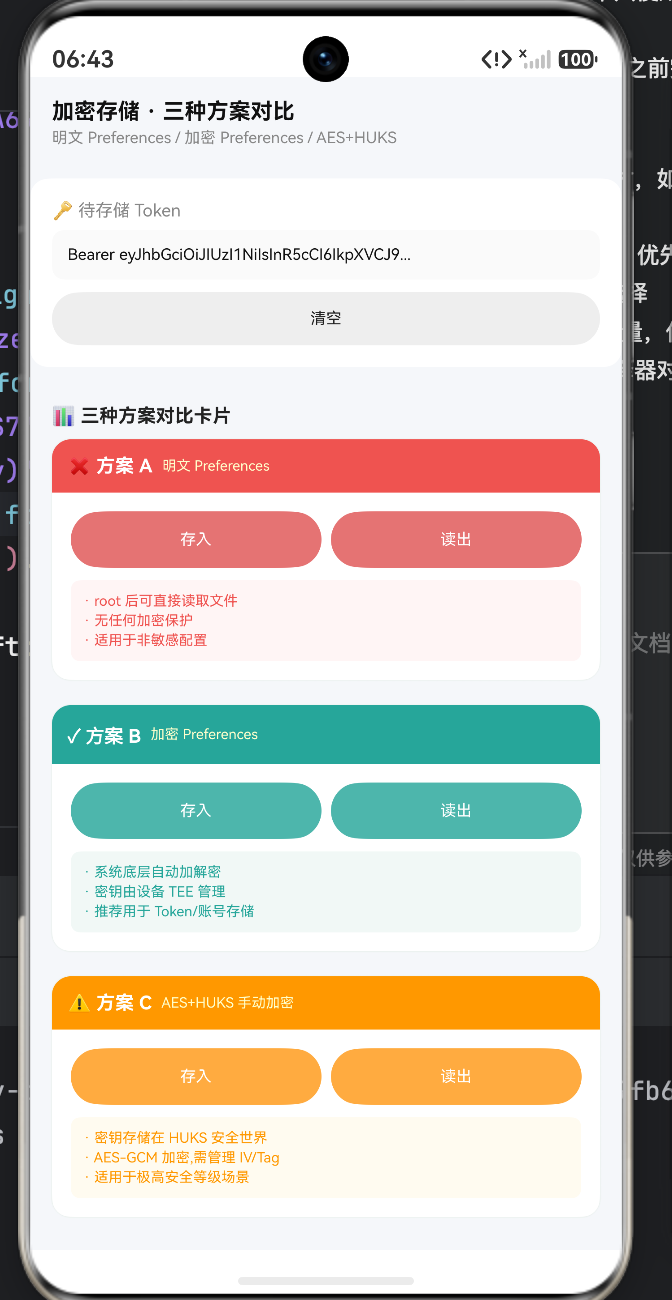
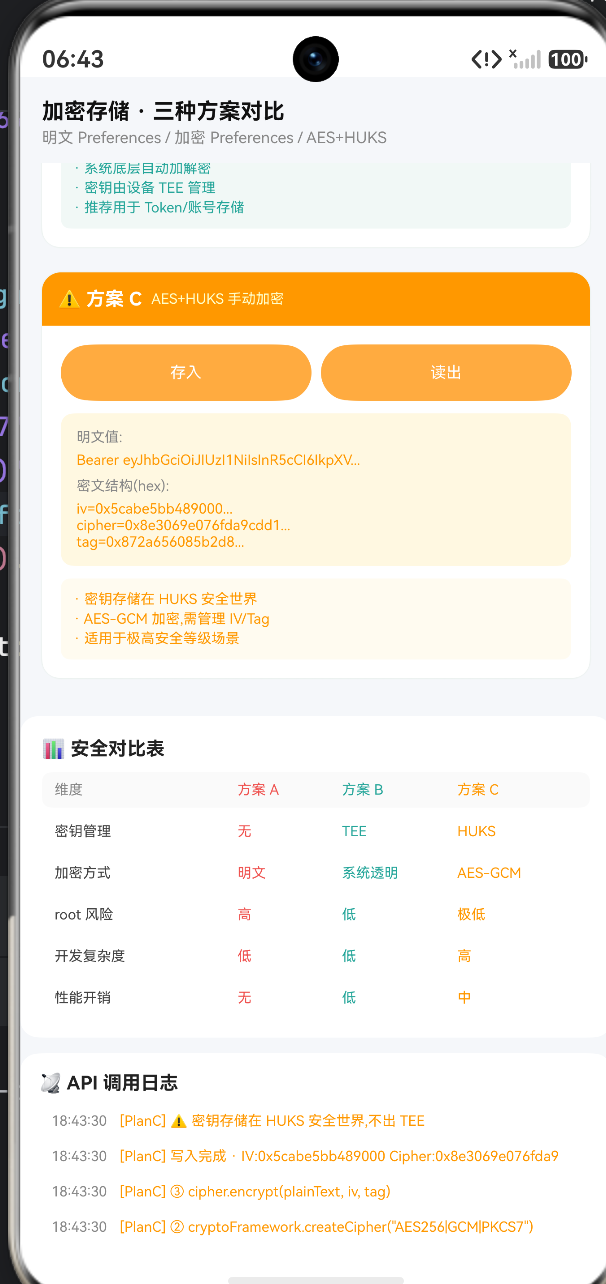
本文将基于一段高保真的 ArkUI 加密存储沙盒模拟源码,为您进行像素级、密码学级别的深度拆解。我们将对比“明文存储”、“系统透明加密”与“手动 AES-GCM + HUKS”三大方案,探讨在不同业务场景下,如何优雅、安全地将敏感数据锁进 HarmonyOS 的系统级保险箱。
一、 攻防博弈:为什么需要加密存储?
在讨论技术方案前,我们必须明白“敌人在哪”。很多初级开发者认为,只要手机没有越狱/Root,应用沙盒里的文件就是绝对安全的。这在现代网络战中是一个极其危险的错觉。
// 方案A:明文存储(错误示范)
  private planAPut(): void {
    // 真实代码:preferences.put('token', this.plainToken)
    this.appendLog('[PlanA] preferences.put("token", "' + this.plainToken.substring(0, 20) + '...")', '#EF5350')
    this.appendLog('[PlanA] 明文写入 → root 后可直接 cat /data/data/.../preferences.json', '#EF5350')
  }
明文落盘的灾难性后果:
如果使用普通的 Preferences 将 JWT Token 明文写入磁盘,这个 Token 就会以极其直白的 JSON 格式躺在系统底层路径下。
- 物理提取:一旦用户的手机丢失并被黑客通过硬件漏洞强行提取芯片数据,或者被恶意刷机获取 Root 权限,这些 JSON 文件就会被瞬间批量脱库。
- 供应链攻击:如果 App 集成了某些带有后门 SDK,由于同在一个沙盒内,后门代码可以直接读取并上传你的 Token。
因此,对于 Token 类核心数据,绝对禁止使用明文 Preferences 或普通 RelationalStore (RDB) 存储。
二、 方案 B:加密首选项 (Encrypted Preferences) —— 业务开发的“银弹”
为了解决明文存储的痛点,同时兼顾开发效率,HarmonyOS 提供了一种“系统级透明加密”方案。
  private planBPut(): void {
    // 模拟底层真实的系统级调用
    this.appendLog('[PlanB] getPreferences(context, "secure", { encrypt: true })', '#26A69A')
    this.appendLog('[PlanB] 系统级透明加密 · 密钥由 TEE 管理', '#26A69A')

    // 模拟密文落盘
    const fakeCipher: string = '0x' + Array.from<never, string>({ length: 64 }, () => Math.floor(Math.random() * 16).toString(16)).join('')
    // ...
  }

  private planBGet(): void {
    this.appendLog('[PlanB] preferences.get("token") · 自动解密', '#26A69A')
    // ...
  }
技术原理与生产环境指南:
在真实的 ArkTS 开发中,我们只需要在打开 Preferences 时传入 { encrypt: true } 的配置。
- 真正的透明感:后续所有的
put()、get()、flush()操作,在开发者的视角里与明文操作一模一样。底层所有的 AES 加密、解密工作,全都在内存的读写流(Stream)中由操作系统自动完成。 - 密钥去哪了? 系统会在后台为该 Preferences 文件自动生成一个高强度的随机对称密钥。更关键的是,这个密钥不会存储在常规文件系统中,而是被送入了芯片内部的 TEE(可信执行环境) 进行硬件级托管。即使是 Root 级别的恶意软件,也无法进入 TEE 把密钥偷出来。
- 最佳实践:此方案平衡了极高的开发效率与优秀的安全性。强烈推荐用于绝大多数 App 的账号、Token、偏好设置等敏感业务数据的存储。
三、 方案 C:HUKS + AES-GCM 算法 —— 金融级的终极防线
如果你的 App 是数字钱包、银行客户端,或者需要加密存储极其敏感的医疗记录,仅仅依赖系统自动的加密 Preferences 还是不够的(因为它的加密粒度停留在“文件”级别,一旦沙盒被攻破,有极小概率被绕过)。我们需要在“字段”甚至“字节”级别,利用 HUKS 进行手动密码学加解密。
  private planCPut(): void {
    // 1. 在 HUKS 中生成并托管密钥
    this.appendLog('[PlanC] ① huks.generateKeyItem("aes_key", ...)', '#FF9800')
    // 2. 初始化对称加密引擎
    this.appendLog('[PlanC] ② cryptoFramework.createCipher("AES256|GCM|PKCS7")', '#FF9800')
    // 3. 执行加密
    this.appendLog('[PlanC] ③ cipher.encrypt(plainText, iv, tag)', '#FF9800')

    // 模拟高阶密码学的产物组合
    setTimeout(() => {
      // Initialization Vector (初始化向量)
      const iv: string = '0x' + Array.from<never, string>({ length: 32 }, ... ).join('')
      // 密文主体
      const cipher: string = '0x' + Array.from<never, string>({ length: 128 }, ... ).join('')
      // Authentication Tag (认证标签)
      const tag: string = '0x' + Array.from<never, string>({ length: 32 }, ... ).join('')

      this.planC.cipher = 'iv=' + iv.substring(0, 16) + '...\ncipher=' + cipher.substring(0, 20) + '...\ntag=' + tag.substring(0, 16) + '...'
      this.appendLog('[PlanC] ⚠ 密钥存储在 HUKS 安全世界,不出 TEE', '#FF9800')
    }, 900)
  }
密码学工程深度解构(AES-GCM):
这段模拟代码极其严谨地还原了现代密码学的最高标准:AES-GCM (Galois/Counter Mode) 认证加密模式。
- HUKS 的绝对屏障:在真实开发中,
huks.generateKeyItem生成的aes_key永远不会以明文形式出现在你的应用内存中。当你调用cipher.encrypt时,操作系统是把你提供的明文“送进”底层的安全硬件中去,加密完了再把密文吐出来。“密钥不出 TEE”,这是防破解的核心。 - 为何会有 IV 和 Tag?
IV(初始化向量):即使你连续加密相同的字符串(比如密码都是123456),因为每次加密系统都会要求传入一个随机生成的IV,产生的密文将完全不同。这彻底挫败了黑客基于密文统计学和彩虹表的字典攻击。Tag(认证标签):这是 GCM 模式区别于传统 CBC 模式的杀手锏。黑客不仅无法解密,而且如果他试图恶意篡改磁盘上的密文文件哪怕一个字节,解密时计算的 Tag 就会验证失败,系统会直接抛出异常,防止“密文篡改攻击”。
- 落地挑战:在使用方案 C 时,开发者不仅要持久化
cipherText,**还必须一并保存每次加密生成的IV和Tag**(通常将其拼接为cipherText|IV|Tag再存入普通 Preferences 中)。读取时先拆包,再解密。
表 1:三大本地存储方案全景对比与技术选型
| 评估维度 | 方案 A:明文 Preferences | 方案 B:加密 Preferences (encrypt: true) | 方案 C:HUKS + AES-GCM + CryptoFramework |
|---|---|---|---|
| 密钥管理 | 无 | OS 自动管理,硬件 TEE 托管 | 开发者主导调用 HUKS,高度可控,硬件 TEE 托管 |
| 防 Root 读取能力 | 极低(直接白给) | 高(除非沙盒与 TEE 隔离同时被攻破) | 极高(细粒度防暴力内存 Dump,支持生物认证解锁) |
| 开发复杂度 | 极低(一行代码) | 低(仅在初始化增加一个参数) | 极高(需精通异步密码学 API,手动管理 IV 和封包) |
| 性能开销 | 纯 IO 损耗 | 低(流式加密开销极小) | 中等(大量异步内核通信与上下文切换) |
| 业务最佳适用场景 | 缓存最后阅读页码、深浅色模式开关、UI 排序历史等毫不敏感的纯端侧配置。 | OAuth Token、用户手机号脱敏缓存、业务逻辑隐私开关。推荐作为绝大部分业务的首选。 | 数字货币私钥、金融支付密码、极度敏感的医疗与聊天数据。 |
四、 UI 架构:高信息密度的对比看板设计
这份演示沙盒的 UI 设计,堪称数据展示界面的典范。如何在一个屏幕内优雅地塞下三种不同方案的复杂对比结构?
            Column() {
              // 1. 顶部标题与标识栏
              Row() {
                Text('✓ 方案 B').fontSize(12).fontColor('#FFFFFF').fontWeight(FontWeight.Bold)
                Text('加密 Preferences').fontSize(9).fontColor('#FFFFFFCC').margin({ left: 6 })
              }
              .width('100%').padding(10).backgroundColor('#26A69A').borderRadius({ topLeft: 12, topRight: 12 })

              Column({ space: 8 }) {
                // 2. 交互操作栏 (等分 Row 布局)
                Row({ space: 6 }) {
                  Column() { Text('存入') ... }.layoutWeight(1).onClick(() => this.planBPut())
                  Column() { Text('读出') ... }.layoutWeight(1).onClick(() => this.planBGet())
                }

                // 3. 动态数据挂载区 (利用 status 条件渲染)
                if (this.planB.status === 'stored') {
                  Column() {
                    Text('明文值:') ...
                    Text('密文(hex):') ...
                  }
                  .backgroundColor('#E8F5E9') // 浅色护眼背景
                }

                // 4. 结论与总结区
                Column() {
                  Text('· 系统底层自动加解密') ...
                  // ...
                }.backgroundColor('#F1F8F6')
              }
              .padding(12)
            }
            .backgroundColor('#FFFFFF').borderRadius(12).shadow({ radius: 4, color: '#1A237E08' })
UI 工程学透视:
- 色彩语义(Semantic Colors):在这套界面中,配色并不是为了好看,而是为了表明立场。方案 A(明文)使用了代表危险的红色系(
#EF5350);方案 B(系统加密)使用了代表推荐与安全的青绿色(#26A69A);方案 C(高级密码学)则使用了代表专业与硬核的橙色(#FF9800)。通过这种色彩映射,开发者在测试点击时,潜意识就能对各个方案的安全性产生肌肉记忆。 - 渐进式展开(Progressive Disclosure):在未点击“存入”前,
status为empty,卡片高度非常克制。点击操作后,中间利用if挂载了显示密文的深色数据区。这种不会让初始页面显得臃肿的 DOM 树条件重构技巧,是 ArkUI 组件化的核心优势。
完整代码
interface LogItem { id: number; time: string; text: string; color: string }
interface StorageItem { key: string; plain: string; cipher: string; status: string }
struct Index {
logs: LogItem[] = []
seq: number = 0
plainToken: string = 'Bearer eyJhbGciOiJIUzI1NiIsInR5cCI6IkpXVCJ9...'
planA: StorageItem = { key: 'token', plain: '', cipher: '', status: 'empty' }
planB: StorageItem = { key: 'token', plain: '', cipher: '', status: 'empty' }
planC: StorageItem = { key: 'token', plain: '', cipher: '', status: 'empty' }
aboutToAppear(): void {
this.appendLog('[Security] 三种本地存储方案对比', '#5C6BC0')
this.appendLog('[PlanA] 明文 Preferences · ❌ 不安全', '#EF5350')
this.appendLog('[PlanB] 加密 Preferences · ✓ 系统级', '#26A69A')
this.appendLog('[PlanC] AES+HUKS · ⚠ 手动加密', '#FF9800')
}
private appendLog(text: string, color: string): void {
this.seq++
const d: Date = new Date()
const hh: string = d.getHours() < 10 ? '0' + d.getHours() : d.getHours().toString()
const mm: string = d.getMinutes() < 10 ? '0' + d.getMinutes() : d.getMinutes().toString()
const ss: string = d.getSeconds() < 10 ? '0' + d.getSeconds() : d.getSeconds().toString()
this.logs.unshift({ id: this.seq, time: hh + ':' + mm + ':' + ss, text: text, color: color })
if (this.logs.length > 26) { this.logs.pop() }
}
private planAPut(): void {
this.appendLog('[PlanA] preferences.put("token", "' + this.plainToken.substring(0, 20) + '...")', '#EF5350')
this.appendLog('[PlanA] 明文写入 → root 后可直接 cat /data/data/.../preferences.json', '#EF5350')
const self: Index = this
setTimeout(() => {
self.planA.plain = self.plainToken
self.planA.cipher = '(明文存储)'
self.planA.status = 'stored'
self.appendLog('[PlanA] 写入完成 · 明文: ' + self.plainToken.substring(0, 30), '#EF5350')
}, 500)
}
private planAGet(): void {
this.appendLog('[PlanA] preferences.get("token")', '#EF5350')
const self: Index = this
setTimeout(() => {
self.appendLog('[PlanA] 读出: ' + self.planA.plain.substring(0, 30) + '...', '#EF5350')
self.appendLog('[PlanA] ⚠ 任何进程 root 后可直接读取', '#EF5350')
}, 500)
}
private planBPut(): void {
this.appendLog('[PlanB] getPreferences(context, "secure", { encrypt: true })', '#26A69A')
this.appendLog('[PlanB] 系统级透明加密 · 密钥由 TEE 管理', '#26A69A')
const self: Index = this
setTimeout(() => {
const fakeCipher: string = '0x' + Array.from<never, string>({ length: 64 }, () => Math.floor(Math.random() * 16).toString(16)).join('')
self.planB.plain = self.plainToken
self.planB.cipher = fakeCipher.substring(0, 24) + '...(共64字节)'
self.planB.status = 'stored'
self.appendLog('[PlanB] 写入完成 · 密文: ' + fakeCipher.substring(0, 24), '#26A69A')
}, 700)
}
private planBGet(): void {
this.appendLog('[PlanB] preferences.get("token") · 自动解密', '#26A69A')
const self: Index = this
setTimeout(() => {
self.appendLog('[PlanB] 读出(自动解密): ' + self.planB.plain.substring(0, 30) + '...', '#26A69A')
self.appendLog('[PlanB] ✓ 系统底层自动加解密,无需手动处理', '#26A69A')
}, 500)
}
private planCPut(): void {
this.appendLog('[PlanC] ① huks.generateKeyItem("aes_key", ...)', '#FF9800')
this.appendLog('[PlanC] ② cryptoFramework.createCipher("AES256|GCM|PKCS7")', '#FF9800')
this.appendLog('[PlanC] ③ cipher.encrypt(plainText, iv, tag)', '#FF9800')
const self: Index = this
setTimeout(() => {
const iv: string = '0x' + Array.from<never, string>({ length: 32 }, () => Math.floor(Math.random() * 16).toString(16)).join('')
const cipher: string = '0x' + Array.from<never, string>({ length: 128 }, () => Math.floor(Math.random() * 16).toString(16)).join('')
const tag: string = '0x' + Array.from<never, string>({ length: 32 }, () => Math.floor(Math.random() * 16).toString(16)).join('')
self.planC.plain = self.plainToken
self.planC.cipher = 'iv=' + iv.substring(0, 16) + '...\ncipher=' + cipher.substring(0, 20) + '...\ntag=' + tag.substring(0, 16) + '...'
self.planC.status = 'stored'
self.appendLog('[PlanC] 写入完成 · IV:' + iv.substring(0, 16) + ' Cipher:' + cipher.substring(0, 16), '#FF9800')
self.appendLog('[PlanC] ⚠ 密钥存储在 HUKS 安全世界,不出 TEE', '#FF9800')
}, 900)
}
private planCGet(): void {
this.appendLog('[PlanC] ① huks.getKeyItem("aes_key")', '#FF9800')
this.appendLog('[PlanC] ② cipher.decrypt(cipherText, iv, tag)', '#FF9800')
const self: Index = this
setTimeout(() => {
self.appendLog('[PlanC] 读出(手动解密): ' + self.planC.plain.substring(0, 30) + '...', '#FF9800')
self.appendLog('[PlanC] ⚠ 需自行管理 IV/Tag,复杂度较高', '#FF9800')
}, 700)
}
private clearAll(): void {
this.planA = { key: 'token', plain: '', cipher: '', status: 'empty' }
this.planB = { key: 'token', plain: '', cipher: '', status: 'empty' }
this.planC = { key: 'token', plain: '', cipher: '', status: 'empty' }
this.appendLog('[Clear] 所有存储已清空', '#888')
}
build() {
Column() {
Row() {
Column() {
Text('加密存储 · 三种方案对比').fontSize(14).fontColor('#111').fontWeight(FontWeight.Bold)
Text('明文 Preferences / 加密 Preferences / AES+HUKS').fontSize(10).fontColor('#888').margin({ top: 3 })
}
.layoutWeight(1).alignItems(HorizontalAlign.Start)
}
.width('100%').padding({ left: 14, right: 14, top: 14, bottom: 10 })
Scroll() {
Column() {
Column() {
Text('🔑 待存储 Token').fontSize(11).fontColor('#888').width('100%')
Text(this.plainToken).fontSize(10).fontColor('#111').width('100%').margin({ top: 6 })
.padding(10).backgroundColor('#FAFAFA').borderRadius(8)
Row({ space: 8 }) {
Column() { Text('清空').fontSize(10).fontColor('#222') }
.layoutWeight(1).height(34).backgroundColor('#EEEEEE').borderRadius(17).alignItems(HorizontalAlign.Center).justifyContent(FlexAlign.Center).onClick(() => this.clearAll())
}.width('100%').margin({ top: 8 })
}
.width('100%').padding(14).backgroundColor('#FFFFFF').borderRadius(12).margin({ left: 10, right: 10, top: 10 })
Column({ space: 8 }) {
Text('📊 三种方案对比卡片').fontSize(12).fontColor('#222').fontWeight(FontWeight.Bold).width('100%')
Column() {
Row() {
Text('❌ 方案 A').fontSize(12).fontColor('#FFFFFF').fontWeight(FontWeight.Bold)
Text('明文 Preferences').fontSize(9).fontColor('#FFFFFFCC').margin({ left: 6 })
}
.width('100%').padding(10).backgroundColor('#EF5350').borderRadius({ topLeft: 12, topRight: 12 })
Column({ space: 8 }) {
Row({ space: 6 }) {
Column() { Text('存入').fontSize(10).fontColor('#FFFFFF') }
.layoutWeight(1).height(36).backgroundColor('#E57373').borderRadius(18).alignItems(HorizontalAlign.Center).justifyContent(FlexAlign.Center).onClick(() => this.planAPut())
Column() { Text('读出').fontSize(10).fontColor('#FFFFFF') }
.layoutWeight(1).height(36).backgroundColor('#E57373').borderRadius(18).alignItems(HorizontalAlign.Center).justifyContent(FlexAlign.Center).onClick(() => this.planAGet())
}
.width('100%')
if (this.planA.status === 'stored') {
Column() {
Text('明文值:').fontSize(9).fontColor('#888').width('100%')
Text(this.planA.plain.substring(0, 40) + '...').fontSize(9).fontColor('#EF5350').width('100%').margin({ top: 4 })
Text('密文:').fontSize(9).fontColor('#888').width('100%').margin({ top: 6 })
Text(this.planA.cipher).fontSize(9).fontColor('#EF5350').width('100%').margin({ top: 4 })
}
.width('100%').padding(10).backgroundColor('#FFEBEE').borderRadius(8)
}
Column() {
Text('· root 后可直接读取文件').fontSize(9).fontColor('#EF5350').width('100%')
Text('· 无任何加密保护').fontSize(9).fontColor('#EF5350').width('100%').margin({ top: 2 })
Text('· 适用于非敏感配置').fontSize(9).fontColor('#EF5350').width('100%').margin({ top: 2 })
}
.width('100%').padding(8).backgroundColor('#FFF5F5').borderRadius(6)
}
.width('100%').padding(12)
}
.width('100%').backgroundColor('#FFFFFF').borderRadius(12).shadow({ radius: 4, color: '#1A237E08' })
Column() {
Row() {
Text('✓ 方案 B').fontSize(12).fontColor('#FFFFFF').fontWeight(FontWeight.Bold)
Text('加密 Preferences').fontSize(9).fontColor('#FFFFFFCC').margin({ left: 6 })
}
.width('100%').padding(10).backgroundColor('#26A69A').borderRadius({ topLeft: 12, topRight: 12 })
Column({ space: 8 }) {
Row({ space: 6 }) {
Column() { Text('存入').fontSize(10).fontColor('#FFFFFF') }
.layoutWeight(1).height(36).backgroundColor('#4DB6AC').borderRadius(18).alignItems(HorizontalAlign.Center).justifyContent(FlexAlign.Center).onClick(() => this.planBPut())
Column() { Text('读出').fontSize(10).fontColor('#FFFFFF') }
.layoutWeight(1).height(36).backgroundColor('#4DB6AC').borderRadius(18).alignItems(HorizontalAlign.Center).justifyContent(FlexAlign.Center).onClick(() => this.planBGet())
}
.width('100%')
if (this.planB.status === 'stored') {
Column() {
Text('明文值:').fontSize(9).fontColor('#888').width('100%')
Text(this.planB.plain.substring(0, 40) + '...').fontSize(9).fontColor('#26A69A').width('100%').margin({ top: 4 })
Text('密文(hex):').fontSize(9).fontColor('#888').width('100%').margin({ top: 6 })
Text(this.planB.cipher).fontSize(9).fontColor('#26A69A').width('100%').margin({ top: 4 })
}
.width('100%').padding(10).backgroundColor('#E8F5E9').borderRadius(8)
}
Column() {
Text('· 系统底层自动加解密').fontSize(9).fontColor('#26A69A').width('100%')
Text('· 密钥由设备 TEE 管理').fontSize(9).fontColor('#26A69A').width('100%').margin({ top: 2 })
Text('· 推荐用于 Token/账号存储').fontSize(9).fontColor('#26A69A').width('100%').margin({ top: 2 })
}
.width('100%').padding(8).backgroundColor('#F1F8F6').borderRadius(6)
}
.width('100%').padding(12)
}
.width('100%').backgroundColor('#FFFFFF').borderRadius(12).shadow({ radius: 4, color: '#1A237E08' }).margin({ top: 8 })
Column() {
Row() {
Text('⚠ 方案 C').fontSize(12).fontColor('#FFFFFF').fontWeight(FontWeight.Bold)
Text('AES+HUKS 手动加密').fontSize(9).fontColor('#FFFFFFCC').margin({ left: 6 })
}
.width('100%').padding(10).backgroundColor('#FF9800').borderRadius({ topLeft: 12, topRight: 12 })
Column({ space: 8 }) {
Row({ space: 6 }) {
Column() { Text('存入').fontSize(10).fontColor('#FFFFFF') }
.layoutWeight(1).height(36).backgroundColor('#FFAB40').borderRadius(18).alignItems(HorizontalAlign.Center).justifyContent(FlexAlign.Center).onClick(() => this.planCPut())
Column() { Text('读出').fontSize(10).fontColor('#FFFFFF') }
.layoutWeight(1).height(36).backgroundColor('#FFAB40').borderRadius(18).alignItems(HorizontalAlign.Center).justifyContent(FlexAlign.Center).onClick(() => this.planCGet())
}
.width('100%')
if (this.planC.status === 'stored') {
Column() {
Text('明文值:').fontSize(9).fontColor('#888').width('100%')
Text(this.planC.plain.substring(0, 40) + '...').fontSize(9).fontColor('#FF9800').width('100%').margin({ top: 4 })
Text('密文结构(hex):').fontSize(9).fontColor('#888').width('100%').margin({ top: 6 })
Text(this.planC.cipher).fontSize(9).fontColor('#FF9800').width('100%').margin({ top: 4 })
}
.width('100%').padding(10).backgroundColor('#FFF8E1').borderRadius(8)
}
Column() {
Text('· 密钥存储在 HUKS 安全世界').fontSize(9).fontColor('#FF9800').width('100%')
Text('· AES-GCM 加密,需管理 IV/Tag').fontSize(9).fontColor('#FF9800').width('100%').margin({ top: 2 })
Text('· 适用于极高安全等级场景').fontSize(9).fontColor('#FF9800').width('100%').margin({ top: 2 })
}
.width('100%').padding(8).backgroundColor('#FFFBF0').borderRadius(6)
}
.width('100%').padding(12)
}
.width('100%').backgroundColor('#FFFFFF').borderRadius(12).shadow({ radius: 4, color: '#1A237E08' }).margin({ top: 8 })
}
.width('100%').padding(14).backgroundColor('#F5F7FA').borderRadius(12).margin({ left: 10, right: 10, top: 10 })
Column() {
Text('📊 安全对比表').fontSize(12).fontColor('#222').fontWeight(FontWeight.Bold).width('100%')
Column({ space: 4 }) {
Row() {
Text('维度').fontSize(9).fontColor('#888').width('35%')
Text('方案 A').fontSize(9).fontColor('#EF5350').width('20%')
Text('方案 B').fontSize(9).fontColor('#26A69A').width('22%')
Text('方案 C').fontSize(9).fontColor('#FF9800').width('23%')
}
.width('100%').padding({ left: 8, right: 8, top: 6, bottom: 6 }).backgroundColor('#FAFAFA').borderRadius(6)
Row() {
Text('密钥管理').fontSize(9).fontColor('#444').width('35%')
Text('无').fontSize(9).fontColor('#EF5350').width('20%')
Text('TEE').fontSize(9).fontColor('#26A69A').width('22%')
Text('HUKS').fontSize(9).fontColor('#FF9800').width('23%')
}
.width('100%').padding({ left: 8, right: 8, top: 6, bottom: 6 }).backgroundColor('#FFFFFF').borderRadius(6)
Row() {
Text('加密方式').fontSize(9).fontColor('#444').width('35%')
Text('明文').fontSize(9).fontColor('#EF5350').width('20%')
Text('系统透明').fontSize(9).fontColor('#26A69A').width('22%')
Text('AES-GCM').fontSize(9).fontColor('#FF9800').width('23%')
}
.width('100%').padding({ left: 8, right: 8, top: 6, bottom: 6 }).backgroundColor('#FFFFFF').borderRadius(6)
Row() {
Text('root 风险').fontSize(9).fontColor('#444').width('35%')
Text('高').fontSize(9).fontColor('#EF5350').width('20%')
Text('低').fontSize(9).fontColor('#26A69A').width('22%')
Text('极低').fontSize(9).fontColor('#FF9800').width('23%')
}
.width('100%').padding({ left: 8, right: 8, top: 6, bottom: 6 }).backgroundColor('#FFFFFF').borderRadius(6)
Row() {
Text('开发复杂度').fontSize(9).fontColor('#444').width('35%')
Text('低').fontSize(9).fontColor('#EF5350').width('20%')
Text('低').fontSize(9).fontColor('#26A69A').width('22%')
Text('高').fontSize(9).fontColor('#FF9800').width('23%')
}
.width('100%').padding({ left: 8, right: 8, top: 6, bottom: 6 }).backgroundColor('#FFFFFF').borderRadius(6)
Row() {
Text('性能开销').fontSize(9).fontColor('#444').width('35%')
Text('无').fontSize(9).fontColor('#EF5350').width('20%')
Text('低').fontSize(9).fontColor('#26A69A').width('22%')
Text('中').fontSize(9).fontColor('#FF9800').width('23%')
}
.width('100%').padding({ left: 8, right: 8, top: 6, bottom: 6 }).backgroundColor('#FFFFFF').borderRadius(6)
}
.width('100%').margin({ top: 8 })
}
.width('100%').padding(14).backgroundColor('#FFFFFF').borderRadius(12).margin({ left: 10, right: 10, top: 10 })
Column() {
Text('📡 API 调用日志').fontSize(12).fontColor('#222').fontWeight(FontWeight.Bold).width('100%')
Scroll() {
Column({ space: 4 }) {
ForEach(this.logs, (l: LogItem) => {
Row() {
Text(l.time).fontSize(9).fontColor('#888').margin({ right: 8 })
Text(l.text).fontSize(9).fontColor(l.color).layoutWeight(1)
}
.width('100%').padding({ left: 8, right: 8, top: 4, bottom: 4 }).backgroundColor('#FFFFFF').borderRadius(6)
})
}
.width('100%')
}
.height(180).width('100%').scrollBar(BarState.Off).margin({ top: 8 })
}
.width('100%').padding(12).backgroundColor('#FFFFFF').borderRadius(12).margin({ left: 10, right: 10, top: 10 })
Column() {
Text('🧩 方案 B · 加密 Preferences 真机 API').fontSize(12).fontColor('#222').fontWeight(FontWeight.Bold).width('100%')
Text('① 导入: import preferences from "@ohos.data.preferences"').fontSize(10).fontColor('#444').width('100%').margin({ top: 6 })
Text('② 打开: const store = await preferences.getPreferences(context, "secure_store", { encrypt: true })').fontSize(10).fontColor('#444').width('100%').margin({ top: 3 })
Text('③ 写入: await store.put("token", "Bearer ...")').fontSize(10).fontColor('#444').width('100%').margin({ top: 3 })
Text('④ 读出: const token = await store.get("token", "")').fontSize(10).fontColor('#444').width('100%').margin({ top: 3 })
Text('⑤ 特性:系统自动加解密,密钥由 TEE 管理,无需手动处理').fontSize(10).fontColor('#26A69A').width('100%').margin({ top: 3 })
Text('').fontSize(8).width('100%').margin({ top: 8 })
Text('🧩 方案 C · AES-GCM + HUKS 真机 API').fontSize(12).fontColor('#222').fontWeight(FontWeight.Bold).width('100%')
Text('① HUKS 生成密钥: huks.generateKeyItem("my_aes_key", { keyType: "AES", keySize: 256 })').fontSize(10).fontColor('#444').width('100%').margin({ top: 6 })
Text('② 获取密钥: const key = await huks.getKeyItem("my_aes_key")').fontSize(10).fontColor('#444').width('100%').margin({ top: 3 })
Text('③ 创建 Cipher: const cipher = cryptoFramework.createCipher("AES256|GCM|PKCS7")').fontSize(10).fontColor('#444').width('100%').margin({ top: 3 })
Text('④ 加密: const { cipherText, iv, tag } = await cipher.encrypt(plainText, key)').fontSize(10).fontColor('#444').width('100%').margin({ top: 3 })
Text('⑤ 解密: const plain = await cipher.decrypt(cipherText, key, { iv, tag })').fontSize(10).fontColor('#444').width('100%').margin({ top: 3 })
Text('⑥ 存储: preferences.put("token_cipher", cipherText + "|" + iv + "|" + tag)').fontSize(10).fontColor('#FF9800').width('100%').margin({ top: 3 })
}
.width('100%').padding(14).backgroundColor('#FFF8E1').borderRadius(14).margin({ left: 10, right: 10, top: 10, bottom: 20 })
}
.width('100%')
}
.layoutWeight(1).scrollBar(BarState.Off)
}
.width('100%').height('100%').backgroundColor('#F5F7FA')
}
}
运行界面
五、 结语与生产环境避坑忠告
在真实的企业级架构中,选择正确的本地存储方案仅仅是安全防御的第一步。
对于绝大多数常规应用,请毫不犹豫地将你项目中保存 Token 的首选项,迁移为 encrypt: true 的加密首选项。这是一次零成本、高收益的安全架构升级。
但如果您正在使用方案 C(HUKS + CryptoFramework),请务必注意兼容性与错误恢复策略。密码学算法极其依赖底层的操作系统版本与硬件支持(如不同厂商对 AES-GCM 填充模式 PKCS7 的支持可能存在细微差异)。此外,如果用户强行在系统设置中重置了所有安全凭据,您的 TEE 密钥将被彻底清空,导致本地密文永远无法解密。因此,在捕获到任何解密异常(如 Tag Mismatch 或 Key Not Found)时,应用必须具备优雅清空本地缓存、并引导用户重新登录进行云端同步的“灾备能力”。
敬畏数据,方能走得更远。掌握 HarmonyOS 底层的密码学存储工程,你将不再只是一名界面堆砌者,而是真正有能力守护千万用户资产的安全架构师。

讨论HarmonyOS开发技术,专注于API与组件、DevEco Studio、测试、元服务和应用上架分发等。
更多推荐


 11
11 0
0- 0


 已为社区贡献146条内容

所有评论(0)