【私房菜集 HarmonyOS ArkTS 实战系列 07】Preferences 本地状态:收藏、清单、最近浏览和笔记共用一个状态仓
【私房菜集 HarmonyOS ArkTS 实战系列 07】Preferences 本地状态:收藏、清单、最近浏览和笔记共用一个状态仓
第 06 篇拆到了菜谱详情页:用户进入详情后会记录浏览,点击按钮可以收藏、加入想做清单,后续还会写入笔记。到了这里,项目已经不只是展示 514 道内置菜谱,而是开始保存用户自己的行为状态。本篇进入本地状态仓,重点看LocalStoreAdapter与UserStateRepository如何用 Preferences + JSON 承载收藏、想做、最近浏览和笔记,避免页面各自维护一份互不相干的状态。
一、单机应用也要有清晰的数据所有权
很多单机应用容易把状态写散:详情页用一个变量记收藏,收藏页再用另一个数组,首页最近浏览又单独存一份。这样短期能跑,后续会出现三个问题。
- 详情页点了收藏,收藏中心不一定刷新。
- 加入想做清单后,详情页再次打开不一定知道已经加入。
- 最近浏览、笔记、收藏如果分散存储,删除菜谱或重启应用时很难保持一致。
“私房菜集”的做法是把与某一道菜相关的用户状态统一收敛到 UserRecipeState。同一条记录里既有 isFavorite,也有 isInTodoList、todoOrder、lastViewedAt、note。页面不直接管理持久化细节,只通过服务层和仓储层读写这份状态。
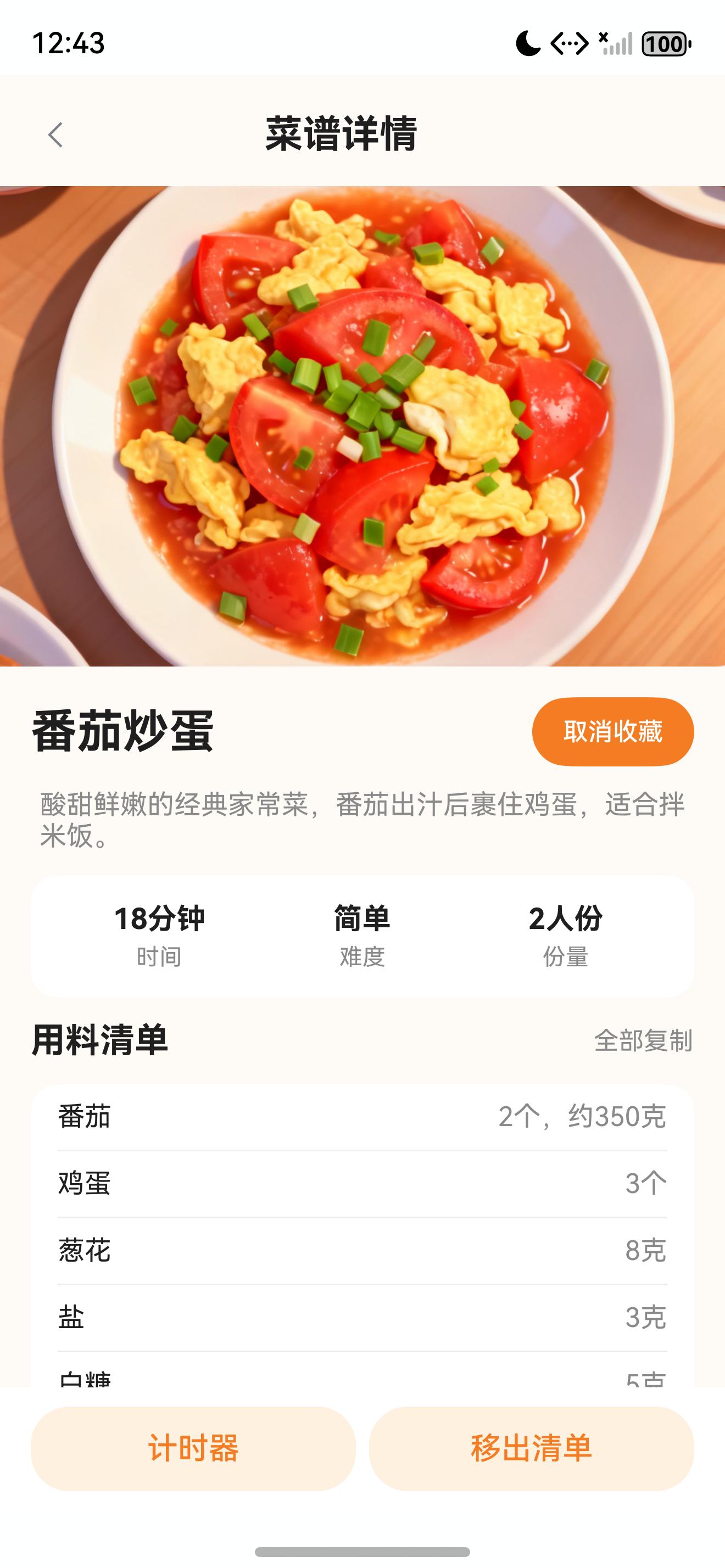
截图里能看到同一道“番茄炒蛋”已经处于两个状态:顶部按钮变成“取消收藏”,底部按钮显示“移出清单”。这不是两个互不相干的数据源,而是同一个 recipeId 下的同一份状态记录在两个 UI 入口上的表现。
二、源码对象总览
| 源码对象 | 作用 |
|---|---|
entry/src/main/ets/repositories/LocalStoreAdapter.ets | 封装 HarmonyOS Preferences 读写能力,统一保存字符串。 |
entry/src/main/ets/repositories/UserStateRepository.ets | 管理菜谱状态数组和用户偏好,负责 JSON 解析、默认值和写回。 |
entry/src/main/ets/models/UserStateModels.ets | 定义 UserRecipeState、UserPreference、ThemeMode 等状态模型。 |
entry/src/main/ets/services/RecipeService.ets | 在 recordView()、getRecipeDetail() 中接入状态仓。 |
entry/src/main/ets/services/NoteService.ets | 复用 UserRecipeState.note 保存单道菜笔记。 |
这条链路的边界很明确:Preferences 只保存字符串,Repository 负责结构化状态,Service 负责业务语义,Page 只负责触发动作和渲染结果。
三、LocalStoreAdapter:把 Preferences 收口成字符串读写
本地存储适配器的代码很短:
import common from '@ohos.app.ability.common';
import dataPreferences from '@ohos.data.preferences';

export class LocalStoreAdapter {
  private context?: common.UIAbilityContext;
  private readonly preferencesName: string = 'sfcj_local_store';

  init(context: common.UIAbilityContext): void {
    this.context = context;
  }

  loadString(key: string): string {
    if (!this.context) {
      return '';
    }
    const store = dataPreferences.getPreferencesSync(this.context, { name: this.preferencesName });
    return store.getSync(key, '') as string;
  }

  saveString(key: string, value: string): void {
    if (!this.context) {
      return;
    }
    const store = dataPreferences.getPreferencesSync(this.context, { name: this.preferencesName });
    store.putSync(key, value);
    store.flush();
  }
}

export const localStoreAdapter: LocalStoreAdapter = new LocalStoreAdapter();
这层不关心收藏、笔记和主题,也不解析 JSON。它只做三件事。
第一,保存 UIAbilityContext。Preferences 读写需要上下文,因此主服务初始化时必须先调用 localStoreAdapter.init(context)。
第二,固定 Preferences 名称为 sfcj_local_store。所有本地字符串都进入同一个命名空间,避免页面或服务各自创建不同名称的存储文件。
第三,对外只暴露 loadString() 和 saveString()。上层如果要保存对象数组,需要自己 JSON.stringify();如果要读取结构化数据,需要自己 JSON.parse()。这种边界让 Adapter 保持稳定,业务变化不会频繁影响底层读写封装。
四、初始化路径:状态仓必须先拿到上下文
应用首页进入时,Index.ets 会初始化服务:
async aboutToAppear() {
  recipeService.init(getContext(this) as common.UIAbilityContext);
  await this.refreshData();
}
RecipeService.init() 再把上下文传给本地存储和菜谱数据源:
init(context: common.UIAbilityContext): void {
  localStoreAdapter.init(context);
  recipeDataSource.init(context);
}
这一步看起来只是初始化,但它决定了后续所有用户状态是否能落盘。如果没有上下文,LocalStoreAdapter.loadString() 会返回空字符串,saveString() 会直接返回。这样做的好处是页面不会因为初始化时序直接崩溃,但功能验收时必须确认入口页面已经先初始化过服务。
五、UserRecipeState:一条记录承载一整组行为
用户状态模型定义在 UserStateModels.ets:
export interface UserRecipeState {
  recipeId: string;
  isFavorite: boolean;
  isInTodoList: boolean;
  todoOrder: number;
  lastViewedAt: number;
  note: string;
  updatedAt: number;
}
字段设计体现了一个关键选择:以 recipeId 为聚合根,而不是以页面为聚合根。
isFavorite:详情页收藏按钮和收藏中心列表都读它。isInTodoList:详情页底部“想做/移出清单”和想做清单都读它。todoOrder:想做清单排序使用。lastViewedAt:首页最近浏览排序使用。note:笔记页和详情数据使用。updatedAt:状态写入时间,用于后续同步、备份或冲突处理。
这让收藏、清单、最近浏览和笔记不再是四套数据,而是同一道菜的一条状态记录。
六、listStates:Preferences 里保存的是 JSON 数组
UserStateRepository 使用固定 key 保存菜谱状态数组:
const USER_STATE_KEY: string = 'user_recipe_states';
读取入口如下:
listStates(): UserRecipeState[] {
  const raw = localStoreAdapter.loadString(USER_STATE_KEY);
  if (!raw) {
    return [];
  }
  try {
    return JSON.parse(raw) as UserRecipeState[];
  } catch (_) {
    return [];
  }
}
这里有两个重要的兜底。
第一,没有内容时返回空数组。新用户第一次打开应用,还没有任何收藏、清单或浏览记录,页面应该展示空状态或默认推荐,而不是抛异常。
第二,JSON 解析失败时也返回空数组。Preferences 是本地持久化,后续如果版本升级、调试写入或异常数据导致 JSON 不合法,仓储层会把错误挡住,避免首页和收藏页被一条坏数据拖垮。
七、getState:默认状态让页面不需要判空
详情页打开一条菜谱时,不应该先判断这道菜有没有状态记录。仓储层提供了默认状态:
getState(recipeId: string): UserRecipeState {
  const now = Date.now();
  const current = this.listStates().find(item => item.recipeId === recipeId);
  return current ?? {
    recipeId,
    isFavorite: false,
    isInTodoList: false,
    todoOrder: 0,
    lastViewedAt: 0,
    note: '',
    updatedAt: now
  };
}
这个设计让页面代码更干净。详情页只要调用 recipeService.getRecipeDetail(recipeId),就能拿到 isFavorite、isInTodoList、note 和忌口数据。不存在状态记录时,默认就是未收藏、未加入清单、没有笔记、没有浏览时间。
默认状态没有立刻写入 Preferences。只有用户触发收藏、想做、浏览记录或笔记保存时,才会真正调用 saveState() 写回。这可以避免打开大量详情页时生成一堆没有实际行为的空状态记录。
八、saveState:按 recipeId 替换或追加
状态写入集中在 saveState():
saveState(state: UserRecipeState): UserRecipeState {
  const states = this.listStates();
  const index = states.findIndex(item => item.recipeId === state.recipeId);
  const next: UserRecipeState = {
    recipeId: state.recipeId,
    isFavorite: state.isFavorite,
    isInTodoList: state.isInTodoList,
    todoOrder: state.todoOrder,
    lastViewedAt: state.lastViewedAt,
    note: state.note,
    updatedAt: Date.now()
  };
  if (index >= 0) {
    states[index] = next;
  } else {
    states.push(next);
  }
  localStoreAdapter.saveString(USER_STATE_KEY, JSON.stringify(states));
  return next;
}
这段代码的关键点是“整体记录写回”。调用方不直接改数组,也不只保存某一个字段,而是把当前状态合并成一条完整记录。
例如收藏服务只反转 isFavorite,但它仍然把 isInTodoList、todoOrder、lastViewedAt、note 原样带回。这样收藏动作不会误清空想做清单,浏览记录也不会被覆盖。
九、recordView:最近浏览也是同一份状态
详情页在 aboutToAppear() 中记录浏览:
if (this.recipeId.length > 0) {
  await recipeService.recordView(this.recipeId);
  const detail = await recipeService.getRecipeDetail(this.recipeId);
  if (detail === null) {
    promptAction.showToast({ message: '菜谱不存在' });
    router.back();
    return;
  }
  this.data = detail;
}
真正写入在 RecipeService.recordView():
async recordView(recipeId: string): Promise<void> {
  const state = userStateRepository.getState(recipeId);
  userStateRepository.saveState({
    recipeId: state.recipeId,
    isFavorite: state.isFavorite,
    isInTodoList: state.isInTodoList,
    todoOrder: state.todoOrder,
    lastViewedAt: Date.now(),
    note: state.note,
    updatedAt: state.updatedAt
  });
}
这说明“最近浏览”不是单独的历史表,而是 UserRecipeState.lastViewedAt。进入详情页时只更新这个字段,其余字段全部保留。
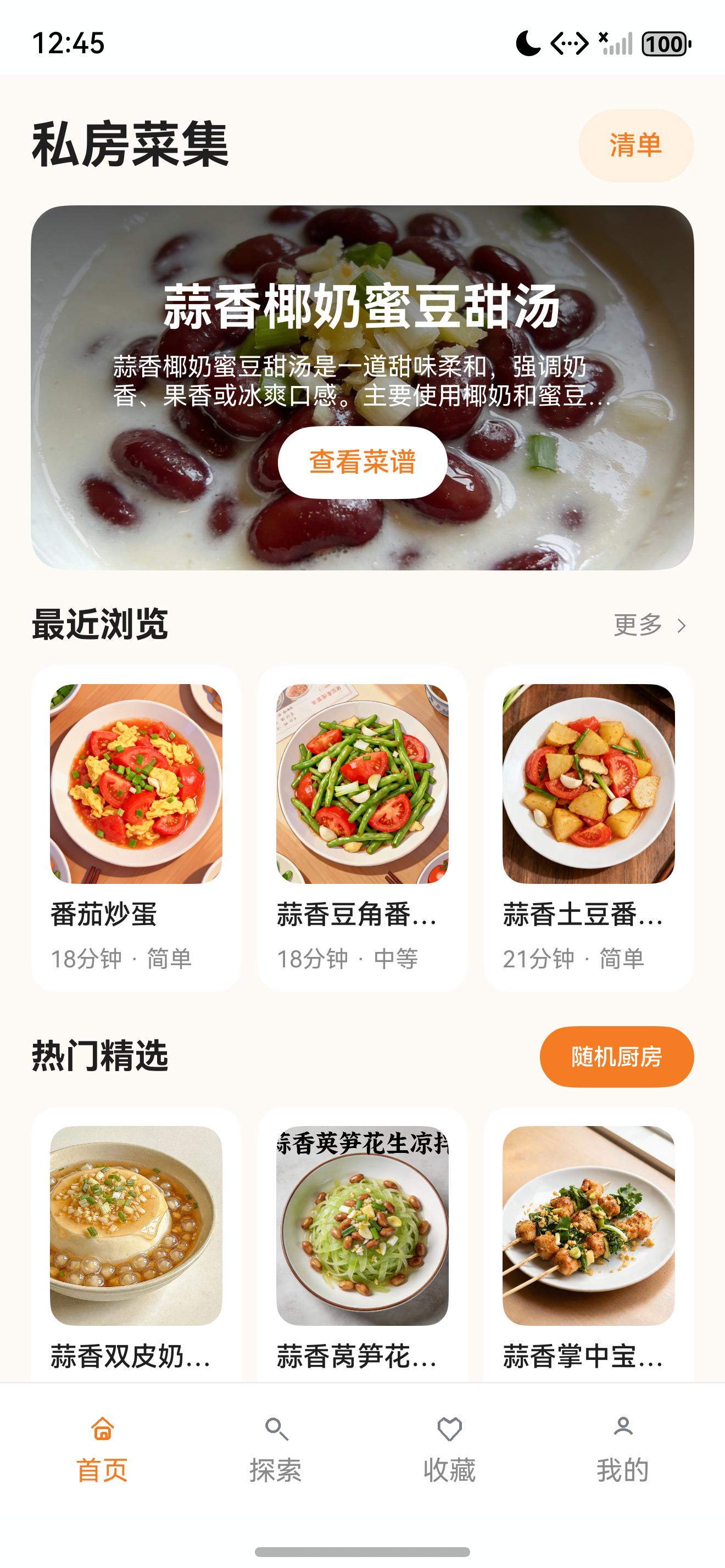
首页的最近浏览再从同一份状态数组中读取:
const states = userStateRepository.listStates().filter(item => item.lastViewedAt > 0)
  .sort((a, b) => b.lastViewedAt - a.lastViewedAt);
const recent: RecipeSummary[] = [];
states.forEach(item => {
  const recipe = this.getAllRecipes().find(candidate => candidate.id === item.recipeId);
  if (recipe && recent.length < 6) {
    recent.push(recipeDataSource.toSummary(recipe));
  }
});
截图里“番茄炒蛋”出现在最近浏览第一位,正是 recordView() 写入 lastViewedAt 后,首页重新读取状态仓的结果。
十、收藏和想做:写一个字段,保留其他字段
收藏服务的切换逻辑如下:
async toggleFavorite(recipeId: string): Promise<UserRecipeState> {
  const state = userStateRepository.getState(recipeId);
  return userStateRepository.saveState({
    recipeId: state.recipeId,
    isFavorite: !state.isFavorite,
    isInTodoList: state.isInTodoList,
    todoOrder: state.todoOrder,
    lastViewedAt: state.lastViewedAt,
    note: state.note,
    updatedAt: state.updatedAt
  });
}
想做服务的切换逻辑如下:
async toggleTodo(recipeId: string): Promise<void> {
  const state = userStateRepository.getState(recipeId);
  const nextOrder = userStateRepository.listStates().filter(item => item.isInTodoList).length + 1;
  userStateRepository.saveState({
    recipeId: state.recipeId,
    isFavorite: state.isFavorite,
    isInTodoList: !state.isInTodoList,
    todoOrder: state.isInTodoList ? 0 : nextOrder,
    lastViewedAt: state.lastViewedAt,
    note: state.note,
    updatedAt: state.updatedAt
  });
}
两段代码都遵循同一个原则:只改变当前行为对应字段,其他字段不丢。
这也是为什么截图中同一道菜可以同时显示“取消收藏”和“移出清单”。收藏按钮不会影响想做清单,移出清单也不会影响收藏状态。
十一、NoteService:笔记也复用状态仓
笔记服务没有新建独立存储,而是复用 UserRecipeState.note:
export class NoteService {
  async getNote(recipeId: string): Promise<string> {
    return userStateRepository.getState(recipeId).note;
  }

  async saveNote(recipeId: string, note: string): Promise<void> {
    const state = userStateRepository.getState(recipeId);
    userStateRepository.saveState({
      recipeId: state.recipeId,
      isFavorite: state.isFavorite,
      isInTodoList: state.isInTodoList,
      todoOrder: state.todoOrder,
      lastViewedAt: state.lastViewedAt,
      note: note.slice(0, 500).trim(),
      updatedAt: state.updatedAt
    });
  }
}
这里有一个细节:笔记保存时会 slice(0, 500).trim()。页面可以控制输入体验,服务层仍然保留长度边界,避免超长文本直接进入本地状态仓。
十二、用户偏好:同一个 Repository 管理另一个 key
UserStateRepository 还管理用户偏好:
const USER_PREFERENCE_KEY: string = 'user_preferences';
偏好默认值如下:
return {
  avoidedIngredients: ['胡椒', '花生', '海鲜'],
  avoidReminderEnabled: true,
  themeMode: 'system',
  unitPreference: 'metric',
  updatedAt: Date.now()
};
菜谱状态和用户偏好虽然都走 Preferences + JSON,但 key 分开:user_recipe_states 面向单道菜,user_preferences 面向全局设置。这样详情页可以根据 recipeId 读取菜谱状态,也可以根据全局偏好计算忌口提醒。
十三、运行与验收
本篇截图来自本机 HarmonyOS 模拟器真实运行页面,操作路径如下:
hdc shell aa start -a EntryAbility -b com.lesson.myapplicationsfcj
hdc shell uitest uiInput click 1162 1333
hdc shell snapshot_display -f /data/local/tmp/sfcj_07_detail_favorited.jpeg
hdc file recv /data/local/tmp/sfcj_07_detail_favorited.jpeg .\SFCJ\screenshots\07_detail_favorited_raw.jpeg
hdc shell uitest uiInput click 180 2665
hdc shell snapshot_display -f /data/local/tmp/sfcj_07_home_recent.jpeg
hdc file recv /data/local/tmp/sfcj_07_home_recent.jpeg .\SFCJ\screenshots\07_home_recent_raw.jpeg
验收重点可以按下面清单检查:
- 进入详情页后会调用
recordView()。 - 收藏按钮点击后从“收藏”变成“取消收藏”。
- 想做按钮点击后从“想做”变成“移出清单”。
- 返回首页后,最近浏览能显示刚访问过的菜谱。
- 重启应用后,收藏和想做状态仍然能从 Preferences 回显。
user_recipe_states解析失败时,listStates()安全返回空数组。- 保存笔记时不会丢掉收藏、想做和最近浏览字段。
十四、问题复盘:状态仓不要替页面做太多事
当前状态仓的设计偏保守:Preferences 里保存 JSON 数组,仓储层按 recipeId 查找和替换,服务层负责具体业务动作。它没有引入复杂数据库,也没有提前设计同步协议。
这种取舍适合当前项目规模。514 道内置菜谱加少量用户自建菜谱,用 JSON 数组保存用户状态足够直接;页面刷新时按状态 ID 回查菜谱,也能保持实现简单。
边界也要看清楚。UserStateRepository 只负责状态读写,不负责决定收藏页如何布局,也不负责决定首页展示几条最近浏览。页面和服务层仍然各自保留自己的职责。后续如果状态量增加,可以把 listStates().find() 优化成 Map 缓存,或者把不同类型状态拆到多个 key,但当前阶段先保持一个清晰、可复核的状态闭环更重要。
十五、下一篇衔接
有了统一状态仓之后,收藏中心和想做清单就不需要各自维护独立数据源。下一篇继续拆收藏 Tab:FavoriteService、TodoService 和 Index.ets 如何基于同一份 UserRecipeState 组合出“我的收藏”和“想做清单”两个页面。

讨论HarmonyOS开发技术,专注于API与组件、DevEco Studio、测试、元服务和应用上架分发等。
更多推荐

 5
5 0
0- 0


 已为社区贡献28条内容

所有评论(0)