【鸿蒙 ArkTS 实战:HAR vs HSP 多模块架构决策
文章目录
前言
在鸿蒙应用开发中,随着业务模块的增多,如何高效地组织代码、复用能力并控制包体积,是每个开发者都会面临的架构问题。鸿蒙提供了两种核心的模块化方案:HAR (Harmony Archive) 和 HSP (Harmony Shared Package)。
本案例通过一个可视化的决策工具,带你深入理解 HAR 与 HSP 的核心区别、适用场景以及工程集成要点,助你做出正确的架构决策。
本案例涵盖以下核心知识点:
- HAR 与 HSP 核心区别:从打包方式、共享机制、路由能力等维度,直观对比两种模块的本质差异。
- 架构决策矩阵:通过具体业务场景(如工具类、大型业务模块),提供清晰的选型指南。
- 工程集成与调用:演示如何在
entry模块中集成 HAR 和 HSP,并进行方法调用和组件引用。 - 常见错误规避:针对 HSP 集成中常见的
9568305报错,提供明确的解决方案。
下面,我们就对这段演示多模块架构的代码进行一次深度解析。
完整代码结构预览
首先,让我们从整体上把握代码结构。它定义了一个 MultiModuleDemo 入口组件,核心在于展示 HAR 和 HSP 的调用结果和架构对比。
// 1. 模块导入
import { formatHarLabel, getHarModuleInfo } from 'common_har' // 导入 HAR 模块
import { FeaturePreview, HspFeatureService } from 'feature_hsp' // 导入 HSP 模块

interface DecisionItem { /* ... */ }

@Entry
@Component
struct MultiModuleDemo {
  // 2. 状态定义
  @State harResult: string = getHarModuleInfo() // 调用 HAR 方法初始化状态
  @State hspResult: string = HspFeatureService.getModuleInfo() // 调用 HSP 方法初始化状态
  @State selectedChoice: string = '待选择场景'
  @State showFeaturePreview: boolean = false
  @State routeMessage: string = '本 Demo 以 HAR 集成特性模块,避免 HSP 单独安装失败 (9568305)'

  // 3. 决策矩阵数据
  private decisions: DecisionItem[] = [ /* ... */ ]

  build() {
    Scroll() {
      Column({ space: 16 }) {
        this.HeaderSection()
        this.ArchitectureSection() // 可视化工程结构
        this.LiveDemoSection()     // 核心:模块调用与组件展示
        this.DecisionMatrixSection() // 架构决策矩阵
        this.CompareSection()      // HAR vs HSP 对比
        this.GuideSection()        // 集成要点
      }
    }
  }
}
第一部分:工程结构可视化
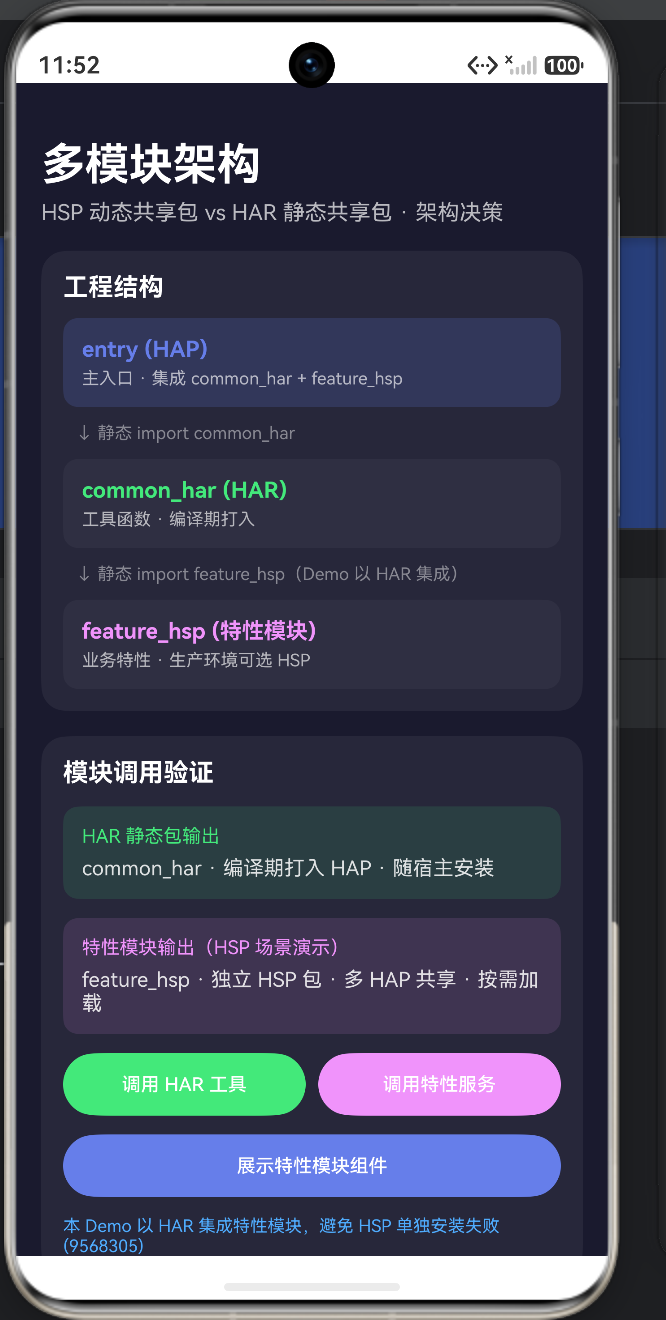
代码中的 ArchitectureSection 清晰地展示了本 Demo 的模块依赖关系。
@Builder ArchitectureSection() {
  Column({ space: 10 }) {
    this.ModuleNode('entry (HAP)', '主入口 · 集成 common_har + feature_hsp', '#667EEA', true)
    this.ModuleArrow('静态 import common_har')
    this.ModuleNode('common_har (HAR)', '工具函数 · 编译期打入', '#43E97B', false)
    this.ModuleArrow('静态 import feature_hsp(Demo 以 HAR 集成)')
    this.ModuleNode('feature_hsp (特性模块)', '业务特性 · 生产环境可选 HSP', '#F093FB', false)
  }
}
- entry (HAP):应用的主模块,是用户安装的入口。
- common_har (HAR):一个静态共享包,通常用于存放工具类、常量、通用 UI 组件等。它在编译期被静态链接到引用它的 HAP 中。
- feature_hsp (特性模块):一个动态共享包,用于封装独立的业务特性。它在运行时被动态加载,可以被多个 HAP 共享。
- 关键注释:代码中特别注明“Demo 以 HAR 集成”,这是为了避免在开发调试时遇到 HSP 的安装问题,我们稍后会详细解释。
第二部分:模块调用与组件引用(核心实战)
LiveDemoSection 是本案例的核心,它演示了如何实际使用 HAR 和 HSP 中的能力。
1. 调用 HAR 中的方法
// 状态初始化时调用
@State harResult: string = getHarModuleInfo()

// 按钮点击时调用
Button('调用 HAR 工具')
  .onClick(() => {
    this.harResult = formatHarLabel('StringUtil.format')
  })
- 方式:HAR 的导出内容就像本地代码一样,可以直接
import并调用。因为它在编译时已经被打包进了当前的 HAP。
2. 调用 HSP 中的服务与组件
// 状态初始化时调用
@State hspResult: string = HspFeatureService.getModuleInfo()

// 按钮点击时调用
Button('调用特性服务')
  .onClick(() => {
    this.hspResult = HspFeatureService.loadFeatureLabel('FeatureService.load')
  })

// 引用 HSP 导出的 UI 组件
Button('展示特性模块组件')
  .onClick(() => {
    this.showFeaturePreview = !this.showFeaturePreview
  })

if (this.showFeaturePreview) {
  FeaturePreview() // 直接使用 HSP 中的组件
}
- 方式:HSP 的调用方式与 HAR 类似,同样是通过
import引入。区别在于,HSP 的代码在运行时才会被加载。 - 组件引用:HSP 可以导出 UI 组件(如
FeaturePreview),并在 HAP 中像使用本地组件一样使用它。这使得业务模块的复用变得非常灵活。
第三部分:HAR vs HSP 架构决策
这是本案例的精华部分,通过 CompareSection 和 DecisionMatrixSection,清晰地阐述了二者的区别和选型原则。
HAR 与 HSP 核心对比
| 特性 | HAR (静态共享包) | HSP (动态共享包) |
|---|---|---|
| 打包方式 | 编译期打包进 HAP | 独立 .hsp 包,运行时动态加载 |
| 共享机制 | 每个依赖方独立编译一份 | 多 HAP 运行时共享一份 |
| 路由能力 | 无独立路由页面 | 可声明 pages 路由 |
| 适用场景 | 工具库、基础组件 | 大型业务模块、跨应用共享 |
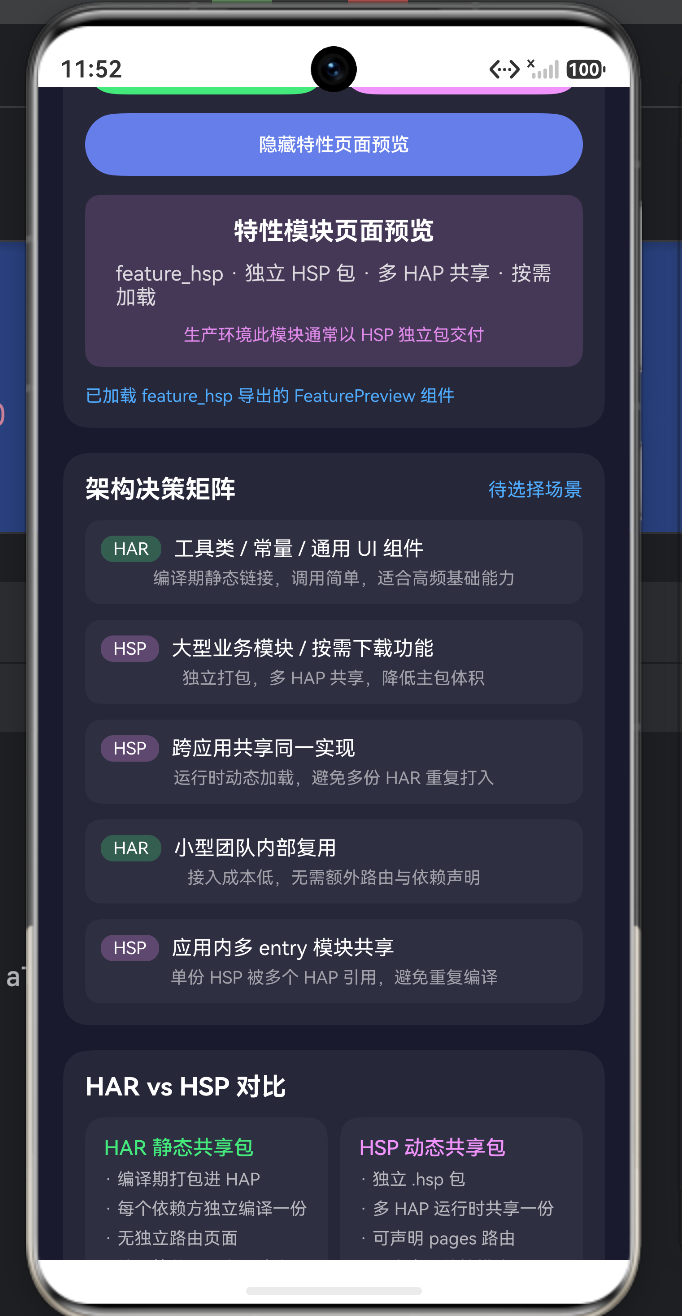
架构决策矩阵
代码中的 decisions 数组提供了具体的选型建议:
- 工具类 / 常量 / 通用 UI 组件 → 选 HAR
- 理由:编译期静态链接,调用简单,适合高频使用的基础能力。
- 大型业务模块 / 按需下载功能 → 选 HSP
- 理由:独立打包,可以被多个 HAP 共享,有效降低主包体积。
- 跨应用共享同一实现 → 选 HSP
- 理由:运行时动态加载,避免在多个应用中重复打入相同的 HAR 代码。
- 应用内多 entry 模块共享 → 选 HSP
- 理由:单份 HSP 可被多个 HAP(如 phone、tablet 等不同入口)引用,避免重复编译,减小总包体积。
第四部分:集成要点与常见错误规避
GuideSection 总结了集成 HAR 和 HSP 的关键步骤,并指出了一个常见的“坑”。
-
9568305 报错:这是开发 HSP 时最常遇到的问题。
- 原因:当
entry模块依赖了 HSP 时,如果直接点击运行,IDE 可能只会安装entry对应的 HAP,而忘记安装它所依赖的 HSP,导致运行时找不到模块而报错。 - 解决方案:
- 正确安装:在 DevEco Studio 中,选择
Run > Deploy Multi Hap,确保 HAP 和其依赖的 HSP 被一同安装到设备上。 - Demo 技巧:正如本案例所示,在开发调试阶段,可以暂时将特性模块以 HAR 的形式集成,绕过安装问题,待功能开发完成后再改回 HSP 进行最终测试。
- 正确安装:在 DevEco Studio 中,选择
- 原因:当
-
工程配置:
- HAR:
module.json5中module.type设置为har,通过hvigor的harTasks构建。 - HSP:
module.json5中module.type设置为shared,通过hvigor的hspTasks构建,并且需要在引用方的module.json5中声明dependencies。
- HAR:
完整代码
import { formatHarLabel, getHarModuleInfo } from 'common_har'
import { FeaturePreview, HspFeatureService } from 'feature_hsp'
interface DecisionItem {
scenario: string
choice: string
reason: string
}
struct MultiModuleDemo {
harResult: string = getHarModuleInfo()
hspResult: string = HspFeatureService.getModuleInfo()
selectedChoice: string = '待选择场景'
showFeaturePreview: boolean = false
routeMessage: string = '本 Demo 以 HAR 集成特性模块,避免 HSP 单独安装失败 (9568305)'
private decisions: DecisionItem[] = [
{ scenario: '工具类 / 常量 / 通用 UI 组件', choice: 'HAR', reason: '编译期静态链接,调用简单,适合高频基础能力' },
{ scenario: '大型业务模块 / 按需下载功能', choice: 'HSP', reason: '独立打包,多 HAP 共享,降低主包体积' },
{ scenario: '跨应用共享同一实现', choice: 'HSP', reason: '运行时动态加载,避免多份 HAR 重复打入' },
{ scenario: '小型团队内部复用', choice: 'HAR', reason: '接入成本低,无需额外路由与依赖声明' },
{ scenario: '应用内多 entry 模块共享', choice: 'HSP', reason: '单份 HSP 被多个 HAP 引用,避免重复编译' }
]
build() {
Scroll() {
Column({ space: 16 }) {
this.HeaderSection()
this.ArchitectureSection()
this.LiveDemoSection()
this.DecisionMatrixSection()
this.CompareSection()
this.GuideSection()
}
.width('100%')
.padding({ top: 36, left: 16, right: 16, bottom: 24 })
}
.width('100%')
.height('100%')
.backgroundColor('#1A1A2E')
.scrollBar(BarState.Off)
}
HeaderSection() {
Column({ space: 6 }) {
Text('多模块架构')
.fontSize(28)
.fontWeight(FontWeight.Bold)
.fontColor('#FFFFFF')
Text('HSP 动态共享包 vs HAR 静态共享包 · 架构决策')
.fontSize(14)
.fontColor('#FFFFFF')
.opacity(0.7)
}
.width('100%')
.alignItems(HorizontalAlign.Start)
}
ArchitectureSection() {
Column({ space: 10 }) {
Text('工程结构')
.fontSize(16)
.fontWeight(FontWeight.Bold)
.fontColor('#FFFFFF')
.width('100%')
this.ModuleNode('entry (HAP)', '主入口 · 集成 common_har + feature_hsp', '#667EEA', true)
this.ModuleArrow('静态 import common_har')
this.ModuleNode('common_har (HAR)', '工具函数 · 编译期打入', '#43E97B', false)
this.ModuleArrow('静态 import feature_hsp(Demo 以 HAR 集成)')
this.ModuleNode('feature_hsp (特性模块)', '业务特性 · 生产环境可选 HSP', '#F093FB', false)
}
.width('100%')
.padding(14)
.backgroundColor('rgba(255,255,255,0.06)')
.borderRadius(16)
.alignItems(HorizontalAlign.Start)
}
ModuleNode(name: string, desc: string, color: string, highlight: boolean) {
Column({ space: 4 }) {
Text(name)
.fontSize(14)
.fontWeight(FontWeight.Bold)
.fontColor(color)
Text(desc)
.fontSize(11)
.fontColor('#FFFFFF')
.opacity(0.65)
}
.width('100%')
.padding(12)
.backgroundColor(highlight ? 'rgba(102,126,234,0.18)' : 'rgba(255,255,255,0.04)')
.borderRadius(10)
.alignItems(HorizontalAlign.Start)
}
ModuleArrow(label: string) {
Text(`↓ ${label}`)
.fontSize(11)
.fontColor('#FFFFFF')
.opacity(0.45)
.margin({ left: 8 })
}
LiveDemoSection() {
Column({ space: 12 }) {
Text('模块调用验证')
.fontSize(16)
.fontWeight(FontWeight.Bold)
.fontColor('#FFFFFF')
.width('100%')
Column({ space: 6 }) {
Text('HAR 静态包输出')
.fontSize(12)
.fontColor('#43E97B')
Text(this.harResult)
.fontSize(13)
.fontColor('#FFFFFF')
.opacity(0.85)
}
.width('100%')
.padding(12)
.backgroundColor('rgba(67,233,123,0.12)')
.borderRadius(10)
.alignItems(HorizontalAlign.Start)
Column({ space: 6 }) {
Text('特性模块输出(HSP 场景演示)')
.fontSize(12)
.fontColor('#F093FB')
Text(this.hspResult)
.fontSize(13)
.fontColor('#FFFFFF')
.opacity(0.85)
}
.width('100%')
.padding(12)
.backgroundColor('rgba(240,147,251,0.12)')
.borderRadius(10)
.alignItems(HorizontalAlign.Start)
Row({ space: 8 }) {
Button('调用 HAR 工具')
.layoutWeight(1)
.height(40)
.fontSize(12)
.backgroundColor('#43E97B')
.onClick(() => {
this.harResult = formatHarLabel('StringUtil.format')
})
Button('调用特性服务')
.layoutWeight(1)
.height(40)
.fontSize(12)
.backgroundColor('#F093FB')
.onClick(() => {
this.hspResult = HspFeatureService.loadFeatureLabel('FeatureService.load')
})
}
.width('100%')
Button(this.showFeaturePreview ? '隐藏特性页面预览' : '展示特性模块组件')
.width('100%')
.height(40)
.fontSize(12)
.backgroundColor('#667EEA')
.onClick(() => {
this.showFeaturePreview = !this.showFeaturePreview
this.routeMessage = this.showFeaturePreview ?
'已加载 feature_hsp 导出的 FeaturePreview 组件' :
'特性模块组件已隐藏'
})
if (this.showFeaturePreview) {
FeaturePreview()
}
Text(this.routeMessage)
.fontSize(11)
.fontColor('#4FACFE')
.width('100%')
}
.width('100%')
.padding(14)
.backgroundColor('rgba(255,255,255,0.06)')
.borderRadius(16)
.alignItems(HorizontalAlign.Start)
}
DecisionMatrixSection() {
Column({ space: 10 }) {
Row() {
Text('架构决策矩阵')
.fontSize(16)
.fontWeight(FontWeight.Bold)
.fontColor('#FFFFFF')
Blank()
Text(this.selectedChoice)
.fontSize(12)
.fontColor('#4FACFE')
}
.width('100%')
ForEach(this.decisions, (item: DecisionItem) => {
Column({ space: 4 }) {
Row({ space: 8 }) {
Text(item.choice)
.fontSize(11)
.fontColor('#FFFFFF')
.padding({ left: 8, right: 8, top: 2, bottom: 2 })
.backgroundColor(item.choice === 'HAR' ? 'rgba(67,233,123,0.25)' : 'rgba(240,147,251,0.25)')
.borderRadius(8)
Text(item.scenario)
.fontSize(13)
.fontColor('#FFFFFF')
.layoutWeight(1)
}
.width('100%')
Text(item.reason)
.fontSize(11)
.fontColor('#FFFFFF')
.opacity(0.55)
}
.width('100%')
.padding(10)
.backgroundColor('rgba(255,255,255,0.04)')
.borderRadius(10)
.onClick(() => {
this.selectedChoice = `${item.scenario} → 选 ${item.choice}`
})
}, (item: DecisionItem) => item.scenario)
}
.width('100%')
.padding(14)
.backgroundColor('rgba(255,255,255,0.06)')
.borderRadius(16)
.alignItems(HorizontalAlign.Start)
}
CompareSection() {
Column({ space: 10 }) {
Text('HAR vs HSP 对比')
.fontSize(16)
.fontWeight(FontWeight.Bold)
.fontColor('#FFFFFF')
.width('100%')
Row({ space: 8 }) {
this.CompareCard('HAR 静态共享包', [
'编译期打包进 HAP',
'每个依赖方独立编译一份',
'无独立路由页面',
'接入简单、适合基础库'
], '#43E97B')
this.CompareCard('HSP 动态共享包', [
'独立 .hsp 包',
'多 HAP 运行时共享一份',
'可声明 pages 路由',
'适合大型特性模块'
], '#F093FB')
}
.width('100%')
}
.width('100%')
.padding(14)
.backgroundColor('rgba(255,255,255,0.06)')
.borderRadius(16)
}
CompareCard(title: string, points: string[], color: string) {
Column({ space: 6 }) {
Text(title)
.fontSize(13)
.fontWeight(FontWeight.Medium)
.fontColor(color)
ForEach(points, (point: string) => {
Text(`· ${point}`)
.fontSize(11)
.fontColor('#FFFFFF')
.opacity(0.65)
}, (point: string) => `${title}-${point}`)
}
.layoutWeight(1)
.padding(12)
.backgroundColor('rgba(255,255,255,0.04)')
.borderRadius(12)
.alignItems(HorizontalAlign.Start)
}
GuideSection() {
Column({ space: 8 }) {
Text('集成要点')
.fontSize(16)
.fontWeight(FontWeight.Bold)
.fontColor('#FFFFFF')
.width('100%')
this.GuideItem('9568305 报错', 'entry 依赖 HSP 时,Run 需 Deploy Multi Hap 同时安装 HSP;或改用 HAR 集成')
this.GuideItem('HAR', 'module.type = har · hvigor harTasks · oh-package file 依赖')
this.GuideItem('HSP', 'module.type = shared · hvigor hspTasks · module.json5 声明 dependencies · 需随 HSP 一起安装')
this.GuideItem('选型原则', '小而稳 → HAR;大而共享 → HSP;避免 HAR 被多模块重复打入导致包体积膨胀')
}
.width('100%')
.padding(14)
.backgroundColor('rgba(255,255,255,0.06)')
.borderRadius(16)
.alignItems(HorizontalAlign.Start)
}
GuideItem(title: string, detail: string) {
Column({ space: 2 }) {
Text(title)
.fontSize(13)
.fontColor('#667EEA')
Text(detail)
.fontSize(11)
.fontColor('#FFFFFF')
.opacity(0.6)
}
.alignItems(HorizontalAlign.Start)
.width('100%')
}
}
总结与选型口诀
通过这个实战案例,你应该掌握了鸿蒙多模块架构的核心决策逻辑:
| 场景 | 解决方案 | 关键点 |
|---|---|---|
| 基础能力复用 | 使用 HAR | 编译期静态链接,接入简单,适合工具类、通用组件 |
| 大型业务解耦 | 使用 HSP | 运行时动态加载,多包共享,有效减小主包体积 |
| 按需加载 | 使用 HSP | 可将非核心功能拆分为 HSP,实现按需下载和加载 |
| 跨应用共享 | 使用 HSP | 避免代码冗余,实现真正的二进制共享 |
一句话口诀:小而稳,用 HAR;大而享,用 HSP。
希望这篇解析能帮你彻底搞懂鸿蒙的 HAR 与 HSP 架构,在项目中做出最合适的选择!如果觉得有用,欢迎点赞收藏。

讨论HarmonyOS开发技术,专注于API与组件、DevEco Studio、测试、元服务和应用上架分发等。
更多推荐


 0
0 0
0- 0


 已为社区贡献95条内容

所有评论(0)