鸿蒙Flutter 状态更新策略
·
概述
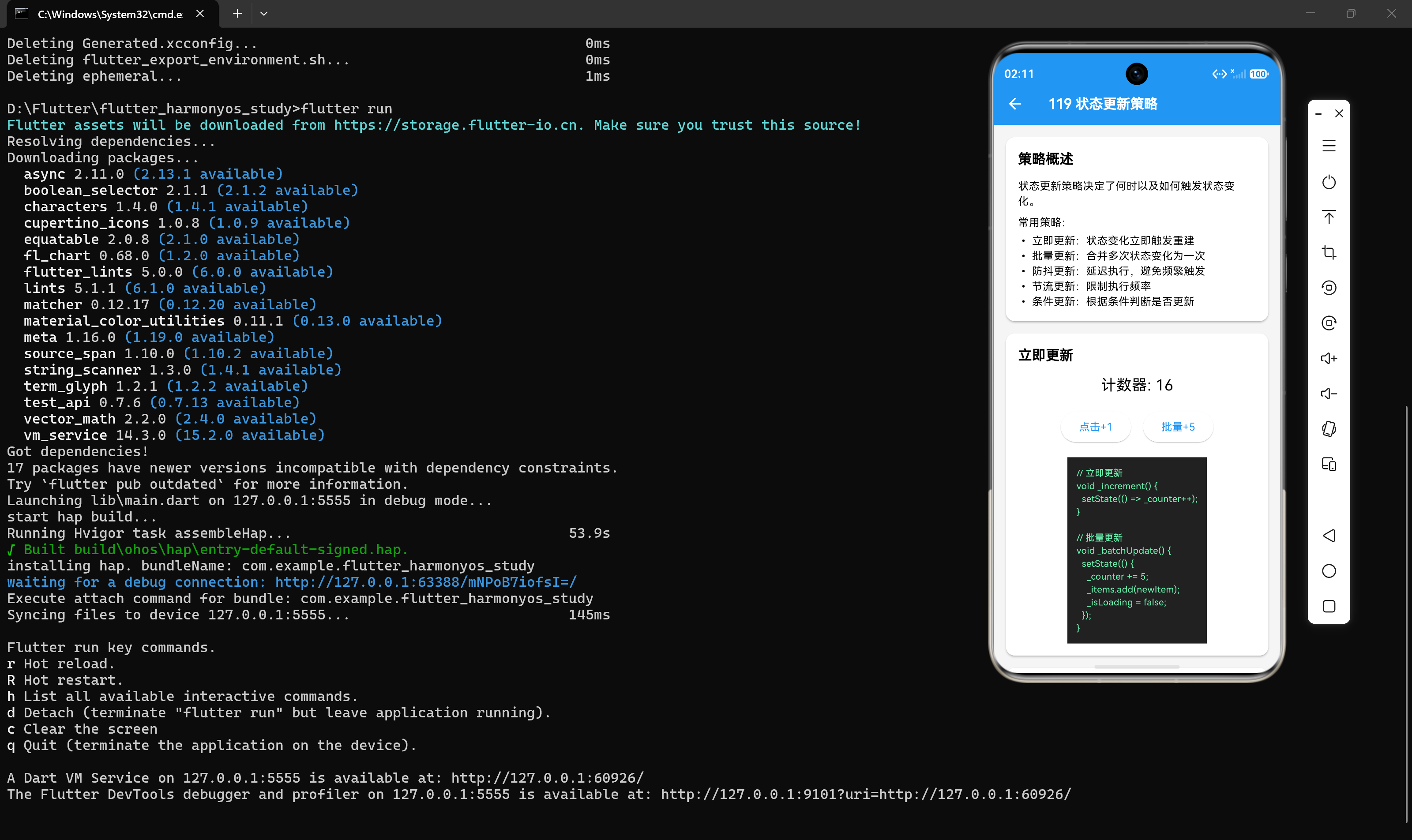
状态更新策略决定了何时以及如何触发状态变化。选择合适的更新策略对于构建高性能、响应迅速的应用至关重要。
常见的状态更新策略
策略 1:立即更新
立即更新是最基本的状态更新策略,状态变化后立即触发重建。
基本用法
void _increment() {
  setState(() => _count++);
}
适用场景
- 状态变化需要实时反映到 UI
- 状态变化不频繁
- 简单的交互操作
示例:计数器
class CounterWidget extends StatefulWidget {
const CounterWidget({super.key});
State<CounterWidget> createState() => _CounterWidgetState();
}
class _CounterWidgetState extends State<CounterWidget> {
int _count = 0;
void _increment() {
setState(() => _count++);
}
void _decrement() {
setState(() => _count--);
}
Widget build(BuildContext context) {
return Column(
children: [
Text('Count: $_count', style: const TextStyle(fontSize: 24)),
Row(
mainAxisAlignment: MainAxisAlignment.center,
children: [
ElevatedButton(onPressed: _decrement, child: const Text('-')),
const SizedBox(width: 16),
ElevatedButton(onPressed: _increment, child: const Text('+')),
],
),
],
);
}
}
策略 2:批量更新
批量更新是将多个状态变化合并为一次更新,减少重建次数。
基本用法
void _batchUpdate() {
  setState(() {
    _count += 5;
    _items.add(newItem);
    _isLoading = false;
  });
}
适用场景
- 多个状态需要同时更新
- 状态变化频繁但可以合并
- 需要减少重建次数
示例:表单提交
class FormWidget extends StatefulWidget {
const FormWidget({super.key});
State<FormWidget> createState() => _FormWidgetState();
}
class _FormWidgetState extends State<FormWidget> {
String _name = '';
String _email = '';
bool _isSubmitting = false;
String? _error;
Future<void> _submit() async {
setState(() {
_isSubmitting = true;
_error = null;
});
try {
// 模拟 API 调用
await Future.delayed(const Duration(seconds: 1));
setState(() {
_isSubmitting = false;
_name = '';
_email = '';
});
ScaffoldMessenger.of(context).showSnackBar(
const SnackBar(content: Text('提交成功')),
);
} catch (e) {
setState(() {
_isSubmitting = false;
_error = e.toString();
});
}
}
Widget build(BuildContext context) {
return Column(
children: [
TextField(
decoration: const InputDecoration(labelText: '姓名'),
onChanged: (value) => setState(() => _name = value),
),
TextField(
decoration: const InputDecoration(labelText: '邮箱'),
onChanged: (value) => setState(() => _email = value),
),
if (_error != null) Text('Error: $_error'),
ElevatedButton(
onPressed: _isSubmitting ? null : _submit,
child: _isSubmitting ? const CircularProgressIndicator() : const Text('提交'),
),
],
);
}
}
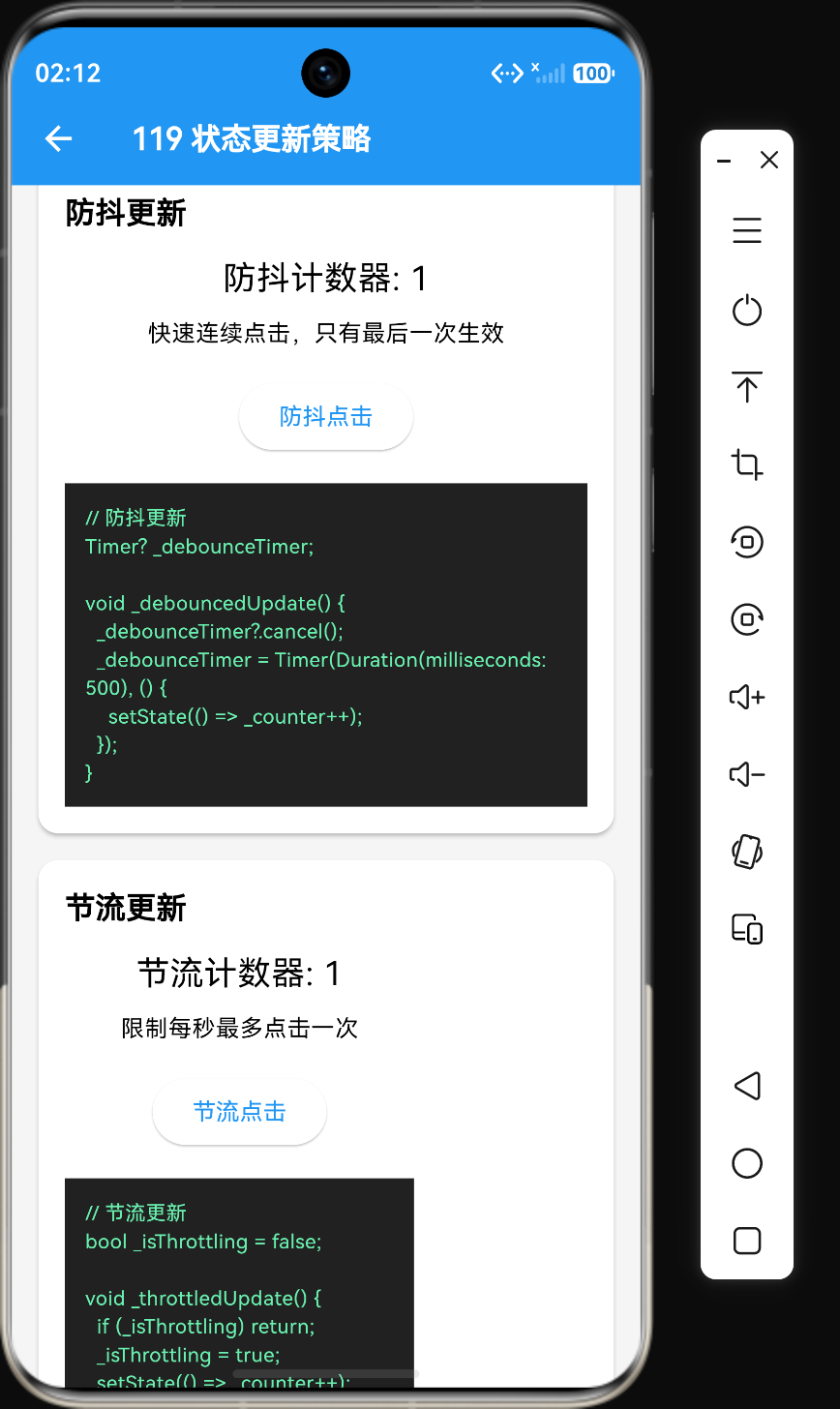
策略 3:防抖更新
防抖更新(Debounce)是延迟执行状态更新,避免频繁触发。
基本用法
Timer? _debounceTimer;

void _debouncedUpdate(String value) {
  _debounceTimer?.cancel();
  _debounceTimer = Timer(const Duration(milliseconds: 500), () {
    setState(() => _searchQuery = value);
  });
}
适用场景
- 搜索输入
- 实时过滤
- 频繁触发的事件
示例:搜索输入
class SearchWidget extends StatefulWidget {
const SearchWidget({super.key});
State<SearchWidget> createState() => _SearchWidgetState();
}
class _SearchWidgetState extends State<SearchWidget> {
String _searchQuery = '';
List<String> _results = [];
Timer? _debounceTimer;
void _handleSearch(String query) {
_debounceTimer?.cancel();
_debounceTimer = Timer(const Duration(milliseconds: 500), () {
setState(() {
_searchQuery = query;
// 模拟搜索
_results = ['结果1', '结果2', '结果3'].where((r) => r.contains(query)).toList();
});
});
}
void dispose() {
_debounceTimer?.cancel();
super.dispose();
}
Widget build(BuildContext context) {
return Column(
children: [
TextField(
decoration: const InputDecoration(labelText: '搜索'),
onChanged: _handleSearch,
),
const SizedBox(height: 16),
if (_searchQuery.isNotEmpty)
Column(children: _results.map((r) => Text(r)).toList())
else
const Text('请输入搜索关键词'),
],
);
}
}
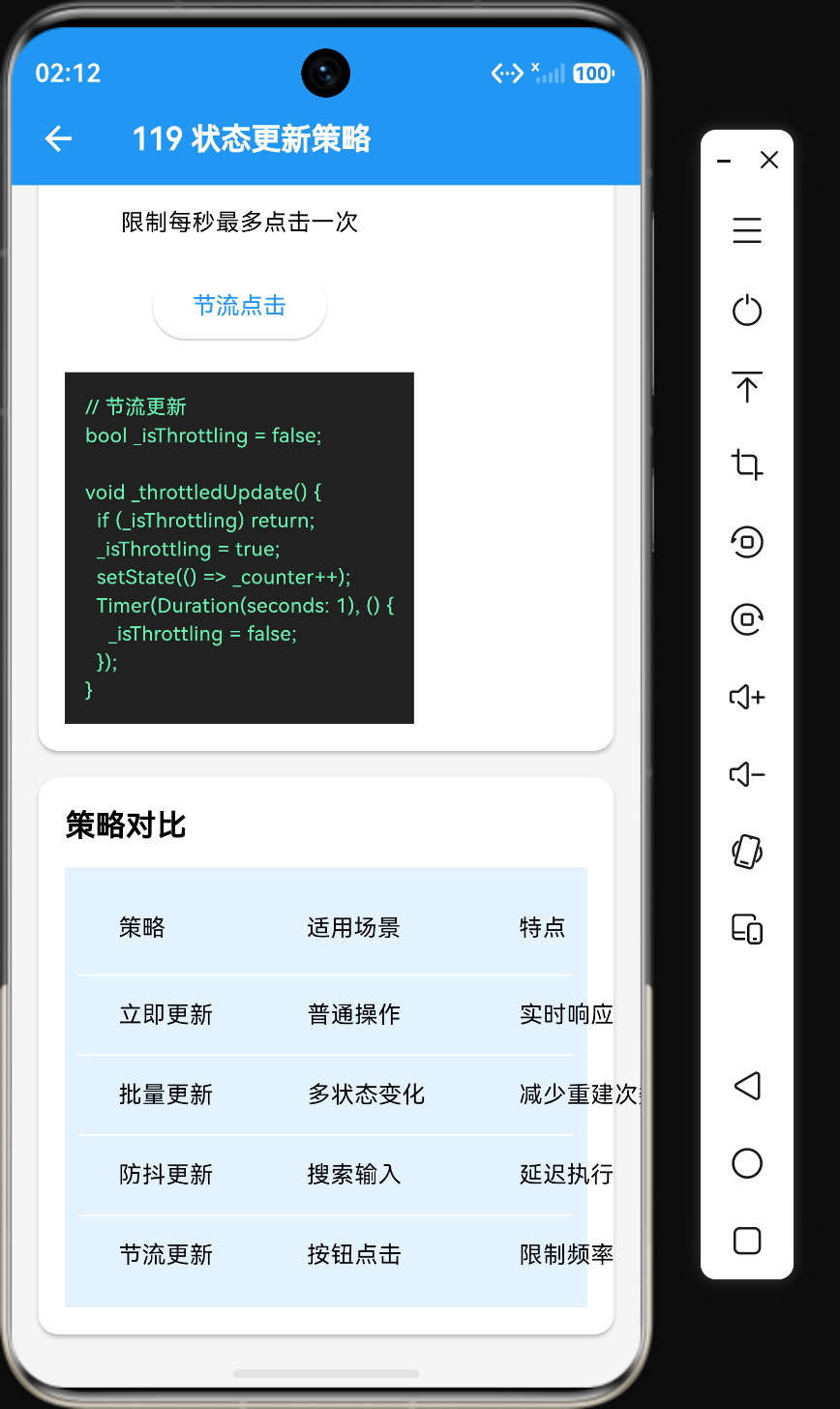
策略 4:节流更新
节流更新(Throttle)是限制状态更新的频率。
基本用法
bool _isThrottling = false;

void _throttledUpdate() {
  if (_isThrottling) return;
  _isThrottling = true;
  setState(() => _count++);
  Timer(const Duration(seconds: 1), () {
    _isThrottling = false;
  });
}
适用场景
- 按钮点击防止重复提交
- 滚动事件处理
- 频繁触发的操作
示例:按钮点击节流
class ThrottledButton extends StatefulWidget {
const ThrottledButton({super.key});
State<ThrottledButton> createState() => _ThrottledButtonState();
}
class _ThrottledButtonState extends State<ThrottledButton> {
int _clickCount = 0;
bool _isThrottling = false;
void _handleClick() {
if (_isThrottling) return;
_isThrottling = true;
setState(() => _clickCount++);
Timer(const Duration(seconds: 1), () {
_isThrottling = false;
});
}
Widget build(BuildContext context) {
return Column(
children: [
Text('点击次数: $_clickCount'),
ElevatedButton(
onPressed: _handleClick,
child: const Text('点击(每秒最多一次)'),
),
],
);
}
}
策略 5:条件更新
条件更新是根据条件判断是否需要更新状态。
基本用法
void _updateIfNeeded(int newValue) {
  if (newValue != _currentValue) {
    setState(() => _currentValue = newValue);
  }
}
适用场景
- 状态可能重复更新
- 需要避免不必要的重建
- 外部数据源可能发送重复数据
示例:条件更新
class ConditionalUpdateWidget extends StatefulWidget {
const ConditionalUpdateWidget({super.key});
State<ConditionalUpdateWidget> createState() => _ConditionalUpdateWidgetState();
}
class _ConditionalUpdateWidgetState extends State<ConditionalUpdateWidget> {
int _value = 0;
void _updateValue(int newValue) {
// 只有当值真正变化时才更新
if (newValue != _value) {
setState(() => _value = newValue);
}
}
Widget build(BuildContext context) {
return Column(
children: [
Text('当前值: $_value'),
Row(
mainAxisAlignment: MainAxisAlignment.center,
children: [
ElevatedButton(
onPressed: () => _updateValue(5),
child: const Text('设置为5'),
),
const SizedBox(width: 16),
ElevatedButton(
onPressed: () => _updateValue(10),
child: const Text('设置为10'),
),
],
),
],
);
}
}
更新策略对比
综合对比表格
| 策略 | 适用场景 | 延迟时间 | 特点 |
|---|---|---|---|
| 立即更新 | 普通操作 | 无延迟 | 实时响应 |
| 批量更新 | 多状态变化 | 无延迟 | 减少重建次数 |
| 防抖更新 | 搜索输入 | 500ms-1s | 延迟执行 |
| 节流更新 | 按钮点击 | 固定间隔 | 限制频率 |
| 条件更新 | 重复数据 | 无延迟 | 避免重复更新 |
选择决策树
┌─────────────────────────────────────────────────────────────────┐
│                     状态更新策略选择决策树                         │
└─────────────────────────────────────────────────────────────────┘
                              │
                              ▼
                    状态变化频率如何?
                              │
              ┌───────────────┴───────────────┐
              ▼                               ▼
           低频变化                          高频变化
              │                               │
              ▼                               ▼
        立即更新                    是否需要实时响应?
              │                               │
              └───────────────┬───────────────┘
                              ▼
                             是
                              │
                              ▼
                    是否需要限制频率?
                              │
              ┌───────────────┴───────────────┐
              ▼                               ▼
             否                              是
              │                               │
              ▼                               ▼
        防抖更新                          节流更新
                              │
                              ▼
                             否
                              │
                              ▼
                       条件更新
实际应用场景
场景 1:搜索功能
搜索功能需要防抖更新,避免每次输入都触发搜索。
class SearchScreen extends StatefulWidget {
const SearchScreen({super.key});
State<SearchScreen> createState() => _SearchScreenState();
}
class _SearchScreenState extends State<SearchScreen> {
String _query = '';
List<Product> _results = [];
Timer? _debounceTimer;
Future<void> _search(String query) async {
_debounceTimer?.cancel();
_debounceTimer = Timer(const Duration(milliseconds: 500), () async {
setState(() => _query = query);
final results = await _api.searchProducts(query);
setState(() => _results = results);
});
}
void dispose() {
_debounceTimer?.cancel();
super.dispose();
}
Widget build(BuildContext context) {
return Column(
children: [
TextField(
decoration: const InputDecoration(labelText: '搜索商品'),
onChanged: _search,
),
Expanded(child: ProductList(products: _results)),
],
);
}
}
场景 2:表单自动保存
表单自动保存需要节流更新,避免频繁保存。
class FormScreen extends StatefulWidget {
const FormScreen({super.key});
State<FormScreen> createState() => _FormScreenState();
}
class _FormScreenState extends State<FormScreen> {
String _content = '';
bool _isSaving = false;
Timer? _saveTimer;
void _handleChange(String content) {
setState(() => _content = content);
// 节流保存,每2秒保存一次
_saveTimer?.cancel();
_saveTimer = Timer(const Duration(seconds: 2), () async {
setState(() => _isSaving = true);
await _api.saveDraft(content);
setState(() => _isSaving = false);
});
}
void dispose() {
_saveTimer?.cancel();
super.dispose();
}
Widget build(BuildContext context) {
return Column(
children: [
TextField(
decoration: const InputDecoration(labelText: '内容'),
onChanged: _handleChange,
maxLines: 10,
),
if (_isSaving) const Text('保存中...') else const Text('自动保存'),
],
);
}
}
场景 3:实时数据同步
实时数据同步需要条件更新,避免重复更新。
class DataSyncWidget extends StatefulWidget {
const DataSyncWidget({super.key});
State<DataSyncWidget> createState() => _DataSyncWidgetState();
}
class _DataSyncWidgetState extends State<DataSyncWidget> {
List<DataItem> _data = [];
void initState() {
super.initState();
_startListening();
}
void _startListening() {
_api.onDataChanged.listen((newData) {
// 只有当数据真正变化时才更新
if (_isDataChanged(_data, newData)) {
setState(() => _data = newData);
}
});
}
bool _isDataChanged(List<DataItem> old, List<DataItem> newData) {
if (old.length != newData.length) return true;
for (var i = 0; i < old.length; i++) {
if (old[i].id != newData[i].id || old[i].value != newData[i].value) {
return true;
}
}
return false;
}
Widget build(BuildContext context) {
return ListView(children: _data.map((item) => ListTile(title: Text(item.value))).toList());
}
}
最佳实践
实践 1:选择合适的更新策略
根据场景选择合适的更新策略,不要过度优化。
// 普通按钮点击 - 立即更新
ElevatedButton(onPressed: () => setState(() => _count++), child: const Text('+1'));

// 搜索输入 - 防抖更新
TextField(onChanged: _debouncedSearch);

// 表单自动保存 - 节流更新
TextField(onChanged: _throttledSave);
实践 2:清理资源
使用定时器时,必须在 dispose 方法中清理资源。
void dispose() {
_debounceTimer?.cancel();
_saveTimer?.cancel();
super.dispose();
}
实践 3:批量更新减少重建
将多个状态变化合并为一次更新。
// 不好的示例
setState(() => _count++);
setState(() => _isLoading = false);
setState(() => _error = null);

// 好的示例
setState(() {
  _count++;
  _isLoading = false;
  _error = null;
});
实践 4:使用不可变状态
不可变状态可以高效地比较状态是否变化。
void _updateState(CartState newState) {
  if (newState != state) {
    state = newState;
  }
}
实践 5:避免在更新回调中执行耗时操作
// 不好的示例
void _update() {
  setState(() {
    _result = _heavyComputation();  // 耗时操作阻塞UI线程
  });
}

// 好的示例
void _update() async {
  setState(() => _isLoading = true);
  final result = await Future.delayed(Duration.zero, () => _heavyComputation());
  setState(() {
    _result = result;
    _isLoading = false;
  });
}
总结
状态更新策略的选择取决于具体场景:
- 立即更新:适用于普通操作,实时响应
- 批量更新:适用于多状态变化,减少重建次数
- 防抖更新:适用于搜索输入,延迟执行
- 节流更新:适用于频繁操作,限制频率
- 条件更新:适用于重复数据,避免重复更新
选择合适的更新策略可以提高应用性能和用户体验。在下一节中,我们将探讨状态管理的性能优化要点。

讨论HarmonyOS开发技术,专注于API与组件、DevEco Studio、测试、元服务和应用上架分发等。
更多推荐
 1
1 0
0- 0


 已为社区贡献36条内容

所有评论(0)