鸿蒙实现滴滴出行项目之乘客支付订单功能
·
目录:
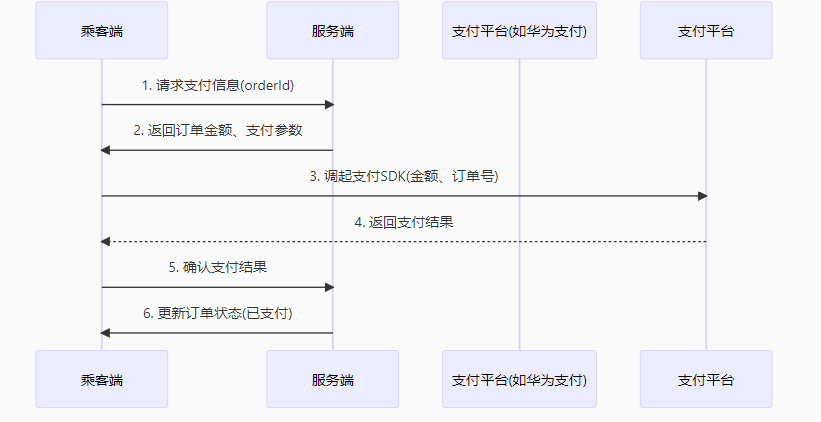
一、支付流程设计
二、鸿蒙乘客端实现
1. 支付页面UI (PaymentPage.ets)
// src/ets/pages/PaymentPage.ets
@Entry
@Component
struct PaymentPage {
  @State orderInfo: Order = {
    id: '123456',
    amount: 38.5,
    start: '北京西站',
    end: '中关村'
  }
  @State payMethods: string[] = ['华为支付', '微信支付', '支付宝']
  @State selectedMethod: string = '华为支付'

  // 发起支付请求
  async function requestPayment() {
    try {
      const result = await httpRequestPayment(this.orderInfo.id, this.selectedMethod);
      if (result.code === 200) {
        router.replaceUrl({ url: 'pages/PaymentSuccessPage' });
      }
    } catch (err) {
      prompt.showToast({ message: '支付失败: ' + err.message });
    }
  }

  build() {
    Column() {
      // 订单信息展示
      Text(`订单号: ${this.orderInfo.id}`).fontSize(16)
      Text(`金额: ¥${this.orderInfo.amount.toFixed(2)}`).fontSize(20).margin(10)

      // 支付方式选择
      RadioGroup({ initialRadio: this.selectedMethod }) {
        ForEach(this.payMethods, (method: string) => {
          Radio({ value: method }).checked(method === this.selectedMethod)
            .onChange((isChecked: boolean) => {
              if (isChecked) this.selectedMethod = method;
            })
          Text(method).margin({ left: 10 })
        })
      }.margin(20)

      // 支付按钮
      Button('立即支付')
        .onClick(() => this.requestPayment())
        .width('90%')
        .height(50)
        .margin(20)
    }
  }
}
2. 支付请求封装 (PaymentService.ets)
// src/ets/services/PaymentService.ets
import http from '@ohos.net.http';
import { HuaweiIap } from '@ohos/huaweiIap';

export async function httpRequestPayment(orderId: string, method: string) {
  // 1. 从服务端获取支付参数
  const httpReq = http.createHttp();
  const response = await httpReq.request(
    'https://your-api.com/payment/prepare',
    {
      method: 'POST',
      header: { 'Content-Type': 'application/json' },
      extraData: JSON.stringify({ orderId, method })
    }
  );

  const params = JSON.parse(response.result);

  // 2. 调用支付SDK
  switch (method) {
    case '华为支付':
      return HuaweiIap.startPayment({
        orderId: params.hwOrderId,
        amount: params.amount,
        currency: 'CNY'
      });
    case '微信支付':
      // 调用微信SDK...
      break;
    default:
      throw new Error('不支持的支付方式');
  }
}
三、服务端实现 (Spring Boot)
1. 支付准备接口
// PaymentController.java
@RestController
@RequestMapping("/payment")
public class PaymentController {

    @Autowired
    private PaymentService paymentService;

    @PostMapping("/prepare")
    public ResponseEntity<PaymentPrepareResponse> preparePayment(
        @RequestBody PaymentPrepareRequest request) {

        // 校验订单状态
        Order order = orderService.validateOrder(request.getOrderId());

        // 生成支付参数(不同支付平台)
        PaymentPrepareResponse response;
        switch (request.getMethod()) {
            case "华为支付":
                response = huaweiPayService.generateParams(order);
                break;
            case "支付宝":
                response = alipayService.generateParams(order);
                break;
            default:
                throw new IllegalArgumentException("不支持的支付方式");
        }

        return ResponseEntity.ok(response);
    }
}
2. 支付回调处理
// PaymentCallbackController.java
@RestController
@RequestMapping("/payment/callback")
public class PaymentCallbackController {

    @PostMapping("/huawei")
    public String huaweiCallback(@RequestBody HuaweiPayNotify notify) {
        // 1. 验证签名
        if (!huaweiPayService.verifySignature(notify)) {
            return "FAIL";
        }

        // 2. 更新订单状态
        orderService.updateOrderStatus(
            notify.getOrderId(),
            OrderStatus.PAID,
            notify.getTransactionId()
        );

        // 3. 通知司机端(通过WebSocket)
        websocketHandler.notifyDriverPaymentCompleted(notify.getOrderId());

        return "SUCCESS";
    }
}
四、华为支付集成关键步骤
1. 配置module.json5
{
  "module": {
    "requestPermissions": [
      {
        "name": "ohos.permission.PAYMENT",
        "reason": "使用华为支付功能"
      }
    ],
    "abilities": [
      {
        "skills": [
          {
            "actions": [
              "hwpay.action.PAY"
            ]
          }
        ]
      }
    ]
  }
}
2. 调用华为IAP SDK
// 华为支付封装
import { HuaweiIap } from '@ohos/huaweiIap';

export async function huaweiPay(orderId: string, amount: number) {
  try {
    const result = await HuaweiIap.startPayment({
      orderId: orderId,
      amount: amount,
      currency: 'CNY',
      productName: '网约车订单',
      serviceCatalog: 'CAR_HAILING' // 业务类型
    });

    if (result.paymentState === 0) { // 0表示成功
      return { code: 200, msg: '支付成功' };
    } else {
      throw new Error(`支付失败: ${result.errorMsg}`);
    }
  } catch (err) {
    throw new Error('支付异常: ' + err.message);
  }
}
五、支付问题总结
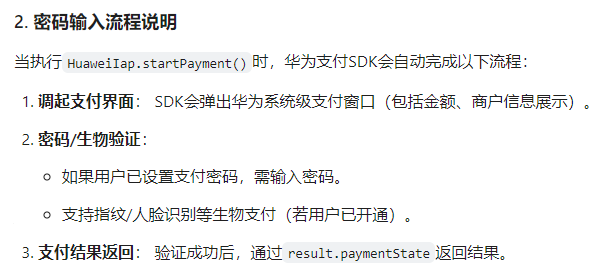
在鸿蒙(HarmonyOS)应用中,乘客输入密码支付的流程通常由华为支付(HUAWEI IAP)SDK内部处理,开发者无需直接编写密码输入界面。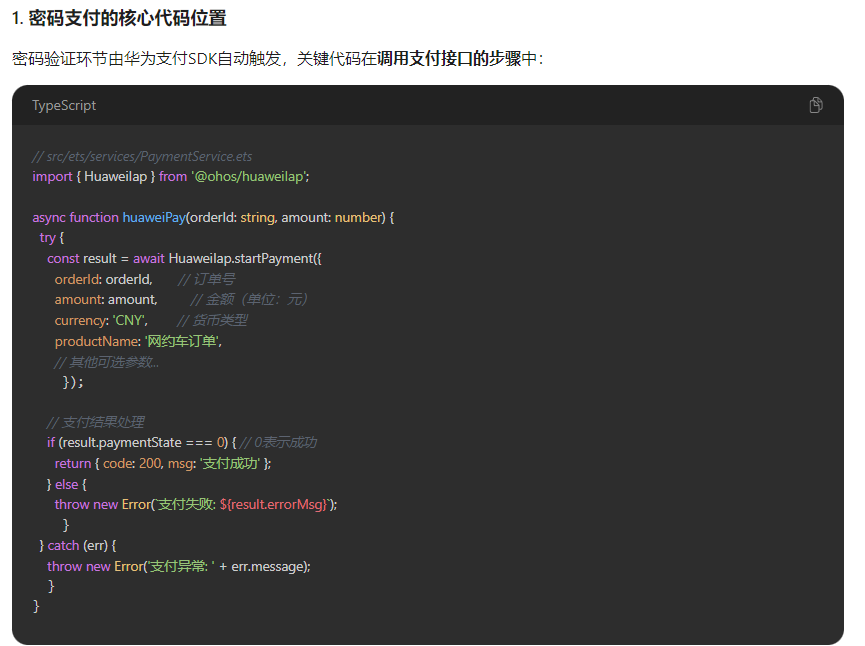

讨论HarmonyOS开发技术,专注于API与组件、DevEco Studio、测试、元服务和应用上架分发等。
更多推荐
 7
7 0
0- 0


 已为社区贡献19条内容

所有评论(0)