鸿蒙5:HarmonyOS应用开发-手势处理
·
注意:博主有个鸿蒙专栏,里面从上到下有关于鸿蒙next的教学文档,大家感兴趣可以学习下
如果大家觉得博主文章写的好的话,可以点下关注,博主会一直更新鸿蒙next相关知识
目录
2. 手势处理
为组件绑定不同类型的手势事件,并设置事件的响应方法。
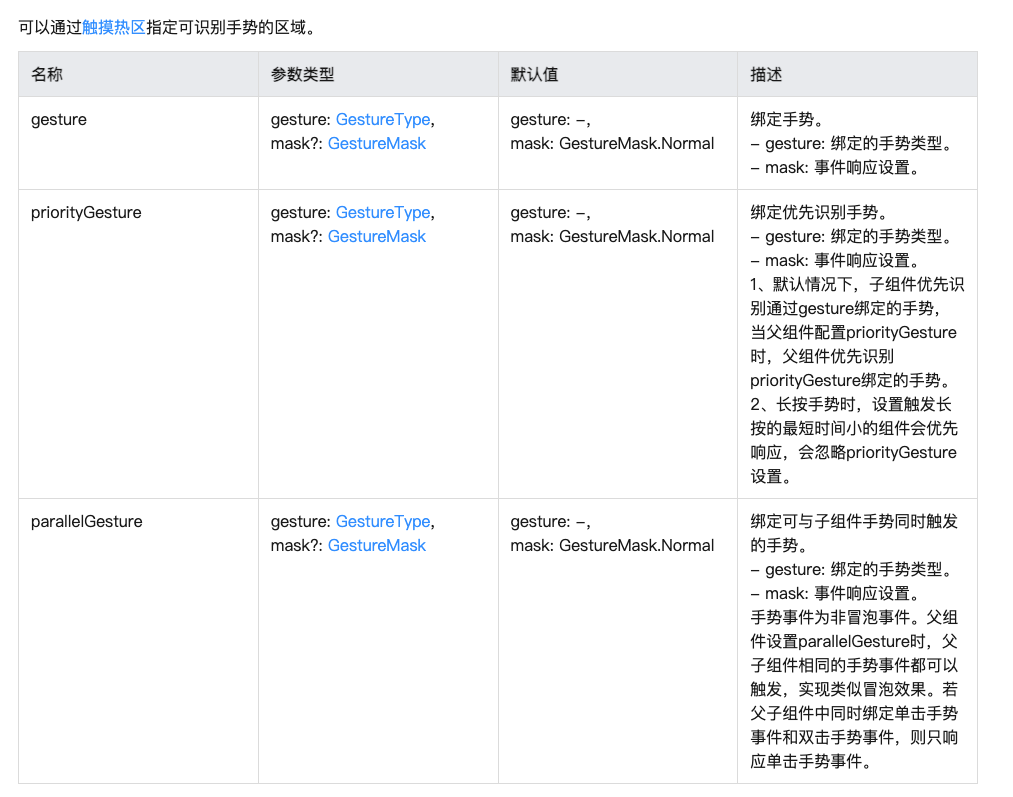
一般情况下 使用组件的gesture即可
2.1 手势类型
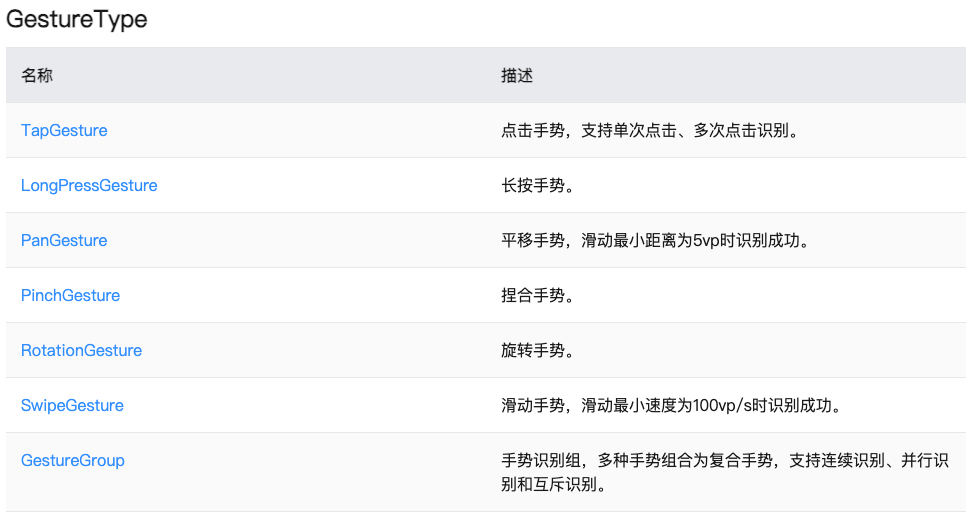
我们这里学习两个,长按手势和平移手势
语法
.gesture( LongPressGesture().onAction(() => {}) )
2.2 长按手势LongPressGesture
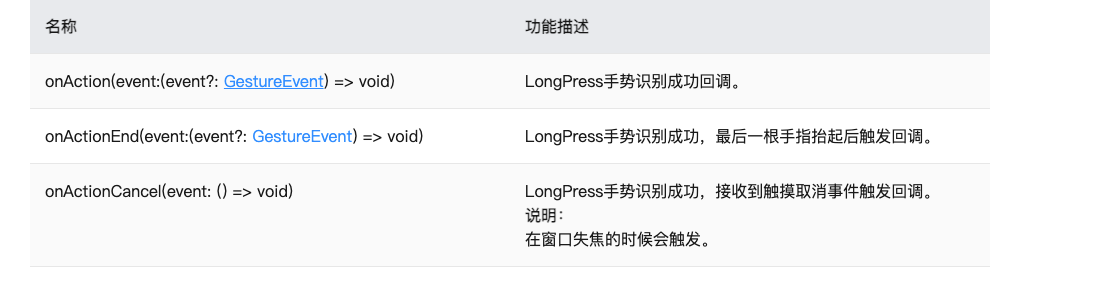
基本上所有的手势都会有这三个事件
2.3 实现一个功能-长按语音按钮,显示语音录制框
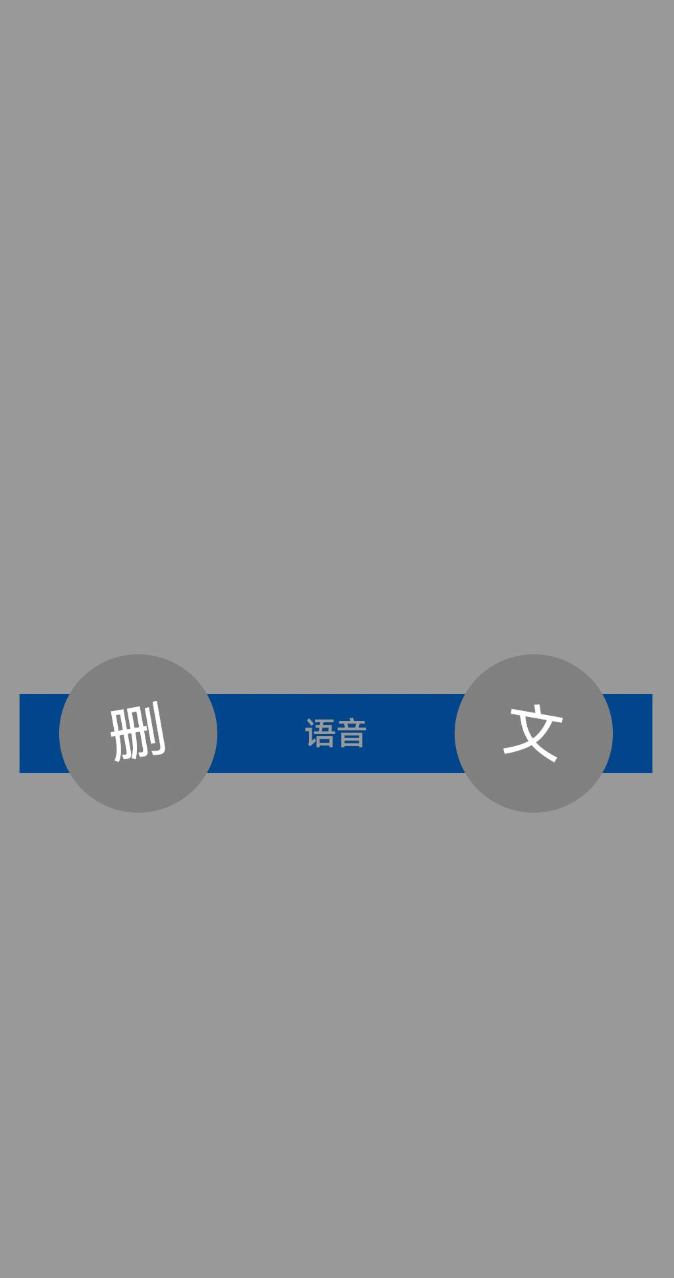
@Entry
  @Component
  struct GestureCase {
    @State
    showVoice: boolean = false

    @Builder
    getContent() {
      Column() {
        Row() {
          Row() {
            Text("删")
              .fontColor(Color.White)
              .fontSize(30)
          }
          .justifyContent(FlexAlign.Center)
            .width(80)
            .height(80)
            .borderRadius(40)
            .backgroundColor(Color.Gray)
            .rotate({
              angle: -10
            })
          Row() {
            Text("文")
              .fontColor(Color.White)
              .fontSize(30)
          }
          .justifyContent(FlexAlign.Center)
            .width(80)
            .height(80)
            .borderRadius(40)
            .backgroundColor(Color.Gray)
            .rotate({
              angle: 10
            })
        }
        .height(80)
          .width('100%')
          .padding({
            left: 40,
            right: 40
          })
          .justifyContent(FlexAlign.SpaceBetween)
      }
      .justifyContent(FlexAlign.Center)
        .width('100%')
        .height('100%')
        .backgroundColor("rgba(0,0,0,0.4)")
    }

    build() {
      Row() {
        Column() {
          Button("语音")
            .width('100%')
            .type(ButtonType.Normal)
            .gesture(
              LongPressGesture()
              .onAction(() => {
                this.showVoice = true
              })
              .onActionEnd(() => {
                this.showVoice = false
              })
            )
        }
        .padding(20)
          .width('100%')
      }
      .height('100%')
        .bindContentCover($$this.showVoice, this.getContent,
                          {
                            modalTransition: ModalTransition.NONE
                          })
    }
  }
2.4 拖动手势PanGesture
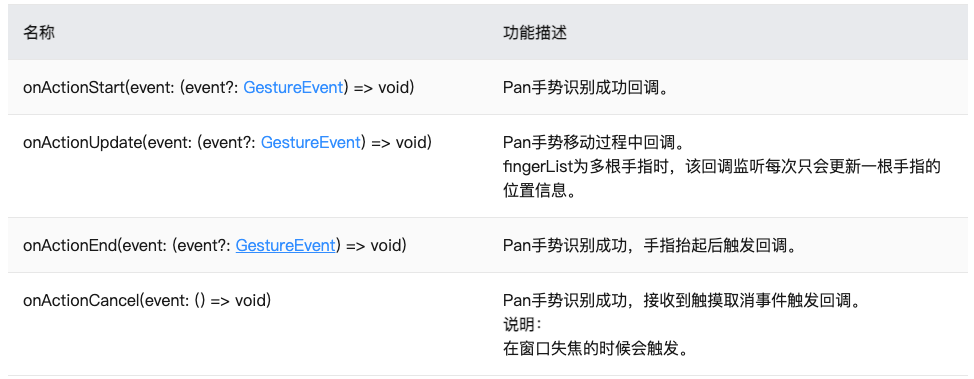
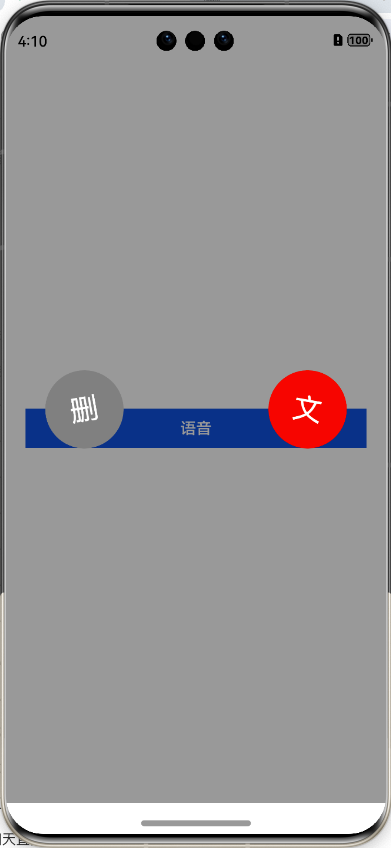
结合原来的长按,长按基础上,拖动实现删除或者文本按钮的选中
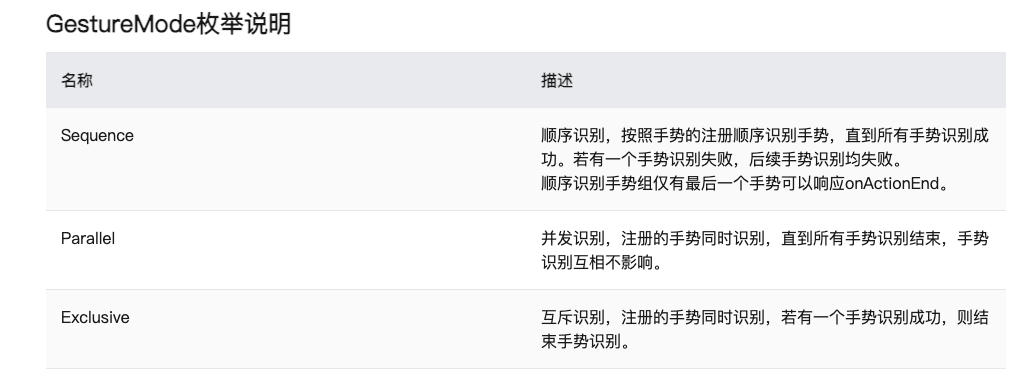
此时需要使用组合手势,因为是长按和拖动手势的集合
组合手势GestureGroup(mode: GestureMode, ...gesture: GestureType[])
GestureMode
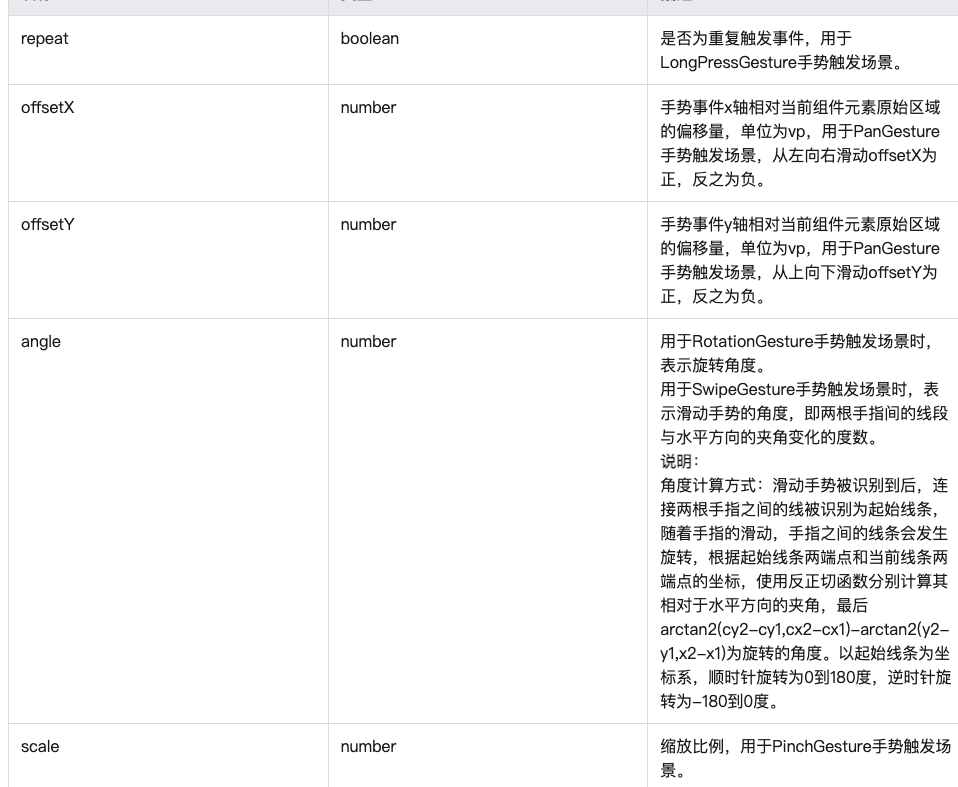
GestureEvent的事件参数
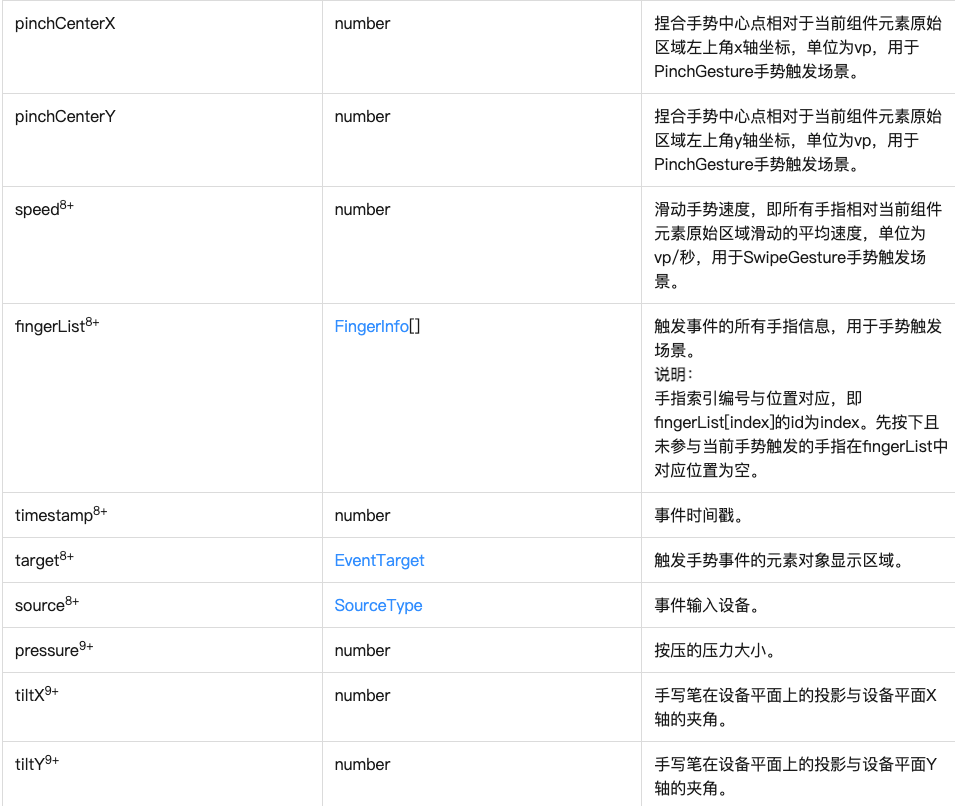
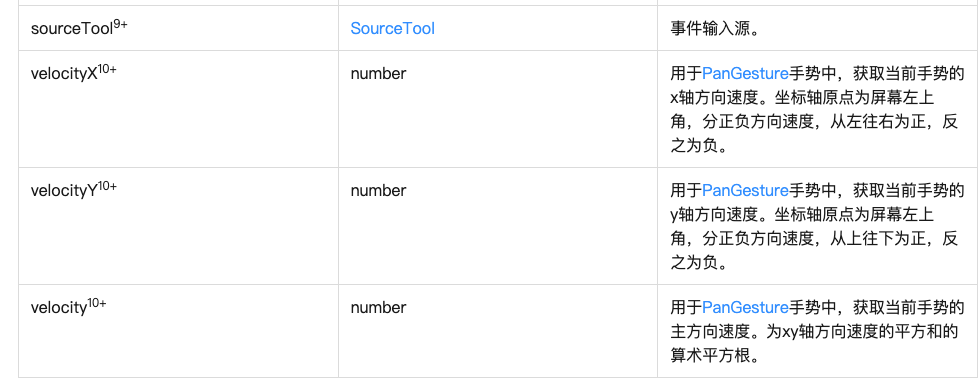
2.5 手指的坐标信息
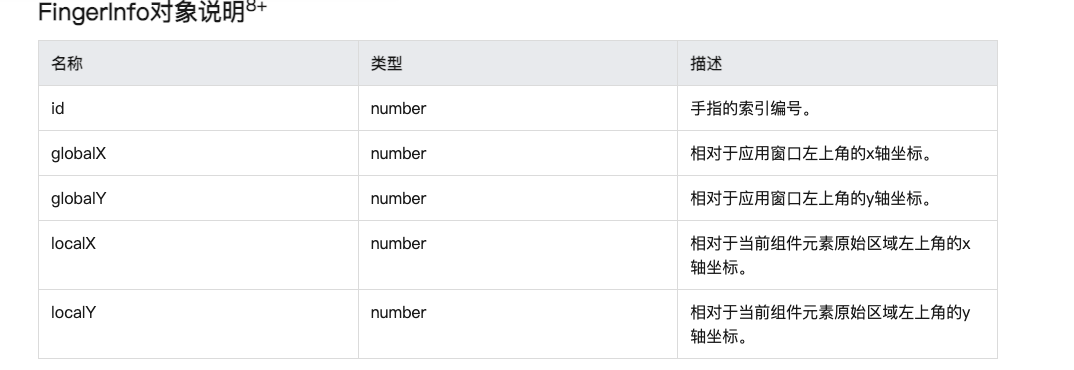
判断逻辑,只要发现x坐标在中线偏左,左边就选中,中线偏右右边选中
- 声明一个枚举类型
enum SelectType {
  DElETE,
  TEXT,
  NONE
}- 通过onAreaChange的值事件拿宽度
screenWidth: number = 0

  .onAreaChange((oldArea: Area, newArea: Area) => {
      this.screenWidth = newArea.width as number
})- 在拖动更新事件中判断坐标落点
 PanGesture()
                .onActionUpdate((event) => {
                  if(event.fingerList[0].globalX < this.screenWidth / 2) {
                    this.currentMode = SelectType.DElETE
                  }else {
                    this.currentMode = SelectType.TEXT
                  }
                })
                .onActionEnd(() => {
                  this.currentMode = SelectType.NONE
                })
@Entry
  @Component
  struct GestureCase {
    @State
    showVoice: boolean = false
    screenWidth: number = 0
    @State
    currentMode: SelectType = SelectType.NONE
    @Builder
    getContent() {
      Column() {
        Row() {
          Row() {
            Text("删")
              .fontColor(Color.White)
              .fontSize(30)
          }
          .justifyContent(FlexAlign.Center)
            .width(80)
            .height(80)
            .borderRadius(40)
            .backgroundColor(this.currentMode === SelectType.DElETE ? Color.Red  : Color.Gray)
            .rotate({
              angle: -10
            })
          Row() {
            Text("文")
              .fontColor(Color.White)
              .fontSize(30)
          }
          .justifyContent(FlexAlign.Center)
            .width(80)
            .height(80)
            .borderRadius(40)
            .backgroundColor(this.currentMode === SelectType.TEXT ? Color.Red  : Color.Gray)
            .rotate({
              angle: 10
            })
        }
        .height(80)
          .width('100%')
          .padding({
            left: 40,
            right: 40
          })
          .justifyContent(FlexAlign.SpaceBetween)
      }
      .justifyContent(FlexAlign.Center)
        .width('100%')
        .height('100%')
        .backgroundColor("rgba(0,0,0,0.4)")
    }

    build() {
      Row() {
        Column() {
          Button("语音")
            .width('100%')
            .type(ButtonType.Normal)
            .gesture(
              GestureGroup(GestureMode.Parallel,
                           LongPressGesture()
                           .onAction(() => {
                             this.showVoice = true
                           })
                           .onActionEnd(() => {
                             this.showVoice = false
                           }),
                           PanGesture()
                           .onActionUpdate((event) => {
                             if(event.fingerList[0].globalX < this.screenWidth / 2) {
                               this.currentMode = SelectType.DElETE
                             }else {
                               this.currentMode = SelectType.TEXT
                             }
                           })
                           .onActionEnd(() => {
                             this.currentMode = SelectType.NONE
                           })
                          )

            )
        }
        .padding(20)
          .width('100%')
      }
      .width('100%')
        .height('100%')
        .bindContentCover($$this.showVoice, this.getContent,
                          {
                            modalTransition: ModalTransition.NONE
                          })
        .onAreaChange((oldArea: Area, newArea: Area) => {
          this.screenWidth = newArea.width as number
        })
    }
  }

enum SelectType {
  DElETE,
  TEXT,
  NONE
}
获取屏幕宽度
- 页面最外层的组件onAreaChange 拿到最新的宽高
display的能力 需要模拟器
display.getDefaultDisplaySync() 拿到所有展示的屏幕的宽高
HarmonyOS赋能资源丰富度建设(第四期)-吴东林

讨论HarmonyOS开发技术,专注于API与组件、DevEco Studio、测试、元服务和应用上架分发等。
更多推荐
 5
5 0
0- 0


 已为社区贡献55条内容

所有评论(0)