Flutter 框架跨平台鸿蒙开发 - 万年历应用开发教程
·
Flutter万年历应用开发教程
项目简介
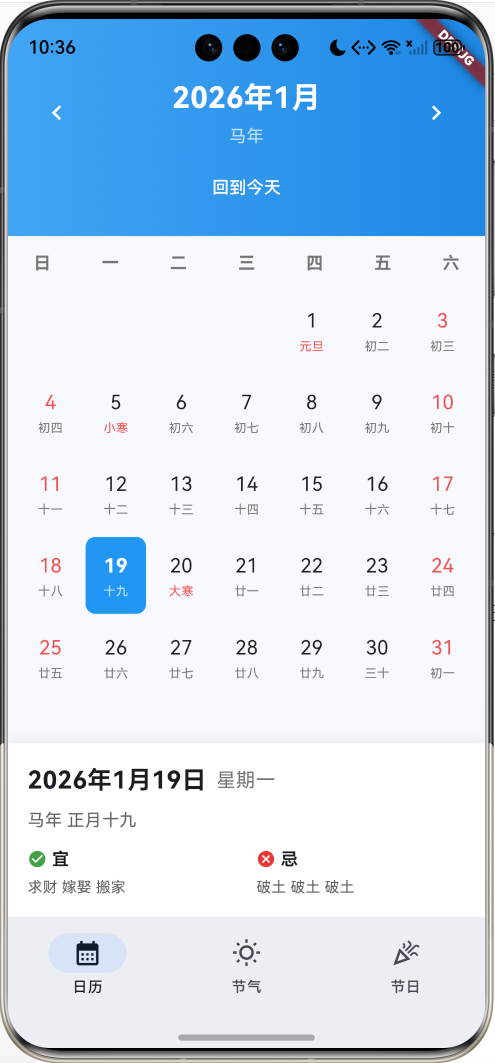
这是一款功能完整的万年历应用,集成了公历、农历、二十四节气、传统节日、黄历宜忌等功能。应用采用Material Design 3设计风格,界面简洁美观,信息展示清晰。
运行效果图
核心特性
- 日历视图:月历展示,支持左右切换月份,快速回到今天
- 双历显示:同时显示公历和农历日期
- 节气节日:自动标注二十四节气和传统节日
- 黄历宜忌:每日宜忌事项提示
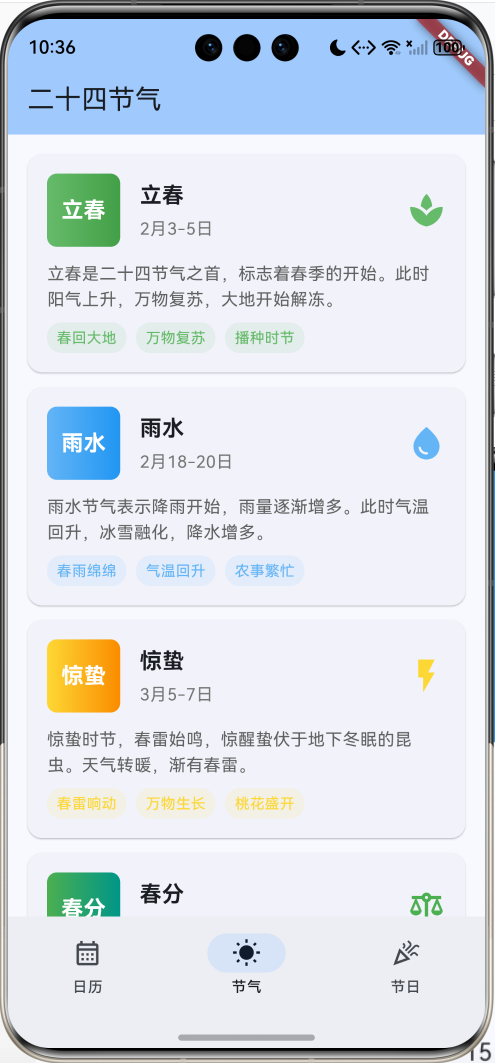
- 节气百科:24个节气的详细介绍和特点
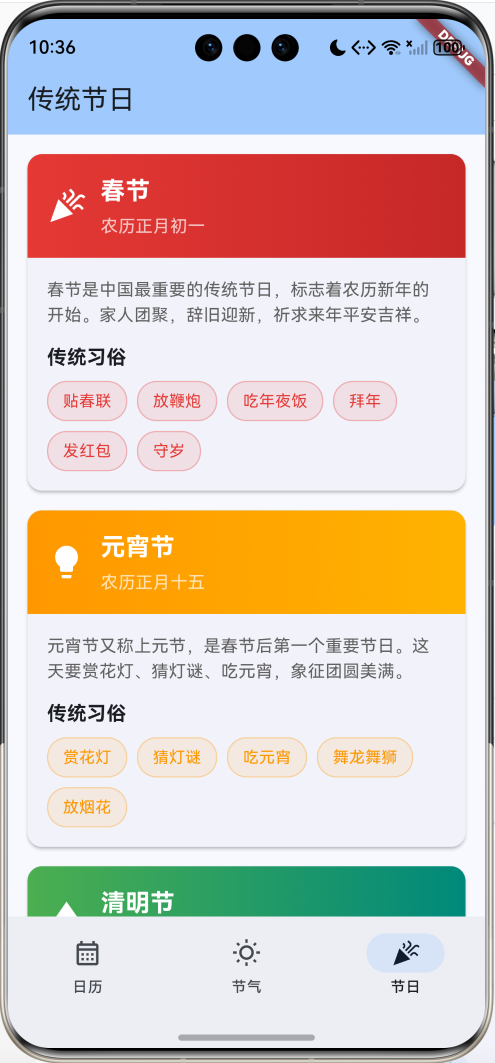
- 节日文化:11个传统节日的由来和习俗
- 日期详情:选中日期显示完整信息
技术栈
- Flutter 3.x
- Material Design 3
- 自定义日历组件
- 渐变UI设计
- 农历算法(简化版)
项目架构
数据模型设计
DateInfo(日期信息模型)
class DateInfo {
  final DateTime date;         // 公历日期
  final String lunarDate;      // 农历日期(初一、初二等)
  final String lunarMonth;     // 农历月份(正月、二月等)
  final String lunarYear;      // 农历年份(鼠年、牛年等)
  final String solarTerm;      // 节气
  final String festival;       // 节日
  final String suitable;       // 宜
  final String unsuitable;     // 忌
  final bool isHoliday;        // 是否节假日
  final bool isToday;          // 是否今天
}
设计要点:
- 整合公历和农历信息
- 节气和节日自动匹配
- 黄历宜忌每日不同
- 标记特殊日期(今天、节假日)
核心功能实现
1. 日历网格布局
使用GridView构建7列日历网格,动态计算每月天数和起始星期。
Widget _buildCalendarGrid() {
  final daysInMonth = _getDaysInMonth(currentMonth);
  final firstDayOfMonth = DateTime(currentMonth.year, currentMonth.month, 1);
  final startWeekday = firstDayOfMonth.weekday % 7; // 0=周日

  return GridView.builder(
    gridDelegate: const SliverGridDelegateWithFixedCrossAxisCount(
      crossAxisCount: 7,
      childAspectRatio: 0.8,
    ),
    itemCount: startWeekday + daysInMonth,
    itemBuilder: (context, index) {
      if (index < startWeekday) {
        return const SizedBox(); // 空白占位
      }

      final day = index - startWeekday + 1;
      final date = DateTime(currentMonth.year, currentMonth.month, day);
      return _buildDateCell(date, _getDateInfo(date));
    },
  );
}
关键计算:
daysInMonth:获取当月天数startWeekday:计算1号是星期几index < startWeekday:前面的空白格子
2. 日期单元格设计
每个日期单元格显示公历日期和农历/节日信息。
Widget _buildDateCell(DateTime date, DateInfo dateInfo) {
  final isSelected = date == selectedDate;
  final isToday = dateInfo.isToday;

  return InkWell(
    onTap: () => onDateSelected(date),
    child: Container(
      decoration: BoxDecoration(
        color: isSelected ? Colors.blue : isToday ? Colors.blue.shade50 : null,
        borderRadius: BorderRadius.circular(8),
        border: isToday && !isSelected
            ? Border.all(color: Colors.blue)
            : null,
      ),
      child: Column(
        mainAxisAlignment: MainAxisAlignment.center,
        children: [
          // 公历日期
          Text(
            '${date.day}',
            style: TextStyle(
              fontSize: 16,
              fontWeight: isToday ? FontWeight.bold : FontWeight.normal,
              color: isSelected ? Colors.white : Colors.black87,
            ),
          ),
          // 农历/节日/节气
          Text(
            dateInfo.festival.isNotEmpty ? dateInfo.festival
                : dateInfo.solarTerm.isNotEmpty ? dateInfo.solarTerm
                : dateInfo.lunarDate,
            style: TextStyle(
              fontSize: 10,
              color: isSelected ? Colors.white70
                  : (dateInfo.festival.isNotEmpty || dateInfo.solarTerm.isNotEmpty)
                      ? Colors.red.shade400
                      : Colors.grey.shade600,
            ),
          ),
        ],
      ),
    ),
  );
}
显示优先级:
- 节日(红色显示)
- 节气(红色显示)
- 农历日期(灰色显示)
3. 农历转换算法
简化的农历转换实现(实际应用建议使用专业库如lunar)。
DateInfo _getDateInfo(DateTime date) {
  // 农历日期
  final lunarDays = ['初一', '初二', '初三', ..., '三十'];
  final lunarDay = lunarDays[(date.day - 1) % 30];

  // 农历月份
  final lunarMonths = ['正月', '二月', '三月', ..., '腊月'];
  final lunarMonth = lunarMonths[(date.month - 1) % 12];

  // 农历年份(生肖)
  final lunarYears = ['鼠', '牛', '虎', '兔', '龙', '蛇',
                      '马', '羊', '猴', '鸡', '狗', '猪'];
  final yearIndex = (date.year - 4) % 12; // 2020年是鼠年
  final lunarYear = '${lunarYears[yearIndex]}年';

  return DateInfo(
    date: date,
    lunarDate: lunarDay,
    lunarMonth: lunarMonth,
    lunarYear: lunarYear,
    // ...
  );
}
生肖计算公式:
生肖索引 = (年份 - 4) % 12
其中2020年是鼠年,作为基准年。
4. 节气匹配算法
根据日期匹配对应的二十四节气。
String _getSolarTerm(DateTime date) {
  final solarTerms = {
    '1-5': '小寒', '1-20': '大寒',
    '2-4': '立春', '2-19': '雨水',
    '3-6': '惊蛰', '3-21': '春分',
    '4-5': '清明', '4-20': '谷雨',
    '5-6': '立夏', '5-21': '小满',
    '6-6': '芒种', '6-21': '夏至',
    '7-7': '小暑', '7-23': '大暑',
    '8-8': '立秋', '8-23': '处暑',
    '9-8': '白露', '9-23': '秋分',
    '10-8': '寒露', '10-23': '霜降',
    '11-7': '立冬', '11-22': '小雪',
    '12-7': '大雪', '12-22': '冬至',
  };

  final key = '${date.month}-${date.day}';
  return solarTerms[key] ?? '';
}
节气日期:
- 每月两个节气
- 日期相对固定(±1-2天)
- 实际应用需要精确计算
5. 节日匹配算法
匹配公历和农历节日。
String _getFestival(DateTime date) {
  // 公历节日
  final festivals = {
    '1-1': '元旦',
    '2-14': '情人节',
    '3-8': '妇女节',
    '5-1': '劳动节',
    '6-1': '儿童节',
    '10-1': '国庆节',
    '12-25': '圣诞节',
  };

  final key = '${date.month}-${date.day}';
  return festivals[key] ?? '';
}
节日类型:
- 公历节日:固定日期
- 农历节日:需要农历转换(春节、端午、中秋等)
- 节气节日:清明、冬至等
6. 黄历宜忌生成
使用随机算法生成每日宜忌(实际应用需要使用专业黄历算法)。
// 使用日期作为随机种子,确保同一天生成相同结果
final random = Random(date.year * 10000 + date.month * 100 + date.day);

final suitableList = ['嫁娶', '祭祀', '出行', '搬家', '开业', '动土', '安葬', '求财'];
final suitable = List.generate(3, (_) =>
    suitableList[random.nextInt(suitableList.length)]
).join(' ');

final unsuitableList = ['诉讼', '破土', '伐木', '开仓', '纳畜', '造船', '入宅', '安门'];
final unsuitable = List.generate(3, (_) =>
    unsuitableList[random.nextInt(unsuitableList.length)]
).join(' ');
关键技术:
- 使用日期作为随机种子
- 保证同一天生成相同结果
- 从预定义列表中随机选择
7. 日期详情展示
底部显示选中日期的完整信息。
Widget _buildDateDetail() {
  final dateInfo = _getDateInfo(selectedDate);
  return Container(
    padding: const EdgeInsets.all(16),
    decoration: BoxDecoration(
      color: Colors.white,
      boxShadow: [
        BoxShadow(
          color: Colors.grey.withValues(alpha: 0.2),
          blurRadius: 8,
          offset: const Offset(0, -2),
        ),
      ],
    ),
    child: Column(
      crossAxisAlignment: CrossAxisAlignment.start,
      children: [
        // 公历日期
        Text('${selectedDate.year}年${selectedDate.month}月${selectedDate.day}日'),
        // 农历日期
        Text('${dateInfo.lunarYear} ${dateInfo.lunarMonth}${dateInfo.lunarDate}'),
        // 节日节气标签
        if (dateInfo.festival.isNotEmpty || dateInfo.solarTerm.isNotEmpty)
          Wrap(
            children: [
              if (dateInfo.festival.isNotEmpty) _buildTag(dateInfo.festival, Colors.red),
              if (dateInfo.solarTerm.isNotEmpty) _buildTag(dateInfo.solarTerm, Colors.orange),
            ],
          ),
        // 宜忌
        Row(
          children: [
            Expanded(
              child: Column(
                children: [
                  Row(children: [Icon(Icons.check_circle), Text('宜')]),
                  Text(dateInfo.suitable),
                ],
              ),
            ),
            Expanded(
              child: Column(
                children: [
                  Row(children: [Icon(Icons.cancel), Text('忌')]),
                  Text(dateInfo.unsuitable),
                ],
              ),
            ),
          ],
        ),
      ],
    ),
  );
}
二十四节气页面
节气数据结构
static final List<Map<String, dynamic>> _solarTermsList = [
  {
    'name': '立春',
    'date': '2月3-5日',
    'icon': Icons.spa,
    'colors': [Colors.green.shade400, Colors.green.shade600],
    'description': '立春是二十四节气之首,标志着春季的开始...',
    'features': ['春回大地', '万物复苏', '播种时节'],
  },
  // 其他23个节气...
];
数据字段:
name:节气名称date:大致日期范围icon:图标colors:渐变颜色description:详细描述features:特点标签
节气卡片设计
Widget _buildSolarTermCard(Map<String, dynamic> term) {
  return Card(
    child: Padding(
      padding: const EdgeInsets.all(16),
      child: Column(
        children: [
          Row(
            children: [
              // 渐变色方块
              Container(
                width: 60,
                height: 60,
                decoration: BoxDecoration(
                  gradient: LinearGradient(colors: term['colors']),
                  borderRadius: BorderRadius.circular(8),
                ),
                child: Center(
                  child: Text(term['name'], style: TextStyle(color: Colors.white)),
                ),
              ),
              // 名称和日期
              Expanded(
                child: Column(
                  children: [
                    Text(term['name']),
                    Text(term['date']),
                  ],
                ),
              ),
              // 图标
              Icon(term['icon'], color: term['colors'][0]),
            ],
          ),
          // 描述
          Text(term['description']),
          // 特点标签
          Wrap(
            children: term['features'].map((f) => _buildTag(f)).toList(),
          ),
        ],
      ),
    ),
  );
}
节气分类
四季节气:
传统节日页面
节日数据结构
static final List<Map<String, dynamic>> _holidaysList = [
  {
    'name': '春节',
    'date': '农历正月初一',
    'icon': Icons.celebration,
    'colors': [Colors.red.shade600, Colors.red.shade800],
    'description': '春节是中国最重要的传统节日...',
    'customs': ['贴春联', '放鞭炮', '吃年夜饭', '拜年', '发红包', '守岁'],
  },
  // 其他10个节日...
];
节日卡片设计
Widget _buildHolidayCard(Map<String, dynamic> holiday) {
  return Card(
    child: Column(
      children: [
        // 渐变色头部
        Container(
          decoration: BoxDecoration(
            gradient: LinearGradient(colors: holiday['colors']),
          ),
          child: Row(
            children: [
              Icon(holiday['icon'], color: Colors.white),
              Column(
                children: [
                  Text(holiday['name'], style: TextStyle(color: Colors.white)),
                  Text(holiday['date'], style: TextStyle(color: Colors.white70)),
                ],
              ),
            ],
          ),
        ),
        // 内容区域
        Padding(
          padding: const EdgeInsets.all(16),
          child: Column(
            children: [
              Text(holiday['description']),
              Text('传统习俗', style: TextStyle(fontWeight: FontWeight.bold)),
              Wrap(
                children: holiday['customs'].map((c) => _buildCustomTag(c)).toList(),
              ),
            ],
          ),
        ),
      ],
    ),
  );
}
节日分类
传统节日时间轴:
UI组件设计
1. 渐变头部
Container(
  padding: const EdgeInsets.fromLTRB(16, 48, 16, 16),
  decoration: BoxDecoration(
    gradient: LinearGradient(
      colors: [Colors.blue.shade400, Colors.blue.shade600],
    ),
  ),
  child: Column(
    children: [
      // 月份切换
      Row(
        mainAxisAlignment: MainAxisAlignment.spaceBetween,
        children: [
          IconButton(icon: Icon(Icons.chevron_left), onPressed: _previousMonth),
          Text('${year}年${month}月'),
          IconButton(icon: Icon(Icons.chevron_right), onPressed: _nextMonth),
        ],
      ),
      // 回到今天按钮
      TextButton(
        onPressed: _goToToday,
        child: Text('回到今天'),
      ),
    ],
  ),
)
2. 标签组件
Widget _buildTag(String text, Color color) {
  return Container(
    padding: const EdgeInsets.symmetric(horizontal: 8, vertical: 4),
    decoration: BoxDecoration(
      color: color.withValues(alpha: 0.1),
      borderRadius: BorderRadius.circular(4),
      border: Border.all(color: color.withValues(alpha: 0.3)),
    ),
    child: Text(
      text,
      style: TextStyle(fontSize: 12, color: color),
    ),
  );
}
3. 阴影卡片
Container(
  decoration: BoxDecoration(
    color: Colors.white,
    boxShadow: [
      BoxShadow(
        color: Colors.grey.withValues(alpha: 0.2),
        blurRadius: 8,
        offset: const Offset(0, -2),
      ),
    ],
  ),
)
4. NavigationBar底部导航
NavigationBar(
  selectedIndex: _selectedIndex,
  onDestinationSelected: (index) {
    setState(() {
      _selectedIndex = index;
    });
  },
  destinations: const [
    NavigationDestination(
      icon: Icon(Icons.calendar_month_outlined),
      selectedIcon: Icon(Icons.calendar_month),
      label: '日历',
    ),
    NavigationDestination(
      icon: Icon(Icons.wb_sunny_outlined),
      selectedIcon: Icon(Icons.wb_sunny),
      label: '节气',
    ),
    NavigationDestination(
      icon: Icon(Icons.celebration_outlined),
      selectedIcon: Icon(Icons.celebration),
      label: '节日',
    ),
  ],
)
功能扩展建议
1. 接入专业农历库
使用lunar包获取精确的农历数据:
dependencies:
  lunar: ^1.0.0
import 'package:lunar/lunar.dart';

DateInfo _getDateInfo(DateTime date) {
  final solar = Solar.fromDate(date);
  final lunar = solar.getLunar();

  return DateInfo(
    date: date,
    lunarDate: lunar.getDayInChinese(),
    lunarMonth: lunar.getMonthInChinese(),
    lunarYear: '${lunar.getYearInGanZhi()}年',
    solarTerm: lunar.getJieQi() ?? '',
    // ...
  );
}
2. 添加日程提醒
class Schedule {
  final DateTime date;
  final String title;
  final String description;
  final Color color;

  Schedule({
    required this.date,
    required this.title,
    required this.description,
    required this.color,
  });
}

class ScheduleManager {
  static final List<Schedule> _schedules = [];

  static void addSchedule(Schedule schedule) {
    _schedules.add(schedule);
  }

  static List<Schedule> getSchedulesForDate(DateTime date) {
    return _schedules.where((s) =>
      s.date.year == date.year &&
      s.date.month == date.month &&
      s.date.day == date.day
    ).toList();
  }
}
3. 本地通知提醒
import 'package:flutter_local_notifications/flutter_local_notifications.dart';

class NotificationService {
  final FlutterLocalNotificationsPlugin _notifications =
      FlutterLocalNotificationsPlugin();

  Future<void> scheduleNotification(Schedule schedule) async {
    await _notifications.zonedSchedule(
      schedule.hashCode,
      schedule.title,
      schedule.description,
      tz.TZDateTime.from(schedule.date, tz.local),
      const NotificationDetails(
        android: AndroidNotificationDetails(
          'schedule_channel',
          '日程提醒',
          importance: Importance.high,
        ),
      ),
      androidAllowWhileIdle: true,
      uiLocalNotificationDateInterpretation:
          UILocalNotificationDateInterpretation.absoluteTime,
    );
  }
}
4. 天气集成
class WeatherInfo {
  final String condition; // 天气状况
  final int temperature; // 温度
  final String icon; // 图标

  WeatherInfo({
    required this.condition,
    required this.temperature,
    required this.icon,
  });
}

class WeatherService {
  Future<WeatherInfo> getWeather(DateTime date) async {
    // 调用天气API
    final response = await http.get(
      Uri.parse('https://api.weather.com/...'),
    );
    return WeatherInfo.fromJson(json.decode(response.body));
  }
}

// 在日历单元格中显示天气图标
Widget _buildDateCell(DateTime date, DateInfo dateInfo) {
  return FutureBuilder<WeatherInfo>(
    future: WeatherService().getWeather(date),
    builder: (context, snapshot) {
      return Column(
        children: [
          Text('${date.day}'),
          if (snapshot.hasData)
            Icon(snapshot.data!.icon),
          Text(dateInfo.lunarDate),
        ],
      );
    },
  );
}
5. 数据持久化
使用SharedPreferences保存用户设置和日程:
class StorageService {
  static const String _schedulesKey = 'schedules';

  Future<void> saveSchedules(List<Schedule> schedules) async {
    final prefs = await SharedPreferences.getInstance();
    final jsonList = schedules.map((s) => s.toJson()).toList();
    await prefs.setString(_schedulesKey, json.encode(jsonList));
  }

  Future<List<Schedule>> loadSchedules() async {
    final prefs = await SharedPreferences.getInstance();
    final jsonStr = prefs.getString(_schedulesKey);
    if (jsonStr == null) return [];

    final jsonList = json.decode(jsonStr) as List;
    return jsonList.map((j) => Schedule.fromJson(j)).toList();
  }
}
6. 周视图和年视图
// 周视图
class WeekView extends StatelessWidget {
final DateTime startDate;
Widget build(BuildContext context) {
return Row(
children: List.generate(7, (index) {
final date = startDate.add(Duration(days: index));
return Expanded(
child: _buildDayColumn(date),
);
}),
);
}
}
// 年视图
class YearView extends StatelessWidget {
final int year;
Widget build(BuildContext context) {
return GridView.builder(
gridDelegate: SliverGridDelegateWithFixedCrossAxisCount(
crossAxisCount: 3,
),
itemCount: 12,
itemBuilder: (context, index) {
return _buildMonthPreview(year, index + 1);
},
);
}
}
7. 导出日历
import 'package:pdf/pdf.dart';
import 'package:pdf/widgets.dart' as pw;

class CalendarExporter {
  Future<void> exportToPdf(int year, int month) async {
    final pdf = pw.Document();

    pdf.addPage(
      pw.Page(
        build: (context) {
          return pw.Column(
            children: [
              pw.Text('$year年$month月'),
              _buildPdfCalendar(year, month),
            ],
          );
        },
      ),
    );

    final file = File('calendar_${year}_${month}.pdf');
    await file.writeAsBytes(await pdf.save());
  }
}
8. 多语言支持
class AppLocalizations {
  static const Map<String, Map<String, String>> _localizedValues = {
    'zh': {
      'calendar': '日历',
      'solar_terms': '节气',
      'holidays': '节日',
      'today': '今天',
      'suitable': '宜',
      'unsuitable': '忌',
    },
    'en': {
      'calendar': 'Calendar',
      'solar_terms': 'Solar Terms',
      'holidays': 'Holidays',
      'today': 'Today',
      'suitable': 'Suitable',
      'unsuitable': 'Unsuitable',
    },
  };

  static String translate(String key, String locale) {
    return _localizedValues[locale]?[key] ?? key;
  }
}
性能优化建议
1. 日期信息缓存
class DateInfoCache {
  static final Map<String, DateInfo> _cache = {};

  static DateInfo getDateInfo(DateTime date) {
    final key = '${date.year}-${date.month}-${date.day}';

    if (_cache.containsKey(key)) {
      return _cache[key]!;
    }

    final dateInfo = _calculateDateInfo(date);
    _cache[key] = dateInfo;
    return dateInfo;
  }

  static void clearCache() {
    _cache.clear();
  }
}
2. 懒加载月份数据
class CalendarController {
  final Map<String, List<DateInfo>> _monthCache = {};

  List<DateInfo> getMonthData(int year, int month) {
    final key = '$year-$month';

    if (_monthCache.containsKey(key)) {
      return _monthCache[key]!;
    }

    final daysInMonth = DateTime(year, month + 1, 0).day;
    final monthData = List.generate(daysInMonth, (index) {
      final date = DateTime(year, month, index + 1);
      return DateInfoCache.getDateInfo(date);
    });

    _monthCache[key] = monthData;
    return monthData;
  }
}
3. 使用const构造函数
// 优化前
NavigationDestination(
  icon: Icon(Icons.calendar_month_outlined),
  label: '日历',
)

// 优化后
const NavigationDestination(
  icon: Icon(Icons.calendar_month_outlined),
  label: '日历',
)
4. 避免不必要的重建
class DateCell extends StatelessWidget {
final DateTime date;
final DateInfo dateInfo;
final bool isSelected;
final VoidCallback onTap;
const DateCell({
super.key,
required this.date,
required this.dateInfo,
required this.isSelected,
required this.onTap,
});
Widget build(BuildContext context) {
// 组件内容
}
}
测试建议
1. 单元测试
void main() {
  group('日期计算测试', () {
    test('获取月份天数', () {
      expect(getDaysInMonth(DateTime(2024, 2)), 29); // 闰年2月
      expect(getDaysInMonth(DateTime(2023, 2)), 28); // 平年2月
      expect(getDaysInMonth(DateTime(2024, 1)), 31);
    });

    test('农历转换', () {
      final dateInfo = getDateInfo(DateTime(2024, 1, 1));
      expect(dateInfo.lunarYear, contains('龙年'));
    });

    test('节气匹配', () {
      final solarTerm = getSolarTerm(DateTime(2024, 2, 4));
      expect(solarTerm, '立春');
    });
  });
}
2. Widget测试
void main() {
  testWidgets('日历网格显示正确天数', (WidgetTester tester) async {
    await tester.pumpWidget(
      MaterialApp(
        home: CalendarPage(
          selectedDate: DateTime(2024, 1, 1),
          currentMonth: DateTime(2024, 1, 1),
          onDateSelected: (_) {},
          onMonthChanged: (_) {},
        ),
      ),
    );

    // 2024年1月有31天
    expect(find.text('31'), findsOneWidget);
    expect(find.text('32'), findsNothing);
  });

  testWidgets('点击日期更新选中状态', (WidgetTester tester) async {
    DateTime? selectedDate;

    await tester.pumpWidget(
      MaterialApp(
        home: CalendarPage(
          selectedDate: DateTime(2024, 1, 1),
          currentMonth: DateTime(2024, 1, 1),
          onDateSelected: (date) {
            selectedDate = date;
          },
          onMonthChanged: (_) {},
        ),
      ),
    );

    await tester.tap(find.text('15'));
    expect(selectedDate?.day, 15);
  });
}
3. 集成测试
void main() {
  IntegrationTestWidgetsFlutterBinding.ensureInitialized();

  testWidgets('完整日历浏览流程', (WidgetTester tester) async {
    await tester.pumpWidget(MyApp());

    // 1. 验证初始显示
    expect(find.text('日历'), findsOneWidget);

    // 2. 切换到下个月
    await tester.tap(find.byIcon(Icons.chevron_right));
    await tester.pumpAndSettle();

    // 3. 选择日期
    await tester.tap(find.text('15'));
    await tester.pumpAndSettle();

    // 4. 验证日期详情显示
    expect(find.text('宜'), findsOneWidget);
    expect(find.text('忌'), findsOneWidget);

    // 5. 切换到节气页面
    await tester.tap(find.text('节气'));
    await tester.pumpAndSettle();
    expect(find.text('立春'), findsOneWidget);

    // 6. 切换到节日页面
    await tester.tap(find.text('节日'));
    await tester.pumpAndSettle();
    expect(find.text('春节'), findsOneWidget);
  });
}
部署发布
1. Android打包
# 生成签名密钥
keytool -genkey -v -keystore ~/calendar-key.jks -keyalg RSA -keysize 2048 -validity 10000 -alias calendar

# 配置android/key.properties
storePassword=your_password
keyPassword=your_password
keyAlias=calendar
storeFile=/path/to/calendar-key.jks

# 构建APK
flutter build apk --release

# 构建App Bundle
flutter build appbundle --release
2. iOS打包
# 安装依赖
cd ios && pod install

# 构建IPA
flutter build ipa --release
3. 应用配置
在pubspec.yaml中配置:
name: calendar
description: 万年历应用
version: 1.0.0+1

flutter:
  uses-material-design: true
在AndroidManifest.xml中配置:
<application
    android:label="万年历"
    android:icon="@mipmap/ic_launcher">
项目总结
技术亮点
- 自定义日历组件:GridView实现月历布局,动态计算起始位置
- 双历显示:公历和农历同时展示,信息丰富
- 节气节日:自动匹配24节气和传统节日
- 黄历宜忌:每日宜忌事项提示
- 渐变UI设计:大量使用LinearGradient提升视觉效果
- Material Design 3:使用最新的NavigationBar组件
学习收获
通过本项目,你将掌握:
- GridView网格布局的使用
- 日期时间计算和处理
- 农历算法基础知识
- 自定义日历组件开发
- 数据模型设计
- 列表和卡片布局
- 渐变和阴影效果
- 底部导航栏实现
应用场景
本应用适合以下场景:
- 日常查询:查看公历、农历、节气、节日
- 传统文化:了解二十四节气和传统节日
- 黄历参考:查看每日宜忌事项
- 学习案例:作为Flutter日历组件的学习项目
后续优化方向
- 精确农历:接入专业农历库,提供精确的农历数据
- 日程管理:添加日程提醒和待办事项
- 天气集成:显示每日天气预报
- 多视图:支持周视图、年视图
- 数据同步:云端同步日程数据
- 小组件:添加桌面小组件
- 主题切换:支持多种主题风格
- 导出功能:导出日历为PDF或图片
代码规范
项目遵循以下规范:
- 使用const构造函数优化性能
- 组件拆分,职责单一
- 命名规范:驼峰命名法
- 注释清晰,代码可读性强
- 数据和UI分离
- 响应式布局设计
项目结构
lib/
├── main.dart                 # 主入口文件
├── models/                   # 数据模型(可扩展)
│   ├── date_info.dart
│   └── schedule.dart
├── pages/                    # 页面组件(可扩展)
│   ├── calendar_page.dart
│   ├── solar_terms_page.dart
│   └── holidays_page.dart
├── widgets/                  # 自定义组件(可扩展)
│   ├── date_cell.dart
│   └── tag_widget.dart
└── services/                 # 业务逻辑(可扩展)
    ├── lunar_service.dart
    └── storage_service.dart
相关资源
推荐库:
lunar:专业的农历转换库flutter_local_notifications:本地通知table_calendar:功能强大的日历组件intl:国际化支持
学习资源:
- Flutter官方文档:https://flutter.dev
- 农历算法:https://github.com/6tail/lunar-flutter
- Material Design 3:https://m3.material.io
本项目提供了完整的万年历功能,代码结构清晰,易于扩展。你可以在此基础上添加更多功能,打造一款功能丰富的日历应用。
欢迎加入开源鸿蒙跨平台社区:https://openharmonycrossplatform.csdn.net

讨论HarmonyOS开发技术,专注于API与组件、DevEco Studio、测试、元服务和应用上架分发等。
更多推荐
 19
19 0
0- 0


 已为社区贡献15条内容

所有评论(0)