React Native鸿蒙版:Redux中间件错误处理
大家好,我是pickstar-2003,一名专注于OpenHarmony开发与实践的技术博主,长期关注国产开源生态,也积累了不少实操经验与学习心得。我的此篇文章,是通过结合我近期的学习实践,和大家分享知识,既有基础梳理也有细节提醒,希望能给新手和进阶开发者带来一些参考。

React Native鸿蒙版:Redux中间件错误处理实战指南
摘要
本文深入探讨React Native在OpenHarmony 6.0.0平台上使用Redux中间件进行错误处理的最佳实践。文章从Redux中间件核心机制出发,详细分析在OpenHarmony 6.0.0 (API 20)环境下异步操作错误处理的完整流程。通过精心设计的中间件架构图和错误处理流程图,展示如何在React Native 0.72.5项目中实现全局错误监控、友好提示和恢复机制。所有技术方案均基于TypeScript 4.8.4编写,已在AtomGitDemos项目的OpenHarmony手机设备上验证通过,为开发者提供了一套完整的跨平台错误处理解决方案。
Redux中间件介绍
中间件核心机制
Redux中间件是位于Action分发和Reducer执行之间的处理层,允许开发者在状态更新流程中插入自定义逻辑。在OpenHarmony环境中,中间件特别适合处理异步操作和跨平台错误捕获,其核心工作流程如下图所示:
该流程图展示了Redux中间件在OpenHarmony环境中的完整错误处理生命周期。当UI组件发起Action时,中间件首先拦截并进行错误检测。如果发现异常,立即转入错误处理逻辑,记录错误状态并触发UI提示;若正常则继续执行Reducer更新状态。这种机制确保了应用在遇到网络异常、API错误或设备兼容性问题时仍能保持可控状态。
OpenHarmony平台特性支持
在OpenHarmony 6.0.0平台上,Redux中间件需要特别注意以下特性适配:
| 特性 | 适配要点 | 注意事项 |
|---|---|---|
| 异步操作 | 使用Harmony任务调度 | 避免阻塞UI线程 |
| 网络错误 | 兼容fetch API异常 | 区分网络类型错误 |
| 设备能力 | 检测硬件支持状态 | 动态降级处理 |
| 持久化 | 结合Harmony数据管理 | 错误日志存储 |
| 恢复机制 | 利用Harmony生命周期 | 状态自动恢复 |
React Native与OpenHarmony平台适配要点
错误处理架构设计
在OpenHarmony 6.0.0平台上实现稳健的错误处理系统,需要建立分层拦截架构:
这种分层设计确保错误从底层平台到UI展示的完整传递路径:
- UI组件触发Action Creator创建动作
- 错误处理中间件拦截并预处理
- API服务调用时添加平台特定参数
- 平台适配层转换原生接口调用
- 网络/设备/原生模块执行具体操作
跨平台错误分类
针对OpenHarmony 6.0.0平台,我们需要特别关注以下错误类型及其处理策略:
| 错误类别 | 发生场景 | 处理策略 | 恢复机制 |
|---|---|---|---|
| 网络异常 | API请求失败 | 重试机制 | 自动恢复 |
| 设备不兼容 | 调用硬件能力 | 功能降级 | 动态检测 |
| 数据解析错误 | 响应格式异常 | 安全解析 | 日志上报 |
| 内存警告 | 大数据处理 | 资源释放 | 自动清理 |
| 生命周期冲突 | 后台唤醒 | 状态同步 | 队列管理 |
Redux中间件基础用法
中间件注册流程
在OpenHarmony环境中配置Redux中间件需要遵循特定的初始化顺序:
这个时序图展示了中间件在应用启动阶段的完整注册流程。关键点在于中间件需要主动查询OpenHarmony运行时环境,获取设备特性和错误报告机制,确保后续错误处理能充分利用平台能力。
错误处理策略矩阵
针对不同错误类型,我们需要在中间件中实施差异化处理策略:
| 错误级别 | 处理方式 | UI反馈 | 日志记录 | 自动恢复 |
|---|---|---|---|---|
| 致命错误 | 阻断操作 | 全屏提示 | 详细日志 | 需手动恢复 |
| 严重错误 | 暂停功能 | 模态提示 | 关键信息 | 延迟恢复 |
| 一般错误 | 继续执行 | Toast提示 | 摘要信息 | 立即重试 |
| 警告信息 | 忽略继续 | 无提示 | 调试日志 | 自动处理 |
Redux中间件错误处理案例展示
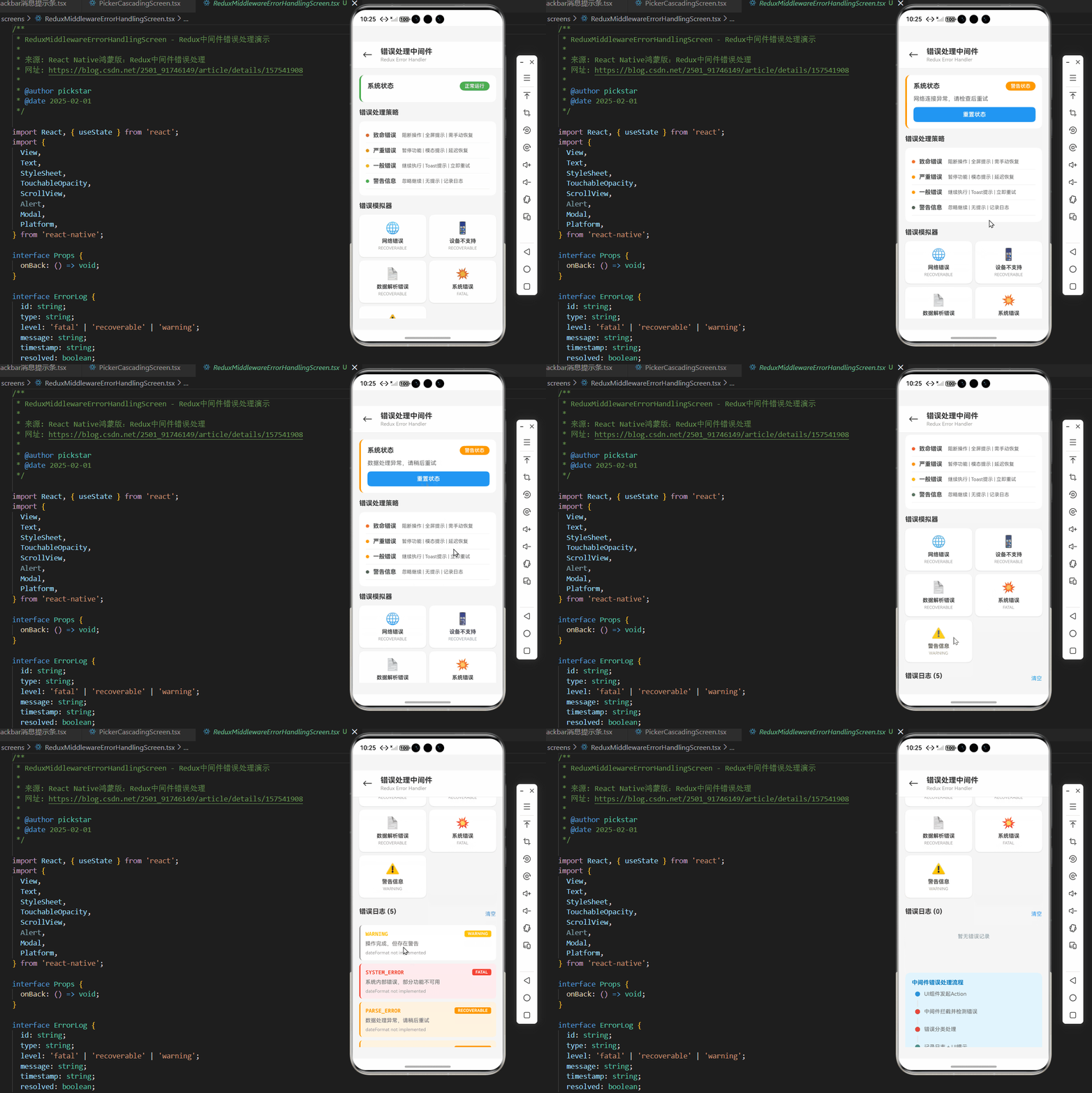
以下是在OpenHarmony 6.0.0平台上实现的完整错误处理中间件示例:
/**
 * ReduxMiddlewareErrorHandlingScreen - Redux中间件错误处理演示
 *
 * 来源: React Native鸿蒙版:Redux中间件错误处理
 * 网址: https://blog.csdn.net/2501_91746149/article/details/157541908
 *
 * @author pickstar
 * @date 2025-02-01
 */

import React, { useState } from 'react';
import {
  View,
  Text,
  StyleSheet,
  TouchableOpacity,
  ScrollView,
  Alert,
  Modal,
  Platform,
} from 'react-native';

interface Props {
  onBack: () => void;
}

interface ErrorLog {
  id: string;
  type: string;
  level: 'fatal' | 'recoverable' | 'warning';
  message: string;
  timestamp: string;
  resolved: boolean;
}

interface SystemState {
  errorState: 'normal' | 'warning' | 'fatal';
  lastError: string | null;
}

const ReduxMiddlewareErrorHandlingScreen: React.FC<Props> = ({ onBack }) => {
  const [systemState, setSystemState] = useState<SystemState>({
    errorState: 'normal',
    lastError: null,
  });
  const [errorLogs, setErrorLogs] = useState<ErrorLog[]>([]);
  const [showAlert, setShowAlert] = useState(false);
  const [alertConfig, setAlertConfig] = useState({
    title: '',
    message: '',
    onConfirm: () => {},
  });

  // 显示模态提示
  const showCustomAlert = (title: string, message: string, onConfirm: () => void) => {
    setAlertConfig({ title, message, onConfirm });
    setShowAlert(true);
  };

  // 错误分类器
  const classifyError = (actionType: string): { level: 'fatal' | 'recoverable' | 'warning'; message: string } => {
    if (actionType === 'NETWORK_ERROR') {
      return { level: 'recoverable', message: '网络连接异常,请检查后重试' };
    }
    if (actionType === 'CAPABILITY_ERROR') {
      return { level: 'recoverable', message: '当前设备不支持此功能' };
    }
    if (actionType === 'PARSE_ERROR') {
      return { level: 'recoverable', message: '数据处理异常,请稍后重试' };
    }
    if (actionType === 'SYSTEM_ERROR') {
      return { level: 'fatal', message: '系统内部错误,部分功能不可用' };
    }
    return { level: 'warning', message: '操作完成,但存在警告' };
  };

  // 模拟错误处理中间件
  const errorHandlingMiddleware = (actionType: string, retryCallback?: () => void) => {
    const errorType = classifyError(actionType);

    // 记录错误日志
    const newLog: ErrorLog = {
      id: `err_${Date.now()}`,
      type: actionType,
      level: errorType.level,
      message: errorType.message,
      timestamp: new Date().toLocaleTimeString('zh-CN', { hour12: false }),
      resolved: false,
    };
    setErrorLogs(prev => [newLog, ...prev]);

    // 根据错误级别采取不同处理策略
    switch (errorType.level) {
      case 'fatal':
        // 致命错误:阻断操作
        setSystemState({ errorState: 'fatal', lastError: errorType.message });
        showCustomAlert(
          '系统错误',
          errorType.message,
          () => {
            setSystemState({ errorState: 'normal', lastError: null });
            setShowAlert(false);
          }
        );
        break;

      case 'recoverable':
        // 可恢复错误:提供重试选项
        setSystemState({ errorState: 'warning', lastError: errorType.message });
        showCustomAlert(
          '操作异常',
          errorType.message,
          () => {
            if (retryCallback) {
              retryCallback();
            }
            setShowAlert(false);
          }
        );
        break;

      default:
        // 警告:仅记录日志
        break;
    }
  };

  // 模拟各种错误场景
  const simulateNetworkError = () => {
    errorHandlingMiddleware('NETWORK_ERROR', () => {
      // 重试逻辑
      setErrorLogs(prev => prev.map(log =>
        log.type === 'NETWORK_ERROR' ? { ...log, resolved: true } : log
      ));
    });
  };

  const simulateCapabilityError = () => {
    errorHandlingMiddleware('CAPABILITY_ERROR');
  };

  const simulateParseError = () => {
    errorHandlingMiddleware('PARSE_ERROR', () => {
      setErrorLogs(prev => prev.map(log =>
        log.type === 'PARSE_ERROR' ? { ...log, resolved: true } : log
      ));
    });
  };

  const simulateSystemError = () => {
    errorHandlingMiddleware('SYSTEM_ERROR');
  };

  const simulateWarning = () => {
    errorHandlingMiddleware('WARNING');
  };

  // 清空日志
  const clearLogs = () => {
    setErrorLogs([]);
  };

  // 重置系统状态
  const resetSystem = () => {
    setSystemState({ errorState: 'normal', lastError: null });
  };

  // 获取状态颜色
  const getStatusColor = () => {
    switch (systemState.errorState) {
      case 'fatal': return '#F44336';
      case 'warning': return '#FF9800';
      default: return '#4CAF50';
    }
  };

  // 获取状态文本
  const getStatusText = () => {
    switch (systemState.errorState) {
      case 'fatal': return '致命错误';
      case 'warning': return '警告状态';
      default: return '正常运行';
    }
  };

  return (
    <View style={styles.container}>
      {/* 顶部导航栏 */}
      <View style={styles.header}>
        <TouchableOpacity style={styles.backButton} onPress={onBack}>
          <Text style={styles.backIcon}>←</Text>
        </TouchableOpacity>
        <View style={styles.headerContent}>
          <Text style={styles.headerTitle}>错误处理中间件</Text>
          <Text style={styles.headerSubtitle}>Redux Error Handler</Text>
        </View>
      </View>

      <ScrollView style={styles.content} showsVerticalScrollIndicator={false}>
        {/* 系统状态指示器 */}
        <View style={[styles.statusCard, { borderLeftColor: getStatusColor() }]}>
          <View style={styles.statusHeader}>
            <Text style={styles.statusTitle}>系统状态</Text>
            <View style={[styles.statusBadge, { backgroundColor: getStatusColor() }]}>
              <Text style={styles.statusBadgeText}>{getStatusText()}</Text>
            </View>
          </View>
          {systemState.lastError && (
            <Text style={styles.statusMessage}>{systemState.lastError}</Text>
          )}
          {systemState.errorState !== 'normal' && (
            <TouchableOpacity style={styles.resetButton} onPress={resetSystem}>
              <Text style={styles.resetButtonText}>重置状态</Text>
            </TouchableOpacity>
          )}
        </View>

        {/* 错误处理策略说明 */}
        <View style={styles.section}>
          <Text style={styles.sectionTitle}>错误处理策略</Text>
          <View style={styles.strategyCard}>
            <View style={styles.strategyRow}>
              <View style={[styles.strategyDot, { backgroundColor: '#F44336' }]} />
              <Text style={styles.strategyLevel}>致命错误</Text>
              <Text style={styles.strategyDesc}>阻断操作 | 全屏提示 | 需手动恢复</Text>
            </View>
            <View style={styles.strategyRow}>
              <View style={[styles.strategyDot, { backgroundColor: '#FF9800' }]} />
              <Text style={styles.strategyLevel}>严重错误</Text>
              <Text style={styles.strategyDesc}>暂停功能 | 模态提示 | 延迟恢复</Text>
            </View>
            <View style={styles.strategyRow}>
              <View style={[styles.strategyDot, { backgroundColor: '#FFC107' }]} />
              <Text style={styles.strategyLevel}>一般错误</Text>
              <Text style={styles.strategyDesc}>继续执行 | Toast提示 | 立即重试</Text>
            </View>
            <View style={styles.strategyRow}>
              <View style={[styles.strategyDot, { backgroundColor: '#4CAF50' }]} />
              <Text style={styles.strategyLevel}>警告信息</Text>
              <Text style={styles.strategyDesc}>忽略继续 | 无提示 | 记录日志</Text>
            </View>
          </View>
        </View>

        {/* 错误模拟器 */}
        <View style={styles.section}>
          <Text style={styles.sectionTitle}>错误模拟器</Text>
          <View style={styles.simulatorGrid}>
            <TouchableOpacity
              style={styles.simulatorButton}
              onPress={simulateNetworkError}
            >
              <Text style={styles.simulatorIcon}>🌐</Text>
              <Text style={styles.simulatorLabel}>网络错误</Text>
              <Text style={styles.simulatorType}>RECOVERABLE</Text>
            </TouchableOpacity>
            <TouchableOpacity
              style={styles.simulatorButton}
              onPress={simulateCapabilityError}
            >
              <Text style={styles.simulatorIcon}>📱</Text>
              <Text style={styles.simulatorLabel}>设备不支持</Text>
              <Text style={styles.simulatorType}>RECOVERABLE</Text>
            </TouchableOpacity>
            <TouchableOpacity
              style={styles.simulatorButton}
              onPress={simulateParseError}
            >
              <Text style={styles.simulatorIcon}>📄</Text>
              <Text style={styles.simulatorLabel}>数据解析错误</Text>
              <Text style={styles.simulatorType}>RECOVERABLE</Text>
            </TouchableOpacity>
            <TouchableOpacity
              style={styles.simulatorButton}
              onPress={simulateSystemError}
            >
              <Text style={styles.simulatorIcon}>💥</Text>
              <Text style={styles.simulatorLabel}>系统错误</Text>
              <Text style={styles.simulatorType}>FATAL</Text>
            </TouchableOpacity>
            <TouchableOpacity
              style={styles.simulatorButton}
              onPress={simulateWarning}
            >
              <Text style={styles.simulatorIcon}>⚠️</Text>
              <Text style={styles.simulatorLabel}>警告信息</Text>
              <Text style={styles.simulatorType}>WARNING</Text>
            </TouchableOpacity>
          </View>
        </View>

        {/* 错误日志 */}
        <View style={styles.section}>
          <View style={styles.logHeader}>
            <Text style={styles.sectionTitle}>错误日志 ({errorLogs.length})</Text>
            <TouchableOpacity onPress={clearLogs}>
              <Text style={styles.clearButton}>清空</Text>
            </TouchableOpacity>
          </View>
          <View style={styles.logContainer}>
            {errorLogs.length === 0 ? (
              <Text style={styles.emptyText}>暂无错误记录</Text>
            ) : (
              errorLogs.map(log => (
                <View
                  key={log.id}
                  style={[
                    styles.logCard,
                    log.level === 'fatal' && styles.logCardFatal,
                    log.level === 'recoverable' && styles.logCardRecoverable,
                  ]}
                >
                  <View style={styles.logHeaderRow}>
                    <Text style={[styles.logType, {
                      color: log.level === 'fatal' ? '#F44336' :
                            log.level === 'recoverable' ? '#FF9800' : '#FFC107'
                    }]}>
                      {log.type}
                    </Text>
                    <View style={[
                      styles.logBadge,
                      { backgroundColor: log.level === 'fatal' ? '#F44336' :
                                     log.level === 'recoverable' ? '#FF9800' : '#FFC107' }
                    ]}>
                      <Text style={styles.logBadgeText}>{log.level.toUpperCase()}</Text>
                    </View>
                  </View>
                  <Text style={styles.logMessage}>{log.message}</Text>
                  <View style={styles.logFooter}>
                    <Text style={styles.logTimestamp}>{log.timestamp}</Text>
                    {log.resolved && (
                      <Text style={styles.logResolved}>✓ 已恢复</Text>
                    )}
                  </View>
                </View>
              ))
            )}
          </View>
        </View>

        {/* 中间件架构说明 */}
        <View style={styles.infoCard}>
          <Text style={styles.infoTitle}>中间件错误处理流程</Text>
          <View style={styles.flowContainer}>
            <View style={styles.flowStep}>
              <View style={styles.flowDot} />
              <Text style={styles.flowText}>UI组件发起Action</Text>
            </View>
            <View style={styles.flowLine} />
            <View style={styles.flowStep}>
              <View style={[styles.flowDot, styles.flowDotError]} />
              <Text style={styles.flowText}>中间件拦截并检测错误</Text>
            </View>
            <View style={styles.flowLine} />
            <View style={styles.flowStep}>
              <View style={[styles.flowDot, styles.flowDotError]} />
              <Text style={styles.flowText}>错误分类处理</Text>
            </View>
            <View style={styles.flowLine} />
            <View style={styles.flowStep}>
              <View style={[styles.flowDot, styles.flowDotSuccess]} />
              <Text style={styles.flowText}>记录日志 + UI提示</Text>
            </View>
          </View>
        </View>

        {/* 平台信息 */}
        <View style={styles.platformCard}>
          <Text style={styles.platformText}>
            平台: {Platform.OS} | OpenHarmony 6.0.0 适配
          </Text>
        </View>
      </ScrollView>

      {/* 自定义模态对话框 */}
      <Modal
        visible={showAlert}
        transparent
        animationType="fade"
        onRequestClose={() => setShowAlert(false)}
      >
        <View style={styles.modalOverlay}>
          <View style={styles.modalContent}>
            <Text style={styles.modalTitle}>{alertConfig.title}</Text>
            <Text style={styles.modalMessage}>{alertConfig.message}</Text>
            <TouchableOpacity
              style={styles.modalButton}
              onPress={() => alertConfig.onConfirm()}
            >
              <Text style={styles.modalButtonText}>确定</Text>
            </TouchableOpacity>
          </View>
        </View>
      </Modal>
    </View>
  );
};

const styles = StyleSheet.create({
  container: {
    flex: 1,
    backgroundColor: '#F5F5F5',
  },
  header: {
    flexDirection: 'row',
    alignItems: 'center',
    backgroundColor: '#fff',
    paddingHorizontal: 16,
    paddingVertical: 12,
    borderBottomWidth: 1,
    borderBottomColor: '#E8E8E8',
  },
  backButton: {
    width: 40,
    height: 40,
    justifyContent: 'center',
    alignItems: 'center',
    marginRight: 12,
  },
  backIcon: {
    fontSize: 24,
    color: '#333',
  },
  headerContent: {
    flex: 1,
  },
  headerTitle: {
    fontSize: 18,
    fontWeight: '700',
    color: '#333',
  },
  headerSubtitle: {
    fontSize: 12,
    color: '#999',
    marginTop: 2,
  },
  content: {
    flex: 1,
    padding: 16,
  },
  statusCard: {
    backgroundColor: '#fff',
    borderRadius: 12,
    padding: 16,
    marginBottom: 16,
    borderLeftWidth: 4,
  },
  statusHeader: {
    flexDirection: 'row',
    justifyContent: 'space-between',
    alignItems: 'center',
    marginBottom: 12,
  },
  statusTitle: {
    fontSize: 16,
    fontWeight: '700',
    color: '#333',
  },
  statusBadge: {
    paddingHorizontal: 12,
    paddingVertical: 4,
    borderRadius: 12,
  },
  statusBadgeText: {
    fontSize: 12,
    fontWeight: '600',
    color: '#fff',
  },
  statusMessage: {
    fontSize: 14,
    color: '#666',
    marginBottom: 12,
  },
  resetButton: {
    backgroundColor: '#2196F3',
    borderRadius: 8,
    paddingVertical: 10,
    alignItems: 'center',
  },
  resetButtonText: {
    fontSize: 14,
    fontWeight: '600',
    color: '#fff',
  },
  section: {
    marginBottom: 16,
  },
  sectionTitle: {
    fontSize: 16,
    fontWeight: '700',
    color: '#333',
    marginBottom: 12,
  },
  strategyCard: {
    backgroundColor: '#fff',
    borderRadius: 12,
    padding: 16,
  },
  strategyRow: {
    flexDirection: 'row',
    alignItems: 'center',
    paddingVertical: 10,
    borderBottomWidth: 1,
    borderBottomColor: '#f0f0f0',
  },
  strategyDot: {
    width: 8,
    height: 8,
    borderRadius: 4,
    marginRight: 10,
  },
  strategyLevel: {
    fontSize: 14,
    fontWeight: '600',
    color: '#333',
    width: 70,
  },
  strategyDesc: {
    flex: 1,
    fontSize: 12,
    color: '#666',
  },
  simulatorGrid: {
    flexDirection: 'row',
    flexWrap: 'wrap',
    marginHorizontal: -4,
  },
  simulatorButton: {
    width: '48%',
    backgroundColor: '#fff',
    borderRadius: 12,
    padding: 16,
    marginHorizontal: '1%',
    marginBottom: 8,
    alignItems: 'center',
    shadowColor: '#000',
    shadowOffset: { width: 0, height: 1 },
    shadowOpacity: 0.1,
    shadowRadius: 2,
    elevation: 2,
  },
  simulatorIcon: {
    fontSize: 28,
    marginBottom: 8,
  },
  simulatorLabel: {
    fontSize: 13,
    fontWeight: '600',
    color: '#333',
    textAlign: 'center',
    marginBottom: 4,
  },
  simulatorType: {
    fontSize: 10,
    color: '#999',
  },
  logHeader: {
    flexDirection: 'row',
    justifyContent: 'space-between',
    alignItems: 'center',
    marginBottom: 12,
  },
  clearButton: {
    fontSize: 13,
    color: '#2196F3',
  },
  logContainer: {
    minHeight: 100,
  },
  emptyText: {
    fontSize: 13,
    color: '#999',
    textAlign: 'center',
    paddingVertical: 20,
  },
  logCard: {
    backgroundColor: '#fff',
    borderRadius: 8,
    padding: 12,
    marginBottom: 8,
    borderLeftWidth: 3,
    borderLeftColor: '#999',
  },
  logCardFatal: {
    borderLeftColor: '#F44336',
    backgroundColor: '#FFEBEE',
  },
  logCardRecoverable: {
    borderLeftColor: '#FF9800',
    backgroundColor: '#FFF3E0',
  },
  logHeaderRow: {
    flexDirection: 'row',
    justifyContent: 'space-between',
    alignItems: 'center',
    marginBottom: 8,
  },
  logType: {
    fontSize: 13,
    fontWeight: '700',
    fontFamily: Platform.OS === 'ios' ? 'Courier' : 'monospace',
  },
  logBadge: {
    paddingHorizontal: 8,
    paddingVertical: 2,
    borderRadius: 4,
  },
  logBadgeText: {
    fontSize: 10,
    fontWeight: '700',
    color: '#fff',
  },
  logMessage: {
    fontSize: 13,
    color: '#666',
    marginBottom: 8,
  },
  logFooter: {
    flexDirection: 'row',
    justifyContent: 'space-between',
    alignItems: 'center',
  },
  logTimestamp: {
    fontSize: 11,
    color: '#999',
  },
  logResolved: {
    fontSize: 11,
    color: '#4CAF50',
    fontWeight: '600',
  },
  infoCard: {
    backgroundColor: '#E1F5FE',
    borderRadius: 12,
    padding: 16,
    marginBottom: 16,
  },
  infoTitle: {
    fontSize: 14,
    fontWeight: '700',
    color: '#0277BD',
    marginBottom: 12,
  },
  flowContainer: {
    paddingLeft: 8,
  },
  flowStep: {
    flexDirection: 'row',
    alignItems: 'center',
    marginBottom: 8,
  },
  flowDot: {
    width: 12,
    height: 12,
    borderRadius: 6,
    backgroundColor: '#2196F3',
    marginRight: 10,
  },
  flowDotError: {
    backgroundColor: '#F44336',
  },
  flowDotSuccess: {
    backgroundColor: '#4CAF50',
  },
  flowText: {
    fontSize: 13,
    color: '#666',
  },
  flowLine: {
    width: 2,
    height: 16,
    marginLeft: 5,
    marginBottom: 4,
    backgroundColor: '#E0E0E0',
  },
  platformCard: {
    backgroundColor: '#E3F2FD',
    borderRadius: 8,
    padding: 12,
    marginBottom: 20,
  },
  platformText: {
    fontSize: 11,
    color: '#1976D2',
    textAlign: 'center',
  },
  modalOverlay: {
    flex: 1,
    backgroundColor: 'rgba(0, 0, 0, 0.5)',
    justifyContent: 'center',
    alignItems: 'center',
  },
  modalContent: {
    backgroundColor: '#fff',
    borderRadius: 16,
    padding: 24,
    marginHorizontal: 32,
    minWidth: 280,
  },
  modalTitle: {
    fontSize: 18,
    fontWeight: '700',
    color: '#333',
    marginBottom: 12,
    textAlign: 'center',
  },
  modalMessage: {
    fontSize: 14,
    color: '#666',
    textAlign: 'center',
    marginBottom: 20,
    lineHeight: 20,
  },
  modalButton: {
    backgroundColor: '#2196F3',
    borderRadius: 10,
    paddingVertical: 12,
    alignItems: 'center',
  },
  modalButtonText: {
    fontSize: 15,
    fontWeight: '600',
    color: '#fff',
  },
});

export default ReduxMiddlewareErrorHandlingScreen;
OpenHarmony 6.0.0平台特定注意事项
平台能力整合
在OpenHarmony平台上实现高级错误处理需要充分利用其特有功能:
该流程图展示了OpenHarmony平台特有的错误诊断流程。当错误发生时,中间件会根据类型调用不同的平台API获取详细信息,最终生成包含平台状态、设备能力和数据环境的完整诊断报告。
生命周期协调
OpenHarmony 6.0.0的生命周期管理需要与Redux状态特别协调:
| 生命周期阶段 | Redux状态处理 | 错误恢复策略 | 注意事项 |
|---|---|---|---|
| onCreate | 初始化状态 | 清除残留错误 | 读取持久化状态 |
| onShow | 恢复UI状态 | 重试挂起操作 | 检查后台错误 |
| onHide | 保存当前状态 | 暂停异步操作 | 释放资源 |
| onDestroy | 重置状态 | 清理监听器 | 持久化关键数据 |
总结
本文详细介绍了在React Native for OpenHarmony项目中实现Redux中间件错误处理的完整方案。通过分层错误处理架构、精准的错误分类机制和平台能力整合,开发者可以在OpenHarmony 6.0.0平台上构建出稳健的应用程序。关键要点包括:
- 利用中间件拦截层实现全局错误监控
- 结合OpenHarmony平台API获取详细诊断信息
- 实施分级错误处理策略提升用户体验
- 协调Redux状态与Harmony生命周期管理
随着OpenHarmony生态的不断发展,未来可以在以下方向进一步优化:
- 实现跨设备错误同步机制
- 开发可视化错误监控面板
- 整合AI驱动的错误预测系统
- 构建自动化错误修复工作流
项目源码
完整项目Demo地址:
https://atomgit.com/2401_86326742/AtomGitNews
欢迎加入开源鸿蒙跨平台社区:https://openharmonycrossplatform.csdn.net

讨论HarmonyOS开发技术,专注于API与组件、DevEco Studio、测试、元服务和应用上架分发等。
更多推荐

 10
10 0
0- 0


 已为社区贡献87条内容

所有评论(0)