HarmonyOS《柚兔学伴》项目实战18-云存储 SDK——文件上传下载
第18篇:云存储 SDK——文件上传下载
在 HarmonyOS 应用开发中,云存储是实现资源远程分发和数据持久化的核心技术之一。本篇以"柚兔学伴"项目为例,深入讲解如何使用 @kit.CloudFoundationKit 中的 cloudStorage 模块完成文件的上传与下载,并结合本地文件系统操作构建完整的资源管理流程。
1. 云存储初始化
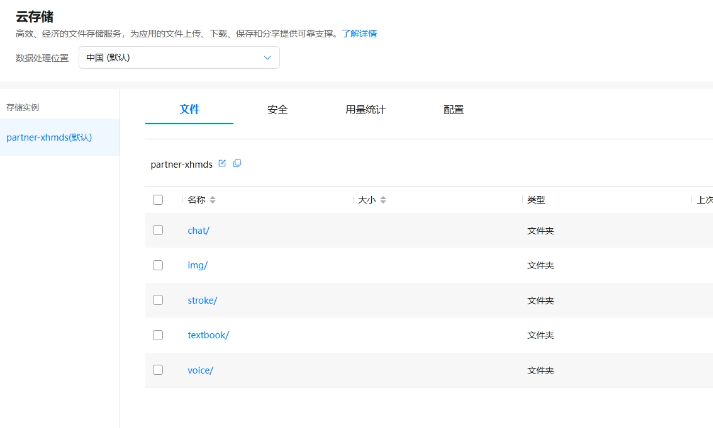
使用云存储之前,需要通过 cloudCommon.init() 完成全局初始化,配置区域、超时时间和认证提供者,然后获取 StorageBucket 实例。
项目在 CloudStorageSDK 中封装了初始化逻辑,采用单例模式确保全局唯一:
import { cloudCommon, cloudStorage } from '@kit.CloudFoundationKit';
import { BusinessError, request } from '@kit.BasicServicesKit';
import { fileIo, fileUri } from '@kit.CoreFileKit';
import { BackupConfig, UserInfoManager } from 'backup_air';

export default class CloudStorageSDK {
  private static instance: CloudStorageSDK
  bucketInstance: cloudStorage.StorageBucket | null = null

  static getInstance() {
    if (!CloudStorageSDK.instance) {
      CloudStorageSDK.instance = new CloudStorageSDK()
    }
    return CloudStorageSDK.instance
  }

  private constructor() {
    this.initStorage()
  }

  initStorage() {
    cloudCommon.init({
      region: cloudCommon.CloudRegion.CHINA,
      functionOptions: {
        timeout: 10 * 1000
      },
      authProvider: new MyAuthProvider(),
      storageOptions: {
        mode: request.agent.Mode.FOREGROUND,
        network: request.agent.Network.ANY
      },
    })
    let bucketName = BackupConfig.getConfig().bucketName;
    this.bucketInstance = cloudStorage.bucket(bucketName);
  }
}
要点解析:
cloudCommon.CloudRegion.CHINA指定中国区域节点authProvider是认证提供者,负责 AccessToken 的获取与刷新cloudStorage.bucket(bucketName)获取指定存储桶的操作实例storageOptions中的mode设为FOREGROUND表示前台模式下载
2. 认证提供者:MyAuthProvider
云存储的每次请求都需要 AccessToken,通过实现 cloudCommon.AuthProvider 接口来管理 Token 生命周期:
export class MyAuthProvider implements cloudCommon.AuthProvider {
  getAccessToken(isForceRefresh: boolean): Promise<string> {
    if (isForceRefresh) {
      return refreshAuthToken()
    }
    if (!UserInfoManager.isLoggedIn()) {
      return Promise.resolve(UserInfoManager.getAccessToken())
    }
    if (UserInfoManager.isAccessTokenExpired()) {
      return refreshAuthToken()
    }
    return Promise.resolve(UserInfoManager.getAccessToken())
  }
}
当 Token 过期时,调用 refreshAuthToken() 使用 RefreshToken 向华为 OAuth 服务换取新的 AccessToken:
export async function refreshAuthToken(): Promise<string> {
  let config = BackupConfig.getConfig()
  let oauth_client_id = config.oauth_client_id;
  let oauth_client_secret = config.oauth_client_secret;
  if (!UserInfoManager.isLoggedIn()) {
    return ""
  }
  if (UserInfoManager.isRefreshTokenExpired()) {
    promptAction.showToast({ message: '登录过期,请重新先登录呀~' })
    UserInfoManager.clearUserInfo()
    return ""
  }
  let refreshToken = encodeURIComponent(UserInfoManager.getRefreshToken());
  let httpRequest = http.createHttp();
  let body =
    `grant_type=refresh_token&client_id=${oauth_client_id}&client_secret=${oauth_client_secret}&refresh_token=${refreshToken}`;
  let resp = await httpRequest.request(
    "https://oauth-login.cloud.huawei.com/oauth2/v3/token",
    {
      method: http.RequestMethod.POST,
      extraData: body,
      header: {
        'Content-Type': 'application/x-www-form-urlencoded'
      },
    })
  let data = resp.result as string;
  const parsedData: Record<string, ESObject> = JSON.parse(data) as Record<string, ESObject>;
  const userInfo = UserInfoManager.getUserInfo();
  if (userInfo) {
    const accessTokenExpire = timeLater(Date.now(), parsedData["expires_in"] as number);
    const accessToken = parsedData["access_token"] as string;
    UserInfoManager.updateTokens(accessToken, accessTokenExpire);
  }
  return (parsedData["access_token"] as string)
}
3. 文件下载
3.1 基础下载流程
下载文件需要调用 bucket.downloadFile(),返回 request.agent.Task 对象,通过事件监听跟踪进度和结果:
async download(option: CloudStorageSDKSend) {
  deleteFile(option.fileUri)
  let task = await this.bucketInstance?.downloadFile(getContext(this), {
    localPath: option.fileUri,
    cloudPath: option.cloudFileName,
  }).catch((err: BusinessError) => {
    option.onFail?.()
    console.error(`下载失败:${err.code} ${err.message}`);
    return undefined;
  });
  if (!task) {
    return
  }

  task.on('progress', (progress) => {
    option.dataSendProgress?.(progress.processed)
    console.info(`${option.fileUri}当前下载进度:${JSON.stringify(progress)}`);
  })
  task.on('completed', (progress) => {
    option.onComplete?.()
    console.info(`当前下载完成: ${JSON.stringify(progress)}`);
  });
  task.on('failed', (progress) => {
    option.onFail?.()
    console.error(`当前下载失败 ${option.fileUri}: ${JSON.stringify(progress)}`);
  });
  task.on('response', (response) => {
    console.info(`当前下载响应: ${JSON.stringify(response)}`);
  });
  task.start((err: BusinessError) => {
    if (err) {
      option.onFail?.()
      console.error(`当前下载失败:${err.code} ${err.message}`);
    } else {
      console.info(`当前下载成功开始`);
    }
  });
}
Task 事件说明:
| 事件 | 触发时机 | 用途 |
|---|---|---|
progress |
数据传输过程中 | 显示下载进度 |
completed |
下载成功完成 | 通知 UI 更新 |
failed |
下载失败 | 错误处理 |
response |
收到服务端响应 | 调试日志 |
3.2 笔画数据下载
在 StrokeView 中,应用启动时从云端下载汉字笔画数据文件 stroke/data/all.json:
let resDir = GlobalUIAbilityContext.getContext().cacheDir
let bucket: cloudStorage.StorageBucket = cloudStorage.bucket();

private downloadStrokeFile(fileName: string, resDir: string) {
  let isExist = fs.accessSync(resDir);
  if (!isExist) {
    fs.mkdirSync(resDir)
  }
  bucket.downloadFile(GlobalUIAbilityContext.getContext(), {
    cloudPath: 'stroke/data/all.json',
    localPath: resDir + '/all.json',
    overwrite: true
  }).then((task: request.agent.Task) => {
    task.on('progress', (progress) => {
      console.info(`下载 on progress ${JSON.stringify(progress)}`);
    });
    task.on('completed', (progress) => {
      console.info(`下载 on completed ${JSON.stringify(progress)}`);
      this.loadWord()
    });
    task.on('failed', (progress) => {
      console.error(`下载 on failed ${JSON.stringify(progress)}`);
    });
    task.on('response', (response) => {
      console.info(`下载 on response ${JSON.stringify(response)}`);
    });
    task.start((err: BusinessError) => {
      if (err) {
        console.error(`下载 Failed to start the downloadFile task, Code: ${err.code}, message: ${err.message}`);
      } else {
        console.info(`下载 Succeeded in starting a downloadFile task.`);
      }
    });
  }).catch((err: BusinessError) => {
    console.error(`下载 Download file failed! Code: ${err.code}, message: ${err.message}`);
  });
}
4. 批量下载与进度管理
4.1 ChatView 批量下载
ChatView 在页面加载时批量下载聊天资源文件,通过 isDownloadingFile 状态标志控制加载提示:
@State isDownloadingFile: boolean = false
private downloadNum: number = 0

async downloadResources() {
  this.isDownloadingFile = true
  let isExist = fs.accessSync(resDir);
  if (!isExist) {
    fs.mkdirSync(resDir)
  }
  this.downloadNum = 0

  let result = await CloudStorageSDK.getInstance().listAllFiles('chat/res/');

  result.forEach((fileName: string, index: number) => {
    let isFileExist = fs.accessSync(resDir + '/' + fileName)
    if (!isFileExist) {
      this.downloadFile(fileName, resDir, result.length);
    } else {
      this.downloadNum++
      if (this.downloadNum === result.length) {
        this.isDownloadingFile = false
        this.initData()
      }
    }
  })
}
批量下载策略:
- 先通过
listAllFiles('chat/res/')获取云端文件列表 - 用
fs.accessSync()检查本地是否已存在该文件,避免重复下载 - 不存在则调用
downloadFile()逐个下载 - 每完成一个下载(或已存在),计数器
downloadNum递增 - 当计数等于总文件数时,标记下载完成
4.2 单文件下载与计数
private downloadFile(fileName: string, resDir: string, totalNum: number) {
  bucket.downloadFile(getContext(this), {
    cloudPath: fileName,
    localPath: resDir + '/' + fileName,
    overwrite: true
  }).then((task: request.agent.Task) => {
    task.on('completed', (progress) => {
      this.downloadNum++
      if (this.downloadNum === totalNum) {
        this.isDownloadingFile = false
        this.initData()
      }
    });
    task.on('failed', (progress) => {
      console.error(`on failed ${JSON.stringify(progress)}`);
    });
    task.start((err: BusinessError) => {
      if (err) {
        console.error(`Failed to start the downloadFile task, Code: ${err.code}, message: ${err.message}`);
      }
    });
  }).catch((err: BusinessError) => {
    console.error(`Download file failed! Code: ${err.code}, message: ${err.message}`);
  });
}
4.3 下载进度 UI
在 build() 中根据 isDownloadingFile 状态显示加载提示:
Column({ space: 10 }) {
  LoadingProgress().width(48).color(Color.White)
  Text('资源下载中,请稍后...').fontColor(Color.White).fontSize(14)
}.backgroundColor($r('app.color.color_loading_background'))
.padding(15)
.borderRadius(6)
.visibility(this.isDownloadingFile ? Visibility.Visible : Visibility.None)
5. 文件上传
5.1 CloudStorageSDK 上传封装
上传流程与下载类似,调用 bucket.uploadFile():
async uploadFile(option: CloudStorageSDKSend) {
  option.fileUri = new fileUri.FileUri(option.fileUri).path

  let task: request.agent.Task | undefined = await this.bucketInstance?.uploadFile(getContext(this), {
    localPath: option.fileUri,
    cloudPath: option.cloudFileName
  }).catch((err: BusinessError) => {
    option.onFail?.()
    console.error(`上传失败:${err.code} ${err.message}`);
    return undefined;
  });
  if (!task) {
    return
  }

  task.on('progress', (progress) => {
    option.dataSendProgress?.(progress.processed)
  })
  task.on('completed', (progress) => {
    option.onComplete?.()
  });
  task.on('failed', (progress) => {
    option.onFail?.()
  });
  task.on('response', (response) => {
    console.info(`上传响应:${JSON.stringify(response)}`);
  });
  task.start((err: BusinessError) => {
    if (err) {
      option.onFail?.()
    }
  });
}
5.2 语音录制上传
在 ChatPage 中,用户录制语音后,先上传到云存储获取下载 URL,再将 URL 传给语音识别服务:
// 录音结束后上传
RecordUtils.getInstance().stopRecordingProcess().then((voicePath: string) => {
  this.chatModel.uploadFile(voicePath, (downloadUrl: string) => {
    let uuid = util.generateRandomUUID()
    this.chatModel.voiceRecognition(uuid, this.uid, downloadUrl).then((status) => {
      if (status === LoadingStatus.SUCCESS) {
        let cloudPath = 'voice/' + voicePath.split('/').pop() as string;
        this.chatModel.deleteFile(cloudPath)
      }
    })
  })
})
ChatModel.uploadFile() 的实现——上传后获取下载 URL:
uploadFile(cacheFilePath: string, completeCallback: CompleteCallback) {
  let cloudPath = 'voice/' + cacheFilePath.split('/').pop() as string;
  bucket.uploadFile(getContext(this), {
    localPath: cacheFilePath,
    cloudPath: cloudPath,
  }).then(task => {
    this.addEventListener(task, this.onUploadCompleted(cloudPath, cacheFilePath, completeCallback));
    task.start();
  }).catch((err: BusinessError) => {
    console.error('uploadFile failed, error code: %{public}d, message: %{public}s',
      err.code, err.message);
  });
}

private onUploadCompleted(cloudPath: string, cacheFilePath: string, completeCallback: CompleteCallback) {
  return (uploadSuccess: boolean) => {
    if (uploadSuccess) {
      this.getDownloadUrl(cloudPath, completeCallback);
    }
    fs.unlink(cacheFilePath);
  }
}

private getDownloadUrl(path: string, completeCallback: CompleteCallback) {
  bucket.getDownloadURL(path).then(async (downloadURL: string) => {
    completeCallback(downloadURL)
  }).catch((err: BusinessError) => {
    console.error('getDownloadURL fail, error code: %{public}d, message: %{public}s',
      err.code, err.message);
  });
}
6. 文件列表与 JSON 数据操作
6.1 列出云端文件
async listAllFiles(dir: string): Promise<string[]> {
  let allFiles: string[] = [];
  const result = await this.bucketInstance?.list(dir);
  return result?.files || [];
}
6.2 上传/下载 JSON 数据
云存储不仅用于二进制文件,还可存取 JSON 配置数据:
async uploadJSON(cloudPath: string, uploadName: string, obj: ESObject) {
  let tempFilePath = `${getContext(this).tempDir}/${uploadName}`
  deleteFile(tempFilePath)
  let backupInfoJson = JSON.stringify(obj)

  let fd = await fileIo.open(tempFilePath, fileIo.OpenMode.CREATE | fileIo.OpenMode.WRITE_ONLY)
  await fileIo.write(fd.fd, backupInfoJson)
  await fileIo.close(fd)

  this.uploadFile({
    cloudFileName: cloudPath,
    fileUri: tempFilePath,
    onComplete: () => { deleteFile(tempFilePath) },
    onFail: () => { deleteFile(tempFilePath) },
    dataSendProgress: (progress) => {}
  })
}

async downloadJSON(cloudPath: string) {
  return new Promise<ESObject>(async (resolve, reject) => {
    let tempPath = `${getContext(this).tempDir}/${util.generateRandomUUID()}`
    await this.download({
      cloudFileName: cloudPath,
      fileUri: tempPath,
      onComplete: () => {
        let content = fileIo.readTextSync(tempPath);
        if (content != "") {
          resolve(JSON.parse(content) as ESObject)
        }
        deleteFile(tempPath)
      },
    })
  })
}
7. 本地文件系统操作
云存储常配合本地文件操作使用,项目中封装了通用的删除和路径转换工具:
export const deleteFile = (path: string) => {
  try {
    let uri = new fileUri.FileUri(path).path
    if (!fileIo.accessSync(uri)) {
      return
    }
    fileIo.unlinkSync(uri)
    getFiles("bgImage")
  } catch (e) {
    let err = e as BusinessError;
    console.error(`删除图片失败 ${err.code} ${err.message}` + path)
  }
}

export const getFiles = async (key: string) => {
  try {
    let context = getContext() as common.UIAbilityContext;
    let filesDir = context.filesDir;
    let files = await fileIo.listFile(filesDir + `/${key}`)
    return files
  } catch (e) {
    return []
  }
}
在 ChatView 和 ChatPage 中,使用 fileUri.getUriFromPath() 将沙箱路径转换为 URI 供 Image 组件加载:
private getAIUrl(path: string): string {
  let context = this.getUIContext().getHostContext();
  if (!context) {
    return '';
  }
  let realPath = context.cacheDir + path
  return fileUri.getUriFromPath(realPath);
}
常用文件系统 API:
| API | 用途 |
|---|---|
fs.accessSync(path) |
同步检查文件是否存在 |
fs.mkdirSync(path) |
同步创建目录 |
fs.unlinkSync(path) |
同步删除文件 |
fileUri.getUriFromPath(path) |
沙箱路径转 URI |
fileIo.readTextSync(path) |
同步读取文本文件 |
小结
本篇围绕 HarmonyOS 云存储 SDK 的核心能力展开讲解:
- 初始化流程:
cloudCommon.init()→cloudStorage.bucket()获取操作实例 - 下载机制:
downloadFile()返回 Task,通过on('progress/completed/failed/response')监听事件,task.start()启动 - 批量下载:
listAllFiles()获取文件列表 → 逐个下载 → 计数器判断完成 - 上传机制:
uploadFile()上传后通过getDownloadURL()获取访问地址 - 本地协同:
fs.accessSync()检查存在性、fileUri.getUriFromPath()路径转换、fs.unlinkSync()清理临时文件
云存储为"柚兔学伴"的聊天资源分发、语音文件中转和笔画数据同步提供了稳定的端云文件通道。

讨论HarmonyOS开发技术,专注于API与组件、DevEco Studio、测试、元服务和应用上架分发等。
更多推荐
 3
3 0
0- 0


 已为社区贡献100条内容

所有评论(0)