HarmonyOS《柚兔学伴》项目实战19-云数据库——端云数据同步
第19篇:云数据库——端云数据同步
HarmonyOS 的云数据库(Cloud DB)提供了端云一致的数据存储方案,支持数据在本地和云端之间自动同步,实现跨设备数据共享。本篇以"柚兔学伴"项目为例,讲解如何使用 @kit.CloudFoundationKit 中的 cloudDatabase 模块完成云端数据的查询、插入与更新操作。
1. 云数据库基础概念
1.1 云数据库 vs 本地 RDB
| 特性 | 云数据库 (Cloud DB) | 本地 RDB |
|---|---|---|
| 数据存储位置 | 云端 + 本地缓存 | 仅本地 |
| 跨设备同步 | 支持 | 不支持 |
| 网络依赖 | 首次查询需联网 | 无 |
| 适用场景 | 用户共享数据、跨设备同步 | 离线数据、本地缓存 |
| 数据类型 | DatabaseObject 子类 | ValuesBucket |
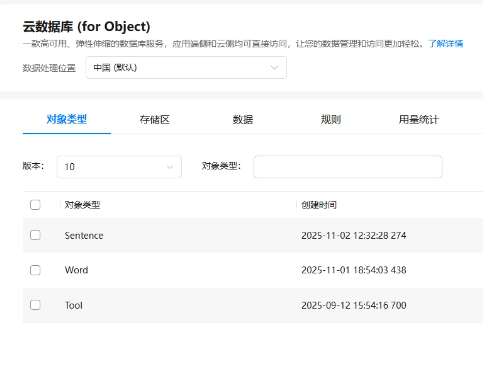
在"柚兔学伴"中,AI 工具卡片(Tool)、用户单词本(Word)、长难句(Sentence)都存储在云数据库中,实现不同设备间的学习数据同步。
1.2 核心对象关系
cloudDatabase.zone(name) → DatabaseZone (数据区域)
DatabaseQuery<T>(Class) → DatabaseQuery (查询条件)
DatabaseZone.query(condition) → T[] (查询结果)
DatabaseZone.upsert(data) → number (插入/更新)
2. 获取 DatabaseZone 实例
所有云数据库操作都从获取 DatabaseZone 开始,需要指定区域名称:
import { cloudDatabase } from '@kit.CloudFoundationKit';
import { UrlConstants } from 'network';

agcDataBase: cloudDatabase.DatabaseZone = cloudDatabase.zone(UrlConstants.ZONE_NAME);
其中 ZONE_NAME 在 UrlConstants 中定义为常量:
export class UrlConstants {
  static readonly ZONE_NAME: string = 'Partner'
}
注意: 区域名称需与 AGC 控制台中配置的云数据库区域名称一致。
3. 定义云对象类型
云数据库中的每张表对应一个继承自 cloudDatabase.DatabaseObject 的类,通过 naturalbase_ClassName() 方法指定表名:
3.1 Tool(AI 工具卡片)
import { cloudDatabase } from '@kit.CloudFoundationKit';

class Tool extends cloudDatabase.DatabaseObject {
    id: number | undefined;
    name: string = '';
    cover: string = '';
    num: string | undefined;
    type: string | undefined;

    naturalbase_ClassName(): string {
        return 'Tool';
    }
}

export { Tool };
3.2 Word(单词卡片)
class Word extends cloudDatabase.DatabaseObject {
    id: number | undefined;
    name: string | undefined;
    ttsUrl: string | undefined;
    pronunciation: string | undefined;
    means: string | undefined;
    userId: string | undefined;

    public naturalbase_ClassName(): string {
        return 'Word';
    }
}

export { Word };
3.3 Sentence(长难句)
class Sentence extends cloudDatabase.DatabaseObject {
    id: number | undefined;
    src: string | undefined;
    dst: string | undefined;
    ttsUrl: string | undefined;
    userId: string | undefined;

    public naturalbase_ClassName(): string {
        return 'Sentence';
    }
}

export { Sentence };
设计要点:
naturalbase_ClassName()返回的名称必须与 AGC 控制台中定义的表名完全一致- 字段名与云数据库表中的列名对应
userId字段用于实现用户维度的数据隔离
4. 查询数据
4.1 ChatView:查询 Tool 列表
在聊天首页,加载所有 AI 工具卡片不需要按用户过滤:
@Component
export struct ChatView {
  agcDataBase: cloudDatabase.DatabaseZone | undefined = undefined;
  condition: cloudDatabase.DatabaseQuery<cloudDatabase.DatabaseObject> | undefined = undefined;
  @State cardList: Tool[] = []

  async aboutToAppear(): Promise<void> {
    this.agcDataBase = cloudDatabase.zone(UrlConstants.ZONE_NAME);
    this.getCardList()
  }

  async getCardList() {
    let condition = new cloudDatabase.DatabaseQuery(Tool);
    try {
      this.cardList = await this.agcDataBase!!.query(condition)
      hilog.info(0x0000, 'testTag', `Succeeded in querying data, result: ${JSON.stringify(this.cardList)}`);
    } catch (err) {
      hilog.error(0x0000, 'testTag', `Failed to query data, code: ${err.code}, message: ${err.message}`);
    }
  }
}
查询流程:
new cloudDatabase.DatabaseQuery(Tool)创建以 Tool 类为模板的查询条件- 不添加任何条件,表示查询所有记录
agcDataBase.query(condition)执行查询,返回Tool[]数组
4.2 WordCardPage:按用户查询单词
单词本需要只显示当前用户的单词,通过 condition.equalTo('userId', uuid) 实现数据隔离:
@Component
struct WordCardPage {
  agcDataBase: cloudDatabase.DatabaseZone = cloudDatabase.zone(UrlConstants.ZONE_NAME);
  condition: cloudDatabase.DatabaseQuery<cloudDatabase.DatabaseObject> | undefined = undefined;
  @State wordList: Word[] = []

  aboutToAppear(): void {
    this.getWordList().then((wordList: Word[]) => {
      this.wordList = wordList
    })
  }

  async getWordList(): Promise<Word[]> {
    try {
      this.condition = new cloudDatabase.DatabaseQuery(Word);
      let uuid = await UserInfoManager.getUserInfo()?.unionID
      this.condition.equalTo('userId', uuid)
      return await this.agcDataBase?.query(this.condition) as Word[]
    } catch (err) {
      return []
    }
  }
}
用户数据隔离的关键步骤:
- 通过
UserInfoManager.getUserInfo()?.unionID获取用户唯一标识 condition.equalTo('userId', uuid)添加等值查询条件- 查询结果只包含当前用户的单词数据
4.3 SentenceCardPage:按用户查询长难句
查询模式与 WordCardPage 完全一致,仅将类型替换为 Sentence:
@Component
struct SentenceCardPage {
  agcDataBase: cloudDatabase.DatabaseZone = cloudDatabase.zone(UrlConstants.ZONE_NAME);
  condition: cloudDatabase.DatabaseQuery<cloudDatabase.DatabaseObject> | undefined = undefined;
  @State sentenceList: Sentence[] = []

  async getWordList(): Promise<Sentence[]> {
    try {
      this.condition = new cloudDatabase.DatabaseQuery(Sentence);
      let uuid = await UserInfoManager.getUserInfo()?.unionID
      this.condition.equalTo('userId', uuid)
      return await this.agcDataBase?.query(this.condition) as Sentence[]
    } catch (err) {
      return []
    }
  }
}
5. 插入与更新数据
5.1 upsert 操作
upsert 是云数据库提供的"插入或更新"操作——如果记录已存在则更新,不存在则插入。在 ChatView 中可以看到注释中的 upsert 用法:
// 更新卡片点击次数
data.num = (parseInt(data.num!!) + 1).toString()
this.agcDataBase!!.upsert(data).then((num: number) => {
  this.getCardList()
}).catch((err: BusinessError) => {
  err
})
5.2 创建新的云对象
添加长难句时,创建 Sentence 实例并设置字段值:
let sentence = new Sentence();
sentence.src = this.model.resultData.result!!.trans_result!![0].src
sentence.dst = this.model.resultData.result!!.trans_result!![0].dst
sentence.ttsUrl = this.model.resultData.result!!.trans_result!![0].dst_tts
sentence.userId = UserInfoManager.getUserInfo()?.unionID
// this.agcDataBase.upsert(sentence)  // 插入到云端
步骤:
new Sentence()创建空的云对象实例- 设置各字段值,特别是
userId确保数据归属 agcDataBase.upsert(sentence)将数据写入云数据库
6. 错误处理
云数据库操作涉及网络请求,必须做好错误处理。项目中采用 try/catch 包裹查询操作:
async getCardList() {
  let condition = new cloudDatabase.DatabaseQuery(Tool);
  try {
    this.cardList = await this.agcDataBase!!.query(condition)
    hilog.info(0x0000, 'testTag', `Succeeded in querying data, result: ${JSON.stringify(this.cardList)}`);
  } catch (err) {
    hilog.error(0x0000, 'testTag', `Failed to query data, code: ${err.code}, message: ${err.message}`);
  }
}
对于非关键数据(如单词列表),查询失败时返回空数组:
async getWordList(): Promise<Word[]> {
  try {
    this.condition = new cloudDatabase.DatabaseQuery(Word);
    let uuid = await UserInfoManager.getUserInfo()?.unionID
    this.condition.equalTo('userId', uuid)
    return await this.agcDataBase?.query(this.condition) as Word[]
  } catch (err) {
    return []
  }
}
错误处理建议:
| 场景 | 处理方式 |
|---|---|
| 关键数据查询失败 | 使用 hilog.error 记录,UI 显示错误提示 |
| 非关键数据查询失败 | 返回空数组,UI 显示"暂无数据" |
| 写入操作失败 | catch 中提示用户重试 |
| 网络不可用 | 结合本地缓存提供离线体验 |
7. UI 数据绑定
查询结果直接绑定到 @State 变量,实现数据驱动 UI 更新:
@State cardList: Tool[] = []

@Builder
CardLayout() {
  Grid(this.scroller) {
    ForEach(this.cardList, (data: Tool, index: number) => {
      GridItem() {
        Column() {
          Column({ space: 5 }) {
            Row() {
              Text(data.name).fontWeight(FontWeight.Bold).fontColor(Color.White);
              Text('复习记忆')
                .fontSize(10)
                .fontColor(Color.White)
            }.width('100%').justifyContent(FlexAlign.SpaceBetween);
          }.width('100%').padding(10)
        }
        .backgroundImage(data.cover)
        .width('100%')
        .aspectRatio(1);
      }
      .onClick(() => {
        if (index === 1) {
          this.pageContext.openPage({ routerName: 'WordCardPage' }, true);
        } else if (index === 0) {
          this.pageContext.openPage({ routerName: 'SentenceCardPage' }, true);
        }
      });
    });
  }
  .columnsTemplate('1fr 1fr')
  .columnsGap(10)
  .rowsGap(10)
}
单词列表页面,无数据时显示空状态:
if (this.wordList.length === 0) {
  Column({ space: 15 }) {
    Image($r('app.media.ic_no_data')).width(50)
    Text('点击对话记录中的单词可添加到单词卡片').fontSize(12)
    Text('暂无单词卡片').fontColor($r('app.color.color_divider')).fontSize(12)
  }.layoutWeight(1).justifyContent(FlexAlign.Center)
} else {
  List({ space: 10 }) {
    ForEach(this.wordList, (word: Word, index: number) => {
      ListItem() {
        Column({ space: 10 }) {
          Row({ space: 5 }) {
            Text(word.name).fontWeight(FontWeight.Bold).fontSize(18)
            Image($r('app.media.ic_listening')).width(24)
              .onClick(() => {
                this.model.download(word.ttsUrl!!).then((name: string) => {
                  AudioUtils.getInstance().startPlay(getContext(this).cacheDir + name)
                })
              })
            Blank()
          }.width('100%')
          Text(word.pronunciation).fontSize(12).width('100%')
          Text(word.means).fontSize(14).fontStyle(FontStyle.Italic)
        }.padding(12).alignItems(HorizontalAlign.Start)
      }.backgroundColor($r('app.color.color_card')).borderRadius(12)
    })
  }
  .layoutWeight(1)
}
8. DatabaseQuery 条件构建
DatabaseQuery 支持多种条件构建方式:
| 方法 | 说明 | 示例 |
|---|---|---|
equalTo(field, value) |
等值查询 | condition.equalTo('userId', uuid) |
lessThan(field, value) |
小于 | condition.lessThan('age', 18) |
greaterThan(field, value) |
大于 | condition.greaterThan('score', 60) |
orderByDesc(field) |
降序排列 | condition.orderByDesc('date') |
orderByAsc(field) |
升序排列 | condition.orderByAsc('name') |
limit(count) |
限制返回数量 | condition.limit(10) |
多条件组合: 可以链式调用多个条件方法:
let condition = new cloudDatabase.DatabaseQuery(Word);
condition.equalTo('userId', uuid)
         .orderByDesc('name')
         .limit(20);
小结
本篇围绕 HarmonyOS 云数据库的核心操作展开讲解:
- 连接云数据库:
cloudDatabase.zone(name)获取DatabaseZone实例 - 定义云对象:继承
DatabaseObject,实现naturalbase_ClassName()指定表名 - 查询数据:
DatabaseQuery<T>构建条件 →zone.query(condition)执行查询 - 数据隔离:
condition.equalTo('userId', uuid)实现用户维度过滤 - 写入数据:
zone.upsert(data)实现插入或更新 - 错误处理:
try/catch包裹异步操作,查询失败返回空数组 - UI 绑定:查询结果直接赋值
@State变量,驱动界面自动刷新
云数据库为"柚兔学伴"实现了单词本、长难句等学习数据的端云同步,用户在不同设备上都能获取一致的学习进度。

讨论HarmonyOS开发技术,专注于API与组件、DevEco Studio、测试、元服务和应用上架分发等。
更多推荐
 4
4 0
0- 0


 已为社区贡献100条内容

所有评论(0)