HarmonyOS《柚兔学伴》项目实战21-诗词数据库与 AI 诗词生成
第21篇:诗词数据库与 AI 诗词生成
本地数据库是 HarmonyOS 应用持久化数据的基础设施,而 AI 大模型则为内容生成提供了智能引擎。本篇以"柚兔学伴"的每日诗词功能为例,讲解如何使用 @kit.ArkData 的 relationalStore 构建功能完整的本地诗词数据库,并结合 AI 智能体实现古诗自动生成与持久化存储。
1. PoemDatabase 单例设计
PoemDatabase 采用单例模式,确保全局只有一个数据库实例,避免重复打开造成的资源浪费:
import { relationalStore } from "@kit.ArkData";
import { BusinessError } from '@kit.BasicServicesKit';

export class PoemDatabase {
  private store: relationalStore.RdbStore | null = null;
  private context: Context;
  private static instance: PoemDatabase | null = null;

  private constructor(context: Context) {
    this.context = context;
  }

  public static getInstance(context: Context): PoemDatabase {
    if (PoemDatabase.instance === null) {
      PoemDatabase.instance = new PoemDatabase(context);
    }
    return PoemDatabase.instance;
  }
}
2. 数据模型定义
2.1 PoemItem 接口
完整的诗词数据模型包含诗词内容、作者、解读等字段:
export interface PoemItem {
  id?: number;
  date: string;        // 日期 (YYYY-MM-DD)
  poem: string;        // 诗词内容
  author: string;      // 作者
  meaning: string;     // 诗词大意
  story: string;       // 背后故事
  praise: string;      // 赏析与启示
  isFavorite: boolean; // 是否收藏
}
2.2 创建与更新接口
为不同操作场景定义专用接口,确保类型安全:
export interface CreatePoemItem {
  date: string;
  poem: string;
  author: string;
  meaning: string;
  story: string;
  praise: string;
  isFavorite: boolean;
}

export interface UpdatePoemItem {
  date?: string;
  poem?: string;
  author?: string;
  meaning?: string;
  story?: string;
  praise?: string;
  isFavorite?: boolean;
}

export interface PoemStatItem {
  total?: number;
  favorite?: number;
  unfavorite?: number;
}
设计原则:
CreatePoemItem:创建时必须提供所有字段(不含 id)UpdatePoemItem:更新时所有字段可选,仅更新传入的字段PoemStatItem:统计专用,聚合查询结果
3. 数据库初始化与建表
3.1 数据库配置
const STORE_CONFIG: relationalStore.StoreConfig = {
  name: 'DailyPoemDatabase.db',
  securityLevel: relationalStore.SecurityLevel.S1,
  encrypt: false
};
| 参数 | 说明 |
|---|---|
name |
数据库文件名 |
securityLevel |
S1 为最低安全级别,适合非敏感数据 |
encrypt |
是否加密数据库文件 |
3.2 建表 SQL
const TABLE_NAME = 'daily_poems';
const CREATE_TABLE_SQL = `
  CREATE TABLE IF NOT EXISTS ${TABLE_NAME} (
    id INTEGER PRIMARY KEY AUTOINCREMENT,
    date TEXT NOT NULL,
    poem TEXT NOT NULL UNIQUE,
    author TEXT NOT NULL,
    meaning TEXT NOT NULL,
    story TEXT NOT NULL,
    praise TEXT NOT NULL,
    isFavorite INTEGER NOT NULL DEFAULT 0
  )
`;
注意 UNIQUE 约束:poem 字段设置了 UNIQUE,确保同一首诗不会被重复存储。插入重复内容时会抛出异常。
3.3 初始化方法
async initialize(): Promise<void> {
  try {
    this.store = await relationalStore.getRdbStore(this.context, STORE_CONFIG);
    await this.store.executeSql(CREATE_TABLE_SQL);
    console.info('PoemDatabase initialized successfully');
  } catch (error) {
    console.error('Failed to initialize PoemDatabase:', error);
    throw new Error('Failed to initialize PoemDatabase: ' + (error as BusinessError).message);
  }
}
4. 完整 CRUD 操作
4.1 添加诗词
使用 ValuesBucket 构建插入数据,布尔值需要转换为整数:
async addPoem(poem: CreatePoemItem): Promise<number> {
  if (!this.store) {
    throw new Error('Database not initialized');
  }

  try {
    const valueBucket: relationalStore.ValuesBucket = {
      date: poem.date,
      poem: poem.poem,
      author: poem.author,
      meaning: poem.meaning,
      story: poem.story,
      praise: poem.praise,
      isFavorite: poem.isFavorite ? 1 : 0
    };

    const rowId = await this.store.insert(TABLE_NAME, valueBucket);
    console.info(`Poem added successfully, rowId: ${rowId}`);
    return rowId;
  } catch (error) {
    console.error('Failed to add poem:', error);
    throw new Error('Failed to add poem: ' + (error as BusinessError).message);
  }
}
4.2 按日期查询
async getPoemByDate(date: string): Promise<PoemItem | null> {
  if (!this.store) {
    throw new Error('Database not initialized');
  }

  try {
    const predicates = new relationalStore.RdbPredicates(TABLE_NAME);
    predicates.equalTo('date', date);

    const resultSet = await this.store.query(predicates);
    if (resultSet.rowCount === 0) {
      resultSet.close();
      return null;
    }

    resultSet.goToLastRow();
    const poem = this.resultSetToPoemItem(resultSet);
    resultSet.close();
    return poem;
  } catch (error) {
    console.error('Failed to get poem by date:', error);
    throw new Error('Failed to get poem by date: ' + (error as BusinessError).message);
  }
}
注意: 使用 goToLastRow() 取同日期最后一条记录,确保获取最新生成的诗词。
4.3 按 ID 查询
async getPoemById(id: number): Promise<PoemItem | null> {
  const predicates = new relationalStore.RdbPredicates(TABLE_NAME);
  predicates.equalTo('id', id);

  const resultSet = await this.store.query(predicates);
  if (resultSet.rowCount === 0) {
    resultSet.close();
    return null;
  }

  resultSet.goToFirstRow();
  const poem = this.resultSetToPoemItem(resultSet);
  resultSet.close();
  return poem;
}
4.4 获取所有诗词
按日期降序排列,最新诗词排在前面:
async getAllPoems(): Promise<PoemItem[]> {
  const predicates = new relationalStore.RdbPredicates(TABLE_NAME);
  predicates.orderByDesc('date');

  const resultSet = await this.store.query(predicates);
  const poems: PoemItem[] = [];

  if (resultSet.rowCount > 0) {
    resultSet.goToFirstRow();
    do {
      poems.push(this.resultSetToPoemItem(resultSet));
    } while (resultSet.goToNextRow());
  }

  resultSet.close();
  return poems;
}
4.5 获取收藏诗词
async getFavoritePoems(): Promise<PoemItem[]> {
  const predicates = new relationalStore.RdbPredicates(TABLE_NAME);
  predicates.equalTo('isFavorite', 1).orderByDesc('date');

  const resultSet = await this.store.query(predicates);
  const poems: PoemItem[] = [];

  if (resultSet.rowCount > 0) {
    resultSet.goToFirstRow();
    do {
      poems.push(this.resultSetToPoemItem(resultSet));
    } while (resultSet.goToNextRow());
  }

  resultSet.close();
  return poems;
}
4.6 更新诗词
动态构建 ValuesBucket,只更新有值的字段:
async updatePoem(id: number, poem: UpdatePoemItem): Promise<boolean> {
  const valueBucket: relationalStore.ValuesBucket = {};

  if (poem.date !== undefined) valueBucket.date = poem.date;
  if (poem.poem !== undefined) valueBucket.poem = poem.poem;
  if (poem.author !== undefined) valueBucket.author = poem.author;
  if (poem.meaning !== undefined) valueBucket.meaning = poem.meaning;
  if (poem.story !== undefined) valueBucket.story = poem.story;
  if (poem.praise !== undefined) valueBucket.praise = poem.praise;
  if (poem.isFavorite !== undefined) valueBucket.isFavorite = poem.isFavorite ? 1 : 0;

  const predicates = new relationalStore.RdbPredicates(TABLE_NAME);
  predicates.equalTo('id', id);

  const rowsAffected = await this.store.update(valueBucket, predicates);
  return rowsAffected > 0;
}
4.7 切换收藏状态
先查询当前状态,再取反更新:
async toggleFavorite(id: number): Promise<boolean> {
  const poem = await this.getPoemById(id);
  if (!poem) {
    return false;
  }
  return await this.updatePoem(id, { isFavorite: !poem.isFavorite });
}
4.8 删除诗词
async deletePoem(id: number): Promise<boolean> {
  const predicates = new relationalStore.RdbPredicates(TABLE_NAME);
  predicates.equalTo('id', id);

  const rowsAffected = await this.store.delete(predicates);
  return rowsAffected > 0;
}
5. 高级查询
5.1 模糊搜索
使用 beginWrap().like().or().like().endWrap() 构建组合搜索条件:
async searchPoems(keyword: string): Promise<PoemItem[]> {
  const predicates = new relationalStore.RdbPredicates(TABLE_NAME);
  predicates.beginWrap()
    .like('title', `%${keyword}%`)
    .or()
    .like('author', `%${keyword}%`)
    .or()
    .like('poem', `%${keyword}%`)
    .endWrap()
    .orderByDesc('date');

  const resultSet = await this.store.query(predicates);
  const poems: PoemItem[] = [];

  if (resultSet.rowCount > 0) {
    resultSet.goToFirstRow();
    do {
      poems.push(this.resultSetToPoemItem(resultSet));
    } while (resultSet.goToNextRow());
  }

  resultSet.close();
  return poems;
}
对应 SQL: WHERE (title LIKE '%keyword%' OR author LIKE '%keyword%' OR poem LIKE '%keyword%') ORDER BY date DESC
5.2 随机诗词
使用原生 SQL 的 RANDOM() 函数:
async getRandomPoem(): Promise<PoemItem | null> {
  const sql = `SELECT * FROM ${TABLE_NAME} ORDER BY RANDOM() LIMIT 1`;
  const resultSet = await this.store.querySql(sql);

  if (resultSet.rowCount === 0) {
    resultSet.close();
    return null;
  }

  resultSet.goToFirstRow();
  const poem = this.resultSetToPoemItem(resultSet);
  resultSet.close();
  return poem;
}
5.3 按作者查询
async getPoemsByAuthor(author: string): Promise<PoemItem[]> {
  const predicates = new relationalStore.RdbPredicates(TABLE_NAME);
  predicates.equalTo('author', author).orderByDesc('date');

  const resultSet = await this.store.query(predicates);
  const poems: PoemItem[] = [];

  if (resultSet.rowCount > 0) {
    resultSet.goToFirstRow();
    do {
      poems.push(this.resultSetToPoemItem(resultSet));
    } while (resultSet.goToNextRow());
  }

  resultSet.close();
  return poems;
}
5.4 统计信息
使用 COUNT(*) 聚合查询获取统计数据:
async getStatistics(): Promise<PoemStatItem> {
  // 总数
  const totalPredicates = new relationalStore.RdbPredicates(TABLE_NAME);
  const totalResult = await this.store.query(totalPredicates, ['COUNT(*) as count']);
  totalResult.goToFirstRow();
  const total = totalResult.getLong(0);
  totalResult.close();

  // 收藏数
  const favoritePredicates = new relationalStore.RdbPredicates(TABLE_NAME);
  favoritePredicates.equalTo('isFavorite', 1);
  const favoriteResult = await this.store.query(favoritePredicates, ['COUNT(*) as count']);
  favoriteResult.goToFirstRow();
  const favorite = favoriteResult.getLong(0);
  favoriteResult.close();

  return {
    total,
    favorite,
    unfavorite: total - favorite
  };
}
6. ResultSet 转换工具
所有查询最终都需要将 ResultSet 转换为 PoemItem 对象:
private resultSetToPoemItem(resultSet: relationalStore.ResultSet): PoemItem {
  return {
    id: resultSet.getLong(resultSet.getColumnIndex('id')),
    date: resultSet.getString(resultSet.getColumnIndex('date')),
    poem: resultSet.getString(resultSet.getColumnIndex('poem')),
    author: resultSet.getString(resultSet.getColumnIndex('author')),
    meaning: resultSet.getString(resultSet.getColumnIndex('meaning')),
    story: resultSet.getString(resultSet.getColumnIndex('story')),
    praise: resultSet.getString(resultSet.getColumnIndex('praise')),
    isFavorite: resultSet.getLong(resultSet.getColumnIndex('isFavorite')) === 1
  };
}
转换要点:
getColumnIndex(columnName)获取列索引getLong()/getString()按类型读取值isFavorite在数据库中是INTEGER,需要与1比较转为boolean- 使用完
ResultSet后必须调用close()释放资源
7. AI 诗词生成
7.1 生成流程
PoemPage 中的 AI 诗词生成遵循"创建会话 → 获取智能体配置 → 发送消息 → 轮询结果 → 解析存储"的完整链路:
private generatePoem() {
  this.isGoPoem = true
  this.poemModel.conversationCreate(this.userId, Role.ASSISTANT).then((status) => {
    if (status === LoadingStatus.SUCCESS) {
      this.poemModel.getOnlineInfo(AgentConstant.DAILY_POEM_ID).then(() => {
        this.sendMsgToAgent('生成一首古诗', '');
      });
    } else {
      this.isGoPoem = false
    }
  });
}
7.2 发送消息与轮询
private sendMsgToAgent(content: string, name: string) {
  this.poemModel.chat(this.poemModel.conversation.id!!, this.userId, Role.USER, content,
    AgentConstant.DAILY_POEM_ID, name).then((status) => {
    if (status === LoadingStatus.SUCCESS) {
      this.internalId = setInterval(() => {
        this.retrieve();
      }, 1100)
    } else {
      this.isGoPoem = false
    }
  })
}
7.3 结果轮询与存储
通过 setInterval 每 1.1 秒轮询生成状态,完成后将 AI 返回的 JSON 解析并存入数据库:
private retrieve() {
  this.poemModel.retrieve(this.poemModel.response.conversation_id!!, this.poemModel.response.id!!)
    .then(() => {
      if (this.poemModel.retrieveData.status === 'in_progress') {
        // 生成中,继续轮询
      } else if (this.poemModel.retrieveData.status === 'failed') {
        ToastUtil.showToast('服务器繁忙,请重试')
        clearInterval(this.internalId)
        this.isGoPoem = false
      } else if (this.poemModel.retrieveData.status === 'completed') {
        this.isGoPoem = false
        clearInterval(this.internalId)
        this.poemModel.messageList(this.poemModel.response.conversation_id!!, this.poemModel.response.id!!)
          .then(() => {
            if (this.poemModel.msgStatus === LoadingStatus.SUCCESS) {
              this.poemModel.msgList.forEach(async (item) => {
                if (item.type! === 'answer') {
                  this.poemInfo = JSON.parse(item.content!!)
                  // 存入本地数据库
                  const poemDB = PoemDatabase.getInstance(GlobalUIAbilityContext.getContext());
                  await poemDB.addPoem({
                    date: DateUtil.getTodayStr('yyyy-MM-dd'),
                    poem: this.poemInfo?.poem ?? "",
                    author: this.poemInfo?.author ?? "",
                    meaning: this.poemInfo?.meaning ?? "",
                    story: this.poemInfo?.story ?? "",
                    praise: this.poemInfo?.praise ?? "",
                    isFavorite: false,
                  });
                }
              })
            }
          })
      }
    });
}
关键步骤解析:
- AI 智能体返回 JSON 格式的诗词数据:
{ poem, author, meaning, story, praise } JSON.parse(item.content!!)解析为PoemItem对象- 赋值给
this.poemInfo驱动 UI 即时显示 - 同时调用
poemDB.addPoem()持久化到本地数据库 DateUtil.getTodayStr('yyyy-MM-dd')自动填充当前日期
8. PoemPage UI 架构
8.1 整体布局
@Component
struct PoemPage {
  @State poemInfo: PoemItem | undefined = undefined
  @State currentIndex: number = 0;
  @State selectedIndex: number = 0;
  @State isGoPoem: boolean = false

  build() {
    NavDestination() {
      Column() {
        this.buildTopBar()
        if (this.isGoPoem) {
          Column() {
            LoadingProgress().width(40)
          }.layoutWeight(1).justifyContent(FlexAlign.Center)
        } else {
          this.buildContent()
        }
        this.buildBottom()
      }
    }
    .onReady((ctx: NavDestinationContext) => {
      this.poemInfo = ctx.pathInfo.param as PoemItem;
      this.userId = UserInfoManager.getUserInfo()?.unionID ?? ''
    })
  }
}
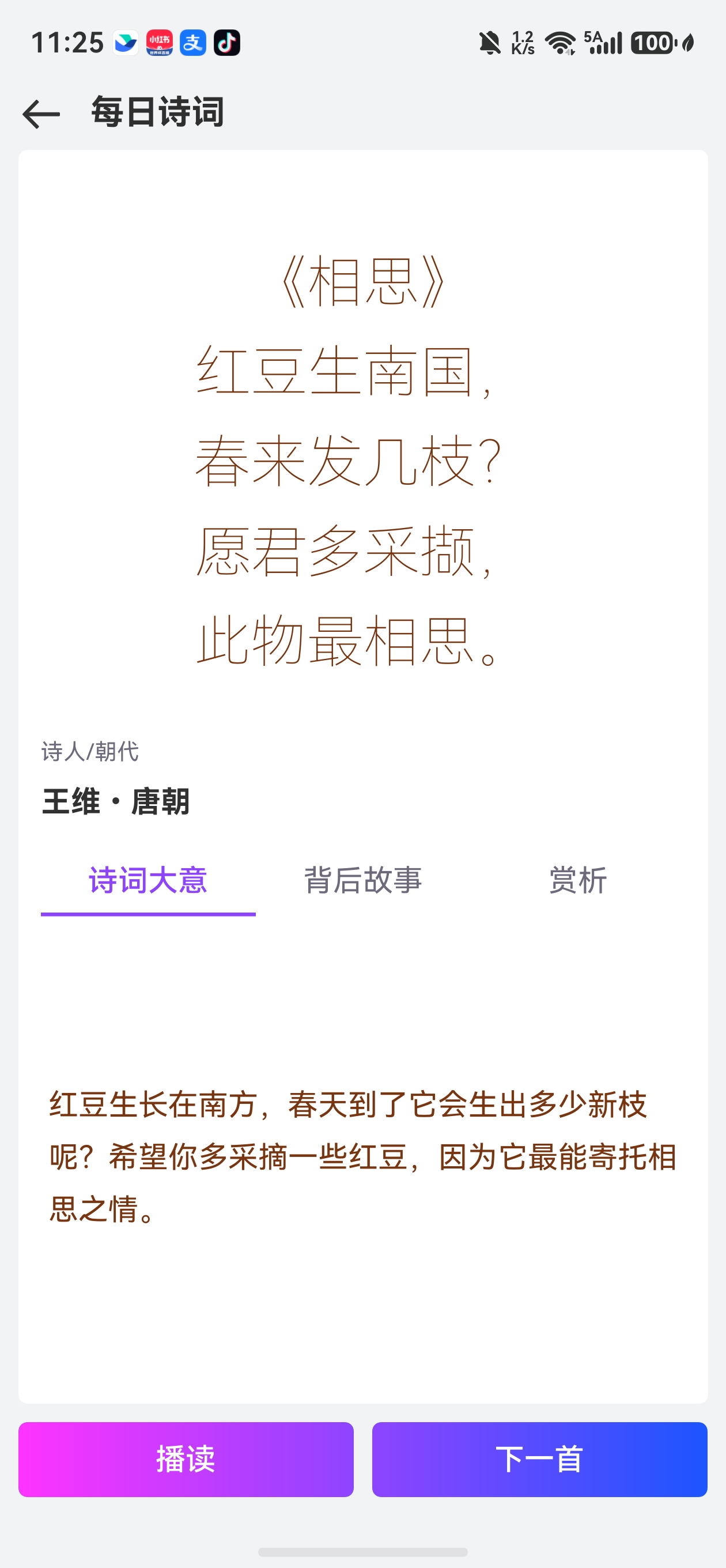
8.2 诗词内容展示
诗词文本使用大号字体、居中排列,配合行间距增强可读性:
Text(this.poemInfo?.poem)
  .fontSize(30)
  .fontWeight(FontWeight.Lighter)
  .fontColor($r('app.color.poem_color'))
  .width("100%")
  .textAlign(TextAlign.Center)
  .layoutWeight(1)
  .lineSpacing(LengthMetrics.fp(18))
8.3 Tabs 详解页面
通过 Tabs 组件展示"诗词大意"、“背后故事”、"赏析"三个维度的解读:
Tabs({ barPosition: BarPosition.Start, index: this.currentIndex, controller: this.controller }) {
  TabContent() {
    Column() {
      Text(this.poemInfo?.meaning)
        .fontColor($r('app.color.poem_color'))
        .lineSpacing(LengthMetrics.fp(12))
    }.layoutWeight(1)
  }.tabBar(this.tabBuilder(0, '诗词大意'))

  TabContent() {
    Column() {
      Text(this.poemInfo?.story)
        .fontColor($r('app.color.poem_color'))
        .lineSpacing(LengthMetrics.fp(12))
    }.layoutWeight(1)
  }.tabBar(this.tabBuilder(1, '背后故事'))

  TabContent() {
    Column() {
      Text(this.poemInfo?.praise)
        .fontColor($r('app.color.poem_color'))
        .lineSpacing(LengthMetrics.fp(12))
    }.layoutWeight(1)
  }.tabBar(this.tabBuilder(2, '赏析'))
}
.barMode(BarMode.Fixed)
.height(300)
.onChange((index: number) => {
  this.currentIndex = index;
  this.selectedIndex = index;
})
8.4 底部操作栏
"播读"按钮调用 PoemReader 朗读诗词,"下一首"按钮触发生成新诗:
@Builder
buildBottom() {
  Row() {
    Button('播读').layoutWeight(1).borderRadius(5)
      .linearGradient({
        angle: 90,
        colors: [[0xFF33FF, 0.0], [0x8E44FF, 1]]
      })
      .onClick(() => {
        PoemReader.play(this.poemInfo?.poem ?? '');
      })
    Blank(10)
    Button('下一首').layoutWeight(1).borderRadius(5)
      .linearGradient({
        angle: 90,
        colors: [[0x8E44FF, 0.0], [0x1C55FF, 1]]
      }).onClick(() => {
      this.generatePoem()
    })
  }.width('100%').padding(10)
}
9. CRUD 方法速查表
| 方法 | 功能 | 关键 API |
|---|---|---|
addPoem |
新增诗词 | store.insert(table, valueBucket) |
getPoemByDate |
按日期查询 | predicates.equalTo('date', date) + goToLastRow() |
getPoemById |
按 ID 查询 | predicates.equalTo('id', id) |
getAllPoems |
获取全部 | predicates.orderByDesc('date') |
getFavoritePoems |
获取收藏 | predicates.equalTo('isFavorite', 1) |
updatePoem |
更新诗词 | store.update(valueBucket, predicates) |
toggleFavorite |
切换收藏 | getPoemById + updatePoem |
deletePoem |
删除诗词 | store.delete(predicates) |
searchPoems |
模糊搜索 | beginWrap().like().or().like().endWrap() |
getRandomPoem |
随机获取 | store.querySql('ORDER BY RANDOM() LIMIT 1') |
getPoemsByAuthor |
按作者查询 | predicates.equalTo('author', author) |
getStatistics |
统计信息 | COUNT(*) 聚合查询 |
小结
本篇围绕诗词数据库和 AI 诗词生成展开讲解:
- 数据库设计:单例模式、专用接口(Create/Update/Stat)、UNIQUE 约束防重复
- CRUD 全操作:insert、query、update、delete,配合
RdbPredicates构建灵活查询条件 - 高级查询:
like模糊搜索、RANDOM()随机、COUNT(*)聚合统计 - ResultSet 处理:
getColumnIndex定位列,getLong/getString读取值,close()释放资源 - AI 生成链路:创建会话 → 获取智能体 → 发送请求 → 轮询结果 → JSON 解析 → 数据库存储
- UI 展示:Tabs 组件多维度展示、播读语音朗读、下一首触发生成
本地 RDB 数据库与 AI 智能体的结合,使"柚兔学伴"的每日诗词功能既能离线浏览历史诗词,又能在线生成全新内容,为用户提供了丰富的传统文化学习体验。

讨论HarmonyOS开发技术,专注于API与组件、DevEco Studio、测试、元服务和应用上架分发等。
更多推荐
 5
5 0
0- 0


 已为社区贡献100条内容

所有评论(0)