HarmonyOS《柚兔学伴》项目实战24-积分系统与礼品兑换
24. 积分系统与礼品兑换
本章导读
积分激励是儿童教育类应用提升用户粘性的重要手段。「柚兔学伴」构建了完整的积分系统:完成任务获得积分、设定兑换目标、确认兑换扣减积分、兑换记录持久化。本章将详解积分的数据存储、UI 展示、兑换逻辑与数据库封装。
24.1 GiftExchangeDatabase 数据库封装
积分兑换记录需要持久化存储,项目采用与 TodoDatabase 相同的 RDB 封装模式:
接口定义
// GiftExchangeDatabase.ets
export interface GiftExchange {
  id?: number;
  giftName?: string;        // 礼品名称
  pointsRequired?: number;  // 所需积分
  exchangeDate?: string;    // 兑换时间 (YYYY-MM-DD HH:mm:ss)
}

export interface GiftStatItem {
  totalExchanges?: number;      // 总兑换次数
  totalPointsUsed?: number;     // 总使用积分
  mostPopularGift?: string;     // 最受欢迎的礼品
}
数据库配置
const STORE_CONFIG: relationalStore.StoreConfig = {
  name: 'GiftExchangeDatabase.db',
  securityLevel: relationalStore.SecurityLevel.S1,
  encrypt: false
};

const TABLE_NAME = 'gift_exchanges';
const CREATE_TABLE_SQL = `
  CREATE TABLE IF NOT EXISTS ${TABLE_NAME} (
    id INTEGER PRIMARY KEY AUTOINCREMENT,
    giftName TEXT NOT NULL,
    pointsRequired INTEGER NOT NULL,
    exchangeDate TEXT NOT NULL
  )
`;
安全级别 S1 适用于一般数据存储,无需加密。
初始化
async initialize(): Promise<void> {
  try {
    this.store = await relationalStore.getRdbStore(this.context, STORE_CONFIG);
    await this.store.executeSql(CREATE_TABLE_SQL);
    console.info('GiftExchangeDatabase initialized successfully');
  } catch (error) {
    console.error('Failed to initialize GiftExchangeDatabase:', error);
    throw new Error('Failed to initialize GiftExchangeDatabase: ' + (error as BusinessError).message);
  }
}
CRUD 完整实现
添加兑换记录:
async addExchange(exchange: GiftExchange): Promise<number> {
  if (!this.store) {
    throw new Error('Database not initialized');
  }
  if (!exchange.giftName || exchange.pointsRequired === undefined || !exchange.exchangeDate) {
    throw new Error('Missing required fields: giftName, pointsRequired, exchangeDate');
  }

  const valueBucket: relationalStore.ValuesBucket = {
    giftName: String(exchange.giftName),
    pointsRequired: Number(exchange.pointsRequired),
    exchangeDate: String(exchange.exchangeDate)
  };

  const rowId = await this.store.insert(TABLE_NAME, valueBucket);
  return rowId;
}
查询所有记录(按日期倒序):
async getAllExchanges(): Promise<GiftExchange[]> {
  const predicates = new relationalStore.RdbPredicates(TABLE_NAME);
  predicates.orderByDesc('exchangeDate');

  const resultSet = await this.store.query(predicates);
  const exchanges: GiftExchange[] = [];

  if (resultSet.rowCount > 0) {
    resultSet.goToFirstRow();
    do {
      exchanges.push(this.resultSetToGiftExchange(resultSet));
    } while (resultSet.goToNextRow());
  }

  resultSet.close();
  return exchanges;
}
按日期查询(LIKE 模糊匹配):
async getExchangesByDate(date: string): Promise<GiftExchange[]> {
  const predicates = new relationalStore.RdbPredicates(TABLE_NAME);
  predicates.like('exchangeDate', `${date}%`);
  // ...
}
按礼品名称搜索:
async searchExchangesByGift(giftName: string): Promise<GiftExchange[]> {
  const predicates = new relationalStore.RdbPredicates(TABLE_NAME);
  predicates.like('giftName', `%${giftName}%`)
    .orderByDesc('exchangeDate');
  // ...
}
更新与删除:
async updateExchange(id: number, exchange: GiftExchange): Promise<boolean> {
  const valueBucket: relationalStore.ValuesBucket = {};
  if (exchange.giftName !== undefined) valueBucket.giftName = exchange.giftName;
  if (exchange.pointsRequired !== undefined) valueBucket.pointsRequired = exchange.pointsRequired;
  if (exchange.exchangeDate !== undefined) valueBucket.exchangeDate = exchange.exchangeDate;

  const predicates = new relationalStore.RdbPredicates(TABLE_NAME);
  predicates.equalTo('id', id);
  const rowsAffected = await this.store.update(valueBucket, predicates);
  return rowsAffected > 0;
}

async deleteExchange(id: number): Promise<boolean> {
  const predicates = new relationalStore.RdbPredicates(TABLE_NAME);
  predicates.equalTo('id', id);
  const rowsAffected = await this.store.delete(predicates);
  return rowsAffected > 0;
}
ResultSet 转对象
private resultSetToGiftExchange(resultSet: relationalStore.ResultSet): GiftExchange {
  return {
    id: resultSet.getLong(resultSet.getColumnIndex('id')),
    giftName: resultSet.getString(resultSet.getColumnIndex('giftName')),
    pointsRequired: resultSet.getLong(resultSet.getColumnIndex('pointsRequired')),
    exchangeDate: resultSet.getString(resultSet.getColumnIndex('exchangeDate'))
  };
}
24.2 积分获取:TodoView 完成任务
积分的核心来源是待办任务的完成。在 TodoView 中,切换任务的完成状态会触发积分增减:
// TodoView.ets
CustomImageToggle({
  isOn: item.isCompleted,
  onToggleChange: (value) => {
    let currentBonus = PreferencesUtil.getNumberSync(AgentConstant.SP_BONUS, 0)
    if (!value && currentBonus === 0) {
      item.isCompleted = true;
      return;
    }
    item.isCompleted = value;
    PreferencesUtil.putSync(AgentConstant.SP_BONUS, value ? currentBonus + 1 : currentBonus - 1)
    this.todoDb.updateTodo(item.id!!, item)
    this.finishVisible = this.arr.every(item => item.isCompleted === true);
  }
});
积分逻辑要点:
- 读取当前积分
AgentConstant.SP_BONUS,默认值 0 - 完成任务(value=true):积分 +1
- 取消完成(value=false):积分 -1
- 边界保护:积分为 0 时不允许取消完成(防止负数)
- 所有任务完成时弹出 Lottie 祝贺动画 + "积分+1"提示
积分使用 PreferencesUtil 轻量存储,适合简单的数值存取场景。
24.3 ScorePage 积分展示与兑换
页面初始化
// ScorePage.ets
@Component
struct ScorePage {
  @State scoreNumber: number = 0
  @State needScoreNumber: number = 10
  @State giftName: string = ''
  @State isWantExchange: boolean = false
  @State isExchange: boolean = false
  @State isShowScoreDialog: boolean = false
  private giftDb: GiftExchangeDatabase = new GiftExchangeDatabase(getContext());

  aboutToAppear(): void {
    this.giftDb.initialize()
  }
}
在 onReady 中从 Preferences 读取积分与兑换目标:
.onReady((ctx: NavDestinationContext) => {
  this.scoreNumber = PreferencesUtil.getNumberSync(AgentConstant.SP_BONUS, 0)
  this.needScoreNumber = PreferencesUtil.getNumberSync(AgentConstant.SP_NEED_BONUS, 10)
  this.giftName = PreferencesUtil.getStringSync(AgentConstant.SP_GIFT, '小汽车')
})
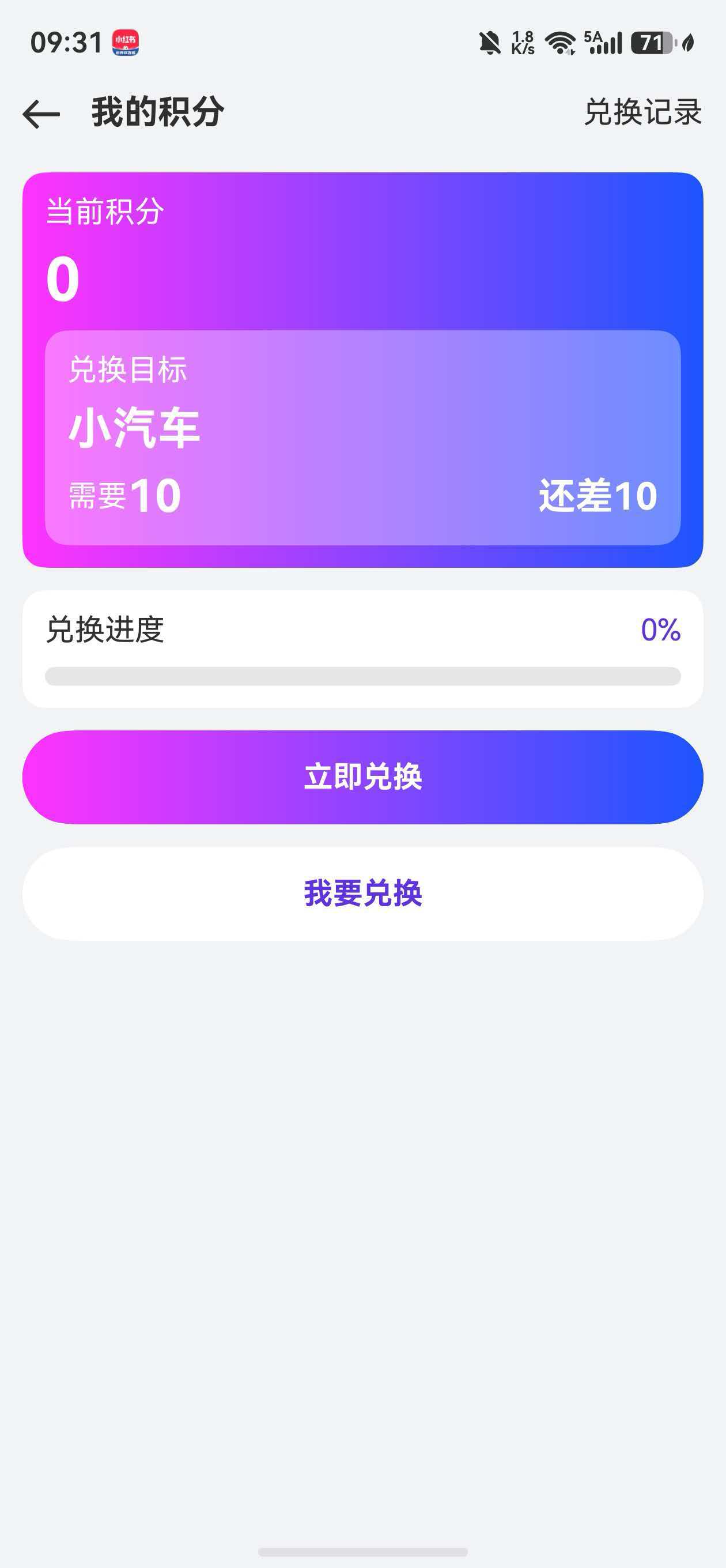
积分卡片(渐变背景)
Column({ space: 8 }) {
  Text('当前积分').fontColor(Color.White)
  Text(this.scoreNumber.toString()).fontColor(Color.White).fontSize(32).fontWeight(FontWeight.Bold)

  Column({ space: 8 }) {
    Text('兑换目标').fontColor(Color.White)
    Text(this.giftName).fontColor(Color.White).fontSize(24).fontWeight(FontWeight.Bold)

    Row() {
      Text('需要').fontColor(Color.White)
      Text(this.needScoreNumber.toString()).fontColor(Color.White).fontSize(24).fontWeight(FontWeight.Bold)
      Blank()
      if (this.needScoreNumber - this.scoreNumber <= 0) {
        Text(`可以兑换`).fontColor(Color.White).fontSize(20).fontWeight(FontWeight.Bold)
      } else {
        Text(`还差${this.needScoreNumber - this.scoreNumber}`)
          .fontColor(Color.White).fontSize(20).fontWeight(FontWeight.Bold)
      }
    }.width('100%')
  }
  .backgroundColor($r('app.color.color_gift_background'))
  .borderRadius(12).padding(12)
}
.borderRadius(12)
.padding(12)
.linearGradient({
  angle: 90,
  colors: [[0xFF33FF, 0.0], [0x1C55FF, 1]]
})
紫色渐变背景使积分区域在视觉上突出,差值动态提示"可以兑换"或"还差N分"。
进度条
Column({ space: 10 }) {
  Row() {
    Text('兑换进度')
    Text(this.getPercent()).fontColor($r('app.color.app_primary'))
  }.width('100%').justifyContent(FlexAlign.SpaceBetween)

  Progress({ value: this.scoreNumber, total: this.needScoreNumber, type: ProgressType.Linear })
    .borderRadius(12)
    .style({ strokeWidth: 10 })
    .color(this.gradientColor)
}
ProgressType.Linear 线性进度条,渐变色与整体风格统一。百分比计算:
getPercent(): string {
  if (this.scoreNumber === 0) return '0%'
  let percent = this.scoreNumber / this.needScoreNumber * 100
  return percent > 100 ? '100%' : `${percent.toFixed(1)}%`
}
24.4 兑换对话框
两种兑换场景共用一个 bindSheet 半模态,通过标志位切换内容:
.bindSheet($$this.isShowScoreDialog, this.scoreDialog(), {
  height: 300,
  backgroundColor: $r('app.color.color_card'),
  onDisappear: (() => { this.isShowScoreDialog = false })
})

@Builder
scoreDialog() {
  if (this.isWantExchange) {
    this.wantExchangeLayout()
  } else if (this.isExchange) {
    this.exchangeLayout()
  }
}
“我要兑换”——设置兑换目标
@Builder
wantExchangeLayout() {
  Column({ space: 10 }) {
    Text('我想要兑换').fontWeight(FontWeight.Bold).fontSize(22).margin({ top: 10 })
    Text('玩具名称')
    TextInput({ text: this.giftInput, placeholder: '如小汽车' })
      .border({ width: 0.5, color: $r('app.color.app_primary') })
      .onChange((value: string) => { this.giftInput = value; })
    Text('所需积分')
    TextInput({ text: this.scoreInput, placeholder: '如100' }).type(InputType.Number)
      .border({ width: 0.5, color: $r('app.color.app_primary') })
      .onChange((value: string) => { this.scoreInput = value; })

    Row() {
      Button('取消')
        .onClick(async () => { this.isShowScoreDialog = false });
      Blank(20)
      Button('设置目标')
        .onClick(async () => {
          this.isShowScoreDialog = false
          this.giftName = this.giftInput
          this.needScoreNumber = Number.parseInt(this.scoreInput)
          PreferencesUtil.putSync(AgentConstant.SP_NEED_BONUS, this.needScoreNumber)
          PreferencesUtil.putSync(AgentConstant.SP_GIFT, this.giftName)
        });
    }
  }
}
用户输入礼品名称和所需积分,点击"设置目标"后持久化到 Preferences。
“立即兑换”——确认兑换
@Builder
exchangeLayout() {
  Column({ space: 10 }) {
    Text('确认兑换').fontWeight(FontWeight.Bold).fontSize(22)

    Column({ space: 12 }) {
      Row() {
        Text('兑换物品')
        Text(this.giftName).fontSize(20).fontWeight(FontWeight.Bold)
      }.width('100%').justifyContent(FlexAlign.SpaceBetween)
      Divider().color($r('app.color.app_primary')).height(0.2)
      Row() {
        Text('所需积分')
        Text(this.needScoreNumber.toString())
          .fontSize(20).fontWeight(FontWeight.Bold).fontColor($r('app.color.app_primary'))
      }.width('100%').justifyContent(FlexAlign.SpaceBetween)
      Row() {
        Text('兑换后剩余')
        Text('100').fontSize(20).fontWeight(FontWeight.Bold).fontColor($r('app.color.app_primary'))
      }.visibility(this.isCanExchange() ? Visibility.Visible : Visibility.None)
    }
    .borderRadius(12).padding(12)
    .backgroundColor($r('app.color.app_primary_light'))
    .borderColor($r('app.color.app_primary')).borderWidth(0.5)

    Row() {
      Button('取消').onClick(() => { this.isShowScoreDialog = false });
      Blank(20)
      Button('确认兑换')
        .enabled(this.isCanExchange())
        .onClick(async () => {
          this.isShowScoreDialog = false
          let gift: GiftExchange = {
            giftName: this.giftName,
            pointsRequired: this.needScoreNumber,
            exchangeDate: DateUtil.getTodayStr('yyyy-MM-dd HH:mm:ss')
          }
          this.giftDb.addExchange(gift)
          PreferencesUtil.putSync(AgentConstant.SP_BONUS, this.scoreNumber - this.needScoreNumber)
          this.scoreNumber = PreferencesUtil.getNumberSync(AgentConstant.SP_BONUS, 0)
          ToastUtil.showToast('兑换成功...')
        });
    }
  }
}
兑换逻辑关键步骤:
isCanExchange()校验积分是否充足- 创建
GiftExchange记录写入数据库 - 扣减积分:
scoreNumber - needScoreNumber - 刷新页面积分显示
兑换按钮的 enabled 绑定 isCanExchange(),积分不足时按钮置灰不可点击:
isCanExchange(): boolean {
  return (this.scoreNumber - this.needScoreNumber) >= 0
}
24.5 ExchangeListPage 兑换记录
兑换历史通过独立页面展示,支持下拉刷新:
// ExchangeListPage.ets
@Component
struct ExchangeListPage {
  @State giftList: GiftExchange[] = [];
  private giftDb: GiftExchangeDatabase = new GiftExchangeDatabase(getContext());

  async reload() {
    this.giftList = await this.giftDb.getAllExchanges()
  }

  build() {
    NavDestination() {
      Refresh({ refreshing: $$this.isRefreshing }) {
        if (this.giftList.length === 0) {
          this.buildEmptyView()
        } else {
          List({ space: 10 }) {
            ForEach(this.giftList, (item: GiftExchange, index) => {
              ListItem() {
                RecordItem({ item: item })
              }
            }, (item: GiftExchange, index: number) => `${item.id}_${index}`)
          }
        }
      }.onRefreshing(() => {
        setTimeout(() => {
          this.reload();
          this.isRefreshing = false;
        }, 1000)
      })
    }
    .onReady(async (ctx: NavDestinationContext) => {
      await this.giftDb.initialize()
      this.reload();
    })
  }
}
每条记录由 RecordItem 子组件渲染:
@Component
struct RecordItem {
  item: GiftExchange | undefined = undefined;

  build() {
    Row({ space: 10 }) {
      Column({ space: 5 }) {
        Text(this.item!!.giftName).fontWeight(FontWeight.Bold)
        Text(this.item!!.pointsRequired?.toString()).fontSize(12)
      }
      .layoutWeight(1)
      .alignItems(HorizontalAlign.Start)
      Text(`兑换时间:${this.item!!.exchangeDate}`).fontSize(10)
    }
    .backgroundColor($r('app.color.color_card'))
    .borderRadius(12).padding(15)
  }
}
24.6 数据流全景
完成任务(TodoView) → PreferencesUtil +1积分
     ↓
ScorePage 读取积分 → 展示进度 → 用户操作
     ↓
┌──────────────────┬──────────────────┐
│   我要兑换         │   立即兑换         │
│   写入目标到Prefs   │   写记录到RDB      │
│                   │   扣减积分到Prefs   │
└──────────────────┴─────────────────┘
     ↓
ExchangeListPage 从RDB读取历史记录
积分实时值存储在 Preferences(轻量KV),兑换记录存储在 RDB(结构化查询),两者各取所长。
本章小结
本章详解了积分系统的完整闭环:从任务完成获取积分(Preferences 轻量存储),到 ScorePage 展示积分与进度条,再到兑换目标的设置与确认兑换的扣减逻辑,最后通过 GiftExchangeDatabase 持久化兑换记录。数据库封装遵循了统一的 initialize→CRUD→close 模式,与 TodoDatabase 保持一致的架构风格。下一章将介绍"我的"页面、Web 嵌入与项目整体总结。

讨论HarmonyOS开发技术,专注于API与组件、DevEco Studio、测试、元服务和应用上架分发等。
更多推荐
 6
6 0
0- 0


 已为社区贡献100条内容

所有评论(0)