HarmonyOS应用开发实战:猫猫大作战-`onForeground` 和 `onBackground` 的触发时机、与页面生命周期 `onPageSh
·

前言
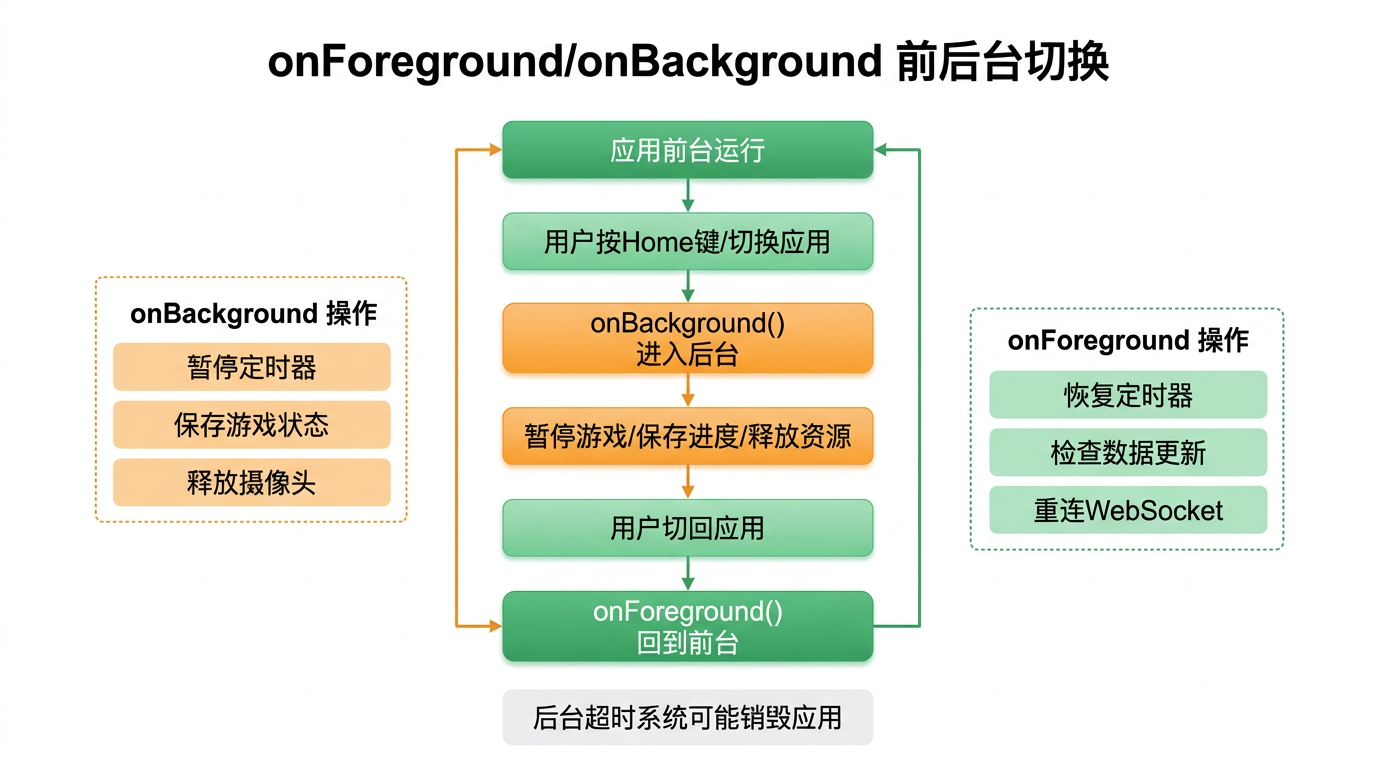
在移动应用开发中,前后台切换是最高频的系统事件之一——用户按下 Home 键、接听电话、拉下通知栏、切换应用,都会触发前台/后台状态变化。对于游戏应用而言,前后台切换的正确处理至关重要:切后台时需要暂停游戏、保存状态、释放资源;回到前台时需要恢复画面、继续计时。
本文以「猫猫大作战」的 EntryAbility 为锚点,讲解 onForeground 和 onBackground 的触发时机、与页面生命周期 onPageShow/onPageHide 的配合、以及前后台切换时的游戏暂停/恢复完整实现。
提示:本系列不讲 ArkTS 基础语法与环境搭建,假设你已跟完第 1–74 篇。本篇是阶段三第 75 篇。
一、onForeground/onBackground 回调
1.1 回调签名
export default class EntryAbility extends UIAbility {
  onForeground(): void {
    // Ability 的 UI 即将变为可见
  }

  onBackground(): void {
    // Ability 的 UI 已经完全不可见
  }
}
1.2 触发场景
| 场景 | 触发的回调 | 说明 |
|---|---|---|
| 应用冷启动 | onForeground |
首次进入前台 |
| 按 Home 键 | onBackground |
进入后台 |
| 从最近任务切回 | onForeground |
回到前台 |
| 来电/通知栏 | onBackground → onForeground |
短暂进出后台 |
| 切换应用 | onBackground |
切换到其他应用 |
| 锁屏/解锁 | onBackground → onForeground |
锁屏时进入后台 |
1.3 猫猫大作战中的前后台处理
import { UIAbility, Want, AbilityConstant } from '@kit.AbilityKit';
import { window } from '@kit.ArkUI';
import { hilog } from '@kit.PerformanceAnalysisKit';

export default class EntryAbility extends UIAbility {
  onForeground(): void {
    hilog.info(0xFF00, 'EntryAbility', 'onForeground — 回到前台');
    // 通知游戏页面恢复运行
    AppStorage.setOrCreate('appForeground', true);
  }

  onBackground(): void {
    hilog.info(0xFF00, 'EntryAbility', 'onBackground — 进入后台');
    // 通知游戏页面暂停运行
    AppStorage.setOrCreate('appBackground', true);
  }
}
二、前后台链路完整时序
2.1 冷启动 → 后台 → 前台
冷启动(首次):
onCreate → onWindowStageCreate → loadContent
  → Index.aboutToAppear → Index.build → Index.onDidBuild
  → onForeground
  → Index.onPageShow              ← 页面可见

按 Home 键:
  → onBackground
  → Index.onPageHide              ← 页面不可见

从最近任务回到前台:
  → onForeground
  → Index.onPageShow              ← 页面重新可见
2.2 Ability 级 vs 页面级的对应关系
| 维度 | Ability 级 | 页面级 |
|---|---|---|
| 回调 | onForeground / onBackground |
onPageShow / onPageHide |
| 作用域 | 整个应用 | 单页面 |
| 触发次数 | 一次(前后台切换) | 每次页面显示/隐藏 |
| 跨页面跳转 | 不触发 | ✅ 触发 onPageHide/onPageShow |
| 适合用途 | 系统资源申请/释放 | 页面数据刷新/暂停 |
三、项目实战:游戏暂停与恢复
3.1 数据流设计
EntryAbility                  Index (页面)
    │                            │
    │  onBackground()            │
    ├── AppStorage.set('bg',true)──► aboutToDisappear 不触发
    │                            │  onPageHide() 触发
    │                            │  → clearTimers()
    │                            │  → gameState = PAUSED
    │                            │
    │  onForeground()            │
    ├── AppStorage.set('fg',true)──► onPageShow() 触发
                                 │  → 恢复定时器
                                 │  → 继续游戏
3.2 Index.ets 中的处理
@Entry
@Component
struct Index {
  @State gameState: GameState = GameState.IDLE;
  @State score: number = 0;
  // ... 其他状态变量

  // 页面显示时回调(每次可见都触发)
  onPageShow() {
    hilog.info(0xFF00, 'Index', 'onPageShow — 页面可见');

    // 检查是否从后台恢复
    const wasBackground = AppStorage.get<boolean>('appForeground');
    if (wasBackground && this.gameState === GameState.PAUSED) {
      // 从后台回来且之前被暂停 → 恢复游戏
      this.resumeGame();
      AppStorage.setOrCreate('appForeground', false);
    }
  }

  // 页面隐藏时回调(每次不可见都触发)
  onPageHide() {
    hilog.info(0xFF00, 'Index', 'onPageHide — 页面不可见');

    // 如果正在游戏 → 自动暂停
    if (this.gameState === GameState.PLAYING) {
      this.pauseGame();
    }

    // 清除后台标志
    AppStorage.setOrCreate('appForeground', false);
    AppStorage.setOrCreate('appBackground', false);
  }

  // 暂停游戏
  pauseGame() {
    if (this.gameState === GameState.PLAYING) {
      this.gameState = GameState.PAUSED;
      this.clearTimers();
      hilog.info(0xFF00, 'Index', '游戏已暂停');
    }
  }

  // 恢复游戏
  resumeGame() {
    if (this.gameState === GameState.PAUSED) {
      // 重新启动定时器
      this.startGameTimers();
      this.gameState = GameState.PLAYING;
      hilog.info(0xFF00, 'Index', '游戏已恢复');
    }
  }

  // 清空定时器
  clearTimers() {
    // ... 同第 65 篇实现
  }

  // 启动定时器
  startGameTimers() {
    this.gameLoopTimer = setInterval(() => {
      if (this.gameState !== GameState.PLAYING) return;
      this.cats = this.gameEngine.updateCats();
      this.score = this.gameEngine.getScore();
    }, 100);

    this.spawnTimer = setInterval(() => {
      if (this.gameState !== GameState.PLAYING) return;
      this.gameEngine.autoSpawnCat();
      this.cats = this.gameEngine.getAllCats();
    }, 2000);

    this.timeTimer = setInterval(() => {
      if (this.gameState === GameState.PLAYING) {
        this.gameTime++;
      }
    }, 1000);
  }
}
3.3 onPageShow/onPageHide 完整示例
@Entry
@Component
struct Index {
  @State gameState: GameState = GameState.IDLE;
  @State score: number = 0;
  @State cats: Cat[] = [];
  @State gameTime: number = 0;

  private gameEngine: GameEngine = new GameEngine();
  private gameLoopTimer: number = -1;
  private spawnTimer: number = -1;
  private timeTimer: number = -1;

  // 页面生命周期 — 每次显示触发
  onPageShow() {
    const resumed = AppStorage.get<boolean>('appForeground') ?? false;
    hilog.info(0xFF00, 'Index',
      `onPageShow: gameState=${this.gameState}, resumed=${resumed}`);
  }

  // 页面生命周期 — 每次隐藏触发
  onPageHide() {
    hilog.info(0xFF00, 'Index',
      `onPageHide: gameState=${this.gameState}`);
    if (this.gameState === GameState.PLAYING) {
      this.gameState = GameState.PAUSED;
      this.clearTimers();
    }
  }

  aboutToDisappear() {
    this.clearTimers();
  }
}
四、三种暂停机制的对比
4.1 设计对比
| 机制 | 触发条件 | 实现位置 | 覆盖场景 |
|---|---|---|---|
| onBackground | Ability 进入后台 | EntryAbility | 系统级强制暂停(来电等) |
| onPageHide | 页面不再可见 | Index.ets | 跳转页面、后台切换 |
| aboutToDisappear | 页面销毁 | Index.ets | 退出页面兜底清理 |
4.2 三层保险策略
第一层:EntryAbility.onBackground()
  └── 通知所有页面暂停(安全性最高,但粒度粗)

第二层:Index.onPageHide()
  └── 页面级暂停(精准控制,建议主要在此处理)

第三层:Index.aboutToDisappear()
  └── 兜底清理(确保定时器不泄漏)
// 第一层:Ability 级 — 全局通知
export default class EntryAbility extends UIAbility {
  onBackground(): void {
    AppStorage.setOrCreate('systemPause', true);
  }
  onForeground(): void {
    AppStorage.setOrCreate('systemResume', true);
  }
}

// 第二层:页面级 — 精确控制
onPageHide() {
  this.pauseGame();
}
onPageShow() {
  const sysResume = AppStorage.get<boolean>('systemResume');
  if (sysResume && this.gameState === GameState.PAUSED) {
    this.resumeGame();
    AppStorage.setOrCreate('systemResume', false);
  }
}

// 第三层:销毁级 — 兜底
aboutToDisappear() {
  this.clearTimers();
}
五、保存与恢复游戏状态
5.1 切后台时保存进度
onPageHide() {
  if (this.gameState === GameState.PLAYING) {
    this.gameState = GameState.PAUSED;
    this.clearTimers();

    // 保存游戏快照到 AppStorage(恢复时使用)
    AppStorage.setOrCreate('savedGameState', {
      score: this.score,
      cats: this.gameEngine.getAllCats(),
      gameTime: this.gameTime,
      combo: this.gameEngine.getCombo()
    });
  }
}
5.2 回前台时恢复进度
onPageShow() {
  const savedState = AppStorage.get<SavedGameState>('savedGameState');
  if (savedState && this.gameState === GameState.PAUSED) {
    // 恢复游戏快照
    this.score = savedState.score;
    this.cats = savedState.cats;
    this.gameTime = savedState.gameTime;
    // 恢复引擎状态
    this.gameEngine.restoreState(savedState);
    // 恢复定时器
    this.startGameTimers();
    this.gameState = GameState.PLAYING;
  }
}
六、前后台切换的日志验证
// 在 DevEco Studio 日志中查看
const TAG = 'Lifecycle';
const DOMAIN = 0xFF00;

// 冷启动
09:15:23.101 EntryAbility: Ability onCreate
09:15:23.156 EntryAbility: Ability onWindowStageCreate
09:15:23.289 Index: Index onDidBuild
09:15:23.302 EntryAbility: Ability onForeground
09:15:23.310 Index: onPageShow

// 按 Home 键
09:16:12.101 EntryAbility: Ability onBackground
09:16:12.110 Index: onPageHide

// 回到前台
09:17:05.234 EntryAbility: Ability onForeground
09:17:05.240 Index: onPageShow
七、常见踩坑
7.1 坑一:混淆 onForeground 与 onPageShow
| 区别 | onForeground | onPageShow |
|---|---|---|
| 触发者 | EntryAbility | Index 页面 |
| 触发时机 | 应用切到前台 | 页面变为可见 |
| 导航切换 | 不触发 | ✅ 触发 |
| 适合用途 | 系统级(权限申请) | 页面级(数据刷新) |
7.2 坑二:onPageHide 中做耗时操作
// 🚫 错误:onPageHide 中保存数据库
onPageHide() {
  await db.saveGameRecord(this.score);  // ❌ onPageHide 不应有 await
}

// ✅ 正确:用异步任务或直接设置标志
onPageHide() {
  AppStorage.setOrCreate('needSaveScore', this.score);
}
7.3 坑三:前后台切换时动画状态未恢复
// 🚫 切后台时不暂停动画 → 回前台时动画状态错乱
// ✅ 正确做法:在 onPageHide 暂停所有动画
onPageHide() {
  // 暂停 animateTo 动画
  this.getUIContext()?.animateTo({ duration: 0 }, () => {
    this.animationProgress = this.currentProgress;
  });
}
八、前后台切换与 WindowStage 事件
onForeground/onBackground 和 windowStageEvent 的对应关系:
| 时序 | Ability 回调 | WindowStage 事件 | 说明 |
|---|---|---|---|
| ① | onForeground | SHOWN → ACTIVE → RESUMED | 前台→可交互 |
| ② | — | INACTIVE | 失焦 |
| ③ | — | PAUSED | 前台不可交互 |
| ④ | onBackground | HIDDEN | 进入后台 |
// 完整的前后台感知方案
export default class EntryAbility extends UIAbility {
  onForeground(): void {
    // Ability 级通知
    AppStorage.setOrCreate('appInForeground', true);
  }

  onBackground(): void {
    AppStorage.setOrCreate('appInForeground', false);
  }
}
九、总结
onForeground 和 onBackground 是 Ability 级的前后台回调,配合页面级的 onPageShow/onPageHide,可以构建从系统层到页面层的多层前后台处理机制。
核心要点:
onForeground在 Ability 进入前台时触发,onBackground进入后台时触发onPageShow/onPageHide在页面级别感知显隐,导航切换也会触发- 游戏场景推荐三层保险:Ability 通知 + onPageHide 暂停 + aboutToDisappear 兜底
- 切后台时必须暂停定时器和动画,回到前台时恢复
- onPageHide 中禁止耗时操作,仅做状态标记
下一篇预告:第 76 篇将深入 module.json5 的完整配置——模块参数、Ability 注册、权限声明与多设备适配。
如果这篇文章对你有帮助,欢迎点赞👍、收藏⭐、关注🔔,你的支持是我持续创作的动力!
相关资源:

讨论HarmonyOS开发技术,专注于API与组件、DevEco Studio、测试、元服务和应用上架分发等。
更多推荐



 5
5 0
0- 0


 已为社区贡献100条内容

所有评论(0)