# HarmonyOS ArkTS 实战解析:咖啡品鉴日记应用的架构与实现
引言:当精品咖啡文化遇见鸿蒙原生开发
在精品咖啡文化日益兴盛的今天,越来越多的咖啡爱好者不再满足于简单地"喝一杯",而是希望像品酒师一样,系统地记录每一次冲煮的产地、烘焙度、风味轮盘、冲煮手法乃至消费明细。一款优秀的咖啡品鉴应用,不仅需要承载丰富的数据维度,更要以优雅的视觉语言呈现这些信息,让用户在翻阅历史记录时仿佛重新闻到那一缕茉莉花香或黑巧克力的醇厚气息。本文要深入剖析的,正是一款基于 HarmonyOS ArkTS 声明式开发范式打造的"咖啡品鉴日记"应用——它以棕橙色调烘托出浓郁的咖啡氛围,通过四个功能 Tab 页将品鉴日志、咖啡馆地图、数据统计与个人中心有机串联,构建出一个完整的咖啡生活记录闭环。
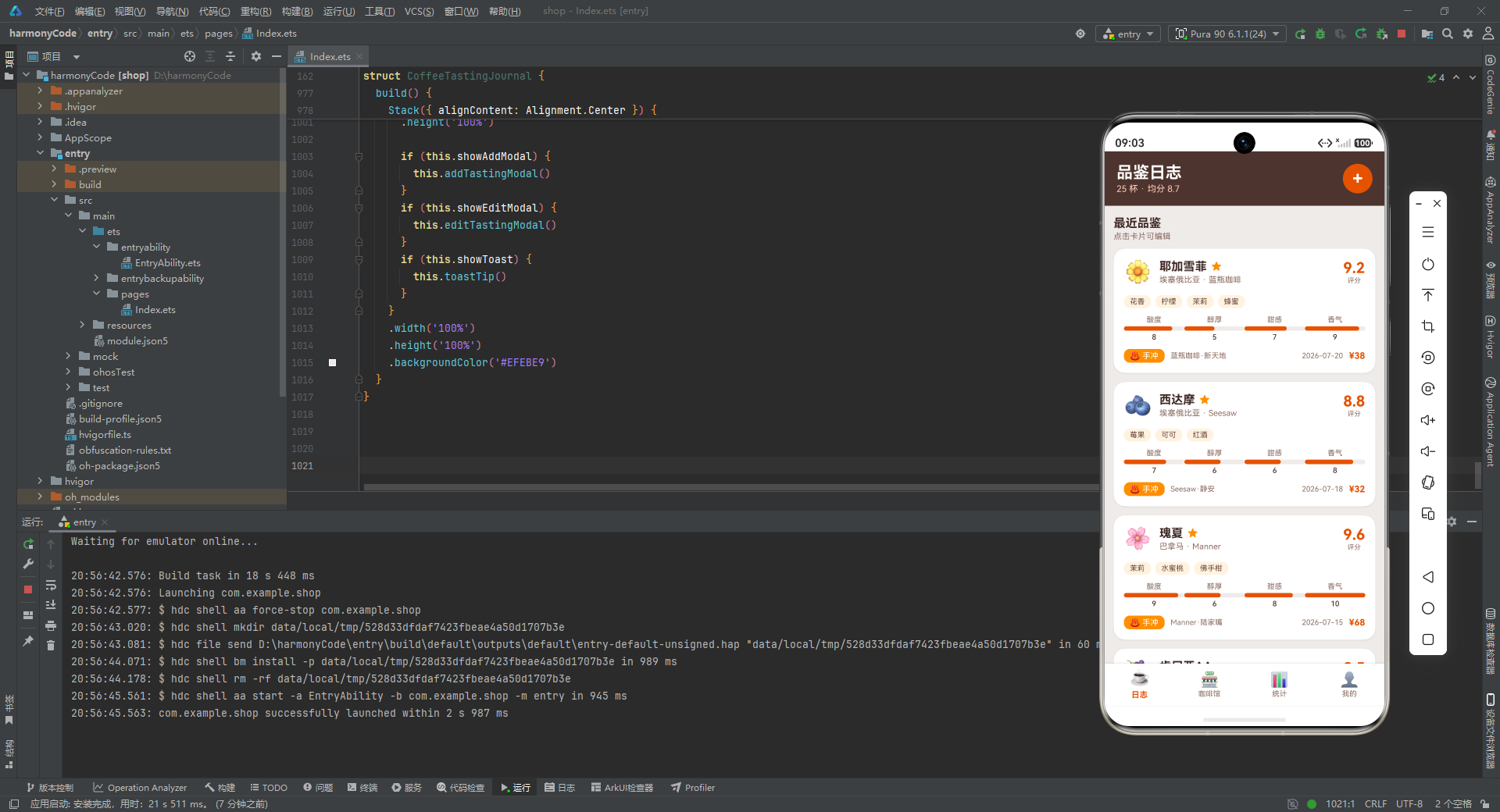
从技术栈的角度来看,本应用是一份典型的 ArkTS 单文件工程实践。它完全基于 HarmonyOS 的 ArkUI 声明式 UI 框架构建,采用 @Entry 与 @Component 装饰器声明入口组件,通过 @State 装饰器实现细粒度的响应式状态管理,利用 @Builder 装饰器将 UI 拆解为高度可复用的构建函数。整个应用没有引入任何第三方依赖,所有数据均以 TypeScript 接口(interface)配合常量数组的形式在文件内部静态定义,这使得我们可以专注于 ArkUI 框架本身的能力分析,而不被外部数据源或网络请求所干扰。应用的视觉设计遵循 Material Design 的卡片化思路,但又通过精心调配的咖啡主题色板(深棕 #4E342E、烈焰橙 #E65100、琥珀金 #FF8F00、米白底 #EFEBE9)营造出独属于咖啡世界的温暖质感。
接下来,我们将按照代码的自然层次——从数据模型定义、组件状态管理、通用构建器、弹窗交互、卡片展示、Tab 页面装配到根节点构建——逐段剖析每一块代码的设计思路与实现细节。
一、数据模型层:接口定义与领域建模
1.1 核心实体接口:CoffeeRecord
interface CoffeeRecord {
  name: string
  origin: string
  roaster: string
  brewMethod: string
  date: string
  rating: number
  price: number
  acidity: number
  body: number
  sweetness: number
  aroma: number
  flavorNotes: string[]
  shopName: string
  isFavorite: boolean
  emoji: string
}
这是整个应用最核心的领域模型,定义了一条咖啡品鉴记录所包含的全部信息字段。我们可以将这些字段分为四个语义群组来理解:第一是"身份信息群组",包括 name(咖啡名称,如"耶加雪菲")、origin(产地,如"埃塞俄比亚")、roaster(烘焙商)、brewMethod(冲煮方式),这些字段回答了"这是什么豆子、来自哪里、谁烘的、怎么萃的"四个最基本的问题。第二是"元数据群组",包括 date(品鉴日期)和 price(价格),用于时间线排序与消费统计。第三是"感官评价群组",这是本应用最有专业深度的部分——rating 是 5 到 10 分的综合评分,而 acidity(酸度)、body(醇厚度)、sweetness(甜感)、aroma(香气)四个细分维度各以 1 到 10 的整数打分,构成了一个类似 SCA(精品咖啡协会)杯测框架的迷你雷达图数据基础。第四是"附加信息群组",flavorNotes 是一个字符串数组,记录"花香"“柠檬”“茉莉”"蜂蜜"等风味关键词标签;shopName 记录品鉴所在的咖啡馆;isFavorite 是布尔收藏标记;emoji 则为每条记录绑定一个表情符号,作为列表中的视觉锚点。
在 ArkTS 的类型系统中,使用 interface 而非 class 来定义这类纯数据结构是推荐做法。接口只在编译期进行类型检查,不会产生运行时的原型链开销,对于这种仅用于数据传递的"值对象"(Value Object)而言是最轻量的选择。值得注意的是,所有字段都没有使用可选修饰符 ?,这意味着每条记录都必须提供完整字段,从数据完整性角度保证了渲染时不会出现 undefined 导致的空白或异常。
1.2 咖啡馆实体与统计实体接口
interface CafeItem {
  name: string
  address: string
  rating: number
  specialty: string
  priceRange: string
  visitCount: number
  emoji: string
}

interface MonthlySpend {
  month: string
  amount: number
  height: number
}

interface BrewMethodStat {
  method: string
  count: number
  percent: number
  color: string
}

interface OriginStat {
  origin: string
  count: number
  percent: number
}

interface RatingLevel {
  level: string
  count: number
  percent: number
}

interface TabItem {
  title: string
  icon: string
}
这里集中定义了应用所需的其余六个辅助接口。CafeItem 描述咖啡馆信息,其中 visitCount(访问次数)是一个关键的业务字段,它既用于列表排序提示,也在卡片上直接展示,传递出"常去"的亲密度信号;priceRange 以"¥35-88"这样的字符串区间形式存储,比单纯的数字更能直观传达消费档次。
接下来的四个统计类接口值得特别关注,它们体现了应用在数据可视化方面的分层设计思路。MonthlySpend 除了 month 和 amount 之外,额外携带了一个 height 字段——这是柱状图渲染时柱子的高度值(以 vp 为单位)。将图表的几何参数预计算并固化在数据中,是一种"数据驱动渲染"的简化策略:渲染层无需在 ForEach 循环中临时计算比例换算,直接读取 height 即可绘制,降低了 build 函数的计算复杂度。BrewMethodStat 同样携带了 color 字段,让每条冲煮方式统计条自带颜色,实现了数据与样式的绑定。OriginStat 和 RatingLevel 则结构更为精简,只保留标签、计数与百分比三项,因为它们在渲染时使用统一的颜色,不需要在数据层注入样式。
TabItem 虽然只有两个字段,却是底部导航栏的数据契约——title 是中文标签,icon 是 Emoji 图标。使用 Emoji 而非图标字体或矢量资源,是本应用在轻量化方面的一个有趣取舍:它零资源依赖、跨平台显示一致、且天然带色彩,非常适合这种个人记录类应用的情感化表达。
1.3 静态数据源:咖啡记录与咖啡馆列表
const COFFEE_DATA: CoffeeRecord[] = [
  { name: '耶加雪菲', origin: '埃塞俄比亚', roaster: '蓝瓶咖啡', brewMethod: '手冲',
    date: '2026-07-20', rating: 9.2, price: 38, acidity: 8, body: 5, sweetness: 7,
    aroma: 9, flavorNotes: ['花香', '柠檬', '茉莉', '蜂蜜'], shopName: '蓝瓶咖啡·新天地',
    isFavorite: true, emoji: '🌼' },
  // ... 共 25 条记录
]

const CAFE_DATA: CafeItem[] = [
  { name: '蓝瓶咖啡', address: '上海·新天地北里', rating: 4.8, specialty: '单品手冲',
    priceRange: '¥35-88', visitCount: 14, emoji: '💙' },
  // ... 共 16 家咖啡馆
]
COFFEE_DATA 是应用的主体数据集,包含 25 条精心编排的品鉴记录。仔细观察这些数据可以发现它们并非随机填充,而是具有明确的故事线与数据分布设计:产地涵盖了埃塞俄比亚(9 条,占比最高)、哥伦比亚、巴拿马、印度尼西亚、危地马拉、肯尼亚、巴西、中国云南等经典产区;烘焙商覆盖了蓝瓶、Seesaw、Manner、M Stand、鱼眼等上海主流精品连锁;冲煮方式包括手冲、意式浓缩、虹吸壶、爱乐压、法压壶、摩卡壶、冷萃七种;评分区间从 7.8 到 9.8 合理分布,既体现了差异化评价,又与后文统计页的 RATING_LEVELS 数据保持一致。每条记录的 emoji 都经过语义匹配——耶加雪菲用🌼(花香)、瑰夏用🌸、曼特宁用🌿、蓝山用🏔️——这种细节让数据本身具备了视觉可读性。
在 ArkTS 中,使用 const 声明的数组虽然内容不可重新赋值,但数组元素的属性理论上可变。本应用将品鉴数据设为模块级常量,既作为日志页的列表数据源,又在编辑模态框中通过 COFFEE_DATA.indexOf(item) 反查索引,实现了数据与 UI 的双向关联。CAFE_DATA 则收录了 16 家上海咖啡馆,visitCount 从 4 到 22 不等,为"常去咖啡馆"列表提供了天然的排序依据。
1.4 统计数据源与全局常量
const MONTHLY_SPEND: MonthlySpend[] = [
  { month: '2月', amount: 320, height: 58 },
  { month: '3月', amount: 480, height: 88 },
  { month: '4月', amount: 260, height: 48 },
  { month: '5月', amount: 540, height: 100 },
  { month: '6月', amount: 410, height: 76 },
  { month: '7月', amount: 440, height: 81 }
]

const BREW_STATS: BrewMethodStat[] = [
  { method: '手冲', count: 11, percent: 44, color: '#E65100' },
  { method: '意式浓缩', count: 5, percent: 20, color: '#FF8F00' },
  { method: '虹吸壶', count: 3, percent: 12, color: '#6D4C41' },
  { method: '爱乐压', count: 3, percent: 12, color: '#8D6E63' },
  { method: '法压壶', count: 2, percent: 8, color: '#A1887F' },
  { method: '摩卡壶', count: 1, percent: 4, color: '#BCAAA4' }
]

const ORIGIN_STATS: OriginStat[] = [ /* 8 个产地统计 */ ]
const RATING_LEVELS: RatingLevel[] = [ /* 4 个评分区间 */ ]

const BREW_METHODS: string[] = ['手冲', '意式浓缩', '虹吸壶', '爱乐压', '法压壶', '摩卡壶', '冷萃']

const TAB_LIST: TabItem[] = [
  { title: '日志', icon: '☕' },
  { title: '咖啡馆', icon: '🏪' },
  { title: '统计', icon: '📊' },
  { title: '我的', icon: '👤' }
]

const TOTAL_TASTINGS: number = 25
const TOTAL_SPENT: number = 2450
const AVG_RATING: number = 8.7
const FAV_ORIGIN: string = '埃塞俄比亚'
const TOTAL_CAFES: number = 16
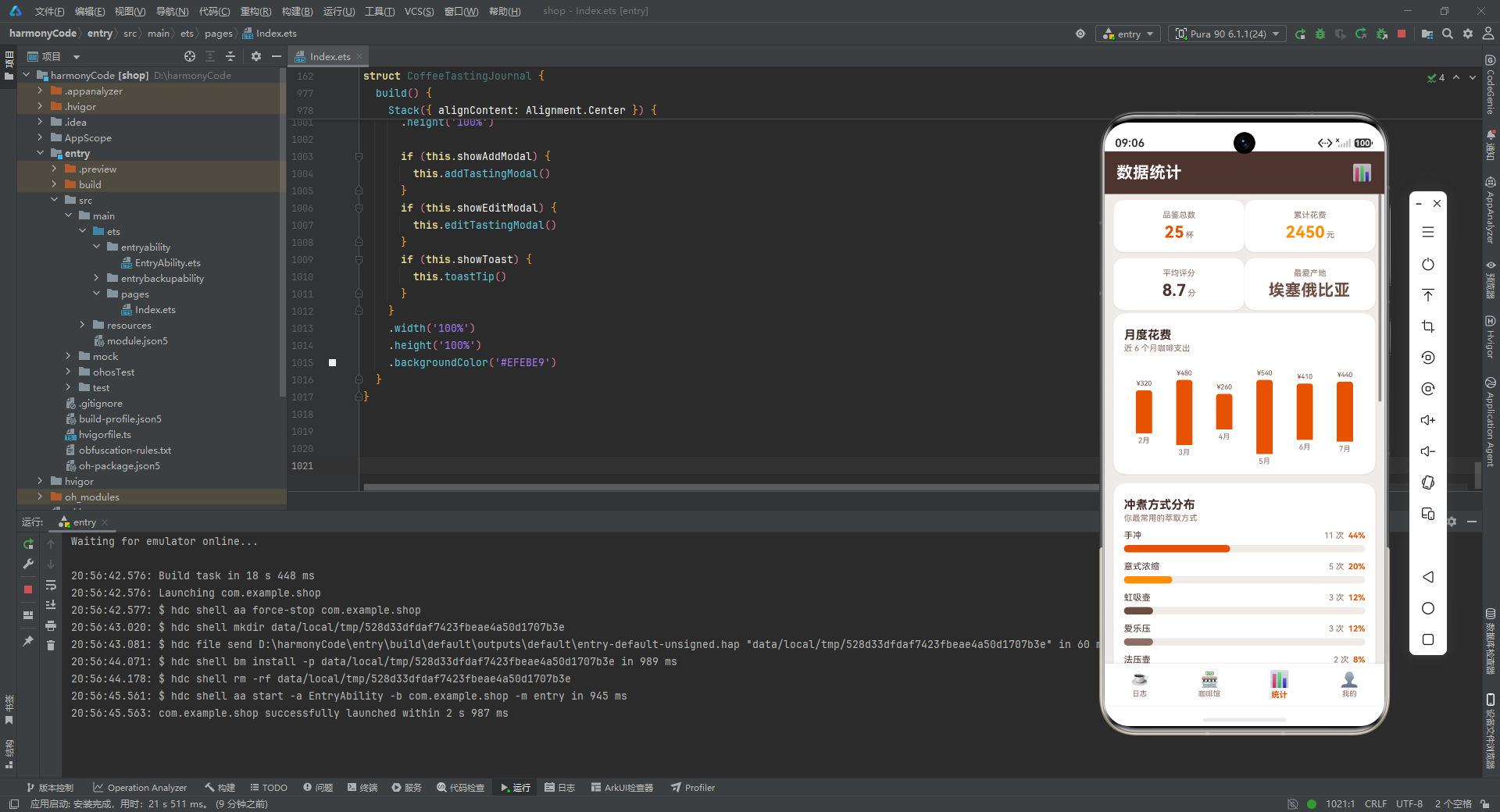
这一组常量构成了统计页与个人中心页的全部数据支撑。MONTHLY_SPEND 的 height 字段是经过预计算的最大值归一化结果——5 月花费 540 元对应 height 100(满高),其余按比例缩放,这种设计让柱状图的 barChartItem 构建器可以零计算直接渲染。BREW_STATS 的 color 字段从深橙到浅棕渐变排列(#E65100 → #FF8F00 → #6D4C41 → #8D6E63 → #A1887F → #BCAAA4),在视觉上形成了从主色到辅色的自然过渡,让进度条列表呈现出层次美感。
BREW_METHODS 是一个纯字符串数组,它服务于添加/编辑模态框中的冲煮方式选择器(Chip 组件),与 BREW_STATS 中的 method 字段存在语义对应但用途不同:前者是"可选选项全集"(包含冷萃),后者是"已统计分布"(不含冷萃,因为冷萃记录可能统计在别的维度)。TAB_LIST 定义了四个 Tab 的标题与图标,是底部导航栏的唯一数据源。
最后五个全局数值常量(TOTAL_TASTINGS 等)是应用的"核心指标摘要",它们在日志页头部、统计页卡片、个人中心页多处复用。将它们提取为模块级常量而非在组件内反复计算,既保证了数据一致性,又避免了重复的数组遍历开销。
二、组件状态管理:入口组件与响应式状态
@Entry
@Component
struct CoffeeTastingJournal {
  @State currentTab: number = 0
  @State showAddModal: boolean = false
  @State showEditModal: boolean = false
  @State editIndex: number = 0
  @State inputName: string = ''
  @State inputOrigin: string = ''
  @State inputRoaster: string = ''
  @State inputBrew: string = '手冲'
  @State inputRating: number = 8.0
  @State inputPrice: number = 35
  @State inputNotes: string = ''
  @State inputShop: string = ''
  @State toastMsg: string = ''
  @State showToast: boolean = false
这段代码是整个应用的"神经中枢"。@Entry 装饰器将 CoffeeTastingJournal 结构体标记为页面入口组件,HarmonyOS 框架会以此为根节点构建组件树并挂载到渲染管线。@Component 装饰器则声明这是一个自定义组件,使其内部可以使用 @State、@Builder、build() 等 ArkUI 特性。
紧随其后的 13 个 @State 变量构成了应用的全部响应式状态空间,我们可以将它们按职责分为三组来理解。第一组是"导航状态",仅 currentTab 一个变量,它控制当前显示哪个 Tab 页面,初始值为 0(日志页)。每当用户点击底部 TabBar 时,这个值变化,ArkUI 的 diff 算法会重新评估 build() 中的条件分支,切换显示对应的内容构建器。第二组是"弹窗可见性状态",包括 showAddModal(添加弹窗)、showEditModal(编辑弹窗)和 showToast(轻提示)三个布尔值,它们通过条件渲染控制浮层的显示与隐藏。第三组是"表单输入状态",这是一组以 input 为前缀的变量,对应添加/编辑弹窗中的所有表单字段。
这里有一个关键的设计决策值得深入探讨:表单状态被提升到了组件根级别,而非封装在弹窗构建器内部。这种"状态上提"(State Hoisting)的模式带来了两个重要好处。其一,添加弹窗与编辑弹窗共享同一组 input* 状态变量,避免了重复定义;当用户点击咖啡卡片触发编辑时,卡片点击回调会将该条记录的数据"灌入"这组 input 变量,然后打开编辑弹窗,弹窗内的表单控件直接绑定这些变量即可显示当前编辑值。其二,由于 @State 变量是响应式的,用户在弹窗内修改任何输入项时,UI 会实时刷新——例如拖动评分 Slider 时,旁边的评分数字会同步变化,这正是 @State 驱动响应式渲染的体现。editIndex 变量则记录当前编辑的记录在 COFFEE_DATA 数组中的索引,为后续可能的持久化更新预留了定位能力。toastMsg 配合 showToast 实现了操作反馈机制,当保存或更新记录后,会设置消息内容并显示 Toast。
三、通用构建器层:可复用 UI 片段
3.1 模态背景与轻提示
@Builder modalBg(onClose: () => void) {
  Column().width('100%').height('100%')
    .backgroundColor('rgba(0,0,0,0.5)').onClick(onClose)
}

@Builder toastTip() {
  Column() {
    Column() {
      Text(this.toastMsg).fontSize(14).fontColor('#FFFFFF')
    }
    .padding({ left: 20, right: 20, top: 10, bottom: 10 })
    .backgroundColor('#4E342E')
    .borderRadius(22)
    .shadow({ radius: 12, color: '#33000000', offsetY: 2 })
  }
  .width('100%')
  .height('100%')
  .justifyContent(FlexAlign.Center)
  .alignItems(HorizontalAlign.Center)
  .position({ x: 0, y: 0 })
  .zIndex(1000)
}
modalBg 是一个极其精炼但功能关键的构建器。它接受一个 onClose 回调函数作为参数,渲染一个铺满全屏的半透明黑色遮罩层(rgba(0,0,0,0.5)),并绑定点击事件触发关闭回调。这种"参数化构建器"是 ArkUI 实现组件复用的核心手段——通过将行为逻辑以回调形式注入,同一个构建器可以被添加弹窗和编辑弹窗共享,各自传入不同的关闭逻辑。遮罩层的半透明黑色既阻断了用户对底层内容的操作(起到模态锁定作用),又保留了底层内容的朦胧可见,符合移动端模态交互的视觉规范。
toastTip 构建器实现了一个居中浮层提示。其结构是嵌套的两层 Column:外层 Column 铺满全屏并设置 justifyContent(FlexAlign.Center) 和 alignItems(HorizontalAlign.Center) 实现内容居中定位,通过 position({ x: 0, y: 0 }) 配合 zIndex(1000) 确保它浮于所有内容之上;内层 Column 是实际的提示气泡,使用深棕色背景(#4E342E)、圆角 22vp、内边距 20/10,并附带一个带 Y 轴偏移的阴影模拟悬浮效果。值得注意的是 Toast 的文案 this.toastMsg 直接绑定到 @State 变量,因此当外部代码修改 toastMsg 并将 showToast 设为 true 时,提示文本会即时反映最新内容。zIndex(1000) 高于弹窗的 zIndex(999),确保 Toast 即使在弹窗之上也能正常显示。
3.2 冲煮方式选择芯片与表单字段
@Builder brewChip(method: string) {
  Text(method)
    .fontSize(12)
    .fontColor(this.inputBrew === method ? '#FFFFFF' : '#6D4C41')
    .backgroundColor(this.inputBrew === method ? '#E65100' : '#EFEBE9')
    .borderRadius(14)
    .padding({ left: 12, right: 12, top: 6, bottom: 6 })
    .margin({ right: 8, bottom: 8 })
    .onClick(() => { this.inputBrew = method })
}

@Builder formField(label: string, value: string, placeholder: string, onChange: (v: string) => void) {
  Row() {
    Text(label).fontSize(13).fontColor('#6D4C41').width(64)
    TextInput({ text: value, placeholder: placeholder })
      .layoutWeight(1)
      .height(40)
      .fontSize(13)
      .fontColor('#3E2723')
      .backgroundColor('#F5F5F5')
      .borderRadius(10)
      .padding({ left: 10, right: 10 })
      .onChange(onChange)
  }
  .width('100%')
  .alignItems(VerticalAlign.Center)
  .margin({ bottom: 10 })
}
brewChip 实现了一个单选风格的冲煮方式标签芯片。它的精妙之处在于完全通过条件表达式驱动样式切换:当 this.inputBrew === method 为真时,文字变白、背景变橙(选中态);否则文字为棕色、背景为米白(未选中态)。点击事件直接修改 @State 变量 inputBrew,由于该变量是响应式的,所有芯片的样式会立即重新计算——被选中的芯片高亮,其余芯片恢复默认。这种"一变量驱多芯片"的模式是 ArkUI 声明式状态绑定的典型用法,开发者无需手动遍历芯片列表去切换样式,框架的 diff 机制会自动完成。borderRadius(14) 配合 padding 的上下 6vp 营造出胶囊形态,margin 的 right 8 和 bottom 8 则为 Flex 换行布局预留了芯片间距。
formField 是一个高度通用的表单行构建器,它接受标签文本、当前值、占位提示文本和变更回调四个参数,渲染出一个"标签 + 输入框"的水平布局。Text 标签固定宽度 64vp 保证多个字段标签对齐,TextInput 使用 layoutWeight(1) 占据剩余空间。这里有一个 ArkUI 的关键细节:TextInput 的 text 参数绑定的是传入的 value 值,而非直接绑定 @State 变量。由于构建器参数是值传递的快照,如果直接绑定 @State,在用户输入时可能出现光标跳动问题;而通过 onChange 回调将新值写回 @State 变量,再由父组件重新调用构建器传入新值,形成受控组件的数据流闭环。输入框采用浅灰背景(#F5F5F5)与圆角 10vp 的"填充式"风格,比带边框的输入框更显柔和,契合咖啡主题的温暖调性。
四、弹窗交互层:添加与编辑模态框
4.1 添加品鉴弹窗
@Builder addTastingModal() {
  Column() {
    this.modalBg(() => { this.showAddModal = false })
    Column() {
      Row() {
        Text('+ 添加品鉴').fontSize(18).fontWeight(FontWeight.Bold).fontColor('#4E342E')
      }.width('100%').justifyContent(FlexAlign.Center).padding({ top: 18, bottom: 12 })

      Scroll() {
        Column() {
          this.formField('咖啡名', this.inputName, '如 耶加雪菲', (v: string) => { this.inputName = v })
          this.formField('产地', this.inputOrigin, '如 埃塞俄比亚', (v: string) => { this.inputOrigin = v })
          this.formField('烘焙商', this.inputRoaster, '如 蓝瓶咖啡', (v: string) => { this.inputRoaster = v })
          this.formField('咖啡馆', this.inputShop, '如 蓝瓶·新天地', (v: string) => { this.inputShop = v })

          Text('冲煮方式').fontSize(13).fontColor('#6D4C41').margin({ bottom: 6, top: 4 })
          Flex({ wrap: FlexWrap.Wrap }) {
            ForEach(BREW_METHODS, (m: string) => {
              this.brewChip(m)
            }, (m: string) => m)
          }.width('100%').margin({ bottom: 10 })

          Row() {
            Text('评分').fontSize(13).fontColor('#6D4C41').width(64)
            Text(this.inputRating.toFixed(1)).fontSize(16).fontWeight(FontWeight.Bold).fontColor('#E65100').width(40)
            Slider({ value: this.inputRating, min: 5, max: 10, step: 0.1 })
              .layoutWeight(1).blockColor('#E65100').trackColor('#EFEBE9').selectedColor('#FF8F00')
              .onChange((v: number) => { this.inputRating = v })
          }.width('100%').alignItems(VerticalAlign.Center).margin({ bottom: 10 })

          Row() {
            Text('价格 ¥').fontSize(13).fontColor('#6D4C41').width(64)
            Text(this.inputPrice.toString()).fontSize(16).fontWeight(FontWeight.Bold).fontColor('#FF8F00').width(40)
            Slider({ value: this.inputPrice, min: 10, max: 100, step: 1 })
              .layoutWeight(1).blockColor('#FF8F00').trackColor('#EFEBE9').selectedColor('#FF8F00')
              .onChange((v: number) => { this.inputPrice = v })
          }.width('100%').alignItems(VerticalAlign.Center).margin({ bottom: 10 })

          this.formField('风味笔记', this.inputNotes, '花香 / 柠檬 / 蜂蜜', (v: string) => { this.inputNotes = v })
        }
        .width('100%')
        .padding({ left: 18, right: 18, bottom: 20 })
      }
      .layoutWeight(1)
      .width('100%')

      Row() {
        Text('取消')
          .fontSize(15).fontColor('#6D4C41')
          .layoutWeight(1).textAlign(TextAlign.Center)
          .padding({ top: 14, bottom: 14 })
          .backgroundColor('#EFEBE9')
          .borderRadius({ topLeft: 0, topRight: 0, bottomLeft: 14, bottomRight: 0 })
          .onClick(() => { this.showAddModal = false })
        Text('保存')
          .fontSize(15).fontColor('#FFFFFF').fontWeight(FontWeight.Bold)
          .layoutWeight(1).textAlign(TextAlign.Center)
          .padding({ top: 14, bottom: 14 })
          .backgroundColor('#E65100')
          .borderRadius({ topLeft: 0, topRight: 0, bottomLeft: 0, bottomRight: 14 })
          .onClick(() => {
            this.toastMsg = '已保存「' + (this.inputName.length > 0 ? this.inputName : '新咖啡') + '」'
            this.showToast = true
            this.showAddModal = false
          })
      }
      .width('100%')
    }
    .width('90%')
    .height('82%')
    .backgroundColor('#FFFFFF')
    .borderRadius(18)
    .alignItems(HorizontalAlign.Center)
    .position({ x: '5%', y: '9%' })
    .shadow({ radius: 20, color: '#33000000', offsetY: 4 })
  }
  .width('100%').height('100%').position({ x: 0, y: 0 }).zIndex(999)
}
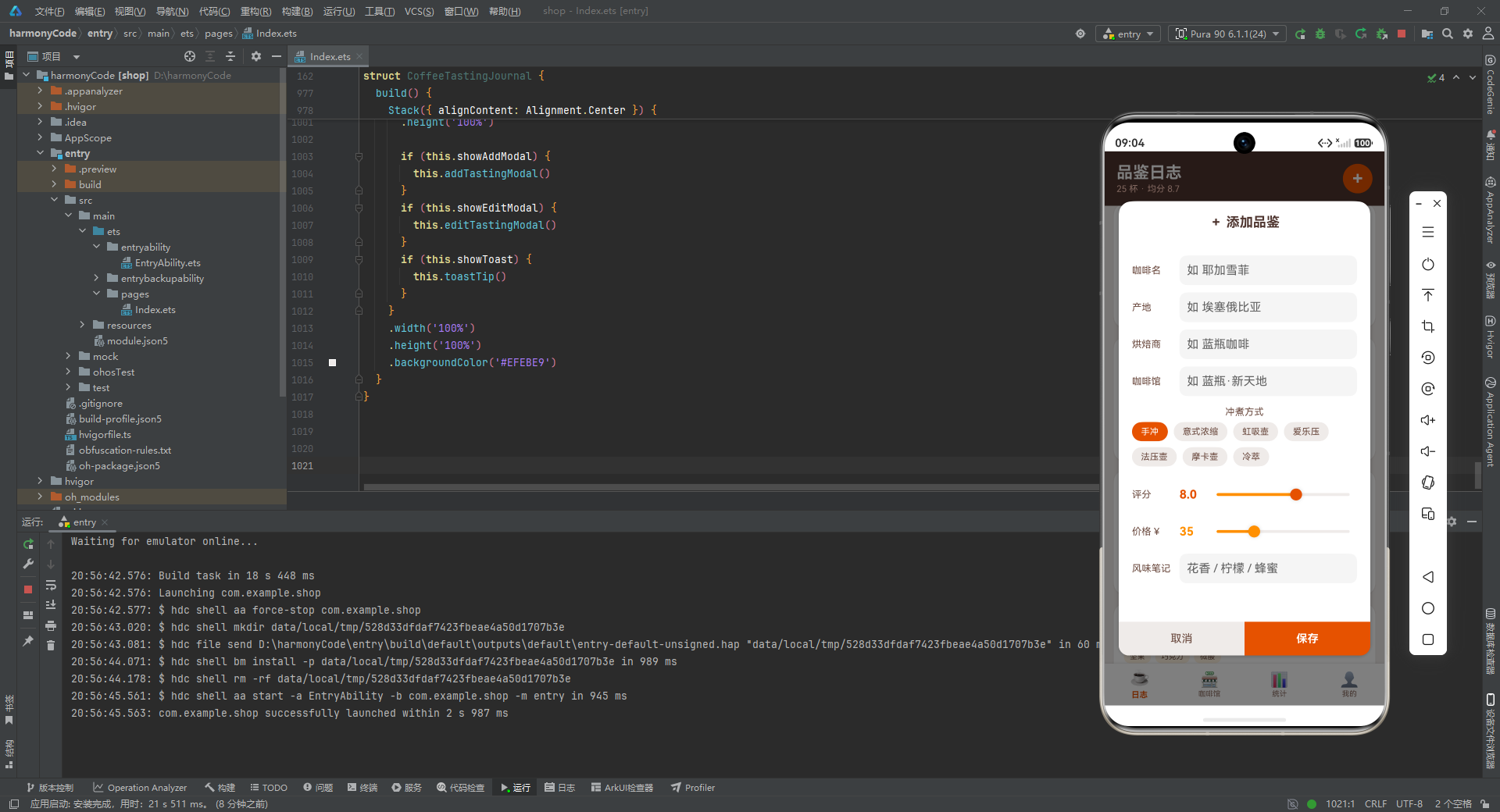
这是应用中最复杂的构建器之一,实现了一个功能完整的"添加品鉴记录"模态弹窗。从结构上看,它是一个两层 Column 嵌套:外层 Column 铺满全屏并设置 zIndex(999) 确保浮于主内容之上,其第一个子元素是 this.modalBg(...) 渲染的半透明遮罩,第二个子元素是白色弹窗主体。弹窗主体通过 position({ x: '5%', y: '9%' }) 配合 width('90%') 和 height('82%') 实现居中偏上的定位——这种定位方式比 justifyContent(Center) 更精确,能同时控制水平与垂直位置。borderRadius(18) 赋予弹窗圆润的边角,shadow 的 offsetY 4vp 模拟自上而下的光照投影,增强了悬浮感。
弹窗内部纵向分为三个区域:标题行、可滚动表单区、底部按钮行。标题行通过 justifyContent(FlexAlign.Center) 居中显示"+ 添加品鉴"。表单区使用 Scroll 包裹 Column,layoutWeight(1) 让它占据弹窗主体除去标题和按钮后的全部剩余高度——当表单内容超出可视区域时,用户可以上下滚动浏览,这是处理长表单的标准做法。表单内容依次包含四个文本输入字段(咖啡名、产地、烘焙商、咖啡馆),每个都复用 formField 构建器并传入对应的 @State 变量与更新回调;接着是冲煮方式选择区,使用 Flex({ wrap: FlexWrap.Wrap }) 配合 ForEach 渲染 BREW_METHODS 数组中的七个芯片,FlexWrap.Wrap 确保芯片在空间不足时自动换行。
评分与价格两个滑块行是表单的交互亮点。每行采用"标签 + 数值显示 + 滑块"三段式布局:Text 标签固定 64vp 宽,实时数值显示用 Text 绑定 this.inputRating.toFixed(1) 或 this.inputPrice.toString()(固定 40vp 宽),Slider 用 layoutWeight(1) 填充剩余空间。评分滑块范围为 5 到 10、步长 0.1,价格滑块范围为 10 到 100、步长 1,两者都通过 onChange 回调将拖动值写回 @State 变量。滑块的 blockColor(滑块按钮)、trackColor(未选中轨道)、selectedColor(已选中轨道)三个属性被精心配色——评分滑块用橙色系,价格滑块用琥珀金,与各自的数值文字颜色保持一致,形成视觉呼应。
底部按钮行采用 layoutWeight(1) 实现取消与保存两个按钮等宽分布。两个按钮通过 borderRadius 的非对称设置(取消按钮左下圆角 14、保存按钮右下圆角 14)拼合成弹窗底部的完整圆角,这是 ArkUI 中实现"底部双按钮圆角衔接"的经典技巧。保存按钮的 onClick 回调包含三步逻辑:构造 Toast 消息(对空名称做"新咖啡"兜底处理)、显示 Toast、关闭弹窗,形成完整的操作反馈闭环。
4.2 编辑记录弹窗
@Builder editTastingModal() {
  // 结构与 addTastingModal 高度相似,差异点:
  // 1. 标题为 "✎ 编辑记录"
  // 2. 底部按钮为 "删除"(红色)与 "更新"(深棕色)
  // 3. 更新回调设置 toastMsg = '记录已更新'
}
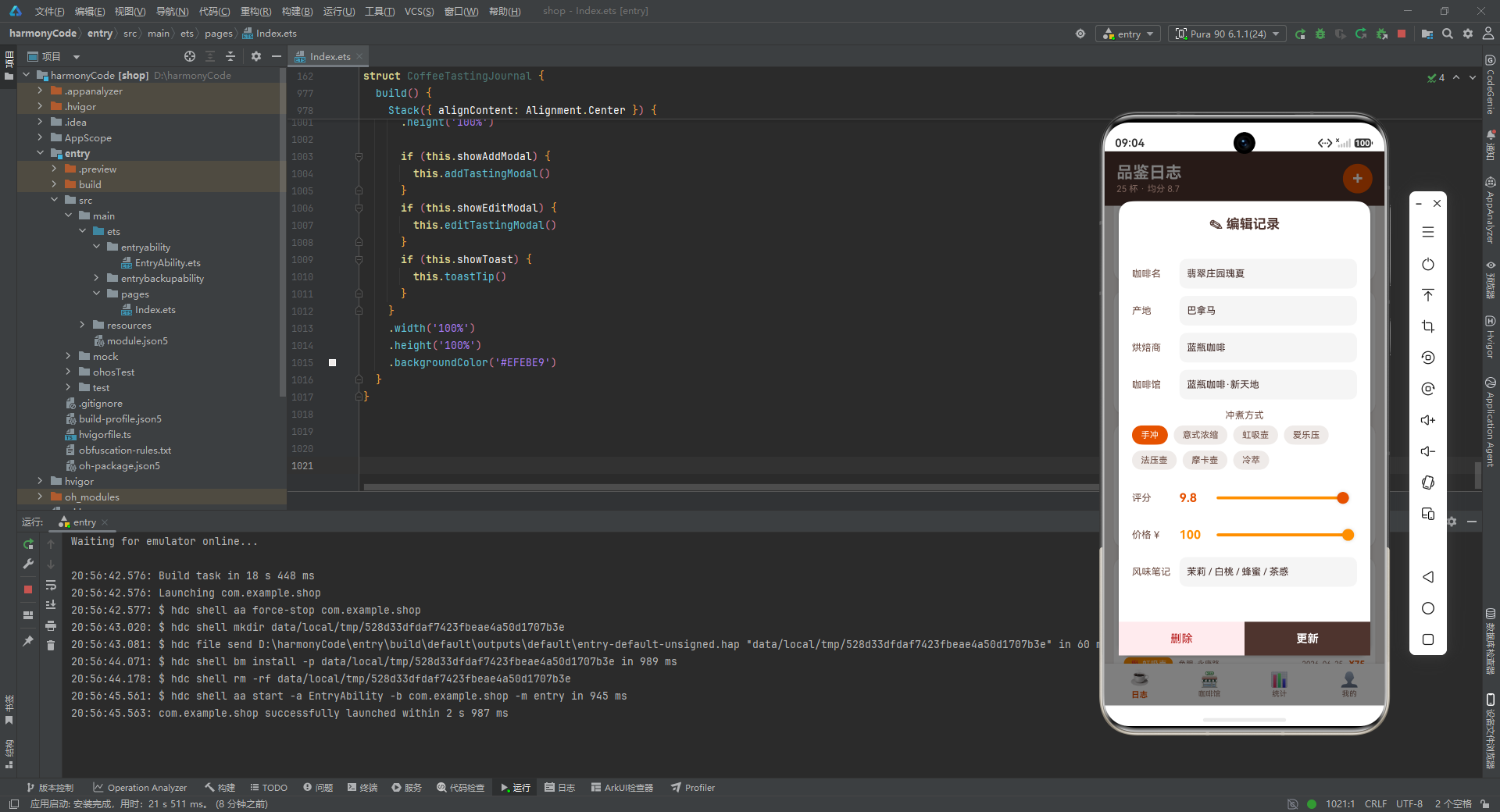
编辑弹窗与添加弹窗在结构上几乎完全对称,差异仅体现在三处:标题文案改为"✎ 编辑记录"以区分操作语义;底部左侧按钮从"取消"变为"删除",使用红色系配色(#B71C1C 文字 + #FFEBEE 背景)传达危险操作的视觉警示;右侧按钮从"保存"变为"更新",背景色从橙色 #E65100 改为深棕 #4E342E,在视觉上与添加操作做出区分。更新按钮的回调同样执行"设置 Toast → 显示 Toast → 关闭弹窗"三步流程,只是消息文案改为"记录已更新"。
这里体现了一个值得讨论的工程取舍:添加弹窗与编辑弹窗存在大量重复代码,理论上可以提取为一个带 mode 参数的通用弹窗构建器。但本应用选择保持两者独立,原因可能在于:其一,两个弹窗虽然结构相似,但按钮的语义、配色、回调逻辑存在本质差异,强行合并会导致构建器参数列表膨胀、条件分支增多,反而降低可读性;其二,独立维护使得未来对某一弹窗的定制化扩展(如编辑弹窗增加"分享"按钮)不会影响另一个。这种"适度重复优先于过度抽象"的原则,在中小型应用中是合理的工程判断。
五、卡片展示层:评分条、咖啡卡片与咖啡馆卡片
5.1 感官评分进度条
@Builder scoreBar(label: string, score: number) {
  Column() {
    Text(label).fontSize(10).fontColor('#8D6E63')
    Row() {
      Column()
        .width((score * 10) + '%')
        .height(6)
        .backgroundColor('#E65100')
        .borderRadius(3)
    }
    .width('100%')
    .height(6)
    .backgroundColor('#EFEBE9')
    .borderRadius(3)
    .margin({ top: 3, bottom: 3 })
    Text(score.toString()).fontSize(10).fontColor('#4E342E').fontWeight(FontWeight.Medium)
  }
  .layoutWeight(1)
  .alignItems(HorizontalAlign.Center)
}
scoreBar 是一个用于展示感官评分的微型进度条构建器。它的数据可视化思路非常巧妙:外层 Row 作为轨道容器,宽度 100%、高度 6vp、背景米白色 #EFEBE9、圆角 3vp;内层 Column 作为填充条,宽度通过 (score * 10) + '%' 动态计算——因为评分范围是 1 到 10 分,乘以 10 即可换算为 10% 到 100% 的百分比宽度。这种"乘以 10 转百分比"的简化换算,得益于评分上限恰好是 10 的巧妙设计,避免了引入额外的最大值常量。填充条使用主色橙 #E65100,与轨道的米白形成高对比,让评分高低一目了然。整个构建器通过 layoutWeight(1) 实现"一行四等分"的布局,在咖啡卡片中横向排列酸度、醇厚、甜感、香气四个维度,构成了一个迷你雷达图的条形化呈现。标签与数值分别位于进度条上下,以 10vp 小字号居中显示,保持了紧凑的信息密度。
5.2 咖啡品鉴卡片
@Builder coffeeCard(item: CoffeeRecord) {
  Column() {
    Row() {
      Text(item.emoji).fontSize(30).margin({ right: 10 })
      Column() {
        Row() {
          Text(item.name).fontSize(16).fontWeight(FontWeight.Bold).fontColor('#3E2723')
          if (item.isFavorite) {
            Text('★').fontSize(14).fontColor('#FF8F00').margin({ left: 6 })
          }
        }
        .width('100%')
        .alignItems(VerticalAlign.Center)
        Text(item.origin + ' · ' + item.roaster).fontSize(11).fontColor('#8D6E63').margin({ top: 2 })
      }
      .layoutWeight(1)
      .alignItems(HorizontalAlign.Start)

      Column() {
        Text(item.rating.toFixed(1)).fontSize(20).fontWeight(FontWeight.Bold).fontColor('#E65100')
        Text('评分').fontSize(9).fontColor('#8D6E63')
      }
      .alignItems(HorizontalAlign.Center)
    }
    .width('100%')
    .alignItems(VerticalAlign.Center)

    Flex({ wrap: FlexWrap.Wrap }) {
      ForEach(item.flavorNotes, (note: string) => {
        Text(note)
          .fontSize(10)
          .fontColor('#6D4C41')
          .backgroundColor('#FFF3E0')
          .borderRadius(8)
          .padding({ left: 8, right: 8, top: 3, bottom: 3 })
          .margin({ right: 6, top: 4 })
      }, (note: string) => note)
    }
    .width('100%')
    .margin({ top: 10 })

    Row() {
      this.scoreBar('酸度', item.acidity)
      this.scoreBar('醇厚', item.body)
      this.scoreBar('甜感', item.sweetness)
      this.scoreBar('香气', item.aroma)
    }
    .width('100%')
    .margin({ top: 10 })

    Row() {
      Text('♨ ' + item.brewMethod).fontSize(11).fontColor('#FFFFFF')
        .backgroundColor('#FF8F00').borderRadius(8).padding({ left: 8, right: 8, top: 3, bottom: 3 })
      Text(item.shopName).fontSize(10).fontColor('#8D6E63').layoutWeight(1).margin({ left: 8 })
      Text(item.date).fontSize(10).fontColor('#8D6E63')
      Text('¥' + item.price.toString()).fontSize(12).fontColor('#E65100').fontWeight(FontWeight.Bold).margin({ left: 8 })
    }
    .width('100%')
    .alignItems(VerticalAlign.Center)
    .margin({ top: 10 })
  }
  .width('100%')
  .padding(14)
  .backgroundColor('#FFFFFF')
  .borderRadius(16)
  .shadow({ radius: 8, color: '#1A4E342E', offsetY: 2 })
  .margin({ bottom: 12 })
  .onClick(() => {
    this.editIndex = COFFEE_DATA.indexOf(item)
    this.inputName = item.name
    this.inputOrigin = item.origin
    this.inputRoaster = item.roaster
    this.inputShop = item.shopName
    this.inputBrew = item.brewMethod
    this.inputRating = item.rating
    this.inputPrice = item.price
    this.inputNotes = item.flavorNotes.join(' / ')
    this.showEditModal = true
  })
}
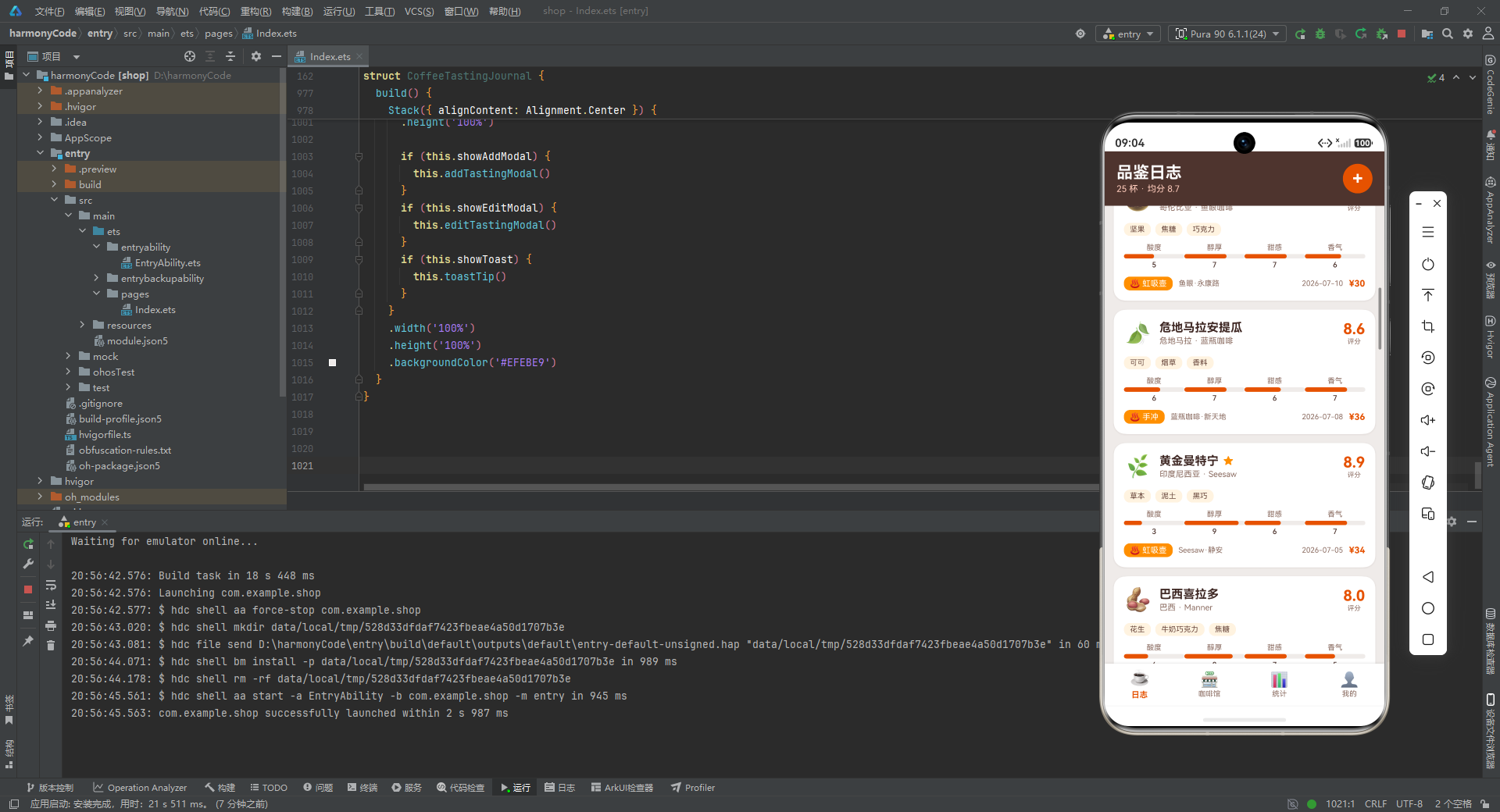
coffeeCard 是日志页的核心展示单元,也是整个应用信息密度最高的组件。从纵向结构看,它分为四个信息层:头部信息行、风味标签区、感官评分行、底部元数据行,层层递进地呈现一条品鉴记录的全貌。
头部信息行采用三段式水平布局:左侧是 30vp 字号的 Emoji 图标,作为卡片的视觉锚点;中间是 layoutWeight(1) 撑开的名称列,包含咖啡名称(16vp 粗体深棕)和"产地 · 烘焙商"副标题(11vp 浅棕);右侧是评分数字(20vp 粗体橙色)配"评分"小标签。这里有一个条件渲染的细节——当 item.isFavorite 为真时,在咖啡名称右侧追加一个琥珀金色星标 ★,这种"收藏即亮星"的视觉反馈简洁直观。if (item.isFavorite) 是 ArkUI 在构建器内支持的条件渲染语法,只有条件为真时才会渲染对应的 UI 节点。
风味标签区使用 Flex({ wrap: FlexWrap.Wrap }) 渲染 item.flavorNotes 数组,每个风味关键词被包装成一个浅橙色背景(#FFF3E0)、圆角 8vp 的小标签。FlexWrap.Wrap 确保标签数量较多时自动换行,不会溢出卡片边界。ForEach 的第三个参数 (note: string) => note 是键值生成器,以关键词文本本身作为唯一键,帮助框架在数据变化时高效 diff。
感官评分行横向排列四个 scoreBar,分别展示酸度、醇厚、甜感、香气,由于 scoreBar 内部使用了 layoutWeight(1),四个进度条会自动等分宽度,形成一个整齐的四列网格。
底部元数据行同样信息丰富:最左侧是冲煮方式标签(橙色背景白字,带 ♨ 图标前缀),接着是 layoutWeight(1) 撑开的咖啡馆名称(左对齐,右侧自然留白),然后是品鉴日期,最右侧是价格(橙色粗体,带 ¥ 前缀)。这一行将"怎么冲的、在哪喝的、什么时候喝的、花了多少钱"四个维度的信息浓缩在一行之内,信息密度极高但不显拥挤,得益于字号阶梯的精心设计(11vp/10vp/10vp/12vp)。
卡片整体的视觉封装堪称典范:白色背景、borderRadius(16) 圆角、padding(14) 内边距,阴影使用半透明的主题色 #1A4E342E(即 #4E342E 带 0x1A 透明度)而非纯黑,这让阴影带有咖啡色调的温暖感,与整体主题高度协调。margin({ bottom: 12 }) 为卡片之间预留间距。最关键的是卡片根节点的 onClick 回调:它通过 COFFEE_DATA.indexOf(item) 反查当前卡片对应的数据索引并存入 editIndex,然后将该条记录的所有字段逐一赋值给 input* 状态变量(注意 flavorNotes 数组通过 .join(' / ') 转为以斜杠分隔的字符串以适配文本输入框),最后将 showEditModal 设为 true 打开编辑弹窗。这一连串赋值操作实现了"点击卡片即进入编辑"的流畅交互,是状态上提模式发挥价值的最佳体现。
5.3 咖啡馆卡片与分区标题
@Builder cafeCard(item: CafeItem) {
  Column() {
    Row() {
      Text(item.emoji).fontSize(28).margin({ right: 10 })
      Column() {
        Text(item.name).fontSize(15).fontWeight(FontWeight.Bold).fontColor('#3E2723')
        Text(item.address).fontSize(11).fontColor('#8D6E63').margin({ top: 2 })
      }
      .layoutWeight(1)
      .alignItems(HorizontalAlign.Start)
      Column() {
        Text(item.rating.toFixed(1)).fontSize(18).fontWeight(FontWeight.Bold).fontColor('#E65100')
        Row() {
          Text('★').fontSize(9).fontColor('#FF8F00')
          Text('★').fontSize(9).fontColor('#FF8F00')
          Text('★').fontSize(9).fontColor('#FF8F00')
          Text('★').fontSize(9).fontColor('#FF8F00')
          Text('★').fontSize(9).fontColor('#FF8F00')
        }
      }
      .alignItems(HorizontalAlign.Center)
    }
    .width('100%')
    .alignItems(VerticalAlign.Center)

    Row() {
      Text('招牌').fontSize(10).fontColor('#8D6E63')
      Text(item.specialty).fontSize(11).fontColor('#4E342E').fontWeight(FontWeight.Medium).margin({ left: 4 })
      Row().layoutWeight(1)
      Text(item.priceRange).fontSize(11).fontColor('#E65100').fontWeight(FontWeight.Bold)
    }
    .width('100%')
    .alignItems(VerticalAlign.Center)
    .margin({ top: 10 })

    Row() {
      Text('已访问 ' + item.visitCount.toString() + ' 次').fontSize(10).fontColor('#8D6E63')
      Row().layoutWeight(1)
      Text('查看 ›').fontSize(11).fontColor('#E65100').fontWeight(FontWeight.Medium)
    }
    .width('100%')
    .alignItems(VerticalAlign.Center)
    .margin({ top: 8 })
  }
  .width('100%')
  .padding(14)
  .backgroundColor('#FFFFFF')
  .borderRadius(16)
  .shadow({ radius: 8, color: '#1A4E342E', offsetY: 2 })
  .margin({ bottom: 12 })
}

@Builder sectionHeader(title: string, subtitle: string) {
  Row() {
    Column() {
      Text(title).fontSize(16).fontWeight(FontWeight.Bold).fontColor('#3E2723')
      Text(subtitle).fontSize(11).fontColor('#8D6E63').margin({ top: 2 })
    }
    .alignItems(HorizontalAlign.Start)
    .layoutWeight(1)
  }
  .width('100%')
  .margin({ bottom: 10, top: 6 })
}
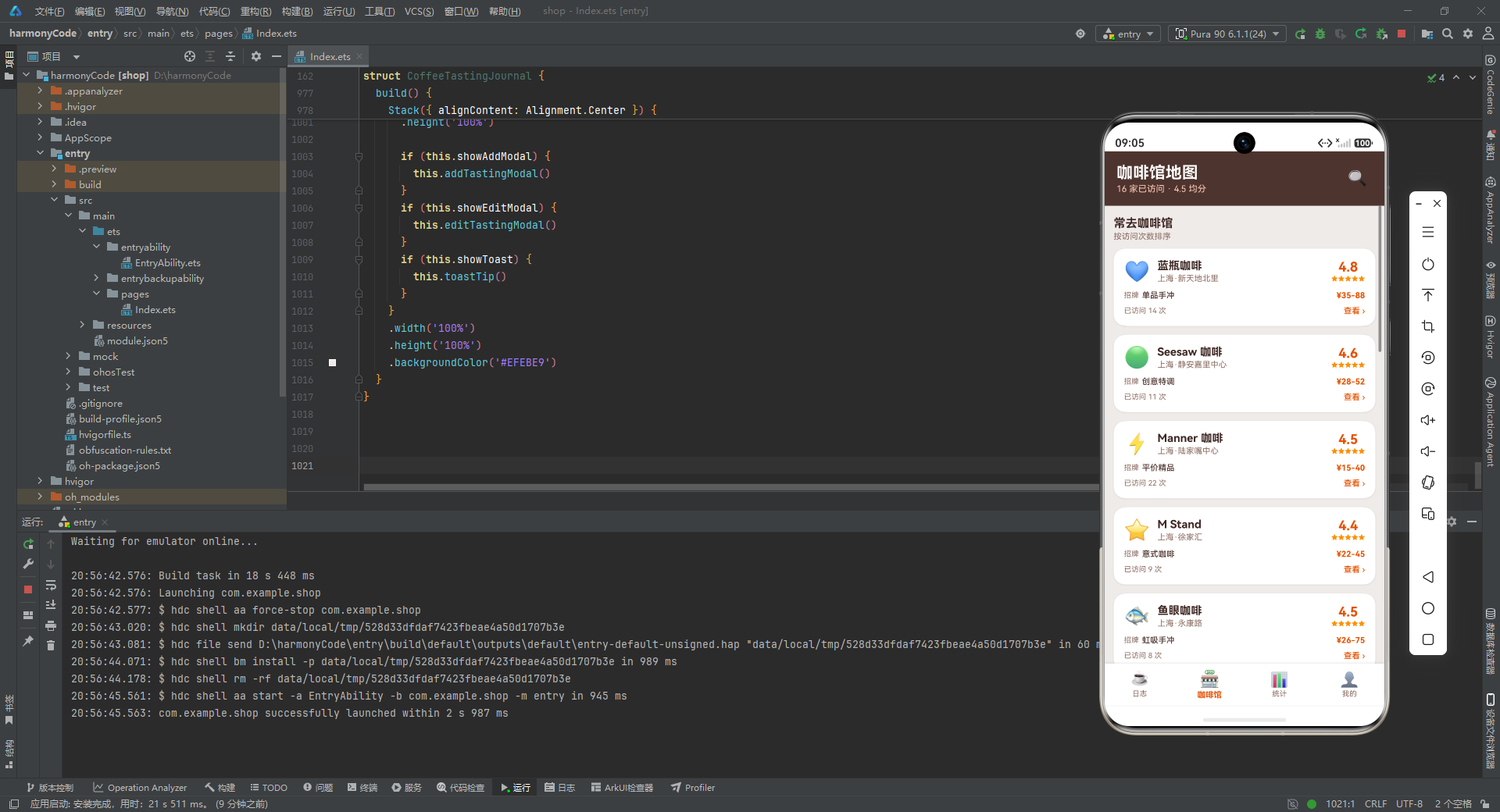
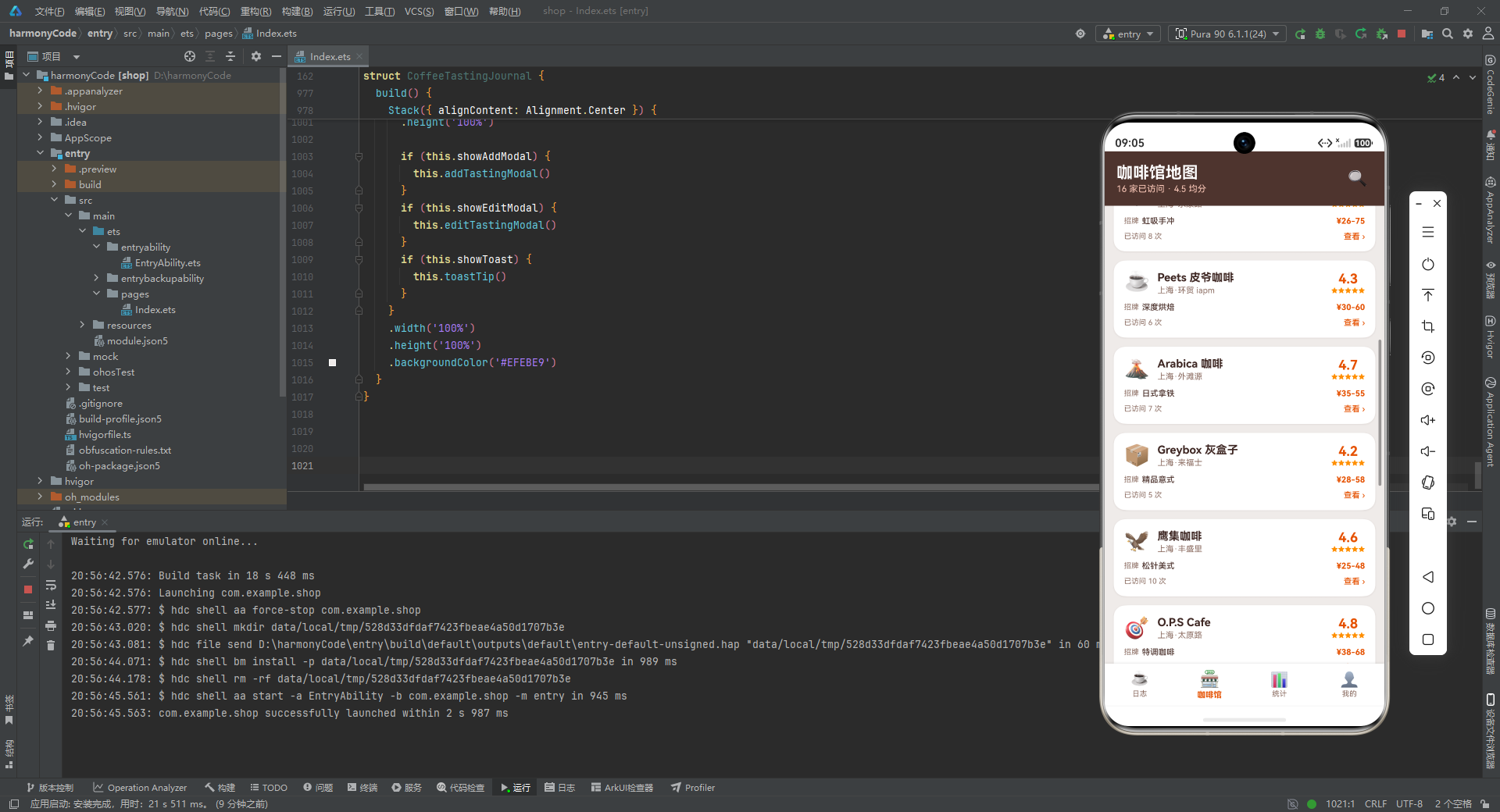
cafeCard 的结构与 coffeeCard 一脉相承,但信息维度有所不同。头部行同样三段式:Emoji + 名称地址列 + 评分列。评分列除了数字评分外,还渲染了五个 ★ 星标作为视觉装饰——这里值得注意的是,这五个星标是固定渲染的而非根据评分动态计算,属于"装饰性五星"设计,重点在于传达"这是一家评分不错的店"的直观印象,而非精确的星级映射。第二行展示"招牌"特色与价格区间,使用一个 Row().layoutWeight(1) 作为弹性占位符实现左右两端对齐——这是 ArkUI 中实现"两端对齐"的惯用技巧,比 justifyContent(FlexAlign.SpaceBetween) 更灵活,因为它允许在同一行内混合多个元素。第三行展示访问次数与"查看 ›"引导链接,visitCount 以"已访问 N 次"的文案呈现,强化了用户与咖啡馆之间的互动记忆。
sectionHeader 是一个极简但高频复用的构建器,渲染一个"标题 + 副标题"的分区头部。标题 16vp 粗体深棕,副标题 11vp 浅棕,纵向排列左对齐。它在四个 Tab 页中被调用了十余次,为每个内容区块提供视觉分隔与语义说明。margin({ bottom: 10, top: 6 }) 的上下间距既与上方内容拉开距离,又为下方卡片留出呼吸空间。
六、Tab 页面层:四大功能模块的装配
6.1 品鉴日志页(tabJournal)
@Builder tabJournal() {
  Column() {
    Row() {
      Column() {
        Text('品鉴日志').fontSize(22).fontWeight(FontWeight.Bold).fontColor('#FFFFFF')
        Text(TOTAL_TASTINGS.toString() + ' 杯 · 均分 ' + AVG_RATING.toFixed(1))
          .fontSize(12).fontColor('#FFCCBC').margin({ top: 2 })
      }
      .alignItems(HorizontalAlign.Start)
      .layoutWeight(1)
      Text('+')
        .fontSize(24).fontColor('#FFFFFF').fontWeight(FontWeight.Bold)
        .width(40).height(40).textAlign(TextAlign.Center)
        .backgroundColor('#E65100').borderRadius(20)
        .onClick(() => {
          this.inputName = ''
          this.inputOrigin = ''
          this.inputRoaster = ''
          this.inputShop = ''
          this.inputBrew = '手冲'
          this.inputRating = 8.0
          this.inputPrice = 35
          this.inputNotes = ''
          this.showAddModal = true
        })
  }
  .width('100%')
  .padding({ left: 16, right: 16, top: 16, bottom: 16 })
  .backgroundColor('#4E342E')
  .alignItems(VerticalAlign.Center)

    Scroll() {
      Column() {
        this.sectionHeader('最近品鉴', '点击卡片可编辑')
        ForEach(COFFEE_DATA, (item: CoffeeRecord) => {
          this.coffeeCard(item)
        }, (item: CoffeeRecord) => item.name + item.date)
      }
      .width('100%')
      .padding({ left: 12, right: 12, top: 8, bottom: 16 })
    }
    .layoutWeight(1)
    .backgroundColor('#EFEBE9')
  }
  .width('100%')
  .height('100%')
}
tabJournal 是应用的默认首页,由头部栏和可滚动列表区两部分组成。头部栏采用深棕色背景(#4E342E),左侧是"品鉴日志"标题与摘要副标题(“25 杯 · 均分 8.7”),右侧是一个 40x40vp 的圆形橙色添加按钮。这个按钮的 onClick 回调执行了一组"表单重置"操作——将所有 input* 状态变量清空或设为默认值(冲煮方式默认"手冲"、评分默认 8.0、价格默认 35),然后打开添加弹窗。这种"打开前先重置"的模式确保了用户每次点击添加按钮时,弹窗内的表单都是干净的初始状态,不会残留上一次编辑的数据。
列表区使用 Scroll 包裹 Column,layoutWeight(1) 让它占据头部栏以下的全部剩余高度。内部通过 ForEach 遍历 COFFEE_DATA 数组渲染 coffeeCard,键值生成器 (item: CoffeeRecord) => item.name + item.date 以"名称+日期"组合作为唯一键,确保每条记录在 diff 时能被正确识别。sectionHeader 在列表顶部提供"最近品鉴 / 点击卡片可编辑"的引导文案,告知用户卡片可点击交互。整个列表区背景设为米白 #EFEBE9,与白色卡片形成微妙的层次对比。
6.2 咖啡馆地图页(tabCafes)
@Builder tabCafes() {
  Column() {
    Row() {
      Column() {
        Text('咖啡馆地图').fontSize(22).fontWeight(FontWeight.Bold).fontColor('#FFFFFF')
        Text(TOTAL_CAFES.toString() + ' 家已访问 · 4.5 均分')
          .fontSize(12).fontColor('#FFCCBC').margin({ top: 2 })
      }
      .alignItems(HorizontalAlign.Start)
      .layoutWeight(1)
      Text('🔍').fontSize(22).width(40).height(40).textAlign(TextAlign.Center)
    }
    .width('100%')
    .padding({ left: 16, right: 16, top: 16, bottom: 16 })
    .backgroundColor('#4E342E')
    .alignItems(VerticalAlign.Center)

    Scroll() {
      Column() {
        this.sectionHeader('常去咖啡馆', '按访问次数排序')
        ForEach(CAFE_DATA, (item: CafeItem) => {
          this.cafeCard(item)
        }, (item: CafeItem) => item.name)
      }
      .width('100%')
      .padding({ left: 12, right: 12, top: 8, bottom: 16 })
    }
    .layoutWeight(1)
    .backgroundColor('#EFEBE9')
  }
  .width('100%')
  .height('100%')
}
tabCafes 的结构与 tabJournal 高度对称,体现了应用在页面布局上的一致性设计原则。头部栏同样深棕色背景,左侧标题改为"咖啡馆地图"配摘要"16 家已访问 · 4.5 均分",右侧放置一个🔍搜索图标(虽然当前未绑定点击事件,但为未来搜索功能预留了入口位置)。列表区通过 ForEach 遍历 CAFE_DATA 渲染 cafeCard,键值生成器以咖啡馆名称 item.name 作为唯一键。分区标题"常去咖啡馆 / 按访问次数排序"暗示了列表的预期排序逻辑——虽然当前数据源是静态的,但这一文案为用户建立了"访问次数越多排越前"的心理预期。
七、统计页:数据可视化的集中呈现
7.1 统计卡片、柱状图项与进度条项
@Builder statCard(title: string, value: string, unit: string, color: string) {
  Column() {
    Text(title).fontSize(11).fontColor('#8D6E63')
    Row() {
      Text(value).fontSize(22).fontWeight(FontWeight.Bold).fontColor(color)
      Text(unit).fontSize(11).fontColor('#8D6E63').margin({ left: 2, bottom: 3 })
    }
    .alignItems(VerticalAlign.Bottom)
    .margin({ top: 4 })
  }
  .layoutWeight(1)
  .padding({ top: 14, bottom: 14, left: 8, right: 8 })
  .backgroundColor('#FFFFFF')
  .borderRadius(14)
  .alignItems(HorizontalAlign.Center)
  .shadow({ radius: 6, color: '#1A4E342E', offsetY: 2 })
}

@Builder barChartItem(item: MonthlySpend) {
  Column() {
    Text('¥' + item.amount.toString())
      .fontSize(9)
      .fontColor('#6D4C41')
    Column()
      .width(22)
      .height(item.height)
      .backgroundColor('#E65100')
      .borderRadius({ topLeft: 4, topRight: 4, bottomLeft: 0, bottomRight: 0 })
      .margin({ top: 4, bottom: 4 })
    Text(item.month)
      .fontSize(10)
      .fontColor('#8D6E63')
  }
  .layoutWeight(1)
  .alignItems(HorizontalAlign.Center)
  .justifyContent(FlexAlign.End)
}
statCard 是一个通用的数值展示卡片,接受标题、数值、单位和颜色四个参数。它的布局是纵向的"小标题 + 数值行":数值行内 Text(value) 用 22vp 粗体显示主数值,Text(unit) 用 11vp 显示单位并通过 margin({ bottom: 3 }) 实现底部对齐,让单位紧贴数值底部而非居中,这在视觉上更符合"数值 + 单位"的排版习惯。fontColor(color) 让每张卡片的数值可以使用不同颜色——统计页的"品鉴总数"用橙色、"累计花费"用琥珀金、"平均评分"用深棕、"最爱产地"用中棕,四色卡片并排时既统一又有变化。卡片通过 layoutWeight(1) 实现等宽分布,shadow 的 radius 6vp 比内容卡片的 8vp 略小,呈现出更轻量的悬浮感。
barChartItem 是一个纯 CSS 柱状图的柱子实现,没有使用任何图表库。每根柱子由三部分纵向排列:顶部的金额标签(¥ + amount,9vp 小字)、中间的柱体(固定宽 22vp,高度取自预计算的 item.height,橙色背景,仅顶部圆角 4vp 模拟柱状图的"圆头"效果)、底部的月份标签。整个 Column 通过 justifyContent(FlexAlign.End) 实现底部对齐——因为各月份的 height 不同,底部对齐能让所有柱子的底边处于同一水平线,形成标准的柱状图基线。layoutWeight(1) 让六根柱子在父 Row 中等宽分布,柱体之间的间距由 layoutWeight 自动分配的空间提供。这种"数据驱动 + 纯布局组件"的图表实现方式,是 ArkUI 在无图表库场景下的优雅解决方案。
@Builder progressItem(label: string, percent: number, color: string, count: number) {
  Column() {
    Row() {
      Text(label).fontSize(12).fontColor('#4E342E')
      Row().layoutWeight(1)
      Text(count.toString() + ' 次').fontSize(11).fontColor('#8D6E63')
      Text('  ' + percent.toString() + '%').fontSize(11).fontColor('#E65100').fontWeight(FontWeight.Bold)
    }
    .width('100%')
    .alignItems(VerticalAlign.Center)
    .margin({ bottom: 6 })
    Row() {
      Column()
        .width(percent + '%')
        .height(10)
        .backgroundColor(color)
        .borderRadius(5)
    }
    .width('100%')
    .height(10)
    .backgroundColor('#EFEBE9')
    .borderRadius(5)
  }
  .width('100%')
  .margin({ bottom: 12 })
}
progressItem 实现了一个带标签和数值的水平进度条。上半部分是信息行:左侧标签、中间弹性占位 Row().layoutWeight(1)、右侧依次是次数和百分比。下半部分是进度条本体:外层 Row 作为轨道(米白背景、圆角 5vp、高度 10vp),内层 Column 作为填充(宽度直接取 percent + '%',高度 10vp,颜色由参数传入,圆角 5vp)。由于 percent 已经是 0 到 100 的整数值,直接拼接 % 即可作为宽度百分比字符串,无需任何换算。这个构建器在统计页被三处复用——冲煮方式分布(多色)、产地分布(统一棕色)、评分等级(统一琥珀金),通过 color 参数的灵活传参实现了"一构建器驭三场景"的高复用性。
7.2 统计页面主体
@Builder tabStats() {
  Column() {
    Row() {
      Text('数据统计').fontSize(22).fontWeight(FontWeight.Bold).fontColor('#FFFFFF')
      Row().layoutWeight(1)
      Text('📊').fontSize(22)
    }
    .width('100%')
    .padding({ left: 16, right: 16, top: 16, bottom: 16 })
    .backgroundColor('#4E342E')
    .alignItems(VerticalAlign.Center)

    Scroll() {
      Column() {
        Row() {
          this.statCard('品鉴总数', TOTAL_TASTINGS.toString(), '杯', '#E65100')
          this.statCard('累计花费', TOTAL_SPENT.toString(), '元', '#FF8F00')
        }
        .width('100%')
        .margin({ bottom: 8 })
        Row() {
          this.statCard('平均评分', AVG_RATING.toFixed(1), '分', '#4E342E')
          this.statCard('最爱产地', FAV_ORIGIN, '', '#6D4C41')
        }
        .width('100%')
        .margin({ bottom: 4 })

        Column() {
          this.sectionHeader('月度花费', '近 6 个月咖啡支出')
          Row() {
            ForEach(MONTHLY_SPEND, (item: MonthlySpend) => {
              this.barChartItem(item)
            }, (item: MonthlySpend) => item.month)
          }
          .width('100%')
          .height(140)
          .padding({ top: 12, bottom: 12 })
        }
        .width('100%')
        .padding(14)
        .backgroundColor('#FFFFFF')
        .borderRadius(16)
        .shadow({ radius: 8, color: '#1A4E342E', offsetY: 2 })
        .margin({ bottom: 12 })

        Column() {
          this.sectionHeader('冲煮方式分布', '你最常用的萃取方式')
          ForEach(BREW_STATS, (stat: BrewMethodStat) => {
            this.progressItem(stat.method, stat.percent, stat.color, stat.count)
          }, (stat: BrewMethodStat) => stat.method)
        }
        .width('100%')
        .padding(14)
        .backgroundColor('#FFFFFF')
        .borderRadius(16)
        .shadow({ radius: 8, color: '#1A4342E', offsetY: 2 })
        .margin({ bottom: 12 })

        Column() {
          this.sectionHeader('产地分布', '咖啡豆产区占比')
          ForEach(ORIGIN_STATS, (stat: OriginStat) => {
            this.progressItem(stat.origin, stat.percent, '#6D4C41', stat.count)
          }, (stat: OriginStat) => stat.origin)
        }
        .width('100%')
        .padding(14)
        .backgroundColor('#FFFFFF')
        .borderRadius(16)
        .shadow({ radius: 8, color: '#1A4E342E', offsetY: 2 })
        .margin({ bottom: 12 })

        Column() {
          this.sectionHeader('评分等级', '品鉴评分区间分布')
          ForEach(RATING_LEVELS, (stat: RatingLevel) => {
            this.progressItem(stat.level, stat.percent, '#FF8F00', stat.count)
          }, (stat: RatingLevel) => stat.level)
        }
        .width('100%')
        .padding(14)
        .backgroundColor('#FFFFFF')
        .borderRadius(16)
        .shadow({ radius: 8, color: '#1A4E342E', offsetY: 2 })
        .margin({ bottom: 16 })
      }
      .width('100%')
      .padding({ left: 12, right: 12, top: 8, bottom: 16 })
    }
    .layoutWeight(1)
    .backgroundColor('#EFEBE9')
  }
  .width('100%')
  .height('100%')
}
tabStats 是四个 Tab 页中信息量最大、可视化组件最丰富的页面。它采用"头部栏 + 可滚动内容区"的标准结构,但内容区内部又分为多个白色卡片区块,每个区块承载一类统计可视化。
内容区顶部首先是四张 statCard 组成的 2x2 网格,通过两个 Row 纵向排列,每行两张卡片,卡片间通过 layoutWeight(1) 等分宽度,行间距通过 margin({ bottom: 8 }) 和 margin({ bottom: 4 }) 控制。这四张卡片是应用的"核心指标看板",一屏之内即可了解品鉴总数、累计花费、平均评分和最爱产地。
紧接着是月度花费柱状图区块。它被包裹在一个白色卡片容器内(圆角 16、阴影、padding 14),内部先调用 sectionHeader 设置"月度花费 / 近 6 个月咖啡支出"标题,然后是一个 height(140) 的 Row 容器,通过 ForEach 遍历 MONTHLY_SPEND 渲染六根 barChartItem 柱子。固定 140vp 的高度既保证了柱子有足够的展示空间,又不会占据过多屏幕。padding({ top: 12, bottom: 12 }) 为柱状图上下留出与卡片边框的间距。
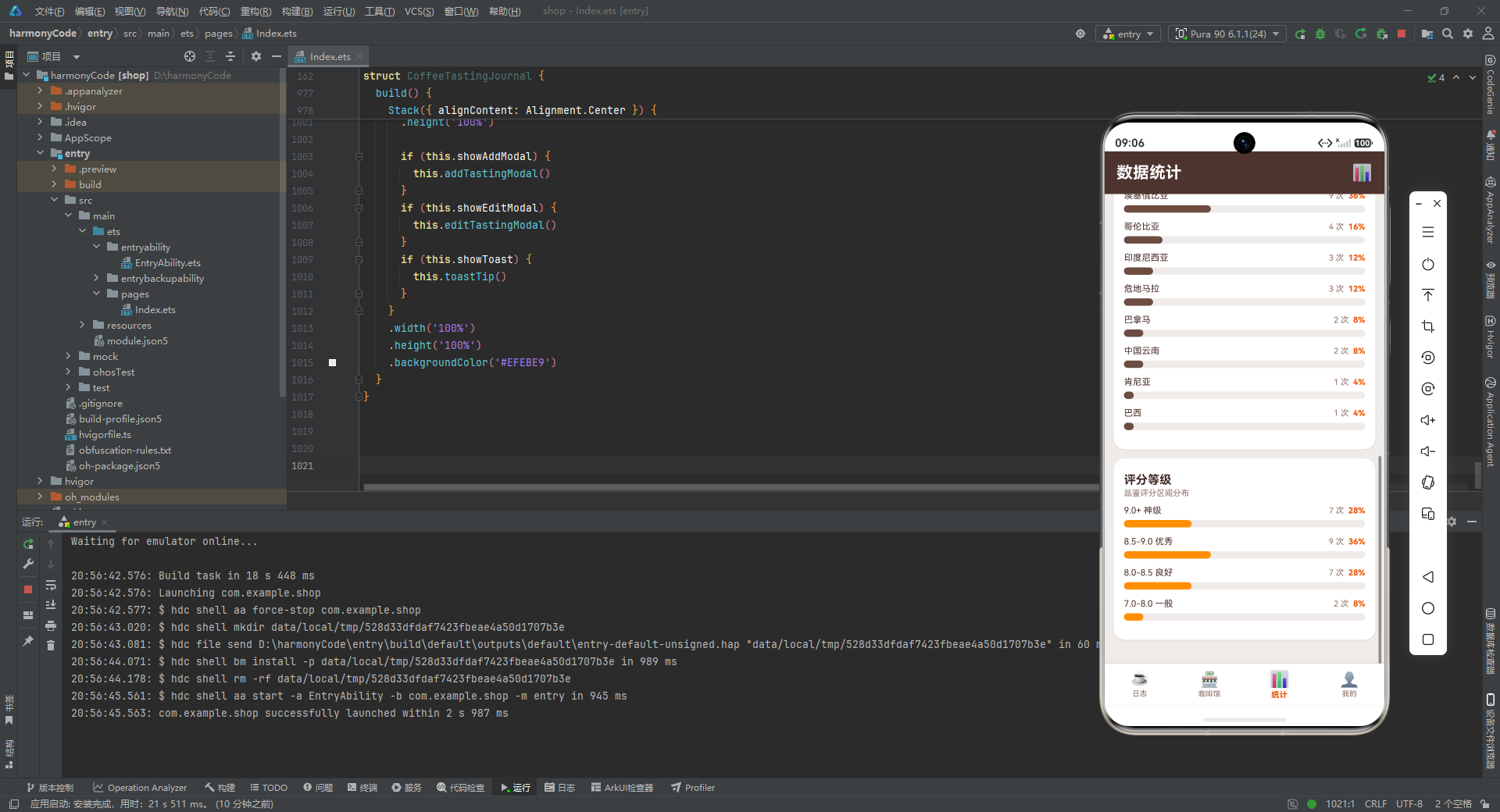
随后的三个区块分别展示冲煮方式分布、产地分布、评分等级分布,结构完全一致:白色卡片容器 + sectionHeader + ForEach 渲染 progressItem。唯一的差异在于数据源和颜色参数:冲煮方式分布传入 stat.color(每条不同色,从数据中读取);产地分布统一传入 '#6D4C41'(中棕色);评分等级统一传入 '#FF8F00'(琥珀金)。这种"同结构不同数据不同配色"的复用模式,让三个区块在视觉上既统一又有辨识度。整个统计页通过 Scroll 包裹,确保所有统计内容在超出屏幕时可以滚动浏览。
八、个人中心页:用户画像与成就系统
@Builder tabProfile() {
  Column() {
    Row() {
      Text('个人中心').fontSize(22).fontWeight(FontWeight.Bold).fontColor('#FFFFFF')
      Row().layoutWeight(1)
      Text('⚙').fontSize(22).fontColor('#FFFFFF')
    }
    .width('100%')
    .padding({ left: 16, right: 16, top: 16, bottom: 16 })
    .backgroundColor('#4E342E')
    .alignItems(VerticalAlign.Center)

    Scroll() {
      Column() {
        // 用户信息卡
        Column() {
          Row() {
            Column() {
              Text('☕').fontSize(48)
            }
            .width(80)
            .height(80)
            .backgroundColor('#FF8F00')
            .borderRadius(40)
            .justifyContent(FlexAlign.Center)
            .alignItems(HorizontalAlign.Center)
            Column() {
              Text('咖啡品鉴师').fontSize(18).fontWeight(FontWeight.Bold).fontColor('#3E2723')
              Text('Lv.7 · 资深爱好者').fontSize(12).fontColor('#8D6E63').margin({ top: 4 })
              Row() {
                Text('已品鉴 ' + TOTAL_TASTINGS.toString() + ' 杯').fontSize(11).fontColor('#E65100')
              }
              .margin({ top: 6 })
            }
            .margin({ left: 14 })
            .alignItems(HorizontalAlign.Start)
            .layoutWeight(1)
          }
          .width('100%')
          .alignItems(VerticalAlign.Center)
        }
        .width('100%')
        .padding(16)
        .backgroundColor('#FFFFFF')
        .borderRadius(16)
        .shadow({ radius: 8, color: '#1A4E342E', offsetY: 2 })
        .margin({ bottom: 12 })

        // 三连统计卡
        Row() {
          this.statCard('品鉴', TOTAL_TASTINGS.toString(), '杯', '#E65100')
          this.statCard('均分', AVG_RATING.toFixed(1), '分', '#FF8F00')
          this.statCard('花费', TOTAL_SPENT.toString(), '元', '#4E342E')
        }
        .width('100%')
        .margin({ bottom: 12 })

        // 成就徽章卡
        Column() {
          this.sectionHeader('成就徽章', '已解锁 6 / 12')
          Row() {
            Column() { Text('🏆').fontSize(28); Text('品鉴达人').fontSize(10).fontColor('#4E342E').margin({ top: 4 }) }
              .layoutWeight(1).alignItems(HorizontalAlign.Center)
            Column() { Text('🌟').fontSize(28); Text('产地猎人').fontSize(10).fontColor('#4E342E').margin({ top: 4 }) }
              .layoutWeight(1).alignItems(HorizontalAlign.Center)
            Column() { Text('🔥').fontSize(28); Text('连续打卡').fontSize(10).fontColor('#4E342E').margin({ top: 4 }) }
              .layoutWeight(1).alignItems(HorizontalAlign.Center)
            Column() { Text('💎').fontSize(28); Text('瑰夏鉴赏').fontSize(10).fontColor('#4E342E').margin({ top: 4 }) }
              .layoutWeight(1).alignItems(HorizontalAlign.Center)
          }
          .width('100%')
          .margin({ bottom: 12 })
          Row() {
            Column() { Text('📚').fontSize(28); Text('笔记达人').fontSize(10).fontColor('#4E342E').margin({ top: 4 }) }
              .layoutWeight(1).alignItems(HorizontalAlign.Center)
            Column() { Text('🎨').fontSize(28); Text('风味专家').fontSize(10).fontColor('#4E342E').margin({ top: 4 }) }
              .layoutWeight(1).alignItems(HorizontalAlign.Center)
            Column() { Text('🗺️').fontSize(28); Text('探店能手').fontSize(10).fontColor('#4E342E').margin({ top: 4 }) }
              .layoutWeight(1).alignItems(HorizontalAlign.Center)
            Column() { Text('🔒').fontSize(28); Text('待解锁').fontSize(10).fontColor('#BCAAA4').margin({ top: 4 }) }
              .layoutWeight(1).alignItems(HorizontalAlign.Center)
          }
          .width('100%')
        }
        .width('100%')
        .padding(14)
        .backgroundColor('#FFFFFF')
        .borderRadius(16)
        .shadow({ radius: 8, color: '#1A4E342E', offsetY: 2 })
        .margin({ bottom: 12 })

        // 设置列表
        Column() {
          this.sectionHeader('设置', '应用偏好')
          Row() {
            Text('🔔').fontSize(18).margin({ right: 10 })
            Text('品鉴提醒').fontSize(14).fontColor('#3E2723').layoutWeight(1)
            Text('已开启').fontSize(12).fontColor('#8D6E63')
          }.width('100%').padding({ top: 12, bottom: 12 }).alignItems(VerticalAlign.Center)
          Row().width('100%').height(1).backgroundColor('#EFEBE9')
          // ... 其余三行设置项结构相同
        }
        .width('100%')
        .padding({ left: 14, right: 14, bottom: 4 })
        .backgroundColor('#FFFFFF')
        .borderRadius(16)
        .shadow({ radius: 8, color: '#1A4E342E', offsetY: 2 })
        .margin({ bottom: 16 })
      }
      .width('100%')
      .padding({ left: 12, right: 12, top: 8, bottom: 16 })
    }
    .layoutWeight(1)
    .backgroundColor('#EFEBE9')
  }
  .width('100%')
  .height('100%')
}
tabProfile 是应用的人格化页面,通过用户信息卡、统计概览、成就徽章和设置列表四个区块,构建出一个鲜活的"咖啡品鉴师"用户画像。
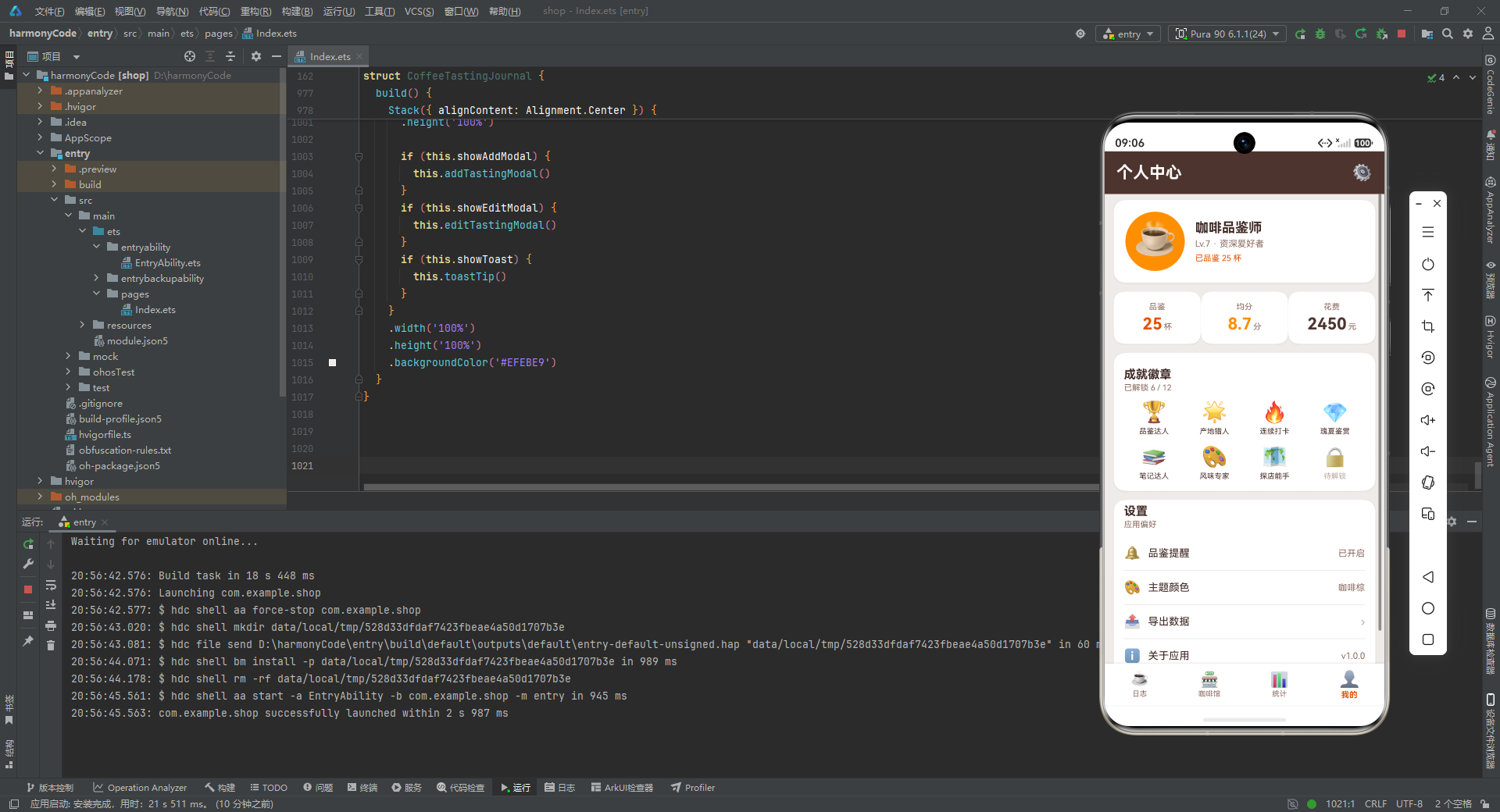
用户信息卡是本页的视觉焦点。左侧是一个 80x80vp 的圆形头像区域(琥珀金背景 #FF8F00、borderRadius(40) 实现正圆),中央放置一个 48vp 的☕ Emoji 作为头像——这种"Emoji 头像"方案零资源依赖且充满趣味。右侧是用户信息列:18vp 粗体的"咖啡品鉴师"头衔、12vp 的等级标签"Lv.7 · 资深爱好者"、以及 11vp 橙色的"已品鉴 25 杯"成就提示。等级系统的引入为应用增添了游戏化元素,激励用户持续记录。
三连统计卡复用了 statCard 构建器,横向排列品鉴数、均分、花费三项核心指标,与统计页的看板形成呼应,但此处采用三列布局而非四列,更适配个人中心的页面节奏。
成就徽章区块是本页的设计亮点。它以 4x2 的网格展示了 8 个徽章(6 个已解锁 + 1 个待解锁 + 暗示还有更多),每个徽章由一个 28vp 的 Emoji 图标和 10vp 的文字标签组成。已解锁徽章使用深棕色标签(#4E342E),待解锁徽章使用浅灰色标签(#BCAAA4)配🔒图标,通过颜色和图标的差异直观传达"已获得 vs 未获得"的状态。徽章名称——品鉴达人、产地猎人、连续打卡、瑰夏鉴赏、笔记达人、风味专家、探店能手——紧扣咖啡品鉴的核心场景,让用户在收集过程中获得成就感。
设置列表采用经典的 iOS 风格分组列表:每行由图标、标题、layoutWeight(1) 占位符、右侧值/箭头组成,行间以 1vp 高的米白色分隔线(Row().width('100%').height(1).backgroundColor('#EFEBE9'))分隔。四行设置项分别展示品鉴提醒(已开启)、主题颜色(咖啡棕)、导出数据(›)、关于应用(v1.0.0),虽然当前未绑定交互逻辑,但完整的 UI 呈现为后续功能扩展预留了空间。
九、导航层:底部 TabBar
@Builder tabBar() {
  Row() {
    ForEach(TAB_LIST, (tab: TabItem, idx: number) => {
      Column() {
        Text(tab.icon)
          .fontSize(this.currentTab === idx ? 22 : 20)
          .fontColor(this.currentTab === idx ? '#E65100' : '#8D6E63')
        Text(tab.title)
          .fontSize(this.currentTab === idx ? 11 : 10)
          .fontColor(this.currentTab === idx ? '#E65100' : '#8D6E63')
          .fontWeight(this.currentTab === idx ? FontWeight.Bold : FontWeight.Normal)
          .margin({ top: 2 })
      }
      .layoutWeight(1)
      .alignItems(HorizontalAlign.Center)
      .justifyContent(FlexAlign.Center)
      .padding({ top: 8, bottom: 8 })
      .onClick(() => { this.currentTab = idx })
    }, (tab: TabItem) => tab.title)
  }
  .width('100%')
  .backgroundColor('#FFFFFF')
  .shadow({ radius: 8, color: '#1A000000', offsetY: -2 })
}
tabBar 是应用的导航枢纽,通过 ForEach 遍历 TAB_LIST 渲染四个 Tab 项。每个 Tab 项是一个纵向排列的 Column,包含图标和文字两行。这里最精妙的是选中态的视觉表达——完全通过三元表达式驱动:选中时图标字号 22vp(比未选中的 20vp 大 2vp)、颜色变为橙色 #E65100、文字字号 11vp、字重加粗;未选中时图标字号 20vp、颜色为浅棕 #8D6E63、文字字号 10vp、字重常规。这种"字号 + 颜色 + 字重"三重差异化的选中态反馈,比单纯改颜色更有层次感,选中项微微"放大"的效果引导用户视觉聚焦。
ForEach 的第二个参数 (tab: TabItem, idx: number) 同时接收数据项和索引,idx 用于与 currentTab 比较判断选中态。点击事件 this.currentTab = idx 是整个导航的核心驱动力——修改这个 @State 变量后,ArkUI 会重新执行 build() 中的条件分支,切换显示对应的 Tab 页面构建器,同时 TabBar 自身的选中态样式也会同步刷新。TabBar 底部的 shadow 使用了负的 offsetY(offsetY: -2),让阴影投射方向朝上,模拟底部导航栏对上方内容的光照遮挡效果,增强了导航栏"浮于内容之上"的层次感。四个 Tab 项通过 layoutWeight(1) 等分宽度,无论屏幕尺寸如何都能均匀分布。
十、根构建:build() 整体装配
build() {
  Stack({ alignContent: Alignment.Center }) {
    Column() {
      Column() {
        if (this.currentTab === 0) {
          this.tabJournal()
        } else {
          if (this.currentTab === 1) {
            this.tabCafes()
          } else {
            if (this.currentTab === 2) {
              this.tabStats()
            } else {
              this.tabProfile()
            }
          }
        }
      }
      .layoutWeight(1)
      .width('100%')

      this.tabBar()
    }
    .width('100%')
    .height('100%')

    if (this.showAddModal) {
      this.addTastingModal()
    }
    if (this.showEditModal) {
      this.editTastingModal()
    }
    if (this.showToast) {
      this.toastTip()
    }
  }
  .width('100%')
  .height('100%')
  .backgroundColor('#EFEBE9')
}
build() 是整个应用的装配总枢纽,所有构建器在这里被组装成最终的组件树。最外层使用 Stack 作为根容器——Stack 是 ArkUI 的层叠布局容器,子元素默认居中堆叠,后声明的子元素浮于先声明的子元素之上。这一特性正是实现"主内容 + 浮层"架构的关键。
Stack 的第一个子元素是主内容 Column,它纵向排列两部分:上方的 Tab 页面容器(Column + layoutWeight(1) 占据除 TabBar 外的全部高度)和下方的 tabBar()。Tab 页面容器内部通过嵌套的 if-else 条件分支,根据 currentTab 的值调用对应的页面构建器。这里使用的是嵌套 if-else 而非 switch-case,这是 ArkUI 在 build 函数中支持条件渲染的标准写法——每个 if 分支返回一个构建器调用的 UI 节点,当 currentTab 变化时,框架会卸载旧分支的节点树并挂载新分支的节点树。
Stack 的后续三个子元素是三个条件渲染的浮层:添加弹窗、编辑弹窗、Toast 提示。它们分别由 showAddModal、showEditModal、showToast 三个布尔状态变量控制。由于它们声明在主内容之后,根据 Stack 的层叠规则,它们会浮于主内容之上。三个浮层的 zIndex 值在各自构建器内部已设置(弹窗 999、Toast 1000),确保 Toast 即使在弹窗显示时也能浮于最顶层。这种"主内容 + 条件浮层"的 Stack 架构是 ArkUI 实现模态交互的推荐模式——浮层独立于主内容树,不影响主内容的布局计算,显示和隐藏也不会触发主内容的重排。
整个 Stack 设置了 width('100%')、height('100%') 和 backgroundColor('#EFEBE9'),确保应用铺满全屏并以米白色作为基底背景。当 Tab 页面内容不足以铺满屏幕时,这个基底背景会透出,保持视觉一致性。
十一、各模块关键技术点总结对比
下表横向对比了应用四个 Tab 页(及核心弹窗模块)的关键技术维度,帮助快速把握各模块的设计差异与共性:
| 对比维度 | 品鉴日志页 (Tab 0) | 咖啡馆页 (Tab 1) | 统计页 (Tab 2) | 个人中心页 (Tab 3) | 添加/编辑弹窗 |
|---|---|---|---|---|---|
| 核心功能 | 展示品鉴记录列表,点击卡片进入编辑 | 展示常去咖啡馆列表及详情 | 多维度数据可视化(柱状图、进度条、数值看板) | 用户画像、成就徽章、设置入口 | 表单输入与记录增删改 |
| 状态管理要点 | 读取 COFFEE_DATA 常量;点击卡片写入 input* 状态并触发 showEditModal |
读取 CAFE_DATA 常量;无写入操作,纯展示 |
读取五组统计常量;无状态写入,纯渲染 | 读取全局数值常量;无状态写入 | 双向绑定 input* 状态变量;showAddModal/showEditModal 控制可见性;showToast/toastMsg 反馈结果 |
| 关键组件 | coffeeCard、scoreBar、sectionHeader |
cafeCard、sectionHeader |
statCard、barChartItem、progressItem、sectionHeader |
statCard、sectionHeader(徽章与设置项为内联布局) |
formField、brewChip、Slider、Scroll、modalBg |
| 数据可视化方式 | 感官评分条形进度(scoreBar × 4) | 五星装饰图标、访问次数计数 | 纯 CSS 柱状图(barChartItem)、水平进度条(progressItem)、数值看板(statCard) | 三连统计卡、徽章网格 | 评分/价格 Slider 实时数值显示 |
| 布局模式 | 头部栏 + Scroll 纵向列表 |
头部栏 + Scroll 纵向列表 |
头部栏 + Scroll 多卡片纵向堆叠 |
头部栏 + Scroll 多卡片纵向堆叠 |
Stack 层叠遮罩 + position 绝对定位弹窗 |
| 列表渲染 | ForEach(COFFEE_DATA) 键值=name+date |
ForEach(CAFE_DATA) 键值=name |
ForEach × 4(月度/冲煮/产地/评分) |
无 ForEach(徽章与设置项硬编码) | ForEach(BREW_METHODS) 渲染芯片选择器 |
| 交互反馈 | 卡片点击 → 编辑弹窗 | 静态展示("查看›"预留入口) | 纯展示无交互 | 纯展示无交互 | 表单输入实时响应;保存/更新 → Toast 提示 |
| 复用构建器 | coffeeCard、scoreBar、sectionHeader | cafeCard、sectionHeader | statCard、barChartItem、progressItem、sectionHeader | statCard、sectionHeader | modalBg、formField、brewChip、toastTip |
| 设计模式 | 状态上提(卡片数据写入根级 input 状态) | 数据驱动只读渲染 | 数据预计算驱动渲染(height/color 固化在数据中) | 游戏化成就展示 + 列表式设置 | 受控组件模式(value 快照 + onChange 回写) |
| 视觉重点 | 信息密度最高的卡片(四层信息) | 招牌特色与访问频次 | 四色数值看板 + 六柱柱状图 + 三组进度条 | 圆形 Emoji 头像 + 4×2 徽章网格 | Slider 实时数值 + 底部双按钮圆角衔接 |
安装DevEco Studio程序

选择目标安装目录:

设置环境变量,但是需要重启一下:

新建一个空白模板:

设置API为24的模板项目:
初始化项目,自动下载相关依赖:

完整代码:
// 咖啡品鉴 Coffee Tasting Journal
// 主题色: Brown #4E342E | Orange #E65100 | Amber #FF8F00 | Bg #EFEBE9
interface CoffeeRecord {
name: string
origin: string
roaster: string
brewMethod: string
date: string
rating: number
price: number
acidity: number
body: number
sweetness: number
aroma: number
flavorNotes: string[]
shopName: string
isFavorite: boolean
emoji: string
}
interface CafeItem {
name: string
address: string
rating: number
specialty: string
priceRange: string
visitCount: number
emoji: string
}
interface MonthlySpend {
month: string
amount: number
height: number
}
interface BrewMethodStat {
method: string
count: number
percent: number
color: string
}
interface OriginStat {
origin: string
count: number
percent: number
}
interface RatingLevel {
level: string
count: number
percent: number
}
interface TabItem {
title: string
icon: string
}
const COFFEE_DATA: CoffeeRecord[] = [
{ name: '耶加雪菲', origin: '埃塞俄比亚', roaster: '蓝瓶咖啡', brewMethod: '手冲', date: '2026-07-20', rating: 9.2, price: 38, acidity: 8, body: 5, sweetness: 7, aroma: 9, flavorNotes: ['花香', '柠檬', '茉莉', '蜂蜜'], shopName: '蓝瓶咖啡·新天地', isFavorite: true, emoji: '🌼' },
{ name: '西达摩', origin: '埃塞俄比亚', roaster: 'Seesaw', brewMethod: '手冲', date: '2026-07-18', rating: 8.8, price: 32, acidity: 7, body: 6, sweetness: 6, aroma: 8, flavorNotes: ['莓果', '可可', '红酒'], shopName: 'Seesaw·静安', isFavorite: true, emoji: '🫐' },
{ name: '瑰夏', origin: '巴拿马', roaster: 'Manner', brewMethod: '手冲', date: '2026-07-15', rating: 9.6, price: 68, acidity: 9, body: 6, sweetness: 8, aroma: 10, flavorNotes: ['茉莉', '水蜜桃', '佛手柑'], shopName: 'Manner·陆家嘴', isFavorite: true, emoji: '🌸' },
{ name: '肯尼亚AA', origin: '肯尼亚', roaster: 'M Stand', brewMethod: '手冲', date: '2026-07-12', rating: 8.5, price: 35, acidity: 9, body: 6, sweetness: 5, aroma: 7, flavorNotes: ['黑加仑', '番茄', '梅子'], shopName: 'M Stand·徐家汇', isFavorite: false, emoji: '🍇' },
{ name: '哥伦比亚惠兰', origin: '哥伦比亚', roaster: '鱼眼咖啡', brewMethod: '虹吸壶', date: '2026-07-10', rating: 8.3, price: 30, acidity: 5, body: 7, sweetness: 7, aroma: 6, flavorNotes: ['坚果', '焦糖', '巧克力'], shopName: '鱼眼·永康路', isFavorite: false, emoji: '🌰' },
{ name: '危地马拉安提瓜', origin: '危地马拉', roaster: '蓝瓶咖啡', brewMethod: '手冲', date: '2026-07-08', rating: 8.6, price: 36, acidity: 6, body: 7, sweetness: 6, aroma: 7, flavorNotes: ['可可', '烟草', '香料'], shopName: '蓝瓶咖啡·新天地', isFavorite: false, emoji: '🍃' },
{ name: '黄金曼特宁', origin: '印度尼西亚', roaster: 'Seesaw', brewMethod: '虹吸壶', date: '2026-07-05', rating: 8.9, price: 34, acidity: 3, body: 9, sweetness: 6, aroma: 7, flavorNotes: ['草本', '泥土', '黑巧'], shopName: 'Seesaw·静安', isFavorite: true, emoji: '🌿' },
{ name: '巴西喜拉多', origin: '巴西', roaster: 'Manner', brewMethod: '意式浓缩', date: '2026-07-03', rating: 8.0, price: 22, acidity: 4, body: 8, sweetness: 7, aroma: 5, flavorNotes: ['花生', '牛奶巧克力', '焦糖'], shopName: 'Manner·陆家嘴', isFavorite: false, emoji: '🥜' },
{ name: '花魁', origin: '埃塞俄比亚', roaster: 'M Stand', brewMethod: '手冲', date: '2026-06-30', rating: 9.0, price: 40, acidity: 8, body: 5, sweetness: 8, aroma: 9, flavorNotes: ['草莓', '玫瑰', '荔枝'], shopName: 'M Stand·徐家汇', isFavorite: true, emoji: '🍓' },
{ name: '翡翠庄园瑰夏', origin: '巴拿马', roaster: '蓝瓶咖啡', brewMethod: '手冲', date: '2026-06-28', rating: 9.8, price: 88, acidity: 9, body: 7, sweetness: 9, aroma: 10, flavorNotes: ['茉莉', '白桃', '蜂蜜', '茶感'], shopName: '蓝瓶咖啡·新天地', isFavorite: true, emoji: '💎' },
{ name: '蓝山一号', origin: '牙买加', roaster: '鱼眼咖啡', brewMethod: '虹吸壶', date: '2026-06-25', rating: 9.1, price: 75, acidity: 5, body: 8, sweetness: 8, aroma: 8, flavorNotes: ['坚果', '巧克力', '微酸'], shopName: '鱼眼·永康路', isFavorite: false, emoji: '🏔️' },
{ name: '云南小粒', origin: '中国云南', roaster: 'Seesaw', brewMethod: '法压壶', date: '2026-06-22', rating: 7.8, price: 26, acidity: 4, body: 6, sweetness: 6, aroma: 5, flavorNotes: ['红糖', '坚果', '谷物'], shopName: 'Seesaw·静安', isFavorite: false, emoji: '🌾' },
{ name: '薇拉妮', origin: '埃塞俄比亚', roaster: 'Manner', brewMethod: '爱乐压', date: '2026-06-20', rating: 8.7, price: 33, acidity: 7, body: 6, sweetness: 7, aroma: 8, flavorNotes: ['杏', '桃', '茶'], shopName: 'Manner·陆家嘴', isFavorite: false, emoji: '🍑' },
{ name: '花神', origin: '危地马拉', roaster: 'M Stand', brewMethod: '手冲', date: '2026-06-18', rating: 8.4, price: 31, acidity: 6, body: 6, sweetness: 6, aroma: 7, flavorNotes: ['花香', '柑橘', '蜂蜜'], shopName: 'M Stand·徐家汇', isFavorite: false, emoji: '🌺' },
{ name: '哥斯达黎加蜜处理', origin: '哥斯达黎加', roaster: '蓝瓶咖啡', brewMethod: '手冲', date: '2026-06-15', rating: 8.6, price: 37, acidity: 6, body: 6, sweetness: 8, aroma: 7, flavorNotes: ['蜂蜜', '杏仁', '柑橘'], shopName: '蓝瓶咖啡·新天地', isFavorite: true, emoji: '🍯' },
{ name: '罗德里格斯', origin: '哥伦比亚', roaster: 'Seesaw', brewMethod: '意式浓缩', date: '2026-06-12', rating: 8.2, price: 25, acidity: 5, body: 8, sweetness: 6, aroma: 6, flavorNotes: ['焦糖', '可可', '奶油'], shopName: 'Seesaw·静安', isFavorite: false, emoji: '🍮' },
{ name: '圣费利佩', origin: '危地马拉', roaster: '鱼眼咖啡', brewMethod: '虹吸壶', date: '2026-06-10', rating: 8.5, price: 35, acidity: 6, body: 7, sweetness: 6, aroma: 7, flavorNotes: ['苹果', '焦糖', '可可'], shopName: '鱼眼·永康路', isFavorite: false, emoji: '🍎' },
{ name: '红宝石', origin: '肯尼亚', roaster: 'Manner', brewMethod: '手冲', date: '2026-06-08', rating: 8.9, price: 36, acidity: 9, body: 6, sweetness: 6, aroma: 8, flavorNotes: ['黑莓', '葡萄', '红酒'], shopName: 'Manner·陆家嘴', isFavorite: true, emoji: '🍷' },
{ name: '紫风铃', origin: '埃塞俄比亚', roaster: 'M Stand', brewMethod: '爱乐压', date: '2026-06-05', rating: 9.0, price: 39, acidity: 8, body: 5, sweetness: 8, aroma: 9, flavorNotes: ['紫罗兰', '葡萄', '荔枝'], shopName: 'M Stand·徐家汇', isFavorite: false, emoji: '🟣' },
{ name: '白山', origin: '哥伦比亚', roaster: '蓝瓶咖啡', brewMethod: '手冲', date: '2026-06-02', rating: 8.4, price: 34, acidity: 5, body: 7, sweetness: 7, aroma: 6, flavorNotes: ['牛奶', '坚果', '香草'], shopName: '蓝瓶咖啡·新天地', isFavorite: false, emoji: '🥛' },
{ name: '黑蜜处理', origin: '哥斯达黎加', roaster: 'Seesaw', brewMethod: '手冲', date: '2026-05-30', rating: 8.7, price: 38, acidity: 5, body: 8, sweetness: 9, aroma: 7, flavorNotes: ['红糖', '蜜枣', '坚果'], shopName: 'Seesaw·静安', isFavorite: false, emoji: '🟤' },
{ name: '醇香曼特宁', origin: '印度尼西亚', roaster: 'Manner', brewMethod: '摩卡壶', date: '2026-05-28', rating: 8.3, price: 28, acidity: 3, body: 9, sweetness: 5, aroma: 6, flavorNotes: ['松木', '香料', '黑巧'], shopName: 'Manner·陆家嘴', isFavorite: false, emoji: '🌲' },
{ name: '雪域', origin: '中国云南', roaster: '鱼眼咖啡', brewMethod: '法压壶', date: '2026-05-25', rating: 7.9, price: 27, acidity: 4, body: 6, sweetness: 6, aroma: 5, flavorNotes: ['麦芽', '红糖', '坚果'], shopName: '鱼眼·永康路', isFavorite: false, emoji: '❄️' },
{ name: '琥珀', origin: '巴西', roaster: 'M Stand', brewMethod: '冷萃', date: '2026-05-22', rating: 8.1, price: 30, acidity: 4, body: 7, sweetness: 8, aroma: 5, flavorNotes: ['太妃糖', '巧克力', '奶油'], shopName: 'M Stand·徐家汇', isFavorite: false, emoji: '🟠' },
{ name: '日晒耶加', origin: '埃塞俄比亚', roaster: '蓝瓶咖啡', brewMethod: '手冲', date: '2026-05-20', rating: 9.3, price: 42, acidity: 8, body: 6, sweetness: 8, aroma: 10, flavorNotes: ['蓝莓', '巧克力', '红酒'], shopName: '蓝瓶咖啡·新天地', isFavorite: true, emoji: '🫐' }
]
const CAFE_DATA: CafeItem[] = [
{ name: '蓝瓶咖啡', address: '上海·新天地北里', rating: 4.8, specialty: '单品手冲', priceRange: '¥35-88', visitCount: 14, emoji: '💙' },
{ name: 'Seesaw 咖啡', address: '上海·静安嘉里中心', rating: 4.6, specialty: '创意特调', priceRange: '¥28-52', visitCount: 11, emoji: '🟢' },
{ name: 'Manner 咖啡', address: '上海·陆家嘴中心', rating: 4.5, specialty: '平价精品', priceRange: '¥15-40', visitCount: 22, emoji: '⚡' },
{ name: 'M Stand', address: '上海·徐家汇', rating: 4.4, specialty: '意式咖啡', priceRange: '¥22-45', visitCount: 9, emoji: '⭐' },
{ name: '鱼眼咖啡', address: '上海·永康路', rating: 4.5, specialty: '虹吸手冲', priceRange: '¥26-75', visitCount: 8, emoji: '🐟' },
{ name: 'Peets 皮爷咖啡', address: '上海·环贸 iapm', rating: 4.3, specialty: '深度烘焙', priceRange: '¥30-60', visitCount: 6, emoji: '☕' },
{ name: 'Arabica 咖啡', address: '上海·外滩源', rating: 4.7, specialty: '日式拿铁', priceRange: '¥35-55', visitCount: 7, emoji: '🌋' },
{ name: 'Greybox 灰盒子', address: '上海·来福士', rating: 4.2, specialty: '精品意式', priceRange: '¥28-58', visitCount: 5, emoji: '📦' },
{ name: '鹰集咖啡', address: '上海·丰盛里', rating: 4.6, specialty: '松针美式', priceRange: '¥25-48', visitCount: 10, emoji: '🦅' },
{ name: 'O.P.S Cafe', address: '上海·太原路', rating: 4.8, specialty: '特调咖啡', priceRange: '¥38-68', visitCount: 4, emoji: '🎯' },
{ name: 'RAC Coffee', address: '上海·武康路', rating: 4.5, specialty: '澳白咖啡', priceRange: '¥30-50', visitCount: 6, emoji: '🇦🇺' },
{ name: 'Metal Hands', address: '上海·建国西路', rating: 4.4, specialty: '手冲单品', priceRange: '¥32-62', visitCount: 5, emoji: '🤘' },
{ name: '月球咖啡', address: '上海·安福路', rating: 4.6, specialty: '桂花拿铁', priceRange: '¥28-45', visitCount: 8, emoji: '🌕' },
{ name: '明谦咖啡', address: '上海·五原路', rating: 4.3, specialty: '自家烘焙', priceRange: '¥25-48', visitCount: 7, emoji: '🔆' },
{ name: 'Coffee Lab', address: '上海·愚园路', rating: 4.7, specialty: '冷萃特调', priceRange: '¥30-55', visitCount: 6, emoji: '🔬' },
{ name: 'T12 咖啡', address: '上海·建国中路', rating: 4.5, specialty: '单品手冲', priceRange: '¥35-70', visitCount: 5, emoji: '🔢' }
]
const MONTHLY_SPEND: MonthlySpend[] = [
{ month: '2月', amount: 320, height: 58 },
{ month: '3月', amount: 480, height: 88 },
{ month: '4月', amount: 260, height: 48 },
{ month: '5月', amount: 540, height: 100 },
{ month: '6月', amount: 410, height: 76 },
{ month: '7月', amount: 440, height: 81 }
]
const BREW_STATS: BrewMethodStat[] = [
{ method: '手冲', count: 11, percent: 44, color: '#E65100' },
{ method: '意式浓缩', count: 5, percent: 20, color: '#FF8F00' },
{ method: '虹吸壶', count: 3, percent: 12, color: '#6D4C41' },
{ method: '爱乐压', count: 3, percent: 12, color: '#8D6E63' },
{ method: '法压壶', count: 2, percent: 8, color: '#A1887F' },
{ method: '摩卡壶', count: 1, percent: 4, color: '#BCAAA4' }
]
const ORIGIN_STATS: OriginStat[] = [
{ origin: '埃塞俄比亚', count: 9, percent: 36 },
{ origin: '哥伦比亚', count: 4, percent: 16 },
{ origin: '印度尼西亚', count: 3, percent: 12 },
{ origin: '危地马拉', count: 3, percent: 12 },
{ origin: '巴拿马', count: 2, percent: 8 },
{ origin: '中国云南', count: 2, percent: 8 },
{ origin: '肯尼亚', count: 1, percent: 4 },
{ origin: '巴西', count: 1, percent: 4 }
]
const RATING_LEVELS: RatingLevel[] = [
{ level: '9.0+ 神级', count: 7, percent: 28 },
{ level: '8.5-9.0 优秀', count: 9, percent: 36 },
{ level: '8.0-8.5 良好', count: 7, percent: 28 },
{ level: '7.0-8.0 一般', count: 2, percent: 8 }
]
const BREW_METHODS: string[] = ['手冲', '意式浓缩', '虹吸壶', '爱乐压', '法压壶', '摩卡壶', '冷萃']
const TAB_LIST: TabItem[] = [
{ title: '日志', icon: '☕' },
{ title: '咖啡馆', icon: '🏪' },
{ title: '统计', icon: '📊' },
{ title: '我的', icon: '👤' }
]
const TOTAL_TASTINGS: number = 25
const TOTAL_SPENT: number = 2450
const AVG_RATING: number = 8.7
const FAV_ORIGIN: string = '埃塞俄比亚'
const TOTAL_CAFES: number = 16
@Entry
@Component
struct CoffeeTastingJournal {
@State currentTab: number = 0
@State showAddModal: boolean = false
@State showEditModal: boolean = false
@State editIndex: number = 0
@State inputName: string = ''
@State inputOrigin: string = ''
@State inputRoaster: string = ''
@State inputBrew: string = '手冲'
@State inputRating: number = 8.0
@State inputPrice: number = 35
@State inputNotes: string = ''
@State inputShop: string = ''
@State toastMsg: string = ''
@State showToast: boolean = false
@Builder modalBg(onClose: () => void) {
Column().width('100%').height('100%')
.backgroundColor('rgba(0,0,0,0.5)').onClick(onClose)
}
@Builder toastTip() {
Column() {
Column() {
Text(this.toastMsg).fontSize(14).fontColor('#FFFFFF')
}
.padding({ left: 20, right: 20, top: 10, bottom: 10 })
.backgroundColor('#4E342E')
.borderRadius(22)
.shadow({ radius: 12, color: '#33000000', offsetY: 2 })
}
.width('100%')
.height('100%')
.justifyContent(FlexAlign.Center)
.alignItems(HorizontalAlign.Center)
.position({ x: 0, y: 0 })
.zIndex(1000)
}
@Builder brewChip(method: string) {
Text(method)
.fontSize(12)
.fontColor(this.inputBrew === method ? '#FFFFFF' : '#6D4C41')
.backgroundColor(this.inputBrew === method ? '#E65100' : '#EFEBE9')
.borderRadius(14)
.padding({ left: 12, right: 12, top: 6, bottom: 6 })
.margin({ right: 8, bottom: 8 })
.onClick(() => { this.inputBrew = method })
}
@Builder formField(label: string, value: string, placeholder: string, onChange: (v: string) => void) {
Row() {
Text(label).fontSize(13).fontColor('#6D4C41').width(64)
TextInput({ text: value, placeholder: placeholder })
.layoutWeight(1)
.height(40)
.fontSize(13)
.fontColor('#3E2723')
.backgroundColor('#F5F5F5')
.borderRadius(10)
.padding({ left: 10, right: 10 })
.onChange(onChange)
}
.width('100%')
.alignItems(VerticalAlign.Center)
.margin({ bottom: 10 })
}
@Builder addTastingModal() {
Column() {
this.modalBg(() => { this.showAddModal = false })
Column() {
Row() {
Text('+ 添加品鉴').fontSize(18).fontWeight(FontWeight.Bold).fontColor('#4E342E')
}.width('100%').justifyContent(FlexAlign.Center).padding({ top: 18, bottom: 12 })
Scroll() {
Column() {
this.formField('咖啡名', this.inputName, '如 耶加雪菲', (v: string) => { this.inputName = v })
this.formField('产地', this.inputOrigin, '如 埃塞俄比亚', (v: string) => { this.inputOrigin = v })
this.formField('烘焙商', this.inputRoaster, '如 蓝瓶咖啡', (v: string) => { this.inputRoaster = v })
this.formField('咖啡馆', this.inputShop, '如 蓝瓶·新天地', (v: string) => { this.inputShop = v })
Text('冲煮方式').fontSize(13).fontColor('#6D4C41').margin({ bottom: 6, top: 4 })
Flex({ wrap: FlexWrap.Wrap }) {
ForEach(BREW_METHODS, (m: string) => {
this.brewChip(m)
}, (m: string) => m)
}.width('100%').margin({ bottom: 10 })
Row() {
Text('评分').fontSize(13).fontColor('#6D4C41').width(64)
Text(this.inputRating.toFixed(1)).fontSize(16).fontWeight(FontWeight.Bold).fontColor('#E65100').width(40)
Slider({ value: this.inputRating, min: 5, max: 10, step: 0.1 })
.layoutWeight(1).blockColor('#E65100').trackColor('#EFEBE9').selectedColor('#FF8F00')
.onChange((v: number) => { this.inputRating = v })
}.width('100%').alignItems(VerticalAlign.Center).margin({ bottom: 10 })
Row() {
Text('价格 ¥').fontSize(13).fontColor('#6D4C41').width(64)
Text(this.inputPrice.toString()).fontSize(16).fontWeight(FontWeight.Bold).fontColor('#FF8F00').width(40)
Slider({ value: this.inputPrice, min: 10, max: 100, step: 1 })
.layoutWeight(1).blockColor('#FF8F00').trackColor('#EFEBE9').selectedColor('#FF8F00')
.onChange((v: number) => { this.inputPrice = v })
}.width('100%').alignItems(VerticalAlign.Center).margin({ bottom: 10 })
this.formField('风味笔记', this.inputNotes, '花香 / 柠檬 / 蜂蜜', (v: string) => { this.inputNotes = v })
}
.width('100%')
.padding({ left: 18, right: 18, bottom: 20 })
}
.layoutWeight(1)
.width('100%')
Row() {
Text('取消')
.fontSize(15).fontColor('#6D4C41')
.layoutWeight(1).textAlign(TextAlign.Center)
.padding({ top: 14, bottom: 14 })
.backgroundColor('#EFEBE9')
.borderRadius({ topLeft: 0, topRight: 0, bottomLeft: 14, bottomRight: 0 })
.onClick(() => { this.showAddModal = false })
Text('保存')
.fontSize(15).fontColor('#FFFFFF').fontWeight(FontWeight.Bold)
.layoutWeight(1).textAlign(TextAlign.Center)
.padding({ top: 14, bottom: 14 })
.backgroundColor('#E65100')
.borderRadius({ topLeft: 0, topRight: 0, bottomLeft: 0, bottomRight: 14 })
.onClick(() => {
this.toastMsg = '已保存「' + (this.inputName.length > 0 ? this.inputName : '新咖啡') + '」'
this.showToast = true
this.showAddModal = false
})
}
.width('100%')
}
.width('90%')
.height('82%')
.backgroundColor('#FFFFFF')
.borderRadius(18)
.alignItems(HorizontalAlign.Center)
.position({ x: '5%', y: '9%' })
.shadow({ radius: 20, color: '#33000000', offsetY: 4 })
}
.width('100%').height('100%').position({ x: 0, y: 0 }).zIndex(999)
}
@Builder editTastingModal() {
Column() {
this.modalBg(() => { this.showEditModal = false })
Column() {
Row() {
Text('✎ 编辑记录').fontSize(18).fontWeight(FontWeight.Bold).fontColor('#4E342E')
}.width('100%').justifyContent(FlexAlign.Center).padding({ top: 18, bottom: 12 })
Scroll() {
Column() {
this.formField('咖啡名', this.inputName, '咖啡名称', (v: string) => { this.inputName = v })
this.formField('产地', this.inputOrigin, '产地', (v: string) => { this.inputOrigin = v })
this.formField('烘焙商', this.inputRoaster, '烘焙商', (v: string) => { this.inputRoaster = v })
this.formField('咖啡馆', this.inputShop, '咖啡馆', (v: string) => { this.inputShop = v })
Text('冲煮方式').fontSize(13).fontColor('#6D4C41').margin({ bottom: 6, top: 4 })
Flex({ wrap: FlexWrap.Wrap }) {
ForEach(BREW_METHODS, (m: string) => {
this.brewChip(m)
}, (m: string) => m)
}.width('100%').margin({ bottom: 10 })
Row() {
Text('评分').fontSize(13).fontColor('#6D4C41').width(64)
Text(this.inputRating.toFixed(1)).fontSize(16).fontWeight(FontWeight.Bold).fontColor('#E65100').width(40)
Slider({ value: this.inputRating, min: 5, max: 10, step: 0.1 })
.layoutWeight(1).blockColor('#E65100').trackColor('#EFEBE9').selectedColor('#FF8F00')
.onChange((v: number) => { this.inputRating = v })
}.width('100%').alignItems(VerticalAlign.Center).margin({ bottom: 10 })
Row() {
Text('价格 ¥').fontSize(13).fontColor('#6D4C41').width(64)
Text(this.inputPrice.toString()).fontSize(16).fontWeight(FontWeight.Bold).fontColor('#FF8F00').width(40)
Slider({ value: this.inputPrice, min: 10, max: 100, step: 1 })
.layoutWeight(1).blockColor('#FF8F00').trackColor('#EFEBE9').selectedColor('#FF8F00')
.onChange((v: number) => { this.inputPrice = v })
}.width('100%').alignItems(VerticalAlign.Center).margin({ bottom: 10 })
this.formField('风味笔记', this.inputNotes, '风味关键词', (v: string) => { this.inputNotes = v })
}
.width('100%')
.padding({ left: 18, right: 18, bottom: 20 })
}
.layoutWeight(1)
.width('100%')
Row() {
Text('删除')
.fontSize(15).fontColor('#B71C1C')
.layoutWeight(1).textAlign(TextAlign.Center)
.padding({ top: 14, bottom: 14 })
.backgroundColor('#FFEBEE')
Text('更新')
.fontSize(15).fontColor('#FFFFFF').fontWeight(FontWeight.Bold)
.layoutWeight(1).textAlign(TextAlign.Center)
.padding({ top: 14, bottom: 14 })
.backgroundColor('#4E342E')
.onClick(() => {
this.toastMsg = '记录已更新'
this.showToast = true
this.showEditModal = false
})
}
.width('100%')
}
.width('90%')
.height('82%')
.backgroundColor('#FFFFFF')
.borderRadius(18)
.alignItems(HorizontalAlign.Center)
.position({ x: '5%', y: '9%' })
.shadow({ radius: 20, color: '#33000000', offsetY: 4 })
}
.width('100%').height('100%').position({ x: 0, y: 0 }).zIndex(999)
}
@Builder scoreBar(label: string, score: number) {
Column() {
Text(label).fontSize(10).fontColor('#8D6E63')
Row() {
Column()
.width((score * 10) + '%')
.height(6)
.backgroundColor('#E65100')
.borderRadius(3)
}
.width('100%')
.height(6)
.backgroundColor('#EFEBE9')
.borderRadius(3)
.margin({ top: 3, bottom: 3 })
Text(score.toString()).fontSize(10).fontColor('#4E342E').fontWeight(FontWeight.Medium)
}
.layoutWeight(1)
.alignItems(HorizontalAlign.Center)
}
@Builder coffeeCard(item: CoffeeRecord) {
Column() {
Row() {
Text(item.emoji).fontSize(30).margin({ right: 10 })
Column() {
Row() {
Text(item.name).fontSize(16).fontWeight(FontWeight.Bold).fontColor('#3E2723')
if (item.isFavorite) {
Text('★').fontSize(14).fontColor('#FF8F00').margin({ left: 6 })
}
}
.width('100%')
.alignItems(VerticalAlign.Center)
Text(item.origin + ' · ' + item.roaster).fontSize(11).fontColor('#8D6E63').margin({ top: 2 })
}
.layoutWeight(1)
.alignItems(HorizontalAlign.Start)
Column() {
Text(item.rating.toFixed(1)).fontSize(20).fontWeight(FontWeight.Bold).fontColor('#E65100')
Text('评分').fontSize(9).fontColor('#8D6E63')
}
.alignItems(HorizontalAlign.Center)
}
.width('100%')
.alignItems(VerticalAlign.Center)
Flex({ wrap: FlexWrap.Wrap }) {
ForEach(item.flavorNotes, (note: string) => {
Text(note)
.fontSize(10)
.fontColor('#6D4C41')
.backgroundColor('#FFF3E0')
.borderRadius(8)
.padding({ left: 8, right: 8, top: 3, bottom: 3 })
.margin({ right: 6, top: 4 })
}, (note: string) => note)
}
.width('100%')
.margin({ top: 10 })
Row() {
this.scoreBar('酸度', item.acidity)
this.scoreBar('醇厚', item.body)
this.scoreBar('甜感', item.sweetness)
this.scoreBar('香气', item.aroma)
}
.width('100%')
.margin({ top: 10 })
Row() {
Text('♨ ' + item.brewMethod).fontSize(11).fontColor('#FFFFFF')
.backgroundColor('#FF8F00').borderRadius(8).padding({ left: 8, right: 8, top: 3, bottom: 3 })
Text(item.shopName).fontSize(10).fontColor('#8D6E63').layoutWeight(1).margin({ left: 8 })
Text(item.date).fontSize(10).fontColor('#8D6E63')
Text('¥' + item.price.toString()).fontSize(12).fontColor('#E65100').fontWeight(FontWeight.Bold).margin({ left: 8 })
}
.width('100%')
.alignItems(VerticalAlign.Center)
.margin({ top: 10 })
}
.width('100%')
.padding(14)
.backgroundColor('#FFFFFF')
.borderRadius(16)
.shadow({ radius: 8, color: '#1A4E342E', offsetY: 2 })
.margin({ bottom: 12 })
.onClick(() => {
this.editIndex = COFFEE_DATA.indexOf(item)
this.inputName = item.name
this.inputOrigin = item.origin
this.inputRoaster = item.roaster
this.inputShop = item.shopName
this.inputBrew = item.brewMethod
this.inputRating = item.rating
this.inputPrice = item.price
this.inputNotes = item.flavorNotes.join(' / ')
this.showEditModal = true
})
}
@Builder cafeCard(item: CafeItem) {
Column() {
Row() {
Text(item.emoji).fontSize(28).margin({ right: 10 })
Column() {
Text(item.name).fontSize(15).fontWeight(FontWeight.Bold).fontColor('#3E2723')
Text(item.address).fontSize(11).fontColor('#8D6E63').margin({ top: 2 })
}
.layoutWeight(1)
.alignItems(HorizontalAlign.Start)
Column() {
Text(item.rating.toFixed(1)).fontSize(18).fontWeight(FontWeight.Bold).fontColor('#E65100')
Row() {
Text('★').fontSize(9).fontColor('#FF8F00')
Text('★').fontSize(9).fontColor('#FF8F00')
Text('★').fontSize(9).fontColor('#FF8F00')
Text('★').fontSize(9).fontColor('#FF8F00')
Text('★').fontSize(9).fontColor('#FF8F00')
}
}
.alignItems(HorizontalAlign.Center)
}
.width('100%')
.alignItems(VerticalAlign.Center)
Row() {
Text('招牌').fontSize(10).fontColor('#8D6E63')
Text(item.specialty).fontSize(11).fontColor('#4E342E').fontWeight(FontWeight.Medium).margin({ left: 4 })
Row().layoutWeight(1)
Text(item.priceRange).fontSize(11).fontColor('#E65100').fontWeight(FontWeight.Bold)
}
.width('100%')
.alignItems(VerticalAlign.Center)
.margin({ top: 10 })
Row() {
Text('已访问 ' + item.visitCount.toString() + ' 次').fontSize(10).fontColor('#8D6E63')
Row().layoutWeight(1)
Text('查看 ›').fontSize(11).fontColor('#E65100').fontWeight(FontWeight.Medium)
}
.width('100%')
.alignItems(VerticalAlign.Center)
.margin({ top: 8 })
}
.width('100%')
.padding(14)
.backgroundColor('#FFFFFF')
.borderRadius(16)
.shadow({ radius: 8, color: '#1A4E342E', offsetY: 2 })
.margin({ bottom: 12 })
}
@Builder sectionHeader(title: string, subtitle: string) {
Row() {
Column() {
Text(title).fontSize(16).fontWeight(FontWeight.Bold).fontColor('#3E2723')
Text(subtitle).fontSize(11).fontColor('#8D6E63').margin({ top: 2 })
}
.alignItems(HorizontalAlign.Start)
.layoutWeight(1)
}
.width('100%')
.margin({ bottom: 10, top: 6 })
}
@Builder tabJournal() {
Column() {
Row() {
Column() {
Text('品鉴日志').fontSize(22).fontWeight(FontWeight.Bold).fontColor('#FFFFFF')
Text(TOTAL_TASTINGS.toString() + ' 杯 · 均分 ' + AVG_RATING.toFixed(1)).fontSize(12).fontColor('#FFCCBC').margin({ top: 2 })
}
.alignItems(HorizontalAlign.Start)
.layoutWeight(1)
Text('+')
.fontSize(24).fontColor('#FFFFFF').fontWeight(FontWeight.Bold)
.width(40).height(40).textAlign(TextAlign.Center)
.backgroundColor('#E65100').borderRadius(20)
.onClick(() => {
this.inputName = ''
this.inputOrigin = ''
this.inputRoaster = ''
this.inputShop = ''
this.inputBrew = '手冲'
this.inputRating = 8.0
this.inputPrice = 35
this.inputNotes = ''
this.showAddModal = true
})
}
.width('100%')
.padding({ left: 16, right: 16, top: 16, bottom: 16 })
.backgroundColor('#4E342E')
.alignItems(VerticalAlign.Center)
Scroll() {
Column() {
this.sectionHeader('最近品鉴', '点击卡片可编辑')
ForEach(COFFEE_DATA, (item: CoffeeRecord) => {
this.coffeeCard(item)
}, (item: CoffeeRecord) => item.name + item.date)
}
.width('100%')
.padding({ left: 12, right: 12, top: 8, bottom: 16 })
}
.layoutWeight(1)
.backgroundColor('#EFEBE9')
}
.width('100%')
.height('100%')
}
@Builder tabCafes() {
Column() {
Row() {
Column() {
Text('咖啡馆地图').fontSize(22).fontWeight(FontWeight.Bold).fontColor('#FFFFFF')
Text(TOTAL_CAFES.toString() + ' 家已访问 · 4.5 均分').fontSize(12).fontColor('#FFCCBC').margin({ top: 2 })
}
.alignItems(HorizontalAlign.Start)
.layoutWeight(1)
Text('🔍').fontSize(22).width(40).height(40).textAlign(TextAlign.Center)
}
.width('100%')
.padding({ left: 16, right: 16, top: 16, bottom: 16 })
.backgroundColor('#4E342E')
.alignItems(VerticalAlign.Center)
Scroll() {
Column() {
this.sectionHeader('常去咖啡馆', '按访问次数排序')
ForEach(CAFE_DATA, (item: CafeItem) => {
this.cafeCard(item)
}, (item: CafeItem) => item.name)
}
.width('100%')
.padding({ left: 12, right: 12, top: 8, bottom: 16 })
}
.layoutWeight(1)
.backgroundColor('#EFEBE9')
}
.width('100%')
.height('100%')
}
@Builder statCard(title: string, value: string, unit: string, color: string) {
Column() {
Text(title).fontSize(11).fontColor('#8D6E63')
Row() {
Text(value).fontSize(22).fontWeight(FontWeight.Bold).fontColor(color)
Text(unit).fontSize(11).fontColor('#8D6E63').margin({ left: 2, bottom: 3 })
}
.alignItems(VerticalAlign.Bottom)
.margin({ top: 4 })
}
.layoutWeight(1)
.padding({ top: 14, bottom: 14, left: 8, right: 8 })
.backgroundColor('#FFFFFF')
.borderRadius(14)
.alignItems(HorizontalAlign.Center)
.shadow({ radius: 6, color: '#1A4E342E', offsetY: 2 })
}
@Builder barChartItem(item: MonthlySpend) {
Column() {
Text('¥' + item.amount.toString())
.fontSize(9)
.fontColor('#6D4C41')
Column()
.width(22)
.height(item.height)
.backgroundColor('#E65100')
.borderRadius({ topLeft: 4, topRight: 4, bottomLeft: 0, bottomRight: 0 })
.margin({ top: 4, bottom: 4 })
Text(item.month)
.fontSize(10)
.fontColor('#8D6E63')
}
.layoutWeight(1)
.alignItems(HorizontalAlign.Center)
.justifyContent(FlexAlign.End)
}
@Builder progressItem(label: string, percent: number, color: string, count: number) {
Column() {
Row() {
Text(label).fontSize(12).fontColor('#4E342E')
Row().layoutWeight(1)
Text(count.toString() + ' 次').fontSize(11).fontColor('#8D6E63')
Text(' ' + percent.toString() + '%').fontSize(11).fontColor('#E65100').fontWeight(FontWeight.Bold)
}
.width('100%')
.alignItems(VerticalAlign.Center)
.margin({ bottom: 6 })
Row() {
Column()
.width(percent + '%')
.height(10)
.backgroundColor(color)
.borderRadius(5)
}
.width('100%')
.height(10)
.backgroundColor('#EFEBE9')
.borderRadius(5)
}
.width('100%')
.margin({ bottom: 12 })
}
@Builder tabStats() {
Column() {
Row() {
Text('数据统计').fontSize(22).fontWeight(FontWeight.Bold).fontColor('#FFFFFF')
Row().layoutWeight(1)
Text('📊').fontSize(22)
}
.width('100%')
.padding({ left: 16, right: 16, top: 16, bottom: 16 })
.backgroundColor('#4E342E')
.alignItems(VerticalAlign.Center)
Scroll() {
Column() {
Row() {
this.statCard('品鉴总数', TOTAL_TASTINGS.toString(), '杯', '#E65100')
this.statCard('累计花费', TOTAL_SPENT.toString(), '元', '#FF8F00')
}
.width('100%')
.margin({ bottom: 8 })
Row() {
this.statCard('平均评分', AVG_RATING.toFixed(1), '分', '#4E342E')
this.statCard('最爱产地', FAV_ORIGIN, '', '#6D4C41')
}
.width('100%')
.margin({ bottom: 4 })
Column() {
this.sectionHeader('月度花费', '近 6 个月咖啡支出')
Row() {
ForEach(MONTHLY_SPEND, (item: MonthlySpend) => {
this.barChartItem(item)
}, (item: MonthlySpend) => item.month)
}
.width('100%')
.height(140)
.padding({ top: 12, bottom: 12 })
}
.width('100%')
.padding(14)
.backgroundColor('#FFFFFF')
.borderRadius(16)
.shadow({ radius: 8, color: '#1A4E342E', offsetY: 2 })
.margin({ bottom: 12 })
Column() {
this.sectionHeader('冲煮方式分布', '你最常用的萃取方式')
ForEach(BREW_STATS, (stat: BrewMethodStat) => {
this.progressItem(stat.method, stat.percent, stat.color, stat.count)
}, (stat: BrewMethodStat) => stat.method)
}
.width('100%')
.padding(14)
.backgroundColor('#FFFFFF')
.borderRadius(16)
.shadow({ radius: 8, color: '#1A4E342E', offsetY: 2 })
.margin({ bottom: 12 })
Column() {
this.sectionHeader('产地分布', '咖啡豆产区占比')
ForEach(ORIGIN_STATS, (stat: OriginStat) => {
this.progressItem(stat.origin, stat.percent, '#6D4C41', stat.count)
}, (stat: OriginStat) => stat.origin)
}
.width('100%')
.padding(14)
.backgroundColor('#FFFFFF')
.borderRadius(16)
.shadow({ radius: 8, color: '#1A4E342E', offsetY: 2 })
.margin({ bottom: 12 })
Column() {
this.sectionHeader('评分等级', '品鉴评分区间分布')
ForEach(RATING_LEVELS, (stat: RatingLevel) => {
this.progressItem(stat.level, stat.percent, '#FF8F00', stat.count)
}, (stat: RatingLevel) => stat.level)
}
.width('100%')
.padding(14)
.backgroundColor('#FFFFFF')
.borderRadius(16)
.shadow({ radius: 8, color: '#1A4E342E', offsetY: 2 })
.margin({ bottom: 16 })
}
.width('100%')
.padding({ left: 12, right: 12, top: 8, bottom: 16 })
}
.layoutWeight(1)
.backgroundColor('#EFEBE9')
}
.width('100%')
.height('100%')
}
@Builder tabProfile() {
Column() {
Row() {
Text('个人中心').fontSize(22).fontWeight(FontWeight.Bold).fontColor('#FFFFFF')
Row().layoutWeight(1)
Text('⚙').fontSize(22).fontColor('#FFFFFF')
}
.width('100%')
.padding({ left: 16, right: 16, top: 16, bottom: 16 })
.backgroundColor('#4E342E')
.alignItems(VerticalAlign.Center)
Scroll() {
Column() {
Column() {
Row() {
Column() {
Text('☕').fontSize(48)
}
.width(80)
.height(80)
.backgroundColor('#FF8F00')
.borderRadius(40)
.justifyContent(FlexAlign.Center)
.alignItems(HorizontalAlign.Center)
Column() {
Text('咖啡品鉴师').fontSize(18).fontWeight(FontWeight.Bold).fontColor('#3E2723')
Text('Lv.7 · 资深爱好者').fontSize(12).fontColor('#8D6E63').margin({ top: 4 })
Row() {
Text('已品鉴 ' + TOTAL_TASTINGS.toString() + ' 杯').fontSize(11).fontColor('#E65100')
}
.margin({ top: 6 })
}
.margin({ left: 14 })
.alignItems(HorizontalAlign.Start)
.layoutWeight(1)
}
.width('100%')
.alignItems(VerticalAlign.Center)
}
.width('100%')
.padding(16)
.backgroundColor('#FFFFFF')
.borderRadius(16)
.shadow({ radius: 8, color: '#1A4E342E', offsetY: 2 })
.margin({ bottom: 12 })
Row() {
this.statCard('品鉴', TOTAL_TASTINGS.toString(), '杯', '#E65100')
this.statCard('均分', AVG_RATING.toFixed(1), '分', '#FF8F00')
this.statCard('花费', TOTAL_SPENT.toString(), '元', '#4E342E')
}
.width('100%')
.margin({ bottom: 12 })
Column() {
this.sectionHeader('成就徽章', '已解锁 6 / 12')
Row() {
Column() {
Text('🏆').fontSize(28)
Text('品鉴达人').fontSize(10).fontColor('#4E342E').margin({ top: 4 })
}
.layoutWeight(1).alignItems(HorizontalAlign.Center)
Column() {
Text('🌟').fontSize(28)
Text('产地猎人').fontSize(10).fontColor('#4E342E').margin({ top: 4 })
}
.layoutWeight(1).alignItems(HorizontalAlign.Center)
Column() {
Text('🔥').fontSize(28)
Text('连续打卡').fontSize(10).fontColor('#4E342E').margin({ top: 4 })
}
.layoutWeight(1).alignItems(HorizontalAlign.Center)
Column() {
Text('💎').fontSize(28)
Text('瑰夏鉴赏').fontSize(10).fontColor('#4E342E').margin({ top: 4 })
}
.layoutWeight(1).alignItems(HorizontalAlign.Center)
}
.width('100%')
.margin({ bottom: 12 })
Row() {
Column() {
Text('📚').fontSize(28)
Text('笔记达人').fontSize(10).fontColor('#4E342E').margin({ top: 4 })
}
.layoutWeight(1).alignItems(HorizontalAlign.Center)
Column() {
Text('🎨').fontSize(28)
Text('风味专家').fontSize(10).fontColor('#4E342E').margin({ top: 4 })
}
.layoutWeight(1).alignItems(HorizontalAlign.Center)
Column() {
Text('🗺️').fontSize(28)
Text('探店能手').fontSize(10).fontColor('#4E342E').margin({ top: 4 })
}
.layoutWeight(1).alignItems(HorizontalAlign.Center)
Column() {
Text('🔒').fontSize(28)
Text('待解锁').fontSize(10).fontColor('#BCAAA4').margin({ top: 4 })
}
.layoutWeight(1).alignItems(HorizontalAlign.Center)
}
.width('100%')
}
.width('100%')
.padding(14)
.backgroundColor('#FFFFFF')
.borderRadius(16)
.shadow({ radius: 8, color: '#1A4E342E', offsetY: 2 })
.margin({ bottom: 12 })
Column() {
this.sectionHeader('设置', '应用偏好')
Row() {
Text('🔔').fontSize(18).margin({ right: 10 })
Text('品鉴提醒').fontSize(14).fontColor('#3E2723').layoutWeight(1)
Text('已开启').fontSize(12).fontColor('#8D6E63')
}.width('100%').padding({ top: 12, bottom: 12 }).alignItems(VerticalAlign.Center)
Row().width('100%').height(1).backgroundColor('#EFEBE9')
Row() {
Text('🎨').fontSize(18).margin({ right: 10 })
Text('主题颜色').fontSize(14).fontColor('#3E2723').layoutWeight(1)
Text('咖啡棕').fontSize(12).fontColor('#8D6E63')
}.width('100%').padding({ top: 12, bottom: 12 }).alignItems(VerticalAlign.Center)
Row().width('100%').height(1).backgroundColor('#EFEBE9')
Row() {
Text('📤').fontSize(18).margin({ right: 10 })
Text('导出数据').fontSize(14).fontColor('#3E2723').layoutWeight(1)
Text('›').fontSize(16).fontColor('#BCAAA4')
}.width('100%').padding({ top: 12, bottom: 12 }).alignItems(VerticalAlign.Center)
Row().width('100%').height(1).backgroundColor('#EFEBE9')
Row() {
Text('ℹ️').fontSize(18).margin({ right: 10 })
Text('关于应用').fontSize(14).fontColor('#3E2723').layoutWeight(1)
Text('v1.0.0').fontSize(12).fontColor('#8D6E63')
}.width('100%').padding({ top: 12, bottom: 12 }).alignItems(VerticalAlign.Center)
}
.width('100%')
.padding({ left: 14, right: 14, bottom: 4 })
.backgroundColor('#FFFFFF')
.borderRadius(16)
.shadow({ radius: 8, color: '#1A4E342E', offsetY: 2 })
.margin({ bottom: 16 })
}
.width('100%')
.padding({ left: 12, right: 12, top: 8, bottom: 16 })
}
.layoutWeight(1)
.backgroundColor('#EFEBE9')
}
.width('100%')
.height('100%')
}
@Builder tabBar() {
Row() {
ForEach(TAB_LIST, (tab: TabItem, idx: number) => {
Column() {
Text(tab.icon)
.fontSize(this.currentTab === idx ? 22 : 20)
.fontColor(this.currentTab === idx ? '#E65100' : '#8D6E63')
Text(tab.title)
.fontSize(this.currentTab === idx ? 11 : 10)
.fontColor(this.currentTab === idx ? '#E65100' : '#8D6E63')
.fontWeight(this.currentTab === idx ? FontWeight.Bold : FontWeight.Normal)
.margin({ top: 2 })
}
.layoutWeight(1)
.alignItems(HorizontalAlign.Center)
.justifyContent(FlexAlign.Center)
.padding({ top: 8, bottom: 8 })
.onClick(() => { this.currentTab = idx })
}, (tab: TabItem) => tab.title)
}
.width('100%')
.backgroundColor('#FFFFFF')
.shadow({ radius: 8, color: '#1A000000', offsetY: -2 })
}
build() {
Stack({ alignContent: Alignment.Center }) {
Column() {
Column() {
if (this.currentTab === 0) {
this.tabJournal()
} else {
if (this.currentTab === 1) {
this.tabCafes()
} else {
if (this.currentTab === 2) {
this.tabStats()
} else {
this.tabProfile()
}
}
}
}
.layoutWeight(1)
.width('100%')
this.tabBar()
}
.width('100%')
.height('100%')
if (this.showAddModal) {
this.addTastingModal()
}
if (this.showEditModal) {
this.editTastingModal()
}
if (this.showToast) {
this.toastTip()
}
}
.width('100%')
.height('100%')
.backgroundColor('#EFEBE9')
}
}
设计哲学总结
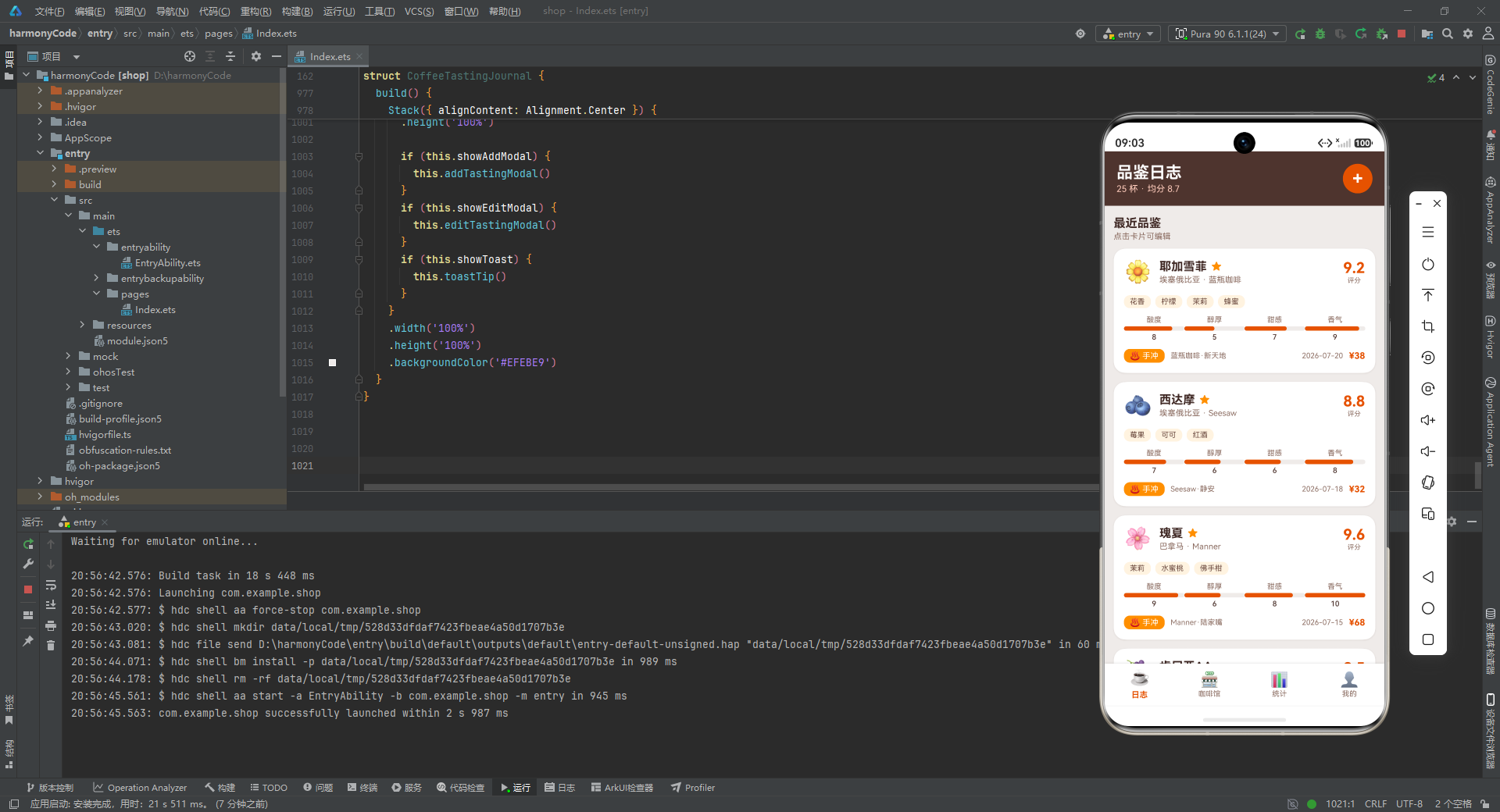
纵观全应用,我们可以提炼出三条贯穿始终的设计哲学。其一是**“数据即样式"的预计算策略**——柱状图的 height、冲煮统计的 color 都被固化在数据接口中,让渲染层变为纯粹的"读取即绘制”,将计算复杂度前移到数据准备阶段,极大简化了 build 函数的逻辑。其二是**"状态上提 + 构建器下沉"的分层架构**——所有可变状态集中在根组件的 @State 中,而 UI 被拆解为十余个职责单一的 @Builder,构建器通过参数接收数据和回调,形成"状态在上、视图在下、参数为桥"的清晰数据流。其三是**“咖啡主题色板的系统化应用”**——从深棕(#4E342E)到烈焰橙(#E65100)到琥珀金(#FF8F00)再到米白(#EFEBE9),四个层级的色彩在头部栏、卡片、按钮、进度条、阴影中被一致地复用,甚至连阴影颜色都使用半透明的主题色(#1A4E342E)而非纯黑,确保了整个应用视觉语言的统一性与温度感。

讨论HarmonyOS开发技术,专注于API与组件、DevEco Studio、测试、元服务和应用上架分发等。
更多推荐
 5
5 0
0- 0


 已为社区贡献95条内容

所有评论(0)