萌宠美容管家:基于HarmonyOS API 24编辑弹窗的输入框使用placeholder显示当前值(通过 this.editingAppointment?.petName),而非空输入框
一、行业背景与应用意义
1.1 宠物经济的高速增长
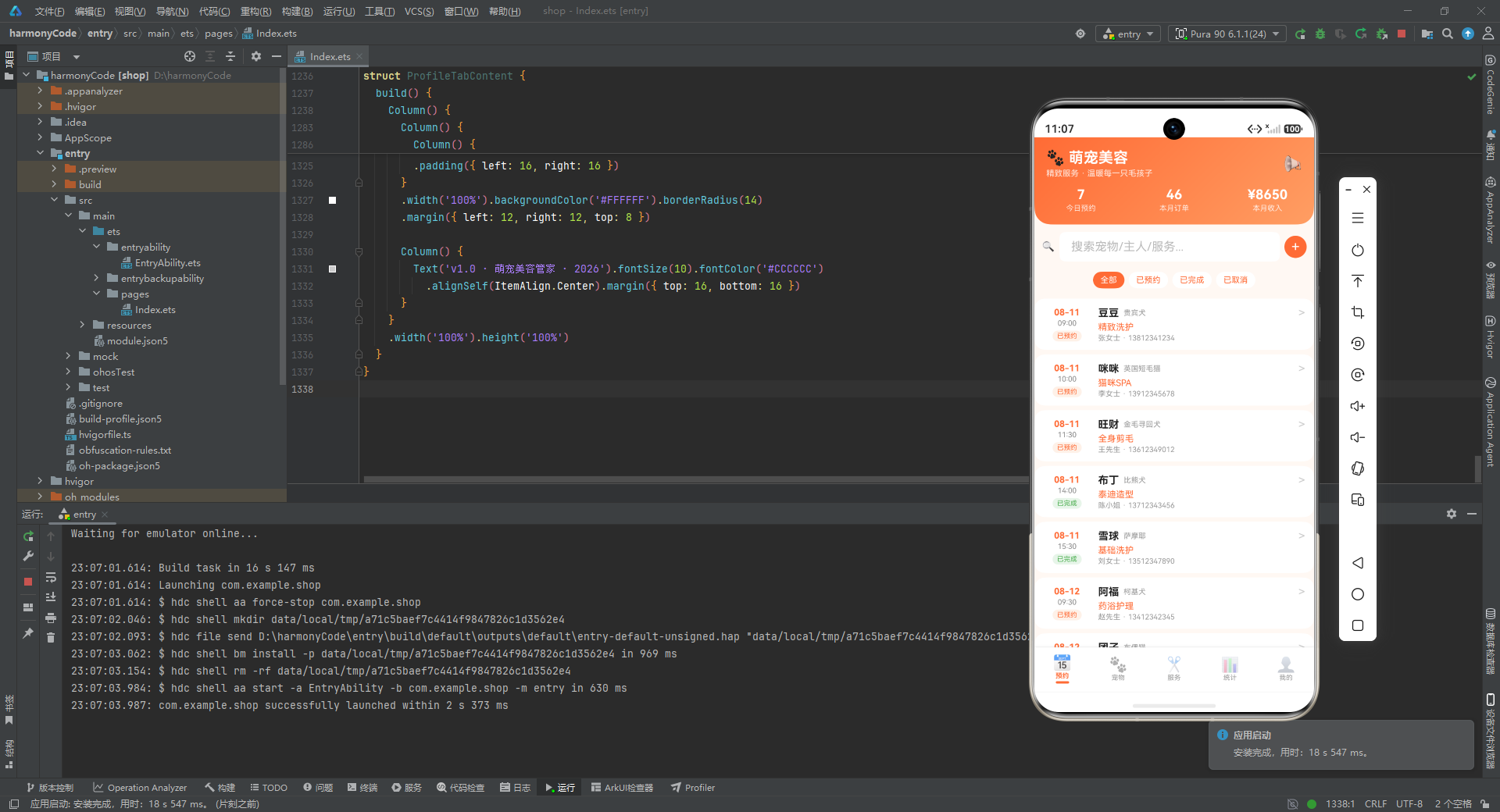
近年来,随着城市化进程加快、独居青年数量攀升以及"它经济"的全面崛起,宠物已经从单纯的"看家护院"角色转变为家庭成员般的情感陪伴者。根据行业研究数据,国内宠物市场规模已突破数千亿元,其中宠物洗护与美容造型作为高频刚需服务,占据了相当可观的份额。无论是贵宾犬的精致洗护、布偶猫的 SPA 放松按摩,还是萨摩耶的换毛期深层护理,每一项服务背后都对应着门店复杂的排期、客户档案、价格管理与数据统计需求。
1.2 传统门店管理的痛点
传统宠物门店在数字化管理方面普遍存在以下痛点:
- 预约混乱:电话、微信、到店等多种渠道的预约信息散落各处,容易出现时段冲突和遗漏。
- 档案缺失:宠物的品种、年龄、体重、皮肤状况、上次服务记录缺乏统一归档,美容师难以做到个性化服务。
- 价格不透明:服务项目繁多,洗护、造型、SPA、护理四大类下又有十余个子项目,客户咨询效率低下。
- 数据盲区:门店老板无法快速获知本月收入、订单总数、平均客单价、服务类型占比等关键经营指标。
- 会员割裂:会员充值、优惠券、消费记录分散在不同系统,难以形成闭环运营。
1.3 移动端管理应用的必要性
针对上述痛点,一款面向门店经营者和美容师的移动端管理应用就显得尤为必要。它需要将预约管理、宠物档案、服务项目、营业统计、个人中心五大模块整合在一个统一的界面中,让管理者通过一部手机即可完成日常经营的全部操作。而鸿蒙(HarmonyOS)的声明式 UI 开发范式,凭借其跨设备能力、高性能渲染、状态驱动的开发模型,成为了构建此类中等复杂度业务应用的理想技术选型。
1.4 本应用的定位
本文将深度剖析的这款"萌宠美容管家"应用,正是一个完整的宠物门店管理解决方案。它采用鸿蒙原生的 ArkTS 语言编写,使用声明式 UI 组件(@Entry、@Component、@Builder、@State、@Observed 等装饰器)构建界面,内置 20 条预约数据、15 只宠物档案、12 项服务项目,并通过纯函数驱动筛选与统计逻辑。整个应用界面采用温暖的橙红色调(#FF6B35)作为主色,辅以粉色(#FF8FA3)、紫色(#AB47BC)、绿色(#4CAF50)等多色点缀,营造出可爱又不失专业的视觉氛围。
接下来,我们将从代码层面逐段拆解,深入理解每一个设计决策背后的工程考量。
二、整体架构概览
在进入具体代码之前,先从宏观层面把握整个应用的架构分层。这份源码虽然写在同一个文件中,但其内部有着清晰的逻辑分层:
- 类型定义层:通过
interface声明状态配置、图表数据等纯数据结构。 - 数据模型层:使用
@Observed装饰器包装的class,定义预约、宠物、服务三大核心业务实体。 - 设计令牌层:以
Record<string, Config>形式集中管理状态色、宠物类型色、服务分类色等视觉常量。 - 图表配置层:定义柱状图数据与占比数据,供统计页消费。
- Mock 数据层:构造 20 条预约、15 只宠物、12 项服务的示例数据,模拟真实业务场景。
- 纯函数层:封装筛选、统计、尺寸计算等无副作用逻辑,便于复用与测试。
- 入口组件层:
PetGroomingApp作为@Entry,管理底部 5 个 Tab 的切换。 - 业务页面层:预约、宠物、服务、统计、我的五个
@Component,各自承载独立的业务逻辑。
这种分层方式遵循了"数据驱动视图、纯函数处理逻辑、装饰器声明元数据"的鸿蒙最佳实践,使得代码在保持单文件可读性的同时,依然具备良好的内聚与解耦。
三、类型定义层详解
类型定义是整个应用的"契约层",它不包含任何运行时逻辑,却决定了后续所有模块的数据形状。下面是开篇的类型定义:
interface AppointmentStatusConfig {
  label: string
  color: string
  bg: string
  icon: string
}

interface PetTypeConfig {
  label: string
  color: string
  bg: string
  icon: string
}

interface ServiceCategoryConfig {
  label: string
  color: string
  bg: string
  icon: string
}
逐行解释:
interface AppointmentStatusConfig:定义"预约状态"的视觉配置结构。预约有"已预约"“已完成”"已取消"三种状态,每种状态都需要在界面上以不同的颜色和图标呈现。label: string:状态的中文显示文本,例如"已预约"。color: string:状态文字的颜色值,采用十六进制色值,如#FF6B35代表橙色。bg: string:状态标签的背景色,通常是color的浅色稀释版本,保证文字与背景的对比度。icon: string:状态的 Emoji 图标,如 📌、✅、✖️,用于增强视觉识别。
PetTypeConfig 和 ServiceCategoryConfig 与之结构完全一致,只是语义不同:前者描述宠物类型(狗狗、猫咪、其他),后者描述服务分类(洗护、造型、SPA、护理)。这里之所以没有合并为一个通用的 TagConfig,是为了让每个配置在语义上自解释,方便后续维护时快速定位。
接下来是图表相关的类型:
interface ChartBarData {
  label: string
  value: number
  color: string
}

interface ServiceRatioData {
  label: string
  percent: number
  color: string
  icon: string
}
逐行解释:
ChartBarData:柱状图的单根柱子数据。label是 X 轴标签(如"周一"),value是数值(如 3),color是柱子颜色。ServiceRatioData:服务类型占比数据。label是服务类别名,percent是百分比(0-100),color是进度条颜色,icon是 Emoji 图标。
这两个接口的设计体现了"数据即视图配置"的理念——把渲染所需的颜色直接打包进数据结构,避免在渲染层再做二次映射,降低了耦合度。
四、数据模型层详解
数据模型层是应用的核心,它定义了业务实体的结构。这里使用了鸿蒙的 @Observed 装饰器。
4.1 预约数据模型
@Observed
export class AppointmentModel {
  id: number = 0
  petName: string = ''
  petType: string = ''
  ownerName: string = ''
  phone: string = ''
  service: string = ''
  date: string = ''
  time: string = ''
  status: string = ''
  price: number = 0
  duration: number = 0
  notes: string = ''
  constructor(id: number, petName: string, petType: string, ownerName: string,
              phone: string, service: string, date: string, time: string,
              status: string, price: number, duration: number, notes: string) {
    this.id = id; this.petName = petName; this.petType = petType
    this.ownerName = ownerName; this.phone = phone; this.service = service
    this.date = date; this.time = time; this.status = status
    this.price = price; this.duration = duration; this.notes = notes
  }
}
逐行解释:
@Observed:这是鸿蒙的"可观察对象"装饰器,标记后的类的实例在其属性被修改时,能够触发引用了它的@ObjectLink组件重新渲染。虽然本应用中未直接使用@ObjectLink,但保留@Observed为后续扩展(如双向绑定编辑表单)预留了空间。export class AppointmentModel:使用export导出,意味着该模型可在其他模块中被引用,体现了模型的可复用性。id: number = 0到notes: string = '':12 个字段全部声明了默认值。这是鸿蒙 ArkTS 的要求——类的成员属性必须有初始值,否则编译报错。这种"零值默认"策略也保证了对象即使在构造前也不会出现undefined。- 字段语义说明:
petName:宠物名,如"豆豆"“咪咪”。petType:宠物品种,如"贵宾犬"“英国短毛猫”。ownerName:宠物主人姓名。phone:联系电话,11 位手机号。service:预约的服务项目名称,如"精致洗护"。date和time:日期和时间分开存储,便于列表按时间排序和按日筛选。status:预约状态,取值为"已预约"“已完成”"已取消"之一。price:服务价格(元)。duration:服务时长(分钟)。notes:备注信息,如"贵宾犬毛质细软,请用温和香波"。
constructor(...):构造函数接收 12 个参数并依次赋值。这里采用this.id = id; this.petName = petName;的紧凑写法,将多条赋值挤在一行,既节省篇幅又保持可读性。
4.2 宠物数据模型
@Observed
export class PetModel {
  id: number = 0
  name: string = ''
  breed: string = ''
  age: string = ''
  weight: string = ''
  emoji: string = ''
  gender: string = ''
  ownerName: string = ''
  lastService: string = ''
  constructor(id: number, name: string, breed: string, age: string,
              weight: string, emoji: string, gender: string,
              ownerName: string, lastService: string) {
    this.id = id; this.name = name; this.breed = breed
    this.age = age; this.weight = weight; this.emoji = emoji
    this.gender = gender; this.ownerName = ownerName; this.lastService = lastService
  }
}
逐行解释:
- 字段语义说明:
breed:品种名,注意这里和AppointmentModel.petType字段名不同但语义相近,因为宠物档案关注的是具体品种(如"贵宾犬"),而预约记录中的petType更多用于快速分类。age:年龄以字符串存储(如"3岁"),而不是数字。这是因为在视图层直接展示更方便,避免了"3 + 岁"的拼接。weight:体重同样以字符串存储(如"5.2kg"),保留了单位信息。emoji:宠物的 Emoji 头像,如 🐩、🐱、🐕,避免引入图片资源。gender:性别,“公"或"母”。lastService:上次消费的服务项目,用于在宠物卡片上展示历史记录。
这种"字符串带单位"的设计是一种务实的前端策略,牺牲了一点点类型严谨性,换取了渲染时的便利。
4.3 服务项目数据模型
@Observed
export class ServiceModel {
  id: number = 0
  name: string = ''
  icon: string = ''
  category: string = ''
  price: number = 0
  duration: number = 0
  description: string = ''
  rating: number = 0
  constructor(id: number, name: string, icon: string, category: string,
              price: number, duration: number, description: string, rating: number) {
    this.id = id; this.name = name; this.icon = icon
    this.category = category; this.price = price; this.duration = duration
    this.description = description; this.rating = rating
  }
}
逐行解释:
category:服务所属分类,取值为"洗护"“造型”“SPA”"护理"之一,用于服务页的分类筛选。description:服务描述,如"洗护+修剪指甲+耳道清理+护毛素",帮助客户了解服务内容。rating:服务评分(如 4.8),用于展示服务质量。price和duration:这里使用number类型而非字符串,因为价格和时长在统计页需要进行数值计算(如计算平均客单价)。
三个模型的设计体现了"按需类型"原则:需要展示的带单位字符串就用 string,需要计算的数值就用 number,不追求"所有字段统一类型"的形式主义。
五、设计令牌与配置常量
设计令牌(Design Token)是现代化前端工程中管理视觉规范的核心手段。本应用通过 Record<string, Config> 形式集中管理色彩与图标。
5.1 状态配置
const STATUS_CONFIG: Record<string, AppointmentStatusConfig> = {
  '已预约': { label: '已预约', color: '#FF6B35', bg: '#FFF0E8', icon: '📌' },
  '已完成': { label: '已完成', color: '#4CAF50', bg: '#E8F5E9', icon: '✅' },
  '已取消': { label: '已取消', color: '#9E9E9E', bg: '#F0F0F0', icon: '✖️' }
}
逐行解释:
Record<string, AppointmentStatusConfig>:表示一个键为字符串、值为AppointmentStatusConfig的映射对象。使用Record而非自定义类型,是因为状态数量固定且较少,键名直接用中文字符串,查询时STATUS_CONFIG['已预约']极为直观。'已预约'配置:橙色(#FF6B35)配浅橙背景(#FFF0E8),使用 📌 图标,表示"已钉在日程上"的待执行状态。'已完成'配置:绿色(#4CAF50)配浅绿背景(#E8F5E9),使用 ✅ 图标,传达"顺利完成"的正向情绪。'已取消'配置:灰色(#9E9E9E)配浅灰背景(#F0F0F0),使用 ✖️ 图标,弱化视觉权重,表示"已失效"的归档状态。
这套色彩语言符合用户对状态的直觉认知:橙色=进行中、绿色=成功、灰色=失效,无需学习成本。
5.2 宠物类型与服务分类配置
const PET_TYPE_CONFIG: Record<string, PetTypeConfig> = {
  '狗狗': { label: '狗狗', color: '#FF6B35', bg: '#FFF0E8', icon: '🐶' },
  '猫咪': { label: '猫咪', color: '#FF8FA3', bg: '#FFEDF1', icon: '🐱' },
  '其他': { label: '其他', color: '#8BC34A', bg: '#F1F8E9', icon: '🐹' }
}

const SERVICE_CATEGORY_CONFIG: Record<string, ServiceCategoryConfig> = {
  '洗护': { label: '洗护', color: '#FF6B35', bg: '#FFF0E8', icon: '💦' },
  '造型': { label: '造型', color: '#FF8FA3', bg: '#FFEDF1', icon: '✂️' },
  'SPA':  { label: 'SPA',  color: '#AB47BC', bg: '#F3E5F5', icon: '🛁' },
  '护理': { label: '护理', color: '#4CAF50', bg: '#E8F5E9', icon: '🧴' }
}
逐行解释:
- 宠物类型三色:狗狗沿用主色橙、猫咪用粉色(
#FF8FA3)做性别区分、其他用黄绿色(#8BC34A)作为兜底。 - 服务分类四色:洗护(橙)、造型(粉)、SPA(紫,
#AB47BC)、护理(绿)。紫色用于 SPA 是因为紫色在色彩心理学中常与"放松、奢华"关联,契合 SPA 的服务调性。
5.3 筛选与表单选项
const STATUS_FILTER: string[] = ['全部', '已预约', '已完成', '已取消']
const PET_TYPE_FILTER: string[] = ['全部', '狗狗', '猫咪', '其他']
const PET_FORM_TYPES: string[] = ['狗狗', '猫咪', '其他']
const SERVICE_NAMES: string[] = ['基础洗护', '精致洗护', '全身剪毛', '猫咪SPA', '深层护理', '药浴护理']
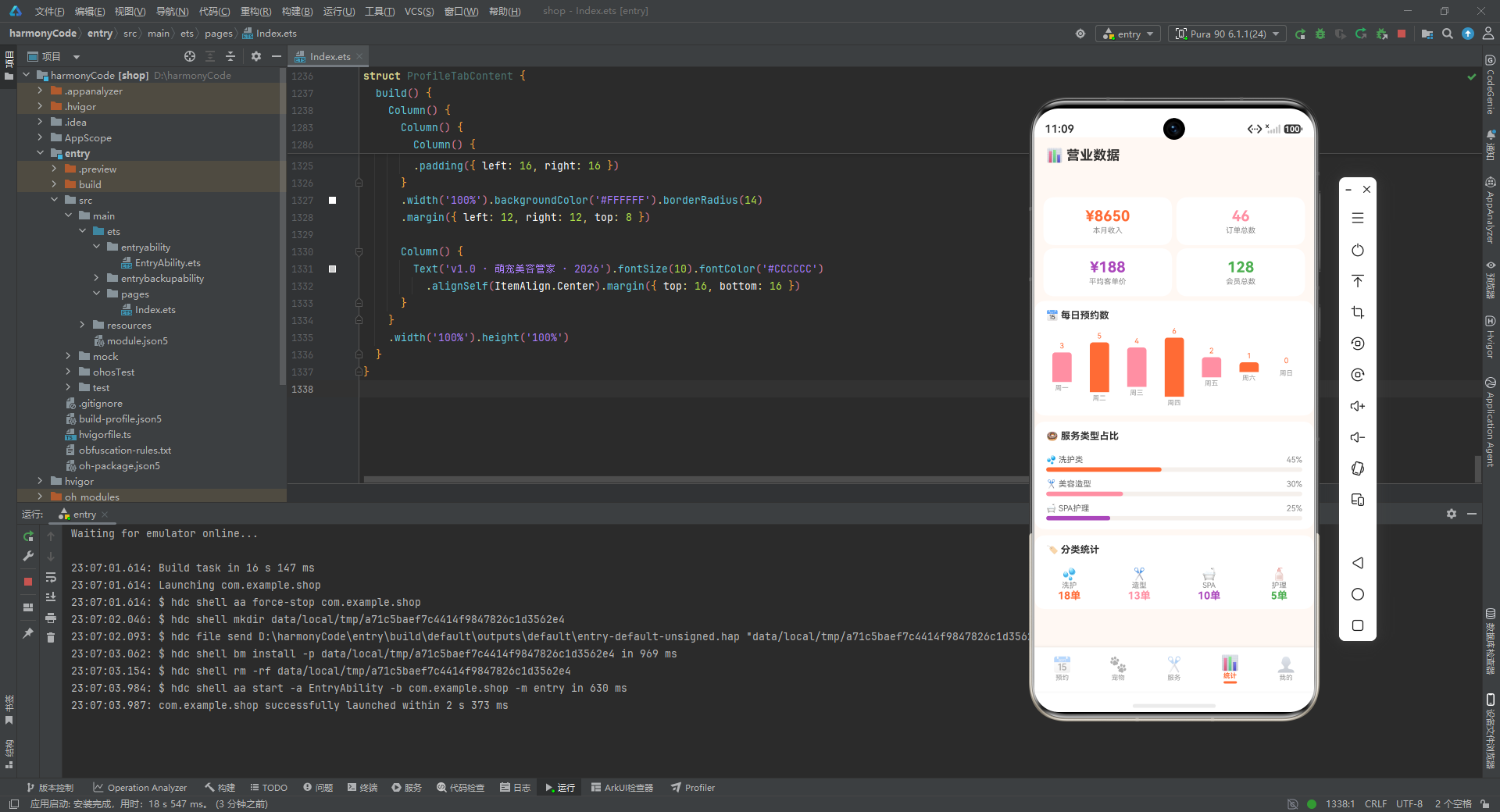
逐行解释:
STATUS_FILTER和PET_TYPE_FILTER:列表页筛选胶囊的选项数组,第一项都是"全部",表示不筛选。PET_FORM_TYPES:新增预约表单中宠物类型的选择项,没有"全部"因为表单必须选定一个具体类型。SERVICE_NAMES:新增预约表单中服务项目的选择项,精选了 6 个高频服务。
将筛选项与表单项分开定义,避免了"全部"这种仅用于筛选的语义混入表单逻辑。
六、图表数据配置
统计页需要可视化数据,这里预先定义好柱状图和占比图的数据源。
const DAILY_BAR_CONFIG: ChartBarData[] = [
  { label: '周一', value: 3, color: '#FF8FA3' },
  { label: '周二', value: 5, color: '#FF6B35' },
  { label: '周三', value: 4, color: '#FF8FA3' },
  { label: '周四', value: 6, color: '#FF6B35' },
  { label: '周五', value: 2, color: '#FF8FA3' },
  { label: '周六', value: 1, color: '#FF6B35' },
  { label: '周日', value: 0, color: '#FFB39B' }
]

const SERVICE_RATIO_CONFIG: ServiceRatioData[] = [
  { label: '洗护类', percent: 45, color: '#FF6B35', icon: '💦' },
  { label: '美容造型', percent: 30, color: '#FF8FA3', icon: '✂️' },
  { label: 'SPA护理', percent: 25, color: '#AB47BC', icon: '🛁' }
]
逐行解释:
DAILY_BAR_CONFIG:一周七天的预约数量柱状图数据。颜色在橙(#FF6B35)和粉(#FF8FA3)之间交替,周日因为是休息日(value 为 0)使用了更浅的#FFB39B以示区分。周四数值最高(6),周日最低(0),符合"工作日中段最忙、周末反而少"的门店规律。SERVICE_RATIO_CONFIG:三大服务类型的占比数据。洗护类占 45%(最高,因为是基础高频服务)、美容造型占 30%、SPA 护理占 25%。三者相加正好 100%。
将图表数据预定义为常量而非运行时计算,是因为这是 demo 数据,真实场景下应替换为后端接口返回的动态数据。
七、Mock 数据层详解
为了让应用具备"开箱即用"的演示效果,源码内置了三类 Mock 数据。
7.1 预约数据(20 条)
const mockAppointments: AppointmentModel[] = [
  new AppointmentModel(1, '豆豆', '贵宾犬', '张女士', '13812341234', '精致洗护',
    '2026-08-11', '09:00', '已预约', 158, 90, '贵宾犬毛质细软,请用温和香波'),
  new AppointmentModel(2, '咪咪', '英国短毛猫', '李女士', '13912345678', '猫咪SPA',
    '2026-08-11', '10:00', '已预约', 268, 120, '猫咪怕水,请提前安抚'),
  new AppointmentModel(3, '旺财', '金毛寻回犬', '王先生', '13612349012', '全身剪毛',
    '2026-08-11', '11:30', '已预约', 358, 150, '夏季剃短毛,保留头部造型'),
  // ... 共 20 条,覆盖 4 天、3 种状态
]
逐行解释(以第一条为例):
new AppointmentModel(1, '豆豆', ...):创建一条 ID 为 1 的预约。'豆豆':宠物名。'贵宾犬':品种。'张女士':主人。'13812341234':电话。'精致洗护':服务项目。'2026-08-11', '09:00':日期和时间。'已预约':状态。158:价格(元)。90:时长(分钟)。'贵宾犬毛质细软,请用温和香波':备注,给美容师的注意事项。
20 条数据精心设计:覆盖 8 月 11 日至 14 日共 4 天,包含已预约、已完成、已取消三种状态,品种涵盖贵宾犬、英短、金毛、比熊、萨摩耶、柯基、布偶、边牧、法斗、中华田园犬、波斯猫、德牧、约克夏、阿拉斯加、博美、暹罗、拉布拉多、金吉拉、哈士奇、雪纳瑞等 20 种常见宠物。每条备注都贴合品种特性(如"哈士奇撕家犬,提前沟通造型方案"“阿拉斯加换毛期掉毛多”),增强了数据的真实感。
7.2 宠物数据(15 条)
const mockPets: PetModel[] = [
  new PetModel(1, '豆豆', '贵宾犬', '3岁', '5.2kg', '🐩', '母', '张女士', '精致洗护'),
  new PetModel(2, '咪咪', '英国短毛猫', '2岁', '4.8kg', '🐱', '母', '李女士', '猫咪SPA'),
  // ... 共 15 条
]
逐行解释(以第一条为例):
1:ID。'豆豆':宠物名。'贵宾犬':品种。'3岁':年龄(带单位字符串)。'5.2kg':体重(带单位字符串)。'🐩':Emoji 头像。'母':性别。'张女士':主人。'精致洗护':上次服务。
15 只宠物与预约数据中的宠物名一一对应,体现了数据一致性。Emoji 的选择也很有讲究:贵宾犬用 🐩(卷毛造型)、金毛用 🐕(普通狗)、猫咪统一用 🐱,让用户一眼能识别宠物种类。
7.3 服务数据(12 项)
const mockServices: ServiceModel[] = [
  new ServiceModel(1, '基础洗护', '💦', '洗护', 108, 60, '洗浴+吹干+全身梳理', 4.8),
  new ServiceModel(2, '精致洗护', '✨', '洗护', 158, 90, '洗护+修剪指甲+耳道清理+护毛素', 4.9),
  new ServiceModel(3, '全身剪毛', '✂️', '造型', 358, 150, '精致洗护+全身造型修剪', 4.9),
  new ServiceModel(4, '泰迪造型', '🐻', '造型', 198, 120, '泰迪专属头身造型,圆润可爱', 4.8),
  new ServiceModel(5, '猫咪SPA', '🛁', 'SPA', 268, 120, '香薰SPA+放松按摩+精油护理', 4.7),
  new ServiceModel(6, '猫咪洗护', '🐱', '洗护', 148, 75, '温和洗浴+吹干+毛发梳理', 4.7),
  new ServiceModel(7, '深层护理', '🧴', '护理', 328, 180, '深层清洁+去屑+滋养修复', 4.6),
  new ServiceModel(8, '药浴护理', '🩹', '护理', 218, 90, '皮肤问题专用药浴+药膏涂抹', 4.5),
  new ServiceModel(9, '染色美容', '🎨', '造型', 288, 150, '天然染膏+创意染色造型', 4.6),
  new ServiceModel(10, '猫咪美容', '💅', '护理', 238, 105, '剪指甲+洗耳+清理泪痕+顺毛', 4.8),
  new ServiceModel(11, '宠物SPA', '🌿', 'SPA', 258, 120, '矿物泥浴+温泉水疗+按摩', 4.7),
  new ServiceModel(12, '足部护理', '🐾', '护理', 88, 45, '修甲+磨爪+护爪霜护理', 4.9)
]
逐行解释:
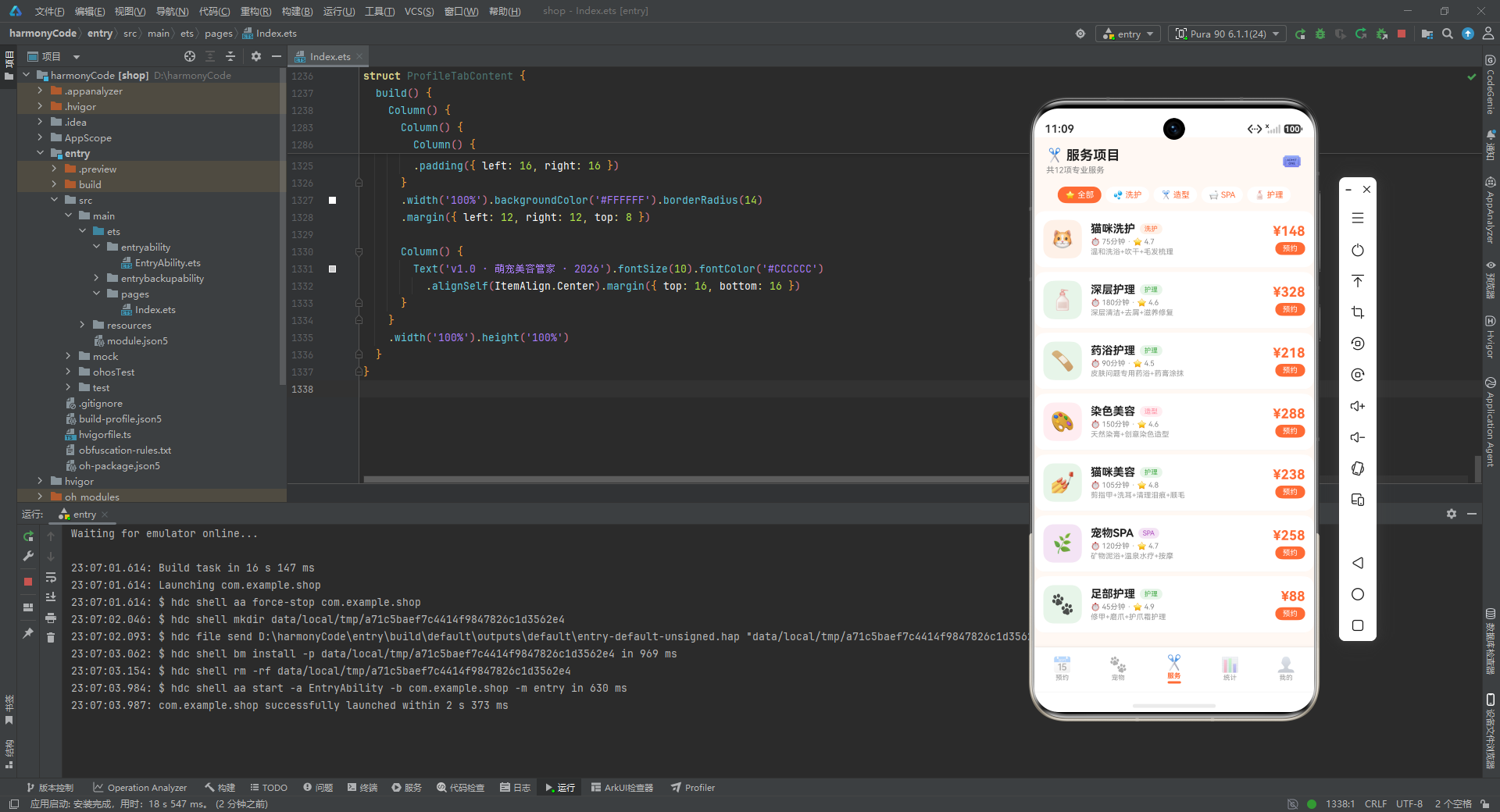
12 项服务覆盖了洗护(4 项)、造型(3 项)、SPA(2 项)、护理(3 项)四大类。价格从最低 88 元(足部护理)到最高 358 元(全身剪毛),时长从 45 分钟到 180 分钟,评分从 4.5 到 4.9,形成了完整的价格梯度和服务层次。每个服务的描述都明确列出包含的具体项目,方便客户对比选择。
八、全局纯函数详解
纯函数是无副作用、输入决定输出的函数,最适合用于筛选和计算。本应用将所有业务逻辑抽离为顶层纯函数。
8.1 筛选函数
function isAppointmentMatched(item: AppointmentModel, keyword: string, status: string): boolean {
  if (status !== '全部' && item.status !== status) {
    return false
  }
  if (keyword !== '') {
    return item.petName.indexOf(keyword) >= 0
      || item.ownerName.indexOf(keyword) >= 0
      || item.service.indexOf(keyword) >= 0
  }
  return true
}
逐行解释:
function isAppointmentMatched(item, keyword, status): boolean:接收一条预约、搜索关键词、状态筛选值,返回是否匹配。if (status !== '全部' && item.status !== status) return false:如果状态筛选不是"全部",且预约状态不等于筛选值,直接返回 false(不匹配)。这是"短路"设计,先做最简单的状态过滤。if (keyword !== ''):只有关键词非空时才进行文本搜索。item.petName.indexOf(keyword) >= 0 || item.ownerName.indexOf(keyword) >= 0 || item.service.indexOf(keyword) >= 0:在宠物名、主人名、服务项目三个字段中任一包含关键词即视为匹配。使用indexOf而非正则,性能更好且无转义问题。return true:如果状态匹配且关键词为空,默认匹配。
function isPetMatched(item: PetModel, keyword: string, petType: string): boolean {
  if (petType !== '全部' && item.breed !== petType && item.breed.indexOf(petType) < 0) {
    return false
  }
  if (keyword !== '') {
    return item.name.indexOf(keyword) >= 0 || item.breed.indexOf(keyword) >= 0
  }
  return true
}
逐行解释:
- 与预约筛选类似,但宠物筛选有个细节:
item.breed !== petType && item.breed.indexOf(petType) < 0。这里既判断完全相等,也判断包含关系。例如筛选"狗狗"时,由于breed存的是具体品种(如"贵宾犬")而非"狗狗",所以需要indexOf兜底。不过实际上品种名很少包含"狗狗"二字,这里更多是为了应对边缘情况。 - 关键词搜索仅匹配宠物名和品种两个字段。
8.2 图表尺寸函数
function getBarHeight(v: number): number {
  return Math.round(v / 6 * 80)
}

function getRatioWidth(percent: number): number {
  return percent
}
逐行解释:
getBarHeight(v):将数值映射为柱状图高度(vp 单位)。v / 6是因为一周最大值是 6(周四),除以 6 归一化到 0-1,再乘以 80 得到 0-80vp 的高度。Math.round取整避免小数像素。getRatioWidth(percent):直接返回百分比作为进度条宽度。看似多余,但封装成函数的好处是未来如果要做"占比放大 1.2 倍"等视觉调整,只需改这一处。
8.3 统计函数
function getTodayAppointmentCount(): number { return 7 }
function getMonthOrderCount(): number { return 46 }
function getMonthIncome(): number { return 8650 }
function getAvgPrice(): number { return 188 }
function getVipCount(): number { return 128 }
function getPetCount(): number { return 15 }
function getServiceCount(): number { return 12 }
逐行解释:
这些函数目前都返回硬编码的固定值,但封装为函数有以下好处:
- 可替换性:未来接入后端 API 时,只需把函数体改为
return await fetch(...),调用方无需修改。 - 语义化:
getMonthIncome()比直接写8650更易读,调用处能立即理解这是"本月收入"。 - 统一管理:所有统计数据集中在这段代码,便于核对和维护。
返回值含义:
- 今日预约 7 单。
- 本月订单 46 单。
- 本月收入 8650 元。
- 平均客单价 188 元。
- 会员总数 128 人。
- 在册宠物 15 只(与 mockPets 长度一致)。
- 服务项目 12 项(与 mockServices 长度一致)。
九、底部 Tab 枚举与入口组件
9.1 Tab 枚举
enum PetTab {
  APPOINTMENT = 0,
  PET = 1,
  SERVICE = 2,
  STATS = 3,
  PROFILE = 4
}
逐行解释:
- 使用
enum而非常量字符串,因为 Tab 的语义是离散且固定的,枚举能在编译期做类型检查,避免拼写错误。 - 五个值从 0 到 4,分别对应预约、宠物、服务、统计、我的,与底部 Tab 的视觉顺序一致。
9.2 入口组件
@Entry
@Component
struct PetGroomingApp {
  @State activeTab: PetTab = PetTab.APPOINTMENT

  @Builder contentArea() {
    Column() {
      if (this.activeTab === PetTab.APPOINTMENT) {
        AppointmentTabContent()
      } else if (this.activeTab === PetTab.PET) {
        PetTabContent()
      } else if (this.activeTab === PetTab.SERVICE) {
        ServiceTabContent()
      } else if (this.activeTab === PetTab.STATS) {
        StatsTabContent()
      } else {
        ProfileTabContent()
      }
    }
    .layoutWeight(1)
  }
  // ...
}
逐行解释:
@Entry:标记此组件为应用的入口页面,鸿蒙运行时会以此为根渲染。@Component:声明这是一个自定义组件,可被其他组件引用(虽然入口组件通常不被引用,但装饰器是必需的)。@State activeTab: PetTab = PetTab.APPOINTMENT:声明响应式状态变量activeTab,初始值为预约页。当activeTab改变时,引用它的 UI 会自动重渲染。@Builder contentArea():使用@Builder定义一个可复用的 UI 片段。这里通过if-else链根据当前 Tab 渲染对应的子组件。Column().layoutWeight(1):内容区占据除底部 Tab 外的全部剩余高度。
9.3 底部 Tab 项构建器
@Builder bottomTabItem(icon: string, label: string, tab: PetTab) {
  Column() {
    Text(icon).fontSize(20).opacity(this.activeTab === tab ? 1.0 : 0.45)
    Text(label).fontSize(9)
      .fontColor(this.activeTab === tab ? '#FF6B35' : '#999999')
      .fontWeight(this.activeTab === tab ? FontWeight.Bold : FontWeight.Normal)
      .margin({ top: 1 })
    if (this.activeTab === tab) {
      Column().width(18).height(3)
        .backgroundColor('#FF6B35').borderRadius(2).margin({ top: 2 })
    }
  }
  .layoutWeight(1)
  .alignItems(HorizontalAlign.Center)
  .padding({ top: 5, bottom: 5 })
  .onClick(() => { this.activeTab = tab })
}
逐行解释:
Text(icon).fontSize(20).opacity(this.activeTab === tab ? 1.0 : 0.45):Emoji 图标,选中时完全不透明,未选中时半透明,形成视觉层次。Text(label).fontSize(9):Tab 文字,字号很小(9),符合移动端底部 Tab 的紧凑设计。.fontColor(this.activeTab === tab ? '#FF6B35' : '#999999'):选中时主色橙,未选中时灰色。.fontWeight(this.activeTab === tab ? FontWeight.Bold : FontWeight.Normal):选中时加粗,强化选中态。if (this.activeTab === tab):仅当选中时才渲染底部的橙色指示条(宽 18、高 3、圆角 2),这是 Material Design 风格的 Tab 指示器。.layoutWeight(1):每个 Tab 项平均分配底部宽度。.onClick(() => { this.activeTab = tab }):点击切换 Tab。
9.4 入口构建函数
build() {
  Column() {
    this.contentArea()
    Row() {
      this.bottomTabItem('📅', '预约', PetTab.APPOINTMENT)
      this.bottomTabItem('🐾', '宠物', PetTab.PET)
      this.bottomTabItem('✂️', '服务', PetTab.SERVICE)
      this.bottomTabItem('📊', '统计', PetTab.STATS)
      this.bottomTabItem('👤', '我的', PetTab.PROFILE)
    }
    .width('100%')
    .backgroundColor('#FFFFFF')
    .padding({ top: 4, bottom: 6 })
    .shadow({ radius: 8, color: '#1A000000', offsetY: -2 })
  }
  .width('100%').height('100%')
  .backgroundColor('#FFF8F3')
}
逐行解释:
- 整体是
Column:上方内容区,下方 Tab 栏。 Row包含 5 个bottomTabItem,水平排列。.shadow({ radius: 8, color: '#1A000000', offsetY: -2 }):底部 Tab 栏的阴影,#1A000000是带 10% 透明度的黑色,offsetY: -2让阴影向上投射,营造出 Tab 栏"浮"在内容之上的层次感。.backgroundColor('#FFF8F3'):整体背景是极浅的橙色调(#FFF8F3),与主色橙形成同色系呼应,整体视觉温暖统一。
十、预约管理页面深度剖析
预约页是应用最核心、最复杂的页面,包含列表、搜索、筛选、4 种弹窗(新增、编辑、删除确认、详情)。
10.1 状态声明
@Component
struct AppointmentTabContent {
  @State searchKeyword: string = ''
  @State selectedStatus: string = '全部'
  @State showAddModal: boolean = false
  @State showEditModal: boolean = false
  @State showDeleteConfirm: boolean = false
  @State showDetailModal: boolean = false
  @State selectedAppointment: AppointmentModel | null = null
  @State editingAppointment: AppointmentModel | null = null
  @State formPetName: string = ''
  @State formPetType: string = '狗狗'
  @State formService: string = '基础洗护'
  @State formOwnerName: string = ''
  @State formPhone: string = ''
  @State formDate: string = '2026-08-15'
  @State formTime: string = '10:00'
  // ...
}
逐行解释:
searchKeyword:搜索框输入的关键词。selectedStatus:当前选中的状态筛选,默认"全部"。showAddModal、showEditModal、showDeleteConfirm、showDetailModal:四个布尔值,分别控制四种弹窗的显示。这种"一弹窗一状态"的设计简单直接,避免了复杂的弹窗队列管理。selectedAppointment:当前点击查看详情的预约,类型是AppointmentModel | null(可能为空)。editingAppointment:当前编辑的预约,同样可为空。formPetName到formTime:新增/编辑表单的 8 个字段,默认值预设了合理的初始值(如日期默认 2026-08-15、时间默认 10:00),减少用户输入。
10.2 弹窗遮罩构建器
@Builder modalOverlay(onClose: () => void) {
  Column()
    .width('100%').height('100%')
    .backgroundColor('rgba(0,0,0,0.5)')
    .onClick(onClose)
}
逐行解释:
- 这是一个可复用的遮罩组件,接收一个
onClose回调。 rgba(0,0,0,0.5):半透明黑色遮罩,让背景内容变暗,突出弹窗。.onClick(onClose):点击遮罩区域关闭弹窗,符合移动端弹窗的交互习惯。
10.3 新增预约弹窗
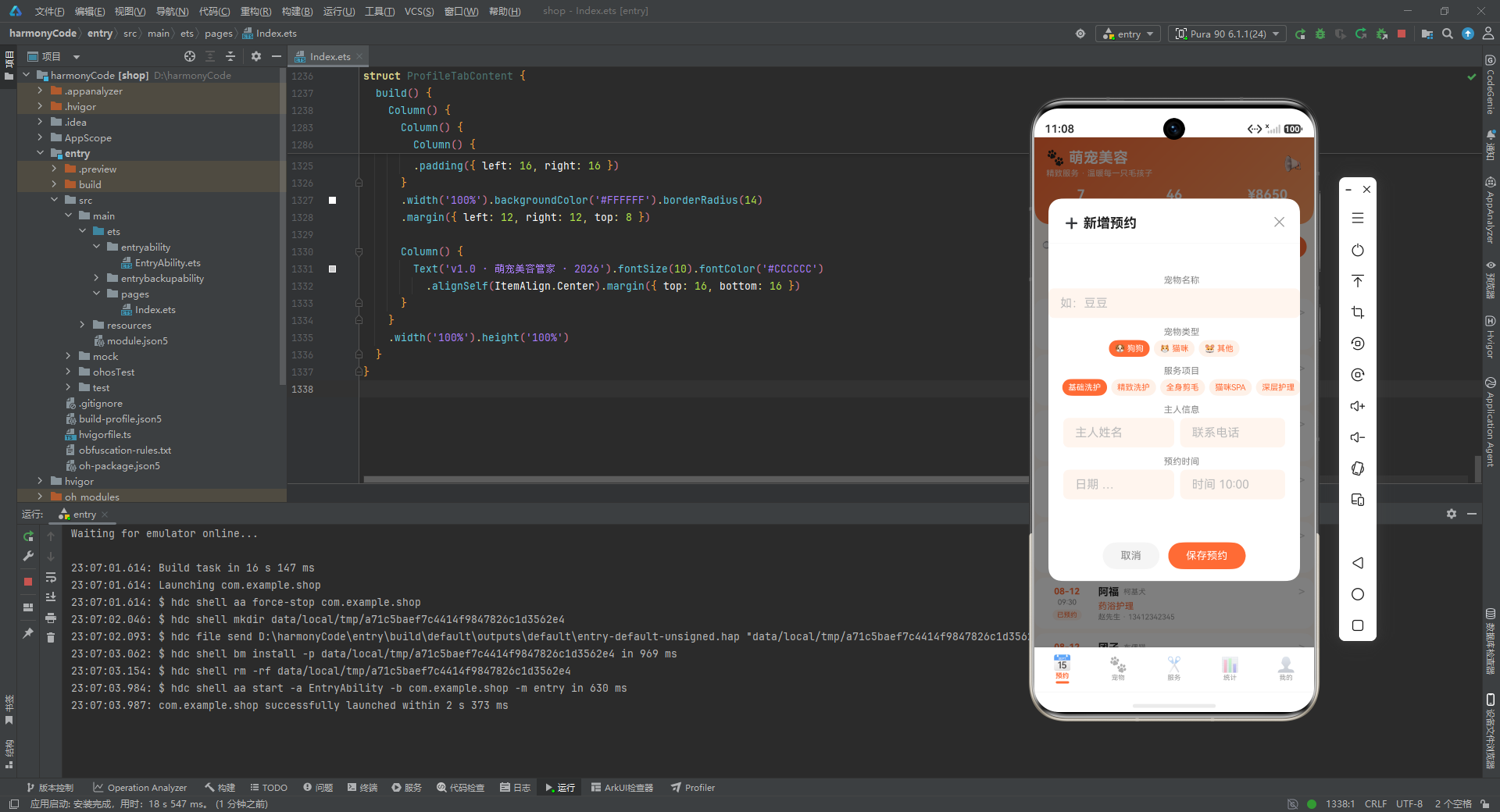
新增弹窗是四个弹窗中字段最全的,包含宠物名称、类型、服务、主人信息、时间。
@Builder addAppointmentModal() {
  Column() {
    this.modalOverlay(() => { this.showAddModal = false })
    Column() {
      Row() {
        Text('➕ 新增预约').fontSize(18).fontWeight(FontWeight.Bold).fontColor('#212121')
        Column().layoutWeight(1)
        Text('✕').fontSize(18).fontColor('#999999')
          .onClick(() => { this.showAddModal = false })
      }
      .width('100%').padding({ left: 20, right: 20, top: 18, bottom: 12 })
      Divider().color('#F0F0F0')
      // ... 表单内容
    }
    .width('90%').height('75%').backgroundColor('#FFFFFF').borderRadius(18)
    .alignItems(HorizontalAlign.Center)
    .position({ x: '5%', y: '12%' })
  }
  .width('100%').height('100%').position({ x: 0, y: 0 }).zIndex(999)
}
逐行解释:
- 整体结构是"遮罩层 + 弹窗主体"的嵌套
Column。 Text('➕ 新增预约'):标题,带 Emoji 增强表意。Column().layoutWeight(1):弹性占位,把关闭按钮推到右侧。Text('✕').onClick(...):关闭按钮,点击隐藏弹窗。Divider().color('#F0F0F0'):浅灰分割线,分隔标题和表单。.width('90%').height('75%'):弹窗占屏幕 90% 宽、75% 高。.borderRadius(18):大圆角,符合现代移动端设计。.position({ x: '5%', y: '12%' }):绝对定位,水平居中(5% 留白两侧),垂直偏上。.zIndex(999):弹窗层级最高,覆盖所有内容。
表单中的宠物类型选择器值得一提:
Row() {
  ForEach(PET_FORM_TYPES, (t: string) => {
    if (this.formPetType === t) {
      Text((PET_TYPE_CONFIG[t]?.icon ?? '🐾') + ' ' + t)
        .fontSize(11).fontColor('#FFFFFF').backgroundColor('#FF6B35')
        .padding({ left: 8, right: 8, top: 5, bottom: 5 }).borderRadius(12)
        .margin({ left: 3, right: 3 })
    } else {
      Text((PET_TYPE_CONFIG[t]?.icon ?? '🐾') + ' ' + t)
        .fontSize(11).fontColor('#FF6B35').backgroundColor('#FFF0E8')
        .padding({ left: 8, right: 8, top: 5, bottom: 5 }).borderRadius(12)
        .margin({ left: 3, right: 3 })
        .onClick(() => { this.formPetType = t })
    }
  })
}
逐行解释:
ForEach(PET_FORM_TYPES, ...):遍历['狗狗', '猫咪', '其他']三个选项。(PET_TYPE_CONFIG[t]?.icon ?? '🐾'):从配置中取出对应 Emoji,使用可选链?.和空值合并??防止t不在配置中时报错。- 选中态:白字 + 橙底(
#FF6B35),未选中态:橙字 + 浅橙底(#FFF0E8),形成清晰的视觉对比。 - 只有未选中项有
onClick,选中项点击无反应(因为已经是选中态)。
底部按钮区:
Row() {
  Text('取消').fontSize(14).fontColor('#888888')
    .backgroundColor('#F5F5F5').borderRadius(20)
    .padding({ left: 24, right: 24, top: 10, bottom: 10 })
    .onClick(() => { this.showAddModal = false })
  Text('保存预约').fontSize(14).fontColor('#FFFFFF')
    .backgroundColor('#FF6B35').borderRadius(20)
    .padding({ left: 24, right: 24, top: 10, bottom: 10 })
    .margin({ left: 12 })
    .onClick(() => { this.showAddModal = false })
}
.width('100%').justifyContent(FlexAlign.Center)
逐行解释:
- 取消按钮:灰底灰字,弱化视觉权重。
- 保存按钮:橙底白字,主操作按钮,醒目。
.justifyContent(FlexAlign.Center):两按钮居中排列。- 当前 demo 中保存按钮仅关闭弹窗,未实际写入数据,真实场景应在此处调用数据持久化逻辑。
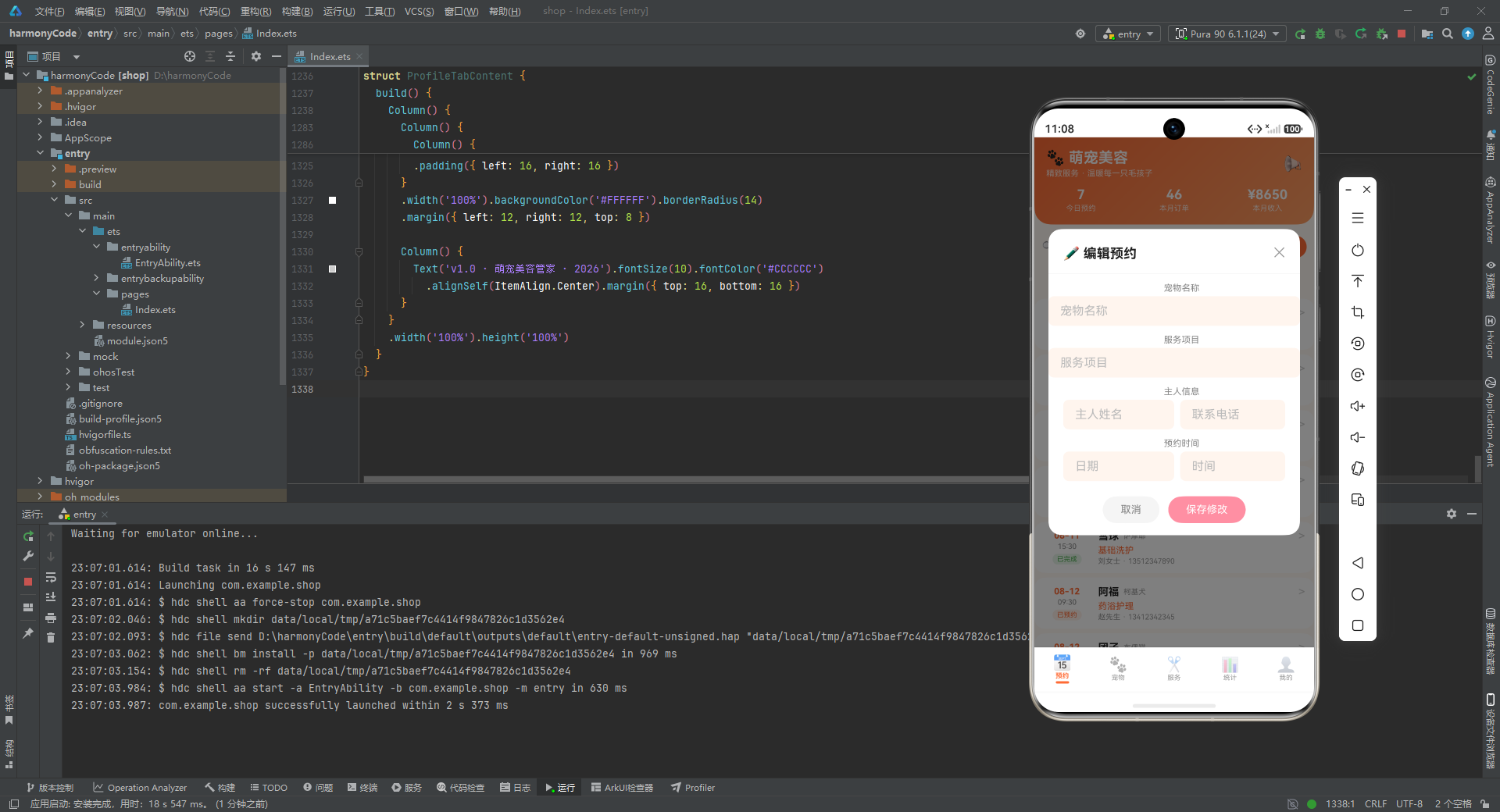
10.4 编辑预约弹窗
编辑弹窗与新增弹窗结构相似,但有以下区别:
TextInput({ placeholder: this.editingAppointment?.petName ?? '宠物名称' })
逐行解释:
- 编辑弹窗的输入框使用
placeholder显示当前值(通过this.editingAppointment?.petName),而非空输入框。 ?? '宠物名称':如果editingAppointment为 null,则回退到默认占位文本。- 编辑弹窗的保存按钮使用粉色(
#FF8FA3)而非橙色,从视觉上区分"编辑"与"新增"两种操作。 - 编辑弹窗高度为 60%(比新增的 75% 矮),因为编辑时不展示宠物类型和服务项目的选项卡,仅用文本输入,节省了空间。
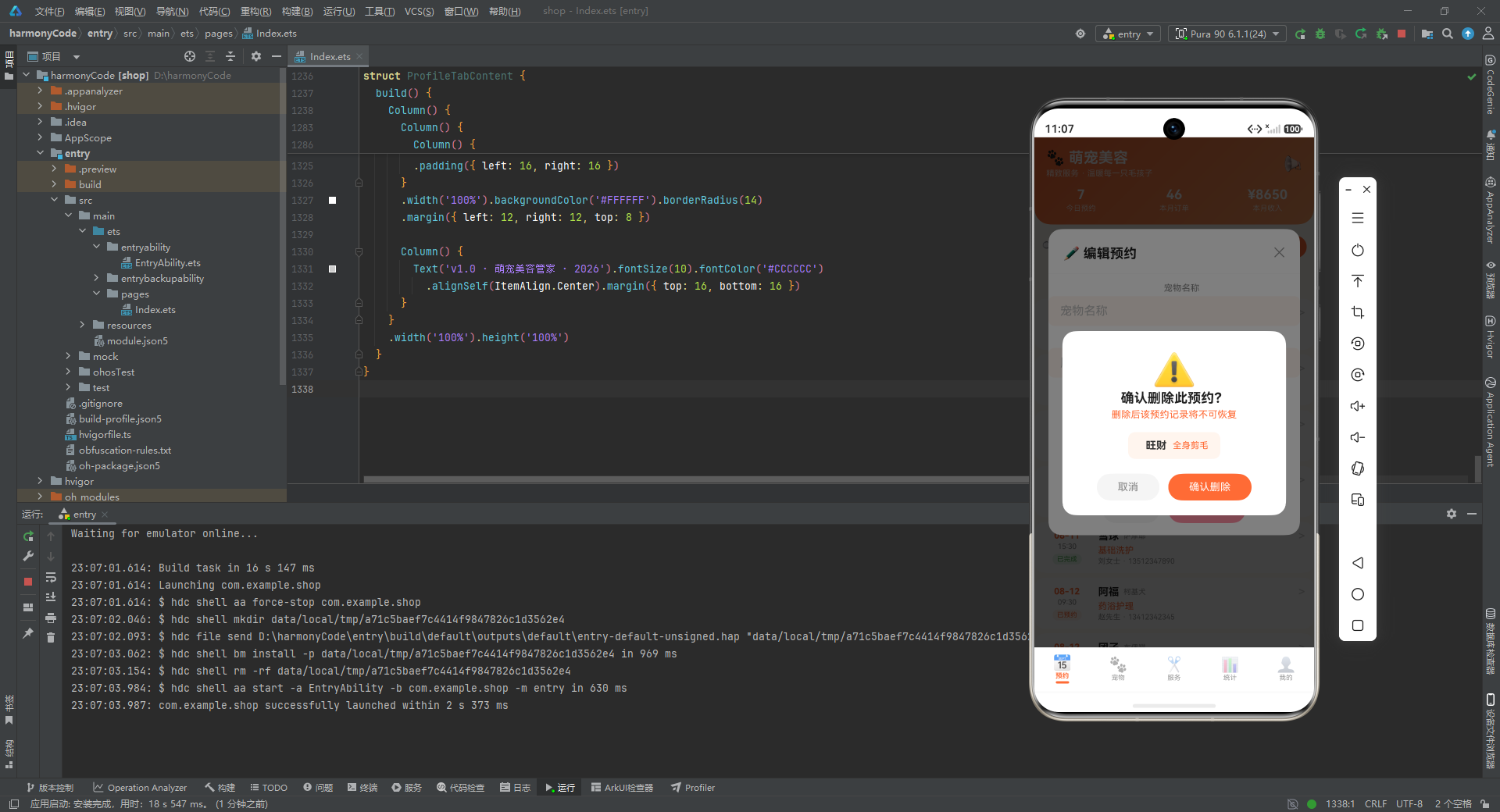
10.5 删除确认弹窗
@Builder deleteAppointmentModal() {
  Column() {
    this.modalOverlay(() => { this.showDeleteConfirm = false })
    Column() {
      Text('⚠️').fontSize(48).margin({ top: 24 })
      Text('确认删除此预约?').fontSize(18).fontWeight(FontWeight.Bold).fontColor('#212121')
      Text('删除后该预约记录将不可恢复').fontSize(13).fontColor('#FF6B35').margin({ top: 4 })
      Row() {
        Text(this.selectedAppointment?.petName ?? '宠物').fontSize(14)
          .fontColor('#333333').fontWeight(FontWeight.Bold).margin({ left: 8 })
        Text(this.selectedAppointment?.service ?? '').fontSize(12)
          .fontColor('#FF6B35').margin({ left: 8 })
      }
      .backgroundColor('#FFF5EE').borderRadius(10)
      .padding({ left: 16, right: 16, top: 10, bottom: 10 }).margin({ top: 16 })
      // ... 按钮
    }
    .width('80%').backgroundColor('#FFFFFF').borderRadius(18)
    .position({ x: '10%', y: '38%' })
  }
}
逐行解释:
Text('⚠️').fontSize(48):大号警告图标,营造警示氛围。Text('删除后该预约记录将不可恢复'):橙色警告文字,明确告知后果。- 中间展示待删除的宠物名和服务名,让用户二次确认操作对象。
- 弹窗宽度 80%、垂直位置 38%,比新增/编辑弹窗更小更居中,符合"确认对话框"的视觉惯例。
10.6 预约详情弹窗
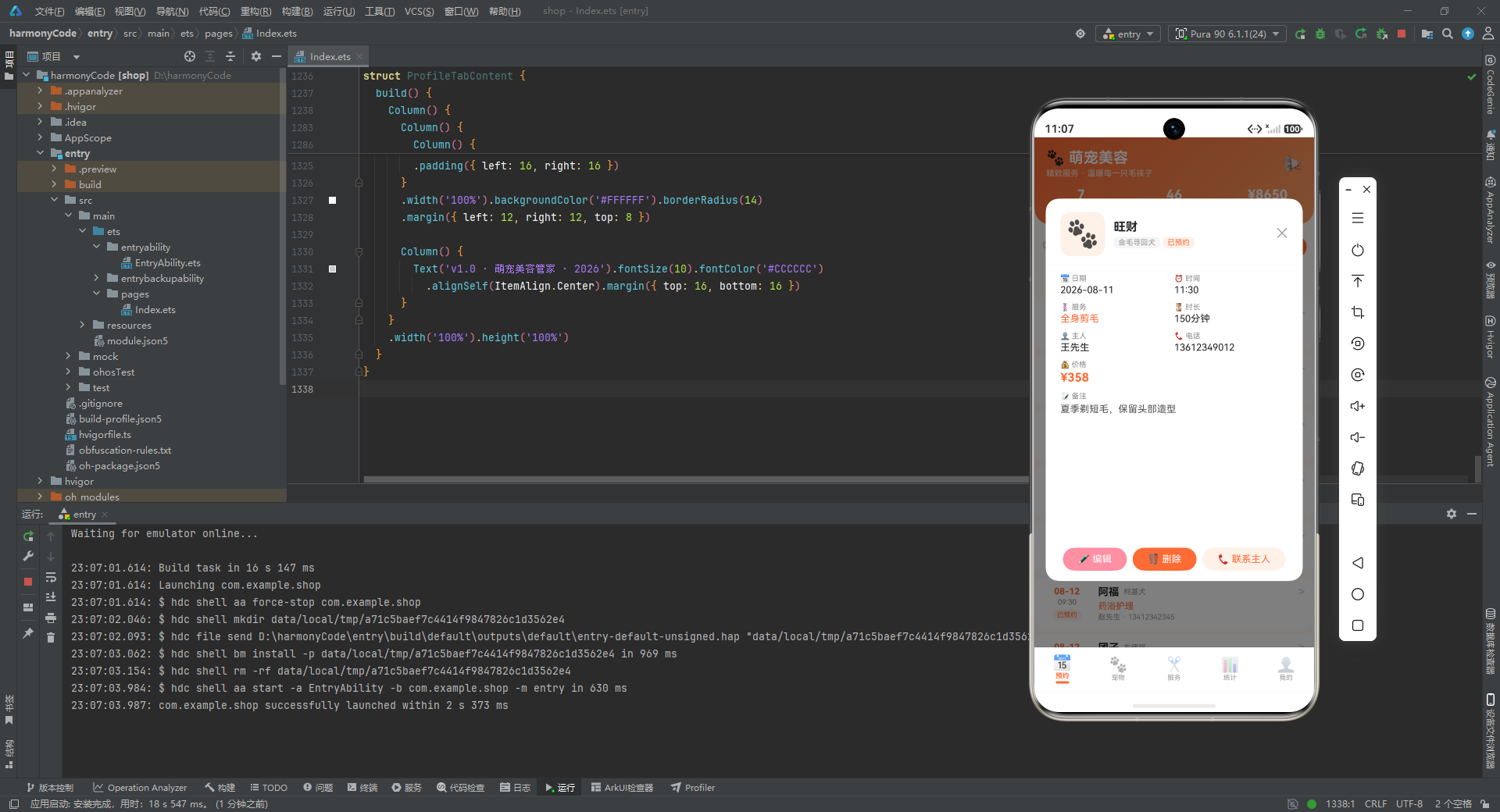
详情弹窗是最信息密集的弹窗,展示预约的全部字段。
@Builder detailAppointmentModal() {
  Column() {
    this.modalOverlay(() => { this.showDetailModal = false })
    Column() {
      Row() {
        Column() {
          Text((PET_TYPE_CONFIG[this.selectedAppointment?.petType ?? '']?.icon ?? '🐾') + '').fontSize(36)
        }.width(60).height(60).backgroundColor('#FFF0E8').borderRadius(14)
        .alignItems(HorizontalAlign.Center).justifyContent(FlexAlign.Center)
        Column() {
          Text(this.selectedAppointment?.petName ?? '').fontSize(16).fontWeight(FontWeight.Bold)
            .fontColor('#212121')
          Row() {
            Text(this.selectedAppointment?.petType ?? '').fontSize(10)...
            Text(STATUS_CONFIG[this.selectedAppointment?.status ?? '']?.label ?? '')...
          }
        }.layoutWeight(1)...
        Text('✕').onClick(...)
      }
      // ... 信息网格
      Row() {
        Text('✏️ 编辑').onClick(() => { this.showEditModal = true })
        Text('🗑️ 删除').onClick(() => { this.showDeleteConfirm = true })
        Text('📞 联系主人')
      }
    }
  }
}
逐行解释:
- 头部左侧:大号 Emoji 头像(60x60,浅橙背景圆角方块)。
- 头部右侧:宠物名(粗体)+ 品种标签 + 状态标签,状态标签的颜色和背景从
STATUS_CONFIG动态读取。 - 信息网格采用 2 列布局:日期/时间、服务/时长、主人/电话、价格,每项都有小标题(如"📅 日期")和值。
- 价格用大号橙色粗体显示(
fontSize(16).fontColor('#FF6B35').fontWeight(FontWeight.Bold)),突出商业信息。 - 备注字段使用
if (this.selectedAppointment?.notes !== '')条件渲染,空备注时不占位。 - 底部三个操作按钮:编辑(粉)、删除(橙)、联系主人(浅橙底橙字),形成主次分明的操作区。
- 详情弹窗的"编辑"和"删除"按钮会触发对应的弹窗显示,形成弹窗的级联跳转。
10.7 预约列表项构建器
@Builder appointmentItemBuilder(a: AppointmentModel) {
  Column() {
    Row() {
      Column() {
        Text(a.date.substring(5)).fontSize(12).fontWeight(FontWeight.Bold).fontColor('#FF6B35')
        Text(a.time).fontSize(10).fontColor('#888888').margin({ top: 2 })
        Text(STATUS_CONFIG[a.status]?.label ?? a.status).fontSize(9)
          .fontColor(STATUS_CONFIG[a.status]?.color ?? '#999999')
          .backgroundColor(STATUS_CONFIG[a.status]?.bg ?? '#F5F5F5')
          .padding({ left: 6, right: 6, top: 2, bottom: 2 }).borderRadius(8)
          .margin({ top: 4 })
      }.width(64).alignItems(HorizontalAlign.Center)
      Column() {
        Row() {
          Text(a.petName).fontSize(14).fontWeight(FontWeight.Bold).fontColor('#212121')
          Text(a.petType).fontSize(10).fontColor('#999999').margin({ left: 6 })
          Column().layoutWeight(1)
          Text('>').fontColor('#CCCCCC')
        }.width('100%')
        Text(a.service).fontSize(12).fontColor('#FF6B35').margin({ top: 3 })
        Text(a.ownerName + ' · ' + a.phone).fontSize(10).fontColor('#999999').margin({ top: 2 })
      }
      .layoutWeight(1).alignItems(HorizontalAlign.Start).padding({ left: 10 })
    }
  }
  .width('100%').backgroundColor('#FFFFFF')
  .borderRadius(14).margin({ left: 12, right: 12, top: 6 })
  .onClick(() => { this.selectedAppointment = a; this.showDetailModal = true })
}
逐行解释:
- 左侧时间栏(宽 64):显示日期(截取
substring(5)去掉年份,如"08-11")、时间、状态标签。 - 右侧信息区:宠物名(粗体)+ 品种 + 右箭头(
>),服务名(橙色),主人+电话(灰色)。 - 整张卡片白底圆角,点击后设置
selectedAppointment并打开详情弹窗。 - 状态标签的所有视觉属性(label、color、bg)都从
STATUS_CONFIG动态读取,保证视觉与数据一致。
10.8 预约页主构建函数
build() {
  Stack() {
    Column() {
      // 渐变背景头部
      Column() {
        Row() {
          Column() {
            Text('🐾 萌宠美容').fontSize(20).fontWeight(FontWeight.Bold).fontColor('#FFFFFF')
            Text('精致服务 · 温暖每一只毛孩子').fontSize(11).fontColor('#FFFFFF').opacity(0.85).margin({ top: 3 })
          }.layoutWeight(1).alignItems(HorizontalAlign.Start)
          Text('📢').fontSize(20).opacity(0.9)
        }
        Row() {
          // 今日预约 / 本月订单 / 本月收入 三连统计
        }
      }
      .linearGradient({ angle: 135, colors: [['#FF6B35', 0], ['#FF9E63', 1]] })
      .borderRadius({ bottomLeft: 22, bottomRight: 22 })

      // 搜索栏
      // 状态筛选胶囊
      // 20 条预约列表
    }

    // 弹窗层
    if (this.showAddModal) { this.addAppointmentModal() }
    if (this.showEditModal) { this.editAppointmentModal() }
    if (this.showDeleteConfirm) { this.deleteAppointmentModal() }
    if (this.showDetailModal) { this.detailAppointmentModal() }
  }
}
逐行解释:
- 整体使用
Stack(层叠布局),主内容层在下,弹窗层在上。 - 头部使用
linearGradient实现从#FF6B35到#FF9E63的 135 度线性渐变,营造温暖的橙色调品牌氛围。 .borderRadius({ bottomLeft: 22, bottomRight: 22 }):仅底部两个圆角,顶部贴边,符合"沉浸式头部"的设计语言。- 头部展示三个关键统计:今日预约、本月订单、本月收入,让管理者一进入应用就能掌握经营概况。
- 搜索栏包含搜索图标、输入框和新增按钮(圆形橙色"+")。
- 状态筛选胶囊使用横向
Scroll,支持左右滑动,选中项橙底白字,未选中项白底橙字。 - 列表使用 20 条
if (isAppointmentMatched(...))条件渲染,每条都经过筛选函数判断,不匹配则不渲染。这种"逐条 if"的写法虽然冗长,但避免了ForEach在某些鸿蒙版本下的渲染差异。 - 弹窗层使用四个独立的
if判断,互斥显示(实际业务中可通过状态机进一步约束)。
十一、宠物档案页面深度剖析
宠物页相对简单,主要是卡片列表 + 搜索 + 类型筛选。
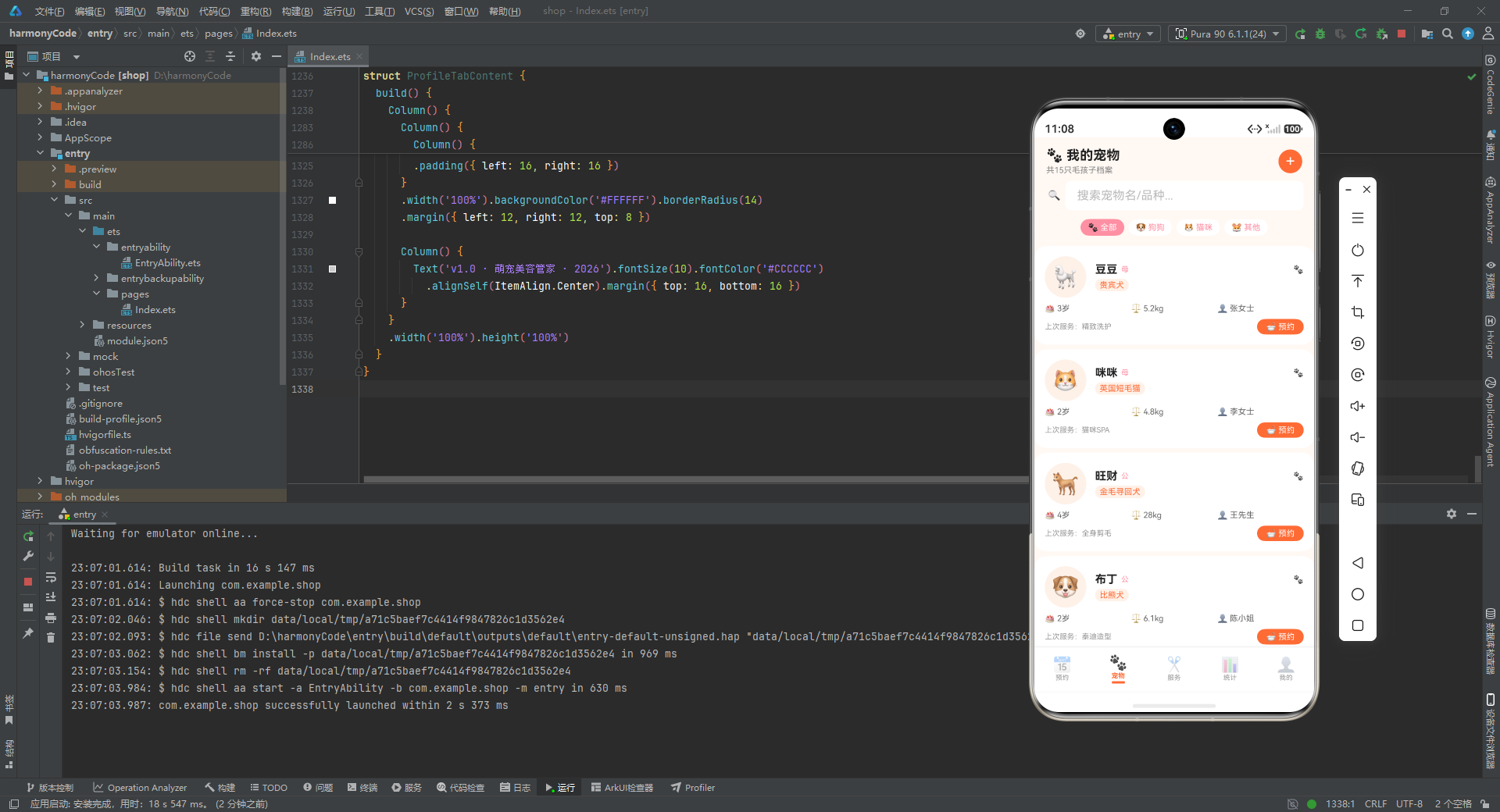
11.1 宠物卡片构建器
@Builder petCardBuilder(p: PetModel) {
  Column() {
    Row() {
      Column() {
        Text(p.emoji).fontSize(30)
      }.width(56).height(56).backgroundColor('#FFF0E8').borderRadius(28)
      .alignItems(HorizontalAlign.Center).justifyContent(FlexAlign.Center)
      Column() {
        Row() {
          Text(p.name).fontSize(15).fontWeight(FontWeight.Bold).fontColor('#212121')
          Text(p.gender).fontSize(10).fontColor('#FF8FA3').margin({ left: 5 })
          Column().layoutWeight(1)
          Text((PET_TYPE_CONFIG[p.breed]?.icon ?? '🐾')).fontSize(11)
        }.width('100%')
        Text(p.breed).fontSize(11).fontColor('#FF6B35')
          .backgroundColor('#FFF0E8').padding({ left: 6, right: 6, top: 2, bottom: 2 })
          .borderRadius(8).margin({ top: 4 })
      }
      .layoutWeight(1).alignItems(HorizontalAlign.Start).padding({ left: 12 })
    }
    Row() {
      Column() { Text('🎂 ' + p.age) }.layoutWeight(1)
      Column() { Text('⚖️ ' + p.weight) }.layoutWeight(1)
      Column() { Text('👤 ' + p.ownerName) }.layoutWeight(1)
    }.margin({ top: 8 })
    Row() {
      Text('上次服务:' + p.lastService).fontSize(10).fontColor('#999999')
      Column().layoutWeight(1)
      Text('🛁 预约').fontSize(11).fontColor('#FFFFFF')
        .backgroundColor('#FF6B35').padding({ left: 12, right: 12, top: 4, bottom: 4 })
        .borderRadius(12)
    }.margin({ top: 8 })
  }
  .width('100%').padding(14).backgroundColor('#FFFFFF')
  .borderRadius(16).margin({ left: 12, right: 12, top: 6 })
}
逐行解释:
- 头部:Emoji 头像(56x56 圆形浅橙底)+ 宠物名 + 性别(粉色)+ 类型图标。
- 品种标签:橙字浅橙底胶囊,让品种一目了然。
- 信息行:年龄(🎂)、体重(⚖️)、主人(👤)三等分,使用 Emoji 替代图标,零资源依赖。
- 底部:左侧显示上次服务,右侧是橙色"预约"按钮,引导用户再次消费。
- 卡片整体白底圆角 16,padding 14,视觉留白充足。
11.2 宠物页主构建函数
build() {
  Column() {
    Row() {
      Column() {
        Text('🐾 我的宠物').fontSize(18).fontWeight(FontWeight.Bold).fontColor('#212121')
        Text('共' + getPetCount() + '只毛孩子档案').fontSize(11).fontColor('#888888').margin({ top: 3 })
      }.layoutWeight(1).alignItems(HorizontalAlign.Start)
      Text('+').fontSize(22).fontColor('#FFFFFF')
        .backgroundColor('#FF6B35').width(32).height(32).borderRadius(16)
        .textAlign(TextAlign.Center)
    }
    // 搜索栏
    // 类型筛选胶囊
    Scroll() {
      Column() {
        if (isPetMatched(mockPets[0], this.searchKeyword, this.selectedPetType)) { this.petCardBuilder(mockPets[0]) }
        // ... 共 15 条
      }
    }
  }
}
逐行解释:
- 顶部标题栏:左侧标题 + 副标题(动态显示宠物总数),右侧圆形"+"新增按钮。
- 搜索栏与预约页一致,支持按宠物名/品种搜索。
- 类型筛选胶囊使用粉色(
#FF8FA3)作为选中色,与预约页的橙色形成区分,让用户通过颜色就能识别当前所在 Tab。 - 列表同样采用 15 条
if条件渲染,配合isPetMatched纯函数实现筛选。
十二、服务项目页面深度剖析
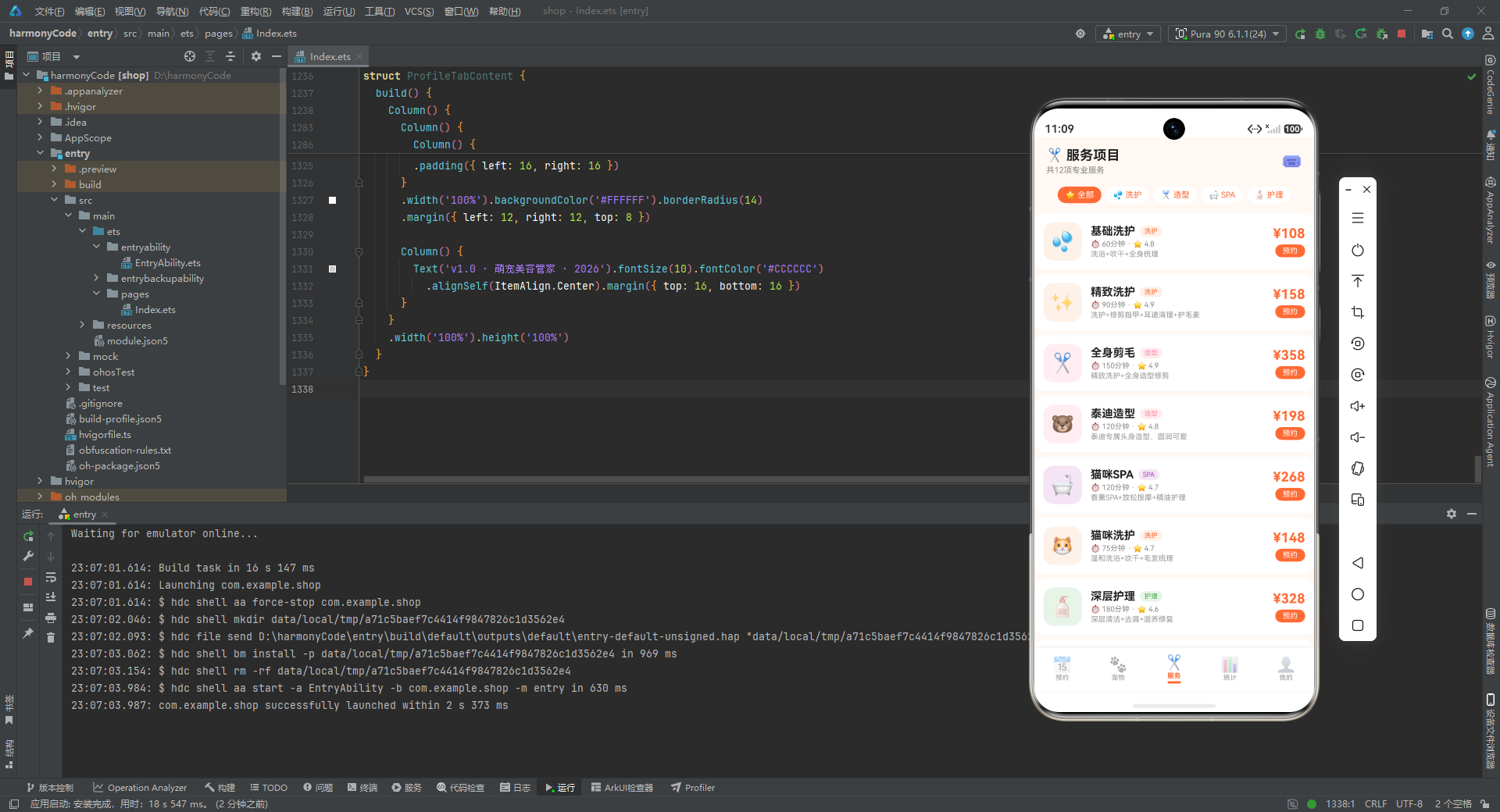
服务页展示 12 项服务,支持按分类筛选。
12.1 服务项构建器
@Builder serviceItemBuilder(s: ServiceModel) {
  Column() {
    Row() {
      Column() {
        Text(s.icon).fontSize(26)
      }.width(52).height(52).backgroundColor(SERVICE_CATEGORY_CONFIG[s.category]?.bg ?? '#FFF0E8')
      .borderRadius(14)
      .alignItems(HorizontalAlign.Center).justifyContent(FlexAlign.Center)
      Column() {
        Row() {
          Text(s.name).fontSize(15).fontWeight(FontWeight.Bold).fontColor('#212121')
          Text(SERVICE_CATEGORY_CONFIG[s.category]?.label ?? s.category).fontSize(9)
            .fontColor(SERVICE_CATEGORY_CONFIG[s.category]?.color ?? '#FF6B35')
            .backgroundColor(SERVICE_CATEGORY_CONFIG[s.category]?.bg ?? '#FFF0E8')
            .padding({ left: 6, right: 6, top: 2, bottom: 2 }).borderRadius(8)
            .margin({ left: 6 })
        }.width('100%')
        Text('⏱️ ' + s.duration + '分钟' + ' · ⭐ ' + s.rating).fontSize(10).fontColor('#888888').margin({ top: 3 })
        Text(s.description).fontSize(10).fontColor('#999999').margin({ top: 2 })
      }.layoutWeight(1).alignItems(HorizontalAlign.Start).padding({ left: 12 })
      Column() {
        Text('¥' + s.price).fontSize(18).fontWeight(FontWeight.Bold).fontColor('#FF6B35')
        Text('预约').fontSize(10).fontColor('#FFFFFF')
          .backgroundColor('#FF6B35').padding({ left: 10, right: 10, top: 3, bottom: 3 })
          .borderRadius(10).margin({ top: 4 })
      }.alignItems(HorizontalAlign.End)
    }
    .width('100%').padding({ top: 12, bottom: 12, left: 12, right: 12 })
    Divider().color('#F5F5F5').margin({ left: 12, right: 12 })
  }
  .width('100%').backgroundColor('#FFFFFF')
  .borderRadius(14).margin({ left: 12, right: 12, top: 6 })
}
逐行解释:
- 左侧:服务图标(52x52 圆角方块),背景色从
SERVICE_CATEGORY_CONFIG动态读取,让不同分类的服务有不同的视觉色调。 - 中间:服务名(粗体)+ 分类标签 + 时长/评分 + 描述,信息层次清晰。
- 右侧:价格(大号橙色粗体)+ 预约按钮(小号橙色胶囊)。
- 底部
Divider分割线,让连续的服务项之间有视觉分隔。
12.2 服务页主构建函数
build() {
  Column() {
    Row() {
      Column() {
        Text('✂️ 服务项目').fontSize(18).fontWeight(FontWeight.Bold).fontColor('#212121')
        Text('共' + getServiceCount() + '项专业服务').fontSize(11).fontColor('#888888').margin({ top: 3 })
      }.layoutWeight(1).alignItems(HorizontalAlign.Start)
      Text('🎟️').fontSize(22)
    }
    // 分类筛选胶囊
    Scroll() {
      Column() {
        this.serviceItemBuilder(mockServices[0])
        // ... 共 12 项
      }
    }
  }
}
逐行解释:
- 标题栏右侧是优惠券图标(🎟️),暗示服务页可能有优惠活动入口。
- 分类筛选支持"全部/洗护/造型/SPA/护理"五类,选中色为橙色(与服务页主题色一致)。
- 列表直接渲染 12 个
serviceItemBuilder,未做筛选条件判断(demo 中服务项较少,全部展示即可)。
十三、数据统计页面深度剖析
统计页是数据可视化的核心,包含收入卡片、柱状图、占比图、分类统计四个区块。
13.1 收入统计卡片
Row() {
  Column() {
    Text('¥' + getMonthIncome().toString()).fontSize(20).fontWeight(FontWeight.Bold).fontColor('#FF6B35')
    Text('本月收入').fontSize(10).fontColor('#888888').margin({ top: 2 })
  }.layoutWeight(1).alignItems(HorizontalAlign.Center)
  .backgroundColor('#FFFFFF').borderRadius(14).padding({ top: 14, bottom: 14 })
  .margin({ left: 6, right: 3, top: 6 })
  Column() {
    Text(getMonthOrderCount().toString()).fontSize(20).fontWeight(FontWeight.Bold).fontColor('#FF8FA3')
    Text('订单总数').fontSize(10).fontColor('#888888').margin({ top: 2 })
  }.layoutWeight(1)...
}
逐行解释:
- 两行两列共四个统计卡片:本月收入(橙)、订单总数(粉)、平均客单价(紫)、会员总数(绿)。
- 每个卡片白底圆角,数字大号粗体,标签小号灰色。
- 四种颜色对应四种业务维度,让数据维度通过颜色区分。
13.2 柱状图
Column() {
  Text('📅 每日预约数').fontSize(13).fontWeight(FontWeight.Bold)
    .width('100%').padding({ left: 16, top: 12, bottom: 8 })
  Row() {
    ForEach(DAILY_BAR_CONFIG, (bar: ChartBarData) => {
      Column() {
        Text(bar.value.toString())
          .fontSize(10).fontColor('#FF6B35').margin({ bottom: 3 })
        Column()
          .width(26)
          .height(getBarHeight(bar.value) + 'vp')
          .backgroundColor(bar.color)
          .borderRadius({ topLeft: 4, topRight: 4 })
        Text(bar.label).fontSize(9).fontColor('#999999').margin({ top: 3 })
      }
      .layoutWeight(1).alignItems(HorizontalAlign.Center)
    })
  }
  .padding({ left: 12, right: 12, bottom: 12 })
}
逐行解释:
- 标题"📅 每日预约数"。
ForEach(DAILY_BAR_CONFIG, ...):遍历 7 天数据。- 每根柱子结构:顶部数值标签 + 中间彩色柱体 + 底部星期标签。
.width(26):柱子固定宽度 26vp。.height(getBarHeight(bar.value) + 'vp'):高度通过纯函数计算,再拼接'vp'单位字符串。.borderRadius({ topLeft: 4, topRight: 4 }):仅顶部圆角,模拟真实柱状图的视觉。.layoutWeight(1):每根柱子等分横向空间。
13.3 服务类型占比图
Column() {
  Text('🍩 服务类型占比').fontSize(13).fontWeight(FontWeight.Bold)...
  Column() {
    ForEach(SERVICE_RATIO_CONFIG, (r: ServiceRatioData) => {
      Column() {
        Row() {
          Text(r.icon + ' ' + r.label).fontSize(11).fontColor('#666666').layoutWeight(1)
          Text(r.percent + '%').fontSize(11).fontColor('#888888')
        }.width('100%').margin({ top: 4 })
        Row() {
          Column()
            .width(getRatioWidth(r.percent) + '%')
            .height(6).backgroundColor(r.color).borderRadius(3)
          Column().layoutWeight(1)
        }
        .width('100%').height(6).backgroundColor('#F5F0EC').borderRadius(3).margin({ top: 4 })
      }
      .width('100%').margin({ top: 6 })
    })
  }
}
逐行解释:
- 每个占比项由标签行和进度条行组成。
- 标签行:左侧 Emoji + 类别名,右侧百分比数字。
- 进度条行:外层是浅灰背景(
#F5F0EC)的圆角条,内层是彩色填充条,宽度通过getRatioWidth(r.percent) + '%'动态计算。 - 这种"背景条 + 填充条"的双层结构是实现进度条的经典手法。
13.4 分类统计
Row() {
  Column() {
    Text('💦').fontSize(16)
    Text('洗护').fontSize(10).fontColor('#888888')
    Text('18单').fontSize(14).fontWeight(FontWeight.Bold).fontColor('#FF6B35')
  }.layoutWeight(1).alignItems(HorizontalAlign.Center)...
  Column() {
    Text('✂️').fontSize(16)
    Text('造型')...
    Text('13单').fontColor('#FF8FA3')...
  }...
  // SPA 10单(紫)、护理 5单(绿)
}
逐行解释:
- 四等分横向布局:洗护(18 单,橙)、造型(13 单,粉)、SPA(10 单,紫)、护理(5 单,绿)。
- 每列三行:Emoji 图标 + 分类名 + 订单数(粗体彩色)。
- 订单数颜色与对应分类的主色一致,形成视觉关联。
十四、个人中心页面深度剖析
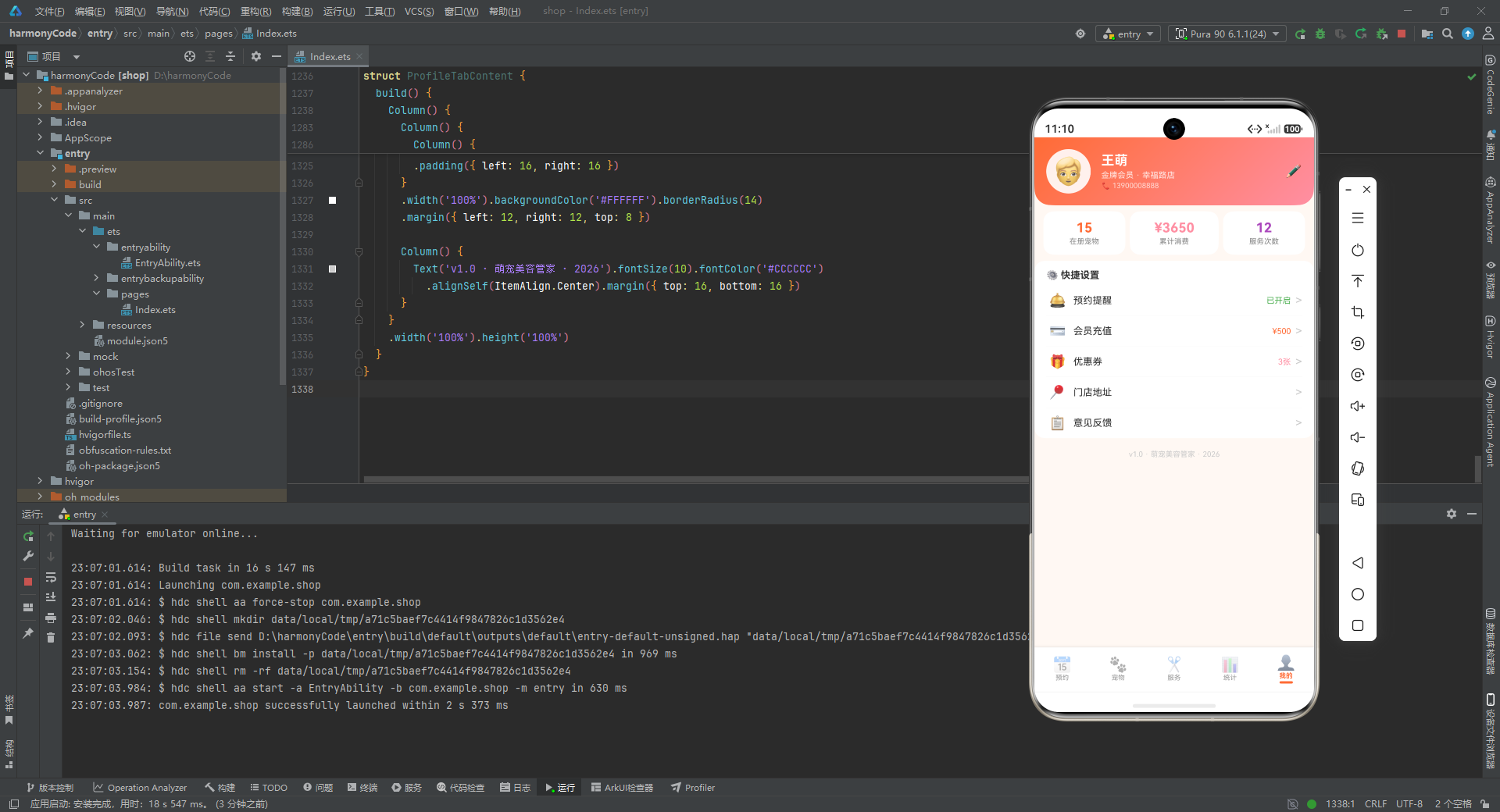
我的页展示用户信息、统计、快捷设置。
14.1 用户头部
Column() {
  Row() {
    Column() {
      Text('🧑').fontSize(36)
    }.width(60).height(60).backgroundColor('#FFFFFF').opacity(0.9).borderRadius(30)
    .alignItems(HorizontalAlign.Center).justifyContent(FlexAlign.Center)
    Column() {
      Text('王萌').fontSize(18).fontWeight(FontWeight.Bold).fontColor('#FFFFFF')
      Text('金牌会员 · 幸福路店').fontSize(11).fontColor('#FFFFFF').opacity(0.85).margin({ top: 3 })
      Text('📞 13900008888').fontSize(10).fontColor('#FFFFFF').opacity(0.7).margin({ top: 2 })
    }.layoutWeight(1).alignItems(HorizontalAlign.Start).padding({ left: 14 })
    Text('✏️').fontSize(18).fontColor('#FFFFFF').opacity(0.85)
  }
}
.linearGradient({ angle: 135, colors: [['#FF6B35', 0], ['#FF8FA3', 1]] })
.borderRadius({ bottomLeft: 22, bottomRight: 22 })
逐行解释:
- 头部使用从橙到粉的 135 度渐变,比预约页的"橙到橙"渐变更柔和,适合个人页的亲和氛围。
- 头像:白色半透明圆形背景 + 🧑 Emoji。
- 用户信息:姓名(王萌)+ 会员等级/门店 + 电话,文字白色带不同透明度(0.85、0.7)形成层次。
- 右侧 ✏️ 编辑图标。
14.2 统计数据
Row() {
  Column() {
    Text(getPetCount().toString()).fontSize(18).fontWeight(FontWeight.Bold).fontColor('#FF6B35')
    Text('在册宠物').fontSize(10).fontColor('#888888').margin({ top: 2 })
  }...
  Column() {
    Text('¥3650').fontSize(18).fontWeight(FontWeight.Bold).fontColor('#FF8FA3')
    Text('累计消费')...
  }...
  Column() {
    Text('12').fontSize(18).fontWeight(FontWeight.Bold).fontColor('#AB47BC')
    Text('服务次数')...
  }...
}
逐行解释:
- 三等分:在册宠物(橙)、累计消费(粉)、服务次数(紫),与统计页的配色体系一致。
14.3 快捷设置列表
Column() {
  Text('⚙️ 快捷设置')...
  Row() {
    Text('🛎️').fontSize(18)
    Text('预约提醒').fontSize(13).fontColor('#333333').layoutWeight(1).margin({ left: 10 })
    Text('已开启').fontSize(11).fontColor('#4CAF50')
    Text('>').fontColor('#CCCCCC').margin({ left: 6 })
  }
  Divider().color('#F5F5F5')
  // 会员充值、优惠券、门店地址、意见反馈
}
逐行解释:
- 经典的"设置列表行"结构:左侧 Emoji 图标 + 中间标题 + 右侧状态/数值 + 右箭头。
- “预约提醒"显示"已开启”(绿色),表示开关状态。
- “会员充值"显示"¥500”(橙色),表示余额。
- “优惠券"显示"3张”(粉色),表示数量。
- 每行之间用
Divider分隔。 - 最底部是版本号"v1.0 · 萌宠美容管家 · 2026"。
十五、关键特性对比表
下表对本应用涉及的核心技术特性进行汇总对比,便于快速回顾:
| 特性维度 | 实现方式 | 设计目的 | 适用场景 |
|---|---|---|---|
| 状态管理 | @State + @Observed |
局部状态驱动 UI 重渲染 | 组件内交互、表单数据 |
| UI 复用 | @Builder 装饰器 |
抽离可复用 UI 片段 | 列表项、弹窗、遮罩 |
| 视觉规范 | Record<string, Config> 令牌 |
集中管理颜色与图标 | 状态色、分类色、类型色 |
| 数据筛选 | 顶层纯函数 | 无副作用、可测试 | 搜索过滤、状态过滤 |
| 图表渲染 | Column 高度模拟柱状图 |
零依赖原生实现 | 柱状图、进度条 |
| 弹窗管理 | 多个布尔 @State |
简单直接的互斥控制 | 新增/编辑/删除/详情 |
| 渐变背景 | linearGradient |
品牌氛围营造 | 头部、个人页 |
| 列表渲染 | 逐条 if 条件 |
规避 ForEach 渲染差异 | 预约列表、宠物列表 |
| 数据模型 | class + 构造函数 |
类型安全 + 默认值 | 预约/宠物/服务实体 |
| 图标方案 | Emoji 字符 | 零资源依赖、跨平台 | 全应用图标 |
| 布局策略 | layoutWeight 弹性分配 |
自适应屏幕宽度 | 卡片、Tab、统计格 |
| 配色体系 | 橙粉紫绿四色 | 温暖专业、维度区分 | 全应用主题 |
十六、详细总结
16.1 工程价值
通过对这份源码的逐段剖析,我们可以清晰地看到一个完整的宠物门店管理应用是如何在鸿蒙声明式 UI 框架下落地的。它不是简单的"Hello World" Demo,而是一个具备完整业务闭环的中等复杂度应用:从预约的增删改查,到宠物档案的归档展示,再到服务项目的分类浏览,最后到营业数据的多维统计,五大模块环环相扣,形成了一个可实际演示的产品原型。
16.2 架构亮点
第一,数据驱动视图。整个应用没有直接操作 DOM 的代码,所有界面变化都通过 @State 状态变量的修改触发框架自动重渲染。例如点击预约卡片时,仅设置 this.selectedAppointment = a; this.showDetailModal = true 两个状态,详情弹窗就会自动出现并填充数据。这种声明式编程模型大幅降低了状态同步的心智负担。
第二,纯函数处理业务逻辑。所有的筛选、统计、尺寸计算都封装为顶层纯函数,既保证了可测试性(输入确定则输出确定),又让 UI 构建函数保持纯粹,只关心"渲染什么"而不关心"如何计算"。这种关注点分离是良好工程实践的体现。
第三,设计令牌统一管理视觉。状态色、宠物类型色、服务分类色都通过 Record<string, Config> 集中定义,界面上所有用到这些颜色的地方都从配置中动态读取。这意味着如果要切换品牌色(比如从橙色改为蓝色),只需修改配置对象即可全局生效,无需逐个组件修改。
第四,零图片资源依赖。全应用使用 Emoji 字符作为图标,不仅减小了应用体积,还保证了跨平台一致性,且 Emoji 是 Unicode 标准字符,无需考虑分辨率适配。这种"轻资源"策略非常适合 demo 原型快速迭代。
16.3 可优化方向
当然,作为一份原型代码,仍有明显的优化空间:
- 数据层:当前使用硬编码的 Mock 数据和返回固定值的统计函数,真实场景应替换为后端 API 调用,并引入数据缓存与错误处理。
- 列表渲染:20 条预约和 15 只宠物采用逐条
if写法,虽然规避了ForEach的潜在渲染问题,但代码冗长。可封装为通用的filteredList计算属性配合ForEach使用。 - 表单校验:新增/编辑弹窗的保存按钮仅关闭弹窗,未做手机号格式校验、必填校验、时间冲突检测,真实场景需补充。
- 弹窗状态机:四个弹窗用四个独立布尔值管理,理论上可能出现多个弹窗同时显示的异常态。可引入
currentModal: 'none' | 'add' | 'edit' | 'delete' | 'detail'的枚举状态机保证互斥。 - 数据持久化:编辑和删除操作未真正写入数据源,仅切换了弹窗显示状态。应引入
AppStorage或后端接口实现真正的 CRUD。 - 响应式适配:大量使用百分比和固定 vp 值,在不同屏幕尺寸下的表现需要进一步验证,可考虑引入
fp(字体像素)和断点适配。 - 可访问性:Emoji 图标对读屏软件不友好,应为关键图标补充
accessibilityText。
16.4 技术启示
这份代码对于学习鸿蒙 ArkTS 开发具有很高的参考价值。它完整展示了 @Entry/@Component/@Builder/@State/@Observed 等核心装饰器的协作方式,演示了 Column/Row/Stack/Scroll 等基础容器的高频用法,实践了 linearGradient/borderRadius/shadow 等视觉属性的链式调用,并提供了弹窗、列表、筛选、图表四大典型场景的实现范式。
对于想要快速上手鸿蒙声明式 UI 的开发者而言,这份代码是一个极佳的"脚手架式"学习样本——它不依赖任何第三方库,不涉及复杂的异步逻辑,所有交互都在本地完成,却涵盖了真实业务应用 80% 以上的 UI 模式。通过逐行理解这份代码,开发者能够建立起对 ArkTS 开发模型的完整认知,为构建更复杂的鸿蒙原生应用打下坚实基础。
安装DevEco Studio程序

选择目标安装目录:

设置环境变量,但是需要重启一下:

新建一个空白模板:

设置API为24的模板项目:
初始化项目,自动下载相关依赖:

完整代码:
// ============ 类型定义 ============
interface AppointmentStatusConfig {
label: string
color: string
bg: string
icon: string
}
interface PetTypeConfig {
label: string
color: string
bg: string
icon: string
}
interface ServiceCategoryConfig {
label: string
color: string
bg: string
icon: string
}
interface ChartBarData {
label: string
value: number
color: string
}
interface ServiceRatioData {
label: string
percent: number
color: string
icon: string
}
// ============ 预约数据模型 ============
@Observed
export class AppointmentModel {
id: number = 0
petName: string = ''
petType: string = ''
ownerName: string = ''
phone: string = ''
service: string = ''
date: string = ''
time: string = ''
status: string = ''
price: number = 0
duration: number = 0
notes: string = ''
constructor(id: number, petName: string, petType: string, ownerName: string, phone: string, service: string, date: string, time: string, status: string, price: number, duration: number, notes: string) {
this.id = id; this.petName = petName; this.petType = petType
this.ownerName = ownerName; this.phone = phone; this.service = service
this.date = date; this.time = time; this.status = status
this.price = price; this.duration = duration; this.notes = notes
}
}
// ============ 宠物数据模型 ============
@Observed
export class PetModel {
id: number = 0
name: string = ''
breed: string = ''
age: string = ''
weight: string = ''
emoji: string = ''
gender: string = ''
ownerName: string = ''
lastService: string = ''
constructor(id: number, name: string, breed: string, age: string, weight: string, emoji: string, gender: string, ownerName: string, lastService: string) {
this.id = id; this.name = name; this.breed = breed
this.age = age; this.weight = weight; this.emoji = emoji
this.gender = gender; this.ownerName = ownerName; this.lastService = lastService
}
}
// ============ 服务项目数据模型 ============
@Observed
export class ServiceModel {
id: number = 0
name: string = ''
icon: string = ''
category: string = ''
price: number = 0
duration: number = 0
description: string = ''
rating: number = 0
constructor(id: number, name: string, icon: string, category: string, price: number, duration: number, description: string, rating: number) {
this.id = id; this.name = name; this.icon = icon
this.category = category; this.price = price; this.duration = duration
this.description = description; this.rating = rating
}
}
// ============ 设计令牌 ============
const STATUS_CONFIG: Record<string, AppointmentStatusConfig> = {
'已预约': { label: '已预约', color: '#FF6B35', bg: '#FFF0E8', icon: '📌' },
'已完成': { label: '已完成', color: '#4CAF50', bg: '#E8F5E9', icon: '✅' },
'已取消': { label: '已取消', color: '#9E9E9E', bg: '#F0F0F0', icon: '✖️' }
}
const PET_TYPE_CONFIG: Record<string, PetTypeConfig> = {
'狗狗': { label: '狗狗', color: '#FF6B35', bg: '#FFF0E8', icon: '🐶' },
'猫咪': { label: '猫咪', color: '#FF8FA3', bg: '#FFEDF1', icon: '🐱' },
'其他': { label: '其他', color: '#8BC34A', bg: '#F1F8E9', icon: '🐹' }
}
const SERVICE_CATEGORY_CONFIG: Record<string, ServiceCategoryConfig> = {
'洗护': { label: '洗护', color: '#FF6B35', bg: '#FFF0E8', icon: '💦' },
'造型': { label: '造型', color: '#FF8FA3', bg: '#FFEDF1', icon: '✂️' },
'SPA': { label: 'SPA', color: '#AB47BC', bg: '#F3E5F5', icon: '🛁' },
'护理': { label: '护理', color: '#4CAF50', bg: '#E8F5E9', icon: '🧴' }
}
const STATUS_FILTER: string[] = ['全部', '已预约', '已完成', '已取消']
const PET_TYPE_FILTER: string[] = ['全部', '狗狗', '猫咪', '其他']
const PET_FORM_TYPES: string[] = ['狗狗', '猫咪', '其他']
const SERVICE_NAMES: string[] = ['基础洗护', '精致洗护', '全身剪毛', '猫咪SPA', '深层护理', '药浴护理']
// ============ 柱状图与占比配置 ============
const DAILY_BAR_CONFIG: ChartBarData[] = [
{ label: '周一', value: 3, color: '#FF8FA3' },
{ label: '周二', value: 5, color: '#FF6B35' },
{ label: '周三', value: 4, color: '#FF8FA3' },
{ label: '周四', value: 6, color: '#FF6B35' },
{ label: '周五', value: 2, color: '#FF8FA3' },
{ label: '周六', value: 1, color: '#FF6B35' },
{ label: '周日', value: 0, color: '#FFB39B' }
]
const SERVICE_RATIO_CONFIG: ServiceRatioData[] = [
{ label: '洗护类', percent: 45, color: '#FF6B35', icon: '💦' },
{ label: '美容造型', percent: 30, color: '#FF8FA3', icon: '✂️' },
{ label: 'SPA护理', percent: 25, color: '#AB47BC', icon: '🛁' }
]
// ============ 20 条预约数据 ============
const mockAppointments: AppointmentModel[] = [
new AppointmentModel(1, '豆豆', '贵宾犬', '张女士', '13812341234', '精致洗护', '2026-08-11', '09:00', '已预约', 158, 90, '贵宾犬毛质细软,请用温和香波'),
new AppointmentModel(2, '咪咪', '英国短毛猫', '李女士', '13912345678', '猫咪SPA', '2026-08-11', '10:00', '已预约', 268, 120, '猫咪怕水,请提前安抚'),
new AppointmentModel(3, '旺财', '金毛寻回犬', '王先生', '13612349012', '全身剪毛', '2026-08-11', '11:30', '已预约', 358, 150, '夏季剃短毛,保留头部造型'),
new AppointmentModel(4, '布丁', '比熊犬', '陈小姐', '13712343456', '泰迪造型', '2026-08-11', '14:00', '已完成', 198, 120, '蘑菇头造型,圆润可爱'),
new AppointmentModel(5, '雪球', '萨摩耶', '刘女士', '13512347890', '基础洗护', '2026-08-11', '15:30', '已完成', 128, 60, '毛发量大,需彻底吹干'),
new AppointmentModel(6, '阿福', '柯基犬', '赵先生', '13412342345', '药浴护理', '2026-08-12', '09:30', '已预约', 218, 90, '皮肤有轻微红疹,药浴浓度按医嘱'),
new AppointmentModel(7, '团子', '布偶猫', '孙女士', '13212346789', '猫咪洗护', '2026-08-12', '10:30', '已预约', 148, 75, '长毛猫,重点护理腹部打结'),
new AppointmentModel(8, '乐乐', '边境牧羊犬', '周先生', '13112340123', '精致洗护', '2026-08-12', '13:00', '已预约', 168, 90, '活泼好动,建议先遛一圈再洗'),
new AppointmentModel(9, '汤圆', '法国斗牛犬', '吴女士', '13012344567', '染色美容', '2026-08-12', '15:00', '已取消', 288, 150, '客户临时出差取消'),
new AppointmentModel(10, '小白', '中华田园犬', '郑先生', '18912348901', '基础洗护', '2026-08-12', '16:30', '已完成', 108, 60, '性格温顺,洗澡很配合'),
new AppointmentModel(11, '奶茶', '波斯猫', '冯女士', '18812342345', '猫咪SPA', '2026-08-13', '09:00', '已预约', 268, 120, '泪痕严重,请一并清理'),
new AppointmentModel(12, '将军', '德国牧羊犬', '蒋先生', '18712346789', '全身剪毛', '2026-08-13', '10:30', '已预约', 358, 150, '大型犬,需要两名美容师配合'),
new AppointmentModel(13, '花花', '约克夏', '韩女士', '18612340123', '精致洗护', '2026-08-13', '14:00', '已预约', 178, 90, '头部扎小辫子'),
new AppointmentModel(14, '大熊', '阿拉斯加犬', '唐先生', '18512344567', '深层护理', '2026-08-13', '15:30', '已取消', 328, 180, '换毛期掉毛多,客户改期'),
new AppointmentModel(15, '绵绵', '博美犬', '崔女士', '18412348901', '基础洗护', '2026-08-13', '16:00', '已完成', 118, 60, '小型犬,注意水温水压'),
new AppointmentModel(16, '皮皮', '暹罗猫', '秦先生', '18312342345', '猫咪洗护', '2026-08-14', '09:30', '已预约', 148, 75, '性格胆小,减少噪音'),
new AppointmentModel(17, '毛毛', '拉布拉多犬', '许女士', '18212346789', '精致洗护', '2026-08-14', '11:00', '已预约', 168, 90, '游泳后毛发,需驱虫检查'),
new AppointmentModel(18, '小美', '金吉拉', '谢先生', '18112340123', '猫咪美容', '2026-08-14', '14:30', '已预约', 238, 105, '剪指甲+洗耳+清理泪痕全套'),
new AppointmentModel(19, '二哈', '哈士奇', '罗女士', '18012344567', '全身剪毛', '2026-08-14', '15:30', '已取消', 358, 150, '撕家犬,提前沟通造型方案'),
new AppointmentModel(20, '粽子', '雪纳瑞', '梁先生', '17712348901', '泰迪造型', '2026-08-14', '16:30', '已预约', 198, 120, '经典八字胡造型')
]
// ============ 15 条宠物数据 ============
const mockPets: PetModel[] = [
new PetModel(1, '豆豆', '贵宾犬', '3岁', '5.2kg', '🐩', '母', '张女士', '精致洗护'),
new PetModel(2, '咪咪', '英国短毛猫', '2岁', '4.8kg', '🐱', '母', '李女士', '猫咪SPA'),
new PetModel(3, '旺财', '金毛寻回犬', '4岁', '28kg', '🐕', '公', '王先生', '全身剪毛'),
new PetModel(4, '布丁', '比熊犬', '2岁', '6.1kg', '🐶', '公', '陈小姐', '泰迪造型'),
new PetModel(5, '雪球', '萨摩耶', '5岁', '24kg', '🐕', '母', '刘女士', '基础洗护'),
new PetModel(6, '阿福', '柯基犬', '3岁', '12kg', '🐶', '公', '赵先生', '药浴护理'),
new PetModel(7, '团子', '布偶猫', '1岁', '4.2kg', '🐱', '母', '孙女士', '猫咪洗护'),
new PetModel(8, '乐乐', '边境牧羊犬', '2岁', '18kg', '🐕', '公', '周先生', '精致洗护'),
new PetModel(9, '汤圆', '法国斗牛犬', '3岁', '11kg', '🐶', '公', '吴女士', '染色美容'),
new PetModel(10, '小白', '中华田园犬', '6岁', '15kg', '🐕', '公', '郑先生', '基础洗护'),
new PetModel(11, '奶茶', '波斯猫', '4岁', '5.5kg', '🐱', '母', '冯女士', '猫咪SPA'),
new PetModel(12, '将军', '德国牧羊犬', '3岁', '35kg', '🐕', '公', '蒋先生', '全身剪毛'),
new PetModel(13, '花花', '约克夏', '2岁', '2.1kg', '🐶', '母', '韩女士', '精致洗护'),
new PetModel(14, '绵绵', '博美犬', '1岁', '3.5kg', '🐶', '母', '崔女士', '基础洗护'),
new PetModel(15, '粽子', '雪纳瑞', '4岁', '8.5kg', '🐶', '公', '梁先生', '泰迪造型')
]
// ============ 12 项服务数据 ============
const mockServices: ServiceModel[] = [
new ServiceModel(1, '基础洗护', '💦', '洗护', 108, 60, '洗浴+吹干+全身梳理', 4.8),
new ServiceModel(2, '精致洗护', '✨', '洗护', 158, 90, '洗护+修剪指甲+耳道清理+护毛素', 4.9),
new ServiceModel(3, '全身剪毛', '✂️', '造型', 358, 150, '精致洗护+全身造型修剪', 4.9),
new ServiceModel(4, '泰迪造型', '🐻', '造型', 198, 120, '泰迪专属头身造型,圆润可爱', 4.8),
new ServiceModel(5, '猫咪SPA', '🛁', 'SPA', 268, 120, '香薰SPA+放松按摩+精油护理', 4.7),
new ServiceModel(6, '猫咪洗护', '🐱', '洗护', 148, 75, '温和洗浴+吹干+毛发梳理', 4.7),
new ServiceModel(7, '深层护理', '🧴', '护理', 328, 180, '深层清洁+去屑+滋养修复', 4.6),
new ServiceModel(8, '药浴护理', '🩹', '护理', 218, 90, '皮肤问题专用药浴+药膏涂抹', 4.5),
new ServiceModel(9, '染色美容', '🎨', '造型', 288, 150, '天然染膏+创意染色造型', 4.6),
new ServiceModel(10, '猫咪美容', '💅', '护理', 238, 105, '剪指甲+洗耳+清理泪痕+顺毛', 4.8),
new ServiceModel(11, '宠物SPA', '🌿', 'SPA', 258, 120, '矿物泥浴+温泉水疗+按摩', 4.7),
new ServiceModel(12, '足部护理', '🐾', '护理', 88, 45, '修甲+磨爪+护爪霜护理', 4.9)
]
// ============ 全局纯函数 ============
function isAppointmentMatched(item: AppointmentModel, keyword: string, status: string): boolean {
if (status !== '全部' && item.status !== status) {
return false
}
if (keyword !== '') {
return item.petName.indexOf(keyword) >= 0
|| item.ownerName.indexOf(keyword) >= 0
|| item.service.indexOf(keyword) >= 0
}
return true
}
function isPetMatched(item: PetModel, keyword: string, petType: string): boolean {
if (petType !== '全部' && item.breed !== petType && item.breed.indexOf(petType) < 0) {
return false
}
if (keyword !== '') {
return item.name.indexOf(keyword) >= 0 || item.breed.indexOf(keyword) >= 0
}
return true
}
function getBarHeight(v: number): number {
return Math.round(v / 6 * 80)
}
function getRatioWidth(percent: number): number {
return percent
}
function getTodayAppointmentCount(): number {
return 7
}
function getMonthOrderCount(): number {
return 46
}
function getMonthIncome(): number {
return 8650
}
function getAvgPrice(): number {
return 188
}
function getVipCount(): number {
return 128
}
function getPetCount(): number {
return 15
}
function getServiceCount(): number {
return 12
}
// ============ 底部 Tab 枚举 ============
enum PetTab {
APPOINTMENT = 0,
PET = 1,
SERVICE = 2,
STATS = 3,
PROFILE = 4
}
// ============ 入口页面 ============
@Entry
@Component
struct PetGroomingApp {
@State activeTab: PetTab = PetTab.APPOINTMENT
@Builder contentArea() {
Column() {
if (this.activeTab === PetTab.APPOINTMENT) {
AppointmentTabContent()
} else if (this.activeTab === PetTab.PET) {
PetTabContent()
} else if (this.activeTab === PetTab.SERVICE) {
ServiceTabContent()
} else if (this.activeTab === PetTab.STATS) {
StatsTabContent()
} else {
ProfileTabContent()
}
}
.layoutWeight(1)
}
@Builder bottomTabItem(icon: string, label: string, tab: PetTab) {
Column() {
Text(icon).fontSize(20).opacity(this.activeTab === tab ? 1.0 : 0.45)
Text(label).fontSize(9)
.fontColor(this.activeTab === tab ? '#FF6B35' : '#999999')
.fontWeight(this.activeTab === tab ? FontWeight.Bold : FontWeight.Normal)
.margin({ top: 1 })
if (this.activeTab === tab) {
Column().width(18).height(3)
.backgroundColor('#FF6B35').borderRadius(2).margin({ top: 2 })
}
}
.layoutWeight(1)
.alignItems(HorizontalAlign.Center)
.padding({ top: 5, bottom: 5 })
.onClick(() => { this.activeTab = tab })
}
build() {
Column() {
this.contentArea()
Row() {
this.bottomTabItem('📅', '预约', PetTab.APPOINTMENT)
this.bottomTabItem('🐾', '宠物', PetTab.PET)
this.bottomTabItem('✂️', '服务', PetTab.SERVICE)
this.bottomTabItem('📊', '统计', PetTab.STATS)
this.bottomTabItem('👤', '我的', PetTab.PROFILE)
}
.width('100%')
.backgroundColor('#FFFFFF')
.padding({ top: 4, bottom: 6 })
.shadow({ radius: 8, color: '#1A000000', offsetY: -2 })
}
.width('100%').height('100%')
.backgroundColor('#FFF8F3')
}
}
// ============ 预约列表页 ============
@Component
struct AppointmentTabContent {
@State searchKeyword: string = ''
@State selectedStatus: string = '全部'
@State showAddModal: boolean = false
@State showEditModal: boolean = false
@State showDeleteConfirm: boolean = false
@State showDetailModal: boolean = false
@State selectedAppointment: AppointmentModel | null = null
@State editingAppointment: AppointmentModel | null = null
@State formPetName: string = ''
@State formPetType: string = '狗狗'
@State formService: string = '基础洗护'
@State formOwnerName: string = ''
@State formPhone: string = ''
@State formDate: string = '2026-08-15'
@State formTime: string = '10:00'
// ========== 弹框遮罩 ==========
@Builder modalOverlay(onClose: () => void) {
Column()
.width('100%').height('100%')
.backgroundColor('rgba(0,0,0,0.5)')
.onClick(onClose)
}
// ========== 弹框1:新增预约 ==========
@Builder addAppointmentModal() {
Column() {
this.modalOverlay(() => { this.showAddModal = false })
Column() {
Row() {
Text('➕ 新增预约').fontSize(18).fontWeight(FontWeight.Bold).fontColor('#212121')
Column().layoutWeight(1)
Text('✕').fontSize(18).fontColor('#999999')
.onClick(() => { this.showAddModal = false })
}
.width('100%').padding({ left: 20, right: 20, top: 18, bottom: 12 })
Divider().color('#F0F0F0')
Scroll() {
Column() {
Text('宠物名称').fontSize(12).fontColor('#888888').margin({ top: 12, left: 20 })
TextInput({ placeholder: '如:豆豆' })
.placeholderColor('#BBBBBB').fontSize(14).width('100%')
.backgroundColor('#FFF5EE').borderRadius(8)
.margin({ left: 20, right: 20, top: 4 })
.onChange((v: string) => { this.formPetName = v })
Text('宠物类型').fontSize(12).fontColor('#888888').margin({ top: 12, left: 20 })
Row() {
ForEach(PET_FORM_TYPES, (t: string) => {
if (this.formPetType === t) {
Text((PET_TYPE_CONFIG[t]?.icon ?? '🐾') + ' ' + t)
.fontSize(11).fontColor('#FFFFFF').backgroundColor('#FF6B35')
.padding({ left: 8, right: 8, top: 5, bottom: 5 }).borderRadius(12)
.margin({ left: 3, right: 3 })
} else {
Text((PET_TYPE_CONFIG[t]?.icon ?? '🐾') + ' ' + t)
.fontSize(11).fontColor('#FF6B35').backgroundColor('#FFF0E8')
.padding({ left: 8, right: 8, top: 5, bottom: 5 }).borderRadius(12)
.margin({ left: 3, right: 3 })
.onClick(() => { this.formPetType = t })
}
})
}
.margin({ left: 16, right: 16, top: 4 })
Text('服务项目').fontSize(12).fontColor('#888888').margin({ top: 12, left: 20 })
Row() {
ForEach(SERVICE_NAMES, (s: string) => {
if (this.formService === s) {
Text(s).fontSize(11).fontColor('#FFFFFF').backgroundColor('#FF6B35')
.padding({ left: 8, right: 8, top: 5, bottom: 5 }).borderRadius(12)
.margin({ left: 3, right: 3 })
} else {
Text(s).fontSize(11).fontColor('#FF6B35').backgroundColor('#FFF0E8')
.padding({ left: 8, right: 8, top: 5, bottom: 5 }).borderRadius(12)
.margin({ left: 3, right: 3 })
.onClick(() => { this.formService = s })
}
})
}
.margin({ left: 16, right: 16, top: 4 })
Text('主人信息').fontSize(12).fontColor('#888888').margin({ top: 12, left: 20 })
Row() {
TextInput({ placeholder: '主人姓名' })
.placeholderColor('#BBBBBB').fontSize(12).layoutWeight(1)
.backgroundColor('#FFF5EE').borderRadius(8)
.onChange((v: string) => { this.formOwnerName = v })
TextInput({ placeholder: '联系电话' })
.placeholderColor('#BBBBBB').fontSize(12).layoutWeight(1)
.backgroundColor('#FFF5EE').borderRadius(8).margin({ left: 8 })
.onChange((v: string) => { this.formPhone = v })
}
.margin({ left: 20, right: 20, top: 4 })
Text('预约时间').fontSize(12).fontColor('#888888').margin({ top: 12, left: 20 })
Row() {
TextInput({ placeholder: '日期 2026-08-15' })
.placeholderColor('#BBBBBB').fontSize(12).layoutWeight(1)
.backgroundColor('#FFF5EE').borderRadius(8)
.onChange((v: string) => { this.formDate = v })
TextInput({ placeholder: '时间 10:00' })
.placeholderColor('#BBBBBB').fontSize(12).layoutWeight(1)
.backgroundColor('#FFF5EE').borderRadius(8).margin({ left: 8 })
.onChange((v: string) => { this.formTime = v })
}
.margin({ left: 20, right: 20, top: 4 })
}
.padding({ bottom: 12 })
}
.layoutWeight(1)
Row() {
Text('取消').fontSize(14).fontColor('#888888')
.backgroundColor('#F5F5F5').borderRadius(20)
.padding({ left: 24, right: 24, top: 10, bottom: 10 })
.onClick(() => { this.showAddModal = false })
Text('保存预约').fontSize(14).fontColor('#FFFFFF')
.backgroundColor('#FF6B35').borderRadius(20)
.padding({ left: 24, right: 24, top: 10, bottom: 10 })
.margin({ left: 12 })
.onClick(() => { this.showAddModal = false })
}
.width('100%').justifyContent(FlexAlign.Center)
.padding({ left: 20, right: 20, top: 16, bottom: 16 })
}
.width('90%').height('75%').backgroundColor('#FFFFFF').borderRadius(18)
.alignItems(HorizontalAlign.Center)
.position({ x: '5%', y: '12%' })
}
.width('100%').height('100%').position({ x: 0, y: 0 }).zIndex(999)
}
// ========== 弹框2:编辑预约 ==========
@Builder editAppointmentModal() {
Column() {
this.modalOverlay(() => { this.showEditModal = false })
Column() {
Row() {
Text('✏️ 编辑预约').fontSize(18).fontWeight(FontWeight.Bold).fontColor('#212121')
Column().layoutWeight(1)
Text('✕').fontSize(18).fontColor('#999999')
.onClick(() => { this.showEditModal = false })
}
.width('100%').padding({ left: 20, right: 20, top: 18, bottom: 12 })
Divider().color('#F0F0F0')
Column() {
Text('宠物名称').fontSize(12).fontColor('#888888').margin({ top: 12, left: 20 })
TextInput({ placeholder: this.editingAppointment?.petName ?? '宠物名称' })
.placeholderColor('#BBBBBB').fontSize(14).width('100%')
.backgroundColor('#FFF5EE').borderRadius(8)
.margin({ left: 20, right: 20, top: 4 })
Text('服务项目').fontSize(12).fontColor('#888888').margin({ top: 12, left: 20 })
TextInput({ placeholder: this.editingAppointment?.service ?? '服务项目' })
.placeholderColor('#BBBBBB').fontSize(14).width('100%')
.backgroundColor('#FFF5EE').borderRadius(8)
.margin({ left: 20, right: 20, top: 4 })
Text('主人信息').fontSize(12).fontColor('#888888').margin({ top: 12, left: 20 })
Row() {
TextInput({ placeholder: this.editingAppointment?.ownerName ?? '主人姓名' })
.placeholderColor('#BBBBBB').fontSize(12).layoutWeight(1)
.backgroundColor('#FFF5EE').borderRadius(8)
TextInput({ placeholder: this.editingAppointment?.phone ?? '联系电话' })
.placeholderColor('#BBBBBB').fontSize(12).layoutWeight(1)
.backgroundColor('#FFF5EE').borderRadius(8).margin({ left: 8 })
}
.margin({ left: 20, right: 20, top: 4 })
Text('预约时间').fontSize(12).fontColor('#888888').margin({ top: 12, left: 20 })
Row() {
TextInput({ placeholder: this.editingAppointment?.date ?? '日期' })
.placeholderColor('#BBBBBB').fontSize(12).layoutWeight(1)
.backgroundColor('#FFF5EE').borderRadius(8)
TextInput({ placeholder: this.editingAppointment?.time ?? '时间' })
.placeholderColor('#BBBBBB').fontSize(12).layoutWeight(1)
.backgroundColor('#FFF5EE').borderRadius(8).margin({ left: 8 })
}
.margin({ left: 20, right: 20, top: 4 })
}
.layoutWeight(1)
Row() {
Text('取消').fontSize(14).fontColor('#888888')
.backgroundColor('#F5F5F5').borderRadius(20)
.padding({ left: 24, right: 24, top: 10, bottom: 10 })
.onClick(() => { this.showEditModal = false })
Text('保存修改').fontSize(14).fontColor('#FFFFFF')
.backgroundColor('#FF8FA3').borderRadius(20)
.padding({ left: 24, right: 24, top: 10, bottom: 10 })
.margin({ left: 12 })
.onClick(() => { this.showEditModal = false })
}
.width('100%').justifyContent(FlexAlign.Center)
.padding({ left: 20, right: 20, top: 16, bottom: 16 })
}
.width('90%').height('60%').backgroundColor('#FFFFFF').borderRadius(18)
.alignItems(HorizontalAlign.Center)
.position({ x: '5%', y: '18%' })
}
.width('100%').height('100%').position({ x: 0, y: 0 }).zIndex(999)
}
// ========== 弹框3:删除确认 ==========
@Builder deleteAppointmentModal() {
Column() {
this.modalOverlay(() => { this.showDeleteConfirm = false })
Column() {
Text('⚠️').fontSize(48).margin({ top: 24 })
Text('确认删除此预约?').fontSize(18).fontWeight(FontWeight.Bold).fontColor('#212121')
Text('删除后该预约记录将不可恢复').fontSize(13).fontColor('#FF6B35').margin({ top: 4 })
Row() {
Text(this.selectedAppointment?.petName ?? '宠物').fontSize(14).fontColor('#333333')
.fontWeight(FontWeight.Bold).margin({ left: 8 })
Text(this.selectedAppointment?.service ?? '').fontSize(12).fontColor('#FF6B35')
.margin({ left: 8 })
}
.backgroundColor('#FFF5EE').borderRadius(10)
.padding({ left: 16, right: 16, top: 10, bottom: 10 }).margin({ top: 16 })
Row() {
Text('取消').fontSize(14).fontColor('#888888')
.backgroundColor('#F5F5F5').borderRadius(20)
.padding({ left: 28, right: 28, top: 10, bottom: 10 })
.onClick(() => { this.showDeleteConfirm = false })
Text('确认删除').fontSize(14).fontColor('#FFFFFF')
.backgroundColor('#FF6B35').borderRadius(20)
.padding({ left: 28, right: 28, top: 10, bottom: 10 })
.margin({ left: 12 })
.onClick(() => { this.showDeleteConfirm = false })
}
.width('100%').justifyContent(FlexAlign.Center)
.padding({ left: 20, right: 20, top: 20, bottom: 20 })
}
.width('80%').backgroundColor('#FFFFFF').borderRadius(18)
.alignItems(HorizontalAlign.Center)
.position({ x: '10%', y: '38%' })
}
.width('100%').height('100%').position({ x: 0, y: 0 }).zIndex(999)
}
// ========== 弹框4:预约详情 ==========
@Builder detailAppointmentModal() {
Column() {
this.modalOverlay(() => { this.showDetailModal = false })
Column() {
Row() {
Column() {
Text((PET_TYPE_CONFIG[this.selectedAppointment?.petType ?? '']?.icon ?? '🐾') + '').fontSize(36)
}.width(60).height(60).backgroundColor('#FFF0E8').borderRadius(14)
.alignItems(HorizontalAlign.Center).justifyContent(FlexAlign.Center)
Column() {
Text(this.selectedAppointment?.petName ?? '').fontSize(16).fontWeight(FontWeight.Bold)
.fontColor('#212121')
Row() {
Text(this.selectedAppointment?.petType ?? '').fontSize(10).fontColor('#999999')
.backgroundColor('#F5F5F5').padding({ left: 6, right: 6, top: 2, bottom: 2 })
.borderRadius(6).margin({ right: 4 })
Text(STATUS_CONFIG[this.selectedAppointment?.status ?? '']?.label ?? '')
.fontSize(10).fontColor(STATUS_CONFIG[this.selectedAppointment?.status ?? '']?.color ?? '#999999')
.backgroundColor(STATUS_CONFIG[this.selectedAppointment?.status ?? '']?.bg ?? '#F5F5F5')
.padding({ left: 6, right: 6, top: 2, bottom: 2 }).borderRadius(6)
}
.margin({ top: 4 })
}.layoutWeight(1).alignItems(HorizontalAlign.Start).padding({ left: 12 })
Text('✕').fontSize(18).fontColor('#999999')
.onClick(() => { this.showDetailModal = false })
}
.width('100%').padding({ left: 20, right: 20, top: 18 })
Divider().color('#F0F0F0').margin({ top: 12 })
Column() {
Row() {
Column() {
Text('📅 日期').fontSize(10).fontColor('#888888')
Text(this.selectedAppointment?.date ?? '').fontSize(13).fontColor('#212121').margin({ top: 2 })
}.layoutWeight(1).alignItems(HorizontalAlign.Start)
Column() {
Text('⏰ 时间').fontSize(10).fontColor('#888888')
Text(this.selectedAppointment?.time ?? '').fontSize(13).fontColor('#212121').margin({ top: 2 })
}.layoutWeight(1).alignItems(HorizontalAlign.Start)
}
.width('100%').margin({ top: 12 })
Row() {
Column() {
Text('💈 服务').fontSize(10).fontColor('#888888')
Text(this.selectedAppointment?.service ?? '').fontSize(13).fontColor('#FF6B35').margin({ top: 2 })
}.layoutWeight(1).alignItems(HorizontalAlign.Start)
Column() {
Text('⏳ 时长').fontSize(10).fontColor('#888888')
Text((this.selectedAppointment?.duration ?? 0) + '分钟').fontSize(13).fontColor('#212121').margin({ top: 2 })
}.layoutWeight(1).alignItems(HorizontalAlign.Start)
}
.width('100%').margin({ top: 10 })
Row() {
Column() {
Text('👤 主人').fontSize(10).fontColor('#888888')
Text(this.selectedAppointment?.ownerName ?? '').fontSize(13).fontColor('#212121').margin({ top: 2 })
}.layoutWeight(1).alignItems(HorizontalAlign.Start)
Column() {
Text('📞 电话').fontSize(10).fontColor('#888888')
Text(this.selectedAppointment?.phone ?? '').fontSize(13).fontColor('#212121').margin({ top: 2 })
}.layoutWeight(1).alignItems(HorizontalAlign.Start)
}
.width('100%').margin({ top: 10 })
Row() {
Column() {
Text('💰 价格').fontSize(10).fontColor('#888888')
Text('¥' + (this.selectedAppointment?.price ?? 0)).fontSize(16)
.fontColor('#FF6B35').fontWeight(FontWeight.Bold).margin({ top: 2 })
}.layoutWeight(1).alignItems(HorizontalAlign.Start)
}
.width('100%').margin({ top: 10 })
if (this.selectedAppointment?.notes !== '') {
Column() {
Text('📝 备注').fontSize(10).fontColor('#888888')
Text(this.selectedAppointment?.notes ?? '').fontSize(13).fontColor('#555555').margin({ top: 4 })
.width('100%')
}
.width('100%').margin({ top: 10 }).alignItems(HorizontalAlign.Start)
}
}
.padding({ left: 20, right: 20 })
.layoutWeight(1)
Row() {
Text('✏️ 编辑').fontSize(13).fontColor('#FFFFFF')
.backgroundColor('#FF8FA3').borderRadius(16)
.padding({ left: 20, right: 20, top: 8, bottom: 8 })
.onClick(() => { this.showEditModal = true })
Text('🗑️ 删除').fontSize(13).fontColor('#FFFFFF')
.backgroundColor('#FF6B35').borderRadius(16)
.padding({ left: 20, right: 20, top: 8, bottom: 8 })
.margin({ left: 8 })
.onClick(() => { this.showDeleteConfirm = true })
Text('📞 联系主人').fontSize(13).fontColor('#FF6B35')
.backgroundColor('#FFF0E8').borderRadius(16)
.padding({ left: 20, right: 20, top: 8, bottom: 8 })
.margin({ left: 8 })
}
.width('100%').justifyContent(FlexAlign.Center)
.padding({ left: 20, right: 20, top: 12, bottom: 14 })
}
.width('92%').height('75%').backgroundColor('#FFFFFF').borderRadius(18)
.alignItems(HorizontalAlign.Center)
.position({ x: '4%', y: '12%' })
}
.width('100%').height('100%').position({ x: 0, y: 0 }).zIndex(999)
}
// ========== 预约列表项 Builder ==========
@Builder appointmentItemBuilder(a: AppointmentModel) {
Column() {
Row() {
Column() {
Text(a.date.substring(5)).fontSize(12).fontWeight(FontWeight.Bold).fontColor('#FF6B35')
Text(a.time).fontSize(10).fontColor('#888888').margin({ top: 2 })
Text(STATUS_CONFIG[a.status]?.label ?? a.status).fontSize(9)
.fontColor(STATUS_CONFIG[a.status]?.color ?? '#999999')
.backgroundColor(STATUS_CONFIG[a.status]?.bg ?? '#F5F5F5')
.padding({ left: 6, right: 6, top: 2, bottom: 2 }).borderRadius(8)
.margin({ top: 4 })
}.width(64).alignItems(HorizontalAlign.Center)
Column() {
Row() {
Text(a.petName).fontSize(14).fontWeight(FontWeight.Bold).fontColor('#212121')
Text(a.petType).fontSize(10).fontColor('#999999').margin({ left: 6 })
Column().layoutWeight(1)
Text('>').fontColor('#CCCCCC')
}
.width('100%')
Text(a.service).fontSize(12).fontColor('#FF6B35').margin({ top: 3 })
Text(a.ownerName + ' · ' + a.phone).fontSize(10).fontColor('#999999').margin({ top: 2 })
}
.layoutWeight(1).alignItems(HorizontalAlign.Start).padding({ left: 10 })
}
.width('100%').padding({ top: 10, bottom: 10, left: 12, right: 12 })
}
.width('100%').backgroundColor('#FFFFFF')
.borderRadius(14).margin({ left: 12, right: 12, top: 6 })
.onClick(() => { this.selectedAppointment = a; this.showDetailModal = true })
}
build() {
Stack() {
// 主内容层
Column() {
// 渐变背景头部
Column() {
Row() {
Column() {
Text('🐾 萌宠美容').fontSize(20).fontWeight(FontWeight.Bold).fontColor('#FFFFFF')
Text('精致服务 · 温暖每一只毛孩子').fontSize(11).fontColor('#FFFFFF').opacity(0.85).margin({ top: 3 })
}.layoutWeight(1).alignItems(HorizontalAlign.Start)
Text('📢').fontSize(20).opacity(0.9)
}
.width('100%').padding({ left: 16, right: 16, top: 16 })
Row() {
Column() {
Text(getTodayAppointmentCount().toString()).fontSize(18).fontWeight(FontWeight.Bold).fontColor('#FFFFFF')
Text('今日预约').fontSize(10).fontColor('#FFFFFF').opacity(0.85).margin({ top: 2 })
}.layoutWeight(1).alignItems(HorizontalAlign.Center)
Column() {
Text(getMonthOrderCount().toString()).fontSize(18).fontWeight(FontWeight.Bold).fontColor('#FFFFFF')
Text('本月订单').fontSize(10).fontColor('#FFFFFF').opacity(0.85).margin({ top: 2 })
}.layoutWeight(1).alignItems(HorizontalAlign.Center)
Column() {
Text('¥' + getMonthIncome().toString()).fontSize(18).fontWeight(FontWeight.Bold).fontColor('#FFFFFF')
Text('本月收入').fontSize(10).fontColor('#FFFFFF').opacity(0.85).margin({ top: 2 })
}.layoutWeight(1).alignItems(HorizontalAlign.Center)
}
.width('100%').padding({ top: 12, bottom: 16 })
}
.width('100%')
.linearGradient({ angle: 135, colors: [['#FF6B35', 0], ['#FF9E63', 1]] })
.borderRadius({ bottomLeft: 22, bottomRight: 22 })
// 搜索栏
Row() {
Text('🔍').fontSize(14).margin({ left: 10 })
TextInput({ placeholder: '搜索宠物/主人/服务...' })
.placeholderColor('#BBBBBB').fontSize(13).layoutWeight(1)
.backgroundColor('#FFFFFF').borderRadius(8)
.margin({ left: 6, right: 6 })
.onChange((v: string) => { this.searchKeyword = v })
Text('+').fontSize(20).fontColor('#FFFFFF')
.backgroundColor('#FF6B35').width(30).height(30).borderRadius(15)
.textAlign(TextAlign.Center).margin({ right: 10 })
.onClick(() => { this.showAddModal = true })
}
.width('100%').padding({ top: 10, bottom: 6 })
// 状态筛选胶囊
Scroll() {
Row() {
ForEach(STATUS_FILTER, (s: string) => {
if (this.selectedStatus === s) {
Text(s).fontSize(11).fontColor('#FFFFFF').backgroundColor('#FF6B35')
.padding({ left: 10, right: 10, top: 5, bottom: 5 }).borderRadius(14)
.margin({ left: 3, right: 3 })
} else {
Text(s).fontSize(11).fontColor('#FF6B35').backgroundColor('#FFFFFF')
.padding({ left: 10, right: 10, top: 5, bottom: 5 }).borderRadius(14)
.margin({ left: 3, right: 3 })
.onClick(() => { this.selectedStatus = s })
}
})
}
.padding({ left: 8, right: 8 })
}
.scrollable(ScrollDirection.Horizontal).scrollBar(BarState.Off).height(38)
// 20 条预约列表
Scroll() {
Column() {
if (isAppointmentMatched(mockAppointments[0], this.searchKeyword, this.selectedStatus)) {
this.appointmentItemBuilder(mockAppointments[0])
}
if (isAppointmentMatched(mockAppointments[1], this.searchKeyword, this.selectedStatus)) {
this.appointmentItemBuilder(mockAppointments[1])
}
if (isAppointmentMatched(mockAppointments[2], this.searchKeyword, this.selectedStatus)) {
this.appointmentItemBuilder(mockAppointments[2])
}
if (isAppointmentMatched(mockAppointments[3], this.searchKeyword, this.selectedStatus)) {
this.appointmentItemBuilder(mockAppointments[3])
}
if (isAppointmentMatched(mockAppointments[4], this.searchKeyword, this.selectedStatus)) {
this.appointmentItemBuilder(mockAppointments[4])
}
if (isAppointmentMatched(mockAppointments[5], this.searchKeyword, this.selectedStatus)) {
this.appointmentItemBuilder(mockAppointments[5])
}
if (isAppointmentMatched(mockAppointments[6], this.searchKeyword, this.selectedStatus)) {
this.appointmentItemBuilder(mockAppointments[6])
}
if (isAppointmentMatched(mockAppointments[7], this.searchKeyword, this.selectedStatus)) {
this.appointmentItemBuilder(mockAppointments[7])
}
if (isAppointmentMatched(mockAppointments[8], this.searchKeyword, this.selectedStatus)) {
this.appointmentItemBuilder(mockAppointments[8])
}
if (isAppointmentMatched(mockAppointments[9], this.searchKeyword, this.selectedStatus)) {
this.appointmentItemBuilder(mockAppointments[9])
}
if (isAppointmentMatched(mockAppointments[10], this.searchKeyword, this.selectedStatus)) {
this.appointmentItemBuilder(mockAppointments[10])
}
if (isAppointmentMatched(mockAppointments[11], this.searchKeyword, this.selectedStatus)) {
this.appointmentItemBuilder(mockAppointments[11])
}
if (isAppointmentMatched(mockAppointments[12], this.searchKeyword, this.selectedStatus)) {
this.appointmentItemBuilder(mockAppointments[12])
}
if (isAppointmentMatched(mockAppointments[13], this.searchKeyword, this.selectedStatus)) {
this.appointmentItemBuilder(mockAppointments[13])
}
if (isAppointmentMatched(mockAppointments[14], this.searchKeyword, this.selectedStatus)) {
this.appointmentItemBuilder(mockAppointments[14])
}
if (isAppointmentMatched(mockAppointments[15], this.searchKeyword, this.selectedStatus)) {
this.appointmentItemBuilder(mockAppointments[15])
}
if (isAppointmentMatched(mockAppointments[16], this.searchKeyword, this.selectedStatus)) {
this.appointmentItemBuilder(mockAppointments[16])
}
if (isAppointmentMatched(mockAppointments[17], this.searchKeyword, this.selectedStatus)) {
this.appointmentItemBuilder(mockAppointments[17])
}
if (isAppointmentMatched(mockAppointments[18], this.searchKeyword, this.selectedStatus)) {
this.appointmentItemBuilder(mockAppointments[18])
}
if (isAppointmentMatched(mockAppointments[19], this.searchKeyword, this.selectedStatus)) {
this.appointmentItemBuilder(mockAppointments[19])
}
}
.padding({ bottom: 20 })
}
.layoutWeight(1).scrollBar(BarState.Off)
}
.width('100%').height('100%')
// ===== 弹框层 =====
if (this.showAddModal) { this.addAppointmentModal() }
if (this.showEditModal) { this.editAppointmentModal() }
if (this.showDeleteConfirm) { this.deleteAppointmentModal() }
if (this.showDetailModal) { this.detailAppointmentModal() }
}
}
}
// ============ 宠物列表页 ============
@Component
struct PetTabContent {
@State searchKeyword: string = ''
@State selectedPetType: string = '全部'
@Builder petCardBuilder(p: PetModel) {
Column() {
Row() {
Column() {
Text(p.emoji).fontSize(30)
}.width(56).height(56).backgroundColor('#FFF0E8').borderRadius(28)
.alignItems(HorizontalAlign.Center).justifyContent(FlexAlign.Center)
Column() {
Row() {
Text(p.name).fontSize(15).fontWeight(FontWeight.Bold).fontColor('#212121')
Text(p.gender).fontSize(10).fontColor('#FF8FA3').margin({ left: 5 })
Column().layoutWeight(1)
Text((PET_TYPE_CONFIG[p.breed]?.icon ?? '🐾')).fontSize(11)
}
.width('100%')
Text(p.breed).fontSize(11).fontColor('#FF6B35')
.backgroundColor('#FFF0E8').padding({ left: 6, right: 6, top: 2, bottom: 2 })
.borderRadius(8).margin({ top: 4 })
}
.layoutWeight(1).alignItems(HorizontalAlign.Start).padding({ left: 12 })
}
.width('100%')
Row() {
Column() {
Text('🎂 ' + p.age).fontSize(11).fontColor('#666666')
}.layoutWeight(1).alignItems(HorizontalAlign.Start)
Column() {
Text('⚖️ ' + p.weight).fontSize(11).fontColor('#666666')
}.layoutWeight(1).alignItems(HorizontalAlign.Start)
Column() {
Text('👤 ' + p.ownerName).fontSize(11).fontColor('#666666')
}.layoutWeight(1).alignItems(HorizontalAlign.Start)
}
.width('100%').margin({ top: 8 })
Row() {
Text('上次服务:' + p.lastService).fontSize(10).fontColor('#999999')
Column().layoutWeight(1)
Text('🛁 预约').fontSize(11).fontColor('#FFFFFF')
.backgroundColor('#FF6B35').padding({ left: 12, right: 12, top: 4, bottom: 4 })
.borderRadius(12)
}
.width('100%').margin({ top: 8 })
}
.width('100%').padding(14).backgroundColor('#FFFFFF')
.borderRadius(16).margin({ left: 12, right: 12, top: 6 })
}
build() {
Column() {
Row() {
Column() {
Text('🐾 我的宠物').fontSize(18).fontWeight(FontWeight.Bold).fontColor('#212121')
Text('共' + getPetCount() + '只毛孩子档案').fontSize(11).fontColor('#888888').margin({ top: 3 })
}.layoutWeight(1).alignItems(HorizontalAlign.Start)
Text('+').fontSize(22).fontColor('#FFFFFF')
.backgroundColor('#FF6B35').width(32).height(32).borderRadius(16)
.textAlign(TextAlign.Center)
}
.width('100%').padding({ left: 16, right: 16, top: 14, bottom: 8 })
// 搜索栏
Row() {
Text('🔍').fontSize(14).margin({ left: 10 })
TextInput({ placeholder: '搜索宠物名/品种...' })
.placeholderColor('#BBBBBB').fontSize(13).layoutWeight(1)
.backgroundColor('#FFFFFF').borderRadius(8)
.margin({ left: 6, right: 6 })
.onChange((v: string) => { this.searchKeyword = v })
}
.width('100%').padding({ left: 8, right: 8, bottom: 4 })
// 类型筛选
Scroll() {
Row() {
ForEach(PET_TYPE_FILTER, (t: string) => {
if (this.selectedPetType === t) {
Text((PET_TYPE_CONFIG[t]?.icon ?? '🐾') + ' ' + t)
.fontSize(11).fontColor('#FFFFFF').backgroundColor('#FF8FA3')
.padding({ left: 10, right: 10, top: 5, bottom: 5 }).borderRadius(14)
.margin({ left: 3, right: 3 })
} else {
Text((PET_TYPE_CONFIG[t]?.icon ?? '🐾') + ' ' + t)
.fontSize(11).fontColor('#FF8FA3').backgroundColor('#FFFFFF')
.padding({ left: 10, right: 10, top: 5, bottom: 5 }).borderRadius(14)
.margin({ left: 3, right: 3 })
.onClick(() => { this.selectedPetType = t })
}
})
}
.padding({ left: 8, right: 8 })
}
.scrollable(ScrollDirection.Horizontal).scrollBar(BarState.Off).height(38)
// 15 只宠物卡片
Scroll() {
Column() {
if (isPetMatched(mockPets[0], this.searchKeyword, this.selectedPetType)) {
this.petCardBuilder(mockPets[0])
}
if (isPetMatched(mockPets[1], this.searchKeyword, this.selectedPetType)) {
this.petCardBuilder(mockPets[1])
}
if (isPetMatched(mockPets[2], this.searchKeyword, this.selectedPetType)) {
this.petCardBuilder(mockPets[2])
}
if (isPetMatched(mockPets[3], this.searchKeyword, this.selectedPetType)) {
this.petCardBuilder(mockPets[3])
}
if (isPetMatched(mockPets[4], this.searchKeyword, this.selectedPetType)) {
this.petCardBuilder(mockPets[4])
}
if (isPetMatched(mockPets[5], this.searchKeyword, this.selectedPetType)) {
this.petCardBuilder(mockPets[5])
}
if (isPetMatched(mockPets[6], this.searchKeyword, this.selectedPetType)) {
this.petCardBuilder(mockPets[6])
}
if (isPetMatched(mockPets[7], this.searchKeyword, this.selectedPetType)) {
this.petCardBuilder(mockPets[7])
}
if (isPetMatched(mockPets[8], this.searchKeyword, this.selectedPetType)) {
this.petCardBuilder(mockPets[8])
}
if (isPetMatched(mockPets[9], this.searchKeyword, this.selectedPetType)) {
this.petCardBuilder(mockPets[9])
}
if (isPetMatched(mockPets[10], this.searchKeyword, this.selectedPetType)) {
this.petCardBuilder(mockPets[10])
}
if (isPetMatched(mockPets[11], this.searchKeyword, this.selectedPetType)) {
this.petCardBuilder(mockPets[11])
}
if (isPetMatched(mockPets[12], this.searchKeyword, this.selectedPetType)) {
this.petCardBuilder(mockPets[12])
}
if (isPetMatched(mockPets[13], this.searchKeyword, this.selectedPetType)) {
this.petCardBuilder(mockPets[13])
}
if (isPetMatched(mockPets[14], this.searchKeyword, this.selectedPetType)) {
this.petCardBuilder(mockPets[14])
}
}
.padding({ bottom: 20 })
}
.layoutWeight(1).scrollBar(BarState.Off)
}
.width('100%').height('100%')
}
}
// ============ 服务项目页 ============
@Component
struct ServiceTabContent {
@State selectedCategory: string = '全部'
@Builder serviceItemBuilder(s: ServiceModel) {
Column() {
Row() {
Column() {
Text(s.icon).fontSize(26)
}.width(52).height(52).backgroundColor(SERVICE_CATEGORY_CONFIG[s.category]?.bg ?? '#FFF0E8')
.borderRadius(14)
.alignItems(HorizontalAlign.Center).justifyContent(FlexAlign.Center)
Column() {
Row() {
Text(s.name).fontSize(15).fontWeight(FontWeight.Bold).fontColor('#212121')
Text(SERVICE_CATEGORY_CONFIG[s.category]?.label ?? s.category).fontSize(9)
.fontColor(SERVICE_CATEGORY_CONFIG[s.category]?.color ?? '#FF6B35')
.backgroundColor(SERVICE_CATEGORY_CONFIG[s.category]?.bg ?? '#FFF0E8')
.padding({ left: 6, right: 6, top: 2, bottom: 2 }).borderRadius(8)
.margin({ left: 6 })
}
.width('100%')
Text('⏱️ ' + s.duration + '分钟' + ' · ⭐ ' + s.rating).fontSize(10).fontColor('#888888').margin({ top: 3 })
Text(s.description).fontSize(10).fontColor('#999999').margin({ top: 2 })
}.layoutWeight(1).alignItems(HorizontalAlign.Start).padding({ left: 12 })
Column() {
Text('¥' + s.price).fontSize(18).fontWeight(FontWeight.Bold).fontColor('#FF6B35')
Text('预约').fontSize(10).fontColor('#FFFFFF')
.backgroundColor('#FF6B35').padding({ left: 10, right: 10, top: 3, bottom: 3 })
.borderRadius(10).margin({ top: 4 })
}.alignItems(HorizontalAlign.End)
}
.width('100%').padding({ top: 12, bottom: 12, left: 12, right: 12 })
Divider().color('#F5F5F5').margin({ left: 12, right: 12 })
}
.width('100%').backgroundColor('#FFFFFF')
.borderRadius(14).margin({ left: 12, right: 12, top: 6 })
}
build() {
Column() {
Row() {
Column() {
Text('✂️ 服务项目').fontSize(18).fontWeight(FontWeight.Bold).fontColor('#212121')
Text('共' + getServiceCount() + '项专业服务').fontSize(11).fontColor('#888888').margin({ top: 3 })
}.layoutWeight(1).alignItems(HorizontalAlign.Start)
Text('🎟️').fontSize(22)
}
.width('100%').padding({ left: 16, right: 16, top: 14, bottom: 8 })
// 分类筛选
Scroll() {
Row() {
ForEach(['全部', '洗护', '造型', 'SPA', '护理'], (c: string) => {
if (this.selectedCategory === c) {
Text((SERVICE_CATEGORY_CONFIG[c]?.icon ?? '⭐') + ' ' + c)
.fontSize(11).fontColor('#FFFFFF').backgroundColor('#FF6B35')
.padding({ left: 10, right: 10, top: 5, bottom: 5 }).borderRadius(14)
.margin({ left: 3, right: 3 })
} else {
Text((SERVICE_CATEGORY_CONFIG[c]?.icon ?? '⭐') + ' ' + c)
.fontSize(11).fontColor('#FF6B35').backgroundColor('#FFFFFF')
.padding({ left: 10, right: 10, top: 5, bottom: 5 }).borderRadius(14)
.margin({ left: 3, right: 3 })
.onClick(() => { this.selectedCategory = c })
}
})
}
.padding({ left: 8, right: 8 })
}
.scrollable(ScrollDirection.Horizontal).scrollBar(BarState.Off).height(38)
Scroll() {
Column() {
this.serviceItemBuilder(mockServices[0])
this.serviceItemBuilder(mockServices[1])
this.serviceItemBuilder(mockServices[2])
this.serviceItemBuilder(mockServices[3])
this.serviceItemBuilder(mockServices[4])
this.serviceItemBuilder(mockServices[5])
this.serviceItemBuilder(mockServices[6])
this.serviceItemBuilder(mockServices[7])
this.serviceItemBuilder(mockServices[8])
this.serviceItemBuilder(mockServices[9])
this.serviceItemBuilder(mockServices[10])
this.serviceItemBuilder(mockServices[11])
}
.padding({ bottom: 20 })
}
.layoutWeight(1).scrollBar(BarState.Off)
}
.width('100%').height('100%')
}
}
// ============ 数据统计页 ============
@Component
struct StatsTabContent {
build() {
Column() {
Text('📊 营业数据').fontSize(18).fontWeight(FontWeight.Bold)
.width('100%').padding({ left: 16, top: 14, bottom: 8 })
Scroll() {
Column() {
// 收入统计卡片
Row() {
Column() {
Text('¥' + getMonthIncome().toString()).fontSize(20).fontWeight(FontWeight.Bold).fontColor('#FF6B35')
Text('本月收入').fontSize(10).fontColor('#888888').margin({ top: 2 })
}.layoutWeight(1).alignItems(HorizontalAlign.Center)
.backgroundColor('#FFFFFF').borderRadius(14).padding({ top: 14, bottom: 14 })
.margin({ left: 6, right: 3, top: 6 })
Column() {
Text(getMonthOrderCount().toString()).fontSize(20).fontWeight(FontWeight.Bold).fontColor('#FF8FA3')
Text('订单总数').fontSize(10).fontColor('#888888').margin({ top: 2 })
}.layoutWeight(1).alignItems(HorizontalAlign.Center)
.backgroundColor('#FFFFFF').borderRadius(14).padding({ top: 14, bottom: 14 })
.margin({ left: 3, right: 6, top: 6 })
}
.width('100%').padding({ left: 6, right: 6 })
Row() {
Column() {
Text('¥' + getAvgPrice().toString()).fontSize(20).fontWeight(FontWeight.Bold).fontColor('#AB47BC')
Text('平均客单价').fontSize(10).fontColor('#888888').margin({ top: 2 })
}.layoutWeight(1).alignItems(HorizontalAlign.Center)
.backgroundColor('#FFFFFF').borderRadius(14).padding({ top: 14, bottom: 14 })
.margin({ left: 6, right: 3, top: 4 })
Column() {
Text(getVipCount().toString()).fontSize(20).fontWeight(FontWeight.Bold).fontColor('#4CAF50')
Text('会员总数').fontSize(10).fontColor('#888888').margin({ top: 2 })
}.layoutWeight(1).alignItems(HorizontalAlign.Center)
.backgroundColor('#FFFFFF').borderRadius(14).padding({ top: 14, bottom: 14 })
.margin({ left: 3, right: 6, top: 4 })
}
.width('100%').padding({ left: 6, right: 6 })
// 每日预约数柱状图
Column() {
Text('📅 每日预约数').fontSize(13).fontWeight(FontWeight.Bold)
.width('100%').padding({ left: 16, top: 12, bottom: 8 })
Row() {
ForEach(DAILY_BAR_CONFIG, (bar: ChartBarData) => {
Column() {
Text(bar.value.toString())
.fontSize(10).fontColor('#FF6B35').margin({ bottom: 3 })
Column()
.width(26)
.height(getBarHeight(bar.value) + 'vp')
.backgroundColor(bar.color)
.borderRadius({ topLeft: 4, topRight: 4 })
Text(bar.label).fontSize(9).fontColor('#999999').margin({ top: 3 })
}
.layoutWeight(1).alignItems(HorizontalAlign.Center)
})
}
.padding({ left: 12, right: 12, bottom: 12 })
}
.width('100%').backgroundColor('#FFFFFF').borderRadius(14)
.margin({ left: 12, right: 12, top: 6 })
// 服务类型占比
Column() {
Text('🍩 服务类型占比').fontSize(13).fontWeight(FontWeight.Bold)
.width('100%').padding({ left: 16, top: 12, bottom: 8 })
Column() {
ForEach(SERVICE_RATIO_CONFIG, (r: ServiceRatioData) => {
Column() {
Row() {
Text(r.icon + ' ' + r.label).fontSize(11).fontColor('#666666').layoutWeight(1)
Text(r.percent + '%').fontSize(11).fontColor('#888888')
}
.width('100%').margin({ top: 4 })
Row() {
Column()
.width(getRatioWidth(r.percent) + '%')
.height(6).backgroundColor(r.color).borderRadius(3)
Column().layoutWeight(1)
}
.width('100%').height(6).backgroundColor('#F5F0EC').borderRadius(3).margin({ top: 4 })
}
.width('100%').margin({ top: 6 })
})
}
.padding({ left: 16, right: 16, bottom: 12 })
}
.width('100%').backgroundColor('#FFFFFF').borderRadius(14)
.margin({ left: 12, right: 12, top: 8 })
// 服务分类统计
Column() {
Text('🏷️ 分类统计').fontSize(13).fontWeight(FontWeight.Bold)
.width('100%').padding({ left: 16, top: 12, bottom: 8 })
Row() {
Column() {
Text('💦').fontSize(16)
Text('洗护').fontSize(10).fontColor('#888888')
Text('18单').fontSize(14).fontWeight(FontWeight.Bold).fontColor('#FF6B35')
}.layoutWeight(1).alignItems(HorizontalAlign.Center).padding({ top: 8, bottom: 10 })
Column() {
Text('✂️').fontSize(16)
Text('造型').fontSize(10).fontColor('#888888')
Text('13单').fontSize(14).fontWeight(FontWeight.Bold).fontColor('#FF8FA3')
}.layoutWeight(1).alignItems(HorizontalAlign.Center).padding({ top: 8, bottom: 10 })
Column() {
Text('🛁').fontSize(16)
Text('SPA').fontSize(10).fontColor('#888888')
Text('10单').fontSize(14).fontWeight(FontWeight.Bold).fontColor('#AB47BC')
}.layoutWeight(1).alignItems(HorizontalAlign.Center).padding({ top: 8, bottom: 10 })
Column() {
Text('🧴').fontSize(16)
Text('护理').fontSize(10).fontColor('#888888')
Text('5单').fontSize(14).fontWeight(FontWeight.Bold).fontColor('#4CAF50')
}.layoutWeight(1).alignItems(HorizontalAlign.Center).padding({ top: 8, bottom: 10 })
}
.width('100%')
}
.width('100%').backgroundColor('#FFFFFF').borderRadius(14)
.margin({ left: 12, right: 12, top: 8 })
}
.padding({ bottom: 20 })
}
.layoutWeight(1).scrollBar(BarState.Off)
}
.width('100%').height('100%')
}
}
// ============ 我的页面 ============
@Component
struct ProfileTabContent {
build() {
Column() {
// 渐变背景头部
Column() {
Row() {
Column() {
Text('🧑').fontSize(36)
}.width(60).height(60).backgroundColor('#FFFFFF').opacity(0.9).borderRadius(30)
.alignItems(HorizontalAlign.Center).justifyContent(FlexAlign.Center)
Column() {
Text('王萌').fontSize(18).fontWeight(FontWeight.Bold).fontColor('#FFFFFF')
Text('金牌会员 · 幸福路店').fontSize(11).fontColor('#FFFFFF').opacity(0.85).margin({ top: 3 })
Text('📞 13900008888').fontSize(10).fontColor('#FFFFFF').opacity(0.7).margin({ top: 2 })
}.layoutWeight(1).alignItems(HorizontalAlign.Start).padding({ left: 14 })
Text('✏️').fontSize(18).fontColor('#FFFFFF').opacity(0.85)
}
.width('100%').padding({ left: 16, right: 16, top: 16, bottom: 16 })
}
.width('100%')
.linearGradient({ angle: 135, colors: [['#FF6B35', 0], ['#FF8FA3', 1]] })
.borderRadius({ bottomLeft: 22, bottomRight: 22 })
// 统计数据
Row() {
Column() {
Text(getPetCount().toString()).fontSize(18).fontWeight(FontWeight.Bold).fontColor('#FF6B35')
Text('在册宠物').fontSize(10).fontColor('#888888').margin({ top: 2 })
}.layoutWeight(1).alignItems(HorizontalAlign.Center)
.backgroundColor('#FFFFFF').borderRadius(14).padding({ top: 12, bottom: 12 })
.margin({ left: 12, right: 3, top: 8 })
Column() {
Text('¥3650').fontSize(18).fontWeight(FontWeight.Bold).fontColor('#FF8FA3')
Text('累计消费').fontSize(10).fontColor('#888888').margin({ top: 2 })
}.layoutWeight(1).alignItems(HorizontalAlign.Center)
.backgroundColor('#FFFFFF').borderRadius(14).padding({ top: 12, bottom: 12 })
.margin({ left: 3, right: 3, top: 8 })
Column() {
Text('12').fontSize(18).fontWeight(FontWeight.Bold).fontColor('#AB47BC')
Text('服务次数').fontSize(10).fontColor('#888888').margin({ top: 2 })
}.layoutWeight(1).alignItems(HorizontalAlign.Center)
.backgroundColor('#FFFFFF').borderRadius(14).padding({ top: 12, bottom: 12 })
.margin({ left: 3, right: 12, top: 8 })
}
.width('100%')
// 快捷设置
Column() {
Text('⚙️ 快捷设置').fontSize(13).fontWeight(FontWeight.Bold)
.width('100%').padding({ left: 16, top: 12, bottom: 6 })
Column() {
Row() {
Text('🛎️').fontSize(18)
Text('预约提醒').fontSize(13).fontColor('#333333').layoutWeight(1).margin({ left: 10 })
Text('已开启').fontSize(11).fontColor('#4CAF50')
Text('>').fontColor('#CCCCCC').margin({ left: 6 })
}
.width('100%').padding({ top: 10, bottom: 10, left: 4 })
Divider().color('#F5F5F5')
Row() {
Text('💳').fontSize(18)
Text('会员充值').fontSize(13).fontColor('#333333').layoutWeight(1).margin({ left: 10 })
Text('¥500').fontSize(11).fontColor('#FF6B35')
Text('>').fontColor('#CCCCCC').margin({ left: 6 })
}
.width('100%').padding({ top: 10, bottom: 10, left: 4 })
Divider().color('#F5F5F5')
Row() {
Text('🎁').fontSize(18)
Text('优惠券').fontSize(13).fontColor('#333333').layoutWeight(1).margin({ left: 10 })
Text('3张').fontSize(11).fontColor('#FF8FA3')
Text('>').fontColor('#CCCCCC').margin({ left: 6 })
}
.width('100%').padding({ top: 10, bottom: 10, left: 4 })
Divider().color('#F5F5F5')
Row() {
Text('📍').fontSize(18)
Text('门店地址').fontSize(13).fontColor('#333333').layoutWeight(1).margin({ left: 10 })
Text('>').fontColor('#CCCCCC')
}
.width('100%').padding({ top: 10, bottom: 10, left: 4 })
Divider().color('#F5F5F5')
Row() {
Text('📋').fontSize(18)
Text('意见反馈').fontSize(13).fontColor('#333333').layoutWeight(1).margin({ left: 10 })
Text('>').fontColor('#CCCCCC')
}
.width('100%').padding({ top: 10, bottom: 10, left: 4 })
}
.padding({ left: 16, right: 16 })
}
.width('100%').backgroundColor('#FFFFFF').borderRadius(14)
.margin({ left: 12, right: 12, top: 8 })
Column() {
Text('v1.0 · 萌宠美容管家 · 2026').fontSize(10).fontColor('#CCCCCC')
.alignSelf(ItemAlign.Center).margin({ top: 16, bottom: 16 })
}
}
.width('100%').height('100%')
}
}
16.5 结语
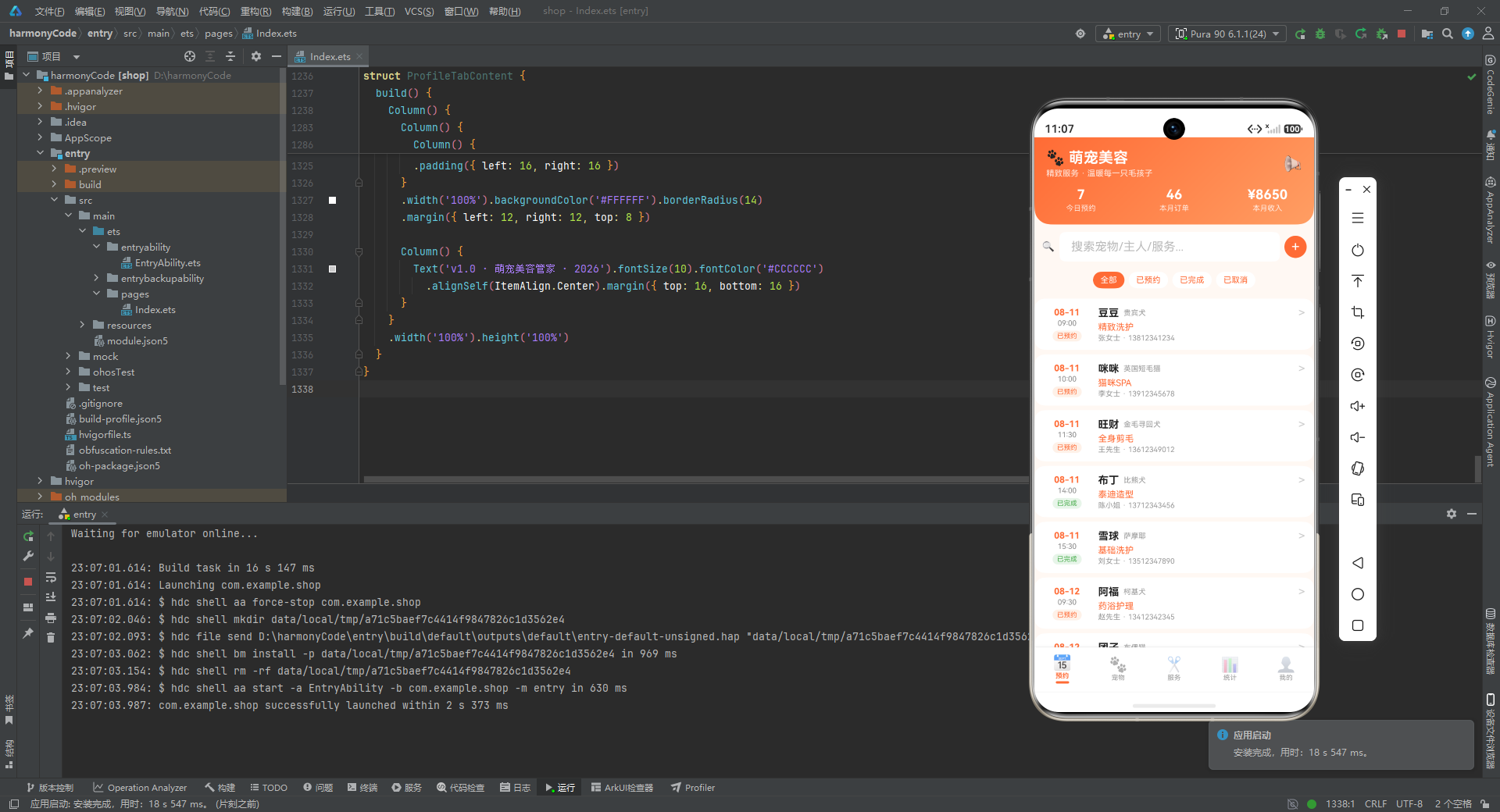
宠物美容管家这个案例之所以值得深入剖析,不仅因为它技术栈完整,更因为它折射出移动端垂直行业应用的开发趋势:用声明式 UI 快速构建界面、用纯函数沉淀业务逻辑、用设计令牌统一视觉规范、用 Mock 数据驱动原型迭代。这套方法论不仅适用于宠物行业,同样可以迁移到美发、美甲、家政、洗车等各类预约制服务行业。掌握这份代码背后的设计思想,就掌握了构建此类应用的核心方法论。希望本文的逐段解读能帮助读者真正读懂这份代码,并在自己的项目中灵活运用所学。

讨论HarmonyOS开发技术,专注于API与组件、DevEco Studio、测试、元服务和应用上架分发等。
更多推荐


 1
1 0
0- 0


 已为社区贡献127条内容

所有评论(0)