二手车交易市场应用:HarmonyOS ArkTS API 24解析,键值生成函数 row.label + row.value 将标签和值拼接作为唯一 key,避免不同行使用相同标签时的 key 冲突
一、写在前面:二手车交易市场的数字化浪潮
近年来,中国汽车保有量持续攀升,二手车市场迎来了前所未有的发展机遇。与新车市场不同,二手车交易具有典型的"非标品"特征:每一辆车的品牌、年份、里程、车况、保养历史、过户次数都不尽相同,这使得买卖双方在信息获取和价格博弈上长期处于不对称状态。传统二手车交易中,买家常常担心"事故车"“泡水车”“调表车”,卖家则苦于"压价严重"“曝光不足”“成交周期长”,整个行业亟需一个透明、高效、可信赖的数字化交易平台。
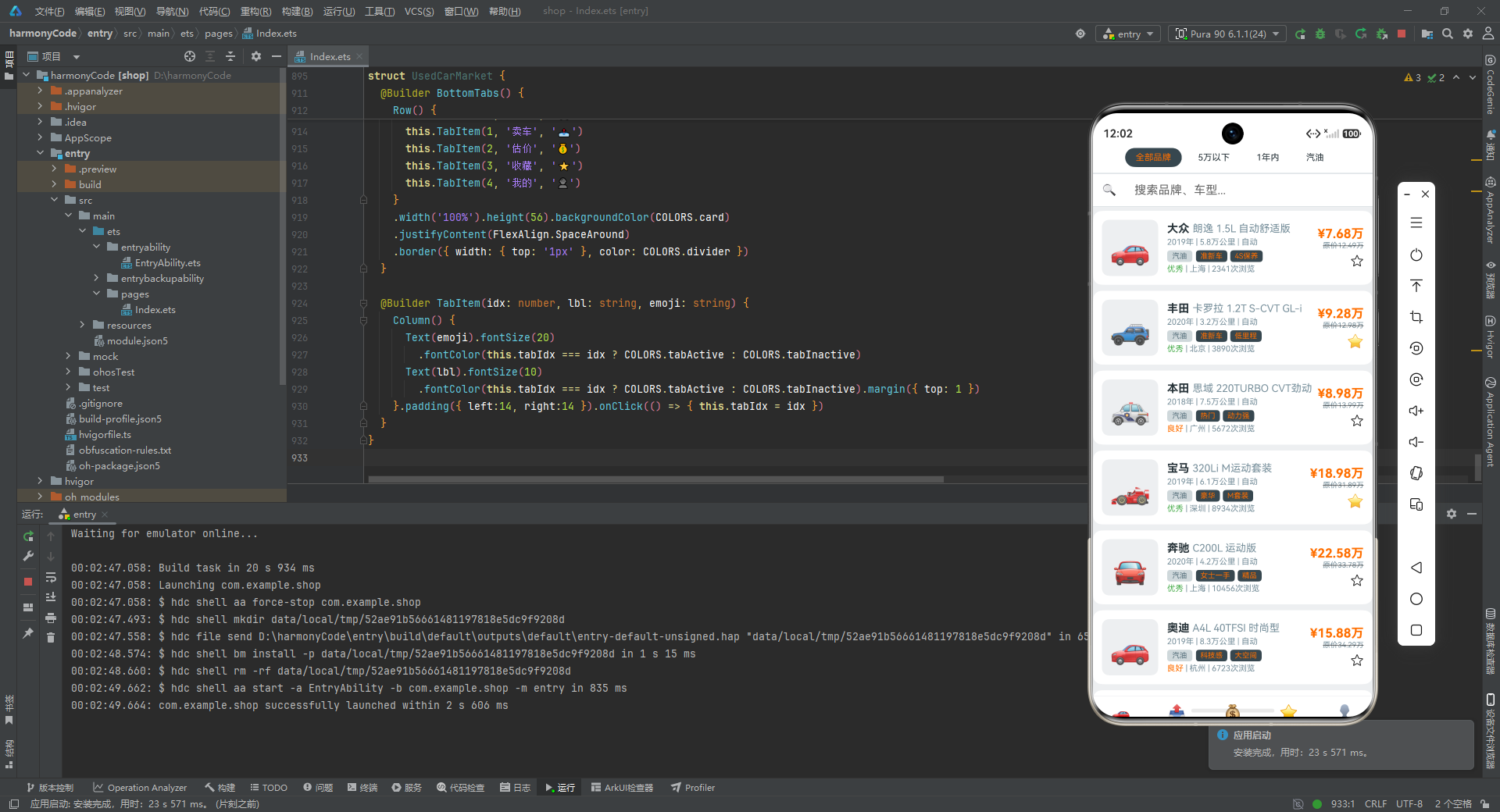
随着鸿蒙生态(HarmonyOS)的崛起和 ArkUI 声明式开发框架的成熟,开发者拥有了构建高性能、跨设备、原生体验移动应用的新武器。ArkUI 采用类似 SwiftUI 的声明式语法,通过状态驱动视图更新,极大地简化了复杂交互界面的开发流程。本文将以一个功能完整的"二手车交易市场"应用为案例,从数据建模、色彩体系、组件设计、交互逻辑到页面架构,逐行剖析每一个关键实现,帮助开发者深入理解 ArkUI 的核心思想与工程实践。
这个应用涵盖了买家和卖家双端的核心场景:浏览买车、发布卖车、在线估价、收藏管理、个人中心,共五大功能模块。每个模块都经过精心设计,既保证了视觉一致性,又实现了丰富的交互细节。通过学习这个案例,你将掌握如何用 ArkUI 构建一个具备商业级品质的电商类应用,包括列表渲染、弹窗模态、表单交互、图表可视化、状态管理等关键技术点。
二、整体架构概览
在深入代码细节之前,我们先从宏观层面理解这个应用的整体架构。整个应用由一个主入口组件和五个子页面组件构成,采用典型的"底部 Tab 导航 + 页面切换"模式。主入口负责管理当前激活的 Tab 索引,并根据索引值渲染对应的页面组件。这种设计的好处在于职责清晰、耦合度低:每个页面组件独立管理自己的状态和 UI,互不干扰;主入口只负责路由分发,逻辑极简。
从数据流的角度看,应用采用了"静态数据源 + 组件内状态"的混合模式。所有车辆、估价、品牌统计、浏览历史等数据以常量数组的形式定义在文件顶部,作为全局数据源供各组件读取;而与用户交互密切相关的状态(如当前选中的车辆、弹窗的显示与隐藏、表单输入值等)则通过 @State 装饰器声明在组件内部,实现局部的响应式更新。这种设计在 Demo 级应用中非常实用,既避免了引入复杂的状态管理框架,又能清晰展示数据与视图的绑定关系。
从视觉设计的角度看,应用采用了一套统一的色彩体系,主色为深灰蓝(#37474F),辅以中性灰、橙色价格强调色、绿色车况优、红色急售等多种语义化色彩,整体风格沉稳专业,符合汽车交易类应用的调性。所有颜色通过一个集中配置对象统一管理,便于后期换肤和主题切换。
三、色彩体系设计:集中式配置的工程智慧
3.1 色彩配置接口定义
在任何一款严肃的移动应用中,色彩管理都是视觉一致性的基石。这个应用首先定义了一个 ColorsConfig 接口,将所有用到的颜色字段以类型安全的方式约束起来:
interface ColorsConfig {
  primary: string;
  secondary: string;
  background: string;
  card: string;
  accentPrice: string;
  accentGood: string;
  accentUrgent: string;
  textPrimary: string;
  textSecondary: string;
  textWhite: string;
  divider: string;
  tabActive: string;
  tabInactive: string;
}
逐行解析:
primary(主色):用于底部导航栏激活态、按钮背景、标题文字等需要强调的核心元素,值为#37474F,是一种深沉的灰蓝色,传达专业、可靠的品牌气质。secondary(辅色):用于次要装饰元素,值为#546E7A,比主色稍浅,在视觉层级上起到过渡作用。background(背景色):整个页面的底色,值为#ECEFF1,是非常浅的冷灰色,既能衬托白色卡片,又不会与卡片融为一体。card(卡片色):值为#FFFFFF(纯白),用于所有卡片、弹窗、导航栏的背景,与背景色形成鲜明对比,突出内容层次。accentPrice(价格强调色):值为#FF6F00(深橙色),专门用于价格数字,在沉稳的灰蓝色调中形成强烈的视觉焦点,引导用户关注交易核心信息。accentGood(车况优良色):值为#4CAF50( Material Design 绿色),用于"优秀"车况等正面标签,传递安心、可靠的信号。accentUrgent(急售警示色):值为#F44336( Material Design 红色),用于"急售""一般"车况等需要警示的场景,唤起用户的注意。textPrimary(主文本色):值为#263238,接近黑色的深灰,用于标题、价格、关键信息,保证可读性。textSecondary(次文本色):值为#78909C,中灰色,用于辅助说明、时间戳、浏览次数等次要信息,形成文本层级。textWhite(白色文本):值为#FFFFFF,用于深色背景上的文字,如按钮上的文字。divider(分割线色):值为#CFD8DC,浅灰色,用于分割线和边框,存在感弱但功能明确。tabActive(Tab 激活色)和tabInactive(Tab 非激活色):分别控制底部导航栏选中与未选中状态的图标和文字颜色。
3.2 色彩常量实例化
定义好接口后,接下来用一个常量对象将所有颜色值集中实例化:
const COLORS: ColorsConfig = {
  primary: '#37474F', secondary: '#546E7A', background: '#ECEFF1', card: '#FFFFFF',
  accentPrice: '#FF6F00', accentGood: '#4CAF50', accentUrgent: '#F44336',
  textPrimary: '#263238', textSecondary: '#78909C', textWhite: '#FFFFFF',
  divider: '#CFD8DC', tabActive: '#37474F', tabInactive: '#90A4AE'
};
逐行解析:
- 第1行声明了一个名为
COLORS的常量,类型标注为ColorsConfig,确保赋值时必须包含接口中定义的所有字段,否则编译器会报错。这是一种典型的"接口约束 + 常量实例"模式。 - 第2行设置
primary和secondary为灰蓝色系,background为浅灰,card为纯白,这四个值构成了应用的基础视觉骨架。 - 第3行定义了三个语义化强调色:橙色用于价格、绿色用于优良车况、红色用于急售警示。这种"一色一义"的设计让用户能快速通过颜色识别信息类型。
- 第4行定义了文本和分割线颜色,
textPrimary接近黑色保证可读性,textSecondary为中灰用于次要信息,divider为浅灰用于分割。 - 第5行定义了底部 Tab 的激活与非激活颜色,激活态使用主色
#37474F,非激活态使用更浅的#90A4AE,通过明暗对比区分状态。
这种集中式色彩管理的优势非常明显:当设计师提出"把主色从灰蓝改为深青"时,开发者只需修改一处即可全局生效;当需要支持暗色模式时,只需定义两套 COLORS 对象并在运行时切换即可。
四、数据建模:用接口刻画二手车世界
4.1 车辆数据接口
数据建模是任何应用的基础。这个应用的核心实体是"车辆",通过 CarData 接口对其进行了全面刻画:
interface CarData {
  id: number; brand: string; model: string; year: number; mileage: number;
  price: number; originalPrice: number; color: string; fuelType: string;
  transmission: string; displacement: string; condition: string;
  inspectionDate: string; location: string; owner: number; views: number;
  isFavorite: boolean; tags: string[]; image: string; description: string;
}
逐行解析:
id: number:车辆唯一标识符,用于列表渲染的ForEach键值生成和详情页的数据定位。brand: string:品牌名称,如"大众"“丰田”“宝马”,用于品牌筛选和统计。model: string:车型全称,如"朗逸 1.5L 自动舒适版",包含排量、配置等详细信息。year: number:上牌年份,影响估价和筛选。mileage: number:行驶里程(万公里),是二手车定价的核心因素之一。price: number:当前售价(万元),是交易的核心数据。originalPrice: number:新车指导价(万元),用于展示折扣力度,通常会加上删除线效果。color: string:车身颜色,如"白色"“黑色”“银色”。fuelType: string:燃料类型,包括"汽油"“混动”“纯电”,覆盖传统燃油车和新能源车。transmission: string:变速箱类型,“自动"或"手动”。displacement: string:排量,如"1.5L"“2.0T”“电动”。condition: string:车况等级,分为"优秀"“良好”"一般"三档,用不同颜色区分。inspectionDate: string:年检到期日期,格式为"YYYY-MM"。location: string:车辆所在地城市,如"上海"“北京”。owner: number:过户次数,反映车辆转手历史,次数越少越受买家青睐。views: number:浏览次数,反映车辆热度。isFavorite: boolean:是否已收藏,用于收藏页的数据筛选。tags: string[]:标签数组,如"准新车"“4S保养”“急售”“豪华”,用于快速识别车辆卖点。image: string:车辆图片占位符,这里使用 Emoji 表情符号(如🚗、🏎️、⚡)模拟图片,在真实应用中可替换为图片 URL。description: string:车辆描述文本,由卖家填写,展示在详情页。
4.2 辅助数据接口
除了核心的车辆数据,应用还定义了多个辅助接口来支撑不同页面的数据需求:
interface BrandStat {
  brand: string; count: number; avgPrice: number; minPrice: number; maxPrice: number;
}
逐行解析:
brand: string:品牌名称。count: number:该品牌在平台上的在售车辆总数。avgPrice: number:平均价格(万元),用于品牌对比图表的柱状长度。minPrice: number和maxPrice: number:最低和最高价格,反映该品牌的价格区间。
interface EvaluateItem {
  brand: string; emoji: string; retentionRate: number; prices: number[]; color: string;
}
逐行解析:
brand: string:品牌名称。emoji: string:品牌对应的 Emoji 图标,用于估价页的品牌选择器。retentionRate: number:1年保值率,取值0到1之间,如0.75表示1年后保留75%的价值。保值率是二手车市场的核心指标,丰田以0.75高居榜首。prices: number[]:不同车龄对应的估价数组,索引0对应1年车龄,索引5对应6年车龄,值随车龄递减。color: string:品牌主题色,用于估价页中该品牌相关元素的高亮显示。
interface PriceBar {
  label: string; value: number; color: string;
}
逐行解析:
label: string:月份标签,如"1月"“2月”。value: number:该月的成交均价(用于柱状图高度),取值范围0到100。color: string:柱子颜色,普通月份使用主色或辅色,特殊高峰月份(7月、12月)使用橙色强调。
interface HistoryItem {
  id: number; brand: string; model: string; time: string; emoji: string;
}
逐行解析:
id: number:历史记录唯一标识。brand: string和model: string:品牌和车型简称。time: string:浏览时间,格式为"MM-DD HH:mm"。emoji: string:车辆图标,与列表中的图片保持一致。
interface DetailRow {
  label: string; value: string;
}
逐行解析:
label: string:属性行的标签,如"品牌"“型号”“年份”。value: string:属性行的值,如"大众"“朗逸”“2019年”。- 这个接口的设计非常巧妙,它将详情页中大量的"标签-值"行抽象为统一的数据结构,配合
DetailSectionBuilder 可以优雅地渲染任意数量的属性行。
五、静态数据源:构建丰富的模拟数据集
5.1 车辆数据集(25条)
应用定义了一个包含25条车辆记录的 CARS 数组,覆盖了大众、丰田、本田、宝马、奔驰、奥迪、日产、现代、比亚迪、特斯拉等10个主流品牌,涵盖轿车、SUV、新能源等多种车型:
const CARS: CarData[] = [
  { id:1, brand:'大众', model:'朗逸 1.5L 自动舒适版', year:2019, mileage:5.8, price:7.68,
    originalPrice:12.49, color:'白色', fuelType:'汽油', transmission:'自动', displacement:'1.5L',
    condition:'优秀', inspectionDate:'2025-06', location:'上海', owner:1, views:2341,
    isFavorite:false, tags:['准新车','4S保养'], image:'🚗',
    description:'个人一手车,全程4S店保养,无事故无水泡' },
  // ... 其余24条数据结构相同
];
逐行解析:
- 第1行声明
CARS为CarData[]类型的常量数组,类型约束确保每条数据必须包含CarData接口的所有字段。 - 第2至7行是第一条车辆记录:一辆2019年的大众朗逸,行驶5.8万公里,售价7.68万元(原价12.49万元),白色、汽油、自动挡、1.5L排量,车况优秀,年检到2025年6月,位于上海,一手车,浏览2341次,未收藏,标签为"准新车"和"4S保养"。
- 数据中特别值得注意的是新能源车型的加入:比亚迪汉DM-i(混动)、特斯拉Model 3/Y(纯电)、比亚迪海豹(纯电),这些车型的
fuelType字段值为"混动"或"纯电",displacement字段值为"电动"或"1.5T",体现了当前二手车市场新能源占比不断提升的趋势。 - 价格数据从7.68万元(大众朗逸)到24.88万元(宝马X3),跨度较大,覆盖了经济型到中高端的市场区间。
- 每条数据的
tags字段精心设计,如"准新车"“低里程”“豪华”“急售”“保值神车”"新能源"等,既反映车辆卖点,又为筛选功能提供了数据基础。
5.2 估价数据集
估价数据集 EVALUATES 包含6个主流品牌的保值率和不同车龄的价格曲线:
const EVALUATES: EvaluateItem[] = [
  { brand:'大众', emoji:'🚗', retentionRate:0.62, prices:[10.5,9.2,8.1,7.0,6.0,5.1], color:'#1565C0' },
  { brand:'丰田', emoji:'🚙', retentionRate:0.75, prices:[12.8,11.5,10.2,9.0,7.9,6.8], color:'#C62828' },
  { brand:'本田', emoji:'🚓', retentionRate:0.70, prices:[11.5,10.2,9.0,7.9,6.9,5.9], color:'#2E7D32' },
  { brand:'宝马', emoji:'🏎️', retentionRate:0.58, prices:[25.0,21.5,18.2,15.2,12.5,10.0], color:'#1565C0' },
  { brand:'奔驰', emoji:'🚘', retentionRate:0.60, prices:[28.0,24.5,21.0,17.8,14.8,12.0], color:'#424242' },
  { brand:'奥迪', emoji:'🚗', retentionRate:0.55, prices:[22.0,19.0,16.2,13.8,11.5,9.5], color:'#1A1A1A' }
];
逐行解析:
- 丰田保值率最高(0.75),这与其在国内市场"开不坏的丰田"口碑一致;奥迪保值率最低(0.55),豪华品牌折旧更快是行业普遍现象。
prices数组展示了一个清晰的折旧曲线:以丰田为例,1年估价12.8万,到6年降至6.8万,折旧约47%,符合日系车保值的市场规律。- 每个品牌配有专属颜色(
color字段),在估价页的品牌选择器和保值率进度条中用于高亮显示当前选中品牌。
5.3 品牌统计数据集
BRAND_STATS 包含12个品牌的统计数据,用于估价页的品牌价格对比图表:
const BRAND_STATS: BrandStat[] = [
  { brand:'大众', count:156, avgPrice:9.85, minPrice:3.28, maxPrice:18.98 },
  { brand:'丰田', count:142, avgPrice:11.56, minPrice:4.58, maxPrice:22.88 },
  // ... 其余10个品牌
  { brand:'比亚迪', count:168, avgPrice:13.28, minPrice:6.88, maxPrice:22.58 },
  { brand:'特斯拉', count:134, avgPrice:22.15, minPrice:16.58, maxPrice:28.98 },
];
逐行解析:
- 比亚迪以168辆的在售数量位居榜首,反映了新能源车在二手市场的快速渗透。
- 奔驰平均价格最高(24.68万),雪佛兰最低(6.85万),价格跨度覆盖了从入门到豪华的全段位。
avgPrice字段在估价页用于绘制横向柱状图,柱子长度为avgPrice * 8(像素),直观展示各品牌的价格差异。
5.4 浏览历史与价格走势数据
const HISTORIES: HistoryItem[] = [
  { id:1, brand:'大众', model:'朗逸', time:'08-07 15:30', emoji:'🚗' },
  // ... 共16条,时间从08-07倒序至08-05
];
逐行解析: 浏览历史按时间倒序排列,最新的记录在最前,模拟用户真实的浏览轨迹。在"我的"页面只展示前10条。
const CHART_BARS: PriceBar[] = [
  { label:'1月', value:56, color:'#37474F' }, { label:'2月', value:42, color:'#546E7A' },
  { label:'3月', value:68, color:'#37474F' }, { label:'4月', value:51, color:'#546E7A' },
  { label:'5月', value:73, color:'#37474F' }, { label:'6月', value:62, color:'#546E7A' },
  { label:'7月', value:85, color:'#FF6F00' }, { label:'8月', value:78, color:'#37474F' },
  { label:'9月', value:91, color:'#546E7A' }, { label:'10月', value:67, color:'#37474F' },
  { label:'11月', value:55, color:'#546E7A' }, { label:'12月', value:88, color:'#FF6F00' }
];
逐行解析:
- 12个月的价格走势数据,奇数月使用主色
#37474F,偶数月使用辅色#546E7A,形成交替的视觉节奏。 - 7月和12月使用橙色
#FF6F00,因为这两个月是二手车交易的旺季(暑假和年底),成交均价较高,用强调色突出这一规律。 - 9月以91的值成为全年最高点,可能与"金九银十"的传统汽车销售旺季有关。
六、买车页:列表与详情的交互艺术
6.1 组件结构与状态声明
买车页是应用的核心页面,负责展示所有在售车辆并提供详情查看功能:
@Component
struct BuyCarContent {
  @State detailCar: CarData | null = null;

  build() {
    Stack() {
      Column() {
        this.FilterBar()
        Divider().color(COLORS.divider).strokeWidth(1)
        this.SearchBar()
        this.CarListView()
      }
      .width('100%').height('100%').backgroundColor(COLORS.background)

      if (this.detailCar !== null) {
        this.CarDetailOverlay()
      }
    }
    .width('100%').height('100%')
  }
}
逐行解析:
@Component装饰器将BuyCarContent声明为一个 ArkUI 组件,使其可以被其他组件引用和渲染。@State detailCar: CarData | null = null:声明了一个可空的状态变量detailCar,初始值为null。当用户点击某张车辆卡片时,这个变量会被赋值为对应的CarData对象,触发详情遮罩层的显示;当用户关闭详情时,重新赋值为null。这是 ArkUI 响应式编程的核心:状态变化自动驱动视图更新。build()方法是组件的渲染入口,所有 UI 都在这里声明式地描述。Stack()是层叠布局容器,其子元素会依次堆叠。这里先放一个Column(主内容区),再根据条件放详情遮罩层,遮罩层会覆盖在主内容区之上,实现模态弹窗效果。- 主内容区的
Column中依次排列:筛选栏、分割线、搜索栏、车辆列表,从上到下形成清晰的信息层级。 if (this.detailCar !== null)是条件渲染:只有当detailCar不为空时才渲染详情遮罩层。这种"状态驱动渲染"的模式让 UI 与数据自动同步,无需手动操作 DOM。
6.2 筛选栏:横向滚动的标签条
@Builder FilterBar() {
  Scroll() {
    Row() {
      ForEach(['全部品牌','5万以下','1年内','汽油'],
        (item: string, idx: number) => {
          Text(item)
            .fontSize(12).fontColor(idx === 0 ? COLORS.accentPrice : COLORS.textPrimary)
            .padding({ left:14, right:14, top:6, bottom:6 }).borderRadius(14)
            .backgroundColor(idx === 0 ? COLORS.primary : COLORS.card)
            .margin({ right: 8 })
        }, (item: string, idx: number) => idx.toString())
    }
    .padding({ left: 12, right: 12, top: 8, bottom: 8 })
  }
  .scrollable(ScrollDirection.Horizontal).scrollBar(BarState.Off)
  .width('100%').backgroundColor(COLORS.card)
}
逐行解析:
@Builder装饰器声明了一个构建器函数,类似于其他框架中的"子组件"或"渲染函数",用于封装可复用的 UI 片段。Scroll()包裹Row()实现横向滚动,当标签数量超出屏幕宽度时可以左右滑动查看。ForEach遍历标签数组,第一个参数是数据源,第二个是 item 渲染函数,第三个是键值生成函数(用索引转字符串,确保每个标签有唯一 key)。idx === 0 ? COLORS.accentPrice : COLORS.textPrimary:第一个标签"全部品牌"使用橙色文字(表示当前选中),其余使用主文本色。这里用三元运算符实现简单的选中态样式。backgroundColor(idx === 0 ? COLORS.primary : COLORS.card):选中标签使用深色主色背景,未选中使用白色,形成明显的视觉区分。borderRadius(14)将标签设为圆角胶囊形状,padding控制内边距使标签大小适中。scrollable(ScrollDirection.Horizontal)指定横向滚动方向,scrollBar(BarState.Off)隐藏滚动条,保持界面简洁。
6.3 搜索栏:简约而不简单
@Builder SearchBar() {
  Row() {
    Text('🔍').fontSize(16).margin({ right: 8 })
    TextInput({ placeholder: '搜索品牌、车型...' })
      .fontSize(14).backgroundColor('transparent').layoutWeight(1).height(36)
  }
  .width('100%').height(44).padding({ left:12, right:12 })
  .backgroundColor(COLORS.card)
  .border({ width: { bottom: '1px' }, color: COLORS.divider })
}
逐行解析:
- 搜索栏由一个放大镜 Emoji 和一个文本输入框组成,横向排列在
Row中。 Text('🔍')作为搜索图标,字号16,右侧留8的间距与输入框分隔。TextInput({ placeholder: '搜索品牌、车型...' }):文本输入框,placeholder参数设置占位提示文字,引导用户输入。backgroundColor('transparent'):输入框背景设为透明,融入卡片背景。layoutWeight(1):输入框占据剩余空间,这是 Flex 布局的核心用法,让输入框自适应宽度。height(36)控制输入框高度,整体行高44,留出上下各4的间距。border({ width: { bottom: '1px' }, color: COLORS.divider }):只在底部添加1像素的分割线,作为搜索栏与列表的分界。
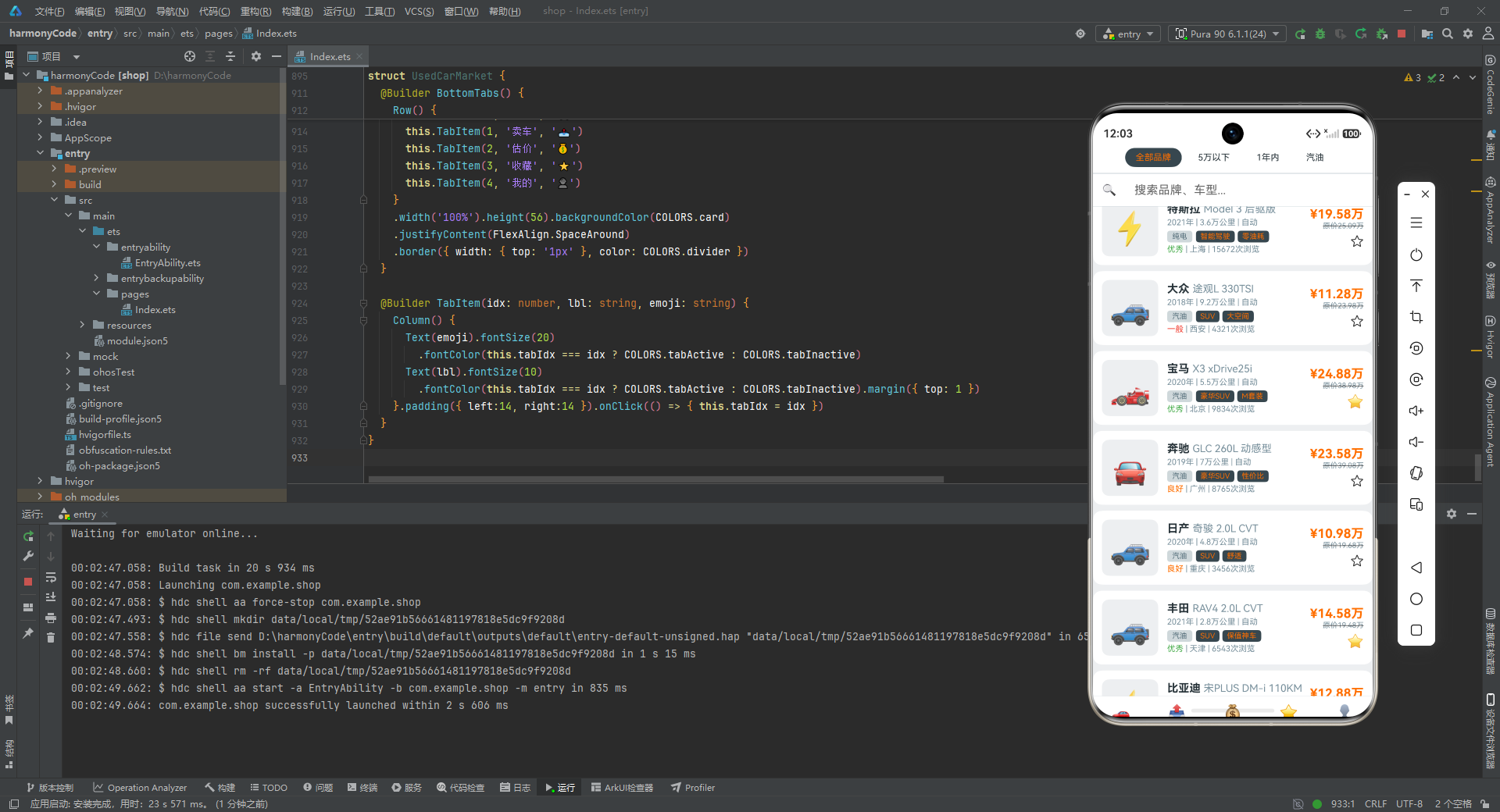
6.4 车辆列表:ForEach 的高效渲染
@Builder CarListView() {
  Scroll() {
    Column() {
      ForEach(CARS, (car: CarData) => {
        this.CarCard(car)
      }, (car: CarData) => car.id.toString())
    }.width('100%')
  }
  .scrollable(ScrollDirection.Vertical).scrollBar(BarState.Off)
  .width('100%').layoutWeight(1)
}
逐行解析:
Scroll()包裹Column()实现垂直滚动列表,因为车辆数据有25条,一屏无法全部展示。ForEach(CARS, ...):遍历CARS数组,为每条数据渲染一个CarCard。第一个参数是数据源,第二个是渲染函数(调用this.CarCard(car)传入当前车辆数据),第三个是键值生成函数(用car.id.toString()确保每张卡片有唯一标识,帮助框架高效复用和更新)。scrollable(ScrollDirection.Vertical)指定垂直滚动,scrollBar(BarState.Off)隐藏滚动条。layoutWeight(1)让列表区域占据筛选栏和搜索栏之外的所有剩余空间。
6.5 车辆卡片:信息密度与视觉层次的平衡
车辆卡片是买车页最核心的 UI 元素,需要在有限的空间内展示丰富的车辆信息:
@Builder CarCard(car: CarData) {
  Row() {
    Text(car.image)
      .fontSize(44).width(76).height(76).textAlign(TextAlign.Center)
      .backgroundColor(COLORS.background).borderRadius(10).margin({ right: 12 })
    Column() {
      Row() {
        Text(car.brand + ' ').fontSize(15).fontWeight(FontWeight.Bold).fontColor(COLORS.textPrimary)
        Text(car.model).fontSize(14).fontColor(COLORS.textSecondary)
          .maxLines(1).textOverflow({ overflow: TextOverflow.Ellipsis })
      }.width('100%')

      Text(car.year + '年 | ' + car.mileage + '万公里 | ' + car.transmission)
        .fontSize(11).fontColor(COLORS.textSecondary).margin({ top: 3 })

      Row() {
        Text(car.fuelType).fontSize(10).fontColor(COLORS.secondary)
          .padding({ left:7, right:7, top:2, bottom:2 })
          .backgroundColor(COLORS.divider).borderRadius(4).margin({ right: 5 })
        ForEach(car.tags, (tag: string) => {
          Text(tag).fontSize(10).fontColor(COLORS.accentPrice)
            .padding({ left:6, right:6, top:2, bottom:2 })
            .backgroundColor(COLORS.primary).borderRadius(4).margin({ right: 4 })
        }, (tag: string) => tag)
      }.margin({ top: 5 })

      Row() {
        Text(car.condition).fontSize(11).fontColor(car.condition === '优秀' ? COLORS.accentGood :
          car.condition === '良好' ? COLORS.accentPrice : COLORS.accentUrgent)
        Text(' | ' + car.location + ' | ' + car.views.toString() + '次浏览')
          .fontSize(11).fontColor(COLORS.textSecondary)
      }.margin({ top: 3 })
    }
    .alignItems(HorizontalAlign.Start).layoutWeight(1)

    Column() {
      Text('¥' + car.price.toFixed(2) + '万')
        .fontSize(17).fontWeight(FontWeight.Bold).fontColor(COLORS.accentPrice)
      Text('原价' + car.originalPrice.toFixed(2) + '万')
        .fontSize(10).fontColor(COLORS.textSecondary)
        .decoration({ type: TextDecorationType.LineThrough })
      if (car.tags.indexOf('急售') !== -1) {
        Text('急售').fontSize(10).fontColor('#FFFFFF')
          .padding({ left:6, right:6, top:2, bottom:2 })
          .backgroundColor(COLORS.accentUrgent).borderRadius(4).margin({ top: 3 })
      }
      Text(car.isFavorite ? '⭐' : '☆')
        .fontSize(18).margin({ top: 5 })
        .onClick(() => { car.isFavorite = !car.isFavorite })
    }.alignItems(HorizontalAlign.End)
  }
  .width('100%').padding(12).backgroundColor(COLORS.card).borderRadius(12)
  .shadow({ radius: 3, color: '#00000012', offsetY: 1 })
  .margin({ left:10, right:10, top:6, bottom:2 })
  .onClick(() => { this.detailCar = car })
}
逐行解析:
- 卡片整体是一个
Row,分为三列:左侧车辆图片区、中间信息区、右侧价格与操作区。 Text(car.image):左侧显示车辆 Emoji 图片,字号44,76x76的方块区域,浅灰背景圆角10,右侧留12间距。- 中间
Column的第一行是品牌+型号:品牌用15号粗体主色文字,型号用14号次要色文字,maxLines(1)限制单行显示,textOverflow({ overflow: TextOverflow.Ellipsis })在溢出时显示省略号。 - 第二行是年份、里程、变速箱的概要信息,用"|"分隔,11号次要色文字。
- 第三行是标签行:先显示燃料类型(灰色背景小标签),再用
ForEach遍历tags数组渲染卖点标签(深色背景橙色文字)。每个标签都是一个小胶囊形状,字号10,紧凑排列。 - 第四行是车况+地点+浏览量。车况文字的颜色通过嵌套三元运算符动态决定:"优秀"用绿色、"良好"用橙色、"一般"用红色,让用户一眼就能判断车况好坏。
- 右侧
Column是价格和操作区:当前价格用17号粗体橙色大字(最醒目),原价用10号灰色文字加删除线(decoration({ type: TextDecorationType.LineThrough })),形成折扣对比。 if (car.tags.indexOf('急售') !== -1):如果标签中包含"急售",则显示一个红色"急售"徽章,用indexOf检查数组中是否包含某元素。Text(car.isFavorite ? '⭐' : '☆'):收藏按钮,根据isFavorite状态显示实心星或空心星,onClick中切换状态。注意这里直接修改了car对象的属性,在真实应用中应该通过状态管理来触发更新。- 卡片整体样式:白色背景、圆角12、内边距12、阴影效果(
shadow({ radius: 3, color: '#00000012', offsetY: 1 })),营造卡片浮起的质感。左右各留10的外边距,顶部6底部2的间距。 .onClick(() => { this.detailCar = car }):点击卡片时,将当前车辆赋值给detailCar状态,触发详情遮罩层显示。
6.6 详情遮罩层:模态弹窗的优雅实现
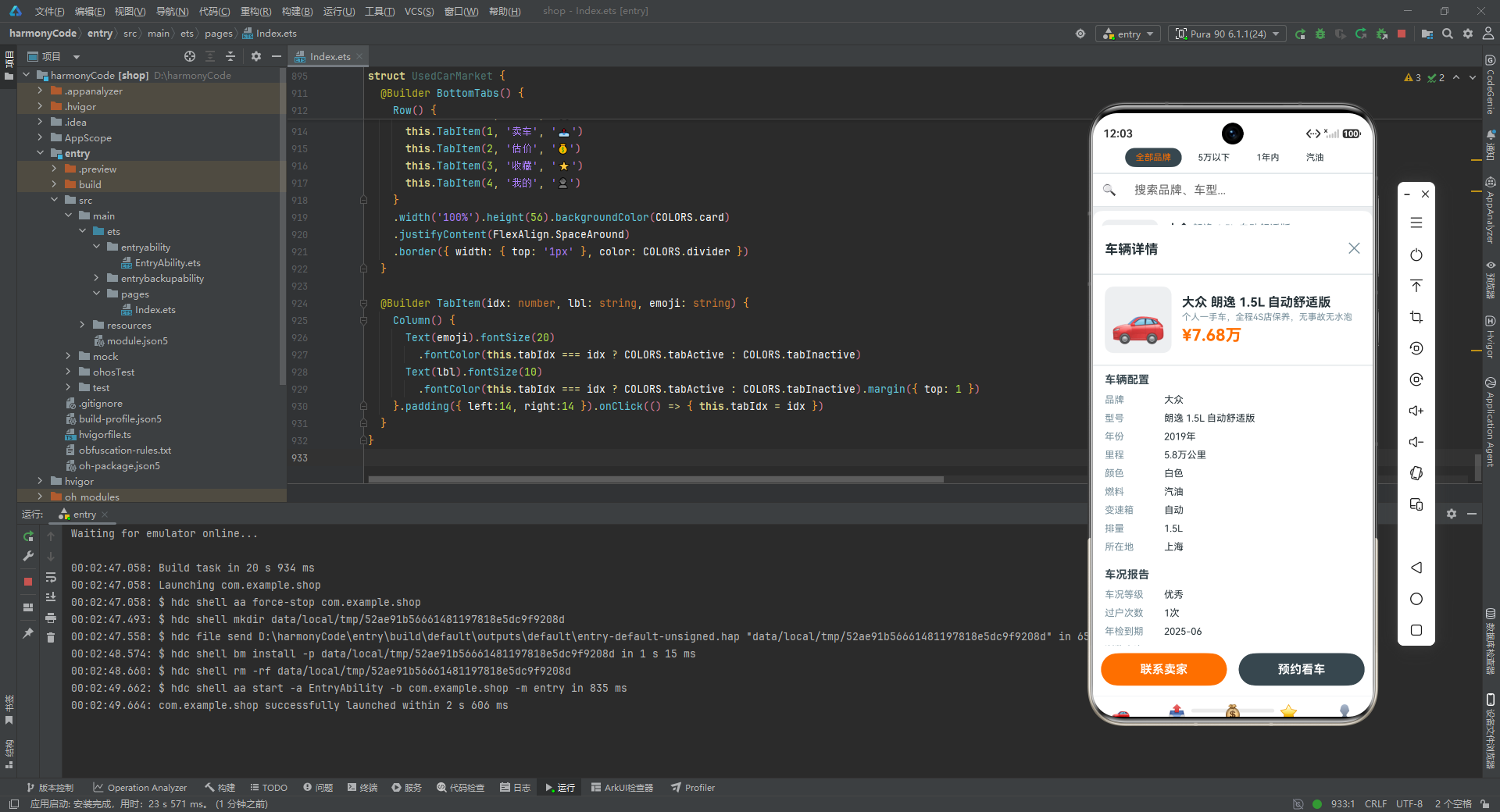
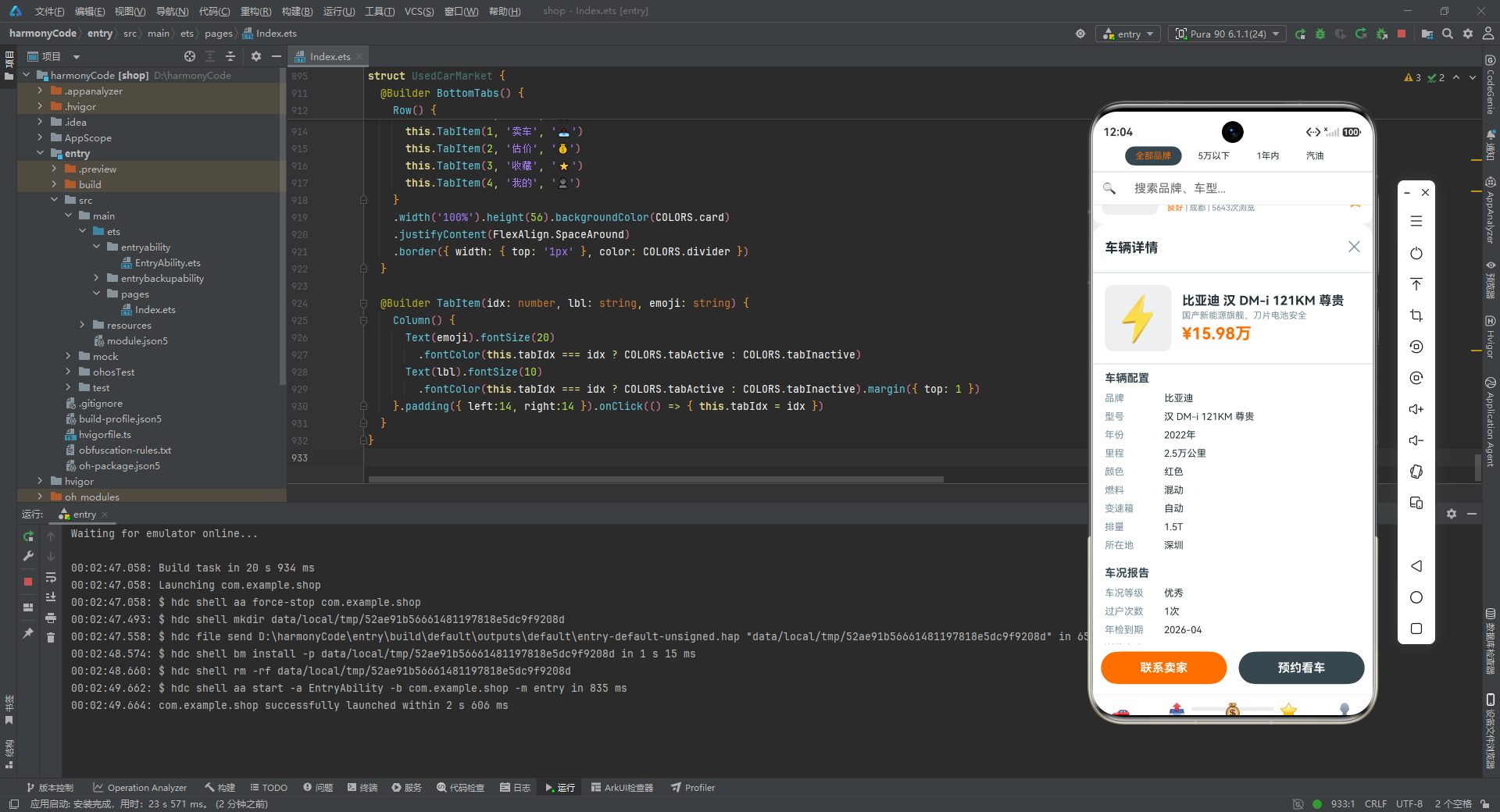
当用户点击车辆卡片时,一个从底部滑出的详情面板会覆盖在列表之上:
@Builder CarDetailOverlay() {
  Column() {
    Column().layoutWeight(1).width('100%').onClick(() => { this.detailCar = null })
    Column() {
      Row() {
        Text('车辆详情').fontSize(18).fontWeight(FontWeight.Bold).fontColor(COLORS.textPrimary)
        Row().layoutWeight(1)
        Text('✕').fontSize(20).fontColor(COLORS.textSecondary).onClick(() => { this.detailCar = null })
      }.width('100%').padding(16)
      Divider().color(COLORS.divider).strokeWidth(1)

      Scroll() {
        Column() {
          Row() {
            Text(this.detailCar!.image).fontSize(60).width(90).height(90).textAlign(TextAlign.Center)
              .backgroundColor(COLORS.background).borderRadius(12).margin({ right: 14 })
            Column() {
              Text(this.detailCar!.brand + ' ' + this.detailCar!.model)
                .fontSize(17).fontWeight(FontWeight.Bold).fontColor(COLORS.textPrimary).margin({ bottom: 3 })
              Text(this.detailCar!.description).fontSize(12).fontColor(COLORS.textSecondary)
                .maxLines(2).textOverflow({ overflow: TextOverflow.Ellipsis }).margin({ bottom: 5 })
              Text('¥' + this.detailCar!.price.toFixed(2) + '万')
                .fontSize(22).fontWeight(FontWeight.Bold).fontColor(COLORS.accentPrice)
            }.alignItems(HorizontalAlign.Start).layoutWeight(1)
          }.width('100%').padding(16)
          Divider().color(COLORS.divider).strokeWidth(1)

          this.DetailSection('车辆配置', [
            { label:'品牌', value: this.detailCar!.brand },
            { label:'型号', value: this.detailCar!.model },
            { label:'年份', value: this.detailCar!.year + '年' },
            { label:'里程', value: this.detailCar!.mileage + '万公里' },
            { label:'颜色', value: this.detailCar!.color },
            { label:'燃料', value: this.detailCar!.fuelType },
            { label:'变速箱', value: this.detailCar!.transmission },
            { label:'排量', value: this.detailCar!.displacement },
            { label:'所在地', value: this.detailCar!.location }
          ])
          this.DetailSection('车况报告', [
            { label:'车况等级', value: this.detailCar!.condition },
            { label:'过户次数', value: this.detailCar!.owner + '次' },
            { label:'年检到期', value: this.detailCar!.inspectionDate },
            { label:'浏览人次', value: this.detailCar!.views.toString() }
          ])
          this.DetailSection('历史记录', [
            { label:'事故记录', value:'无重大事故' },
            { label:'泡水记录', value:'无' },
            { label:'火烧记录', value:'无' },
            { label:'抵押记录', value:'无' },
            { label:'维修保养', value:'4S店定期保养' }
          ])
        }.width('100%')
      }
      .scrollable(ScrollDirection.Vertical).scrollBar(BarState.Off).layoutWeight(1)

      Row() {
        Text('联系卖家').fontSize(16).fontColor(COLORS.textWhite).fontWeight(FontWeight.Bold)
          .textAlign(TextAlign.Center).width('45%').height(44).borderRadius(22)
          .backgroundColor(COLORS.accentPrice)
        Row().width(16).height(1)
        Text('预约看车').fontSize(16).fontColor(COLORS.textWhite).fontWeight(FontWeight.Bold)
          .textAlign(TextAlign.Center).width('45%').height(44).borderRadius(22)
          .backgroundColor(COLORS.primary)
      }
      .width('100%').justifyContent(FlexAlign.Center).padding({ top:10, bottom:14 })
      .backgroundColor(COLORS.card)
    }
    .width('100%').constraintSize({ maxHeight: '85%' })
    .backgroundColor(COLORS.card).borderRadius({ topLeft:20, topRight:20 })
  }
  .width('100%').height('100%').backgroundColor('#00000050')
}
逐行解析:
- 最外层
Column设置backgroundColor('#00000050'),即50%透明度的黑色遮罩,让背景列表变暗,突出详情面板。 - 第一个
Column().layoutWeight(1)是一个占位的透明区域,占据遮罩层上半部分,点击时关闭详情(onClick(() => { this.detailCar = null }))。这是模态弹窗的经典交互:点击遮罩区域关闭。 - 第二个
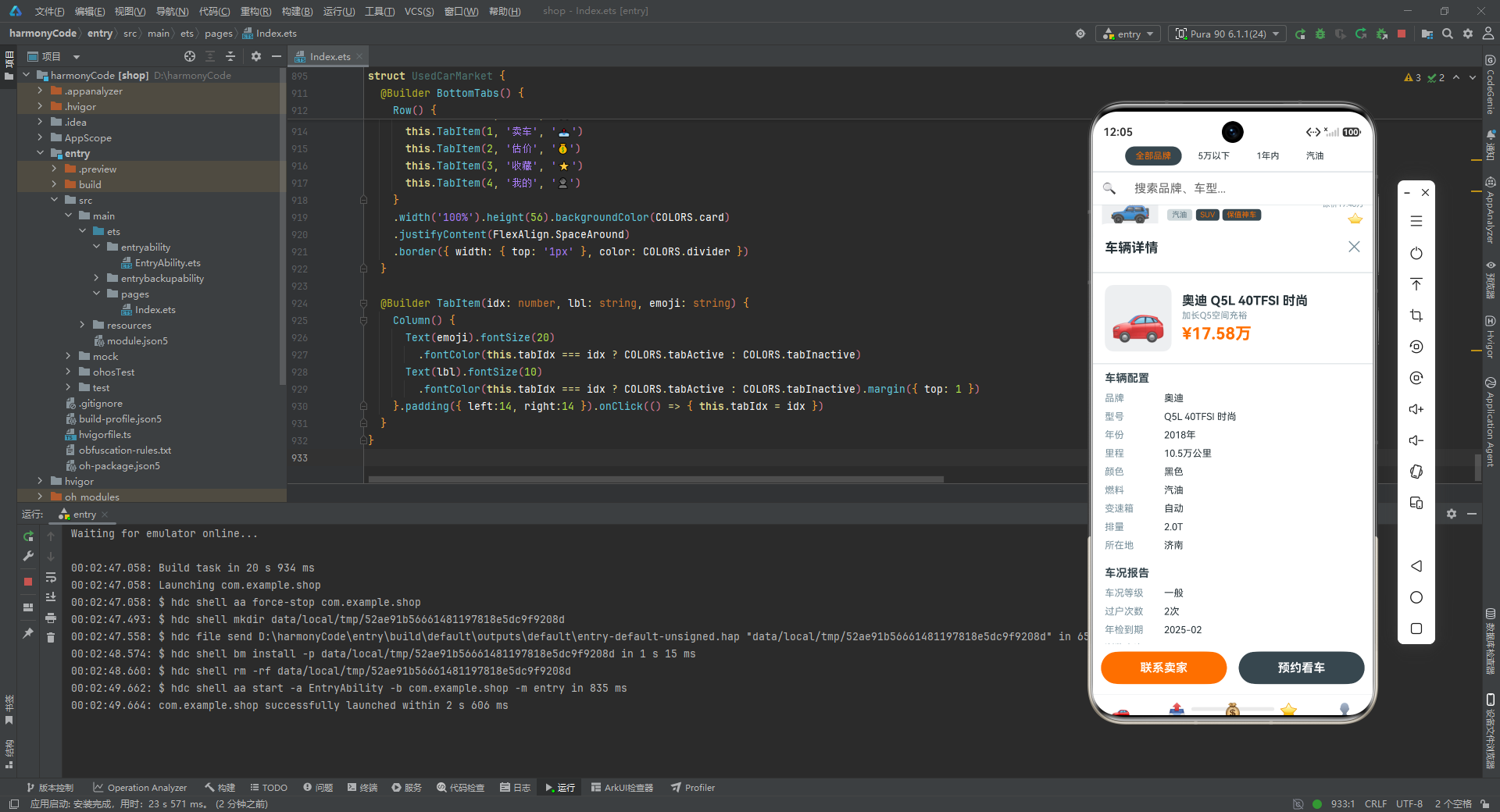
Column是详情面板主体,通过constraintSize({ maxHeight: '85%' })限制最大高度为屏幕的85%,borderRadius({ topLeft:20, topRight:20 })设置顶部圆角,模拟从底部弹出的效果。 - 面板顶部是标题栏:"车辆详情"标题在左,关闭按钮"✕"在右,中间用
Row().layoutWeight(1)撑开空间。 - 顶部信息区:左侧大图(90x90,字号60),右侧品牌型号、描述、价格。
this.detailCar!中的!是非空断言,告诉编译器此时detailCar一定不为 null(因为只有非空时才渲染此组件)。 - 三个
DetailSection调用分别展示"车辆配置"“车况报告”“历史记录”,每个 section 接收一个标题和一组DetailRow数组。这种设计将重复的属性行渲染逻辑封装在DetailSectionBuilder 中,代码极为简洁。 - "历史记录"部分的数据是硬编码的(“无重大事故”"无"等),模拟了第三方车况报告的结果,这是二手车买家最关心的信息。
- 底部操作栏:两个按钮"联系卖家"(橙色)和"预约看车"(深色),各占45%宽度,中间16间距,
justifyContent(FlexAlign.Center)居中排列。
6.7 详情分区构建器:DRY 原则的实践
@Builder DetailSection(title: string, items: DetailRow[]) {
  Column() {
    Text(title).fontSize(15).fontWeight(FontWeight.Bold).fontColor(COLORS.primary)
      .width('100%').padding({ left:16, top:10, bottom:6 })
    ForEach(items, (row: DetailRow) => {
      Row() {
        Text(row.label).fontSize(13).fontColor(COLORS.textSecondary).width(80)
        Text(row.value).fontSize(13).fontColor(COLORS.textPrimary)
      }
      .width('100%').padding({ left:16, right:16, top:5, bottom:5 })
    }, (row: DetailRow) => row.label + row.value)
  }.width('100%').padding({ bottom: 6 })
}
逐行解析:
DetailSection接收两个参数:title(分区标题)和items(属性行数组),这是一个典型的参数化 Builder。- 标题文字使用15号粗体主色,左侧16内边距,上下各有间距。
ForEach遍历items数组,每行包含标签和值:标签用13号次要色固定宽度80(保证对齐),值用13号主色自适应。- 键值生成函数
row.label + row.value将标签和值拼接作为唯一 key,避免不同行使用相同标签时的 key 冲突。 - 这个 Builder 的设计完美体现了 DRY(Don’t Repeat Yourself)原则:详情页有3个分区共18个属性行,如果没有这个 Builder,需要重复编写18次几乎相同的
Row代码。通过参数化封装,只需3次调用即可完成。
七、卖车页:CRUD 交互的完整闭环
7.1 状态声明与初始化
卖车页实现了完整的车辆发布、编辑、删除功能,状态管理较为复杂:
@Component
struct SellCarContent {
  @State myCars: CarData[] = [];
  @State showAdd: boolean = false;
  @State showEdit: boolean = false;
  @State showDelete: boolean = false;
  @State editTarget: CarData | null = null;
  @State brand: string = ''; @State mdl: string = '';
  @State yr: string = ''; @State mi: string = ''; @State pr: string = '';
  @State cond: string = '良好'; @State fuel: string = '汽油';
  @State trans: string = '自动'; @State clr: string = '白色';

  aboutToAppear() { this.myCars = CARS.filter((c: CarData) => c.id <= 5) }
逐行解析:
myCars: CarData[]:当前用户发布的车辆列表,初始为空数组。showAdd、showEdit、showDelete:三个布尔状态分别控制三个弹窗的显示与隐藏。这种"一个弹窗一个状态"的设计简单直观,便于独立控制。editTarget: CarData | null:当前正在编辑或删除的车辆对象,初始为 null。brand、mdl、yr、mi、pr:表单文本输入字段,分别对应品牌、型号、年份、里程、价格,初始为空字符串。注意命名使用了缩写(mdl代表 model,yr代表 year 等),这是一种在 Demo 中常见的简写风格。cond、fuel、trans、clr:选择型字段,预设了默认值(“良好”“汽油”“自动”“白色”),这些字段通过 Chip(芯片标签)选择器来切换。aboutToAppear()是组件的生命周期钩子,在组件即将显示时调用。这里用CARS.filter((c: CarData) => c.id <= 5)模拟从全局数据中筛选出当前用户的5辆已发布车辆。
7.2 主视图与空状态处理
build() {
  Stack() {
    Column() {
      if (this.myCars.length === 0) {
        this.EmptyView()
      } else {
        Column().width('100%').height('100%').backgroundColor(COLORS.background)
        this.StatsRow()
        Scroll() {
          Column() {
            ForEach(this.myCars, (car: CarData) => {
              this.SellCard(car)
            }, (car: CarData) => car.id.toString())
          }.width('100%')
        }
        .scrollable(ScrollDirection.Vertical).scrollBar(BarState.Off).layoutWeight(1)
      }
    }.width('100%').height('100%')

    if (this.showAdd) { this.AddModal() }
    if (this.showEdit) { this.EditModal() }
    if (this.showDelete) { this.DeleteModal() }
  }.width('100%').height('100%')
}
逐行解析:
- 使用
Stack层叠布局,底层是主内容区,上层根据状态条件渲染三个弹窗。 if (this.myCars.length === 0)判断车辆列表是否为空:空则显示空状态视图,非空则显示统计栏和车辆列表。这种空状态处理是良好用户体验的体现,避免用户看到空白页面感到困惑。Column().width('100%').height('100%').backgroundColor(COLORS.background)这一行是一个占位的背景层,确保内容区有正确的背景色。- 三个弹窗的渲染使用独立的
if条件,可以同时控制(虽然实际使用中只会显示一个)。
7.3 空状态视图
@Builder EmptyView() {
  Column() {
    Text('📤').fontSize(56).margin({ bottom: 14 })
    Text('还没有发布任何车辆').fontSize(16).fontColor(COLORS.textSecondary).margin({ bottom: 6 })
    Text('点击下方按钮开始发布').fontSize(13).fontColor(COLORS.textSecondary).margin({ bottom: 22 })
    Text('发布卖车').fontSize(16).fontColor(COLORS.textWhite).fontWeight(FontWeight.Bold)
      .padding({ left:32, right:32, top:12, bottom:12 })
      .backgroundColor(COLORS.accentPrice).borderRadius(24)
      .onClick(() => { this.showAdd = true })
  }
  .width('100%').height('100%').justifyContent(FlexAlign.Center).backgroundColor(COLORS.background)
}
逐行解析:
- 空状态视图居中显示:一个大的📤图标(字号56),两行提示文字(“还没有发布任何车辆"和"点击下方按钮开始发布”),以及一个橙色的"发布卖车"按钮。
justifyContent(FlexAlign.Center)让所有内容垂直居中。- 按钮点击事件
this.showAdd = true打开发布弹窗,这是从空状态进入功能流程的入口。
7.4 统计栏:数据概览
@Builder StatsRow() {
  Row() {
    this.StatItem('已发布', this.myCars.length.toString())
    this.StatItem('本月浏览', '2,456')
    this.StatItem('咨询', '128')
    this.StatItem('成交', '3')
  }
  .width('100%').justifyContent(FlexAlign.SpaceBetween).padding(14)
  .backgroundColor(COLORS.card).borderRadius(12)
  .margin({ left:10, right:10, top:10, bottom:6 })
}

@Builder StatItem(label: string, val: string) {
  Column() {
    Text(val).fontSize(18).fontWeight(FontWeight.Bold).fontColor(COLORS.primary)
    Text(label).fontSize(11).fontColor(COLORS.textSecondary).margin({ top: 3 })
  }
}
逐行解析:
- 统计栏展示四个关键指标:已发布数量(动态取
myCars.length)、本月浏览(硬编码2456)、咨询(硬编码128)、成交(硬编码3)。在真实应用中,后三项应从服务器获取。 justifyContent(FlexAlign.SpaceBetween)让四个统计项均匀分布在整个行宽中。StatItem是一个参数化 Builder,接收标签和值,渲染为一个数值在上、标签在下的两行布局。数值用18号粗体主色,标签用11号次要色。
7.5 卖车卡片与操作按钮
@Builder SellCard(car: CarData) {
  Row() {
    Text(car.image).fontSize(38).width(58).height(58).textAlign(TextAlign.Center)
      .backgroundColor(COLORS.background).borderRadius(8).margin({ right: 12 })
    Column() {
      Text(car.brand + ' ' + car.model).fontSize(15).fontWeight(FontWeight.Bold)
        .fontColor(COLORS.textPrimary).maxLines(1).textOverflow({ overflow: TextOverflow.Ellipsis })
      Text('¥' + car.price.toFixed(2) + '万 | ' + car.mileage + '万公里')
        .fontSize(12).fontColor(COLORS.textSecondary).margin({ top: 4 })
      Text('浏览' + car.views.toString() + '次').fontSize(11).fontColor(COLORS.textSecondary).margin({ top: 2 })
    }.alignItems(HorizontalAlign.Start).layoutWeight(1)
    Column() {
      Text('编辑').fontSize(12).fontColor(COLORS.accentPrice).onClick(() => {
        this.editTarget = car; this.showEdit = true
      }).margin({ bottom: 8 })
      Text('删除').fontSize(12).fontColor(COLORS.accentUrgent).onClick(() => {
        this.editTarget = car; this.showDelete = true
      })
    }.alignItems(HorizontalAlign.Center)
  }
  .width('100%').padding(12).backgroundColor(COLORS.card).borderRadius(10)
  .margin({ left:10, right:10, top:3, bottom:3 })
}
逐行解析:
- 卖车卡片比买车卡片更简洁,因为信息面向卖家自己,不需要展示标签、车况等详细字段。
- 左侧车辆图标(58x58,字号38),中间品牌型号+价格里程+浏览次数,右侧"编辑"和"删除"两个操作按钮。
- "编辑"按钮点击时将当前车辆赋值给
editTarget并显示编辑弹窗(this.showEdit = true)。 - "删除"按钮点击时同样设置
editTarget并显示删除确认弹窗(this.showDelete = true)。删除操作需要二次确认是良好的 UX 实践,防止误操作。
7.6 发布弹窗:表单交互的完整实现
发布弹窗是一个从底部弹出的模态面板,包含品牌、型号、年份、里程、价格等文本输入和燃料、变速箱、车况、颜色等选择器:
@Builder AddModal() {
  Column() {
    Column().layoutWeight(1).width('100%')
      .onClick(() => { this.showAdd = false })
    Column() {
      Row() {
        Text('发布卖车').fontSize(18).fontWeight(FontWeight.Bold).fontColor(COLORS.textPrimary)
        Row().layoutWeight(1)
        Text('✕').fontSize(20).fontColor(COLORS.textSecondary)
          .onClick(() => { this.showAdd = false })
      }.width('100%').padding(16)
      Divider().color(COLORS.divider).strokeWidth(1)

      Scroll() {
        Column() {
          this.FormField('品牌', this.brand, '例如:大众')
          this.FormField('型号', this.mdl, '例如:朗逸')
          this.FormField('年份', this.yr, '例如:2020')
          this.FormField('里程(万公里)', this.mi, '例如:5.8')
          this.FormField('价格(万元)', this.pr, '例如:7.68')
          this.SelectChips('燃料', this.fuel, ['汽油','柴油','混动','纯电'])
          this.SelectChips('变速箱', this.trans, ['自动','手动'])
          this.SelectChips('车况', this.cond, ['优秀','良好','一般'])
          this.SelectChips('颜色', this.clr, ['白色','黑色','银色','蓝色','红色','灰色'])
        }.width('100%')
      }
      .scrollable(ScrollDirection.Vertical).scrollBar(BarState.Off).layoutWeight(1)

      Text('立即发布').fontSize(16).fontColor(COLORS.textWhite).fontWeight(FontWeight.Bold)
        .textAlign(TextAlign.Center).width('100%').height(44).borderRadius(22)
        .backgroundColor(COLORS.accentPrice)
        .onClick(() => { this.showAdd = false })
        .margin({ left:16, right:16, top:8, bottom:20 })
    }
    .width('100%').constraintSize({ maxHeight: '75%' })
    .backgroundColor(COLORS.card).borderRadius({ topLeft:20, topRight:20 })
  }
  .width('100%').height('100%').backgroundColor('#00000050')
}
逐行解析:
- 弹窗结构与详情遮罩层类似:顶部透明遮罩区(点击关闭)、底部白色面板(最大高度75%)。
- 标题栏"发布卖车"和关闭按钮,下方分割线。
- 表单区域使用
Scroll包裹,因为表单内容较多(5个文本输入+4个选择器),可能超出屏幕高度。 - 5个
FormField调用分别渲染品牌、型号、年份、里程、价格的文本输入框,每个字段都有对应的占位提示文字。 - 4个
SelectChips调用分别渲染燃料、变速箱、车况、颜色的选择器,每个选择器提供预设选项。 - 底部"立即发布"按钮,橙色背景,点击后关闭弹窗(
this.showAdd = false)。在真实应用中,这里应该收集表单数据并调用 API 提交。
7.7 表单字段与选择器构建器
@Builder FormField(lbl: string, val: string, placeholder: string) {
  Row() {
    Text(lbl).fontSize(14).fontColor(COLORS.textPrimary).width(90)
    TextInput({ placeholder: placeholder, text: val })
      .fontSize(14).layoutWeight(1).height(38)
      .backgroundColor(COLORS.background).borderRadius(8).padding({ left:10 })
  }
  .width('100%').padding({ left:16, right:16, top:5, bottom:5 })
}
逐行解析:
FormField是文本输入行的通用 Builder,接收标签名、当前值和占位文字三个参数。- 标签固定宽度90保证对齐,输入框
layoutWeight(1)占据剩余宽度,高度38,浅灰背景圆角8。 TextInput的text参数绑定当前值val,在真实应用中应通过onChange回调更新对应的状态变量。
@Builder SelectChips(lbl: string, cur: string, opts: string[]) {
  Row() {
    Text(lbl).fontSize(14).fontColor(COLORS.textPrimary).width(70)
    Row() {
      ForEach(opts, (opt: string) => {
        Text(opt).fontSize(11)
          .fontColor(cur === opt ? COLORS.textWhite : COLORS.textSecondary)
          .padding({ left:10, right:10, top:5, bottom:5 })
          .backgroundColor(cur === opt ? COLORS.primary : COLORS.background)
          .borderRadius(14).margin({ right: 5 })
          .onClick(() => {
            if (lbl === '燃料') { this.fuel = opt }
            if (lbl === '变速箱') { this.trans = opt }
            if (lbl === '车况') { this.cond = opt }
            if (lbl === '颜色') { this.clr = opt }
          })
      }, (opt: string) => opt)
    }
  }
  .width('100%').padding({ left:16, right:16, top:8, bottom:8 })
}
逐行解析:
SelectChips是选择器的通用 Builder,接收标签名、当前选中值和选项数组三个参数。- 标签固定宽度70,选项区域
ForEach遍历opts数组渲染 Chip。 - 每个 Chip 的样式根据是否为当前选中值动态切换:选中时白字深色背景,未选中时灰字浅色背景。
onClick中通过判断lbl的值来更新对应的状态变量。这种"标签路由"的设计虽然不够优雅(需要为每个标签写一个 if),但在 Demo 场景下足够简洁实用。在更正式的代码中,可以通过对象映射或回调函数来优化。
7.8 编辑弹窗与删除确认弹窗
@Builder EditModal() {
  Column() {
    Column().layoutWeight(1).width('100%')
      .onClick(() => { this.showEdit = false; this.editTarget = null })
    Column() {
      Row() {
        Text('编辑车辆').fontSize(18).fontWeight(FontWeight.Bold).fontColor(COLORS.textPrimary)
        Row().layoutWeight(1)
        Text('✕').fontSize(20).fontColor(COLORS.textSecondary)
          .onClick(() => { this.showEdit = false; this.editTarget = null })
      }.width('100%').padding(16)
      Divider().color(COLORS.divider).strokeWidth(1)

      if (this.editTarget !== null) {
        Column() {
          Text(this.editTarget!.image).fontSize(44).width(70).height(70).textAlign(TextAlign.Center)
            .backgroundColor(COLORS.background).borderRadius(10).margin({ bottom: 10 })
          Text(this.editTarget!.brand + ' ' + this.editTarget!.model)
            .fontSize(16).fontWeight(FontWeight.Bold).fontColor(COLORS.textPrimary).margin({ bottom: 12 })
          this.FormField('年份', this.yr, '修改年份')
          this.FormField('里程(万公里)', this.mi, '修改里程')
          this.FormField('价格(万元)', this.pr, '修改价格')
        }.width('100%').padding(16)
      }

      Text('保存修改').fontSize(16).fontColor(COLORS.textWhite).fontWeight(FontWeight.Bold)
        .textAlign(TextAlign.Center).width('60%').height(44).borderRadius(22)
        .backgroundColor(COLORS.primary)
        .onClick(() => { this.showEdit = false; this.editTarget = null })
        .margin({ top: 12, bottom: 20 })
    }
    .width('100%').constraintSize({ maxHeight: '60%' })
    .backgroundColor(COLORS.card).borderRadius({ topLeft:20, topRight:20 })
  }
  .width('100%').height('100%').backgroundColor('#00000050')
}
逐行解析:
- 编辑弹窗最大高度限制为60%(比发布弹窗的75%小),因为编辑时只展示年份、里程、价格三个可修改字段,内容较少。
if (this.editTarget !== null)条件渲染编辑内容:先显示车辆图标和品牌型号(只读信息),再展示三个可编辑字段。- "保存修改"按钮使用主色背景(而非橙色),宽度60%(比发布按钮的100%窄),视觉上与发布操作区分。
- 关闭时同时清除
editTarget(this.editTarget = null),保持状态干净。
@Builder DeleteModal() {
  Column() {
    Column().layoutWeight(1).width('100%')
      .onClick(() => { this.showDelete = false; this.editTarget = null })
    Column() {
      Text('⚠️').fontSize(38).margin({ bottom: 10 })
      Text('确认删除').fontSize(18).fontWeight(FontWeight.Bold).fontColor(COLORS.textPrimary).margin({ bottom: 6 })
      Text('删除后无法恢复,确定要删除吗?').fontSize(13).fontColor(COLORS.textSecondary)
        .textAlign(TextAlign.Center).padding({ left:24, right:24 }).margin({ bottom: 18 })
      Row() {
        Text('取消').fontSize(15).fontColor(COLORS.textSecondary).textAlign(TextAlign.Center)
          .width('45%').height(40).borderRadius(20).backgroundColor(COLORS.background)
          .onClick(() => { this.showDelete = false; this.editTarget = null })
        Row().width(16).height(1)
        Text('确认删除').fontSize(15).fontColor(COLORS.textWhite).fontWeight(FontWeight.Bold)
          .textAlign(TextAlign.Center).width('45%').height(40).borderRadius(20)
          .backgroundColor(COLORS.accentUrgent)
          .onClick(() => { this.showDelete = false; this.editTarget = null })
      }.width('100%').justifyContent(FlexAlign.Center)
    }
    .width('100%').padding({ top:22, bottom:22 })
    .backgroundColor(COLORS.card).borderRadius({ topLeft:20, topRight:20 })
  }
  .width('100%').height('100%').backgroundColor('#00000050')
}
逐行解析:
- 删除确认弹窗是最简洁的模态,没有最大高度限制,内容居中显示。
- 顶部⚠️警示图标(字号38),下方"确认删除"标题和警告文案"删除后无法恢复",传达不可逆操作的严肃性。
- 底部两个按钮:“取消”(浅灰背景)和"确认删除"(红色背景),形成鲜明的选择对比。红色按钮使用
accentUrgent色,与"急售"标签同色,强化危险操作的视觉警示。
八、估价页:数据可视化与交互计算
8.1 估价页状态与主结构
估价页是应用中技术含量最高的页面,集成了品牌选择、保值率展示、滑块输入、价格计算、图表可视化等多种功能:
@Component
struct EvaluateContent {
  @State brandIdx: number = 0;
  @State carYear: number = 3;
  @State carMileage: number = 5;

  build() {
    Scroll() {
      Column() {
        this.Header()
        this.BrandPicker()
        this.RetentionCard()
        this.SliderCard('车龄', this.carYear, 1, 10)
        this.SliderCard('里程(万公里)', this.carMileage, 0.5, 20)
        this.PriceResult()
        this.ChartCard()
        this.BrandCompareCard()
      }.width('100%')
    }
    .scrollable(ScrollDirection.Vertical).scrollBar(BarState.Off)
    .width('100%').height('100%').backgroundColor(COLORS.background)
  }
}
逐行解析:
- 三个状态变量:
brandIdx(当前选中的品牌索引,默认0即大众)、carYear(车龄,默认3年)、carMileage(里程,默认5万公里)。这三个变量是估价计算的输入参数。 - 整个页面使用
Scroll包裹,因为内容较多(头部、品牌选择器、保值率卡片、两个滑块卡片、估价结果、价格走势图表、品牌对比图表),需要垂直滚动。 - 8个 Builder 调用从上到下依次渲染各个模块,结构清晰。
8.2 页面头部与品牌选择器
@Builder Header() {
  Column() {
    Text('💰').fontSize(44).margin({ bottom: 6 })
    Text('二手车在线估价').fontSize(18).fontWeight(FontWeight.Bold).fontColor(COLORS.primary)
    Text('基于真实成交数据,精准估价').fontSize(12).fontColor(COLORS.textSecondary).margin({ top: 2 })
  }
  .width('100%').justifyContent(FlexAlign.Center).padding({ top:20, bottom:14 })
  .backgroundColor(COLORS.card).borderRadius(12).margin({ left:10, right:10, top:10 })
}
逐行解析:
- 头部是一个居中的标题卡片:💰图标(字号44)、“二手车在线估价"标题(18号粗体主色)、副标题"基于真实成交数据,精准估价”(12号次要色)。简洁明了地传达页面功能。
@Builder BrandPicker() {
  Row() {
    ForEach(EVALUATES, (item: EvaluateItem, idx: number) => {
      Column() {
        Text(item.emoji).fontSize(22).padding(6)
          .backgroundColor(this.brandIdx === idx ? item.color + '20' : COLORS.card).borderRadius(28)
        Text(item.brand).fontSize(11)
          .fontColor(this.brandIdx === idx ? item.color : COLORS.textSecondary).margin({ top: 3 })
      }.onClick(() => { this.brandIdx = idx }).margin({ left:4, right:4 })
    }, (item: EvaluateItem, idx: number) => idx.toString())
  }
  .width('100%').padding({ left:8, right:8, top:10, bottom:10 })
}
逐行解析:
- 品牌选择器是一个横向排列的
Row,用ForEach遍历EVALUATES数组,为每个品牌渲染一个图标+名称的选择项。 - 每个选择项的图标背景色根据是否选中动态切换:选中时使用
item.color + '20'(品牌色加20的透明度后缀,形成浅色背景),未选中时使用白色。 - 品牌名称颜色同样根据选中状态切换:选中时使用品牌专属色,未选中时使用次要灰色。
onClick(() => { this.brandIdx = idx }):点击时更新brandIdx,触发整个估价页中所有依赖品牌索引的组件重新渲染(保值率卡片、估价结果、图表等)。borderRadius(28)将图标设为圆形,配合padding(6)形成合适的圆形选择区域。
8.3 保值率卡片
@Builder RetentionCard() {
  Column() {
    Text('品牌保值率').fontSize(14).fontWeight(FontWeight.Bold).fontColor(COLORS.textPrimary)
      .width('100%').margin({ bottom: 6 })
    Row() {
      Text('1年保值率').fontSize(13).fontColor(COLORS.textSecondary)
      Row().layoutWeight(1)
      Text((EVALUATES[this.brandIdx].retentionRate * 100).toFixed(0) + '%')
        .fontSize(20).fontWeight(FontWeight.Bold).fontColor(COLORS.accentPrice)
    }.width('100%')
    Progress({ value: EVALUATES[this.brandIdx].retentionRate * 100, total: 100, type: ProgressType.Linear })
      .width('100%').height(8).color(EVALUATES[this.brandIdx].color).margin({ top: 6 })
  }
  .width('100%').padding(16).backgroundColor(COLORS.card).borderRadius(12)
  .margin({ left:10, right:10, top:10 })
}
逐行解析:
- 保值率卡片展示当前选中品牌的1年保值率,由标题、数值行和进度条三部分组成。
- 数值行左侧是"1年保值率"标签,右侧是百分比数值(如丰田75%),用橙色粗体大字突出。
retentionRate * 100将0到1的保值率转换为0到100的百分比,.toFixed(0)保留整数。Progress组件是 ArkUI 内置的进度条,value是当前值,total是最大值,type: ProgressType.Linear指定线性进度条。- 进度条颜色使用
EVALUATES[this.brandIdx].color,即当前品牌的专属色,让进度条与品牌选择器的选中态保持视觉一致。
8.4 滑块卡片:交互式参数输入
@Builder SliderCard(lbl: string, sliderVal: number, min: number, max: number) {
  Column() {
    Row() {
      Text(lbl).fontSize(14).fontWeight(FontWeight.Bold).fontColor(COLORS.textPrimary)
      Row().layoutWeight(1)
      Text(sliderVal.toString() + (lbl.indexOf('里程') !== -1 ? '万' : '年'))
        .fontSize(15).fontWeight(FontWeight.Bold).fontColor(COLORS.primary)
    }.width('100%').margin({ bottom: 6 })

    Slider({ value: sliderVal, min: min, max: max, step: lbl.indexOf('里程') !== -1 ? 0.5 : 1,
      style: SliderStyle.OutSet })
      .width('100%').blockColor(COLORS.primary).trackColor(COLORS.divider).selectedColor(COLORS.primary)
      .onChange((v: number) => {
        if (lbl.indexOf('里程') !== -1) { this.carMileage = v }
        else { this.carYear = v }
      })
  }
  .width('100%').padding(16).backgroundColor(COLORS.card).borderRadius(12)
  .margin({ left:10, right:10, top:10 })
}
逐行解析:
SliderCard是一个参数化的滑块卡片 Builder,接收标签名、当前值、最小值、最大值四个参数。通过lbl.indexOf('里程')判断当前是车龄还是里程滑块,从而决定单位后缀(“年"或"万”)和步长(里程步长0.5,车龄步长1)。- 顶部行显示标签和当前值,当前值用15号粗体主色。
Slider是 ArkUI 内置的滑块组件,value绑定当前值,min/max设置范围,step设置步长,style: SliderStyle.OutSet指定外凸样式。- 滑块颜色配置:
blockColor(滑块圆点)为主色,trackColor(未选中的轨道)为分割线色,selectedColor(已选中的轨道)为主色。 onChange回调在滑块值变化时触发,通过判断标签更新对应的状态变量(carMileage或carYear),进而触发估价结果的重新计算和显示。
8.5 估价结果:实时计算的智能定价
@Builder PriceResult() {
  Column() {
    Text('估价结果').fontSize(14).fontWeight(FontWeight.Bold).fontColor(COLORS.textPrimary)
      .width('100%').margin({ bottom: 8 })
    Row() {
      Column() {
        Text('¥' + (EVALUATES[this.brandIdx].prices[Math.min(this.carYear - 1, 5)] * 0.9).toFixed(2) + '万')
          .fontSize(26).fontWeight(FontWeight.Bold).fontColor(COLORS.accentPrice)
        Text('估价区间').fontSize(11).fontColor(COLORS.textSecondary).margin({ top: 3 })
      }.alignItems(HorizontalAlign.Center).layoutWeight(1)
      Column() {
        Text('最低 ' + (EVALUATES[this.brandIdx].prices[Math.min(this.carYear - 1, 5)] * 0.85).toFixed(2) + '万')
          .fontSize(13).fontColor(COLORS.textSecondary)
        Text('最高 ' + (EVALUATES[this.brandIdx].prices[Math.min(this.carYear - 1, 5)] * 0.95).toFixed(2) + '万')
          .fontSize(13).fontColor(COLORS.textSecondary).margin({ top: 4 })
      }.alignItems(HorizontalAlign.Center).layoutWeight(1)
    }.width('100%')
  }
  .width('100%').padding(16).backgroundColor(COLORS.card).borderRadius(12)
  .margin({ left:10, right:10, top:10 })
}
逐行解析:
- 估价结果卡片是整个估价页的核心输出,根据用户选择的品牌、车龄动态计算估价区间。
EVALUATES[this.brandIdx].prices[Math.min(this.carYear - 1, 5)]:从估价数据中取当前品牌对应车龄的价格。carYear - 1将车龄(1-10年)映射到数组索引(0-5),Math.min(..., 5)确保索引不超过数组最大长度5(即6年以上的车使用6年的价格)。- 估价区间以基准价的90%为中心,85%为最低,95%为最高,形成一个正负5%的浮动区间。这种设计模拟了实际交易中的议价空间。
- 左侧大字显示中心估价(26号粗体橙色),下方标注"估价区间";右侧两行分别显示最低和最高估价(13号次要色)。
8.6 价格走势柱状图:纯 UI 实现的数据可视化
@Builder ChartCard() {
  Column() {
    Row() {
      Text('价格走势').fontSize(14).fontWeight(FontWeight.Bold).fontColor(COLORS.textPrimary)
      Row().layoutWeight(1)
      Text('近12个月成交均价').fontSize(11).fontColor(COLORS.textSecondary)
    }.width('100%').margin({ bottom: 10 })

    Row() {
      ForEach(CHART_BARS, (item: PriceBar) => {
        Column() {
          Text(item.value.toString()).fontSize(8).fontColor(COLORS.textSecondary).margin({ bottom: 2 })
          Column().width(16).height(item.value).backgroundColor(item.color).borderRadius({ topLeft:3, topRight:3 })
          Text(item.label).fontSize(9).fontColor(COLORS.textSecondary).margin({ top: 3 })
        }.alignItems(HorizontalAlign.Center).margin({ left:1, right:1 })
      }, (item: PriceBar) => item.label)
    }
    .width('100%').justifyContent(FlexAlign.SpaceAround)
  }
  .width('100%').padding(16).backgroundColor(COLORS.card).borderRadius(12)
  .margin({ left:10, right:10, top:10 })
}
逐行解析:
- 价格走势图表完全用基础组件(
Column、Text)实现,没有使用任何图表库,体现了 ArkUI 声明式 UI 的灵活性。 - 顶部标题行:左侧"价格走势"标题,右侧"近12个月成交均价"说明。
Row中用ForEach遍历CHART_BARS(12个月的数据),每个月渲染一个柱子。- 每个柱子由三部分组成(从上到下):数值标签(8号字)、柱子本体(宽度16像素,高度为
item.value像素)、月份标签(9号字)。 - 柱子本体是一个
Column,通过height(item.value)动态设置高度,backgroundColor(item.color)设置颜色,borderRadius({ topLeft:3, topRight:3 })只圆角顶部,模拟标准柱状图外观。 justifyContent(FlexAlign.SpaceAround)让12个柱子在行内均匀分布,每个柱子左右各有相等的间距。
8.7 品牌价格对比图:横向柱状图
@Builder BrandCompareCard() {
  Column() {
    Text('各品牌平均价格对比').fontSize(14).fontWeight(FontWeight.Bold).fontColor(COLORS.textPrimary)
      .width('100%').margin({ bottom: 10 })
    ForEach(BRAND_STATS.slice(0, 10), (s: BrandStat) => {
      Row() {
        Text(s.brand).fontSize(12).fontColor(COLORS.textPrimary).width(46)
        Text(s.count.toString() + '辆').fontSize(10).fontColor(COLORS.textSecondary).width(36)
        Row() {
          Row().width(s.avgPrice * 8).height(12)
            .backgroundColor(COLORS.accentPrice).borderRadius(4)
        }.layoutWeight(1)
        Text('¥' + s.avgPrice.toFixed(1) + '万')
          .fontSize(11).fontColor(COLORS.accentPrice).width(60).textAlign(TextAlign.End)
      }.width('100%').margin({ top:5, bottom:5 })
    }, (s: BrandStat) => s.brand)
  }
  .width('100%').padding(16).backgroundColor(COLORS.card).borderRadius(12)
  .margin({ left:10, right:10, top:10, bottom:20 })
}
逐行解析:
- 品牌对比图表使用横向柱状图展示各品牌的平均价格,取前10个品牌(
BRAND_STATS.slice(0, 10))。 - 每行包含四部分:品牌名称(固定宽度46)、在售数量(固定宽度36,如"156辆")、横向柱子(宽度为
avgPrice * 8像素)、价格数值(固定宽度60,右对齐)。 - 柱子用
Row().width(s.avgPrice * 8)实现动态宽度,* 8是一个缩放系数,将价格(如9.85万)转换为合理的像素宽度(约79像素)。这个系数需要根据实际数据范围调整,确保最长柱子不会溢出。 - 柱子颜色统一使用
accentPrice橙色,与价格主题一致。柱子高度12,圆角4。
九、收藏页:网格布局的卡片墙
9.1 收藏页结构
收藏页使用双列网格布局展示用户收藏的车辆,视觉上更加紧凑:
@Component
struct FavoriteContent {
  @State favList: CarData[] = [];

  aboutToAppear() { this.favList = CARS.filter((c: CarData) => c.isFavorite) }

  build() {
    if (this.favList.length === 0) {
      Column() {
        Text('⭐').fontSize(56).margin({ bottom: 14 })
        Text('还没有收藏车辆').fontSize(16).fontColor(COLORS.textSecondary)
        Text('去浏览列表收藏心仪的车辆吧').fontSize(13).fontColor(COLORS.textSecondary).margin({ top: 6 })
      }
      .width('100%').height('100%').justifyContent(FlexAlign.Center).backgroundColor(COLORS.background)
    } else {
      Column() {
        Text('共收藏 ' + this.favList.length.toString() + ' 辆车')
          .fontSize(13).fontColor(COLORS.textSecondary)
          .width('100%').padding({ left:14, top:10, bottom:6 })

        Scroll() {
          Grid() {
            ForEach(this.favList, (car: CarData) => {
              GridItem() {
                Column() {
                  Text(car.image).fontSize(42).width('100%').height(66).textAlign(TextAlign.Center)
                    .backgroundColor(COLORS.background).borderRadius({ topLeft:10, topRight:10 })
                  Column() {
                    Text(car.brand + ' ' + car.model).fontSize(13).fontWeight(FontWeight.Bold)
                      .fontColor(COLORS.textPrimary).maxLines(1)
                      .textOverflow({ overflow: TextOverflow.Ellipsis }).margin({ bottom: 3 })
                    Text('¥' + car.price.toFixed(2) + '万').fontSize(15).fontWeight(FontWeight.Bold)
                      .fontColor(COLORS.accentPrice).margin({ bottom: 2 })
                    Text(car.year + '年 | ' + car.mileage + '万公里')
                      .fontSize(10).fontColor(COLORS.textSecondary)
                  }.alignItems(HorizontalAlign.Start).width('100%').padding(8)
                }
                .width('100%').backgroundColor(COLORS.card).borderRadius(10)
                .shadow({ radius: 2, color: '#0000000C', offsetY: 1 })
              }
            }, (car: CarData) => car.id.toString())
          }
          .columnsTemplate('1fr 1fr').columnsGap(10).rowsGap(10)
          .padding({ left:10, right:10, top:4, bottom:20 }).width('100%')
        }
        .scrollable(ScrollDirection.Vertical).scrollBar(BarState.Off).layoutWeight(1)
      }
      .width('100%').height('100%').backgroundColor(COLORS.background)
    }
  }
}
逐行解析:
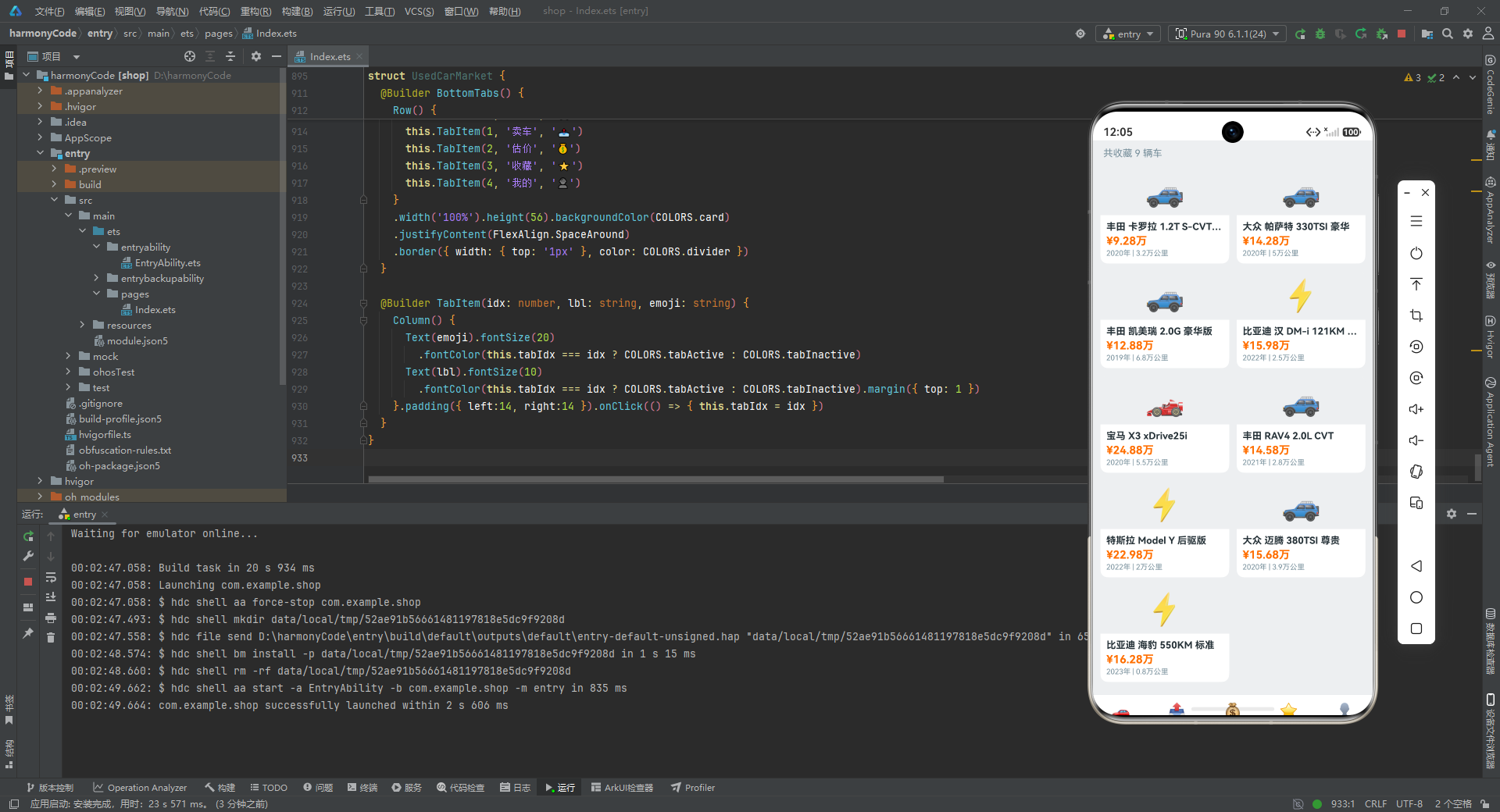
aboutToAppear中用CARS.filter((c: CarData) => c.isFavorite)筛选出所有isFavorite为 true 的车辆,模拟从全局数据中获取用户收藏列表。- 空状态处理与卖车页类似:居中显示⭐图标和提示文字,引导用户去浏览列表收藏。
- 非空状态下,顶部显示收藏数量(“共收藏 X 辆车”),下方是可滚动的网格列表。
Grid组件是 ArkUI 的网格布局容器,columnsTemplate('1fr 1fr')定义两列等宽布局(1fr 表示一份剩余空间),columnsGap(10)和rowsGap(10)分别设置列间距和行间距。GridItem是网格项容器,每个收藏车辆渲染为一个卡片。卡片顶部是车辆图标区域(高度66,只有顶部圆角),下方是品牌型号、价格、年份里程信息。- 卡片样式:白色背景、圆角10、轻微阴影,比买车卡片更紧凑,适合双列展示。
Scroll包裹Grid实现滚动,layoutWeight(1)让网格区域占据标题之外的所有空间。
十、我的页:个人中心的综合展示
10.1 我的主结构
我的页面是应用的信息聚合中心,包含用户信息、统计数据、浏览历史和功能菜单:
@Component
struct ProfileContent {
  build() {
    Scroll() {
      Column() {
        this.ProfileHeader()
        this.CountStats()
        this.BrowseHistoryView()
        this.MenuList()
      }.width('100%')
    }
    .scrollable(ScrollDirection.Vertical).scrollBar(BarState.Off)
    .width('100%').height('100%').backgroundColor(COLORS.background)
  }
}
逐行解析:
- 整个页面使用
Scroll包裹,四个 Builder 从上到下依次渲染:用户头部信息、数据统计、浏览历史、功能菜单。 - 这种"信息流"式的布局是个人中心页面的经典设计,用户可以从上到下滚动浏览所有信息。
10.2 用户头部信息
@Builder ProfileHeader() {
  Row() {
    Text('👤').fontSize(38).width(56).height(56).textAlign(TextAlign.Center)
      .backgroundColor(COLORS.secondary).borderRadius(28).fontColor(COLORS.textWhite).margin({ right: 14 })
    Column() {
      Text('二手车达人').fontSize(18).fontWeight(FontWeight.Bold).fontColor(COLORS.textPrimary)
      Text('已加入365天 · 资深用户').fontSize(12).fontColor(COLORS.textSecondary).margin({ top: 2 })
      Row() {
        Text('Lv.8').fontSize(10).fontColor(COLORS.accentPrice)
          .padding({ left:7, right:7, top:2, bottom:2 }).backgroundColor(COLORS.primary).borderRadius(6)
        Text('已认证').fontSize(10).fontColor(COLORS.accentGood)
          .padding({ left:7, right:7, top:2, bottom:2 }).backgroundColor('#E8F5E9').borderRadius(6)
          .margin({ left: 6 })
      }.margin({ top: 4 })
    }.alignItems(HorizontalAlign.Start)
  }
  .width('100%').padding(18).backgroundColor(COLORS.card).borderRadius(12)
  .margin({ left:10, right:10, top:10 })
}
逐行解析:
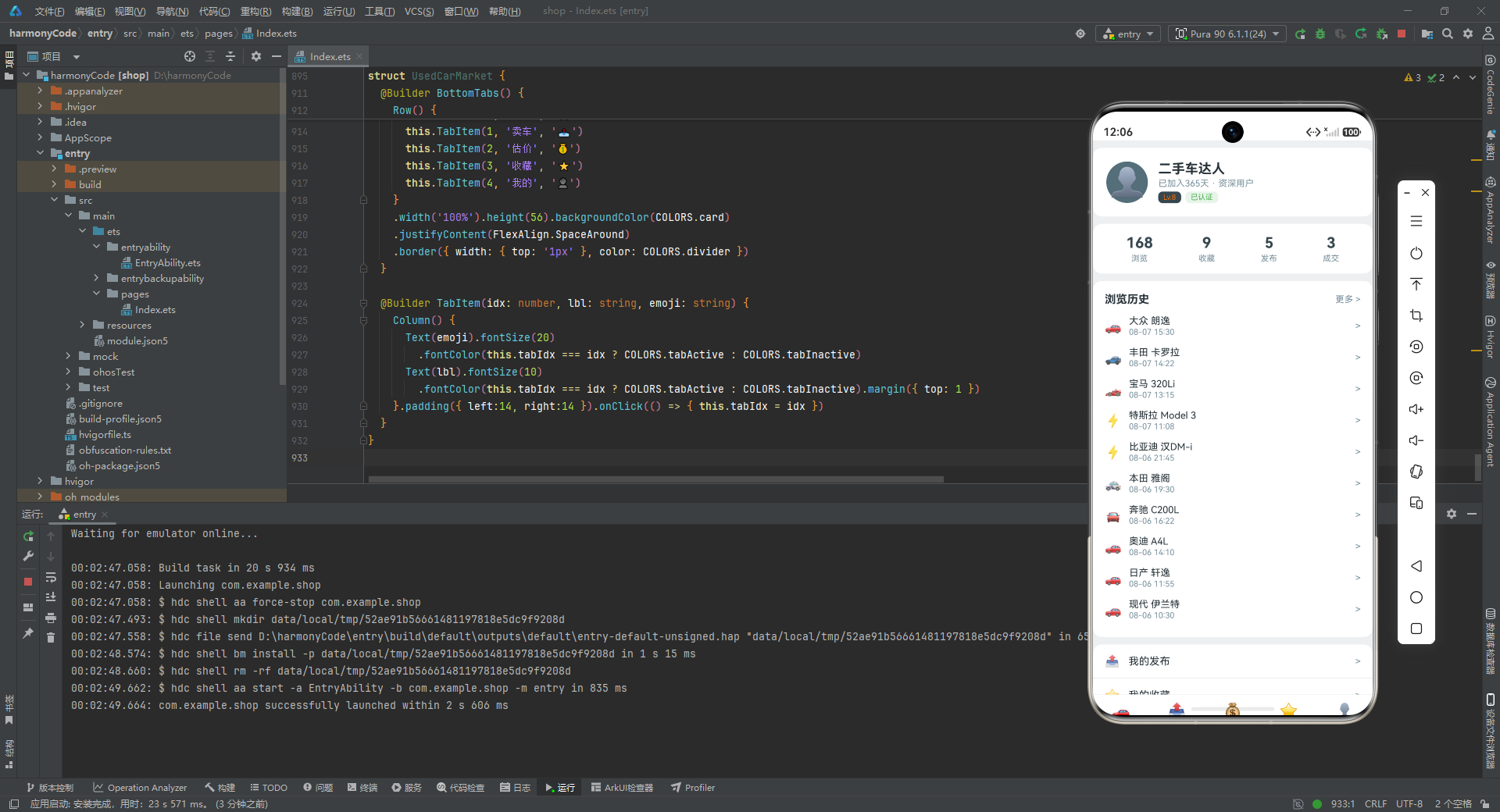
- 用户头部卡片:左侧圆形头像(56x56,辅色背景,👤图标),右侧用户信息。
- 用户信息包括:昵称"二手车达人"(18号粗体)、加入天数和身份"已加入365天 · 资深用户"(12号次要色)、两个标签徽章。
- "Lv.8"标签使用主色背景+橙色文字,表示用户等级;"已认证"标签使用浅绿色背景(
#E8F5E9)+绿色文字,表示实名认证状态。两个标签并排显示,font-size 10,紧凑小巧。
10.3 数据统计
@Builder CountStats() {
  Row() {
    this.CountItem('浏览', '168')
    this.CountItem('收藏', CARS.filter((c: CarData) => c.isFavorite).length.toString())
    this.CountItem('发布', '5')
    this.CountItem('成交', '3')
  }
  .width('100%').justifyContent(FlexAlign.SpaceAround).padding(14)
  .backgroundColor(COLORS.card).borderRadius(12).margin({ left:10, right:10, top:10 })
}

@Builder CountItem(lbl: string, val: string) {
  Column() {
    Text(val).fontSize(20).fontWeight(FontWeight.Bold).fontColor(COLORS.primary)
    Text(lbl).fontSize(11).fontColor(COLORS.textSecondary).margin({ top: 3 })
  }
}
逐行解析:
- 统计栏展示四个数据:浏览(168)、收藏(动态计算
CARS.filter(c => c.isFavorite).length)、发布(5)、成交(3)。 - 收藏数量通过
filter实时计算,体现了数据驱动视图的优势——当用户在买车页收藏或取消收藏车辆时,这里的数字会自动更新。 CountItem与卖车页的StatItem类似,数值20号粗体主色,标签11号次要色。justifyContent(FlexAlign.SpaceAround)让四个统计项均匀分布。
10.4 浏览历史
@Builder BrowseHistoryView() {
  Column() {
    Row() {
      Text('浏览历史').fontSize(15).fontWeight(FontWeight.Bold).fontColor(COLORS.textPrimary)
      Row().layoutWeight(1)
      Text('更多 >').fontSize(12).fontColor(COLORS.textSecondary)
    }.width('100%').margin({ bottom: 6 })

    ForEach(HISTORIES.slice(0, 10), (h: HistoryItem) => {
      Row() {
        Text(h.emoji).fontSize(18).margin({ right: 10 })
        Column() {
          Text(h.brand + ' ' + h.model).fontSize(13).fontColor(COLORS.textPrimary)
          Text(h.time).fontSize(11).fontColor(COLORS.textSecondary).margin({ top: 1 })
        }.alignItems(HorizontalAlign.Start).layoutWeight(1)
        Text('>').fontSize(13).fontColor(COLORS.textSecondary)
      }.width('100%').padding({ top:7, bottom:7 })
    }, (h: HistoryItem) => h.id.toString() + h.brand + h.model)
  }
  .width('100%').padding(16).backgroundColor(COLORS.card).borderRadius(12)
  .margin({ left:10, right:10, top:10 })
}
逐行解析:
- 浏览历史卡片:顶部标题行(“浏览历史"和"更多 >”),下方是历史记录列表。
HISTORIES.slice(0, 10)只取前10条记录展示,避免列表过长影响页面体验。- 每条记录是一个
Row:左侧车辆 Emoji 图标、中间品牌型号+时间、右侧箭头">"。简洁的单行布局,信息一目了然。 - 键值生成函数
h.id.toString() + h.brand + h.model将 id、品牌、型号拼接作为唯一 key,确保每条记录有稳定的标识。
10.5 功能菜单列表
@Builder MenuList() {
  Column() {
    this.MenuItem('我的发布', '📤')
    this.MenuItem('我的收藏', '⭐')
    this.MenuItem('估价记录', '💰')
    this.MenuItem('车辆对比', '📊')
    this.MenuItem('浏览历史', '🕐')
    this.MenuItem('成交记录', '📋')
    this.MenuItem('消息中心', '💬')
    this.MenuItem('设置', '⚙️')
  }
  .width('100%').backgroundColor(COLORS.card).borderRadius(12)
  .margin({ left:10, right:10, top:10, bottom:20 })
}

@Builder MenuItem(title: string, emoji: string) {
  Row() {
    Text(emoji).fontSize(16).margin({ right: 12 })
    Text(title).fontSize(14).fontColor(COLORS.textPrimary)
    Row().layoutWeight(1)
    Text('>').fontSize(13).fontColor(COLORS.textSecondary)
  }
  .width('100%').height(46).padding({ left:16, right:16 })
  .border({ width: { bottom: '0.5px' }, color: COLORS.divider })
}
逐行解析:
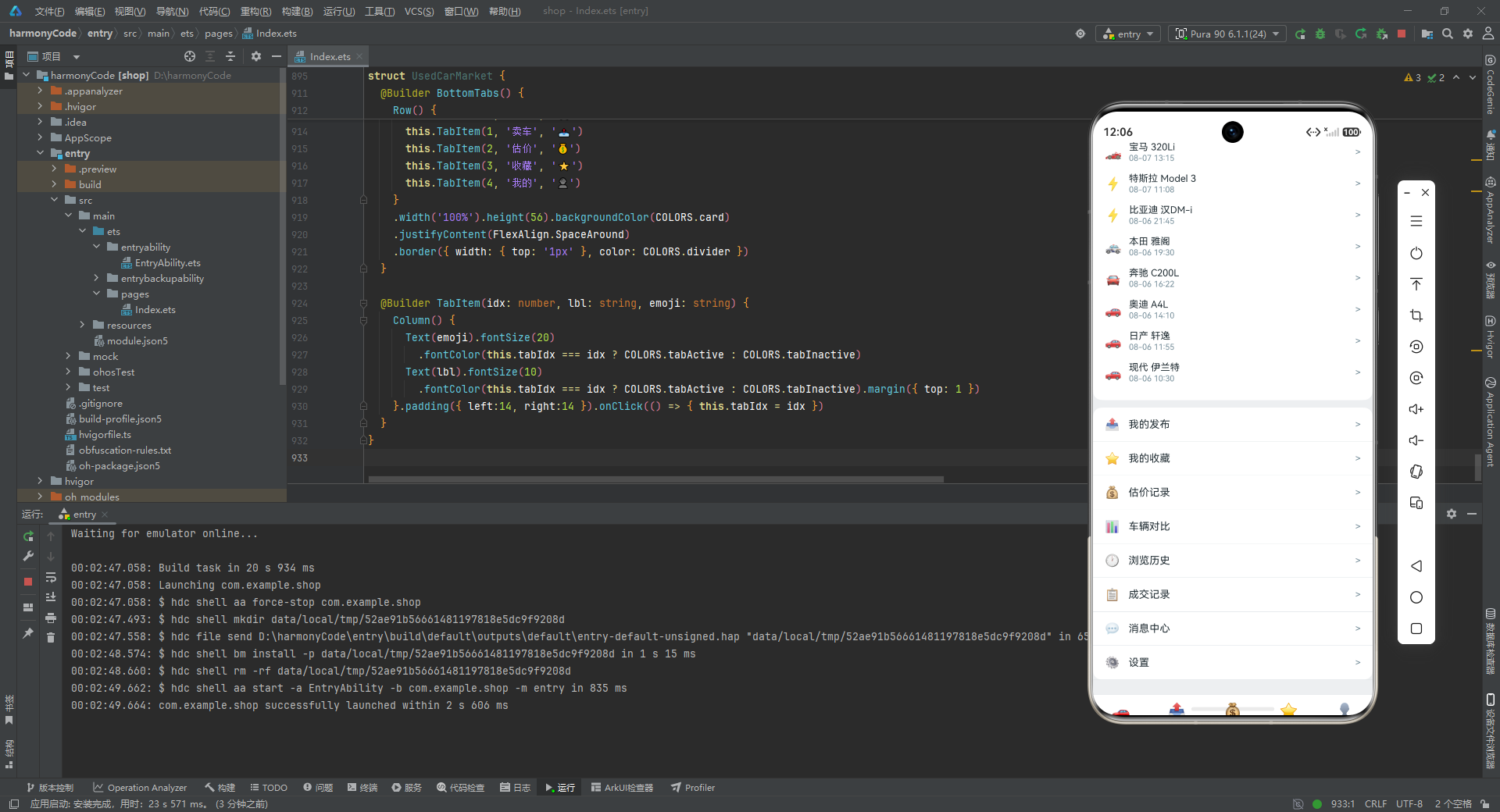
- 功能菜单包含8个条目:我的发布、我的收藏、估价记录、车辆对比、浏览历史、成交记录、消息中心、设置。每个条目前有对应的 Emoji 图标。
MenuItem是参数化 Builder,接收标题和 Emoji 两个参数,渲染一个高度46的行:左侧图标+标题,右侧箭头。- 每行底部有0.5像素的分割线(
border({ width: { bottom: '0.5px' }, color: COLORS.divider })),形成列表的视觉分隔。最后一行的分割线虽然多余,但在视觉上影响不大。 - 整个菜单列表用
Column包裹,白色背景圆角12,形成一个完整的卡片。
十一、主入口组件:底部导航的指挥中心
11.1 主入口结构
主入口组件 UsedCarMarket 是整个应用的根组件,负责底部 Tab 导航和页面切换:
@Entry
@Component
struct UsedCarMarket {
  @State tabIdx: number = 0;

  build() {
    Column() {
      if (this.tabIdx === 0) { BuyCarContent() }
      else if (this.tabIdx === 1) { SellCarContent() }
      else if (this.tabIdx === 2) { EvaluateContent() }
      else if (this.tabIdx === 3) { FavoriteContent() }
      else { ProfileContent() }

      this.BottomTabs()
    }
    .width('100%').height('100%').backgroundColor(COLORS.background)
  }
逐行解析:
@Entry装饰器将UsedCarMarket声明为应用的入口组件,整个应用从这里开始渲染。一个页面只能有一个@Entry组件。@State tabIdx: number = 0:当前激活的 Tab 索引,默认为0(买车页)。build()方法中,Column从上到下排列:页面内容区和底部导航栏。- 页面内容区使用
if-else if-else链根据tabIdx的值渲染对应的页面组件。当tabIdx为0时渲染BuyCarContent,为1时渲染SellCarContent,以此类推。这种条件渲染确保同一时刻只显示一个页面,切换时旧页面被销毁、新页面被创建。 - 底部导航栏
this.BottomTabs()固定在页面底部,不受页面切换影响。
11.2 底部导航栏
@Builder BottomTabs() {
  Row() {
    this.TabItem(0, '买车', '🚗')
    this.TabItem(1, '卖车', '📤')
    this.TabItem(2, '估价', '💰')
    this.TabItem(3, '收藏', '⭐')
    this.TabItem(4, '我的', '👤')
  }
  .width('100%').height(56).backgroundColor(COLORS.card)
  .justifyContent(FlexAlign.SpaceAround)
  .border({ width: { top: '1px' }, color: COLORS.divider })
}

@Builder TabItem(idx: number, lbl: string, emoji: string) {
  Column() {
    Text(emoji).fontSize(20)
      .fontColor(this.tabIdx === idx ? COLORS.tabActive : COLORS.tabInactive)
    Text(lbl).fontSize(10)
      .fontColor(this.tabIdx === idx ? COLORS.tabActive : COLORS.tabInactive).margin({ top: 1 })
  }.padding({ left:14, right:14 }).onClick(() => { this.tabIdx = idx })
}
逐行解析:
- 底部导航栏是一个高度56的
Row,白色背景,顶部1像素分割线,包含5个 Tab 项。 justifyContent(FlexAlign.SpaceAround)让5个 Tab 项均匀分布。TabItem是参数化 Builder,接收索引、标签、Emoji 三个参数,渲染图标+文字两行布局。- 图标和文字颜色根据
this.tabIdx === idx判断:激活时使用tabActive(主色 #37474F),非激活时使用tabInactive(浅灰 #90A4AE),通过颜色对比清晰标识当前所在页面。 onClick(() => { this.tabIdx = idx }):点击 Tab 项时更新tabIdx,触发页面切换。这是整个应用导航的核心逻辑,一行代码实现了5个页面的切换。
十二、关键特性对比总结
为了帮助读者更直观地理解各模块的设计特点,下表对五大功能模块进行了多维度的对比总结:
| 模块 | 核心功能 | 主要状态变量 | 关键交互技术 | 数据来源 | 视觉亮点 |
|---|---|---|---|---|---|
| 买车页 | 浏览车辆列表、查看详情 | detailCar | Stack层叠遮罩、条件渲染、ForEach列表 | CARS数组(25条) | 卡片阴影、价格强调色、车况语义色 |
| 卖车页 | 发布、编辑、删除车辆 | myCars, showAdd/Edit/Delete, editTarget, 表单字段 | 多弹窗状态管理、表单输入、Chip选择器 | CARS前5条 | 统计栏、空状态引导、删除二次确认 |
| 估价页 | 品牌选择、参数调节、价格计算 | brandIdx, carYear, carMileage | Slider滑块、Progress进度条、纯UI柱状图 | EVALUATES(6品牌)、BRAND_STATS(12品牌)、CHART_BARS(12月) | 品牌主题色、双图表可视化、实时计算 |
| 收藏页 | 网格展示收藏车辆 | favList | Grid双列网格、filter筛选 | CARS中isFavorite为true的 | 紧凑卡片墙、空状态引导 |
| 我的页 | 个人信息、历史、菜单 | 无(纯展示) | ForEach列表、参数化MenuItem | HISTORIES(16条)、CARS统计 | 用户徽章、统计栏、功能菜单列表 |
| 主入口 | Tab导航、页面切换 | tabIdx | if-else条件渲染、底部Tab | - | 统一导航栏、激活态色彩切换 |
十三、总结与展望
13.1 技术亮点回顾
通过对这个二手车交易市场应用的完整剖析,我们可以总结出以下几个值得学习的技术亮点。
第一,集中式色彩管理体系。通过 ColorsConfig 接口和 COLORS 常量对象,将13种语义化颜色集中管理,既保证了视觉一致性,又为未来换肤和暗色模式预留了扩展空间。这种"接口约束 + 常量实例"的模式是大型应用色彩管理的最佳实践。
第二,参数化 Builder 的广泛运用。从 CarCard(car) 到 DetailSection(title, items),从 FormField(lbl, val, placeholder) 到 SelectChips(lbl, cur, opts),从 SliderCard(lbl, sliderVal, min, max) 到 TabItem(idx, lbl, emoji),应用大量使用参数化 Builder 封装可复用的 UI 片段,极大地减少了代码重复,提高了可维护性。这是 ArkUI 声明式 UI 的核心优势之一。
第三,状态驱动的模态弹窗。无论是买车页的详情遮罩层,还是卖车页的发布/编辑/删除弹窗,都采用"状态变量控制显示 + Stack层叠覆盖"的模式实现。这种模式将弹窗的显示逻辑完全交给状态管理,无需手动操作 DOM,代码简洁且不易出错。
第四,纯组件实现的图表可视化。估价页的价格走势柱状图和品牌对比横向柱状图,完全使用 Column、Text、Row 等基础组件构建,没有依赖任何第三方图表库。这既展示了 ArkUI 组件系统的灵活性,也保证了应用的轻量级和性能。
第五,完整的数据建模与模拟数据集。应用定义了6个接口(CarData、BrandStat、EvaluateItem、PriceBar、HistoryItem、DetailRow)和5个数据集(25条车辆、6个品牌估价、12个品牌统计、16条浏览历史、12个月价格走势),构建了一个完整的二手车交易数据世界。这种"接口先行、数据驱动"的开发模式,使得 UI 渲染逻辑与数据结构解耦,便于后续接入真实 API。
13.2 架构设计评价
从架构角度看,这个应用采用了"单文件多组件"的组织方式,将5个页面组件和1个主入口组件集中在一个文件中。这种方式的优点是便于阅读和学习,所有代码一目了然;缺点是在真实项目中会导致文件过大、难以协作。在实际工程中,应该将每个页面组件拆分为独立文件,并引入状态管理框架(如 AppStorage、LocalStorage)来处理跨组件数据共享。
数据流方面,应用采用了"静态数据源 + 组件内状态"的混合模式。全局数据以常量数组形式定义,组件通过 filter、slice 等方法获取所需数据;交互状态通过 @State 声明在组件内部。这种模式在 Demo 级别足够清晰,但在真实应用中,需要引入响应式数据层(如 ViewModel、Repository 模式)来处理数据的增删改查和网络同步。
安装DevEco Studio程序

选择目标安装目录:

设置环境变量,但是需要重启一下:

新建一个空白模板:

设置API为24的模板项目:
初始化项目,自动下载相关依赖:

完整代码:
// 二手车交易市场
// 主色:#37474F | 辅色:#546E7A | 背景:#ECEFF1 | 卡片:#FFFFFF
// 强调色:#FF6F00(价格) | #4CAF50(车况优) | #F44336(急售)
// ==================== 接口 ====================
interface ColorsConfig {
primary: string;
secondary: string;
background: string;
card: string;
accentPrice: string;
accentGood: string;
accentUrgent: string;
textPrimary: string;
textSecondary: string;
textWhite: string;
divider: string;
tabActive: string;
tabInactive: string;
}
const COLORS: ColorsConfig = {
primary: '#37474F', secondary: '#546E7A', background: '#ECEFF1', card: '#FFFFFF',
accentPrice: '#FF6F00', accentGood: '#4CAF50', accentUrgent: '#F44336',
textPrimary: '#263238', textSecondary: '#78909C', textWhite: '#FFFFFF',
divider: '#CFD8DC', tabActive: '#37474F', tabInactive: '#90A4AE'
};
interface CarData {
id: number; brand: string; model: string; year: number; mileage: number;
price: number; originalPrice: number; color: string; fuelType: string;
transmission: string; displacement: string; condition: string;
inspectionDate: string; location: string; owner: number; views: number;
isFavorite: boolean; tags: string[]; image: string; description: string;
}
interface BrandStat {
brand: string; count: number; avgPrice: number; minPrice: number; maxPrice: number;
}
interface EvaluateItem {
brand: string; emoji: string; retentionRate: number; prices: number[]; color: string;
}
interface PriceBar {
label: string; value: number; color: string;
}
interface HistoryItem {
id: number; brand: string; model: string; time: string; emoji: string;
}
interface DetailRow {
label: string; value: string;
}
// ==================== 车辆数据(25条) ====================
const CARS: CarData[] = [
{ id:1, brand:'大众', model:'朗逸 1.5L 自动舒适版', year:2019, mileage:5.8, price:7.68, originalPrice:12.49, color:'白色', fuelType:'汽油', transmission:'自动', displacement:'1.5L', condition:'优秀', inspectionDate:'2025-06', location:'上海', owner:1, views:2341, isFavorite:false, tags:['准新车','4S保养'], image:'🚗', description:'个人一手车,全程4S店保养,无事故无水泡' },
{ id:2, brand:'丰田', model:'卡罗拉 1.2T S-CVT GL-i', year:2020, mileage:3.2, price:9.28, originalPrice:12.98, color:'银色', fuelType:'汽油', transmission:'自动', displacement:'1.2T', condition:'优秀', inspectionDate:'2025-09', location:'北京', owner:1, views:3890, isFavorite:true, tags:['准新车','低里程'], image:'🚙', description:'家用代步首选,油耗低至6L/百公里' },
{ id:3, brand:'本田', model:'思域 220TURBO CVT劲动', year:2018, mileage:7.5, price:8.98, originalPrice:13.99, color:'蓝色', fuelType:'汽油', transmission:'自动', displacement:'1.5T', condition:'良好', inspectionDate:'2025-03', location:'广州', owner:2, views:5672, isFavorite:false, tags:['热门','动力强'], image:'🚓', description:'动力充沛,操控精准,外观时尚' },
{ id:4, brand:'宝马', model:'320Li M运动套装', year:2019, mileage:6.1, price:18.98, originalPrice:31.89, color:'黑色', fuelType:'汽油', transmission:'自动', displacement:'2.0T', condition:'优秀', inspectionDate:'2026-01', location:'深圳', owner:1, views:8934, isFavorite:true, tags:['豪华','M套装'], image:'🏎️', description:'M运动套装加持,操控无敌' },
{ id:5, brand:'奔驰', model:'C200L 运动版', year:2020, mileage:4.2, price:22.58, originalPrice:33.78, color:'白色', fuelType:'汽油', transmission:'自动', displacement:'1.5T', condition:'优秀', inspectionDate:'2025-12', location:'上海', owner:1, views:10456, isFavorite:false, tags:['女士一手','精品'], image:'🚘', description:'女士一手车,内饰如新' },
{ id:6, brand:'奥迪', model:'A4L 40TFSI 时尚型', year:2019, mileage:8.3, price:15.88, originalPrice:34.29, color:'灰色', fuelType:'汽油', transmission:'自动', displacement:'2.0T', condition:'良好', inspectionDate:'2025-08', location:'杭州', owner:2, views:6723, isFavorite:false, tags:['科技感','大空间'], image:'🚗', description:'虚拟座舱科技感十足' },
{ id:7, brand:'大众', model:'帕萨特 330TSI 豪华', year:2020, mileage:5.0, price:14.28, originalPrice:23.79, color:'黑色', fuelType:'汽油', transmission:'自动', displacement:'2.0T', condition:'优秀', inspectionDate:'2026-02', location:'南京', owner:1, views:4532, isFavorite:true, tags:['商务','急售'], image:'🚙', description:'商务出行利器,因换车急售' },
{ id:8, brand:'日产', model:'轩逸 1.6L XL CVT', year:2021, mileage:2.1, price:8.58, originalPrice:12.99, color:'白色', fuelType:'汽油', transmission:'自动', displacement:'1.6L', condition:'优秀', inspectionDate:'2025-10', location:'武汉', owner:1, views:3210, isFavorite:false, tags:['准新车','省油王'], image:'🚗', description:'仅行驶2万公里,油耗极低' },
{ id:9, brand:'丰田', model:'凯美瑞 2.0G 豪华版', year:2019, mileage:6.8, price:12.88, originalPrice:19.98, color:'黑色', fuelType:'汽油', transmission:'自动', displacement:'2.0L', condition:'良好', inspectionDate:'2025-07', location:'成都', owner:1, views:5643, isFavorite:true, tags:['保值神车','耐用'], image:'🚙', description:'丰田品质保证,开不坏的凯美瑞' },
{ id:10, brand:'本田', model:'雅阁 260TURBO 豪华', year:2020, mileage:4.5, price:14.28, originalPrice:19.98, color:'白色', fuelType:'汽油', transmission:'自动', displacement:'1.5T', condition:'优秀', inspectionDate:'2026-03', location:'长沙', owner:1, views:7234, isFavorite:false, tags:['B级标杆','大溜背'], image:'🚓', description:'B级车标杆之作,颜值空间无敌' },
{ id:11, brand:'现代', model:'伊兰特 1.5L CVT', year:2021, mileage:1.8, price:7.98, originalPrice:11.28, color:'蓝色', fuelType:'汽油', transmission:'自动', displacement:'1.5L', condition:'优秀', inspectionDate:'2025-11', location:'郑州', owner:1, views:2890, isFavorite:false, tags:['准新车','颜值担当'], image:'🚗', description:'韩系颜值天花板' },
{ id:12, brand:'比亚迪', model:'汉 DM-i 121KM 尊贵', year:2022, mileage:2.5, price:15.98, originalPrice:21.68, color:'红色', fuelType:'混动', transmission:'自动', displacement:'1.5T', condition:'优秀', inspectionDate:'2026-04', location:'深圳', owner:1, views:12089, isFavorite:true, tags:['新能源','续航王'], image:'⚡', description:'国产新能源旗舰,刀片电池安全' },
{ id:13, brand:'特斯拉', model:'Model 3 后驱版', year:2021, mileage:3.6, price:19.58, originalPrice:25.09, color:'白色', fuelType:'纯电', transmission:'自动', displacement:'电动', condition:'优秀', inspectionDate:'2025-12', location:'上海', owner:1, views:15672, isFavorite:false, tags:['智能驾驶','零油耗'], image:'⚡', description:'特斯拉持续OTA升级' },
{ id:14, brand:'大众', model:'途观L 330TSI', year:2018, mileage:9.2, price:11.28, originalPrice:23.98, color:'棕色', fuelType:'汽油', transmission:'自动', displacement:'2.0T', condition:'一般', inspectionDate:'2025-04', location:'西安', owner:2, views:4321, isFavorite:false, tags:['SUV','大空间'], image:'🚙', description:'中型SUV标杆,空间巨大' },
{ id:15, brand:'宝马', model:'X3 xDrive25i', year:2020, mileage:5.5, price:24.88, originalPrice:38.98, color:'黑色', fuelType:'汽油', transmission:'自动', displacement:'2.0T', condition:'优秀', inspectionDate:'2026-05', location:'北京', owner:1, views:9834, isFavorite:true, tags:['豪华SUV','M套装'], image:'🏎️', description:'宝马SUV操控之王' },
{ id:16, brand:'奔驰', model:'GLC 260L 动感型', year:2019, mileage:7.0, price:23.58, originalPrice:39.08, color:'白色', fuelType:'汽油', transmission:'自动', displacement:'2.0T', condition:'良好', inspectionDate:'2025-09', location:'广州', owner:2, views:8765, isFavorite:false, tags:['豪华SUV','性价比'], image:'🚘', description:'后排空间堪比S级' },
{ id:17, brand:'日产', model:'奇骏 2.0L CVT', year:2020, mileage:4.8, price:10.98, originalPrice:19.68, color:'白色', fuelType:'汽油', transmission:'自动', displacement:'2.0L', condition:'良好', inspectionDate:'2025-10', location:'重庆', owner:1, views:3456, isFavorite:false, tags:['SUV','舒适'], image:'🚙', description:'移动大沙发' },
{ id:18, brand:'丰田', model:'RAV4 2.0L CVT', year:2021, mileage:2.8, price:14.58, originalPrice:19.48, color:'灰色', fuelType:'汽油', transmission:'自动', displacement:'2.0L', condition:'优秀', inspectionDate:'2026-06', location:'天津', owner:1, views:6543, isFavorite:true, tags:['SUV','保值神车'], image:'🚙', description:'全球销冠SUV' },
{ id:19, brand:'比亚迪', model:'宋PLUS DM-i 110KM', year:2022, mileage:1.5, price:12.88, originalPrice:16.78, color:'灰色', fuelType:'混动', transmission:'自动', displacement:'1.5L', condition:'优秀', inspectionDate:'2026-07', location:'广州', owner:1, views:11678, isFavorite:false, tags:['新能源','爆款'], image:'⚡', description:'插混爆款,日常纯电够用' },
{ id:20, brand:'特斯拉', model:'Model Y 后驱版', year:2022, mileage:2.0, price:22.98, originalPrice:26.39, color:'黑色', fuelType:'纯电', transmission:'自动', displacement:'电动', condition:'优秀', inspectionDate:'2026-08', location:'深圳', owner:1, views:18234, isFavorite:true, tags:['智能SUV','畅销'], image:'⚡', description:'全球最畅销车型' },
{ id:21, brand:'本田', model:'CR-V 240TURBO 风尚', year:2019, mileage:6.5, price:12.28, originalPrice:20.38, color:'白色', fuelType:'汽油', transmission:'自动', displacement:'1.5T', condition:'良好', inspectionDate:'2025-05', location:'成都', owner:2, views:5678, isFavorite:false, tags:['SUV','经典'], image:'🚙', description:'CR-V口碑积累' },
{ id:22, brand:'奥迪', model:'Q5L 40TFSI 时尚', year:2018, mileage:10.5, price:17.58, originalPrice:41.38, color:'黑色', fuelType:'汽油', transmission:'自动', displacement:'2.0T', condition:'一般', inspectionDate:'2025-02', location:'济南', owner:2, views:4567, isFavorite:false, tags:['豪华SUV','急售'], image:'🚗', description:'加长Q5空间充裕' },
{ id:23, brand:'大众', model:'迈腾 380TSI 尊贵', year:2020, mileage:3.9, price:15.68, originalPrice:26.99, color:'黑色', fuelType:'汽油', transmission:'自动', displacement:'2.0T', condition:'优秀', inspectionDate:'2025-11', location:'济南', owner:1, views:5432, isFavorite:true, tags:['商务首选'], image:'🚙', description:'德系B级品质标杆' },
{ id:24, brand:'现代', model:'途胜 1.5T 精英版', year:2021, mileage:2.2, price:10.28, originalPrice:17.08, color:'蓝色', fuelType:'汽油', transmission:'自动', displacement:'1.5T', condition:'优秀', inspectionDate:'2026-01', location:'南京', owner:1, views:2987, isFavorite:false, tags:['SUV','性价比'], image:'🚙', description:'韩系SUV新秀' },
{ id:25, brand:'比亚迪', model:'海豹 550KM 标准', year:2023, mileage:0.8, price:16.28, originalPrice:18.98, color:'蓝色', fuelType:'纯电', transmission:'自动', displacement:'电动', condition:'优秀', inspectionDate:'2026-08', location:'深圳', owner:1, views:21890, isFavorite:true, tags:['新能源','准新车'], image:'⚡', description:'CTB电池车身一体化' }
];
// ==================== 估价数据 ====================
const EVALUATES: EvaluateItem[] = [
{ brand:'大众', emoji:'🚗', retentionRate:0.62, prices:[10.5,9.2,8.1,7.0,6.0,5.1], color:'#1565C0' },
{ brand:'丰田', emoji:'🚙', retentionRate:0.75, prices:[12.8,11.5,10.2,9.0,7.9,6.8], color:'#C62828' },
{ brand:'本田', emoji:'🚓', retentionRate:0.70, prices:[11.5,10.2,9.0,7.9,6.9,5.9], color:'#2E7D32' },
{ brand:'宝马', emoji:'🏎️', retentionRate:0.58, prices:[25.0,21.5,18.2,15.2,12.5,10.0], color:'#1565C0' },
{ brand:'奔驰', emoji:'🚘', retentionRate:0.60, prices:[28.0,24.5,21.0,17.8,14.8,12.0], color:'#424242' },
{ brand:'奥迪', emoji:'🚗', retentionRate:0.55, prices:[22.0,19.0,16.2,13.8,11.5,9.5], color:'#1A1A1A' }
];
// ==================== 品牌统计(12个) ====================
const BRAND_STATS: BrandStat[] = [
{ brand:'大众', count:156, avgPrice:9.85, minPrice:3.28, maxPrice:18.98 },
{ brand:'丰田', count:142, avgPrice:11.56, minPrice:4.58, maxPrice:22.88 },
{ brand:'本田', count:128, avgPrice:10.92, minPrice:3.98, maxPrice:16.88 },
{ brand:'宝马', count:98, avgPrice:22.35, minPrice:12.88, maxPrice:36.98 },
{ brand:'奔驰', count:87, avgPrice:24.68, minPrice:13.58, maxPrice:38.88 },
{ brand:'奥迪', count:76, avgPrice:18.92, minPrice:9.98, maxPrice:29.88 },
{ brand:'日产', count:95, avgPrice:8.56, minPrice:3.28, maxPrice:15.88 },
{ brand:'现代', count:82, avgPrice:7.89, minPrice:2.98, maxPrice:13.88 },
{ brand:'比亚迪', count:168, avgPrice:13.28, minPrice:6.88, maxPrice:22.58 },
{ brand:'特斯拉', count:134, avgPrice:22.15, minPrice:16.58, maxPrice:28.98 },
{ brand:'别克', count:65, avgPrice:9.12, minPrice:4.58, maxPrice:16.98 },
{ brand:'雪佛兰', count:58, avgPrice:6.85, minPrice:2.88, maxPrice:12.88 }
];
// ==================== 浏览历史(16条) ====================
const HISTORIES: HistoryItem[] = [
{ id:1, brand:'大众', model:'朗逸', time:'08-07 15:30', emoji:'🚗' },
{ id:2, brand:'丰田', model:'卡罗拉', time:'08-07 14:22', emoji:'🚙' },
{ id:3, brand:'宝马', model:'320Li', time:'08-07 13:15', emoji:'🏎️' },
{ id:4, brand:'特斯拉', model:'Model 3', time:'08-07 11:08', emoji:'⚡' },
{ id:5, brand:'比亚迪', model:'汉DM-i', time:'08-06 21:45', emoji:'⚡' },
{ id:6, brand:'本田', model:'雅阁', time:'08-06 19:30', emoji:'🚓' },
{ id:7, brand:'奔驰', model:'C200L', time:'08-06 16:22', emoji:'🚘' },
{ id:8, brand:'奥迪', model:'A4L', time:'08-06 14:10', emoji:'🚗' },
{ id:9, brand:'日产', model:'轩逸', time:'08-06 11:55', emoji:'🚗' },
{ id:10, brand:'现代', model:'伊兰特', time:'08-06 10:30', emoji:'🚗' },
{ id:11, brand:'比亚迪', model:'宋PLUS', time:'08-06 09:15', emoji:'⚡' },
{ id:12, brand:'特斯拉', model:'Model Y', time:'08-05 22:10', emoji:'⚡' },
{ id:13, brand:'丰田', model:'凯美瑞', time:'08-05 20:40', emoji:'🚙' },
{ id:14, brand:'大众', model:'迈腾', time:'08-05 18:25', emoji:'🚙' },
{ id:15, brand:'宝马', model:'X3', time:'08-05 16:00', emoji:'🏎️' },
{ id:16, brand:'比亚迪', model:'海豹', time:'08-05 14:30', emoji:'⚡' }
];
// ==================== 价格走势柱状图数据 ====================
const CHART_BARS: PriceBar[] = [
{ label:'1月', value:56, color:'#37474F' }, { label:'2月', value:42, color:'#546E7A' },
{ label:'3月', value:68, color:'#37474F' }, { label:'4月', value:51, color:'#546E7A' },
{ label:'5月', value:73, color:'#37474F' }, { label:'6月', value:62, color:'#546E7A' },
{ label:'7月', value:85, color:'#FF6F00' }, { label:'8月', value:78, color:'#37474F' },
{ label:'9月', value:91, color:'#546E7A' }, { label:'10月', value:67, color:'#37474F' },
{ label:'11月', value:55, color:'#546E7A' }, { label:'12月', value:88, color:'#FF6F00' }
];
// ==================== 买车页 ====================
@Component
struct BuyCarContent {
@State detailCar: CarData | null = null;
build() {
Stack() {
Column() {
this.FilterBar()
Divider().color(COLORS.divider).strokeWidth(1)
this.SearchBar()
this.CarListView()
}
.width('100%').height('100%').backgroundColor(COLORS.background)
if (this.detailCar !== null) {
this.CarDetailOverlay()
}
}
.width('100%').height('100%')
}
@Builder FilterBar() {
Scroll() {
Row() {
ForEach(['全部品牌','5万以下','1年内','汽油'],
(item: string, idx: number) => {
Text(item)
.fontSize(12).fontColor(idx === 0 ? COLORS.accentPrice : COLORS.textPrimary)
.padding({ left:14, right:14, top:6, bottom:6 }).borderRadius(14)
.backgroundColor(idx === 0 ? COLORS.primary : COLORS.card)
.margin({ right: 8 })
}, (item: string, idx: number) => idx.toString())
}
.padding({ left: 12, right: 12, top: 8, bottom: 8 })
}
.scrollable(ScrollDirection.Horizontal).scrollBar(BarState.Off)
.width('100%').backgroundColor(COLORS.card)
}
@Builder SearchBar() {
Row() {
Text('🔍').fontSize(16).margin({ right: 8 })
TextInput({ placeholder: '搜索品牌、车型...' })
.fontSize(14).backgroundColor('transparent').layoutWeight(1).height(36)
}
.width('100%').height(44).padding({ left:12, right:12 })
.backgroundColor(COLORS.card)
.border({ width: { bottom: '1px' }, color: COLORS.divider })
}
@Builder CarListView() {
Scroll() {
Column() {
ForEach(CARS, (car: CarData) => {
this.CarCard(car)
}, (car: CarData) => car.id.toString())
}.width('100%')
}
.scrollable(ScrollDirection.Vertical).scrollBar(BarState.Off)
.width('100%').layoutWeight(1)
}
@Builder CarCard(car: CarData) {
Row() {
Text(car.image)
.fontSize(44).width(76).height(76).textAlign(TextAlign.Center)
.backgroundColor(COLORS.background).borderRadius(10).margin({ right: 12 })
Column() {
Row() {
Text(car.brand + ' ').fontSize(15).fontWeight(FontWeight.Bold).fontColor(COLORS.textPrimary)
Text(car.model).fontSize(14).fontColor(COLORS.textSecondary)
.maxLines(1).textOverflow({ overflow: TextOverflow.Ellipsis })
}.width('100%')
Text(car.year + '年 | ' + car.mileage + '万公里 | ' + car.transmission)
.fontSize(11).fontColor(COLORS.textSecondary).margin({ top: 3 })
Row() {
Text(car.fuelType).fontSize(10).fontColor(COLORS.secondary)
.padding({ left:7, right:7, top:2, bottom:2 })
.backgroundColor(COLORS.divider).borderRadius(4).margin({ right: 5 })
ForEach(car.tags, (tag: string) => {
Text(tag).fontSize(10).fontColor(COLORS.accentPrice)
.padding({ left:6, right:6, top:2, bottom:2 })
.backgroundColor(COLORS.primary).borderRadius(4).margin({ right: 4 })
}, (tag: string) => tag)
}.margin({ top: 5 })
Row() {
Text(car.condition).fontSize(11).fontColor(car.condition === '优秀' ? COLORS.accentGood :
car.condition === '良好' ? COLORS.accentPrice : COLORS.accentUrgent)
Text(' | ' + car.location + ' | ' + car.views.toString() + '次浏览')
.fontSize(11).fontColor(COLORS.textSecondary)
}.margin({ top: 3 })
}
.alignItems(HorizontalAlign.Start).layoutWeight(1)
Column() {
Text('¥' + car.price.toFixed(2) + '万')
.fontSize(17).fontWeight(FontWeight.Bold).fontColor(COLORS.accentPrice)
Text('原价' + car.originalPrice.toFixed(2) + '万')
.fontSize(10).fontColor(COLORS.textSecondary)
.decoration({ type: TextDecorationType.LineThrough })
if (car.tags.indexOf('急售') !== -1) {
Text('急售').fontSize(10).fontColor('#FFFFFF')
.padding({ left:6, right:6, top:2, bottom:2 })
.backgroundColor(COLORS.accentUrgent).borderRadius(4).margin({ top: 3 })
}
Text(car.isFavorite ? '⭐' : '☆')
.fontSize(18).margin({ top: 5 })
.onClick(() => { car.isFavorite = !car.isFavorite })
}.alignItems(HorizontalAlign.End)
}
.width('100%').padding(12).backgroundColor(COLORS.card).borderRadius(12)
.shadow({ radius: 3, color: '#00000012', offsetY: 1 })
.margin({ left:10, right:10, top:6, bottom:2 })
.onClick(() => { this.detailCar = car })
}
@Builder CarDetailOverlay() {
Column() {
Column().layoutWeight(1).width('100%').onClick(() => { this.detailCar = null })
Column() {
Row() {
Text('车辆详情').fontSize(18).fontWeight(FontWeight.Bold).fontColor(COLORS.textPrimary)
Row().layoutWeight(1)
Text('✕').fontSize(20).fontColor(COLORS.textSecondary).onClick(() => { this.detailCar = null })
}.width('100%').padding(16)
Divider().color(COLORS.divider).strokeWidth(1)
Scroll() {
Column() {
Row() {
Text(this.detailCar!.image).fontSize(60).width(90).height(90).textAlign(TextAlign.Center)
.backgroundColor(COLORS.background).borderRadius(12).margin({ right: 14 })
Column() {
Text(this.detailCar!.brand + ' ' + this.detailCar!.model)
.fontSize(17).fontWeight(FontWeight.Bold).fontColor(COLORS.textPrimary).margin({ bottom: 3 })
Text(this.detailCar!.description).fontSize(12).fontColor(COLORS.textSecondary)
.maxLines(2).textOverflow({ overflow: TextOverflow.Ellipsis }).margin({ bottom: 5 })
Text('¥' + this.detailCar!.price.toFixed(2) + '万')
.fontSize(22).fontWeight(FontWeight.Bold).fontColor(COLORS.accentPrice)
}.alignItems(HorizontalAlign.Start).layoutWeight(1)
}.width('100%').padding(16)
Divider().color(COLORS.divider).strokeWidth(1)
this.DetailSection('车辆配置', [
{ label:'品牌', value: this.detailCar!.brand },
{ label:'型号', value: this.detailCar!.model },
{ label:'年份', value: this.detailCar!.year + '年' },
{ label:'里程', value: this.detailCar!.mileage + '万公里' },
{ label:'颜色', value: this.detailCar!.color },
{ label:'燃料', value: this.detailCar!.fuelType },
{ label:'变速箱', value: this.detailCar!.transmission },
{ label:'排量', value: this.detailCar!.displacement },
{ label:'所在地', value: this.detailCar!.location }
])
this.DetailSection('车况报告', [
{ label:'车况等级', value: this.detailCar!.condition },
{ label:'过户次数', value: this.detailCar!.owner + '次' },
{ label:'年检到期', value: this.detailCar!.inspectionDate },
{ label:'浏览人次', value: this.detailCar!.views.toString() }
])
this.DetailSection('历史记录', [
{ label:'事故记录', value:'无重大事故' },
{ label:'泡水记录', value:'无' },
{ label:'火烧记录', value:'无' },
{ label:'抵押记录', value:'无' },
{ label:'维修保养', value:'4S店定期保养' }
])
}.width('100%')
}
.scrollable(ScrollDirection.Vertical).scrollBar(BarState.Off).layoutWeight(1)
Row() {
Text('联系卖家').fontSize(16).fontColor(COLORS.textWhite).fontWeight(FontWeight.Bold)
.textAlign(TextAlign.Center).width('45%').height(44).borderRadius(22)
.backgroundColor(COLORS.accentPrice)
Row().width(16).height(1)
Text('预约看车').fontSize(16).fontColor(COLORS.textWhite).fontWeight(FontWeight.Bold)
.textAlign(TextAlign.Center).width('45%').height(44).borderRadius(22)
.backgroundColor(COLORS.primary)
}
.width('100%').justifyContent(FlexAlign.Center).padding({ top:10, bottom:14 })
.backgroundColor(COLORS.card)
}
.width('100%').constraintSize({ maxHeight: '85%' })
.backgroundColor(COLORS.card).borderRadius({ topLeft:20, topRight:20 })
}
.width('100%').height('100%').backgroundColor('#00000050')
}
@Builder DetailSection(title: string, items: DetailRow[]) {
Column() {
Text(title).fontSize(15).fontWeight(FontWeight.Bold).fontColor(COLORS.primary)
.width('100%').padding({ left:16, top:10, bottom:6 })
ForEach(items, (row: DetailRow) => {
Row() {
Text(row.label).fontSize(13).fontColor(COLORS.textSecondary).width(80)
Text(row.value).fontSize(13).fontColor(COLORS.textPrimary)
}
.width('100%').padding({ left:16, right:16, top:5, bottom:5 })
}, (row: DetailRow) => row.label + row.value)
}.width('100%').padding({ bottom: 6 })
}
}
// ==================== 卖车页 ====================
@Component
struct SellCarContent {
@State myCars: CarData[] = [];
@State showAdd: boolean = false;
@State showEdit: boolean = false;
@State showDelete: boolean = false;
@State editTarget: CarData | null = null;
@State brand: string = ''; @State mdl: string = '';
@State yr: string = ''; @State mi: string = ''; @State pr: string = '';
@State cond: string = '良好'; @State fuel: string = '汽油';
@State trans: string = '自动'; @State clr: string = '白色';
aboutToAppear() { this.myCars = CARS.filter((c: CarData) => c.id <= 5) }
build() {
Stack() {
Column() {
if (this.myCars.length === 0) {
this.EmptyView()
} else {
Column().width('100%').height('100%').backgroundColor(COLORS.background)
this.StatsRow()
Scroll() {
Column() {
ForEach(this.myCars, (car: CarData) => {
this.SellCard(car)
}, (car: CarData) => car.id.toString())
}.width('100%')
}
.scrollable(ScrollDirection.Vertical).scrollBar(BarState.Off).layoutWeight(1)
}
}.width('100%').height('100%')
if (this.showAdd) { this.AddModal() }
if (this.showEdit) { this.EditModal() }
if (this.showDelete) { this.DeleteModal() }
}.width('100%').height('100%')
}
@Builder EmptyView() {
Column() {
Text('📤').fontSize(56).margin({ bottom: 14 })
Text('还没有发布任何车辆').fontSize(16).fontColor(COLORS.textSecondary).margin({ bottom: 6 })
Text('点击下方按钮开始发布').fontSize(13).fontColor(COLORS.textSecondary).margin({ bottom: 22 })
Text('发布卖车').fontSize(16).fontColor(COLORS.textWhite).fontWeight(FontWeight.Bold)
.padding({ left:32, right:32, top:12, bottom:12 })
.backgroundColor(COLORS.accentPrice).borderRadius(24)
.onClick(() => { this.showAdd = true })
}
.width('100%').height('100%').justifyContent(FlexAlign.Center).backgroundColor(COLORS.background)
}
@Builder StatsRow() {
Row() {
this.StatItem('已发布', this.myCars.length.toString())
this.StatItem('本月浏览', '2,456')
this.StatItem('咨询', '128')
this.StatItem('成交', '3')
}
.width('100%').justifyContent(FlexAlign.SpaceBetween).padding(14)
.backgroundColor(COLORS.card).borderRadius(12)
.margin({ left:10, right:10, top:10, bottom:6 })
}
@Builder StatItem(label: string, val: string) {
Column() {
Text(val).fontSize(18).fontWeight(FontWeight.Bold).fontColor(COLORS.primary)
Text(label).fontSize(11).fontColor(COLORS.textSecondary).margin({ top: 3 })
}
}
@Builder SellCard(car: CarData) {
Row() {
Text(car.image).fontSize(38).width(58).height(58).textAlign(TextAlign.Center)
.backgroundColor(COLORS.background).borderRadius(8).margin({ right: 12 })
Column() {
Text(car.brand + ' ' + car.model).fontSize(15).fontWeight(FontWeight.Bold)
.fontColor(COLORS.textPrimary).maxLines(1).textOverflow({ overflow: TextOverflow.Ellipsis })
Text('¥' + car.price.toFixed(2) + '万 | ' + car.mileage + '万公里')
.fontSize(12).fontColor(COLORS.textSecondary).margin({ top: 4 })
Text('浏览' + car.views.toString() + '次').fontSize(11).fontColor(COLORS.textSecondary).margin({ top: 2 })
}.alignItems(HorizontalAlign.Start).layoutWeight(1)
Column() {
Text('编辑').fontSize(12).fontColor(COLORS.accentPrice).onClick(() => {
this.editTarget = car; this.showEdit = true
}).margin({ bottom: 8 })
Text('删除').fontSize(12).fontColor(COLORS.accentUrgent).onClick(() => {
this.editTarget = car; this.showDelete = true
})
}.alignItems(HorizontalAlign.Center)
}
.width('100%').padding(12).backgroundColor(COLORS.card).borderRadius(10)
.margin({ left:10, right:10, top:3, bottom:3 })
}
@Builder AddModal() {
Column() {
Column().layoutWeight(1).width('100%')
.onClick(() => { this.showAdd = false })
Column() {
Row() {
Text('发布卖车').fontSize(18).fontWeight(FontWeight.Bold).fontColor(COLORS.textPrimary)
Row().layoutWeight(1)
Text('✕').fontSize(20).fontColor(COLORS.textSecondary)
.onClick(() => { this.showAdd = false })
}.width('100%').padding(16)
Divider().color(COLORS.divider).strokeWidth(1)
Scroll() {
Column() {
this.FormField('品牌', this.brand, '例如:大众')
this.FormField('型号', this.mdl, '例如:朗逸')
this.FormField('年份', this.yr, '例如:2020')
this.FormField('里程(万公里)', this.mi, '例如:5.8')
this.FormField('价格(万元)', this.pr, '例如:7.68')
this.SelectChips('燃料', this.fuel, ['汽油','柴油','混动','纯电'])
this.SelectChips('变速箱', this.trans, ['自动','手动'])
this.SelectChips('车况', this.cond, ['优秀','良好','一般'])
this.SelectChips('颜色', this.clr, ['白色','黑色','银色','蓝色','红色','灰色'])
}.width('100%')
}
.scrollable(ScrollDirection.Vertical).scrollBar(BarState.Off).layoutWeight(1)
Text('立即发布').fontSize(16).fontColor(COLORS.textWhite).fontWeight(FontWeight.Bold)
.textAlign(TextAlign.Center).width('100%').height(44).borderRadius(22)
.backgroundColor(COLORS.accentPrice)
.onClick(() => { this.showAdd = false })
.margin({ left:16, right:16, top:8, bottom:20 })
}
.width('100%').constraintSize({ maxHeight: '75%' })
.backgroundColor(COLORS.card).borderRadius({ topLeft:20, topRight:20 })
}
.width('100%').height('100%').backgroundColor('#00000050')
}
@Builder EditModal() {
Column() {
Column().layoutWeight(1).width('100%')
.onClick(() => { this.showEdit = false; this.editTarget = null })
Column() {
Row() {
Text('编辑车辆').fontSize(18).fontWeight(FontWeight.Bold).fontColor(COLORS.textPrimary)
Row().layoutWeight(1)
Text('✕').fontSize(20).fontColor(COLORS.textSecondary)
.onClick(() => { this.showEdit = false; this.editTarget = null })
}.width('100%').padding(16)
Divider().color(COLORS.divider).strokeWidth(1)
if (this.editTarget !== null) {
Column() {
Text(this.editTarget!.image).fontSize(44).width(70).height(70).textAlign(TextAlign.Center)
.backgroundColor(COLORS.background).borderRadius(10).margin({ bottom: 10 })
Text(this.editTarget!.brand + ' ' + this.editTarget!.model)
.fontSize(16).fontWeight(FontWeight.Bold).fontColor(COLORS.textPrimary).margin({ bottom: 12 })
this.FormField('年份', this.yr, '修改年份')
this.FormField('里程(万公里)', this.mi, '修改里程')
this.FormField('价格(万元)', this.pr, '修改价格')
}.width('100%').padding(16)
}
Text('保存修改').fontSize(16).fontColor(COLORS.textWhite).fontWeight(FontWeight.Bold)
.textAlign(TextAlign.Center).width('60%').height(44).borderRadius(22)
.backgroundColor(COLORS.primary)
.onClick(() => { this.showEdit = false; this.editTarget = null })
.margin({ top: 12, bottom: 20 })
}
.width('100%').constraintSize({ maxHeight: '60%' })
.backgroundColor(COLORS.card).borderRadius({ topLeft:20, topRight:20 })
}
.width('100%').height('100%').backgroundColor('#00000050')
}
@Builder DeleteModal() {
Column() {
Column().layoutWeight(1).width('100%')
.onClick(() => { this.showDelete = false; this.editTarget = null })
Column() {
Text('⚠️').fontSize(38).margin({ bottom: 10 })
Text('确认删除').fontSize(18).fontWeight(FontWeight.Bold).fontColor(COLORS.textPrimary).margin({ bottom: 6 })
Text('删除后无法恢复,确定要删除吗?').fontSize(13).fontColor(COLORS.textSecondary)
.textAlign(TextAlign.Center).padding({ left:24, right:24 }).margin({ bottom: 18 })
Row() {
Text('取消').fontSize(15).fontColor(COLORS.textSecondary).textAlign(TextAlign.Center)
.width('45%').height(40).borderRadius(20).backgroundColor(COLORS.background)
.onClick(() => { this.showDelete = false; this.editTarget = null })
Row().width(16).height(1)
Text('确认删除').fontSize(15).fontColor(COLORS.textWhite).fontWeight(FontWeight.Bold)
.textAlign(TextAlign.Center).width('45%').height(40).borderRadius(20)
.backgroundColor(COLORS.accentUrgent)
.onClick(() => { this.showDelete = false; this.editTarget = null })
}.width('100%').justifyContent(FlexAlign.Center)
}
.width('100%').padding({ top:22, bottom:22 })
.backgroundColor(COLORS.card).borderRadius({ topLeft:20, topRight:20 })
}
.width('100%').height('100%').backgroundColor('#00000050')
}
@Builder FormField(lbl: string, val: string, placeholder: string) {
Row() {
Text(lbl).fontSize(14).fontColor(COLORS.textPrimary).width(90)
TextInput({ placeholder: placeholder, text: val })
.fontSize(14).layoutWeight(1).height(38)
.backgroundColor(COLORS.background).borderRadius(8).padding({ left:10 })
}
.width('100%').padding({ left:16, right:16, top:5, bottom:5 })
}
@Builder SelectChips(lbl: string, cur: string, opts: string[]) {
Row() {
Text(lbl).fontSize(14).fontColor(COLORS.textPrimary).width(70)
Row() {
ForEach(opts, (opt: string) => {
Text(opt).fontSize(11)
.fontColor(cur === opt ? COLORS.textWhite : COLORS.textSecondary)
.padding({ left:10, right:10, top:5, bottom:5 })
.backgroundColor(cur === opt ? COLORS.primary : COLORS.background)
.borderRadius(14).margin({ right: 5 })
.onClick(() => {
if (lbl === '燃料') { this.fuel = opt }
if (lbl === '变速箱') { this.trans = opt }
if (lbl === '车况') { this.cond = opt }
if (lbl === '颜色') { this.clr = opt }
})
}, (opt: string) => opt)
}
}
.width('100%').padding({ left:16, right:16, top:8, bottom:8 })
}
}
// ==================== 估价页 ====================
@Component
struct EvaluateContent {
@State brandIdx: number = 0;
@State carYear: number = 3;
@State carMileage: number = 5;
build() {
Scroll() {
Column() {
this.Header()
this.BrandPicker()
this.RetentionCard()
this.SliderCard('车龄', this.carYear, 1, 10)
this.SliderCard('里程(万公里)', this.carMileage, 0.5, 20)
this.PriceResult()
this.ChartCard()
this.BrandCompareCard()
}.width('100%')
}
.scrollable(ScrollDirection.Vertical).scrollBar(BarState.Off)
.width('100%').height('100%').backgroundColor(COLORS.background)
}
@Builder Header() {
Column() {
Text('💰').fontSize(44).margin({ bottom: 6 })
Text('二手车在线估价').fontSize(18).fontWeight(FontWeight.Bold).fontColor(COLORS.primary)
Text('基于真实成交数据,精准估价').fontSize(12).fontColor(COLORS.textSecondary).margin({ top: 2 })
}
.width('100%').justifyContent(FlexAlign.Center).padding({ top:20, bottom:14 })
.backgroundColor(COLORS.card).borderRadius(12).margin({ left:10, right:10, top:10 })
}
@Builder BrandPicker() {
Row() {
ForEach(EVALUATES, (item: EvaluateItem, idx: number) => {
Column() {
Text(item.emoji).fontSize(22).padding(6)
.backgroundColor(this.brandIdx === idx ? item.color + '20' : COLORS.card).borderRadius(28)
Text(item.brand).fontSize(11)
.fontColor(this.brandIdx === idx ? item.color : COLORS.textSecondary).margin({ top: 3 })
}.onClick(() => { this.brandIdx = idx }).margin({ left:4, right:4 })
}, (item: EvaluateItem, idx: number) => idx.toString())
}
.width('100%').padding({ left:8, right:8, top:10, bottom:10 })
}
@Builder RetentionCard() {
Column() {
Text('品牌保值率').fontSize(14).fontWeight(FontWeight.Bold).fontColor(COLORS.textPrimary)
.width('100%').margin({ bottom: 6 })
Row() {
Text('1年保值率').fontSize(13).fontColor(COLORS.textSecondary)
Row().layoutWeight(1)
Text((EVALUATES[this.brandIdx].retentionRate * 100).toFixed(0) + '%')
.fontSize(20).fontWeight(FontWeight.Bold).fontColor(COLORS.accentPrice)
}.width('100%')
Progress({ value: EVALUATES[this.brandIdx].retentionRate * 100, total: 100, type: ProgressType.Linear })
.width('100%').height(8).color(EVALUATES[this.brandIdx].color).margin({ top: 6 })
}
.width('100%').padding(16).backgroundColor(COLORS.card).borderRadius(12)
.margin({ left:10, right:10, top:10 })
}
@Builder SliderCard(lbl: string, sliderVal: number, min: number, max: number) {
Column() {
Row() {
Text(lbl).fontSize(14).fontWeight(FontWeight.Bold).fontColor(COLORS.textPrimary)
Row().layoutWeight(1)
Text(sliderVal.toString() + (lbl.indexOf('里程') !== -1 ? '万' : '年'))
.fontSize(15).fontWeight(FontWeight.Bold).fontColor(COLORS.primary)
}.width('100%').margin({ bottom: 6 })
Slider({ value: sliderVal, min: min, max: max, step: lbl.indexOf('里程') !== -1 ? 0.5 : 1,
style: SliderStyle.OutSet })
.width('100%').blockColor(COLORS.primary).trackColor(COLORS.divider).selectedColor(COLORS.primary)
.onChange((v: number) => {
if (lbl.indexOf('里程') !== -1) { this.carMileage = v }
else { this.carYear = v }
})
}
.width('100%').padding(16).backgroundColor(COLORS.card).borderRadius(12)
.margin({ left:10, right:10, top:10 })
}
@Builder PriceResult() {
Column() {
Text('估价结果').fontSize(14).fontWeight(FontWeight.Bold).fontColor(COLORS.textPrimary)
.width('100%').margin({ bottom: 8 })
Row() {
Column() {
Text('¥' + (EVALUATES[this.brandIdx].prices[Math.min(this.carYear - 1, 5)] * 0.9).toFixed(2) + '万')
.fontSize(26).fontWeight(FontWeight.Bold).fontColor(COLORS.accentPrice)
Text('估价区间').fontSize(11).fontColor(COLORS.textSecondary).margin({ top: 3 })
}.alignItems(HorizontalAlign.Center).layoutWeight(1)
Column() {
Text('最低 ' + (EVALUATES[this.brandIdx].prices[Math.min(this.carYear - 1, 5)] * 0.85).toFixed(2) + '万')
.fontSize(13).fontColor(COLORS.textSecondary)
Text('最高 ' + (EVALUATES[this.brandIdx].prices[Math.min(this.carYear - 1, 5)] * 0.95).toFixed(2) + '万')
.fontSize(13).fontColor(COLORS.textSecondary).margin({ top: 4 })
}.alignItems(HorizontalAlign.Center).layoutWeight(1)
}.width('100%')
}
.width('100%').padding(16).backgroundColor(COLORS.card).borderRadius(12)
.margin({ left:10, right:10, top:10 })
}
@Builder ChartCard() {
Column() {
Row() {
Text('价格走势').fontSize(14).fontWeight(FontWeight.Bold).fontColor(COLORS.textPrimary)
Row().layoutWeight(1)
Text('近12个月成交均价').fontSize(11).fontColor(COLORS.textSecondary)
}.width('100%').margin({ bottom: 10 })
Row() {
ForEach(CHART_BARS, (item: PriceBar) => {
Column() {
Text(item.value.toString()).fontSize(8).fontColor(COLORS.textSecondary).margin({ bottom: 2 })
Column().width(16).height(item.value).backgroundColor(item.color).borderRadius({ topLeft:3, topRight:3 })
Text(item.label).fontSize(9).fontColor(COLORS.textSecondary).margin({ top: 3 })
}.alignItems(HorizontalAlign.Center).margin({ left:1, right:1 })
}, (item: PriceBar) => item.label)
}
.width('100%').justifyContent(FlexAlign.SpaceAround)
}
.width('100%').padding(16).backgroundColor(COLORS.card).borderRadius(12)
.margin({ left:10, right:10, top:10 })
}
@Builder BrandCompareCard() {
Column() {
Text('各品牌平均价格对比').fontSize(14).fontWeight(FontWeight.Bold).fontColor(COLORS.textPrimary)
.width('100%').margin({ bottom: 10 })
ForEach(BRAND_STATS.slice(0, 10), (s: BrandStat) => {
Row() {
Text(s.brand).fontSize(12).fontColor(COLORS.textPrimary).width(46)
Text(s.count.toString() + '辆').fontSize(10).fontColor(COLORS.textSecondary).width(36)
Row() {
Row().width(s.avgPrice * 8).height(12)
.backgroundColor(COLORS.accentPrice).borderRadius(4)
}.layoutWeight(1)
Text('¥' + s.avgPrice.toFixed(1) + '万')
.fontSize(11).fontColor(COLORS.accentPrice).width(60).textAlign(TextAlign.End)
}.width('100%').margin({ top:5, bottom:5 })
}, (s: BrandStat) => s.brand)
}
.width('100%').padding(16).backgroundColor(COLORS.card).borderRadius(12)
.margin({ left:10, right:10, top:10, bottom:20 })
}
}
// ==================== 收藏页 ====================
@Component
struct FavoriteContent {
@State favList: CarData[] = [];
aboutToAppear() { this.favList = CARS.filter((c: CarData) => c.isFavorite) }
build() {
if (this.favList.length === 0) {
Column() {
Text('⭐').fontSize(56).margin({ bottom: 14 })
Text('还没有收藏车辆').fontSize(16).fontColor(COLORS.textSecondary)
Text('去浏览列表收藏心仪的车辆吧').fontSize(13).fontColor(COLORS.textSecondary).margin({ top: 6 })
}
.width('100%').height('100%').justifyContent(FlexAlign.Center).backgroundColor(COLORS.background)
} else {
Column() {
Text('共收藏 ' + this.favList.length.toString() + ' 辆车')
.fontSize(13).fontColor(COLORS.textSecondary)
.width('100%').padding({ left:14, top:10, bottom:6 })
Scroll() {
Grid() {
ForEach(this.favList, (car: CarData) => {
GridItem() {
Column() {
Text(car.image).fontSize(42).width('100%').height(66).textAlign(TextAlign.Center)
.backgroundColor(COLORS.background).borderRadius({ topLeft:10, topRight:10 })
Column() {
Text(car.brand + ' ' + car.model).fontSize(13).fontWeight(FontWeight.Bold)
.fontColor(COLORS.textPrimary).maxLines(1)
.textOverflow({ overflow: TextOverflow.Ellipsis }).margin({ bottom: 3 })
Text('¥' + car.price.toFixed(2) + '万').fontSize(15).fontWeight(FontWeight.Bold)
.fontColor(COLORS.accentPrice).margin({ bottom: 2 })
Text(car.year + '年 | ' + car.mileage + '万公里')
.fontSize(10).fontColor(COLORS.textSecondary)
}.alignItems(HorizontalAlign.Start).width('100%').padding(8)
}
.width('100%').backgroundColor(COLORS.card).borderRadius(10)
.shadow({ radius: 2, color: '#0000000C', offsetY: 1 })
}
}, (car: CarData) => car.id.toString())
}
.columnsTemplate('1fr 1fr').columnsGap(10).rowsGap(10)
.padding({ left:10, right:10, top:4, bottom:20 }).width('100%')
}
.scrollable(ScrollDirection.Vertical).scrollBar(BarState.Off).layoutWeight(1)
}
.width('100%').height('100%').backgroundColor(COLORS.background)
}
}
}
// ==================== 我的页 ====================
@Component
struct ProfileContent {
build() {
Scroll() {
Column() {
this.ProfileHeader()
this.CountStats()
this.BrowseHistoryView()
this.MenuList()
}.width('100%')
}
.scrollable(ScrollDirection.Vertical).scrollBar(BarState.Off)
.width('100%').height('100%').backgroundColor(COLORS.background)
}
@Builder ProfileHeader() {
Row() {
Text('👤').fontSize(38).width(56).height(56).textAlign(TextAlign.Center)
.backgroundColor(COLORS.secondary).borderRadius(28).fontColor(COLORS.textWhite).margin({ right: 14 })
Column() {
Text('二手车达人').fontSize(18).fontWeight(FontWeight.Bold).fontColor(COLORS.textPrimary)
Text('已加入365天 · 资深用户').fontSize(12).fontColor(COLORS.textSecondary).margin({ top: 2 })
Row() {
Text('Lv.8').fontSize(10).fontColor(COLORS.accentPrice)
.padding({ left:7, right:7, top:2, bottom:2 }).backgroundColor(COLORS.primary).borderRadius(6)
Text('已认证').fontSize(10).fontColor(COLORS.accentGood)
.padding({ left:7, right:7, top:2, bottom:2 }).backgroundColor('#E8F5E9').borderRadius(6)
.margin({ left: 6 })
}.margin({ top: 4 })
}.alignItems(HorizontalAlign.Start)
}
.width('100%').padding(18).backgroundColor(COLORS.card).borderRadius(12)
.margin({ left:10, right:10, top:10 })
}
@Builder CountStats() {
Row() {
this.CountItem('浏览', '168')
this.CountItem('收藏', CARS.filter((c: CarData) => c.isFavorite).length.toString())
this.CountItem('发布', '5')
this.CountItem('成交', '3')
}
.width('100%').justifyContent(FlexAlign.SpaceAround).padding(14)
.backgroundColor(COLORS.card).borderRadius(12).margin({ left:10, right:10, top:10 })
}
@Builder CountItem(lbl: string, val: string) {
Column() {
Text(val).fontSize(20).fontWeight(FontWeight.Bold).fontColor(COLORS.primary)
Text(lbl).fontSize(11).fontColor(COLORS.textSecondary).margin({ top: 3 })
}
}
@Builder BrowseHistoryView() {
Column() {
Row() {
Text('浏览历史').fontSize(15).fontWeight(FontWeight.Bold).fontColor(COLORS.textPrimary)
Row().layoutWeight(1)
Text('更多 >').fontSize(12).fontColor(COLORS.textSecondary)
}.width('100%').margin({ bottom: 6 })
ForEach(HISTORIES.slice(0, 10), (h: HistoryItem) => {
Row() {
Text(h.emoji).fontSize(18).margin({ right: 10 })
Column() {
Text(h.brand + ' ' + h.model).fontSize(13).fontColor(COLORS.textPrimary)
Text(h.time).fontSize(11).fontColor(COLORS.textSecondary).margin({ top: 1 })
}.alignItems(HorizontalAlign.Start).layoutWeight(1)
Text('>').fontSize(13).fontColor(COLORS.textSecondary)
}.width('100%').padding({ top:7, bottom:7 })
}, (h: HistoryItem) => h.id.toString() + h.brand + h.model)
}
.width('100%').padding(16).backgroundColor(COLORS.card).borderRadius(12)
.margin({ left:10, right:10, top:10 })
}
@Builder MenuList() {
Column() {
this.MenuItem('我的发布', '📤')
this.MenuItem('我的收藏', '⭐')
this.MenuItem('估价记录', '💰')
this.MenuItem('车辆对比', '📊')
this.MenuItem('浏览历史', '🕐')
this.MenuItem('成交记录', '📋')
this.MenuItem('消息中心', '💬')
this.MenuItem('设置', '⚙️')
}
.width('100%').backgroundColor(COLORS.card).borderRadius(12)
.margin({ left:10, right:10, top:10, bottom:20 })
}
@Builder MenuItem(title: string, emoji: string) {
Row() {
Text(emoji).fontSize(16).margin({ right: 12 })
Text(title).fontSize(14).fontColor(COLORS.textPrimary)
Row().layoutWeight(1)
Text('>').fontSize(13).fontColor(COLORS.textSecondary)
}
.width('100%').height(46).padding({ left:16, right:16 })
.border({ width: { bottom: '0.5px' }, color: COLORS.divider })
}
}
// ==================== 主入口 ====================
@Entry
@Component
struct UsedCarMarket {
@State tabIdx: number = 0;
build() {
Column() {
if (this.tabIdx === 0) { BuyCarContent() }
else if (this.tabIdx === 1) { SellCarContent() }
else if (this.tabIdx === 2) { EvaluateContent() }
else if (this.tabIdx === 3) { FavoriteContent() }
else { ProfileContent() }
this.BottomTabs()
}
.width('100%').height('100%').backgroundColor(COLORS.background)
}
@Builder BottomTabs() {
Row() {
this.TabItem(0, '买车', '🚗')
this.TabItem(1, '卖车', '📤')
this.TabItem(2, '估价', '💰')
this.TabItem(3, '收藏', '⭐')
this.TabItem(4, '我的', '👤')
}
.width('100%').height(56).backgroundColor(COLORS.card)
.justifyContent(FlexAlign.SpaceAround)
.border({ width: { top: '1px' }, color: COLORS.divider })
}
@Builder TabItem(idx: number, lbl: string, emoji: string) {
Column() {
Text(emoji).fontSize(20)
.fontColor(this.tabIdx === idx ? COLORS.tabActive : COLORS.tabInactive)
Text(lbl).fontSize(10)
.fontColor(this.tabIdx === idx ? COLORS.tabActive : COLORS.tabInactive).margin({ top: 1 })
}.padding({ left:14, right:14 }).onClick(() => { this.tabIdx = idx })
}
}
13.3 未来优化方向
如果要将这个 Demo 演进为生产级应用,可以从以下几个方面进行优化。
数据层方面,应该将静态数据替换为真实的 RESTful API 或 GraphQL 接口,引入数据缓存、分页加载、下拉刷新等机制。同时,应该使用 AppStorage 或第三方状态管理库来管理全局状态(如用户登录信息、收藏列表、购物车等),实现跨组件的数据共享和持久化。
UI 层方面,可以为车辆卡片接入真实图片加载(使用 Image 组件替代 Emoji),引入图片懒加载和占位图机制。可以添加骨架屏(Skeleton)在数据加载时展示,提升用户体验。可以支持暗色模式,通过运行时切换 COLORS 对象实现主题切换。
功能方面,可以增加搜索过滤功能(按品牌、价格区间、年份、里程等条件筛选)、排序功能(按价格、里程、最新发布排序)、地图定位功能(展示车辆位置和附近车源)、即时通讯功能(买卖双方在线聊天)、支付交易功能(定金支付、担保交易)等。估价功能可以接入更专业的估价算法,考虑更多因素(车况评分、保养记录、市场供需等),提供更精准的估价结果。
性能方面,对于长列表渲染(如25条甚至更多的车辆数据),可以使用 LazyForEach 替代 ForEach 实现懒加载,只渲染可见区域的列表项,大幅提升滚动性能。对于图片密集的页面,应该实现图片缓存和复用机制。
13.4 结语
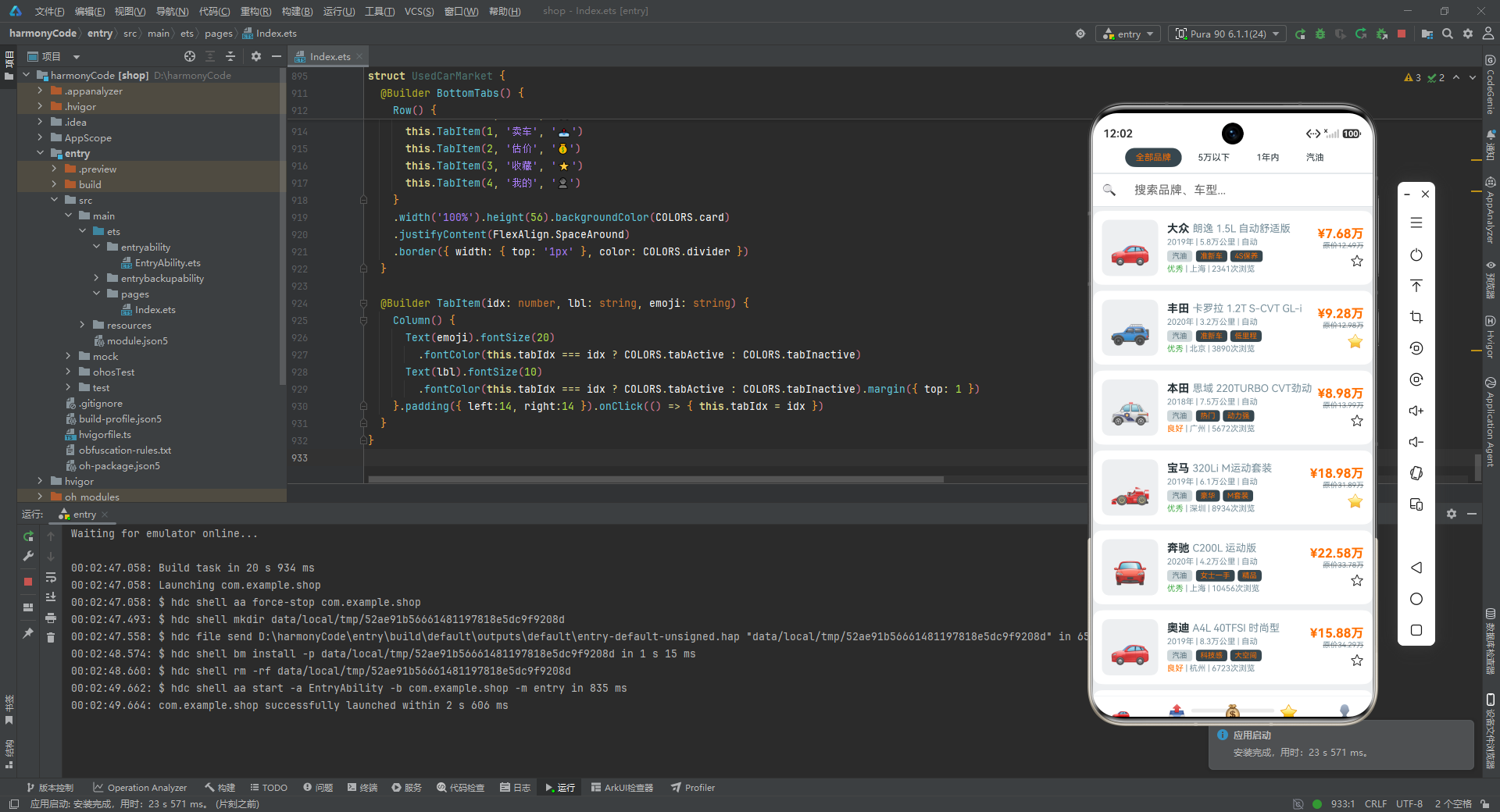
这个二手车交易市场应用虽然是一个 Demo,但其设计之完整、交互之丰富、代码之规范,已经具备了商业级应用的雏形。通过对它的深入剖析,我们不仅学习了 ArkUI 的核心 API 和开发模式,更理解了如何将设计理念、用户体验、技术实现三者有机结合,构建出一个既有"面子"(精美 UI)又有"里子"(清晰架构)的移动应用。

讨论HarmonyOS开发技术,专注于API与组件、DevEco Studio、测试、元服务和应用上架分发等。
更多推荐
 5
5 0
0- 0


 已为社区贡献146条内容

所有评论(0)