便签模块全量代码与效果:ArkTS 在 HarmonyOS 的随手一记
·
实例:备忘录便签(Memo)|收官文章
一、文件清单
| 文件 | 职责 | 行数 |
|---|---|---|
database/MemoDao.ets |
数据层:双键排序、部分更新、颜色筛选、种子 | 约 220 行 |
pages/samples/MemoPage.ets |
UI 层:彩色便签墙 + 筛选 + 新建编辑 | 约 240 行 |
resources/base/profile/main_pages.json |
路由注册:pages/samples/MemoPage |
追加一行 |
pages/Index.ets |
首页入口按钮 | 追加一个按钮 |
本篇文章完整展示可编译运行的 MemoPage 代码,最后描述运行效果。
二、MemoPage 完整代码
import { common } from '@kit.AbilityKit';
import { promptAction } from '@kit.ArkUI';
import { MemoDao, Memo, MEMO_COLORS } from '../../database/MemoDao';

@Entry
@Component
struct MemoPage {
  @State memos: Memo[] = [];
  @State total: number = 0;
  @State colorFilter: string = '全部';
  @State formVisible: boolean = false;
  @State editing: Memo | null = null;
  @State fTitle: string = '';
  @State fContent: string = '';
  @State fColor: string = MEMO_COLORS[0];
  private context: common.UIAbilityContext = getContext(this) as common.UIAbilityContext;

  aboutToAppear(): void {
    this.refresh();
  }

  async refresh(): Promise<void> {
    try {
      await MemoDao.initSeedData(this.context);
      this.total = await MemoDao.count(this.context);
      if (this.colorFilter === '全部') {
        this.memos = await MemoDao.queryAll(this.context);
      } else {
        this.memos = await MemoDao.queryByColor(this.context, this.colorFilter);
      }
    } catch (e) {
      promptAction.showToast({ message: `加载失败: ${e}` });
    }
  }

  async switchColor(color: string): Promise<void> {
    this.colorFilter = color;
    await this.refresh();
  }

  togglePin(m: Memo): void {
    MemoDao.togglePin(this.context, m.id, m.pinned === 1 ? 0 : 1).then(async () => {
      await this.refresh();
    });
  }

  openAdd(): void {
    this.editing = null;
    this.fTitle = ''; this.fContent = ''; this.fColor = MEMO_COLORS[0];
    this.formVisible = true;
  }

  openEdit(m: Memo): void {
    this.editing = m;
    this.fTitle = m.title; this.fContent = m.content; this.fColor = m.color;
    this.formVisible = true;
  }

  async onSave(): Promise<void> {
    if (!this.fTitle.trim()) {
      promptAction.showToast({ message: '标题必填' });
      return;
    }
    const memo: Memo = {
      id: this.editing ? this.editing.id : 0,
      title: this.fTitle.trim(),
      content: this.fContent.trim(),
      color: this.fColor,
      pinned: this.editing ? this.editing.pinned : 0,
      createdTime: this.editing ? this.editing.createdTime : Date.now(),
      updatedTime: Date.now(),
    };
    try {
      if (this.editing) {
        await MemoDao.update(this.context, memo);
      } else {
        await MemoDao.insert(this.context, memo);
      }
      this.formVisible = false;
      await this.refresh();
      promptAction.showToast({ message: '💾 已保存' });
    } catch (e) {
      promptAction.showToast({ message: `保存失败: ${e}` });
    }
  }

  onDelete(id: number): void {
    promptAction.showDialog({
      title: '删除便签',
      message: '确定删除这张便签吗?',
      buttons: [
        { text: '取消', color: '#808080' },
        { text: '删除', color: '#EF4444' },
      ],
    }).then((res: promptAction.ShowDialogSuccessResponse) => {
      if (res.index === 1) {
        MemoDao.delete(this.context, id).then(async () => {
          await this.refresh();
          promptAction.showToast({ message: '🗑 已删除' });
        });
      }
    });
  }

  build() {
    Stack({ alignContent: Alignment.BottomEnd }) {
      Column() {
        // ===== 标题栏 =====
        Row() {
          Column() {
            Text('📝 备忘录便签').fontSize(22).fontWeight(FontWeight.Bold)
            Text(`共 ${this.total} 张便签`).fontSize(12).fontColor('#999999').margin({ top: 2 })
          }.alignItems(HorizontalAlign.Start).layoutWeight(1)
          Text('↻').fontSize(22).onClick(() => this.refresh())
        }.width('100%').padding({ left: 16, right: 16, top: 12 })

        // ===== 颜色筛选 =====
        Scroll() {
          Row({ space: 8 }) {
            Text('全部')
              .fontSize(13).padding({ left: 12, right: 12, top: 6, bottom: 6 })
              .borderRadius(16)
              .backgroundColor(this.colorFilter === '全部' ? '#111827' : '#FFFFFF')
              .fontColor(this.colorFilter === '全部' ? Color.White : '#4B5563')
              .onClick(() => this.switchColor('全部'))
            ForEach(MEMO_COLORS, (c: string) => {
              Row().width(28).height(28).borderRadius(14).backgroundColor(c)
                .border({ width: this.colorFilter === c ? 3 : 0, color: '#3B82F6' })
                .onClick(() => this.switchColor(c))
            }, (c: string) => c)
          }.padding({ left: 16, right: 16, top: 10 })
        }.scrollable(ScrollDirection.Horizontal).scrollBar(BarState.Off).width('100%')

        // ===== 便签墙 =====
        List({ space: 10 }) {
          ForEach(this.memos, (m: Memo) => {
            ListItem() {
              Column() {
                Row() {
                  Text(m.pinned === 1 ? '📌' : '').fontSize(14)
                  Text(m.title).fontSize(15).fontWeight(FontWeight.Bold).layoutWeight(1)
                  Text('⋯').fontSize(18).fontColor('#6B7280').onClick(() => this.showMenu(m))
                }.width('100%')
                if (m.content.length > 80) {
                  Text(m.content.substring(0, 80) + '…').fontSize(13).fontColor('#4B5563')
                    .margin({ top: 8 }).lineHeight(20)
                } else {
                  Text(m.content).fontSize(13).fontColor('#4B5563')
                    .margin({ top: 8 }).lineHeight(20)
                }
                Text(this.fmtTime(m.updatedTime)).fontSize(10).fontColor('#9CA3AF').margin({ top: 10 })
              }
              .padding(14).borderRadius(12).backgroundColor(m.color)
              .width('100%').alignItems(HorizontalAlign.Start)
              .onClick(() => this.openEdit(m))
            }
          }, (m: Memo) => `${m.id}-${m.title}`)
        }
        .width('94%').layoutWeight(1).margin({ top: 10 })
        .scrollBar(BarState.Off)
        .lanes(2, 10)
      }
      .width('100%').height('100%').backgroundColor('#F8FAFC')

      // ===== 悬浮新建按钮 =====
      Text('+')
        .width(52).height(52).borderRadius(26)
        .backgroundColor('#F59E0B').fontColor(Color.White).fontSize(28)
        .textAlign(TextAlign.Center)
        .margin({ right: 20, bottom: 24 })
        .shadow({ radius: 8, color: 'rgba(245,158,11,0.4)', offsetY: 3 })
        .onClick(() => this.openAdd())

      // ===== 新建/编辑弹窗 =====
      if (this.formVisible) {
        Column() {
          Text(this.editing ? '编辑便签' : '新建便签').fontSize(18).fontWeight(FontWeight.Bold)
          TextInput({ placeholder: '标题 *', text: this.fTitle }).margin({ top: 10 }).onChange((v: string) => this.fTitle = v)
          TextArea({ placeholder: '写点什么…', text: this.fContent })
            .height(120).margin({ top: 8 }).onChange((v: string) => this.fContent = v)
          Row({ space: 6 }) {
            ForEach(MEMO_COLORS, (c: string) => {
              Row().width(26).height(26).borderRadius(13).backgroundColor(c)
                .border({ width: this.fColor === c ? 3 : 0, color: '#3B82F6' })
                .onClick(() => this.fColor = c)
            }, (c: string) => c)
          }.margin({ top: 12 })
          Row({ space: 8 }) {
            Button('取消').layoutWeight(1).backgroundColor('#EEF2F7').fontColor('#555555')
              .onClick(() => this.formVisible = false)
            Button('保存').layoutWeight(1).backgroundColor('#F59E0B')
              .onClick(() => this.onSave())
          }.margin({ top: 16 })
        }
        .padding(20).borderRadius(16).backgroundColor(Color.White).width('90%')
        .position({ x: '5%', y: '14%' })
      }
    }
    .width('100%').height('100%')
  }

  showMenu(m: Memo): void {
    promptAction.showActionMenu({
      title: m.title,
      buttons: [
        { text: m.pinned === 1 ? '取消置顶' : '置顶', color: '#F59E0B' },
        { text: '删除', color: '#EF4444' },
      ],
    }).then((res: promptAction.ActionMenuSuccessResponse) => {
      if (res.index === 0) {
        this.togglePin(m);
      }
      if (res.index === 1) {
        this.onDelete(m.id);
      }
    });
  }

  private fmtTime(ts: number): string {
    const d = new Date(ts);
    return `${d.getMonth() + 1}月${d.getDate()}日 ${String(d.getHours()).padStart(2, '0')}:${String(d.getMinutes()).padStart(2, '0')}`;
  }
}
三、注册与运行
main_pages.json追加"pages/samples/MemoPage";Index.ets追加:Button('📝 11 备忘录便签').fontSize(15).width('70%') .onClick(() => this.getUIContext().getRouter().pushUrl({ url: 'pages/samples/MemoPage' }))- 构建验证 →
BUILD SUCCESSFUL。
四、运行效果描述
进入「📝 11 备忘录便签」:
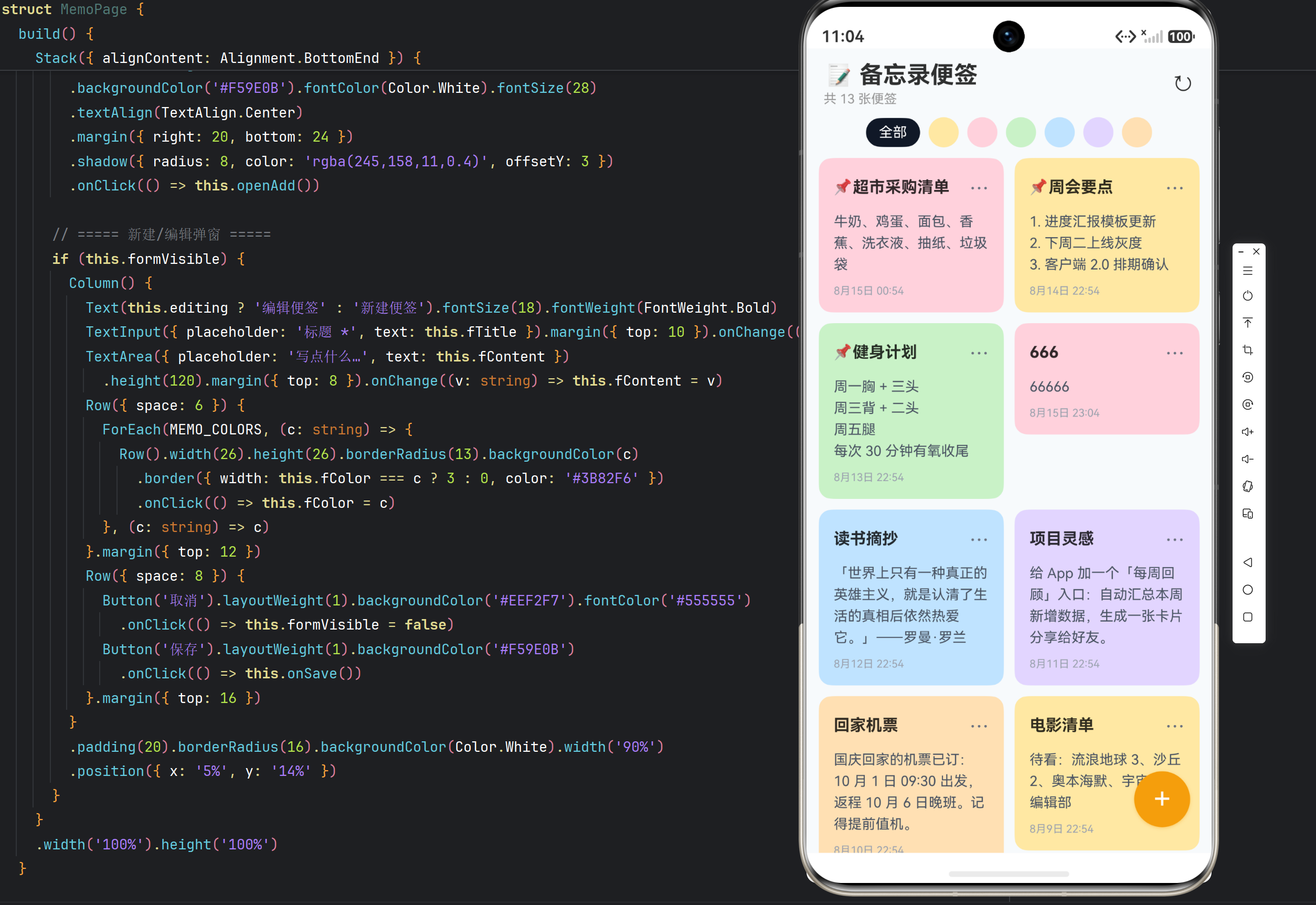
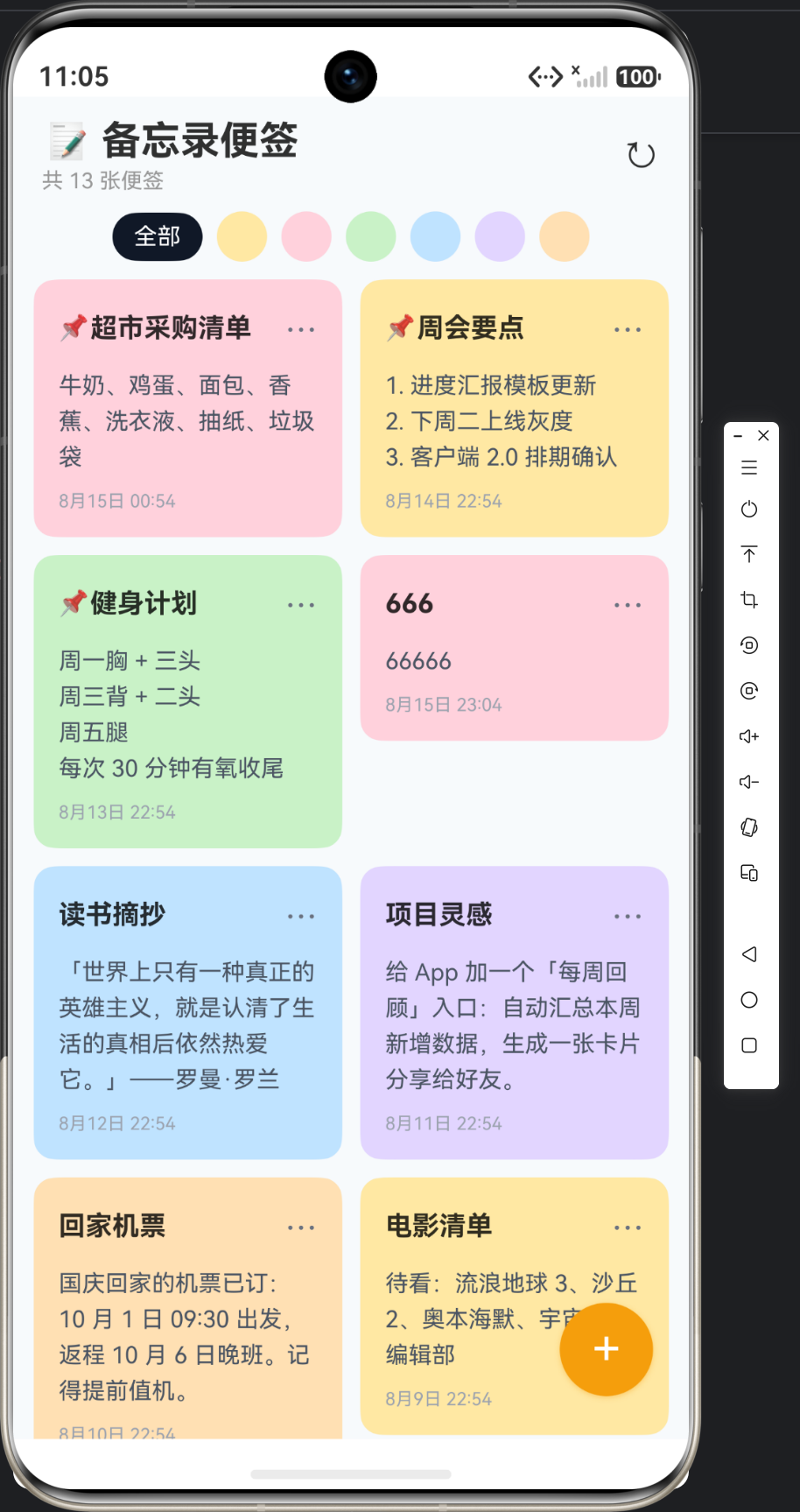
第一屏:标题栏「📝 备忘录便签 · 共 12 张便签」;六色圆点筛选条 + 「全部」;下方双列便签墙——12 张彩色卡片:前 3 张带 📌(米黄周会要点、粉超市采购、绿健身计划),后 9 张无图钉(蓝摘抄、紫灵感、橙机票…),每张卡片「标题加粗 + 内容摘要 + 底部时间」。
交互一(颜色筛选):点粉色圆点(描边高亮)→ 墙面只剩 2 张粉色便签(超市采购、生日提醒)→ 点「全部」恢复 12 张。
交互二(置顶/取消):点任意便签 ⋯ → 底部弹出菜单 → 点「置顶」→ 便签跳到墙面最前 + 📌 标识;再 ⋯ → 「取消置顶」→ 回到普通区。
交互三(新建):点橙色「+」→ 弹窗 → 输标题内容、选颜色 → 保存 → 新便签以所选颜色出现在墙顶(普通区最前)。
交互四(编辑换色):点便签卡 → 弹窗预填 → 换颜色保存 → 便签变色并上浮到同组顶部。
五、代码质量要点回顾
| 关注点 | 本实例做法 |
|---|---|
| 双键排序 | pinned DESC + updated_time DESC |
| 部分更新 | togglePin/changeColor 最小写 |
| 颜色驱动 | MEMO_COLORS 单一来源 |
| 操作菜单 | showActionMenu + index 判断 |
| 复用弹窗 | editing 区分新建/编辑 |
| 悬浮新建 | Stack BottomEnd + 橙色浮钮 |
六、文章小结
实例 11「备忘录便签」收官。五篇文章覆盖:置顶颜色建模(11-1)→ 彩色便签墙 UI(11-2)→ 置顶排序与部分更新(11-3)→ 六色种子(11-4)→ 全量代码(11-5)。核心技术是双键排序的分组结构、部分字段更新的最小写入(RDB 相对 ORM 的优势)、以及「颜色即语义」的展示设计。这是「轻量内容应用」的完整范式。

讨论HarmonyOS开发技术,专注于API与组件、DevEco Studio、测试、元服务和应用上架分发等。
更多推荐
 14
14 0
0- 0


 已为社区贡献82条内容

所有评论(0)