鲁班锁坊非遗制锁应用基于HarmonyOS API 24深度解析——采用了“单入口 + 多内容区 + 底部导航“的经典移动端布局模式。入口组件 LubanApp 作为整个应用的根容器
鲁班锁坊非遗制锁应用基于HarmonyOS API 24深度解析——采用了"单入口 + 多内容区 + 底部导航"的经典移动端布局模式。入口组件 LubanApp 作为整个应用的根容器
本文基于 HarmonyOS NEXT + ArkTS 声明式开发框架,完整实现一个「鲁班锁坊」非遗制锁主题 App,涵盖配色系统、状态管理、多 Tab 页面、自定义弹窗、动态颜色映射、两列网格布局、难度可视化等核心知识点,并附完整源码与运行效果截图。
一、引言:非遗制锁的数字化传承
在移动互联网与智能设备高速发展的今天,非物质文化遗产的传承与传播已经从单纯的线下演示,演变为一种高度数字化、流程化、个性化的线上线下融合体验。鲁班锁,又名孔明锁、八卦锁,是中国古代传统的土木建筑固定结合器,距今已有数千年历史。它起源于古代建筑中的榫卯结构,不用钉子和绳子,完全靠自身结构的连接支撑,展现了一种看似简单却不平凡的智慧。一只好锁,从选材、画线、凿卯、制榫到拼装、打磨,需经数十道工序,凝聚着匠人的心血与木作的温润。六通锁的精巧、二十四锁的繁复、菠萝锁的别致、九龙壁的雄浑、三才锁的简约、八卦锁的玄妙,每一只锁都承载着中国人对智慧与巧思的追求与向往。然而,这门古老的技艺正面临着传承人老龄化、受众面狭窄、销售渠道单一等现实困境。
正是在这样的背景下,鲁班锁坊类数字化应用应运而生,并迅速成为非遗制锁"活态传承"的数字载体。一个优秀的鲁班锁坊应用,不仅需要覆盖从"锁型陈列"到"评鉴口碑"的完整业务闭环,还要在视觉设计、交互体验、数据呈现上做到细致入微,让用户在指尖滑动间便能感受到木作的温润与制锁的雅致。
本文将深入剖析一个基于鸿蒙 ArkUI 声明式开发框架构建的鲁班锁坊非遗制锁应用。该应用以"锁型陈列"为核心,横向扩展出榫件料库、难度分布、订单管理、评鉴口碑五大功能模块,形成了一个完整闭环的制锁管理生态。它不仅是一个功能完备的演示项目,更是一份典型的 ArkUI 工程实践范本,涵盖了状态管理、组件化设计、模态弹窗、列表渲染、图表可视化、动态颜色映射、两列网格布局、难度可视化等关键技术点。
二、应用整体架构概览
整个应用采用了"单入口 + 多内容区 + 底部导航"的经典移动端布局模式。入口组件 LubanApp 作为整个应用的根容器,负责管理当前激活的 Tab 状态,并根据状态切换不同的内容区组件。
应用一共划分为五个一级页面:锁型陈列(LOCK)、榫件料库(JOINT)、难度分布(LEVEL)、订单管理(ORDER)以及评鉴口碑(REVIEW)。每个页面都是一个独立的 @Component 装饰的自定义组件,内部封装了自己的状态、构建逻辑和子组件。这种"高内聚、低耦合"的组件化设计,使得每个页面可以独立开发、独立测试,同时也便于后续的扩展与维护。
在数据层面,应用定义了一套完整的类型系统,包括色彩主题、锁型元数据、榫件元数据、难度元数据、订单元数据、评鉴元数据、周销量元数据、工艺热度元数据等,并通过常量数组将数据与 UI 表现层解耦。所有业务数据以 @Observed 装饰的可观察类 LubanData 为载体,配合四组各 12 条模拟数据,模拟了一个真实的鲁班锁坊数据环境。
在交互层面,应用通过 @Builder 构建器实现了三类弹窗的叠加显示:新制鲁班锁、修改订单、撤下榫件。弹窗以 Stack 布局叠加全屏半透明遮罩 + 居中卡片的形式呈现,遮罩点击可关闭,与主内容共享同一根 Column,通过布尔状态控制显隐。
在视觉层面,应用独创了"两列网格"的锁型页设计——锁型陈列使用 ForEach(LOCK_PAIRS [0,2,4,6,8,10]) 遍历,每行渲染两个锁,形成两列网格,不同于之前项目的列表布局。难度页独创"三卡片"布局——难度分布柱状图+制锁工艺热度横向条形图+三栏统计卡片,信息密度最高。顶部头部通过 @Builder topBar() 抽取,build() 中直接调用,代码更整洁。
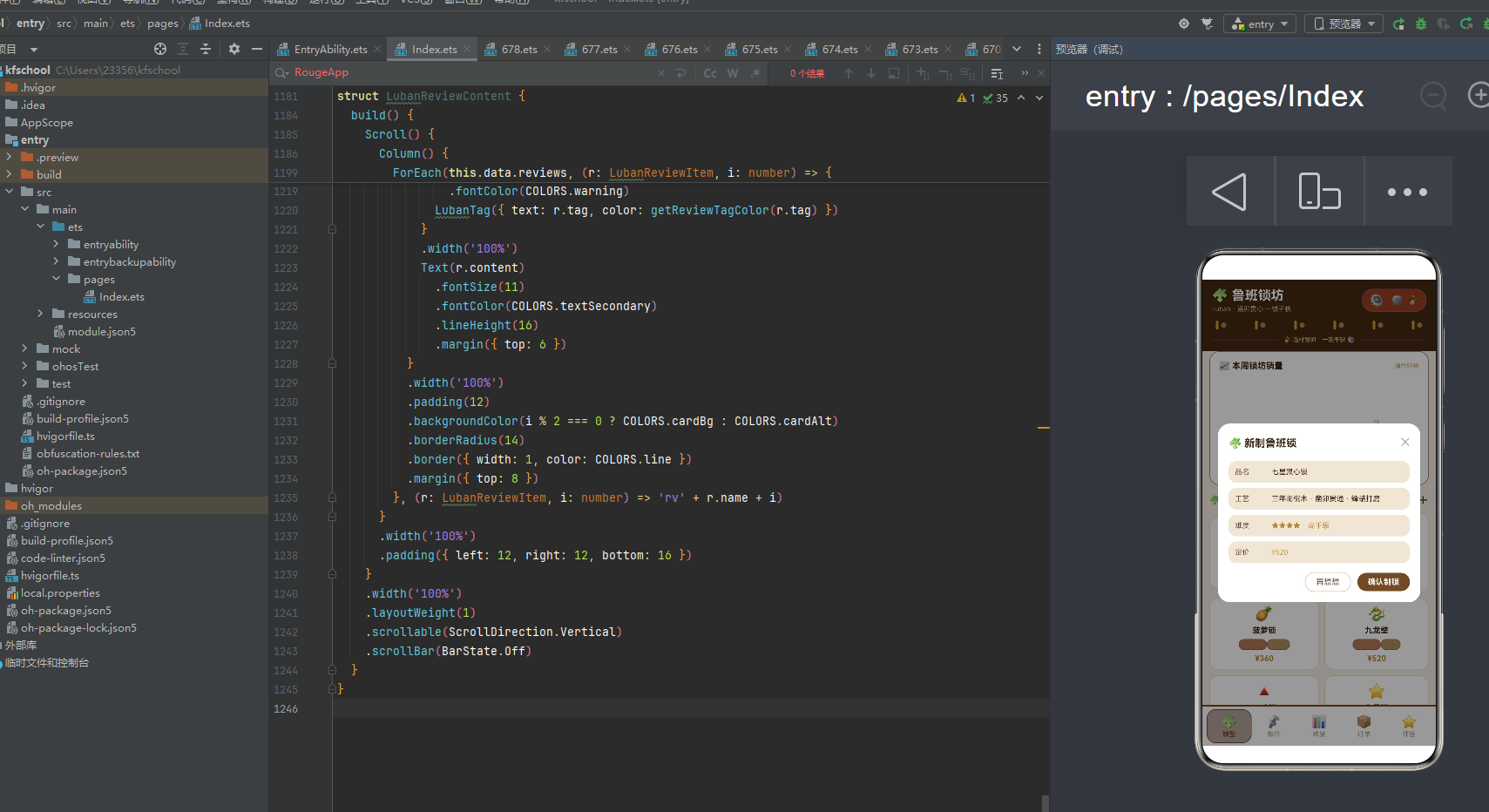
下面逐页展示应用的五大功能模块运行效果。
三、锁型页:两列网格的锁型陈列
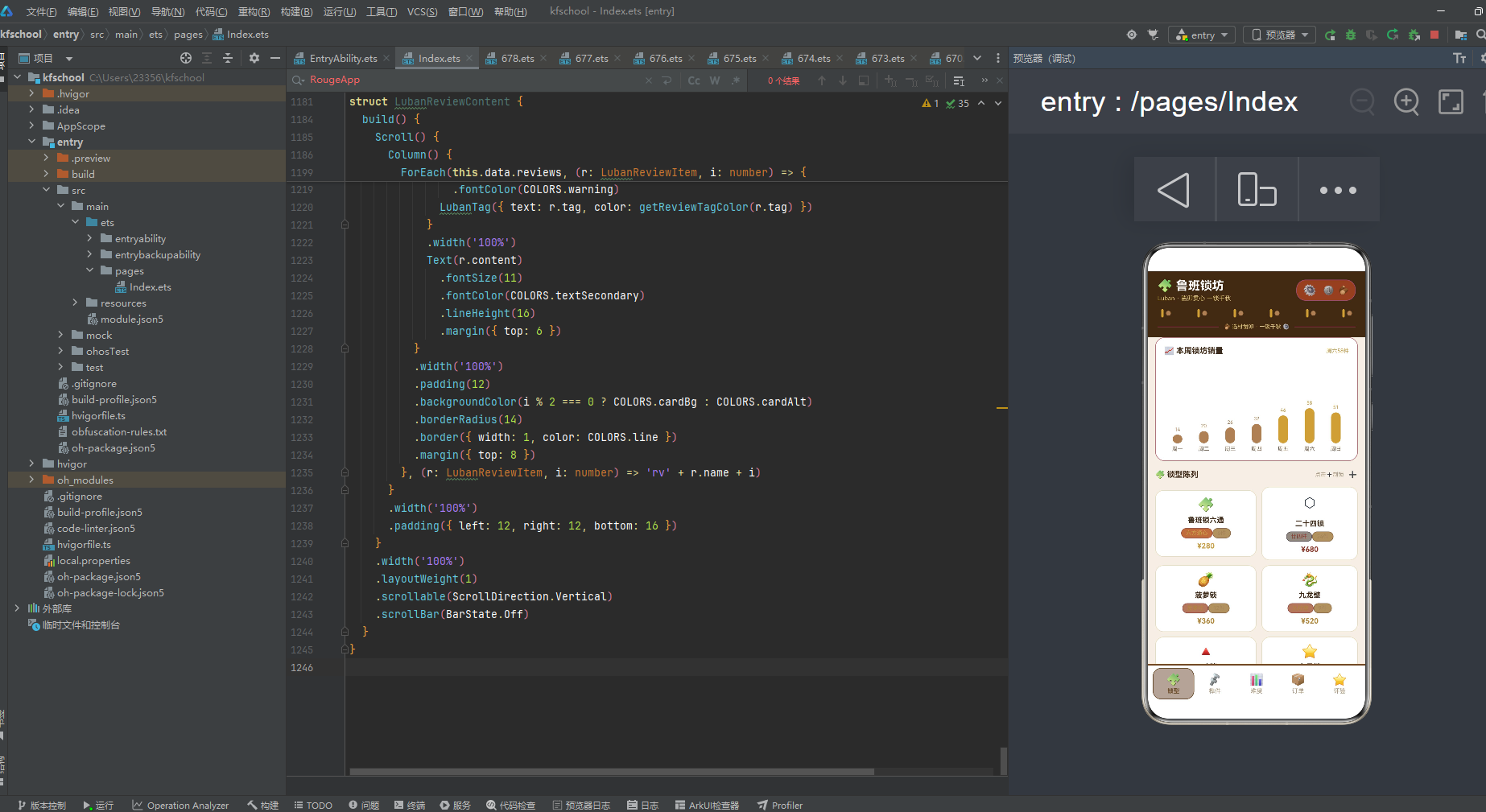
锁型页是整个应用的默认首页,也是视觉设计最独特的页面。它包含了本周锁坊销量柱状图、锁型陈列两列网格,以及新制鲁班锁弹窗。
锁型页顶部是"本周锁坊销量"柱状图卡片,采用白色背景配 1px 黄铜金半透明边框,圆角 16。通过 ForEach 遍历一周七天的销量数据,柱子高度直接绑定数值,销量超过 40 的日期(周五、周六、周日)使用 accent 黄铜金 #C9A24B 突出显示,其余日期使用 primaryLight 木棕浅 #A8825A,形成自然的高低起伏。周六以 58 件的销量居首,符合鲁班锁作为文玩用品在周末热销的真实节奏。
下方是锁型陈列,采用了独创的"两列网格"设计——使用 ForEach(LOCK_PAIRS [0,2,4,6,8,10]) 遍历,每行渲染两个锁(索引 p 和 p+1),形成两列网格布局。每个锁卡片:emoji 图标 22 号、锁型名称、形状标签(颜色按难度动态着色)+ 件数标签、价格(颜色按难度动态着色),白色背景圆角 14,1px 浅木色边框。
12 款锁覆盖了从 120 元(三才锁)到 1280 元(老木包浆锁)的完整价格梯队,件数从 3 件到 24 件不等,难度从 1 星(入门)到 5 星(宗师)递进。鲁班锁六通¥280、二十四锁¥680、菠萝锁¥360、九龙壁¥520、三才锁¥120、七星锁¥320、八卦锁¥460、四季锁¥180、十二柱宫锁¥880、梅花锁¥240、笼中鸟锁¥560、老木包浆锁¥1280,emoji 图标与锁型名称呼应(鲁班锁六通用🧩、二十四锁用⬡、菠萝锁用🍍、九龙壁用🐉、三才锁用🔺、八卦锁用☯️等),让锁不仅是益智玩具,更是形制与难度的双重体验。右上角 ➕ 按钮点击可弹出"新制鲁班锁"弹窗。
四、榫件页:榫型分布与撤件管理
榫件页以"榫件"为核心,顶部是榫型分布横向条形图,下方是榫件料库列表,支持撤件操作。
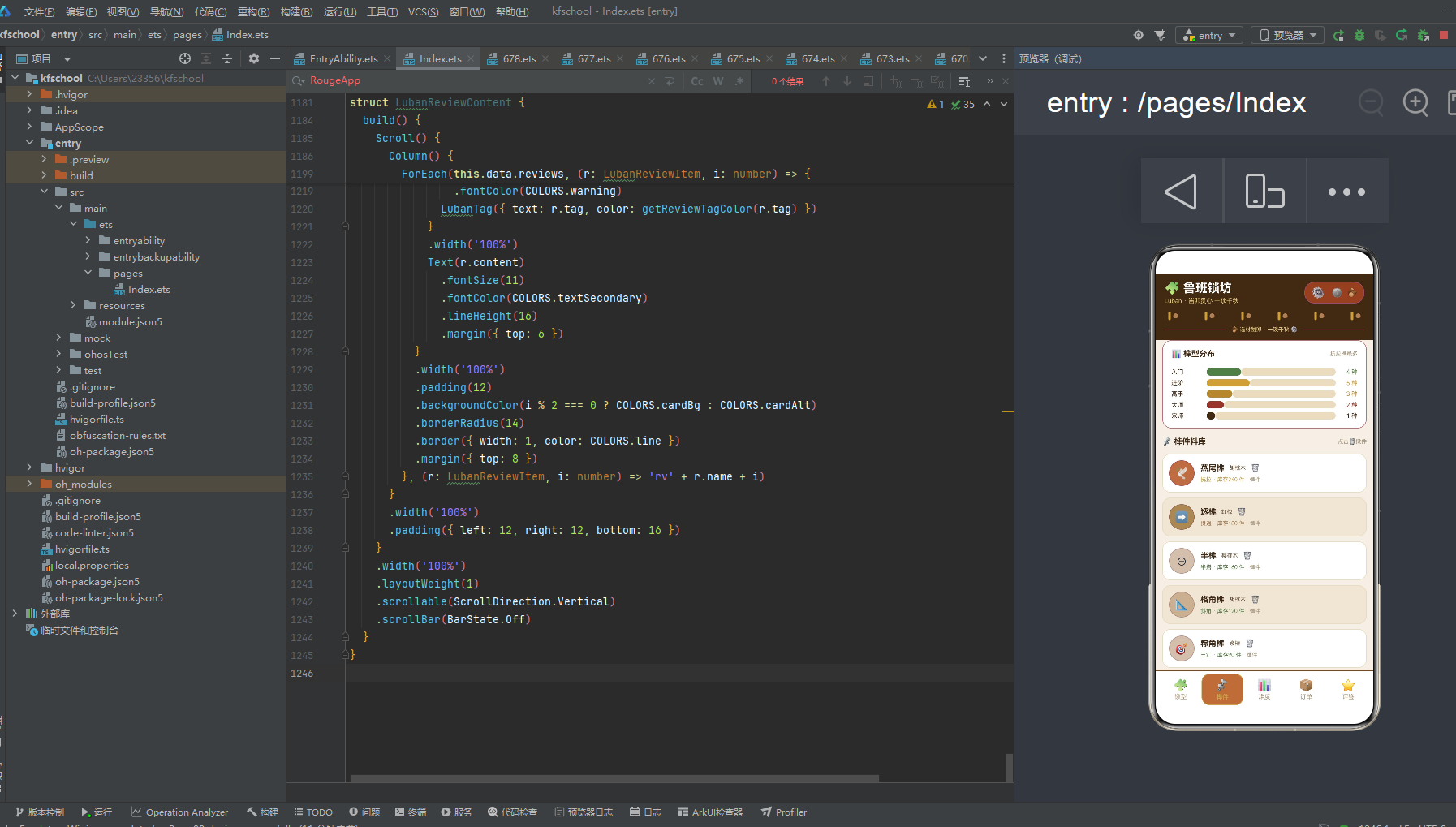
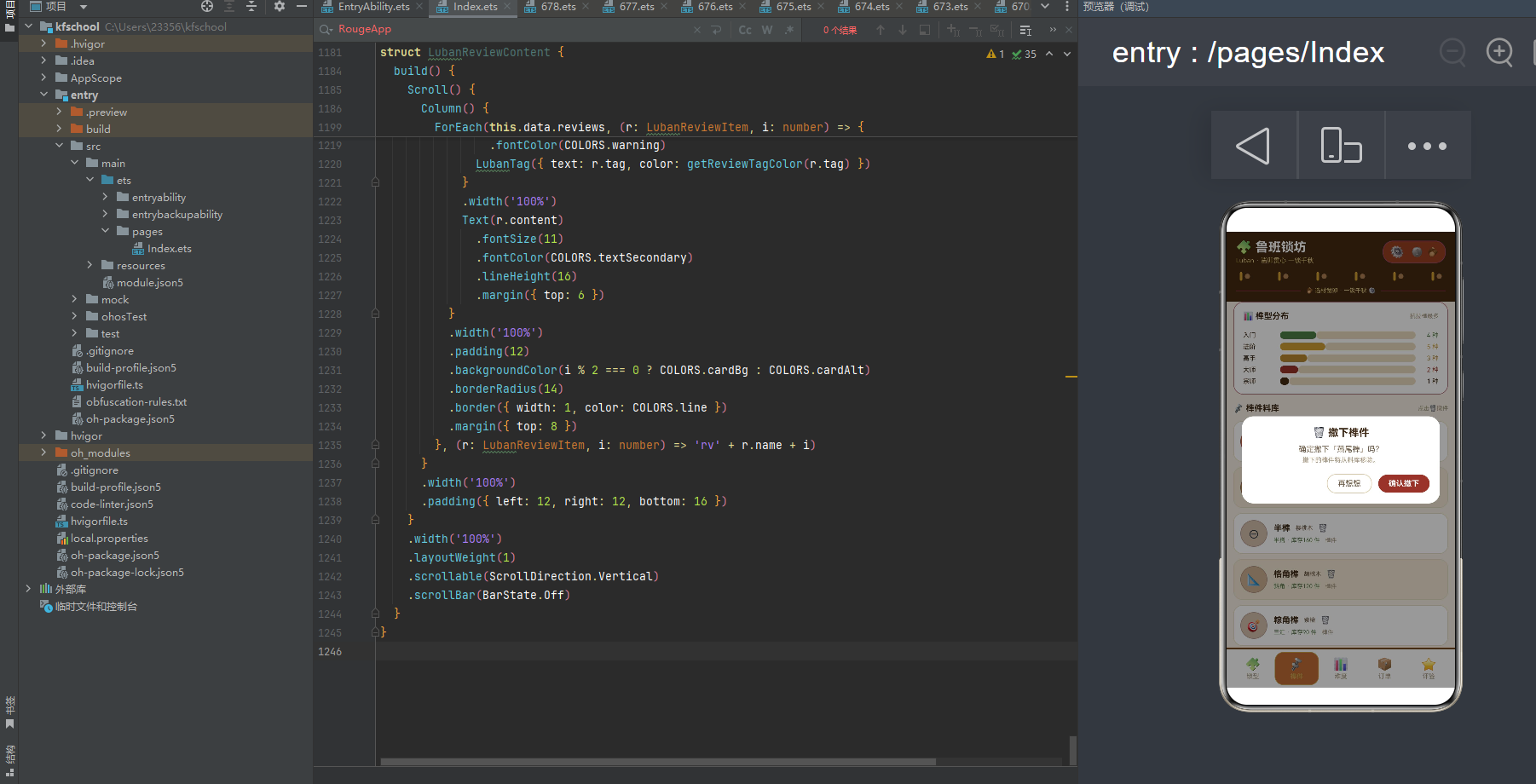
顶部榫型分布卡片通过横向进度条展示五个难度等级的榫件分布:入门 4 种、进阶 5 种、高手 3 种、大师 2 种、宗师 1 种,合计 15 种(满刻度 15)。进度条以 15 为满刻度进行比例渲染,比百分比更直观地传达了"几种榫型"的语义。五种难度各有特色配色:入门用竹绿 #5A7D4C、进阶用黄铜金 #C9A24B、高手用金棕 #B0893F、大师用赭红 #8E3B2E、宗师用深棕 #3E2A16,形成从浅到深的难度递进色阶。
下方榫件料库列表展示 12 款榫件,卡片采用"左图标右文字"布局。左侧是一个 42×42 的圆形图标(圆角21),背景色通过 getJointColor 函数按榫型分档着色(抗拉/加固/互锁类黄铜金、贯通/变截面/斜撑类木棕浅、其余竹绿),展示榫件 emoji 图标。右侧展示榫件名称、木材(胡桃木/红橡/樱桃木/紫檀等)、榫型(“抗拉 · 库存240 件”,颜色按榫型动态着色)和 🗑️ 撤件按钮。
12 款榫件覆盖燕尾榫、透榫、半榫、格角榫、粽角榫、揣榫、大进小出榫、勾挂榫、楔钉榫、霸王枨、夹头榫、插肩榫十二种经典榫卯结构,木材从胡桃木、红橡、樱桃木到紫檀,库存从 70 件(楔钉榫)到 240 件(燕尾榫)不等,呈现出"榫件天下"的格局。其中燕尾榫库存 240 件最多,楔钉榫 70 件最少,符合"常用榫库存多、特殊榫库存少"的行业规律。点击 🗑️ 按钮弹出"撤下榫件"二次确认弹窗,采用警示型设计语言,"确认撤下"按钮使用危险色赭红,防止误操作。
五、难度页:三卡片的难度可视化
难度页是应用中信息密度最高的页面,独创"三卡片"布局——难度分布柱状图、制锁工艺热度横向条形图、三栏统计卡片。
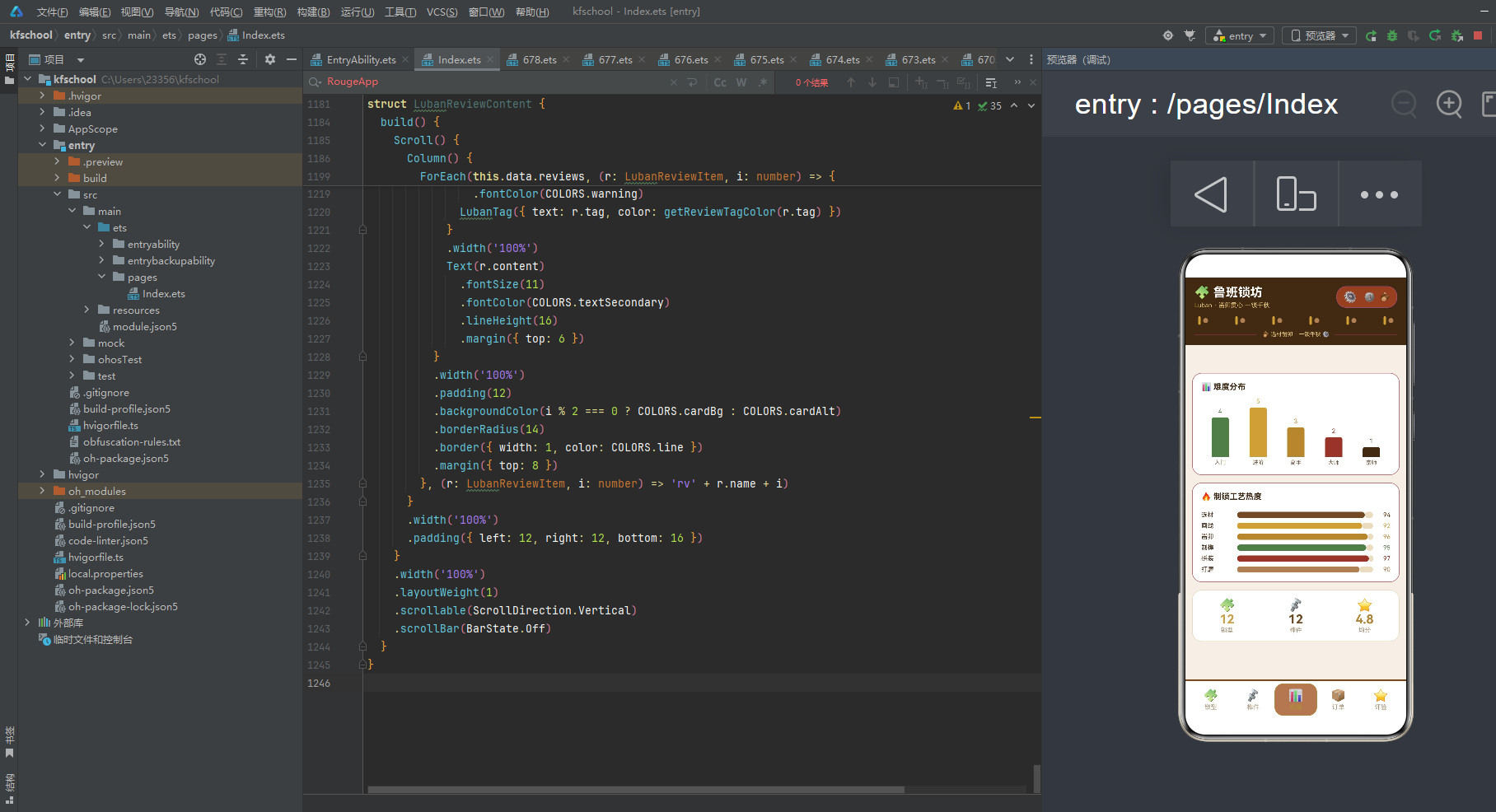
第一张卡片是"难度分布"柱状图,展示五个难度等级的锁型数量:入门 4 款、进阶 5 款、高手 3 款、大师 2 款、宗师 1 款。柱子高度直接绑定 count×16,顶部圆角(topLeft/topRight 各 4),底部对齐,形成从左到右先升后降的山峰状分布。进阶以 5 款居首,符合"进阶锁型最丰富"的产品策略。五种难度各有特色配色,形成从浅到深的难度递进色阶。
第二张卡片是"制锁工艺热度"横向条形图,展示六门工序的热度指数:选材 94、画线 92、凿卯 96、制榫 95、拼装 97、打磨 90,恰好对应制锁制作的完整流程(选材→画线→凿卯→制榫→拼装→打磨),拼装以 97 的热度居首(不是第一道选材),呈现出"拼装为核心工序"的合理分布。六根进度条颜色从胡桃木棕到黄铜金到金棕到竹绿到赭红到木棕浅,形成了一条色彩渐变的工艺流水线。
第三张卡片是三栏统计,横向排列三个数据指标:12 锁型(黄铜金 #C9A24B)、12 榫件(胡桃木棕 #6D4C2A)、4.8 均分(金棕 #B0893F),每个指标上方配 emoji 图标(🧩/🔩/⭐),下方配文字标签(锁型/榫件/均分),白色背景圆角 16,1px 浅木色边框。三栏统计一目了然地展示了鲁班锁坊的核心数据规模。
六、订单页:锁坊订单与改单管理
订单页以"订单"为核心,展示锁坊订单列表,支持修改订单。
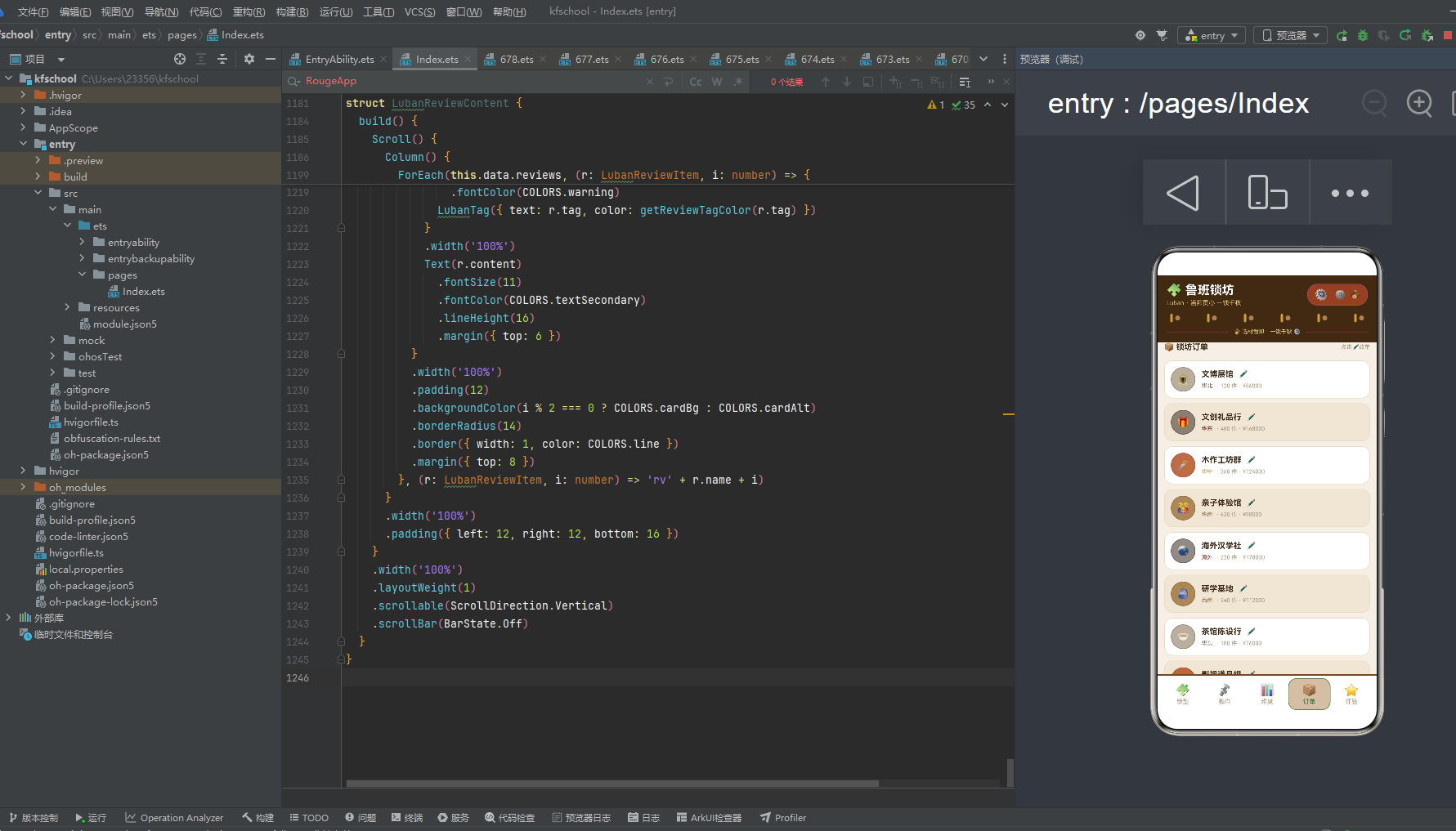
页面顶部是标题行"📦 锁坊订单"和操作提示"点击✏️改单"。下方 12 条订单卡片采用"左图标右文字"布局。左侧是一个 40×40 的圆形图标(圆角20),背景色通过 getOrderColor 函数按订单金额分档着色(16万以上赭红、12-16万黄铜金、9-12万木棕浅、9万以下深木棕),展示客户 emoji 图标。右侧展示客户名称、✏️ 编辑按钮、区域标签和订单详情(“· 120 件 · ¥86000”)。
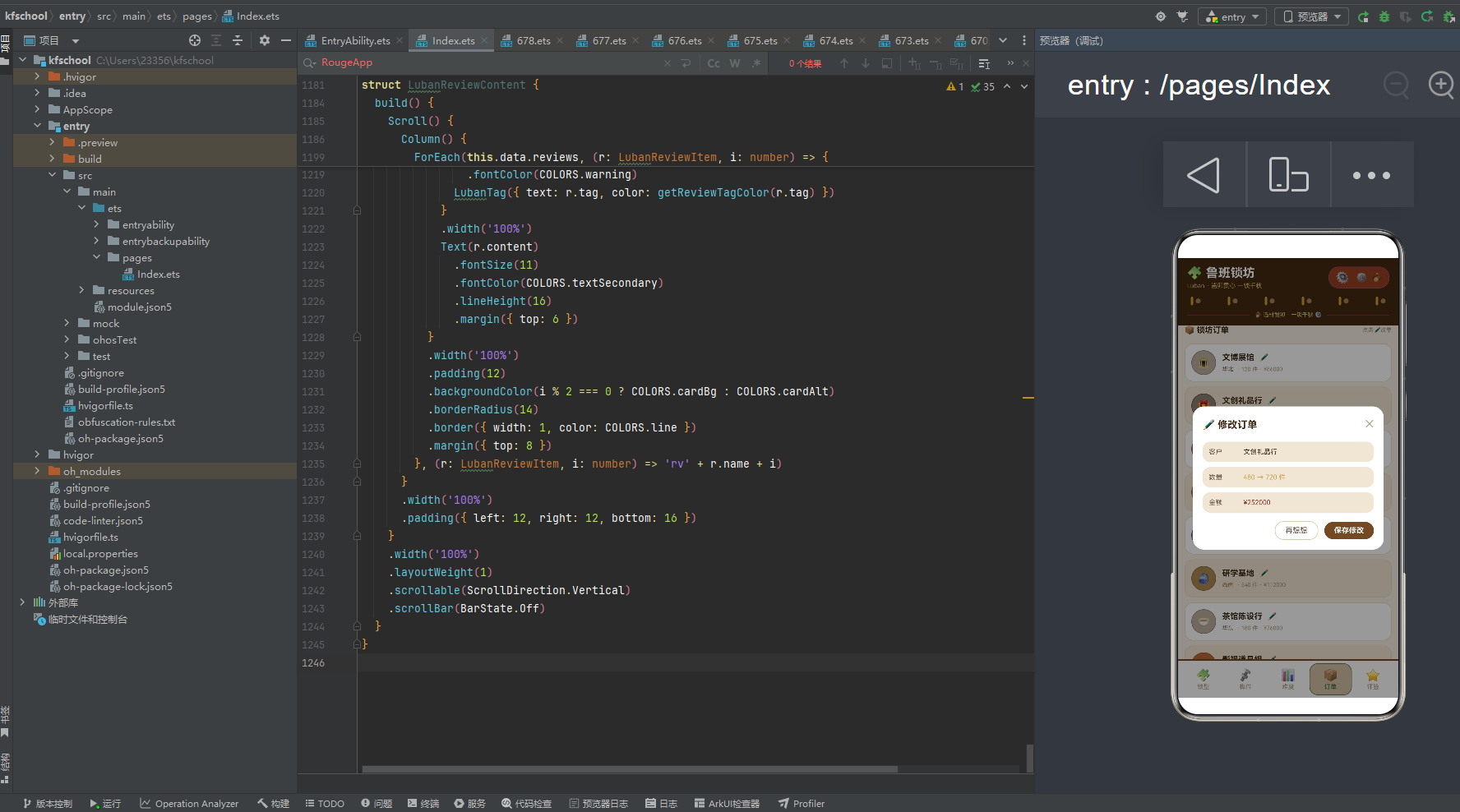
12 类客户覆盖文博展馆、文创礼品行、木作工坊群、亲子体验馆、海外汉学社、研学基地、茶馆陈设行、影视道具组、非遗课堂、直播文玩号、景区文创店、高端定制客。高端定制客以 60 件的数量最少但金额 196000 最高,单价极高,符合高端定制对精品鲁班锁的高需求。海外汉学社虽然只有 220 件,但金额高达 178000,单价第二高,体现了非遗制锁在海外市场的高溢价。非遗课堂以 800 件的数量最多但金额 88000,单价最低,符合课堂教具批量采购的特点。点击 ✏️ 按钮弹出"修改订单"弹窗,可调整数量和金额,数量行使用箭头符号"→"直观展示修改前后的对比。
七、评鉴页:口碑展示与标签体系
评鉴页是应用中最具"人情味"的页面,展示了 12 条用户好评。
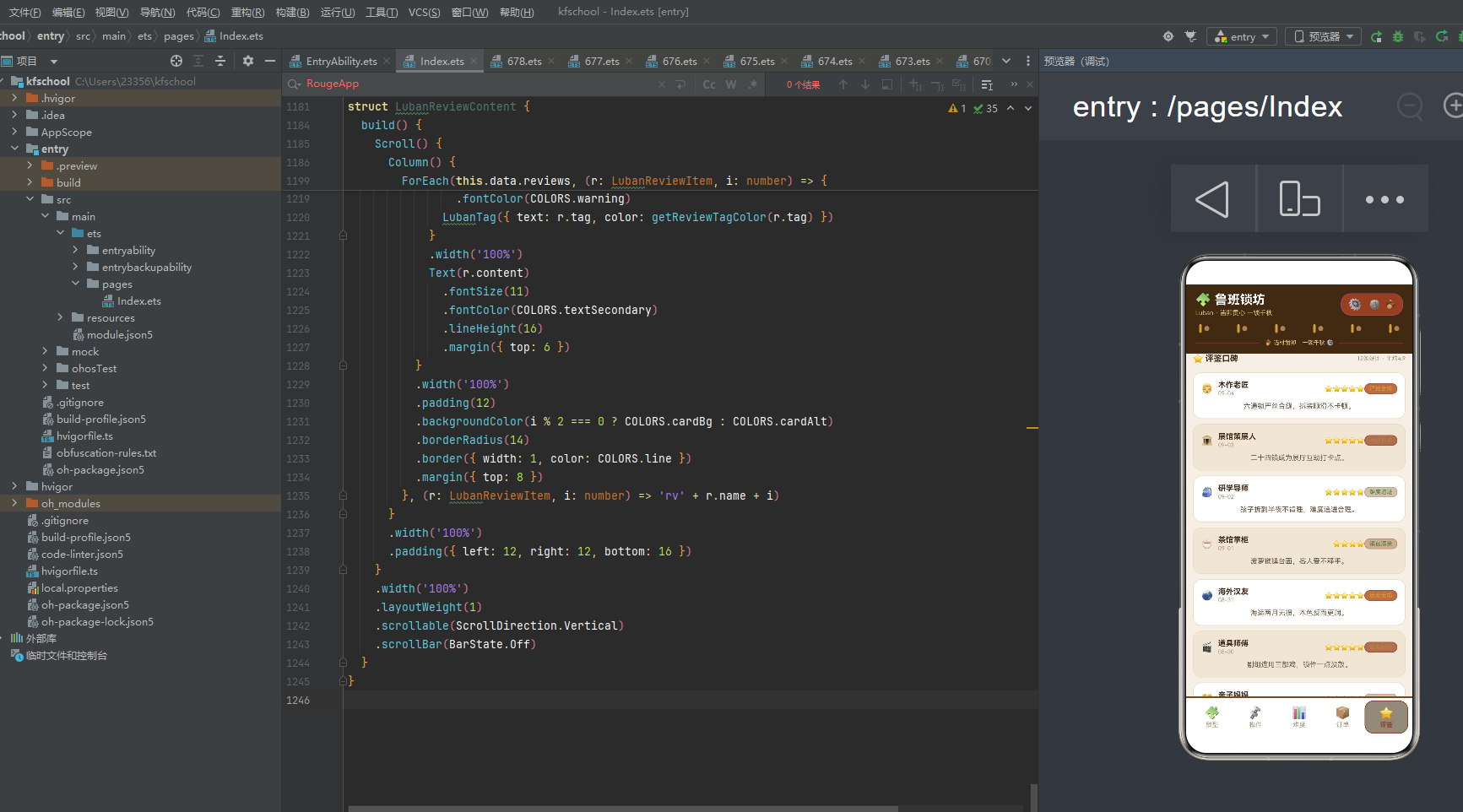
页面顶部是标题行"⭐ 评鉴口碑"和统计摘要"12条好评 · 平均4.9"。下方 12 条评价卡片采用"左头像右信息"的横向布局:最左侧是用户 emoji 头像,中间是用户名称和日期,右侧是星级评分(通过 String.repeat 一行代码生成对应数量的星星)和评价标签(通过动态颜色函数按标签语义分档着色)。评价内容正文在卡片下方,使用次要色文字和 16px 行高。
12 条评价每条都有独特的标签:“严丝合缝”、“互动打卡”、“难度递进”、“镇台添景”、“远渡无损”、“结实耐用”、“入门友好”、“盼出小号”、“一夜爆单”、“日销百件”、“包浆温润”、“课堂标配”,这些标签既概括了评价核心,又形成了鲁班锁坊的口碑关键词云。
评价内容充满生活气息,如"六通锁严丝合缝,拆装顺滑不卡顿"、“二十四锁成为展厅互动打卡点”、“孩子拆到半夜不肯睡,难度递进合理”、“菠萝锁镇台面,客人爱不释手”、“海运两月无损,木色反而更润”、“剧组连用三部戏,锁件一点没散”、“三才锁入门正合适,娃有成就感”、“老木包浆锁上手温润,木香还在”,让数据看起来不是冷冰冰的测试桩,而是真实锁友的心声。卡片背景使用白色与浅木色奇偶交替,整体视觉雅致而温润。
八、色彩主题系统:胡桃木棕与黄铜金的制锁视觉语言
8.1 色彩接口定义
任何一款设计精良的应用,背后都有一套严谨的色彩规范。该应用首先通过一个 LubanPalette 接口,将整个应用所需的色彩抽象为一个结构化的契约:
interface LubanPalette {
  primary: string;
  primaryLight: string;
  primaryDark: string;
  accent: string;
  accentLight: string;
  bg: string;
  cardBg: string;
  cardAlt: string;
  textPrimary: string;
  textSecondary: string;
  textHint: string;
  border: string;
  line: string;
  success: string;
  warning: string;
  danger: string;
  white: string;
  brass: string;
  wood: string;
}
- primary:主色调,胡桃木棕 #6D4C2A,用于按钮、强调文字、激活状态、底部导航装饰条等高优先级视觉元素,是木作的标志性色彩。
- primaryDark:主色深色变体 #3E2A16,作为顶部头部背景,营造深木作的沉稳感。
- accent:强调色,黄铜金 #C9A24B,与胡桃木棕形成暖色调对比,用于齿轮、黄铜币、销量高亮等元素。
- bg:页面整体背景色 #F5EFE6,米白暖调,营造木作工坊般的温润质感。
- brass:黄铜色 #C9A24B,专用于头部装饰竖条,语义上强调"黄铜"的金属质感。
- wood:木色 #6D4C2A,用于装饰性圆点,营造出木作的自然质感。
8.2 色彩实例化
const COLORS: LubanPalette = {
  primary: '#6D4C2A',
  primaryLight: '#A8825A',
  primaryDark: '#3E2A16',
  accent: '#C9A24B',
  accentLight: '#E0C57A',
  bg: '#F5EFE6',
  cardBg: '#FFFFFF',
  cardAlt: '#EFE6D6',
  textPrimary: '#3E2A16',
  textSecondary: '#6D5A45',
  textHint: '#A89880',
  border: '#D9C9A8',
  line: '#E8DCC2',
  success: '#5A7D4C',
  warning: '#B0893F',
  danger: '#8E3B2E',
  white: '#FFFFFF',
  brass: '#C9A24B',
  wood: '#6D4C2A'
};
主色 #6D4C2A 是一种醇厚的胡桃木棕色,既契合"制锁"主题(木作的标志性色彩),又具有传统、沉稳的气质。强调色 #C9A24B 黄铜金与胡桃木棕形成暖色调对比,呼应齿轮、黄铜件的色彩。brass 黄铜色 #C9A24B 用于头部装饰竖条,营造出黄铜金属的视觉感。背景色 #F5EFE6 米白暖调与主色同暖色系,营造出木作工坊般的温润氛围。值得注意的是,本应用的动态颜色函数返回的是多色系(赭红/金棕/黄铜金/竹绿/木棕浅),用于不同业务维度的语义着色,难度越高颜色越深(getLockColor),金额越高颜色越红(getOrderColor),形成了"以色定级、以色定价"的高级渲染模式。这种将所有色彩集中管理的做法保证了全局一致性,支持主题切换,降低了维护成本。
九、类型定义:构建严谨的数据契约
应用通过一组接口定义,为每一类业务对象建立了明确的数据契约。
9.1 锁型、榫件元数据
interface LockItem {
  name: string; shape: string; pieces: number; difficulty: number; price: number; emoji: string;
}
interface JointItem {
  name: string; wood: string; type: string; count: number; emoji: string;
}
LockItem 描述锁型的名称、形状、件数、难度、价格和图标,用 difficulty 字段体现"以星定级"。JointItem 描述榫件的名称、木材、榫型、库存和图标,用 count 字段体现库存管理。
9.2 难度、订单、评鉴与图表元数据
interface LevelMeta { name: string; count: number; color: string; }
interface LubanOrderItem {
  name: string; region: string; count: number; amount: number; emoji: string;
}
interface LubanReviewItem {
  name: string; score: number; date: string; content: string; tag: string; emoji: string;
}
interface WeekLockMeta { day: string; value: number; }
interface CraftHeatMeta { name: string; heat: number; color: string; }
LevelMeta 描述难度等级的名称、数量和颜色,自带 color 字段实现"数据即配色"。两组图表元数据(WeekLockMeta/CraftHeatMeta)也都自带 color 字段,组件渲染时无需额外的颜色映射逻辑。
十、配置驱动:常量数据与可视化配置
10.1 Tab 导航配置
enum LubanTab { LOCK = 0, JOINT = 1, LEVEL = 2, ORDER = 3, REVIEW = 4 }

const TAB_LIST: TabMeta[] = [
  { key: 'lock', icon: '🧩', label: '锁型', color: '#6D4C2A' },
  { key: 'joint', icon: '🔩', label: '榫件', color: '#C9A24B' },
  { key: 'level', icon: '📊', label: '难度', color: '#B0893F' },
  { key: 'order', icon: '📦', label: '订单', color: '#5A7D4C' },
  { key: 'review', icon: '⭐', label: '评鉴', color: '#8E3B2E' }
];
枚举提供类型安全的 Tab 标识,TAB_LIST 为每个 Tab 配置独立的图标、标签和主题色:锁型用胡桃木棕、榫件用黄铜金、难度用金棕、订单用竹绿、评鉴用赭红,"一 Tab 一色"让每个页面有鲜明的视觉身份。
10.2 周销量、难度分布、工艺热度
const WEEK_SOLD = [
  { day: '周一', value: 14 }, { day: '周二', value: 20 },
  { day: '周三', value: 26 }, { day: '周四', value: 32 },
  { day: '周五', value: 46 }, { day: '周六', value: 58 }, { day: '周日', value: 51 }
];
const LEVEL_DIST = [
  { name: '入门', count: 4, color: '#5A7D4C' },
  { name: '进阶', count: 5, color: '#C9A24B' },
  { name: '高手', count: 3, color: '#B0893F' },
  { name: '大师', count: 2, color: '#8E3B2E' },
  { name: '宗师', count: 1, color: '#3E2A16' }
];
const CRAFT_HOT = [
  { name: '选材', heat: 94 }, { name: '画线', heat: 92 }, { name: '凿卯', heat: 96 },
  { name: '制榫', heat: 95 }, { name: '拼装', heat: 97 }, { name: '打磨', heat: 90 }
];
CRAFT_HOT 的六门工艺恰好对应制锁制作的完整流程(选材→画线→凿卯→制榫→拼装→打磨),拼装以 97 的热度居首(不是第一道选材),呈现出"拼装为核心工序"的合理分布。LEVEL_DIST 五个难度等级(入门4/进阶5/高手3/大师2/宗师1),满刻度15,进阶以5款居首。LOCK_PAIRS 常量 [0,2,4,6,8,10] 用于锁型页两列网格渲染和顶部头部的装饰带渲染,每个位置渲染黄铜竖条4×14圆角2 + 木棕圆点8×8,形成"榫卯"装饰线,呼应鲁班锁的"榫卯"视觉元素。
十一、数据模型:可观察的鲁班锁实体
@Observed
export class LubanData {
  locks: LockItem[] = [ /* 12 款锁型 */ ];
  joints: JointItem[] = [ /* 12 款榫件 */ ];
  orders: LubanOrderItem[] = [ /* 12 条订单 */ ];
  reviews: LubanReviewItem[] = [ /* 12 条评鉴 */ ];
}
LubanData 是核心数据模型,以四个数组承载鲁班锁坊全部业务信息。@Observed 装饰器使得该类实例在被 @State 或 @ObjectLink 引用时,属性变化能自动触发 UI 刷新。每个数组精确包含 12 条数据,"四四对称、各十二条"的设计保证了每个页面都有足够的内容密度。所有数据在类定义时直接初始化,"字段即默认值"的写法避免了构造函数中重复赋值。
十二、模拟数据:构建真实的鲁班锁坊数据环境
12.1 锁型模拟数据
12 款锁覆盖了从 120 元(三才锁)到 1280 元(老木包浆锁)的完整价格梯队,件数从 3 件到 24 件不等,难度从 1 星(入门)到 5 星(宗师)递进。鲁班锁六通6件难度3¥280、二十四锁24件难度5¥680、菠萝锁12件难度4¥360、九龙壁9件难度4¥520、三才锁3件难度1¥120、七星锁7件难度3¥320、八卦锁8件难度4¥460、四季锁4件难度2¥180、十二柱宫锁12件难度5¥880、梅花锁5件难度2¥240、笼中鸟锁10件难度4¥560、老木包浆锁6件难度5¥1280,emoji 图标与锁型名称呼应(鲁班锁六通用🧩、二十四锁用⬡、菠萝锁用🍍、九龙壁用🐉、三才锁用🔺、八卦锁用☯️等)。
12.2 榫件模拟数据
12 款榫件覆盖燕尾榫、透榫、半榫、格角榫、粽角榫、揣榫、大进小出榫、勾挂榫、楔钉榫、霸王枨、夹头榫、插肩榫十二种经典榫卯结构,木材从胡桃木、红橡、樱桃木到紫檀,库存从 70 件(楔钉榫)到 240 件(燕尾榫)不等。燕尾榫库存 240 件最多,楔钉榫 70 件最少,符合"常用榫库存多、特殊榫库存少"的行业规律。
12.3 订单与评鉴模拟数据
订单覆盖 12 类客户,高端定制客以 60 件数量最少但金额 196000 最高,海外汉学社单价第二高,非遗课堂以 800 件数量最多但单价最低。评鉴 12 条各有独特标签(严丝合缝、互动打卡、难度递进、镇台添景、远渡无损、结实耐用、入门友好、盼出小号、一夜爆单、日销百件、包浆温润、课堂标配),评价内容充满生活气息,如"六通锁严丝合缝,拆装顺滑不卡顿"、“孩子拆到半夜不肯睡,难度递进合理”、“老木包浆锁上手温润,木香还在”。
十三、动态颜色函数:数据驱动的视觉映射
应用通过四个动态颜色函数将业务数据映射为视觉色彩,实现"数据即配色"。值得注意的是,本应用的动态颜色函数返回的是多色系(赭红/金棕/黄铜金/竹绿/木棕浅),用于不同业务维度的语义着色,难度越高颜色越深,金额越高颜色越红。
function getLockColor(difficulty: number): string {
  if (difficulty >= 5) return '#8E3B2E';
  else if (difficulty >= 4) return '#B0893F';
  else if (difficulty >= 3) return '#C9A24B';
  return '#5A7D4C';
}
function getJointColor(type: string): string {
  if (type === '抗拉' || type === '加固' || type === '互锁') return '#C9A24B';
  else if (type === '贯通' || type === '变截面' || type === '斜撑') return '#A8825A';
  return '#5A7D4C';
}
function getOrderColor(amount: number): string {
  if (amount >= 160000) return '#8E3B2E';
  else if (amount >= 120000) return '#C9A24B';
  else if (amount >= 90000) return '#A8825A';
  return '#6D5A45';
}
function getReviewTagColor(tag: string): string { /* 按标签语义分四档着色 */ }
- getLockColor:按难度分四档色彩(5星以上赭红、4星金棕、3星黄铜金、其余竹绿),“以色定级”,难度越高颜色越深。
- getJointColor:按榫型分三组(抗拉/加固/互锁类黄铜金、贯通/变截面/斜撑类木棕浅、其余竹绿)。
- getOrderColor:按订单金额分四档(16万以上赭红、12-16万黄铜金、9-12万木棕浅、9万以下深木棕),“以色定价”,金额越高颜色越红。
- getReviewTagColor:按评价标签语义分四色系。
值得注意的是,锁型页的两列网格卡片中,形状标签和价格颜色都调用 getLockColor 返回按难度分档的色彩,难度5星的二十四锁和老木包浆锁使用赭红 #8E3B2E,难度1星的三才锁使用竹绿 #5A7D4C,用户一眼就能从颜色判断锁的难度等级。这种"难度色阶 + 两列网格 + 圆形图标"的组合是本应用最具辨识度的视觉设计特征。
十四、入口组件:应用的骨架与导航中枢
14.1 组件声明与状态
@Entry
@Component
struct LubanApp {
  @State curTab: number = 0;
  @State data: LubanData = new LubanData();
  @State showAddLock: boolean = false;
  @State showEditOrder: boolean = false;
  @State showDeleteJoint: boolean = false;
  @State delJointName: string = '';
  @State gearSpin: boolean = false;
  @State brassPulse: boolean = false;
}
8 个 @State 状态分四类:导航状态(curTab)、数据状态(data)、弹窗控制状态(3个布尔+1个参数字符串)、交互动效状态(gearSpin、brassPulse)。
14.2 顶部头部构建(@Builder 抽取)
顶部头部通过 @Builder topBar() 抽取为独立构建器,build() 中直接调用 this.topBar(),代码更整洁。头部采用 primaryDark #3E2A16 深木棕色背景。第一层标题栏左侧是标题"鲁班锁坊"和副标题"Luban · 凿卯贯心 一锁千秋",右侧是动效区:齿轮⚙️点击触发旋转动画(angle 从 0 到 90 度,duration 600ms)、黄铜币🪙点击触发缩放脉冲动画(scale 从 0.9 到 1.3,duration 500ms)、木头🪵静态装饰。第二层是"装饰带",通过 ForEach 遍历 LOCK_PAIRS [0,2,4,6,8,10],每个位置渲染黄铜竖条4×14圆角2 + 木棕圆点8×8,形成"榫卯"装饰线,呼应鲁班锁的"榫卯"视觉元素。第三层是标语分割线"🪵 选材凿卯 · 一锁千秋 ⚙️"。
14.3 底部 Tab 导航
底部导航顶部有一条 3px 高的胡桃木棕色装饰条,与深木棕色头部形成上下呼应。每个 Tab 激活态有三重视觉反馈:标签文字主题色加粗、背景填充主题色 8% 透明度、主题色实线边框,圆角 14(木作造型风格)。非激活态用灰色文字、透明背景、无边框。导航栏高度 60。
14.4 @Builder 弹窗构建(Stack 布局叠加)
应用通过 @Builder 构建器实现三类弹窗:新制鲁班锁(addLockModal)、修改订单(editOrderModal)、撤下榫件(deleteJointModal)。每个弹窗使用 Stack 布局叠加 modalOverlay 遮罩(全屏半透明 #66000000,点击遮罩可关闭)+ 居中白色卡片。弹窗直接叠加在根 Column 末尾,通过布尔状态控制显隐。弹窗卡片统一使用圆角 18,信息行圆角 12。这种 @Builder + Stack 的弹窗构建方式,不同于之前项目的条件渲染独立组件,代码更紧凑,遮罩点击关闭更灵活。
十五、关键技术特性对比
| 特性维度 | 实现方式 | 技术要点 | 设计价值 |
|---|---|---|---|
| 色彩管理 | LubanPalette 接口 + COLORS 常量 | 集中定义 20 种语义色,含 brass/wood 装饰色 | 保证视觉一致性,支持主题切换 |
| 数据建模 | @Observed 装饰的 LubanData 类 | 4 个数组各 12 条数据,覆盖制锁全业务维度 | 数据与 UI 双向联动,响应式更新 |
| 配置驱动 | 常量数组 + 元数据接口 | WEEK_SOLD/LEVEL_DIST/CRAFT_HOT 自带 color | 数据与表现解耦,扩展零成本 |
| 动态颜色 | 4 个全局映射函数 | 按难度/榫型/金额/标签分档着色,难度越高颜色越深 | 数据即配色,语义化着色 |
| 两列网格 | ForEach(LOCK_PAIRS) 双列渲染 | 锁型页每行渲染两个锁,形成两列网格布局 | 信息密度高,视觉丰富 |
| 三卡片布局 | 难度页三卡片堆叠 | 难度柱状图+工艺热度条形图+三栏统计 | 信息密度最高,一目了然 |
| @Builder 抽取 | topBar/modalOverlay/弹窗构建器 | 顶部头部和弹窗通过 @Builder 抽取,build 直接调用 | 代码整洁,复用性强 |
| Stack 弹窗 | Stack 布局叠加遮罩+卡片 | 遮罩点击可关闭,弹窗通过 @Builder 构建 | 灵活可控,交互友好 |
| 状态管理 | @State + @ObjectLink | 8 个状态分四类(导航/数据/弹窗/动效) | 细粒度状态控制,自动触发渲染 |
| 组件化 | @Component + @Builder | 5 个页面组件 + 3 个弹窗构建器 + LubanTag 通用组件 | 高内聚低耦合,代码复用率高 |
| 模态交互 | @Builder 弹窗 + Stack 遮罩 | 3 个弹窗 Stack 叠加,遮罩点击关闭 | 灵活可控,完全自定义布局 |
| 列表渲染 | ForEach + 奇偶交替背景 | 12 条数据 × 4 页面,cardBg/cardAlt 交替 | 数据驱动渲染,长列表可读性强 |
| 数据可视化 | 柱状图 + 横向条形图 + 三栏统计 | height 绑定数据、layoutWeight 比例法、阈值着色 | 多维度呈现,直观易读 |
| 星级渲染 | String.repeat 技巧 | ‘⭐’.repeat(score) 一行代码生成星级 | 简洁高效,无需循环 |
| 防御编程 | 字段默认值 + 类型安全 | 所有数据字段声明即初始化,枚举替代魔法数字 | 健壮性强,无运行时异常 |
| 布局系统 | Column/Row + layoutWeight + Stack | 弹性权重分配、Stack 弹窗叠加、Scroll 滚动容器 | 自适应布局,层次分明 |
| 交互动效 | rotate + scale + animation | 齿轮旋转 600ms、黄铜币缩放脉冲 500ms、EaseOut 曲线 | 静态头部灵动化,趣味性强 |
| 视觉层次 | 装饰带/圆角14/两列网格 | LOCK_PAIRS 渲染榫卯竖条装饰、全局圆角14、锁型页两列网格 | 精致细腻,制锁氛围感强 |
完整代码
// ============ 鲁班锁坊 · 胡桃木 + 黄铜 ============
interface LubanPalette {
primary: string;
primaryLight: string;
primaryDark: string;
accent: string;
accentLight: string;
bg: string;
cardBg: string;
cardAlt: string;
textPrimary: string;
textSecondary: string;
textHint: string;
border: string;
line: string;
success: string;
warning: string;
danger: string;
white: string;
brass: string;
wood: string;
}
const COLORS: LubanPalette = {
primary: '#6D4C2A',
primaryLight: '#A8825A',
primaryDark: '#3E2A16',
accent: '#C9A24B',
accentLight: '#E0C57A',
bg: '#F5EFE6',
cardBg: '#FFFFFF',
cardAlt: '#EFE6D6',
textPrimary: '#3E2A16',
textSecondary: '#6D5A45',
textHint: '#A89880',
border: '#D9C9A8',
line: '#E8DCC2',
success: '#5A7D4C',
warning: '#B0893F',
danger: '#8E3B2E',
white: '#FFFFFF',
brass: '#C9A24B',
wood: '#6D4C2A'
};
enum LubanTab {
LOCK = 0,
JOINT = 1,
LEVEL = 2,
ORDER = 3,
REVIEW = 4
}
interface TabMeta {
key: string;
icon: string;
label: string;
color: string;
}
const TAB_LIST: TabMeta[] = [
{ key: 'lock', icon: '🧩', label: '锁型', color: '#6D4C2A' },
{ key: 'joint', icon: '🔩', label: '榫件', color: '#C9A24B' },
{ key: 'level', icon: '📊', label: '难度', color: '#B0893F' },
{ key: 'order', icon: '📦', label: '订单', color: '#5A7D4C' },
{ key: 'review', icon: '⭐', label: '评鉴', color: '#8E3B2E' }
];
const LOCK_PAIRS: number[] = [0, 2, 4, 6, 8, 10];
interface LockItem {
name: string;
shape: string;
pieces: number;
difficulty: number;
price: number;
emoji: string;
}
interface JointItem {
name: string;
wood: string;
type: string;
count: number;
emoji: string;
}
interface LevelMeta {
name: string;
count: number;
color: string;
}
interface LubanOrderItem {
name: string;
region: string;
count: number;
amount: number;
emoji: string;
}
interface LubanReviewItem {
name: string;
score: number;
date: string;
content: string;
tag: string;
emoji: string;
}
interface WeekLockMeta {
day: string;
value: number;
}
interface CraftHeatMeta {
name: string;
heat: number;
color: string;
}
const WEEK_SOLD: WeekLockMeta[] = [
{ day: '周一', value: 14 },
{ day: '周二', value: 20 },
{ day: '周三', value: 26 },
{ day: '周四', value: 32 },
{ day: '周五', value: 46 },
{ day: '周六', value: 58 },
{ day: '周日', value: 51 }
];
const LEVEL_DIST: LevelMeta[] = [
{ name: '入门', count: 4, color: '#5A7D4C' },
{ name: '进阶', count: 5, color: '#C9A24B' },
{ name: '高手', count: 3, color: '#B0893F' },
{ name: '大师', count: 2, color: '#8E3B2E' },
{ name: '宗师', count: 1, color: '#3E2A16' }
];
const CRAFT_HOT: CraftHeatMeta[] = [
{ name: '选材', heat: 94, color: '#6D4C2A' },
{ name: '画线', heat: 92, color: '#C9A24B' },
{ name: '凿卯', heat: 96, color: '#B0893F' },
{ name: '制榫', heat: 95, color: '#5A7D4C' },
{ name: '拼装', heat: 97, color: '#8E3B2E' },
{ name: '打磨', heat: 90, color: '#A8825A' }
];
@Observed
export class LubanData {
locks: LockItem[] = [
{ name: '鲁班锁六通', shape: '六方通心', pieces: 6, difficulty: 3, price: 280, emoji: '🧩' },
{ name: '二十四锁', shape: '廿四柱', pieces: 24, difficulty: 5, price: 680, emoji: '⬡' },
{ name: '菠萝锁', shape: '菠萝柱', pieces: 12, difficulty: 4, price: 360, emoji: '🍍' },
{ name: '九龙壁', shape: '九柱壁', pieces: 9, difficulty: 4, price: 520, emoji: '🐉' },
{ name: '三才锁', shape: '三柱心', pieces: 3, difficulty: 1, price: 120, emoji: '🔺' },
{ name: '七星锁', shape: '七柱斗', pieces: 7, difficulty: 3, price: 320, emoji: '⭐' },
{ name: '八卦锁', shape: '八柱环', pieces: 8, difficulty: 4, price: 460, emoji: '☯️' },
{ name: '四季锁', shape: '四柱方', pieces: 4, difficulty: 2, price: 180, emoji: '🔷' },
{ name: '十二柱宫锁', shape: '十二柱', pieces: 12, difficulty: 5, price: 880, emoji: '🏯' },
{ name: '梅花锁', shape: '五柱梅', pieces: 5, difficulty: 2, price: 240, emoji: '🌸' },
{ name: '笼中鸟锁', shape: '笼柱心', pieces: 10, difficulty: 4, price: 560, emoji: '🐦' },
{ name: '老木包浆锁', shape: '六方老', pieces: 6, difficulty: 5, price: 1280, emoji: '📜' }
];
joints: JointItem[] = [
{ name: '燕尾榫', wood: '胡桃木', type: '抗拉', count: 240, emoji: '🕊️' },
{ name: '透榫', wood: '红橡', type: '贯通', count: 180, emoji: '➡️' },
{ name: '半榫', wood: '樱桃木', type: '半搭', count: 160, emoji: '⊖' },
{ name: '格角榫', wood: '胡桃木', type: '斜角', count: 120, emoji: '📐' },
{ name: '粽角榫', wood: '紫檀', type: '三汇', count: 90, emoji: '🎯' },
{ name: '揣榫', wood: '红橡', type: '暗藏', count: 140, emoji: '🕳️' },
{ name: '大进小出榫', wood: '胡桃木', type: '变截面', count: 80, emoji: '⏩' },
{ name: '勾挂榫', wood: '樱桃木', type: '互锁', count: 110, emoji: '🪝' },
{ name: '楔钉榫', wood: '紫檀', type: '加固', count: 70, emoji: '📌' },
{ name: '霸王枨', wood: '红橡', type: '斜撑', count: 100, emoji: '⚔️' },
{ name: '夹头榫', wood: '胡桃木', type: '夹固', count: 130, emoji: '🧷' },
{ name: '插肩榫', wood: '樱桃木', type: '肩承', count: 95, emoji: '🤝' }
];
orders: LubanOrderItem[] = [
{ name: '文博展馆', region: '华北', count: 120, amount: 86000, emoji: '🏛️' },
{ name: '文创礼品行', region: '华东', count: 480, amount: 168000, emoji: '🎁' },
{ name: '木作工坊群', region: '华中', count: 360, amount: 124000, emoji: '🪚' },
{ name: '亲子体验馆', region: '华南', count: 620, amount: 98000, emoji: '👨👩👧' },
{ name: '海外汉学社', region: '海外', count: 220, amount: 178000, emoji: '🌏' },
{ name: '研学基地', region: '西南', count: 540, amount: 112000, emoji: '🎒' },
{ name: '茶馆陈设行', region: '华东', count: 180, amount: 76000, emoji: '🍵' },
{ name: '影视道具组', region: '华北', count: 90, amount: 142000, emoji: '🎬' },
{ name: '非遗课堂', region: '西北', count: 800, amount: 88000, emoji: '📖' },
{ name: '直播文玩号', region: '华东', count: 460, amount: 138000, emoji: '🎥' },
{ name: '景区文创店', region: '西南', count: 320, amount: 104000, emoji: '🏞️' },
{ name: '高端定制客', region: '华北', count: 60, amount: 196000, emoji: '🎩' }
];
reviews: LubanReviewItem[] = [
{ name: '木作老匠', score: 5, date: '09-04', content: '六通锁严丝合缝,拆装顺滑不卡顿。', tag: '严丝合缝', emoji: '🧓' },
{ name: '展馆策展人', score: 5, date: '09-03', content: '二十四锁成为展厅互动打卡点。', tag: '互动打卡', emoji: '🏛️' },
{ name: '研学导师', score: 5, date: '09-02', content: '孩子拆到半夜不肯睡,难度递进合理。', tag: '难度递进', emoji: '🎒' },
{ name: '茶馆掌柜', score: 4, date: '09-01', content: '菠萝锁镇台面,客人爱不释手。', tag: '镇台添景', emoji: '🍵' },
{ name: '海外汉友', score: 5, date: '08-31', content: '海运两月无损,木色反而更润。', tag: '远渡无损', emoji: '🌏' },
{ name: '道具师傅', score: 5, date: '08-30', content: '剧组连用三部戏,锁件一点没散。', tag: '结实耐用', emoji: '🎬' },
{ name: '亲子妈妈', score: 5, date: '08-29', content: '三才锁入门正合适,娃有成就感。', tag: '入门友好', emoji: '👨👩👧' },
{ name: '文创买手', score: 4, date: '08-28', content: '包装精美,盼出更小号便携款。', tag: '盼出小号', emoji: '🎁' },
{ name: '直播主播', score: 5, date: '08-27', content: '开箱视频一夜爆了,问价不断。', tag: '一夜爆单', emoji: '🎥' },
{ name: '景区店主', score: 5, date: '08-26', content: '周末文创店日销百件,补货勤。', tag: '日销百件', emoji: '🏞️' },
{ name: '高端藏家', score: 5, date: '08-25', content: '老木包浆锁上手温润,木香还在。', tag: '包浆温润', emoji: '📜' },
{ name: '课堂老师', score: 5, date: '08-24', content: '非遗课堂标配教具,学生抢着拆。', tag: '课堂标配', emoji: '📖' }
];
}
function getLockColor(difficulty: number): string {
if (difficulty >= 5) {
return '#8E3B2E';
} else if (difficulty >= 4) {
return '#B0893F';
} else if (difficulty >= 3) {
return '#C9A24B';
}
return '#5A7D4C';
}
function getJointColor(type: string): string {
if (type === '抗拉' || type === '加固' || type === '互锁') {
return '#C9A24B';
} else if (type === '贯通' || type === '变截面' || type === '斜撑') {
return '#A8825A';
}
return '#5A7D4C';
}
function getOrderColor(amount: number): string {
if (amount >= 160000) {
return '#8E3B2E';
} else if (amount >= 120000) {
return '#C9A24B';
} else if (amount >= 90000) {
return '#A8825A';
}
return '#6D5A45';
}
function getReviewTagColor(tag: string): string {
if (tag === '严丝合缝' || tag === '远渡无损' || tag === '日销百件' || tag === '包浆温润') {
return '#C9A24B';
} else if (tag === '互动打卡' || tag === '结实耐用' || tag === '一夜爆单' || tag === '课堂标配') {
return '#B0893F';
} else if (tag === '难度递进' || tag === '镇台添景' || tag === '入门友好' || tag === '互动打卡') {
return '#5A7D4C';
}
return '#A8825A';
}
@Entry
@Component
struct LubanApp {
@State curTab: number = 0;
@State data: LubanData = new LubanData();
@State showAddLock: boolean = false;
@State showEditOrder: boolean = false;
@State showDeleteJoint: boolean = false;
@State delJointName: string = '';
@State gearSpin: boolean = false;
@State brassPulse: boolean = false;
@Builder modalOverlay(onClose: () => void) {
Column()
.width('100%')
.height('100%')
.backgroundColor('#66000000')
.onClick(() => { onClose(); })
}
@Builder addLockModal() {
Stack() {
this.modalOverlay(() => { this.showAddLock = false; })
Column() {
Row() {
Text('🧩 新制鲁班锁')
.fontSize(16)
.fontWeight(FontWeight.Bold)
.fontColor(COLORS.textPrimary)
Column().layoutWeight(1)
Text('✕')
.fontSize(16)
.fontColor(COLORS.textHint)
.onClick(() => { this.showAddLock = false; })
}
.width('100%')
Row() {
Text('品名')
.fontSize(11)
.fontColor(COLORS.textSecondary)
.width(56)
Text('七星聚心锁')
.fontSize(11)
.fontColor(COLORS.textPrimary)
}
.width('100%')
.padding(10)
.backgroundColor(COLORS.cardAlt)
.borderRadius(12)
.margin({ top: 14 })
Row() {
Text('工艺')
.fontSize(11)
.fontColor(COLORS.textSecondary)
.width(56)
Text('三年胡桃木 · 凿卯贯通 · 蜂蜡打磨')
.fontSize(11)
.fontColor(COLORS.textPrimary)
}
.width('100%')
.padding(10)
.backgroundColor(COLORS.cardAlt)
.borderRadius(12)
.margin({ top: 8 })
Row() {
Text('难度')
.fontSize(11)
.fontColor(COLORS.textSecondary)
.width(56)
Text('★★★★ · 高手级')
.fontSize(11)
.fontColor(getLockColor(4))
}
.width('100%')
.padding(10)
.backgroundColor(COLORS.cardAlt)
.borderRadius(12)
.margin({ top: 8 })
Row() {
Text('定价')
.fontSize(11)
.fontColor(COLORS.textSecondary)
.width(56)
Text('¥520')
.fontSize(11)
.fontColor(COLORS.accent)
}
.width('100%')
.padding(10)
.backgroundColor(COLORS.cardAlt)
.borderRadius(12)
.margin({ top: 8 })
Row() {
Text('再想想')
.fontSize(12)
.fontColor(COLORS.textSecondary)
.padding({ left: 16, right: 16, top: 7, bottom: 7 })
.borderRadius(14)
.border({ width: 1, color: COLORS.border })
.onClick(() => { this.showAddLock = false; })
Text('确认制锁')
.fontSize(12)
.fontWeight(FontWeight.Bold)
.fontColor(COLORS.white)
.padding({ left: 16, right: 16, top: 7, bottom: 7 })
.backgroundColor(COLORS.primary)
.borderRadius(14)
.margin({ left: 10 })
.onClick(() => { this.showAddLock = false; })
}
.width('100%')
.justifyContent(FlexAlign.End)
.margin({ top: 14 })
}
.width('86%')
.padding(16)
.backgroundColor(COLORS.cardBg)
.borderRadius(18)
.constraintSize({ maxHeight: '78%' })
}
.width('100%')
.height('100%')
.position({ x: 0, y: 0 })
}
@Builder editOrderModal() {
Stack() {
this.modalOverlay(() => { this.showEditOrder = false; })
Column() {
Row() {
Text('✏️ 修改订单')
.fontSize(16)
.fontWeight(FontWeight.Bold)
.fontColor(COLORS.textPrimary)
Column().layoutWeight(1)
Text('✕')
.fontSize(16)
.fontColor(COLORS.textHint)
.onClick(() => { this.showEditOrder = false; })
}
.width('100%')
Row() {
Text('客户')
.fontSize(11)
.fontColor(COLORS.textSecondary)
.width(56)
Text('文创礼品行')
.fontSize(11)
.fontColor(COLORS.textPrimary)
}
.width('100%')
.padding(10)
.backgroundColor(COLORS.cardAlt)
.borderRadius(12)
.margin({ top: 14 })
Row() {
Text('数量')
.fontSize(11)
.fontColor(COLORS.textSecondary)
.width(56)
Text('480 → 720 件')
.fontSize(11)
.fontColor(COLORS.accent)
}
.width('100%')
.padding(10)
.backgroundColor(COLORS.cardAlt)
.borderRadius(12)
.margin({ top: 8 })
Row() {
Text('金额')
.fontSize(11)
.fontColor(COLORS.textSecondary)
.width(56)
Text('¥252000')
.fontSize(11)
.fontColor(getOrderColor(168000))
}
.width('100%')
.padding(10)
.backgroundColor(COLORS.cardAlt)
.borderRadius(12)
.margin({ top: 8 })
Row() {
Text('再想想')
.fontSize(12)
.fontColor(COLORS.textSecondary)
.padding({ left: 16, right: 16, top: 7, bottom: 7 })
.borderRadius(14)
.border({ width: 1, color: COLORS.border })
.onClick(() => { this.showEditOrder = false; })
Text('保存修改')
.fontSize(12)
.fontWeight(FontWeight.Bold)
.fontColor(COLORS.white)
.padding({ left: 16, right: 16, top: 7, bottom: 7 })
.backgroundColor(COLORS.primary)
.borderRadius(14)
.margin({ left: 10 })
.onClick(() => { this.showEditOrder = false; })
}
.width('100%')
.justifyContent(FlexAlign.End)
.margin({ top: 14 })
}
.width('86%')
.padding(16)
.backgroundColor(COLORS.cardBg)
.borderRadius(18)
.constraintSize({ maxHeight: '78%' })
}
.width('100%')
.height('100%')
.position({ x: 0, y: 0 })
}
@Builder deleteJointModal() {
Stack() {
this.modalOverlay(() => { this.showDeleteJoint = false; })
Column() {
Text('🗑️ 撤下榫件')
.fontSize(16)
.fontWeight(FontWeight.Bold)
.fontColor(COLORS.textPrimary)
Text('确定撤下「' + this.delJointName + '」吗?')
.fontSize(12)
.fontColor(COLORS.textSecondary)
.margin({ top: 10 })
Text('撤下的榫件将从料库移除。')
.fontSize(10)
.fontColor(COLORS.textHint)
.margin({ top: 4 })
Row() {
Text('再想想')
.fontSize(12)
.fontColor(COLORS.textSecondary)
.padding({ left: 16, right: 16, top: 7, bottom: 7 })
.borderRadius(14)
.border({ width: 1, color: COLORS.border })
.onClick(() => { this.showDeleteJoint = false; })
Text('确认撤下')
.fontSize(12)
.fontWeight(FontWeight.Bold)
.fontColor(COLORS.white)
.padding({ left: 16, right: 16, top: 7, bottom: 7 })
.backgroundColor(COLORS.danger)
.borderRadius(14)
.margin({ left: 10 })
.onClick(() => { this.showDeleteJoint = false; })
}
.width('100%')
.justifyContent(FlexAlign.End)
.margin({ top: 16 })
}
.width('86%')
.padding(16)
.backgroundColor(COLORS.cardBg)
.borderRadius(18)
.constraintSize({ maxHeight: '78%' })
}
.width('100%')
.height('100%')
.position({ x: 0, y: 0 })
}
@Builder topBar() {
Column() {
Row() {
Column() {
Text('🧩 鲁班锁坊')
.fontSize(20)
.fontWeight(FontWeight.Bold)
.fontColor(COLORS.white)
Text('Luban · 凿卯贯心 一锁千秋')
.fontSize(10)
.fontColor(COLORS.accentLight)
.margin({ top: 3 })
}
.alignItems(HorizontalAlign.Start)
.layoutWeight(1)
Row() {
Text('⚙️')
.fontSize(18)
.rotate({ angle: this.gearSpin ? 90 : 0 })
.animation({ duration: 600, curve: Curve.EaseOut })
.onClick(() => { this.gearSpin = !this.gearSpin; })
Text('🪙')
.fontSize(16)
.margin({ left: 10 })
.scale({ x: this.brassPulse ? 1.3 : 0.9, y: this.brassPulse ? 1.3 : 0.9 })
.animation({ duration: 500, curve: Curve.EaseOut })
.onClick(() => { this.brassPulse = !this.brassPulse; })
Text('🪵')
.fontSize(14)
.margin({ left: 6 })
}
.padding({ left: 10, right: 10, top: 6, bottom: 6 })
.backgroundColor(COLORS.accent + '2E')
.borderRadius(16)
.border({ width: 1, color: COLORS.accent + '80' })
}
.width('100%')
Row() {
ForEach(LOCK_PAIRS, (p: number) => {
Row() {
Column()
.width(4)
.height(14)
.backgroundColor(COLORS.brass)
.borderRadius(2)
Column()
.width(8)
.height(8)
.backgroundColor(COLORS.primaryLight)
.borderRadius(4)
.margin({ left: 4 })
}
.width(28)
.justifyContent(FlexAlign.Center)
}, (p: number) => 'tb' + p)
}
.width('100%')
.justifyContent(FlexAlign.SpaceBetween)
.margin({ top: 12 })
Row() {
Column()
.layoutWeight(1)
.height(1)
.backgroundColor(COLORS.accent + '66')
Text('🪵 选材凿卯 · 一锁千秋 ⚙️')
.fontSize(9)
.fontColor(COLORS.accentLight)
.margin({ left: 8, right: 8 })
Column()
.layoutWeight(1)
.height(1)
.backgroundColor(COLORS.accent + '66')
}
.width('100%')
.margin({ top: 10 })
}
.width('100%')
.padding({ left: 16, right: 16, top: 12, bottom: 12 })
.backgroundColor(COLORS.primaryDark)
}
build() {
Column() {
this.topBar()
if (this.curTab === LubanTab.LOCK) {
LockGridContent({ data: this.data, onAdd: () => { this.showAddLock = true; } })
} else if (this.curTab === LubanTab.JOINT) {
JointListContent({ data: this.data, onDel: (n: string) => {
this.delJointName = n;
this.showDeleteJoint = true;
} })
} else if (this.curTab === LubanTab.LEVEL) {
LevelChartContent({ data: this.data })
} else if (this.curTab === LubanTab.ORDER) {
LubanOrderContent({ data: this.data, onEdit: () => { this.showEditOrder = true; } })
} else {
LubanReviewContent({ data: this.data })
}
Column()
.width('100%')
.height(3)
.backgroundColor(COLORS.primary)
Row() {
ForEach(TAB_LIST, (t: TabMeta, idx: number) => {
Column() {
Text(t.icon)
.fontSize(19)
Text(t.label)
.fontSize(10)
.fontColor(this.curTab === idx ? t.color : COLORS.textHint)
.fontWeight(this.curTab === idx ? FontWeight.Bold : FontWeight.Normal)
.margin({ top: 2 })
}
.layoutWeight(1)
.justifyContent(FlexAlign.Center)
.padding({ top: 7, bottom: 7 })
.backgroundColor(this.curTab === idx ? t.color + '14' : '#00000000')
.borderRadius(14)
.border(this.curTab === idx ? { width: 1, color: t.color } : { width: 0 })
.onClick(() => { this.curTab = idx; })
}, (t: TabMeta) => t.key)
}
.width('100%')
.height(60)
.padding({ left: 8, right: 8 })
.backgroundColor(COLORS.cardBg)
if (this.showAddLock) {
this.addLockModal()
}
if (this.showEditOrder) {
this.editOrderModal()
}
if (this.showDeleteJoint) {
this.deleteJointModal()
}
}
.width('100%')
.height('100%')
.backgroundColor(COLORS.bg)
}
}
@Component
struct LubanTag {
@Prop text: string;
@Prop color: string;
build() {
Text(this.text)
.fontSize(9)
.fontColor(this.color)
.padding({ left: 7, right: 7, top: 2, bottom: 2 })
.backgroundColor(this.color + '1F')
.borderRadius(9)
.border({ width: 1, color: this.color + '40' })
}
}
@Component
struct LockGridContent {
@ObjectLink data: LubanData;
onAdd: () => void = () => {};
build() {
Scroll() {
Column() {
Column() {
Row() {
Text('📈 本周锁坊销量')
.fontSize(13)
.fontWeight(FontWeight.Bold)
.fontColor(COLORS.textPrimary)
Text('周六58件')
.fontSize(9)
.fontColor(COLORS.accent)
.margin({ left: 8 })
}
.width('100%')
.justifyContent(FlexAlign.SpaceBetween)
Row() {
ForEach(WEEK_SOLD, (w: WeekLockMeta) => {
Column() {
Text(w.value + '')
.fontSize(8)
.fontColor(w.value >= 40 ? COLORS.accent : COLORS.primaryLight)
Column()
.width(16)
.height(w.value)
.backgroundColor(w.value >= 40 ? COLORS.accent : COLORS.primaryLight)
.borderRadius(8)
.margin({ top: 4 })
Text(w.day)
.fontSize(9)
.fontColor(COLORS.textSecondary)
.margin({ top: 4 })
}
.layoutWeight(1)
.alignItems(HorizontalAlign.Center)
}, (w: WeekLockMeta) => w.day)
}
.width('100%')
.height(150)
.alignItems(VerticalAlign.Bottom)
.margin({ top: 10 })
}
.width('100%')
.padding(14)
.backgroundColor(COLORS.cardBg)
.borderRadius(16)
.border({ width: 1, color: COLORS.accent + '55' })
Row() {
Text('🧩 锁型陈列')
.fontSize(13)
.fontWeight(FontWeight.Bold)
.fontColor(COLORS.textPrimary)
Column().layoutWeight(1)
Text('点击➕制锁')
.fontSize(9)
.fontColor(COLORS.textHint)
Text('➕')
.fontSize(14)
.margin({ left: 6 })
.onClick(() => { this.onAdd(); })
}
.width('100%')
.margin({ top: 14, bottom: 4 })
ForEach(LOCK_PAIRS, (p: number) => {
Row() {
Column() {
Text(this.data.locks[p].emoji)
.fontSize(22)
Text(this.data.locks[p].name)
.fontSize(12)
.fontWeight(FontWeight.Bold)
.fontColor(COLORS.textPrimary)
.margin({ top: 6 })
Row() {
LubanTag({ text: this.data.locks[p].shape, color: getLockColor(this.data.locks[p].difficulty) })
LubanTag({ text: this.data.locks[p].pieces + '件', color: COLORS.primaryLight })
}
.margin({ top: 6 })
Text('¥' + this.data.locks[p].price)
.fontSize(12)
.fontWeight(FontWeight.Bold)
.fontColor(getLockColor(this.data.locks[p].difficulty))
.margin({ top: 6 })
}
.layoutWeight(1)
.alignItems(HorizontalAlign.Center)
.padding(10)
.backgroundColor(COLORS.cardBg)
.borderRadius(14)
.border({ width: 1, color: COLORS.line })
Column() {
Text(this.data.locks[p + 1].emoji)
.fontSize(22)
Text(this.data.locks[p + 1].name)
.fontSize(12)
.fontWeight(FontWeight.Bold)
.fontColor(COLORS.textPrimary)
.margin({ top: 6 })
Row() {
LubanTag({ text: this.data.locks[p + 1].shape, color: getLockColor(this.data.locks[p + 1].difficulty) })
LubanTag({ text: this.data.locks[p + 1].pieces + '件', color: COLORS.primaryLight })
}
.margin({ top: 6 })
Text('¥' + this.data.locks[p + 1].price)
.fontSize(12)
.fontWeight(FontWeight.Bold)
.fontColor(getLockColor(this.data.locks[p + 1].difficulty))
.margin({ top: 6 })
}
.layoutWeight(1)
.alignItems(HorizontalAlign.Center)
.padding(10)
.backgroundColor(COLORS.cardBg)
.borderRadius(14)
.border({ width: 1, color: COLORS.line })
.margin({ left: 8 })
}
.width('100%')
.margin({ top: 8 })
}, (p: number) => 'lp' + p)
}
.width('100%')
.padding({ left: 12, right: 12, bottom: 16 })
}
.width('100%')
.layoutWeight(1)
.scrollable(ScrollDirection.Vertical)
.scrollBar(BarState.Off)
}
}
@Component
struct JointListContent {
@ObjectLink data: LubanData;
onDel: (n: string) => void = () => {};
build() {
Scroll() {
Column() {
Column() {
Row() {
Text('📊 榫型分布')
.fontSize(13)
.fontWeight(FontWeight.Bold)
.fontColor(COLORS.textPrimary)
Text('抗拉榫最多')
.fontSize(9)
.fontColor(COLORS.textHint)
.margin({ left: 8 })
}
.width('100%')
.justifyContent(FlexAlign.SpaceBetween)
.margin({ bottom: 10 })
ForEach(LEVEL_DIST, (l: LevelMeta) => {
Row() {
Text(l.name)
.fontSize(10)
.width(52)
.fontColor(COLORS.textPrimary)
Row() {
Row()
.layoutWeight(l.count)
.height(12)
.backgroundColor(l.color)
.borderRadius(6)
Row()
.layoutWeight(15 - l.count)
.height(12)
.backgroundColor(COLORS.line)
.borderRadius(6)
}
.layoutWeight(1)
.height(12)
.margin({ left: 6 })
Text(l.count + ' 种')
.fontSize(10)
.width(36)
.textAlign(TextAlign.End)
.fontColor(l.color)
}
.width('100%')
.margin({ top: 6 })
}, (l: LevelMeta) => l.name)
}
.width('100%')
.padding(14)
.backgroundColor(COLORS.cardBg)
.borderRadius(16)
.border({ width: 1, color: COLORS.accent + '55' })
Row() {
Text('🔩 榫件料库')
.fontSize(13)
.fontWeight(FontWeight.Bold)
.fontColor(COLORS.textPrimary)
Column().layoutWeight(1)
Text('点击🗑️撤件')
.fontSize(9)
.fontColor(COLORS.textHint)
}
.width('100%')
.margin({ top: 14, bottom: 4 })
ForEach(this.data.joints, (j: JointItem, i: number) => {
Row() {
Column() {
Text(j.emoji)
.fontSize(18)
}
.width(42)
.height(42)
.justifyContent(FlexAlign.Center)
.alignItems(HorizontalAlign.Center)
.backgroundColor(getJointColor(j.type) + '22')
.borderRadius(21)
.border({ width: 1, color: getJointColor(j.type) + '55' })
Column() {
Row() {
Text(j.name)
.fontSize(13)
.fontWeight(FontWeight.Bold)
.fontColor(COLORS.textPrimary)
Text(j.wood)
.fontSize(9)
.fontColor(COLORS.textSecondary)
.margin({ left: 8 })
Text('🗑️')
.fontSize(12)
.margin({ left: 8 })
.onClick(() => { this.onDel(j.name); })
}
.width('100%')
Row() {
Text(j.type + ' · 库存' + j.count + ' 件')
.fontSize(9)
.fontColor(getJointColor(j.type))
Text('榫件')
.fontSize(9)
.fontColor(COLORS.textHint)
.margin({ left: 8 })
}
.width('100%')
.margin({ top: 6 })
}
.layoutWeight(1)
.alignItems(HorizontalAlign.Start)
.margin({ left: 10 })
}
.width('100%')
.padding(10)
.backgroundColor(i % 2 === 0 ? COLORS.cardBg : COLORS.cardAlt)
.borderRadius(14)
.border({ width: 1, color: COLORS.line })
.margin({ top: 8 })
}, (j: JointItem, i: number) => 'jt' + j.name + i)
}
.width('100%')
.padding({ left: 12, right: 12, bottom: 16 })
}
.width('100%')
.layoutWeight(1)
.scrollable(ScrollDirection.Vertical)
.scrollBar(BarState.Off)
}
}
@Component
struct LevelChartContent {
@ObjectLink data: LubanData;
build() {
Scroll() {
Column() {
Column() {
Text('📊 难度分布')
.fontSize(13)
.fontWeight(FontWeight.Bold)
.fontColor(COLORS.textPrimary)
.width('100%')
Row() {
ForEach(LEVEL_DIST, (l: LevelMeta) => {
Column() {
Text(l.count + '')
.fontSize(10)
.fontColor(l.color)
Column()
.width(28)
.height(l.count * 16)
.backgroundColor(l.color)
.borderRadius({ topLeft: 4, topRight: 4 })
.margin({ top: 4 })
Text(l.name)
.fontSize(9)
.fontColor(COLORS.textSecondary)
.margin({ top: 4 })
}
.layoutWeight(1)
.alignItems(HorizontalAlign.Center)
}, (l: LevelMeta) => l.name)
}
.width('100%')
.alignItems(VerticalAlign.Bottom)
.margin({ top: 10 })
}
.width('100%')
.padding(14)
.backgroundColor(COLORS.cardBg)
.borderRadius(16)
.border({ width: 1, color: COLORS.accent + '55' })
Column() {
Text('🔥 制锁工艺热度')
.fontSize(13)
.fontWeight(FontWeight.Bold)
.fontColor(COLORS.textPrimary)
.width('100%')
.margin({ bottom: 10 })
ForEach(CRAFT_HOT, (h: CraftHeatMeta) => {
Row() {
Text(h.name)
.fontSize(10)
.width(52)
.fontColor(COLORS.textPrimary)
Row() {
Row()
.layoutWeight(h.heat)
.height(10)
.backgroundColor(h.color)
.borderRadius(5)
Row()
.layoutWeight(100 - h.heat)
.height(10)
.backgroundColor(COLORS.line)
.borderRadius(5)
}
.layoutWeight(1)
.height(10)
.margin({ left: 6 })
Text(h.heat + '')
.fontSize(10)
.width(28)
.textAlign(TextAlign.End)
.fontColor(h.color)
}
.width('100%')
.margin({ top: 6 })
}, (h: CraftHeatMeta) => h.name)
}
.width('100%')
.padding(14)
.backgroundColor(COLORS.cardBg)
.borderRadius(16)
.border({ width: 1, color: COLORS.accent + '55' })
.margin({ top: 12 })
Row() {
Column() {
Text('🧩')
.fontSize(20)
Text('12')
.fontSize(20)
.fontWeight(FontWeight.Bold)
.fontColor(COLORS.accent)
Text('锁型')
.fontSize(10)
.fontColor(COLORS.textHint)
}
.layoutWeight(1)
.alignItems(HorizontalAlign.Center)
Column() {
Text('🔩')
.fontSize(20)
Text('12')
.fontSize(20)
.fontWeight(FontWeight.Bold)
.fontColor(COLORS.primary)
Text('榫件')
.fontSize(10)
.fontColor(COLORS.textHint)
}
.layoutWeight(1)
.alignItems(HorizontalAlign.Center)
Column() {
Text('⭐')
.fontSize(20)
Text('4.8')
.fontSize(20)
.fontWeight(FontWeight.Bold)
.fontColor(COLORS.warning)
Text('均分')
.fontSize(10)
.fontColor(COLORS.textHint)
}
.layoutWeight(1)
.alignItems(HorizontalAlign.Center)
}
.width('100%')
.backgroundColor(COLORS.cardBg)
.borderRadius(16)
.border({ width: 1, color: COLORS.line })
.padding({ top: 12, bottom: 12 })
.margin({ top: 12 })
}
.width('100%')
.padding({ left: 12, right: 12, bottom: 16 })
}
.width('100%')
.layoutWeight(1)
.scrollable(ScrollDirection.Vertical)
.scrollBar(BarState.Off)
}
}
@Component
struct LubanOrderContent {
@ObjectLink data: LubanData;
onEdit: () => void = () => {};
build() {
Scroll() {
Column() {
Row() {
Text('📦 锁坊订单')
.fontSize(13)
.fontWeight(FontWeight.Bold)
.fontColor(COLORS.textPrimary)
Column().layoutWeight(1)
Text('点击✏️改单')
.fontSize(9)
.fontColor(COLORS.textHint)
}
.width('100%')
.margin({ bottom: 6 })
ForEach(this.data.orders, (o: LubanOrderItem, i: number) => {
Row() {
Column() {
Text(o.emoji)
.fontSize(16)
}
.width(40)
.height(40)
.justifyContent(FlexAlign.Center)
.alignItems(HorizontalAlign.Center)
.backgroundColor(getOrderColor(o.amount) + '22')
.borderRadius(20)
.border({ width: 1, color: getOrderColor(o.amount) + '55' })
Column() {
Row() {
Text(o.name)
.fontSize(13)
.fontWeight(FontWeight.Bold)
.fontColor(COLORS.textPrimary)
Text('✏️')
.fontSize(12)
.margin({ left: 8 })
.onClick(() => { this.onEdit(); })
}
.width('100%')
Row() {
Text(o.region)
.fontSize(9)
.fontColor(getOrderColor(o.amount))
Text('· ' + o.count + ' 件 · ¥' + o.amount)
.fontSize(9)
.fontColor(COLORS.textHint)
.margin({ left: 6 })
}
.width('100%')
.margin({ top: 6 })
}
.layoutWeight(1)
.alignItems(HorizontalAlign.Start)
.margin({ left: 10 })
}
.width('100%')
.padding(10)
.backgroundColor(i % 2 === 0 ? COLORS.cardBg : COLORS.cardAlt)
.borderRadius(14)
.border({ width: 1, color: COLORS.line })
.margin({ top: 8 })
}, (o: LubanOrderItem, i: number) => 'od' + o.name + i)
}
.width('100%')
.padding({ left: 12, right: 12, bottom: 16 })
}
.width('100%')
.layoutWeight(1)
.scrollable(ScrollDirection.Vertical)
.scrollBar(BarState.Off)
}
}
@Component
struct LubanReviewContent {
@ObjectLink data: LubanData;
build() {
Scroll() {
Column() {
Row() {
Text('⭐ 评鉴口碑')
.fontSize(13)
.fontWeight(FontWeight.Bold)
.fontColor(COLORS.textPrimary)
Column().layoutWeight(1)
Text('12条好评 · 平均4.9')
.fontSize(9)
.fontColor(COLORS.textHint)
}
.width('100%')
.margin({ bottom: 6 })
ForEach(this.data.reviews, (r: LubanReviewItem, i: number) => {
Column() {
Row() {
Text(r.emoji)
.fontSize(15)
Column() {
Text(r.name)
.fontSize(12)
.fontWeight(FontWeight.Bold)
.fontColor(COLORS.textPrimary)
Text(r.date)
.fontSize(9)
.fontColor(COLORS.textHint)
.margin({ top: 1 })
}
.alignItems(HorizontalAlign.Start)
.layoutWeight(1)
.margin({ left: 8 })
Text('⭐'.repeat(r.score))
.fontSize(10)
.fontColor(COLORS.warning)
LubanTag({ text: r.tag, color: getReviewTagColor(r.tag) })
}
.width('100%')
Text(r.content)
.fontSize(11)
.fontColor(COLORS.textSecondary)
.lineHeight(16)
.margin({ top: 6 })
}
.width('100%')
.padding(12)
.backgroundColor(i % 2 === 0 ? COLORS.cardBg : COLORS.cardAlt)
.borderRadius(14)
.border({ width: 1, color: COLORS.line })
.margin({ top: 8 })
}, (r: LubanReviewItem, i: number) => 'rv' + r.name + i)
}
.width('100%')
.padding({ left: 12, right: 12, bottom: 16 })
}
.width('100%')
.layoutWeight(1)
.scrollable(ScrollDirection.Vertical)
.scrollBar(BarState.Off)
}
}
十六、开发环境搭建
16.1 安装 DevEco Studio
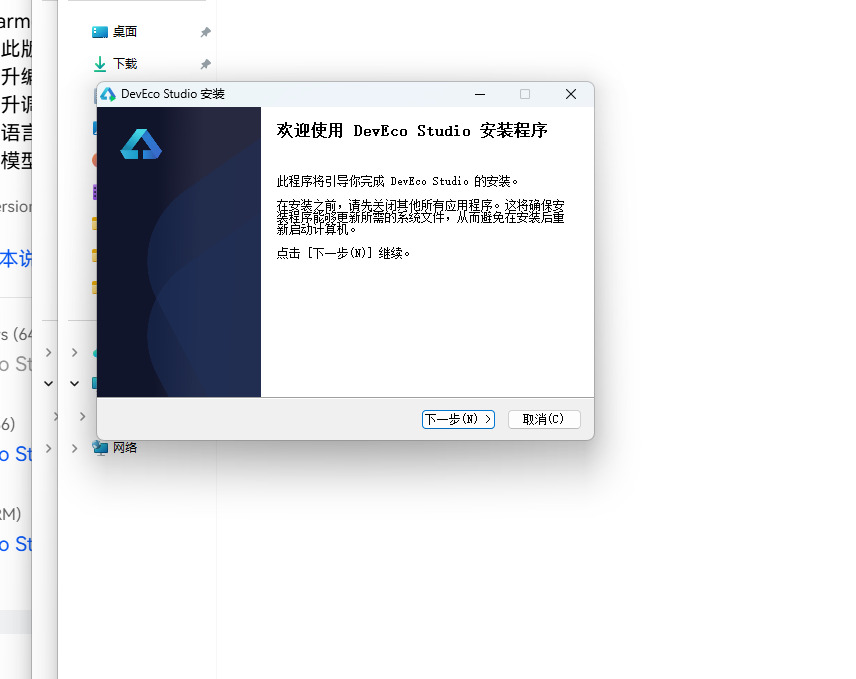
DevEco Studio 是 HarmonyOS 应用开发的官方 IDE。下载安装包后双击运行,进入安装欢迎界面,点击「下一步」继续。
16.2 选择安装路径
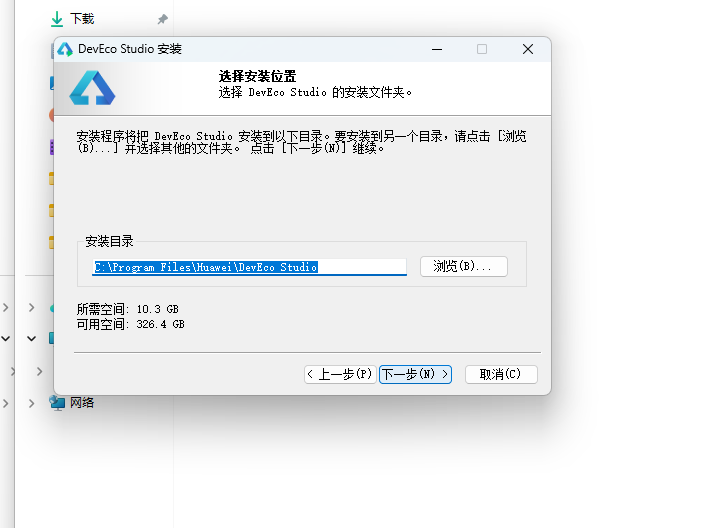
选择目标安装目录,建议安装到非系统盘,确认所需空间后点击「下一步」。
16.3 配置安装选项
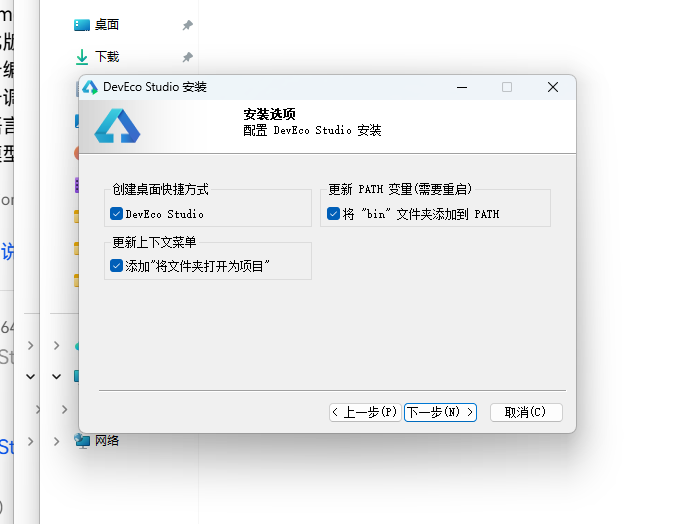
设置环境变量,勾选创建桌面快捷方式、将 bin 文件夹添加到 PATH、添加上下文菜单,但是需要重启一下电脑使环境变量生效。
16.4 选择项目模板
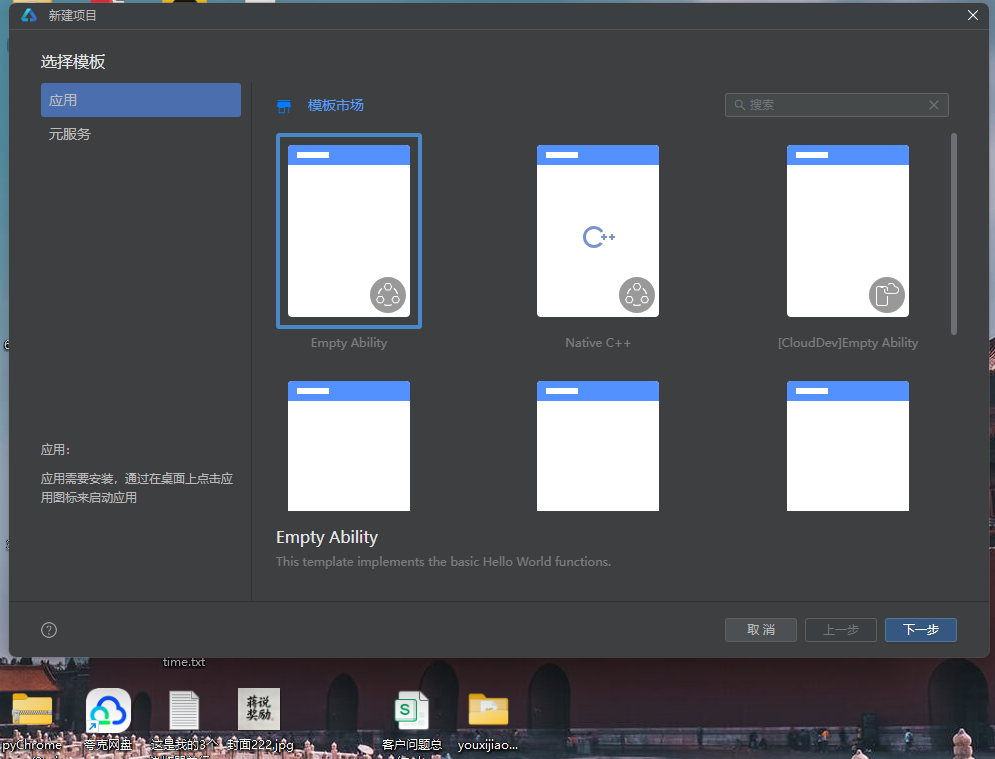
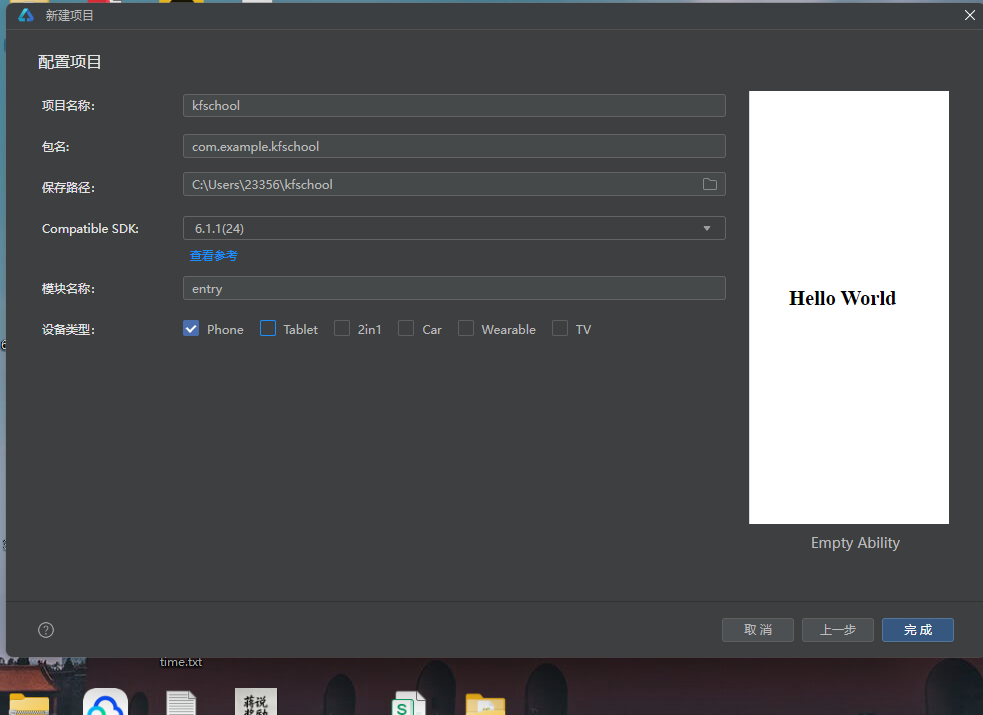
新建一个空白模板,在模板市场中选择 Empty Ability。
16.5 配置项目信息
设置 API 为 24 的模板项目,项目名称 kfschool,Compatible SDK 6.1.1(24),设备类型勾选 Phone,点击完成后初始化项目,自动下载相关依赖。
十七、总结
通过对这款鲁班锁坊非遗制锁应用的深度剖析,我们可以看到,一个优秀的移动端应用远不止是功能的堆砌,它更是架构设计、数据建模、视觉系统、交互逻辑、防御性编程等多维度能力的综合体现。
在架构层面,该应用采用了"配置驱动 + 组件化 + 状态管理"的三层设计模式。配置层将所有可变的数据与视觉属性抽离为常量数组和元数据接口,使得业务逻辑与表现层彻底解耦;组件层将五个功能页面拆分为独立的 @Component,每个组件内部通过 @Builder 进一步复用 UI 片段;状态层利用 ArkUI 的 @State、@Observed 和 @ObjectLink 机制,实现了数据变化到 UI 刷新的自动响应。
在数据层面,LubanData 类作为核心数据模型,以 4 个数组各 12 条数据完整描述了鲁班锁坊的全部业务信息。4 个动态颜色映射函数将业务数据转化为视觉色彩,实现了"数据即配色"的高级渲染模式——难度越高颜色越深(getLockColor),金额越高颜色越红(getOrderColor),这是该应用最具特色的技术亮点之一。
在视觉层面,本应用独创了"两列网格"的锁型页设计——锁型陈列使用 ForEach(LOCK_PAIRS [0,2,4,6,8,10]) 遍历,每行渲染两个锁,形成两列网格布局,不同于之前项目的列表布局。难度页独创"三卡片"布局——难度分布柱状图+制锁工艺热度横向条形图+三栏统计卡片,信息密度最高。顶部头部通过 @Builder topBar() 抽取,build() 中直接调用,代码更整洁。弹窗通过 @Builder + Stack 布局构建,遮罩点击可关闭,不同于之前项目的条件渲染独立组件。统一的色彩系统是整个应用的视觉基石,胡桃木棕主色搭配黄铜金强调色,配合金棕语义色和竹绿装饰色,营造出既传统又雅致的制锁主题氛围。顶部头部的榫卯竖条装饰带、齿轮旋转+黄铜币缩放脉冲微动效、两列网格与三卡片布局等细节处理,使得界面在信息密度较高的同时依然保持精致与舒适,处处透露出"鲁班锁坊"的主题气质。
在交互层面,应用实现了完整的 CRUD 闭环——新制鲁班锁、修改订单、撤下榫件三类弹窗各司其职,配合统一的 @Builder + Stack 弹窗机制和全屏半透明遮罩(点击可关闭),交互流畅且一致。撤榫件操作的二次确认、订单金额的动态着色、销量阈值的高亮显示等细节,都体现了对用户体验的深入考量。
标签: HarmonyOS · ArkTS · 华为 · 非遗制锁 · 移动端开发

讨论HarmonyOS开发技术,专注于API与组件、DevEco Studio、测试、元服务和应用上架分发等。
更多推荐
 2
2 0
0- 0


 已为社区贡献2条内容

所有评论(0)