基于HarmonyOS API 24的ArkTS霓虹夜市巡游应用深度解析:多Tab架构、灯泡串导航栏与五弹窗状态管理的HarmonyOS 6.1.1全栈实践
技术引言
HarmonyOS 6.1.1 为开发者提供了更为成熟的 ArkTS 声明式 UI 编程范式,其核心在于以数据驱动视图、以状态管理驱动交互闭环。在 HarmonyOS ArkTS API 24 中,@Entry、@Component、@State、@Builder 等装饰器构成了组件化开发的基础骨架,开发者可以通过声明式的语法,将复杂的业务场景拆解为一个个可复用的构建单元。本文以一个"仲夏夜市巡游专线"应用为切入点,深入剖析一个包含七大功能 Tab、五套弹窗交互、十余种数据模型的完整鸿蒙应用是如何在 ArkTS 中落地的。
这个应用涵盖了夜市浏览、小吃下单、街区推荐、演出购票、手作市集、主题巴士巡游和个人中心七大业务板块,每一个板块都通过独立的 @Builder 方法构建,配合 @State 状态变量驱动条件渲染和弹窗交互。从视觉层面看,应用采用霓虹夜色风格——深紫底色搭配霓虹粉、青、暖黄三色点缀,通过 linearGradient 线性渐变营造沉浸式氛围;从交互层面看,灯泡串式 Tab 栏、人流预警卡片、甜咸投票进度条、时间轴节目单等丰富的可视化组件共同构成了一个高度仿真的夜市消费场景。本文将逐段拆解源码,从数据建模到视图构建、从状态管理到弹窗交互,全面解析 HarmonyOS ArkTS API 24 下的工程实践。
一、色彩体系与接口定义:ColorPalette 接口与 COLORS 常量
interface ColorPalette {
  primary: string;
  primaryLight: string;
  primaryDeep: string;
  accent: string;
  accentLight: string;
  warm: string;
  cyan: string;
  bg: string;
  cardBg: string;
  cardBg2: string;
  textPrimary: string;
  textSecondary: string;
  textHint: string;
  border: string;
  success: string;
  warning: string;
  danger: string;
  white: string;
}

const COLORS: ColorPalette = {
  primary: '#7C4DFF',
  primaryLight: '#B388FF',
  primaryDeep: '#4527A0',
  accent: '#FF4081',
  accentLight: '#FFD9E7',
  warm: '#FFC94D',
  cyan: '#26E0E8',
  bg: '#141224',
  cardBg: '#201C36',
  cardBg2: '#2A2547',
  textPrimary: '#FFFFFF',
  textSecondary: '#A79FC9',
  textHint: '#5E5687',
  border: '#39325E',
  success: '#6AF2A8',
  warning: '#FFAB40',
  danger: '#FF6079',
  white: '#FFFFFF'
};
应用在入口处首先定义了一个 ColorPalette 接口,将所有颜色字段以类型安全的方式声明出来,随后用一个 const 常量 COLORS 完成实例化。这是 ArkTS 中非常典型的"接口约束 + 常量实现"模式:通过接口定义颜色的形状,确保后续所有引用 COLORS 的地方都能获得编译期的类型检查,避免拼写错误或类型不匹配。这个色彩体系包含了主色系(primary 深紫、primaryLight 浅紫、primaryDeep 深紫蓝)、强调色系(accent 霓虹粉、accentLight 粉白)、暖色系(warm 暖黄)、冷色系(cyan 霓虹青)四组色调,再加上背景色(bg 深夜紫底)、卡片色(cardBg、cardBg2 两级深紫)、文字色(三级:primary 白色、secondary 灰紫、hint 暗紫)、边框色(border)以及语义色(success 绿、warning 橙、danger 红)。这种分层设计使得整个应用在任何组件中都能通过 COLORS.xxx 引用统一颜色,保证了视觉一致性。深紫底色 #141224 配合霓虹粉 #FF4081 和霓虹青 #26E0E8,完美再现了夜市灯火的氛围感。
二、夜市数据模型与静态数据源:NightMarket 接口与 MARKETS 数组
interface NightMarket {
  id: number;
  name: string;
  emoji: string;
  zone: string;
  stalls: number;
  rating: number;
  hot: string;
  tag: string;
  crowd: string;
  crowdVal: number;
  distance: string;
}

const MARKETS: NightMarket[] = [
  { id: 1, name: '南门老夜市', emoji: '🏮', zone: '老城区南门', stalls: 186, rating: 4.9, hot: '爆', tag: '烟火气天花板', crowd: '拥挤', crowdVal: 96, distance: '2.3km' },
  { id: 2, name: '江畔星光夜市', emoji: '🌟', zone: '滨江东岸', stalls: 142, rating: 4.8, hot: '热', tag: '江风吹拂', crowd: '较多', crowdVal: 78, distance: '4.1km' },
  // ... 共10条数据
];
NightMarket 接口定义了夜市数据的完整结构:id 为唯一标识,name 为夜市名称,emoji 为表情图标,zone 为所在区域,stalls 为摊位数量,rating 为评分,hot 为热度等级(“爆”/“热”/“升”/“温”),tag 为特色标签,crowd 为人流状态文字描述(“拥挤”/“较多”/“适中”/“舒适”),crowdVal 为人流数值化指标(0-100),distance 为距离。这种将定性描述(crowd 文字)和定量指标(crowdVal 数值)同时保留的设计非常巧妙:前者用于直接展示给用户阅读,后者用于驱动 Progress 进度条的渲染和颜色判断逻辑。MARKETS 常量数组填充了十条夜市数据,每条数据都是一个字面量对象,符合 NightMarket 接口的类型约束。在 ArkTS 中,const 声明的数组虽然引用不可变,但数组内容在运行时是可遍历的,适合配合 ForEach 进行列表渲染。这种"接口定义形状 + 常量数组填充数据"的模式是该应用所有数据模块的通用范式。
三、小吃数据模型与品类体系:SnackItem 接口与 SNACKS 数据
interface SnackItem {
  id: number;
  name: string;
  emoji: string;
  stall: string;
  price: number;
  originPrice: number;
  sales: number;
  rating: number;
  market: string;
  kind: string;
  desc: string;
}

const SNACKS: SnackItem[] = [
  { id: 1, name: '东北烤冷面', emoji: '🌯', stall: '老铁烤冷面', price: 10, originPrice: 15, sales: 3421, rating: 4.9, market: '南门老夜市', kind: '咸香', desc: '铁板现烤,加蛋加肠双拼酱,酸甜口一绝' },
  // ... 共10条数据
];
SnackItem 接口在夜市模型的基础上增加了价格维度:price 为当前售价、originPrice 为原价(用于展示划线价)、sales 为销量。这三个字段共同支撑了小吃卡片的"促销感"——当前价格用强调色高亮、原价用删除线样式弱化、销量用提示色展示。kind 字段表示口味品类(“咸香”/“香酥”/“重口”/“酸甜”/“冰爽”/“酸辣”),与全局常量 SNACK_KINDS 数组配合,驱动小吃 Tab 顶部的分类筛选 Chips 组件。desc 字段是一段口语化的描述文案,在列表中通过 maxLines(1) 和 textOverflow({ overflow: TextOverflow.Ellipsis }) 实现单行省略,保证卡片高度一致性。这种设计体现了 ArkTS 中"数据即视图"的理念:每一个字段都能在 UI 中找到对应的渲染出口,没有冗余字段。
四、街区、演出与市集数据模型
interface StreetItem {
  id: number;
  name: string;
  emoji: string;
  distance: string;
  shops: number;
  lanterns: number;
  mood: string;
  lightVal: number;
  note: string;
}

interface ShowItem {
  id: number;
  name: string;
  emoji: string;
  time: string;
  stage: string;
  duration: string;
  price: number;
  seats: string;
  seatVal: number;
  kind: string;
}

interface GoodsItem {
  id: number;
  name: string;
  emoji: string;
  price: number;
  seller: string;
  stock: string;
  tag: string;
  hotVal: number;
}
这三个接口分别定义了街区、演出和市集好物的数据结构。StreetItem 中的 lanterns(灯笼数)和 lightVal(灯光指数)是夜逛街区的核心量化指标,mood(氛围标签如"文艺清新"、“港风复古”)则用于情感化展示。ShowItem 中的 seats(余票文字如"余 12 席")和 seatVal(余票数值)又是一组"定性+定量"的对照设计,seatVal 驱动 Progress 进度条和颜色阈值判断(seatVal <= 20 时显示红色危险色)。GoodsItem 中的 stock(库存状态:“有货”/“现做”/“限量”)和 tag(品类标签:“非遗”/“手作”/“国风”/“氛围”)分别驱动库存徽章和品类徽章的条件渲染。这三个接口共同体现了 ArkTS 类型系统在复杂数据建模中的优势:每个字段类型明确、语义清晰,为后续的列表渲染提供了坚实的类型基础。
五、巴士路线、逛吃搭子与个人数据模型
interface BusRoute {
  id: number;
  name: string;
  emoji: string;
  from: string;
  to: string;
  time: string;
  duration: string;
  price: number;
  seats: string;
  theme: string;
}

interface BuddyItem {
  id: number;
  name: string;
  avatar: string;
  market: string;
  goal: string;
  people: number;
  joined: number;
  note: string;
}

interface FavItem {
  id: number;
  name: string;
  stall: string;
  market: string;
  note: string;
}

interface OrderItem {
  id: number;
  date: string;
  route: string;
  seats: number;
  amount: number;
  status: string;
}
这组接口覆盖了巡游巴士、社交搭子、个人收藏和订单管理四个维度。BusRoute 中的 from/to 构成起讫站点,time/duration 构成时间维度,theme(如"车内挂满红灯笼"、“桂花香氛车厢”)赋予了巴士情感化标签。BuddyItem 是社交功能的核心,people(目标人数)和 joined(已加入人数)驱动搭子卡片底部的进度条和"满员/加入"按钮的条件渲染——当 joined >= people 时按钮变为灰色"满员"不可加入状态。FavItem 设计精简,仅保留摊位名称、位置和口味备注三个核心字段,配合编辑弹窗实现 CRUD 操作。OrderItem 包含订单日期、路线、座位数、金额和状态,status 字段(“已完成”/“待出行”)驱动状态徽章的颜色变化。这四个接口的设计体现了"最小必要字段"原则——每个字段都在 UI 中有明确的消费场景。
六、全局常量与枚举数据
const WEEK_CROWD: number[] = [58, 72, 66, 84, 96, 100, 78];
const WEEK_LABELS: string[] = ['周一', '周二', '周三', '周四', '周五', '周六', '周日'];
const SNACK_KINDS: string[] = ['全部', '咸香', '香酥', '重口', '酸甜', '冰爽', '酸辣'];
const BUS_DATES: string[] = ['今天', '明天', '周六', '周日'];
const SNACK_SPECS: string[] = ['小份', '大份', '双拼'];
这组全局常量为应用的筛选器、图表和选项组件提供数据源。WEEK_CROWD 是一周七天的夜市人流指数数组,配合 WEEK_LABELS 驱动柱状图渲染——其中周六(索引5,值100)的柱子使用暖黄到霓虹粉的渐变色高亮,其余日期使用深紫到浅紫的渐变色,通过索引条件判断实现"突出峰值"的视觉效果。SNACK_KINDS 是小吃分类筛选 Chips 的选项列表,首项"全部"为默认选中状态。BUS_DATES 和 SNACK_SPECS 分别是巴士预订弹窗和小吃下单弹窗中的选项集合,配合 @State 变量实现单选交互。这种将可选项提取为全局常量的做法有两个好处:一是避免了在模板中硬编码字符串字面量,便于后续国际化或数据替换;二是使得选项数据与渲染逻辑解耦,符合关注点分离原则。
七、组件入口与状态声明体系
@Entry
@Component
struct NightMarketGo {
  @State currentTab: number = 0
  @State showBusModal: boolean = false
  @State showSnackModal: boolean = false
  @State showBuddyModal: boolean = false
  @State showFavEditModal: boolean = false
  @State showOrderDeleteModal: boolean = false
  @State selectedRoute: BusRoute = BUS_ROUTES[0]
  @State selectedSnack: SnackItem = SNACKS[0]
  @State editingFav: FavItem = FAVS[0]
  @State deleteOrderId: number = 0
  @State busDate: string = '今天'
  @State busCount: number = 2
  @State snackSpec: string = '大份'
  @State snackCount: number = 1
  @State snackCoupon: boolean = true
  @State snackKind: string = '全部'
  @State myOrders: OrderItem[] = [ ... ]
  @State myFavs: FavItem[] = FAVS.slice(0)
  @State buddyList: BuddyItem[] = BUDDIES.slice(0)
  private tabNames: string[] = ['夜市', '小吃', '街区', '演出', '市集', '巡游', '我的']
  private tabIcons: string[] = ['🌃', '🍢', '🏮', '🎤', '🛍️', '🚐', '👤']
  private bulbColors: string[] = [COLORS.warm, COLORS.accent, COLORS.cyan, COLORS.primaryLight, COLORS.warm, COLORS.accent, COLORS.primaryLight]
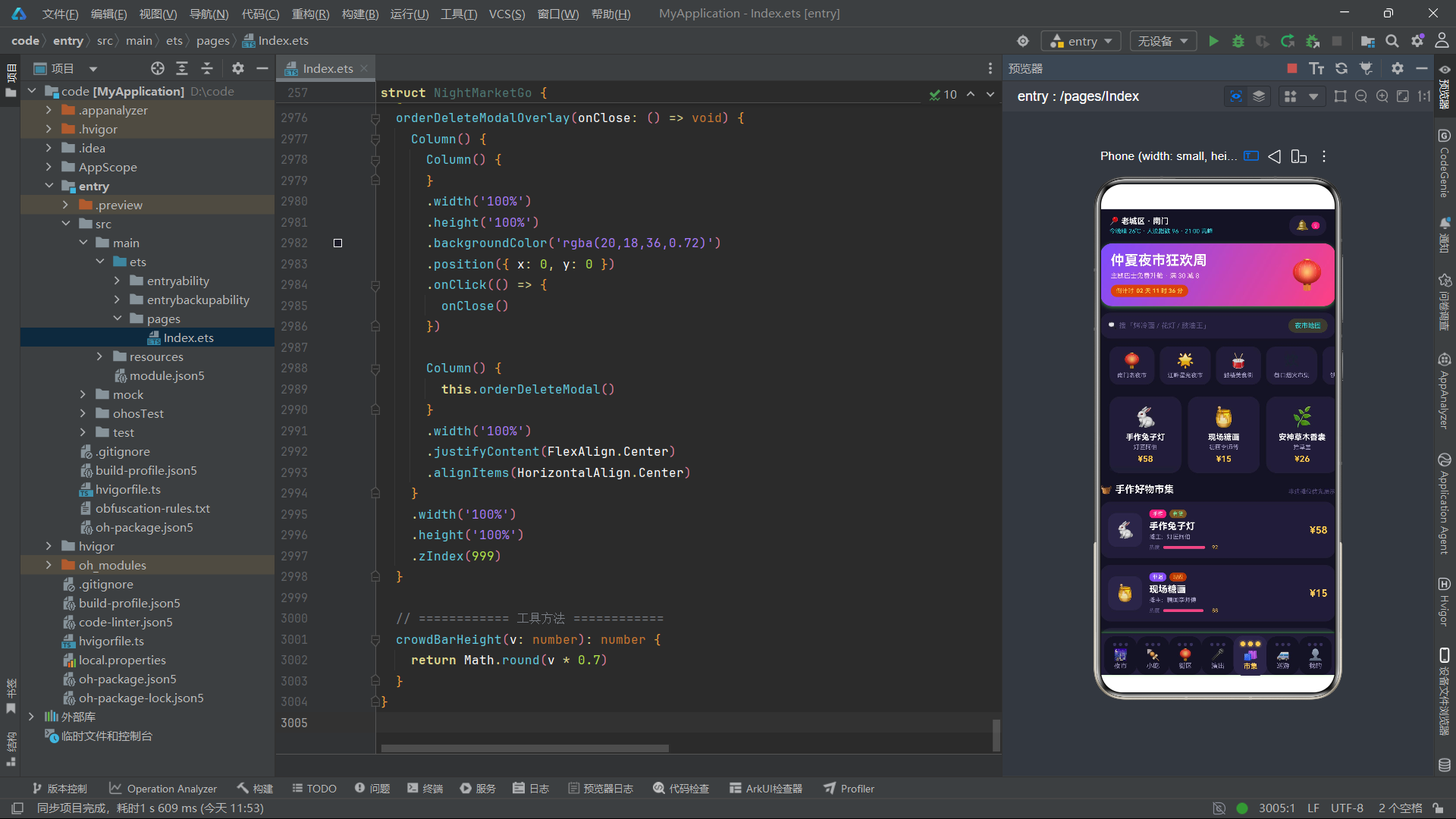
@Entry 装饰器将 NightMarketGo 标记为页面入口组件,@Component 声明它为一个自定义组件。这个组件的状态管理体系非常丰富,可以按功能分为五组:第一组是 Tab 导航状态(currentTab),驱动七大页面的条件渲染;第二组是弹窗可见性状态(五个 showXxxModal 布尔值),每个对应一套弹窗的显示/隐藏;第三组是弹窗内选中数据状态(selectedRoute、selectedSnack、editingFav、deleteOrderId),在打开弹窗时从列表项传入;第四组是弹窗内表单状态(busDate、busCount、snackSpec、snackCount、snackCoupon 等),驱动弹窗内的选项交互和价格计算;第五组是持久化列表状态(myOrders、myFavs、buddyList),支持增删改操作。值得注意的是 private 修饰的 tabNames、tabIcons 和 bulbColors 不使用 @State,因为它们是静态配置数据,不参与响应式更新。myFavs 和 buddyList 使用 .slice(0) 创建了原始数组的浅拷贝,确保组件内修改不影响全局常量数据。
八、build 主结构与页面路由条件渲染
build() {
  Column() {
    Scroll() {
      Column() {
        this.nightHeader()

        if (this.currentTab === 0) {
          this.marketTab()
        } else if (this.currentTab === 1) {
          this.snackTab()
        } else if (this.currentTab === 2) {
          this.streetTab()
        } else if (this.currentTab === 3) {
          this.showTab()
        } else if (this.currentTab === 4) {
          this.goodsTab()
        } else if (this.currentTab === 5) {
          this.busTab()
        } else {
          this.mineTab()
        }
      }
      .width('100%')
      .padding({ bottom: 6 })
    }
    .layoutWeight(1)
    .scrollBar(BarState.Off)
    .edgeEffect(EdgeEffect.Spring)
    .align(Alignment.Top)
    // ... 弹窗与 Tab 栏
  }
  .width('100%')
  .height('100%')
  .backgroundColor(COLORS.bg)
}
build() 方法是 ArkTS 组件的渲染入口,它构建了一个"纵向 Column → 滚动区域 + 弹窗层 + Tab 栏"的三段式布局结构。最外层 Column 撑满全屏并设置深夜紫底色背景。内部 Scroll 组件通过 layoutWeight(1) 占据剩余空间,scrollBar(BarState.Off) 隐藏滚动条,edgeEffect(EdgeEffect.Spring) 设置弹性边缘效果,align(Alignment.Top) 让内容从顶部开始排列。滚动区域内是一个 Column 容器,先调用 this.nightHeader() 渲染公共头部,然后通过 if-else 链根据 currentTab 的值条件渲染对应的 Tab 页面。这种"头部公共 + 内容条件分支"的架构是 ArkTS 多 Tab 应用的经典模式:避免了使用 Tabs 容器可能带来的预加载和内存占用问题,同时保证了每次切换 Tab 只渲染当前页面的内容。当 currentTab 改变时,ArkTS 的响应式系统会自动触发 build() 的重新执行,卸载旧页面、挂载新页面。
九、弹窗层条件渲染机制
if (this.showBusModal) {
  this.busModalOverlay(() => {
    this.showBusModal = false
  })
}
if (this.showSnackModal) {
  this.snackModalOverlay(() => {
    this.showSnackModal = false
  })
}
if (this.showBuddyModal) {
  this.buddyModalOverlay(() => {
    this.showBuddyModal = false
  })
}
if (this.showFavEditModal) {
  this.favEditModalOverlay(() => {
    this.showFavEditModal = false
  })
}
if (this.showOrderDeleteModal) {
  this.orderDeleteModalOverlay(() => {
    this.showOrderDeleteModal = false
  })
}
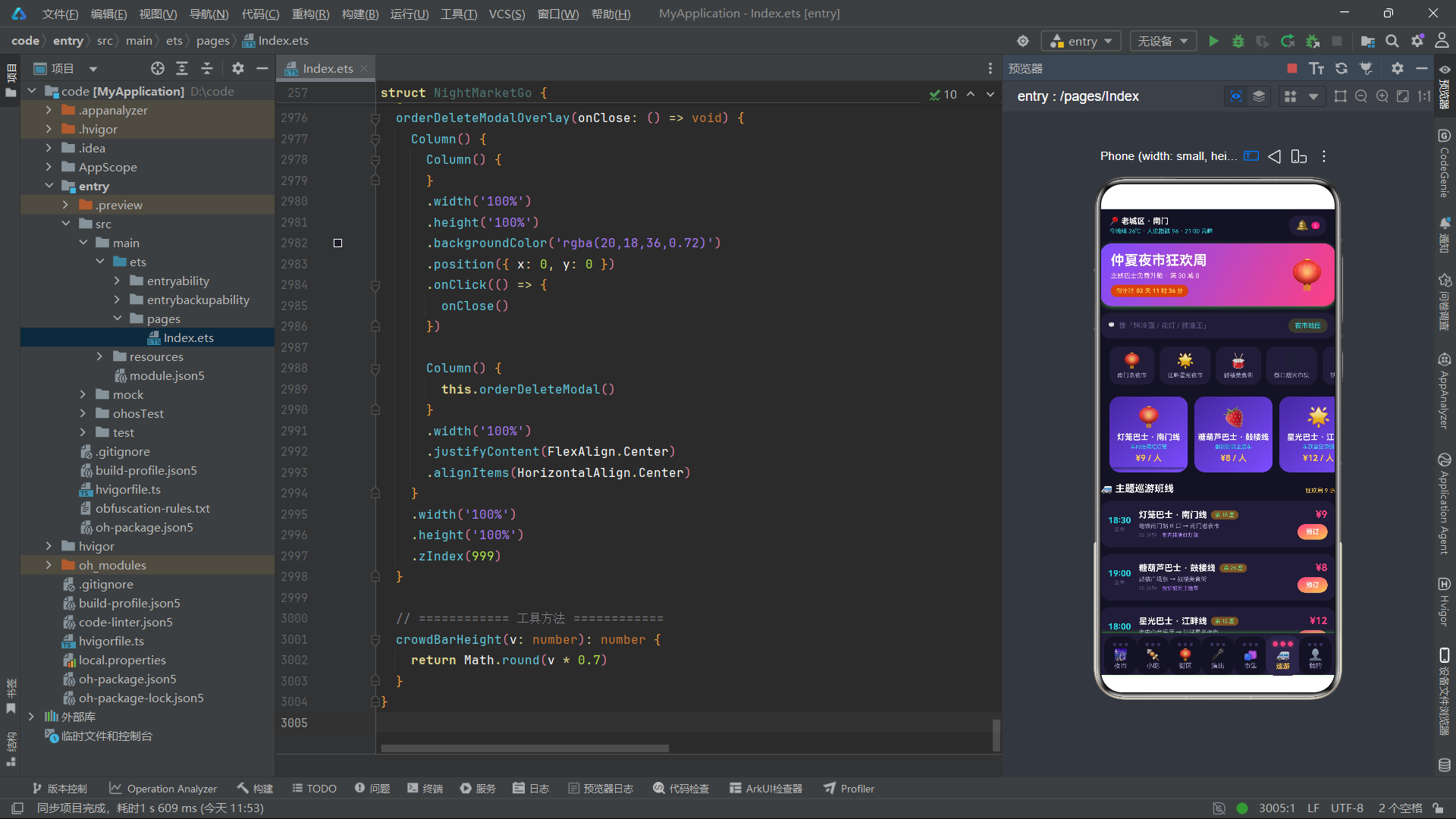
弹窗层位于 Scroll 和 bulbTabBar 之间,通过五个独立的 if 条件块控制五个弹窗的显示与隐藏。每个弹窗采用 @Builder 方法包装,并接收一个 onClose: () => void 回调函数作为参数——这是 ArkTS 中实现弹窗关闭的回调通信模式。当用户点击遮罩层时,回调函数被调用,将对应的 showXxxModal 状态变量设为 false,触发响应式更新,if 条件不再满足,弹窗从视图树中卸载。这种"状态驱动 + 回调关闭"的弹窗管理模式比传统的命令式 dialog.show() / dialog.close() 更符合声明式 UI 的理念。五个弹窗使用独立的布尔状态而非一个枚举值,是因为该应用允许某些弹窗在逻辑上互斥的同时保持各自的独立性,且每个弹窗的打开时机和上下文数据不同——巴士弹窗需要 selectedRoute、小吃弹窗需要 selectedSnack、收藏编辑弹窗需要 editingFav、删除弹窗需要 deleteOrderId。每个弹窗的 Overlay 方法内部都设置了 zIndex(999),确保弹窗层级高于普通内容。
十、霓虹夜市头部:状态条与主题横幅
@Builder
nightHeader() {
  Column() {
    Row() {
      Column() {
        Text('📍 老城区 · 南门')
          .fontSize(12)
          .fontWeight(FontWeight.Bold)
          .fontColor(COLORS.white)
        Text('今晚晴 26℃ · 人流指数 96 · 21:00 高峰')
          .fontSize(9)
          .fontColor(COLORS.cyan)
          .margin({ top: 3 })
      }
      .alignItems(HorizontalAlign.Start)
      .layoutWeight(1)

      Row() {
        Text('🔔')
          .fontSize(16)
        Text('5')
          .fontSize(8)
          .fontColor(COLORS.white)
          .backgroundColor(COLORS.accent)
          .borderRadius(7)
          .padding({ left: 4, right: 4, top: 1, bottom: 1 })
          .margin({ left: 4 })
      }
      .padding({ left: 10, right: 10, top: 6, bottom: 6 })
      .backgroundColor(COLORS.cardBg)
      .borderRadius(14)
    }
    .alignItems(VerticalAlign.Center)
    .width('100%')
    .padding({ left: 14, right: 14, top: 10 })

    Column() {
      Row() {
        Column() {
          Text('仲夏夜市狂欢周')
            .fontSize(21)
            .fontWeight(FontWeight.Bold)
            .fontColor(COLORS.white)
          Text('主题巴士免费升舱 · 满 30 减 8')
            .fontSize(10)
            .fontColor('#FFD9E7')
            .margin({ top: 5 })
          Row() {
            Text('倒计时')
              .fontSize(9)
              .fontColor(COLORS.warm)
            Text('02 天 11 时 36 分')
              .fontSize(9)
              .fontWeight(FontWeight.Bold)
              .fontColor(COLORS.warm)
              .margin({ left: 4 })
          }
          .margin({ top: 8 })
          .padding({ left: 8, right: 8, top: 4, bottom: 4 })
          .backgroundColor('#FFC94D26')
          .borderRadius(10)
        }
        .alignItems(HorizontalAlign.Start)
        .layoutWeight(1)

        Text('🏮')
          .fontSize(44)
      }
      .alignItems(VerticalAlign.Center)
      .padding({ left: 16, right: 16, top: 14, bottom: 14 })
    }
    .width('100%')
    .linearGradient({
      angle: 120,
      colors: [['#7C4DFF', 0], ['#FF4081', 1]]
    })
    .borderRadius(18)
    .margin({ left: 14, right: 14, top: 12 })
    .shadow({
      radius: 16,
      color: '#FF408144',
      offsetX: 0,
      offsetY: 6
    })
    // ... 搜索条与金刚区
  }
  .width('100%')
  .padding({ bottom: 4 })
}
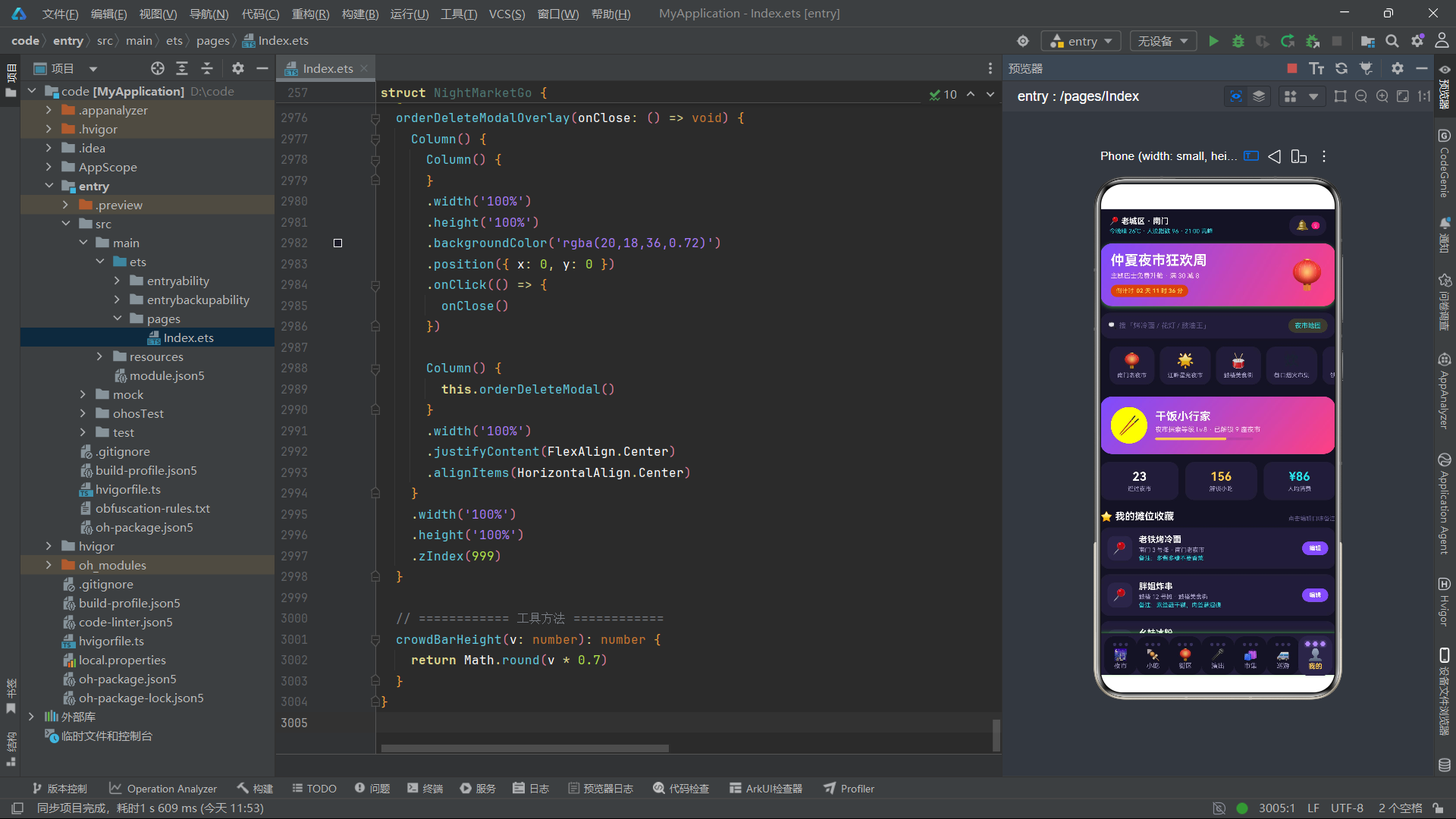
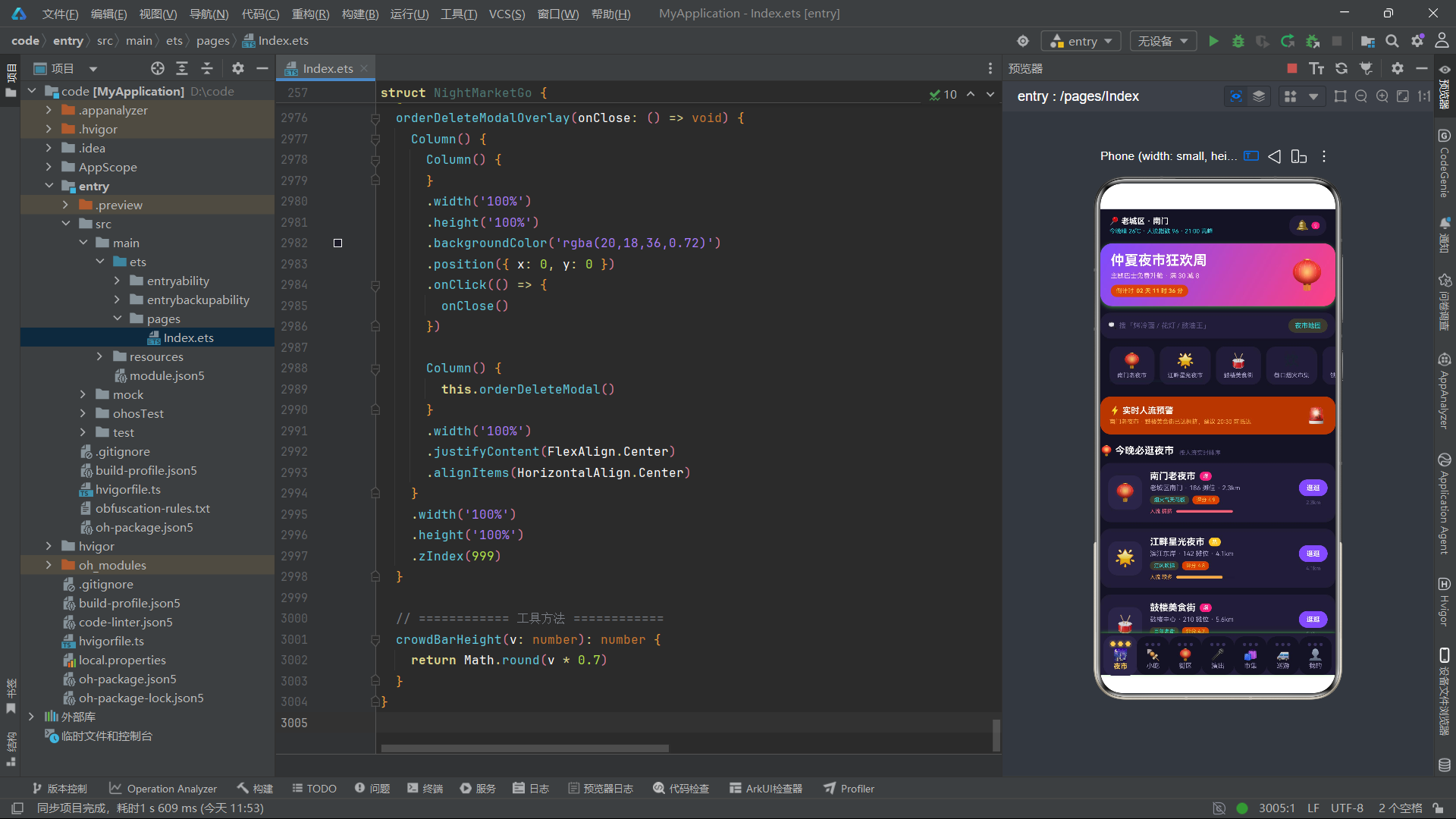
nightHeader() 是所有 Tab 页面共享的公共头部,由三个模块构成。第一是顶部状态条:左侧用 Column 纵向排列定位信息和天气人流指数,右侧是通知铃铛和未读数徽章,徽章用霓虹粉背景 + 圆角胶囊形实现"小红点"效果。第二是主题横幅:采用 linearGradient 从深紫 #7C4DFF 到霓虹粉 #FF4081 的 120 度线性渐变,配合 shadow 投影(offsetY: 6 营造悬浮感),左侧是标题"仲夏夜市狂欢周"和促销副文案,下方是倒计时胶囊(暖黄半透明背景 #FFC94D26),右侧是一个 44 号字体的灯笼表情。这个横幅是整个应用视觉风格的核心锚点——渐变 + 阴影 + 大表情的组合营造了强烈的电商大促氛围。layoutWeight(1) 在左侧 Column 上使用,使得左侧文字区域弹性占据剩余空间,右侧灯笼固定宽度。borderRadius(18) 配合 margin 两侧留白 14,确保横幅不贴边。
十一、搜索条与金刚区横滑入口
Row() {
  Text('🔍 搜「烤冷面 / 花灯 / 豉油王」')
    .fontSize(11)
    .fontColor(COLORS.textHint)
    .layoutWeight(1)
ight: 15, bottomLeft: 15, bottomRight: 15 })
      .scale({
        x: this.currentTab === idx ? 1.05 : 1,
        y: this.currentTab === idx ? 1.05 : 1
      })
      .onClick(() => {
        this.currentTab = idx
      })
    }, (name: string, idx: number) => name + idx.toString() + this.currentTab.toString())
  }
  .width('100%')
  .alignItems(VerticalAlign.Center)
  .padding({ left: 6, right: 6, top: 5 })
  .backgroundColor(COLORS.cardBg)
  .shadow({ radius: 14, color: '#7C4DFF33', offsetX: 0, offsetY: -3 })
}
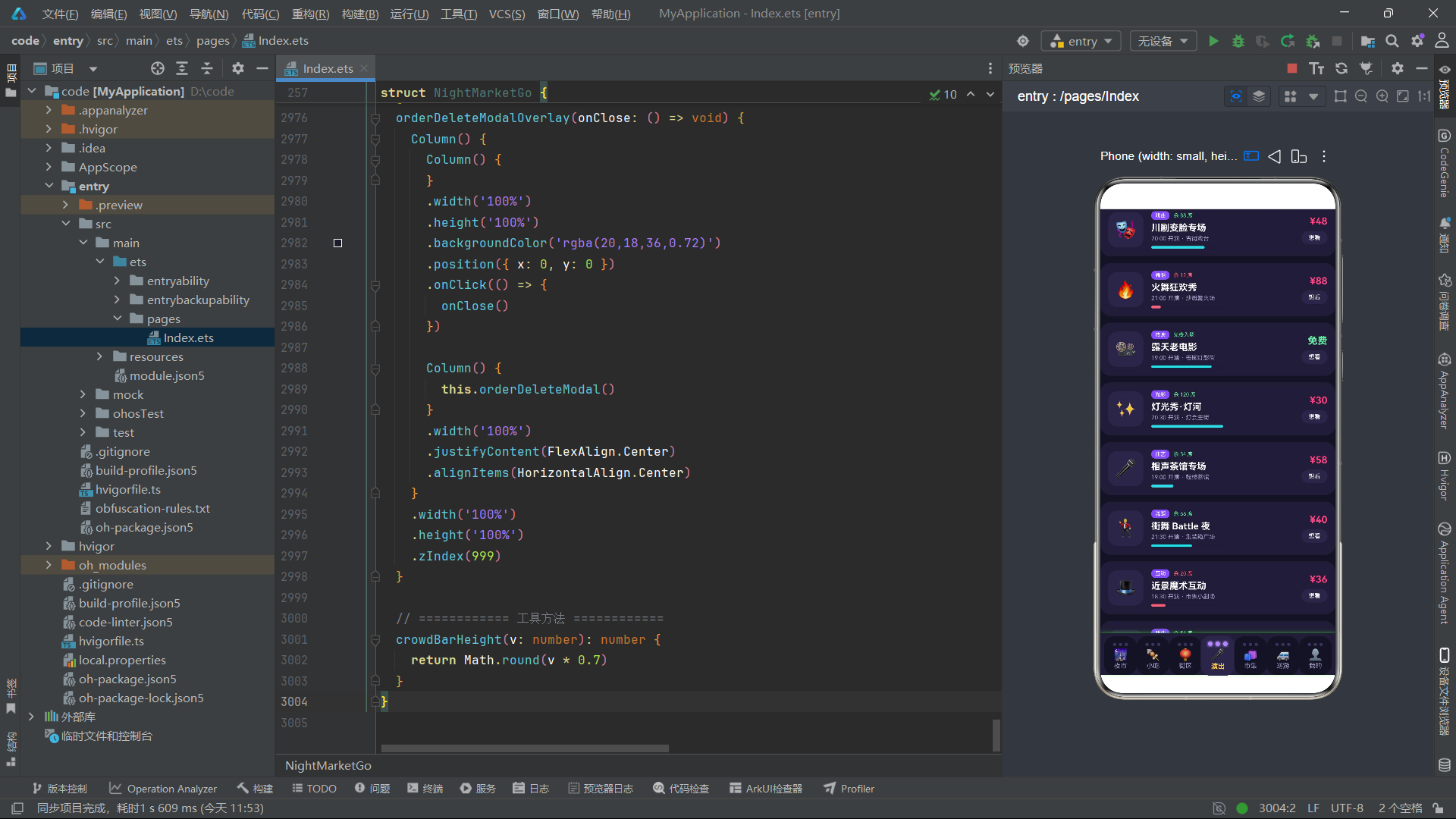
这是整个应用最具创意的组件——灯泡串式 Tab 栏。每个 Tab 项顶部有三颗 Circle 小灯泡(模拟灯串上的灯泡),选中状态下灯泡放大(7px vs 5px)、点亮颜色(从 bulbColors 数组取对应颜色)、并添加 shadow 光晕效果(radius: 6,颜色与灯泡色一致),未选中时灯泡为暗色 COLORS.border 且无光晕。三颗灯泡的 ForEach 键值生成器 'b.toString() + idx.toString() + this.currentTab.toString()' 将灯泡序号、Tab 索引和当前选中 Tab 全部编入 key,确保选中状态切换时灯泡组件能正确 diff 更新。选中 Tab 的背景色变为 cardBg2(更亮的深紫),并应用 scale 1.05 倍缩放放大效果,文字加粗变色。点击时设置 currentTab = idx 触发整个页面切换。bulbColors 数组为七个 Tab 各指定了一种灯泡色(暖黄、霓虹粉、霓虹青、浅紫循环),让每串灯泡都有独特的色彩个性。整个 Tab 栏底部还有向上的紫色阴影投影,模拟灯串悬挂在内容上方的视觉效果。
十三、夜市 Tab:人流预警与夜市列表卡片
@Builder
marketTab() {
  Column() {
    Row() {
      Column() {
        Text('⚡ 实时人流预警')
          .fontSize(13)
          .fontWeight(FontWeight.Bold)
          .fontColor(COLORS.white)
        Text('南门老夜市 · 鼓楼美食街已达拥挤,建议 20:30 前抵达')
          .fontSize(9)
          .fontColor(COLORS.warning)
          .margin({ top: 4 })
      }
      .alignItems(HorizontalAlign.Start)
      .layoutWeight(1)
      Text('🚨')
        .fontSize(24)
    }
    .alignItems(VerticalAlign.Center)
    .width('100%')
    .padding(14)
    .backgroundColor('#FFAB401A')
    .borderRadius(16)
    .margin({ left: 14, right: 14, top: 14 })

    ForEach(MARKETS, (m: NightMarket) => {
      Row() {
        Column() {
          Text(m.emoji).fontSize(26)
        }
        .width(52).height(52)
        .justifyContent(FlexAlign.Center)
        .backgroundColor(COLORS.cardBg2)
        .borderRadius(14)

        Column() {
          Row() {
            Text(m.name).fontSize(14).fontWeight(FontWeight.Bold).fontColor(COLORS.white)
            Text(m.hot).fontSize(8).fontColor(COLORS.white)
              .padding({ left: 5, right: 5, top: 2, bottom: 2 })
              .backgroundColor(m.hot === '爆' ? COLORS.accent : (m.hot === '热' ? COLORS.warm : COLORS.cyan))
              .borderRadius(6).margin({ left: 6 })
          }
          Text(m.zone + ' · ' + m.stalls.toString() + ' 摊位 · ' + m.distance)
            .fontSize(10).fontColor(COLORS.textSecondary).margin({ top: 4 })
          Row() {
            Text(m.crowd).fontSize(8)
              .fontColor(m.crowd === '拥挤' ? COLORS.danger : (m.crowd === '较多' ? COLORS.warning : COLORS.success))
            Progress({ value: m.crowdVal, total: 100, type: ProgressType.Linear })
              .width(90).height(5).margin({ left: 6 })
              .color(m.crowd === '拥挤' ? COLORS.danger : (m.crowd === '较多' ? COLORS.warning : COLORS.success))
          }
          .alignItems(VerticalAlign.Center).margin({ top: 6 })
        }
        .alignItems(HorizontalAlign.Start).layoutWeight(1).margin({ left: 12 })

        Column() {
          Text('逛逛').fontSize(10).fontWeight(FontWeight.Bold).fontColor(COLORS.white)
            .padding({ left: 12, right: 12, top: 7, bottom: 7 })
            .backgroundColor(COLORS.primary).borderRadius(14)
            .onClick(() => { this.currentTab = 1 })
        }
      }
      .backgroundColor(COLORS.cardBg).borderRadius(16)
      .margin({ left: 14, right: 14, top: 10 })
    }, (m: NightMarket) => 'market' + m.id.toString())
    // ... 柱状图、搭子列表、贴士
  }
}
夜市 Tab 的第一个组件是人流预警卡片,使用暖橙半透明背景 #FFAB401A + 预警表情营造紧迫感。随后的夜市列表是 Tab 的核心内容,通过 ForEach 遍历 MARKETS 渲染十张夜市卡片。每张卡片采用"左侧图标 + 中间信息 + 右侧按钮"三栏布局:左侧 52x52 的圆角方块内居中放置夜市表情图标;中间区域纵向排列名称行(含热度徽章,通过三元运算符 m.hot === '爆' ? accent : (m.hot === '热' ? warm : cyan) 条件选择徽章颜色)、区域信息行、人流进度行。人流进度行是卡片的亮点——通过 Progress 线性进度条组件配合 crowdVal 数值驱动,同时根据 crowd 文字状态条件选择进度条颜色:拥挤用红色 danger、较多用橙色 warning、其他用绿色 success。这种"文字状态 + 数值进度 + 条件颜色"的三重联动设计让用户一目了然地感知人流态势。右侧"逛逛"按钮点击后跳转到小吃 Tab(currentTab = 1),形成了从夜市浏览到小吃下单的自然转化链路。
十四、夜市 Tab:本周人流柱状图与逛吃搭子
Column() {
  Text('📊 本周夜市人流指数')
    .fontSize(14).fontWeight(FontWeight.Bold).fontColor(COLORS.white)

  Row() {
    ForEach(WEEK_CROWD, (v: number, idx: number) => {
      Column() {
        Text(v.toString()).fontSize(8)
          .fontColor(idx === 5 ? COLORS.warm : COLORS.textSecondary)
        Column() {}
          .width(18)
          .height(this.crowdBarHeight(v))
          .linearGradient({
            angle: 180,
            colors: idx === 5 ? [['#FFC94D', 0], ['#FF4081', 1]] : [['#7C4DFF', 0], ['#B388FF', 1]]
          })
          .borderRadius({ topLeft: 5, topRight: 5, bottomLeft: 0, bottomRight: 0 })
          .margin({ top: 4 })
        Text(WEEK_LABELS[idx]).fontSize(8)
          .fontColor(idx === 5 ? COLORS.warm : COLORS.textHint)
          .margin({ top: 4 })
      }
      .alignItems(HorizontalAlign.Center).layoutWeight(1)
    }, (v: number, idx: number) => 'week' + idx.toString())
  }
  .alignItems(VerticalAlign.Bottom)
  .width('100%').height(110).margin({ top: 12 })
}
柱状图是夜市 Tab 的数据可视化亮点。它没有使用任何图表库,而是通过 ForEach 遍历 WEEK_CROWD 数组,用 Column 空容器作为柱子,通过 .height(this.crowdBarHeight(v)) 动态设置柱子高度。crowdBarHeight 是组件内部的方法,将原始值乘以 0.7 并取整(Math.round(v * 0.7)),把 0-100 的数值压缩到 0-70 的高度区间,适配 110px 的图表区域。每根柱子使用 linearGradient 从上到下渐变:周六(索引5)用暖黄到霓虹粉的渐变高亮,其余日期用深紫到浅紫的渐变。柱子顶部圆角(topLeft: 5, topRight: 5),底部不圆角,模拟真实的柱状图外观。整个 Row 容器设置 alignItems(VerticalAlign.Bottom) 让所有柱子底部对齐。数值标签和日期标签分别在柱子上下,周六的数据全部使用暖黄色高亮显示,视觉上突出了"周六人流最高"这一核心洞察。这种纯 ArkTS 声明式语法实现柱状图的方案,展现了 ArkTS 在不依赖第三方图表库的情况下完成数据可视化的能力。
十五、小吃 Tab:分类 Chips、统计卡与小吃列表
@Builder
snackTab() {
  Column() {
    Scroll() {
      Row() {
        ForEach(SNACK_KINDS, (k: string) => {
          Text(k).fontSize(11)
            .fontColor(k === this.snackKind ? COLORS.white : COLORS.textSecondary)
            .padding({ left: 14, right: 14, top: 6, bottom: 6 })
            .backgroundColor(k === this.snackKind ? COLORS.accent : COLORS.cardBg)
            .borderRadius(14)
            .margin({ right: 8 })
            .onClick(() => { this.snackKind = k })
        }, (k: string) => k + this.snackKind)
      }
    }
    .scrollable(ScrollDirection.Horizontal)

    Row() {
      Column() {
        Text('10').fontSize(19).fontWeight(FontWeight.Bold).fontColor(COLORS.accent)
        Text('在售小吃').fontSize(9).fontColor(COLORS.textSecondary).margin({ top: 3 })
      }
      .alignItems(HorizontalAlign.Center).layoutWeight(1)
      .padding({ top: 12, bottom: 12 }).backgroundColor(COLORS.cardBg).borderRadius(14)
      // ... 另外两个统计卡
    }

    ForEach(SNACKS, (s: SnackItem) => {
      Row() {
        Column() { Text(s.emoji).fontSize(26) }
          .width(56).height(56).justifyContent(FlexAlign.Center)
          .backgroundColor(COLORS.cardBg2).borderRadius(14)
        Column() {
          Row() {
            Text(s.name).fontSize(14).fontWeight(FontWeight.Bold).fontColor(COLORS.white)
            Text(s.kind).fontSize(8).fontColor(COLORS.primaryLight)
              .padding({ left: 6, right: 6, top: 2, bottom: 2 })
              .backgroundColor('#B388FF1A').borderRadius(6).margin({ left: 6 })
          }
          Text(s.desc).fontSize(9).fontColor(COLORS.textHint)
            .maxLines(1).textOverflow({ overflow: TextOverflow.Ellipsis })
          Row() {
            Text('¥' + s.price.toString()).fontSize(14).fontWeight(FontWeight.Bold).fontColor(COLORS.accent)
            Text('¥' + s.originPrice.toString()).fontSize(9).fontColor(COLORS.textHint)
              .decoration({ type: TextDecorationType.LineThrough }).margin({ left: 5 })
          }
        }
        .layoutWeight(1).margin({ left: 12 })
        Text('领券\n下单').fontSize(10).fontWeight(FontWeight.Bold).fontColor(COLORS.white)
          .textAlign(TextAlign.Center)
          .padding({ left: 11, right: 11, top: 9, bottom: 9 })
          .linearGradient({ angle: 160, colors: [['#FF4081', 0], ['#FFC94D', 1]] })
          .borderRadius(15)
          .onClick(() => {
            this.selectedSnack = s
            this.snackSpec = '大份'
            this.snackCount = 1
            this.showSnackModal = true
          })
      }
      .backgroundColor(COLORS.cardBg).borderRadius(16)
      .margin({ left: 14, right: 14, top: 10 })
    }, (s: SnackItem) => 'snack' + s.id.toString())
    // ... 甜咸大战投票卡
  }
}
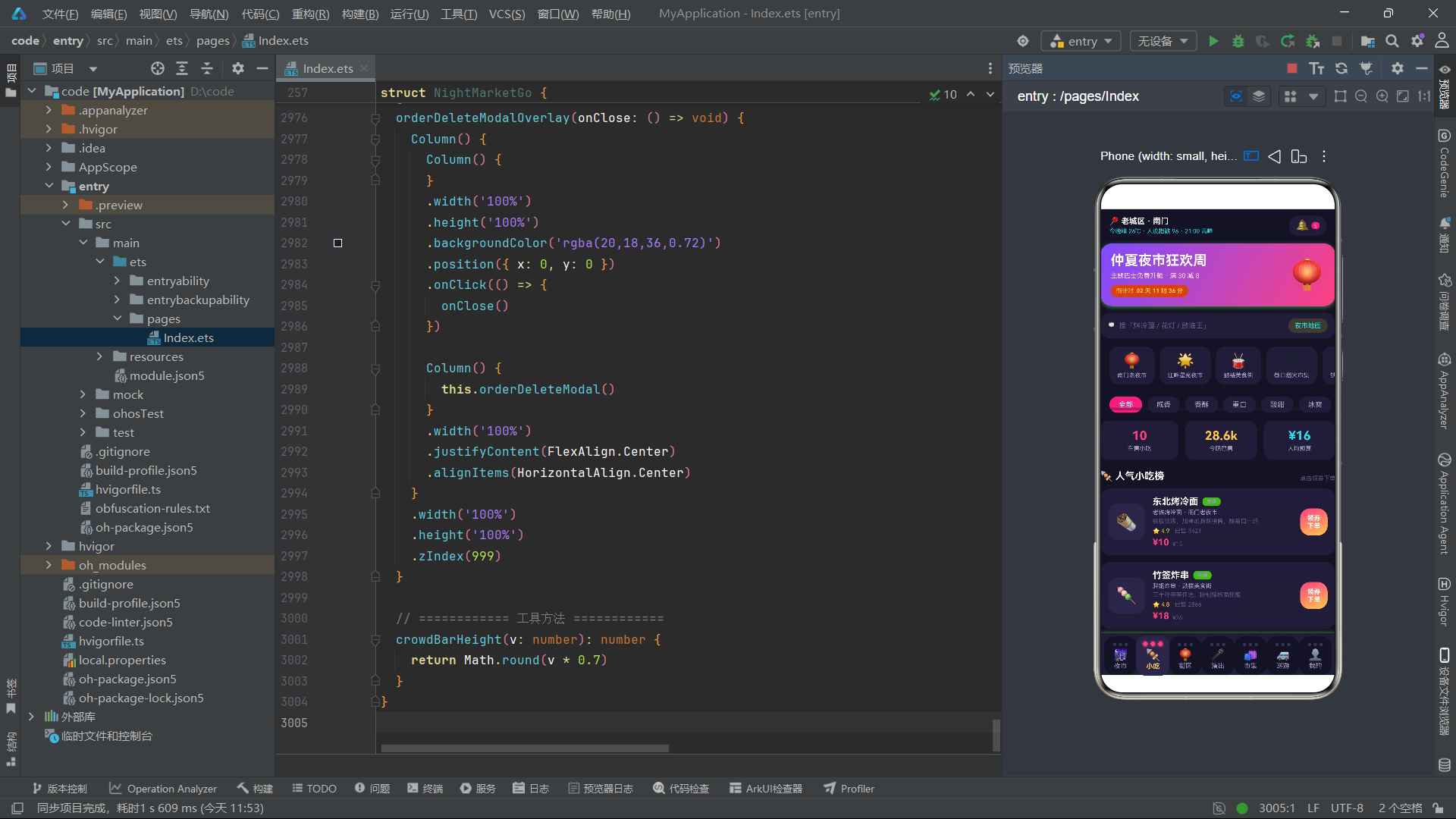
小吃 Tab 的顶部是横向滑动的分类 Chips,通过 ForEach 遍历 SNACK_KINDS 数组生成七个筛选标签,选中状态(k === this.snackKind)使用霓虹粉背景 + 白色文字,未选中使用深紫背景 + 灰紫文字。Chips 的键值生成器 'k + this.snackKind' 将当前选中值编入 key,确保选中状态切换时正确 diff。点击 Chip 设置 snackKind,虽然当前代码未实现实际筛选逻辑,但状态驱动机制已就绪。统计三卡区域展示了在售数量、已售总量和人均预算三个关键指标,每个卡片使用不同的强调色(霓虹粉、暖黄、霓虹青)区分。小吃列表卡片的设计与夜市卡片类似,但增加了价格的双行展示:当前价用大号霓虹粉字体高亮,原价用小号暗色 + TextDecorationType.LineThrough 删除线样式。描述文字通过 maxLines(1) + textOverflow({ overflow: TextOverflow.Ellipsis }) 实现单行省略。右侧的"领券下单"按钮使用从霓虹粉到暖黄的 160 度渐变,点击时将选中小吃数据传入 selectedSnack,初始化规格和份数,然后打开小吃弹窗。
十六、小吃 Tab:甜咸大战投票卡
Column() {
  Text('⚔️ 今晚甜咸大战')
    .fontSize(14).fontWeight(FontWeight.Bold).fontColor(COLORS.white)
  Row() {
    Column() {
      Text('咸党 62%').fontSize(13).fontWeight(FontWeight.Bold).fontColor(COLORS.white)
      Progress({ value: 62, total: 100, type: ProgressType.Linear })
        .width('100%').height(8).margin({ top: 6 }).color(COLORS.cyan)
    }
    .alignItems(HorizontalAlign.Center).layoutWeight(1)

    Text('VS').fontSize(14).fontWeight(FontWeight.Bold)
      .fontColor(COLORS.warm).margin({ left: 10, right: 10 })

    Column() {
      Text('甜党 38%').fontSize(13).fontWeight(FontWeight.Bold).fontColor(COLORS.white)
      Progress({ value: 38, total: 100, type: ProgressType.Linear })
        .width('100%').height(8).margin({ top: 6 }).color(COLORS.accent)
    }
    .alignItems(HorizontalAlign.Center).layoutWeight(1)
  }
  .alignItems(VerticalAlign.Center).margin({ top: 12 })
}
甜咸大战投票卡是小吃 Tab 的趣味互动组件,将抽象的"口味偏好"概念可视化为一组对比进度条。左侧"咸党"使用霓虹青色进度条、62% 数值;右侧"甜党"使用霓虹粉色进度条、38% 数值;中间用暖黄色的"VS"文字分隔。两个 Column 各占 layoutWeight(1) 等宽布局,内部的 Progress 组件使用 width('100%') 自适应填充列宽。这种双向对比进度条的设计在投票、PK、竞品对比等场景中非常实用,用最简洁的组件实现了直观的数据对比效果。虽然当前数据是静态的 62% 和 38%,但结构上完全可以对接后端投票数据实现动态更新。
十七、街区 Tab:渐变双卡与街区列表
@Builder
streetTab() {
  Column() {
    Row() {
      Column() {
        Text('🏮').fontSize(24)
        Text('灯河长廊').fontSize(13).fontWeight(FontWeight.Bold).fontColor(COLORS.white).margin({ top: 4 })
        Text('288 盏花灯').fontSize(9).fontColor(COLORS.cyan).margin({ top: 3 })
      }
      .alignItems(HorizontalAlign.Center).layoutWeight(1)
      .padding({ top: 14, bottom: 14 })
      .linearGradient({ angle: 135, colors: [['#4527A0', 0], ['#7C4DFF', 1]] })
      .borderRadius(16)

      Column() {
        Text('📸').fontSize(24)
        Text('霓虹出片街').fontSize(13).fontWeight(FontWeight.Bold).fontColor(COLORS.white).margin({ top: 4 })
        Text('港风打卡地').fontSize(9).fontColor(COLORS.warm).margin({ top: 3 })
      }
      .alignItems(HorizontalAlign.Center).layoutWeight(1)
      .padding({ top: 14, bottom: 14 })
      .linearGradient({ angle: 135, colors: [['#AD1457', 0], ['#FF4081', 1]] })
      .borderRadius(16).margin({ left: 10 })
    }

    ForEach(STREETS, (st: StreetItem) => {
      Column() {
        Row() {
          Column() { Text(st.emoji).fontSize(24) }
            .width(48).height(48).justifyContent(FlexAlign.Center)
            .backgroundColor(COLORS.cardBg2).borderRadius(13)
          Column() {
            Text(st.name).fontSize(14).fontWeight(FontWeight.Bold).fontColor(COLORS.white)
            Text(st.mood + ' · ' + st.distance).fontSize(9).fontColor(COLORS.textSecondary).margin({ top: 3 })
            Text(st.note).fontSize(9).fontColor(COLORS.textHint).margin({ top: 2 })
          }
          .layoutWeight(1).margin({ left: 11 })
          Column() {
            Text(st.lightVal.toString()).fontSize(15).fontWeight(FontWeight.Bold)
              .fontColor(st.lightVal >= 85 ? COLORS.warm : COLORS.cyan)
            Text('灯光指数').fontSize(8).fontColor(COLORS.textHint).margin({ top: 2 })
          }
        }
        Row() {
          ForEach([0, 1, 2, 3, 4], (i: number) => {
            Text('🏮').fontSize(11).margin({ left: 2 })
          }, (i: number) => 'lan' + i.toString() + st.id.toString())
        }
        Progress({ value: st.lightVal, total: 100, type: ProgressType.Linear })
          .width('100%').height(5).margin({ top: 10 })
          .color(st.lightVal >= 85 ? COLORS.warm : COLORS.cyan)
      }
      .backgroundColor(COLORS.cardBg).borderRadius(16)
      .margin({ left: 14, right: 14, top: 10 })
    }, (st: StreetItem) => 'street' + st.id.toString())
    // ... 夜逛路线卡
  }
}
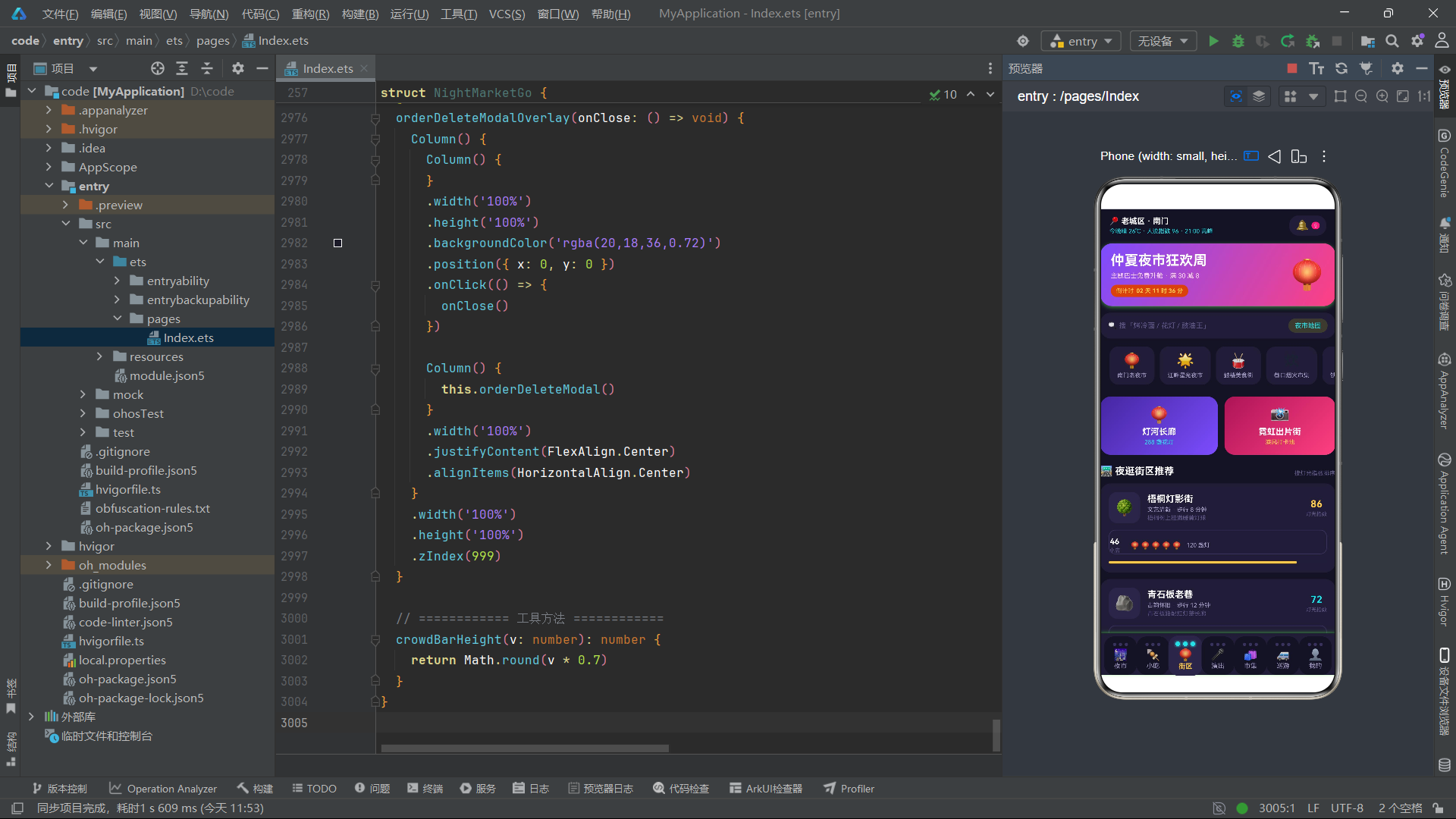
街区 Tab 顶部的渐变双卡是视觉亮点:左卡"灯河长廊"使用从深紫蓝 #4527A0 到主紫 #7C4DFF 的 135 度渐变,右卡"霓虹出片街"使用从深玫红 #AD1457 到霓虹粉 #FF4081 的渐变,两卡等宽并排、中间间距 10、圆角 16,形成色彩呼应的视觉双联。街区列表卡片的布局更复杂——上半部分是图标+信息+灯光指数的三栏行,lightVal >= 85 时灯光指数数值和进度条都使用暖黄色高亮,否则使用霓虹青色;中间区域用五个灯笼表情模拟"灯串装饰"效果,ForEach 的键值 'lan' + i.toString() + st.id.toString() 将灯笼序号和街区 ID 编入 key;底部是全宽的 Progress 灯光指数进度条。这种"数值阈值判断 + 条件颜色 + 进度条"的组合在多个 Tab 中反复出现,形成了该应用统一的"数据可视化模式语言"。街区 Tab 底部还有夜逛路线时间轴卡片,用四行时间+活动的 Row 模拟 18:30 到 21:00 的夜逛行程安排。
十八、演出 Tab:时间轴节目单与余票进度
@Builder
showTab() {
  Column() {
    Column() {
      Text('🎬 今日节目单').fontSize(14).fontWeight(FontWeight.Bold).fontColor(COLORS.white)
      ForEach(SHOWS, (sh: ShowItem) => {
        Row() {
          Column() {
            Text(sh.time).fontSize(10).fontWeight(FontWeight.Bold).fontColor(COLORS.cyan)
            Circle({ width: 7, height: 7 }).fill(COLORS.accent).margin({ top: 5 })
            Column() {}.width(2).height(28).backgroundColor(COLORS.border).margin({ top: 4 })
          }
          .alignItems(HorizontalAlign.Center)
          Row() {
            Text(sh.emoji).fontSize(20)
            Column() {
              Text(sh.name).fontSize(12).fontWeight(FontWeight.Bold).fontColor(COLORS.white)
              Text(sh.stage + ' · ' + sh.duration + ' · ' + sh.kind)
                .fontSize(9).fontColor(COLORS.textSecondary).margin({ top: 2 })
            }
            .layoutWeight(1).margin({ left: 9 })
            Text(sh.price === 0 ? '免费' : '¥' + sh.price.toString())
              .fontSize(12).fontWeight(FontWeight.Bold)
              .fontColor(sh.price === 0 ? COLORS.success : COLORS.warm)
          }
          .layoutWeight(1).padding({ left: 10, right: 10, top: 8, bottom: 8 })
          .backgroundColor(COLORS.cardBg2).borderRadius(12).margin({ left: 10 })
        }
      }, (sh: ShowItem) => 'showtl' + sh.id.toString())
    }

    ForEach(SHOWS, (sh: ShowItem) => {
      Row() {
        Column() { Text(sh.emoji).fontSize(26) }
          .width(54).height(54).justifyContent(FlexAlign.Center)
          .backgroundColor(COLORS.cardBg2).borderRadius(14)
        Column() {
          Row() {
            Text(sh.kind).fontSize(8).fontColor(COLORS.white)
              .padding({ left: 6, right: 6, top: 2, bottom: 2 })
              .backgroundColor(COLORS.primary).borderRadius(6)
            Text(sh.seats).fontSize(8)
              .fontColor(sh.seatVal <= 20 ? COLORS.danger : COLORS.success)
              .margin({ left: 6 })
          }
          Progress({ value: sh.seatVal, total: 120, type: ProgressType.Linear })
            .width(110).height(4).margin({ top: 6 })
            .color(sh.seatVal <= 20 ? COLORS.danger : COLORS.cyan)
        }
        .layoutWeight(1).margin({ left: 12 })
        Column() {
          Text(sh.price === 0 ? '免费' : '¥' + sh.price.toString())
            .fontSize(15).fontWeight(FontWeight.Bold)
            .fontColor(sh.price === 0 ? COLORS.success : COLORS.accent)
          Text('想看').fontSize(9).fontColor(COLORS.white)
            .padding({ left: 11, right: 11, top: 5, bottom: 5 })
            .backgroundColor(COLORS.cardBg2).borderRadius(12).margin({ top: 6 })
        }
      }
    }, (sh: ShowItem) => 'show' + sh.id.toString())
  }
}
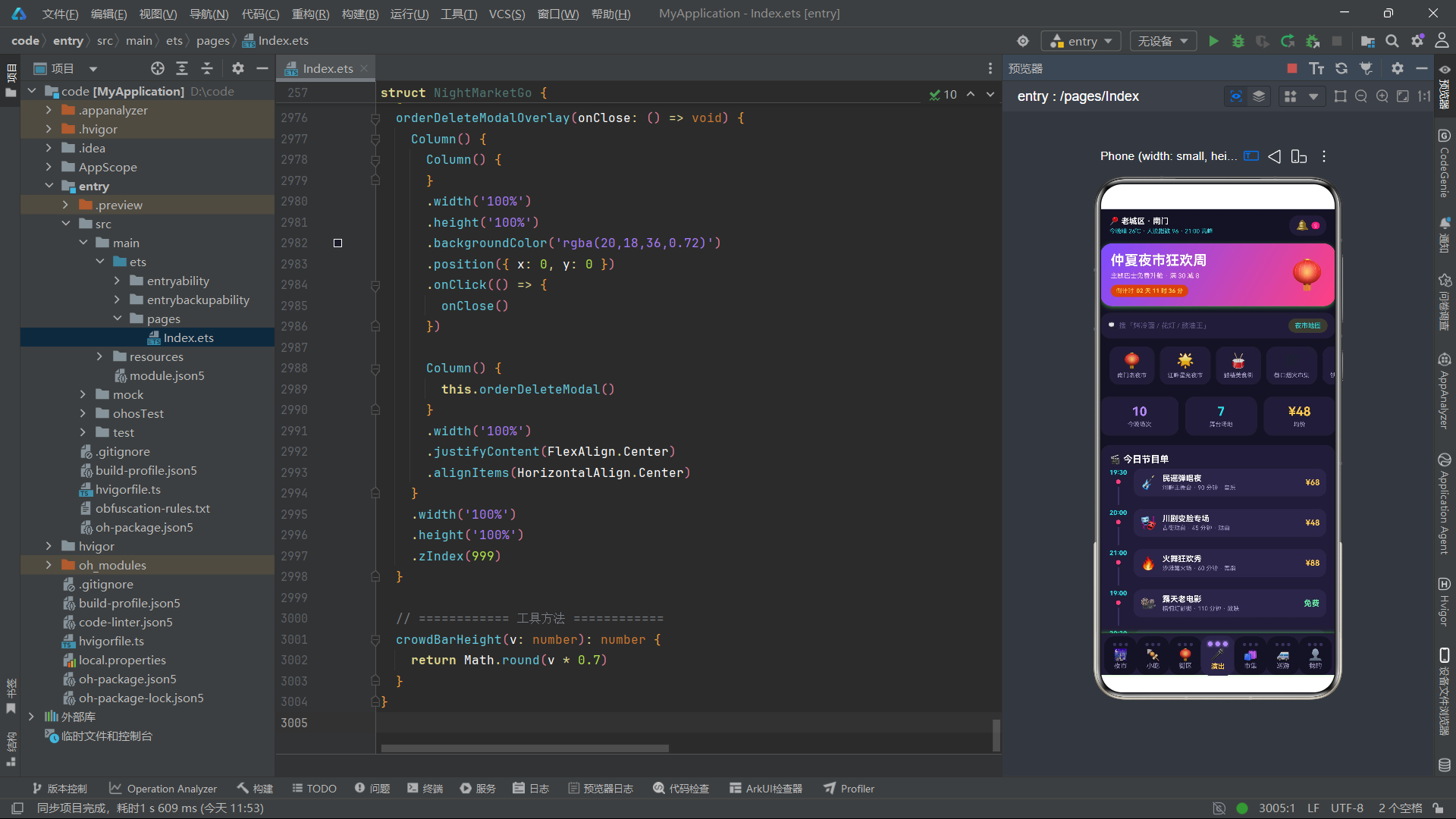
演出 Tab 的核心是时间轴节目单组件。每条节目项左侧是一个 Column 容器,纵向排列时间文字、霓虹粉小圆点(Circle)、以及一条 2px 宽 28px 高的竖线(空 Column 设置 backgroundColor),这条竖线模拟时间轴的连接线。右侧的节目信息卡片使用 cardBg2 背景包裹,包含表情、名称、场地时长品类信息和价格。价格通过三元运算符 sh.price === 0 ? '免费' : '¥' + sh.price.toString() 判断——免费演出用绿色 success、收费演出用暖黄 warm。演出列表卡片同样遍历 SHOWS,但布局更丰富:顶部是品类徽章和余票状态文字(seatVal <= 20 时红色危险、否则绿色安全),下方是余票进度条(total: 120 为满座基准),右侧是价格和"想看"按钮。这种"时间轴 + 列表卡片"的双视图展示让用户既能纵览全天节目时间线,又能横向浏览演出详情和购票入口。
十九、市集 Tab:横滑卡与手作体验课
@Builder
goodsTab() {
  Column() {
    Scroll() {
      Row() {
        ForEach(GOODS, (g: GoodsItem) => {
          Column() {
            Text(g.emoji).fontSize(30)
            Text(g.name).fontSize(12).fontWeight(FontWeight.Bold).fontColor(COLORS.white).margin({ top: 6 })
            Text(g.seller).fontSize(9).fontColor(COLORS.textSecondary).margin({ top: 3 })
            Text('¥' + g.price.toString()).fontSize(13).fontWeight(FontWeight.Bold)
              .fontColor(COLORS.warm).margin({ top: 5 })
          }
          .alignItems(HorizontalAlign.Center).width(110)
          .padding({ top: 14, bottom: 14 }).backgroundColor(COLORS.cardBg)
          .borderRadius(16).margin({ right: 10 })
        }, (g: GoodsItem) => 'goodscard' + g.id.toString())
      }
    }
    .scrollable(ScrollDirection.Horizontal)

    ForEach(GOODS, (g: GoodsItem) => {
      Row() {
        Column() { Text(g.emoji).fontSize(25) }
          .width(52).height(52).justifyContent(FlexAlign.Center)
          .backgroundColor(COLORS.cardBg2).borderRadius(13)
        Column() {
          Row() {
            Text(g.tag).fontSize(8).fontColor(COLORS.white)
              .padding({ left: 5, right: 5, top: 2, bottom: 2 })
              .backgroundColor(g.tag === '非遗' ? COLORS.primary : (g.tag === '手作' ? COLORS.accent : COLORS.cyan))
              .borderRadius(6)
            Text(g.stock).fontSize(8)
              .fontColor(g.stock === '有货' ? COLORS.success : COLORS.warning)
              .backgroundColor(g.stock === '有货' ? '#6AF2A81A' : '#FFAB401A')
              .borderRadius(6).margin({ left: 5 })
          }
          Row() {
            Text('热度').fontSize(8).fontColor(COLORS.textHint)
            Progress({ value: g.hotVal, total: 100, type: ProgressType.Linear })
              .width(70).height(4).margin({ left: 5 }).color(COLORS.accent)
            Text(g.hotVal.toString()).fontSize(8).fontColor(COLORS.warm).margin({ left: 5 })
          }
        }
        .layoutWeight(1).margin({ left: 11 })
        Text('¥' + g.price.toString()).fontSize(15).fontWeight(FontWeight.Bold).fontColor(COLORS.warm)
      }
      .backgroundColor(COLORS.cardBg).borderRadius(16)
      .margin({ left: 14, right: 14, top: 10 })
    }, (g: GoodsItem) => 'goods' + g.id.toString())

    Column() {
      Text('🎨 今晚手作体验课').fontSize(14).fontWeight(FontWeight.Bold).fontColor(COLORS.white)
      Row() {
        Column() {
          Text('🪭').fontSize(22)
          Text('漂漆团扇课').fontSize(12).fontWeight(FontWeight.Bold).fontColor(COLORS.white).margin({ top: 4 })
          Text('19:00 · 漆色工作室 · ¥99').fontSize(9).fontColor(COLORS.cyan).margin({ top: 3 })
        }
        .layoutWeight(1).backgroundColor(COLORS.cardBg2).borderRadius(13)
        Column() {
          Text('🐇').fontSize(22)
          Text('兔子灯扎制课').fontSize(12).fontWeight(FontWeight.Bold).fontColor(COLORS.white).margin({ top: 4 })
          Text('20:00 · 灯匠阿伯 · ¥129').fontSize(9).fontColor(COLORS.warm).margin({ top: 3 })
        }
        .layoutWeight(1).backgroundColor(COLORS.cardBg2).borderRadius(13).margin({ left: 10 })
      }
      .margin({ top: 12 })
    }
  }
}
市集 Tab 的顶部是横向滑动的手作好物卡片轮播,每张卡片固定宽度 110px,纵向排列表情图标、名称、摊主和价格,底部间距 10px。随后的列表区域遍历 GOODS 数组生成好物卡片,每张卡片包含品类徽章和库存徽章的双条件渲染——品类通过 g.tag === '非遗' ? primary : (g.tag === '手作' ? accent : cyan) 三级条件选择颜色(非遗用深紫、手作用霓虹粉、其他用霓虹青),库存通过 g.stock === '有货' ? success : warning 判断颜色和背景。热度行是列表卡片的特色,将"热度"文字标签、进度条和数值三者横向排列,进度条用霓虹粉色,数值用暖黄色,形成"标签+可视化+数值"的完整数据展示链。底部手作体验课卡片用双卡并排展示了漂漆团扇课和兔子灯扎制课,分别用霓虹青和暖黄两种色调区分时间信息。
二十、巡游 Tab:主题巴士横滑卡与班线列表
@Builder
busTab() {
  Column() {
    Scroll() {
      Row() {
        ForEach(BUS_ROUTES, (r: BusRoute) => {
          Column() {
            Text(r.emoji).fontSize(30)
            Text(r.name).fontSize(12).fontWeight(FontWeight.Bold).fontColor(COLORS.white).margin({ top: 6 })
            Text(r.theme).fontSize(8).fontColor(COLORS.cyan).margin({ top: 3 })
            Text('¥' + r.price.toString() + ' / 人').fontSize(13).fontWeight(FontWeight.Bold)
              .fontColor(COLORS.warm).margin({ top: 5 })
          }
          .alignItems(HorizontalAlign.Center).width(120)
          .padding({ top: 14, bottom: 14 })
          .linearGradient({ angle: 140, colors: [['#4527A0', 0], ['#7C4DFF', 1]] })
          .borderRadius(16).margin({ right: 10 })
          .onClick(() => {
            this.selectedRoute = r
            this.showBusModal = true
          })
        }, (r: BusRoute) => 'buscard' + r.id.toString())
      }
    }

    ForEach(BUS_ROUTES, (r: BusRoute) => {
      Row() {
        Column() {
          Text(r.time).fontSize(13).fontWeight(FontWeight.Bold).fontColor(COLORS.cyan)
          Text('发车').fontSize(8).fontColor(COLORS.textHint).margin({ top: 2 })
        }
        Column() {
          Row() {
            Text(r.name).fontSize(13).fontWeight(FontWeight.Bold).fontColor(COLORS.white)
            Text(r.seats).fontSize(8).fontColor(COLORS.success)
              .padding({ left: 6, right: 6, top: 2, bottom: 2 })
              .backgroundColor('#6AF2A81A').borderRadius(6).margin({ left: 6 })
          }
          Text(r.from + ' → ' + r.to).fontSize(9).fontColor(COLORS.textSecondary).margin({ top: 4 })
          Row() {
            Text(r.duration).fontSize(8).fontColor(COLORS.textHint)
            Text(r.theme).fontSize(8).fontColor(COLORS.primaryLight).margin({ left: 8 })
          }
        }
        .layoutWeight(1).margin({ left: 12 })
        Column() {
          Text('¥' + r.price.toString()).fontSize(15).fontWeight(FontWeight.Bold).fontColor(COLORS.accent)
          Text('预订').fontSize(10).fontWeight(FontWeight.Bold).fontColor(COLORS.white)
            .padding({ left: 13, right: 13, top: 6, bottom: 6 })
            .linearGradient({ angle: 160, colors: [['#FF4081', 0], ['#FFC94D', 1]] })
            .borderRadius(14).margin({ top: 6 })
            .onClick(() => {
              this.selectedRoute = r
              this.busDate = '今天'
              this.busCount = 2
              this.showBusModal = true
            })
        }
      }
    }, (r: BusRoute) => 'bus' + r.id.toString())
    // ... 我的订单、乘车须知
  }
}
巡游 Tab 的顶部横滑卡每张使用从深紫蓝到主紫的 140 度渐变背景,宽度 120px,纵向排列表情、路线名称、主题文案和单价。点击横滑卡会设置 selectedRoute 并打开巴士预订弹窗。班线列表卡片的布局是"左侧发车时间 + 中间路线信息 + 右侧价格和预订按钮"三栏式:左侧时间用霓虹青色大号字体,下方"发车"小字;中间区域包含路线名称和余票徽章(绿色半透明背景 #6AF2A81A)、起讫站点连写、时长和主题文案;右侧价格用霓虹粉色,预订按钮使用从霓虹粉到暖黄的 160 度渐变。点击预订按钮时,除了设置 selectedRoute 外,还会重置表单状态 busDate = '今天' 和 busCount = 2,然后打开弹窗。这种"点击前重置表单"的设计确保了每次打开弹窗都是干净的初始状态,避免上次操作残留。巡游 Tab 底部还有"我的巡游订单"列表和"乘车须知"卡片,订单列表支持删除操作(通过删除确认弹窗)。
二十一、我的 Tab:用户卡、收藏编辑与设置列表
@Builder
mineTab() {
  Column() {
    Row() {
      Column() { Text('🥢').fontSize(28) }
        .width(56).height(56).justifyContent(FlexAlign.Center)
        .backgroundColor('#FFFFFF26').borderRadius(28)
      Column() {
        Text('干饭小行家').fontSize(17).fontWeight(FontWeight.Bold).fontColor(COLORS.white)
        Text('夜市探索等级 Lv.8 · 已解锁 9 座夜市')
          .fontSize(10).fontColor('#FFD9E7').margin({ top: 4 })
        Progress({ value: 72, total: 100, type: ProgressType.Linear })
          .width(150).height(5).margin({ top: 6 }).color(COLORS.warm)
      }
      .layoutWeight(1).margin({ left: 12 })
    }
    .linearGradient({ angle: 130, colors: [['#7C4DFF', 0], ['#FF4081', 1]] })
    .borderRadius(18).margin({ left: 14, right: 14, top: 14 })

    ForEach(this.myFavs, (f: FavItem) => {
      Row() {
        Column() { Text('📍').fontSize(18) }
          .width(38).height(38).justifyContent(FlexAlign.Center)
          .backgroundColor(COLORS.cardBg2).borderRadius(11)
        Column() {
          Text(f.name).fontSize(13).fontWeight(FontWeight.Bold).fontColor(COLORS.white)
          Text(f.stall + ' · ' + f.market).fontSize(9).fontColor(COLORS.textSecondary).margin({ top: 3 })
          Text('备注:' + f.note).fontSize(9).fontColor(COLORS.cyan).margin({ top: 2 })
        }
        .layoutWeight(1).margin({ left: 10 })
        Text('编辑').fontSize(9).fontWeight(FontWeight.Bold).fontColor(COLORS.white)
          .padding({ left: 11, right: 11, top: 5, bottom: 5 })
          .backgroundColor(COLORS.primary).borderRadius(12)
          .onClick(() => {
            this.editingFav = f
            this.editFavName = f.name
            this.editFavStall = f.stall
            this.editFavNote = f.note
            this.showFavEditModal = true
          })
      }
      .backgroundColor(COLORS.cardBg).borderRadius(14)
      .margin({ left: 14, right: 14, top: 8 })
    }, (f: FavItem) => 'fav' + f.id.toString() + f.name + f.note)
  }
}
我的 Tab 的用户卡使用了从主紫到霓虹粉的 130 度渐变背景,左侧头像用白色半透明背景 #FFFFFF26 的圆形容器包裹筷子表情,右侧是用户名、等级信息和等级进度条(暖黄色 Progress,150px 宽)。收藏列表卡片遍历 myFavs 数组,注意键值生成器 'fav' + f.id.toString() + f.name + f.note 将名称和备注也编入 key——这是因为收藏编辑功能会修改 name 和 note 字段,将这些字段编入 key 可以确保编辑保存后 ForEach 正确识别数据变化并触发对应卡片的重新渲染。每张收藏卡片右侧有"编辑"按钮,点击时将当前收藏项赋值给 editingFav,同时把三个字段分别赋值给编辑表单的状态变量 editFavName、editFavStall、editFavNote,然后打开收藏编辑弹窗。这种"选中数据 + 同步表单状态"的模式在多个弹窗中反复使用,是该应用弹窗交互的标准范式。
二十二、巴士预订弹窗与 busTotal 价格计算
@Builder
busModal() {
  Column() {
    Column() {
      Row() {
        Text(this.selectedRoute.emoji).fontSize(34)
        Column() {
          Text(this.selectedRoute.name).fontSize(16).fontWeight(FontWeight.Bold).fontColor(COLORS.white)
          Text(this.selectedRoute.from + ' → ' + this.selectedRoute.to + ' · ' + this.selectedRoute.duration)
            .fontSize(10).fontColor('#FFD9E7').margin({ top: 4 })
        }
        .layoutWeight(1).margin({ left: 10 })
      }
    }
    .linearGradient({ angle: 135, colors: [['#7C4DFF', 0], ['#FF4081', 1]] })

    Column() {
      Text('出发日期').fontSize(12).fontWeight(FontWeight.Bold).fontColor(COLORS.white)
      Row() {
        ForEach(BUS_DATES, (d: string) => {
          Text(d).fontSize(11)
            .fontColor(d === this.busDate ? COLORS.white : COLORS.textSecondary)
            .padding({ left: 15, right: 15, top: 7, bottom: 7 })
            .backgroundColor(d === this.busDate ? COLORS.accent : COLORS.cardBg2)
            .borderRadius(13).margin({ right: 8, top: 10 })
            .onClick(() => { this.busDate = d })
        }, (d: string) => d + this.busDate)
      }

      Text('乘车人数').fontSize(12).fontWeight(FontWeight.Bold).fontColor(COLORS.white).margin({ top: 16 })
      Row() {
        Text('−').fontSize(17).fontWeight(FontWeight.Bold)
          .fontColor(this.busCount > 1 ? COLORS.white : COLORS.textHint)
          .width(34).height(34).textAlign(TextAlign.Center)
          .backgroundColor(COLORS.cardBg2).borderRadius(17)
          .onClick(() => { if (this.busCount > 1) { this.busCount -= 1 } })
        Text(this.busCount.toString() + ' 人').fontSize(14).fontWeight(FontWeight.Bold)
          .fontColor(COLORS.white).margin({ left: 16, right: 16 })
        Text('+').fontSize(17).fontWeight(FontWeight.Bold).fontColor(COLORS.white)
          .width(34).height(34).textAlign(TextAlign.Center)
          .backgroundColor(COLORS.cardBg2).borderRadius(17)
          .onClick(() => { if (this.busCount < 10) { this.busCount += 1 } })
      }

      Text('¥' + this.busTotal().toString()).fontSize(19).fontWeight(FontWeight.Bold).fontColor(COLORS.accent)
    }
  }
  .borderRadius({ topLeft: 22, topRight: 22 })
  .constraintSize({ maxHeight: '80%' })
}

busTotal(): number {
  return this.selectedRoute.price * this.busCount - 3
}
巴士预订弹窗是五个弹窗中最复杂的一个,包含日期选择、上车点展示、人数步进器和价格计算四个交互模块。弹窗顶部是渐变头部,展示选中路线的表情、名称和起讫信息。日期选择通过 ForEach 遍历 BUS_DATES 生成四个日期 Chip,选中状态用霓虹粉背景。人数步进器是经典的"减号-数值-加号"三件套:减号按钮在 busCount > 1 时可用(白色文字),等于 1 时变灰(textHint 色);加号按钮在 busCount < 10 时可加,上限 10 人。两个按钮都是 34x34 的圆形(borderRadius(17)),点击时通过 if 条件守卫递增递减。busTotal() 方法计算总价为 单价 * 人数 - 3(狂欢周立减 3 元),这是一个简单的线性计算函数,当 busCount 或 selectedRoute 变化时自动重新计算并更新显示。弹窗使用 constraintSize({ maxHeight: '80%' }) 限制最大高度为屏幕的 80%,配合 borderRadius 顶部圆角实现底部弹出面板效果。
二十三、小吃详情弹窗与 snackTotal 规格价格计算
snackTotal(): number {
  return Math.round(this.selectedSnack.price * (this.snackSpec === '小份' ? 1 : (this.snackSpec === '大份' ? 1.5 : 2)) * this.snackCount) - (this.snackCoupon ? 5 : 0)
}
小吃弹窗的价格计算函数 snackTotal() 比 busTotal() 更复杂,涉及规格系数、份数和优惠券三重因素。规格系数通过嵌套三元运算符实现:小份乘 1、大份乘 1.5、双拼乘 2;份数直接相乘;优惠券在勾选时减 5 元。整个计算使用 Math.round 取整,避免浮点数精度问题。小吃弹窗的规格选择和份数步进器与巴士弹窗的模式一致,但额外增加了优惠券勾选组件——一个 Text 标签显示"已勾选"或"不使用"状态,点击时通过 this.snackCoupon = !this.snackCoupon 切换布尔值,背景色和文字色随之条件变化。这种"布尔状态驱动 UI 样式切换"的模式是 ArkTS 中最简单的交互形式。弹窗底部展示 snackTotal() 的实时计算结果和"领券下单"按钮,按钮点击后关闭弹窗(showSnackModal = false)。
二十四、逛吃搭子弹窗与 createBuddy 数据新增
@Builder
buddyModal() {
Column() {
Column() {
Text('🧑🤝🧑 发起逛吃搭子').fontSize(16).fontWeight(FontWeight.Bold).fontColor(COLORS.white)
Text('找齐队友,一起去扫街').fontSize(10).fontColor('#FFD9E7').margin({ top: 4 })
}
.linearGradient({ angle: 135, colors: [['#4527A0', 0], ['#7C4DFF', 1]] })
Column() {
Text('目标夜市').fontSize(12).fontWeight(FontWeight.Bold).fontColor(COLORS.white)
Flex({ wrap: FlexWrap.Wrap }) {
ForEach(this.buddyMarkets, (m: string) => {
Text(m).fontSize(10)
.fontColor(m === this.buddyMarket ? COLORS.white : COLORS.textSecondary)
.padding({ left: 12, right: 12, top: 6, bottom: 6 })
.backgroundColor(m === this.buddyMarket ? COLORS.accent : COLORS.cardBg2)
.borderRadius(12).margin({ right: 8, top: 10 })
.onClick(() => { this.buddyMarket = m })
}, (m: string) => m + this.buddyMarket)
}
TextInput({ placeholder: '例如:能吃辣,22 点南门集合', text: this.buddyNote })
.fontSize(11).fontColor(COLORS.white)
.placeholderColor(COLORS.textHint)
.placeholderFont({ size: 11 })
.backgroundColor(COLORS.cardBg2).borderRadius(12)
.padding({ left: 12, right: 12 }).height(40).margin({ top: 10 })
.onChange((v: string) => { this.buddyNote = v })
}
}
}
createBuddy(): void {
const nb: BuddyItem = {
id: this.buddyList.length + 1,
name: '我发起的局',
avatar: '🎉',
market: this.buddyMarket,
goal: this.buddyGoal,
people: this.buddySize,
joined: 1,
note: this.buddyNote === '' ? '欢迎加入,AA 制' : this.buddyNote
}
this.buddyList = [nb].concat(this.buddyList)
this.buddyNote = ''
this.showBuddyModal = false
this.currentTab = 0
}
逛吃搭子弹窗是社交功能的核心,包含目标夜市选择、搭子目标选择、队伍人数步进器和备注输入框四个模块。其中目标夜市选择使用了 Flex({ wrap: FlexWrap.Wrap }) 容器配合 ForEach 生成 Chip 列表,FlexWrap.Wrap 让 Chip 在空间不足时自动换行,比 Row 更适合数量较多的选项场景。备注输入框使用 TextInput 组件,通过 onChange 回调实时将输入值同步到 buddyNote 状态变量。createBuddy() 方法是数据新增逻辑的典范:首先用字面量构造一个新的 BuddyItem 对象,id 通过 buddyList.length + 1 自动递增,note 字段在用户未输入时使用默认文案"欢迎加入,AA 制"(通过三元运算符 this.buddyNote === '' ? '默认文案' : this.buddyNote 实现),然后用 [nb].concat(this.buddyList) 将新搭子插入到列表头部。插入后重置 buddyNote 为空字符串、关闭弹窗、并切换到夜市 Tab(currentTab = 0)让用户看到新创建的搭子。这种"创建后自动跳转到展示页"的用户体验设计非常流畅。
二十五、收藏编辑弹窗与 saveFav 不可变更新
saveFav(): void {
  const next: FavItem[] = []
  this.myFavs.forEach((f: FavItem) => {
    if (f.id === this.editingFav.id) {
      const nf: FavItem = {
        id: f.id,
        name: this.editFavName,
        stall: this.editFavStall,
        market: f.market,
        note: this.editFavNote
      }
      next.push(nf)
    } else {
      next.push(f)
    }
  })
  this.myFavs = next
  this.showFavEditModal = false
}
saveFav() 方法实现了收藏数据的编辑保存,采用了一种"不可变更新"(immutable update)的模式:不直接修改原数组中的对象,而是构建一个全新的数组 next。通过 forEach 遍历 myFavs,当遇到 id 匹配 editingFav.id 的项时,用编辑后的表单值(editFavName、editFavStall、editFavNote)构造一个新的 FavItem 对象推入 next,其余项原样推入。最后将 this.myFavs = next 整体替换。这种模式在 ArkTS 中非常重要——直接修改数组元素的属性不会触发 @State 的响应式更新,因为 ArkTS 的状态追踪是基于引用变化的。通过构建新数组并整体赋值,确保引用变化被检测到,从而触发 ForEach 的重新渲染。收藏编辑弹窗包含三个 TextInput 输入框(摊位名称、摊位位置、口味备注),每个都通过 onChange 回调同步到对应的状态变量,保存和取消两个按钮分别调用 saveFav() 和直接关闭弹窗。
二十六、删除确认弹窗与 filter 不可变删除
@Builder
orderDeleteModal() {
  Column() {
    Text('🗑️').fontSize(34)
    Text('确认删除这条订单?').fontSize(15).fontWeight(FontWeight.Bold).fontColor(COLORS.white).margin({ top: 10 })
    Text('删除后不可恢复,出行记录将同步移除').fontSize(10).fontColor(COLORS.textHint).margin({ top: 6 })
    Row() {
      Text('再想想').fontSize(12).fontWeight(FontWeight.Bold).fontColor(COLORS.textSecondary)
        .padding({ left: 22, right: 22, top: 10, bottom: 10 })
        .backgroundColor(COLORS.cardBg2).borderRadius(18)
        .onClick(() => { this.showOrderDeleteModal = false })
      Text('确认删除').fontSize(12).fontWeight(FontWeight.Bold).fontColor(COLORS.white)
        .padding({ left: 22, right: 22, top: 10, bottom: 10 })
        .backgroundColor(COLORS.danger).borderRadius(18).margin({ left: 12 })
        .onClick(() => {
          this.myOrders = this.myOrders.filter((o: OrderItem) => o.id !== this.deleteOrderId)
          this.showOrderDeleteModal = false
        })
    }
  }
  .width('86%').backgroundColor(COLORS.cardBg).borderRadius(20)
}
删除确认弹窗是五个弹窗中唯一使用居中弹窗布局(而非底部弹出)的弹窗,宽度 86%、圆角 20、内容垂直居中。弹窗包含删除图标、标题、描述和双按钮("再想想"取消 + "确认删除"确认)。确认删除按钮使用红色 danger 背景,点击时通过 this.myOrders.filter((o: OrderItem) => o.id !== this.deleteOrderId) 过滤掉目标订单,然后整体赋值给 myOrders。filter 方法返回一个新数组(不修改原数组),这与 saveFav 的不可变更新模式一致——通过生成新数组引用来触发 @State 的响应式更新。deleteOrderId 在列表卡片的删除按钮点击时设置(this.deleteOrderId = o.id),随后打开弹窗。这种"先记录目标 ID 再弹窗确认"的两步删除流程在移动端应用中是标准的交互模式,防止误操作。
二十七、crowdBarHeight 工具方法与数据映射
private buddyMarkets: string[] = ['南门老夜市', '鼓楼美食街', '江畔星光夜市', '海边篝火夜市', '灯会古街夜市']
private buddyGoals: string[] = ['连吃五摊咸口', '甜品胃专用局', '汉服出片局', '生蚝管饱挑战', '蹦完迪吃夜宵']

crowdBarHeight(v: number): number {
  return Math.round(v * 0.7)
}
crowdBarHeight 是组件中唯一的工具方法,用于将人流指数(0-100)映射为柱状图高度。Math.round(v * 0.7) 将数值压缩到 0-70 像素的范围,配合图表容器 110px 的高度,留出了数值标签和日期标签的空间。这个方法在 ForEach(WEEK_CROWD, ...) 的柱状图渲染中被调用,通过 .height(this.crowdBarHeight(v)) 动态设置每根柱子的高度。在 ArkTS 中,组件方法可以在 @Builder 内部通过 this.methodName() 调用,返回值直接用于属性设置。buddyMarkets 和 buddyGoals 两个 private 数组是搭子弹窗中选项的数据源,它们不使用 @State 因为是静态配置数据。这种将工具方法和静态配置数据集中放在组件底部的做法,保持了 build() 和 @Builder 方法的可读性。
对比表格
表格一:七大 Tab 页面功能对比
| Tab 索引 | Tab 名称 | 核心数据模型 | 列表组件 | 特色可视化组件 | 交互弹窗 |
|---|---|---|---|---|---|
| 0 | 夜市 | NightMarket / BuddyItem | ForEach + 卡片 | Progress 人流进度条 + 柱状图 | buddyModal |
| 1 | 小吃 | SnackItem | ForEach + 卡片 + 横滑 Chips | Progress 甜咸对比 + 统计三卡 | snackModal |
| 2 | 街区 | StreetItem | ForEach + 卡片 | 渐变双卡 + 灯笼灯串 + 路线时间轴 | 无 |
| 3 | 演出 | ShowItem | ForEach + 时间轴 + 卡片 | Circle 时间轴节点 + 余票进度 | 无 |
| 4 | 市集 | GoodsItem | ForEach + 横滑卡 + 列表卡 | 热度进度条 + 体验课双卡 | 无 |
| 5 | 巡游 | BusRoute / OrderItem | ForEach + 横滑卡 + 列表 + 订单 | 渐变巴士卡 + 订单状态徽章 | busModal + orderDeleteModal |
| 6 | 我的 | FavItem | ForEach + 收藏卡 + 设置列表 | 等级进度条 + 统计三格 | favEditModal |
表格二:五套弹窗架构对比
| 弹窗名称 | 触发状态变量 | 选中数据状态 | 表单状态变量 | 布局方式 | 数据操作方法 |
|---|---|---|---|---|---|
| 巴士预订 | showBusModal | selectedRoute | busDate, busCount | 底部弹出 maxHeight 80% | busTotal() |
| 小吃下单 | showSnackModal | selectedSnack | snackSpec, snackCount, snackCoupon | 底部弹出 maxHeight 80% | snackTotal() |
| 发起搭子 | showBuddyModal | 无 | buddyMarket, buddyGoal, buddySize, buddyNote | 底部弹出 maxHeight 80% | createBuddy() |
| 收藏编辑 | showFavEditModal | editingFav | editFavName, editFavStall, editFavNote | 底部弹出 maxHeight 80% | saveFav() |
| 删除确认 | showOrderDeleteModal | deleteOrderId | 无 | 居中弹窗 width 86% | filter 删除 |
表格三:Progress 进度条使用场景对比
| 使用场景 | value 来源 | total 值 | 颜色条件 | 宽度设置 | 所在 Tab |
|---|---|---|---|---|---|
| 夜市人流 | m.crowdVal | 100 | 拥挤红/较多橙/其他绿 | 90px 固定 | 夜市 |
| 搭子加入 | b.joined | b.people | 固定霓虹青 | 30px 固定 | 夜市 |
| 甜咸投票 | 62 / 38 | 100 | 咸党青/甜党粉 | 100% 自适应 | 小吃 |
| 街区灯光 | st.lightVal | 100 | >=85 暖黄/其他青 | 100% 自适应 | 街区 |
| 演出余票 | sh.seatVal | 120 | <=20 红/其他青 | 110px 固定 | 演出 |
| 好物热度 | g.hotVal | 100 | 固定霓虹粉 | 70px 固定 | 市集 |
| 用户等级 | 72 | 100 | 固定暖黄 | 150px 固定 | 我的 |
表格四:不可变数据更新模式对比
| 操作场景 | 方法 | 技术手段 | 触发响应式更新原理 |
|---|---|---|---|
| 新增搭子 | createBuddy() | [newItem].concat(oldList) | 新数组引用替换旧引用 |
| 编辑收藏 | saveFav() | forEach 构建新数组 | 新数组引用替换旧引用 |
| 删除订单 | onClick | filter 过滤生成新数组 | 新数组引用替换旧引用 |
| 弹窗关闭 | onClose 回调 | showXxxModal = false | 布尔值变化触发 if 条件重判 |
| Tab 切换 | onClick | currentTab = idx | 数值变化触发 if-else 重判 |
安装DevEco Studio程序

选择目标安装目录:

设置环境变量,但是需要重启一下:

新建一个空白模板:

设置API为24的模板项目:
初始化项目,自动下载相关依赖:

完整代码:
// ============================================================
// 场景:仲夏夜市巡游专线(夜市/小吃/街区/演出/市集/巡游/我的)
// 视觉:霓虹夜色 · 深紫底 + 霓虹粉/青 + 灯泡暖黄
// Tab 栏:灯泡串式(每项顶部 3 颗小灯泡,选中点亮 + 光晕)
// ============================================================
interface ColorPalette {
primary: string;
primaryLight: string;
primaryDeep: string;
accent: string;
accentLight: string;
warm: string;
cyan: string;
bg: string;
cardBg: string;
cardBg2: string;
textPrimary: string;
textSecondary: string;
textHint: string;
border: string;
success: string;
warning: string;
danger: string;
white: string;
}
const COLORS: ColorPalette = {
primary: '#7C4DFF',
primaryLight: '#B388FF',
primaryDeep: '#4527A0',
accent: '#FF4081',
accentLight: '#FFD9E7',
warm: '#FFC94D',
cyan: '#26E0E8',
bg: '#141224',
cardBg: '#201C36',
cardBg2: '#2A2547',
textPrimary: '#FFFFFF',
textSecondary: '#A79FC9',
textHint: '#5E5687',
border: '#39325E',
success: '#6AF2A8',
warning: '#FFAB40',
danger: '#FF6079',
white: '#FFFFFF'
};
interface NightMarket {
id: number;
name: string;
emoji: string;
zone: string;
stalls: number;
rating: number;
hot: string;
tag: string;
crowd: string;
crowdVal: number;
distance: string;
}
const MARKETS: NightMarket[] = [
{ id: 1, name: '南门老夜市', emoji: '🏮', zone: '老城区南门', stalls: 186, rating: 4.9, hot: '爆', tag: '烟火气天花板', crowd: '拥挤', crowdVal: 96, distance: '2.3km' },
{ id: 2, name: '江畔星光夜市', emoji: '🌟', zone: '滨江东岸', stalls: 142, rating: 4.8, hot: '热', tag: '江风吹拂', crowd: '较多', crowdVal: 78, distance: '4.1km' },
{ id: 3, name: '鼓楼美食街', emoji: '🥁', zone: '鼓楼中心', stalls: 210, rating: 4.7, hot: '爆', tag: '百年老街', crowd: '拥挤', crowdVal: 92, distance: '5.6km' },
{ id: 4, name: '巷口烟火市集', emoji: '炊', zone: '梧桐巷片区', stalls: 96, rating: 4.6, hot: '升', tag: '新晋网红', crowd: '适中', crowdVal: 61, distance: '1.8km' },
{ id: 5, name: '铁西深夜食堂街', emoji: '🍢', zone: '铁西广场', stalls: 158, rating: 4.8, hot: '热', tag: '深夜党福音', crowd: '较多', crowdVal: 74, distance: '7.2km' },
{ id: 6, name: '外滩枫泾夜市', emoji: '🌉', zone: '外滩南段', stalls: 128, rating: 4.5, hot: '温', tag: '拍照出片', crowd: '适中', crowdVal: 55, distance: '9.4km' },
{ id: 7, name: '桂花巷夜市', emoji: '🌼', zone: '西城桂巷', stalls: 84, rating: 4.6, hot: '升', tag: '桂花限定', crowd: '舒适', crowdVal: 42, distance: '3.9km' },
{ id: 8, name: '海边篝火夜市', emoji: '🔥', zone: '东湾沙滩', stalls: 112, rating: 4.9, hot: '爆', tag: '篝火演出', crowd: '较多', crowdVal: 80, distance: '12.6km' },
{ id: 9, name: '灯会古街夜市', emoji: '🎇', zone: '古城灯会区', stalls: 174, rating: 4.8, hot: '热', tag: '花灯长廊', crowd: '拥挤', crowdVal: 88, distance: '8.8km' },
{ id: 10, name: '大学城后街', emoji: '🎓', zone: '大学城南', stalls: 138, rating: 4.7, hot: '升', tag: '学生党最爱', crowd: '适中', crowdVal: 58, distance: '6.5km' }
];
interface SnackItem {
id: number;
name: string;
emoji: string;
stall: string;
price: number;
originPrice: number;
sales: number;
rating: number;
market: string;
kind: string;
desc: string;
}
const SNACKS: SnackItem[] = [
{ id: 1, name: '东北烤冷面', emoji: '🌯', stall: '老铁烤冷面', price: 10, originPrice: 15, sales: 3421, rating: 4.9, market: '南门老夜市', kind: '咸香', desc: '铁板现烤,加蛋加肠双拼酱,酸甜口一绝' },
{ id: 2, name: '竹签炸串', emoji: '🍡', stall: '胖姐炸串', price: 18, originPrice: 26, sales: 2866, rating: 4.8, market: '鼓楼美食街', kind: '香酥', desc: '三十种签签任选,秘制辣椒面现蘸' },
{ id: 3, name: '长沙臭豆腐', emoji: '🧆', stall: '黑色经典', price: 12, originPrice: 18, sales: 3102, rating: 4.7, market: '南门老夜市', kind: '重口', desc: '外酥里嫩,灌汤汁水,闻着臭吃着香' },
{ id: 4, name: '章鱼小丸子', emoji: '🐙', stall: '鲸屋烧', price: 15, originPrice: 22, sales: 1980, rating: 4.6, market: '江畔星光夜市', kind: '软糯', desc: '整颗章鱼足,木鱼花现刨会跳舞' },
{ id: 5, name: '冰糖葫芦', emoji: '🍓', stall: '京味果局', price: 8, originPrice: 12, sales: 2655, rating: 4.8, market: '灯会古街夜市', kind: '酸甜', desc: '山楂草莓双拼,糖衣脆壳咔嚓响' },
{ id: 6, name: '现炒酸奶', emoji: '🥛', stall: '冰冰酱炒酸奶', price: 14, originPrice: 20, sales: 1750, rating: 4.6, market: '大学城后街', kind: '冰爽', desc: '-18℃铁板急冻,芒果榴莲双拼' },
{ id: 7, name: '炭火烤生蚝', emoji: '🦪', stall: '蚝门盛宴', price: 30, originPrice: 45, sales: 1240, rating: 4.9, market: '海边篝火夜市', kind: '鲜辣', desc: '蒜蓉粉丝打底,五只起烤滋滋冒汁' },
{ id: 8, name: '柳州螺蛳粉', emoji: '🍜', stall: '嗦粉大王', price: 16, originPrice: 24, sales: 2288, rating: 4.7, market: '铁西深夜食堂街', kind: '酸辣', desc: '汤底熬足八小时,加辣加臭双倍快乐' },
{ id: 9, name: '流心蛋堡', emoji: '🍔', stall: '蛋蛋大人', price: 11, originPrice: 16, sales: 1602, rating: 4.5, market: '巷口烟火市集', kind: '咸香', desc: '双层蛋液夹肉饼,流心芝士爆浆' },
{ id: 10, name: '手搓冰粉', emoji: '🍧', stall: '幺妹冰粉', price: 9, originPrice: 14, sales: 2933, rating: 4.8, market: '江畔星光夜市', kind: '冰爽', desc: '红糖醪糟小圆子,手搓气泡感十足' }
];
interface StreetItem {
id: number;
name: string;
emoji: string;
distance: string;
shops: number;
lanterns: number;
mood: string;
lightVal: number;
note: string;
}
const STREETS: StreetItem[] = [
{ id: 1, name: '梧桐灯影街', emoji: '🌳', distance: '步行 8 分钟', shops: 46, lanterns: 120, mood: '文艺清新', lightVal: 86, note: '梧桐树上挂满暖黄灯球' },
{ id: 2, name: '青石板老巷', emoji: '🪨', distance: '步行 12 分钟', shops: 38, lanterns: 88, mood: '古韵怀旧', lightVal: 72, note: '青石板路配红灯笼长廊' },
{ id: 3, name: '霓虹招牌街', emoji: '💬', distance: '步行 15 分钟', shops: 52, lanterns: 210, mood: '港风复古', lightVal: 95, note: '满街霓虹招牌,出片圣地' },
{ id: 4, name: '集装箱市集巷', emoji: '📦', distance: '打车 10 分钟', shops: 34, lanterns: 66, mood: '潮流混搭', lightVal: 64, note: '彩色集装箱改造小店' },
{ id: 5, name: '河灯许愿堤', emoji: '🕯️', distance: '步行 20 分钟', shops: 22, lanterns: 156, mood: '浪漫治愈', lightVal: 90, note: '堤岸放河灯,晚风超级舒服' },
{ id: 6, name: '书法涂鸦墙街', emoji: '🎨', distance: '打车 8 分钟', shops: 28, lanterns: 44, mood: '先锋艺术', lightVal: 58, note: '整面墙都是街头创作' },
{ id: 7, name: '桂花香径', emoji: '🌼', distance: '步行 6 分钟', shops: 18, lanterns: 74, mood: '静谧安逸', lightVal: 68, note: '八月满巷桂花香' },
{ id: 8, name: '篝火沙滩道', emoji: '🔥', distance: '打车 18 分钟', shops: 30, lanterns: 132, mood: '热烈奔放', lightVal: 82, note: '围着篝火看演出蹦野迪' },
{ id: 9, name: '灯会主街', emoji: '🏮', distance: '打车 15 分钟', shops: 62, lanterns: 288, mood: '人山人海', lightVal: 99, note: '三百盏花灯组成的灯河' },
{ id: 10, name: '火车头夜集', emoji: '🚂', distance: '打车 12 分钟', shops: 26, lanterns: 58, mood: '怀旧工业', lightVal: 60, note: '绿皮车厢里开的袖珍店' }
];
interface ShowItem {
id: number;
name: string;
emoji: string;
time: string;
stage: string;
duration: string;
price: number;
seats: string;
seatVal: number;
kind: string;
}
const SHOWS: ShowItem[] = [
{ id: 1, name: '民谣弹唱夜', emoji: '🎸', time: '19:30', stage: '河畔主舞台', duration: '90 分钟', price: 68, seats: '余 46 席', seatVal: 46, kind: '音乐' },
{ id: 2, name: '川剧变脸专场', emoji: '🎭', time: '20:00', stage: '古街戏台', duration: '45 分钟', price: 48, seats: '余 88 席', seatVal: 88, kind: '戏曲' },
{ id: 3, name: '火舞狂欢秀', emoji: '🔥', time: '21:00', stage: '沙滩篝火场', duration: '60 分钟', price: 88, seats: '余 12 席', seatVal: 12, kind: '舞蹈' },
{ id: 4, name: '露天老电影', emoji: '📽️', time: '19:00', stage: '梧桐灯影街', duration: '110 分钟', price: 0, seats: '免费入场', seatVal: 100, kind: '放映' },
{ id: 5, name: '灯光秀·灯河', emoji: '✨', time: '20:30', stage: '灯会主街', duration: '30 分钟', price: 30, seats: '余 120 席', seatVal: 120, kind: '光影' },
{ id: 6, name: '相声茶馆专场', emoji: '🎤', time: '19:00', stage: '鼓楼茶馆', duration: '120 分钟', price: 58, seats: '余 34 席', seatVal: 34, kind: '曲艺' },
{ id: 7, name: '街舞 Battle 夜', emoji: '🕺', time: '21:30', stage: '集装箱广场', duration: '75 分钟', price: 40, seats: '余 66 席', seatVal: 66, kind: '舞蹈' },
{ id: 8, name: '近景魔术互动', emoji: '🎩', time: '18:30', stage: '市集小剧场', duration: '40 分钟', price: 36, seats: '余 20 席', seatVal: 20, kind: '互动' },
{ id: 9, name: '昆曲水磨腔', emoji: '🪷', time: '19:45', stage: '青石板戏台', duration: '50 分钟', price: 42, seats: '余 54 席', seatVal: 54, kind: '戏曲' },
{ id: 10, name: '电音野迪场', emoji: '🎧', time: '22:00', stage: '沙滩篝火场', duration: '120 分钟', price: 78, seats: '余 90 席', seatVal: 90, kind: '音乐' }
];
interface GoodsItem {
id: number;
name: string;
emoji: string;
price: number;
seller: string;
stock: string;
tag: string;
hotVal: number;
}
const GOODS: GoodsItem[] = [
{ id: 1, name: '手作兔子灯', emoji: '🐇', price: 58, seller: '灯匠阿伯', stock: '有货', tag: '手作', hotVal: 92 },
{ id: 2, name: '现场糖画', emoji: '🍯', price: 15, seller: '糖画李师傅', stock: '现做', tag: '非遗', hotVal: 88 },
{ id: 3, name: '安神草木香囊', emoji: '🌿', price: 26, seller: '拾草堂', stock: '有货', tag: '国风', hotVal: 71 },
{ id: 4, name: '漂漆团扇', emoji: '🪭', price: 45, seller: '漆色工作室', stock: '限量', tag: '手作', hotVal: 95 },
{ id: 5, name: '扎染方巾', emoji: '🧣', price: 32, seller: '蓝白布坊', stock: '有货', tag: '非遗', hotVal: 76 },
{ id: 6, name: '粗陶杯垫', emoji: '🍵', price: 28, seller: '慢陶社', stock: '有货', tag: '手作', hotVal: 63 },
{ id: 7, name: '银丝缠花耳坠', emoji: '💫', price: 88, seller: '细银记', stock: '限量', tag: '手作', hotVal: 89 },
{ id: 8, name: '皮影摆件套装', emoji: '🦊', price: 66, seller: '影戏人家', stock: '有货', tag: '非遗', hotVal: 80 },
{ id: 9, name: '香薰花烛', emoji: '🕯️', price: 38, seller: '拾光蜡烛', stock: '有货', tag: '氛围', hotVal: 68 },
{ id: 10, name: '缠花发簪', emoji: '🌸', price: 52, seller: '簪娘小铺', stock: '现做', tag: '国风', hotVal: 91 }
];
interface BusRoute {
id: number;
name: string;
emoji: string;
from: string;
to: string;
time: string;
duration: string;
price: number;
seats: string;
theme: string;
}
const BUS_ROUTES: BusRoute[] = [
{ id: 1, name: '灯笼巴士 · 南门线', emoji: '🏮', from: '地铁南门站 B 口', to: '南门老夜市', time: '18:30', duration: '25 分钟', price: 9, seats: '余 18 座', theme: '车内挂满红灯笼' },
{ id: 2, name: '糖葫芦巴士 · 鼓楼线', emoji: '🍓', from: '鼓楼广场东', to: '鼓楼美食街', time: '19:00', duration: '20 分钟', price: 8, seats: '余 26 座', theme: '酸甜甜品主题车' },
{ id: 3, name: '星光巴士 · 江畔线', emoji: '🌟', from: '市中心音乐厅', to: '江畔星光夜市', time: '18:00', duration: '35 分钟', price: 12, seats: '余 12 座', theme: '车顶星空顶棚' },
{ id: 4, name: '篝火巴士 · 海滩线', emoji: '🔥', from: '东湾客运站', to: '海边篝火夜市', time: '17:30', duration: '45 分钟', price: 15, seats: '余 30 座', theme: '火舞暖橙灯光' },
{ id: 5, name: '花灯巴士 · 古城线', emoji: '🎇', from: '古城游客中心', to: '灯会古街夜市', time: '18:15', duration: '30 分钟', price: 10, seats: '余 8 座', theme: '车窗花灯剪纸' },
{ id: 6, name: '青春巴士 · 大学城线', emoji: '🎓', from: '大学城地铁口', to: '大学城后街', time: '17:50', duration: '15 分钟', price: 6, seats: '余 40 座', theme: '涂鸦彩绘车身' },
{ id: 7, name: '深夜巴士 · 铁西线', emoji: '🌙', from: '铁西广场北', to: '铁西深夜食堂街', time: '22:00', duration: '18 分钟', price: 8, seats: '余 22 座', theme: '午夜蓝霓虹内饰' },
{ id: 8, name: '桂香巴士 · 西城线', emoji: '🌼', from: '西城文化宫', to: '桂花巷夜市', time: '18:45', duration: '22 分钟', price: 8, seats: '余 16 座', theme: '桂花香氛车厢' }
];
interface BuddyItem {
id: number;
name: string;
avatar: string;
market: string;
goal: string;
people: number;
joined: number;
note: string;
}
const BUDDIES: BuddyItem[] = [
{ id: 1, name: '烤冷面狂魔', avatar: '🌯', market: '南门老夜市', goal: '连吃五摊咸口', people: 4, joined: 3, note: '能吃辣优先,AA 制' },
{ id: 2, name: '冰粉妹妹', avatar: '🍧', market: '江畔星光夜市', goal: '甜品胃专用局', people: 3, joined: 2, note: '只吃甜不吃辣' },
{ id: 3, name: '灯会拍照搭子', avatar: '📸', market: '灯会古街夜市', goal: '汉服出片局', people: 6, joined: 4, note: '可互拍,带三脚架' },
{ id: 4, name: '生蚝战神', avatar: '🦪', market: '海边篝火夜市', goal: '生蚝管饱挑战', people: 5, joined: 1, note: '人均预算 100' },
{ id: 5, name: '嗦粉小分队', avatar: '🍜', market: '铁西深夜食堂街', goal: '螺蛳粉加臭局', people: 4, joined: 2, note: '22 点后集合' },
{ id: 6, name: '炸串质检员', avatar: '🍢', market: '鼓楼美食街', goal: '炸串全签测评', people: 3, joined: 1, note: '不辣星人求保护' },
{ id: 7, name: '糖画收藏家', avatar: '🍯', market: '灯会古街夜市', goal: '集齐十二生肖', people: 2, joined: 1, note: '带小朋友的家庭局' },
{ id: 8, name: '野迪预备役', avatar: '🎧', market: '海边篝火夜市', goal: '蹦完迪吃夜宵', people: 8, joined: 5, note: '不怕晚不怕吵' },
{ id: 9, name: '汉服夜游团', avatar: '👘', market: '青石板老巷', goal: '古风氛围游', people: 6, joined: 3, note: '可约妆造跟拍' },
{ id: 10, name: '电影散场局', avatar: '📽️', market: '梧桐灯影街', goal: '看完电影吃冰粉', people: 4, joined: 2, note: '文艺片爱好者' }
];
interface FavItem {
id: number;
name: string;
stall: string;
market: string;
note: string;
}
const FAVS: FavItem[] = [
{ id: 1, name: '老铁烤冷面', stall: '南门 3 号摊', market: '南门老夜市', note: '多酱多糖不要香菜' },
{ id: 2, name: '胖姐炸串', stall: '鼓楼 12 号摊', market: '鼓楼美食街', note: '素签蘸干碟,肉签蘸湿碟' },
{ id: 3, name: '幺妹冰粉', stall: '江畔 6 号摊', market: '江畔星光夜市', note: '醪糟多加一勺' }
];
interface OrderItem {
id: number;
date: string;
route: string;
seats: number;
amount: number;
status: string;
}
const WEEK_CROWD: number[] = [58, 72, 66, 84, 96, 100, 78];
const WEEK_LABELS: string[] = ['周一', '周二', '周三', '周四', '周五', '周六', '周日'];
const SNACK_KINDS: string[] = ['全部', '咸香', '香酥', '重口', '酸甜', '冰爽', '酸辣'];
const BUS_DATES: string[] = ['今天', '明天', '周六', '周日'];
const SNACK_SPECS: string[] = ['小份', '大份', '双拼'];
@Entry
@Component
struct NightMarketGo {
@State currentTab: number = 0
@State showBusModal: boolean = false
@State showSnackModal: boolean = false
@State showBuddyModal: boolean = false
@State showFavEditModal: boolean = false
@State showOrderDeleteModal: boolean = false
@State selectedRoute: BusRoute = BUS_ROUTES[0]
@State selectedSnack: SnackItem = SNACKS[0]
@State editingFav: FavItem = FAVS[0]
@State deleteOrderId: number = 0
@State busDate: string = '今天'
@State busCount: number = 2
@State busStop: string = '地铁南门站 B 口'
@State snackSpec: string = '大份'
@State snackCount: number = 1
@State snackCoupon: boolean = true
@State snackKind: string = '全部'
@State buddyMarket: string = '南门老夜市'
@State buddyGoal: string = '连吃五摊咸口'
@State buddyNote: string = ''
@State buddySize: number = 4
@State editFavName: string = ''
@State editFavStall: string = ''
@State editFavNote: string = ''
@State myOrders: OrderItem[] = [
{ id: 1, date: '08-22 周六', route: '灯笼巴士 · 南门线', seats: 2, amount: 18, status: '已完成' },
{ id: 2, date: '08-23 周日', route: '花灯巴士 · 古城线', seats: 3, amount: 30, status: '待出行' },
{ id: 3, date: '08-25 周二', route: '深夜巴士 · 铁西线', seats: 1, amount: 8, status: '待出行' }
]
@State myFavs: FavItem[] = FAVS.slice(0)
@State buddyList: BuddyItem[] = BUDDIES.slice(0)
private tabNames: string[] = ['夜市', '小吃', '街区', '演出', '市集', '巡游', '我的']
private tabIcons: string[] = ['🌃', '🍢', '🏮', '🎤', '🛍️', '🚐', '👤']
private bulbColors: string[] = [COLORS.warm, COLORS.accent, COLORS.cyan, COLORS.primaryLight, COLORS.warm, COLORS.accent, COLORS.primaryLight]
build() {
Column() {
Scroll() {
Column() {
this.nightHeader()
if (this.currentTab === 0) {
this.marketTab()
} else if (this.currentTab === 1) {
this.snackTab()
} else if (this.currentTab === 2) {
this.streetTab()
} else if (this.currentTab === 3) {
this.showTab()
} else if (this.currentTab === 4) {
this.goodsTab()
} else if (this.currentTab === 5) {
this.busTab()
} else {
this.mineTab()
}
}
.width('100%')
.padding({ bottom: 6 })
}
.layoutWeight(1)
.scrollBar(BarState.Off)
.edgeEffect(EdgeEffect.Spring)
.align(Alignment.Top)
if (this.showBusModal) {
this.busModalOverlay(() => {
this.showBusModal = false
})
}
if (this.showSnackModal) {
this.snackModalOverlay(() => {
this.showSnackModal = false
})
}
if (this.showBuddyModal) {
this.buddyModalOverlay(() => {
this.showBuddyModal = false
})
}
if (this.showFavEditModal) {
this.favEditModalOverlay(() => {
this.showFavEditModal = false
})
}
if (this.showOrderDeleteModal) {
this.orderDeleteModalOverlay(() => {
this.showOrderDeleteModal = false
})
}
this.bulbTabBar()
}
.width('100%')
.height('100%')
.backgroundColor(COLORS.bg)
}
// ============ 霓虹夜市头部(电商大促风 · 无动画) ============
@Builder
nightHeader() {
Column() {
// 顶部状态条
Row() {
Column() {
Text('📍 老城区 · 南门')
.fontSize(12)
.fontWeight(FontWeight.Bold)
.fontColor(COLORS.white)
Text('今晚晴 26℃ · 人流指数 96 · 21:00 高峰')
.fontSize(9)
.fontColor(COLORS.cyan)
.margin({ top: 3 })
}
.alignItems(HorizontalAlign.Start)
.layoutWeight(1)
Row() {
Text('🔔')
.fontSize(16)
Text('5')
.fontSize(8)
.fontColor(COLORS.white)
.backgroundColor(COLORS.accent)
.borderRadius(7)
.padding({ left: 4, right: 4, top: 1, bottom: 1 })
.margin({ left: 4 })
}
.padding({ left: 10, right: 10, top: 6, bottom: 6 })
.backgroundColor(COLORS.cardBg)
.borderRadius(14)
}
.alignItems(VerticalAlign.Center)
.width('100%')
.padding({ left: 14, right: 14, top: 10 })
// 主题横幅
Column() {
Row() {
Column() {
Text('仲夏夜市狂欢周')
.fontSize(21)
.fontWeight(FontWeight.Bold)
.fontColor(COLORS.white)
Text('主题巴士免费升舱 · 满 30 减 8')
.fontSize(10)
.fontColor('#FFD9E7')
.margin({ top: 5 })
Row() {
Text('倒计时')
.fontSize(9)
.fontColor(COLORS.warm)
Text('02 天 11 时 36 分')
.fontSize(9)
.fontWeight(FontWeight.Bold)
.fontColor(COLORS.warm)
.margin({ left: 4 })
}
.margin({ top: 8 })
.padding({ left: 8, right: 8, top: 4, bottom: 4 })
.backgroundColor('#FFC94D26')
.borderRadius(10)
}
.alignItems(HorizontalAlign.Start)
.layoutWeight(1)
Text('🏮')
.fontSize(44)
}
.alignItems(VerticalAlign.Center)
.padding({ left: 16, right: 16, top: 14, bottom: 14 })
}
.width('100%')
.linearGradient({
angle: 120,
colors: [['#7C4DFF', 0], ['#FF4081', 1]]
})
.borderRadius(18)
.margin({ left: 14, right: 14, top: 12 })
.shadow({
radius: 16,
color: '#FF408144',
offsetX: 0,
offsetY: 6
})
// 搜索条
Row() {
Text('🔍 搜「烤冷面 / 花灯 / 豉油王」')
.fontSize(11)
.fontColor(COLORS.textHint)
.layoutWeight(1)
Text('夜市地图')
.fontSize(10)
.fontColor(COLORS.cyan)
.padding({ left: 10, right: 10, top: 5, bottom: 5 })
.borderRadius(12)
.backgroundColor('#26E0E81F')
}
.alignItems(VerticalAlign.Center)
.width('100%')
.padding({ left: 12, right: 12, top: 9, bottom: 9 })
.backgroundColor(COLORS.cardBg)
.borderRadius(16)
.margin({ left: 14, right: 14, top: 10 })
// 金刚区
Scroll() {
Row() {
ForEach(MARKETS, (m: NightMarket) => {
Column() {
Text(m.emoji)
.fontSize(22)
Text(m.name)
.fontSize(9)
.fontColor(COLORS.textSecondary)
.margin({ top: 4 })
}
.alignItems(HorizontalAlign.Center)
.padding({ left: 12, right: 12, top: 9, bottom: 9 })
.backgroundColor(COLORS.cardBg)
.borderRadius(14)
.margin({ right: 8 })
.onClick(() => {
this.currentTab = 0
})
}, (m: NightMarket) => 'king' + m.id.toString())
}
}
.scrollable(ScrollDirection.Horizontal)
.width('100%')
.margin({ left: 14, right: 0, top: 12 })
}
.width('100%')
.padding({ bottom: 4 })
}
// ============ 灯泡串式 Tab 栏 ============
@Builder
bulbTabBar() {
Row() {
ForEach(this.tabNames, (name: string, idx: number) => {
Column() {
Row() {
ForEach([0, 1, 2], (b: number) => {
Circle({ width: idx === this.currentTab ? 7 : 5, height: idx === this.currentTab ? 7 : 5 })
.fill(idx === this.currentTab ? this.bulbColors[idx] : COLORS.border)
.margin({ left: 2, right: 2 })
.shadow({
radius: idx === this.currentTab ? 6 : 0,
color: this.bulbColors[idx],
offsetX: 0,
offsetY: 0
})
}, (b: number) => b.toString() + idx.toString() + this.currentTab.toString())
}
.height(8)
Text(this.tabIcons[idx])
.fontSize(17)
.margin({ top: 2 })
Text(name)
.fontSize(10)
.fontWeight(this.currentTab === idx ? FontWeight.Bold : FontWeight.Normal)
.fontColor(this.currentTab === idx ? COLORS.warm : COLORS.textSecondary)
.margin({ top: 1 })
}
.layoutWeight(1)
.padding({ top: 8, bottom: 8 })
.backgroundColor(this.currentTab === idx ? COLORS.cardBg2 : COLORS.bg)
.borderRadius({
topLeft: 15,
topRight: 15,
bottomLeft: 15,
bottomRight: 15
})
.scale({
x: this.currentTab === idx ? 1.05 : 1,
y: this.currentTab === idx ? 1.05 : 1
})
.onClick(() => {
this.currentTab = idx
})
}, (name: string, idx: number) => name + idx.toString() + this.currentTab.toString())
}
.width('100%')
.alignItems(VerticalAlign.Center)
.padding({ left: 6, right: 6, top: 5 })
.backgroundColor(COLORS.cardBg)
.shadow({
radius: 14,
color: '#7C4DFF33',
offsetX: 0,
offsetY: -3
})
}
// ============ Tab0 夜市 ============
@Builder
marketTab() {
Column() {
// 人流预警卡
Row() {
Column() {
Text('⚡ 实时人流预警')
.fontSize(13)
.fontWeight(FontWeight.Bold)
.fontColor(COLORS.white)
Text('南门老夜市 · 鼓楼美食街已达拥挤,建议 20:30 前抵达')
.fontSize(9)
.fontColor(COLORS.warning)
.margin({ top: 4 })
}
.alignItems(HorizontalAlign.Start)
.layoutWeight(1)
Text('🚨')
.fontSize(24)
}
.alignItems(VerticalAlign.Center)
.width('100%')
.padding(14)
.backgroundColor('#FFAB401A')
.borderRadius(16)
.margin({ left: 14, right: 14, top: 14 })
// 夜市列表标题
Row() {
Text('🏮 今晚必逛夜市')
.fontSize(15)
.fontWeight(FontWeight.Bold)
.fontColor(COLORS.white)
Text('按人流实时排序')
.fontSize(9)
.fontColor(COLORS.textHint)
.margin({ left: 8 })
}
.alignItems(VerticalAlign.Bottom)
.width('100%')
.margin({ left: 14, right: 14, top: 16 })
// 夜市列表
ForEach(MARKETS, (m: NightMarket) => {
Row() {
Column() {
Text(m.emoji)
.fontSize(26)
}
.width(52)
.height(52)
.justifyContent(FlexAlign.Center)
.backgroundColor(COLORS.cardBg2)
.borderRadius(14)
Column() {
Row() {
Text(m.name)
.fontSize(14)
.fontWeight(FontWeight.Bold)
.fontColor(COLORS.white)
Text(m.hot)
.fontSize(8)
.fontColor(COLORS.white)
.padding({ left: 5, right: 5, top: 2, bottom: 2 })
.backgroundColor(m.hot === '爆' ? COLORS.accent : (m.hot === '热' ? COLORS.warm : COLORS.cyan))
.borderRadius(6)
.margin({ left: 6 })
}
.alignItems(VerticalAlign.Center)
Text(m.zone + ' · ' + m.stalls.toString() + ' 摊位 · ' + m.distance)
.fontSize(10)
.fontColor(COLORS.textSecondary)
.margin({ top: 4 })
Row() {
Text(m.tag)
.fontSize(8)
.fontColor(COLORS.cyan)
.padding({ left: 6, right: 6, top: 2, bottom: 2 })
.backgroundColor('#26E0E81A')
.borderRadius(6)
Text('评分 ' + m.rating.toString())
.fontSize(8)
.fontColor(COLORS.warm)
.padding({ left: 6, right: 6, top: 2, bottom: 2 })
.backgroundColor('#FFC94D1A')
.borderRadius(6)
.margin({ left: 5 })
}
.margin({ top: 6 })
Row() {
Text('人流 ' + m.crowd)
.fontSize(8)
.fontColor(m.crowd === '拥挤' ? COLORS.danger : (m.crowd === '较多' ? COLORS.warning : COLORS.success))
Progress({ value: m.crowdVal, total: 100, type: ProgressType.Linear })
.width(90)
.height(5)
.margin({ left: 6 })
.color(m.crowd === '拥挤' ? COLORS.danger : (m.crowd === '较多' ? COLORS.warning : COLORS.success))
}
.alignItems(VerticalAlign.Center)
.margin({ top: 6 })
}
.alignItems(HorizontalAlign.Start)
.layoutWeight(1)
.margin({ left: 12 })
Column() {
Text('逛逛')
.fontSize(10)
.fontWeight(FontWeight.Bold)
.fontColor(COLORS.white)
.padding({ left: 12, right: 12, top: 7, bottom: 7 })
.backgroundColor(COLORS.primary)
.borderRadius(14)
.onClick(() => {
this.currentTab = 1
})
Text(m.distance)
.fontSize(8)
.fontColor(COLORS.textHint)
.margin({ top: 5 })
}
.alignItems(HorizontalAlign.Center)
}
.alignItems(VerticalAlign.Center)
.width('100%')
.padding(12)
.backgroundColor(COLORS.cardBg)
.borderRadius(16)
.margin({ left: 14, right: 14, top: 10 })
}, (m: NightMarket) => 'market' + m.id.toString())
// 本周人流柱状图
Column() {
Text('📊 本周夜市人流指数')
.fontSize(14)
.fontWeight(FontWeight.Bold)
.fontColor(COLORS.white)
Row() {
ForEach(WEEK_CROWD, (v: number, idx: number) => {
Column() {
Text(v.toString())
.fontSize(8)
.fontColor(idx === 5 ? COLORS.warm : COLORS.textSecondary)
Column() {
}
.width(18)
.height(this.crowdBarHeight(v))
.linearGradient({
angle: 180,
colors: idx === 5 ? [['#FFC94D', 0], ['#FF4081', 1]] : [['#7C4DFF', 0], ['#B388FF', 1]]
})
.borderRadius({
topLeft: 5,
topRight: 5,
bottomLeft: 0,
bottomRight: 0
})
.margin({ top: 4 })
Text(WEEK_LABELS[idx])
.fontSize(8)
.fontColor(idx === 5 ? COLORS.warm : COLORS.textHint)
.margin({ top: 4 })
}
.alignItems(HorizontalAlign.Center)
.layoutWeight(1)
}, (v: number, idx: number) => 'week' + idx.toString())
}
.alignItems(VerticalAlign.Bottom)
.width('100%')
.height(110)
.margin({ top: 12 })
}
.alignItems(HorizontalAlign.Start)
.width('100%')
.padding(14)
.backgroundColor(COLORS.cardBg)
.borderRadius(16)
.margin({ left: 14, right: 14, top: 16 })
// 逛吃搭子
Row() {
Text('🧑🤝🧑 今晚的逛吃搭子')
.fontSize(15)
.fontWeight(FontWeight.Bold)
.fontColor(COLORS.white)
.layoutWeight(1)
Text('+ 发起')
.fontSize(10)
.fontWeight(FontWeight.Bold)
.fontColor(COLORS.white)
.padding({ left: 12, right: 12, top: 6, bottom: 6 })
.backgroundColor(COLORS.accent)
.borderRadius(13)
.onClick(() => {
this.showBuddyModal = true
})
}
.alignItems(VerticalAlign.Center)
.width('100%')
.margin({ left: 14, right: 14, top: 18 })
ForEach(this.buddyList, (b: BuddyItem) => {
Row() {
Column() {
Text(b.avatar)
.fontSize(22)
}
.width(44)
.height(44)
.justifyContent(FlexAlign.Center)
.backgroundColor(COLORS.cardBg2)
.borderRadius(22)
Column() {
Text(b.name)
.fontSize(13)
.fontWeight(FontWeight.Bold)
.fontColor(COLORS.white)
Text(b.market + ' · ' + b.goal)
.fontSize(9)
.fontColor(COLORS.textSecondary)
.margin({ top: 3 })
Text('已加 ' + b.joined.toString() + '/' + b.people.toString() + ' 人 · ' + b.note)
.fontSize(8)
.fontColor(COLORS.textHint)
.margin({ top: 3 })
}
.alignItems(HorizontalAlign.Start)
.layoutWeight(1)
.margin({ left: 10 })
Row() {
Progress({ value: b.joined, total: b.people, type: ProgressType.Linear })
.width(30)
.height(4)
.color(COLORS.cyan)
Text(b.joined >= b.people ? '满员' : '加入')
.fontSize(9)
.fontWeight(FontWeight.Bold)
.fontColor(b.joined >= b.people ? COLORS.textHint : COLORS.cyan)
.margin({ left: 6 })
}
.alignItems(VerticalAlign.Center)
}
.alignItems(VerticalAlign.Center)
.width('100%')
.padding(11)
.backgroundColor(COLORS.cardBg)
.borderRadius(14)
.margin({ left: 14, right: 14, top: 8 })
}, (b: BuddyItem) => 'buddy' + b.id.toString() + b.joined.toString() + this.buddyList.length.toString())
// 夜市贴士
Column() {
Text('💡 夜逛贴士')
.fontSize(13)
.fontWeight(FontWeight.Bold)
.fontColor(COLORS.warm)
Text('① 现金和手机电量都要备足,摊位扫码偶有卡顿\n② 周六 21 点人流最高,错峰更舒服\n③ 主题巴士末班车 23:30,别玩过头啦')
.fontSize(10)
.fontColor(COLORS.textSecondary)
.lineHeight(19)
.margin({ top: 8 })
}
.alignItems(HorizontalAlign.Start)
.width('100%')
.padding(14)
.backgroundColor(COLORS.cardBg)
.borderRadius(16)
.margin({ left: 14, right: 14, top: 16, bottom: 10 })
}
.width('100%')
}
// ============ Tab1 小吃 ============
@Builder
snackTab() {
Column() {
// 分类 chips
Scroll() {
Row() {
ForEach(SNACK_KINDS, (k: string) => {
Text(k)
.fontSize(11)
.fontColor(k === this.snackKind ? COLORS.white : COLORS.textSecondary)
.padding({ left: 14, right: 14, top: 6, bottom: 6 })
.backgroundColor(k === this.snackKind ? COLORS.accent : COLORS.cardBg)
.borderRadius(14)
.margin({ right: 8 })
.onClick(() => {
this.snackKind = k
})
}, (k: string) => k + this.snackKind)
}
}
.scrollable(ScrollDirection.Horizontal)
.width('100%')
.margin({ left: 14, right: 0, top: 14 })
// 爆款统计三卡
Row() {
Column() {
Text('10')
.fontSize(19)
.fontWeight(FontWeight.Bold)
.fontColor(COLORS.accent)
Text('在售小吃')
.fontSize(9)
.fontColor(COLORS.textSecondary)
.margin({ top: 3 })
}
.alignItems(HorizontalAlign.Center)
.layoutWeight(1)
.padding({ top: 12, bottom: 12 })
.backgroundColor(COLORS.cardBg)
.borderRadius(14)
Column() {
Text('28.6k')
.fontSize(19)
.fontWeight(FontWeight.Bold)
.fontColor(COLORS.warm)
Text('今晚已售')
.fontSize(9)
.fontColor(COLORS.textSecondary)
.margin({ top: 3 })
}
.alignItems(HorizontalAlign.Center)
.layoutWeight(1)
.padding({ top: 12, bottom: 12 })
.backgroundColor(COLORS.cardBg)
.borderRadius(14)
.margin({ left: 10 })
Column() {
Text('¥16')
.fontSize(19)
.fontWeight(FontWeight.Bold)
.fontColor(COLORS.cyan)
Text('人均预算')
.fontSize(9)
.fontColor(COLORS.textSecondary)
.margin({ top: 3 })
}
.alignItems(HorizontalAlign.Center)
.layoutWeight(1)
.padding({ top: 12, bottom: 12 })
.backgroundColor(COLORS.cardBg)
.borderRadius(14)
.margin({ left: 10 })
}
.width('100%')
.margin({ left: 14, right: 14, top: 12 })
// 小吃列表
Row() {
Text('🍢 人气小吃榜')
.fontSize(15)
.fontWeight(FontWeight.Bold)
.fontColor(COLORS.white)
.layoutWeight(1)
Text('点击领券下单')
.fontSize(9)
.fontColor(COLORS.textHint)
}
.alignItems(VerticalAlign.Bottom)
.width('100%')
.margin({ left: 14, right: 14, top: 16 })
ForEach(SNACKS, (s: SnackItem) => {
Row() {
Column() {
Text(s.emoji)
.fontSize(26)
}
.width(56)
.height(56)
.justifyContent(FlexAlign.Center)
.backgroundColor(COLORS.cardBg2)
.borderRadius(14)
Column() {
Row() {
Text(s.name)
.fontSize(14)
.fontWeight(FontWeight.Bold)
.fontColor(COLORS.white)
Text(s.kind)
.fontSize(8)
.fontColor(COLORS.primaryLight)
.padding({ left: 6, right: 6, top: 2, bottom: 2 })
.backgroundColor('#B388FF1A')
.borderRadius(6)
.margin({ left: 6 })
}
.alignItems(VerticalAlign.Center)
Text(s.stall + ' · ' + s.market)
.fontSize(9)
.fontColor(COLORS.textSecondary)
.margin({ top: 3 })
Text(s.desc)
.fontSize(9)
.fontColor(COLORS.textHint)
.maxLines(1)
.textOverflow({ overflow: TextOverflow.Ellipsis })
.margin({ top: 3 })
Row() {
Text('⭐ ' + s.rating.toString())
.fontSize(9)
.fontColor(COLORS.warm)
Text('已售 ' + s.sales.toString())
.fontSize(9)
.fontColor(COLORS.textHint)
.margin({ left: 8 })
}
.alignItems(VerticalAlign.Center)
.margin({ top: 4 })
Row() {
Text('¥' + s.price.toString())
.fontSize(14)
.fontWeight(FontWeight.Bold)
.fontColor(COLORS.accent)
Text('¥' + s.originPrice.toString())
.fontSize(9)
.fontColor(COLORS.textHint)
.decoration({ type: TextDecorationType.LineThrough })
.margin({ left: 5 })
}
.alignItems(VerticalAlign.Bottom)
.margin({ top: 4 })
}
.alignItems(HorizontalAlign.Start)
.layoutWeight(1)
.margin({ left: 12 })
Text('领券\n下单')
.fontSize(10)
.fontWeight(FontWeight.Bold)
.fontColor(COLORS.white)
.textAlign(TextAlign.Center)
.padding({ left: 11, right: 11, top: 9, bottom: 9 })
.linearGradient({
angle: 160,
colors: [['#FF4081', 0], ['#FFC94D', 1]]
})
.borderRadius(15)
.onClick(() => {
this.selectedSnack = s
this.snackSpec = '大份'
this.snackCount = 1
this.showSnackModal = true
})
}
.alignItems(VerticalAlign.Center)
.width('100%')
.padding(12)
.backgroundColor(COLORS.cardBg)
.borderRadius(16)
.margin({ left: 14, right: 14, top: 10 })
}, (s: SnackItem) => 'snack' + s.id.toString())
// 甜咸大战投票卡
Column() {
Text('⚔️ 今晚甜咸大战')
.fontSize(14)
.fontWeight(FontWeight.Bold)
.fontColor(COLORS.white)
Row() {
Column() {
Text('咸党 62%')
.fontSize(13)
.fontWeight(FontWeight.Bold)
.fontColor(COLORS.white)
Progress({ value: 62, total: 100, type: ProgressType.Linear })
.width('100%')
.height(8)
.margin({ top: 6 })
.color(COLORS.cyan)
}
.alignItems(HorizontalAlign.Center)
.layoutWeight(1)
Text('VS')
.fontSize(14)
.fontWeight(FontWeight.Bold)
.fontColor(COLORS.warm)
.margin({ left: 10, right: 10 })
Column() {
Text('甜党 38%')
.fontSize(13)
.fontWeight(FontWeight.Bold)
.fontColor(COLORS.white)
Progress({ value: 38, total: 100, type: ProgressType.Linear })
.width('100%')
.height(8)
.margin({ top: 6 })
.color(COLORS.accent)
}
.alignItems(HorizontalAlign.Center)
.layoutWeight(1)
}
.alignItems(VerticalAlign.Center)
.margin({ top: 12 })
}
.alignItems(HorizontalAlign.Start)
.width('100%')
.padding(14)
.backgroundColor(COLORS.cardBg)
.borderRadius(16)
.margin({ left: 14, right: 14, top: 16, bottom: 10 })
}
.width('100%')
}
// ============ Tab2 街区 ============
@Builder
streetTab() {
Column() {
// 顶部双卡:灯河 + 拍照圣地
Row() {
Column() {
Text('🏮')
.fontSize(24)
Text('灯河长廊')
.fontSize(13)
.fontWeight(FontWeight.Bold)
.fontColor(COLORS.white)
.margin({ top: 4 })
Text('288 盏花灯')
.fontSize(9)
.fontColor(COLORS.cyan)
.margin({ top: 3 })
}
.alignItems(HorizontalAlign.Center)
.layoutWeight(1)
.padding({ top: 14, bottom: 14 })
.linearGradient({
angle: 135,
colors: [['#4527A0', 0], ['#7C4DFF', 1]]
})
.borderRadius(16)
Column() {
Text('📸')
.fontSize(24)
Text('霓虹出片街')
.fontSize(13)
.fontWeight(FontWeight.Bold)
.fontColor(COLORS.white)
.margin({ top: 4 })
Text('港风打卡地')
.fontSize(9)
.fontColor(COLORS.warm)
.margin({ top: 3 })
}
.alignItems(HorizontalAlign.Center)
.layoutWeight(1)
.padding({ top: 14, bottom: 14 })
.linearGradient({
angle: 135,
colors: [['#AD1457', 0], ['#FF4081', 1]]
})
.borderRadius(16)
.margin({ left: 10 })
}
.width('100%')
.margin({ left: 14, right: 14, top: 14 })
// 街区列表
Row() {
Text('🛣️ 夜逛街区推荐')
.fontSize(15)
.fontWeight(FontWeight.Bold)
.fontColor(COLORS.white)
.layoutWeight(1)
Text('按灯光指数排序')
.fontSize(9)
.fontColor(COLORS.textHint)
}
.alignItems(VerticalAlign.Bottom)
.width('100%')
.margin({ left: 14, right: 14, top: 16 })
ForEach(STREETS, (st: StreetItem) => {
Column() {
Row() {
Column() {
Text(st.emoji)
.fontSize(24)
}
.width(48)
.height(48)
.justifyContent(FlexAlign.Center)
.backgroundColor(COLORS.cardBg2)
.borderRadius(13)
Column() {
Text(st.name)
.fontSize(14)
.fontWeight(FontWeight.Bold)
.fontColor(COLORS.white)
Text(st.mood + ' · ' + st.distance)
.fontSize(9)
.fontColor(COLORS.textSecondary)
.margin({ top: 3 })
Text(st.note)
.fontSize(9)
.fontColor(COLORS.textHint)
.margin({ top: 2 })
}
.alignItems(HorizontalAlign.Start)
.layoutWeight(1)
.margin({ left: 11 })
Column() {
Text(st.lightVal.toString())
.fontSize(15)
.fontWeight(FontWeight.Bold)
.fontColor(st.lightVal >= 85 ? COLORS.warm : COLORS.cyan)
Text('灯光指数')
.fontSize(8)
.fontColor(COLORS.textHint)
.margin({ top: 2 })
}
.alignItems(HorizontalAlign.Center)
}
.alignItems(VerticalAlign.Center)
.width('100%')
Row() {
Column() {
Text(st.shops.toString())
.fontSize(12)
.fontWeight(FontWeight.Bold)
.fontColor(COLORS.white)
Text('小店')
.fontSize(8)
.fontColor(COLORS.textHint)
.margin({ top: 2 })
}
.alignItems(HorizontalAlign.Center)
Row() {
ForEach([0, 1, 2, 3, 4], (i: number) => {
Text('🏮')
.fontSize(11)
.margin({ left: 2 })
}, (i: number) => 'lan' + i.toString() + st.id.toString())
}
.margin({ left: 14 })
Text(st.lanterns.toString() + ' 盏灯')
.fontSize(9)
.fontColor(COLORS.textSecondary)
.margin({ left: 8 })
}
.alignItems(VerticalAlign.Center)
.width('100%')
.margin({ top: 10 })
.padding({ top: 10 })
.border({
width: 1,
color: COLORS.border,
radius: 10
})
Progress({ value: st.lightVal, total: 100, type: ProgressType.Linear })
.width('100%')
.height(5)
.margin({ top: 10 })
.color(st.lightVal >= 85 ? COLORS.warm : COLORS.cyan)
}
.alignItems(HorizontalAlign.Start)
.width('100%')
.padding(13)
.backgroundColor(COLORS.cardBg)
.borderRadius(16)
.margin({ left: 14, right: 14, top: 10 })
}, (st: StreetItem) => 'street' + st.id.toString())
// 夜逛路线卡
Column() {
Text('🗺️ 经典夜逛路线 · 2.5 小时版')
.fontSize(14)
.fontWeight(FontWeight.Bold)
.fontColor(COLORS.white)
Row() {
Text('18:30')
.fontSize(9)
.fontColor(COLORS.cyan)
Text('地铁南门站集合 → 灯笼巴士出发')
.fontSize(10)
.fontColor(COLORS.textSecondary)
.margin({ left: 8 })
}
.alignItems(VerticalAlign.Center)
.margin({ top: 10 })
Row() {
Text('19:00')
.fontSize(9)
.fontColor(COLORS.cyan)
Text('南门老夜市咸口三连:烤冷面 → 炸串 → 蛋堡')
.fontSize(10)
.fontColor(COLORS.textSecondary)
.margin({ left: 8 })
}
.alignItems(VerticalAlign.Center)
.margin({ top: 6 })
Row() {
Text('20:00')
.fontSize(9)
.fontColor(COLORS.cyan)
Text('青石板老巷散步消食 · 花灯长廊拍照')
.fontSize(10)
.fontColor(COLORS.textSecondary)
.margin({ left: 8 })
}
.alignItems(VerticalAlign.Center)
.margin({ top: 6 })
Row() {
Text('21:00')
.fontSize(9)
.fontColor(COLORS.cyan)
Text('沙滩篝火 · 火舞秀 + 电音野迪收尾')
.fontSize(10)
.fontColor(COLORS.textSecondary)
.margin({ left: 8 })
}
.alignItems(VerticalAlign.Center)
.margin({ top: 6 })
}
.alignItems(HorizontalAlign.Start)
.width('100%')
.padding(14)
.backgroundColor(COLORS.cardBg)
.borderRadius(16)
.margin({ left: 14, right: 14, top: 16, bottom: 10 })
}
.width('100%')
}
// ============ Tab3 演出 ============
@Builder
showTab() {
Column() {
// 演出统计
Row() {
Column() {
Text('10')
.fontSize(19)
.fontWeight(FontWeight.Bold)
.fontColor(COLORS.primaryLight)
Text('今晚场次')
.fontSize(9)
.fontColor(COLORS.textSecondary)
.margin({ top: 3 })
}
.alignItems(HorizontalAlign.Center)
.layoutWeight(1)
.padding({ top: 12, bottom: 12 })
.backgroundColor(COLORS.cardBg)
.borderRadius(14)
Column() {
Text('7')
.fontSize(19)
.fontWeight(FontWeight.Bold)
.fontColor(COLORS.cyan)
Text('舞台场地')
.fontSize(9)
.fontColor(COLORS.textSecondary)
.margin({ top: 3 })
}
.alignItems(HorizontalAlign.Center)
.layoutWeight(1)
.padding({ top: 12, bottom: 12 })
.backgroundColor(COLORS.cardBg)
.borderRadius(14)
.margin({ left: 10 })
Column() {
Text('¥48')
.fontSize(19)
.fontWeight(FontWeight.Bold)
.fontColor(COLORS.warm)
Text('均价')
.fontSize(9)
.fontColor(COLORS.textSecondary)
.margin({ top: 3 })
}
.alignItems(HorizontalAlign.Center)
.layoutWeight(1)
.padding({ top: 12, bottom: 12 })
.backgroundColor(COLORS.cardBg)
.borderRadius(14)
.margin({ left: 10 })
}
.width('100%')
.margin({ left: 14, right: 14, top: 14 })
// 今日节目单时间轴
Column() {
Text('🎬 今日节目单')
.fontSize(14)
.fontWeight(FontWeight.Bold)
.fontColor(COLORS.white)
ForEach(SHOWS, (sh: ShowItem) => {
Row() {
Column() {
Text(sh.time)
.fontSize(10)
.fontWeight(FontWeight.Bold)
.fontColor(COLORS.cyan)
Circle({ width: 7, height: 7 })
.fill(COLORS.accent)
.margin({ top: 5 })
Column() {
}
.width(2)
.height(28)
.backgroundColor(COLORS.border)
.margin({ top: 4 })
.width(52)
.height(52)
.justifyContent(FlexAlign.Center)
.backgroundColor(COLORS.cardBg2)
.borderRadius(13)
Column() {
Row() {
Text(g.tag)
.fontSize(8)
.fontColor(COLORS.white)
.padding({ left: 5, right: 5, top: 2, bottom: 2 })
.backgroundColor(g.tag === '非遗' ? COLORS.primary : (g.tag === '手作' ? COLORS.accent : COLORS.cyan))
.borderRadius(6)
Text(g.stock)
.fontSize(8)
.fontColor(g.stock === '有货' ? COLORS.success : COLORS.warning)
.padding({ left: 5, right: 5, top: 2, bottom: 2 })
.backgroundColor(g.stock === '有货' ? '#6AF2A81A' : '#FFAB401A')
.borderRadius(6)
.margin({ left: 5 })
}
.alignItems(VerticalAlign.Center)
Text(g.name)
.fontSize(14)
.fontWeight(FontWeight.Bold)
.fontColor(COLORS.white)
.margin({ top: 4 })
Text('摊主:' + g.seller)
.fontSize(9)
.fontColor(COLORS.textSecondary)
.margin({ top: 3 })
Row() {
Text('热度')
.fontSize(8)
.fontColor(COLORS.textHint)
Progress({ value: g.hotVal, total: 100, type: ProgressType.Linear })
.width(70)
.height(4)
.margin({ left: 5 })
.color(COLORS.accent)
Text(g.hotVal.toString())
.fontSize(8)
.fontColor(COLORS.warm)
.margin({ left: 5 })
}
.alignItems(VerticalAlign.Center)
.margin({ top: 6 })
}
.alignItems(HorizontalAlign.Start)
.layoutWeight(1)
.margin({ left: 11 })
Text('¥' + g.price.toString())
.fontSize(15)
.fontWeight(FontWeight.Bold)
.fontColor(COLORS.warm)
}
.alignItems(VerticalAlign.Center)
.width('100%')
.padding(12)
.backgroundColor(COLORS.cardBg)
.borderRadius(16)
.margin({ left: 14, right: 14, top: 10 })
}, (g: GoodsItem) => 'goods' + g.id.toString())
// 手作体验课
Column() {
Text('🎨 今晚手作体验课')
.fontSize(14)
.fontWeight(FontWeight.Bold)
.fontColor(COLORS.white)
Row() {
Column() {
Text('🪭')
.fontSize(22)
Text('漂漆团扇课')
.fontSize(12)
.fontWeight(FontWeight.Bold)
.fontColor(COLORS.white)
.margin({ top: 4 })
Text('19:00 · 漆色工作室 · ¥99')
.fontSize(9)
.fontColor(COLORS.cyan)
.margin({ top: 3 })
}
.alignItems(HorizontalAlign.Center)
.layoutWeight(1)
.padding({ top: 12, bottom: 12 })
.backgroundColor(COLORS.cardBg2)
.borderRadius(13)
Column() {
Text('🐇')
.fontSize(22)
Text('兔子灯扎制课')
.fontSize(12)
.fontWeight(FontWeight.Bold)
.fontColor(COLORS.white)
.margin({ top: 4 })
Text('20:00 · 灯匠阿伯 · ¥129')
.fontSize(9)
.fontColor(COLORS.warm)
.margin({ top: 3 })
}
.alignItems(HorizontalAlign.Center)
.layoutWeight(1)
.padding({ top: 12, bottom: 12 })
.backgroundColor(COLORS.cardBg2)
.borderRadius(13)
.margin({ left: 10 })
}
.width('100%')
.margin({ top: 12 })
}
.alignItems(HorizontalAlign.Start)
.width('100%')
.padding(14)
.backgroundColor(COLORS.cardBg)
.borderRadius(16)
.margin({ left: 14, right: 14, top: 16, bottom: 10 })
}
.width('100%')
}
// ============ Tab5 巡游 ============
@Builder
busTab() {
Column() {
// 主题巴士横滑卡
Scroll() {
Row() {
ForEach(BUS_ROUTES, (r: BusRoute) => {
Column() {
Text(r.emoji)
.fontSize(30)
Text(r.name)
.fontSize(12)
.fontWeight(FontWeight.Bold)
.fontColor(COLORS.white)
.margin({ top: 6 })
Text(r.theme)
.fontSize(8)
.fontColor(COLORS.cyan)
.margin({ top: 3 })
Text('¥' + r.price.toString() + ' / 人')
.fontSize(13)
.fontWeight(FontWeight.Bold)
.fontColor(COLORS.warm)
.margin({ top: 5 })
}
.alignItems(HorizontalAlign.Center)
.width(120)
.padding({ top: 14, bottom: 14 })
.linearGradient({
angle: 140,
colors: [['#4527A0', 0], ['#7C4DFF', 1]]
})
.borderRadius(16)
.margin({ right: 10 })
.onClick(() => {
this.selectedRoute = r
this.showBusModal = true
})
}, (r: BusRoute) => 'buscard' + r.id.toString())
}
}
.scrollable(ScrollDirection.Horizontal)
.width('100%')
.margin({ left: 14, right: 0, top: 14 })
.alignItems(VerticalAlign.Center)
.justifyContent(FlexAlign.Center)
.margin({ top: 20, bottom: 20 })
}
.width('86%')
.alignItems(HorizontalAlign.Center)
.padding({ top: 22, bottom: 8 })
.backgroundColor(COLORS.cardBg)
.borderRadius(20)
}
@Builder
orderDeleteModalOverlay(onClose: () => void) {
Column() {
Column() {
}
.width('100%')
.height('100%')
.backgroundColor('rgba(20,18,36,0.72)')
.position({ x: 0, y: 0 })
.onClick(() => {
onClose()
})
Column() {
this.orderDeleteModal()
}
.width('100%')
.justifyContent(FlexAlign.Center)
.alignItems(HorizontalAlign.Center)
}
.width('100%')
.height('100%')
.zIndex(999)
}
// ============ 工具方法 ============
crowdBarHeight(v: number): number {
return Math.round(v * 0.7)
}
}
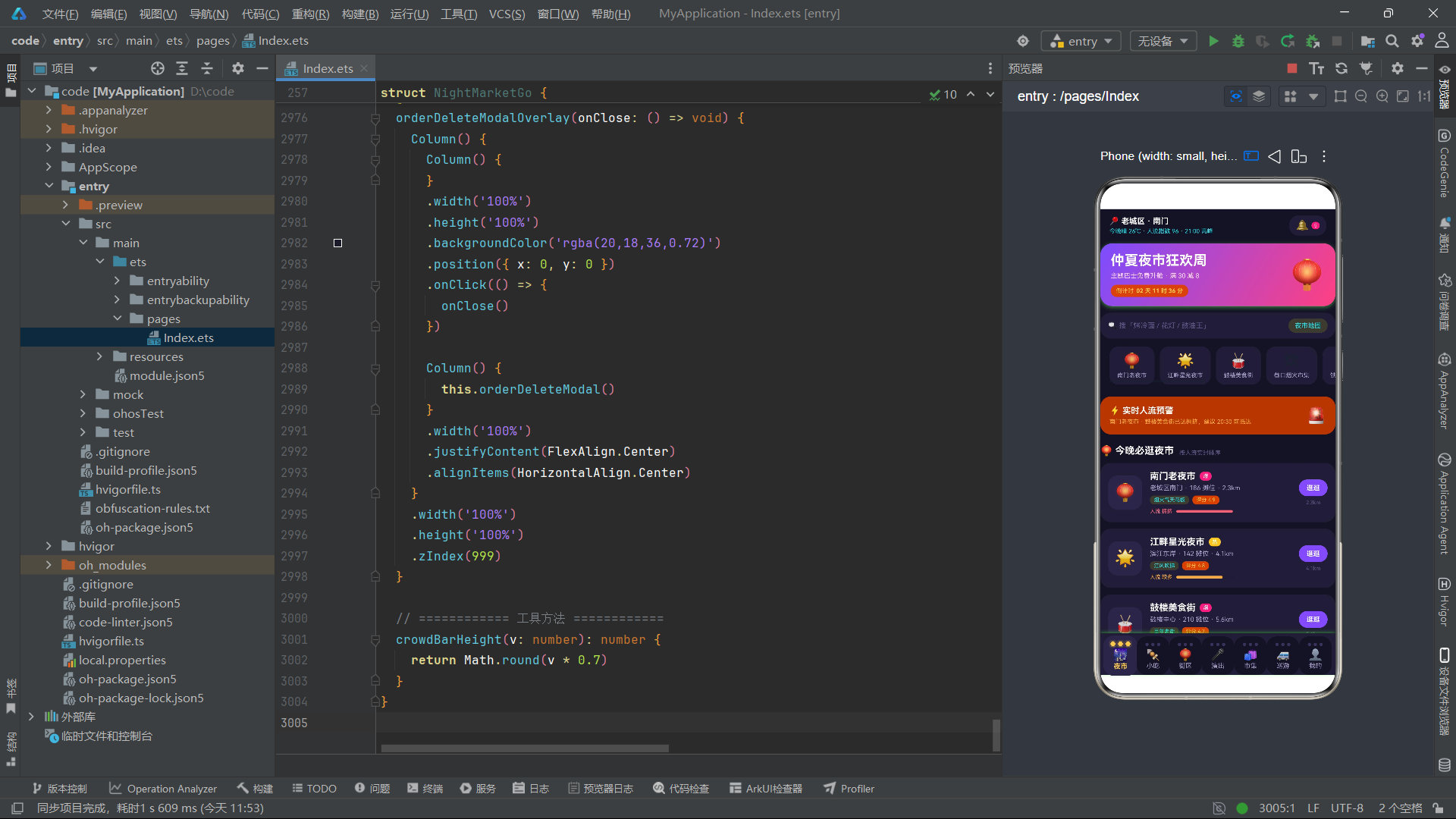
总结
本文以一个"仲夏夜市巡游专线"应用为案例,全面解析了基于 HarmonyOS 6.1.1 和 HarmonyOS ArkTS API 24 的完整应用开发实践。从架构层面看,该应用采用了"接口定义数据形状 + 常量数组填充静态数据 + @State 管理可变状态 + @Builder 构建视图"的四层架构模式,九个数据接口(NightMarket、SnackItem、StreetItem、ShowItem、GoodsItem、BusRoute、BuddyItem、FavItem、OrderItem)覆盖了完整的业务域,体现了 ArkTS 类型系统在复杂数据建模中的优势。
从状态管理层面看,该应用展示了 ArkTS 状态管理的三种核心模式:一是"简单值状态"驱动条件渲染(currentTab 驱动七大页面 if-else 切换、五个 showXxxModal 布尔值驱动弹窗显隐);二是"对象状态"承载弹窗上下文(selectedRoute、selectedSnack、editingFav 在打开弹窗时从列表项传入);三是"数组状态"配合不可变更新模式触发 ForEach 重渲染(createBuddy 用 concat 新增、saveFav 用 forEach 重建、删除用 filter 过滤)。这三种模式几乎覆盖了 ArkTS 应用开发中绝大多数状态管理场景。
从视图构建层面看,@Builder 装饰器方法是该应用的核心构建单元——nightHeader 公共头部、bulbTabBar 创意导航栏、七个 Tab 页面 Builder、五套弹窗 Builder,共计十余个 Builder 方法构成了完整的视图树。每个 Builder 方法内部通过 ForEach 遍历数据数组生成列表,通过 Progress 进度条实现数据可视化,通过 linearGradient 渐变和 shadow 阴影营造视觉层次,通过条件运算符驱动颜色和样式的动态变化。灯泡串式 Tab 栏用 Circle 组件 + shadow 光晕模拟灯泡亮灭效果,柱状图用空 Column + linearGradient 实现,时间轴用 Circle 节点 + 竖线 Column 模拟,这些都展现了 ArkTS 在不依赖第三方组件库的情况下完成复杂视觉效果的能力。
弹窗管理采用了"Overlay 包装器 + onClose 回调"的模式,每个弹窗分为内容 Builder 和 Overlay Builder 两层,Overlay 负责遮罩层渲染和关闭逻辑,内容 Builder 负责弹窗内部交互。价格计算函数 busTotal() 和 snackTotal() 展示了如何在 ArkTS 中将业务逻辑封装为组件方法,在状态变化时自动重新计算并驱动 UI 更新。综合来看,该应用是一个覆盖数据建模、状态管理、视图构建、弹窗交互、数据可视化、不可变更新等 ArkTS 核心知识点的完整工程范例,对 HarmonyOS 应用开发具有较高的参考价值。

讨论HarmonyOS开发技术,专注于API与组件、DevEco Studio、测试、元服务和应用上架分发等。
更多推荐

 2
2 0
0- 0


 已为社区贡献4条内容

所有评论(0)