基于 HarmonyOS API 24 的滴滴温泉度假应用全栈解析:HarmonyOS 6.1.1 下 ArkTS 声明式 UI 构建暖汤氤氲场景的 HarmonyOS ArkTS API 24 实战
技术引言
在 HarmonyOS 6.1.1 全场景智慧生活战略持续推进的当下,基于 HarmonyOS API 24 的 ArkTS 声明式开发范式已经成为构建复杂业务应用的核心武器。ArkTS 在 TypeScript 基础上做了语法收紧与编译期约束,既保留了类型系统的表达能力,又通过 V8 之外的自研 ArkCompiler 方舟编译器实现了 AOT 优化,让 UI 渲染性能逼近原生。本文将以一个温泉度假电商应用"滴滴温泉度假 HotSpringGo"为蓝本,深入剖析在 HarmonyOS ArkTS API 24 环境下如何用单一组件结构、@Builder 构建器、@State 状态驱动、ForEach 列表渲染、linearGradient 视觉装饰、Progress 进度可视化、Modal 蒙层交互等技术,搭建出一个涵盖温泉预约、汤宿订房、汤后美食、理疗SPA、接驳班车、个人中心六大业务模块的完整应用。
该应用采用了暖汤氤氲的视觉语言——米白底配汤橙与汤青的浅色系,以区别于夜色系方案;底部 Tab 栏创新性地采用"汤池涟漪式"交互——选中项的 icon 被两层同心圆环涟漪包围,呼应温泉水波纹理。在数据层面,应用预置了十口泉池、十家汤宿、十道汤后美食、六项理疗、六条接驳线的完整数据集,配合人流柱状图、进度条、金刚区快捷入口等可视化组件,构建了一个具备电商下单闭环的真实业务场景。下文将逐段拆解源码中的关键技术实现,帮助开发者快速掌握 HarmonyOS ArkTS 在复杂业务场景下的工程实践。
一、颜色与主题常量:ColorPalette 接口与 COLORS 配置
interface ColorPalette {
  primary: string;
  primaryLight: string;
  primaryDeep: string;
  accent: string;
  accentLight: string;
  steam: string;
  bg: string;
  cardBg: string;
  cardBg2: string;
  textPrimary: string;
  textSecondary: string;
  textHint: string;
  border: string;
  success: string;
  warning: string;
  danger: string;
  white: string;
}

const COLORS: ColorPalette = {
  primary: '#E67E22',
  primaryLight: '#F5B041',
  primaryDeep: '#BF360C',
  accent: '#00897B',
  accentLight: '#D5F0EC',
  steam: '#F4E8DA',
  bg: '#FAF6F0',
  cardBg: '#FFFFFF',
  cardBg2: '#F5EEE4',
  textPrimary: '#4E342E',
  textSecondary: '#8D7468',
  textHint: '#BCA99C',
  border: '#EADFD2',
  success: '#43A047',
  warning: '#F57C00',
  danger: '#E53935',
  white: '#FFFFFF'
};
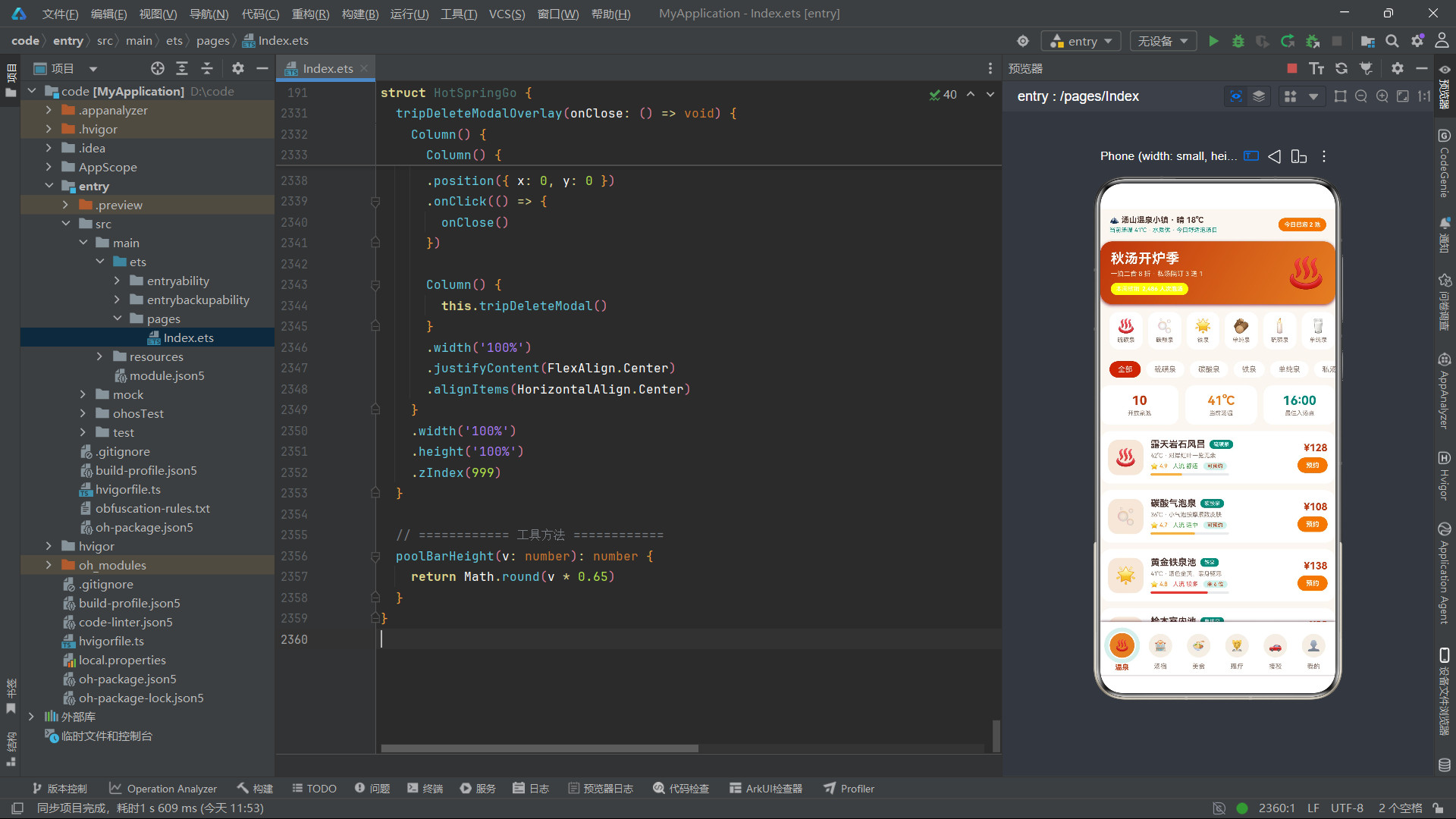
应用在文件顶部首先定义了一个 ColorPalette 接口,它将整个应用所需的色彩体系抽象为 17 个语义化字段。这种做法在 HarmonyOS ArkTS 中属于典型的"主题令牌(Design Token)"实践:通过接口约定字段类型,再通过常量对象实例化具体色值,既保证了编译期类型检查,又能在全局范围内通过单一来源维护配色方案。primary 系列承担汤橙主色族,accent 系列承担汤青辅色族,二者形成暖与冷的对话关系;steam 用于温泉水汽底色、bg 是米白页面底色、cardBg 系列用于卡片层级背景。
语义化命名的最大好处是可读性与可维护性:当某处需要"危险色"时直接取 COLORS.danger,而不是到处散落 #E53935 魔法值。一旦要切换深色模式或节日主题,只需替换 COLORS 常量的赋值即可全局生效,无需逐处修改。在 HarmonyOS API 24 中,虽然系统提供了资源管理能力(如 $r('app.color.xxx')),但在纯代码驱动的演示项目中,用接口+常量的方式做主题管理同样高效且更直观,适合快速迭代阶段使用。
二、数据模型接口定义:OnsenItem 与其他业务实体
interface OnsenItem {
  id: number;
  name: string;
  emoji: string;
  type: string;
  temp: number;
  feature: string;
  price: number;
  rest: string;
  crowd: string;
  crowdVal: number;
  rating: number;
}

interface RyokanItem {
  id: number;
  name: string;
  emoji: string;
  style: string;
  price: number;
  meals: string;
  score: number;
  tag: string;
  distance: string;
  left: number;
}

interface FoodItem {
  id: number;
  name: string;
  emoji: string;
  kind: string;
  price: number;
  shop: string;
  spicy: boolean;
  desc: string;
}

interface SpaItem {
  id: number;
  name: string;
  emoji: string;
  duration: string;
  price: number;
  effect: string;
  booked: number;
}

interface PlanItem {
  id: number;
  date: string;
  pool: string;
  time: string;
  note: string;
  status: string;
}

interface VisitorItem {
  id: number;
  name: string;
  idType: string;
  times: number;
}

interface RideItem {
  id: number;
  name: string;
  from: string;
  to: string;
  time: string;
  duration: string;
  price: number;
  seats: string;
}
ArkTS 的类型系统是该范式区别于普通 JavaScript 的核心特征之一。应用在此一口气定义了七个业务实体接口:OnsenItem(泉池)、RyokanItem(汤宿)、FoodItem(美食)、SpaItem(理疗)、PlanItem(泡汤计划)、VisitorItem(泡汤人)、RideItem(接驳线)。每个接口都用 interface 关键字声明,字段类型严格使用 number、string、boolean 等基础类型,杜绝了 any 的滥用。
值得注意的是 FoodItem 中使用了 spicy: boolean 布尔字段表示是否微辣,OnsenItem 中用 crowdVal: number 表示人流百分比以驱动柱状图,RyokanItem 中用 left: number 表示剩余房间数。这些字段类型的选择直接决定了后续 UI 渲染时能否进行数值比较、条件着色和进度计算。例如 left <= 3 的红色告警、crowd === '较多' 的危险色判断,都依赖于字段是基本类型而非字符串字面量。在 HarmonyOS API 24 中,ArkTS 对 interface 的支持还包括可选属性(?)、联合类型等,但本应用全部采用必填字段,确保数据完整性,减少运行时空值判断,这是一种"严格数据契约"的设计取向。
三、静态数据数组初始化:ONSSENS、RYOKANS 等业务数据集
const ONSSENS: OnsenItem[] = [
  { id: 1, name: '露天岩石风吕', emoji: '♨️', type: '硫磺泉', temp: 42, feature: '对岸红叶一览无余', price: 128, rest: '可预约', crowd: '舒适', crowdVal: 38, rating: 4.9 },
  { id: 2, name: '碳酸气泡泉', emoji: '🫧', type: '碳酸泉', temp: 36, feature: '小气泡按摩紧致皮肤', price: 108, rest: '可预约', crowd: '适中', crowdVal: 55, rating: 4.7 },
  // ... 共 10 条
];

const RYOKANS: RyokanItem[] = [
  { id: 1, name: '栖山庭院汤屋', emoji: '🏡', style: '日式町屋', price: 1280, meals: '一泊二食 · 会席料理', score: 4.9, tag: '含私汤', distance: '步行 3 分钟', left: 4 },
  // ... 共 10 条
];

const FOODS: FoodItem[] = [ /* 10 条美食 */ ];
const SPAS: SpaItem[] = [ /* 6 项理疗 */ ];
const RIDES: RideItem[] = [
  { id: 1, name: '山门接驳 · 直达线', from: '高铁汤山站', to: '温泉小镇正门', time: '09:00-19:00 每 30 分钟', duration: '20 分钟', price: 0, seats: '凭票免费' },
  // ... 共 6 条
];
紧跟接口定义之后,应用用 const 声明了五个业务数据数组,并显式标注类型为数组形态(如 OnsenItem[])。这种写法在 ArkTS 中有两个好处:第一,编译器会在每个对象字面量处做结构类型检查,缺字段或类型不符会直接报错;第二,这些常量是只读引用,避免在运行时被误改。数据内容覆盖了真实的温泉度假场景——从露天岩石风吕、洞窟秘汤到家族私汤院,从栖山庭院汤屋到竹里馆温泉别墅,从温泉蛋豆腐到药膳养生锅,数据本身的丰富度让 UI 渲染出来后非常接近真实电商应用。
emoji 字段的引入是这套数据设计的一个亮点:用 Emoji 充当每条记录的"图标",既省去了图片资源加载与切图工作,又能在文本流中渲染出彩色图形,极大降低了演示项目的素材成本。在 HarmonyOS ArkTS 中,Text 组件原生支持 Emoji 渲染,配合不同 fontSize 可以呈现从小图标到大特写的多种尺寸。price === 0 的足汤漫步道则展示了"免费"特例,要求 UI 层做条件分支显示,这是电商场景中常见的边界处理。
四、辅助数据与标签常量:图表与下拉选项的预置
const POOL_CROWD: number[] = [38, 55, 72, 42, 28, 60, 76];
const POOL_LABELS: string[] = ['岩石', '碳酸', '铁泉', '桧木', '洞窟', '牛奶', '瀑布'];
const HOUR_LABELS: string[] = ['08:00', '10:00', '12:00', '14:00', '16:00', '18:00', '20:00'];
const HOUR_CROWD: number[] = [22, 40, 66, 58, 88, 95, 62];
const ONSEN_TICKETS: string[] = ['平日票', '周末票', '夜汤票'];
const ONSEN_SLOTS: string[] = ['上午场', '午后场', '夜汤场'];
const ID_TYPES: string[] = ['身份证', '护照', '港澳台证件'];
const PLAN_POOLS: string[] = ['露天岩石风吕', '碳酸气泡泉', '洞窟秘汤', '美肌牛奶泉', '家族私汤院'];
const PLAN_SLOTS: string[] = ['09:00-10:30', '13:00-14:30', '16:00-17:30', '20:00-21:30'];
除了业务实体数组,应用还预置了一组"辅助常量"——它们并非独立实体,而是用于驱动图表渲染、下拉选项、票种选择等次级 UI。POOL_CROWD 与 POOL_LABELS 是成对出现的数值与标签数组,前者提供柱状图高度数据,后者提供 X 轴标签;HOUR_CROWD 与 HOUR_LABELS 同理,用于接驳页的一日人流分布图。这种"数值数组+标签数组平行索引"的设计在 ArkTS 中是一种轻量级数据可视化方案:用 ForEach 同时遍历两个数组(通过 idx 索引取值),即可渲染出柱状图,无需引入图表三方库。
ONSEN_TICKETS、ONSEN_SLOTS、ID_TYPES、PLAN_POOLS、PLAN_SLOTS 这几个字符串数组则用于弹窗内的选项 chips。把它们抽成常量的好处是:选项可全局复用、修改时只改一处、ForEach 的 keyGenerator 可以稳定生成。在 HarmonyOS API 24 中,这类小型选项集合也可以用 @State 包装进组件内部,但放在文件顶部作为常量更符合"数据与视图分离"的工程原则,便于后期接入后端接口时统一替换。
五、主组件结构与状态声明:@Entry @Component 与 @State
@Entry
@Component
struct HotSpringGo {
  @State currentTab: number = 0
  @State showOnsenModal: boolean = false
  @State showRyokanModal: boolean = false
  @State showPlanModal: boolean = false
  @State showVisitorModal: boolean = false
  @State showTripDeleteModal: boolean = false
  @State selectedOnsen: OnsenItem = ONSSENS[0]
  @State selectedRyokan: RyokanItem = RYOKANS[0]
  @State deleteTripId: number = 0
  @State onsenTicket: string = '平日票'
  @State onsenSlot: string = '午后场'
  @State onsenCount: number = 2
  @State roomNights: number = 1
  @State roomMeal: string = '一泊二食'
  @State planPool: string = '露天岩石风吕'
  @State planSlot: string = '13:00-14:30'
  @State planDate: string = '今天'
  @State planNote: string = ''
  @State editVisitorName: string = ''
  @State editVisitorType: string = '身份证'
  @State editingVisitorId: number = 0
  @State onsenFilter: string = '全部'
  @State foodFilter: string = '全部'
  @State myTrips: PlanItem[] = [
    { id: 1, date: '今天', pool: '露天岩石风吕', time: '13:00-14:30', note: '先泡岩石池再喝牛奶冰', status: '待泡汤' },
    { id: 2, date: '明天', pool: '洞窟秘汤', time: '20:00-21:30', note: '夜汤人少记得带水杯', status: '待泡汤' }
  ]
  @State visitors: VisitorItem[] = [
    { id: 1, name: '本人', idType: '身份证', times: 12 },
    { id: 2, name: '妈妈', idType: '身份证', times: 4 }
  ]
  private tabNames: string[] = ['温泉', '汤宿', '美食', '理疗', '接驳', '我的']
  private tabIcons: string[] = ['♨️', '🏨', '🍜', '💆', '🚗', '👤']
这是整个应用的"心脏"——HotSpringGo 自定义组件。@Entry 装饰器声明它是页面入口组件,@Component 声明它是一个可复用的自定义组件,二者组合后该 struct 即可作为页面被路由加载。组件内部声明了约 25 个 @State 状态变量,涵盖了 Tab 索引、五个弹窗的显隐开关、当前选中的泉池/汤宿对象、删除目标 ID、票种/时段/人数/晚数/餐食等下单参数、计划编辑参数、访客编辑参数、两个筛选值,以及两个可变数组(myTrips 泡汤计划、visitors 常用泡汤人)。
@State 是 ArkTS 响应式状态管理的基石:被它装饰的变量一旦发生赋值变更,ArkUI 框架会自动触发依赖该变量的 UI 组件重新渲染。这里有一个关键细节——@State selectedOnsen: OnsenItem = ONSSENS[0] 把对象引用作为状态初值,当后续 this.selectedOnsen = o 重新赋值时,弹窗内的展示内容会立刻更新。而对于 myTrips 和 visitors 这两个数组状态,则通过 concat 生成新数组、filter 生成新数组、forEach 构建新数组再赋值的方式触发更新——这是因为 ArkTS 的 @State 对数组的监听是基于引用变更的,直接 push/splice 不一定能被框架捕获。private tabNames 与 tabIcons 不需要响应式,所以用 private 而非 @State,体现了对状态开销的精细化控制。
六、build() 主入口:Scroll 容器与页面骨架
build() {
  Column() {
    Scroll() {
      Column() {
        this.springHeader()

        if (this.currentTab === 0) {
          this.onsenTab()
        } else if (this.currentTab === 1) {
          this.ryokanTab()
        } else if (this.currentTab === 2) {
          this.foodTab()
        } else if (this.currentTab === 3) {
          this.spaTab()
        } else if (this.currentTab === 4) {
          this.rideTab()
        } else {
          this.mineTab()
        }
      }
      .width('100%')
      .padding({ bottom: 6 })
    }
    .layoutWeight(1)
    .scrollBar(BarState.Off)
    .edgeEffect(EdgeEffect.Spring)
    .align(Alignment.Top)

    // ... 五个弹窗条件渲染
    this.rippleTabBar()
  }
  .width('100%')
  .height('100%')
  .backgroundColor(COLORS.bg)
}
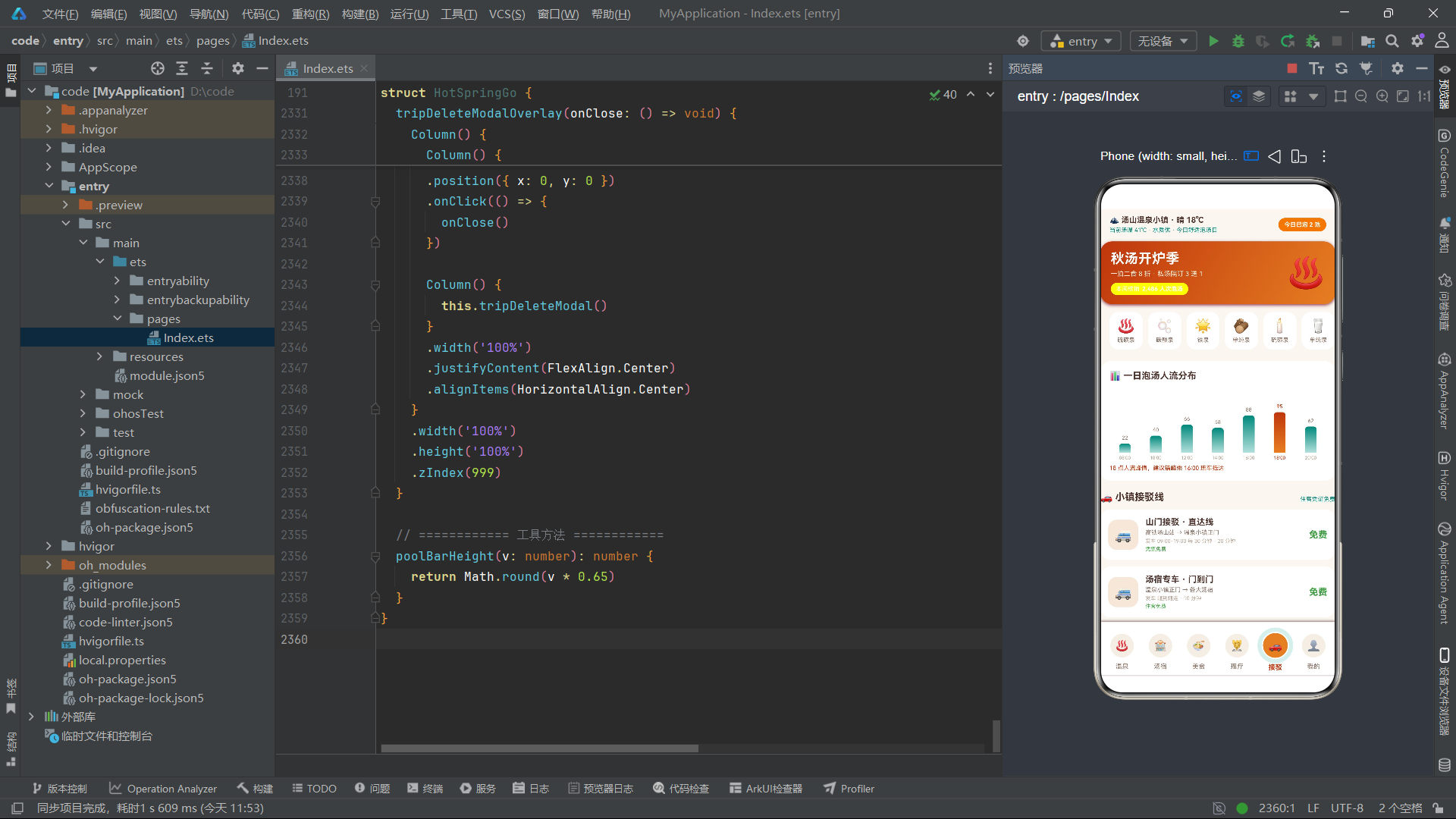
build() 是 ArkTS 自定义组件的渲染入口,所有 UI 描述都从这一方法展开。整个页面采用"Column 包裹 Scroll + 底部 Tab 栏"的经典电商布局:顶部 Scroll 占据 layoutWeight(1) 的剩余空间,内部是一个纵向 Column 容器,先渲染公共头部 springHeader(),再根据 currentTab 的值用 if/else if/else 链式条件渲染六个业务 Tab 之一。这种"if 分支切换页面"的做法在单组件架构下比用路由跳转更轻量,切换瞬间完成无转场动画,适合 Tab 式浏览场景。
Scroll 配置了三个关键属性:.scrollBar(BarState.Off) 关闭滚动条让视觉更干净;.edgeEffect(EdgeEffect.Spring) 启用回弹效果,让滚动到边缘时有橡皮筋般的物理反馈;.align(Alignment.Top) 让内容顶部对齐。底部固定的 rippleTabBar() 写在 Scroll 之外,使其始终悬浮于内容之上,是典型的"底部固定导航"模式。弹窗部分则用五个独立的 if (this.showXxxModal) 判断条件渲染——这种"按需挂载"的方式意味着弹窗不显示时不会占用渲染树,性能优于"常驻 + opacity 隐藏"的方案。整个 build 结构清晰展现了 ArkTS"声明式 UI = 组件树 + 属性链 + 状态驱动"的范式精髓。
七、Tab 切换与弹窗渲染调度逻辑
if (this.showOnsenModal) {
  this.onsenModalOverlay(() => {
    this.showOnsenModal = false
  })
}
if (this.showRyokanModal) {
  this.ryokanModalOverlay(() => {
    this.showRyokanModal = false
  })
}
if (this.showPlanModal) {
  this.planModalOverlay(() => {
    this.showPlanModal = false
  })
}
if (this.showVisitorModal) {
  this.visitorModalOverlay(() => {
    this.showVisitorModal = false
  })
}
if (this.showTripDeleteModal) {
  this.tripDeleteModalOverlay(() => {
    this.showTripDeleteModal = false
  })
}
这段代码看似简单——五个 if 条件渲染五个弹窗,但其背后体现的是 ArkTS 中"状态驱动的弹窗调度"模式。每个弹窗都有一个对应的 @State showXxxModal: boolean 开关变量,初始值为 false。当用户在某处点击"预约"/“订房”/“添加计划”/“编辑”/"删除"按钮时,回调函数会把对应开关置为 true,ArkUI 框架感知到状态变更后,重新执行 build(),对应的 if 分支条件成立,弹窗组件被挂载到渲染树并显示。
每个弹窗 Overlay 都接收一个 onClose: () => void 的回调参数,其内部点击蒙层时调用 onClose(),从而把 showXxxModal 置回 false,实现关闭。这种"父组件持有开关、子组件通过回调通知关闭"是 ArkTS 中父子通信的标准范式,比子组件自己持有显隐状态更可控——父组件可以在关闭前做额外处理(如表单校验、数据清理)。五个弹窗互不干扰,但同时显示时 zIndex 层叠由声明顺序决定,不过实际业务中通常不会同时触发多个弹窗。这种调度逻辑结构清晰、易扩展,新增弹窗只需"加一个 @State 开关 + 一个 @Builder + 一段 if 渲染"三步走。
八、springHeader 头部构建器:顶部状态条与秋汤开炉横幅
@Builder
springHeader() {
  Column() {
    // 顶部状态条
    Row() {
      Column() {
        Text('🏔️ 汤山温泉小镇 · 晴 18℃')
          .fontSize(12)
          .fontWeight(FontWeight.Bold)
          .fontColor(COLORS.textPrimary)
        Text('当前汤温 41℃ · 水质优 · 今日舒适泡汤日')
          .fontSize(9)
          .fontColor(COLORS.accent)
          .margin({ top: 3 })
      }
      .alignItems(HorizontalAlign.Start)
      .layoutWeight(1)

      Text('今日已泡 2 池')
        .fontSize(9)
        .fontWeight(FontWeight.Bold)
        .fontColor(COLORS.white)
        .padding({ left: 9, right: 9, top: 5, bottom: 5 })
        .backgroundColor(COLORS.primary)
        .borderRadius(12)
    }
    .alignItems(VerticalAlign.Center)
    .width('100%')
    .padding({ left: 14, right: 14, top: 10 })

    // 秋汤开炉横幅
    Column() {
      Row() {
        Column() {
          Text('秋汤开炉季')
            .fontSize(21)
            .fontWeight(FontWeight.Bold)
            .fontColor(COLORS.white)
          Text('一泊二食 8 折 · 私汤院订 3 送 1')
            .fontSize(10)
            .fontColor('#FFF3E0')
            .margin({ top: 5 })
          Row() {
            Text('本周核销')
              .fontSize(9)
              .fontColor(COLORS.white)
            Text('2,486 人次泡汤')
              .fontSize(9)
              .fontWeight(FontWeight.Bold)
              .fontColor(COLORS.white)
              .margin({ left: 4 })
          }
          .padding({ left: 8, right: 8, top: 4, bottom: 4 })
          .backgroundColor('#FFFFFF33')
          .borderRadius(10)
          .margin({ top: 8 })
        }
        .alignItems(HorizontalAlign.Start)
        .layoutWeight(1)

        Text('♨️').fontSize(46)
      }
    }
    .width('100%')
    .linearGradient({ angle: 120, colors: [['#BF360C', 0], ['#E67E22', 1]] })
    .borderRadius(18)
    .margin({ left: 14, right: 14, top: 12 })
    .shadow({ radius: 12, color: '#E67E2233', offsetX: 0, offsetY: 5 })
  }
  .width('100%')
  .padding({ bottom: 4 })
}
@Builder 是 ArkTS 中的 UI 构建器装饰器,用于把一段可复用的 UI 描述抽成方法,避免 build() 体积爆炸。springHeader() 负责页面顶部的"度假电商风"头部,分两层:第一层是状态条 Row——左侧用 Column 纵向排列小镇天气与汤温信息(字号 12 主标题 + 9 副标题),右侧是"今日已泡 2 池"的圆角胶囊标签,用 padding 控制内边距、borderRadius(12) 做胶囊形、backgroundColor(COLORS.primary) 填充汤橙底色。
第二层是"秋汤开炉季"横幅,使用了 ArkTS 的 linearGradient 线性渐变属性——angle: 120 表示渐变方向角度,colors 数组里 ['#BF360C', 0] 和 ['#E67E22', 1] 分别表示深橙在 0% 起点、亮橙在 100% 终点。这种渐变让横幅呈现出从深到浅的暖汤色彩,配合 shadow 阴影属性(offsetY: 5 让阴影投在下方)形成立体浮起感。横幅右侧的 Text('♨️').fontSize(46) 用大号 Emoji 充当装饰主视觉,省去了图片素材。'#FFFFFF33' 这种 8 位十六进制颜色(最后两位是 alpha 透明度)用于"本周核销"小标签的半透明背景,是 ArkTS 对 CSS 色值规范的兼容。
九、金刚区快捷入口:横滑泉种导航
// 金刚区
Scroll() {
  Row() {
    ForEach(ONSSENS, (o: OnsenItem) => {
      Column() {
        Text(o.emoji)
          .fontSize(21)
        Text(o.type)
          .fontSize(9)
          .fontColor(COLORS.textSecondary)
          .margin({ top: 4 })
      }
      .alignItems(HorizontalAlign.Center)
      .padding({ left: 12, right: 12, top: 9, bottom: 9 })
      .backgroundColor(COLORS.cardBg)
      .borderRadius(14)
      .margin({ right: 8 })
      .onClick(() => {
        this.currentTab = 0
      })
    }, (o: OnsenItem) => 'oking' + o.id.toString())
  }
}
.scrollable(ScrollDirection.Horizontal)
.width('100%')
.margin({ left: 14, right: 0, top: 12 })
"金刚区"是电商首页的术语,指横滑的图标快捷入口区。这里用 Scroll 包裹 Row,再配合 .scrollable(ScrollDirection.Horizontal) 开启横向滚动,让十个泉池种类以胶囊卡片形式横滑展示。每张卡片是一个 Column:上方大号 Emoji 图标(fontSize 21),下方泉种文字标签。ForEach 的第三个参数是 keyGenerator,返回 'oking' + o.id.toString() 作为唯一键——这里有个小细节,键名写作 oking(疑似 authoring 的缩写失误),但功能上保证每项有稳定唯一键,让 ArkUI 在数据变更时能正确做 diff 复用,避免全量重渲染。
点击金刚区任意卡片都会跳转到温泉 Tab(this.currentTab = 0),这是首页到详情页的轻量跳转——没有用路由栈,直接切换 Tab 索引。.margin({ left: 14, right: 0 }) 让金刚区与左侧页面边距对齐,但右侧不预留边距,这样最后一张卡片可以滑到屏幕右边缘消失,符合横滑容器的视觉规范。整个金刚区把十种泉池类型(硫磺泉、碳酸泉、铁泉、单纯泉、私汤等)做了图标化呈现,既丰富视觉又提供了快捷导航,是电商首页的标准信息架构。
十、涟漪式 Tab 栏:rippleTabBar 的同心圆环交互
@Builder
rippleTabBar() {
  Row() {
    ForEach(this.tabNames, (name: string, idx: number) => {
      Column() {
        Stack() {
          if (this.currentTab === idx) {
            Circle({ width: 46, height: 46 })
              .fill('transparent')
              .stroke(COLORS.accentLight)
              .strokeWidth(6)
          }
          Circle({ width: 36, height: 36 })
            .fill(this.currentTab === idx ? COLORS.primary : COLORS.cardBg2)
          Text(this.tabIcons[idx])
            .fontSize(16)
        }
        .width(46)
        .height(46)

        Text(name)
          .fontSize(10)
          .fontWeight(this.currentTab === idx ? FontWeight.Bold : FontWeight.Normal)
          .fontColor(this.currentTab === idx ? COLORS.primaryDeep : COLORS.textSecondary)
          .margin({ top: 3 })
      }
      .layoutWeight(1)
      .padding({ top: 7, bottom: 7 })
      .scale({
        x: this.currentTab === idx ? 1.05 : 1,
        y: this.currentTab === idx ? 1.05 : 1
      })
      .onClick(() => {
        this.currentTab = idx
      })
    }, (name: string, idx: number) => name + idx.toString() + this.currentTab.toString())
  }
  .width('100%')
  .alignItems(VerticalAlign.Center)
  .padding({ left: 4, right: 4, top: 6 })
  .backgroundColor(COLORS.cardBg)
  .shadow({ radius: 10, color: '#BF360C1A', offsetX: 0, offsetY: -3 })
}
这是该应用最具特色的组件——“汤池涟漪式 Tab 栏”。它的核心创意是用 Stack 层叠容器组合两个 Circle 圆形组件:当选中某个 Tab 时,外层渲染一个 46px 的透明填充圆(fill('transparent'))但带 6px 的浅青描边(stroke(COLORS.accentLight).strokeWidth(6)),内层再叠一个 36px 的实心圆(选中时填充汤橙、未选中填充米色)。两层同心圆环形成"涟漪包围 icon"的视觉效果,呼应温泉水面的波纹纹理。
Stack 是 ArkTS 中处理层叠布局的关键容器,子组件按声明顺序从下往上堆叠。这里的层级是:外环(透明+描边)→ 实心圆 → Emoji 文字,让文字显示在最上层。选中态还通过 .scale({ x: 1.05, y: 1.05 }) 做轻微放大,强化选中反馈;文字则用 FontWeight.Bold 与 COLORS.primaryDeep 深橙做双重高亮。整个 Tab 栏底色为白色 cardBg,配合 shadow 的 offsetY: -3 让阴影向上投射,模拟"底部导航悬浮于内容之上"的浮起感。keyGenerator 中加入了 this.currentTab.toString(),让选中态切换时强制刷新键名,触发重渲染——这是处理"选中态视觉"时常用的小技巧。
十一、温泉主页面 onsenTab:筛选 chips 与统计三格
@Builder
onsenTab() {
  Column() {
    // 泉质筛选
    Scroll() {
      Row() {
        ForEach(['全部', '硫磺泉', '碳酸泉', '铁泉', '单纯泉', '私汤'], (t: string) => {
          Text(t)
            .fontSize(11)
            .fontColor(t === this.onsenFilter ? COLORS.white : COLORS.textSecondary)
            .padding({ left: 13, right: 13, top: 6, bottom: 6 })
            .backgroundColor(t === this.onsenFilter ? COLORS.primaryDeep : COLORS.cardBg)
            .borderRadius(14)
            .margin({ right: 8 })
            .onClick(() => {
              this.onsenFilter = t
            })
        }, (t: string) => t + this.onsenFilter)
      }
    }
    .scrollable(ScrollDirection.Horizontal)
    .width('100%')
    .margin({ left: 14, right: 0, top: 14 })

    // 泡汤数据卡
    Row() {
      Column() {
        Text('10').fontSize(19).fontWeight(FontWeight.Bold).fontColor(COLORS.primaryDeep)
        Text('开放泉池').fontSize(9).fontColor(COLORS.textSecondary).margin({ top: 3 })
      }
      .alignItems(HorizontalAlign.Center)
      .layoutWeight(1)
      .padding({ top: 12, bottom: 12 })
      .backgroundColor(COLORS.cardBg)
      .borderRadius(14)
      // ... 另外两格
    }
    .width('100%')
    .margin({ left: 14, right: 14, top: 12 })
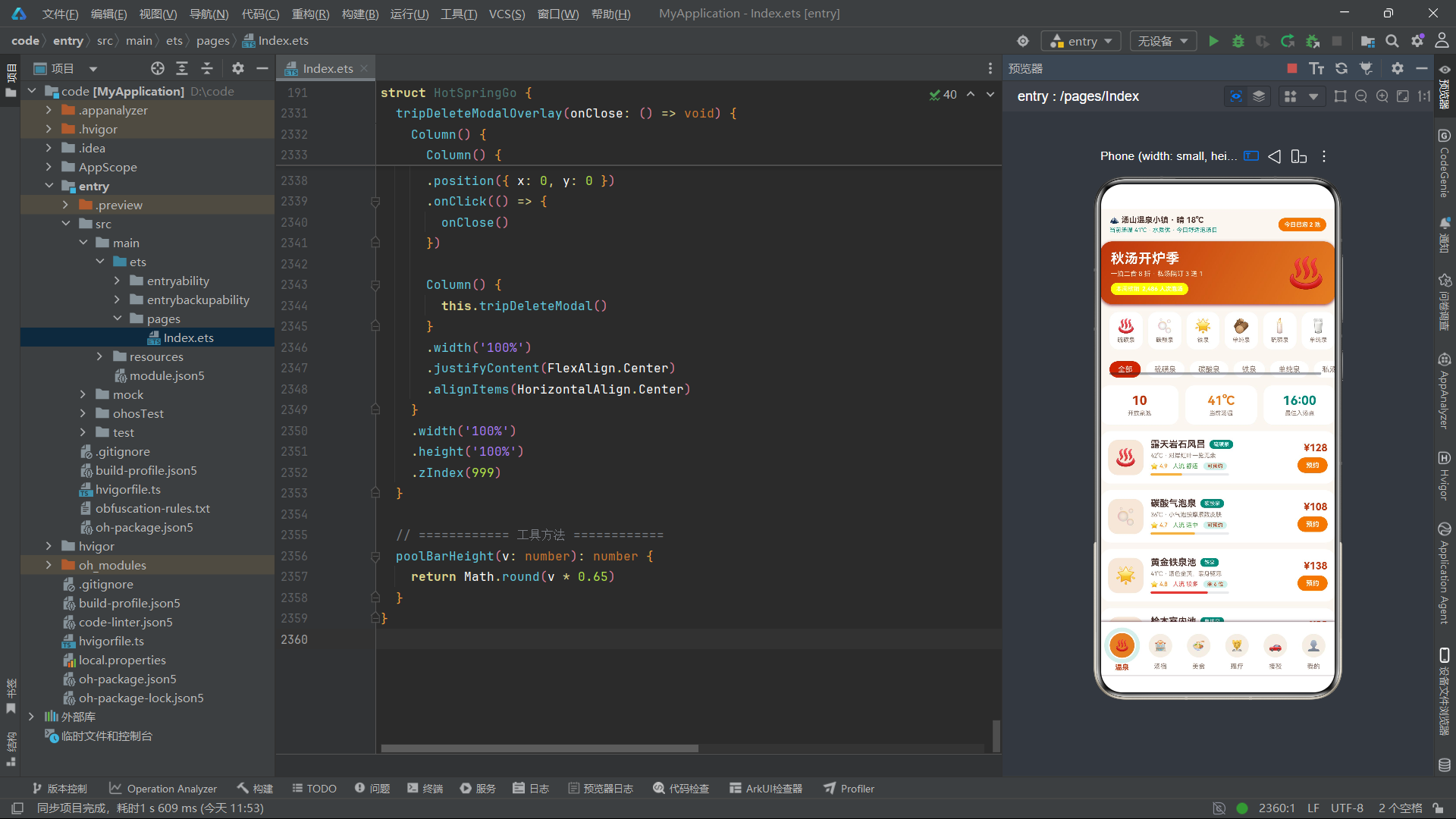
onsenTab() 是温泉主页面,内容非常丰富,从上到下依次是泉质筛选 chips、泡汤数据三格、泉池列表、人流柱状图、泡汤守则五大部分。顶部筛选 chips 用 Scroll + Row + ForEach 横滑展示六个泉种筛选项,每项是一个 Text 胶囊——选中时填充深橙底白字、未选中填充米色底灰字。点击后 this.onsenFilter = t 更新筛选状态,触发泉池列表的 keyGenerator(含 this.onsenFilter)重算,从而让列表"虚拟刷新"。
泡汤数据三格用 Row 横向排列三个等宽 Column(layoutWeight(1)),每格内是一个大数字 + 小标签的"KPI 卡片":10 开放泉池、41℃ 当前汤温、16:00 最佳入汤点。三格用 borderRadius(14) 圆角、白色 cardBg 底色、margin({ left: 10 }) 间距分隔。这种"统计三格"是电商首页的常见信息架构,把关键经营数据一眼呈现给用户。值得注意的是三格的主色不同——深橙、汤橙、汤青,既统一在暖汤色谱内又有层次区分,避免了单调。
十二、泉池列表卡片:ForEach 渲染与 Progress 进度条
// 泉池列表
ForEach(ONSSENS, (o: OnsenItem) => {
  Row() {
    Column() {
      Text(o.emoji).fontSize(26)
    }
    .width(54).height(54)
    .justifyContent(FlexAlign.Center)
    .backgroundColor(COLORS.steam)
    .borderRadius(15)

    Column() {
      Row() {
        Text(o.name).fontSize(14).fontWeight(FontWeight.Bold).fontColor(COLORS.textPrimary)
        Text(o.type)
          .fontSize(8).fontColor(COLORS.white)
          .padding({ left: 6, right: 6, top: 2, bottom: 2 })
          .backgroundColor(COLORS.accent).borderRadius(6)
          .margin({ left: 6 })
      }
      .alignItems(VerticalAlign.Center)

      Text(o.temp.toString() + '℃ · ' + o.feature)
        .fontSize(9).fontColor(COLORS.textSecondary).margin({ top: 4 })
      Row() {
        Text('⭐ ' + o.rating.toString()).fontSize(9).fontColor(COLORS.warning)
        Text('人流 ' + o.crowd)
          .fontSize(9)
          .fontColor(o.crowd === '较多' ? COLORS.danger : COLORS.success)
          .margin({ left: 8 })
        Text(o.rest)
          .fontSize(8).fontColor(COLORS.primaryDeep)
          .padding({ left: 6, right: 6, top: 1, bottom: 1 })
          .backgroundColor(COLORS.accentLight).borderRadius(6)
          .margin({ left: 8 })
      }
      .alignItems(VerticalAlign.Center)
      .margin({ top: 5 })

      Progress({ value: o.crowdVal, total: 100, type: ProgressType.Linear })
        .width(120).height(4).margin({ top: 5 })
        .color(o.crowd === '较多' ? COLORS.danger : COLORS.primaryLight)
    }
    .alignItems(HorizontalAlign.Start)
    .layoutWeight(1)
    .margin({ left: 11 })

    Column() {
      Text(o.price === 0 ? '免费' : '¥' + o.price.toString())
        .fontSize(15).fontWeight(FontWeight.Bold).fontColor(COLORS.primaryDeep)
      Text('预约')
        .fontSize(10).fontWeight(FontWeight.Bold).fontColor(COLORS.white)
        .padding({ left: 13, right: 13, top: 6, bottom: 6 })
        .backgroundColor(COLORS.primary).borderRadius(14)
        .margin({ top: 6 })
        .onClick(() => {
          this.selectedOnsen = o
          this.onsenTicket = '平日票'
          this.onsenSlot = '午后场'
          this.onsenCount = 2
          this.showOnsenModal = true
        })
    }
    .alignItems(HorizontalAlign.End)
  }
  .alignItems(VerticalAlign.Center)
  .width('100%')
  .padding(12)
  .backgroundColor(COLORS.cardBg)
  .borderRadius(16)
  .margin({ left: 14, right: 14, top: 10 })
}, (o: OnsenItem) => 'onsen' + o.id.toString() + this.onsenFilter)
这是温泉列表的核心渲染逻辑。ForEach 遍历 ONSSENS 数组,为每个 OnsenItem 渲染一张信息卡片。卡片采用"左图标 + 中信息 + 右价格操作"的三段式电商列表布局:左侧 54x54 的 Column 用 COLORS.steam 米色底+borderRadius(15) 圆角承载泉池 Emoji;中部用 layoutWeight(1) 占满剩余空间,纵向堆叠泉名标签、温度特色、评分人流余量三行信息;右侧是价格与预约按钮。
中部信息区有几个技术点值得注意:第一,泉名旁的泉种用 backgroundColor(COLORS.accent) 汤青胶囊标签突出,字号 8 极小但可读;第二,人流状态的 fontColor 用了三元表达式 o.crowd === '较多' ? COLORS.danger : COLORS.success,让人流较多时显示红色警示、舒适时显示绿色安心;第三,Progress({ value: o.crowdVal, total: 100, type: ProgressType.Linear }) 是 ArkTS 内置的线性进度条组件,用 4px 高度、120px 宽度做成人流饱和度的细条可视化,颜色同样按人流多少做条件着色。右侧"预约"按钮的 onClick 回调里一次性给四个 @State 变量赋值——选中泉池对象、重置票种时段人数初值、打开弹窗,体现了 ArkTS 中"一次状态批量更新触发一次重渲染"的高效模式。
十三、各池人流柱状图:自绘式数据可视化
// 各池人流柱状图
Column() {
  Text('📊 各泉池当前人流')
    .fontSize(14).fontWeight(FontWeight.Bold).fontColor(COLORS.textPrimary)
  Row() {
    ForEach(POOL_CROWD, (v: number, idx: number) => {
      Column() {
        Text(v.toString())
          .fontSize(8)
          .fontColor(idx === 4 ? COLORS.primaryDeep : COLORS.textSecondary)
        Column() {
        }
        .width(16)
        .height(this.poolBarHeight(v))
        .linearGradient({
          angle: 180,
          colors: idx === 4 ? [['#E67E22', 0], ['#F5B041', 1]] : [['#00897B', 0], ['#80CBC4', 1]]
        })
        .borderRadius({
          topLeft: 5, topRight: 5, bottomLeft: 0, bottomRight: 0
        })
        .margin({ top: 4 })
        Text(POOL_LABELS[idx])
          .fontSize(8)
          .fontColor(idx === 4 ? COLORS.primaryDeep : COLORS.textHint)
          .margin({ top: 4 })
      }
      .alignItems(HorizontalAlign.Center)
      .layoutWeight(1)
    }, (v: number, idx: number) => 'poolcrowd' + idx.toString())
  }
  .alignItems(VerticalAlign.Bottom)
  .width('100%')
  .height(110)
  .margin({ top: 12 })
  Text('洞窟秘汤当前人流最少,适合即刻入汤')
    .fontSize(9).fontColor(COLORS.accent).margin({ top: 6 })
}
这段是"自绘式柱状图"的实现——不依赖任何图表三方库,纯用 ArkTS 原生组件搭出来。核心思路是:外层 Row 横向排列七个 Column(每个 layoutWeight(1) 等宽),每个 Column 内部从上到下是"数值文本 + 柱体 + 标签文本"三段。柱体本身是一个空的 Column() {},通过 .height(this.poolBarHeight(v)) 把人流数值映射为像素高度——poolBarHeight 方法是 Math.round(v * 0.65),把 0-100 的百分比压缩到 0-65px 的可视范围,避免柱子过高溢出。
柱体的视觉装饰用了两个关键属性:linearGradient 做从下到上的颜色渐变(angle: 180 表示纵向),普通柱用汤青渐变(#00897B → #80CBC4),而 idx === 4(即洞窟秘汤,人流最少)用汤橙渐变(#E67E22 → #F5B041)做高亮,引导用户"即刻入汤"。borderRadius 只设上两个角为 5、下两角为 0,让柱体顶部圆润、底部贴底,是柱状图标准造型。整个 Row 设 .alignItems(VerticalAlign.Bottom) 让所有柱子底部对齐,是柱状图的关键对齐方式。底部还有一行 Text 提示文案,用汤青色引导用户关注人流最少的洞窟池——这是一个"数据驱动的智能建议",把可视化与决策引导结合在一起。
十四、汤宿主页面 ryokanTab:横滑推荐卡与列表
@Builder
ryokanTab() {
  Column() {
    // 汤宿横滑推荐卡
    Scroll() {
      Row() {
        ForEach(RYOKANS, (r: RyokanItem) => {
          Column() {
            Text(r.emoji).fontSize(30)
            Text(r.name)
              .fontSize(12).fontWeight(FontWeight.Bold).fontColor(COLORS.white)
              .margin({ top: 6 })
            Text(r.style)
              .fontSize(9).fontColor('#FFF3E0').margin({ top: 3 })
            Text('¥' + r.price.toString() + ' 起')
              .fontSize(13).fontWeight(FontWeight.Bold).fontColor(COLORS.white)
              .margin({ top: 5 })
          }
          .alignItems(HorizontalAlign.Center)
          .width(124)
          .padding({ top: 14, bottom: 14 })
          .linearGradient({ angle: 140, colors: [['#BF360C', 0], ['#E67E22', 1]] })
          .borderRadius(16)
          .margin({ right: 10 })
        }, (r: RyokanItem) => 'rcard' + r.id.toString())
      }
    }
    .scrollable(ScrollDirection.Horizontal)
    .width('100%')
    .margin({ left: 14, right: 0, top: 14 })

    // 汤宿列表
    ForEach(RYOKANS, (r: RyokanItem) => {
      Row() {
        Column() {
          Text(r.emoji).fontSize(26)
        }
        .width(54).height(54)
        .justifyContent(FlexAlign.Center)
        .backgroundColor(COLORS.steam).borderRadius(15)

        Column() {
          Row() {
            Text(r.name).fontSize(14).fontWeight(FontWeight.Bold).fontColor(COLORS.textPrimary)
            Text(r.tag)
              .fontSize(8).fontColor(COLORS.primaryDeep)
              .padding({ left: 6, right: 6, top: 2, bottom: 2 })
              .backgroundColor(COLORS.accentLight).borderRadius(6)
              .margin({ left: 6 })
          }
          // ... 风格距离、餐食、评分余房
          Row() {
            Text('⭐ ' + r.score.toString()).fontSize(9).fontColor(COLORS.warning)
            Text('仅余 ' + r.left.toString() + ' 间')
              .fontSize(9)
              .fontColor(r.left <= 3 ? COLORS.danger : COLORS.textSecondary)
              .margin({ left: 8 })
          }
        }
        .alignItems(HorizontalAlign.Start)
        .layoutWeight(1)
        .margin({ left: 11 })

        Column() {
          Text('¥' + r.price.toString())
            .fontSize(15).fontWeight(FontWeight.Bold).fontColor(COLORS.primaryDeep)
          Text('/晚').fontSize(8).fontColor(COLORS.textHint)
          Text('订房')
            .fontSize(10).fontWeight(FontWeight.Bold).fontColor(COLORS.white)
            .padding({ left: 13, right: 13, top: 6, bottom: 6 })
            .backgroundColor(COLORS.accent).borderRadius(14)
            .margin({ top: 5 })
            .onClick(() => {
              this.selectedRyokan = r
              this.roomNights = 1
              this.roomMeal = '一泊二食'
              this.showRyokanModal = true
            })
        }
      }
      // ... 容器样式
    }, (r: RyokanItem) => 'ryokan' + r.id.toString())
  }
  .width('100%')
}
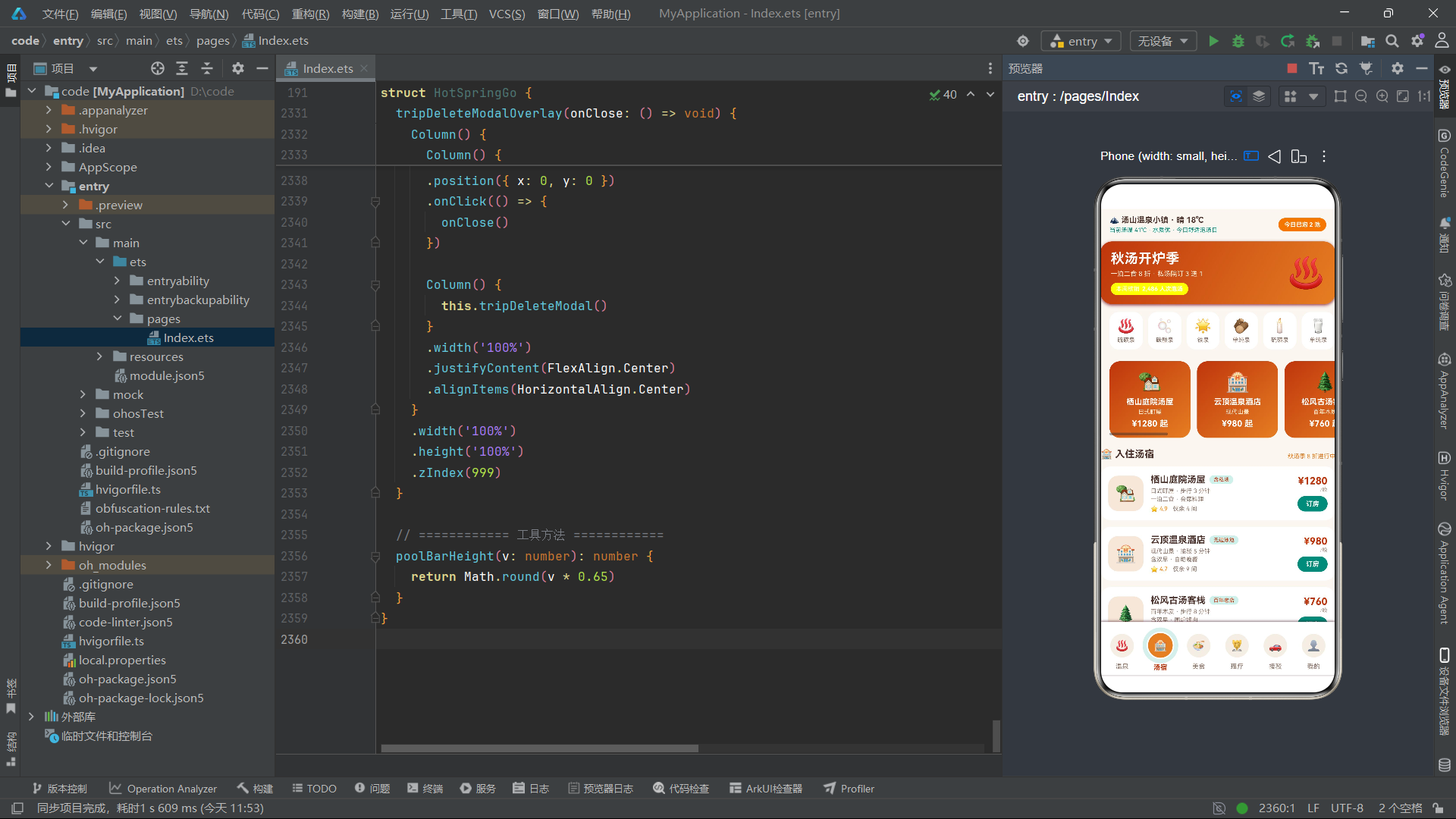
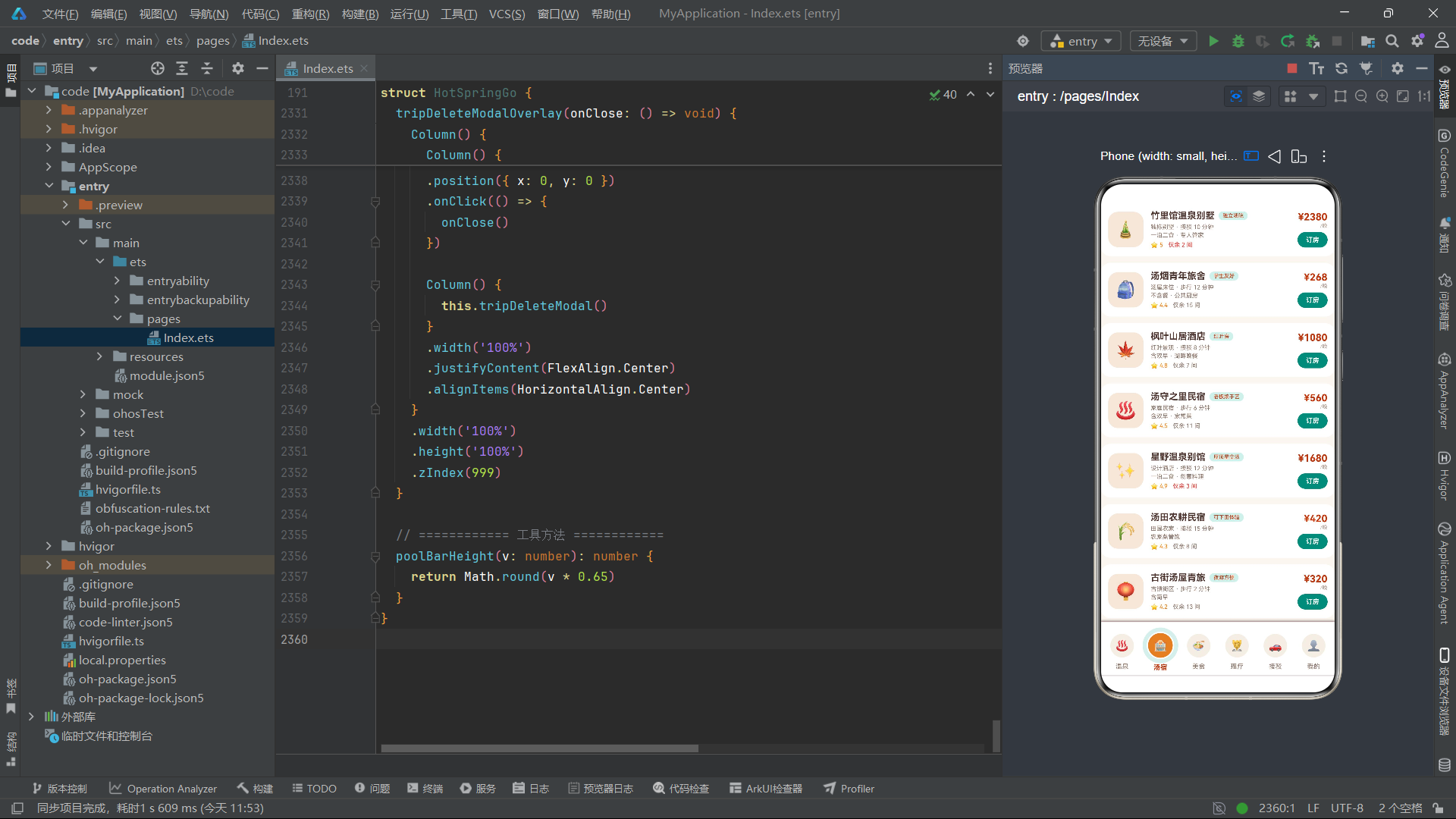
汤宿页面采用了"横滑推荐卡 + 纵向列表"的双层信息架构。顶部横滑区每张卡是 124px 宽的 Column,用汤橙渐变背景 + 白字反白设计——这种"深底浅字"的卡片在横滑场景下视觉冲击力强,能快速吸引注意力。卡内纵向排列 Emoji、汤宿名、风格、价格四行信息,价格用"¥xxx 起"的电商惯用表达。
下方的纵向列表与温泉列表结构一致——左 Emoji + 中信息 + 右价格操作,但有两处差异:第一,标签用 COLORS.accentLight 浅青底 + COLORS.primaryDeep 深橙字,呈现"含私汤"“无边泳池”“百年老店”“屋顶星空汤"等卖点标签;第二,余房量的 fontColor 用 r.left <= 3 ? COLORS.danger : COLORS.textSecondary,当剩余房间不超过 3 间时显示红色,制造"稀缺紧迫感"促进下单。右侧"订房"按钮用汤青色(COLORS.accent)而非汤橙,与温泉页的橙色预约按钮形成色彩区分,帮助用户在视觉上辨别"这是订房不是预约温泉”。点击回调里同样批量更新三个状态变量后打开 showRyokanModal,交互模式与温泉预约弹窗保持一致。
十五、美食主页面 foodTab:分类 chips 与补给提示卡
@Builder
foodTab() {
  Column() {
    // 分类 chips
    Scroll() {
      Row() {
        ForEach(['全部', '汤后小食', '正餐', '前菜', '点心', '饮品', '甜品'], (k: string) => {
          Text(k)
            .fontSize(11)
            .fontColor(k === this.foodFilter ? COLORS.white : COLORS.textSecondary)
            .padding({ left: 13, right: 13, top: 6, bottom: 6 })
            .backgroundColor(k === this.foodFilter ? COLORS.primary : COLORS.cardBg)
            .borderRadius(14)
            .margin({ right: 8 })
            .onClick(() => {
              this.foodFilter = k
            })
        }, (k: string) => k + this.foodFilter)
      }
    }
    .scrollable(ScrollDirection.Horizontal)
    .width('100%')
    .margin({ left: 14, right: 0, top: 14 })

    // 汤后补给提示卡
    Row() {
      Text('🥛').fontSize(24)
      Column() {
        Text('泡汤后 30 分钟内先补水')
          .fontSize(12).fontWeight(FontWeight.Bold).fontColor(COLORS.textPrimary)
        Text('推荐牛奶冰淇淋 + 温泉蛋豆腐的组合')
          .fontSize(9).fontColor(COLORS.accent).margin({ top: 3 })
      }
      .alignItems(HorizontalAlign.Start)
      .layoutWeight(1)
      .margin({ left: 10 })
    }
    .alignItems(VerticalAlign.Center)
    .width('100%')
    .padding(13)
    .backgroundColor(COLORS.accentLight)
    .borderRadius(16)
    .margin({ left: 14, right: 14, top: 12 })

    // 美食列表
    ForEach(FOODS, (f: FoodItem) => {
      // ... 左 Emoji + 中名称描述 + 右价格到店
    }, (f: FoodItem) => 'food' + f.id.toString() + this.foodFilter)

    // 一日五餐动线
    Column() {
      Text('🍽️ 汤客一日五餐动线')
        .fontSize(14).fontWeight(FontWeight.Bold).fontColor(COLORS.textPrimary)
      Text('07:30 汤宿朝食 · 粥与汤豆腐')
        .fontSize(10).fontColor(COLORS.textSecondary).margin({ top: 10 })
      // ... 五餐时间线
    }
    // ...
  }
  .width('100%')
}
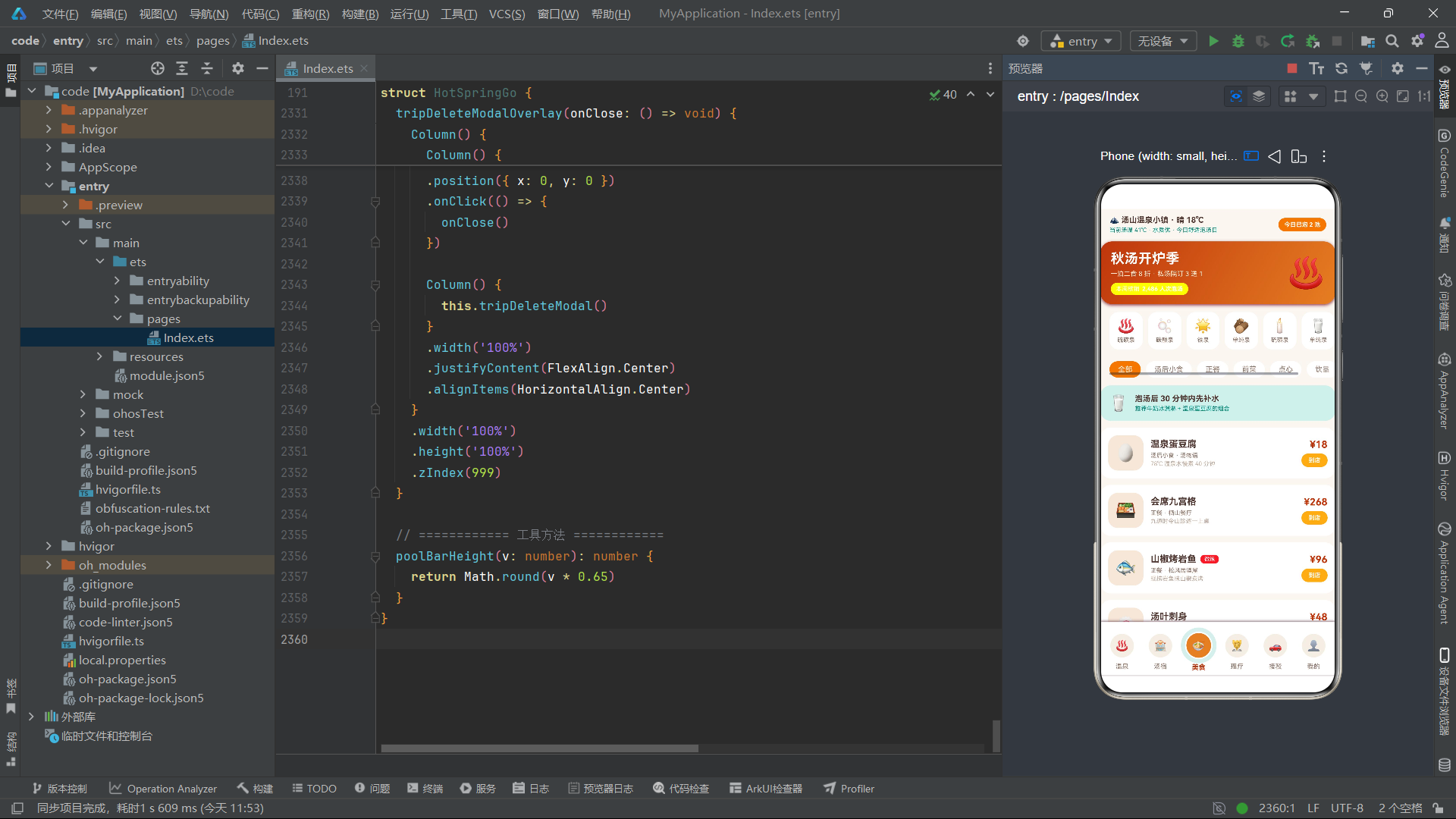
美食页面的结构与温泉页类似——顶部分类 chips(七个分类:全部、汤后小食、正餐、前菜、点心、饮品、甜品),中部列表,底部"一日五餐动线"时间轴。但美食页有一个独特设计:“汤后补给提示卡”。这是一张用 COLORS.accentLight 浅青底色突出的提示卡,文案"泡汤后 30 分钟内先补水 · 推荐牛奶冰淇淋 + 温泉蛋豆腐的组合",把"科普知识 + 商品推荐"巧妙结合,是内容电商的典型手法。
美食列表的卡片结构同样三段式,但中部信息区有一个条件渲染细节——当 f.spicy 为 true 时,菜名旁会渲染一个红色"微辣"小标签:
if (f.spicy) {
  Text('微辣')
    .fontSize(8).fontColor(COLORS.white)
    .padding({ left: 6, right: 6, top: 2, bottom: 2 })
    .backgroundColor(COLORS.danger).borderRadius(6)
    .margin({ left: 6 })
}
这种"if 条件渲染标签"的写法在 ArkTS 中非常自然——if 可以直接出现在 Row() 内部,框架会根据条件决定是否挂载该子组件。底部的"一日五餐动线"用五个 Text 纵向排列,从 07:30 朝食到 21:00 夜宵收尾,构建了一个完整的汤客饮食时间轴,既是内容也是引导消费的动线设计。
十六、理疗主页面 spaTab:统计三格与预约进度
@Builder
spaTab() {
  Column() {
    // 理疗统计
    Row() {
      Column() {
        Text('6').fontSize(19).fontWeight(FontWeight.Bold).fontColor(COLORS.primaryDeep)
        Text('理疗项目').fontSize(9).fontColor(COLORS.textSecondary).margin({ top: 3 })
      }
      .alignItems(HorizontalAlign.Center)
      .layoutWeight(1)
      .padding({ top: 12, bottom: 12 })
      .backgroundColor(COLORS.cardBg).borderRadius(14)
      // ... 另外两格:672 本月理疗人次、20 分钟平均排队
    }
    .width('100%')
    .margin({ left: 14, right: 14, top: 14 })

    ForEach(SPAS, (s: SpaItem) => {
      Column() {
        Row() {
          Column() {
            Text(s.emoji).fontSize(26)
          }
          .width(52).height(52)
          .justifyContent(FlexAlign.Center)
          .backgroundColor(COLORS.steam).borderRadius(14)

          Column() {
            Text(s.name).fontSize(14).fontWeight(FontWeight.Bold).fontColor(COLORS.textPrimary)
            Text(s.duration + ' · ' + s.effect)
              .fontSize(9).fontColor(COLORS.textSecondary).margin({ top: 4 })
            Text('已预约 ' + s.booked.toString() + ' 人次')
              .fontSize(9).fontColor(COLORS.textHint).margin({ top: 3 })
          }
          .alignItems(HorizontalAlign.Start)
          .layoutWeight(1)
          .margin({ left: 11 })

          Column() {
            Text('¥' + s.price.toString())
              .fontSize(15).fontWeight(FontWeight.Bold).fontColor(COLORS.primaryDeep)
            Text('预约')
              .fontSize(10).fontWeight(FontWeight.Bold).fontColor(COLORS.white)
              .padding({ left: 13, right: 13, top: 6, bottom: 6 })
              .backgroundColor(COLORS.primary).borderRadius(14)
              .margin({ top: 6 })
          }
          .alignItems(HorizontalAlign.End)
        }
        .alignItems(VerticalAlign.Center)
        .width('100%')

        Progress({ value: s.booked, total: 200, type: ProgressType.Linear })
          .width('100%').height(4)
          .margin({ top: 10 })
          .color(COLORS.accent)
      }
      .alignItems(HorizontalAlign.Start)
      .width('100%')
      .padding(13)
      .backgroundColor(COLORS.cardBg)
      .borderRadius(16)
      .margin({ left: 14, right: 14, top: 10 })
    }, (s: SpaItem) => 'spa' + s.id.toString())
  }
  .width('100%')
}
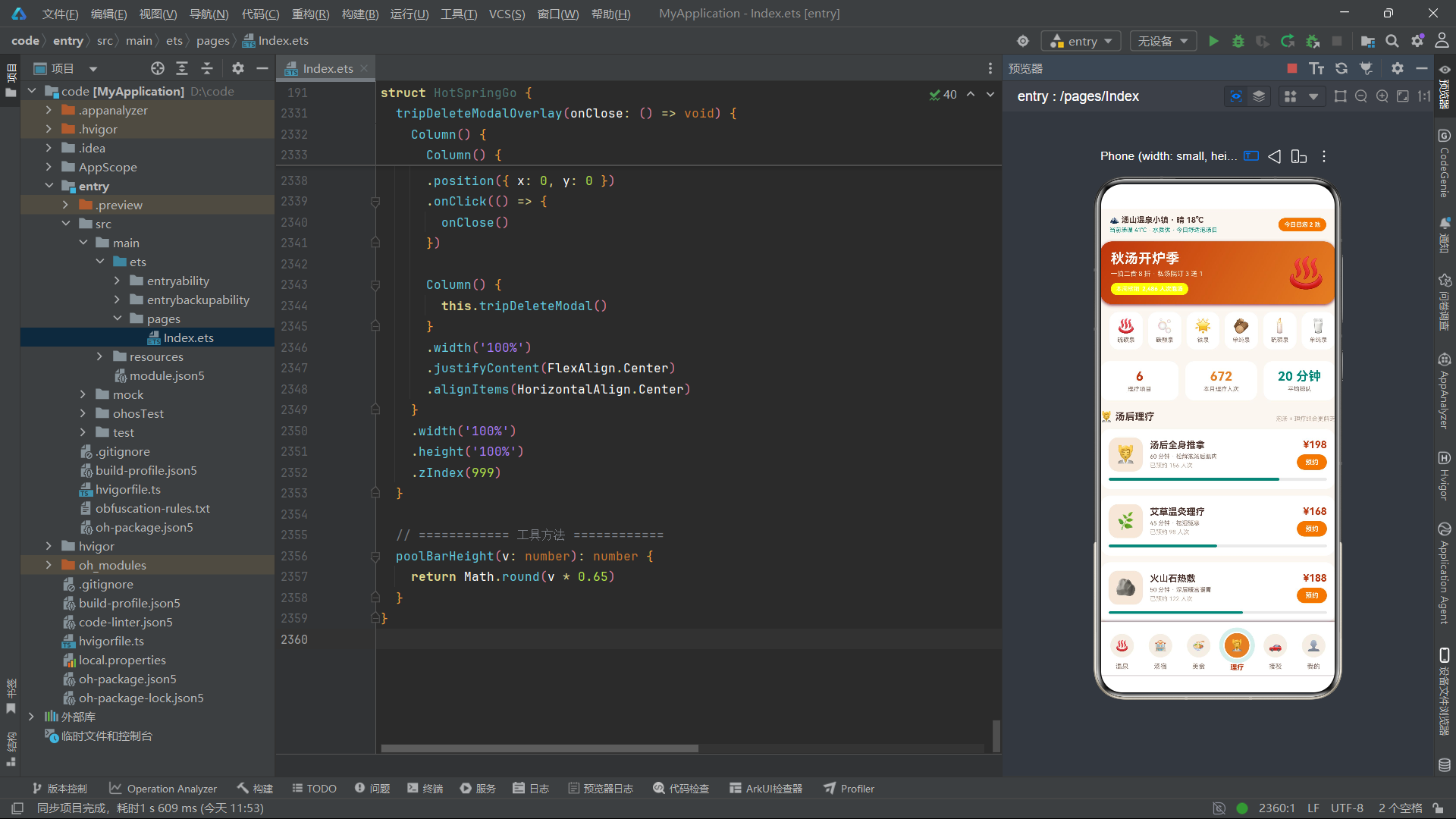
理疗页面的设计与温泉/汤宿页保持一致——顶部统计三格(6 理疗项目、672 本月理疗人次、20 分钟平均排队),下方是六项理疗的卡片列表。但理疗卡片有一个独特细节:每张卡片底部都附了一条 Progress 进度条,value 是 s.booked(已预约人次),total 是 200,color 用汤青色。这条进度条把"已预约热度"可视化,让用户一眼看出哪项理疗最受欢迎,既是一种社交证明(popular item)也是一种容量提示(快约满了快约满了)。
理疗卡片的另一个设计亮点是:外层是 Column 而非 Row——这是因为它要在 Row(上部信息)之外再容纳一条全宽进度条。Row 内部仍是熟悉的三段式(左 Emoji + 中名称时长功效 + 右价格预约),但被 Column 包裹后,下方可以追加 Progress 组件做"卡片底栏"。这种"Column { Row{...}; Progress{...} }"的卡片结构在 ArkTS 中非常灵活,能组合出信息密度高的卡片样式。理疗项目涵盖汤后全身推拿、艾草温灸理疗、火山石热敷、和风头部SPA、足底反射护理、面部汤泉护肤,价格从 138 到 258 元,时长从 40 到 70 分钟,是一个完整的汤后放松服务矩阵。
十七、接驳主页面 rideTab:时段人流柱状图与接驳线列表
@Builder
rideTab() {
  Column() {
    // 时刻柱状图(各时段人流)
    Column() {
      Text('📊 一日泡汤人流分布')
        .fontSize(14).fontWeight(FontWeight.Bold).fontColor(COLORS.textPrimary)
      Row() {
        ForEach(HOUR_CROWD, (v: number, idx: number) => {
          Column() {
            Text(v.toString())
              .fontSize(8)
              .fontColor(idx === 5 ? COLORS.primaryDeep : COLORS.textSecondary)
            Column() {
            }
            .width(18)
            .height(this.poolBarHeight(v))
            .linearGradient({
              angle: 180,
              colors: idx === 5 ? [['#BF360C', 0], ['#E67E22', 1]] : [['#00897B', 0], ['#B2DFDB', 1]]
            })
            .borderRadius({ topLeft: 5, topRight: 5, bottomLeft: 0, bottomRight: 0 })
            .margin({ top: 4 })
            Text(HOUR_LABELS[idx])
              .fontSize(7)
              .fontColor(idx === 5 ? COLORS.primaryDeep : COLORS.textHint)
              .margin({ top: 4 })
          }
          .alignItems(HorizontalAlign.Center)
          .layoutWeight(1)
        }, (v: number, idx: number) => 'hour' + idx.toString())
      }
      .alignItems(VerticalAlign.Bottom)
      .width('100%')
      .height(110)
      .margin({ top: 12 })
      Text('18 点人流峰值,建议错峰乘 16:00 班车抵达')
        .fontSize(9).fontColor(COLORS.primaryDeep).margin({ top: 6 })
    }
    // ...

    // 接驳线列表
    ForEach(RIDES, (r: RideItem) => {
      Row() {
        Column() {
          Text('🚐').fontSize(22)
        }
        .width(46).height(46)
        .justifyContent(FlexAlign.Center)
        .backgroundColor(COLORS.steam).borderRadius(13)

        Column() {
          Text(r.name).fontSize(13).fontWeight(FontWeight.Bold).fontColor(COLORS.textPrimary)
          Text(r.from + ' → ' + r.to)
            .fontSize(9).fontColor(COLORS.textSecondary).margin({ top: 3 })
          Text('发车 ' + r.time + ' · ' + r.duration)
            .fontSize(8).fontColor(COLORS.textHint).margin({ top: 3 })
          Text(r.seats)
            .fontSize(8)
            .fontColor(r.price === 0 ? COLORS.success : COLORS.primaryDeep)
            .margin({ top: 3 })
        }
        .alignItems(HorizontalAlign.Start)
        .layoutWeight(1)
        .margin({ left: 11 })

        Text(r.price === 0 ? '免费' : '¥' + r.price.toString())
          .fontSize(14).fontWeight(FontWeight.Bold)
          .fontColor(r.price === 0 ? COLORS.success : COLORS.primaryDeep)
      }
      // ...
    }, (r: RideItem) => 'ride' + r.id.toString())
  }
  .width('100%')
}
接驳页面顶部也是一个自绘式柱状图,但数据换成了一日七时段的人流分布(08:00 到 20:00)。这次高亮的是 idx === 5(即 18:00),用深橙渐变标识晚高峰峰值,并配文案"18 点人流峰值,建议错峰乘 16:00 班车抵达"——这是把数据洞察转化为行动建议的典型设计。柱体宽度比温泉页的 16px 略宽到 18px,因为时段标签更长,需要更宽的柱体承载。
接驳线列表用班车 Emoji 🚐 作为统一图标(不再用每条线的个性化 Emoji),因为接驳线本质都是车,用统一图标更整洁。每张卡片中部信息区四行:线路名、起终点(from + ' → ' + to)、发车时间与时长、座位状态。座位状态的 fontColor 用 r.price === 0 ? COLORS.success : COLORS.primaryDeep——免费线路用绿色、收费线路用深橙,让"免费"这一卖点视觉突出。右侧价格同样做 r.price === 0 ? '免费' : '¥' + price 的条件显示,免费二字用绿色,与收费的深橙形成对比。六条接驳线涵盖了山门直达、汤宿专车、红叶山观光、夜汤专线、古街巡游、机场专车,构建了完整的小镇交通网络。
十八、我的主页面 mineTab:用户卡与统计三格
@Builder
mineTab() {
  Column() {
    // 用户卡
    Row() {
      Column() {
        Text('♨️').fontSize(28)
      }
      .width(56).height(56)
      .justifyContent(FlexAlign.Center)
      .backgroundColor('#FFFFFF33')
      .borderRadius(28)

      Column() {
        Text('汤客 108 号')
          .fontSize(17).fontWeight(FontWeight.Bold).fontColor(COLORS.white)
        Text('汤龄 3 年 · 累计泡汤 86 池次')
          .fontSize(10).fontColor('#FFF3E0').margin({ top: 4 })
        Progress({ value: 72, total: 100, type: ProgressType.Linear })
          .width(150).height(5).margin({ top: 6 })
          .color(COLORS.white)
      }
      .alignItems(HorizontalAlign.Start)
      .layoutWeight(1)
      .margin({ left: 12 })
    }
    .alignItems(VerticalAlign.Center)
    .width('100%')
    .padding(16)
    .linearGradient({ angle: 130, colors: [['#BF360C', 0], ['#E67E22', 1]] })
    .borderRadius(18)
    .margin({ left: 14, right: 14, top: 14 })

    // 统计三格
    Row() {
      Column() {
        Text('86').fontSize(18).fontWeight(FontWeight.Bold).fontColor(COLORS.primaryDeep)
        Text('累计泡汤').fontSize(9).fontColor(COLORS.textSecondary).margin({ top: 3 })
      }
      .alignItems(HorizontalAlign.Center)
      .layoutWeight(1)
      .padding({ top: 12, bottom: 12 })
      .backgroundColor(COLORS.cardBg).borderRadius(14)
      // ... 另外两格:12 集章泉池、36 小时汤内时长
    }
    // ...
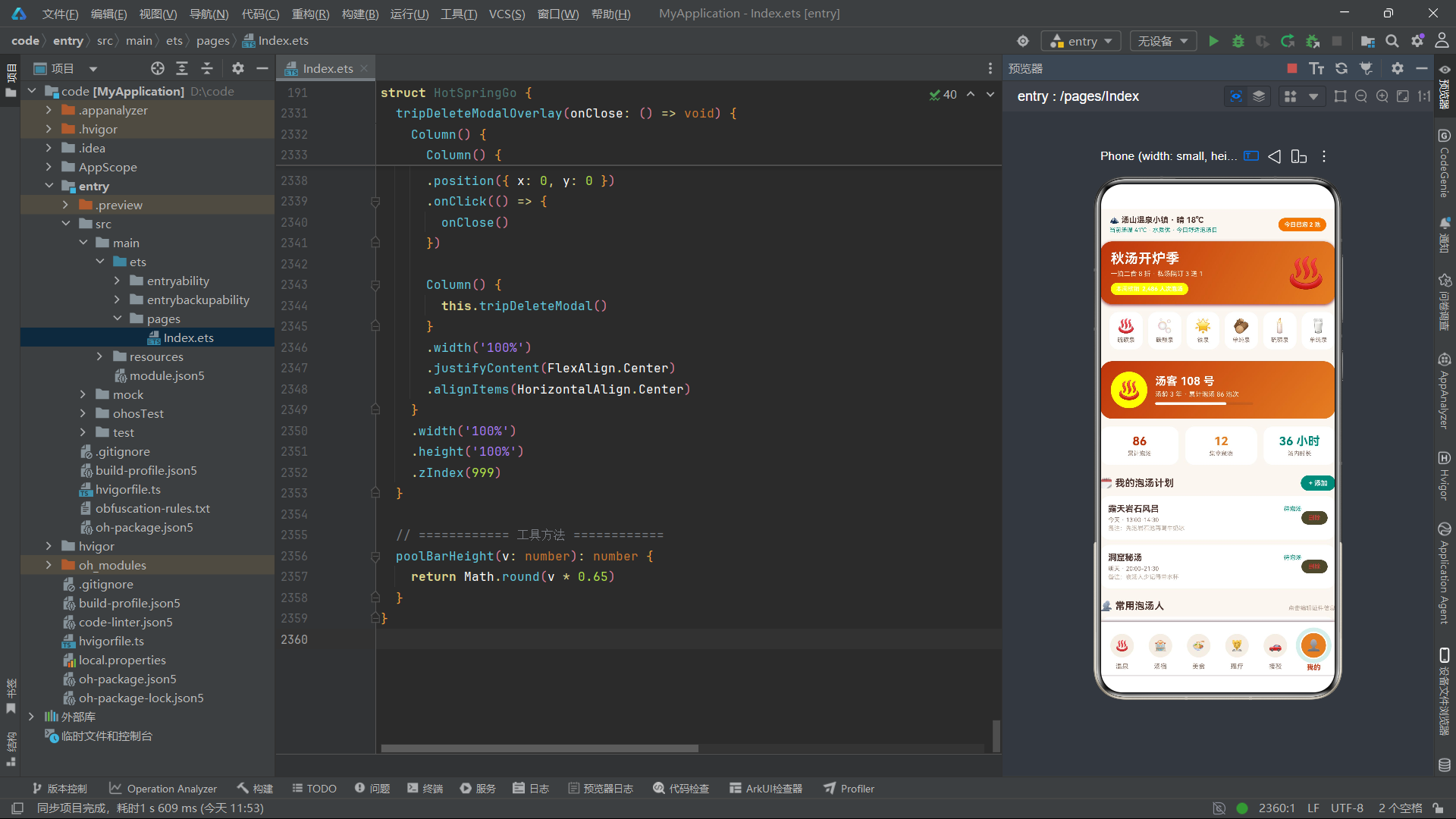
"我的"页面是用户中心,顶部用户卡用汤橙渐变背景 + 白字反白设计,呈现"汤客 108 号"的用户身份、汤龄与累计泡汤次数。卡片左侧是一个 56x56 的圆形头像位(用 borderRadius(28) 把方形 Column 变圆),填充半透明白色 #FFFFFF33 承载 Emoji 头像。右侧用户信息下方还有一条 Progress 进度条——value: 72, total: 100,用白色 COLORS.white 渲染,表示用户从白银汤客升到黄金汤客的进度(72%)。这种"渐变卡片 + 半透明头像 + 进度条"的组合是电商会员卡的常见样式。
下方统计三格与温泉页/理疗页结构一致——86 累计泡汤、12 集章泉池、36 小时汤内时长,三色区分(深橙、汤橙、汤青)。再下方是"我的泡汤计划"列表(用 myTrips 状态数组驱动,支持添加与删除)、"常用泡汤人"列表(用 visitors 状态数组驱动,支持编辑)、“设置列表”(汤票、更衣柜、年卡续费三项静态入口)。整个"我的"页是数据驱动 + 交互密集的区域,涉及弹窗的添加计划、删除计划确认、编辑访客三大交互流。
十九、我的泡汤计划列表:删除交互与状态数组更新
ForEach(this.myTrips, (t: PlanItem) => {
  Row() {
    Column() {
      Row() {
        Text(t.pool)
          .fontSize(13).fontWeight(FontWeight.Bold).fontColor(COLORS.textPrimary)
          .layoutWeight(1)
        Text(t.status)
          .fontSize(9).fontColor(COLORS.accent)
      }
      .alignItems(VerticalAlign.Center)
      .width('100%')

      Text(t.date + ' · ' + t.time)
        .fontSize(9).fontColor(COLORS.textSecondary).margin({ top: 4 })
      Text('备注:' + t.note)
        .fontSize(9).fontColor(COLORS.textHint).margin({ top: 2 })
    }
    .alignItems(HorizontalAlign.Start)
    .layoutWeight(1)

    Text('删除')
      .fontSize(9).fontColor(COLORS.danger)
      .padding({ left: 11, right: 11, top: 5, bottom: 5 })
      .backgroundColor('#E539351A')
      .borderRadius(12)
      .onClick(() => {
        this.deleteTripId = t.id
        this.showTripDeleteModal = true
      })
  }
  .alignItems(VerticalAlign.Center)
  .width('100%')
  .padding(12)
  .backgroundColor(COLORS.cardBg)
  .borderRadius(14)
  .margin({ left: 14, right: 14, top: 8 })
}, (t: PlanItem) => 'trip' + t.id.toString() + t.status + this.myTrips.length.toString())
泡汤计划列表是"我的"页的核心可变数据区。ForEach 遍历 this.myTrips 状态数组,每条计划渲染为一张卡片:上部是泉池名 + 状态标签(待泡汤)的横向行,中部是日期时段,下部是备注。右侧的"删除"按钮用红色文字 + 半透明红色背景(#E539351A,最后两位 1A 是约 10% 透明度),点击后不会直接删除,而是先记录 this.deleteTripId = t.id 再打开 showTripDeleteModal 确认弹窗——这是"二次确认"的安全交互模式,避免误删。
keyGenerator 的设计非常巧妙:'trip' + t.id.toString() + t.status + this.myTrips.length.toString(),把 id、status、数组长度三个维度组合成键。加入 this.myTrips.length.toString() 的目的是:当数组长度变化(增删计划)时,所有项的键都会变化,强制 ForEach 全量重渲染,确保列表状态与数据同步。这种"用键名变化强制刷新"的小技巧在 ArkTS 中处理"数组内容变更但引用未变"的场景时很实用。实际的删除操作在弹窗里执行:this.myTrips = this.myTrips.filter((t: PlanItem) => t.id !== this.deleteTripId),用 filter 生成新数组再赋值,触发 @State 的响应式更新。
二十、常用泡汤人列表:编辑交互与状态数组更新
ForEach(this.visitors, (v: VisitorItem) => {
  Row() {
    Column() {
      Text('🙋').fontSize(18)
    }
    .width(38).height(38)
    .justifyContent(FlexAlign.Center)
    .backgroundColor(COLORS.steam).borderRadius(11)

    Column() {
      Text(v.name).fontSize(13).fontWeight(FontWeight.Bold).fontColor(COLORS.textPrimary)
      Text(v.idType + ' · 已随行 ' + v.times.toString() + ' 次')
        .fontSize(9).fontColor(COLORS.textSecondary).margin({ top: 3 })
    }
    .alignItems(HorizontalAlign.Start)
    .layoutWeight(1)
    .margin({ left: 10 })

    Text('编辑')
      .fontSize(9).fontWeight(FontWeight.Bold).fontColor(COLORS.white)
      .padding({ left: 11, right: 11, top: 5, bottom: 5 })
      .backgroundColor(COLORS.primary).borderRadius(12)
      .onClick(() => {
        this.editingVisitorId = v.id
        this.editVisitorName = v.name
        this.editVisitorType = v.idType
        this.showVisitorModal = true
      })
  }
  .alignItems(VerticalAlign.Center)
  .width('100%')
  .padding(11)
  .backgroundColor(COLORS.cardBg)
  .borderRadius(14)
  .margin({ left: 14, right: 14, top: 8 })
}, (v: VisitorItem) => 'visitor' + v.id.toString() + v.name + v.idType)
常用泡汤人列表与泡汤计划列表结构类似,但操作是"编辑"而非"删除"。点击"编辑"按钮后,回调把当前访客的 id、name、idType 三个值赋给对应的 @State 编辑变量(editingVisitorId、editVisitorName、editVisitorType),然后打开 showVisitorModal 编辑弹窗。这种"把待编辑对象的状态复制一份到编辑变量"的模式,是为了让弹窗内的 TextInput 可以双向绑定编辑变量,而原数据在用户点击"保存"前不受影响——如果用户点击"取消",原数据保持不变。
keyGenerator 同样考虑了内容变化:'visitor' + v.id.toString() + v.name + v.idType,把 name 和 idType 也纳入键名,当这两字段被编辑保存后,键名变化触发对应项的重渲染。实际的保存操作在 saveVisitor() 方法中:
saveVisitor(): void {
  const next: VisitorItem[] = []
  this.visitors.forEach((v: VisitorItem) => {
    if (v.id === this.editingVisitorId) {
      const nv: VisitorItem = {
        id: v.id,
        name: this.editVisitorName,
        idType: this.editVisitorType,
        times: v.times
      }
      next.push(nv)
    } else {
      next.push(v)
    }
  })
  this.visitors = next
  this.showVisitorModal = false
}
这里用 forEach 遍历原数组构建一个新数组 next——当遇到正在编辑的 id 时,用编辑后的 name 与 idType 构造一个新对象 push 进去;其他项原样 push。最后把 this.visitors = next 整体替换,触发 @State 响应式更新。这种"不可变更新(immutable update)"模式是 ArkTS 中操作 @State 数组的标准做法,避免了直接修改原数组元素导致框架无法感知的问题。
二十一、温泉预约弹窗 onsenModal:票种/时段/人数选择与价格计算
@Builder
onsenModal() {
  Column() {
    Column() {
      Row() {
        Text(this.selectedOnsen.emoji).fontSize(34)
        Column() {
          Text(this.selectedOnsen.name)
            .fontSize(16).fontWeight(FontWeight.Bold).fontColor(COLORS.white)
          Text(this.selectedOnsen.type + ' · ' + this.selectedOnsen.temp.toString() + '℃ · ' + this.selectedOnsen.feature)
            .fontSize(10).fontColor('#FFF3E0').margin({ top: 4 })
        }
        .alignItems(HorizontalAlign.Start)
        .layoutWeight(1)
        .margin({ left: 10 })
      }
      .alignItems(VerticalAlign.Center)
      .padding(16)
    }
    .width('100%')
    .linearGradient({ angle: 135, colors: [['#BF360C', 0], ['#E67E22', 1]] })

    Column() {
      Text('票种').fontSize(12).fontWeight(FontWeight.Bold).fontColor(COLORS.textPrimary)
      Row() {
        ForEach(ONSEN_TICKETS, (t: string) => {
          Text(t)
            .fontSize(11)
            .fontColor(t === this.onsenTicket ? COLORS.white : COLORS.textSecondary)
            .padding({ left: 14, right: 14, top: 7, bottom: 7 })
            .backgroundColor(t === this.onsenTicket ? COLORS.primaryDeep : COLORS.cardBg2)
            .borderRadius(13)
            .margin({ right: 8, top: 10 })
            .onClick(() => { this.onsenTicket = t })
        }, (t: string) => t + this.onsenTicket)
      }
      .width('100%')

      // ... 入汤时段、人数加减
      Row() {
        Text('−')
          .fontSize(17).fontWeight(FontWeight.Bold)
          .fontColor(this.onsenCount > 1 ? COLORS.textPrimary : COLORS.textHint)
          .width(34).height(34)
          .textAlign(TextAlign.Center)
          .backgroundColor(COLORS.cardBg2).borderRadius(17)
          .onClick(() => {
            if (this.onsenCount > 1) {
              this.onsenCount -= 1
            }
          })
        Text(this.onsenCount.toString() + ' 人')
          .fontSize(14).fontWeight(FontWeight.Bold).fontColor(COLORS.textPrimary)
          .margin({ left: 16, right: 16 })
        Text('+')
          // ... 加按钮,上限 6
          .onClick(() => {
            if (this.onsenCount < 6) {
              this.onsenCount += 1
            }
          })
      }

      Row() {
        Column() {
          Text('¥' + this.onsenTotal().toString())
            .fontSize(19).fontWeight(FontWeight.Bold).fontColor(COLORS.primaryDeep)
          Text('合计(含浴巾浴衣)')
            .fontSize(8).fontColor(COLORS.textHint).margin({ top: 2 })
        }
        .alignItems(HorizontalAlign.Start)
        .layoutWeight(1)

        Text('确认预约')
          .fontSize(13).fontWeight(FontWeight.Bold).fontColor(COLORS.white)
          .padding({ left: 22, right: 22, top: 10, bottom: 10 })
          .backgroundColor(COLORS.primary).borderRadius(18)
          .onClick(() => {
            this.showOnsenModal = false
            this.currentTab = 0
          })
      }
      // ...
    }
    // ...
  }
  .width('100%')
  .borderRadius({ topLeft: 22, topRight: 22, bottomLeft: 0, bottomRight: 0 })
  .constraintSize({ maxHeight: '80%' })
}

onsenTotal(): number {
  const rate: number = this.onsenTicket === '平日票' ? 1 : (this.onsenTicket === '周末票' ? 1.2 : 1.1)
  return Math.round(this.selectedOnsen.price * rate * this.onsenCount)
}
温泉预约弹窗是应用最核心的下单流程。弹窗顶部用汤橙渐变 banner 展示选中的泉池信息(Emoji + 名称 + 泉种温度特色),下方是票种选择、入汤时段选择、人数加减三组交互控件,底部是合计价格与"确认预约"按钮。票种与时段都是 chips 单选——点击某项后 this.onsenTicket = t 更新选中态,所有 chips 的 fontColor 与 backgroundColor 会根据 t === this.onsenTicket 重新计算,实现"选中高亮、未选中普通"的视觉效果。
人数加减是经典的 Stepper 控件——减号按钮在 this.onsenCount > 1 时可点击(否则灰色),加号按钮在 this.onsenCount < 6 时可点击,形成 1-6 人的取值边界。每次点击都会更新 this.onsenCount,进而触发合计价格的重新计算。onsenTotal() 方法是一个计算函数:平日票不打折(rate=1)、周末票加价 20%(rate=1.2)、夜汤票加价 10%(rate=1.1),最终价格 = round(泉池单价 × rate × 人数)。这种"票种决定系数"的价格模型是电商票务的常见逻辑。constraintSize({ maxHeight: '80%' }) 限制弹窗最大高度不超过屏幕 80%,避免内容过多遮挡背景;borderRadius 只设上两角圆角,让弹窗呈"底部贴底、顶部圆角"的 BottomSheet 样式。
二十二、汤宿订房弹窗 ryokanModal:餐食/晚数选择与折扣计算
@Builder
ryokanModal() {
  Column() {
    Column() {
      Text(this.selectedRyokan.emoji).fontSize(36)
      Text(this.selectedRyokan.name)
        .fontSize(16).fontWeight(FontWeight.Bold).fontColor(COLORS.white)
        .margin({ top: 4 })
      Text(this.selectedRyokan.style + ' · ' + this.selectedRyokan.meals)
        .fontSize(10).fontColor('#FFF3E0').margin({ top: 4 })
    }
    .width('100%')
    .alignItems(HorizontalAlign.Center)
    .padding({ top: 16, bottom: 14 })
    .linearGradient({ angle: 135, colors: [['#00695C', 0], ['#00897B', 1]] })

    Column() {
      Row() {
        Column() {
          Text(this.selectedRyokan.score.toString())
            .fontSize(17).fontWeight(FontWeight.Bold).fontColor(COLORS.accent)
          Text('住客评分').fontSize(8).fontColor(COLORS.textHint).margin({ top: 3 })
        }
        .alignItems(HorizontalAlign.Center).layoutWeight(1)
        // ... 今日余房、距泉区
      }
      .width('100%')

      Text('餐食方案').fontSize(12).fontWeight(FontWeight.Bold).fontColor(COLORS.textPrimary).margin({ top: 16 })
      Row() {
        ForEach(['一泊二食', '含双早', '不含餐'], (m: string) => {
          Text(m)
            .fontSize(11)
            .fontColor(m === this.roomMeal ? COLORS.white : COLORS.textSecondary)
            .padding({ left: 13, right: 13, top: 7, bottom: 7 })
            .backgroundColor(m === this.roomMeal ? COLORS.primary : COLORS.cardBg2)
            .borderRadius(13)
            .margin({ right: 8, top: 10 })
            .onClick(() => { this.roomMeal = m })
        }, (m: string) => m + this.roomMeal)
      }
      .width('100%')

      // ... 入住晚数加减(1-7 晚)

      Row() {
        Column() {
          Text('¥' + this.roomTotal().toString())
            .fontSize(19).fontWeight(FontWeight.Bold).fontColor(COLORS.primaryDeep)
          Text('合计(秋汤季 8 折已减)')
            .fontSize(8).fontColor(COLORS.textHint).margin({ top: 2 })
        }
        .alignItems(HorizontalAlign.Start).layoutWeight(1)

        Text('立即预订')
          .fontSize(13).fontWeight(FontWeight.Bold).fontColor(COLORS.white)
          .padding({ left: 22, right: 22, top: 10, bottom: 10 })
          .backgroundColor(COLORS.accent).borderRadius(18)
          .onClick(() => {
            this.showRyokanModal = false
            this.currentTab = 1
          })
      }
      // ...
    }
    // ...
  }
  // ... 圆角与 maxHeight
}

roomTotal(): number {
  const mealAdd: number = this.roomMeal === '一泊二食' ? 180 : (this.roomMeal === '含双早' ? 60 : 0)
  return Math.round((this.selectedRyokan.price + mealAdd) * this.roomNights * 0.8)
}
汤宿订房弹窗与温泉预约弹窗结构同构,但配色与计算逻辑不同。顶部 banner 用汤青渐变(#00695C → #00897B)而非汤橙,与订房按钮的汤青色呼应,形成"订房=青色"的色彩记忆。banner 下方是三格统计(住客评分、今日余房、距泉区),把汤宿关键信息一眼呈现。餐食方案是三选一 chips:一泊二食(加 180 元)、含双早(加 60 元)、不含餐(加 0 元),通过 roomMeal 状态切换。入住晚数是 1-7 晚的 Stepper,与温泉人数 Stepper 实现一致。
roomTotal() 的价格计算更有意思:(单价 + 餐食加价) × 晚数 × 0.8,最后的 0.8 是"秋汤季 8 折"折扣。这种"基础价 + 增值项 + 折扣系数"的复合计价模型是电商订房场景的典型逻辑。合计文案"合计(秋汤季 8 折已减)"明确告知用户折扣已应用,是价格透明度的设计。点击"立即预订"后关闭弹窗并切到汤宿 Tab(this.currentTab = 1),完成下单闭环。
二十三、添加泡汤计划弹窗 planModal:Flex 换行布局与 TextInput
@Builder
planModal() {
  Column() {
    Column() {
      Text('🗓️ 添加泡汤计划')
        .fontSize(16).fontWeight(FontWeight.Bold).fontColor(COLORS.white)
      Text('把想泡的池子排进日程')
        .fontSize(10).fontColor('#FFF3E0').margin({ top: 4 })
    }
    .width('100%')
    .alignItems(HorizontalAlign.Center)
    .padding({ top: 16, bottom: 14 })
    .linearGradient({ angle: 135, colors: [['#BF360C', 0], ['#F57C00', 1]] })

    Column() {
      Text('日期').fontSize(12).fontWeight(FontWeight.Bold).fontColor(COLORS.textPrimary)
      Row() {
        ForEach(['今天', '明天', '后天'], (d: string) => {
          Text(d)
            .fontSize(11)
            .fontColor(d === this.planDate ? COLORS.white : COLORS.textSecondary)
            .padding({ left: 15, right: 15, top: 7, bottom: 7 })
            .backgroundColor(d === this.planDate ? COLORS.primary : COLORS.cardBg2)
            .borderRadius(13)
            .margin({ right: 8, top: 10 })
            .onClick(() => { this.planDate = d })
        }, (d: string) => d + this.planDate)
      }
      .width('100%')

      Text('泉池').fontSize(12).fontWeight(FontWeight.Bold).fontColor(COLORS.textPrimary).margin({ top: 16 })
      Flex({ wrap: FlexWrap.Wrap }) {
        ForEach(PLAN_POOLS, (p: string) => {
          Text(p)
            .fontSize(10)
            .fontColor(p === this.planPool ? COLORS.white : COLORS.textSecondary)
            .padding({ left: 12, right: 12, top: 6, bottom: 6 })
            .backgroundColor(p === this.planPool ? COLORS.primaryDeep : COLORS.cardBg2)
            .borderRadius(12)
            .margin({ right: 8, top: 10 })
            .onClick(() => { this.planPool = p })
        }, (p: string) => p + this.planPool)
      }
      .width('100%')

      Text('时段').fontSize(12).fontWeight(FontWeight.Bold).fontColor(COLORS.textPrimary).margin({ top: 16 })
      Row() {
        ForEach(PLAN_SLOTS, (s: string) => {
          Text(s)
            .fontSize(10)
            .fontColor(s === this.planSlot ? COLORS.white : COLORS.textSecondary)
            .padding({ left: 11, right: 11, top: 7, bottom: 7 })
            .backgroundColor(s === this.planSlot ? COLORS.accent : COLORS.cardBg2)
            .borderRadius(12)
            .margin({ right: 8, top: 10 })
            .onClick(() => { this.planSlot = s })
        }, (s: string) => s + this.planSlot)
      }
      .width('100%')

      Text('备注').fontSize(12).fontWeight(FontWeight.Bold).fontColor(COLORS.textPrimary).margin({ top: 16 })
      TextInput({ placeholder: '例如:先泡 15 分钟再上岸喝水', text: this.planNote })
        .fontSize(11).fontColor(COLORS.textPrimary)
        .placeholderColor(COLORS.textHint)
        .placeholderFont({ size: 11 })
        .backgroundColor(COLORS.cardBg2).borderRadius(12)
        .padding({ left: 12, right: 12 })
        .height(40).margin({ top: 8 })
        .onChange((v: string) => {
          this.planNote = v
        })

      Row() {
        Text('取消')
          .fontSize(12).fontWeight(FontWeight.Bold).fontColor(COLORS.textSecondary)
          .padding({ left: 20, right: 20, top: 10, bottom: 10 })
          .backgroundColor(COLORS.cardBg2).borderRadius(18)
          .onClick(() => { this.showPlanModal = false })
        Text('加入计划')
          .fontSize(12).fontWeight(FontWeight.Bold).fontColor(COLORS.white)
          .padding({ left: 20, right: 20, top: 10, bottom: 10 })
          .backgroundColor(COLORS.accent).borderRadius(18)
          .margin({ left: 12 })
          .onClick(() => { this.addPlan() })
      }
      .alignItems(VerticalAlign.Center)
      .width('100%')
      .justifyContent(FlexAlign.End)
      .margin({ top: 20, bottom: 18 })
    }
    // ...
  }
  // ...
}
添加计划弹窗是表单类弹窗的代表——日期三选一、泉池五选一、时段四选一、备注文本输入四组控件。这里有一个关键技术点:泉池选择用的是 Flex({ wrap: FlexWrap.Wrap }) 而非 Row。原因是五个泉池名称较长(如"露天岩石风吕"“碳酸气泡泉”“洞窟秘汤”“美肌牛奶泉”“家族私汤院”),用 Row 横向排列会超出屏幕宽度,而 Flex 配合 wrap: FlexWrap.Wrap 可以在空间不足时自动换行,让 chips 流式排列。这是 ArkTS 中处理"数量不定、宽度不均的 chips 集合"的标准方案。
TextInput 是 ArkTS 的文本输入组件,通过 text: this.planNote 实现与状态的绑定,.onChange((v: string) => { this.planNote = v }) 把输入内容同步到状态变量。placeholder、placeholderColor、placeholderFont 提供占位提示样式。底部"取消"与"加入计划"按钮用 Row 横向排列,.justifyContent(FlexAlign.End) 让按钮靠右对齐,符合表单操作的视觉习惯。点击"加入计划"调用 addPlan() 方法完成数据写入。
二十四、addPlan 方法:不可变数组更新与状态重置
addPlan(): void {
  const np: PlanItem = {
    id: this.myTrips.length + 1,
    date: this.planDate,
    pool: this.planPool,
    time: this.planSlot,
    note: this.planNote === '' ? '记得带水杯' : this.planNote,
    status: '待泡汤'
  }
  this.myTrips = this.myTrips.concat([np])
  this.planNote = ''
  this.showPlanModal = false
  this.currentTab = 5
}
addPlan() 是添加计划的核心方法,体现了 ArkTS 中"不可变数组更新"的标准范式。首先构建一个新的 PlanItem 对象 np——id 用 this.myTrips.length + 1 自增生成(简单方案,生产环境应用 UUID 或后端 id),date/pool/time 取自三个选择状态,note 用三元表达式做默认值兜底(空则填"记得带水杯"),status 固定为"待泡汤"。
关键的更新语句是 this.myTrips = this.myTrips.concat([np])——concat 不会修改原数组,而是返回一个新数组(原数组 + 新元素),把它赋值给 this.myTrips 后,@State 感知到引用变更,触发 ForEach 重新渲染列表。如果用 this.myTrips.push(np) 直接修改原数组,ArkUI 框架不一定能感知到变化(因为引用没变),这是 ArkTS 状态管理的一个重要陷阱。更新完成后,重置 planNote 为空(为下次添加做准备)、关闭弹窗、切换到"我的"Tab(this.currentTab = 5),让用户立刻看到新增的计划项,完成"操作-反馈"闭环。
二十五、编辑泡汤人弹窗 visitorModal:表单编辑与保存逻辑
@Builder
visitorModal() {
  Column() {
    Column() {
      Text('✏️ 编辑泡汤人')
        .fontSize(16).fontWeight(FontWeight.Bold).fontColor(COLORS.white)
      Text('入场需核验证件信息')
        .fontSize(10).fontColor('#FFF3E0').margin({ top: 4 })
    }
    .width('100%')
    .alignItems(HorizontalAlign.Center)
    .padding({ top: 16, bottom: 14 })
    .linearGradient({ angle: 135, colors: [['#00695C', 0], ['#00897B', 1]] })

    Column() {
      Text('姓名').fontSize(12).fontWeight(FontWeight.Bold).fontColor(COLORS.textPrimary)
      TextInput({ placeholder: '泡汤人姓名', text: this.editVisitorName })
        .fontSize(11).fontColor(COLORS.textPrimary)
        .placeholderColor(COLORS.textHint)
        .placeholderFont({ size: 11 })
        .backgroundColor(COLORS.cardBg2).borderRadius(12)
        .padding({ left: 12, right: 12 })
        .height(40).margin({ top: 8 })
        .onChange((v: string) => {
          this.editVisitorName = v
        })

      Text('证件类型').fontSize(12).fontWeight(FontWeight.Bold).fontColor(COLORS.textPrimary).margin({ top: 14 })
      Row() {
        ForEach(ID_TYPES, (t: string) => {
          Text(t)
            .fontSize(10)
            .fontColor(t === this.editVisitorType ? COLORS.white : COLORS.textSecondary)
            .padding({ left: 12, right: 12, top: 7, bottom: 7 })
            .backgroundColor(t === this.editVisitorType ? COLORS.primary : COLORS.cardBg2)
            .borderRadius(12)
            .margin({ right: 8, top: 10 })
            .onClick(() => { this.editVisitorType = t })
        }, (t: string) => t + this.editVisitorType)
      }
      .width('100%')

      Row() {
        Text('取消')
          .fontSize(12).fontWeight(FontWeight.Bold).fontColor(COLORS.textSecondary)
          .padding({ left: 20, right: 20, top: 10, bottom: 10 })
          .backgroundColor(COLORS.cardBg2).borderRadius(18)
          .onClick(() => { this.showVisitorModal = false })
        Text('保存修改')
          .fontSize(12).fontWeight(FontWeight.Bold).fontColor(COLORS.white)
          .padding({ left: 20, right: 20, top: 10, bottom: 10 })
          .backgroundColor(COLORS.accent).borderRadius(18)
          .margin({ left: 12 })
          .onClick(() => { this.saveVisitor() })
      }
      // ...
    }
    // ...
  }
  // ...
}

saveVisitor(): void {
  const next: VisitorItem[] = []
  this.visitors.forEach((v: VisitorItem) => {
    if (v.id === this.editingVisitorId) {
      const nv: VisitorItem = {
        id: v.id,
        name: this.editVisitorName,
        idType: this.editVisitorType,
        times: v.times
      }
      next.push(nv)
    } else {
      next.push(v)
    }
  })
  this.visitors = next
  this.showVisitorModal = false
}
编辑泡汤人弹窗是"表单编辑"场景的标准实现。姓名用 TextInput 双向绑定 editVisitorName,证件类型用三选一 chips 绑定 editVisitorType(身份证、护照、港澳台证件)。这两个编辑状态在点击列表"编辑"按钮时已经从原数据复制过来,所以弹窗打开时显示的就是当前访客的信息。用户修改后,编辑状态实时更新(通过 onChange),但原 visitors 数组不受影响——只有点击"保存修改"调用 saveVisitor() 才会真正写入。
saveVisitor() 的实现前面已分析过——用 forEach 遍历构建新数组,匹配 editingVisitorId 的项用编辑后的值构造新对象替换,其他项原样保留,最后整体赋值触发响应式更新。这种"复制-修改-替换"的不可变更新模式,比直接修改原数组元素更安全,也更符合 ArkTS 的状态监听机制。整个编辑流程体现了"编辑态与持久态分离"的设计原则,避免用户编辑中途取消导致数据被部分修改。
二十六、删除确认弹窗 tripDeleteModal 与 Overlay 蒙层模式
@Builder
tripDeleteModal() {
  Column() {
    Text('🗓️').fontSize(34)
    Text('删除这条泡汤计划?')
      .fontSize(15).fontWeight(FontWeight.Bold).fontColor(COLORS.textPrimary)
      .margin({ top: 10 })
    Text('删除后需重新添加计划,已预约泉池不受影响')
      .fontSize(10).fontColor(COLORS.textHint).margin({ top: 6 })

    Row() {
      Text('再想想')
        .fontSize(12).fontWeight(FontWeight.Bold).fontColor(COLORS.textSecondary)
        .padding({ left: 22, right: 22, top: 10, bottom: 10 })
        .backgroundColor(COLORS.cardBg2).borderRadius(18)
        .onClick(() => { this.showTripDeleteModal = false })
      Text('确认删除')
        .fontSize(12).fontWeight(FontWeight.Bold).fontColor(COLORS.white)
        .padding({ left: 22, right: 22, top: 10, bottom: 10 })
        .backgroundColor(COLORS.danger).borderRadius(18)
        .margin({ left: 12 })
        .onClick(() => {
          this.myTrips = this.myTrips.filter((t: PlanItem) => t.id !== this.deleteTripId)
          this.showTripDeleteModal = false
        })
    }
    .alignItems(VerticalAlign.Center)
    .justifyContent(FlexAlign.Center)
    .margin({ top: 20, bottom: 20 })
  }
  .width('86%')
  .alignItems(HorizontalAlign.Center)
  .padding({ top: 22, bottom: 8 })
  .backgroundColor(COLORS.cardBg)
  .borderRadius(20)
}

@Builder
tripDeleteModalOverlay(onClose: () => void) {
  Column() {
    Column() {
    }
    .width('100%')
    .height('100%')
    .backgroundColor('rgba(78,52,46,0.5)')
    .position({ x: 0, y: 0 })
    .onClick(() => { onClose() })

    Column() {
      this.tripDeleteModal()
    }
    .width('100%')
    .justifyContent(FlexAlign.Center)
    .alignItems(HorizontalAlign.Center)
  }
  .width('100%')
  .height('100%')
  .zIndex(999)
}
删除确认弹窗是一个居中对话框(区别于前面的底部 BottomSheet 弹窗),宽度 86%、圆角 20、居中显示。内容很简单:Emoji 图标 + 删除标题 + 说明文案 + "再想想/确认删除"两个按钮。"确认删除"用红色 COLORS.danger 背景,与"删除"语义呼应;"再想想"用米色普通背景,做次要操作。点击"确认删除"后执行 this.myTrips = this.myTrips.filter((t: PlanItem) => t.id !== this.deleteTripId)——用 filter 过滤掉目标 id 的项,生成新数组赋值,触发列表刷新。
tripDeleteModalOverlay 是蒙层组合器,体现了该应用所有弹窗的通用架构:一个全屏 Column 包裹两层——底层是透明的半透明蒙层(backgroundColor('rgba(78,52,46,0.5)'),78,52,46 是 textPrimary 的 RGB 值,0.5 透明度),用 .position({ x: 0, y: 0 }) 绝对定位铺满;上层是实际的弹窗内容。蒙层点击调用 onClose() 回调关闭弹窗。整个 Overlay 设 .zIndex(999) 确保浮于所有内容之上。这种"Overlay = 蒙层 + 内容"的组合模式让弹窗可以独立于主内容挂载与卸载,是 ArkTS 中实现 Modal 的经典方案。
二十七、poolBarHeight 工具方法与整体架构回顾
// ============ 工具方法 ============
poolBarHeight(v: number): number {
  return Math.round(v * 0.65)
}
最后一个方法是 poolBarHeight,它把 0-100 的人流百分比值映射为 0-65 像素的柱状图高度。Math.round 做四舍五入确保高度是整数像素,避免亚像素渲染模糊。这个方法被温泉页的"各池人流柱状图"和接驳页的"一日人流分布柱状图"共用,体现了方法复用。虽然逻辑极简,但它的存在让柱状图的高度计算有了单一来源,调整系数(0.65)只需改一处。
回顾整个应用的架构,可以总结为以下几个层次:数据层(interface + const 数组)→ 状态层(@State 变量)→ 视图层(@Builder 方法)→ 逻辑层(onsenTotal/roomTotal/addPlan/saveVisitor 等方法)→ 交互层(onClick/onChange 回调)。这五层在单一 struct HotSpringGo 内闭环,没有引入外部组件或状态管理库,是 ArkTS"轻量单组件"开发的典型范式。所有 UI 用原生组件搭出,所有数据用本地常量预置,所有状态用 @State 管理,所有交互用回调函数实现——这种"四自"(自数据、自状态、自视图、自交互)的架构在演示项目和小型应用中非常高效,也是理解 ArkTS 范式的最佳样本。
核心流程图
流程图一:应用启动到 Tab 切换的整体流转
流程图二:温泉预约下单的完整交互链路
流程图三:泡汤计划增删改的状态流
技术对比表格
表格一:五种弹窗的设计差异对比
| 弹窗名称 | 触发场景 | 布局方式 | 顶部 banner 渐变 | 主操作按钮颜色 | 计算方法 | 关闭后跳转 |
|---|---|---|---|---|---|---|
| onsenModal 泉池预约 | 点击泉池卡"预约" | BottomSheet 底部贴底 | 汤橙 #BF360C→#E67E22 | 汤橙 COLORS.primary | onsenTotal | currentTab=0 温泉 |
| ryokanModal 汤宿订房 | 点击汤宿卡"订房" | BottomSheet 底部贴底 | 汤青 #00695C→#00897B | 汤青 COLORS.accent | roomTotal | currentTab=1 汤宿 |
| planModal 添加计划 | 点击"+添加" | BottomSheet 底部贴底 | 橙红 #BF360C→#F57C00 | 汤青 COLORS.accent | addPlan | currentTab=5 我的 |
| visitorModal 编辑访客 | 点击访客"编辑" | BottomSheet 底部贴底 | 汤青 #00695C→#00897B | 汤青 COLORS.accent | saveVisitor | 不跳转 |
| tripDeleteModal 删除确认 | 点击计划"删除" | 居中对话框 86% 宽 | 无 banner 纯白底 | 红色 COLORS.danger | filter 过滤 | 不跳转 |
表格二:六个 Tab 页面的信息架构对比
| Tab 名称 | 顶部组件 | 列表类型 | 数据可视化 | 交互弹窗 | 主色调 |
|---|---|---|---|---|---|
| 温泉 onsenTab | 筛选 chips + 统计三格 | 泉池卡片列表 | 人流柱状图 + Progress 进度条 | onsenModal | 汤橙系 |
| 汤宿 ryokanTab | 横滑推荐卡 | 汤宿卡片列表 | 无 | ryokanModal | 汤橙+汤青 |
| 美食 foodTab | 分类 chips + 补给提示卡 | 美食卡片列表 | 无 | 无弹窗直接到店 | 汤橙系 |
| 理疗 spaTab | 统计三格 | 理疗卡片列表 | Progress 预约热度条 | 无弹窗直接预约 | 汤橙+汤青 |
| 接驳 rideTab | 时段人流柱状图 | 接驳线卡片列表 | 时段柱状图 | 无弹窗 | 汤橙+汤青 |
| 我的 mineTab | 用户卡 + 统计三格 | 计划列表+访客列表+设置列表 | Progress 会员进度条 | planModal+visitorModal+tripDeleteModal | 汤橙渐变 |
表格三:ArkTS 关键技术点在应用中的使用统计
| 技术点 | 装饰器/关键字 | 使用次数 | 典型应用位置 |
|---|---|---|---|
| 页面入口 | @Entry | 1 次 | HotSpringGo 组件 |
| 自定义组件 | @Component | 1 次 | HotSpringGo 组件 |
| 响应式状态 | @State | 25 个变量 | currentTab/showXxxModal/selectedXxx 等 |
| UI 构建器 | @Builder | 13 个方法 | springHeader/rippleTabBar/onsenTab 等 |
| 列表渲染 | ForEach | 约 20 处 | 泉池列表/汤宿列表/Tab 栏/chips 等 |
| 条件渲染 | if | 约 30 处 | Tab 切换/弹窗显隐/spicy 标签/选中态 |
| 线性渐变 | linearGradient | 约 8 处 | 头部 banner/弹窗顶部/柱状图柱体 |
| 进度条 | Progress | 约 12 处 | 人流饱和度/理疗热度/会员进度 |
| 阴影 | shadow | 约 3 处 | 头部横幅/Tab 栏/弹窗 |
| 圆形 | Circle | 2 处 | rippleTabBar 同心圆环涟漪 |
| 滚动容器 | Scroll | 约 5 处 | 主内容区/金刚区/筛选 chips/横滑卡 |
| Flex 换行 | Flex + FlexWrap.Wrap | 1 处 | planModal 泉池选择 chips |
安装DevEco Studio程序

选择目标安装目录:

设置环境变量,但是需要重启一下:

新建一个空白模板:

设置API为24的模板项目:
初始化项目,自动下载相关依赖:

完整代码:
// ============================================================
// 场景:秋汤温泉度假专线(温泉/汤宿/美食/套餐/接驳/我的)
// 视觉:暖汤氤氲 · 米白底 + 汤橙 + 汤青(浅色系,与夜色系区分)
// Tab 栏:汤池涟漪式(选中项 icon 被两层同心圆环涟漪包围)
// ============================================================
interface ColorPalette {
primary: string;
primaryLight: string;
primaryDeep: string;
accent: string;
accentLight: string;
steam: string;
bg: string;
cardBg: string;
cardBg2: string;
textPrimary: string;
textSecondary: string;
textHint: string;
border: string;
success: string;
warning: string;
danger: string;
white: string;
}
const COLORS: ColorPalette = {
primary: '#E67E22',
primaryLight: '#F5B041',
primaryDeep: '#BF360C',
accent: '#00897B',
accentLight: '#D5F0EC',
steam: '#F4E8DA',
bg: '#FAF6F0',
cardBg: '#FFFFFF',
cardBg2: '#F5EEE4',
textPrimary: '#4E342E',
textSecondary: '#8D7468',
textHint: '#BCA99C',
border: '#EADFD2',
success: '#43A047',
warning: '#F57C00',
danger: '#E53935',
white: '#FFFFFF'
};
interface OnsenItem {
id: number;
name: string;
emoji: string;
type: string;
temp: number;
feature: string;
price: number;
rest: string;
crowd: string;
crowdVal: number;
rating: number;
}
const ONSSENS: OnsenItem[] = [
{ id: 1, name: '露天岩石风吕', emoji: '♨️', type: '硫磺泉', temp: 42, feature: '对岸红叶一览无余', price: 128, rest: '可预约', crowd: '舒适', crowdVal: 38, rating: 4.9 },
{ id: 2, name: '碳酸气泡泉', emoji: '🫧', type: '碳酸泉', temp: 36, feature: '小气泡按摩紧致皮肤', price: 108, rest: '可预约', crowd: '适中', crowdVal: 55, rating: 4.7 },
{ id: 3, name: '黄金铁泉池', emoji: '🌟', type: '铁泉', temp: 41, feature: '汤色金黄,暖身驱寒', price: 138, rest: '余 6 位', crowd: '较多', crowdVal: 72, rating: 4.8 },
{ id: 4, name: '桧木室内池', emoji: '🪵', type: '单纯泉', temp: 40, feature: '桧木香安神助眠', price: 98, rest: '可预约', crowd: '舒适', crowdVal: 42, rating: 4.6 },
{ id: 5, name: '洞窟秘汤', emoji: '🕯️', type: '硫磺泉', temp: 43, feature: '岩洞烛光私密池', price: 188, rest: '余 3 位', crowd: '较少', crowdVal: 28, rating: 4.9 },
{ id: 6, name: '美肌牛奶泉', emoji: '🥛', type: '单纯泉', temp: 39, feature: '乳白汤底滑嫩肌肤', price: 118, rest: '可预约', crowd: '适中', crowdVal: 60, rating: 4.7 },
{ id: 7, name: '瀑布打汤区', emoji: '💦', type: '瀑布汤', temp: 40, feature: '肩颈冲压舒缓酸痛', price: 88, rest: '可预约', crowd: '较多', crowdVal: 76, rating: 4.5 },
{ id: 8, name: '红酒风情池', emoji: '🍷', type: '混合泉', temp: 38, feature: '红酒多酚美容养颜', price: 158, rest: '余 8 位', crowd: '适中', crowdVal: 58, rating: 4.6 },
{ id: 9, name: '家族私汤院', emoji: '🏯', type: '私汤', temp: 41, feature: '独门独院家庭包池', price: 468, rest: '余 2 院', crowd: '私密', crowdVal: 10, rating: 5.0 },
{ id: 10, name: '足汤漫步道', emoji: '🦶', type: '足汤', temp: 42, feature: '百米足汤走廊免费泡', price: 0, rest: '免费', crowd: '较多', crowdVal: 70, rating: 4.8 }
];
interface RyokanItem {
id: number;
name: string;
emoji: string;
style: string;
price: number;
meals: string;
score: number;
tag: string;
distance: string;
left: number;
}
const RYOKANS: RyokanItem[] = [
{ id: 1, name: '栖山庭院汤屋', emoji: '🏡', style: '日式町屋', price: 1280, meals: '一泊二食 · 会席料理', score: 4.9, tag: '含私汤', distance: '步行 3 分钟', left: 4 },
{ id: 2, name: '云顶温泉酒店', emoji: '🏨', style: '现代山景', price: 980, meals: '含双早 · 自助晚餐', score: 4.7, tag: '无边泳池', distance: '接驳 5 分钟', left: 9 },
{ id: 3, name: '松风古汤客栈', emoji: '🌲', style: '百年木质', price: 760, meals: '含双早 · 围炉烧肉', score: 4.6, tag: '百年老店', distance: '步行 8 分钟', left: 6 },
{ id: 4, name: '竹里馆温泉别墅', emoji: '🎍', style: '独栋别墅', price: 2380, meals: '一泊二食 · 专人管家', score: 5.0, tag: '独立汤院', distance: '接驳 10 分钟', left: 2 },
{ id: 5, name: '汤烟青年旅舍', emoji: '🎒', style: '汤屋床位', price: 268, meals: '不含餐 · 公共厨房', score: 4.4, tag: '学生友好', distance: '步行 12 分钟', left: 15 },
{ id: 6, name: '枫叶山居酒店', emoji: '🍁', style: '红叶景观', price: 1080, meals: '含双早 · 湖畔晚餐', score: 4.8, tag: '红叶房', distance: '接驳 8 分钟', left: 7 },
{ id: 7, name: '汤守之里民宿', emoji: '♨️', style: '家庭民宿', price: 560, meals: '含双早 · 家常菜', score: 4.5, tag: '老板娘手艺', distance: '步行 6 分钟', left: 11 },
{ id: 8, name: '星野温泉别馆', emoji: '✨', style: '设计酒店', price: 1680, meals: '一泊二食 · 创意料理', score: 4.9, tag: '屋顶星空汤', distance: '接驳 12 分钟', left: 3 },
{ id: 9, name: '汤田农耕民宿', emoji: '🌾', style: '田园农家', price: 420, meals: '农家菜管饱', score: 4.3, tag: '可下田体验', distance: '接驳 15 分钟', left: 8 },
{ id: 10, name: '古街汤屋青旅', emoji: '🏮', style: '古镇街区', price: 320, meals: '含简早', score: 4.2, tag: '夜游方便', distance: '步行 2 分钟', left: 13 }
];
interface FoodItem {
id: number;
name: string;
emoji: string;
kind: string;
price: number;
shop: string;
spicy: boolean;
desc: string;
}
const FOODS: FoodItem[] = [
{ id: 1, name: '温泉蛋豆腐', emoji: '🥚', kind: '汤后小食', price: 18, shop: '汤物语', spicy: false, desc: '78℃ 温泉水慢煮 40 分钟' },
{ id: 2, name: '会席九宫格', emoji: '🍱', kind: '正餐', price: 268, shop: '栖山餐厅', spicy: false, desc: '九道时令山珍逐一上桌' },
{ id: 3, name: '山椒烤岩鱼', emoji: '🐟', kind: '正餐', price: 96, shop: '松风居酒屋', spicy: true, desc: '现捞岩鱼抹山椒炭烤' },
{ id: 4, name: '汤叶刺身', emoji: '🍥', kind: '前菜', price: 48, shop: '汤物语', spicy: false, desc: '豆浆表膜现揭现吃' },
{ id: 5, name: '抹茶温泉馒头', emoji: '🍡', kind: '点心', price: 22, shop: '古街老铺', spicy: false, desc: '温泉水蒸的豆沙馒头' },
{ id: 6, name: '药膳养生锅', emoji: '🍲', kind: '正餐', price: 158, shop: '百草堂', spicy: false, desc: '十八味药材配土鸡汤' },
{ id: 7, name: '柚子清酒', emoji: '🍶', kind: '饮品', price: 38, shop: '汤烟酒场', spicy: false, desc: '本地柚子浸米酒微醺' },
{ id: 8, name: '辣味噌关东煮', emoji: '🍢', kind: '汤后小食', price: 32, shop: '深夜档口', spicy: true, desc: '味噌汤底加特制辣油' },
{ id: 9, name: '牛奶冰淇淋', emoji: '🍦', kind: '甜品', price: 20, shop: '牧场直营', spicy: false, desc: '泡完汤来一支收尾' },
{ id: 10, name: '烤团子三色拼', emoji: '🍡', kind: '点心', price: 26, shop: '古街老铺', spicy: false, desc: '酱油抹茶艾草三味' }
];
interface SpaItem {
id: number;
name: string;
emoji: string;
duration: string;
price: number;
effect: string;
booked: number;
}
const SPAS: SpaItem[] = [
{ id: 1, name: '汤后全身推拿', emoji: '💆', duration: '60 分钟', price: 198, effect: '松解泡汤后肌肉', booked: 156 },
{ id: 2, name: '艾草温灸理疗', emoji: '🌿', duration: '45 分钟', price: 168, effect: '祛湿驱寒', booked: 98 },
{ id: 3, name: '火山石热敷', emoji: '🪨', duration: '50 分钟', price: 188, effect: '深层暖宫暖胃', booked: 122 },
{ id: 4, name: '和风头部SPA', emoji: '🌬️', duration: '40 分钟', price: 148, effect: '缓解偏头痛', booked: 87 },
{ id: 5, name: '足底反射护理', emoji: '🦶', duration: '45 分钟', price: 138, effect: '走山路的脚救星', booked: 143 },
{ id: 6, name: '面部汤泉护肤', emoji: '🧖', duration: '70 分钟', price: 258, effect: '温泉水敏肌护理', booked: 66 }
];
interface PlanItem {
id: number;
date: string;
pool: string;
time: string;
note: string;
status: string;
}
interface VisitorItem {
id: number;
name: string;
idType: string;
times: number;
}
interface RideItem {
id: number;
name: string;
from: string;
to: string;
time: string;
duration: string;
price: number;
seats: string;
}
const RIDES: RideItem[] = [
{ id: 1, name: '山门接驳 · 直达线', from: '高铁汤山站', to: '温泉小镇正门', time: '09:00-19:00 每 30 分钟', duration: '20 分钟', price: 0, seats: '凭票免费' },
{ id: 2, name: '汤宿专车 · 门到门', from: '温泉小镇正门', to: '各大汤宿', time: '随到随走', duration: '10 分钟', price: 0, seats: '住客免费' },
{ id: 3, name: '红叶山线 · 观光线', from: '温泉小镇正门', to: '红叶观景台', time: '10:00 / 14:00', duration: '40 分钟', price: 20, seats: '余 16 座' },
{ id: 4, name: '夜汤专线', from: '温泉小镇正门', to: '洞窟秘汤区', time: '19:30 / 21:00', duration: '15 分钟', price: 10, seats: '余 9 座' },
{ id: 5, name: '古街巡游线', from: '温泉小镇正门', to: '古街牌坊', time: '11:00-21:00 每 1 小时', duration: '12 分钟', price: 8, seats: '余 22 座' },
{ id: 6, name: '机场直达 · 专车线', from: '机场 T2', to: '温泉小镇正门', time: '按航班预约', duration: '75 分钟', price: 128, seats: '可约专车' }
];
const POOL_CROWD: number[] = [38, 55, 72, 42, 28, 60, 76];
const POOL_LABELS: string[] = ['岩石', '碳酸', '铁泉', '桧木', '洞窟', '牛奶', '瀑布'];
const HOUR_LABELS: string[] = ['08:00', '10:00', '12:00', '14:00', '16:00', '18:00', '20:00'];
const HOUR_CROWD: number[] = [22, 40, 66, 58, 88, 95, 62];
const ONSEN_TICKETS: string[] = ['平日票', '周末票', '夜汤票'];
const ONSEN_SLOTS: string[] = ['上午场', '午后场', '夜汤场'];
const ID_TYPES: string[] = ['身份证', '护照', '港澳台证件'];
const PLAN_POOLS: string[] = ['露天岩石风吕', '碳酸气泡泉', '洞窟秘汤', '美肌牛奶泉', '家族私汤院'];
const PLAN_SLOTS: string[] = ['09:00-10:30', '13:00-14:30', '16:00-17:30', '20:00-21:30'];
@Entry
@Component
struct HotSpringGo {
@State currentTab: number = 0
@State showOnsenModal: boolean = false
@State showRyokanModal: boolean = false
@State showPlanModal: boolean = false
@State showVisitorModal: boolean = false
@State showTripDeleteModal: boolean = false
@State selectedOnsen: OnsenItem = ONSSENS[0]
@State selectedRyokan: RyokanItem = RYOKANS[0]
@State deleteTripId: number = 0
@State onsenTicket: string = '平日票'
@State onsenSlot: string = '午后场'
@State onsenCount: number = 2
@State roomNights: number = 1
@State roomMeal: string = '一泊二食'
@State planPool: string = '露天岩石风吕'
@State planSlot: string = '13:00-14:30'
@State planDate: string = '今天'
@State planNote: string = ''
@State editVisitorName: string = ''
@State editVisitorType: string = '身份证'
@State editingVisitorId: number = 0
@State onsenFilter: string = '全部'
@State foodFilter: string = '全部'
@State myTrips: PlanItem[] = [
{ id: 1, date: '今天', pool: '露天岩石风吕', time: '13:00-14:30', note: '先泡岩石池再喝牛奶冰', status: '待泡汤' },
{ id: 2, date: '明天', pool: '洞窟秘汤', time: '20:00-21:30', note: '夜汤人少记得带水杯', status: '待泡汤' }
]
@State visitors: VisitorItem[] = [
{ id: 1, name: '本人', idType: '身份证', times: 12 },
{ id: 2, name: '妈妈', idType: '身份证', times: 4 }
]
private tabNames: string[] = ['温泉', '汤宿', '美食', '理疗', '接驳', '我的']
private tabIcons: string[] = ['♨️', '🏨', '🍜', '💆', '🚗', '👤']
build() {
Column() {
Scroll() {
Column() {
this.springHeader()
if (this.currentTab === 0) {
this.onsenTab()
} else if (this.currentTab === 1) {
this.ryokanTab()
} else if (this.currentTab === 2) {
this.foodTab()
} else if (this.currentTab === 3) {
this.spaTab()
} else if (this.currentTab === 4) {
this.rideTab()
} else {
this.mineTab()
}
}
.width('100%')
.padding({ bottom: 6 })
}
.layoutWeight(1)
.scrollBar(BarState.Off)
.edgeEffect(EdgeEffect.Spring)
.align(Alignment.Top)
if (this.showOnsenModal) {
this.onsenModalOverlay(() => {
this.showOnsenModal = false
})
}
if (this.showRyokanModal) {
this.ryokanModalOverlay(() => {
this.showRyokanModal = false
})
}
if (this.showPlanModal) {
this.planModalOverlay(() => {
this.showPlanModal = false
})
}
if (this.showVisitorModal) {
this.visitorModalOverlay(() => {
this.showVisitorModal = false
})
}
if (this.showTripDeleteModal) {
this.tripDeleteModalOverlay(() => {
this.showTripDeleteModal = false
})
}
this.rippleTabBar()
}
.width('100%')
.height('100%')
.backgroundColor(COLORS.bg)
}
// ============ 温泉头部(度假电商风 · 无动画) ============
@Builder
springHeader() {
Column() {
// 顶部状态条
Row() {
Column() {
Text('🏔️ 汤山温泉小镇 · 晴 18℃')
.fontSize(12)
.fontWeight(FontWeight.Bold)
.fontColor(COLORS.textPrimary)
Text('当前汤温 41℃ · 水质优 · 今日舒适泡汤日')
.fontSize(9)
.fontColor(COLORS.accent)
.margin({ top: 3 })
}
.alignItems(HorizontalAlign.Start)
.layoutWeight(1)
Text('今日已泡 2 池')
.fontSize(9)
.fontWeight(FontWeight.Bold)
.fontColor(COLORS.white)
.padding({ left: 9, right: 9, top: 5, bottom: 5 })
.backgroundColor(COLORS.primary)
.borderRadius(12)
}
.alignItems(VerticalAlign.Center)
.width('100%')
.padding({ left: 14, right: 14, top: 10 })
// 秋汤开炉横幅
Column() {
Row() {
Column() {
Text('秋汤开炉季')
.fontSize(21)
.fontWeight(FontWeight.Bold)
.fontColor(COLORS.white)
Text('一泊二食 8 折 · 私汤院订 3 送 1')
.fontSize(10)
.fontColor('#FFF3E0')
.margin({ top: 5 })
Row() {
Text('本周核销')
.fontSize(9)
.fontColor(COLORS.white)
Text('2,486 人次泡汤')
.fontSize(9)
.fontWeight(FontWeight.Bold)
.fontColor(COLORS.white)
.margin({ left: 4 })
}
.padding({ left: 8, right: 8, top: 4, bottom: 4 })
.backgroundColor('#FFFFFF33')
.borderRadius(10)
.margin({ top: 8 })
}
.alignItems(HorizontalAlign.Start)
.layoutWeight(1)
Text('♨️')
.fontSize(46)
}
.alignItems(VerticalAlign.Center)
.padding({ left: 16, right: 16, top: 14, bottom: 14 })
}
.width('100%')
.linearGradient({
angle: 120,
colors: [['#BF360C', 0], ['#E67E22', 1]]
})
.borderRadius(18)
.margin({ left: 14, right: 14, top: 12 })
.shadow({
radius: 12,
color: '#E67E2233',
offsetX: 0,
offsetY: 5
})
// 金刚区
Scroll() {
Row() {
ForEach(ONSSENS, (o: OnsenItem) => {
Column() {
Text(o.emoji)
.fontSize(21)
Text(o.type)
.fontSize(9)
.fontColor(COLORS.textSecondary)
.margin({ top: 4 })
}
.alignItems(HorizontalAlign.Center)
.padding({ left: 12, right: 12, top: 9, bottom: 9 })
.backgroundColor(COLORS.cardBg)
.borderRadius(14)
.margin({ right: 8 })
.onClick(() => {
this.currentTab = 0
})
}, (o: OnsenItem) => 'oking' + o.id.toString())
}
}
.scrollable(ScrollDirection.Horizontal)
.width('100%')
.margin({ left: 14, right: 0, top: 12 })
}
.width('100%')
.padding({ bottom: 4 })
}
// ============ 涟漪式 Tab 栏 ============
@Builder
rippleTabBar() {
Row() {
ForEach(this.tabNames, (name: string, idx: number) => {
Column() {
Stack() {
if (this.currentTab === idx) {
Circle({ width: 46, height: 46 })
.fill('transparent')
.stroke(COLORS.accentLight)
.strokeWidth(6)
}
Circle({ width: 36, height: 36 })
.fill(this.currentTab === idx ? COLORS.primary : COLORS.cardBg2)
Text(this.tabIcons[idx])
.fontSize(16)
}
.width(46)
.height(46)
Text(name)
.fontSize(10)
.fontWeight(this.currentTab === idx ? FontWeight.Bold : FontWeight.Normal)
.fontColor(this.currentTab === idx ? COLORS.primaryDeep : COLORS.textSecondary)
.margin({ top: 3 })
}
.layoutWeight(1)
.padding({ top: 7, bottom: 7 })
.scale({
x: this.currentTab === idx ? 1.05 : 1,
y: this.currentTab === idx ? 1.05 : 1
})
.onClick(() => {
this.currentTab = idx
})
}, (name: string, idx: number) => name + idx.toString() + this.currentTab.toString())
}
.width('100%')
.alignItems(VerticalAlign.Center)
.padding({ left: 4, right: 4, top: 6 })
.backgroundColor(COLORS.cardBg)
.shadow({
radius: 10,
color: '#BF360C1A',
offsetX: 0,
offsetY: -3
})
}
// ============ Tab0 温泉 ============
@Builder
onsenTab() {
Column() {
// 泉质筛选
Scroll() {
Row() {
ForEach(['全部', '硫磺泉', '碳酸泉', '铁泉', '单纯泉', '私汤'], (t: string) => {
Text(t)
.fontSize(11)
.fontColor(t === this.onsenFilter ? COLORS.white : COLORS.textSecondary)
.padding({ left: 13, right: 13, top: 6, bottom: 6 })
.backgroundColor(t === this.onsenFilter ? COLORS.primaryDeep : COLORS.cardBg)
.borderRadius(14)
.margin({ right: 8 })
.onClick(() => {
this.onsenFilter = t
})
}, (t: string) => t + this.onsenFilter)
}
}
.scrollable(ScrollDirection.Horizontal)
.width('100%')
.margin({ left: 14, right: 0, top: 14 })
// 泡汤数据卡
Row() {
Column() {
Text('10')
.fontSize(19)
.fontWeight(FontWeight.Bold)
.fontColor(COLORS.primaryDeep)
Text('开放泉池')
.fontSize(9)
.fontColor(COLORS.textSecondary)
.margin({ top: 3 })
}
.alignItems(HorizontalAlign.Center)
.layoutWeight(1)
.padding({ top: 12, bottom: 12 })
.backgroundColor(COLORS.cardBg)
.borderRadius(14)
Column() {
Text('41℃')
.fontSize(19)
.fontWeight(FontWeight.Bold)
.fontColor(COLORS.primary)
Text('当前汤温')
.fontSize(9)
.fontColor(COLORS.textSecondary)
.margin({ top: 3 })
}
.alignItems(HorizontalAlign.Center)
.layoutWeight(1)
.padding({ top: 12, bottom: 12 })
.backgroundColor(COLORS.cardBg)
.borderRadius(14)
.margin({ left: 10 })
Column() {
Text('16:00')
.fontSize(19)
.fontWeight(FontWeight.Bold)
.fontColor(COLORS.accent)
Text('最佳入汤点')
.fontSize(9)
.fontColor(COLORS.textSecondary)
.margin({ top: 3 })
}
.alignItems(HorizontalAlign.Center)
.layoutWeight(1)
.padding({ top: 12, bottom: 12 })
.backgroundColor(COLORS.cardBg)
.borderRadius(14)
.margin({ left: 10 })
}
.width('100%')
.margin({ left: 14, right: 14, top: 12 })
// 泉池列表
ForEach(ONSSENS, (o: OnsenItem) => {
Row() {
Column() {
Text(o.emoji)
.fontSize(26)
}
.width(54)
.height(54)
.justifyContent(FlexAlign.Center)
.backgroundColor(COLORS.steam)
.borderRadius(15)
Column() {
Row() {
Text(o.name)
.fontSize(14)
.fontWeight(FontWeight.Bold)
.fontColor(COLORS.textPrimary)
Text(o.type)
.fontSize(8)
.fontColor(COLORS.white)
.padding({ left: 6, right: 6, top: 2, bottom: 2 })
.backgroundColor(COLORS.accent)
.borderRadius(6)
.margin({ left: 6 })
}
.alignItems(VerticalAlign.Center)
Text(o.temp.toString() + '℃ · ' + o.feature)
.fontSize(9)
.fontColor(COLORS.textSecondary)
.margin({ top: 4 })
Row() {
Text('⭐ ' + o.rating.toString())
.fontSize(9)
.fontColor(COLORS.warning)
Text('人流 ' + o.crowd)
.fontSize(9)
.fontColor(o.crowd === '较多' ? COLORS.danger : COLORS.success)
.margin({ left: 8 })
Text(o.rest)
.fontSize(8)
.fontColor(COLORS.primaryDeep)
.padding({ left: 6, right: 6, top: 1, bottom: 1 })
.backgroundColor(COLORS.accentLight)
.borderRadius(6)
.margin({ left: 8 })
}
.alignItems(VerticalAlign.Center)
.margin({ top: 5 })
Progress({ value: o.crowdVal, total: 100, type: ProgressType.Linear })
.width(120)
.height(4)
.margin({ top: 5 })
.color(o.crowd === '较多' ? COLORS.danger : COLORS.primaryLight)
}
.alignItems(HorizontalAlign.Start)
.layoutWeight(1)
.margin({ left: 11 })
Column() {
Text(o.price === 0 ? '免费' : '¥' + o.price.toString())
.fontSize(15)
.fontWeight(FontWeight.Bold)
.fontColor(COLORS.primaryDeep)
Text('预约')
.fontSize(10)
.fontWeight(FontWeight.Bold)
.fontColor(COLORS.white)
.padding({ left: 13, right: 13, top: 6, bottom: 6 })
.backgroundColor(COLORS.primary)
.borderRadius(14)
.margin({ top: 6 })
.onClick(() => {
this.selectedOnsen = o
this.onsenTicket = '平日票'
this.onsenSlot = '午后场'
this.onsenCount = 2
this.showOnsenModal = true
})
}
.alignItems(HorizontalAlign.End)
}
.alignItems(VerticalAlign.Center)
.width('100%')
.padding(12)
.backgroundColor(COLORS.cardBg)
.borderRadius(16)
.margin({ left: 14, right: 14, top: 10 })
}, (o: OnsenItem) => 'onsen' + o.id.toString() + this.onsenFilter)
// 各池人流柱状图
Column() {
Text('📊 各泉池当前人流')
.fontSize(14)
.fontWeight(FontWeight.Bold)
.fontColor(COLORS.textPrimary)
Row() {
ForEach(POOL_CROWD, (v: number, idx: number) => {
Column() {
Text(v.toString())
.fontSize(8)
.fontColor(idx === 4 ? COLORS.primaryDeep : COLORS.textSecondary)
Column() {
}
.width(16)
.height(this.poolBarHeight(v))
.linearGradient({
angle: 180,
colors: idx === 4 ? [['#E67E22', 0], ['#F5B041', 1]] : [['#00897B', 0], ['#80CBC4', 1]]
})
.borderRadius({
topLeft: 5,
topRight: 5,
bottomLeft: 0,
bottomRight: 0
})
.margin({ top: 4 })
Text(POOL_LABELS[idx])
.fontSize(8)
.fontColor(idx === 4 ? COLORS.primaryDeep : COLORS.textHint)
.margin({ top: 4 })
}
.alignItems(HorizontalAlign.Center)
.layoutWeight(1)
}, (v: number, idx: number) => 'poolcrowd' + idx.toString())
}
.alignItems(VerticalAlign.Bottom)
.width('100%')
.height(110)
.margin({ top: 12 })
Text('洞窟秘汤当前人流最少,适合即刻入汤')
.fontSize(9)
.fontColor(COLORS.accent)
.margin({ top: 6 })
}
.alignItems(HorizontalAlign.Start)
.width('100%')
.padding(14)
.backgroundColor(COLORS.cardBg)
.borderRadius(16)
.margin({ left: 14, right: 14, top: 16 })
// 泡汤守则
Column() {
Text('📖 泡汤守则')
.fontSize(13)
.fontWeight(FontWeight.Bold)
.fontColor(COLORS.primaryDeep)
Text('① 每池不超过 15 分钟,起身缓行补水\n② 空腹与酒后不宜入汤\n③ 长发请盘起,毛巾不入水')
.fontSize(10)
.fontColor(COLORS.textSecondary)
.lineHeight(19)
.margin({ top: 8 })
}
.alignItems(HorizontalAlign.Start)
.width('100%')
.padding(14)
.backgroundColor(COLORS.cardBg)
.borderRadius(16)
.margin({ left: 14, right: 14, top: 16, bottom: 10 })
}
.width('100%')
}
// ============ Tab1 汤宿 ============
@Builder
ryokanTab() {
Column() {
// 汤宿横滑推荐卡
Scroll() {
Row() {
ForEach(RYOKANS, (r: RyokanItem) => {
Column() {
Text(r.emoji)
.fontSize(30)
Text(r.name)
.fontSize(12)
.fontWeight(FontWeight.Bold)
.fontColor(COLORS.white)
.margin({ top: 6 })
Text(r.style)
.fontSize(9)
.fontColor('#FFF3E0')
.margin({ top: 3 })
Text('¥' + r.price.toString() + ' 起')
.fontSize(13)
.fontWeight(FontWeight.Bold)
.fontColor(COLORS.white)
.margin({ top: 5 })
}
.alignItems(HorizontalAlign.Center)
.width(124)
.padding({ top: 14, bottom: 14 })
.linearGradient({
angle: 140,
colors: [['#BF360C', 0], ['#E67E22', 1]]
})
.borderRadius(16)
.margin({ right: 10 })
}, (r: RyokanItem) => 'rcard' + r.id.toString())
}
}
.scrollable(ScrollDirection.Horizontal)
.width('100%')
.margin({ left: 14, right: 0, top: 14 })
// 汤宿列表
Row() {
Text('🏨 入住汤宿')
.fontSize(15)
.fontWeight(FontWeight.Bold)
.fontColor(COLORS.textPrimary)
.layoutWeight(1)
Text('秋汤季 8 折进行中')
.fontSize(9)
.fontColor(COLORS.primary)
}
.alignItems(VerticalAlign.Bottom)
.width('100%')
.margin({ left: 14, right: 14, top: 16 })
ForEach(RYOKANS, (r: RyokanItem) => {
Row() {
Column() {
Text(r.emoji)
.fontSize(26)
}
.width(54)
.height(54)
.justifyContent(FlexAlign.Center)
.backgroundColor(COLORS.steam)
.borderRadius(15)
Column() {
Row() {
Text(r.name)
.fontSize(14)
.fontWeight(FontWeight.Bold)
.fontColor(COLORS.textPrimary)
Text(r.tag)
.fontSize(8)
.fontColor(COLORS.primaryDeep)
.padding({ left: 6, right: 6, top: 2, bottom: 2 })
.backgroundColor(COLORS.accentLight)
.borderRadius(6)
.margin({ left: 6 })
}
.alignItems(VerticalAlign.Center)
Text(r.style + ' · ' + r.distance)
.fontSize(9)
.fontColor(COLORS.textSecondary)
.margin({ top: 4 })
Text(r.meals)
.fontSize(9)
.fontColor(COLORS.textSecondary)
.margin({ top: 2 })
Row() {
Text('⭐ ' + r.score.toString())
.fontSize(9)
.fontColor(COLORS.warning)
Text('仅余 ' + r.left.toString() + ' 间')
.fontSize(9)
.fontColor(r.left <= 3 ? COLORS.danger : COLORS.textSecondary)
.margin({ left: 8 })
}
.alignItems(VerticalAlign.Center)
.margin({ top: 4 })
}
.alignItems(HorizontalAlign.Start)
.layoutWeight(1)
.margin({ left: 11 })
Column() {
Text('¥' + r.price.toString())
.fontSize(15)
.fontWeight(FontWeight.Bold)
.fontColor(COLORS.primaryDeep)
Text('/晚')
.fontSize(8)
.fontColor(COLORS.textHint)
Text('订房')
.fontSize(10)
.fontWeight(FontWeight.Bold)
.fontColor(COLORS.white)
.padding({ left: 13, right: 13, top: 6, bottom: 6 })
.backgroundColor(COLORS.accent)
.borderRadius(14)
.margin({ top: 5 })
.onClick(() => {
this.selectedRyokan = r
this.roomNights = 1
this.roomMeal = '一泊二食'
this.showRyokanModal = true
})
}
.alignItems(HorizontalAlign.End)
}
.alignItems(VerticalAlign.Center)
.width('100%')
.padding(12)
.backgroundColor(COLORS.cardBg)
.borderRadius(16)
.margin({ left: 14, right: 14, top: 10 })
}, (r: RyokanItem) => 'ryokan' + r.id.toString())
}
.width('100%')
}
// ============ Tab2 美食 ============
@Builder
foodTab() {
Column() {
// 分类 chips
Scroll() {
Row() {
ForEach(['全部', '汤后小食', '正餐', '前菜', '点心', '饮品', '甜品'], (k: string) => {
Text(k)
.fontSize(11)
.fontColor(k === this.foodFilter ? COLORS.white : COLORS.textSecondary)
.padding({ left: 13, right: 13, top: 6, bottom: 6 })
.backgroundColor(k === this.foodFilter ? COLORS.primary : COLORS.cardBg)
.borderRadius(14)
.margin({ right: 8 })
.onClick(() => {
this.foodFilter = k
Text('确认删除')
.fontSize(12)
.fontWeight(FontWeight.Bold)
.fontColor(COLORS.white)
.padding({ left: 22, right: 22, top: 10, bottom: 10 })
.backgroundColor(COLORS.danger)
.borderRadius(18)
.margin({ left: 12 })
.onClick(() => {
this.myTrips = this.myTrips.filter((t: PlanItem) => t.id !== this.deleteTripId)
this.showTripDeleteModal = false
})
}
.alignItems(VerticalAlign.Center)
.justifyContent(FlexAlign.Center)
.margin({ top: 20, bottom: 20 })
}
.width('86%')
.alignItems(HorizontalAlign.Center)
.padding({ top: 22, bottom: 8 })
.backgroundColor(COLORS.cardBg)
.borderRadius(20)
}
@Builder
tripDeleteModalOverlay(onClose: () => void) {
Column() {
Column() {
}
.width('100%')
.height('100%')
.backgroundColor('rgba(78,52,46,0.5)')
.position({ x: 0, y: 0 })
.onClick(() => {
onClose()
})
Column() {
this.tripDeleteModal()
}
.width('100%')
.justifyContent(FlexAlign.Center)
.alignItems(HorizontalAlign.Center)
}
.width('100%')
.height('100%')
.zIndex(999)
}
// ============ 工具方法 ============
poolBarHeight(v: number): number {
return Math.round(v * 0.65)
}
}
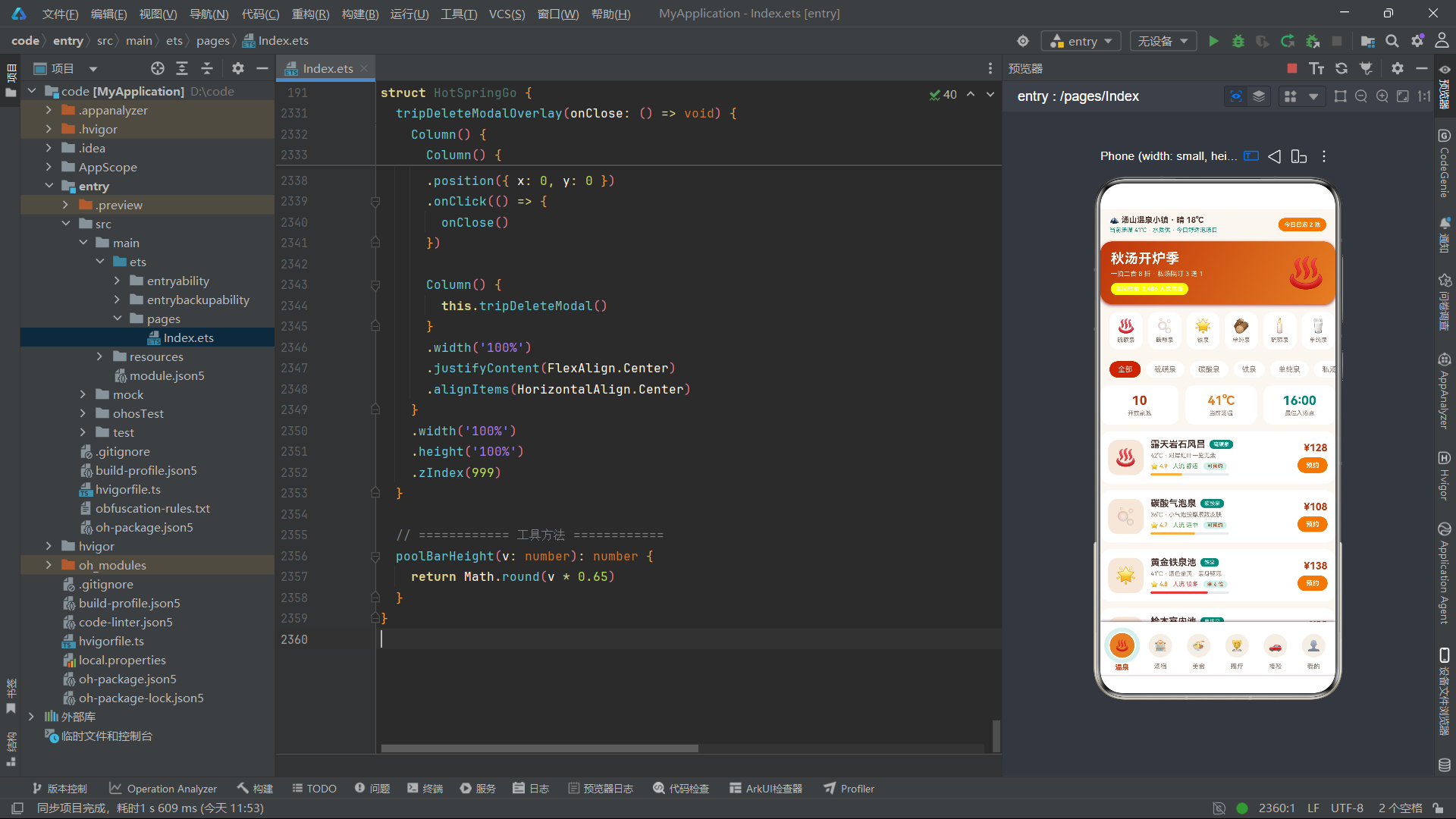
总结
通过对"滴滴温泉度假 HotSpringGo"应用的逐段拆解,我们可以清晰地看到在 HarmonyOS 6.1.1 环境下,基于 HarmonyOS ArkTS API 24 构建一个完整电商级应用所需的核心技术栈与工程范式。该应用以单一 @Entry @Component struct 为容器,用 25 个 @State 状态变量驱动整个响应式 UI,用 13 个 @Builder 方法把复杂的界面拆解为可维护的构建器单元,用约 20 处 ForEach 实现数据驱动的列表渲染,用 30 余处 if 条件渲染处理 Tab 切换、弹窗显隐与状态分支,构建了一个涵盖温泉预约、汤宿订房、汤后美食、理疗SPA、接驳班车、个人中心六大业务模块的完整电商闭环。
在视觉层,应用充分利用了 ArkTS 的 linearGradient 线性渐变、shadow 阴影、borderRadius 圆角、Progress 进度条、Circle 圆形等原生能力,构建了暖汤氤氲的视觉语言——米白底配汤橙与汤青的双色系,配合"涟漪式 Tab 栏"的同心圆环创新交互,呈现出区别于普通电商应用的温泉主题氛围。在数据可视化层,应用用"空 Column + 计算高度 + 渐变填充"的自绘方式实现了柱状图,用 Progress 组件实现了进度条,无需引入任何图表三方库,体现了 ArkTS 原生组件的表达力。
在交互层,应用设计了五种弹窗(温泉预约、汤宿订房、添加计划、编辑访客、删除确认),统一采用"Overlay 蒙层 + 内容容器"的组合架构,通过 @State 布尔开关控制显隐,通过 onClose 回调实现父子通信。在状态更新层,应用严格遵循"不可变更新"范式——用 concat 添加数组项、用 filter 删除数组项、用 forEach 构建新数组实现编辑替换,确保 @State 能感知引用变更触发重渲染。在计算逻辑层,onsenTotal 与 roomTotal 方法分别实现了"票种系数计价"与"餐食加价+折扣计价"两种电商计价模型,配合 Stepper 控件实现实时价格联动。

讨论HarmonyOS开发技术,专注于API与组件、DevEco Studio、测试、元服务和应用上架分发等。
更多推荐

 2
2 0
0- 0


 已为社区贡献4条内容

所有评论(0)