一凿一世界:基于HarmonyOS ArkTS API 24的木雕坊应用胡桃色琥珀色木纹条纹主题与多组件八Tab架构全记录
一凿一世界:基于HarmonyOS ArkTS API 24的木雕坊应用胡桃色琥珀色木纹条纹主题与多组件八Tab架构全记录
一凿一世界,匠心刻木。木雕,是中国传统手工艺的瑰宝,距今已有七千余年历史。木雕不仅是装饰艺术,更是雕塑、绘画、建筑、民俗文化的综合载体——一凿一世界,一刀一乾坤;一木一纹理,一刻一传承。从东阳浮雕到潮州金漆,从福建龙眼到徽州建筑,木雕承载着中国人的匠作精神与造物智慧。本文完整记录一个基于鸿蒙HarmonyOS API 24(HarmonyOS 6.1.1)与ArkTS声明式框架构建的「木雕坊」非遗手作平台,从胡桃色琥珀色桦木色木纹条纹的木雕色彩主题,到深胡桃木工作台头部凿刀条呼吸动画与木屑粒子飘移效果,再到8Tab差异化布局(摆件列表/挂屏赏析/根雕臻品/佛像造像/木料行市/匠师名录/刻刀工坊/订单台账)、单入口组件架构、@Observed聚合数据类WoodShopData、6个工具函数(densityW/orderBarH/chiselBarW/getWoodTone/rankColor/statusColor)、ToolRackCard子组件封装、三大弹窗(新增订单/编辑木料/移除匠师)、条件渲染模态遮罩、PlayMode.Alternate呼吸动画体系、订单柱状图可视化,附完整源码与开发环境搭建。
一、引言:一凿一世界,匠心刻木
木雕,是中国传统手工艺的瑰宝,与玉雕、石雕、牙雕并称"四大雕刻"。木雕的起源可追溯至新石器时代——河姆渡文化遗址出土的木雕鱼形器距今已有七千年,商周时期木雕已用于礼器与建筑装饰,秦汉木雕工艺成熟,唐宋木雕走向鼎盛,明清木雕形成各大流派争奇斗艳的格局。木雕不仅是装饰艺术,更是雕塑、绘画、建筑、民俗文化的综合载体——一凿一世界,一刀一乾坤;一木一纹理,一刻一传承。东阳浮雕层次分明,潮州金漆金碧辉煌,根雕随形取势巧借天工,佛像造像虔心雕琢,木雕承载着中国人的匠作精神与造物智慧。
中国木雕流派纷呈,工艺精湛。各大流派各擅胜场——东阳木雕产于浙江东阳,被誉为"中国木雕之乡",始于唐宋盛于明清,以浮雕见长,层次分明构图饱满,多用于古建筑装饰与家具屏风;潮州金漆木雕产于广东潮州,以金箔贴金著称,金碧辉煌雍容华贵,多用于神龛案几与祭祀器物;福建龙眼木雕产于福州,以龙眼木为材,圆润古朴含蓄内敛,擅长人物圆雕;徽州木雕产于安徽徽州,多用于徽派古建筑装饰,雕工精细题材丰富;宁波朱金木雕产于浙江宁波,以朱金漆装饰,"三金六朱"工艺独特;苏州红木雕刻产于江苏苏州,精细雅致文人气息浓厚;剑川木雕产于云南大理剑川,白族木雕代表,多用于古建筑门窗。工艺技法更是博大精深——圆雕立体全方位雕琢、浮雕层次分明(高浮雕/浅浮雕)、透雕玲珑剔透、镂雕透空见灵、阴雕凹陷含蓄、阳雕凸起醒目、微雕毫厘之间见乾坤,七种技法各擅胜场。
木料更是名贵云集——海南黄花梨木性稳定纹理瑰丽,印度小叶紫檀密度极高色泽深沉,金丝楠木金丝闪耀皇家专享,黄杨木细腻温润适合精雕,大红酸枝色泽红润稳重厚朴,黑檀木乌黑深邃凝重典雅,白蜡木纹理清晰韧性十足,香樟木芳香辟虫民间常用,东北松木质地松软建筑常用,沉香木香气悠远千金难求,十种木料密度从40到96覆盖中国木雕用材全谱。匠师更是名家辈出——陈守拙擅浮雕圆雕四十二载,方木生精透雕镂雕三十六年,林巧手专根雕随形取势,郑一刀佛像雕刻虔心造像,吴小筑文房雕刻文雅精细,何木子建筑木雕古建营缮,罗细刻微雕毫厘乾坤,孙老实家具雕花传统承袭,八位匠师技艺谱系完整。刻刀更是八件齐备——平刀铲底修面、圆刀刻线走弧、斜刀切边起丝、三角刀剔槽勾边、剑刀精雕细琢、剔刀剔除余料、刮刀刮平修光、线刀勾勒细纹,八种刻刀覆盖木雕全工艺。
然而,随着现代工业量产冲击,木雕这门需要数十年刀功积淀的传统手作正面临传承困境——年轻人不了解木雕流派,手工匠师缺乏展示和销售渠道,木雕作品木料信息不透明、工艺技法混乱、匠师档案缺失,正成为中国木雕非遗传承的现实痛点。一个优秀的木雕手作平台,不仅需要覆盖从"摆件馆藏"到"木料行市"再到"订单台账"的完整产品展示闭环,还要在挂屏赏析、根雕臻品、佛像造像、匠师名录、刻刀工坊等维度做到精准而高效。它需要以馆藏摆件为核心入口,横向扩展出挂屏、根雕、佛像、木料、匠师、刻刀、订单八大功能模块,每个模块采用完全不同的布局风格,形成一个完整闭环的中国木雕非遗手作生态。
正是在这样的背景下,木雕坊类非遗手作平台应运而生。一个优秀的木雕应用,需要以馆藏摆件为核心入口,横向扩展出挂屏赏析列表、根雕臻品展示、佛像造像名录、木料行市行情、匠师名录档案、刻刀工坊陈列、订单台账追踪八大功能模块,每个模块采用完全不同的布局风格——摆件=统计概览+摆件列表+木色色条呼吸、挂屏=挂屏列表+分隔线装饰、根雕=根雕列表+随形位移动画、佛像=佛像列表+等级标签着色、木料=木料列表+密度横条+编辑交互、匠师=匠师列表+等级标签+移除交互、刻刀=刻刀列表+锋利度横条、订单=柱状图概览+订单列表+状态着色,形成了一个完整闭环的中国木雕非遗手作生态。它不仅是一个功能完备的演示项目,更是一份典型的ArkUI工程实践范本,涵盖了单入口组件架构设计、@Observed聚合数据类、颜色分级函数、ToolRackCard子组件封装、深胡桃木工作台头部凿刀条呼吸动画与木屑粒子飘移、条件渲染模态弹窗、layoutWeight弹性进度条、ForEach列表渲染、订单柱状图可视化等关键技术点。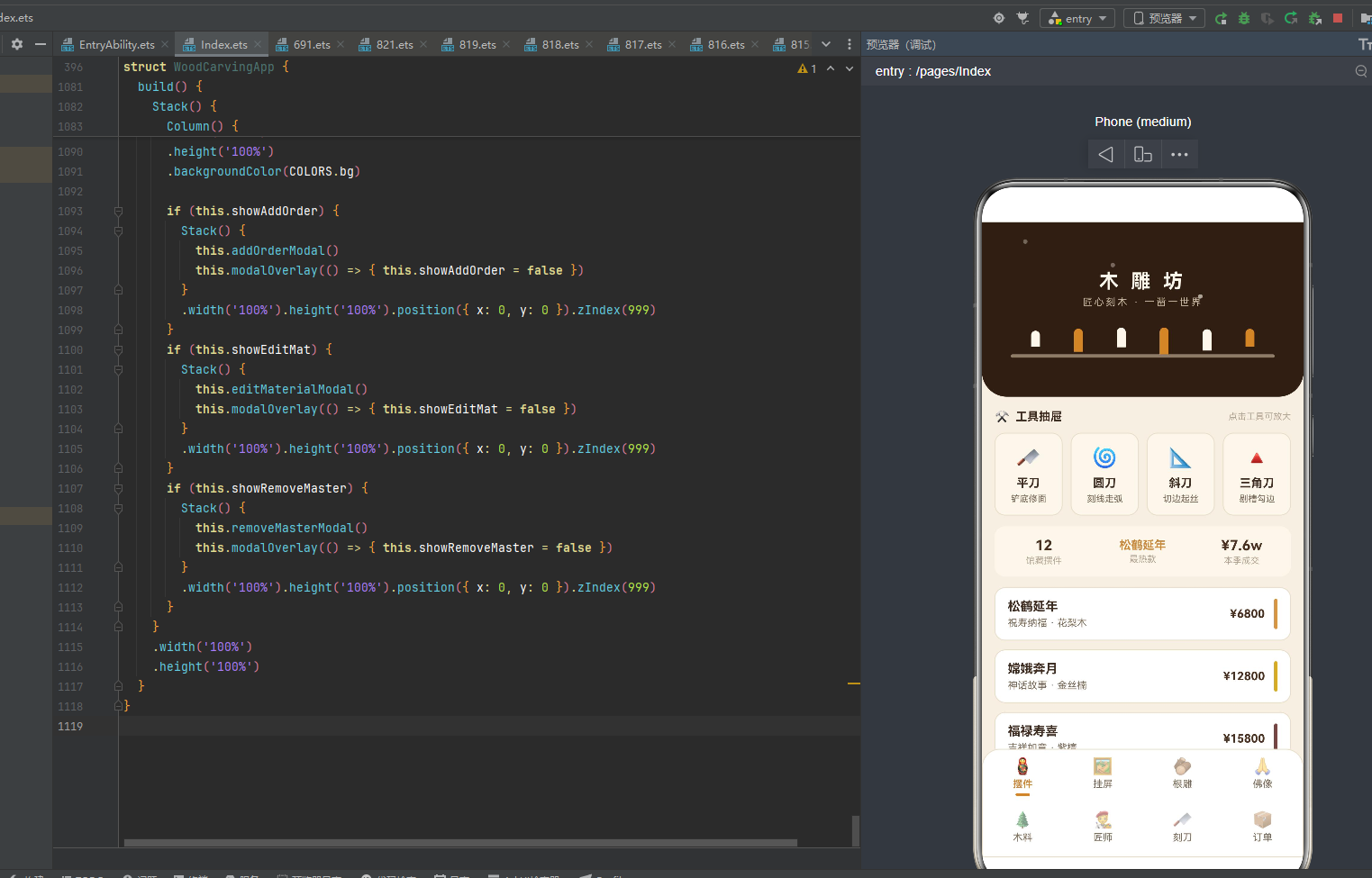
二、应用整体架构概览
整个应用采用了"单入口组件 + @Observed聚合数据 + 配置驱动 + 子组件封装"的四层设计模式。入口组件WoodCarvingApp作为整个应用的根容器,负责管理当前激活的Tab状态、动画开关amb、三个弹窗的显隐状态、表单数据以及聚合数据对象。与多组件内@ObjectLink拆分内容页的架构不同,本应用采用单入口组件架构——所有内容页都内联在入口组件的@Builder contentArea()中通过if-else if条件分支切换,仅ToolRackCard一个独立子组件被复用,是本应用工程化设计的核心选择,也是ArkUI单组件架构的典型实践。
应用一共划分为八个一级页面:摆件(Tab 0)、挂屏(Tab 1)、根雕(Tab 2)、佛像(Tab 3)、木料(Tab 4)、匠师(Tab 5)、刻刀(Tab 6)、订单(Tab 7)。底部bottomBar采用双行四列布局——ROW1_IDX [0,1,2,3] 为第一行,ROW2_IDX [4,5,6,7] 为第二行,每个Tab项由@Builder bottomItem(i)构建,包含图标(18号Emoji)、标签文字(11号)、选中指示条(16x3圆角2琥珀色小条)三部分。激活态文字amber琥珀色加粗+指示条显示,非激活态textSub灰棕色普通+指示条透明隐藏,点击切换activeTab触发contentArea重新渲染。八个Tab每个布局完全不同——摆件采用统计概览+摆件列表+木色色条呼吸(12款摆件,主题木料信息,色条getWoodTone动态着色)、挂屏采用挂屏列表+分隔线装饰(8幅挂屏,题材尺寸信息,◈菱形分隔)、根雕采用根雕列表+随形位移动画(8件根雕,材质重量信息,translate x呼吸位移)、佛像采用佛像列表+等级标签着色(8尊佛像,姿态木料信息,rankColor三级着色)、木料采用木料列表+密度横条+编辑交互(10种木料,densityW密度宽度映射,getWoodTone木色着色,✎点击编辑弹窗)、匠师采用匠师列表+等级标签+移除交互(8位匠师,rankColor等级着色,移除点击确认弹窗)、刻刀采用刻刀列表+锋利度横条(8把刻刀,chiselBarW锋利度宽度映射)、订单采用柱状图概览+订单列表+状态着色(10笔订单,orderBarH金额柱高映射,statusColor状态着色),这种"一页一型"的差异化设计最大程度还原了真实中国木雕非遗手作平台的交互体验。
在数据层面,应用独创了**@Observed聚合数据类**设计——WoodShopData一个类包含ornaments/plaques/roots/buddhas/materials/masters/chisels/orders八个数组,每个数组8-12条数据,用new构造函数初始化(与对象字面量初始化不同,本应用采用构造函数初始化每个数据项),@Observed装饰整个类与所有子项类(OrnamentItem/PlaqueItem/RootItem/BuddhaItem/MaterialItem/MasterItem/ChiselItem/OrderItem全部加@Observed),实现"一个数据对象贯穿所有页面"的聚合数据模式。这种设计将所有业务数据集中管理,修改数据时(如addOrder/editMaterial/removeMaster)所有引用该数据的视图自动响应式刷新,是ArkUI跨视图数据共享的高级实践。应用还定义了8个@Observed数据类和1个ToolRackCard子组件,将数据结构与UI表现层解耦,实现配置驱动设计。
在颜色逻辑层面,应用定义了6个颜色与尺寸映射函数(densityW密度宽度映射/orderBarH订单金额柱高映射/chiselBarW锋利度宽度映射/getWoodTone木色映射/rankColor等级着色/statusColor状态着色),将颜色和尺寸映射逻辑从UI层抽离,每个函数根据不同维度(密度/金额/锋利度/木料/等级/状态)返回对应的颜色值或像素宽度,实现"数据即配色、数据即尺寸"的动态映射模式。应用配色采用"胡桃色琥珀色桦木色木纹条纹"木雕非遗主题——bg #F5EFE3 米杏色(模拟打磨木面温润质感),walnut #4A3223 胡桃色(木雕主色调),walnutDeep #2E1F15 深胡桃色(深色强调),amber #C98A3D 琥珀色(木雕辅色调),birch #FBF6EC 桦木色(浅色装饰),textMain #3D2B1F 深褐棕(深色文字),五色各司其职形成"以胡桃色定雕、以琥珀色定饰、以桦木色定表、以深胡桃定台、以米杏定底"的中国木雕语义着色体系。
在交互层面,应用通过三个@Builder弹窗方法实现了完整的增删改查交互闭环:addOrderModal新增订单(四字段TextInput表单:订单编号/客户姓名/定制作品/定金金额,提交订单amber琥珀底)、editMaterialModal编辑木料(三字段TextInput表单:木料名称/单价/库存,保存修改walnut胡桃底)、removeMasterModal移除匠师(确认对话弹窗,再想想border底+确认移除danger危险底)。三个弹窗都是@Builder方法内联在入口组件中,通过if条件渲染控制显隐(showAddOrder/showEditMat/showRemoveMaster三个@State布尔变量),遮罩用#55000000(55%黑)硬编码,弹窗主体与遮罩用Stack层叠,整体zIndex(999)覆盖主内容。木料页编辑点击触发editMaterialModal(matIdx记录目标索引,预填当前值),匠师页移除点击触发removeMasterModal,订单页新增订单点击触发addOrderModal,形成了完整的"新增订单→编辑木料→移除匠师"交互闭环。
下面逐节展示应用的架构组成与各功能模块运行细节。
三、配色体系:胡桃色琥珀色桦木色木纹条纹
3.1 色彩接口定义
任何一款设计精良的应用,背后都有一套严谨的色彩规范。该应用首先通过一个WoodPalette接口,将整个应用所需的色彩抽象为一个结构化的契约,共14个字段:
interface WoodPalette {
  bg: string;
  cardBg: string;
  walnut: string;
  walnutDeep: string;
  amber: string;
  birch: string;
  textMain: string;
  textSub: string;
  textHint: string;
  border: string;
  success: string;
  warning: string;
  danger: string;
  white: string;
}
WoodPalette接口共定义14个色彩字段,覆盖了背景、卡片、主色调、深色调、辅色调、浅色调、文字主色、文字副色、文字提示色、边框、成功/警告/危险三态、白色全维度。这种接口化的色彩契约设计,让色彩定义有据可循、有型可依,是ArkUI工程化色彩管理的基础。每个字段都对应中国木雕非遗文化的一个视觉语义——胡桃色是木雕作品的主色调,琥珀色是木雕辅色调,桦木色是浅色装饰,深胡桃色是工作台深色基调,色彩与文化语义一一对应,形成"以色载道"的中国木雕视觉语言。
3.2 色彩常量定义与详细解析
const COLORS: WoodPalette = {
  bg: '#F5EFE3',
  cardBg: '#FFFFFF',
  walnut: '#4A3223',
  walnutDeep: '#2E1F15',
  amber: '#C98A3D',
  birch: '#FBF6EC',
  textMain: '#3D2B1F',
  textSub: '#7A6A58',
  textHint: '#B5A794',
  border: '#E8DEC9',
  success: '#5E7B4A',
  warning: '#B57B2E',
  danger: '#A83A2E',
  white: '#FFFFFF'
};
下面对每个色值进行详细的文化含义解析:
- bg #F5EFE3 米杏色:背景色,模拟打磨抛光后的木面温润质感,是整个应用的底色基调。米杏色介于米黄与杏色之间,呼应中国木雕"打磨见光"的工艺——粗坯经过砂纸打磨后才显温润色泽,米杏色正是这层打磨后的木色底色。
- cardBg #FFFFFF 纯白:卡片背景,与米杏色底形成层次。白色卡片浮于米杏色底之上,模拟"白木胚"未上漆的状态,呼应木雕作品未上漆打磨后的原始白木质感。
- walnut #4A3223 胡桃色:木雕主色调,用于价格、标题强调、保存按钮、底部指示条。胡桃色是胡桃木(核桃木)的色泽,胡桃木是中国传统木雕用材之一,色泽深沉纹理瑰丽,#4A3223正是胡桃木芯材的经典色相,承载木雕"以木为本"的工艺基因。
- walnutDeep #2E1F15 深胡桃色:深色强调,用于头部工作台背景、深色底按钮。深胡桃色比胡桃色更深沉,模拟老胡桃木经年氧化后的色泽,是头部"深胡桃木工作台"的核心色相,营造木匠工坊深邃厚重的氛围。
- amber #C98A3D 琥珀色:木雕辅色调,用于激活态文字、图标、柱状图偶数项、提交按钮、琥珀色凿刀条。琥珀色是琥珀的色泽,呼应木雕作品上漆后的琥珀光晕,也象征沉香木的琥珀色调,是木雕"上漆见光"后的视觉呈现。
- birch #FBF6EC 桦木色:浅色装饰,用于图标圆形底色、统计概览底色、表单背景、工具架卡片底色、木屑粒子。桦木色是白桦木的浅色木色,白桦木色浅纹细,是浅色装饰的首选,呼应木雕"以浅衬深"的视觉层次。
- textMain #3D2B1F 深褐棕:主文字色,非纯黑更有文化感。深褐棕比纯黑更温润,模拟墨色与木色的融合,是木雕匠人题款墨迹的色泽。
- textSub #7A6A58 灰棕色:副文字色,用于描述信息。灰棕色是木纹间隙的色泽,介于深褐与浅米之间,承载次要文字信息。
- textHint #B5A794 浅灰棕:提示文字色,用于辅助信息、尾部统计。浅灰棕模拟木屑飞溅后的浅色,承载最次要的提示信息。
- border #E8DEC9 浅米棕:边框色,用于卡片边框、分隔线。浅米棕是打磨后的浅色木纹边线,比bg更浅更柔和,营造卡片浮于底色的层次感。
- success #5E7B4A 苔藓绿:成功状态色,用于已交付订单、名师等级。苔藓绿是木料存放环境中的苔藓色泽,象征"已交付完成"的生机状态。
- warning #B57B2E 赭金色:警告状态色,用于雕刻中订单。赭金色是铁器凿刻木料时飞溅的火花色泽,象征"正在雕刻中"的进行状态。
- danger #A83A2E 朱红色:危险状态色,用于移除匠师确认按钮。朱红色是宁波朱金木雕的朱漆色泽,象征"决断移除"的红色警示。
- white #FFFFFF 纯白:纯白色,用于按钮文字、等级标签文字。
本应用配色最大特色是胡桃色 walnut #4A3223 与琥珀色 amber #C98A3D——胡桃色用于价格/标题/保存按钮/底部指示条(是胡桃木芯材的深沉色调,承载木雕作品的价值与分量),琥珀色用于激活态文字/图标/提交按钮/柱状图(是琥珀的温润色调,承载木雕上漆后的光晕),与米杏色底bg #F5EFE3形成"胡桃色琥珀色桦木色木纹条纹"的中国木雕经典配色。深胡桃色walnutDeep #2E1F15用于头部工作台背景(是老胡桃木氧化后的深邃色调,营造木匠工坊的厚重氛围),桦木色birch #FBF6EC用于表单背景与工具架卡片(是白桦木的浅色木色,与深胡桃工作台形成"深台浅卡"的层次对比),五色各司其职,营造既胡桃色深沉又琥珀色温润的中国木雕非遗氛围。
3.3 颜色分级函数体系
应用定义了6个颜色与尺寸映射函数,将颜色映射逻辑从UI层抽离:
| 函数名 | 输入维度 | 分级逻辑 | 用途 |
|---|---|---|---|
| densityW | 密度 | Math.min(170, d*1.7) | 木料密度横条宽度映射 |
| orderBarH | 金额 | Math.min(110, v/6) | 订单柱状图高度映射 |
| chiselBarW | 锋利度 | Math.min(140, s*1.3) | 刻刀锋利度横条宽度映射 |
| getWoodTone | 木料名 | 关键字匹配返回木色 | 木料色条/密度条颜色映射 |
| rankColor | 等级 | 大师amber/名师success/其他textSub | 匠师/佛像等级着色 |
| statusColor | 状态 | 已交付success/雕刻中warning/待打磨textSub/定制中紫 | 订单状态着色 |
六个函数形成了统一的"动态映射"设计语言——densityW/orderBarH/chiselBarW是数值到像素宽度的映射(都用Math.min做上限保护,避免数值过大撑爆容器),getWoodTone是字符串到颜色的映射(根据木料关键字返回对应木色),rankColor/statusColor是分级到颜色的映射(根据等级/状态返回对应色值),保证了视觉一致性与文化语义的双重统一。
四、导航Tab设计:双行四列八Tab布局
4.1 Tab元数据定义
应用通过TabMeta接口和TAB_LIST常量定义了8个一级Tab的元数据:
interface TabMeta {
label: string;
icon: string;
}
const TAB_LIST: TabMeta[] = [
{ label: '摆件', icon: '🪆' },
{ label: '挂屏', icon: '🖼️' },
{ label: '根雕', icon: '🪵' },
{ label: '佛像', icon: '🙏' },
{ label: '木料', icon: '🌲' },
{ label: '匠师', icon: '🧑🎨' },
{ label: '刻刀', icon: '🔪' },
{ label: '订单', icon: '📦' }
];
TabMeta接口定义两个字段——label(中文标签)和icon(Emoji图标),用TabMeta[]数组定义8个Tab。8个Tab覆盖了木雕坊的完整业务闭环——摆件(🪆木偶摆件,馆藏摆件列表)、挂屏(🖼️画框,挂屏赏析)、根雕(🪵木段,根雕臻品)、佛像(🙏合十,佛像造像)、木料(🌲松木,木料行市)、匠师(🧑🎨匠人,匠师名录)、刻刀(🔪刀具,刻刀工坊)、订单(📦包裹,订单台账)。每个Tab的图标都精心选择——🪆是俄罗斯套娃式木偶摆件呼应"摆件"、🖼️是画框呼应"挂屏"挂在墙上、🪵是木段呼应"根雕"原材料、🙏是合十礼佛呼应"佛像"造像虔心、🌲是松木呼应"木料"原材、🧑🎨是匠人艺术家呼应"匠师"名录、🔪是刀具呼应"刻刀"工坊、📦是包裹呼应"订单"物流,图标与语义高度契合。
4.2 双行四列布局常量
const ROW1_IDX: number[] = [0, 1, 2, 3];
const ROW2_IDX: number[] = [4, 5, 6, 7];
const CHISEL_H: number[] = [18, 26, 22, 30, 24, 20];
const SAWDUST_IDX: number[] = [0, 1, 2];
const TOP_ORDER_IDX: number[] = [0, 1, 2, 3, 4, 5];
底部导航采用双行四列布局——ROW1_IDX [0,1,2,3] 是第一行(摆件/挂屏/根雕/佛像),ROW2_IDX [4,5,6,7] 是第二行(木料/匠师/刻刀/订单),8个Tab分两行展示,每行4个,是本应用导航设计的核心特色。CHISEL_H [18,26,22,30,24,20] 是头部凿刀条6根凿刀的高度数组——模拟木匠工作台上6把不同长度的凿刀立放,高度从18到30不等形成参差错落的视觉节奏。SAWDUST_IDX [0,1,2] 是头部木屑粒子的3个索引——3颗木屑粒子在不同位置飘移,模拟雕刻时飞溅的木屑。TOP_ORDER_IDX [0,1,2,3,4,5] 是订单柱状图展示的前6单索引——取订单数组前6单做柱状图概览。
4.3 工具架元数据
interface ToolMeta {
  name: string;
  use: string;
  icon: string;
}

const TOOL_RACK: ToolMeta[] = [
  { name: '平刀', use: '铲底修面', icon: '🔪' },
  { name: '圆刀', use: '刻线走弧', icon: '🌀' },
  { name: '斜刀', use: '切边起丝', icon: '📐' },
  { name: '三角刀', use: '剔槽勾边', icon: '🔺' }
];
工具架定义了4种木雕基础刻刀——平刀(🔪铲底修面,平刀刀刃平直适合铲平底面与修整平面)、圆刀(🌀刻线走弧,圆刀刀刃弧形适合刻线条与走弧线)、斜刀(📐切边起丝,斜刀刀刃倾斜适合切边与起木丝)、三角刀(🔺剔槽勾边,三角刀刀刃三角适合剔槽与勾边线)。4种刻刀覆盖了木雕"铲、刻、切、剔"四大基础刀法,是木匠工具台上最常用的四件套。每种刻刀都有名字、用途、图标三字段,与TabMeta结构类似,体现本应用"元数据驱动"的设计哲学。
五、数据接口定义:八大@Observed数据类
应用定义了8个数据接口(用@Observed class实现),覆盖木雕坊完整业务数据结构:
5.1 摆件项 OrnamentItem
@Observed
export class OrnamentItem {
  name: string = '';
  theme: string = '';
  wood: string = '';
  price: number = 0;

  constructor(name: string, theme: string, wood: string, price: number) {
    this.name = name;
    this.theme = theme;
    this.wood = wood;
    this.price = price;
  }
}
OrnamentItem是摆件项数据类,4个字段——name(摆件名称,如"松鹤延年")、theme(题材主题,如"祝寿纳福")、wood(木料,如"花梨木")、price(价格,单位元)。@Observed装饰整个类,构造函数初始化4个字段。摆件是木雕坊的核心产品——以圆雕与浮雕为主,题材多为吉祥寓意,木料多为花梨/金丝楠/紫檀等名贵木料,价格从几千到数万不等。每个字段都有默认空值/0值,符合ArkTS的类型安全规范。
5.2 挂屏项 PlaqueItem
@Observed
export class PlaqueItem {
  name: string = '';
  theme: string = '';
  size: string = '';
  price: number = 0;

  constructor(name: string, theme: string, size: string, price: number) {
    this.name = name;
    this.theme = theme;
    this.size = size;
    this.price = price;
  }
}
PlaqueItem是挂屏项数据类,4个字段——name(挂屏名称,如"百鸟朝凤")、theme(题材,如"花鸟题材")、size(尺寸,如"80×40cm")、price(价格)。挂屏是木雕的墙面装饰形式,多以浮雕技法呈现,题材涵盖花鸟、山水、人物、民俗、四君子等,尺寸以"宽×高cm"格式表示。挂屏是中国传统厅堂的高雅陈设,多以成组出现,承载文人雅趣。
5.3 根雕项 RootItem
@Observed
export class RootItem {
  name: string = '';
  material: string = '';
  weight: string = '';
  price: number = 0;

  constructor(name: string, material: string, weight: string, price: number) {
    this.name = name;
    this.material = material;
    this.weight = weight;
    this.price = price;
  }
}
RootItem是根雕项数据类,4个字段——name(根雕名称,如"枯木逢春")、material(材质,如"崖柏")、weight(重量,如"28kg")、price(价格)。根雕是木雕的特殊门类——以树根天然形态为基础,“随形取势、巧借天工”,材质多为崖柏、黄杨木、杜鹃根等根材,重量以kg计,价格因孤品属性往往较高。根雕强调"七分天成三分人工",是中国木雕"天人合一"哲学的体现。
5.4 佛像项 BuddhaItem
@Observed
export class BuddhaItem {
  name: string = '';
  pose: string = '';
  wood: string = '';
  price: number = 0;
  rank: string = '';

  constructor(name: string, pose: string, wood: string, price: number, rank: string) {
    this.name = name;
    this.pose = pose;
    this.wood = wood;
    this.price = price;
    this.rank = rank;
  }
}
BuddhaItem是佛像项数据类,5个字段——name(佛像名称,如"观音立像")、pose(姿态,如"持柳净瓶")、wood(木料,如"紫檀")、price(价格)、rank(等级,如"大师")。佛像是木雕的庄严门类——以圆雕为主,姿态多样(持柳净瓶/袒腹坐像/结跏趺坐/持锡杖坐/智慧坐骑/六牙白象/降龙伏虎/金刚杵立),木料多为紫檀/金丝楠/花梨木/酸枝木等名贵木料,价格往往数万至十万,等级分为"大师/名师/匠人"三级,rankColor函数据此着色。
5.5 木料项 MaterialItem
@Observed
export class MaterialItem {
  woodType: string = '';
  density: number = 0;
  price: number = 0;
  stock: number = 0;

  constructor(woodType: string, density: number, price: number, stock: number) {
    this.woodType = woodType;
    this.density = density;
    this.price = price;
    this.stock = stock;
  }
}
MaterialItem是木料项数据类,4个字段——woodType(木料类型,如"海南黄花梨")、density(密度,数值越高木质越密实,如92)、price(单价,元/斤,如1880)、stock(库存,斤,如12)。木料是木雕的基础原料——density密度是衡量木料品质的核心指标(沉香76/黄杨72/大红酸枝88/黑檀90/海南黄花梨92/印度小叶紫檀96,密度越高木质越密实越名贵),价格以元/斤计(沉香3980最贵,东北松木280最廉),库存以斤计,editMaterial方法据此修改木料信息。
5.6 匠师项 MasterItem
@Observed
export class MasterItem {
  name: string = '';
  skill: string = '';
  years: number = 0;
  works: number = 0;
  rank: string = '';

  constructor(name: string, skill: string, years: number, works: number, rank: string) {
    this.name = name;
    this.skill = skill;
    this.years = years;
    this.works = works;
    this.rank = rank;
  }
}
MasterItem是匠师项数据类,5个字段——name(匠师姓名,如"陈守拙")、skill(技艺,如"浮雕·圆雕")、years(从业年限,如42)、works(作品数,如380)、rank(等级,如"大师")。匠师是木雕坊的人力资源——skill技艺覆盖浮雕/圆雕/透雕/镂雕/根雕/神像雕刻/文房雕刻/建筑木雕/微雕/家具雕花等多种,years从业年限从18到45不等(罗细刻18最年轻/郑一刀45最资深),works作品数从85到420不等,rank等级分为"大师/名师/匠人"三级,removeMaster方法据此移除匠师。
5.7 刻刀项 ChiselItem
@Observed
export class ChiselItem {
  name: string = '';
  blade: string = '';
  handle: string = '';
  price: number = 0;
  sharp: number = 0;

  constructor(name: string, blade: string, handle: string, price: number, sharp: number) {
    this.name = name;
    this.blade = blade;
    this.handle = handle;
    this.price = price;
    this.sharp = sharp;
  }
}
ChiselItem是刻刀项数据类,5个字段——name(刻刀名,如"平刀")、blade(刃宽,如"1.2cm")、handle(刀柄材质,如"枣木柄")、price(价格)、sharp(锋利度,数值越高越锋利,如85)。刻刀是木匠的工具——blade刃宽从0.3cm到2.0cm不等(线刀0.3cm最细/刮刀2.0cm最宽),handle刀柄材质有枣木柄/檀木柄/乌木柄三种(乌木柄最高级),sharp锋利度从78到96不等(线刀96最锋利/刮刀78最钝),chiselBarW函数据此映射锋利度横条宽度。
5.8 订单项 OrderItem
@Observed
export class OrderItem {
  no: string = '';
  buyer: string = '';
  piece: string = '';
  amount: number = 0;
  status: string = '';

  constructor(no: string, buyer: string, piece: string, amount: number, status: string) {
    this.no = no;
    this.buyer = buyer;
    this.piece = piece;
    this.amount = amount;
    this.status = status;
  }
}
OrderItem是订单项数据类,5个字段——no(订单编号,如"D20260801")、buyer(客户姓名,如"苏先生")、piece(定制作品,如"松鹤延年")、amount(定金金额,单位元)、status(订单状态,如"雕刻中")。订单是木雕坊的交易记录——no编号以"D+日期"格式,buyer客户姓名富有古风(苏先生/赵女士/钱掌柜/周员外/吴公子/郑先生/冯女士/蒋老板/韩女士/杨先生),piece作品与摆件/佛像/挂屏/根雕数据一一对应,amount金额从5200到88000不等(梅兰竹菊5200最廉/观音立像88000最贵),status状态分为"定制中/雕刻中/待打磨/已交付"四态,statusColor函数据此着色。
六、@Observed可观察数据类:WoodShopData聚合数据
6.1 聚合数据类定义
应用独创了@Observed聚合数据类设计——WoodShopData一个类包含八个数组,用new构造函数初始化每个数据项:
@Observed
export class WoodShopData {
  ornaments: OrnamentItem[] = [
    new OrnamentItem('松鹤延年', '祝寿纳福', '花梨木', 6800),
    new OrnamentItem('嫦娥奔月', '神话故事', '金丝楠', 12800),
    new OrnamentItem('福禄寿喜', '吉祥如意', '紫檀', 15800),
    new OrnamentItem('龙凤呈祥', '婚庆喜事', '花梨木', 9800),
    new OrnamentItem('八仙过海', '神话故事', '黄杨木', 8800),
    new OrnamentItem('渔翁得利', '招财进宝', '樟木', 4200),
    new OrnamentItem('童子献寿', '祝寿纳福', '花梨木', 3600),
    new OrnamentItem('花开富贵', '吉祥如意', '酸枝木', 5600),
    new OrnamentItem('麒麟送子', '添丁纳福', '金丝楠', 16800),
    new OrnamentItem('金玉满堂', '招财进宝', '紫檀', 19800),
    new OrnamentItem('一路连科', '学业有成', '黄杨木', 5200),
    new OrnamentItem('五福捧寿', '祝寿纳福', '花梨木', 4600)
  ];
  plaques: PlaqueItem[] = [
    new PlaqueItem('百鸟朝凤', '花鸟题材', '80×40cm', 6800),
    new PlaqueItem('溪山行旅', '山水题材', '120×60cm', 15800),
    new PlaqueItem('梅兰竹菊', '四君子', '60×30cm', 5200),
    new PlaqueItem('富贵牡丹', '花鸟题材', '70×35cm', 6200),
    new PlaqueItem('渔樵耕读', '人物题材', '100×50cm', 12800),
    new PlaqueItem('十二生肖', '民俗题材', '90×45cm', 8800),
    new PlaqueItem('高山流水', '山水题材', '110×55cm', 14200),
    new PlaqueItem('丹凤朝阳', '花鸟题材', '75×38cm', 7200)
  ];
  roots: RootItem[] = [
    new RootItem('枯木逢春', '崖柏', '28kg', 18800),
    new RootItem('蛟龙出海', '黄杨木', '36kg', 26800),
    new RootItem('鹤立松巅', '杜鹃根', '19kg', 12800),
    new RootItem('犀牛望月', '崖柏', '42kg', 32800),
    new RootItem('凤栖梧桐', '黄杨木', '25kg', 21800),
    new RootItem('狮子滚绣球', '杜鹃根', '31kg', 19800),
    new RootItem('渔翁独钓', '崖柏', '16kg', 15800),
    new RootItem('灵猴献桃', '黄杨木', '22kg', 16800)
  ];
  buddhas: BuddhaItem[] = [
    new BuddhaItem('观音立像', '持柳净瓶', '紫檀', 88000, '大师'),
    new BuddhaItem('弥勒笑佛', '袒腹坐像', '金丝楠', 58000, '大师'),
    new BuddhaItem('释迦说法', '结跏趺坐', '花梨木', 68000, '名师'),
    new BuddhaItem('地藏菩萨', '持锡杖坐', '紫檀', 76000, '大师'),
    new BuddhaItem('文殊骑狮', '智慧坐骑', '金丝楠', 92000, '名师'),
    new BuddhaItem('普贤骑象', '六牙白象', '花梨木', 88000, '名师'),
    new BuddhaItem('罗汉坐像', '降龙伏虎', '酸枝木', 36000, '匠人'),
    new BuddhaItem('韦陀护法', '金刚杵立', '紫檀', 48000, '大师')
  ];
  materials: MaterialItem[] = [
    new MaterialItem('海南黄花梨', 92, 1880, 12),
    new MaterialItem('金丝楠木', 68, 1280, 20),
    new MaterialItem('印度小叶紫檀', 96, 2280, 8),
    new MaterialItem('黄杨木', 72, 860, 30),
    new MaterialItem('大红酸枝', 88, 1580, 15),
    new MaterialItem('黑檀木', 90, 1380, 18),
    new MaterialItem('白蜡木', 55, 420, 45),
    new MaterialItem('香樟木', 48, 360, 60),
    new MaterialItem('东北松木', 40, 280, 80),
    new MaterialItem('沉香木', 76, 3980, 5)
  ];
  masters: MasterItem[] = [
    new MasterItem('陈守拙', '浮雕·圆雕', 42, 380, '大师'),
    new MasterItem('方木生', '透雕·镂雕', 36, 260, '大师'),
    new MasterItem('林巧手', '根雕', 30, 190, '名师'),
    new MasterItem('郑一刀', '神像雕刻', 45, 420, '大师'),
    new MasterItem('吴小筑', '文房雕刻', 22, 120, '名师'),
    new MasterItem('何木子', '建筑木雕', 28, 150, '名师'),
    new MasterItem('罗细刻', '微雕', 18, 85, '匠人'),
    new MasterItem('孙老实', '家具雕花', 26, 110, '匠人')
  ];
  chisels: ChiselItem[] = [
    new ChiselItem('平刀', '1.2cm', '枣木柄', 68, 85),
    new ChiselItem('圆刀', '0.8cm', '檀木柄', 78, 88),
    new ChiselItem('斜刀', '1.0cm', '枣木柄', 72, 90),
    new ChiselItem('三角刀', '0.6cm', '檀木柄', 82, 92),
    new ChiselItem('剑刀', '0.4cm', '乌木柄', 98, 95),
    new ChiselItem('剔刀', '1.5cm', '枣木柄', 88, 82),
    new ChiselItem('刮刀', '2.0cm', '檀木柄', 92, 78),
    new ChiselItem('线刀', '0.3cm', '乌木柄', 108, 96)
  ];
  orders: OrderItem[] = [
    new OrderItem('D20260801', '苏先生', '松鹤延年', 6800, '雕刻中'),
    new OrderItem('D20260803', '赵女士', '观音立像', 88000, '待打磨'),
    new OrderItem('D20260805', '钱掌柜', '百鸟朝凤', 6800, '已交付'),
    new OrderItem('D20260808', '周员外', '蛟龙出海', 26800, '雕刻中'),
    new OrderItem('D20260810', '吴公子', '弥勒笑佛', 58000, '待打磨'),
    new OrderItem('D20260812', '郑先生', '溪山行旅', 15800, '已交付'),
    new OrderItem('D20260814', '冯女士', '龙凤呈祥', 9800, '定制中'),
    new OrderItem('D20260816', '蒋老板', '金玉满堂', 19800, '雕刻中'),
    new OrderItem('D20260818', '韩女士', '梅兰竹菊', 5200, '已交付'),
    new OrderItem('D20260820', '杨先生', '韦陀护法', 48000, '待打磨')
  ];

  addOrder(no: string, buyer: string, piece: string, amount: number): void {
    this.orders.unshift(new OrderItem(no, buyer, piece, amount, '定制中'));
  }

  editMaterial(idx: number, woodType: string, price: number, stock: number): void {
    this.materials[idx].woodType = woodType;
    this.materials[idx].price = price;
    this.materials[idx].stock = stock;
  }

  removeMaster(idx: number): void {
    this.masters.splice(idx, 1);
  }
}
@Observed装饰整个WoodShopData类,@Observed装饰所有8个子项类(OrnamentItem/PlaqueItem/RootItem/BuddhaItem/MaterialItem/MasterItem/ChiselItem/OrderItem),实现全链路响应式。数据规模达72条(12+8+8+8+10+8+8+10),完整呈现中国木雕非遗手作平台的数据生态。每个数据项都用new构造函数初始化(区别于对象字面量初始化),符合ArkTS的类实例化规范。
6.2 数据操作方法
WoodShopData类还定义了3个数据操作方法:
addOrder(no: string, buyer: string, piece: string, amount: number): void {
  this.orders.unshift(new OrderItem(no, buyer, piece, amount, '定制中'));
}

editMaterial(idx: number, woodType: string, price: number, stock: number): void {
  this.materials[idx].woodType = woodType;
  this.materials[idx].price = price;
  this.materials[idx].stock = stock;
}

removeMaster(idx: number): void {
  this.masters.splice(idx, 1);
}
- addOrder:新增订单,
unshift插入数组头部,新订单status默认"定制中"。unshift将新订单插入数组首位,保证新增订单显示在列表最上方,符合"最新优先"的展示逻辑。 - editMaterial:编辑木料,直接修改指定索引项的woodType/price/stock三个字段。与addOrder的
unshift不同,editMaterial是原地修改——保留density密度不变(密度是木料的物理属性不可改),只改名称/价格/库存三个可变属性。 - removeMaster:移除匠师,
splice删除指定索引项。splice(idx, 1)删除一个元素,匠师名录随之缩短,是本应用唯一的删除操作。
6.3 状态管理架构
入口组件WoodCarvingApp管理14个@State状态变量——activeTab(当前Tab索引)、amb(动画开关布尔)、data(WoodShopData实例)、showAddOrder/showEditMat/showRemoveMaster(三个弹窗显隐布尔)、formNo/formBuyer/formPiece/formAmount(新增订单表单四字段)、matIdx(编辑木料索引)、matName/matPrice/matStock(编辑木料表单三字段)、masterIdx(移除匠师索引)。aboutToAppear生命周期回调中用setTimeout延迟100ms将amb置为true触发入场动画,是本应用动画启动的核心机制。
七、工具函数:六大动态映射函数
7.1 密度宽度映射 densityW
function densityW(d: number): number {
  return Math.min(170, d * 1.7);
}
densityW将木料密度值映射为像素宽度——密度×1.7后用Math.min(170, ...)取上限170px。密度40(东北松木)映射68px(最短),密度96(印度小叶紫檀)映射163.2px(最长,接近170上限)。1.7的系数让密度差异在视觉上放大——40与96的密度差56,映射后宽度差95.2px,柱条长短对比鲜明。170px上限保护避免极高密度撑爆容器,是ArkUI像素宽度映射的典型实践。这种"数值乘系数取上限"的映射方式简洁高效,让密度差异一目了然——印度小叶紫檀96密度柱条最长最密实,东北松木40密度柱条最短最松软。
7.2 订单柱高映射 orderBarH
function orderBarH(v: number): number {
  return Math.min(110, v / 6);
}
orderBarH将订单金额映射为柱状图高度——金额÷6后用Math.min(110, ...)取上限110px。金额5200(梅兰竹菊)映射86.7px,金额88000(观音立像)映射110px(达到上限)。÷6的系数让金额差异在视觉上压缩——5200与88000的金额差82800,映射后高度差仅23.3px,避免极高金额柱条撑爆图表。110px上限保护让所有柱条高度可控,柱状图整体视觉协调。这种"数值除系数取上限"的映射方式与densityW的"乘系数取上限"形成对比——密度用乘法放大差异,金额用除法压缩差异,根据数据特性选择不同映射策略。
7.3 锋利度宽度映射 chiselBarW
function chiselBarW(s: number): number {
  return Math.min(140, s * 1.3);
}
chiselBarW将刻刀锋利度映射为像素宽度——锋利度×1.3后用Math.min(140, ...)取上限140px。锋利度78(刮刀)映射101.4px(最短),锋利度96(线刀)映射124.8px(最长,接近140上限)。1.3的系数让锋利度差异在视觉上温和放大——78与96的锋利度差18,映射后宽度差23.4px,柱条长短对比适中。140px上限保护避免极高锋利度撑爆容器。三种映射函数(densityW×1.7/orderBarH÷6/chiselBarW×1.3)的系数各不相同——密度1.7放大差异、金额÷6压缩差异、锋利度1.3温和放大,根据数据范围与视觉需求精心调校。
7.4 木色映射 getWoodTone
function getWoodTone(w: string): string {
  if (w.indexOf('紫檀') >= 0) {
    return '#5C2E2A';
  }
  if (w.indexOf('金丝楠') >= 0) {
    return '#C9A227';
  }
  if (w.indexOf('黄杨') >= 0) {
    return '#D9B56A';
  }
  if (w.indexOf('酸枝') >= 0) {
    return '#8C4A33';
  }
  if (w.indexOf('黑檀') >= 0) {
    return '#2B2420';
  }
  if (w.indexOf('樟') >= 0) {
    return '#A98863';
  }
  if (w.indexOf('沉香') >= 0) {
    return '#6B4F35';
  }
  return '#C98A3D';
}
getWoodTone根据木料名字符串匹配返回对应木色——紫檀#5C2E2A(深红棕,紫檀芯材色泽)、金丝楠#C9A227(金色,金丝楠木金丝闪耀)、黄杨#D9B56A(浅黄棕,黄杨木温润色泽)、酸枝#8C4A33(红棕,大红酸枝色泽)、黑檀#2B2420(乌黑,黑檀木深邃色泽)、樟#A98863(浅棕,香樟木色泽)、沉香#6B4F35(深褐,沉香木色泽)、默认#C98A3D(琥珀色,未匹配木料用主辅色调)。用indexOf关键字匹配而非精确匹配,让"印度小叶紫檀"也能匹配"紫檀"、"海南黄花梨"等长名也能匹配关键字,是字符串映射的灵活实践。7种木色+1种默认色,让每种木料都有独特的视觉标识,柱条颜色与木料真实色泽高度一致,营造"以色辨木"的视觉体验。
7.5 等级着色 rankColor
function rankColor(r: string): string {
  if (r === '大师') {
    return COLORS.amber;
  }
  if (r === '名师') {
    return COLORS.success;
  }
  return COLORS.textSub;
}
rankColor根据等级返回对应色值——大师用amber琥珀色#C98A3D(最高级,琥珀色温润华贵呼应大师造诣)、名师用success苔藓绿#5E7B4A(次高级,苔藓绿生机盎然呼应名师成长)、匠人用textSub灰棕色#7A6A58(基础级,灰棕色沉稳朴素呼应匠人踏实)。三级着色逻辑清晰——大师琥珀、名师苔绿、匠人灰棕,色彩从暖到冷、从华到朴,呼应等级从高到低的视觉递减。===精确匹配等级字符串,保证映射准确。rankColor同时用于佛像页rank字段和匠师页rank字段,统一了"大师/名师/匠人"三级的视觉语言。
7.6 状态着色 statusColor
function statusColor(s: string): string {
  if (s === '已交付') {
    return COLORS.success;
  }
  if (s === '雕刻中') {
    return COLORS.warning;
  }
  if (s === '待打磨') {
    return '#7A6A58';
  }
  return '#8E6FB0';
}
statusColor根据订单状态返回对应色值——已交付用success苔藓绿#5E7B4A(完成态,苔藓绿生机象征交付完成)、雕刻中用warning赭金色#B57B2E(进行态,赭金色火花象征正在雕刻)、待打磨用#7A6A58灰棕色(过渡态,灰棕色沉稳象征打磨静候)、定制中用#8E6FB0紫色(初始态,紫色神秘象征定制刚启动)。四级着色逻辑——已交付苔绿/雕刻中赭金/待打磨灰棕/定制中紫,色彩从冷到暖、从静到动,呼应订单从定制到交付的生命周期。#7A6A58和#8E6FB0两个硬编码色值未纳入COLORS常量,是本应用唯一的两处硬编码色彩,体现了状态色的特殊性与独立性。
八、子组件封装:ToolRackCard工具架卡片
8.1 子组件定义
应用将工具架卡片封装为独立的ToolRackCard子组件,是本应用唯一的子组件:
@Component
struct ToolRackCard {
  tName: string = '';
  tUse: string = '';
  tIcon: string = '';
  fx: boolean = false;

  build() {
    Column() {
      Text(this.tIcon).fontSize(22)
      Text(this.tName).fontSize(13).fontWeight(FontWeight.Bold)
        .fontColor(COLORS.textMain).margin({ top: 8 })
      Text(this.tUse).fontSize(10).fontColor(COLORS.textSub).margin({ top: 4 })
    }
    .width('23%')
    .padding({ top: 14, bottom: 12 })
    .backgroundColor(COLORS.birch)
    .borderRadius(12)
    .border({ width: 1, color: COLORS.border })
    .scale({ x: this.fx ? 1.05 : 1.0, y: this.fx ? 1.05 : 1.0 })
    .animation({ duration: 320 })
    .onClick(() => {
      this.fx = !this.fx;
    })
  }
}
ToolRackCard子组件4个属性——tName(刻刀名)、tUse(用途)、tIcon(图标)、fx(放大开关布尔)。build方法构建一个23%宽度的桦木色底卡片,纵向排列图标(22号)+刻刀名(13号粗体深褐棕)+用途(10号灰棕色)。卡片用birch桦木色底+borderRadius 12圆角+border浅米棕边框,视觉上模拟一块打磨后的桦木牌。核心交互是scale缩放动画——点击切换fx布尔值,卡片在1.0与1.05之间缩放,animation 320ms过渡,模拟"拿起刻刀查看"的交互反馈。这是本应用唯一的子组件,被toolRackArea中ForEach复用4次(平刀/圆刀/斜刀/三角刀),体现了"高频复用元素封装为子组件"的工程化思想。
8.2 工具架区域 toolRackArea
@Builder
toolRackArea() {
  Column() {
    Row() {
      Text('⚒').fontSize(14).margin({ right: 6 })
      Text('工具抽屉').fontSize(13).fontWeight(FontWeight.Bold).fontColor(COLORS.textMain)
      Column().layoutWeight(1)
      Text('点击工具可放大').fontSize(10).fontColor(COLORS.textHint)
    }
    .width('100%')
    Row() {
      ForEach(TOOL_RACK, (t: ToolMeta) => {
        ToolRackCard({ tName: t.name, tUse: t.use, tIcon: t.icon })
      }, (t: ToolMeta) => t.name)
    }
    .width('100%').justifyContent(FlexAlign.SpaceBetween).margin({ top: 10 })
  }
  .width('100%')
  .padding({ left: 14, right: 14, top: 14 })
}
toolRackArea是工具架区域Builder方法——顶部标题行(⚒锤子图标+"工具抽屉"13号粗体深褐棕+"点击工具可放大"10号浅灰棕提示,用Column().layoutWeight(1)撑开中间空间实现两端对齐),底部ForEach遍历TOOL_RACK数组渲染4个ToolRackCard子组件。Row用justifyContent(FlexAlign.SpaceBetween)让4个卡片均匀分布,每个卡片23%宽度,4个卡片占92%宽度,剩余8%作为卡片间距。工具抽屉位于头部下方内容区上方,是连接头部工作台与内容列表的过渡区域,4把基础刻刀(平刀/圆刀/斜刀/三角刀)陈列其上,点击任意卡片触发scale放大动画,模拟木匠从抽屉取刀的交互体验。
九、头部动画:深胡桃木工作台凿刀条与木屑粒子
9.1 头部区域 headerArea
头部区域是本应用最具创意的动画设计——深胡桃木工作台背景+凿刀条呼吸动画+木屑粒子飘移效果: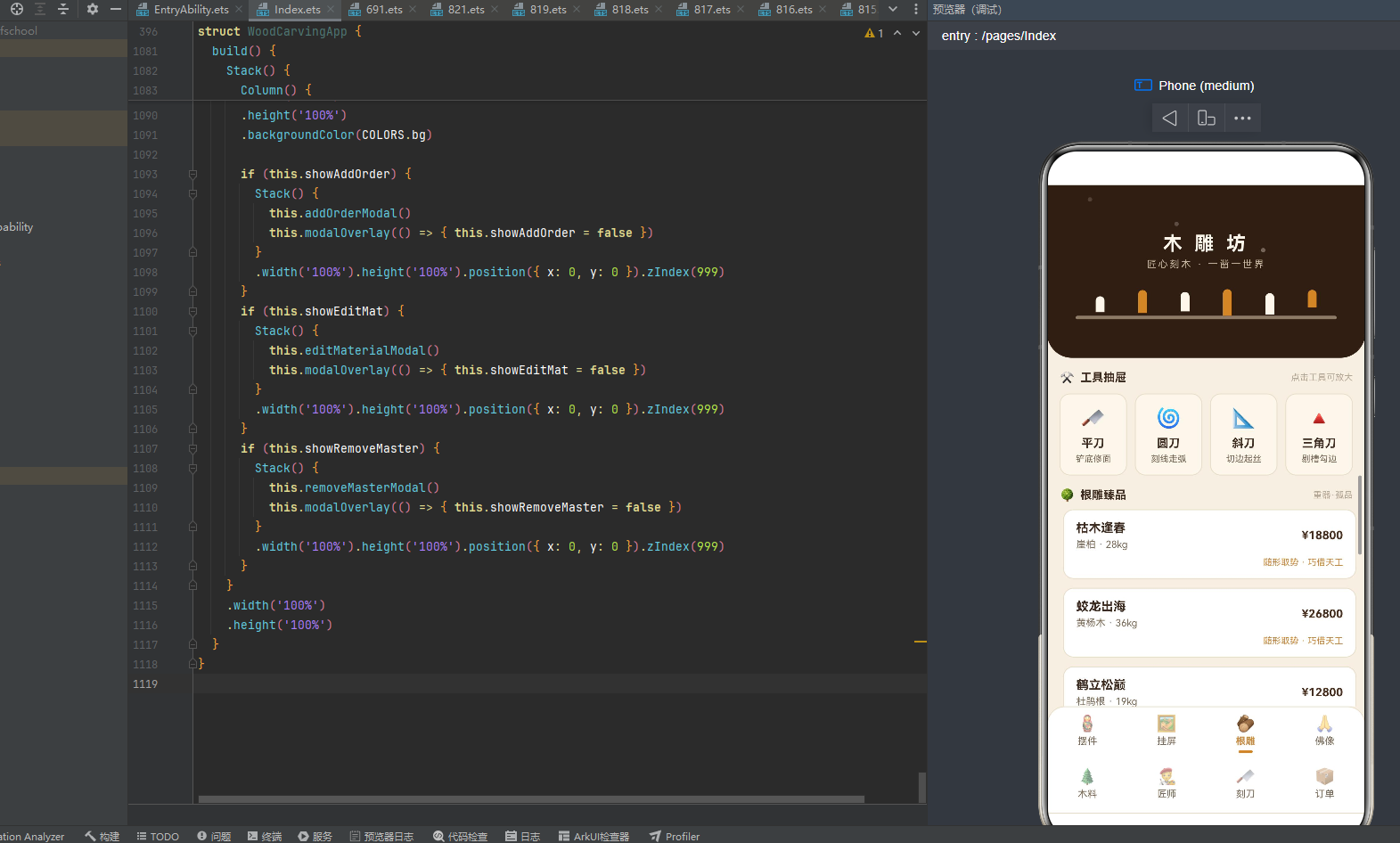
@Builder
headerArea() {
  Stack() {
    Column() {
      Text('木 雕 坊').fontSize(22).fontColor(COLORS.birch)
        .fontWeight(FontWeight.Bold).letterSpacing(4)
      Text('匠心刻木 · 一凿一世界').fontSize(11).fontColor('#C9B89F')
        .margin({ top: 4 }).letterSpacing(2)
      Column() {
        Row() {
          ForEach(CHISEL_H, (h: number, i: number) => {
            Column()
              .width(10).height(h).borderRadius({ topLeft: 5, topRight: 5 })
              .backgroundColor(i % 2 === 0 ? COLORS.birch : COLORS.amber)
              .translate({ y: this.amb ? -10 : 0 })
              .animation({ duration: 800 + i * 120, iterations: -1, playMode: PlayMode.Alternate })
          }, (h: number) => h.toString())
        }
        .width('100%').justifyContent(FlexAlign.SpaceAround)
        .padding({ left: 36, right: 36 })
        .height(40)
        .alignItems(VerticalAlign.Bottom)
        Row()
          .width('82%').height(4).borderRadius(2)
          .backgroundColor('#C9B89F').opacity(0.6)
      }
      .margin({ top: 12 })
    }
    .width('100%')
    .padding({ top: 26, bottom: 16 })
    ForEach(SAWDUST_IDX, (i: number) => {
      Column()
        .width(5).height(5).borderRadius(3)
        .backgroundColor(COLORS.birch)
        .position({ x: 46 + i * 90, y: 30 + i * 26 })
        .opacity(this.amb ? 0.1 : 0.65)
        .translate({ x: i * 8, y: this.amb ? -18 : 0 })
        .animation({ duration: 1500 + i * 300, iterations: -1, playMode: PlayMode.Alternate })
    }, (i: number) => i.toString())
  }
  .width('100%')
  .height(196)
  .backgroundColor(COLORS.walnutDeep)
  .borderRadius({ bottomLeft: 28, bottomRight: 28 })
}
头部用Stack层叠两部分——底层是深胡桃木工作台Column(walnutDeep深胡桃色背景+bottomLeft/bottomRight 28圆角,模拟一块深胡桃木工作台台面),上层是3颗木屑粒子ForEach。工作台Column纵向排列三部分:
- 标题区:'木 雕 坊’22号粗体桦木色(letterSpacing 4字间距拉大营造匾额感)+'匠心刻木 · 一凿一世界’11号浅米棕色(#C9B89F硬编码浅米棕,比birch更暗的木色)。
- 凿刀条区:Row包裹ForEach遍历CHISEL_H [18,26,22,30,24,20] 6根凿刀,每根Column 10px宽,高度按数组值(18-30px),borderRadius topLeft/topRight 5顶部圆角模拟凿刀刃口,backgroundColor按
i % 2 === 0奇偶交替birch桦木色与amber琥珀色(偶数桦木奇数琥珀,6根凿刀双色交替排列),translate y在amb为true时上移10px、为false时不动,animation duration800 + i * 120(每根凿刀动画时长递增120ms——第一根800ms、第二根920ms、第三根1040ms、第四根1160ms、第五根1280ms、第六根1400ms,6根凿刀以不同节奏呼吸,模拟木匠工作时取放凿刀的动态),iterations -1无限循环,playMode Alternate往返播放。Row用justifyContent(FlexAlign.SpaceAround)让6根凿刀均匀分布,padding left/right 36两端留白,height 40固定高度,alignItems(VerticalAlign.Bottom)让凿刀底部对齐模拟立在刀架上。 - 刀架横条:Row 82%宽4px高borderRadius 2的#C9B89F浅米棕色opacity 0.6半透明横条,模拟凿刀架的横档。
上层3颗木屑粒子用ForEach遍历SAWDUST_IDX [0,1,2]——每颗5x5px borderRadius 3的birch桦木色小圆点,position x 46 + i * 90(第0颗x=46、第1颗x=136、第2颗x=226,横向间隔90px)、y 30 + i * 26(第0颗y=30、第1颗y=56、第2颗y=82,纵向间隔26px),opacity在amb为true时0.1、为false时0.65,translate x i * 8(第0颗不位移、第1颗右移8、第2颗右移16)、y在amb为true时上移18px、为false时不动,animation duration 1500 + i * 300(第0颗1500ms、第1颗1800ms、第2颗2100ms,3颗木屑以不同节奏飘移),iterations -1无限循环,playMode Alternate往返播放。3颗木屑粒子在不同位置以不同节奏飘移,模拟雕刻时飞溅的木屑在空中飘落,是本应用最具匠作氛围的动画细节。
9.2 入场动画触发 aboutToAppear
aboutToAppear(): void {
  setTimeout(() => {
    this.amb = true;
  }, 100);
}
aboutToAppear是ArkUI组件生命周期回调,在组件创建后、build方法执行前调用。本应用在aboutToAppear中用setTimeout延迟100ms将amb置为true——这100ms延迟让组件先以amb=false状态渲染一帧(凿刀条不动、木屑粒子不动、色条不透明),然后100ms后amb=true触发所有动画启动,形成"页面加载→动画启动"的入场序列。amb布尔值贯穿整个应用——头部凿刀条translate y、木屑粒子translate y/opacity、摆件色条opacity、根雕卡片translate x、木料密度条opacity、订单柱状图opacity都依赖amb,是本应用动画体系的全局开关。
amb=true后,6处动画同时启动,形成"凿刀条呼吸+木屑飘移+色条闪烁+卡片位移+密度条明暗+柱状图明暗"的多层次动画体系,是本应用"一开关控全局"的动画架构核心。
十、列表渲染:八大@Builder内容分支
10.1 内容区域 contentArea 总览
内容区域contentArea是本应用最大的@Builder方法,通过if-else if条件分支切换8个Tab的内容:
@Builder
contentArea() {
  if (this.activeTab === 0) {
    // 摆件页
  } else if (this.activeTab === 1) {
    // 挂屏页
  } else if (this.activeTab === 2) {
    // 根雕页
  } else if (this.activeTab === 3) {
    // 佛像页
  } else if (this.activeTab === 4) {
    // 木料页
  } else if (this.activeTab === 5) {
    // 匠师页
  } else if (this.activeTab === 6) {
    // 刻刀页
  } else {
    // 订单页
  }
}
contentArea用if (this.activeTab === 0) ... else if ... else八分支条件渲染——每个Tab对应一个独立的Scroll+Column+ForEach列表结构,点击底部Tab切换activeTab触发contentArea重新渲染对应分支。这种"单Builder多分支"的架构是ArkUI单组件应用的典型模式,与多组件架构(每个Tab一个独立@Component)相比,代码集中但组件通信简单。下面逐个分析八大内容分支。
10.2 摆件页(Tab 0):统计概览+摆件列表+木色色条
摆件页以"馆藏摆件"为核心,采用"统计概览+摆件列表+木色色条"的布局:
Scroll() {
  Column() {
    Row() {
      Column() {
        Text('12').fontSize(16).fontWeight(FontWeight.Bold).fontColor(COLORS.walnut)
        Text('馆藏摆件').fontSize(10).fontColor(COLORS.textHint).margin({ top: 2 })
      }.layoutWeight(1)
      Column() {
        Text('松鹤延年').fontSize(13).fontWeight(FontWeight.Bold).fontColor(COLORS.amber)
        Text('最热款').fontSize(10).fontColor(COLORS.textHint).margin({ top: 2 })
      }.layoutWeight(1)
      Column() {
        Text('¥7.6w').fontSize(16).fontWeight(FontWeight.Bold).fontColor(COLORS.walnut)
        Text('本季成交').fontSize(10).fontColor(COLORS.textHint).margin({ top: 2 })
      }.layoutWeight(1)
    }
    .width('100%')
    .padding({ top: 12, bottom: 12 })
    .backgroundColor(COLORS.birch).borderRadius(12)
    .margin({ top: 12, bottom: 12 })
    ForEach(this.data.ornaments, (o: OrnamentItem) => {
      Column() {
        Row() {
          Column() {
            Text(o.name).fontSize(14).fontWeight(FontWeight.Bold).fontColor(COLORS.textMain)
            Text(o.theme + ' · ' + o.wood).fontSize(11)
              .fontColor(COLORS.textSub).margin({ top: 4 })
          }
          .alignItems(HorizontalAlign.Start).layoutWeight(1)
          Text('¥' + o.price).fontSize(13).fontWeight(FontWeight.Bold).fontColor(COLORS.walnut)
          Column()
            .width(4).height(34).borderRadius(2)
            .backgroundColor(getWoodTone(o.wood)).margin({ left: 10 })
            .opacity(this.amb ? 0.4 : 0.9)
            .animation({ duration: 1100, iterations: -1, playMode: PlayMode.Alternate })
        }
        .width('100%')
      }
      .width('100%')
      .backgroundColor(COLORS.cardBg).borderRadius(12)
      .padding({ left: 14, right: 14, top: 12, bottom: 12 })
      .margin({ bottom: 10 })
      .border({ width: 1, color: COLORS.border })
    }, (o: OrnamentItem) => o.name)
  }
  .width('100%').padding({ left: 14, right: 14, bottom: 12 })
}
.width('100%')
.layoutWeight(1)
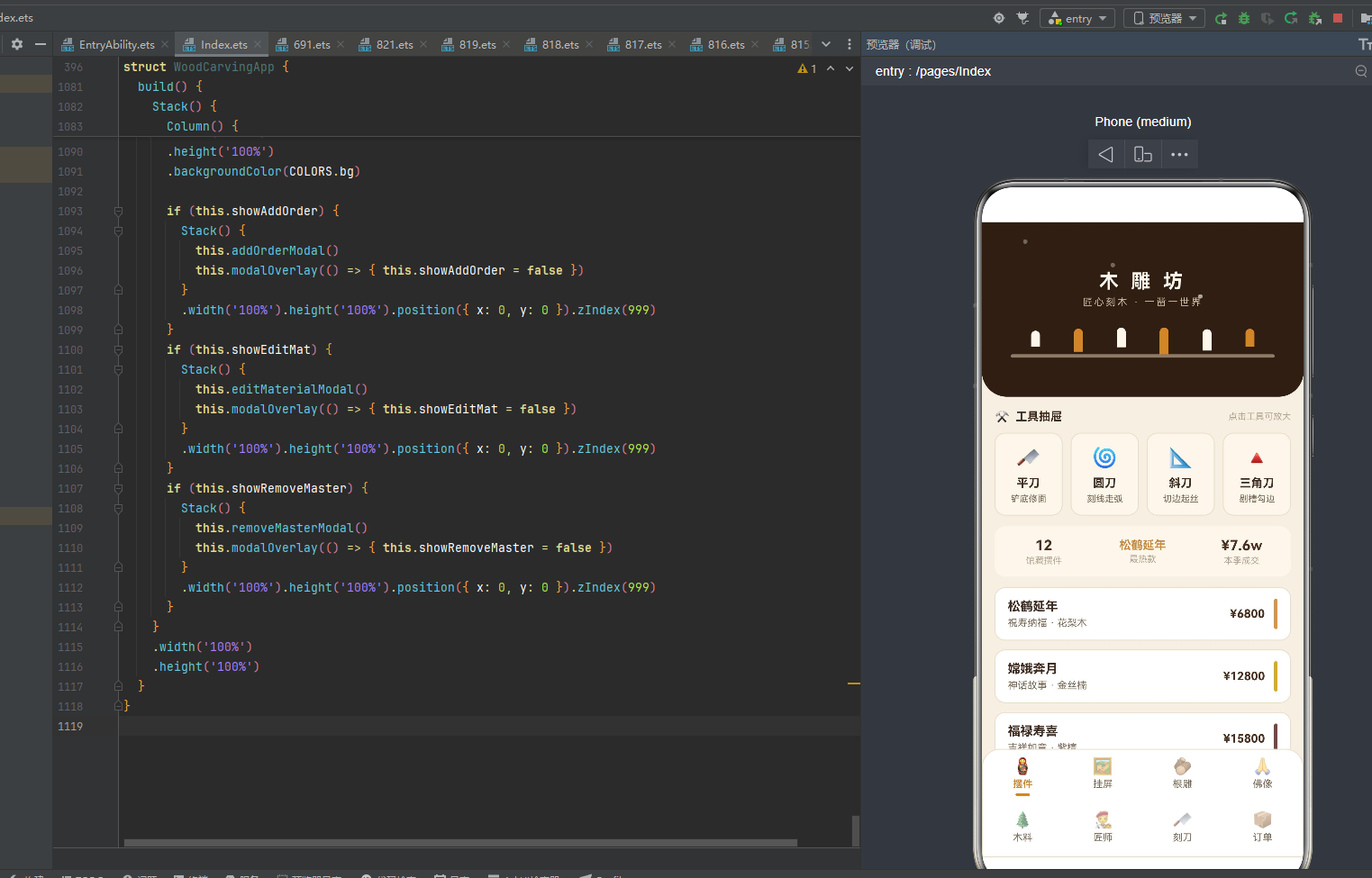
摆件页顶部是统计概览卡——三列均分布局,每列layoutWeight(1)等宽:第一列"12"16号粗体胡桃色+"馆藏摆件"10号浅灰棕(摆件总数12款);第二列"松鹤延年"13号粗体琥珀色+"最热款"10号浅灰棕(最热门摆件);第三列"¥7.6w"16号粗体胡桃色+"本季成交"10号浅灰棕(本季成交总额7.6万)。统计概览卡用birch桦木色底+borderRadius 12圆角,视觉上模拟一块桦木统计板。
第二部分是摆件列表ForEach遍历ornaments数组——每张摆件卡片采用三列布局:第一列是弹性信息区(layoutWeight(1)撑开,摆件名称14号粗体深褐棕+题材木料信息11号灰棕色"祝寿纳福 · 花梨木"),第二列是价格(“¥”+price 13号粗体胡桃色),第三列是4x34px木色色条(backgroundColor(getWoodTone(o.wood))根据木料名动态着色+margin left 10与价格间距+opacity this.amb ? 0.4 : 0.9amb开关控制透明度+animation 1100ms Alternate呼吸闪烁)。色条是摆件页的核心亮点——每种木料对应独特木色(花梨木琥珀色/金丝楠金色/紫檀深红棕/黄杨浅黄棕/酸枝红棕/樟木浅棕),色条颜色与木料真实色泽一致,让用户"以色辨木"。
12款摆件数据完整呈现了中国木雕的文化生态:松鹤延年(祝寿纳福,花梨木,¥6800)、嫦娥奔月(神话故事,金丝楠,¥12800)、福禄寿喜(吉祥如意,紫檀,¥15800)、龙凤呈祥(婚庆喜事,花梨木,¥9800)、八仙过海(神话故事,黄杨木,¥8800)、渔翁得利(招财进宝,樟木,¥4200)、童子献寿(祝寿纳福,花梨木,¥3600)、花开富贵(吉祥如意,酸枝木,¥5600)、麒麟送子(添丁纳福,金丝楠,¥16800)、金玉满堂(招财进宝,紫檀,¥19800)、一路连科(学业有成,黄杨木,¥5200)、五福捧寿(祝寿纳福,花梨木,¥4600)。价格从¥3600(童子献寿,花梨木,最实惠)到¥19800(金玉满堂,紫檀,最名贵),金玉满堂¥19800最贵(紫檀木料名贵+招财进宝题材吉祥),童子献寿¥3600最实惠(花梨木常见+祝寿纳福题材常见)。12款摆件覆盖祝寿纳福/神话故事/吉祥如意/婚庆喜事/招财进宝/添丁纳福/学业有成七大题材,木料覆盖花梨木/金丝楠/紫檀/黄杨木/樟木/酸枝木六种,完整呈现中国木雕摆件"一木一题一吉祥"的文化内涵。
10.3 挂屏页(Tab 1):挂屏列表+菱形分隔线
挂屏页以"挂屏赏析"为核心,采用"挂屏列表+菱形分隔线"的布局:
Scroll() {
  Column() {
    Row() {
      Text('🖼️').fontSize(14).margin({ right: 6 })
      Text('挂屏赏析').fontSize(13).fontWeight(FontWeight.Bold).fontColor(COLORS.textMain)
      Column().layoutWeight(1)
      Text('共 8 幅').fontSize(10).fontColor(COLORS.textHint)
    }
    .width('100%').padding({ top: 14, bottom: 8 })
    ForEach(this.data.plaques, (p: PlaqueItem) => {
      Column() {
        Row() {
          Column() {
            Text(p.name).fontSize(14).fontWeight(FontWeight.Bold).fontColor(COLORS.textMain)
            Text(p.theme + ' · ' + p.size).fontSize(11)
              .fontColor(COLORS.textSub).margin({ top: 4 })
          }
          .alignItems(HorizontalAlign.Start).layoutWeight(1)
          Text('¥' + p.price).fontSize(13).fontWeight(FontWeight.Bold).fontColor(COLORS.walnut)
        }
        .width('100%')
        Row() {
          Column().layoutWeight(1)
            .height(1).backgroundColor(COLORS.border).margin({ top: 10 })
          Text('◈').fontSize(12).fontColor(COLORS.amber).margin({ top: 6, left: 8, right: 8 })
          Column().layoutWeight(1)
            .height(1).backgroundColor(COLORS.border).margin({ top: 10 })
        }
        .width('100%')
      }
      .width('100%')
      .backgroundColor(COLORS.cardBg).borderRadius(12)
      .padding({ left: 14, right: 14, top: 12, bottom: 12 })
      .margin({ bottom: 10 })
      .border({ width: 1, color: COLORS.border })
    }, (p: PlaqueItem) => p.name)
  }
  .width('100%').padding({ left: 14, right: 14, bottom: 12 })
}
.width('100%')
.layoutWeight(1)
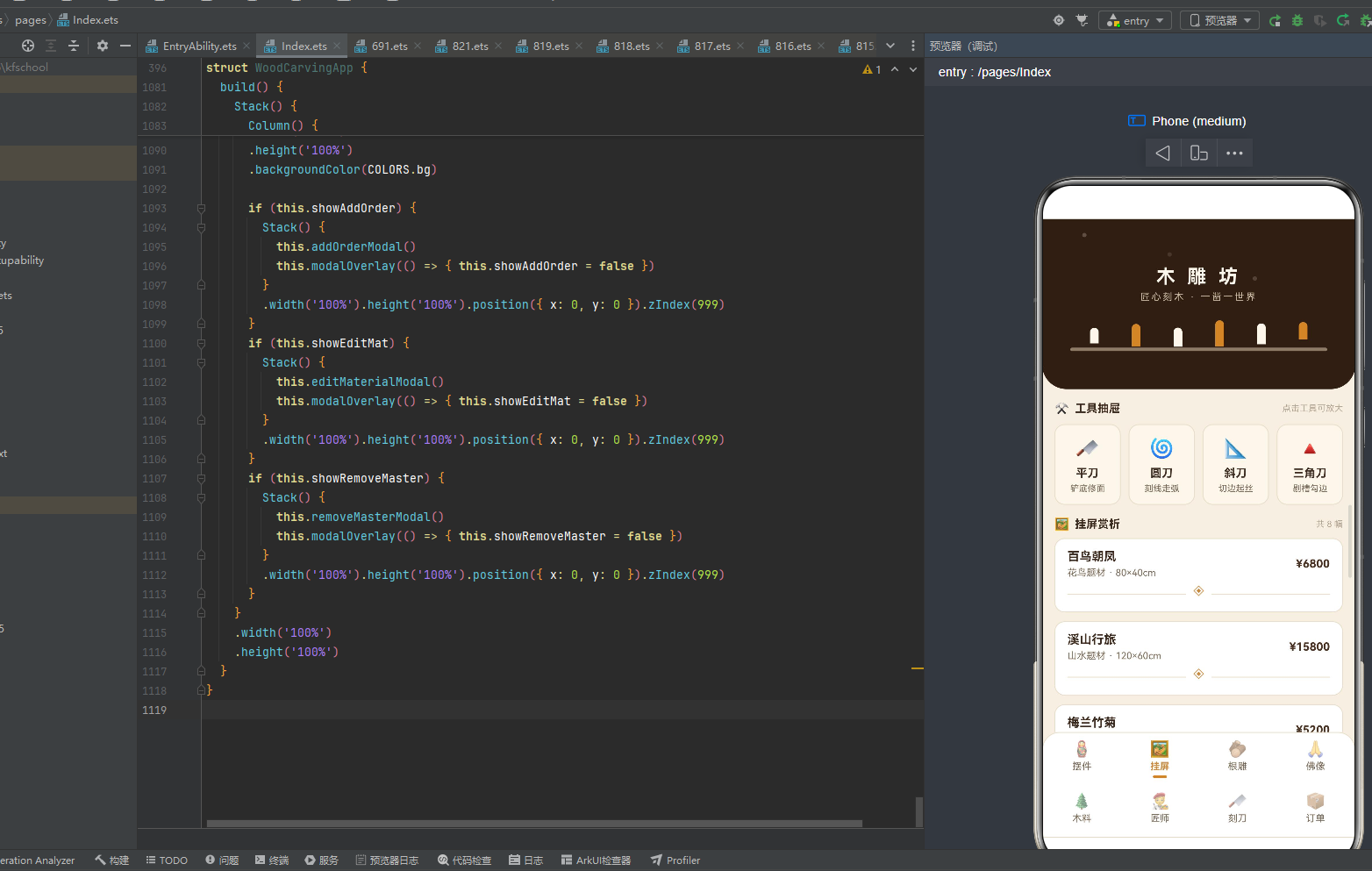
挂屏页顶部标题行——🖼️画框图标+“挂屏赏析"13号粗体深褐棕+“共 8 幅"10号浅灰棕,用Column().layoutWeight(1)撑开中间空间。挂屏列表ForEach遍历plaques数组——每张挂屏卡片采用两行布局:第一行是信息行(弹性信息区layoutWeight(1)+挂屏名称14号粗体深褐棕+题材尺寸信息11号灰棕色"花鸟题材 · 80×40cm”+价格"¥”+price 13号粗体胡桃色),第二行是菱形分隔线行(Column().layoutWeight(1)弹性分隔线左半+height 1 backgroundColor border1px浅米棕线+margin top 10+◈菱形12号琥珀色+margin left/right 8两端间距+Column().layoutWeight(1)弹性分隔线右半)。菱形分隔线是挂屏页的核心装饰——左右两条弹性分隔线中间夹一个◈琥珀色菱形,模拟中国传统挂屏的装裱分隔线,让每幅挂屏像装裱在画框中。
8幅挂屏数据:百鸟朝凤(花鸟题材,80×40cm,¥6800)、溪山行旅(山水题材,120×60cm,¥15800)、梅兰竹菊(四君子,60×30cm,¥5200)、富贵牡丹(花鸟题材,70×35cm,¥6200)、渔樵耕读(人物题材,100×50cm,¥12800)、十二生肖(民俗题材,90×45cm,¥8800)、高山流水(山水题材,110×55cm,¥14200)、丹凤朝阳(花鸟题材,75×38cm,¥7200)。尺寸从60×30cm(梅兰竹菊,最小)到120×60cm(溪山行旅,最大),溪山行旅120×60cm最大(山水题材构图宏大需要大面积),梅兰竹菊60×30cm最小(四君子构图精简小尺寸即可)。价格从¥5200(梅兰竹菊)到¥15800(溪山行旅),溪山行旅¥15800最贵(山水题材大面积+构图复杂),梅兰竹菊¥5200最廉(四君子小面积+构图精简)。8幅挂屏覆盖花鸟题材/山水题材/四君子/人物题材/民俗题材五大题材,完整呈现中国挂屏"以画入木、以木载画"的文化内涵。
10.4 根雕页(Tab 2):根雕列表+随形位移动画
根雕页以"根雕臻品"为核心,采用"根雕列表+随形位移动画"的布局:
Scroll() {
  Column() {
    Row() {
      Text('🌳').fontSize(14).margin({ right: 6 })
      Text('根雕臻品').fontSize(13).fontWeight(FontWeight.Bold).fontColor(COLORS.textMain)
      Column().layoutWeight(1)
      Text('重器·孤品').fontSize(10).fontColor(COLORS.textHint)
    }
    .width('100%').padding({ top: 14, bottom: 8 })
    ForEach(this.data.roots, (r: RootItem) => {
      Column() {
        Row() {
          Column() {
            Text(r.name).fontSize(14).fontWeight(FontWeight.Bold).fontColor(COLORS.textMain)
            Text(r.material + ' · ' + r.weight).fontSize(11)
              .fontColor(COLORS.textSub).margin({ top: 4 })
          }
          .alignItems(HorizontalAlign.Start).layoutWeight(1)
          Text('¥' + r.price).fontSize(13).fontWeight(FontWeight.Bold).fontColor(COLORS.walnut)
        }
        .width('100%')
        Text('随形取势 · 巧借天工').fontSize(10).fontColor(COLORS.amber)
          .width('100%').margin({ top: 8 }).textAlign(TextAlign.End)
      }
      .width('100%')
      .backgroundColor(COLORS.cardBg).borderRadius(12)
      .padding({ left: 14, right: 14, top: 12, bottom: 12 })
      .margin({ bottom: 10 })
      .border({ width: 1, color: COLORS.border })
      .translate({ x: this.amb ? 4 : 0 })
      .animation({ duration: 1300, iterations: -1, playMode: PlayMode.Alternate })
    }, (r: RootItem) => r.name)
  }
  .width('100%').padding({ left: 14, right: 14, bottom: 12 })
}
.width('100%')
.layoutWeight(1)
根雕页顶部标题行——🌳树木图标+“根雕臻品"13号粗体深褐棕+“重器·孤品"10号浅灰棕(点明根雕"重器孤品"的收藏属性)。根雕列表ForEach遍历roots数组——每张根雕卡片采用两行布局:第一行是信息行(弹性信息区layoutWeight(1)+根雕名称14号粗体深褐棕+材质重量信息11号灰棕色"崖柏 · 28kg”+价格"¥”+price 13号粗体胡桃色),第二行是底部署名行("随形取势 · 巧借天工"10号琥珀色+width 100%+margin top 8+textAlign End右对齐,点明根雕"随形取势巧借天工"的工艺哲学)。
根雕页的核心亮点是translate({ x: this.amb ? 4 : 0 })随形位移动画——每张根雕卡片在amb为true时右移4px、为false时不动,animation 1300ms Alternate往返播放。这种"整体卡片位移"的动画模拟根雕"随形"的动态——根雕本就是随树根天然形态雕刻,卡片整体位移呼应"随形取势"的工艺哲学,让每张卡片像根雕本身一样"动起来",是本应用"动画呼应工艺"的设计巧思。
8件根雕数据:枯木逢春(崖柏,28kg,¥18800)、蛟龙出海(黄杨木,36kg,¥26800)、鹤立松巅(杜鹃根,19kg,¥12800)、犀牛望月(崖柏,42kg,¥32800)、凤栖梧桐(黄杨木,25kg,¥21800)、狮子滚绣球(杜鹃根,31kg,¥19800)、渔翁独钓(崖柏,16kg,¥15800)、灵猴献桃(黄杨木,22kg,¥16800)。重量从16kg(渔翁独钓,最轻)到42kg(犀牛望月,最重),犀牛望月42kg最重(崖柏大料+犀牛题材体量大),渔翁独钓16kg最轻(崖柏小料+渔翁题材体量小)。价格从¥12800(鹤立松巅)到¥32800(犀牛望月),犀牛望月¥32800最贵(42kg最重+崖柏名贵+题材宏大),鹤立松巅¥12800最廉(19kg较轻+杜鹃根普通+题材简单)。8件根雕材质覆盖崖柏/黄杨木/杜鹃根三种根材,完整呈现中国根雕"七分天成三分人工"的造物哲学。
10.5 佛像页(Tab 3):佛像列表+等级标签着色
佛像页以"佛像造像"为核心,采用"佛像列表+等级标签着色"的布局: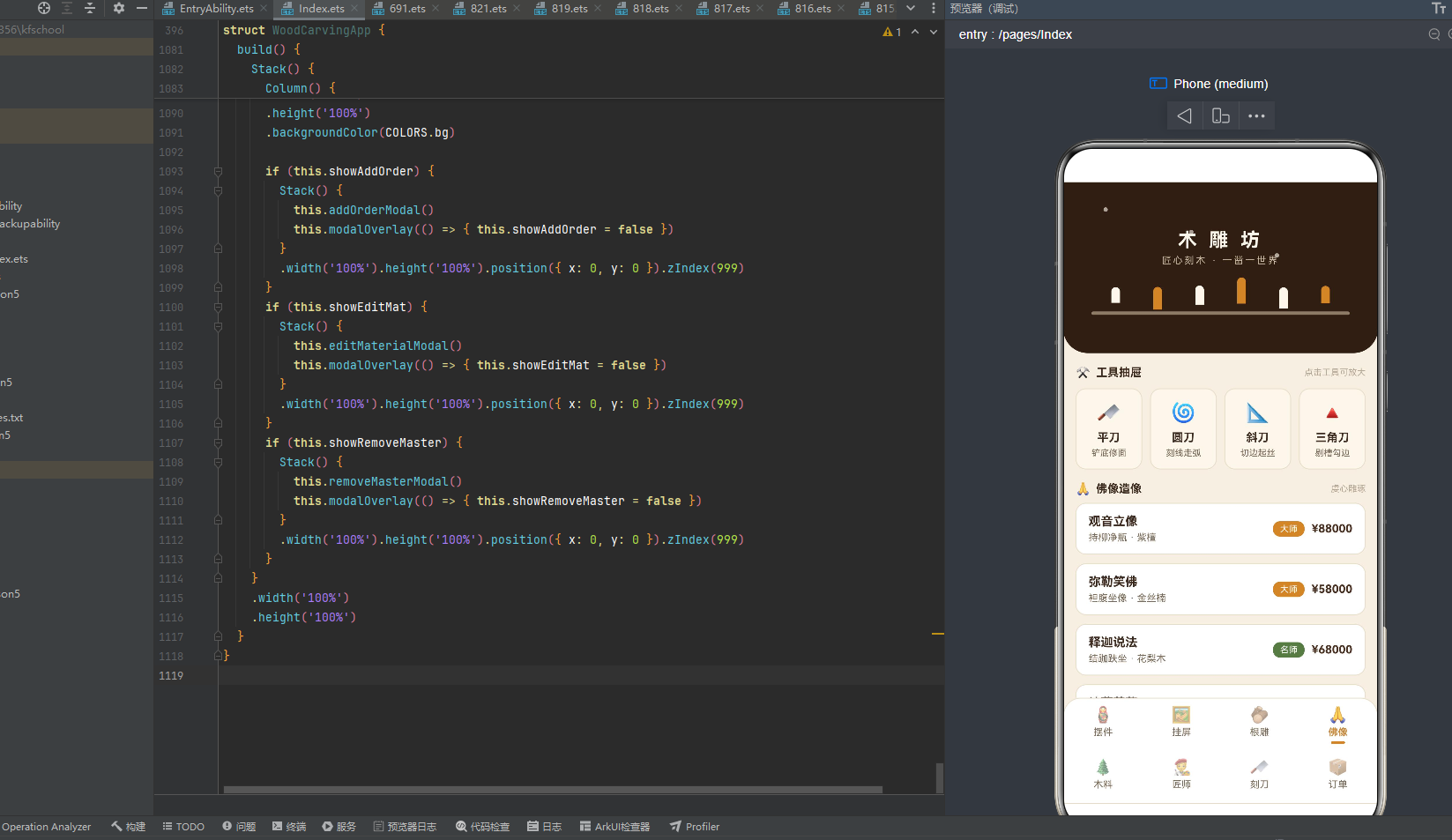
Scroll() {
  Column() {
    Row() {
      Text('🙏').fontSize(14).margin({ right: 6 })
      Text('佛像造像').fontSize(13).fontWeight(FontWeight.Bold).fontColor(COLORS.textMain)
      Column().layoutWeight(1)
      Text('虔心雕琢').fontSize(10).fontColor(COLORS.textHint)
    }
    .width('100%').padding({ top: 14, bottom: 8 })
    ForEach(this.data.buddhas, (b: BuddhaItem) => {
      Column() {
        Row() {
          Column() {
            Text(b.name).fontSize(14).fontWeight(FontWeight.Bold).fontColor(COLORS.textMain)
            Text(b.pose + ' · ' + b.wood).fontSize(11)
              .fontColor(COLORS.textSub).margin({ top: 4 })
          }
          .alignItems(HorizontalAlign.Start).layoutWeight(1)
          Text(b.rank).fontSize(10).fontColor(COLORS.white)
            .backgroundColor(rankColor(b.rank)).borderRadius(8)
            .padding({ left: 8, right: 8, top: 3, bottom: 3 })
          Text('¥' + b.price).fontSize(13).fontWeight(FontWeight.Bold)
            .fontColor(COLORS.walnut).margin({ left: 8 })
        }
        .width('100%')
      }
      .width('100%')
      .backgroundColor(COLORS.cardBg).borderRadius(12)
      .padding({ left: 14, right: 14, top: 12, bottom: 12 })
      .margin({ bottom: 10 })
      .border({ width: 1, color: COLORS.border })
    }, (b: BuddhaItem) => b.name)
  }
  .width('100%').padding({ left: 14, right: 14, bottom: 12 })
}
.width('100%')
.layoutWeight(1)
佛像页顶部标题行——🙏合十图标+"佛像造像"13号粗体深褐棕+“虔心雕琢"10号浅灰棕(点明佛像"虔心雕琢"的庄严属性)。佛像列表ForEach遍历buddhas数组——每张佛像卡片采用三列布局:第一列是弹性信息区(layoutWeight(1)+佛像名称14号粗体深褐棕+姿态木料信息11号灰棕色"持柳净瓶 · 紫檀”),第二列是等级标签(rank 10号白色字+backgroundColor(rankColor(b.rank))等级色底+borderRadius 8圆角+padding紧凑),第三列是价格(“¥”+price 13号粗体胡桃色+margin left 8与标签间距)。
等级标签是佛像页的核心亮点——rankColor函数根据等级返回对应色值(大师amber琥珀色/名师success苔藓绿/匠人textSub灰棕色),等级标签用等级色底白字圆角8,让"大师/名师/匠人"三级一目了然。大师琥珀色标签最醒目(琥珀色温润华贵呼应大师造诣),名师苔藓绿标签次之(苔藓绿生机呼应名师成长),匠人灰棕色标签最朴素(灰棕色沉稳呼应匠人踏实),三级标签色彩从华到朴呼应等级从高到低。
8尊佛像数据:观音立像(持柳净瓶,紫檀,¥88000,大师)、弥勒笑佛(袒腹坐像,金丝楠,¥58000,大师)、释迦说法(结跏趺坐,花梨木,¥68000,名师)、地藏菩萨(持锡杖坐,紫檀,¥76000,大师)、文殊骑狮(智慧坐骑,金丝楠,¥92000,名师)、普贤骑象(六牙白象,花梨木,¥88000,名师)、罗汉坐像(降龙伏虎,酸枝木,¥36000,匠人)、韦陀护法(金刚杵立,紫檀,¥48000,大师)。价格从¥36000(罗汉坐像,酸枝木,匠人)到¥92000(文殊骑狮,金丝楠,名师),文殊骑狮¥92000最贵(金丝楠名贵+智慧坐骑题材复杂+名师造像),罗汉坐像¥36000最廉(酸枝木普通+降龙伏虎题材常见+匠人造像)。8尊佛像覆盖观音/弥勒/释迦/地藏/文殊/普贤/罗汉/韦陀八大佛教造像,姿态覆盖持柳净瓶/袒腹坐像/结跏趺坐/持锡杖坐/智慧坐骑/六牙白象/降龙伏虎/金刚杵立八种,木料覆盖紫檀/金丝楠/花梨木/酸枝木四种,等级覆盖大师/名师/匠人三级,完整呈现中国佛像造像"虔心雕琢、以木载道"的宗教艺术内涵。
10.6 木料页(Tab 4):木料列表+密度横条+编辑交互
木料页以"木料行市"为核心,采用"木料列表+密度横条+编辑交互"的布局: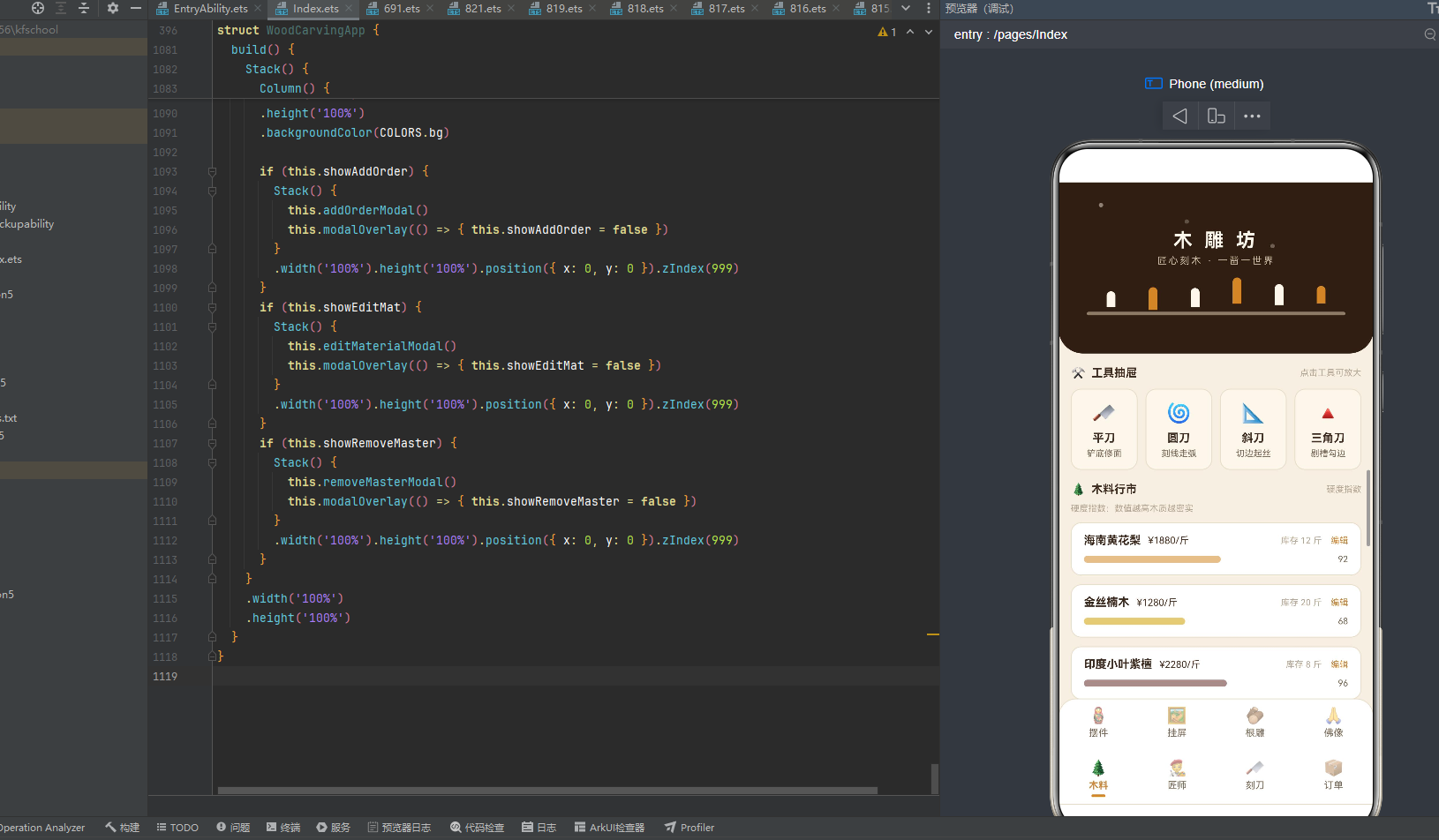
Scroll() {
  Column() {
    Row() {
      Text('🌲').fontSize(14).margin({ right: 6 })
      Text('木料行市').fontSize(13).fontWeight(FontWeight.Bold).fontColor(COLORS.textMain)
      Column().layoutWeight(1)
      Text('硬度指数').fontSize(10).fontColor(COLORS.textHint)
    }
    .width('100%').padding({ top: 14, bottom: 8 })
    Text('硬度指数:数值越高木质越密实').fontSize(10)
      .fontColor(COLORS.textHint).width('100%').margin({ bottom: 10 })
    ForEach(this.data.materials, (m: MaterialItem, i: number) => {
      Column() {
        Row() {
          Text(m.woodType).fontSize(13).fontWeight(FontWeight.Bold)
            .fontColor(COLORS.textMain)
          Text('¥' + m.price + '/斤').fontSize(11).fontColor(COLORS.walnut)
            .margin({ left: 8 })
          Column().layoutWeight(1)
          Text('库存 ' + m.stock + ' 斤').fontSize(10).fontColor(COLORS.textHint)
          Text('编辑').fontSize(10).fontColor(COLORS.amber).margin({ left: 10 })
            .onClick(() => {
              this.matIdx = i;
              this.matName = m.woodType;
              this.matPrice = m.price.toString();
              this.matStock = m.stock.toString();
              this.showEditMat = true;
            })
        }
        .width('100%')
        Row() {
          Column()
            .width(densityW(m.density)).height(8).borderRadius(4)
            .backgroundColor(getWoodTone(m.woodType))
            .opacity(this.amb ? 0.55 : 1)
            .animation({ duration: 1000, iterations: -1, playMode: PlayMode.Alternate })
          Column().layoutWeight(1)
          Text(m.density + '').fontSize(10).fontColor(COLORS.textSub).margin({ left: 8 })
        }
        .width('100%').margin({ top: 8 })
      }
      .width('100%')
      .backgroundColor(COLORS.cardBg).borderRadius(12)
      .padding({ left: 14, right: 14, top: 12, bottom: 12 })
      .margin({ bottom: 10 })
      .border({ width: 1, color: COLORS.border })
    }, (m: MaterialItem, i: number) => m.woodType)
  }
  .width('100%').padding({ left: 14, right: 14, bottom: 12 })
}
.width('100%')
.layoutWeight(1)
木料页顶部标题行——🌲松木图标+“木料行市"13号粗体深褐棕+“硬度指数"10号浅灰棕,下方还有一行"硬度指数:数值越高木质越密实"10号浅灰棕说明文字(点明密度指数的物理含义)。木料列表ForEach遍历materials数组(带索引i)——每张木料卡片采用两行布局:第一行是信息行(木料名称13号粗体深褐棕+单价"¥”+price+”/斤"11号胡桃色+margin left 8+Column().layoutWeight(1)撑开+库存"库存 “+stock+” 斤"10号浅灰棕+编辑"编辑"10号琥珀色+margin left 10+onClick点击触发编辑),第二行是密度横条行(Column().width(densityW(m.density))密度宽度映射8px高borderRadius 4+backgroundColor(getWoodTone(m.woodType))木色着色+opacity this.amb ? 0.55 : 1amb开关控制透明度+animation 1000ms Alternate呼吸+Column().layoutWeight(1)弹性空白+密度数值m.density 10号灰棕色+margin left 8)。
密度横条是木料页的核心亮点——densityW函数将密度值映射为像素宽度(密度×1.7取上限170),getWoodTone函数根据木料名返回对应木色,密度横条宽度与颜色双重映射——印度小叶紫檀96密度柱条最长163.2px深红棕色(紫檀#5C2E2A),东北松木40密度柱条最短68px琥珀色(默认#C98A3D,松木未匹配关键字),柱条长短对比鲜明、颜色与木料一致,让用户"以长辨密、以色辨木"。编辑按钮onClick触发编辑交互——记录matIdx索引、预填matName/matPrice/matStock当前值、showEditMat置true弹出editMaterialModal编辑弹窗,形成"浏览→编辑"交互闭环。
10种木料数据:海南黄花梨(密度92,¥1880/斤,库存12斤)、金丝楠木(密度68,¥1280/斤,库存20斤)、印度小叶紫檀(密度96,¥2280/斤,库存8斤)、黄杨木(密度72,¥860/斤,库存30斤)、大红酸枝(密度88,¥1580/斤,库存15斤)、黑檀木(密度90,¥1380/斤,库存18斤)、白蜡木(密度55,¥420/斤,库存45斤)、香樟木(密度48,¥360/斤,库存60斤)、东北松木(密度40,¥280/斤,库存80斤)、沉香木(密度76,¥3980/斤,库存5斤)。密度从40(东北松木,最松软)到96(印度小叶紫檀,最密实),印度小叶紫檀96密度最高(木质最密实最名贵),东北松木40密度最低(木质最松软最普通)。价格从¥280/斤(东北松木,最廉)到¥3980/斤(沉香木,最贵),沉香木¥3980/斤最贵(沉香木香气悠远千金难求,密度76中等但因香气名贵),东北松木¥280/斤最廉(松木质地松软建筑常用)。库存从5斤(沉香木,最少)到80斤(东北松木,最多),沉香木5斤库存最少(千金难求量少),东北松木80斤库存最多(建筑常用量大)。10种木料密度覆盖40-96全谱,价格覆盖¥280-¥3980全谱,库存覆盖5-80斤全谱,完整呈现中国木雕用材"以密度定品、以香气定贵、以产地定稀"的选材哲学。
10.7 匠师页(Tab 5):匠师名录+等级标签+移除交互
匠师页以"匠师名录"为核心,采用"匠师名录+等级标签+移除交互"的布局: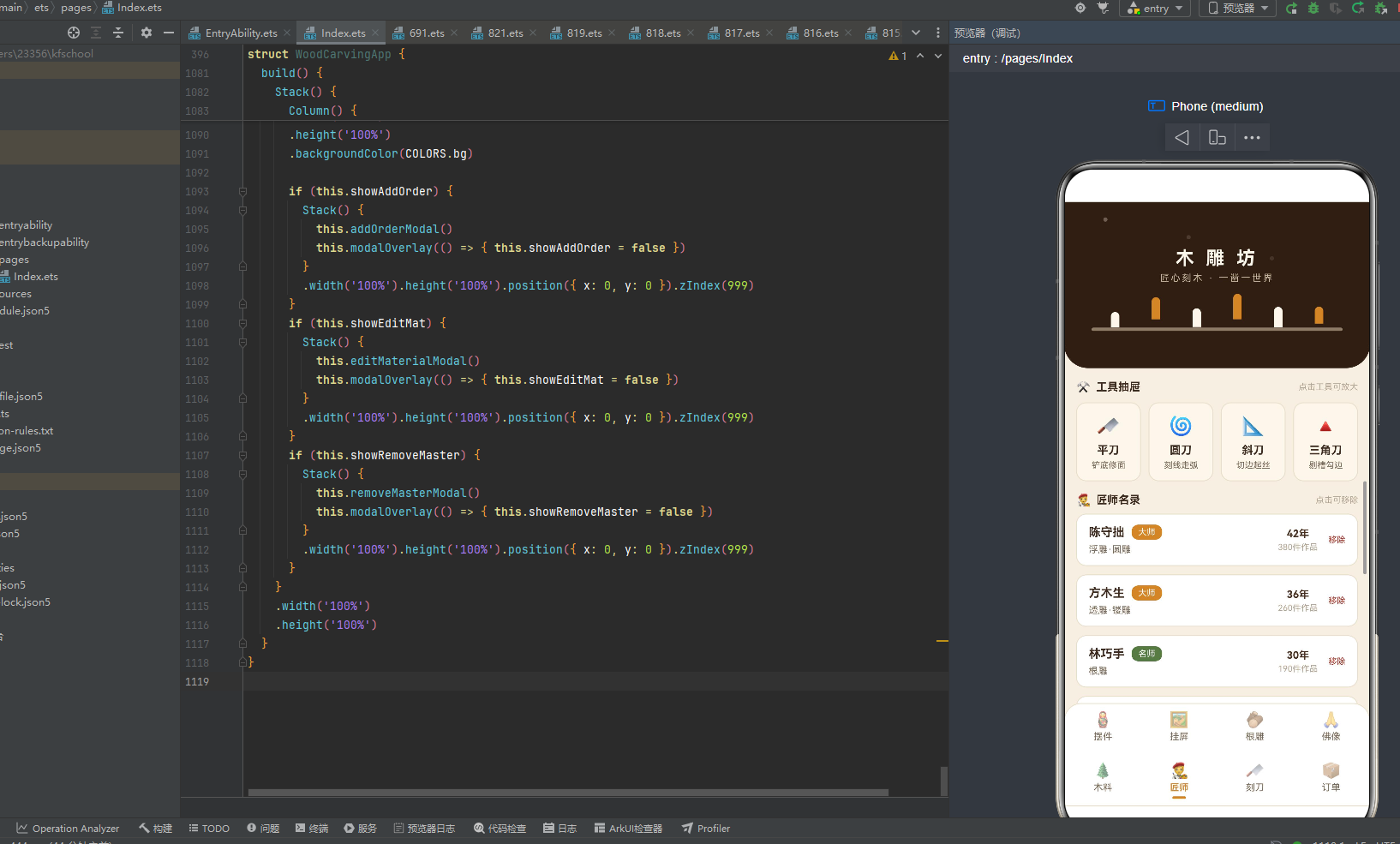
Scroll() {
Column() {
Row() {
Text('🧑🎨').fontSize(14).margin({ right: 6 })
Text('匠师名录').fontSize(13).fontWeight(FontWeight.Bold).fontColor(COLORS.textMain)
Column().layoutWeight(1)
Text('点击可移除').fontSize(10).fontColor(COLORS.textHint)
}
.width('100%').padding({ top: 14, bottom: 8 })
ForEach(this.data.masters, (m: MasterItem, i: number) => {
Column() {
Row() {
Column() {
Row() {
Text(m.name).fontSize(14).fontWeight(FontWeight.Bold).fontColor(COLORS.textMain)
Text(m.rank).fontSize(10).fontColor(COLORS.white)
.backgroundColor(rankColor(m.rank)).borderRadius(8)
.padding({ left: 8, right: 8, top: 3, bottom: 3 }).margin({ left: 8 })
}
Text(m.skill).fontSize(11).fontColor(COLORS.textSub).margin({ top: 5 })
}
.alignItems(HorizontalAlign.Start).layoutWeight(1)
Column() {
Text(m.years + '年').fontSize(12).fontWeight(FontWeight.Bold).fontColor(COLORS.walnut)
Text(m.works + '件作品').fontSize(10).fontColor(COLORS.textHint).margin({ top: 3 })
}
Text('移除').fontSize(10).fontColor(COLORS.danger).margin({ left: 12 })
.onClick(() => {
this.masterIdx = i;
this.showRemoveMaster = true;
})
}
.width('100%')
}
.width('100%')
.backgroundColor(COLORS.cardBg).borderRadius(12)
.padding({ left: 14, right: 14, top: 12, bottom: 12 })
.margin({ bottom: 10 })
.border({ width: 1, color: COLORS.border })
}, (m: MasterItem) => m.name)
}
.width('100%').padding({ left: 14, right: 14, bottom: 12 })
}
.width('100%')
.layoutWeight(1)
匠师页顶部标题行——🧑🎨匠人图标+"匠师名录"13号粗体深褐棕+"点击可移除"10号浅灰棕(点明移除交互入口)。匠师列表ForEach遍历masters数组(带索引i)——每张匠师卡片采用三列布局:第一列是弹性信息区(layoutWeight(1)+内层Row包裹匠师姓名14号粗体深褐棕+等级标签rank 10号白色字backgroundColor(rankColor(m.rank))等级色底borderRadius 8圆角margin left 8间距+技艺skill 11号灰棕色margin top 5),第二列是统计区(年限m.years+"年"12号粗体胡桃色+作品数m.works+"件作品"10号浅灰棕margin top 3),第三列是移除按钮("移除"10号danger朱红色margin left 12+onClick点击触发移除交互——记录masterIdx索引、showRemoveMaster置true弹出removeMasterModal确认弹窗)。
匠师页的等级标签与佛像页一致——rankColor函数三级着色(大师amber琥珀/名师success苔绿/匠人textSub灰棕),保证视觉统一。移除按钮用danger朱红色#A83A2E着色(朱红色是宁波朱金木雕的朱漆色泽,象征"决断移除"的红色警示),onClick触发移除确认弹窗——先记录masterIdx索引(保证确认时移除正确的匠师),再showRemoveMaster置true弹出确认弹窗,避免误删,是本应用"删除前确认"的交互规范。
8位匠师数据:陈守拙(浮雕·圆雕,42年,380件作品,大师)、方木生(透雕·镂雕,36年,260件作品,大师)、林巧手(根雕,30年,190件作品,名师)、郑一刀(神像雕刻,45年,420件作品,大师)、吴小筑(文房雕刻,22年,120件作品,名师)、何木子(建筑木雕,28年,150件作品,名师)、罗细刻(微雕,18年,85件作品,匠人)、孙老实(家具雕花,26年,110件作品,匠人)。年限从18年(罗细刻,最年轻)到45年(郑一刀,最资深),郑一刀45年居首(神像雕刻需要最长刀功积淀,虔心造像四十五载),罗细刻18年最年轻(微雕是新兴门类,毫厘乾坤十八年)。作品数从85件(罗细刻)到420件(郑一刀),郑一刀420件作品最多(神像雕刻批量生产),罗细刻85件最少(微雕耗时长产量低)。8位匠师技艺覆盖浮雕·圆雕/透雕·镂雕/根雕/神像雕刻/文房雕刻/建筑木雕/微雕/家具雕花八种,等级覆盖大师/名师/匠人三级,完整呈现中国木雕匠师"大师名师匠人、技艺谱系完整"的人才生态。
10.8 刻刀页(Tab 6):刻刀列表+锋利度横条
刻刀页以"刻刀工坊"为核心,采用"刻刀列表+锋利度横条"的布局: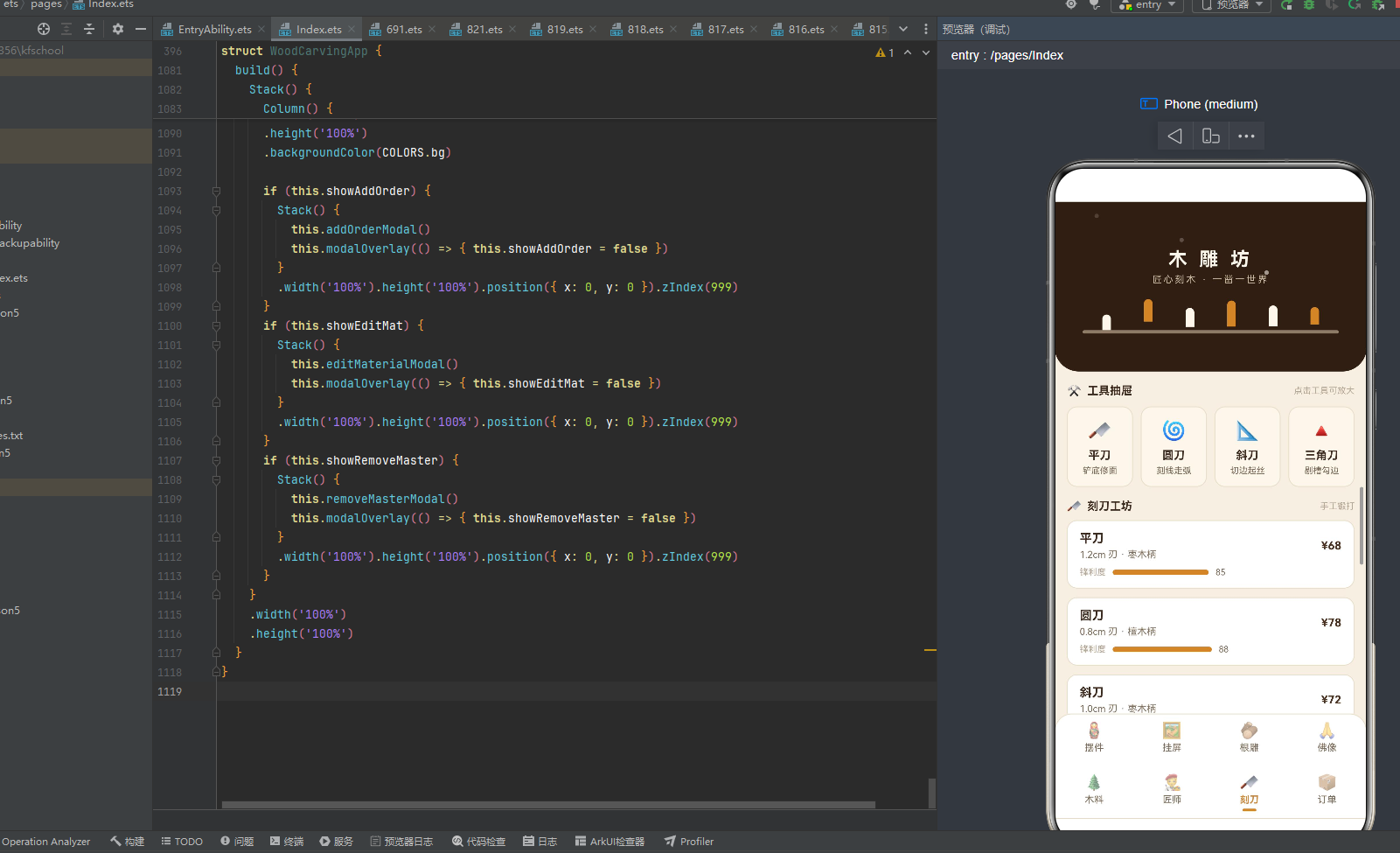
Scroll() {
  Column() {
    Row() {
      Text('🔪').fontSize(14).margin({ right: 6 })
      Text('刻刀工坊').fontSize(13).fontWeight(FontWeight.Bold).fontColor(COLORS.textMain)
      Column().layoutWeight(1)
      Text('手工锻打').fontSize(10).fontColor(COLORS.textHint)
    }
    .width('100%').padding({ top: 14, bottom: 8 })
    ForEach(this.data.chisels, (c: ChiselItem) => {
      Column() {
        Row() {
          Column() {
            Text(c.name).fontSize(14).fontWeight(FontWeight.Bold).fontColor(COLORS.textMain)
            Text(c.blade + ' 刃 · ' + c.handle).fontSize(11)
              .fontColor(COLORS.textSub).margin({ top: 4 })
          }
          .alignItems(HorizontalAlign.Start).layoutWeight(1)
          Text('¥' + c.price).fontSize(13).fontWeight(FontWeight.Bold).fontColor(COLORS.walnut)
        }
        .width('100%')
        Row() {
          Text('锋利度').fontSize(10).fontColor(COLORS.textHint).margin({ right: 8 })
          Column()
            .width(chiselBarW(c.sharp)).height(6).borderRadius(3)
            .backgroundColor(COLORS.amber)
          Text(c.sharp + '').fontSize(10).fontColor(COLORS.textSub).margin({ left: 8 })
        }
        .width('100%').margin({ top: 8 })
      }
      .width('100%')
      .backgroundColor(COLORS.cardBg).borderRadius(12)
      .padding({ left: 14, right: 14, top: 12, bottom: 12 })
      .margin({ bottom: 10 })
      .border({ width: 1, color: COLORS.border })
    }, (c: ChiselItem) => c.name)
  }
  .width('100%').padding({ left: 14, right: 14, bottom: 12 })
}
.width('100%')
.layoutWeight(1)
刻刀页顶部标题行——🔪刀具图标+“刻刀工坊"13号粗体深褐棕+“手工锻打"10号浅灰棕(点明刻刀"手工锻打"的工艺属性)。刻刀列表ForEach遍历chisels数组——每张刻刀卡片采用两行布局:第一行是信息行(弹性信息区layoutWeight(1)+刻刀名称14号粗体深褐棕+刃宽刀柄信息11号灰棕色"1.2cm 刃 · 枣木柄”+价格"¥”+price 13号粗体胡桃色),第二行是锋利度横条行("锋利度"10号浅灰棕+margin right 8+Column().width(chiselBarW(c.sharp))锋利度宽度映射6px高borderRadius 3+backgroundColor(COLORS.amber)琥珀色底+margin left 8+锋利度数值c.sharp 10号灰棕色)。
锋利度横条是刻刀页的核心亮点——chiselBarW函数将锋利度映射为像素宽度(锋利度×1.3取上限140),锋利度78(刮刀)映射101.4px最短,锋利度96(线刀)映射124.8px最长。锋利度横条用amber琥珀色底(呼应刻刀"上漆见光"后的琥珀光晕),柱条长短对比让锋利度差异一目了然——线刀96最锋利柱条最长(线刀刃细0.3cm最锋利),刮刀78最钝柱条最短(刮刀刃宽2.0cm相对钝)。刻刀刃宽与锋利度呈反比——刃越细越锋利(线刀0.3cm刃宽锋利度96),刃越宽相对钝(刮刀2.0cm刃宽锋利度78),这种"刃宽定锋利"的物理关系通过横条可视化呈现。
8把刻刀数据:平刀(1.2cm刃,枣木柄,¥68,锋利度85)、圆刀(0.8cm刃,檀木柄,¥78,锋利度88)、斜刀(1.0cm刃,枣木柄,¥72,锋利度90)、三角刀(0.6cm刃,檀木柄,¥82,锋利度92)、剑刀(0.4cm刃,乌木柄,¥98,锋利度95)、剔刀(1.5cm刃,枣木柄,¥88,锋利度82)、刮刀(2.0cm刃,檀木柄,¥92,锋利度78)、线刀(0.3cm刃,乌木柄,¥108,锋利度96)。刃宽从0.3cm(线刀,最细)到2.0cm(刮刀,最宽),线刀0.3cm最细(精雕细刻勾勒细纹),刮刀2.0cm最宽(刮平修光大面积)。锋利度从78(刮刀,最钝)到96(线刀,最锋利),线刀96最锋利(刃细锋利),刮刀78最钝(刃宽相对钝)。价格从¥68(平刀,最廉)到¥108(线刀,最贵),线刀¥108最贵(刃细难锻+乌木柄高级+锋利度最高),平刀¥68最廉(刃宽常见+枣木柄普通+锋利度中等)。刀柄材质有枣木柄/檀木柄/乌木柄三种(乌木柄最高级,檀木柄次之,枣木柄最普通),8把刻刀覆盖平刀/圆刀/斜刀/三角刀/剑刀/剔刀/刮刀/线刀八种,完整呈现中国木雕刻刀"八刀齐备、各司其职"的工具生态。
10.9 订单页(Tab 7):柱状图概览+订单列表+状态着色
订单页以"订单台账"为核心,采用"柱状图概览+订单列表+状态着色"的布局,是本应用最复杂的页面: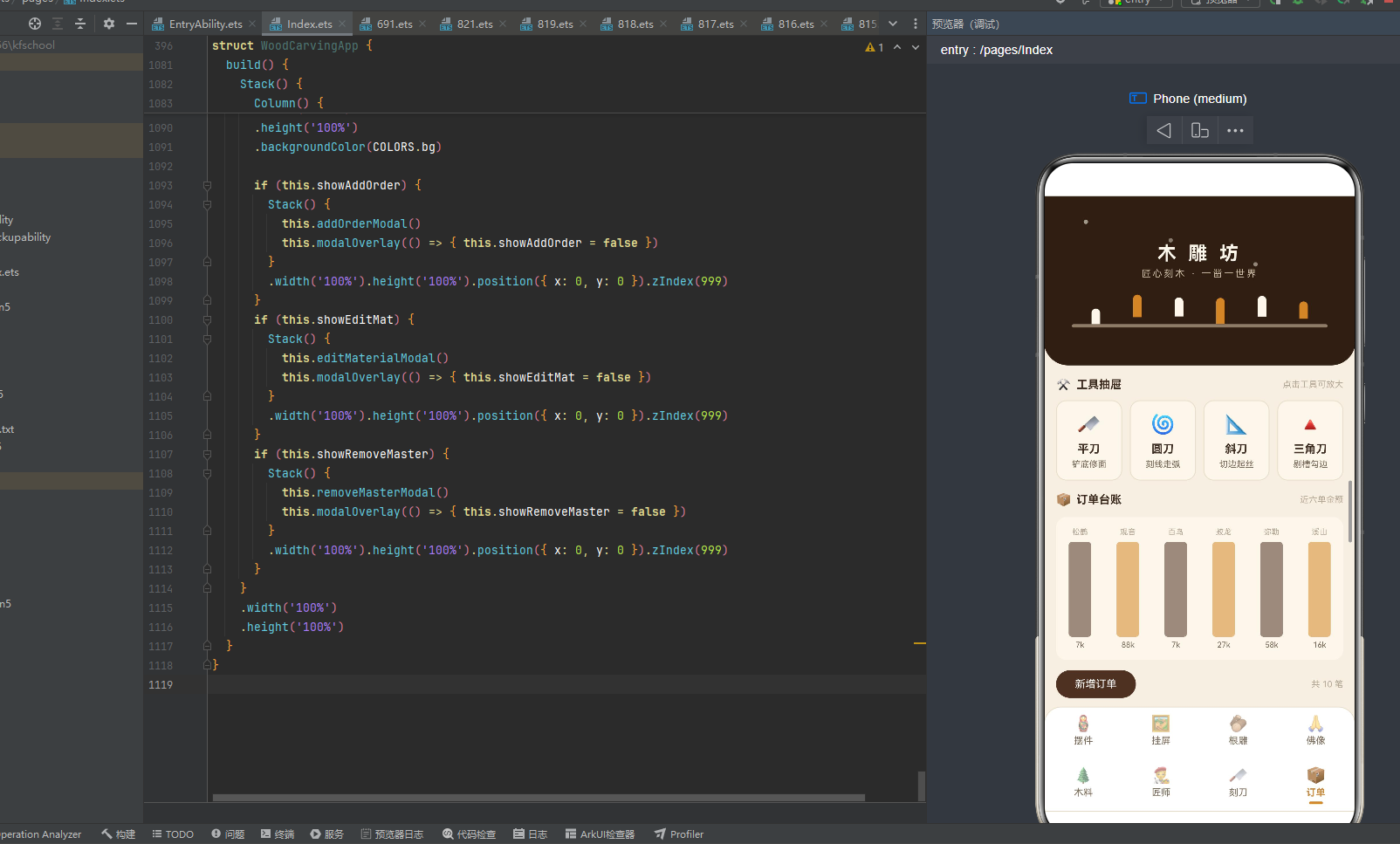
Scroll() {
  Column() {
    Row() {
      Text('📦').fontSize(14).margin({ right: 6 })
      Text('订单台账').fontSize(13).fontWeight(FontWeight.Bold).fontColor(COLORS.textMain)
      Column().layoutWeight(1)
      Text('近六单金额').fontSize(10).fontColor(COLORS.textHint)
    }
    .width('100%').padding({ top: 14, bottom: 8 })
    Row() {
      ForEach(TOP_ORDER_IDX, (i: number) => {
        Column() {
          Text(this.data.orders[i].piece.length > 2
            ? this.data.orders[i].piece.substring(0, 2) : this.data.orders[i].piece)
            .fontSize(9).fontColor(COLORS.textHint)
          Column()
            .width(26).height(orderBarH(this.data.orders[i].amount)).borderRadius(4)
            .backgroundColor(i % 2 === 0 ? COLORS.walnut : COLORS.amber)
            .margin({ top: 6 })
            .opacity(this.amb ? 0.55 : 1)
            .animation({ duration: 900 + i * 150, iterations: -1, playMode: PlayMode.Alternate })
          Text((this.data.orders[i].amount / 1000).toFixed(0) + 'k')
            .fontSize(9).fontColor(COLORS.textSub).margin({ top: 4 })
        }
        .layoutWeight(1)
        .alignItems(HorizontalAlign.Center)
      }, (i: number) => i.toString())
    }
    .width('100%')
    .padding({ top: 12, bottom: 12 })
    .backgroundColor(COLORS.birch).borderRadius(12)
    .margin({ top: 4, bottom: 12 })
    .alignItems(VerticalAlign.Bottom)
    Row() {
      Text('新增订单').fontSize(12).fontColor(COLORS.white)
        .backgroundColor(COLORS.walnut).borderRadius(16)
        .padding({ left: 22, right: 22, top: 9, bottom: 9 })
        .onClick(() => {
          this.formNo = '';
          this.formBuyer = '';
          this.formPiece = '';
          this.formAmount = '';
          this.showAddOrder = true;
        })
      Column().layoutWeight(1)
      Text('共 ' + this.data.orders.length + ' 笔').fontSize(10).fontColor(COLORS.textHint)
    }
    .width('100%').margin({ bottom: 12 })
    ForEach(this.data.orders, (o: OrderItem) => {
      Column() {
        Row() {
          Column() {
            Text(o.piece).fontSize(14).fontWeight(FontWeight.Bold).fontColor(COLORS.textMain)
            Text(o.no + ' · ' + o.buyer).fontSize(10)
              .fontColor(COLORS.textHint).margin({ top: 4 })
          }
          .alignItems(HorizontalAlign.Start).layoutWeight(1)
          Text(o.status).fontSize(10).fontColor(COLORS.white)
            .backgroundColor(statusColor(o.status)).borderRadius(8)
            .padding({ left: 8, right: 8, top: 3, bottom: 3 })
          Text('¥' + o.amount).fontSize(13).fontWeight(FontWeight.Bold)
            .fontColor(COLORS.walnut).margin({ left: 8 })
        }
        .width('100%')
      }
      .width('100%')
      .backgroundColor(COLORS.cardBg).borderRadius(12)
      .padding({ left: 14, right: 14, top: 12, bottom: 12 })
      .margin({ bottom: 10 })
      .border({ width: 1, color: COLORS.border })
    }, (o: OrderItem) => o.no)
  }
  .width('100%').padding({ left: 14, right: 14, bottom: 12 })
}
.width('100%')
.layoutWeight(1)
订单页是本应用最复杂的页面,包含四部分:
第一部分:标题行——📦包裹图标+"订单台账"13号粗体深褐棕+"近六单金额"10号浅灰棕(点明柱状图展示前六单)。
第二部分:柱状图概览——Row包裹ForEach遍历TOP_ORDER_IDX [0,1,2,3,4,5] 前六单索引,每根柱子是一个Column:顶部是作品名前两字(piece.length > 2 ? piece.substring(0, 2) : piece取前两字,9号浅灰棕),中间是柱条(width 26 height orderBarH(amount)金额柱高映射borderRadius 4+backgroundColor i % 2 === 0 ? walnut : amber奇偶交替胡桃色与琥珀色+margin top 6与作品名间距+opacity this.amb ? 0.55 : 1amb开关控制透明度+animation 900 + i * 150 Alternate每根柱子动画时长递增150ms呼吸),底部是金额((amount / 1000).toFixed(0) + 'k'金额除以1000取整加k单位,9号灰棕色+margin top 4与柱条间距)。Row用alignItems(VerticalAlign.Bottom)让6根柱子底部对齐,模拟柱状图基准线。柱状图用birch桦木色底+borderRadius 12圆角,视觉上模拟一块桦木统计板。
柱状图是订单页的核心亮点——orderBarH函数将金额映射为柱高(金额÷6取上限110),6根柱子奇偶交替胡桃色与琥珀色(偶数胡桃奇数琥珀),柱高对应金额高低——观音立像¥88000柱高110px最高(达到上限,偶数胡桃色),梅兰竹菊¥5200柱高86.7px最矮(偶数胡桃色)。柱状图动画900 + i * 150——第0根900ms、第1根1050ms、第2根1200ms、第3根1350ms、第4根1500ms、第5根1650ms,6根柱子以不同节奏呼吸明暗,模拟订单金额的动态波动。
第三部分:操作行——"新增订单"12号白色字+walnut胡桃色底+borderRadius 16圆角+padding紧凑+onClick点击触发新增交互(清空formNo/formBuyer/formPiece/formAmount四字段+showAddOrder置true弹出addOrderModal新增订单弹窗),Column().layoutWeight(1)撑开+"共 “+orders.length+” 笔"10号浅灰棕(动态显示当前订单总数)。
第四部分:订单列表——ForEach遍历orders数组,每张订单卡片采用三列布局:第一列是弹性信息区(layoutWeight(1)+作品名14号粗体深褐棕+订单编号客户姓名10号浅灰棕o.no + ' · ' + o.buyer),第二列是状态标签(status 10号白色字+backgroundColor(statusColor(o.status))状态色底+borderRadius 8圆角+padding紧凑),第三列是金额(“¥”+amount 13号粗体胡桃色+margin left 8与标签间距)。
状态标签是订单列表的核心亮点——statusColor函数四级着色(已交付success苔藓绿/雕刻中warning赭金色/待打磨#7A6A58灰棕色/定制中#8E6FB0紫色),状态标签用状态色底白字圆角8,让"已交付/雕刻中/待打磨/定制中"四态一目了然。已交付苔藓绿(完成态,生机象征交付完成),雕刻中赭金色(进行态,火花象征正在雕刻),待打磨灰棕色(过渡态,沉稳象征打磨静候),定制中紫色(初始态,神秘象征定制刚启动),四态色彩从冷到暖、从静到动呼应订单生命周期。
10笔订单数据:D20260801苏先生松鹤延年¥6800雕刻中、D20260803赵女士观音立像¥88000待打磨、D20260805钱掌柜百鸟朝凤¥6800已交付、D20260808周员外蛟龙出海¥26800雕刻中、D20260810吴公子弥勒笑佛¥58000待打磨、D20260812郑先生溪山行旅¥15800已交付、D20260814冯女士龙凤呈祥¥9800定制中、D20260816蒋老板金玉满堂¥19800雕刻中、D20260818韩女士梅兰竹菊¥5200已交付、D20260820杨先生韦陀护法¥48000待打磨。金额从¥5200(梅兰竹菊,最廉)到¥88000(观音立像,最贵),观音立像¥88000最贵(紫檀佛像名贵+大师造像),梅兰竹菊¥5200最廉(四君子挂屏小面积)。状态覆盖已交付3笔/雕刻中3笔/待打磨3笔/定制中1笔,定制中只有1笔(冯女士龙凤呈祥,新下单刚启动),已交付/雕刻中/待打磨各3笔均衡分布。订单编号以"D+日期"格式(D20260801-D20260820,每2-3天一单),客户姓名富有古风(苏先生/赵女士/钱掌柜/周员外/吴公子/郑先生/冯女士/蒋老板/韩女士/杨先生,覆盖先生/女士/掌柜/员外/公子/老板多种称谓),作品与摆件/佛像/挂屏/根雕数据一一对应(松鹤延年摆件/观音立像佛像/百鸟朝凤挂屏/蛟龙出海根雕/弥勒笑佛佛像/溪山行旅挂屏/龙凤呈祥摆件/金玉满堂摆件/梅兰竹菊挂屏/韦陀护法佛像),完整呈现中国木雕坊"接单→定制→雕刻→打磨→交付"的订单全流程。
十一、弹窗交互:三大@Builder弹窗方法
应用通过三个@Builder弹窗方法实现了完整的增删改查交互闭环:
11.1 模态遮罩 modalOverlay
@Builder
modalOverlay(onClose: () => void) {
  Column()
    .width('100%').height('100%')
    .backgroundColor('#55000000')
    .onClick(() => {
      onClose();
    })
}
modalOverlay是模态遮罩Builder方法——全屏Column+backgroundColor('#55000000')55%黑色半透明遮罩+onClick点击触发onClose回调关闭弹窗。onClose: () => void是回调函数参数,让遮罩可复用——addOrderModal/editMaterialModal/removeMasterModal三个弹窗都复用modalOverlay,传入不同的关闭回调(() => { this.showAddOrder = false }等)。遮罩用55%黑色半透明(比50%更深,让背景内容更模糊),点击遮罩任意位置关闭弹窗,是模态交互的标准模式。
11.2 新增订单弹窗 addOrderModal
@Builder
addOrderModal() {
  Column() {
    Row() {
      Text('新增订单').fontSize(17).fontWeight(FontWeight.Bold).fontColor(COLORS.textMain)
      Column().layoutWeight(1)
      Text('✕').fontSize(16).fontColor(COLORS.textHint)
        .onClick(() => { this.showAddOrder = false })
    }
    .width('100%').padding({ left: 20, right: 20, top: 18, bottom: 8 })
    Scroll() {
      Column() {
        Text('订单编号').fontSize(12).fontColor(COLORS.textSub).width('100%').margin({ top: 8 })
        TextInput({ text: this.formNo, placeholder: '如 D20260822' })
          .placeholderColor(COLORS.textHint).fontSize(14).width('100%')
          .backgroundColor(COLORS.birch).borderRadius(8)
          .margin({ top: 4 }).onChange((v: string) => { this.formNo = v })
        Text('客户姓名').fontSize(12).fontColor(COLORS.textSub).width('100%').margin({ top: 12 })
        TextInput({ text: this.formBuyer, placeholder: '客户姓名' })
          .placeholderColor(COLORS.textHint).fontSize(14).width('100%')
          .backgroundColor(COLORS.birch).borderRadius(8)
          .margin({ top: 4 }).onChange((v: string) => { this.formBuyer = v })
        Text('定制作品').fontSize(12).fontColor(COLORS.textSub).width('100%').margin({ top: 12 })
        TextInput({ text: this.formPiece, placeholder: '如 五福捧寿' })
          .placeholderColor(COLORS.textHint).fontSize(14).width('100%')
          .backgroundColor(COLORS.birch).borderRadius(8)
          .margin({ top: 4 }).onChange((v: string) => { this.formPiece = v })
        Text('定金金额').fontSize(12).fontColor(COLORS.textSub).width('100%').margin({ top: 12 })
        TextInput({ text: this.formAmount, placeholder: '元' })
          .placeholderColor(COLORS.textHint).fontSize(14).width('100%')
          .backgroundColor(COLORS.birch).borderRadius(8)
          .margin({ top: 4 }).onChange((v: string) => { this.formAmount = v })
      }
      .width('100%').padding({ left: 20, right: 20 })
    }
    .width('100%')
    .constraintSize({ maxHeight: '52%' })
    Row() {
      Text('取消').fontSize(14).fontColor(COLORS.textSub)
        .backgroundColor(COLORS.border).borderRadius(20)
        .padding({ left: 26, right: 26, top: 10, bottom: 10 })
        .onClick(() => { this.showAddOrder = false })
      Text('提交订单').fontSize(14).fontColor(COLORS.white)
        .backgroundColor(COLORS.amber).borderRadius(20)
        .padding({ left: 26, right: 26, top: 10, bottom: 10 })
        .margin({ left: 12 })
        .onClick(() => {
          this.data.addOrder(
            this.formNo === '' ? 'D20260822' : this.formNo,
            this.formBuyer === '' ? '匿名客' : this.formBuyer,
            this.formPiece === '' ? '五福捧寿' : this.formPiece,
            this.formAmount === '' ? 5000 : Number(this.formAmount));
          this.showAddOrder = false;
        })
    }
    .width('100%').justifyContent(FlexAlign.Center)
    .padding({ left: 20, right: 20, top: 16, bottom: 16 })
  }
  .width('90%')
  .constraintSize({ maxHeight: '80%' })
  .backgroundColor(COLORS.cardBg).borderRadius(16)
  .alignItems(HorizontalAlign.Center)
  .position({ x: '5%', y: '8%' })
}
addOrderModal是新增订单弹窗——90%宽度+cardBg白底+borderRadius 16圆角+position({ x: '5%', y: '8%' })居中偏上8%定位。弹窗包含三部分:
标题行:'新增订单’17号粗体深褐棕+Column().layoutWeight(1)撑开+✕16号浅灰棕关闭按钮(onClick showAddOrder置false关闭)。
表单区:Scroll包裹Column,4个TextInput表单字段——订单编号(placeholder ‘如 D20260822’,onChange绑定formNo)、客户姓名(placeholder ‘客户姓名’,onChange绑定formBuyer)、定制作品(placeholder ‘如 五福捧寿’,onChange绑定formPiece)、定金金额(placeholder ‘元’,onChange绑定formAmount)。每个TextInput用birch桦木色底+borderRadius 8圆角+placeholderColor浅灰棕,label用12号灰棕色。Scroll+constraintSize({ maxHeight: '52%' })限制表单区最大高度52%,超出可滚动,避免表单过长撑爆弹窗。
按钮区:取消14号灰棕色+border浅米棕底+borderRadius 20圆角+onClick关闭,提交订单14号白色字+amber琥珀色底+borderRadius 20圆角+margin left 12间距+onClick提交(调用data.addOrder新增订单,四字段空值时用默认值——formNo空用’D20260822’、formBuyer空用’匿名客’、formPiece空用’五福捧寿’、formAmount空用5000,空值默认值保证提交不报错,提交后showAddOrder置false关闭)。
提交按钮用amber琥珀色底(呼应订单页柱状图偶数项琥珀色),是新增操作的视觉标识。空值默认值设计是本应用的容错亮点——即使用户不填任何字段直接提交,也会用默认值生成一笔新订单,保证交互的鲁棒性。
11.3 编辑木料弹窗 editMaterialModal
@Builder
editMaterialModal() {
  Column() {
    Row() {
      Text('编辑木料').fontSize(17).fontWeight(FontWeight.Bold).fontColor(COLORS.textMain)
      Column().layoutWeight(1)
      Text('✕').fontSize(16).fontColor(COLORS.textHint)
        .onClick(() => { this.showEditMat = false })
    }
    .width('100%').padding({ left: 20, right: 20, top: 18, bottom: 8 })
    Text('木料名称').fontSize(12).fontColor(COLORS.textSub).width('100%').margin({ top: 8, left: 20 })
    TextInput({ text: this.matName, placeholder: '木料名称' })
      .placeholderColor(COLORS.textHint).fontSize(14).width('90%')
      .backgroundColor(COLORS.birch).borderRadius(8)
      .margin({ top: 4 }).onChange((v: string) => { this.matName = v })
    Text('单价(元/斤)').fontSize(12).fontColor(COLORS.textSub).width('100%').margin({ top: 12, left: 20 })
    TextInput({ text: this.matPrice, placeholder: '单价' })
      .placeholderColor(COLORS.textHint).fontSize(14).width('90%')
      .backgroundColor(COLORS.birch).borderRadius(8)
      .margin({ top: 4 }).onChange((v: string) => { this.matPrice = v })
    Text('库存(斤)').fontSize(12).fontColor(COLORS.textSub).width('100%').margin({ top: 12, left: 20 })
    TextInput({ text: this.matStock, placeholder: '库存' })
      .placeholderColor(COLORS.textHint).fontSize(14).width('90%')
      .backgroundColor(COLORS.birch).borderRadius(8)
      .margin({ top: 4 }).onChange((v: string) => { this.matStock = v })
    Row() {
      Text('取消').fontSize(14).fontColor(COLORS.textSub)
        .backgroundColor(COLORS.border).borderRadius(20)
        .padding({ left: 26, right: 26, top: 10, bottom: 10 })
        .onClick(() => { this.showEditMat = false })
      Text('保存修改').fontSize(14).fontColor(COLORS.white)
        .backgroundColor(COLORS.walnut).borderRadius(20)
        .padding({ left: 26, right: 26, top: 10, bottom: 10 })
        .margin({ left: 12 })
        .onClick(() => {
          this.data.editMaterial(
            this.matIdx,
            this.matName === '' ? this.data.materials[this.matIdx].woodType : this.matName,
            this.matPrice === '' ? this.data.materials[this.matIdx].price : Number(this.matPrice),
            this.matStock === '' ? this.data.materials[this.matIdx].stock : Number(this.matStock));
          this.showEditMat = false;
        })
    }
    .width('100%').justifyContent(FlexAlign.Center)
    .padding({ left: 20, right: 20, top: 20, bottom: 16 })
  }
  .width('90%')
  .constraintSize({ maxHeight: '80%' })
  .backgroundColor(COLORS.cardBg).borderRadius(16)
  .alignItems(HorizontalAlign.Center)
  .position({ x: '5%', y: '8%' })
}
editMaterialModal是编辑木料弹窗——结构与addOrderModal类似,但3个TextInput字段(木料名称/单价/库存)+无Scroll包裹(字段少不需要滚动)。每个TextInput用text: this.matName等预填当前值(编辑时已通过onClick预填matName/matPrice/matStock),让用户看到当前值再修改。保存修改按钮用walnut胡桃色底(呼应木料页的主色调),onClick调用data.editMaterial编辑木料——matIdx索引+三字段空值时用原值(matName空用data.materials[matIdx].woodType原木料名、matPrice空用原price、matStock空用原stock),空值用原值的容错设计保证用户只改一个字段时其他字段不变,是编辑交互的精细之处。
11.4 移除匠师弹窗 removeMasterModal
@Builder
removeMasterModal() {
  Column() {
    Text('🗿').fontSize(34).margin({ top: 24 })
    Text('移除匠师').fontSize(17).fontWeight(FontWeight.Bold)
      .fontColor(COLORS.textMain).margin({ top: 10 })
    Text('确认将 ' + this.data.masters[this.masterIdx].name + ' 移出匠师名录?')
      .fontSize(13).fontColor(COLORS.textSub).margin({ top: 10 })
      .padding({ left: 28, right: 28 }).textAlign(TextAlign.Center)
    Row() {
      Text('再想想').fontSize(14).fontColor(COLORS.textSub)
        .backgroundColor(COLORS.border).borderRadius(20)
        .padding({ left: 26, right: 26, top: 10, bottom: 10 })
        .onClick(() => { this.showRemoveMaster = false })
      Text('确认移除').fontSize(14).fontColor(COLORS.white)
        .backgroundColor(COLORS.danger).borderRadius(20)
        .padding({ left: 26, right: 26, top: 10, bottom: 10 })
        .margin({ left: 12 })
        .onClick(() => {
          this.data.removeMaster(this.masterIdx);
          this.showRemoveMaster = false;
        })
    }
    .width('100%').justifyContent(FlexAlign.Center)
    .padding({ left: 20, right: 20, top: 22, bottom: 20 })
  }
  .width('86%')
  .constraintSize({ maxHeight: '80%' })
  .backgroundColor(COLORS.cardBg).borderRadius(16)
  .alignItems(HorizontalAlign.Center)
  .position({ x: '7%', y: '28%' })
}
removeMasterModal是移除匠师确认弹窗——86%宽度(比前两个弹窗90%略窄,强调确认对话的紧凑感)+position({ x: '7%', y: '28%' })居中偏下28%定位(比前两个弹窗8%更靠下,模拟确认对话从下方弹出)。弹窗包含三部分:
图标区:🗿摩艾石像34号+margin top 24(摩艾石像呼应"匠师"的雕塑感)。
文本区:'移除匠师’17号粗体深褐棕+margin top 10+确认问句"确认将 “+masters[masterIdx].name+” 移出匠师名录?"13号灰棕色+margin top 10+padding left/right 28+textAlign Center居中(动态显示当前要移除的匠师姓名,让用户明确移除对象)。
按钮区:再想想14号灰棕色+border浅米棕底+borderRadius 20圆角+onClick关闭("再想想"比"取消"更口语化,呼应匠人语境),确认移除14号白色字+danger朱红色底+borderRadius 20圆角+margin left 12间距+onClick调用data.removeMaster(masterIdx)移除匠师+关闭。确认移除按钮用danger朱红色底(朱红色是宁波朱金木雕的朱漆色泽,象征"决断移除"的红色警示),是删除操作的视觉标识。
十二、底部导航:双行四列八Tab布局
12.1 底部Tab项 bottomItem
@Builder
bottomItem(i: number) {
  Column() {
    Text(TAB_LIST[i].icon).fontSize(18)
      .opacity(this.activeTab === i ? 1 : 0.55)
    Text(TAB_LIST[i].label).fontSize(11)
      .fontColor(this.activeTab === i ? COLORS.amber : COLORS.textSub)
      .fontWeight(this.activeTab === i ? FontWeight.Bold : FontWeight.Normal)
      .margin({ top: 3 })
    Column()
      .width(16).height(3).borderRadius(2)
      .backgroundColor(this.activeTab === i ? COLORS.amber : '#00000000')
      .margin({ top: 4 })
  }
  .layoutWeight(1)
  .padding({ top: 8, bottom: 8 })
  .onClick(() => {
    this.activeTab = i;
  })
}
bottomItem是底部Tab项Builder方法——Column纵向排列三部分:图标(TAB_LIST[i].icon 18号,opacity this.activeTab === i ? 1 : 0.55激活态不透明、非激活态55%半透明)、标签文字(TAB_LIST[i].label 11号,fontColor this.activeTab === i ? amber : textSub激活态琥珀色、非激活态灰棕色,fontWeight Bold/Normal激活态粗体、非激活态普通,margin top 3与图标间距)、选中指示条(16x3px borderRadius 2小条,backgroundColor this.activeTab === i ? amber : '#00000000'激活态琥珀色、非激活态透明隐藏,margin top 4与标签间距)。Column用layoutWeight(1)等宽分布+padding top/bottom 8上下内边距+onClick点击切换activeTab。
激活态与非激活态的三重视觉区分——图标透明度(1 vs 0.55)、标签颜色(琥珀 vs 灰棕)、指示条显隐(琥珀 vs 透明),让当前Tab一目了然。指示条用16x3px小条(比香囊坊的16x3一致),是底部导航的视觉焦点。
12.2 底部导航栏 bottomBar
@Builder
bottomBar() {
  Column() {
    Row() {
      ForEach(ROW1_IDX, (i: number) => {
        this.bottomItem(i)
      }, (i: number) => i.toString())
    }
    .width('100%')
    Row() {
      ForEach(ROW2_IDX, (i: number) => {
        this.bottomItem(i)
      }, (i: number) => i.toString())
    }
    .width('100%')
  }
  .width('100%')
  .backgroundColor(COLORS.cardBg)
  .borderRadius({ topLeft: 20, topRight: 20 })
  .border({ width: 1, color: COLORS.border })
}
bottomBar是底部导航栏Builder方法——Column包裹两个Row:第一行Row包裹ForEach遍历ROW1_IDX [0,1,2,3]渲染摆件/挂屏/根雕/佛像4个Tab,第二行Row包裹ForEach遍历ROW2_IDX [4,5,6,7]渲染木料/匠师/刻刀/订单4个Tab。每个Tab用this.bottomItem(i)调用bottomItem Builder方法渲染。Column用cardBg白底+borderRadius topLeft/topRight 20顶部圆角(模拟从底部浮起的导航栏)+border width 1 color border浅米棕顶边框分隔内容区与导航栏。
双行四列布局是本应用导航设计的核心特色——8个Tab分两行展示,每行4个,避免单行8Tab过于拥挤(每个Tab仅占12.5%宽度,图标文字会挤压),双行布局让每个Tab占25%宽度,图标文字显示更舒展。双行四列布局呼应中国木雕"四平八稳"的对称美学——8Tab分两行四列,左右对称上下均衡,是本应用"以布局载文化"的设计体现。
十三、图表可视化:订单柱状图
13.1 柱状图数据流
订单页的柱状图是本应用唯一的图表可视化,展示前6单订单金额对比:
柱状图数据流——TOP_ORDER_IDX [0,1,2,3,4,5] 牢定展示前6单 → ForEach遍历6索引 → orders[i].amount获取金额 → orderBarH(amount)映射柱高(金额÷6取上限110) → Column柱条width 26 height柱高 → backgroundColor奇偶交替胡桃色与琥珀色 → opacity amb开关0.55↔1呼吸 → animation 900+i*150 Alternate每根柱子不同节奏。柱状图上方是作品名前两字(9号浅灰棕),下方是金额千位+k单位(9号灰棕色),Row用alignItems(VerticalAlign.Bottom)让6根柱子底部对齐模拟基准线。
13.2 柱状图视觉解析
6根柱子对应前6单订单——D20260801松鹤延年¥6800(柱高113.3px取上限110,偶数胡桃色)、D20260803观音立像¥88000(柱高110px达到上限,奇数琥珀色,最高!)、D20260805百鸟朝凤¥6800(柱高113.3px取上限110,偶数胡桃色)、D20260808蛟龙出海¥26800(柱高44.7px,奇数琥珀色)、D20260810弥勒笑佛¥58000(柱高96.7px,偶数胡桃色)、D20260812溪山行旅¥15800(柱高26.3px,奇数琥珀色,最矮!)。观音立像¥88000柱高110px最高(达到orderBarH上限,紫檀佛像名贵+大师造像),溪山行旅¥15800柱高26.3px最矮(山水挂画中等价位)。
柱状图奇偶交替胡桃色与琥珀色——偶数索引(第0/2/4根)用walnut胡桃色#4A3223深沉,奇数索引(第1/3/5根)用amber琥珀色#C98A3D温润,双色交替让柱状图视觉节奏鲜明,避免单一颜色的单调。每根柱子animation时长递增150ms——第0根900ms、第1根1050ms、第2根1200ms、第3根1350ms、第4根1500ms、第5根1650ms,6根柱子以不同节奏呼吸明暗,模拟订单金额的动态波动,是本应用"以动画载数据"的可视化巧思。柱状图用birch桦木色底+borderRadius 12圆角,视觉上模拟一块桦木统计板,与摆件页统计概览卡风格一致。
十四、完整源代码
以下是木雕坊应用的完整源代码,涵盖了色彩接口定义、常量配置、Tab元数据、工具架元数据、八大@Observed数据类、聚合数据类WoodShopData、6个工具函数、ToolRackCard子组件、入口组件WoodCarvingApp及所有@Builder方法的全部实现:
// 694.ets 木雕坊 · 工具台/木纹卡风
// 布局特色:深胡桃木工作台 header(浮动凿刀工具条 + 木屑粒子)+ 横向工具架 + 木纹条纹卡片列表
interface WoodPalette {
bg: string;
cardBg: string;
walnut: string;
walnutDeep: string;
amber: string;
birch: string;
textMain: string;
textSub: string;
textHint: string;
border: string;
success: string;
warning: string;
danger: string;
white: string;
}
const COLORS: WoodPalette = {
bg: '#F5EFE3',
cardBg: '#FFFFFF',
walnut: '#4A3223',
walnutDeep: '#2E1F15',
amber: '#C98A3D',
birch: '#FBF6EC',
textMain: '#3D2B1F',
textSub: '#7A6A58',
textHint: '#B5A794',
border: '#E8DEC9',
success: '#5E7B4A',
warning: '#B57B2E',
danger: '#A83A2E',
white: '#FFFFFF'
};
interface TabMeta {
label: string;
icon: string;
}
const TAB_LIST: TabMeta[] = [
{ label: '摆件', icon: '🪆' },
{ label: '挂屏', icon: '🖼️' },
{ label: '根雕', icon: '🪵' },
{ label: '佛像', icon: '🙏' },
{ label: '木料', icon: '🌲' },
{ label: '匠师', icon: '🧑🎨' },
{ label: '刻刀', icon: '🔪' },
{ label: '订单', icon: '📦' }
];
const ROW1_IDX: number[] = [0, 1, 2, 3];
const ROW2_IDX: number[] = [4, 5, 6, 7];
const CHISEL_H: number[] = [18, 26, 22, 30, 24, 20];
const SAWDUST_IDX: number[] = [0, 1, 2];
const TOP_ORDER_IDX: number[] = [0, 1, 2, 3, 4, 5];
interface ToolMeta {
name: string;
use: string;
icon: string;
}
const TOOL_RACK: ToolMeta[] = [
{ name: '平刀', use: '铲底修面', icon: '🔪' },
{ name: '圆刀', use: '刻线走弧', icon: '🌀' },
{ name: '斜刀', use: '切边起丝', icon: '📐' },
{ name: '三角刀', use: '剔槽勾边', icon: '🔺' }
];
@Observed
export class OrnamentItem {
name: string = '';
theme: string = '';
wood: string = '';
price: number = 0;
constructor(name: string, theme: string, wood: string, price: number) {
this.name = name;
this.theme = theme;
this.wood = wood;
this.price = price;
}
}
@Observed
export class PlaqueItem {
name: string = '';
theme: string = '';
size: string = '';
price: number = 0;
constructor(name: string, theme: string, size: string, price: number) {
this.name = name;
this.theme = theme;
this.size = size;
this.price = price;
}
}
@Observed
export class RootItem {
name: string = '';
material: string = '';
weight: string = '';
price: number = 0;
constructor(name: string, material: string, weight: string, price: number) {
this.name = name;
this.material = material;
this.weight = weight;
this.price = price;
}
}
@Observed
export class BuddhaItem {
name: string = '';
pose: string = '';
wood: string = '';
price: number = 0;
rank: string = '';
constructor(name: string, pose: string, wood: string, price: number, rank: string) {
this.name = name;
this.pose = pose;
this.wood = wood;
this.price = price;
this.rank = rank;
}
}
@Observed
export class MaterialItem {
woodType: string = '';
density: number = 0;
price: number = 0;
stock: number = 0;
constructor(woodType: string, density: number, price: number, stock: number) {
this.woodType = woodType;
this.density = density;
this.price = price;
this.stock = stock;
}
}
@Observed
export class MasterItem {
name: string = '';
skill: string = '';
years: number = 0;
works: number = 0;
rank: string = '';
constructor(name: string, skill: string, years: number, works: number, rank: string) {
this.name = name;
this.skill = skill;
this.years = years;
this.works = works;
this.rank = rank;
}
}
@Observed
export class ChiselItem {
name: string = '';
blade: string = '';
handle: string = '';
price: number = 0;
sharp: number = 0;
constructor(name: string, blade: string, handle: string, price: number, sharp: number) {
this.name = name;
this.blade = blade;
this.handle = handle;
this.price = price;
this.sharp = sharp;
}
}
@Observed
export class OrderItem {
no: string = '';
buyer: string = '';
piece: string = '';
amount: number = 0;
status: string = '';
constructor(no: string, buyer: string, piece: string, amount: number, status: string) {
this.no = no;
this.buyer = buyer;
this.piece = piece;
this.amount = amount;
this.status = status;
}
}
@Observed
export class WoodShopData {
ornaments: OrnamentItem[] = [
new OrnamentItem('松鹤延年', '祝寿纳福', '花梨木', 6800),
new OrnamentItem('嫦娥奔月', '神话故事', '金丝楠', 12800),
new OrnamentItem('福禄寿喜', '吉祥如意', '紫檀', 15800),
new OrnamentItem('龙凤呈祥', '婚庆喜事', '花梨木', 9800),
new OrnamentItem('八仙过海', '神话故事', '黄杨木', 8800),
new OrnamentItem('渔翁得利', '招财进宝', '樟木', 4200),
new OrnamentItem('童子献寿', '祝寿纳福', '花梨木', 3600),
new OrnamentItem('花开富贵', '吉祥如意', '酸枝木', 5600),
new OrnamentItem('麒麟送子', '添丁纳福', '金丝楠', 16800),
new OrnamentItem('金玉满堂', '招财进宝', '紫檀', 19800),
new OrnamentItem('一路连科', '学业有成', '黄杨木', 5200),
new OrnamentItem('五福捧寿', '祝寿纳福', '花梨木', 4600)
];
plaques: PlaqueItem[] = [
new PlaqueItem('百鸟朝凤', '花鸟题材', '80×40cm', 6800),
new PlaqueItem('溪山行旅', '山水题材', '120×60cm', 15800),
new PlaqueItem('梅兰竹菊', '四君子', '60×30cm', 5200),
new PlaqueItem('富贵牡丹', '花鸟题材', '70×35cm', 6200),
new PlaqueItem('渔樵耕读', '人物题材', '100×50cm', 12800),
new PlaqueItem('十二生肖', '民俗题材', '90×45cm', 8800),
new PlaqueItem('高山流水', '山水题材', '110×55cm', 14200),
new PlaqueItem('丹凤朝阳', '花鸟题材', '75×38cm', 7200)
];
roots: RootItem[] = [
new RootItem('枯木逢春', '崖柏', '28kg', 18800),
new RootItem('蛟龙出海', '黄杨木', '36kg', 26800),
new RootItem('鹤立松巅', '杜鹃根', '19kg', 12800),
new RootItem('犀牛望月', '崖柏', '42kg', 32800),
new RootItem('凤栖梧桐', '黄杨木', '25kg', 21800),
new RootItem('狮子滚绣球', '杜鹃根', '31kg', 19800),
new RootItem('渔翁独钓', '崖柏', '16kg', 15800),
new RootItem('灵猴献桃', '黄杨木', '22kg', 16800)
];
buddhas: BuddhaItem[] = [
new BuddhaItem('观音立像', '持柳净瓶', '紫檀', 88000, '大师'),
new BuddhaItem('弥勒笑佛', '袒腹坐像', '金丝楠', 58000, '大师'),
new BuddhaItem('释迦说法', '结跏趺坐', '花梨木', 68000, '名师'),
new BuddhaItem('地藏菩萨', '持锡杖坐', '紫檀', 76000, '大师'),
new BuddhaItem('文殊骑狮', '智慧坐骑', '金丝楠', 92000, '名师'),
new BuddhaItem('普贤骑象', '六牙白象', '花梨木', 88000, '名师'),
new BuddhaItem('罗汉坐像', '降龙伏虎', '酸枝木', 36000, '匠人'),
new BuddhaItem('韦陀护法', '金刚杵立', '紫檀', 48000, '大师')
];
materials: MaterialItem[] = [
new MaterialItem('海南黄花梨', 92, 1880, 12),
new MaterialItem('金丝楠木', 68, 1280, 20),
new MaterialItem('印度小叶紫檀', 96, 2280, 8),
new MaterialItem('黄杨木', 72, 860, 30),
new MaterialItem('大红酸枝', 88, 1580, 15),
new MaterialItem('黑檀木', 90, 1380, 18),
new MaterialItem('白蜡木', 55, 420, 45),
new MaterialItem('香樟木', 48, 360, 60),
new MaterialItem('东北松木', 40, 280, 80),
new MaterialItem('沉香木', 76, 3980, 5)
];
masters: MasterItem[] = [
new MasterItem('陈守拙', '浮雕·圆雕', 42, 380, '大师'),
new MasterItem('方木生', '透雕·镂雕', 36, 260, '大师'),
new MasterItem('林巧手', '根雕', 30, 190, '名师'),
new MasterItem('郑一刀', '神像雕刻', 45, 420, '大师'),
new MasterItem('吴小筑', '文房雕刻', 22, 120, '名师'),
new MasterItem('何木子', '建筑木雕', 28, 150, '名师'),
new MasterItem('罗细刻', '微雕', 18, 85, '匠人'),
new MasterItem('孙老实', '家具雕花', 26, 110, '匠人')
];
chisels: ChiselItem[] = [
new ChiselItem('平刀', '1.2cm', '枣木柄', 68, 85),
new ChiselItem('圆刀', '0.8cm', '檀木柄', 78, 88),
new ChiselItem('斜刀', '1.0cm', '枣木柄', 72, 90),
new ChiselItem('三角刀', '0.6cm', '檀木柄', 82, 92),
new ChiselItem('剑刀', '0.4cm', '乌木柄', 98, 95),
new ChiselItem('剔刀', '1.5cm', '枣木柄', 88, 82),
new ChiselItem('刮刀', '2.0cm', '檀木柄', 92, 78),
new ChiselItem('线刀', '0.3cm', '乌木柄', 108, 96)
];
orders: OrderItem[] = [
new OrderItem('D20260801', '苏先生', '松鹤延年', 6800, '雕刻中'),
new OrderItem('D20260803', '赵女士', '观音立像', 88000, '待打磨'),
new OrderItem('D20260805', '钱掌柜', '百鸟朝凤', 6800, '已交付'),
new OrderItem('D20260808', '周员外', '蛟龙出海', 26800, '雕刻中'),
new OrderItem('D20260810', '吴公子', '弥勒笑佛', 58000, '待打磨'),
new OrderItem('D20260812', '郑先生', '溪山行旅', 15800, '已交付'),
new OrderItem('D20260814', '冯女士', '龙凤呈祥', 9800, '定制中'),
new OrderItem('D20260816', '蒋老板', '金玉满堂', 19800, '雕刻中'),
new OrderItem('D20260818', '韩女士', '梅兰竹菊', 5200, '已交付'),
new OrderItem('D20260820', '杨先生', '韦陀护法', 48000, '待打磨')
];
addOrder(no: string, buyer: string, piece: string, amount: number): void {
this.orders.unshift(new OrderItem(no, buyer, piece, amount, '定制中'));
}
editMaterial(idx: number, woodType: string, price: number, stock: number): void {
this.materials[idx].woodType = woodType;
this.materials[idx].price = price;
this.materials[idx].stock = stock;
}
removeMaster(idx: number): void {
this.masters.splice(idx, 1);
}
}
function densityW(d: number): number {
return Math.min(170, d * 1.7);
}
function orderBarH(v: number): number {
return Math.min(110, v / 6);
}
function chiselBarW(s: number): number {
return Math.min(140, s * 1.3);
}
function getWoodTone(w: string): string {
if (w.indexOf('紫檀') >= 0) {
return '#5C2E2A';
}
if (w.indexOf('金丝楠') >= 0) {
return '#C9A227';
}
if (w.indexOf('黄杨') >= 0) {
return '#D9B56A';
}
if (w.indexOf('酸枝') >= 0) {
return '#8C4A33';
}
if (w.indexOf('黑檀') >= 0) {
return '#2B2420';
}
if (w.indexOf('樟') >= 0) {
return '#A98863';
}
if (w.indexOf('沉香') >= 0) {
return '#6B4F35';
}
return '#C98A3D';
}
function rankColor(r: string): string {
if (r === '大师') {
return COLORS.amber;
}
if (r === '名师') {
return COLORS.success;
}
return COLORS.textSub;
}
function statusColor(s: string): string {
if (s === '已交付') {
return COLORS.success;
}
if (s === '雕刻中') {
return COLORS.warning;
}
if (s === '待打磨') {
return '#7A6A58';
}
return '#8E6FB0';
}
@Component
struct ToolRackCard {
tName: string = '';
tUse: string = '';
tIcon: string = '';
fx: boolean = false;
build() {
Column() {
Text(this.tIcon).fontSize(22)
Text(this.tName).fontSize(13).fontWeight(FontWeight.Bold)
.fontColor(COLORS.textMain).margin({ top: 8 })
Text(this.tUse).fontSize(10).fontColor(COLORS.textSub).margin({ top: 4 })
}
.width('23%')
.padding({ top: 14, bottom: 12 })
.backgroundColor(COLORS.birch)
.borderRadius(12)
.border({ width: 1, color: COLORS.border })
.scale({ x: this.fx ? 1.05 : 1.0, y: this.fx ? 1.05 : 1.0 })
.animation({ duration: 320 })
.onClick(() => {
this.fx = !this.fx;
})
}
}
@Entry
@Component
struct WoodCarvingApp {
@State data: WoodShopData = new WoodShopData();
@State activeTab: number = 0;
@State amb: boolean = false;
@State showAddOrder: boolean = false;
@State showEditMat: boolean = false;
@State showRemoveMaster: boolean = false;
@State formNo: string = '';
@State formBuyer: string = '';
@State formPiece: string = '';
@State formAmount: string = '';
@State matIdx: number = 0;
@State matName: string = '';
@State matPrice: string = '';
@State matStock: string = '';
@State masterIdx: number = 0;
aboutToAppear(): void {
setTimeout(() => {
this.amb = true;
}, 100);
}
@Builder
bottomItem(i: number) {
Column() {
Text(TAB_LIST[i].icon).fontSize(18)
.opacity(this.activeTab === i ? 1 : 0.55)
Text(TAB_LIST[i].label).fontSize(11)
.fontColor(this.activeTab === i ? COLORS.amber : COLORS.textSub)
.fontWeight(this.activeTab === i ? FontWeight.Bold : FontWeight.Normal)
.margin({ top: 3 })
Column()
.width(16).height(3).borderRadius(2)
.backgroundColor(this.activeTab === i ? COLORS.amber : '#00000000')
.margin({ top: 4 })
}
.layoutWeight(1)
.padding({ top: 8, bottom: 8 })
.onClick(() => {
this.activeTab = i;
})
}
@Builder
modalOverlay(onClose: () => void) {
Column()
.width('100%').height('100%')
.backgroundColor('#55000000')
.onClick(() => {
onClose();
})
}
@Builder
headerArea() {
Stack() {
Column() {
Text('木 雕 坊').fontSize(22).fontColor(COLORS.birch)
.fontWeight(FontWeight.Bold).letterSpacing(4)
Text('匠心刻木 · 一凿一世界').fontSize(11).fontColor('#C9B89F')
.margin({ top: 4 }).letterSpacing(2)
Column() {
Row() {
ForEach(CHISEL_H, (h: number, i: number) => {
Column()
.width(10).height(h).borderRadius({ topLeft: 5, topRight: 5 })
.backgroundColor(i % 2 === 0 ? COLORS.birch : COLORS.amber)
.translate({ y: this.amb ? -10 : 0 })
.animation({ duration: 800 + i * 120, iterations: -1, playMode: PlayMode.Alternate })
}, (h: number) => h.toString())
}
.width('100%').justifyContent(FlexAlign.SpaceAround)
.padding({ left: 36, right: 36 })
.height(40)
.alignItems(VerticalAlign.Bottom)
Row()
.width('82%').height(4).borderRadius(2)
.backgroundColor('#C9B89F').opacity(0.6)
}
.margin({ top: 12 })
}
.width('100%')
.padding({ top: 26, bottom: 16 })
ForEach(SAWDUST_IDX, (i: number) => {
Column()
.width(5).height(5).borderRadius(3)
.backgroundColor(COLORS.birch)
.position({ x: 46 + i * 90, y: 30 + i * 26 })
.opacity(this.amb ? 0.1 : 0.65)
.translate({ x: i * 8, y: this.amb ? -18 : 0 })
.animation({ duration: 1500 + i * 300, iterations: -1, playMode: PlayMode.Alternate })
}, (i: number) => i.toString())
}
.width('100%')
.height(196)
.backgroundColor(COLORS.walnutDeep)
.borderRadius({ bottomLeft: 28, bottomRight: 28 })
}
@Builder
toolRackArea() {
Column() {
Row() {
Text('⚒').fontSize(14).margin({ right: 6 })
Text('工具抽屉').fontSize(13).fontWeight(FontWeight.Bold).fontColor(COLORS.textMain)
Column().layoutWeight(1)
Text('点击工具可放大').fontSize(10).fontColor(COLORS.textHint)
}
.width('100%')
Row() {
ForEach(TOOL_RACK, (t: ToolMeta) => {
ToolRackCard({ tName: t.name, tUse: t.use, tIcon: t.icon })
}, (t: ToolMeta) => t.name)
}
.width('100%').justifyContent(FlexAlign.SpaceBetween).margin({ top: 10 })
}
.width('100%')
.padding({ left: 14, right: 14, top: 14 })
}
@Builder
addOrderModal() {
Column() {
Row() {
Text('新增订单').fontSize(17).fontWeight(FontWeight.Bold).fontColor(COLORS.textMain)
Column().layoutWeight(1)
Text('✕').fontSize(16).fontColor(COLORS.textHint)
.onClick(() => { this.showAddOrder = false })
}
.width('100%').padding({ left: 20, right: 20, top: 18, bottom: 8 })
Scroll() {
Column() {
Text('订单编号').fontSize(12).fontColor(COLORS.textSub).width('100%').margin({ top: 8 })
TextInput({ text: this.formNo, placeholder: '如 D20260822' })
.placeholderColor(COLORS.textHint).fontSize(14).width('100%')
.backgroundColor(COLORS.birch).borderRadius(8)
.margin({ top: 4 }).onChange((v: string) => { this.formNo = v })
Text('客户姓名').fontSize(12).fontColor(COLORS.textSub).width('100%').margin({ top: 12 })
TextInput({ text: this.formBuyer, placeholder: '客户姓名' })
.placeholderColor(COLORS.textHint).fontSize(14).width('100%')
.backgroundColor(COLORS.birch).borderRadius(8)
.margin({ top: 4 }).onChange((v: string) => { this.formBuyer = v })
Text('定制作品').fontSize(12).fontColor(COLORS.textSub).width('100%').margin({ top: 12 })
TextInput({ text: this.formPiece, placeholder: '如 五福捧寿' })
.placeholderColor(COLORS.textHint).fontSize(14).width('100%')
.backgroundColor(COLORS.birch).borderRadius(8)
.margin({ top: 4 }).onChange((v: string) => { this.formPiece = v })
Text('定金金额').fontSize(12).fontColor(COLORS.textSub).width('100%').margin({ top: 12 })
TextInput({ text: this.formAmount, placeholder: '元' })
.placeholderColor(COLORS.textHint).fontSize(14).width('100%')
.backgroundColor(COLORS.birch).borderRadius(8)
.margin({ top: 4 }).onChange((v: string) => { this.formAmount = v })
}
.width('100%').padding({ left: 20, right: 20 })
}
.width('100%')
.constraintSize({ maxHeight: '52%' })
Row() {
Text('取消').fontSize(14).fontColor(COLORS.textSub)
.backgroundColor(COLORS.border).borderRadius(20)
.padding({ left: 26, right: 26, top: 10, bottom: 10 })
.onClick(() => { this.showAddOrder = false })
Text('提交订单').fontSize(14).fontColor(COLORS.white)
.backgroundColor(COLORS.amber).borderRadius(20)
.padding({ left: 26, right: 26, top: 10, bottom: 10 })
.margin({ left: 12 })
.onClick(() => {
this.data.addOrder(
this.formNo === '' ? 'D20260822' : this.formNo,
this.formBuyer === '' ? '匿名客' : this.formBuyer,
this.formPiece === '' ? '五福捧寿' : this.formPiece,
this.formAmount === '' ? 5000 : Number(this.formAmount));
this.showAddOrder = false;
})
}
.width('100%').justifyContent(FlexAlign.Center)
.padding({ left: 20, right: 20, top: 16, bottom: 16 })
}
.width('90%')
.constraintSize({ maxHeight: '80%' })
.backgroundColor(COLORS.cardBg).borderRadius(16)
.alignItems(HorizontalAlign.Center)
.position({ x: '5%', y: '8%' })
}
@Builder
editMaterialModal() {
Column() {
Row() {
Text('编辑木料').fontSize(17).fontWeight(FontWeight.Bold).fontColor(COLORS.textMain)
Column().layoutWeight(1)
Text('✕').fontSize(16).fontColor(COLORS.textHint)
.onClick(() => { this.showEditMat = false })
}
.width('100%').padding({ left: 20, right: 20, top: 18, bottom: 8 })
Text('木料名称').fontSize(12).fontColor(COLORS.textSub).width('100%').margin({ top: 8, left: 20 })
TextInput({ text: this.matName, placeholder: '木料名称' })
.placeholderColor(COLORS.textHint).fontSize(14).width('90%')
.backgroundColor(COLORS.birch).borderRadius(8)
.margin({ top: 4 }).onChange((v: string) => { this.matName = v })
Text('单价(元/斤)').fontSize(12).fontColor(COLORS.textSub).width('100%').margin({ top: 12, left: 20 })
TextInput({ text: this.matPrice, placeholder: '单价' })
.placeholderColor(COLORS.textHint).fontSize(14).width('90%')
.backgroundColor(COLORS.birch).borderRadius(8)
.margin({ top: 4 }).onChange((v: string) => { this.matPrice = v })
Text('库存(斤)').fontSize(12).fontColor(COLORS.textSub).width('100%').margin({ top: 12, left: 20 })
TextInput({ text: this.matStock, placeholder: '库存' })
.placeholderColor(COLORS.textHint).fontSize(14).width('90%')
.backgroundColor(COLORS.birch).borderRadius(8)
.margin({ top: 4 }).onChange((v: string) => { this.matStock = v })
Row() {
Text('取消').fontSize(14).fontColor(COLORS.textSub)
.backgroundColor(COLORS.border).borderRadius(20)
.padding({ left: 26, right: 26, top: 10, bottom: 10 })
.onClick(() => { this.showEditMat = false })
Text('保存修改').fontSize(14).fontColor(COLORS.white)
.backgroundColor(COLORS.walnut).borderRadius(20)
.padding({ left: 26, right: 26, top: 10, bottom: 10 })
.margin({ left: 12 })
.onClick(() => {
this.data.editMaterial(
this.matIdx,
this.matName === '' ? this.data.materials[this.matIdx].woodType : this.matName,
this.matPrice === '' ? this.data.materials[this.matIdx].price : Number(this.matPrice),
this.matStock === '' ? this.data.materials[this.matIdx].stock : Number(this.matStock));
this.showEditMat = false;
})
}
.width('100%').justifyContent(FlexAlign.Center)
.padding({ left: 20, right: 20, top: 20, bottom: 16 })
}
.width('90%')
.constraintSize({ maxHeight: '80%' })
.backgroundColor(COLORS.cardBg).borderRadius(16)
.alignItems(HorizontalAlign.Center)
.position({ x: '5%', y: '8%' })
}
@Builder
removeMasterModal() {
Column() {
Text('🗿').fontSize(34).margin({ top: 24 })
Text('移除匠师').fontSize(17).fontWeight(FontWeight.Bold)
.fontColor(COLORS.textMain).margin({ top: 10 })
Text('确认将 ' + this.data.masters[this.masterIdx].name + ' 移出匠师名录?')
.fontSize(13).fontColor(COLORS.textSub).margin({ top: 10 })
.padding({ left: 28, right: 28 }).textAlign(TextAlign.Center)
Row() {
Text('再想想').fontSize(14).fontColor(COLORS.textSub)
.backgroundColor(COLORS.border).borderRadius(20)
.padding({ left: 26, right: 26, top: 10, bottom: 10 })
.onClick(() => { this.showRemoveMaster = false })
Text('确认移除').fontSize(14).fontColor(COLORS.white)
.backgroundColor(COLORS.danger).borderRadius(20)
.padding({ left: 26, right: 26, top: 10, bottom: 10 })
.margin({ left: 12 })
.onClick(() => {
this.data.removeMaster(this.masterIdx);
this.showRemoveMaster = false;
})
}
.width('100%').justifyContent(FlexAlign.Center)
.padding({ left: 20, right: 20, top: 22, bottom: 20 })
}
.width('86%')
.constraintSize({ maxHeight: '80%' })
.backgroundColor(COLORS.cardBg).borderRadius(16)
.alignItems(HorizontalAlign.Center)
.position({ x: '7%', y: '28%' })
}
@Builder
contentArea() {
if (this.activeTab === 0) {
Scroll() {
Column() {
Row() {
Column() {
Text('12').fontSize(16).fontWeight(FontWeight.Bold).fontColor(COLORS.walnut)
Text('馆藏摆件').fontSize(10).fontColor(COLORS.textHint).margin({ top: 2 })
}.layoutWeight(1)
Column() {
Text('松鹤延年').fontSize(13).fontWeight(FontWeight.Bold).fontColor(COLORS.amber)
Text('最热款').fontSize(10).fontColor(COLORS.textHint).margin({ top: 2 })
}.layoutWeight(1)
Column() {
Text('¥7.6w').fontSize(16).fontWeight(FontWeight.Bold).fontColor(COLORS.walnut)
Text('本季成交').fontSize(10).fontColor(COLORS.textHint).margin({ top: 2 })
}.layoutWeight(1)
}
.width('100%')
.padding({ top: 12, bottom: 12 })
.backgroundColor(COLORS.birch).borderRadius(12)
.margin({ top: 12, bottom: 12 })
ForEach(this.data.ornaments, (o: OrnamentItem) => {
Column() {
Row() {
Column() {
Text(o.name).fontSize(14).fontWeight(FontWeight.Bold).fontColor(COLORS.textMain)
Text(o.theme + ' · ' + o.wood).fontSize(11)
.fontColor(COLORS.textSub).margin({ top: 4 })
}
.alignItems(HorizontalAlign.Start).layoutWeight(1)
Text('¥' + o.price).fontSize(13).fontWeight(FontWeight.Bold).fontColor(COLORS.walnut)
Column()
.width(4).height(34).borderRadius(2)
.backgroundColor(getWoodTone(o.wood)).margin({ left: 10 })
.opacity(this.amb ? 0.4 : 0.9)
.animation({ duration: 1100, iterations: -1, playMode: PlayMode.Alternate })
}
.width('100%')
}
.width('100%')
.backgroundColor(COLORS.cardBg).borderRadius(12)
.padding({ left: 14, right: 14, top: 12, bottom: 12 })
.margin({ bottom: 10 })
.border({ width: 1, color: COLORS.border })
}, (o: OrnamentItem) => o.name)
}
.width('100%').padding({ left: 14, right: 14, bottom: 12 })
}
.width('100%')
.layoutWeight(1)
} else if (this.activeTab === 1) {
Scroll() {
Column() {
Row() {
Text('🖼️').fontSize(14).margin({ right: 6 })
Text('挂屏赏析').fontSize(13).fontWeight(FontWeight.Bold).fontColor(COLORS.textMain)
Column().layoutWeight(1)
Text('共 8 幅').fontSize(10).fontColor(COLORS.textHint)
}
.width('100%').padding({ top: 14, bottom: 8 })
ForEach(this.data.plaques, (p: PlaqueItem) => {
Column() {
Row() {
Column() {
Text(p.name).fontSize(14).fontWeight(FontWeight.Bold).fontColor(COLORS.textMain)
Text(p.theme + ' · ' + p.size).fontSize(11)
.fontColor(COLORS.textSub).margin({ top: 4 })
}
.alignItems(HorizontalAlign.Start).layoutWeight(1)
Text('¥' + p.price).fontSize(13).fontWeight(FontWeight.Bold).fontColor(COLORS.walnut)
}
.width('100%')
Row() {
Column().layoutWeight(1)
.height(1).backgroundColor(COLORS.border).margin({ top: 10 })
Text('◈').fontSize(12).fontColor(COLORS.amber).margin({ top: 6, left: 8, right: 8 })
Column().layoutWeight(1)
.height(1).backgroundColor(COLORS.border).margin({ top: 10 })
}
.width('100%')
}
.width('100%')
.backgroundColor(COLORS.cardBg).borderRadius(12)
.padding({ left: 14, right: 14, top: 12, bottom: 12 })
.margin({ bottom: 10 })
.border({ width: 1, color: COLORS.border })
}, (p: PlaqueItem) => p.name)
}
.width('100%').padding({ left: 14, right: 14, bottom: 12 })
}
.width('100%')
.layoutWeight(1)
} else if (this.activeTab === 2) {
Scroll() {
Column() {
Row() {
Text('🌳').fontSize(14).margin({ right: 6 })
Text('根雕臻品').fontSize(13).fontWeight(FontWeight.Bold).fontColor(COLORS.textMain)
Column().layoutWeight(1)
Text('重器·孤品').fontSize(10).fontColor(COLORS.textHint)
}
.width('100%').padding({ top: 14, bottom: 8 })
ForEach(this.data.roots, (r: RootItem) => {
Column() {
Row() {
Column() {
Text(r.name).fontSize(14).fontWeight(FontWeight.Bold).fontColor(COLORS.textMain)
Text(r.material + ' · ' + r.weight).fontSize(11)
.fontColor(COLORS.textSub).margin({ top: 4 })
}
.alignItems(HorizontalAlign.Start).layoutWeight(1)
Text('¥' + r.price).fontSize(13).fontWeight(FontWeight.Bold).fontColor(COLORS.walnut)
}
.width('100%')
Text('随形取势 · 巧借天工').fontSize(10).fontColor(COLORS.amber)
.width('100%').margin({ top: 8 }).textAlign(TextAlign.End)
}
.width('100%')
.backgroundColor(COLORS.cardBg).borderRadius(12)
.padding({ left: 14, right: 14, top: 12, bottom: 12 })
.margin({ bottom: 10 })
.border({ width: 1, color: COLORS.border })
.translate({ x: this.amb ? 4 : 0 })
.animation({ duration: 1300, iterations: -1, playMode: PlayMode.Alternate })
}, (r: RootItem) => r.name)
}
.width('100%').padding({ left: 14, right: 14, bottom: 12 })
}
.width('100%')
.layoutWeight(1)
} else if (this.activeTab === 3) {
Scroll() {
Column() {
Row() {
Text('🙏').fontSize(14).margin({ right: 6 })
Text('佛像造像').fontSize(13).fontWeight(FontWeight.Bold).fontColor(COLORS.textMain)
Column().layoutWeight(1)
Text('虔心雕琢').fontSize(10).fontColor(COLORS.textHint)
}
.width('100%').padding({ top: 14, bottom: 8 })
ForEach(this.data.buddhas, (b: BuddhaItem) => {
Column() {
Row() {
Column() {
Text(b.name).fontSize(14).fontWeight(FontWeight.Bold).fontColor(COLORS.textMain)
Text(b.pose + ' · ' + b.wood).fontSize(11)
.fontColor(COLORS.textSub).margin({ top: 4 })
}
.alignItems(HorizontalAlign.Start).layoutWeight(1)
Text(b.rank).fontSize(10).fontColor(COLORS.white)
.backgroundColor(rankColor(b.rank)).borderRadius(8)
.padding({ left: 8, right: 8, top: 3, bottom: 3 })
Text('¥' + b.price).fontSize(13).fontWeight(FontWeight.Bold)
.fontColor(COLORS.walnut).margin({ left: 8 })
}
.width('100%')
}
.width('100%')
.backgroundColor(COLORS.cardBg).borderRadius(12)
.padding({ left: 14, right: 14, top: 12, bottom: 12 })
.margin({ bottom: 10 })
.border({ width: 1, color: COLORS.border })
}, (b: BuddhaItem) => b.name)
}
.width('100%').padding({ left: 14, right: 14, bottom: 12 })
}
.width('100%')
.layoutWeight(1)
} else if (this.activeTab === 4) {
Scroll() {
Column() {
Row() {
Text('🌲').fontSize(14).margin({ right: 6 })
Text('木料行市').fontSize(13).fontWeight(FontWeight.Bold).fontColor(COLORS.textMain)
Column().layoutWeight(1)
Text('硬度指数').fontSize(10).fontColor(COLORS.textHint)
}
.width('100%').padding({ top: 14, bottom: 8 })
Text('硬度指数:数值越高木质越密实').fontSize(10)
.fontColor(COLORS.textHint).width('100%').margin({ bottom: 10 })
ForEach(this.data.materials, (m: MaterialItem, i: number) => {
Column() {
Row() {
Text(m.woodType).fontSize(13).fontWeight(FontWeight.Bold)
.fontColor(COLORS.textMain)
Text('¥' + m.price + '/斤').fontSize(11).fontColor(COLORS.walnut)
.margin({ left: 8 })
Column().layoutWeight(1)
Text('库存 ' + m.stock + ' 斤').fontSize(10).fontColor(COLORS.textHint)
Text('编辑').fontSize(10).fontColor(COLORS.amber).margin({ left: 10 })
.onClick(() => {
this.matIdx = i;
this.matName = m.woodType;
this.matPrice = m.price.toString();
this.matStock = m.stock.toString();
this.showEditMat = true;
})
}
.width('100%')
Row() {
Column()
.width(densityW(m.density)).height(8).borderRadius(4)
.backgroundColor(getWoodTone(m.woodType))
.opacity(this.amb ? 0.55 : 1)
.animation({ duration: 1000, iterations: -1, playMode: PlayMode.Alternate })
Column().layoutWeight(1)
Text(m.density + '').fontSize(10).fontColor(COLORS.textSub).margin({ left: 8 })
}
.width('100%').margin({ top: 8 })
}
.width('100%')
.backgroundColor(COLORS.cardBg).borderRadius(12)
.padding({ left: 14, right: 14, top: 12, bottom: 12 })
.margin({ bottom: 10 })
.border({ width: 1, color: COLORS.border })
}, (m: MaterialItem, i: number) => m.woodType)
}
.width('100%').padding({ left: 14, right: 14, bottom: 12 })
}
.width('100%')
.layoutWeight(1)
} else if (this.activeTab === 5) {
Scroll() {
Column() {
Row() {
Text('🧑🎨').fontSize(14).margin({ right: 6 })
Text('匠师名录').fontSize(13).fontWeight(FontWeight.Bold).fontColor(COLORS.textMain)
Column().layoutWeight(1)
Text('点击可移除').fontSize(10).fontColor(COLORS.textHint)
}
.width('100%').padding({ top: 14, bottom: 8 })
ForEach(this.data.masters, (m: MasterItem, i: number) => {
Column() {
Row() {
Column() {
Row() {
Text(m.name).fontSize(14).fontWeight(FontWeight.Bold).fontColor(COLORS.textMain)
Text(m.rank).fontSize(10).fontColor(COLORS.white)
.backgroundColor(rankColor(m.rank)).borderRadius(8)
.padding({ left: 8, right: 8, top: 3, bottom: 3 }).margin({ left: 8 })
}
Text(m.skill).fontSize(11).fontColor(COLORS.textSub).margin({ top: 5 })
}
.alignItems(HorizontalAlign.Start).layoutWeight(1)
Column() {
Text(m.years + '年').fontSize(12).fontWeight(FontWeight.Bold).fontColor(COLORS.walnut)
Text(m.works + '件作品').fontSize(10).fontColor(COLORS.textHint).margin({ top: 3 })
}
Text('移除').fontSize(10).fontColor(COLORS.danger).margin({ left: 12 })
.onClick(() => {
this.masterIdx = i;
this.showRemoveMaster = true;
})
}
.width('100%')
}
.width('100%')
.backgroundColor(COLORS.cardBg).borderRadius(12)
.padding({ left: 14, right: 14, top: 12, bottom: 12 })
.margin({ bottom: 10 })
.border({ width: 1, color: COLORS.border })
}, (m: MasterItem) => m.name)
}
.width('100%').padding({ left: 14, right: 14, bottom: 12 })
}
.width('100%')
.layoutWeight(1)
} else if (this.activeTab === 6) {
Scroll() {
Column() {
Row() {
Text('🔪').fontSize(14).margin({ right: 6 })
Text('刻刀工坊').fontSize(13).fontWeight(FontWeight.Bold).fontColor(COLORS.textMain)
Column().layoutWeight(1)
Text('手工锻打').fontSize(10).fontColor(COLORS.textHint)
}
.width('100%').padding({ top: 14, bottom: 8 })
ForEach(this.data.chisels, (c: ChiselItem) => {
Column() {
Row() {
Column() {
Text(c.name).fontSize(14).fontWeight(FontWeight.Bold).fontColor(COLORS.textMain)
Text(c.blade + ' 刃 · ' + c.handle).fontSize(11)
.fontColor(COLORS.textSub).margin({ top: 4 })
}
.alignItems(HorizontalAlign.Start).layoutWeight(1)
Text('¥' + c.price).fontSize(13).fontWeight(FontWeight.Bold).fontColor(COLORS.walnut)
}
.width('100%')
Row() {
Text('锋利度').fontSize(10).fontColor(COLORS.textHint).margin({ right: 8 })
Column()
.width(chiselBarW(c.sharp)).height(6).borderRadius(3)
.backgroundColor(COLORS.amber)
Text(c.sharp + '').fontSize(10).fontColor(COLORS.textSub).margin({ left: 8 })
}
.width('100%').margin({ top: 8 })
}
.width('100%')
.backgroundColor(COLORS.cardBg).borderRadius(12)
.padding({ left: 14, right: 14, top: 12, bottom: 12 })
.margin({ bottom: 10 })
.border({ width: 1, color: COLORS.border })
}, (c: ChiselItem) => c.name)
}
.width('100%').padding({ left: 14, right: 14, bottom: 12 })
}
.width('100%')
.layoutWeight(1)
} else {
Scroll() {
Column() {
Row() {
Text('📦').fontSize(14).margin({ right: 6 })
Text('订单台账').fontSize(13).fontWeight(FontWeight.Bold).fontColor(COLORS.textMain)
Column().layoutWeight(1)
Text('近六单金额').fontSize(10).fontColor(COLORS.textHint)
}
.width('100%').padding({ top: 14, bottom: 8 })
Row() {
ForEach(TOP_ORDER_IDX, (i: number) => {
Column() {
Text(this.data.orders[i].piece.length > 2
? this.data.orders[i].piece.substring(0, 2) : this.data.orders[i].piece)
.fontSize(9).fontColor(COLORS.textHint)
Column()
.width(26).height(orderBarH(this.data.orders[i].amount)).borderRadius(4)
.backgroundColor(i % 2 === 0 ? COLORS.walnut : COLORS.amber)
.margin({ top: 6 })
.opacity(this.amb ? 0.55 : 1)
.animation({ duration: 900 + i * 150, iterations: -1, playMode: PlayMode.Alternate })
Text((this.data.orders[i].amount / 1000).toFixed(0) + 'k')
.fontSize(9).fontColor(COLORS.textSub).margin({ top: 4 })
}
.layoutWeight(1)
.alignItems(HorizontalAlign.Center)
}, (i: number) => i.toString())
}
.width('100%')
.padding({ top: 12, bottom: 12 })
.backgroundColor(COLORS.birch).borderRadius(12)
.margin({ top: 4, bottom: 12 })
.alignItems(VerticalAlign.Bottom)
Row() {
Text('新增订单').fontSize(12).fontColor(COLORS.white)
.backgroundColor(COLORS.walnut).borderRadius(16)
.padding({ left: 22, right: 22, top: 9, bottom: 9 })
.onClick(() => {
this.formNo = '';
this.formBuyer = '';
this.formPiece = '';
this.formAmount = '';
this.showAddOrder = true;
})
Column().layoutWeight(1)
Text('共 ' + this.data.orders.length + ' 笔').fontSize(10).fontColor(COLORS.textHint)
}
.width('100%').margin({ bottom: 12 })
ForEach(this.data.orders, (o: OrderItem) => {
Column() {
Row() {
Column() {
Text(o.piece).fontSize(14).fontWeight(FontWeight.Bold).fontColor(COLORS.textMain)
Text(o.no + ' · ' + o.buyer).fontSize(10)
.fontColor(COLORS.textHint).margin({ top: 4 })
}
.alignItems(HorizontalAlign.Start).layoutWeight(1)
Text(o.status).fontSize(10).fontColor(COLORS.white)
.backgroundColor(statusColor(o.status)).borderRadius(8)
.padding({ left: 8, right: 8, top: 3, bottom: 3 })
Text('¥' + o.amount).fontSize(13).fontWeight(FontWeight.Bold)
.fontColor(COLORS.walnut).margin({ left: 8 })
}
.width('100%')
}
.width('100%')
.backgroundColor(COLORS.cardBg).borderRadius(12)
.padding({ left: 14, right: 14, top: 12, bottom: 12 })
.margin({ bottom: 10 })
.border({ width: 1, color: COLORS.border })
}, (o: OrderItem) => o.no)
}
.width('100%').padding({ left: 14, right: 14, bottom: 12 })
}
.width('100%')
.layoutWeight(1)
}
}
@Builder
bottomBar() {
Column() {
Row() {
ForEach(ROW1_IDX, (i: number) => {
this.bottomItem(i)
}, (i: number) => i.toString())
}
.width('100%')
Row() {
ForEach(ROW2_IDX, (i: number) => {
this.bottomItem(i)
}, (i: number) => i.toString())
}
.width('100%')
}
.width('100%')
.backgroundColor(COLORS.cardBg)
.borderRadius({ topLeft: 20, topRight: 20 })
.border({ width: 1, color: COLORS.border })
}
build() {
Stack() {
Column() {
this.headerArea()
this.toolRackArea()
this.contentArea()
this.bottomBar()
}
.width('100%')
.height('100%')
.backgroundColor(COLORS.bg)
if (this.showAddOrder) {
Stack() {
this.addOrderModal()
this.modalOverlay(() => { this.showAddOrder = false })
}
.width('100%').height('100%').position({ x: 0, y: 0 }).zIndex(999)
}
if (this.showEditMat) {
Stack() {
this.editMaterialModal()
this.modalOverlay(() => { this.showEditMat = false })
}
.width('100%').height('100%').position({ x: 0, y: 0 }).zIndex(999)
}
if (this.showRemoveMaster) {
Stack() {
this.removeMasterModal()
this.modalOverlay(() => { this.showRemoveMaster = false })
}
.width('100%').height('100%').position({ x: 0, y: 0 }).zIndex(999)
}
}
.width('100%')
.height('100%')
}
}
十五、开发环境搭建
15.1 安装 DevEco Studio
DevEco Studio 是 HarmonyOS 应用开发的官方 IDE。下载安装包后双击运行,进入安装欢迎界面,点击「下一步」继续。
15.2 选择安装路径
选择目标安装目录,建议安装到非系统盘,确认所需空间后点击「下一步」。
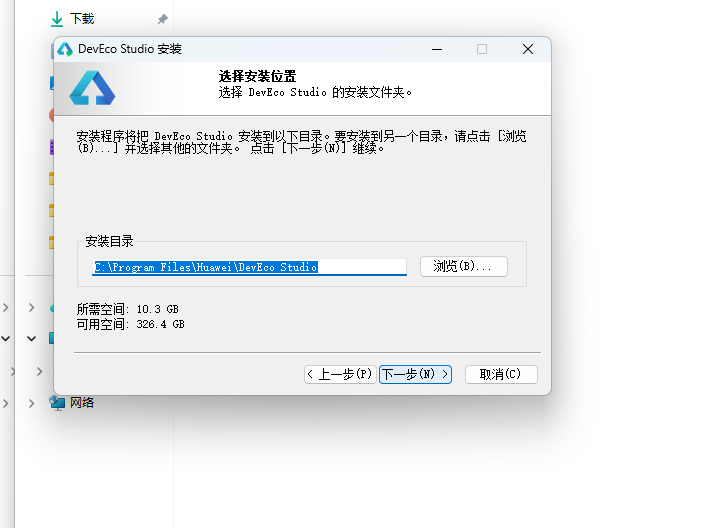
15.3 配置安装选项
设置环境变量,勾选创建桌面快捷方式、将 bin 文件夹添加到 PATH、添加上下文菜单,但是需要重启一下电脑使环境变量生效。
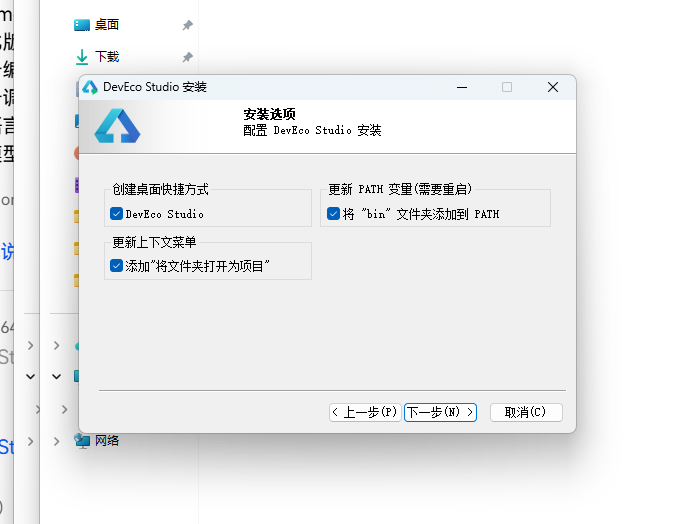
15.4 选择项目模板
新建一个空白模板,在模板市场中选择 Empty Ability。
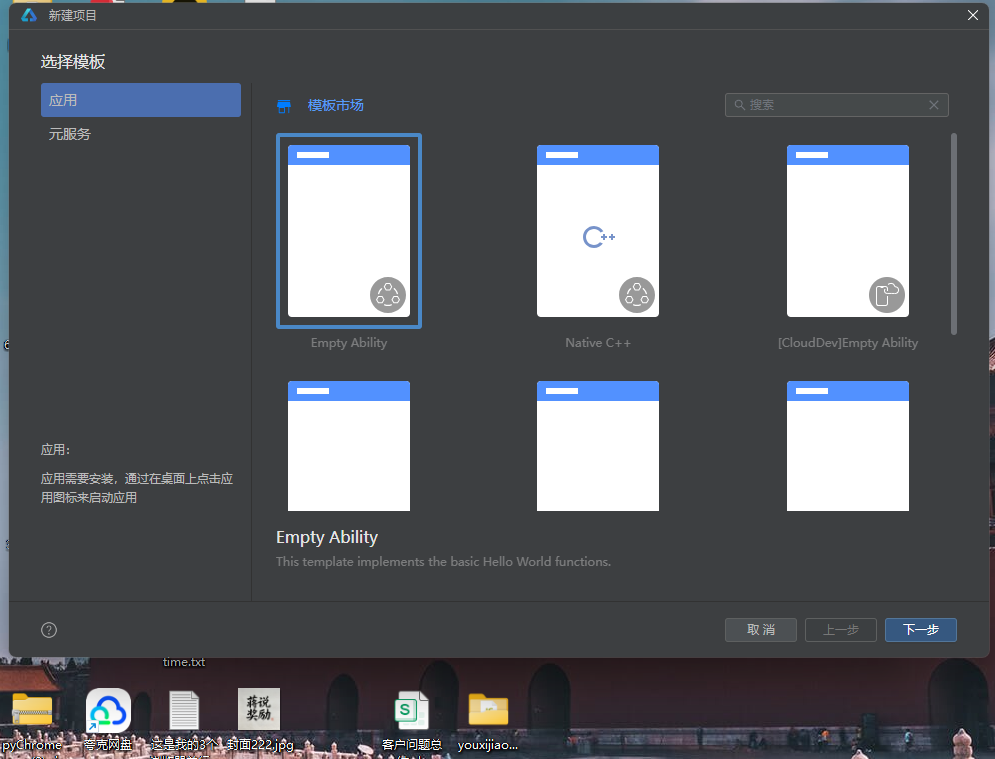
15.5 配置项目信息
设置 API 为 24 的模板项目,项目名称 kfschool,Compatible SDK 6.1.1(24),设备类型勾选 Phone,点击完成后初始化项目,自动下载相关依赖。
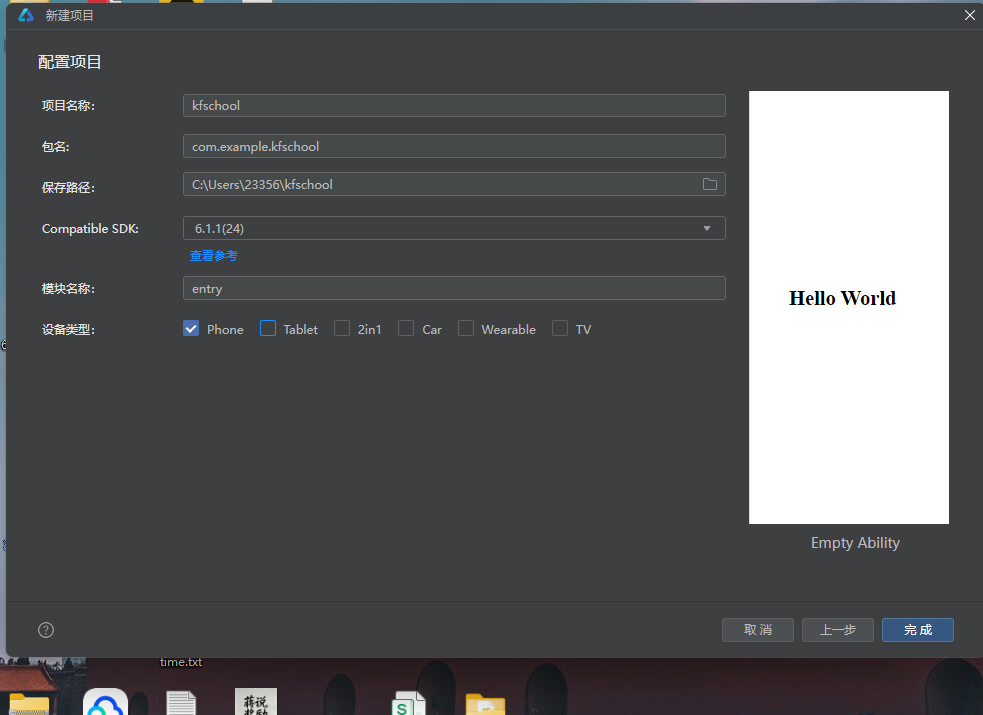
十六、总结
通过对这款木雕坊非遗手作平台的深度记录,我们可以看到,一个优秀的移动端应用远不止是功能的堆砌,它更是架构设计、数据建模、视觉系统、交互逻辑、动效设计、组件化工程、文化内涵等多维度能力的综合体现。
在架构层面,该应用采用了单入口组件架构设计——入口组件WoodCarvingApp作为整个应用的根容器,负责管理所有状态、弹窗、表单与聚合数据,所有内容页都内联在@Builder contentArea()中通过if-else if八分支条件渲染切换,仅ToolRackCard一个独立子组件被复用于工具架。与多组件架构(每个Tab一个独立@Component+@ObjectLink)不同,本应用将所有内容页集中在入口组件内,代码集中但组件通信简单(无需@ObjectLink/@Prop/回调函数),是中小型ArkUI应用的高效架构实践。入口组件管理14个@State状态变量——activeTab(当前Tab)、amb(动画开关)、data(WoodShopData实例)、showAddOrder/showEditMat/showRemoveMaster(三个弹窗显隐)、formNo/formBuyer/formPiece/formAmount(新增订单表单四字段)、matIdx/matName/matPrice/matStock(编辑木料表单四字段)、masterIdx(移除匠师索引),aboutToAppear生命周期回调中用setTimeout延迟100ms将amb置为true触发入场动画,是本应用"一开关控全局"的动画架构核心。
在数据层面,应用独创了**@Observed聚合数据类设计——WoodShopData一个类包含ornaments/plaques/roots/buddhas/materials/masters/chisels/orders八个数组,每个数组8-12条数据,用new构造函数初始化每个数据项(与对象字面量初始化不同,本应用采用构造函数实例化),@Observed装饰整个WoodShopData类与所有8个子项类(OrnamentItem/PlaqueItem/RootItem/BuddhaItem/MaterialItem/MasterItem/ChiselItem/OrderItem全部加@Observed),实现全链路响应式。数据规模达72条(12+8+8+8+10+8+8+10),完整呈现中国木雕非遗手作平台的数据生态。应用还定义了6个颜色与尺寸映射函数(densityW密度宽度映射/orderBarH订单柱高映射/chiselBarW锋利度宽度映射/getWoodTone木色映射/rankColor等级着色/statusColor状态着色),将颜色和尺寸映射逻辑从UI层抽离,实现"数据即配色、数据即尺寸"的动态映射模式。本应用数据最大的特色是中国传统木雕文化全覆盖**——12款摆件覆盖祝寿纳福/神话故事/吉祥如意/婚庆喜事/招财进宝/添丁纳福/学业有成七大题材,木料覆盖花梨木/金丝楠/紫檀/黄杨木/樟木/酸枝木六种;8幅挂屏覆盖花鸟/山水/四君子/人物/民俗五大题材;8件根雕材质覆盖崖柏/黄杨木/杜鹃根三种根材;8尊佛像覆盖观音/弥勒/释迦/地藏/文殊/普贤/罗汉/韦陀八大造像;10种木料密度覆盖40-96全谱;8位匠师技艺覆盖浮雕圆雕/透雕镂雕/根雕/神像雕刻/文房雕刻/建筑木雕/微雕/家具雕花八种;8把刻刀覆盖平刀/圆刀/斜刀/三角刀/剑刀/剔刀/刮刀/线刀八种。这些文化数据让应用不只是一个技术演示,更是一个中国木雕文化的数字载体。
在视觉层面,本应用采用"胡桃色琥珀色桦木色木纹条纹"中国木雕非遗主题设计——bg #F5EFE3 米杏色(模拟打磨木面温润质感),cardBg #FFFFFF 白,walnut #4A3223 胡桃色(木雕主色调,模拟胡桃木芯材),walnutDeep #2E1F15 深胡桃色(深色强调,模拟老胡桃木氧化色泽),amber #C98A3D 琥珀色(木雕辅色调,模拟上漆后琥珀光晕),birch #FBF6EC 桦木色(浅色装饰,模拟白桦木浅色木色),textMain #3D2B1F 深褐棕(深色文字,非纯黑更有文化感)。主色体系采用"胡桃色+琥珀色+桦木色+深胡桃色+米杏色"五色组合,五色各司其职形成"以胡桃色定雕、以琥珀色定饰、以桦木色定表、以深胡桃定台、以米杏定底"的中国木雕语义着色体系。本应用最大的视觉特色是深胡桃木工作台头部凿刀条呼吸动画与木屑粒子飘移效果——6根凿刀条以800+i*120ms不同节奏translate y -10往返呼吸模拟木匠取放凿刀的动态,3颗木屑粒子以1500+i*300ms不同节奏translate y -18+opacity 0.1↔0.65往返飘移模拟雕刻时飞溅的木屑,"慢凿快屑"的动画层次营造了木雕坊"凿刀呼吸、木屑飘飞"的匠作意境。统一的色彩系统是整个应用的视觉基石,胡桃色琥珀色桦木色主题配合6个颜色分级函数和多维度动态着色,营造出既胡桃色深沉又琥珀色温润的中国木雕非遗氛围。
在交互层面,应用通过三个@Builder弹窗方法实现了完整的增删改查交互闭环:addOrderModal新增订单(四字段TextInput表单:订单编号/客户姓名/定制作品/定金金额,提交订单amber琥珀底)、editMaterialModal编辑木料(三字段TextInput表单:木料名称/单价/库存,保存修改walnut胡桃底)、removeMasterModal移除匠师(确认对话弹窗,再想想border底+确认移除danger朱红底)。三个弹窗都是@Builder方法内联在入口组件中,通过if条件渲染控制显隐,遮罩用#55000000(55%黑)硬编码,弹窗主体与遮罩用Stack层叠,整体zIndex(999)覆盖主内容。订单页新增订单点击触发addOrderModal(清空表单四字段+弹出),木料页编辑点击触发editMaterialModal(matIdx记录索引+预填当前值+弹出),匠师页移除点击触发removeMasterModal(masterIdx记录索引+弹出确认),形成了完整的"新增订单→编辑木料→移除匠师"交互闭环。木料密度横条用densityW像素映射+getWoodTone木色着色(让用户"以长辨密、以色辨木"),刻刀锋利度横条用chiselBarW像素映射+amber琥珀色底,订单柱状图用orderBarH柱高映射+奇偶交替胡桃色与琥珀色+animation 900+i*150呼吸,佛像/匠师等级用rankColor三级着色(大师琥珀/名师苔绿/匠人灰棕),订单状态用statusColor四级着色(已交付苔绿/雕刻中赭金/待打磨灰棕/定制中紫),都是本应用交互设计的精细之处。
技术特性对比表
| 维度 | 木雕坊 | 香囊坊 | 筷子坊 | 折扇坊 |
|---|---|---|---|---|
| 架构模式 | 单入口组件+1子组件 | 多组件(10组件) | 多组件(11组件) | 单组件@Builder |
| Tab数量 | 8 Tab双行四列 | 8 Tab双行四列 | 5 Tab单排 | 8 Tab双行四列 |
| 数据类 | @Observed WoodShopData | @Observed NangData | @Observed ChopstickData | @Observed FanShopData |
| 数据规模 | 72条(8数组) | 76条(8数组) | 83条(5数组+4统计) | 76条(8数组) |
| 颜色函数 | 6个(densityW/orderBarH/chiselBarW/getWoodTone/rankColor/statusColor) | 3个(useBarWidth/useColor/scoreColor) | 5个 | 6个 |
| 弹窗数量 | 3个(新增订单/编辑木料/移除匠师) | 3个(新增香方/入库香料/编辑香囊) | 4个 | 3个 |
| 主题色 | 胡桃色#4A3223 | 玫瑰粉#C08A9E | 乌木黑#2F2A26 | 竹青#7A8B5A |
| 辅助色 | 琥珀色#C98A3D | 荷花粉#E8D5DC | 朱红#B03A2E | 金#C9A227 |
| 头部动画 | 凿刀条呼吸+木屑粒子飘移 | 虚线圆环旋转+浮动光点 | 🥢旋转90°+🏮位移 | 扇骨辐线开合+流苏 |
| 动画开关 | amb @State全局控制 | ✨ fx @Prop传递 | 无 | 无 |
| 工具架 | ToolRackCard子组件4件 | 无 | 无 | 无 |
| 文化主题 | 木雕·一凿一世界 | 香囊·荷包香事 | 筷子·一箸千年 | 折扇·扇开清凉 |
| 统计图表 | 订单柱状图(6根双色交替) | 用量对比横条 | 柱状图+TOP6+进度条 | 柱状图+难度横条 |
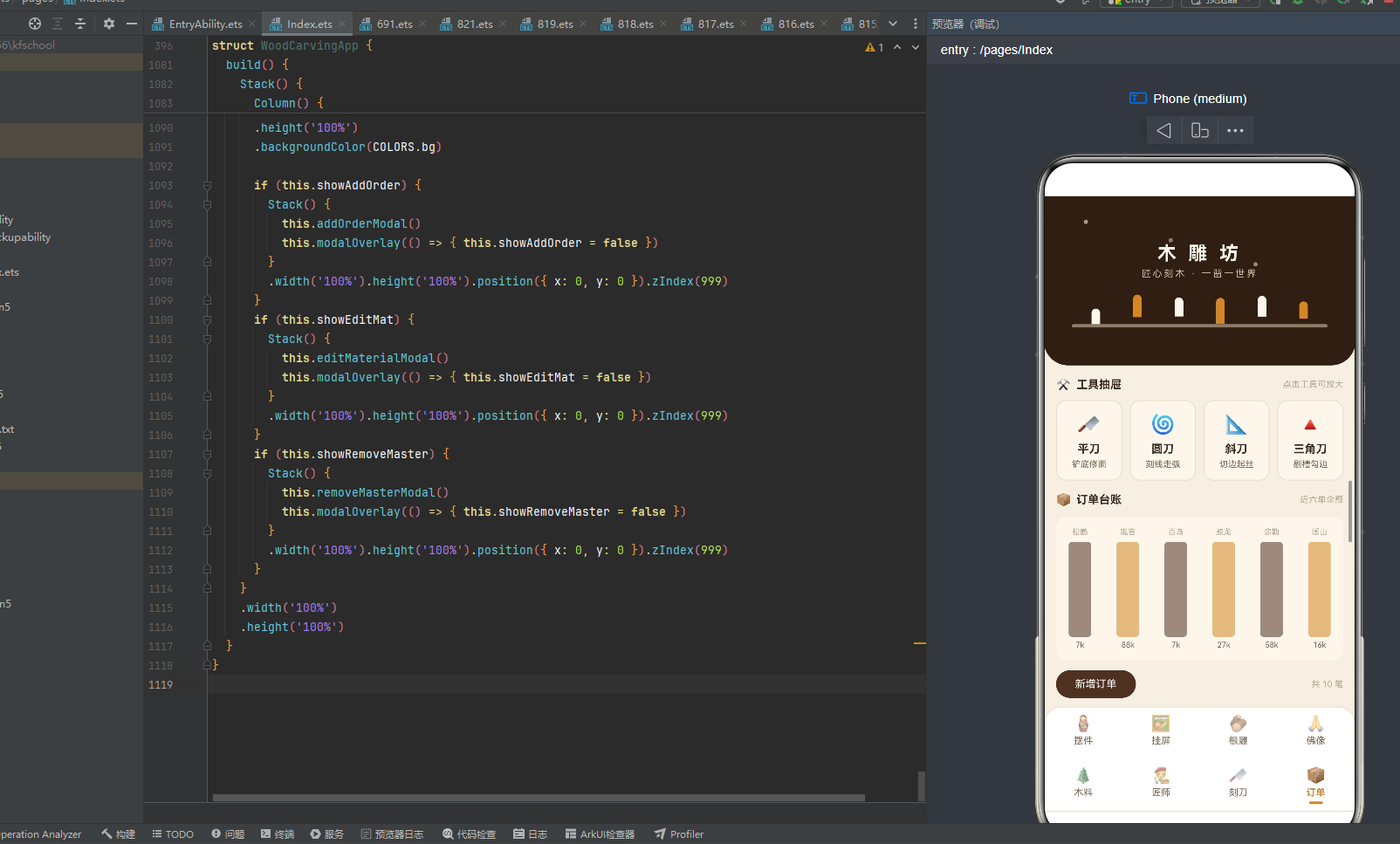
标签: HarmonyOS · ArkTS · API 24 · HarmonyOS 6.1.1 · 中国木雕 · 胡桃色琥珀色 · 单入口组件架构 · @Observed · 一凿一世界 · 移动端开发

讨论HarmonyOS开发技术,专注于API与组件、DevEco Studio、测试、元服务和应用上架分发等。
更多推荐

 4
4 0
0- 0


 已为社区贡献4条内容

所有评论(0)