基于 HarmonyOS API 24 与 ArkTS 声明式 UI 的零食量贩大礼包应用架构设计——HarmonyOS 6.1.1 下场次秒杀、囤货库存 CRUD 与盲盒抽赏概率系统的全链路深度解析
引言
在万物互联的智能终端时代,HarmonyOS 6.1.1 作为华为鸿蒙生态的最新迭代版本,为开发者提供了一套从内核到框架的完整分布式应用开发范式。HarmonyOS ArkTS API 24 作为该版本下的核心声明式 UI 编程接口集合,不仅继承了 ArkTS 语言在类型安全和编译期检查方面的优势,更在组件复用、状态管理、动画调度和布局渲染等方面进行了深度优化。开发者可以通过一套代码同时适配手机、平板、智慧屏等多种终端形态,真正实现"一次开发、多端部署"的工程愿景。在 HarmonyOS 6.1.1 的开发框架下,ArkTS 的声明式编程模型将 UI 的描述与逻辑处理进行了清晰的分层,通过 @Component、@Entry、@State、@Builder 等装饰器的组合使用,开发者可以像搭积木一样构建出结构清晰、可维护性极高的复杂应用界面。
ArkTS 声明式 UI 的核心思想是"数据驱动视图"。在传统的命令式编程中,开发者需要手动操作 DOM 节点来更新界面;而在 ArkTS 中,开发者只需要声明界面与数据之间的绑定关系,框架会在数据发生变化时自动触发 UI 的重新渲染。这种范式转变大幅降低了状态同步的复杂度,使开发者能够将更多精力投入到业务逻辑的设计中。@State 装饰器用于管理组件内部的响应式状态,当被装饰的变量发生变更时,框架会自动定位到所有引用该变量的 UI 节点并执行精确的局部刷新,而非整体重绘。@Builder 装饰器则用于定义可复用的 UI 片段,它不仅支持参数化传入数据,还能在多个组件间共享,从而有效减少代码冗余,提升工程的可维护性。
本文将以"零食量贩大礼包"应用为案例,深入剖析一个涵盖场次秒杀、囤货库存管理、品类筛选、盲盒抽赏、订单流转和用户中心六大业务模块的完整商业级应用在 HarmonyOS ArkTS API 24 下的实现方案。该应用采用明黄 × 红的双色渐变主题(#FFB800 到 #FF4F3E),在视觉上营造出热烈、活泼的零食消费氛围。应用通过底部六 Tab 架构组织核心业务流:秒杀 Tab 实现了多场次切换与限时抢购的完整交互链路;囤货 Tab 以 CRUD 模式管理零食库存,并配备了智能预警和一键补货功能;品类 Tab 提供基于分类筛选的三列宫格浏览体验;盲盒 Tab 构建了包含 SSR/SR/R 三级概率体系的抽赏系统;订单 Tab 集成了消费柱状图可视化与退款流程;我的 Tab 则完成了收货地址 CRUD、优惠券管理和积分明细展示。通过对每个模块的逐层代码拆解,读者将全面掌握在 HarmonyOS 6.1.1 平台上构建复杂商业应用的设计方法与工程实践。
接口定义层分析
在 ArkTS 的工程实践中,接口(interface)承担着数据模型定义的核心职责。良好的接口设计不仅约束了数据的结构,更为组件间的数据传递提供了类型安全保障。本应用共定义了 14 个接口,覆盖了从秒杀场次到用户地址的全部业务实体。
秒杀场次与零食商品接口
interface SessionMeta {
  id: number
  name: string
  time: string
  state: string
}

interface SnackMeta {
  id: number
  name: string
  spec: string
  price: number
  oldPrice: number
  sold: number
  total: number
  pic: string
}

interface HotSnackMeta {
  id: number
  name: string
  brand: string
  heat: number
  pic: string
}
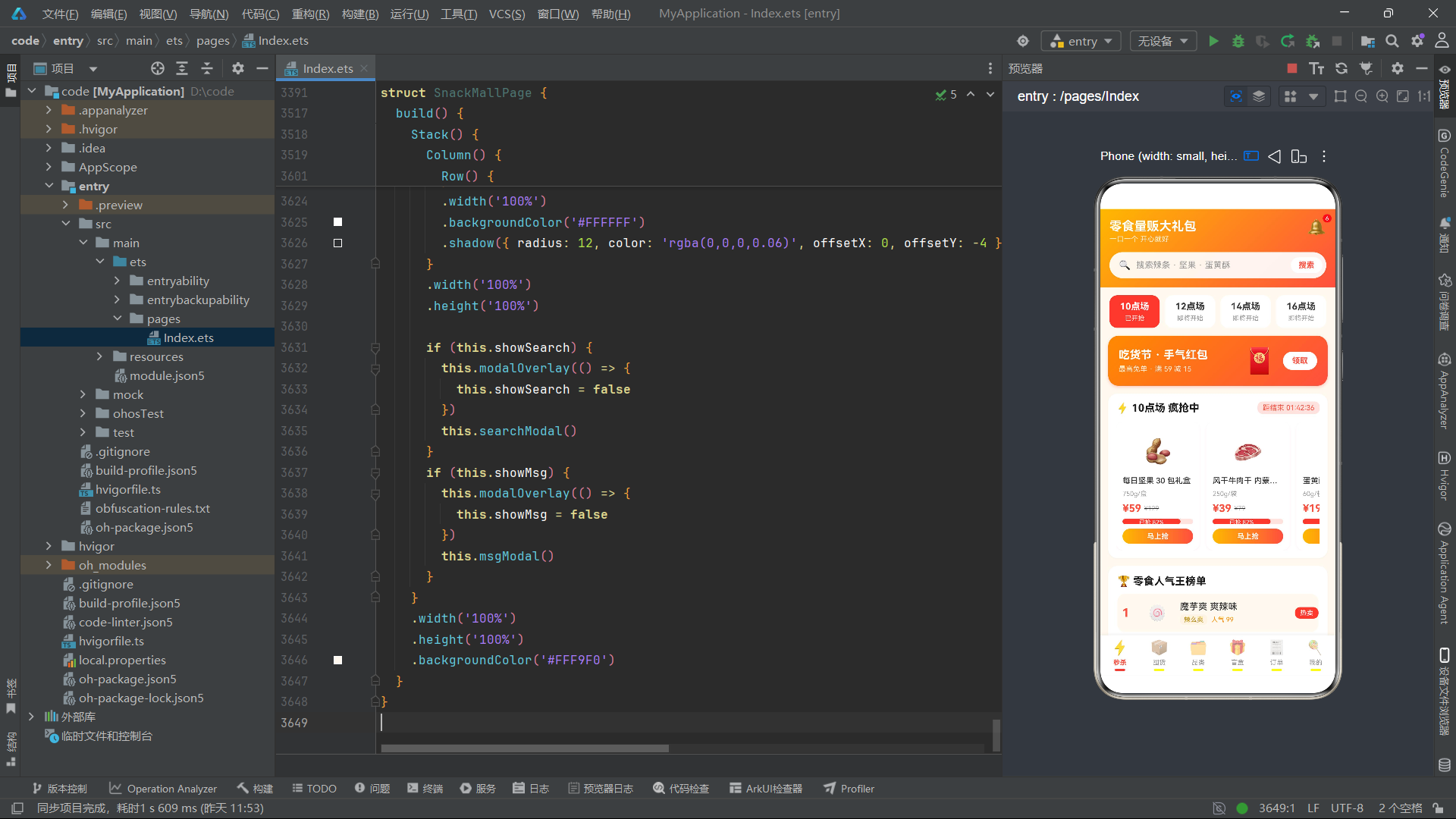
SessionMeta 接口定义了秒杀场次的基础数据结构。id 字段作为场次的唯一标识,用于在 ForEach 循环中生成列表项的 key;name 字段存储场次名称(如"10点场"、“12点场”),直接绑定到 UI 的 Text 组件上;time 字段描述场次的当前状态文案(如"已开抢"、“即将开始”),在 UI 中作为副标题展示;state 字段则使用字符串标记来区分场次是正在进行还是尚未开始,为后续的业务逻辑判断提供依据。
SnackMeta 接口是秒杀商品的核心数据模型。spec 字段存储商品的规格信息(如"750g/盒"),在卡片中以小号字体展示;price 和 oldPrice 两个字段分别记录秒杀价和原价,在 UI 中通过 TextDecorationType.LineThrough 对原价进行删除线处理,从而突出价格优势;sold 和 total 两个字段共同构成进度条的数据源,通过 soldPct 函数计算出已售百分比,驱动进度条的宽度变化;pic 字段使用 Emoji 字符作为商品占位图标,免去了图片资源加载的开销。
HotSnackMeta 接口定义了人气榜单中商品的数据结构。brand 字段记录品牌名称,在 UI 中以带背景色的小标签形式展示;heat 字段是一个数值型的热度指标,直接显示为"人气 99"的文案格式,用于榜单排名的直观感知。
囤货库存与品类筛选接口
interface StockMeta {
  id: number
  name: string
  spec: string
  stock: number
  warning: number
  price: number
  pic: string
}

interface CatSnackMeta {
  id: number
  name: string
  price: number
  oldPrice: number
  cat: string
  pic: string
  sold: number
}
StockMeta 接口是囤货管理模块的核心数据模型。stock 字段记录当前库存数量,warning 字段定义了预警阈值。这两个字段的差值关系直接决定了 UI 中进度条的颜色和预警提示的显示逻辑:当 stock 小于等于 warning 时,系统判定为"待补货"状态,进度条显示为红色;当 stock 介于 warning 和 warning * 2 之间时,进度条显示为黄色;超过 warning * 2 时则显示为绿色。price 字段在补货弹窗中用于计算建议补货金额。
CatSnackMeta 接口在 SnackMeta 的基础上增加了 cat 字段用于分类归属。cat 字段的值(如"坚果炒货"、“肉类零食”)与 SNACK_CATS 常量数组中的分类标签一一对应,通过 getSnacksByCat 全局纯函数实现按分类筛选商品的逻辑。sold 字段在此处用于展示累计销量(如"8621"),为消费者提供购买参考。
盲盒抽赏系统接口
interface BlindBoxMeta {
  id: number
  name: string
  price: number
  pic: string
  desc: string
  hot: string
}

interface PrizeMeta {
  name: string
  level: string
  pic: string
}

interface BoxLogMeta {
  id: number
  box: string
  prize: string
  level: string
  time: string
}
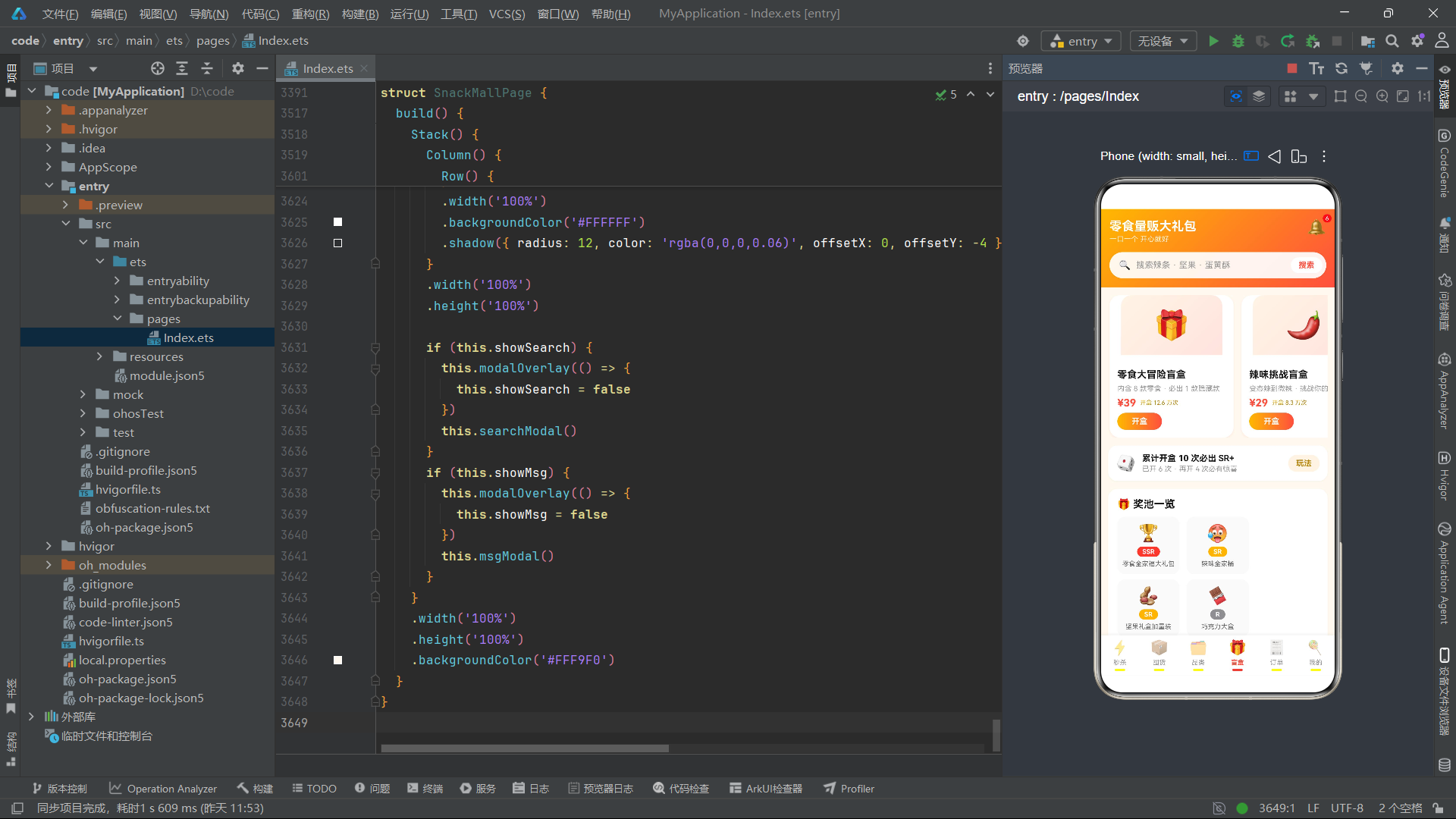
BlindBoxMeta 接口定义了盲盒商品的数据结构。desc 字段存储盲盒的描述文案(如"内含 8 款零食 · 必出 1 款隐藏款"),在横滑卡片中以两行文字形式展示;hot 字段记录开盒热度数据(如"开盒 12.6 万次"),用于在 UI 中营造热度氛围。
PrizeMeta 接口是奖池中奖品的数据模型。level 字段是核心字段,取值为 'SSR'、'SR' 或 'R',通过 levelColor 全局函数映射为不同的显示颜色——SSR 对应主色红 #FF4F3E、SR 对应金黄色 #FFB800、R 对应灰色 #8E8E93。这种三级稀有度体系借鉴了游戏抽卡的经典设计,将概率可视化直接融入 UI 呈现。
BoxLogMeta 接口记录每次开盒的结果日志。box 字段存储盲盒名称(已去除"盲盒"后缀以节省显示空间),prize 字段记录开出的奖品名称,level 字段记录奖品等级,time 字段记录开盒时间(如"今天 09:12"、“刚刚”)。这些日志数据通过 ForEach 渲染为时间线列表,构成了用户的"开盒记录"页面。
订单与用户中心接口
interface SOrderMeta {
  id: string
  name: string
  pic: string
  price: number
  count: number
  status: string
  date: string
}

interface MonthSpendMeta {
  month: string
  amount: number
}

interface AddrMeta {
  id: number
  name: string
  phone: string
  addr: string
  tag: string
  isDefault: boolean
}

interface CouponMeta {
  id: number
  amount: number
  condition: string
  scope: string
  expire: string
}
SOrderMeta 接口定义了零食订单的数据结构。id 字段是订单编号(如"LS20260824011"),在详情弹窗中以小号灰色字体展示;status 字段记录订单状态(“待发货”、“配送中”、“已完成”、“退款成功”),在 UI 列表中根据状态值动态切换文字颜色——退款成功显示为绿色 #34C759,其余状态显示为红色 #FF4F3E。date 字段存储订单日期,与 id 中的日期信息形成冗余,但便于 UI 直接展示。
MonthSpendMeta 接口是消费柱状图的数据模型。month 字段作为 X 轴标签,amount 字段作为柱状图高度的数值源。通过 spendBarH 全局纯函数将金额数值映射为像素高度(最大值 468 对应 72px),实现柱状图的可视化渲染。当前月(8 月)的柱状图使用主题渐变色填充,其余月份使用浅色渐变,通过 idx === 5 的条件判断实现视觉强调。
AddrMeta 接口定义了收货地址的数据结构。tag 字段存储地址标签(“家”、“公司”、“学校”),在 UI 中以带背景色的小标签形式展示;isDefault 字段是一个布尔值,用于标记默认地址。在地址列表的 UI 渲染中,默认地址会显示额外的"默认"红色标签,并且卡片边框颜色会更改为 #FFD591 以增强视觉区分。
CouponMeta 接口定义了优惠券的数据结构。amount 字段是优惠金额,在卡片左侧以大号红色字体展示;condition 字段存储使用门槛(如"满 99 可用");scope 字段限定使用范围(如"全场通用"、“仅限辣味专区”);expire 字段记录到期时间,以灰色小字提醒用户及时使用。
主页面标签与消息接口
interface TabMeta {
  id: number
  name: string
  icon: string
}

interface MsgMeta {
  id: number
  title: string
  detail: string
  time: string
}
TabMeta 接口定义了底部导航栏的标签数据。icon 字段使用 Emoji 字符作为图标(如 ⚡、📦、🎁),免去了图标资源的加载开销。id 字段与 activeTab 状态变量配合,通过 if-else 条件分支实现页面内容的切换。
MsgMeta 接口定义了消息中心的数据结构。title 字段是消息标题(如"秒杀预告"、“盲盒中奖”、“库存预警”),detail 字段是消息的详细内容文案,time 字段记录消息的发送时间。这六条消息涵盖了秒杀提醒、中奖通知、库存预警、物流更新、优惠券到期和签到提醒等核心业务场景,构成了应用的消息通知体系。
全局常量与枚举分析
本应用的全局常量体系承担了两个层面的职责:一是作为设计令牌(Design Token)系统统一管理视觉风格,二是作为业务配置数据源为各 Tab 组件提供初始数据。
主题色设计令牌系统
应用中所有组件的颜色值并非通过单独的常量集中定义,而是以字面量形式散布在各组件的样式声明中。这种设计形成了一套隐性的设计令牌体系:
- 主色:
#FFB800(明黄)到#FF4F3E(红色)的线性渐变,通过linearGradient属性实现,角度统一为 90 度(横向)或 135 度(对角线),用于按钮、头部横幅和品牌标识。 - 强调色:
#FF4F3E用于价格文字、激活态标签和进度条填充;#B8860B(深金黄)用于辅助信息标签和品牌名称标签。 - 背景色:
#FFF9F0(暖白)作为页面主背景色,#FFF4E5(浅黄)作为输入框和次要按钮的背景色,#FAFAFA(浅灰白)作为列表项的背景色。 - 文字色:
#1A1A1A(深黑)用于标题,#333333用于正文,#666666用于次要文字,#999999用于辅助信息,#BBBBBB用于占位文字和删除线价格。 - 状态色:
#34C759(绿色)表示成功/已完成状态,#FF3B30(亮红)用于角标徽章,#CCCCCC用于未选中状态。
秒杀与囤货业务数据常量
const SESS_LIST: SessionMeta[] = [
  { id: 1, name: '10点场', time: '已开抢', state: 'active' },
  { id: 2, name: '12点场', time: '即将开始', state: 'wait' },
  { id: 3, name: '14点场', time: '即将开始', state: 'wait' },
  { id: 4, name: '16点场', time: '即将开始', state: 'wait' },
  { id: 5, name: '20点场', time: '即将开始', state: 'wait' }
]

const SECKILL_SNACKS: SnackMeta[] = [
  { id: 1, name: '每日坚果 30 包礼盒', spec: '750g/盒', price: 59, oldPrice: 129, sold: 820, total: 1000, pic: '🥜' },
  { id: 2, name: '风干牛肉干 内蒙直供', spec: '250g/袋', price: 39, oldPrice: 79, sold: 654, total: 800, pic: '🥩' },
  { id: 3, name: '蛋黄酥 流心酥 6枚', spec: '60g/枚', price: 19, oldPrice: 39, sold: 932, total: 1000, pic: '🥮' },
  { id: 4, name: '手撕素肉辣条大包', spec: '400g/包', price: 15, oldPrice: 29, sold: 1205, total: 1500, pic: '🌶️' },
  { id: 5, name: '冻干榴莲 金枕头', spec: '100g/盒', price: 45, oldPrice: 89, sold: 468, total: 600, pic: '🥭' },
  { id: 6, name: '海盐芝士饼干桶', spec: '500g/桶', price: 25, oldPrice: 49, sold: 777, total: 900, pic: '🍪' }
]

const HOT_SNACKS: HotSnackMeta[] = [
  { id: 1, name: '魔芋爽 爽辣味', brand: '辣么爽', heat: 99, pic: '🍥' },
  { id: 2, name: '猪肉脯 蜜汁味', brand: '肉掌柜', heat: 96, pic: '🥓' },
  { id: 3, name: '炭烧腰果', brand: '坚果仓', heat: 92, pic: '🌰' },
  { id: 4, name: '乳酸菌小口袋面包', brand: '麦香坊', heat: 89, pic: '🍞' },
  { id: 5, name: '冰皮蛋糕', brand: '甜品屋', heat: 85, pic: '🍰' },
  { id: 6, name: '芒果干', brand: '果语', heat: 82, pic: '🥭' },
  { id: 7, name: '炭烧咖啡糖', brand: '老味道', heat: 78, pic: '🍬' },
  { id: 8, name: '鱼豆腐', brand: '辣么爽', heat: 74, pic: '🍢' }
]
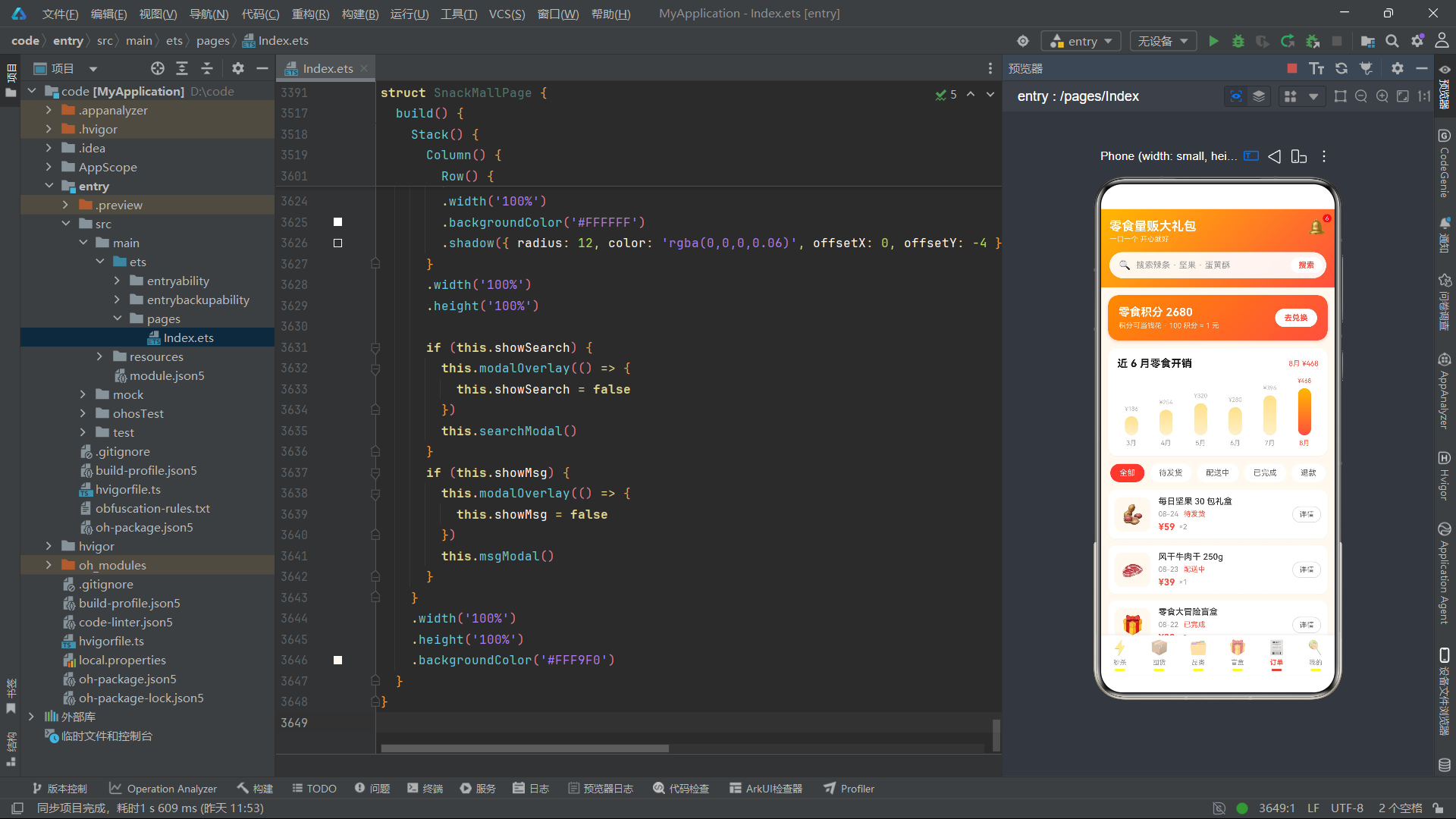
SESS_LIST 定义了五个秒杀场次,从上午 10 点到晚间 20 点,覆盖了全天的主要消费时段。第一个场次标记为 active 状态,表示当前正在进行;其余场次标记为 wait 状态。在 UI 渲染时,当前选中场次的卡片背景色会切换为主题红色,文字变为白色,从而实现激活态的视觉区分。
SECKILL_SNACKS 配置了六款秒杀商品,每款商品的 sold/total 比值均高于 50%,部分甚至超过 90%(如蛋黄酥 932/1000),这通过 soldPct 函数计算后驱动进度条的填充比例,在 UI 上营造出"即将售罄"的紧迫感。当 sold >= total * 0.9 时,抢购按钮的文案会从"马上抢"切换为"即将售罄",这是典型的电商营销心理设计。
HOT_SNACKS 定义了八款人气榜单商品,heat 值从 99 递减至 74,前三名在 UI 中以更大的排名字号(18px vs 14px)和红色排名数字突出展示,卡片背景色也更改为暖色 #FFF9F0,从而在视觉上形成"金银铜"的梯队感。
const STOCK_ITEMS: StockMeta[] = [
  { id: 1, name: '每日坚果', spec: '25g×30包', stock: 3, warning: 5, price: 59, pic: '🥜' },
  { id: 2, name: '蜜汁猪肉脯', spec: '200g/袋', stock: 8, warning: 3, price: 29, pic: '🥓' },
  { id: 3, name: '魔芋爽', spec: '20g×20包', stock: 2, warning: 6, price: 19, pic: '🍥' },
  { id: 4, name: '蛋黄酥', spec: '60g×6枚', stock: 12, warning: 4, price: 25, pic: '🥮' },
  { id: 5, name: '海盐饼干', spec: '500g/桶', stock: 1, warning: 2, price: 22, pic: '🍪' },
  { id: 6, name: '芒果干', spec: '100g/袋', stock: 6, warning: 3, price: 15, pic: '🥭' },
  { id: 7, name: '炭烧腰果', spec: '250g/罐', stock: 4, warning: 5, price: 32, pic: '🌰' },
  { id: 8, name: '乳酸菌面包', spec: '400g/箱', stock: 9, warning: 3, price: 26, pic: '🍞' }
]
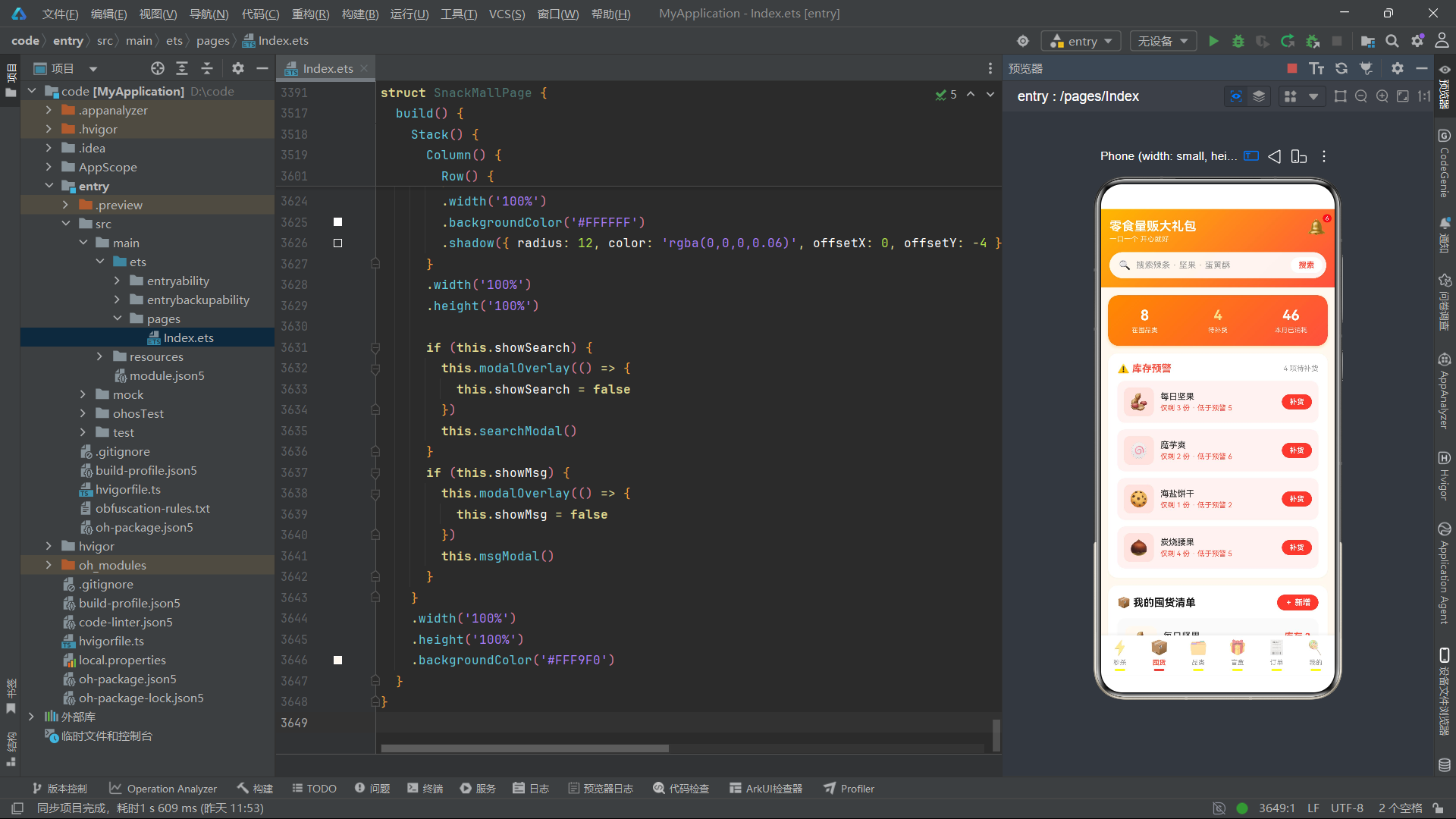
STOCK_ITEMS 是囤货管理的初始数据源。值得注意的是,多个商品的 stock 值低于或等于 warning 值(如魔芋爽 stock=2, warning=6;海盐饼干 stock=1, warning=2),这些商品会在页面加载时自动出现在"库存预警"区域,触发 getLowStock 函数的筛选逻辑。这种设计在初始状态就为用户展示了完整的 CRUD + 预警交互链路。
品类、盲盒与订单数据常量
const CAT_SNACKS: CatSnackMeta[] = [
  { id: 1, name: '混合坚果大礼包', price: 69, oldPrice: 129, cat: '坚果炒货', pic: '🥜', sold: 8621 },
  { id: 2, name: '碧根果奶香味', price: 35, oldPrice: 69, cat: '坚果炒货', pic: '🌰', sold: 4230 },
  // ... 共 15 款商品,覆盖 6 个品类
]

const SNACK_CATS: string[] = ['全部', '坚果炒货', '肉类零食', '糕点烘焙', '糖果巧克力', '膨化食品', '果干蜜饯']

const BLIND_BOXES: BlindBoxMeta[] = [
  { id: 1, name: '零食大冒险盲盒', price: 39, pic: '🎁', desc: '内含 8 款零食 · 必出 1 款隐藏款', hot: '开盒 12.6 万次' },
  { id: 2, name: '辣味挑战盲盒', price: 29, pic: '🌶️', desc: '变态辣到微辣 · 挑战你的极限', hot: '开盒 8.3 万次' },
  { id: 3, name: '甜蜜暴击盲盒', price: 45, pic: '🍬', desc: '甜品糖果组合 · SSR 双倍装', hot: '开盒 6.1 万次' },
  { id: 4, name: '深夜追剧盲盒', price: 35, pic: '🌙', desc: '膨化 + 卤味 · 一口一个停不下', hot: '开盒 9.8 万次' }
]

const PRIZES: PrizeMeta[] = [
  { name: '零食全家福大礼包', level: 'SSR', pic: '🏆' },
  { name: '辣味全家桶', level: 'SR', pic: '🥵' },
  { name: '坚果礼盒加量装', level: 'SR', pic: '🥜' },
  { name: '巧克力大盒', level: 'R', pic: '🍫' },
  { name: '薯片家庭装', level: 'R', pic: '🍟' },
  { name: '果冻大袋装', level: 'R', pic: '🍮' },
  { name: '辣条加量包', level: 'R', pic: '🌶️' },
  { name: '饼干桶装', level: 'R', pic: '🍪' }
]
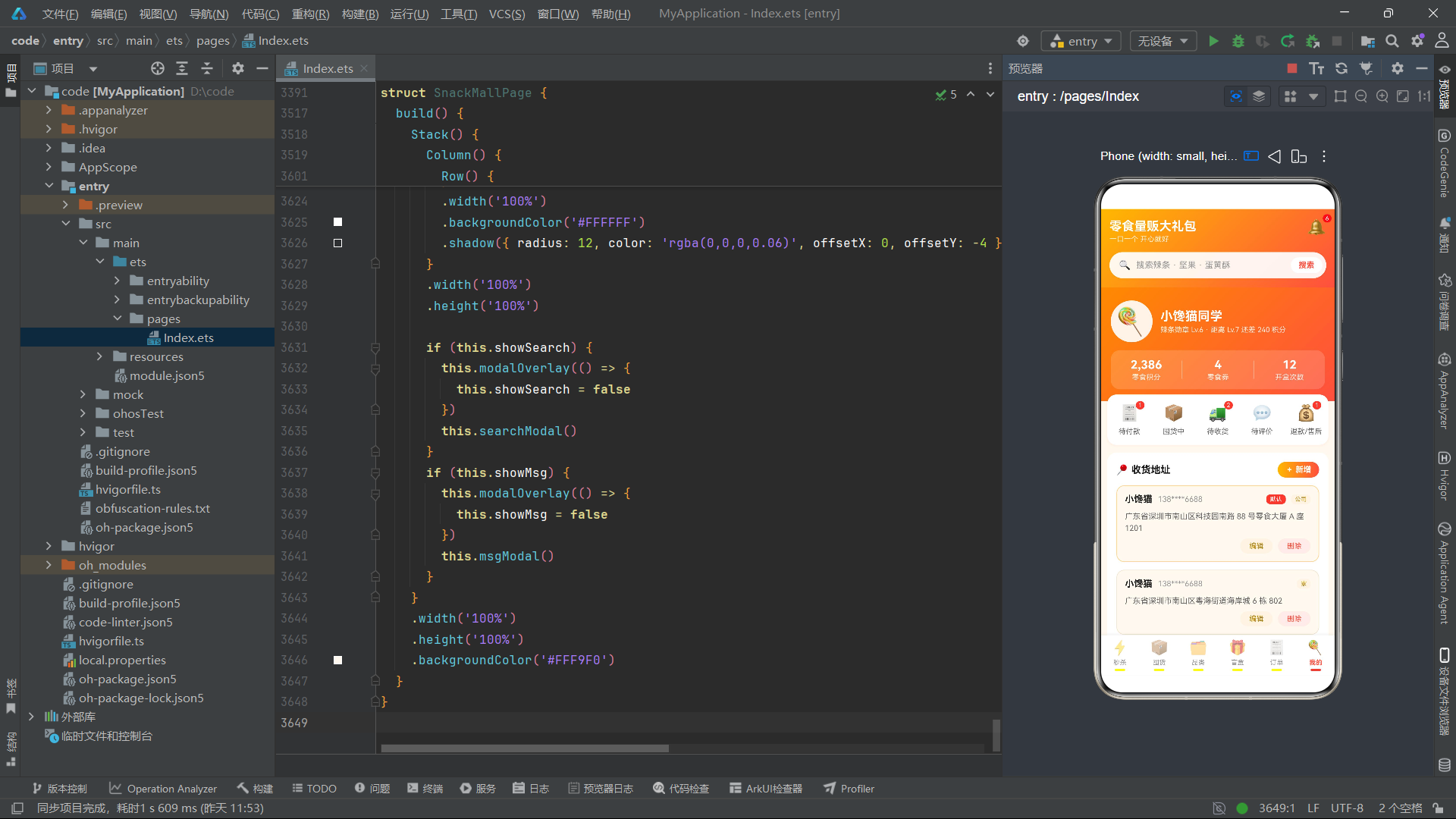
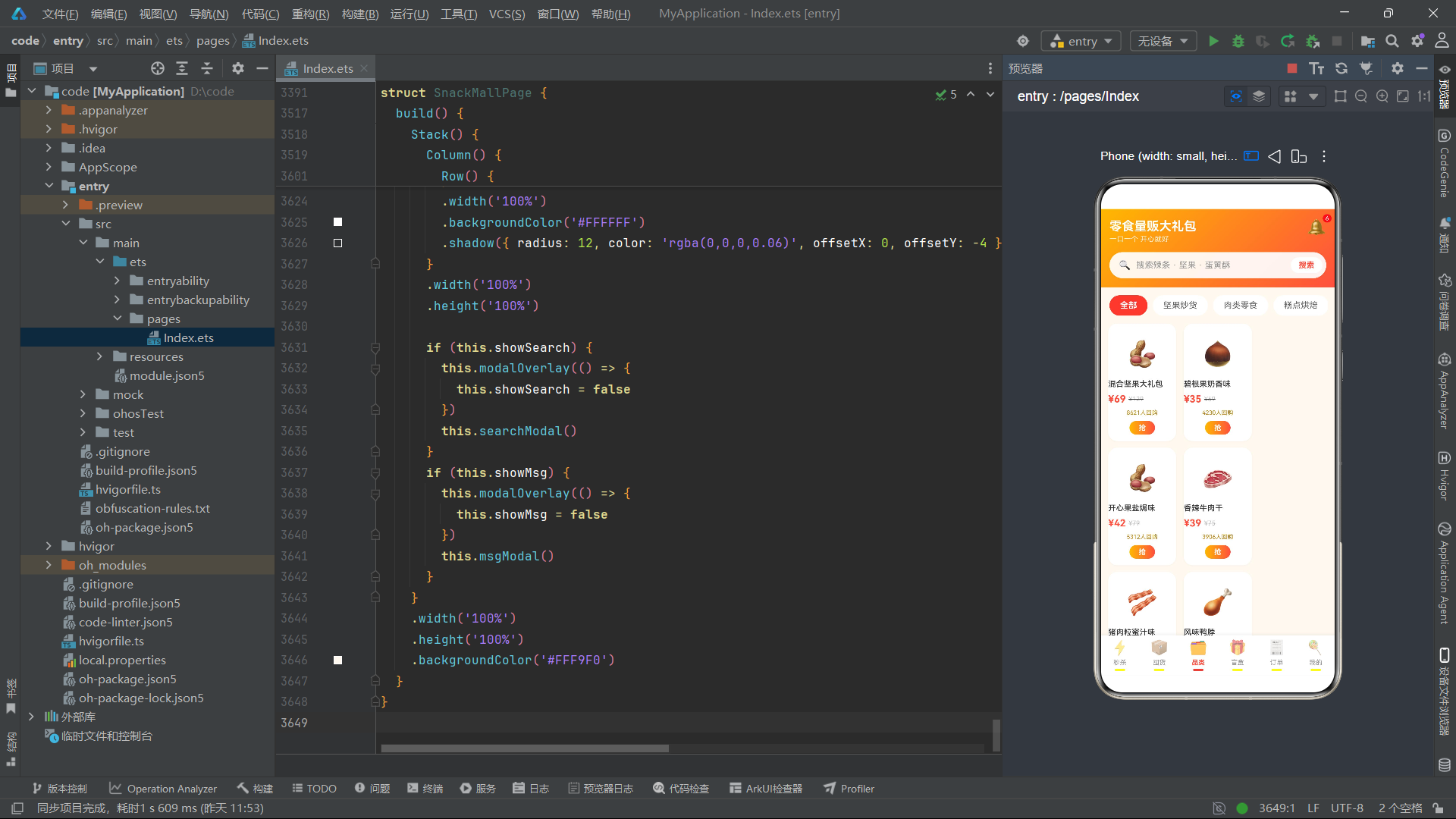
CAT_SNACKS 包含 15 款商品,分布在 6 个品类中,SNACK_CATS 数组定义了 7 个分类标签(含"全部")。品类筛选通过 getSnacksByCat 函数实现,当选择"全部"时返回全部 15 款商品,否则按 cat 字段精确匹配。
BLIND_BOXES 定义了四款主题盲盒,PRIZES 定义了奖池中的八款奖品。奖品池的等级分布为:1 个 SSR(概率 2%)、2 个 SR(概率 18%)、5 个 R(概率 80%)。这种概率分布通过 openBox 方法中的 Math.floor(Math.random() * PRIZES.length) 随机选择实现,虽然实际代码中的随机选择是基于奖品数组的均匀分布而非严格按照概率配比,但 UI 上的概率展示文案(“SSR 2%”、“SR 18%”、“R 80%”)为用户提供了透明的概率信息披露。
const BOX_LOGS: BoxLogMeta[] = [
  { id: 1, box: '零食大冒险', prize: '巧克力大盒', level: 'R', time: '今天 09:12' },
  { id: 2, box: '深夜追剧', prize: '薯片家庭装', level: 'R', time: '昨天 22:40' },
  { id: 3, box: '辣味挑战', prize: '辣味全家桶', level: 'SR', time: '昨天 21:05' },
  { id: 4, box: '甜蜜暴击', prize: '果冻大袋装', level: 'R', time: '周六 15:33' },
  { id: 5, box: '零食大冒险', prize: '零食全家福大礼包', level: 'SSR', time: '周五 20:18' }
]

const MONTH_SPEND: MonthSpendMeta[] = [
  { month: '3月', amount: 186 },
  { month: '4月', amount: 254 },
  { month: '5月', amount: 320 },
  { month: '6月', amount: 280 },
  { month: '7月', amount: 396 },
  { month: '8月', amount: 468 }
]

const REFUND_REASONS: string[] = ['不想要了', '拍错规格', '发货太慢', '包装破损', '口味不喜欢']
BOX_LOGS 是开盒记录的初始数据,包含一条 SSR 记录和一条 SR 记录,为用户展示了完整的历史轨迹。MONTH_SPEND 数据呈现了从 3 月到 8 月的消费金额递增趋势,8 月消费 468 元为最高值,在柱状图中以主题渐变色填充突出展示。REFUND_REASONS 定义了五个退款原因选项,在退款弹窗中以单选列表形式呈现。
地址、优惠券与导航数据常量
const ADDR_LIST: AddrMeta[] = [
  { id: 1, name: '小馋猫', phone: '138****6688', addr: '广东省深圳市南山区科技园南路 88 号零食大厦 A 座 1201', tag: '公司', isDefault: true },
  { id: 2, name: '小馋猫', phone: '138****6688', addr: '广东省深圳市南山区粤海街道海岸城 6 栋 802', tag: '家', isDefault: false },
  { id: 3, name: '喵小姐', phone: '159****2233', addr: '湖南省长沙市岳麓区橘子洲街道甜味路 19 号 3 单元 501', tag: '学校', isDefault: false }
]

const MY_COUPONS: CouponMeta[] = [
  { id: 1, amount: 20, condition: '满 99 可用', scope: '全场通用', expire: '08-31 到期' },
  { id: 2, amount: 8, condition: '满 49 可用', scope: '仅限辣味专区', expire: '09-05 到期' },
  { id: 3, amount: 50, condition: '满 299 可用', scope: '仅限坚果专区', expire: '09-12 到期' },
  { id: 4, amount: 5, condition: '无门槛', scope: '仅限盲盒专区', expire: '08-26 到期' }
]

const MAIN_TABS: TabMeta[] = [
  { id: 0, name: '秒杀', icon: '⚡' },
  { id: 1, name: '囤货', icon: '📦' },
  { id: 2, name: '品类', icon: '🗂️' },
  { id: 3, name: '盲盒', icon: '🎁' },
  { id: 4, name: '订单', icon: '🧾' },
  { id: 5, name: '我的', icon: '🍭' }
]

const MSG_LIST: MsgMeta[] = [
  { id: 1, title: '秒杀预告', detail: '12 点场辣味专场即将开抢,5 元无门槛券已到账,先到先得!', time: '10:02' },
  { id: 2, title: '盲盒中奖', detail: '恭喜开出 SSR 冻干榴莲全家福,已放入你的奖品柜,记得查收~', time: '09:47' },
  { id: 3, title: '库存预警', detail: '你的「魔芋爽 20 包」库存不足 3 包,点击一键补货免运费。', time: '昨天' },
  { id: 4, title: '物流更新', detail: '你的坚果礼盒已到达【深圳转运中心】,预计今日送达。', time: '昨天' },
  { id: 5, title: '优惠券到期', detail: '8 元辣味专区券将于 09-05 过期,抓紧使用哦。', time: '08-22' },
  { id: 6, title: '签到提醒', detail: '今日签到可得 5 积分,连签 7 天送神秘零食盲盒。', time: '08-21' }
]
ADDR_LIST 包含三条地址记录,覆盖了公司、家和学校三种场景,其中第一条标记为默认地址。手机号字段采用了脱敏处理(138****6688),体现了数据隐私保护意识。MY_COUPONS 定义了四张优惠券,从无门槛到满 299 可用,覆盖了不同的消费门槛场景。MAIN_TABS 定义了底部导航栏的六个标签,与 activeTab 状态变量配合实现页面切换。MSG_LIST 定义了六条消息记录,涵盖了应用的核心业务通知场景。
全局纯函数分析
本应用定义了 7 个全局纯函数,它们不依赖任何组件实例的 this 上下文,接收输入参数并返回计算结果,是数据处理的核心逻辑单元。
销量百分比计算函数
function soldPct(sold: number, total: number): string {
  return Math.round(sold / total * 100) + '%'
}
soldPct 函数接收已售数量和总数量两个参数,通过除法运算并四舍五入后拼接百分号返回字符串。该函数在秒杀卡片的进度条中被多次调用:一方面用于计算进度条的填充宽度(width(soldPct(item.sold, item.total))),另一方面作为"已抢 XX%"的文案直接展示。由于 ArkTS 的 UI 组件属性支持字符串类型的百分比值(如 "82%"),因此该函数的返回值可以直接绑定到 width 属性上,实现进度条的动态渲染。
库存百分比与颜色映射函数
function stockPct(stock: number, warning: number): string {
  const v: number = Math.round(stock / (warning * 2) * 100)
  if (v > 100) {
    return '100%'
  }
  return v + '%'
}

function stockColor(stock: number, warning: number): string {
  if (stock <= warning) {
    return '#FF4F3E'
  }
  if (stock <= warning * 2) {
    return '#FFB800'
  }
  return '#34C759'
}
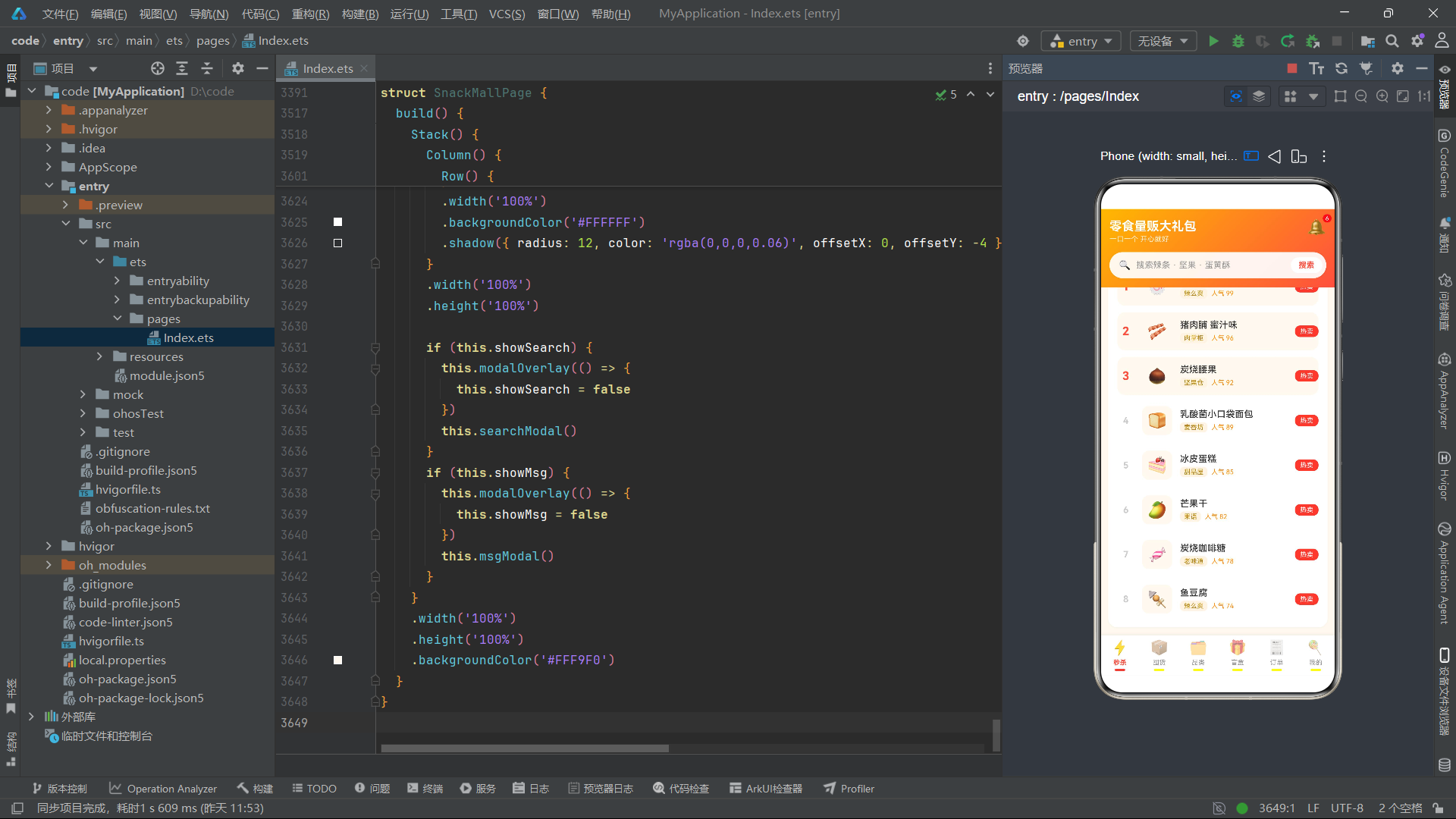
stockPct 函数将当前库存与预警值的两倍进行比较,计算出库存占"理想满库存"的百分比。这里的设计逻辑是:预警值的两倍被视为"满库存"的基准线,当库存超过该值时,百分比被截断为 100%。这种设计使得进度条在库存充足时始终显示满格,而在库存不足时迅速缩短,给用户直观的库存消耗感知。
stockColor 函数实现了三级颜色映射逻辑。当库存低于或等于预警值时返回红色(紧急补货),当库存介于预警值和预警值两倍之间时返回黄色(关注提醒),超过预警值两倍时返回绿色(库存充足)。这两个函数配合使用,在囤货清单的每个商品卡片中同时驱动进度条的宽度和颜色,实现了"一眼可知库存健康度"的视觉设计目标。
低库存筛选函数
function getLowStock(list: StockMeta[]): StockMeta[] {
  const r: StockMeta[] = []
  for (let i = 0; i < list.length; i++) {
    if (list[i].stock <= list[i].warning) {
      r.push(list[i])
    }
  }
  return r
}
getLowStock 函数接收一个 StockMeta 数组,遍历所有元素并筛选出库存低于或等于预警值的商品,返回一个新的数组。该函数在囤货 Tab 的多个位置被调用:在统计区域计算待补货数量(getLowStock(this.stockList).length),在预警区域渲染待补货商品列表,在补货按钮的点击事件中传递商品信息。由于该函数是纯函数,不修改输入数组,因此可以安全地在 ForEach 的数据源中直接调用,每次状态变更触发重新渲染时都会重新计算。
品类筛选函数
function getSnacksByCat(cat: string): CatSnackMeta[] {
  if (cat === '全部') {
    return CAT_SNACKS
  }
  const r: CatSnackMeta[] = []
  for (let i = 0; i < CAT_SNACKS.length; i++) {
    if (CAT_SNACKS[i].cat === cat) {
      r.push(CAT_SNACKS[i])
    }
  }
  return r
}
getSnacksByCat 函数接收品类名称字符串,返回该品类下的所有商品。当传入"全部"时直接返回完整的 CAT_SNACKS 常量数组;否则通过遍历比对 cat 字段进行精确匹配筛选。该函数在品类 Tab 的 build 方法中被调用,其返回值直接作为 ForEach 的数据源:ForEach(getSnacksByCat(SNACK_CATS[this.catIdx]), ...)。当用户点击不同的分类标签时,catIdx 状态变量更新,触发 build 方法重新执行,getSnacksByCat 被重新调用并返回新的筛选结果,UI 自动刷新为对应品类的商品列表。
奖品等级颜色映射函数
function levelColor(level: string): string {
  if (level === 'SSR') {
    return '#FF4F3E'
  }
  if (level === 'SR') {
    return '#FFB800'
  }
  return '#8E8E93'
}
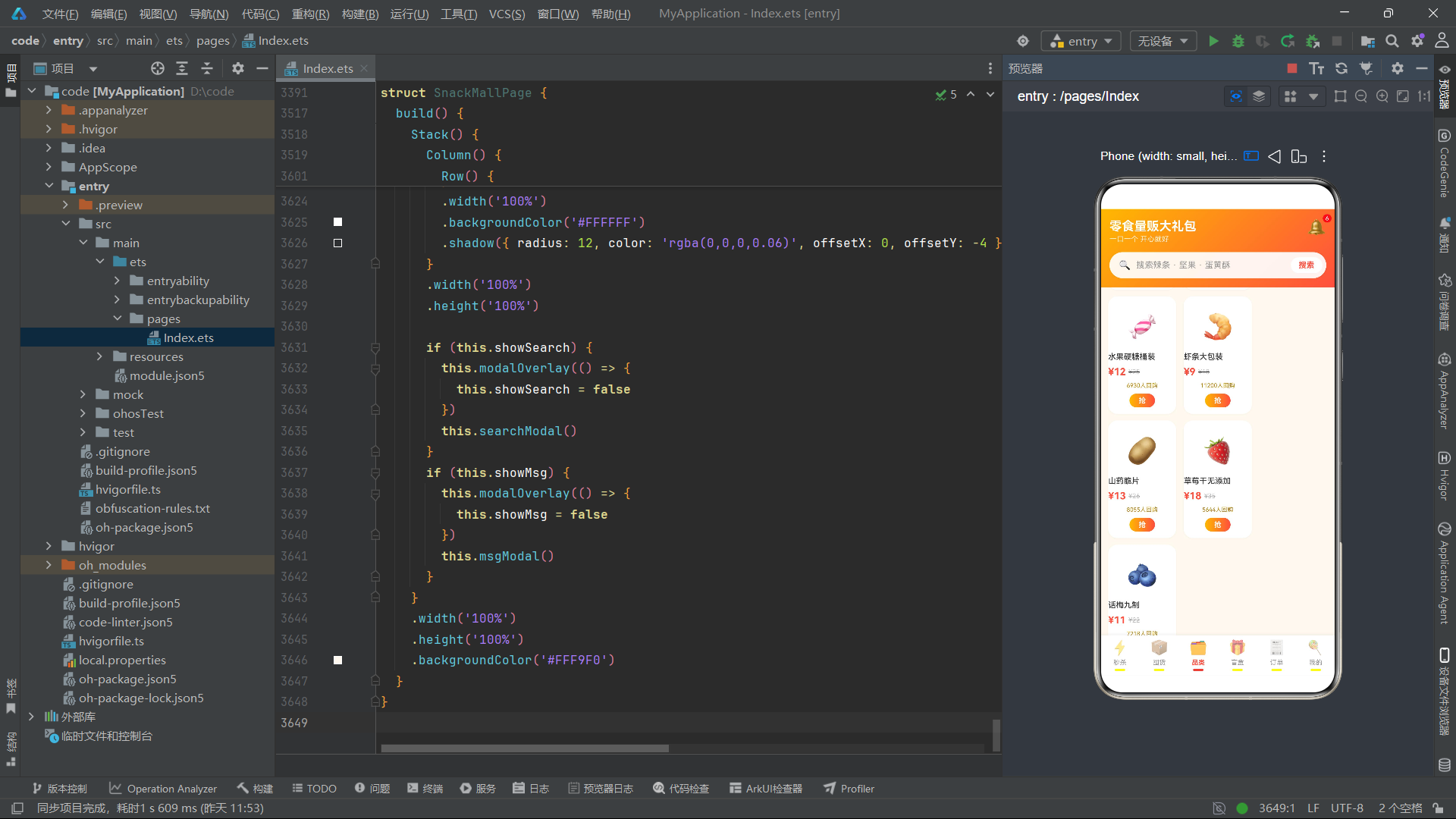
levelColor 函数将盲盒奖品的等级字符串映射为颜色值。SSR 级别映射为主色红 #FF4F3E,SR 级别映射为金黄 #FFB800,R 级别映射为灰色 #8E8E93。该函数在盲盒 Tab 的多个 UI 节点中被调用:奖池一览中奖品等级标签的背景色、开盒结果弹窗中等级标签的背景色、开盒记录列表中等级小标签的背景色。通过统一的颜色映射函数,确保了同一等级在不同 UI 场景下的视觉一致性。
消费柱状图高度计算函数
function spendBarH(v: number): number {
  return Math.round(v / 468 * 72)
}
spendBarH 函数将消费金额映射为柱状图的高度(像素值)。468 是 8 月(当前月)的消费金额,被设定为柱状图的最大参考值,对应 72 像素的高度。该函数在订单 Tab 的消费柱状图中被调用:Column().height(spendBarH(item.amount))。通过比例缩放,所有月份的消费金额都被映射为 0-72 像素之间的柱状图高度,使得消费趋势一目了然。这种以最大值为基准的归一化处理是数据可视化中常用的设计模式。
各 Tab 组件深度分析
秒杀 Tab 组件(SeckillTab)
秒杀 Tab 是应用的首页内容区,承载了场次切换、红包营销和限时抢购三大核心交互。
状态变量定义
@Component
struct SeckillTab {
  @State sessIdx: number = 0
  @State showRemind: boolean = false
  @State showSnack: boolean = false
  @State showOk: boolean = false
  @State curSnack: SnackMeta = SECKILL_SNACKS[0]
  @State buyCount: number = 1
}
sessIdx 管理当前选中的场次索引,初始值为 0(即"10点场")。该变量驱动场次横滑区域的激活态样式切换和秒杀列表标题的动态文案更新。showRemind、showSnack、showOk 三个布尔变量分别控制开抢提醒弹窗、抢购弹窗和成功提示 Toast 的显示与隐藏。curSnack 存储当前点击的商品对象,在抢购弹窗中展示商品详情。buyCount 管理购买数量,范围限制在 1 到 10 之间。
关键方法分析
抢购弹窗中的数量加减逻辑通过内联的 onClick 事件实现。减号按钮在 buyCount > 1 时生效,加号按钮在 buyCount < 10 时生效,且按钮文字颜色会根据当前数量动态切换——当 buyCount 为 1 时减号变为灰色 #CCCCCC 表示不可操作,加号始终为红色 #FF4F3E。合计金额通过 this.curSnack.price * this.buyCount 实时计算并绑定到文案上。
Builder 方法与 build 分析
snackCard 是一个参数化的 @Builder 方法,接收 SnackMeta 类型的参数,渲染单个秒杀商品卡片。卡片内部包含商品图标、名称、规格、秒杀价/原价对比、进度条和抢购按钮六个区域。进度条通过嵌套的 Column 和 Row 实现——外层 Column 设置灰色背景作为轨道,内层 Column 通过 width(soldPct(item.sold, item.total)) 设置填充宽度,背景色为主题红 #FF4F3E。抢购按钮的文案通过三元表达式判断:item.sold >= item.total * 0.9 ? '即将售罄' : '马上抢',当销量达到 90% 时切换为紧迫感文案。
@Builder snackCard(item: SnackMeta) {
  Column({ space: 7 }) {
    Text(item.pic)
      .fontSize(36)
      .padding({ top: 14, bottom: 10 })
    Text(item.name)
      .fontSize(12)
      .fontWeight(FontWeight.Medium)
      .fontColor('#333333')
      .maxLines(1)
      .textOverflow({ overflow: TextOverflow.Ellipsis })
      .width('100%')
    Text(item.spec)
      .fontSize(10)
      .fontColor('#999999')
      .width('100%')
    Row({ space: 4 }) {
      Text('¥' + item.price)
        .fontSize(16)
        .fontWeight(FontWeight.Bold)
        .fontColor('#FF4F3E')
      Text('¥' + item.oldPrice)
        .fontSize(10)
        .fontColor('#BBBBBB')
        .decoration({ type: TextDecorationType.LineThrough })
    }
    .width('100%')

    Column({ space: 4 }) {
      Row() {
        Column() {
          Text('已抢 ' + soldPct(item.sold, item.total))
            .fontSize(9)
            .fontColor('#FFFFFF')
        }
        .height(8)
        .borderRadius(4)
        .backgroundColor('#FF4F3E')
        .width(soldPct(item.sold, item.total))
      }
      .width('100%')
      .backgroundColor('#FFE3DE')
      .borderRadius(4)
    }
    .width('100%')

    Text(item.sold >= item.total * 0.9 ? '即将售罄' : '马上抢')
      .fontSize(11)
      .fontWeight(FontWeight.Bold)
      .fontColor('#FFFFFF')
      .width('100%')
      .textAlign(TextAlign.Center)
      .padding({ top: 5, bottom: 5 })
      .linearGradient({ angle: 90, colors: [['#FFB800', 0.0], ['#FF4F3E', 1.0]] })
      .borderRadius(12)
      .onClick(() => {
        this.curSnack = item
        this.buyCount = 1
        this.showSnack = true
      })
  }
  .padding(10)
  .backgroundColor('#FFFFFF')
  .borderRadius(12)
  .width(128)
  .margin({ right: 10 })
  .shadow({ radius: 8, color: 'rgba(255,79,62,0.08)', offsetX: 0, offsetY: 3 })
}
build 方法的主体结构包含四个区域:场次横滑选择器、红包 Banner、秒杀商品横滑列表和爆款人气榜单。场次横滑通过 Scroll 组件的 scrollable(ScrollDirection.Horizontal) 实现水平滚动,每个场次卡片通过 backgroundColor(this.sessIdx === idx ? '#FF4F3E' : '#FFFFFF') 实现激活态的颜色切换。红包 Banner 使用 135 度对角线渐变(#FF8A00 到 #FF4F3E)填充,配合 shadow 属性的彩色阴影(rgba(255,79,62,0.3))营造悬浮感。人气榜单通过 ForEach 渲染 HOT_SNACKS 数组,前三名使用 idx < 3 条件判断,在排名字号和卡片背景色上做差异化处理。
弹窗的显示与隐藏通过 build 方法末尾的条件渲染块统一管理。当 showRemind 为 true 时,先渲染 modalOverlay(半透明遮罩层),再渲染 remindModal(弹窗内容);showSnack 和 showOk 同理。okToast 使用了轻量级的半透明遮罩(rgba(0,0,0,0.3)),并通过 position 和 translate 属性实现居中定位。
囤货 Tab 组件(StockTab)
囤货 Tab 实现了完整的库存管理 CRUD 操作,是应用中业务逻辑最密集的组件之一。
状态变量定义
@Component
struct StockTab {
  @State stockList: StockMeta[] = STOCK_ITEMS
  @State showAdd: boolean = false
  @State showEdit: boolean = false
  @State showDel: boolean = false
  @State showRestock: boolean = false
  @State showOk: boolean = false
  @State inputName: string = ''
  @State inputSpec: string = ''
  @State inputWarn: string = ''
  @State editName: string = ''
  @State editWarn: string = ''
  @State editId: number = 0
  @State delId: number = 0
  @State restockName: string = ''
  @State restockPrice: number = 0
}
stockList 是囤货列表的响应式数据源,初始值为 STOCK_ITEMS 常量。所有 CRUD 操作都会生成新的数组并赋值给 stockList,触发 UI 重新渲染。inputName、inputSpec、inputWarn 三个变量管理新增弹窗中的输入框值;editName、editWarn、editId 管理编辑弹窗的状态;delId 记录待删除的商品 ID;restockName 和 restockPrice 在补货弹窗中展示商品信息。
CRUD 方法分析
新增方法 addStock 首先验证 inputName 非空,然后解析 inputWarn 为数字(通过 parseFloat),构建新的 StockMeta 对象并追加到数组末尾。新商品的 id 通过 this.stockList.length + 1 生成,stock 初始为 0,pic 默认为糖果 Emoji。方法末尾清空输入框并关闭弹窗:
addStock() {
  if (this.inputName.length > 0) {
    const w: number = parseFloat(this.inputWarn)
    const it: StockMeta = {
      id: this.stockList.length + 1,
      name: this.inputName,
      spec: this.inputSpec.length > 0 ? this.inputSpec : '1份',
      stock: 0,
      warning: w > 0 ? Math.round(w) : 3,
      price: 0,
      pic: '🍬'
    }
    const r: StockMeta[] = []
    for (let i = 0; i < this.stockList.length; i++) {
      r.push(this.stockList[i])
    }
    r.push(it)
    this.stockList = r
    this.inputName = ''
    this.inputSpec = ''
    this.inputWarn = ''
    this.showAdd = false
    this.showOk = true
  }
}
编辑方法 saveEdit 通过 editId 定位目标商品,保留原有的 spec、stock、price、pic 字段不变,仅更新 name 和 warning 两个字段。删除方法 delStock 通过 delId 过滤掉目标商品。消耗方法 eatOne 接收商品 ID 参数,将对应商品的 stock 减 1(不低于 0),模拟用户"吃掉一份零食"的场景。所有方法都遵循"构建新数组 -> 赋值给状态变量"的不可变更新模式,确保 ArkTS 的状态追踪机制能够正确检测到变更。
eatOne(id: number) {
  const r: StockMeta[] = []
  for (let i = 0; i < this.stockList.length; i++) {
    if (this.stockList[i].id === id) {
      const it: StockMeta = {
        id: this.stockList[i].id,
        name: this.stockList[i].name,
        spec: this.stockList[i].spec,
        stock: this.stockList[i].stock > 0 ? this.stockList[i].stock - 1 : 0,
        warning: this.stockList[i].warning,
        price: this.stockList[i].price,
        pic: this.stockList[i].pic
      }
      r.push(it)
    } else {
      r.push(this.stockList[i])
    }
  }
  this.stockList = r
}
build 方法分析
build 方法的主体包含三个核心区域:囤货统计横幅、库存预警区域和囤货清单。统计横幅通过三列等宽布局展示"在囤品类数"、"待补货数"和"本月已消耗"三个指标,其中"待补货"数字使用浅黄色 #FFE08A 突出显示,与白色主数字形成层次。库存预警区域通过 if (getLowStock(this.stockList).length > 0) 条件渲染,仅当存在低库存商品时才显示。预警区域中的每个商品卡片右侧配有"补货"按钮,点击后设置 restockName 和 restockPrice 并打开补货弹窗。
囤货清单通过 ForEach(this.stockList, ...) 渲染完整列表。每个商品卡片包含两行布局:第一行展示图标、名称、规格和库存/预警值,第二行展示库存进度条和三个操作按钮(“吃一份”、“改”、“删”)。进度条使用 stockColor 函数动态设置颜色,stockPct 函数设置宽度。三个操作按钮通过不同的边框颜色和文字颜色进行视觉区分:消耗按钮使用金色主题(#B8860B 文字 + #FFF4E5 背景),编辑按钮使用灰色边框,删除按钮使用红色边框(#FFC9C2)。
品类 Tab 组件(CategoryTab)
品类 Tab 提供基于分类筛选的商品浏览体验,采用三列宫格布局展示商品。
状态变量与交互逻辑
@Component
struct CategoryTab {
  @State catIdx: number = 0
  @State showDetail: boolean = false
  @State showOk: boolean = false
  @State curName: string = ''
  @State curPrice: number = 0
  @State curPic: string = ''
}
catIdx 管理当前选中的分类索引,初始值为 0(即"全部")。点击分类标签时更新 catIdx,触发 build 重新执行,getSnacksByCat(SNACK_CATS[this.catIdx]) 返回新的商品列表,ForEach 重新渲染宫格内容。curName、curPrice、curPic 三个变量在点击商品"抢"按钮时被赋值,用于在详情弹窗中展示商品信息。
build 方法与宫格布局
build 方法包含分类标签横滑区和三列宫格两个主体区域。分类标签通过 Scroll 组件实现水平滚动,每个标签的激活态通过 backgroundColor(this.catIdx === idx ? '#FF4F3E' : '#FFFFFF') 和 fontWeight 的切换实现视觉区分。
三列宫格通过 Flex({ wrap: FlexWrap.Wrap }) 实现自动换行布局,每个商品卡片宽度设为 31%,配合 3.5% 的右间距实现三列等宽排列。卡片内部包含图标、名称、价格对比和"抢"按钮四个区域。"抢"按钮的点击事件将商品信息赋值到状态变量并打开详情弹窗。详情弹窗展示了商品的配料表、保质期、产地和囤货建议等扩展信息,底部提供"加入购物车"和"立即购买"两个操作按钮。
盲盒 Tab 组件(BlindBoxTab)
盲盒 Tab 构建了完整的抽赏系统,包含盲盒选择、概率展示、开盒动画和记录管理四大功能模块。
状态变量定义
@Component
struct BlindBoxTab {
  @State logs: BoxLogMeta[] = BOX_LOGS
  @State showOpen: boolean = false
  @State showResult: boolean = false
  @State showRule: boolean = false
  @State showDel: boolean = false
  @State curBox: BlindBoxMeta = BLIND_BOXES[0]
  @State resultPrize: PrizeMeta = PRIZES[4]
  @State delId: number = 0
}
logs 管理开盒记录列表,初始值为 BOX_LOGS 常量。每次开盒操作都会在 logs 数组头部插入新记录。curBox 存储当前选中的盲盒对象,在开盒弹窗中展示盲盒信息。resultPrize 存储开盒结果的奖品对象,在结果弹窗中展示。delId 记录待删除的开盒记录 ID。
开盒核心方法分析
openBox 方法是盲盒抽赏的核心逻辑。首先通过 Math.floor(Math.random() * PRIZES.length) 从奖池中随机选择一个奖品,然后关闭开盒弹窗、打开结果弹窗,最后构建新的 BoxLogMeta 记录并插入到 logs 数组头部:
openBox() {
  const idx: number = Math.floor(Math.random() * PRIZES.length)
  this.resultPrize = PRIZES[idx]
  this.showOpen = false
  this.showResult = true
  const log: BoxLogMeta = {
    id: this.logs.length + 1,
    box: this.curBox.name.replace('盲盒', ''),
    prize: this.resultPrize.name,
    level: this.resultPrize.level,
    time: '刚刚'
  }
  const r: BoxLogMeta[] = [log]
  for (let i = 0; i < this.logs.length; i++) {
    r.push(this.logs[i])
  }
  this.logs = r
}
box 字段通过 this.curBox.name.replace('盲盒', '') 去除盲盒名称中的"盲盒"后缀,使记录列表中的显示更加简洁。新记录的 time 字段固定为"刚刚",表示当前时刻。记录插入采用头部插入法(先构建只包含新记录的数组,再追加原有记录),确保最新记录显示在列表顶部。
删除记录方法 delLog 通过 delId 过滤掉目标记录,与囤货 Tab 中的删除逻辑保持一致的不可变更新模式。
弹窗体系分析
盲盒 Tab 共有四个弹窗:开盒弹窗(openModal)、结果弹窗(resultModal)、规则弹窗(ruleModal)和删除确认弹窗(delLogModal)。开盒弹窗展示了盲盒的图标、名称、描述和开盒价,并通过三列等宽布局展示了 SSR(2%)、SR(18%)和 R(80%)的概率信息,每列使用不同的背景色(#FFE3DE、#FFF4E5、#F5F5F5)对应奖品的稀有度等级。底部提供"手滑了"(取消)和"立即开盒"两个按钮。
结果弹窗以庆祝文案"恭喜开出"开头,展示奖品图标(60px 大字号)、等级标签(使用 levelColor 函数动态着色)和奖品名称。底部提供"收下"和"再来一盒"两个按钮,"再来一盒"按钮在关闭结果弹窗的同时打开开盒弹窗,实现了连续抽赏的交互闭环。
build 方法分析
build 方法包含四个区域:盲盒横滑卡片、规则入口、奖池一览和开盒记录。盲盒横滑通过 Scroll 组件实现,每个盲盒卡片宽度固定为 190 像素,卡片顶部使用 135 度渐变背景(#FFF4E5 到 #FFE3DE)突出盲盒图标。规则入口以横条卡片形式展示"累计开盒 10 次必出 SR+"的保底规则和当前进度(“已开 6 次 · 再开 4 次必有惊喜”)。奖池一览通过 Flex({ wrap: FlexWrap.Wrap }) 渲染所有奖品的宫格,每个奖品卡片包含图标、等级标签(使用 levelColor 着色)和名称。开盒记录通过 ForEach(this.logs, ...) 渲染记录列表,每条记录展示奖品图标、名称、等级标签、盲盒名称和时间,右侧配有"删"按钮。
订单 Tab 组件(OrderTab)
订单 Tab 集成了消费数据可视化、订单状态筛选和退款流程三大功能模块。
状态变量定义
@Component
struct OrderTab {
  @State orderIdx: number = 0
  @State showDetail: boolean = false
  @State showRefund: boolean = false
  @State showOk: boolean = false
  @State reasonIdx: number = 0
  @State curOrder: SOrderMeta = SNACK_ORDERS[0]
}
orderIdx 管理当前选中的订单状态筛选索引(全部/待发货/配送中/已完成/退款)。reasonIdx 管理退款原因的选择索引。curOrder 存储当前点击的订单对象,在详情弹窗和退款弹窗中展示订单信息。
消费柱状图分析
消费柱状图是订单 Tab 的视觉亮点,通过 ForEach(MONTH_SPEND, ...) 渲染六个月的消费数据。每个柱子是一个 Column 组件,高度通过 spendBarH(item.amount) 计算得到。当前月(索引 5)的柱子使用主题渐变色填充并配合红色文字标签,其余月份使用浅色渐变和灰色文字标签:
Row({ space: 10 }) {
  ForEach(MONTH_SPEND, (item: MonthSpendMeta, idx: number) => {
    Column({ space: 6 }) {
      Text('¥' + item.amount)
        .fontSize(9)
        .fontColor(idx === 5 ? '#FF4F3E' : '#BBBBBB')
      Column()
        .width(20)
        .height(spendBarH(item.amount))
        .borderRadius(10)
        .linearGradient(idx === 5
          ? { angle: 180, colors: [['#FFB800', 0.0], ['#FF4F3E', 1.0]] }
          : { angle: 180, colors: [['#FFE08A', 0.0], ['#FFF0C8', 1.0]] })
      Text(item.month)
        .fontSize(10)
        .fontColor(idx === 5 ? '#FF4F3E' : '#999999')
    }
    .layoutWeight(1)
  })
}
.width('100%')
.alignItems(VerticalAlign.Bottom)
外层 Row 设置 alignItems(VerticalAlign.Bottom) 使所有柱子底部对齐,形成标准的柱状图视觉效果。金额标签在柱子上方,月份标签在柱子下方,构成了完整的数据可视化布局。
退款流程分析
退款弹窗通过 ForEach(REFUND_REASONS, ...) 渲染五个退款原因的单选列表。每个选项通过 this.reasonIdx === idx 判断是否为选中态,选中时显示实心圆点 ● 和红色文字,背景色为浅红 #FFF3F1;未选中时显示空心圆点 ○ 和灰色文字,背景色为浅灰 #FAFAFA。点击选项更新 reasonIdx,实现单选交互效果。底部"提交申请"按钮在关闭退款弹窗的同时打开成功提示 Toast。
我的 Tab 组件(MineTab)
我的 Tab 是用户中心的核心页面,集成了地址管理 CRUD、优惠券展示和积分明细三大功能模块。
状态变量定义
@Component
struct MineTab {
  @State addrList: AddrMeta[] = ADDR_LIST
  @State showAdd: boolean = false
  @State showEdit: boolean = false
  @State showDel: boolean = false
  @State showCoupon: boolean = false
  @State showPoint: boolean = false
  @State showOk: boolean = false
  @State okText: string = '操作成功'
  @State curAddr: AddrMeta = ADDR_LIST[0]
  @State inputName: string = ''
  @State inputPhone: string = ''
  @State inputAddr: string = ''
  @State inputTag: string = '家'
}
addrList 管理收货地址列表。okText 是一个动态文案变量,不同操作会设置不同的成功提示文案(如"地址添加成功"、“地址修改成功”、“地址已删除"等),实现了复用同一 Toast 组件展示不同消息的设计。inputTag 管理新增/编辑地址时的标签选择,默认为"家”,通过三个标签按钮(家/公司/学校)切换。
地址 CRUD 方法分析
新增地址方法 saveAddr 首先验证姓名和地址非空,然后构建新的 AddrMeta 对象追加到数组末尾。编辑方法 applyEditAddr 通过 curAddr.id 定位目标地址,更新姓名、电话、地址和标签字段,保留 isDefault 字段不变。删除方法 applyDelAddr 通过 curAddr.id 过滤掉目标地址。三个方法都在操作完成后设置 okText 并显示成功 Toast:
saveAddr() {
  if (this.inputName.length === 0 || this.inputAddr.length === 0) {
    this.okText = '请填写姓名和地址'
    this.showOk = true
    return
  }
  const r: AddrMeta[] = []
  for (let i = 0; i < this.addrList.length; i++) {
    r.push(this.addrList[i])
  }
  r.push({ id: this.addrList.length + 1, name: this.inputName, phone: this.inputPhone, addr: this.inputAddr, tag: this.inputTag, isDefault: false })
  this.addrList = r
  this.showAdd = false
  this.inputName = ''
  this.inputPhone = ''
  this.inputAddr = ''
  this.okText = '地址添加成功'
  this.showOk = true
}
build 方法分析
build 方法使用 Stack 作为根容器,包含四个区域:头部用户信息卡、订单状态快捷入口、地址管理列表和零食工具箱八宫格。头部使用 135 度渐变背景(#FF8A00 到 #FF4F3E),展示用户头像(Emoji 图标)、昵称、等级信息和三项统计指标(零食积分、零食券、开盒次数),三个指标分别可点击打开对应的弹窗。
地址管理区域通过 ForEach(this.addrList, ...) 渲染地址列表。每个地址卡片包含姓名、电话(脱敏)、默认标签(条件渲染)、地址标签和完整地址文案,底部配有"编辑"和"删除"两个操作按钮。默认地址的卡片边框颜色更改为 #FFD591(金色),非默认地址使用 #F0E6D2(浅金)边框。
零食工具箱通过 Flex({ wrap: FlexWrap.Wrap, justifyContent: FlexAlign.SpaceBetween }) 渲染八宫格布局,包含收藏、足迹、领券中心、盲盒抽奖、配送范围、在线客服、开抢提醒和更多设置八个入口。每个入口点击后设置不同的 okText 文案并显示 Toast,以演示形式展示跳转逻辑。
主入口页面分析
主入口页面 SnackMallPage 是应用的根组件,承载了顶部导航栏、内容区切换和底部 Tab 导航三大核心职责。
@Entry
@Component
struct SnackMallPage {
  @State activeTab: number = 0
  @State showSearch: boolean = false
  @State showMsg: boolean = false
  @State searchKey: string = ''
  @State inputKey: string = ''

  @Builder modalOverlay(onClose: () => void) {
    Column()
      .width('100%')
      .height('100%')
      .backgroundColor('rgba(0,0,0,0.55)')
      .onClick(() => {
        onClose()
      })
  }
}
activeTab 是全局页面切换的核心状态变量,初始值为 0(秒杀 Tab)。showSearch 和 showMsg 分别控制搜索弹窗和消息中心弹窗的显示。searchKey 存储已提交的搜索关键词,在顶部搜索栏中展示;inputKey 管理搜索弹窗中输入框的实时值。
build 方法与页面切换逻辑
build 方法使用 Stack 作为根容器,内含一个 Column 主容器。Column 从上到下依次包含三个区域:头部导航栏、内容区和底部导航栏。
头部导航栏使用 135 度渐变背景(#FFB800 到 #FF4F3E),包含应用标题"零食量贩大礼包"、副标题"一口一个 开心就好"、消息通知图标(带红色角标"6")和搜索栏。搜索栏点击后打开搜索弹窗,弹窗中提供输入框和热门搜索词的标签云(“魔芋爽”、“蛋黄酥”、"冻干榴莲"等八个关键词),点击标签可直接填充到输入框中。
内容区通过 if-else 条件分支实现六 Tab 切换:
Column() {
  if (this.activeTab === 0) {
    SeckillTab()
  } else if (this.activeTab === 1) {
    StockTab()
  } else if (this.activeTab === 2) {
    CategoryTab()
  } else if (this.activeTab === 3) {
    BlindBoxTab()
  } else if (this.activeTab === 4) {
    OrderTab()
  } else {
    MineTab()
  }
}
.layoutWeight(1)
.width('100%')
底部导航栏通过 ForEach(MAIN_TABS, ...) 渲染六个标签按钮。每个标签包含图标、名称和底部指示条三个元素。激活态通过三个维度实现视觉区分:图标透明度(1 vs 0.55)、文字粗细(Bold vs Normal)和文字颜色(#FF4F3E vs #999999),底部指示条在激活时显示为红色 3px 高的圆角条,非激活时为透明色。
Row() {
  ForEach(MAIN_TABS, (tab: TabMeta) => {
    Column({ space: 4 }) {
      Text(tab.icon)
        .fontSize(22)
        .opacity(this.activeTab === tab.id ? 1 : 0.55)
      Text(tab.name)
        .fontSize(10)
        .fontWeight(this.activeTab === tab.id ? FontWeight.Bold : FontWeight.Normal)
        .fontColor(this.activeTab === tab.id ? '#FF4F3E' : '#999999')
      Column()
        .width(16)
        .height(3)
        .borderRadius(2)
        .backgroundColor(this.activeTab === tab.id ? '#FF4F3E' : '#FFFFFF00')
    }
    .layoutWeight(1)
    .padding({ top: 6, bottom: 6 })
    .onClick(() => {
      this.activeTab = tab.id
    })
  })
}
.width('100%')
.backgroundColor('#FFFFFF')
.shadow({ radius: 12, color: 'rgba(0,0,0,0.06)', offsetX: 0, offsetY: -4 })
底部导航栏使用 shadow 属性的负 Y 轴偏移(offsetY: -4)实现向上投射的阴影效果,与内容区形成视觉分隔。点击标签时更新 activeTab,触发内容区的条件分支重新求值,切换显示对应的 Tab 组件。
流程图
应用架构流程图
盲盒抽赏弹框交互流程图
技术对比表格
| 技术维度 | 秒杀 Tab | 囤货 Tab | 品类 Tab | 盲盒 Tab | 订单 Tab | 我的 Tab |
|---|---|---|---|---|---|---|
| 核心业务场景 | 限时抢购 | 库存管理 CRUD | 分类浏览 | 抽赏系统 | 订单流转 | 用户中心 |
| 接口数量 | 3 个 | 1 个 | 1 个 | 3 个 | 2 个 | 2 个 |
| 全局纯函数 | soldPct | stockPct, stockColor, getLowStock | getSnacksByCat | levelColor | spendBarH | 无 |
| 状态变量数 | 6 个 | 13 个 | 6 个 | 8 个 | 6 个 | 14 个 |
| 弹窗数量 | 3 个 | 5 个 | 2 个 | 4 个 | 3 个 | 6 个 |
| CRUD 操作 | 无 | 增删改 + 消耗 | 无 | 删除记录 | 无 | 增删改地址 |
| 数据可视化 | 进度条 | 进度条 + 预警 | 无 | 概率展示 | 消费柱状图 | 统计数字 |
| 列表布局 | 横滑卡片 | 垂直列表 | 三列宫格 | 横滑 + 列表 | 垂直列表 | 垂直列表 + 八宫格 |
| 随机算法 | 无 | 无 | 无 | Math.random | 无 | 无 |
| 不可变更新模式 | 无 | 全量数组重建 | 无 | 头部插入法 | 无 | 全量数组重建 |
| 主题色应用 | 渐变按钮 + 红色价格 | 三级颜色映射 | 渐变按钮 | 等级颜色映射 | 渐变柱状图 | 渐变头部 |
安装DevEco Studio程序

选择目标安装目录:

设置环境变量,但是需要重启一下:

新建一个空白模板:

设置API为24的模板项目:
初始化项目,自动下载相关依赖:

完整代码:
// ============================================================
// 底部 6 Tab:秒杀 / 囤货 / 品类 / 盲盒 / 订单 / 我的
// ============================================================
// ---------------- 数据模型 ----------------
interface SessionMeta {
id: number
name: string
time: string
state: string
}
const SESS_LIST: SessionMeta[] = [
{ id: 1, name: '10点场', time: '已开抢', state: 'active' },
{ id: 2, name: '12点场', time: '即将开始', state: 'wait' },
{ id: 3, name: '14点场', time: '即将开始', state: 'wait' },
{ id: 4, name: '16点场', time: '即将开始', state: 'wait' },
{ id: 5, name: '20点场', time: '即将开始', state: 'wait' }
]
interface SnackMeta {
id: number
name: string
spec: string
price: number
oldPrice: number
sold: number
total: number
pic: string
}
const SECKILL_SNACKS: SnackMeta[] = [
{ id: 1, name: '每日坚果 30 包礼盒', spec: '750g/盒', price: 59, oldPrice: 129, sold: 820, total: 1000, pic: '🥜' },
{ id: 2, name: '风干牛肉干 内蒙直供', spec: '250g/袋', price: 39, oldPrice: 79, sold: 654, total: 800, pic: '🥩' },
{ id: 3, name: '蛋黄酥 流心酥 6枚', spec: '60g/枚', price: 19, oldPrice: 39, sold: 932, total: 1000, pic: '🥮' },
{ id: 4, name: '手撕素肉辣条大包', spec: '400g/包', price: 15, oldPrice: 29, sold: 1205, total: 1500, pic: '🌶️' },
{ id: 5, name: '冻干榴莲 金枕头', spec: '100g/盒', price: 45, oldPrice: 89, sold: 468, total: 600, pic: '🥭' },
{ id: 6, name: '海盐芝士饼干桶', spec: '500g/桶', price: 25, oldPrice: 49, sold: 777, total: 900, pic: '🍪' }
]
function soldPct(sold: number, total: number): string {
return Math.round(sold / total * 100) + '%'
}
interface HotSnackMeta {
id: number
name: string
brand: string
heat: number
pic: string
}
const HOT_SNACKS: HotSnackMeta[] = [
{ id: 1, name: '魔芋爽 爽辣味', brand: '辣么爽', heat: 99, pic: '🍥' },
{ id: 2, name: '猪肉脯 蜜汁味', brand: '肉掌柜', heat: 96, pic: '🥓' },
{ id: 3, name: '炭烧腰果', brand: '坚果仓', heat: 92, pic: '🌰' },
{ id: 4, name: '乳酸菌小口袋面包', brand: '麦香坊', heat: 89, pic: '🍞' },
{ id: 5, name: '冰皮蛋糕', brand: '甜品屋', heat: 85, pic: '🍰' },
{ id: 6, name: '芒果干', brand: '果语', heat: 82, pic: '🥭' },
{ id: 7, name: '炭烧咖啡糖', brand: '老味道', heat: 78, pic: '🍬' },
{ id: 8, name: '鱼豆腐', brand: '辣么爽', heat: 74, pic: '🍢' }
]
// ---------------- 秒杀 Tab ----------------
@Component
struct SeckillTab {
@State sessIdx: number = 0
@State showRemind: boolean = false
@State showSnack: boolean = false
@State showOk: boolean = false
@State curSnack: SnackMeta = SECKILL_SNACKS[0]
@State buyCount: number = 1
@Builder modalOverlay(onClose: () => void) {
Column()
.width('100%')
.height('100%')
.backgroundColor('rgba(0,0,0,0.55)')
.onClick(() => {
onClose()
})
}
@Builder remindModal() {
Column({ space: 14 }) {
Text('⏰ 开抢提醒')
.fontSize(18)
.fontWeight(FontWeight.Bold)
.fontColor('#1A1A1A')
Text('12点场 · 零食半价疯抢')
.fontSize(14)
.fontColor('#666666')
Column({ space: 10 }) {
Text('10:00 坚果专场')
.fontSize(13)
.fontColor('#333333')
.width('100%')
.padding({ top: 10, bottom: 10 })
.textAlign(TextAlign.Center)
.backgroundColor('#FFF4E5')
.borderRadius(10)
Text('12:00 辣味专场')
.fontSize(13)
.fontColor('#333333')
.width('100%')
.padding({ top: 10, bottom: 10 })
.textAlign(TextAlign.Center)
.backgroundColor('#FFF4E5')
.borderRadius(10)
Text('20:00 全场爆款返场')
.fontSize(13)
.fontColor('#333333')
.width('100%')
.padding({ top: 10, bottom: 10 })
.textAlign(TextAlign.Center)
.backgroundColor('#FFF4E5')
.borderRadius(10)
}
.width('100%')
Text('开启提醒')
.fontSize(15)
.fontWeight(FontWeight.Bold)
.fontColor('#FFFFFF')
.width('100%')
.textAlign(TextAlign.Center)
.padding({ top: 12, bottom: 12 })
.linearGradient({ angle: 90, colors: [['#FFB800', 0.0], ['#FF4F3E', 1.0]] })
.borderRadius(22)
.onClick(() => {
this.showRemind = false
this.showOk = true
})
}
.padding(18)
.backgroundColor('#FFFFFF')
.borderRadius(16)
.width('82%')
.position({ x: '9%', y: '20%' })
}
@Builder snackModal() {
Column({ space: 12 }) {
Text('立即抢购')
.fontSize(18)
.fontWeight(FontWeight.Bold)
.fontColor('#1A1A1A')
Row({ space: 12 }) {
Text(this.curSnack.pic)
.fontSize(36)
.padding(14)
.backgroundColor('#FFF9F0')
.borderRadius(12)
Column({ space: 4 }) {
Text(this.curSnack.name)
.fontSize(14)
.fontWeight(FontWeight.Bold)
.fontColor('#333333')
.maxLines(2)
Text(this.curSnack.spec)
.fontSize(11)
.fontColor('#999999')
}
.alignItems(HorizontalAlign.Start)
.layoutWeight(1)
}
.width('100%')
Row() {
Text('秒杀价')
.fontSize(13)
.fontColor('#999999')
Text('¥' + this.curSnack.price)
.fontSize(24)
.fontWeight(FontWeight.Bold)
.fontColor('#FF4F3E')
.margin({ left: 8 })
Text('¥' + this.curSnack.oldPrice)
.fontSize(12)
.fontColor('#BBBBBB')
.decoration({ type: TextDecorationType.LineThrough })
.margin({ left: 8 })
}
.width('100%')
Row() {
Text('数量')
.fontSize(14)
.fontColor('#333333')
Row().layoutWeight(1)
Row() {
Text('−')
.fontSize(19)
.fontColor(this.buyCount > 1 ? '#FF4F3E' : '#CCCCCC')
.width(32)
.height(32)
.textAlign(TextAlign.Center)
.backgroundColor('#FFF4E5')
.borderRadius({ topLeft: 8, bottomLeft: 8 })
.onClick(() => {
if (this.buyCount > 1) {
this.buyCount -= 1
}
})
Text(this.buyCount + '')
.fontSize(14)
.fontWeight(FontWeight.Bold)
.fontColor('#1A1A1A')
.width(42)
.height(32)
.textAlign(TextAlign.Center)
.backgroundColor('#FAFAFA')
Text('+')
.fontSize(19)
.fontColor('#FF4F3E')
.width(32)
.height(32)
.textAlign(TextAlign.Center)
.backgroundColor('#FFF4E5')
.borderRadius({ topRight: 8, bottomRight: 8 })
.onClick(() => {
if (this.buyCount < 10) {
this.buyCount += 1
}
})
}
}
.width('100%')
Row() {
Text('合计 ¥' + (this.curSnack.price * this.buyCount))
.fontSize(16)
.fontWeight(FontWeight.Bold)
.fontColor('#FF4F3E')
Text('· 限购10件')
.fontSize(11)
.fontColor('#999999')
.margin({ left: 6 })
}
.width('100%')
Row({ space: 12 }) {
Text('放弃')
.fontSize(14)
.fontColor('#666666')
.layoutWeight(1)
.textAlign(TextAlign.Center)
.padding({ top: 11, bottom: 11 })
.backgroundColor('#F5F5F5')
.borderRadius(22)
.onClick(() => {
this.showSnack = false
})
Text('抢购')
.fontSize(14)
.fontWeight(FontWeight.Bold)
.fontColor('#FFFFFF')
.layoutWeight(1)
.textAlign(TextAlign.Center)
.padding({ top: 11, bottom: 11 })
.linearGradient({ angle: 90, colors: [['#FFB800', 0.0], ['#FF4F3E', 1.0]] })
.borderRadius(22)
.onClick(() => {
this.showSnack = false
this.showOk = true
})
}
.width('100%')
}
.padding(18)
.backgroundColor('#FFFFFF')
.borderRadius(16)
.width('86%')
.position({ x: '7%', y: '16%' })
.constraintSize({ maxHeight: '74%' })
}
@Builder okToast() {
Column({ space: 8 }) {
Text('🎉')
.fontSize(34)
Text('抢购成功')
.fontSize(15)
.fontWeight(FontWeight.Bold)
.fontColor('#1A1A1A')
}
.padding({ top: 24, bottom: 24, left: 40, right: 40 })
.backgroundColor('#FFFFFF')
.borderRadius(16)
.shadow({ radius: 20, color: 'rgba(0,0,0,0.15)', offsetX: 0, offsetY: 6 })
.position({ x: '50%', y: '42%' })
.translate({ x: '-27%' })
}
@Builder snackCard(item: SnackMeta) {
Column({ space: 7 }) {
Text(item.pic)
.fontSize(36)
.padding({ top: 14, bottom: 10 })
Text(item.name)
.fontSize(12)
.fontWeight(FontWeight.Medium)
.fontColor('#333333')
.maxLines(1)
.textOverflow({ overflow: TextOverflow.Ellipsis })
.width('100%')
Text(item.spec)
.fontSize(10)
.fontColor('#999999')
.width('100%')
Row({ space: 4 }) {
Text('¥' + item.price)
.fontSize(16)
.fontWeight(FontWeight.Bold)
.fontColor('#FF4F3E')
Text('¥' + item.oldPrice)
.fontSize(10)
.fontColor('#BBBBBB')
.decoration({ type: TextDecorationType.LineThrough })
}
.width('100%')
Column({ space: 4 }) {
Row() {
Column() {
Text('已抢 ' + soldPct(item.sold, item.total))
.fontSize(9)
.fontColor('#FFFFFF')
}
.height(8)
.borderRadius(4)
.backgroundColor('#FF4F3E')
.width(soldPct(item.sold, item.total))
}
.width('100%')
.backgroundColor('#FFE3DE')
.borderRadius(4)
}
.width('100%')
Text(item.sold >= item.total * 0.9 ? '即将售罄' : '马上抢')
.fontSize(11)
.fontWeight(FontWeight.Bold)
.fontColor('#FFFFFF')
.width('100%')
.textAlign(TextAlign.Center)
.padding({ top: 5, bottom: 5 })
.linearGradient({ angle: 90, colors: [['#FFB800', 0.0], ['#FF4F3E', 1.0]] })
.borderRadius(12)
.onClick(() => {
this.curSnack = item
this.buyCount = 1
this.showSnack = true
})
}
.padding(10)
.backgroundColor('#FFFFFF')
.borderRadius(12)
.width(128)
.margin({ right: 10 })
.shadow({ radius: 8, color: 'rgba(255,79,62,0.08)', offsetX: 0, offsetY: 3 })
}
build() {
Column() {
Scroll() {
Column({ space: 12 }) {
// 场次横滑
Scroll() {
Row({ space: 8 }) {
ForEach(SESS_LIST, (s: SessionMeta, idx: number) => {
Column({ space: 4 }) {
Text(s.name)
.fontSize(14)
.fontWeight(FontWeight.Bold)
.fontColor(this.sessIdx === idx ? '#FFFFFF' : '#333333')
Text(s.time)
.fontSize(10)
.fontColor(this.sessIdx === idx ? 'rgba(255,255,255,0.85)' : '#999999')
}
.padding({ left: 16, right: 16, top: 9, bottom: 9 })
.borderRadius(12)
.backgroundColor(this.sessIdx === idx ? '#FF4F3E' : '#FFFFFF')
.onClick(() => {
this.sessIdx = idx
})
})
}
.padding({ left: 2, right: 2 })
}
.scrollable(ScrollDirection.Horizontal)
.scrollBar(BarState.Off)
.width('100%')
// 红包 Banner
Row({ space: 12 }) {
Column({ space: 5 }) {
Text('吃货节 · 手气红包')
.fontSize(17)
.fontWeight(FontWeight.Bold)
.fontColor('#FFFFFF')
Text('最高免单 · 满 59 减 15')
.fontSize(11)
.fontColor('rgba(255,255,255,0.85)')
}
.alignItems(HorizontalAlign.Start)
.layoutWeight(1)
Text('🧧')
.fontSize(38)
Text('领取')
.fontSize(12)
.fontWeight(FontWeight.Bold)
.fontColor('#FF4F3E')
.padding({ left: 14, right: 14, top: 7, bottom: 7 })
.backgroundColor('#FFFFFF')
.borderRadius(16)
.onClick(() => {
this.showRemind = true
})
}
.width('100%')
.padding(16)
.borderRadius(16)
.linearGradient({ angle: 135, colors: [['#FF8A00', 0.0], ['#FF4F3E', 1.0]] })
.shadow({ radius: 12, color: 'rgba(255,79,62,0.3)', offsetX: 0, offsetY: 6 })
// 秒杀列表
Column({ space: 12 }) {
Row() {
Text('⚡ ' + SESS_LIST[this.sessIdx].name + ' 疯抢中')
.fontSize(16)
.fontWeight(FontWeight.Bold)
.fontColor('#1A1A1A')
Row().layoutWeight(1)
Text('距结束 01:42:36')
.fontSize(11)
.fontColor('#FF4F3E')
.padding({ left: 8, right: 8, top: 3, bottom: 3 })
.backgroundColor('#FFE3DE')
.borderRadius(8)
}
.width('100%')
Scroll() {
Row() {
ForEach(SECKILL_SNACKS, (item: SnackMeta) => {
this.snackCard(item)
})
}
}
.scrollable(ScrollDirection.Horizontal)
.scrollBar(BarState.Off)
.width('100%')
}
.padding(12)
.backgroundColor('#FFFFFF')
.borderRadius(14)
.width('100%')
.shadow({ radius: 6, color: 'rgba(0,0,0,0.04)', offsetX: 0, offsetY: 2 })
// 爆款榜
Column({ space: 10 }) {
Text('🏆 零食人气王榜单')
.fontSize(16)
.fontWeight(FontWeight.Bold)
.fontColor('#1A1A1A')
.width('100%')
ForEach(HOT_SNACKS, (item: HotSnackMeta, idx: number) => {
Row({ space: 12 }) {
Text(idx + 1 + '')
.fontSize(idx < 3 ? 18 : 14)
.fontWeight(FontWeight.Bold)
.fontColor(idx < 3 ? '#FF4F3E' : '#CCCCCC')
.width(26)
.textAlign(TextAlign.Center)
Text(item.pic)
.fontSize(24)
.padding(8)
.backgroundColor('#FFF9F0')
.borderRadius(10)
Column({ space: 4 }) {
Text(item.name)
.fontSize(14)
.fontWeight(FontWeight.Medium)
.fontColor('#333333')
Row({ space: 6 }) {
Text(item.brand)
.fontSize(10)
.fontColor('#B8860B')
.padding({ left: 6, right: 6, top: 2, bottom: 2 })
.backgroundColor('#FFF4E5')
.borderRadius(6)
Text('人气 ' + item.heat)
.fontSize(10)
.fontColor('#FF8A00')
}
.width('100%')
}
.layoutWeight(1)
.alignItems(HorizontalAlign.Start)
Text('热卖')
.fontSize(10)
.fontColor('#FFFFFF')
.padding({ left: 8, right: 8, top: 3, bottom: 3 })
.backgroundColor('#FF4F3E')
.borderRadius(8)
}
.width('100%')
.padding({ top: 7, bottom: 7 })
.borderRadius(12)
.backgroundColor(idx < 3 ? '#FFF9F0' : '#FFFFFF')
})
}
.padding(14)
.backgroundColor('#FFFFFF')
.borderRadius(14)
.width('100%')
.shadow({ radius: 6, color: 'rgba(0,0,0,0.04)', offsetX: 0, offsetY: 2 })
}
.padding(12)
.width('100%')
}
.scrollBar(BarState.Off)
.width('100%')
.height('100%')
.backgroundColor('#FFF9F0')
if (this.showRemind) {
this.modalOverlay(() => {
this.showRemind = false
})
this.remindModal()
}
if (this.showSnack) {
this.modalOverlay(() => {
this.showSnack = false
})
this.snackModal()
}
if (this.showOk) {
Column()
.width('100%')
.height('100%')
.backgroundColor('rgba(0,0,0,0.3)')
.onClick(() => {
this.showOk = false
})
this.okToast()
}
}
}
}
// ---------------- 囤货 Tab 数据 ----------------
interface StockMeta {
id: number
name: string
spec: string
stock: number
warning: number
price: number
pic: string
}
const STOCK_ITEMS: StockMeta[] = [
{ id: 1, name: '每日坚果', spec: '25g×30包', stock: 3, warning: 5, price: 59, pic: '🥜' },
{ id: 2, name: '蜜汁猪肉脯', spec: '200g/袋', stock: 8, warning: 3, price: 29, pic: '🥓' },
{ id: 3, name: '魔芋爽', spec: '20g×20包', stock: 2, warning: 6, price: 19, pic: '🍥' },
{ id: 4, name: '蛋黄酥', spec: '60g×6枚', stock: 12, warning: 4, price: 25, pic: '🥮' },
{ id: 5, name: '海盐饼干', spec: '500g/桶', stock: 1, warning: 2, price: 22, pic: '🍪' },
{ id: 6, name: '芒果干', spec: '100g/袋', stock: 6, warning: 3, price: 15, pic: '🥭' },
{ id: 7, name: '炭烧腰果', spec: '250g/罐', stock: 4, warning: 5, price: 32, pic: '🌰' },
{ id: 8, name: '乳酸菌面包', spec: '400g/箱', stock: 9, warning: 3, price: 26, pic: '🍞' }
]
function stockPct(stock: number, warning: number): string {
const v: number = Math.round(stock / (warning * 2) * 100)
if (v > 100) {
return '100%'
}
return v + '%'
}
function stockColor(stock: number, warning: number): string {
if (stock <= warning) {
return '#FF4F3E'
}
if (stock <= warning * 2) {
return '#FFB800'
}
return '#34C759'
}
function getLowStock(list: StockMeta[]): StockMeta[] {
const r: StockMeta[] = []
for (let i = 0; i < list.length; i++) {
if (list[i].stock <= list[i].warning) {
r.push(list[i])
}
}
return r
}
// ---------------- 囤货 Tab ----------------
@Component
struct StockTab {
@State stockList: StockMeta[] = STOCK_ITEMS
@State showAdd: boolean = false
@State showEdit: boolean = false
@State showDel: boolean = false
@State showRestock: boolean = false
@State showOk: boolean = false
@State inputName: string = ''
@State inputSpec: string = ''
@State inputWarn: string = ''
@State editName: string = ''
@State editWarn: string = ''
@State editId: number = 0
@State delId: number = 0
@State restockName: string = ''
@State restockPrice: number = 0
addStock() {
if (this.inputName.length > 0) {
const w: number = parseFloat(this.inputWarn)
const it: StockMeta = {
id: this.stockList.length + 1,
name: this.inputName,
spec: this.inputSpec.length > 0 ? this.inputSpec : '1份',
stock: 0,
warning: w > 0 ? Math.round(w) : 3,
price: 0,
pic: '🍬'
}
const r: StockMeta[] = []
for (let i = 0; i < this.stockList.length; i++) {
r.push(this.stockList[i])
}
r.push(it)
this.stockList = r
this.inputName = ''
this.inputSpec = ''
this.inputWarn = ''
this.showAdd = false
this.showOk = true
}
}
saveEdit() {
if (this.editName.length > 0) {
const w: number = parseFloat(this.editWarn)
const r: StockMeta[] = []
for (let i = 0; i < this.stockList.length; i++) {
if (this.stockList[i].id === this.editId) {
const it: StockMeta = {
id: this.stockList[i].id,
name: this.editName,
spec: this.stockList[i].spec,
stock: this.stockList[i].stock,
warning: w > 0 ? Math.round(w) : this.stockList[i].warning,
price: this.stockList[i].price,
pic: this.stockList[i].pic
}
r.push(it)
} else {
r.push(this.stockList[i])
}
}
this.stockList = r
this.showEdit = false
}
}
delStock() {
const r: StockMeta[] = []
for (let i = 0; i < this.stockList.length; i++) {
if (this.stockList[i].id !== this.delId) {
r.push(this.stockList[i])
}
}
this.stockList = r
this.showDel = false
}
eatOne(id: number) {
const r: StockMeta[] = []
for (let i = 0; i < this.stockList.length; i++) {
if (this.stockList[i].id === id) {
const it: StockMeta = {
id: this.stockList[i].id,
name: this.stockList[i].name,
spec: this.stockList[i].spec,
stock: this.stockList[i].stock > 0 ? this.stockList[i].stock - 1 : 0,
warning: this.stockList[i].warning,
price: this.stockList[i].price,
pic: this.stockList[i].pic
}
r.push(it)
} else {
r.push(this.stockList[i])
}
}
this.stockList = r
}
@Builder modalOverlay(onClose: () => void) {
Column()
.width('100%')
.height('100%')
.backgroundColor('rgba(0,0,0,0.55)')
.onClick(() => {
onClose()
})
}
@Builder addStockModal() {
Column({ space: 14 }) {
Text('➕ 新增囤货项')
.fontSize(18)
.fontWeight(FontWeight.Bold)
.fontColor('#1A1A1A')
Column({ space: 6 }) {
Text('零食名称')
.fontSize(12)
.fontColor('#666666')
.width('100%')
TextInput({ placeholder: '如:草莓干', text: this.inputName })
.fontSize(14)
.height(42)
.backgroundColor('#F5F5F5')
.borderRadius(10)
.onChange((v: string) => {
this.inputName = v
})
}
.width('100%')
Row({ space: 10 }) {
Column({ space: 6 }) {
Text('规格')
.fontSize(12)
.fontColor('#666666')
TextInput({ placeholder: '如 100g/袋', text: this.inputSpec })
.fontSize(14)
.height(42)
.backgroundColor('#F5F5F5')
.borderRadius(10)
.onChange((v: string) => {
this.inputSpec = v
})
}
.layoutWeight(1)
.alignItems(HorizontalAlign.Start)
Column({ space: 6 }) {
Text('预警数量')
.fontSize(12)
.fontColor('#666666')
TextInput({ placeholder: '如 3', text: this.inputWarn })
.fontSize(14)
.height(42)
.backgroundColor('#F5F5F5')
.borderRadius(10)
.onChange((v: string) => {
this.inputWarn = v
})
}
.width('40%')
.alignItems(HorizontalAlign.Start)
}
.width('100%')
Row({ space: 12 }) {
Text('取消')
.fontSize(14)
.fontColor('#666666')
.layoutWeight(1)
.textAlign(TextAlign.Center)
.padding({ top: 11, bottom: 11 })
.backgroundColor('#F5F5F5')
.borderRadius(22)
.onClick(() => {
this.showAdd = false
})
Text('加入囤货')
.fontSize(14)
.fontWeight(FontWeight.Bold)
.fontColor('#FFFFFF')
.layoutWeight(1)
.textAlign(TextAlign.Center)
.padding({ top: 11, bottom: 11 })
.linearGradient({ angle: 90, colors: [['#FFB800', 0.0], ['#FF4F3E', 1.0]] })
.borderRadius(22)
.onClick(() => {
this.addStock()
})
}
.width('100%')
}
.padding(18)
.backgroundColor('#FFFFFF')
.borderRadius(16)
.width('86%')
.position({ x: '7%', y: '16%' })
.constraintSize({ maxHeight: '74%' })
}
@Builder editStockModal() {
Column({ space: 14 }) {
Text('✏️ 编辑囤货项')
.fontSize(18)
.fontWeight(FontWeight.Bold)
.fontColor('#1A1A1A')
Column({ space: 6 }) {
Text('零食名称')
.fontSize(12)
.fontColor('#666666')
.width('100%')
TextInput({ placeholder: '请输入名称', text: this.editName })
.fontSize(14)
.height(42)
.backgroundColor('#F5F5F5')
.borderRadius(10)
.onChange((v: string) => {
this.editName = v
})
}
.width('100%')
Column({ space: 6 }) {
Text('预警数量(低于该数量提醒补货)')
.fontSize(12)
.fontColor('#666666')
.width('100%')
TextInput({ placeholder: '如 3', text: this.editWarn })
.fontSize(14)
.height(42)
.backgroundColor('#F5F5F5')
.borderRadius(10)
.onChange((v: string) => {
this.editWarn = v
})
}
.width('100%')
Row({ space: 12 }) {
Text('取消')
.fontSize(14)
.fontColor('#666666')
.layoutWeight(1)
.textAlign(TextAlign.Center)
.padding({ top: 11, bottom: 11 })
.backgroundColor('#F5F5F5')
.borderRadius(22)
.onClick(() => {
this.showEdit = false
})
Text('保存')
.fontSize(14)
.fontWeight(FontWeight.Bold)
.fontColor('#FFFFFF')
.layoutWeight(1)
.textAlign(TextAlign.Center)
.padding({ top: 11, bottom: 11 })
.backgroundColor('#FF4F3E')
.borderRadius(22)
.onClick(() => {
this.saveEdit()
})
}
.width('100%')
}
.padding(18)
.backgroundColor('#FFFFFF')
.borderRadius(16)
.width('86%')
.position({ x: '7%', y: '16%' })
.constraintSize({ maxHeight: '74%' })
}
@Builder delStockModal() {
Column({ space: 14 }) {
Text('🗑️')
.fontSize(36)
Text('删除这个囤货项?')
.fontSize(16)
.fontWeight(FontWeight.Bold)
.fontColor('#1A1A1A')
Text('删除后库存记录将一并清除')
.fontSize(12)
.fontColor('#999999')
Row({ space: 12 }) {
Text('取消')
.fontSize(14)
.fontColor('#666666')
.layoutWeight(1)
.textAlign(TextAlign.Center)
.padding({ top: 11, bottom: 11 })
.backgroundColor('#F5F5F5')
.borderRadius(22)
.onClick(() => {
this.showDel = false
})
Text('删除')
.fontSize(14)
.fontWeight(FontWeight.Bold)
.fontColor('#FFFFFF')
.layoutWeight(1)
.textAlign(TextAlign.Center)
.padding({ top: 11, bottom: 11 })
.backgroundColor('#FF4F3E')
.borderRadius(22)
.onClick(() => {
this.delStock()
})
}
.width('100%')
.margin({ top: 6 })
}
.padding(22)
.backgroundColor('#FFFFFF')
.borderRadius(16)
.width('78%')
.position({ x: '11%', y: '34%' })
}
@Builder restockModal() {
Column({ space: 12 }) {
Text('🛒 一键补货')
.fontSize(18)
.fontWeight(FontWeight.Bold)
.fontColor('#1A1A1A')
Text(this.restockName)
.fontSize(14)
.fontWeight(FontWeight.Bold)
.fontColor('#333333')
Row() {
Text('建议补货')
.fontSize(13)
.fontColor('#999999')
Text('2 份')
.fontSize(20)
.fontWeight(FontWeight.Bold)
.fontColor('#FF4F3E')
.margin({ left: 8 })
Text('¥' + (this.restockPrice * 2))
.fontSize(14)
.fontWeight(FontWeight.Bold)
.fontColor('#B8860B')
.margin({ left: 8 })
}
.width('100%')
Text('根据你近 30 天的消耗速度智能推荐')
.fontSize(11)
.fontColor('#999999')
Row({ space: 12 }) {
Text('再想想')
.fontSize(14)
.fontColor('#666666')
.layoutWeight(1)
.textAlign(TextAlign.Center)
.padding({ top: 11, bottom: 11 })
.backgroundColor('#F5F5F5')
.borderRadius(22)
.onClick(() => {
this.showRestock = false
})
Text('加入购物车')
.fontSize(14)
.fontWeight(FontWeight.Bold)
.fontColor('#FFFFFF')
.layoutWeight(1)
.textAlign(TextAlign.Center)
.padding({ top: 11, bottom: 11 })
.linearGradient({ angle: 90, colors: [['#FFB800', 0.0], ['#FF4F3E', 1.0]] })
.borderRadius(22)
.onClick(() => {
this.showRestock = false
this.showOk = true
})
}
.width('100%')
}
.padding(18)
.backgroundColor('#FFFFFF')
.borderRadius(16)
.width('82%')
.position({ x: '9%', y: '28%' })
}
@Builder okToast() {
Column({ space: 8 }) {
Text('✅')
.fontSize(34)
Text('操作成功')
.fontSize(15)
.fontWeight(FontWeight.Bold)
.fontColor('#1A1A1A')
}
.padding({ top: 24, bottom: 24, left: 40, right: 40 })
.backgroundColor('#FFFFFF')
.borderRadius(16)
.shadow({ radius: 20, color: 'rgba(0,0,0,0.15)', offsetX: 0, offsetY: 6 })
.position({ x: '50%', y: '42%' })
.translate({ x: '-27%' })
}
build() {
Column() {
Scroll() {
Column({ space: 12 }) {
// 囤货统计
Row({ space: 0 }) {
Column({ space: 4 }) {
Text(this.stockList.length + '')
.fontSize(22)
.fontWeight(FontWeight.Bold)
.fontColor('#FFFFFF')
Text('在囤品类')
.fontSize(10)
.fontColor('rgba(255,255,255,0.85)')
}
.layoutWeight(1)
Column({ space: 4 }) {
Text(getLowStock(this.stockList).length + '')
.fontSize(22)
.fontWeight(FontWeight.Bold)
.fontColor('#FFE08A')
Text('待补货')
.fontSize(10)
.fontColor('rgba(255,255,255,0.85)')
}
.layoutWeight(1)
Column({ space: 4 }) {
Text('46')
.fontSize(22)
.fontWeight(FontWeight.Bold)
.fontColor('#FFFFFF')
Text('本月已消耗')
.fontSize(10)
.fontColor('rgba(255,255,255,0.85)')
}
.layoutWeight(1)
}
.width('100%')
.padding({ top: 18, bottom: 18 })
.borderRadius(16)
.linearGradient({ angle: 135, colors: [['#FF8A00', 0.0], ['#FF4F3E', 1.0]] })
.shadow({ radius: 12, color: 'rgba(255,138,0,0.3)', offsetX: 0, offsetY: 6 })
// 补货预警
if (getLowStock(this.stockList).length > 0) {
Column({ space: 10 }) {
Row() {
Text('⚠️ 库存预警')
.fontSize(15)
.fontWeight(FontWeight.Bold)
.fontColor('#FF4F3E')
Row().layoutWeight(1)
Text(getLowStock(this.stockList).length + ' 项待补货')
.fontSize(11)
.fontColor('#999999')
}
.width('100%')
ForEach(getLowStock(this.stockList), (item: StockMeta) => {
Row({ space: 10 }) {
Text(item.pic)
.fontSize(24)
.padding(8)
.backgroundColor('#FFE3DE')
.borderRadius(10)
Column({ space: 3 }) {
Text(item.name)
.fontSize(13)
.fontWeight(FontWeight.Medium)
.fontColor('#333333')
Text('仅剩 ' + item.stock + ' 份 · 低于预警 ' + item.warning)
.fontSize(11)
.fontColor('#FF4F3E')
}
.layoutWeight(1)
.alignItems(HorizontalAlign.Start)
Text('补货')
.fontSize(11)
.fontWeight(FontWeight.Bold)
.fontColor('#FFFFFF')
.padding({ left: 12, right: 12, top: 5, bottom: 5 })
.backgroundColor('#FF4F3E')
.borderRadius(12)
.onClick(() => {
this.restockName = item.name
this.restockPrice = item.price
this.showRestock = true
})
}
.width('100%')
.padding(10)
.backgroundColor('#FFF3F1')
.borderRadius(12)
})
}
.padding(14)
.backgroundColor('#FFFFFF')
.borderRadius(14)
.width('100%')
.shadow({ radius: 6, color: 'rgba(0,0,0,0.04)', offsetX: 0, offsetY: 2 })
}
// 囤货清单
Column({ space: 12 }) {
Row() {
Text('📦 我的囤货清单')
.fontSize(16)
.fontWeight(FontWeight.Bold)
.fontColor('#1A1A1A')
Row().layoutWeight(1)
Text('+ 新增')
.fontSize(12)
.fontWeight(FontWeight.Bold)
.fontColor('#FFFFFF')
.padding({ left: 12, right: 12, top: 5, bottom: 5 })
.backgroundColor('#FF4F3E')
.borderRadius(14)
.onClick(() => {
this.showAdd = true
})
}
.width('100%')
ForEach(this.stockList, (item: StockMeta) => {
Column({ space: 9 }) {
Row({ space: 10 }) {
Text(item.pic)
.fontSize(26)
.padding(8)
.backgroundColor('#FFF9F0')
.borderRadius(10)
Column({ space: 3 }) {
Text(item.name)
.fontSize(14)
.fontWeight(FontWeight.Medium)
.fontColor('#333333')
Text(item.spec)
.fontSize(11)
.fontColor('#999999')
}
.layoutWeight(1)
.alignItems(HorizontalAlign.Start)
Column({ space: 3 }) {
Text('库存 ' + item.stock)
.fontSize(14)
.fontWeight(FontWeight.Bold)
.fontColor(stockColor(item.stock, item.warning))
Text('预警 ' + item.warning)
.fontSize(10)
.fontColor('#BBBBBB')
}
.alignItems(HorizontalAlign.End)
}
.width('100%')
Row() {
Column() {
Column() {
Text('')
.fontSize(0)
}
.height(6)
.borderRadius(3)
.backgroundColor(stockColor(item.stock, item.warning))
.width(stockPct(item.stock, item.warning))
}
.width('62%')
.height(6)
.backgroundColor('#F0F0F0')
.borderRadius(3)
Row().layoutWeight(1)
Text('吃一份')
.fontSize(10)
.fontColor('#B8860B')
.padding({ left: 8, right: 8, top: 3, bottom: 3 })
.backgroundColor('#FFF4E5')
.borderRadius(10)
.onClick(() => {
this.eatOne(item.id)
})
Text('改')
.fontSize(10)
.fontColor('#666666')
.padding({ left: 8, right: 8, top: 3, bottom: 3 })
.border({ width: 1, color: '#DDDDDD' })
.borderRadius(10)
.margin({ left: 6 })
.onClick(() => {
this.editId = item.id
this.editName = item.name
this.editWarn = item.warning + ''
this.showEdit = true
})
Text('删')
.fontSize(10)
.fontColor('#FF4F3E')
.padding({ left: 8, right: 8, top: 3, bottom: 3 })
.border({ width: 1, color: '#FFC9C2' })
.borderRadius(10)
.margin({ left: 6 })
.onClick(() => {
this.delId = item.id
this.showDel = true
})
}
.width('100%')
}
.width('100%')
.padding(12)
.backgroundColor('#FAFAFA')
.borderRadius(12)
})
}
.padding(14)
.backgroundColor('#FFFFFF')
.borderRadius(14)
.width('100%')
.shadow({ radius: 6, color: 'rgba(0,0,0,0.04)', offsetX: 0, offsetY: 2 })
}
.padding(12)
.width('100%')
}
.scrollBar(BarState.Off)
.width('100%')
.height('100%')
.backgroundColor('#FFF9F0')
if (this.showAdd) {
this.modalOverlay(() => {
this.showAdd = false
})
this.addStockModal()
}
if (this.showEdit) {
this.modalOverlay(() => {
this.showEdit = false
})
this.editStockModal()
}
if (this.showDel) {
this.modalOverlay(() => {
this.showDel = false
})
this.delStockModal()
}
if (this.showRestock) {
this.modalOverlay(() => {
this.showRestock = false
})
this.restockModal()
}
if (this.showOk) {
Column()
.width('100%')
.height('100%')
.backgroundColor('rgba(0,0,0,0.3)')
.onClick(() => {
this.showOk = false
})
this.okToast()
}
}
}
}
// ---------------- 品类 Tab 数据 ----------------
interface CatSnackMeta {
id: number
name: string
price: number
oldPrice: number
cat: string
pic: string
sold: number
}
const CAT_SNACKS: CatSnackMeta[] = [
{ id: 1, name: '混合坚果大礼包', price: 69, oldPrice: 129, cat: '坚果炒货', pic: '🥜', sold: 8621 },
{ id: 2, name: '碧根果奶香味', price: 35, oldPrice: 69, cat: '坚果炒货', pic: '🌰', sold: 4230 },
{ id: 3, name: '开心果盐焗味', price: 42, oldPrice: 79, cat: '坚果炒货', pic: '🥜', sold: 5312 },
{ id: 4, name: '香辣牛肉干', price: 39, oldPrice: 75, cat: '肉类零食', pic: '🥩', sold: 3906 },
{ id: 5, name: '猪肉粒蜜汁味', price: 22, oldPrice: 45, cat: '肉类零食', pic: '🥓', sold: 6203 },
{ id: 6, name: '风味鸭脖', price: 28, oldPrice: 52, cat: '肉类零食', pic: '🍗', sold: 7518 },
{ id: 7, name: '乳酪蒸蛋糕', price: 19, oldPrice: 36, cat: '糕点烘焙', pic: '🍰', sold: 9420 },
{ id: 8, name: '全麦消化饼干', price: 16, oldPrice: 32, cat: '糕点烘焙', pic: '🍪', sold: 3860 },
{ id: 9, name: '手工蛋卷', price: 24, oldPrice: 46, cat: '糕点烘焙', pic: '🥮', sold: 4172 },
{ id: 10, name: '黑巧克力 88%', price: 33, oldPrice: 62, cat: '糖果巧克力', pic: '🍫', sold: 2845 },
{ id: 11, name: '水果硬糖桶装', price: 12, oldPrice: 25, cat: '糖果巧克力', pic: '🍬', sold: 6930 },
{ id: 12, name: '虾条大包装', price: 9, oldPrice: 18, cat: '膨化食品', pic: '🍤', sold: 11200 },
{ id: 13, name: '山药脆片', price: 13, oldPrice: 26, cat: '膨化食品', pic: '🥔', sold: 8055 },
{ id: 14, name: '草莓干无添加', price: 18, oldPrice: 35, cat: '果干蜜饯', pic: '🍓', sold: 5644 },
{ id: 15, name: '话梅九制', price: 11, oldPrice: 22, cat: '果干蜜饯', pic: '🫐', sold: 7218 }
]
const SNACK_CATS: string[] = ['全部', '坚果炒货', '肉类零食', '糕点烘焙', '糖果巧克力', '膨化食品', '果干蜜饯']
function getSnacksByCat(cat: string): CatSnackMeta[] {
if (cat === '全部') {
return CAT_SNACKS
}
const r: CatSnackMeta[] = []
for (let i = 0; i < CAT_SNACKS.length; i++) {
if (CAT_SNACKS[i].cat === cat) {
r.push(CAT_SNACKS[i])
}
}
return r
}
// ---------------- 品类 Tab ----------------
@Component
struct CategoryTab {
@State catIdx: number = 0
@State showDetail: boolean = false
@State showOk: boolean = false
@State curName: string = ''
@State curPrice: number = 0
@State curPic: string = ''
@Builder modalOverlay(onClose: () => void) {
Column()
.width('100%')
.height('100%')
.backgroundColor('rgba(0,0,0,0.55)')
.onClick(() => {
onClose()
})
}
@Builder detailModal() {
Column({ space: 12 }) {
Text(this.curPic)
.fontSize(46)
.padding(14)
.backgroundColor('#FFF9F0')
.borderRadius(16)
Text(this.curName)
.fontSize(17)
.fontWeight(FontWeight.Bold)
.fontColor('#1A1A1A')
Text('¥' + this.curPrice)
.fontSize(26)
.fontWeight(FontWeight.Bold)
.fontColor('#FF4F3E')
Divider().color('#F0F0F0')
Row() {
Text('配料表').fontSize(12).fontColor('#999999')
Row().layoutWeight(1)
Text('干净 · 无反式脂肪').fontSize(12).fontColor('#34C759')
}
.width('100%')
Row() {
Text('保质期').fontSize(12).fontColor('#999999')
Row().layoutWeight(1)
Text('180 天').fontSize(12).fontColor('#333333')
}
.width('100%')
Row() {
Text('产地').fontSize(12).fontColor('#999999')
Row().layoutWeight(1)
Text('福建 · 漳州').fontSize(12).fontColor('#333333')
}
.width('100%')
Row() {
Text('囤货建议').fontSize(12).fontColor('#999999')
Row().layoutWeight(1)
Text('一次囤 3 份更划算').fontSize(12).fontColor('#B8860B')
}
.width('100%')
Row({ space: 12 }) {
Text('加入购物车')
.fontSize(14)
.fontColor('#B8860B')
.layoutWeight(1)
.textAlign(TextAlign.Center)
.padding({ top: 11, bottom: 11 })
.backgroundColor('#FFF4E5')
.borderRadius(22)
.onClick(() => {
this.showDetail = false
this.showOk = true
})
Text('立即购买')
.fontSize(14)
.fontWeight(FontWeight.Bold)
.fontColor('#FFFFFF')
.layoutWeight(1)
.textAlign(TextAlign.Center)
.padding({ top: 11, bottom: 11 })
.linearGradient({ angle: 90, colors: [['#FFB800', 0.0], ['#FF4F3E', 1.0]] })
.borderRadius(22)
.onClick(() => {
this.showDetail = false
this.showOk = true
})
}
.width('100%')
}
.padding(18)
.backgroundColor('#FFFFFF')
.borderRadius(16)
.width('86%')
.position({ x: '7%', y: '12%' })
.constraintSize({ maxHeight: '76%' })
}
@Builder okToast() {
Column({ space: 8 }) {
Text('🛒')
.fontSize(34)
Text('已加入购物车')
.fontSize(15)
.fontWeight(FontWeight.Bold)
.fontColor('#1A1A1A')
}
.padding({ top: 24, bottom: 24, left: 36, right: 36 })
.backgroundColor('#FFFFFF')
.borderRadius(16)
.shadow({ radius: 20, color: 'rgba(0,0,0,0.15)', offsetX: 0, offsetY: 6 })
.position({ x: '50%', y: '42%' })
.translate({ x: '-27%' })
}
build() {
Column() {
Scroll() {
Column({ space: 12 }) {
// 分类 chips
Scroll() {
Row({ space: 8 }) {
ForEach(SNACK_CATS, (cat: string, idx: number) => {
Text(cat)
.fontSize(13)
.fontWeight(this.catIdx === idx ? FontWeight.Bold : FontWeight.Normal)
.fontColor(this.catIdx === idx ? '#FFFFFF' : '#666666')
.padding({ left: 16, right: 16, top: 8, bottom: 8 })
.backgroundColor(this.catIdx === idx ? '#FF4F3E' : '#FFFFFF')
.borderRadius(18)
.onClick(() => {
this.catIdx = idx
})
})
}
.padding({ left: 2, right: 2 })
}
.scrollable(ScrollDirection.Horizontal)
.scrollBar(BarState.Off)
.width('100%')
// 三列宫格
Column({ space: 10 }) {
Flex({ wrap: FlexWrap.Wrap }) {
ForEach(getSnacksByCat(SNACK_CATS[this.catIdx]), (item: CatSnackMeta) => {
Column({ space: 7 }) {
Text(item.pic)
.fontSize(38)
.padding({ top: 14, bottom: 10 })
Text(item.name)
.fontSize(12)
.fontWeight(FontWeight.Medium)
.fontColor('#333333')
.maxLines(1)
.textOverflow({ overflow: TextOverflow.Ellipsis })
.width('100%')
Row({ space: 4 }) {
Text('¥' + item.price)
.fontSize(15)
.fontWeight(FontWeight.Bold)
.fontColor('#FF4F3E')
Text('¥' + item.oldPrice)
.fontSize(10)
.fontColor('#BBBBBB')
.decoration({ type: TextDecorationType.LineThrough })
}
.width('100%')
Text(item.sold + '人回购')
.fontSize(9)
.fontColor('#B8860B')
Text('抢')
.fontSize(11)
.fontWeight(FontWeight.Bold)
.fontColor('#FFFFFF')
.padding({ left: 14, right: 14, top: 4, bottom: 4 })
.linearGradient({ angle: 90, colors: [['#FFB800', 0.0], ['#FF4F3E', 1.0]] })
.borderRadius(12)
.onClick(() => {
this.curName = item.name
this.curPrice = item.price
this.curPic = item.pic
this.showDetail = true
})
}
.width('31%')
.padding({ top: 10, bottom: 10 })
.backgroundColor('#FFFFFF')
.borderRadius(14)
.margin({ right: '3.5%', bottom: 10 })
.shadow({ radius: 6, color: 'rgba(0,0,0,0.04)', offsetX: 0, offsetY: 2 })
})
}
.width('100%')
}
.width('100%')
}
.padding(12)
.width('100%')
}
.scrollBar(BarState.Off)
.width('100%')
.height('100%')
.backgroundColor('#FFF9F0')
if (this.showDetail) {
this.modalOverlay(() => {
this.showDetail = false
})
this.detailModal()
}
if (this.showOk) {
Column()
.width('100%')
.height('100%')
.backgroundColor('rgba(0,0,0,0.3)')
.onClick(() => {
this.showOk = false
})
this.okToast()
}
}
}
}
// ---------------- 盲盒 Tab 数据 ----------------
interface BlindBoxMeta {
id: number
name: string
price: number
pic: string
desc: string
hot: string
}
const BLIND_BOXES: BlindBoxMeta[] = [
{ id: 1, name: '零食大冒险盲盒', price: 39, pic: '🎁', desc: '内含 8 款零食 · 必出 1 款隐藏款', hot: '开盒 12.6 万次' },
{ id: 2, name: '辣味挑战盲盒', price: 29, pic: '🌶️', desc: '变态辣到微辣 · 挑战你的极限', hot: '开盒 8.3 万次' },
{ id: 3, name: '甜蜜暴击盲盒', price: 45, pic: '🍬', desc: '甜品糖果组合 · SSR 双倍装', hot: '开盒 6.1 万次' },
{ id: 4, name: '深夜追剧盲盒', price: 35, pic: '🌙', desc: '膨化 + 卤味 · 一口一个停不下', hot: '开盒 9.8 万次' }
]
interface PrizeMeta {
name: string
level: string
pic: string
}
const PRIZES: PrizeMeta[] = [
{ name: '零食全家福大礼包', level: 'SSR', pic: '🏆' },
{ name: '辣味全家桶', level: 'SR', pic: '🥵' },
{ name: '坚果礼盒加量装', level: 'SR', pic: '🥜' },
{ name: '巧克力大盒', level: 'R', pic: '🍫' },
{ name: '薯片家庭装', level: 'R', pic: '🍟' },
{ name: '果冻大袋装', level: 'R', pic: '🍮' },
{ name: '辣条加量包', level: 'R', pic: '🌶️' },
{ name: '饼干桶装', level: 'R', pic: '🍪' }
]
function levelColor(level: string): string {
if (level === 'SSR') {
return '#FF4F3E'
}
if (level === 'SR') {
return '#FFB800'
}
return '#8E8E93'
}
interface BoxLogMeta {
id: number
box: string
prize: string
level: string
time: string
}
const BOX_LOGS: BoxLogMeta[] = [
{ id: 1, box: '零食大冒险', prize: '巧克力大盒', level: 'R', time: '今天 09:12' },
{ id: 2, box: '深夜追剧', prize: '薯片家庭装', level: 'R', time: '昨天 22:40' },
{ id: 3, box: '辣味挑战', prize: '辣味全家桶', level: 'SR', time: '昨天 21:05' },
{ id: 4, box: '甜蜜暴击', prize: '果冻大袋装', level: 'R', time: '周六 15:33' },
{ id: 5, box: '零食大冒险', prize: '零食全家福大礼包', level: 'SSR', time: '周五 20:18' }
]
// ---------------- 盲盒 Tab ----------------
@Component
struct BlindBoxTab {
@State logs: BoxLogMeta[] = BOX_LOGS
@State showOpen: boolean = false
@State showResult: boolean = false
@State showRule: boolean = false
@State showDel: boolean = false
@State curBox: BlindBoxMeta = BLIND_BOXES[0]
@State resultPrize: PrizeMeta = PRIZES[4]
@State delId: number = 0
openBox() {
const idx: number = Math.floor(Math.random() * PRIZES.length)
this.resultPrize = PRIZES[idx]
this.showOpen = false
this.showResult = true
const log: BoxLogMeta = {
id: this.logs.length + 1,
box: this.curBox.name.replace('盲盒', ''),
prize: this.resultPrize.name,
level: this.resultPrize.level,
time: '刚刚'
}
const r: BoxLogMeta[] = [log]
for (let i = 0; i < this.logs.length; i++) {
r.push(this.logs[i])
}
this.logs = r
}
delLog() {
const r: BoxLogMeta[] = []
for (let i = 0; i < this.logs.length; i++) {
if (this.logs[i].id !== this.delId) {
r.push(this.logs[i])
}
}
this.logs = r
this.showDel = false
}
@Builder modalOverlay(onClose: () => void) {
Column()
.width('100%')
.height('100%')
.backgroundColor('rgba(0,0,0,0.55)')
.onClick(() => {
onClose()
})
}
@Builder openModal() {
Column({ space: 14 }) {
Text(this.curBox.pic)
.fontSize(52)
Text(this.curBox.name)
.fontSize(18)
.fontWeight(FontWeight.Bold)
.fontColor('#1A1A1A')
Text(this.curBox.desc)
.fontSize(12)
.fontColor('#666666')
Row() {
Text('开盒价')
.fontSize(13)
.fontColor('#999999')
Text('¥' + this.curBox.price)
.fontSize(26)
.fontWeight(FontWeight.Bold)
.fontColor('#FF4F3E')
.margin({ left: 8 })
}
.width('100%')
Row({ space: 10 }) {
Column({ space: 2 }) {
Text('SSR 2%')
.fontSize(12)
.fontWeight(FontWeight.Bold)
.fontColor('#FF4F3E')
Text('隐藏大礼包')
.fontSize(10)
.fontColor('#999999')
}
.layoutWeight(1)
.padding({ top: 8, bottom: 8 })
.backgroundColor('#FFE3DE')
.borderRadius(10)
Column({ space: 2 }) {
Text('SR 18%')
.fontSize(12)
.fontWeight(FontWeight.Bold)
.fontColor('#B8860B')
Text('超值加量装')
.fontSize(10)
.fontColor('#999999')
}
.layoutWeight(1)
.padding({ top: 8, bottom: 8 })
.backgroundColor('#FFF4E5')
.borderRadius(10)
Column({ space: 2 }) {
Text('R 80%')
.fontSize(12)
.fontWeight(FontWeight.Bold)
.fontColor('#666666')
Text('经典零食')
.fontSize(10)
.fontColor('#999999')
}
.layoutWeight(1)
.padding({ top: 8, bottom: 8 })
.backgroundColor('#F5F5F5')
.borderRadius(10)
}
.width('100%')
Row({ space: 12 }) {
Text('手滑了')
.fontSize(14)
.fontColor('#666666')
.layoutWeight(1)
.textAlign(TextAlign.Center)
.padding({ top: 11, bottom: 11 })
.backgroundColor('#F5F5F5')
.borderRadius(22)
.onClick(() => {
this.showOpen = false
})
Text('立即开盒')
.fontSize(14)
.fontWeight(FontWeight.Bold)
.fontColor('#FFFFFF')
.layoutWeight(1)
.textAlign(TextAlign.Center)
.padding({ top: 11, bottom: 11 })
.linearGradient({ angle: 90, colors: [['#FFB800', 0.0], ['#FF4F3E', 1.0]] })
.borderRadius(22)
.onClick(() => {
this.openBox()
})
}
.width('100%')
}
.padding(20)
.backgroundColor('#FFFFFF')
.borderRadius(16)
.width('84%')
.position({ x: '8%', y: '16%' })
.constraintSize({ maxHeight: '76%' })
}
@Builder resultModal() {
Column({ space: 12 }) {
Text('🎉 恭喜开出')
.fontSize(16)
.fontWeight(FontWeight.Bold)
.fontColor('#1A1A1A')
Text(this.resultPrize.pic)
.fontSize(60)
Text(this.resultPrize.level)
.fontSize(13)
.fontWeight(FontWeight.Bold)
.fontColor('#FFFFFF')
.padding({ left: 14, right: 14, top: 4, bottom: 4 })
.backgroundColor(levelColor(this.resultPrize.level))
.borderRadius(10)
Text(this.resultPrize.name)
.fontSize(18)
.fontWeight(FontWeight.Bold)
.fontColor('#FF4F3E')
Text('已放入你的奖品仓库 · 可直接包邮到家')
.fontSize(11)
.fontColor('#999999')
Row({ space: 12 }) {
Text('收下')
.fontSize(14)
.fontWeight(FontWeight.Bold)
.fontColor('#FFFFFF')
.layoutWeight(1)
.textAlign(TextAlign.Center)
.padding({ top: 11, bottom: 11 })
.linearGradient({ angle: 90, colors: [['#FFB800', 0.0], ['#FF4F3E', 1.0]] })
.borderRadius(22)
.onClick(() => {
this.showResult = false
})
Text('再来一盒')
.fontSize(14)
.fontColor('#B8860B')
.layoutWeight(1)
.textAlign(TextAlign.Center)
.padding({ top: 11, bottom: 11 })
.backgroundColor('#FFF4E5')
.borderRadius(22)
.onClick(() => {
this.showResult = false
this.showOpen = true
})
}
.width('100%')
.margin({ top: 4 })
}
.padding(22)
.backgroundColor('#FFFFFF')
.borderRadius(16)
.width('82%')
.position({ x: '9%', y: '24%' })
}
@Builder ruleModal() {
Column({ space: 10 }) {
Text('📜 盲盒玩法说明')
.fontSize(17)
.fontWeight(FontWeight.Bold)
.fontColor('#1A1A1A')
Text('1. 每个盲盒内含固定数量零食,品质随机')
.fontSize(12)
.fontColor('#666666')
.width('100%')
Text('2. SSR 概率 2%,SR 概率 18%,R 概率 80%')
.fontSize(12)
.fontColor('#666666')
.width('100%')
Text('3. 开盒结果 24 小时内可申请换成积分')
.fontSize(12)
.fontColor('#666666')
.width('100%')
Text('4. 累计开盒 10 次必出 SR 及以上')
.fontSize(12)
.fontColor('#666666')
.width('100%')
Text('5. 盲盒商品不支持七天无理由退货')
.fontSize(12)
.fontColor('#666666')
.width('100%')
Text('知道了')
.fontSize(14)
.fontWeight(FontWeight.Bold)
.fontColor('#FFFFFF')
.width('100%')
.textAlign(TextAlign.Center)
.padding({ top: 11, bottom: 11 })
.backgroundColor('#FF4F3E')
.borderRadius(22)
.margin({ top: 6 })
.onClick(() => {
this.showRule = false
})
}
.padding(20)
.backgroundColor('#FFFFFF')
.borderRadius(16)
.width('84%')
.position({ x: '8%', y: '18%' })
}
@Builder delLogModal() })
})
}
.width('100%')
.backgroundColor('#FFFFFF')
.shadow({ radius: 12, color: 'rgba(0,0,0,0.06)', offsetX: 0, offsetY: -4 })
}
.width('100%')
.height('100%')
if (this.showSearch) {
this.modalOverlay(() => {
this.showSearch = false
})
this.searchModal()
}
if (this.showMsg) {
this.modalOverlay(() => {
this.showMsg = false
})
this.msgModal()
}
}
.width('100%')
.height('100%')
.backgroundColor('#FFF9F0')
}
}
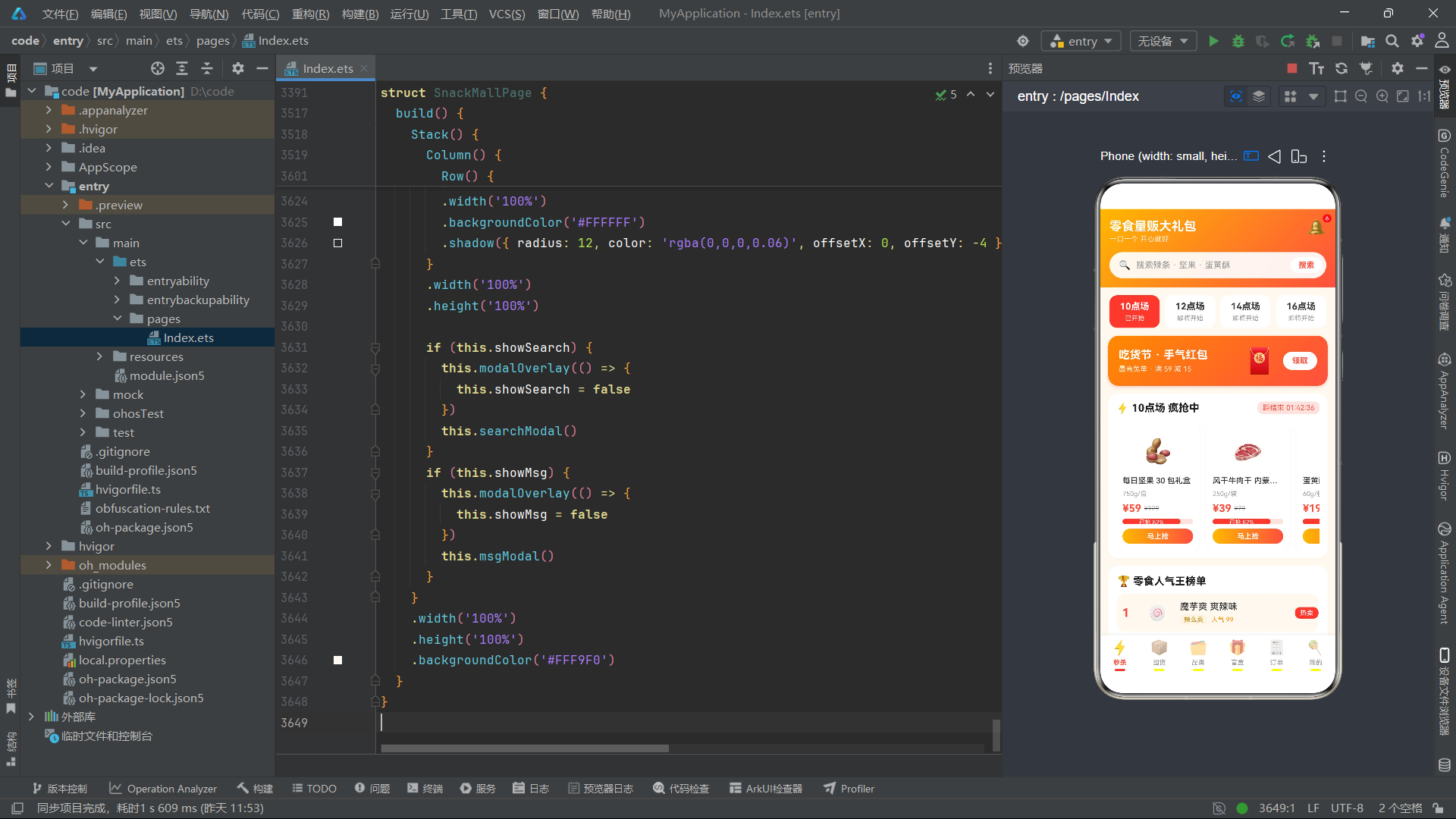
总结
本文以"零食量贩大礼包"应用为完整案例,系统性地剖析了在 HarmonyOS 6.1.1 平台上基于 HarmonyOS ArkTS API 24 构建复杂商业级移动应用的架构设计与工程实现。该应用以明黄 × 红的双色渐变主题为核心视觉语言,通过 14 个接口定义、7 个全局纯函数、6 个 @Component 组件和 1 个 @Entry 主入口,构建了涵盖场次秒杀、囤货库存管理、品类筛选、盲盒抽赏、订单流转和用户中心六大业务模块的完整应用体系。
在数据建模层面,应用通过 14 个 interface 定义了从秒杀场次到用户地址的全部业务实体,每个接口的字段设计都紧密贴合 UI 展示需求。例如 SnackMeta 的 sold 和 total 字段直接驱动进度条的渲染,StockMeta 的 stock 和 warning 字段通过三级颜色映射实现库存健康度的可视化,PrizeMeta 的 level 字段通过 levelColor 函数统一映射为视觉色值。这种"接口即视图模型"的设计理念,使得数据结构与 UI 呈现之间形成了清晰的映射关系,降低了维护成本。
在状态管理层面,所有组件均采用 @State 装饰器管理响应式状态,并严格遵循不可变更新模式——所有数组操作都通过构建新数组并整体赋值的方式触发 UI 重新渲染。无论是囤货 Tab 的 eatOne 方法(逐项遍历构建新数组)、盲盒 Tab 的 openBox 方法(头部插入法构建新数组),还是我的 Tab 的 saveAddr 方法(追加法构建新数组),都保持了统一的状态更新范式。这种一致性不仅确保了 ArkTS 状态追踪机制的正确性,也使得代码具有高度的可预测性和可测试性。
在交互设计层面,应用构建了统一的弹窗体系——每个组件都定义了 modalOverlay 作为半透明遮罩层,通过布尔状态变量控制弹窗的显示与隐藏,点击遮罩层关闭弹窗。应用中的弹窗涵盖了提醒、详情、表单输入、确认删除、成功提示等多种交互类型,且不同组件中的同类弹窗在布局结构和样式声明上保持了高度一致性。盲盒 Tab 的开盒弹窗 -> 结果弹窗 -> 开盒弹窗的连续切换交互,以及订单 Tab 退款弹窗中的单选列表交互,展示了 ArkTS 在复杂交互场景下的表达力。
在数据可视化层面,应用通过纯 ArkTS 组件实现了进度条和柱状图两种数据可视化形态,无需依赖第三方图表库。秒杀卡片的进度条通过嵌套 Column 和 Row 配合 width 百分比实现;囤货清单的库存进度条通过 stockColor 和 stockPct 函数实现动态着色和宽度;订单 Tab 的消费柱状图通过 spendBarH 函数将金额映射为像素高度,配合 linearGradient 渐变填充和 alignItems(VerticalAlign.Bottom) 底部对齐实现标准柱状图布局。这些实现方案充分展示了 ArkTS 声明式 UI 在数据可视化领域的灵活性和表现力。
HarmonyOS 6.1.1 与 HarmonyOS ArkTS API 24 的组合为开发者提供了从底层框架到 UI 组件的完整工具链。通过 @Component/@Entry/@State/@Builder 装饰器的有机组合,开发者可以以声明式的方式构建出结构清晰、交互丰富、状态可控的复杂应用界面。本文案例的六 Tab 架构、14 接口数据模型、7 个纯函数逻辑层和多弹窗交互体系,为在鸿蒙生态中构建同类商业应用提供了可复用的设计参考和工程实践模板。

讨论HarmonyOS开发技术,专注于API与组件、DevEco Studio、测试、元服务和应用上架分发等。
更多推荐


 1
1 0
0- 0


 已为社区贡献2条内容

所有评论(0)