HarmonyOS ArkUI 拖拽事件(Drag & Drop)全面解析与实战演示
文章目录
一、拖拽事件核心概念
1.1 拖拽事件生命周期
ArkUI 拖拽事件体系由 6 个回调 组成,覆盖完整的拖拽生命周期:
用户长按/按下组件
        ↓
  onDragStart(拖拽源)  ← 拖拽开始,可返回自定义预览组件
        ↓
  [进入目标区域] onDragEnter(目标组件)
        ↓
  onDragMove(目标组件)  ← 在目标区域内持续移动
        ↓
  [离开目标区域] onDragLeave(目标组件)
        ↓
  onDrop(目标组件)     ← 松手放置,处理数据接收
        ↓
  onDragEnd(拖拽源)    ← 整个拖拽结束,清理状态
各回调触发时机与职责:
| 事件回调 | 挂载位置 | 触发时机 | 核心职责 |
|---|---|---|---|
onDragStart |
拖拽源 | 达到拖拽阈值后首次触发 | 返回预览 Builder,初始化数据 |
onDragEnter |
目标区域 | 拖拽项进入目标组件区域 | 高亮目标,提示可放置 |
onDragMove |
目标区域 | 在目标区域内持续移动 | 实时获取位置,更新插入点 |
onDragLeave |
目标区域 | 拖拽项离开目标组件区域 | 取消高亮,恢复原始状态 |
onDrop |
目标区域 | 在目标区域松手释放 | 接收数据,执行放置业务逻辑 |
onDragEnd |
拖拽源 | 整个拖拽流程结束 | 清理状态,处理移动/复制后的源数据 |
1.2 拖拽事件与手势事件对比
| 对比项 | 拖拽事件 | 手势 PanGesture |
触摸 onTouch |
|---|---|---|---|
| 跨组件数据传递 | ✅ DragEvent 携带数据 |
❌ 无 | ❌ 无 |
| 系统视觉反馈 | ✅ 自动生成/自定义预览 | ❌ 需手动实现 | ❌ 需手动实现 |
| 放置区域识别 | ✅ onDragEnter/Leave |
❌ 需手动碰撞检测 | ❌ 需手动碰撞检测 |
| 触发阈值 | 长按后移动一定距离 | 按住移动超过阈值 | 任意触摸动作 |
| 典型场景 | 文件移动、列表排序、看板 | 自定义滑动/拖动 | 精细触摸控制 |
选型建议:需要跨组件数据传递、系统级视觉反馈的场景用拖拽事件;需要精细控制拖动过程(自定义动效、吸附效果)用
PanGesture;两者可配合使用。
二、核心 API 详解
2.1 开启拖拽能力
组件默认不可拖拽,需通过 .draggable(true) 显式开启:
// 开启组件的可拖拽能力
Column()
  .draggable(true)
  .onDragStart((event: DragEvent) => {
    console.info('拖拽开始')
  })
注意:
Text、Image、TextInput等部分组件默认draggable为true,会自动携带文本/图片内容。其他容器组件需手动开启。
2.2 DragEvent 完整结构
DragEvent 是所有拖拽回调的参数类型,包含以下字段与方法:
// DragEvent 完整接口说明(ArkTS)
interface DragEvent {
  // ── 坐标信息 ────────────────────────────────────
  getX(): number          // 相对于触发组件左上角的 X 坐标(vp)
  getY(): number          // 相对于触发组件左上角的 Y 坐标(vp)
  getWindowX(): number    // 相对于应用窗口左上角的 X 坐标(vp)
  getWindowY(): number    // 相对于应用窗口左上角的 Y 坐标(vp)
  getDisplayX(): number   // 相对于物理屏幕左上角的 X 坐标(vp)
  getDisplayY(): number   // 相对于物理屏幕左上角的 Y 坐标(vp)

  // ── 数据操作 ────────────────────────────────────
  setData(unifiedData: UnifiedData): void   // 设置拖拽携带的数据(onDragStart 中调用)
  getData(): UnifiedData                    // 获取拖拽携带的数据(onDrop 中调用)

  // ── 放置控制 ────────────────────────────────────
  setResult(dragResult: DragResult): void   // 设置目标区域是否接受放置(onDragEnter/onDragMove/onDrop)
  getResult(): DragResult                   // 获取拖拽结果(onDragEnd 中调用)

  // ── 预览控制 ────────────────────────────────────
  useCustomDropAnimation: boolean           // 是否使用自定义落点动画
}
2.3 DragResult 枚举
DragResult 标识拖拽放置结果,用于 setResult() 和 getResult():
| 枚举值 | 说明 | 使用场景 |
|---|---|---|
DragResult.DRAG_SUCCESSFUL |
放置成功 | 目标区域接受了放置操作 |
DragResult.DRAG_FAILED |
放置失败 | 目标区域拒绝放置(类型不匹配等) |
DragResult.DRAG_CANCELED |
拖拽取消 | 用户中途取消,或未落在有效目标上 |
DragResult.DROP_ENABLED |
目标允许放置 | onDragEnter/Move 中调用 setResult |
DragResult.DROP_DISABLED |
目标禁止放置 | onDragEnter/Move 中调用 setResult |
// 在目标区域中控制是否允许放置
Column()
  .onDragEnter((event: DragEvent) => {
    // 通知系统此区域允许放置(显示绿色高亮指示)
    event.setResult(DragResult.DROP_ENABLED)
  })
  .onDrop((event: DragEvent) => {
    // 放置完成,标记为成功
    event.setResult(DragResult.DRAG_SUCCESSFUL)
  })
2.4 UnifiedData 数据传递
ArkUI 拖拽使用 UDMF(统一数据管理框架) 的 UnifiedData 在拖拽源和目标之间传递数据:
import { unifiedDataChannel, uniformTypeDescriptor } from '@kit.ArkData'

// 拖拽源:设置数据
.onDragStart((event: DragEvent) => {
  const text = new unifiedDataChannel.PlainText()
  text.textContent = '这是拖拽携带的文本内容'
  const unifiedData = new unifiedDataChannel.UnifiedData(text)
  event.setData(unifiedData)
})

// 放置目标:获取数据
.onDrop((event: DragEvent) => {
  const data: UnifiedData = event.getData()
  const records = data.getRecords()
  if (records.length > 0 && records[0].getType() === uniformTypeDescriptor.UniformDataType.PLAIN_TEXT) {
    const plainText = records[0] as unifiedDataChannel.PlainText
    console.info('收到文本:' + plainText.textContent)
  }
})
三、基础用法:拖拽源与目标区域
3.1 可运行完整示例
以下代码展示最基础的拖拽交互:一个可拖拽的卡片,拖入目标区域后显示接收内容:
// entry/src/main/ets/pages/Index.ets
import { unifiedDataChannel } from '@kit.ArkData'

@Entry
@Component
struct BasicDragDropDemo {
  @State dragLog: string[] = ['等待拖拽操作...']
  @State isDropZoneActive: boolean = false
  @State droppedText: string = '(尚未接收)'
  @State isDragging: boolean = false
  @State cardOpacity: number = 1.0

  private appendLog(msg: string): void {
    this.dragLog = [msg, ...this.dragLog.slice(0, 9)]
  }

  build() {
    Column({ space: 16 }) {
      Text('拖拽事件基础演示')
        .fontSize(22).fontWeight(FontWeight.Bold).margin({ top: 24 })

      // 拖拽源卡片
      Column({ space: 8 }) {
        Text('📦').fontSize(36)
        Text('拖拽源').fontSize(14).fontColor('#1565C0').fontWeight(FontWeight.Bold)
        Text('长按后拖动此卡片').fontSize(11).fontColor('#90CAF9')
      }
      .width(140).height(100)
      .justifyContent(FlexAlign.Center)
      .alignItems(HorizontalAlign.Center)
      .backgroundColor('#E3F2FD')
      .borderRadius(16)
      .border({ width: 2, color: '#90CAF9', style: BorderStyle.Solid })
      .opacity(this.isDragging ? 0.4 : 1.0)
      .animation({ duration: 200, curve: Curve.EaseOut })
      .draggable(true)
      .onDragStart((event: DragEvent) => {
        this.isDragging = true
        this.appendLog('▶ onDragStart:拖拽开始')

        // 通过 UDMF 携带文本数据
        const text = new unifiedDataChannel.PlainText()
        text.textContent = '来自拖拽源的数据'
        const unifiedData = new unifiedDataChannel.UnifiedData(text)
        event.setData(unifiedData)
      })
      .onDragEnd((event: DragEvent) => {
        this.isDragging = false
        const result = event.getResult()
        if (result === DragResult.DRAG_SUCCESSFUL) {
          this.appendLog('■ onDragEnd:放置成功 ✅')
        } else if (result === DragResult.DRAG_CANCELED) {
          this.appendLog('■ onDragEnd:拖拽取消 ❌')
        } else {
          this.appendLog('■ onDragEnd:放置失败 ⚠️')
        }
      })

      // 放置目标区域
      Column({ space: 8 }) {
        Text(this.isDropZoneActive ? '🎯 松手放置!' : '📥 放置目标区域')
          .fontSize(15).fontColor(this.isDropZoneActive ? Color.White : '#666666')
          .fontWeight(FontWeight.Bold)
        Text(this.droppedText)
          .fontSize(12)
          .fontColor(this.isDropZoneActive ? '#E3F2FD' : '#BDBDBD')
          .textAlign(TextAlign.Center)
          .width('80%')
      }
      .width('80%').height(120)
      .justifyContent(FlexAlign.Center)
      .alignItems(HorizontalAlign.Center)
      .backgroundColor(this.isDropZoneActive ? '#1565C0' : '#F5F5F5')
      .borderRadius(16)
      .border({
        width: 2,
        color: this.isDropZoneActive ? '#1565C0' : '#BDBDBD',
        style: this.isDropZoneActive ? BorderStyle.Solid : BorderStyle.Dashed
      })
      .animation({ duration: 200, curve: Curve.EaseOut })
      .onDragEnter((event: DragEvent) => {
        this.isDropZoneActive = true
        event.setResult(DragResult.DROP_ENABLED)
        this.appendLog('→ onDragEnter:进入目标区域')
      })
      .onDragMove((event: DragEvent) => {
        // 实时记录位置(节流:每次移动不重复写相同日志)
        event.setResult(DragResult.DROP_ENABLED)
      })
      .onDragLeave((event: DragEvent) => {
        this.isDropZoneActive = false
        this.appendLog('← onDragLeave:离开目标区域')
      })
      .onDrop((event: DragEvent) => {
        this.isDropZoneActive = false
        event.setResult(DragResult.DRAG_SUCCESSFUL)

        // 读取数据
        try {
          const data = event.getData()
          const records = data.getRecords()
          if (records.length > 0) {
            const plain = records[0] as unifiedDataChannel.PlainText
            this.droppedText = plain.textContent
          }
        } catch (e) {
          this.droppedText = '(数据读取异常)'
        }
        this.appendLog(`✅ onDrop:放置成功,数据="${this.droppedText}"`)
      })

      // 事件日志
      Column({ space: 4 }) {
        ForEach(this.dragLog, (item: string, idx: number) => {
          Text(item)
            .fontSize(12)
            .fontColor(idx === 0 ? '#1565C0' : '#BDBDBD')
            .width('100%')
        })
      }
      .width('90%').padding(12)
      .backgroundColor('#F9F9F9').borderRadius(12)
      .border({ width: 1, color: '#E0E0E0', style: BorderStyle.Solid })
      .alignItems(HorizontalAlign.Start)
    }
    .width('100%').height('100%')
    .alignItems(HorizontalAlign.Center)
    .backgroundColor(Color.White)
  }
}
运行效果如图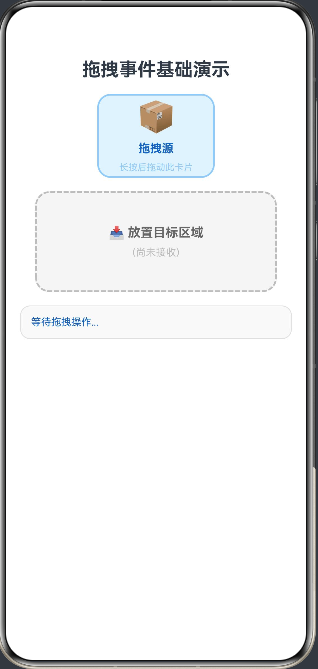
四、自定义拖拽预览(onDragStart 返回 Builder)
4.1 返回自定义预览组件
onDragStart 可以返回一个 CustomBuilder,作为拖拽过程中跟随手指的预览浮层:
// 自定义拖拽预览示例
@Entry
@Component
struct CustomPreviewDemo {
  @State draggingItem: string = ''
  @State isDragging: boolean = false

  @Builder
  DragPreview(item: string) {
    // 自定义预览:圆形徽章样式
    Stack() {
      Column()
        .width(80).height(80).borderRadius(40)
        .backgroundColor('#1565C0')
        .border({ width: 3, color: Color.White, style: BorderStyle.Solid })
        .shadow({ radius: 12, color: '#40000000', offsetX: 4, offsetY: 4 })

      Column({ space: 2 }) {
        Text('📦').fontSize(24)
        Text(item).fontSize(10).fontColor(Color.White).fontWeight(FontWeight.Bold)
      }
    }
    .width(80).height(80)
  }

  build() {
    Column({ space: 20 }) {
      Text('自定义拖拽预览演示').fontSize(20).fontWeight(FontWeight.Bold).margin({ top: 24 })

      Text(this.isDragging ? `正在拖拽:${this.draggingItem}` : '长按卡片开始拖拽')
        .fontSize(13).fontColor(this.isDragging ? '#1565C0' : '#888888')

      // 可拖拽列表
      Column({ space: 12 }) {
        ForEach(
          ['商品 A', '商品 B', '商品 C'],
          (item: string) => {
            Row({ space: 12 }) {
              Text('📦').fontSize(20)
              Text(item).fontSize(15).fontWeight(FontWeight.Medium).layoutWeight(1)
              Text('☰').fontSize(18).fontColor('#BDBDBD')
            }
            .width('90%').height(56)
            .padding({ left: 16, right: 16 })
            .backgroundColor('#F5F5F5')
            .borderRadius(12)
            .border({ width: 1, color: '#E0E0E0', style: BorderStyle.Solid })
            .draggable(true)
            .onDragStart((event: DragEvent) => {
              this.isDragging = true
              this.draggingItem = item
              // 返回自定义预览构建器
              return () => { this.DragPreview(item) }
            })
            .onDragEnd((event: DragEvent) => {
              this.isDragging = false
            })
          }
        )
      }

      Text('提示:长按列表项拖动,将看到圆形徽章样式的自定义预览')
        .fontSize(12).fontColor('#9E9E9E').textAlign(TextAlign.Center).width('90%')
    }
    .width('100%').height('100%')
    .alignItems(HorizontalAlign.Center)
    .backgroundColor(Color.White)
  }
}
运行效果如图: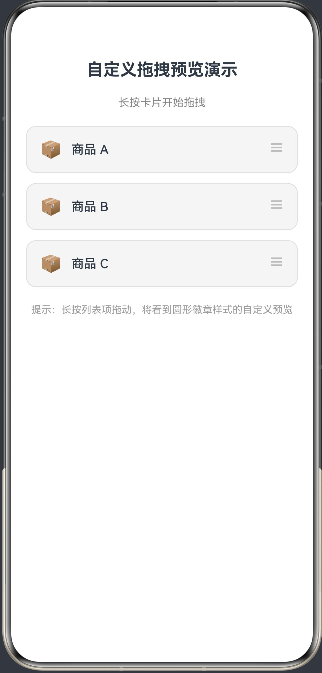
五、列表拖拽排序
5.1 实战:手动实现列表拖拽重排
以下示例实现了经典的列表拖拽排序功能,通过 onDragStart 记录拖拽源索引,onDrop 完成数组元素互换:
// entry/src/main/ets/pages/Index.ets
@Entry
@Component
struct DragSortDemo {
  @State items: string[] = ['🍎 苹果', '🍌 香蕉', '🍇 葡萄', '🍊 橙子', '🍓 草莓', '🍑 桃子']
  @State dragFromIdx: number = -1
  @State dragOverIdx: number = -1
  @State sortLog: string = '长按列表项开始拖拽排序'

  build() {
    Column({ space: 0 }) {
      // 标题栏
      Row() {
        Text('拖拽排序演示').fontSize(18).fontWeight(FontWeight.Bold).fontColor(Color.White)
      }
      .width('100%').padding({ left: 16, right: 16, top: 14, bottom: 14 })
      .backgroundColor('#1565C0')

      Text(this.sortLog)
        .fontSize(13).fontColor('#888888').textAlign(TextAlign.Center)
        .width('100%').padding({ top: 10, bottom: 10 })

      // 可拖拽排序列表
      Column({ space: 6 }) {
        ForEach(this.items, (item: string, idx: number) => {
          Row({ space: 12 }) {
            // 序号
            Text(`${idx + 1}`)
              .fontSize(12).fontColor('#BDBDBD')
              .width(24).textAlign(TextAlign.Center)

            // 拖拽把手
            Text('⠿')
              .fontSize(18).fontColor('#BDBDBD')

            // 内容
            Text(item)
              .fontSize(16).layoutWeight(1).fontWeight(FontWeight.Medium)
          }
          .width('90%').height(58)
          .padding({ left: 12, right: 16 })
          .backgroundColor(
            this.dragOverIdx === idx ? '#E3F2FD' :
            this.dragFromIdx === idx ? '#FFF9C4' : Color.White
          )
          .borderRadius(12)
          .border({
            width: this.dragOverIdx === idx ? 2 : 1,
            color: this.dragOverIdx === idx ? '#1565C0' :
                   this.dragFromIdx === idx ? '#FBC02D' : '#EEEEEE',
            style: BorderStyle.Solid
          })
          .animation({ duration: 150, curve: Curve.EaseOut })
          .shadow(this.dragFromIdx === idx ? {
            radius: 8,
            color: '#20000000',
            offsetX: 0,
            offsetY: 4
          } : { radius: 0, color: Color.Transparent, offsetX: 0, offsetY: 0 })
          .draggable(true)
          .onDragStart((event: DragEvent) => {
            this.dragFromIdx = idx
            this.sortLog = `开始拖拽:${item}`
            event.setResult(DragResult.DRAG_SUCCESSFUL)
          })
          .onDragEnd((event: DragEvent) => {
            this.dragFromIdx = -1
            this.dragOverIdx = -1
          })
          .onDragEnter((event: DragEvent) => {
            if (idx !== this.dragFromIdx) {
              this.dragOverIdx = idx
              event.setResult(DragResult.DROP_ENABLED)
            }
          })
          .onDragLeave((event: DragEvent) => {
            if (this.dragOverIdx === idx) {
              this.dragOverIdx = -1
            }
          })
          .onDrop((event: DragEvent) => {
            if (this.dragFromIdx !== -1 && this.dragFromIdx !== idx) {
              // 交换两个元素
              const fromIdx = this.dragFromIdx
              const toIdx = idx
              const newItems = [...this.items]
              const temp = newItems[fromIdx]
              newItems[fromIdx] = newItems[toIdx]
              newItems[toIdx] = temp
              this.items = newItems
              this.sortLog = `✅ 已将 "${temp}" 移到第 ${toIdx + 1} 位`
            }
            event.setResult(DragResult.DRAG_SUCCESSFUL)
            this.dragOverIdx = -1
          })
        })
      }
      .width('100%').padding({ top: 8, bottom: 16 })
      .alignItems(HorizontalAlign.Center)
    }
    .width('100%').height('100%')
    .backgroundColor('#FAFAFA')
  }
}
运行效果如图: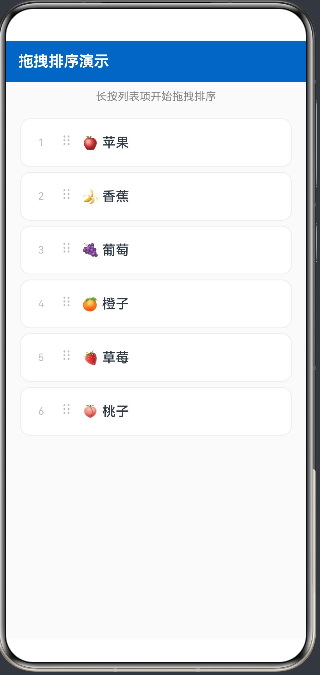
六、跨区域数据传递:拖拽看板
6.1 实战:Kanban 看板拖拽
以下示例模拟看板(Kanban)应用,任务卡片可在"待办"、“进行中”、"已完成"三个泳道间自由拖拽:
// entry/src/main/ets/pages/Index.ets
import { unifiedDataChannel } from '@kit.ArkData'

interface TaskItem {
  id: number
  title: string
  tag: string
}

@Entry
@Component
struct KanbanDemo {
  @State todoList: TaskItem[] = [
    { id: 1, title: '设计 UI 原型', tag: '设计' },
    { id: 2, title: '编写 API 文档', tag: '文档' },
    { id: 3, title: '单元测试', tag: '测试' },
  ]
  @State doingList: TaskItem[] = [
    { id: 4, title: '实现拖拽功能', tag: '开发' },
    { id: 5, title: '性能优化', tag: '优化' },
  ]
  @State doneList: TaskItem[] = [
    { id: 6, title: '需求评审', tag: '管理' },
  ]

  @State dragItem: TaskItem | null = null
  @State dragFromCol: string = ''

  // 各列悬停高亮状态
  @State todoHover: boolean = false
  @State doingHover: boolean = false
  @State doneHover: boolean = false

  private setColHover(col: string, val: boolean): void {
    if (col === 'todo') this.todoHover = val
    else if (col === 'doing') this.doingHover = val
    else if (col === 'done') this.doneHover = val
  }

  private removeItem(col: string, id: number): void {
    if (col === 'todo') this.todoList = this.todoList.filter(t => t.id !== id)
    else if (col === 'doing') this.doingList = this.doingList.filter(t => t.id !== id)
    else if (col === 'done') this.doneList = this.doneList.filter(t => t.id !== id)
  }

  private addItem(col: string, item: TaskItem): void {
    if (col === 'todo') this.todoList = [...this.todoList, item]
    else if (col === 'doing') this.doingList = [...this.doingList, item]
    else if (col === 'done') this.doneList = [...this.doneList, item]
  }

  private getColColor(col: string): string {
    if (col === 'todo') return '#EF9A9A'
    if (col === 'doing') return '#90CAF9'
    return '#A5D6A7'
  }

  @Builder
  TaskCard(item: TaskItem, col: string) {
    Column({ space: 6 }) {
      Row() {
        Text(item.tag)
          .fontSize(10).fontColor(Color.White)
          .padding({ left: 8, right: 8, top: 3, bottom: 3 })
          .backgroundColor(this.getColColor(col))
          .borderRadius(6)
        Blank()
        Text('⠿').fontSize(14).fontColor('#BDBDBD')
      }
      .width('100%')
      Text(item.title).fontSize(13).fontWeight(FontWeight.Medium).width('100%')
    }
    .width('100%')
    .padding(12)
    .backgroundColor(Color.White)
    .borderRadius(10)
    .border({ width: 1, color: '#EEEEEE', style: BorderStyle.Solid })
    .shadow({ radius: 4, color: '#10000000', offsetX: 0, offsetY: 2 })
    .draggable(true)
    .onDragStart((event: DragEvent) => {
      this.dragItem = item
      this.dragFromCol = col
      // 通过 UDMF 传递任务 ID
      const text = new unifiedDataChannel.PlainText()
      text.textContent = item.id.toString()
      event.setData(new unifiedDataChannel.UnifiedData(text))
      event.setResult(DragResult.DRAG_SUCCESSFUL)
    })
    .onDragEnd((event: DragEvent) => {
      this.dragItem = null
      this.dragFromCol = ''
    })
  }

  @Builder
  KanbanColumn(title: string, colKey: string, list: TaskItem[], isHover: boolean) {
    Column({ space: 8 }) {
      // 列标题
      Row() {
        Text(title).fontSize(14).fontWeight(FontWeight.Bold)
        Blank()
        Text(list.length.toString())
          .fontSize(12).fontColor(Color.White)
          .width(22).height(22).borderRadius(11)
          .textAlign(TextAlign.Center)
          .backgroundColor(this.getColColor(colKey))
      }
      .width('100%').padding({ left: 4, right: 4 })

      // 任务卡片列表
      Column({ space: 8 }) {
        ForEach(list, (item: TaskItem) => {
          this.TaskCard(item, colKey)
        })

        // 空状态提示
        if (list.length === 0) {
          Column() {
            Text('拖拽任务到此处').fontSize(12).fontColor('#BDBDBD')
          }
          .width('100%').height(60)
          .justifyContent(FlexAlign.Center)
          .backgroundColor(isHover ? '#F0F8FF' : '#FAFAFA')
          .borderRadius(8)
          .border({ width: 1, color: isHover ? '#90CAF9' : '#EEEEEE', style: BorderStyle.Dashed })
        }
      }
      .width('100%')
    }
    .width('30%')
    .padding(10)
    .backgroundColor(isHover ? '#F0F8FF' : '#F5F5F5')
    .borderRadius(14)
    .border({
      width: isHover ? 2 : 1,
      color: isHover ? '#42A5F5' : '#E0E0E0',
      style: BorderStyle.Solid
    })
    .animation({ duration: 200, curve: Curve.EaseOut })
    .onDragEnter((event: DragEvent) => {
      this.setColHover(colKey, true)
      event.setResult(DragResult.DROP_ENABLED)
    })
    .onDragLeave((event: DragEvent) => {
      this.setColHover(colKey, false)
    })
    .onDrop((event: DragEvent) => {
      this.setColHover(colKey, false)
      if (this.dragItem !== null && this.dragFromCol !== colKey) {
        // 从源列移除,加入目标列
        this.removeItem(this.dragFromCol, this.dragItem.id)
        this.addItem(colKey, this.dragItem)
        event.setResult(DragResult.DRAG_SUCCESSFUL)
      }
    })
  }

  build() {
    Column({ space: 0 }) {
      // 标题
      Text('拖拽看板演示(Kanban)')
        .fontSize(18).fontWeight(FontWeight.Bold).fontColor(Color.White)
        .width('100%').textAlign(TextAlign.Center)
        .padding({ top: 16, bottom: 14 })
        .backgroundColor('#1565C0')

      Text('长按任务卡片,拖到其他泳道完成状态流转')
        .fontSize(12).fontColor('#888888').textAlign(TextAlign.Center)
        .width('100%').padding({ top: 8, bottom: 8 })
        .backgroundColor('#FAFAFA')
        .border({ width: { bottom: 1 }, color: '#E0E0E0', style: BorderStyle.Solid })

      // 三列看板
      Row({ space: 0 }) {
        Scroll() {
          this.KanbanColumn('📋 待办', 'todo', this.todoList, this.todoHover)
        }
        .layoutWeight(1).height('100%')

        Divider().vertical(true).strokeWidth(1).color('#E0E0E0').height('100%')

        Scroll() {
          this.KanbanColumn('⚡ 进行中', 'doing', this.doingList, this.doingHover)
        }
        .layoutWeight(1).height('100%')

        Divider().vertical(true).strokeWidth(1).color('#E0E0E0').height('100%')

        Scroll() {
          this.KanbanColumn('✅ 已完成', 'done', this.doneList, this.doneHover)
        }
        .layoutWeight(1).height('100%')
      }
      .layoutWeight(1).width('100%')
      .padding(8)
    }
    .width('100%').height('100%')
    .backgroundColor('#FAFAFA')
  }
}
七、综合实战:完整拖拽事件演示页面
7.1 功能说明
以下综合示例整合了本文所有核心知识点,单个页面通过 Tab 切换演示四个场景:
- 基础拖拽:拖拽源 + 目标区域,完整六事件日志,UDMF 数据传递
- 列表排序:水果列表拖拽重排,拖拽中高亮目标行
- 看板流转:三列看板任务卡片跨列拖拽
- 轨迹追踪:
onDragMove实时坐标三套坐标系 + 轨迹可视化
7.2 完整可运行代码
// entry/src/main/ets/pages/Index.ets
import { unifiedDataChannel } from '@kit.ArkData'

interface TaskCard {
  id: number
  title: string
  tag: string
}

@Entry
@Component
struct DragDropAllDemo {
  // ── Tab 控制 ──────────────────────────────────────
  @State activeTab: number = 0
  private tabs: string[] = ['📦 基础', '📋 排序', '🗂️ 看板', '📍 轨迹']

  // ── Tab0:基础拖拽 ────────────────────────────────
  @State basicLog: string[] = ['等待拖拽...']
  @State basicDropZone: boolean = false
  @State basicDropText: string = '(尚未接收)'
  @State basicDragging: boolean = false

  // ── Tab1:列表排序 ────────────────────────────────
  @State sortItems: string[] = ['🍎 苹果', '🍌 香蕉', '🍇 葡萄', '🍊 橙子', '🍓 草莓']
  @State sortFrom: number = -1
  @State sortOver: number = -1

  // ── Tab2:看板 ────────────────────────────────────
  @State kanbanTodo: TaskCard[] = [
    { id: 1, title: '设计原型', tag: '设计' },
    { id: 2, title: '写文档', tag: '文档' },
  ]
  @State kanbanDoing: TaskCard[] = [
    { id: 3, title: '实现拖拽', tag: '开发' },
  ]
  @State kanbanDone: TaskCard[] = [
    { id: 4, title: '需求评审', tag: '管理' },
  ]
  @State kbDragItem: TaskCard | null = null
  @State kbDragFrom: string = ''
  @State kbHover: string = ''

  // ── Tab3:轨迹 ────────────────────────────────────
  @State trackX: number = 0
  @State trackY: number = 0
  @State trackWinX: number = 0
  @State trackWinY: number = 0
  @State trackMoveCount: number = 0
  @State trackPoints: Array<{ x: number, y: number }> = []
  @State isTracking: boolean = false

  private appendBasicLog(msg: string): void {
    this.basicLog = [msg, ...this.basicLog.slice(0, 8)]
  }

  private kbRemove(col: string, id: number): void {
    if (col === 'todo') this.kanbanTodo = this.kanbanTodo.filter(t => t.id !== id)
    else if (col === 'doing') this.kanbanDoing = this.kanbanDoing.filter(t => t.id !== id)
    else if (col === 'done') this.kanbanDone = this.kanbanDone.filter(t => t.id !== id)
  }

  private kbAdd(col: string, item: TaskCard): void {
    if (col === 'todo') this.kanbanTodo = [...this.kanbanTodo, item]
    else if (col === 'doing') this.kanbanDoing = [...this.kanbanDoing, item]
    else if (col === 'done') this.kanbanDone = [...this.kanbanDone, item]
  }

  @Builder
  TabBasic() {
    Column({ space: 14 }) {
      // 拖拽源
      Column({ space: 6 }) {
        Text('📦').fontSize(32)
        Text('拖拽源').fontSize(13).fontColor('#1565C0').fontWeight(FontWeight.Bold)
      }
      .width(120).height(90)
      .justifyContent(FlexAlign.Center).alignItems(HorizontalAlign.Center)
      .backgroundColor('#E3F2FD').borderRadius(14)
      .border({ width: 2, color: '#90CAF9', style: BorderStyle.Solid })
      .opacity(this.basicDragging ? 0.35 : 1.0)
      .animation({ duration: 200, curve: Curve.EaseOut })
      .draggable(true)
      .onDragStart((event: DragEvent) => {
        this.basicDragging = true
        this.appendBasicLog('▶ onDragStart')
        const text = new unifiedDataChannel.PlainText()
        text.textContent = '拖拽数据_' + Date.now()
        event.setData(new unifiedDataChannel.UnifiedData(text))
      })
      .onDragEnd((event: DragEvent) => {
        this.basicDragging = false
        const r = event.getResult()
        this.appendBasicLog(`■ onDragEnd:${r === DragResult.DRAG_SUCCESSFUL ? '成功' : '取消/失败'}`)
      })

      // 放置区
      Column({ space: 6 }) {
        Text(this.basicDropZone ? '松手放置' : '📥 目标区域').fontSize(14)
          .fontColor(this.basicDropZone ? Color.White : '#666666').fontWeight(FontWeight.Bold)
        Text(this.basicDropText).fontSize(11)
          .fontColor(this.basicDropZone ? '#E3F2FD' : '#BDBDBD').textAlign(TextAlign.Center).width('80%')
      }
      .width('80%').height(100)
      .justifyContent(FlexAlign.Center).alignItems(HorizontalAlign.Center)
      .backgroundColor(this.basicDropZone ? '#1565C0' : '#F5F5F5')
      .borderRadius(14)
      .border({ width: 2, color: this.basicDropZone ? '#1565C0' : '#BDBDBD',
        style: this.basicDropZone ? BorderStyle.Solid : BorderStyle.Dashed })
      .animation({ duration: 200, curve: Curve.EaseOut })
      .onDragEnter((event: DragEvent) => {
        this.basicDropZone = true
        event.setResult(DragResult.DROP_ENABLED)
        this.appendBasicLog('→ onDragEnter')
      })
      .onDragLeave((event: DragEvent) => {
        this.basicDropZone = false
        this.appendBasicLog('← onDragLeave')
      })
      .onDrop((event: DragEvent) => {
        this.basicDropZone = false
        event.setResult(DragResult.DRAG_SUCCESSFUL)
        try {
          const records = event.getData().getRecords()
          if (records.length > 0) {
            this.basicDropText = (records[0] as unifiedDataChannel.PlainText).textContent
          }
        } catch (_) {}
        this.appendBasicLog(`✅ onDrop:"${this.basicDropText}"`)
      })

      // 事件日志
      Column({ space: 4 }) {
        ForEach(this.basicLog, (item: string, idx: number) => {
          Text(item).fontSize(11).fontColor(idx === 0 ? '#1565C0' : '#BDBDBD').width('100%')
        })
      }
      .width('90%').padding(12).backgroundColor('#F9F9F9').borderRadius(12)
      .border({ width: 1, color: '#E0E0E0', style: BorderStyle.Solid })
      .alignItems(HorizontalAlign.Start)
    }
    .width('100%').alignItems(HorizontalAlign.Center).padding({ top: 14 })
  }

  @Builder
  TabSort() {
    Column({ space: 8 }) {
      Text('长按列表项拖拽排序').fontSize(13).fontColor('#888888').margin({ top: 10 })
      Column({ space: 6 }) {
        ForEach(this.sortItems, (item: string, idx: number) => {
          Row({ space: 10 }) {
            Text(`${idx + 1}`).fontSize(12).fontColor('#BDBDBD').width(20).textAlign(TextAlign.Center)
            Text('⠿').fontSize(16).fontColor('#BDBDBD')
            Text(item).fontSize(15).layoutWeight(1)
          }
          .width('90%').height(52).padding({ left: 12, right: 16 })
          .backgroundColor(this.sortOver === idx ? '#E3F2FD' : this.sortFrom === idx ? '#FFF9C4' : Color.White)
          .borderRadius(12)
          .border({ width: this.sortOver === idx ? 2 : 1,
            color: this.sortOver === idx ? '#1565C0' : '#EEEEEE', style: BorderStyle.Solid })
          .animation({ duration: 120, curve: Curve.EaseOut })
          .draggable(true)
          .onDragStart((event: DragEvent) => { this.sortFrom = idx })
          .onDragEnd((event: DragEvent) => { this.sortFrom = -1; this.sortOver = -1 })
          .onDragEnter((event: DragEvent) => {
            if (idx !== this.sortFrom) {
              this.sortOver = idx
              event.setResult(DragResult.DROP_ENABLED)
            }
          })
          .onDragLeave((event: DragEvent) => {
            if (this.sortOver === idx) this.sortOver = -1
          })
          .onDrop((event: DragEvent) => {
            if (this.sortFrom !== -1 && this.sortFrom !== idx) {
              const arr = [...this.sortItems]
              const t = arr[this.sortFrom]; arr[this.sortFrom] = arr[idx]; arr[idx] = t
              this.sortItems = arr
            }
            event.setResult(DragResult.DRAG_SUCCESSFUL)
            this.sortOver = -1
          })
        })
      }
    }
    .width('100%').alignItems(HorizontalAlign.Center)
  }

  @Builder
  KanbanCol(title: string, colKey: string, list: TaskCard[]) {
    const hover: boolean = this.kbHover === colKey
    Column({ space: 6 }) {
      Row() {
        Text(title).fontSize(13).fontWeight(FontWeight.Bold)
        Blank()
        Text(list.length.toString()).fontSize(11).fontColor(Color.White)
          .width(20).height(20).borderRadius(10).textAlign(TextAlign.Center).backgroundColor('#90CAF9')
      }.width('100%').padding({ left: 4, right: 4 })

      Column({ space: 6 }) {
        ForEach(list, (task: TaskCard) => {
          Column({ space: 4 }) {
            Text(task.tag).fontSize(9).fontColor(Color.White)
              .padding({ left: 6, right: 6, top: 2, bottom: 2 }).backgroundColor('#90CAF9').borderRadius(4)
            Text(task.title).fontSize(12).fontWeight(FontWeight.Medium).width('100%')
          }
          .width('100%').padding(10).backgroundColor(Color.White).borderRadius(8)
          .border({ width: 1, color: '#EEEEEE', style: BorderStyle.Solid })
          .draggable(true)
          .onDragStart((event: DragEvent) => {
            this.kbDragItem = task
            this.kbDragFrom = colKey
            event.setResult(DragResult.DRAG_SUCCESSFUL)
          })
          .onDragEnd((event: DragEvent) => {
            this.kbDragItem = null
            this.kbDragFrom = ''
          })
        })
        if (list.length === 0) {
          Text('拖入此处').fontSize(11).fontColor('#BDBDBD')
            .width('100%').height(44)
            .textAlign(TextAlign.Center)
            .backgroundColor(hover ? '#EEF6FF' : '#FAFAFA')
            .borderRadius(8)
            .border({ width: 1, color: hover ? '#90CAF9' : '#E0E0E0', style: BorderStyle.Dashed })
        }
      }.width('100%')
    }
    .width('100%').padding(8)
    .backgroundColor(hover ? '#F0F8FF' : '#F5F5F5')
    .borderRadius(12)
    .border({ width: hover ? 2 : 1, color: hover ? '#42A5F5' : '#E0E0E0', style: BorderStyle.Solid })
    .animation({ duration: 180, curve: Curve.EaseOut })
    .onDragEnter((event: DragEvent) => { this.kbHover = colKey; event.setResult(DragResult.DROP_ENABLED) })
    .onDragLeave((event: DragEvent) => { if (this.kbHover === colKey) this.kbHover = '' })
    .onDrop((event: DragEvent) => {
      this.kbHover = ''
      if (this.kbDragItem !== null && this.kbDragFrom !== colKey) {
        this.kbRemove(this.kbDragFrom, this.kbDragItem.id)
        this.kbAdd(colKey, this.kbDragItem)
        event.setResult(DragResult.DRAG_SUCCESSFUL)
      }
    })
  }

  @Builder
  TabKanban() {
    Row({ space: 6 }) {
      this.KanbanCol('📋 待办', 'todo', this.kanbanTodo)
      this.KanbanCol('⚡ 进行', 'doing', this.kanbanDoing)
      this.KanbanCol('✅ 完成', 'done', this.kanbanDone)
    }
    .width('100%').padding({ left: 8, right: 8, top: 10 })
  }

  @Builder
  TabTrack() {
    Column({ space: 12 }) {
      Row({ space: 20 }) {
        Column({ space: 3 }) {
          Text('组件坐标').fontSize(10).fontColor('#9E9E9E')
          Text(`(${this.trackX.toFixed(0)},${this.trackY.toFixed(0)})`).fontSize(12).fontColor('#F44336')
        }
        Column({ space: 3 }) {
          Text('窗口坐标').fontSize(10).fontColor('#9E9E9E')
          Text(`(${this.trackWinX.toFixed(0)},${this.trackWinY.toFixed(0)})`).fontSize(12).fontColor('#FF9800')
        }
        Column({ space: 3 }) {
          Text('移动次数').fontSize(10).fontColor('#9E9E9E')
          Text(this.trackMoveCount.toString()).fontSize(12).fontColor('#4CAF50').fontWeight(FontWeight.Bold)
        }
      }.margin({ top: 10 })

      Stack() {
        Column().width('100%').height('100%').backgroundColor('#0D1B2A').borderRadius(12)
        ForEach(this.trackPoints, (pt: { x: number, y: number }, i: number) => {
          Column().width(6).height(6).borderRadius(3).backgroundColor('#42A5F5')
            .opacity((i + 1) / this.trackPoints.length)
            .position({ x: pt.x - 3, y: pt.y - 3 })
        })
        if (this.isTracking) {
          Column().width(14).height(14).borderRadius(7).backgroundColor('#42A5F5')
            .border({ width: 2, color: Color.White, style: BorderStyle.Solid })
            .position({ x: this.trackX - 7, y: this.trackY - 7 })
        }
        if (!this.isTracking) {
          Text('拖入查看轨迹').fontSize(13).fontColor('#42A5F5')
        }
      }
      .width('90%').height(220).borderRadius(12)
      .border({ width: 2, color: '#1E3A5F', style: BorderStyle.Solid })
      .onDragEnter((event: DragEvent) => {
        this.isTracking = true; this.trackPoints = []
        event.setResult(DragResult.DROP_ENABLED)
      })
      .onDragMove((event: DragEvent) => {
        this.trackX = event.getX(); this.trackY = event.getY()
        this.trackWinX = event.getWindowX(); this.trackWinY = event.getWindowY()
        this.trackMoveCount++
        this.trackPoints = [...this.trackPoints.slice(-29), { x: this.trackX, y: this.trackY }]
        event.setResult(DragResult.DROP_ENABLED)
      })
      .onDragLeave((event: DragEvent) => { this.isTracking = false })
      .onDrop((event: DragEvent) => { this.isTracking = false; event.setResult(DragResult.DRAG_SUCCESSFUL) })

      Column()
        .width(60).height(40).borderRadius(10).backgroundColor('#FF9800')
        .draggable(true)
        .onDragStart((event: DragEvent) => { this.trackMoveCount = 0 })
        .onDragEnd((event: DragEvent) => { this.isTracking = false })

      Text('长按橙色块拖入深色区域').fontSize(11).fontColor('#9E9E9E')
    }
    .width('100%').alignItems(HorizontalAlign.Center)
  }

  build() {
    Column({ space: 0 }) {
      Text('ArkUI 拖拽事件综合演示')
        .fontSize(18).fontWeight(FontWeight.Bold).fontColor(Color.White)
        .width('100%').textAlign(TextAlign.Center)
        .padding({ top: 16, bottom: 12 })
        .backgroundColor('#1565C0')

      Row() {
        ForEach(this.tabs, (tab: string, index: number) => {
          Text(tab)
            .fontSize(12).layoutWeight(1).textAlign(TextAlign.Center)
            .fontColor(this.activeTab === index ? '#1565C0' : '#9E9E9E')
            .fontWeight(this.activeTab === index ? FontWeight.Bold : FontWeight.Normal)
            .padding({ top: 10, bottom: 10 })
            .border({ width: { bottom: this.activeTab === index ? 2 : 0 },
              color: '#1565C0', style: BorderStyle.Solid })
            .onClick(() => { this.activeTab = index })
        })
      }
      .width('100%').backgroundColor(Color.White)
      .border({ width: { bottom: 1 }, color: '#E0E0E0', style: BorderStyle.Solid })

      Scroll() {
        Column() {
          if (this.activeTab === 0) {
            this.TabBasic()
          } else if (this.activeTab === 1) {
            this.TabSort()
          } else if (this.activeTab === 2) {
            this.TabKanban()
          } else {
            this.TabTrack()
          }
        }
        .width('100%').padding({ bottom: 20 })
      }
      .layoutWeight(1).width('100%')
    }
    .width('100%').height('100%').backgroundColor(Color.White)
  }
}
八、注意事项与最佳实践
8.1 onDragMove 性能优化
onDragMove 在拖拽过程中以约 60fps 持续触发,需注意性能:
// onDragMove 节流处理(建议 ≥ 16ms 间隔)
private lastMoveTime: number = 0

.onDragMove((event: DragEvent) => {
  const now = Date.now()
  if (now - this.lastMoveTime < 16) return   // 跳过频率过高的帧
  this.lastMoveTime = now

  // 只更新必要的 @State 变量,避免全量重渲染
  this.posX = event.getX()
  this.posY = event.getY()
  event.setResult(DragResult.DROP_ENABLED)
})
- 不要在
onDragMove中执行数组操作、网络请求或复杂计算 - 仅更新直接影响 UI 的
@State变量 - 轨迹数组建议限制长度(如最多保留 30 个点)
8.2 onDragEnd 状态清理
onDragEnd 无论拖拽成功还是取消都会触发,是状态清理的最佳位置:
.onDragEnd((event: DragEvent) => {
  // 必须重置:防止"幽灵高亮"残留
  this.dragFromIdx = -1
  this.dragOverIdx = -1
  this.isDragging = false

  // 根据结果决定是否清除源数据(移动语义)
  const result = event.getResult()
  if (result === DragResult.DRAG_SUCCESSFUL) {
    // 移动模式:从源列表删除拖拽元素
    this.sourceList = this.sourceList.filter(item => item.id !== this.dragItemId)
  }
  // 取消/失败:源数据保持不变
})
8.3 setResult 的时机与作用
setResult 必须在正确的回调中调用,否则系统无法正确识别放置意图:
| 调用位置 | 推荐调用 | 参数 | 效果 |
|---|---|---|---|
onDragEnter |
✅ 必须 | DROP_ENABLED / DROP_DISABLED |
控制落点视觉反馈(绿/红标记) |
onDragMove |
✅ 建议 | DROP_ENABLED / DROP_DISABLED |
持续维持放置指示状态 |
onDrop |
✅ 必须 | DRAG_SUCCESSFUL / DRAG_FAILED |
通知拖拽源本次放置结果 |
onDragEnd |
❌ 无效 | — | 此时结果已固定,设置无效 |
8.4 常见问题排查
// ❌ 问题1:drop 后源组件不消失
// 原因:onDrop 中未调用 setResult(DRAG_SUCCESSFUL)
// ✅ 修复:
.onDrop((event: DragEvent) => {
  event.setResult(DragResult.DRAG_SUCCESSFUL)   // 必须显式设置
  // ... 业务逻辑
})

// ❌ 问题2:放置区域无高亮效果
// 原因:onDragEnter 中未调用 setResult(DROP_ENABLED)
// ✅ 修复:
.onDragEnter((event: DragEvent) => {
  event.setResult(DragResult.DROP_ENABLED)       // 必须显式设置
  this.isHover = true
})

// ❌ 问题3:拖拽与 Scroll 冲突,滑动触发拖拽
// ✅ 修复:在 Scroll 外包一层,只对内部可拖拽项设置 draggable(true)
// 或通过 onTouch 判断手势方向后再激活拖拽
九、DragEvent 方法速查表
| 方法/属性 | 类型 | 含义 | 可用回调 |
|---|---|---|---|
getX() |
number | 相对组件左上角 X(vp) | 所有回调 |
getY() |
number | 相对组件左上角 Y(vp) | 所有回调 |
getWindowX() |
number | 相对窗口左上角 X(vp) | 所有回调 |
getWindowY() |
number | 相对窗口左上角 Y(vp) | 所有回调 |
getDisplayX() |
number | 相对屏幕左上角 X(vp) | 所有回调 |
getDisplayY() |
number | 相对屏幕左上角 Y(vp) | 所有回调 |
setData(UnifiedData) |
void | 设置 UDMF 拖拽数据 | onDragStart |
getData() |
UnifiedData | 获取 UDMF 拖拽数据 | onDrop |
setResult(DragResult) |
void | 设置放置控制/结果 | onDragEnter/Move/Drop |
getResult() |
DragResult | 获取拖拽最终结果 | onDragEnd |
useCustomDropAnimation |
boolean | 是否自定义落点动画 | onDragStart |
总结
本文系统讲解了 HarmonyOS ArkUI 拖拽事件 的完整知识体系,核心要点回顾:
- 六大回调生命周期:
onDragStart(源初始化)→onDragEnter/Move/Leave(目标感知)→onDrop(放置处理)→onDragEnd(源清理) - 三套坐标方法:
getX/Y()(组件)、getWindowX/Y()(窗口)、getDisplayX/Y()(屏幕),对应不同定位需求 - UDMF 数据传递:
setData(UnifiedData)在源端写入,getData()在目标端读取,支持文本/URI/自定义类型 setResult控制放置:onDragEnter/Move中调用DROP_ENABLED/DISABLED控制视觉提示;onDrop中调用DRAG_SUCCESSFUL/FAILED通知源端onDragEnd必清理:重置所有中间状态(高亮索引、拖拽标志);按getResult()决定是否删除源数据(移动语义)onDragMove节流:约 60fps 持续触发,建议 16ms 节流 + 仅更新必要@State- 自定义预览:
onDragStart返回CustomBuilder函数即可替换系统默认的拖拽浮层
如果这篇文章对你有帮助,欢迎点赞👍、收藏⭐、关注🔔,你的支持是我持续创作的动力!

讨论HarmonyOS开发技术,专注于API与组件、DevEco Studio、测试、元服务和应用上架分发等。
更多推荐
 60
60 0
0- 0


 已为社区贡献416条内容

所有评论(0)