论新手如何ArkUI10菜谱应用开发
·
🍳 零基础学 ArkUI10:手把手开发一个菜谱 App
📱 应用场景
「今天吃什么?」是每天的灵魂拷问。我们要开发的菜谱 App 会实现:
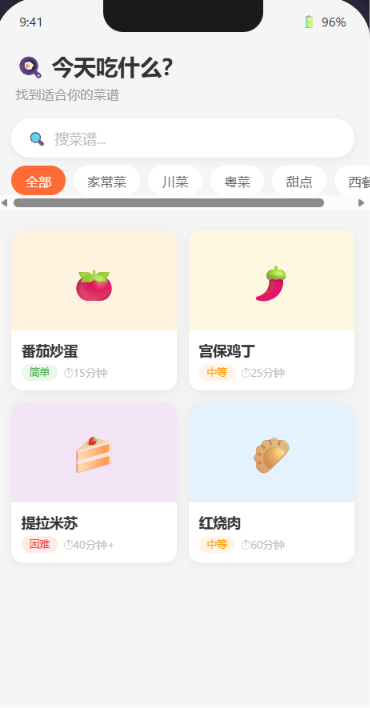
- 菜谱卡片网格展示(封面图 + 菜名 + 难度)
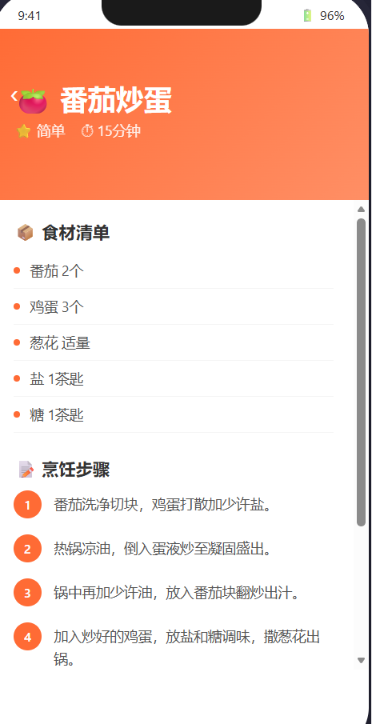
- 点击卡片进入详情页查看完整步骤
- 搜索功能按菜名筛选
- 分类标签切换(川菜 / 粤菜 / 甜点等)
- 图片加载和缓存处理
⚙️ 运行环境要求
| 项目 | 版本要求 |
|---|---|
| 操作系统 | Windows 10/11、macOS 13+ 或 Ubuntu 22.04+ |
| DevEco Studio | 5.0.3.800 及以上 |
| HarmonyOS SDK | API 12(HarmonyOS 5.0.0)及以上 |
| 应用模型 | Stage 模型 |
| 开发语言 | ArkTS |
🛠️ 实战:从零搭建菜谱 App
Step 1:创建数据模型
在 ArkTS 中定义菜谱的数据结构:
// models/Recipe.ets — 菜谱数据模型
export interface Recipe {
  id: string;           // 唯一标识
  name: string;         // 菜名
  category: string;     // 分类(川菜/粤菜/甜点)
  difficulty: '简单' | '中等' | '困难';  // 难度等级
  cookTime: string;     // 烹饪时间
  image: ResourceStr;  // 封面图
  ingredients: string[]; // 食材清单
  steps: string[];      // 步骤列表
  tips: string;         // 小贴士
}

// 模拟数据 — 在实际开发中可以从网络获取
export const RECIPES: Recipe[] = [
  {
    id: '1',
    name: '番茄炒蛋',
    category: '家常菜',
    difficulty: '简单',
    cookTime: '15分钟',
    image: $r('app.media.tomato_egg'),
    ingredients: ['番茄 2个', '鸡蛋 3个', '葱花 适量', '盐 1茶匙', '糖 1茶匙'],
    steps: [
      '番茄洗净切块,鸡蛋打散加少许盐。',
      '热锅凉油,倒入蛋液炒至凝固盛出。',
      '锅中再加少许油,放入番茄块翻炒出汁。',
      '加入炒好的鸡蛋,放盐和糖调味,撒葱花出锅。',
    ],
    tips: '番茄先烫一下去皮,口感更好。'
  },
  {
    id: '2',
    name: '宫保鸡丁',
    category: '川菜',
    difficulty: '中等',
    cookTime: '25分钟',
    image: $r('app.media.kung_pao'),
    ingredients: ['鸡胸肉 300g', '花生米 50g', '干辣椒 10个', '花椒 1茶匙', '葱姜蒜 适量'],
    steps: [
      '鸡胸肉切丁,用料酒、淀粉、生抽腌15分钟。',
      '调碗汁:生抽、醋、糖、淀粉、水拌匀。',
      '锅中多油,小火炸花生米至金黄捞出。',
      '底油爆香干辣椒和花椒,下鸡丁滑熟。',
      '倒入碗汁翻炒收汁,加花生米翻匀出锅。',
    ],
    tips: '鸡丁滑油前加一点蛋清会更嫩。'
  },
  {
    id: '3',
    name: '提拉米苏',
    category: '甜点',
    difficulty: '困难',
    cookTime: '40分钟+冷藏4小时',
    image: $r('app.media.tiramisu'),
    ingredients: ['马斯卡彭 250g', '手指饼干 200g', '浓缩咖啡 200ml', '鸡蛋 3个', '可可粉 适量'],
    steps: [
      '蛋黄加糖隔水加热搅打至浓稠。',
      '马斯卡彭软化后与蛋黄糊混合拌匀。',
      '蛋白加糖打发至硬性发泡,翻拌入奶酪糊。',
      '手指饼干快速蘸咖啡液,铺满容器底部。',
      '一层奶酪糊一层饼干,重复三次。',
      '冷藏4小时以上,筛可可粉装饰。',
    ],
    tips: '手指饼干蘸咖啡要快!蘸太久会软烂。'
  },
  // ... 可以添加更多菜谱
];
📌 数据模型设计要点
| 字段 | 类型 | 说明 |
|---|---|---|
id |
string |
唯一标识,用于列表渲染的 key |
image |
ResourceStr |
ArkUI 图片资源类型,支持 $r() 和网络 URL |
difficulty |
字面量联合类型 | 限制只能取三个固定值 |
避坑指南①: ResourceStr 是 ArkUI 特有的图片类型。本地图片用 $r('app.media.xxx'),网络图片直接用 string URL。image 字段定义为 ResourceStr 会自动兼容这两种情况。
Step 2:主页面 — 网格布局展示菜谱
// pages/RecipeList.ets — 菜谱列表主页
@Entry
@Component
struct RecipeList {
  @State private recipes: Recipe[] = RECIPES;
  @State private selectedCategory: string = '全部';
  @State private searchQuery: string = '';

  // 分类列表
  private categories: string[] = ['全部', '家常菜', '川菜', '粤菜', '甜点', '西餐'];

  // 计算:过滤后的菜谱
  get filteredRecipes(): Recipe[] {
    return this.recipes.filter(r => {
      const matchCategory = this.selectedCategory === '全部'
        || r.category === this.selectedCategory;
      const matchSearch = r.name.includes(this.searchQuery)
        || this.searchQuery === '';
      return matchCategory && matchSearch;
    });
  }

  build() {
    Column() {
      // 🔍 搜索栏
      Search({ placeholder: '搜菜谱...', value: this.searchQuery })
        .width('90%')
        .height(44)
        .margin({ top: 16, bottom: 8 })
        .searchButton('取消')
        .onChange((v: string) => { this.searchQuery = v; })
        .onCancel(() => { this.searchQuery = ''; })

      // 🏷️ 分类标签
      Scroll({ scroller: new Scroller() }) {
        Row({ space: 10 }) {
          ForEach(this.categories, (cat: string) => {
            Text(cat)
              .fontSize(14)
              .fontColor(cat === this.selectedCategory ? '#FF6B35' : '#666')
              .padding({ vertical: 6, horizontal: 16 })
              .backgroundColor(cat === this.selectedCategory
                ? 'rgba(255,107,53,0.1)' : '#F5F5F5')
              .borderRadius(18)
              .onClick(() => { this.selectedCategory = cat; })
          })
        }
        .padding({ left: 20, right: 20 })
      }
      .height(48)
      .scrollable(ScrollDirection.Horizontal)

      // 📊 菜谱网格
      if (this.filteredRecipes.length === 0) {
        // 空状态
        Column() {
          Text('😅 没有找到匹配的菜谱')
            .fontSize(16).fontColor('#999').margin({ top: 80 })
          Text('换个关键词试试吧~')
            .fontSize(14).fontColor('#ccc')
        }
        .width('100%')
      } else {
        Grid() {
          ForEach(this.filteredRecipes, (recipe: Recipe) => {
            GridItem() {
              RecipeCard({ recipe: recipe })
                .onClick(() => {
                  // 导航到详情页
                  this.navigateToDetail(recipe);
                })
            }
          })
        }
        .columnsTemplate('1fr 1fr')
        .columnsGap(12)
        .rowsGap(12)
        .padding(16)
      }
    }
    .width('100%')
    .height('100%')
    .backgroundColor('#F8F8F8')
  }

  navigateToDetail(recipe: Recipe): void {
    router.pushUrl({
      url: 'pages/RecipeDetail',
      params: { recipe: recipe }
    });
  }
}
📌 Grid 网格布局详解
Grid 是 ArkUI 的网格容器,用 columnsTemplate 定义列宽:
Grid() { /* GridItem 子元素 */ }
  .columnsTemplate('1fr 1fr')      // 两列等宽
  .columnsGap(12)                   // 列间距 12
  .rowsGap(12)                      // 行间距 12
fr 是弹性单位 — '1fr 2fr' 表示第二列宽度是第一列的 2 倍。
Step 3:菜谱卡片组件 — @Builder 与自定义组件
@Component
struct RecipeCard {
  @Prop recipe: Recipe;  // 从父组件传入菜谱数据

  build() {
    Column() {
      // 封面图
      Image(this.recipe.image)
        .width('100%')
        .height(120)
        .borderRadius({ topLeft: 12, topRight: 12 })
        .objectFit(ImageFit.Cover)

      // 文字信息
      Column({ space: 4 }) {
        Text(this.recipe.name)
          .fontSize(16)
          .fontWeight(FontWeight.Bold)
          .maxLines(1)
          .textOverflow({ overflow: TextOverflow.Ellipsis })

        Row({ space: 8 }) {
          // 难度标签
          Text(this.recipe.difficulty)
            .fontSize(12)
            .fontColor(this.difficultyColor(this.recipe.difficulty))
            .padding({ horizontal: 8, vertical: 2 })
            .backgroundColor(this.difficultyBg(this.recipe.difficulty))
            .borderRadius(8)

          // 烹饪时间
          Text(`⏱ ${this.recipe.cookTime}`)
            .fontSize(12)
            .fontColor('#999')
        }
      }
      .padding(10)
      .alignItems(HorizontalAlign.Start)
      .width('100%')
    }
    .width('100%')
    .backgroundColor(Color.White)
    .borderRadius(12)
    .shadow({ radius: 4, color: 'rgba(0,0,0,0.08)', offsetY: 2 })
  }

  // 难点:根据难度返回不同颜色
  difficultyColor(d: string): ResourceColor {
    switch(d) {
      case '简单': return '#4CAF50';
      case '中等': return '#FF9800';
      case '困难': return '#F44336';
      default: return '#999';
    }
  }

  difficultyBg(d: string): ResourceColor {
    switch(d) {
      case '简单': return 'rgba(76,175,80,0.1)';
      case '中等': return 'rgba(255,152,0,0.1)';
      case '困难': return 'rgba(244,67,54,0.1)';
      default: return '#F5F5F5';
    }
  }
}
📌 Image 组件要点
| 属性 | 作用 | 常用值 |
|---|---|---|
objectFit |
图片填充模式 | Cover(裁剪填满)/ Contain(完整显示)/ Fill(拉伸) |
borderRadius |
圆角 | { topLeft: 12, topRight: 12 } 只给上角加圆角 |
source |
图片来源 | $r('app.media.xxx') 或网络 URL 字符串 |
Step 4:详情页 — Router 导航
// pages/RecipeDetail.ets — 菜谱详情页
@Entry
@Component
struct RecipeDetail {
  @State recipe: Recipe = RECIPES[0];  // 默认值

  aboutToAppear(): void {
    // 从路由参数获取菜谱数据
    const params = router.getParams() as Record<string, Object>;
    if (params && params['recipe']) {
      this.recipe = params['recipe'] as Recipe;
    }
  }

  build() {
    Scroll() {
      Column() {
        // 顶部大图
        Image(this.recipe.image)
          .width('100%')
          .height(240)
          .objectFit(ImageFit.Cover)

        // 菜名 + 基本信息
        Column({ space: 8 }) {
          Text(this.recipe.name)
            .fontSize(26)
            .fontWeight(FontWeight.Bold)

          Row({ space: 16 }) {
            DifficultyBadge({ difficulty: this.recipe.difficulty })
            Text(`⏱ ${this.recipe.cookTime}`).fontSize(14).fontColor('#999')
          }

          // 食材清单
          Text('📦 食材').fontSize(18).fontWeight(FontWeight.Bold)
            .margin({ top: 16 })

          Column({ space: 6 }) {
            ForEach(this.recipe.ingredients, (item: string) => {
              Row({ space: 8 }) {
                Text('•').fontColor('#FF6B35').fontSize(16)
                Text(item).fontSize(14).fontColor('#444')
              }
            })
          }

          // 步骤列表
          Text('📝 烹饪步骤').fontSize(18).fontWeight(FontWeight.Bold)
            .margin({ top: 16 })

          Column({ space: 12 }) {
            ForEach(this.recipe.steps, (step: string, index: number) => {
              Row({ space: 10 }) {
                // 步骤编号圆圈
                Text(`${index + 1}`)
                  .width(28).height(28)
                  .backgroundColor('#FF6B35')
                  .fontColor(Color.White)
                  .fontSize(14)
                  .borderRadius(14)
                  .textAlign(TextAlign.Center)

                Text(step).fontSize(14).fontColor('#444')
                  .lineHeight(22)
              }
              .alignItems(VerticalAlign.Top)
            })
          }

          // 小贴士
          if (this.recipe.tips) {
            Column({ space: 6 }) {
              Text('💡 小贴士').fontSize(18).fontWeight(FontWeight.Bold)
                .margin({ top: 16 })
              Text(this.recipe.tips)
                .fontSize(14)
                .fontColor('#666')
                .padding(12)
                .backgroundColor('rgba(255,107,53,0.06)')
                .borderRadius(8)
                .border({ width: 1, color: 'rgba(255,107,53,0.2)' })
            }
          }
        }
        .padding(20)
      }
    }
    .width('100%')
    .height('100%')
    .backgroundColor(Color.White)
  }
}
避坑指南②: router.getParams() 需要在 aboutToAppear() 生命周期中调用。如果在 build() 中调用,路由参数可能还没传过来。
Step 5:路由配置
在 entry/src/main/resources/base/profile/main_pages.json 中注册页面:
{
  "src": [
    "pages/RecipeList",
    "pages/RecipeDetail"
  ]
}
Step 6:完整代码文件结构
entry/src/main/ets/
├── models/
│   └── Recipe.ets        ← 数据模型 + 模拟数据
├── pages/
│   ├── RecipeList.ets     ← 列表主页(网格 + 搜索 + 分类)
│   └── RecipeDetail.ets   ← 详情页(图片 + 食材 + 步骤)
└── components/
    └── RecipeCard.ets     ← 菜谱卡片组件
🚨 避坑指南
❌ 坑1:Grid 嵌套 ForEach 的 key 问题
// ❌ 错误:使用 index 当 key,数据变化时 UI 复用混乱
ForEach(this.recipes, (item, index) => { /* ... */ }, (_, i) => `${i}`)

// ✅ 正确:用数据本身的唯一 id
ForEach(this.recipes, (item) => { /* ... */ }, (item) => item.id)
❌ 坑2:router 导航参数序列化
// ❌ 错误:直接传复杂对象,可能丢失方法或类型
router.pushUrl({ url: 'xxx', params: { recipe: this.recipe } })

// ✅ 正确:确保 Recipe 接口可序列化(只含基本类型 + 数组)
// 在目标页面用 router.getParams() 接收
❌ 坑3:图片资源找不到
// ❌ 错误:资源名写错了不报编译错误,运行时不显示
Image($r('app.media.tomato_egg'))

// ✅ 正确:检查 resources/base/media/ 目录下是否有同名文件
// 文件名规则:全小写 + 下划线,如 tomato_egg.png
// 然后在代码中用 $r('app.media.tomato_egg') 引用
💡 最佳实践
- 数据模型独立文件:把
Recipe接口和模拟数据放在单独models/目录下,不要在页面文件里定义 — 方便复用和维护。 - Grid 列数适配:可以用媒体查询根据屏幕宽度动态调整:
.columnsTemplate(this.isWideScreen ? '1fr 1fr 1fr' : '1fr 1fr') - 图片占位图:为每个图片设置
backgroundColor兜底色,网络图片加载慢时用户不会看到白块。 - 空状态处理:搜索没结果时不要留白屏,显示友好的提示 + 表情符号。
- Shadow 性能:避免给 Grid 中每个 Item 加太重的阴影 — 用轻阴影 + 圆角边框组合更省性能。
📚 本章知识点总结
| 知识点 | 难度 | 说明 |
|---|---|---|
| ✅ Grid 网格布局 | ⭐⭐⭐ | columnsTemplate + rowsGap |
| ✅ Image 图片组件 | ⭐⭐ | objectFit、$r() 资源引用 |
| ✅ Router 导航 | ⭐⭐⭐ | pushUrl + getParams |
| ✅ Search 搜索组件 | ⭐⭐ | 搜索栏 + onChange 回调 |
| ✅ @Prop 数据传递 | ⭐⭐⭐ | 父传子,子只读 |
| ✅ Scroll 横向滚动 | ⭐⭐ | 分类标签左右滑动 |
🔗 参考资源
- 官方文档:HarmonyOS 应用开发文档
- 开发者社区:华为开发者论坛
- 欢迎加入开源鸿蒙跨平台社区:https://openharmonycrossplatform.csdn.net/

讨论HarmonyOS开发技术,专注于API与组件、DevEco Studio、测试、元服务和应用上架分发等。
更多推荐
 4
4 0
0- 0


 已为社区贡献9条内容

所有评论(0)