鸿蒙刮刮乐抽奖效果实现:手把手教你写出流畅的刮擦体验
完整源码:LuckyScratchDemo
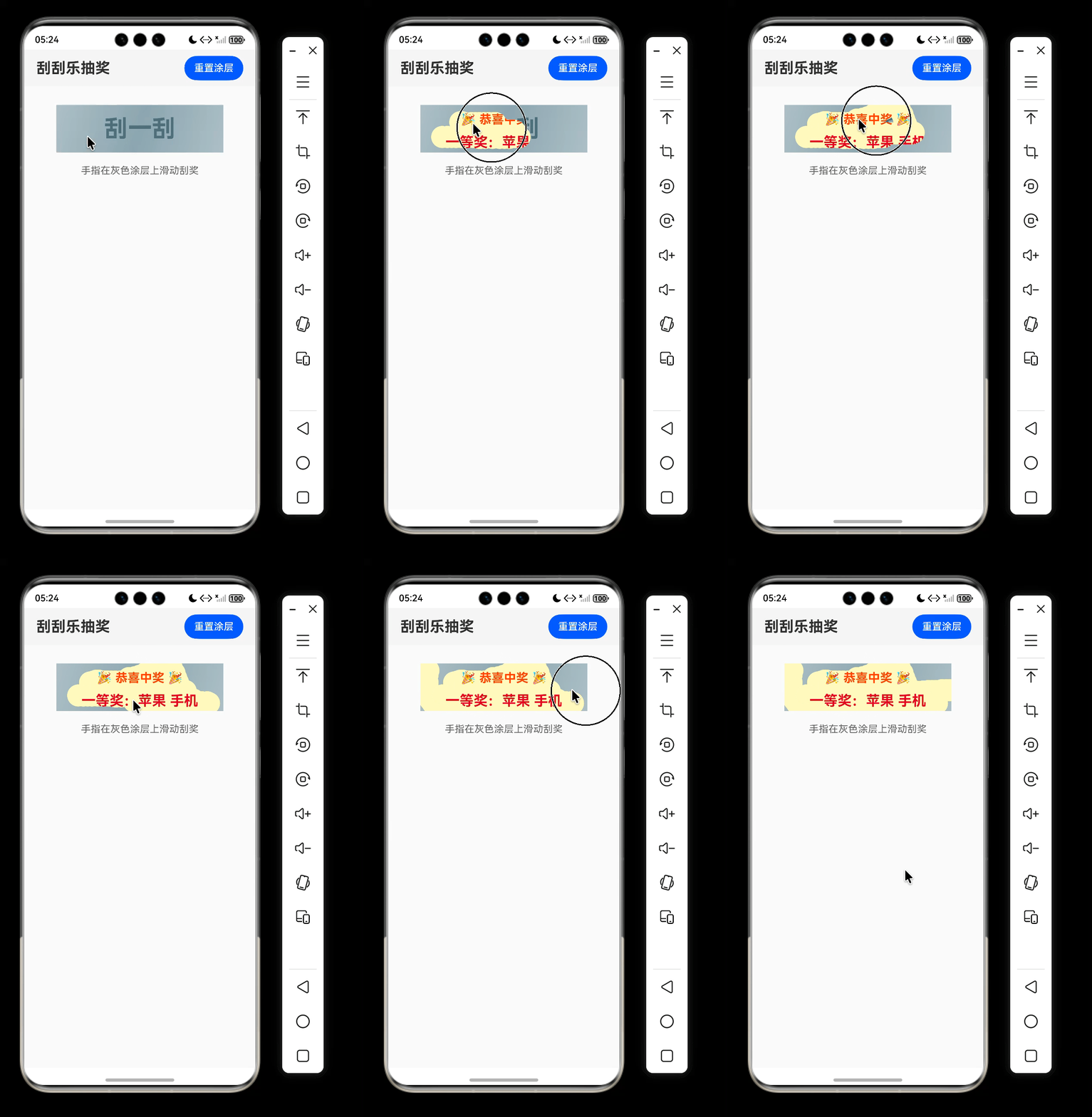
在电商营销活动、积分抽奖等场景中,刮刮乐是一种经典且极具趣味性的互动形式。本文将带你使用Canvas 组件,从零实现一个支持流畅滑动刮擦、无锯齿、无滞后的刮刮乐抽奖页面。最终效果如下:
一、需求分析
一个完整的刮刮乐界面需要满足:
- 底部显示奖品信息(一等奖 / 谢谢参与等)
- 顶部覆盖一层灰色涂层,上面有“刮一刮”提示文字
- 手指在涂层上滑动时,涂层被“擦除”,露出奖品
- 仅滑动才擦除,单纯点击不擦除(防止误触)
- 擦除轨迹应平滑、无锯齿、不卡顿
- 提供“重置涂层”按钮,可重新开始
二、技术选型
鸿蒙提供了强大的 Canvas 组件,配合 CanvasRenderingContext2D 的绘图 API 和混合模式 globalCompositeOperation,可以轻松实现“擦除”效果。核心思路:
- 底层(Stack 的底层)放奖品文字或图片
- 上层用 Canvas 绘制银灰色涂层
- 在
onTouch的Move事件中,以destination-out混合模式绘制圆形路径,使涂层变透明,露出底层
三、关键实现步骤
3.1 页面布局:Stack 叠加
使用 Stack 组件将奖品 Column 和涂层 Canvas 重叠,Canvas 覆盖在上面。
Stack() {
  // 底层奖品
  Column() {
    Text('🎉 恭喜中奖 🎉')
    Text(this.prizeMessage)
  }
  .backgroundColor('#FFF9C4')
  // 顶层涂层
  Canvas(this.context)
    .onTouch(...)
}
.width('90%')
.aspectRatio(3.5)
3.2 涂层绘制:渐变 + 文字
为了使涂层更逼真,使用线性渐变填充背景,并绘制“刮一刮”文字。
private initCoating(): void {
  this.context.clearRect(0, 0, this.canvasWidth, this.canvasHeight);
  const gradient = this.context.createLinearGradient(0, 0, this.canvasWidth, this.canvasHeight);
  gradient.addColorStop(0, '#B0BEC5');
  gradient.addColorStop(0.5, '#90A4AE');
  gradient.addColorStop(1, '#B0BEC5');
  this.context.fillStyle = gradient;
  this.context.fillRect(0, 0, this.canvasWidth, this.canvasHeight);
    const fontSize = Math.min(this.canvasWidth, this.canvasHeight)*3.5*0.5;
  this.context.font = `bold ${fontSize}px "HarmonyOS Sans"`;
  this.context.fillStyle = '#546E7A';
  this.context.textAlign = 'center';
  this.context.fillText('刮一刮', this.canvasWidth / 2, this.canvasHeight / 2);
}
3.3 擦除核心:destination-out 混合模式
globalCompositeOperation = 'destination-out' 会让新绘制的图形区域变透明,从而实现擦除效果。我们用圆形作为“橡皮擦”:
private drawCircle(x: number, y: number, radius: number): void {
  this.context.save();
  this.context.beginPath();
  this.context.arc(x, y, radius, 0, Math.PI * 2);
  this.context.closePath();
  this.context.globalCompositeOperation = 'destination-out';
  this.context.fillStyle = 'rgba(0,0,0,1)';
  this.context.fill();
  this.context.restore();
}
3.4 连续刮擦轨迹:两点之间插值
如果只是在 TouchMove 时画一个圆,快速移动时会产生“断点”,不连续。因此需要在上一个点和当前点之间插入多个圆,保证轨迹连续。
private drawLineCircle(x0: number, y0: number, x1: number, y1: number, radius: number): void {
  const distance = Math.hypot(x1 - x0, y1 - y0);
  if (distance < 0.1) return;
  const steps = Math.ceil(distance / (radius * 0.7)); // 重叠率70%
  for (let i = 0; i <= steps; i++) {
    const t = i / steps;
    const cx = x0 + (x1 - x0) * t;
    const cy = y0 + (y1 - y0) * t;
    this.drawCircle(cx, cy, radius);
  }
}
3.5 触摸事件处理:只有滑动才擦除
按需求,手指点按时不应擦除,只有移动距离大于 2px 才触发擦除。
.onTouch((event: TouchEvent) => {
  const x = event.touches[0].x;
  const y = event.touches[0].y;

  if (event.type === TouchType.Down) {
    this.lastX = x;
    this.lastY = y;
    this.isTouching = true;
  } else if (event.type === TouchType.Move && this.isTouching) {
    if (Math.hypot(x - this.lastX, y - this.lastY) < 2) return; // 微小移动忽略
    this.drawLineCircle(this.lastX, this.lastY, x, y, 18);
    this.lastX = x;
    this.lastY = y;
  } else if (event.type === TouchType.Up) {
    this.isTouching = false;
  }
})
3.6 重置涂层
点击“重置”按钮时,重新调用 initCoating() 清空 Canvas 并重绘涂层。
private resetCoating(): void {
  this.initCoating();
  promptAction.showToast({ message: '涂层已重置,继续刮奖' });
}
四、完整代码
下面是完整的 ScratchCardPage.ets,可直接复制到你的鸿蒙工程中运行。
import { promptAction } from '@kit.ArkUI';

@Entry
@Component
struct ScratchCardPage {
  private settings: RenderingContextSettings = new RenderingContextSettings(true);
  private context: CanvasRenderingContext2D = new CanvasRenderingContext2D(this.settings);
  @State canvasWidth: number = 0;
  @State canvasHeight: number = 0;
  @State prizeMessage: string = "一等奖:苹果 手机";

  private lastX: number = 0;
  private lastY: number = 0;
  private isTouching: boolean = false;

  build() {
    Column() {
      Row() {
        Text('刮刮乐抽奖')
          .fontSize(24)
          .fontWeight(FontWeight.Bold)
          .margin({ left: 20 })
        Blank()
        Button('重置涂层')
          .onClick(() => this.resetCoating())
          .margin({ right: 20 })
      }
      .width('100%')
      .height(60)
      .backgroundColor('#F5F5F5')

      Stack() {
        // 底层奖品
        Column() {
          Text('🎉 恭喜中奖 🎉')
            .fontSize(20)
            .fontWeight(FontWeight.Bold)
            .fontColor('#FF5722')
            .margin({ bottom: 12 })
          Text(this.prizeMessage)
            .fontSize(23)
            .fontWeight(FontWeight.Bold)
            .fontColor('#D32F2F')
        }
        .width('100%')
        .height('100%')
        .justifyContent(FlexAlign.Center)
        .alignItems(HorizontalAlign.Center)
        .backgroundColor('#FFF9C4')
        .padding(12)

        // 涂层 Canvas
        Canvas(this.context)
          .width('100%')
          .height('100%')
          .onAreaChange((_, newValue) => {
            this.canvasWidth = newValue.width as number;
            this.canvasHeight = newValue.height as number;
            if (this.canvasWidth > 0 && this.canvasHeight > 0) {
              this.initCoating();
            }
          })
          .onTouch((event: TouchEvent) => {
            const touch = event.touches[0];
            if (!touch) return;
            const x = touch.x;
            const y = touch.y;
            if (x < 0 || x > this.canvasWidth || y < 0 || y > this.canvasHeight) return;

            if (event.type === TouchType.Down) {
              this.lastX = x;
              this.lastY = y;
              this.isTouching = true;
            } else if (event.type === TouchType.Move && this.isTouching) {
              // 避免微小移动
              if (Math.hypot(x - this.lastX, y - this.lastY) < 2) return;
              // 连续圆形擦除,实现涂鸦般平滑效果
              this.drawLineCircle(this.lastX, this.lastY, x, y, 18);
              this.lastX = x;
              this.lastY = y;
            } else if (event.type === TouchType.Up) {
              this.isTouching = false;
            }
          })
      }
      .width('90%')
      .aspectRatio(3.5)
      .backgroundColor('#E0E0E0')
      .margin({ top: 30 })
      .borderRadius(16)

      Text('手指在灰色涂层上滑动刮奖')
        .fontSize(16)
        .fontColor('#666')
        .margin({ top: 20 })
    }
    .width('100%')
    .height('100%')
    .backgroundColor('#FAFAFA')
  }

  // 初始化涂层(银灰色渐变 + 文字)
  private initCoating(): void {
    if (!this.context || this.canvasWidth === 0 || this.canvasHeight === 0) return;
    this.context.clearRect(0, 0, this.canvasWidth, this.canvasHeight);
    const gradient = this.context.createLinearGradient(0, 0, this.canvasWidth, this.canvasHeight);
    gradient.addColorStop(0, '#B0BEC5');
    gradient.addColorStop(0.5, '#90A4AE');
    gradient.addColorStop(1, '#B0BEC5');
    this.context.fillStyle = gradient;
    this.context.fillRect(0, 0, this.canvasWidth, this.canvasHeight);

    const fontSize = Math.min(this.canvasWidth, this.canvasHeight)*3.5*0.5;
    this.context.font = `bold ${fontSize}px "HarmonyOS Sans"`;
    this.context.fillStyle = '#546E7A';
    this.context.textAlign = 'center';
    this.context.textBaseline = 'middle';
    this.context.fillText('刮一刮', this.canvasWidth / 2, this.canvasHeight / 2);
  }

  // 单点圆形擦除
  private drawCircle(x: number, y: number, radius: number): void {
    if (!this.context) return;
    this.context.save();
    this.context.beginPath();
    this.context.arc(x, y, radius, 0, Math.PI * 2);
    this.context.closePath();
    this.context.globalCompositeOperation = 'destination-out';
    this.context.fillStyle = 'rgba(0,0,0,1)';
    this.context.fill();
    this.context.restore();
  }

  // 两点之间连续绘制圆形,实现平滑连续刮擦
  private drawLineCircle(x0: number, y0: number, x1: number, y1: number, radius: number): void {
    const distance = Math.hypot(x1 - x0, y1 - y0);
    if (distance < 0.1) return;
    const steps = Math.ceil(distance / (radius * 0.7));
    for (let i = 0; i <= steps; i++) {
      const t = i / steps;
      const cx = x0 + (x1 - x0) * t;
      const cy = y0 + (y1 - y0) * t;
      this.drawCircle(cx, cy, radius);
    }
  }

  // 重置涂层
  private resetCoating(): void {
    if (!this.context) return;
    this.initCoating();
    promptAction.showToast({ message: '涂层已重置,继续刮奖' });
  }
}
五、优化与避坑
- 圆形笔刷 vs 方形笔刷:圆形在斜向滑动时边缘平滑,无锯齿;方形会呈现明显的阶梯感。建议使用圆形。
- 插值步数计算:
steps = distance / (radius * overlapFactor),overlapFactor 越小重叠越多,越连续但增加绘制次数。推荐 0.6~0.8。 - 触摸抖动过滤:判断
Math.hypot(dx, dy) < 2可以避免手指轻微抖动产生不必要的圆点。 - 性能考虑:
drawLineCircle在每一帧绘制多个圆,半径过大或步数过多可能掉帧。实际测试半径 15~20、步数系数 0.7 可以流畅运行。 - 涂层重置:重置时需要重新计算 canvas 宽高,确保
initCoating拿到正确的尺寸。所以onAreaChange中调用初始化。
六、总结
本文介绍了如何使用Canvas 组件和 globalCompositeOperation 实现一个流畅的刮刮乐效果。关键点在于:
- Stack 布局上下层叠
- destination-out 混合模式擦除涂层
- 两点之间插值绘制连续轨迹
- 仅滑动时触发擦除,提升用户体验
希望这篇教程能为你的鸿蒙应用开发带来灵感。如果觉得本文对你有帮助,请点赞、收藏、转发支持!

讨论HarmonyOS开发技术,专注于API与组件、DevEco Studio、测试、元服务和应用上架分发等。
更多推荐

 5
5 0
0- 0


 已为社区贡献105条内容

所有评论(0)