ArkUI 常用布局与 Swiper 轮播组件综合学习笔记
·
一、ArkUI 六大布局总览
ArkUI 提供 6 类布局容器,是页面排版的基础,按需选型:
- 线性布局 Row/Column:Row 横向排列、Column 纵向排列,页面基础布局;
- 层叠布局 Stack:组件上下堆叠,适合浮层、图片加文字;
- 弹性布局 Flex:自适应分配空间、支持自动换行,多用于流式标签;
- 相对布局 RelativeContainer:通过 ID + 锚点约束定位,实现不规则自由布局;
- 栅格布局 GridRow/GridCol:网格均分,适配商品列表、多列表单;
- 动态布局 DynamicLayout:运行时动态增减组件,适配动态数据页面。
选型总结:简单行列用线性、叠加用 Stack、流式用 Flex、自由摆放用相对、规整多列用栅格、内容变化用动态。
二、相对布局 RelativeContainer 实战案例
核心规则
- 子组件必须设置唯一
id; alignRules配置横竖双向对齐;__container__代表父容器锚点。
ets
@Entry
@Component
struct RelativeC{
  build() {
    RelativeContainer(){
      //绿色:父容器顶部居中
      Text('相对布局的案例')
        .id('title')
        .alignRules({
          top: { anchor: '__container__', align: VerticalAlign.Top },
          left: { anchor: '__container__', align: HorizontalAlign.Center }
        })
        .backgroundColor(Color.Green).width(150).height(150)
      //蓝色:和绿色顶部平齐,靠父容器左侧
      Text('相对布局的案例2')
        .id('title1')
        .alignRules({
          top: { anchor: 'title', align: VerticalAlign.Top },
          left: { anchor: '__container__', align: HorizontalAlign.Start}
        })
        .backgroundColor(Color.Blue).width(150).height(150)
      //黄色:绿色底部、蓝色左对齐
      Text('相对布局的案例3')
        .id('title3')
        .alignRules({
          top: { anchor: 'title', align: VerticalAlign.Bottom },
          left: { anchor: 'title1', align: HorizontalAlign.Start }
        })
        .backgroundColor(Color.Yellow).width(150).height(150)
      //红色:黄色底部、蓝色居中对齐
      Text('相对布局的案例4')
        .id('title4')
        .alignRules({
          top: { anchor: 'title3', align: VerticalAlign.Bottom },
          left: { anchor: 'title1', align: HorizontalAlign.Center }
        })
        .backgroundColor(Color.Red).width(150).height(150)
    }.width('100%').height('100%')
  }
}
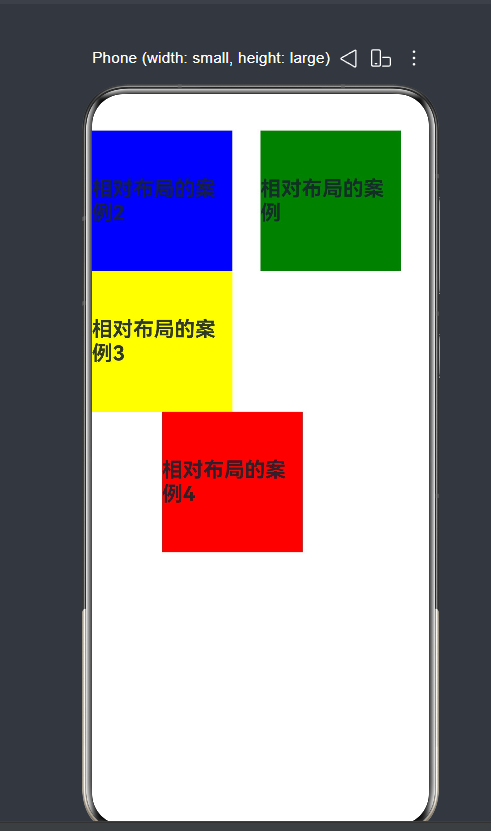
布局效果:绿块顶部居中,蓝块同高靠左,黄块在绿块正下方,红块在黄块下方、居中于蓝块。
三、Swiper 轮播组件(嵌套在线性布局 Column 中)
Swiper 是实现广告轮播的常用组件,一般嵌套在基础布局内部。
ets
@Entry
@Component
struct SwiperDemo{
  build() {
    Column(){
      Text('这是一个轮播展示页面')
        .fontSize(30).fontWeight(FontWeight.Bolder)
      Swiper(){
        Text('你好').width('100%').height(180).backgroundColor(Color.Red).fontSize(35)
        Text('hello').width('100%').height(180).backgroundColor(Color.Pink).fontSize(35)
        Text('world').width('100%').height(180).backgroundColor(Color.Gray).fontSize(35)
        Text('123').width('100%').height(180).backgroundColor(Color.Yellow).fontSize(35)
        Text('456').width('100%').height(180).backgroundColor(Color.Green).fontSize(35)
      }
      .width('100%').height(180)
      .indicator(true)    //开启底部页码圆点
      .autoPlay(true)     //开启自动轮播
      .interval(300)      //轮播间隔300ms(常规项目推荐2000~3000ms)
      .loop(true)         //开启首尾循环
    }.padding(10)
  }
}
运行效果:页面上方标题,下方 5 个彩色色块自动横向循环滑动,底部带轮播指示圆点。
博客
四、整体总结
- 六大布局负责搭建页面整体骨架,是页面开发的基础;
- RelativeContainer依靠锚点 ID 实现不规则自由排版,解决常规布局无法灵活定位的场景;
- Swiper 属于功能性组件,依赖 Column/Row 等基础布局承载,专注实现轮播滑动效果,常用于首页广告栏。

讨论HarmonyOS开发技术,专注于API与组件、DevEco Studio、测试、元服务和应用上架分发等。
更多推荐

 7
7 0
0- 0


 已为社区贡献2条内容

所有评论(0)