《宝宝成长记录时间轴》四、ArkTS开发避坑与修复指南
HarmonyOS ArkTS开发避坑指南:12个高频编译错误与运行时陷阱全解析
导语:HarmonyOS ArkTS在严格模式下有许多隐式约束,初学者甚至有一定经验的开发者都容易踩坑。本文从真实项目开发中提炼出12个高频问题,涵盖编译错误、运行时崩溃、数据丢失和UI异常四大类,每个问题都提供错误现象、原因分析和正确写法,帮你大幅减少调试时间。
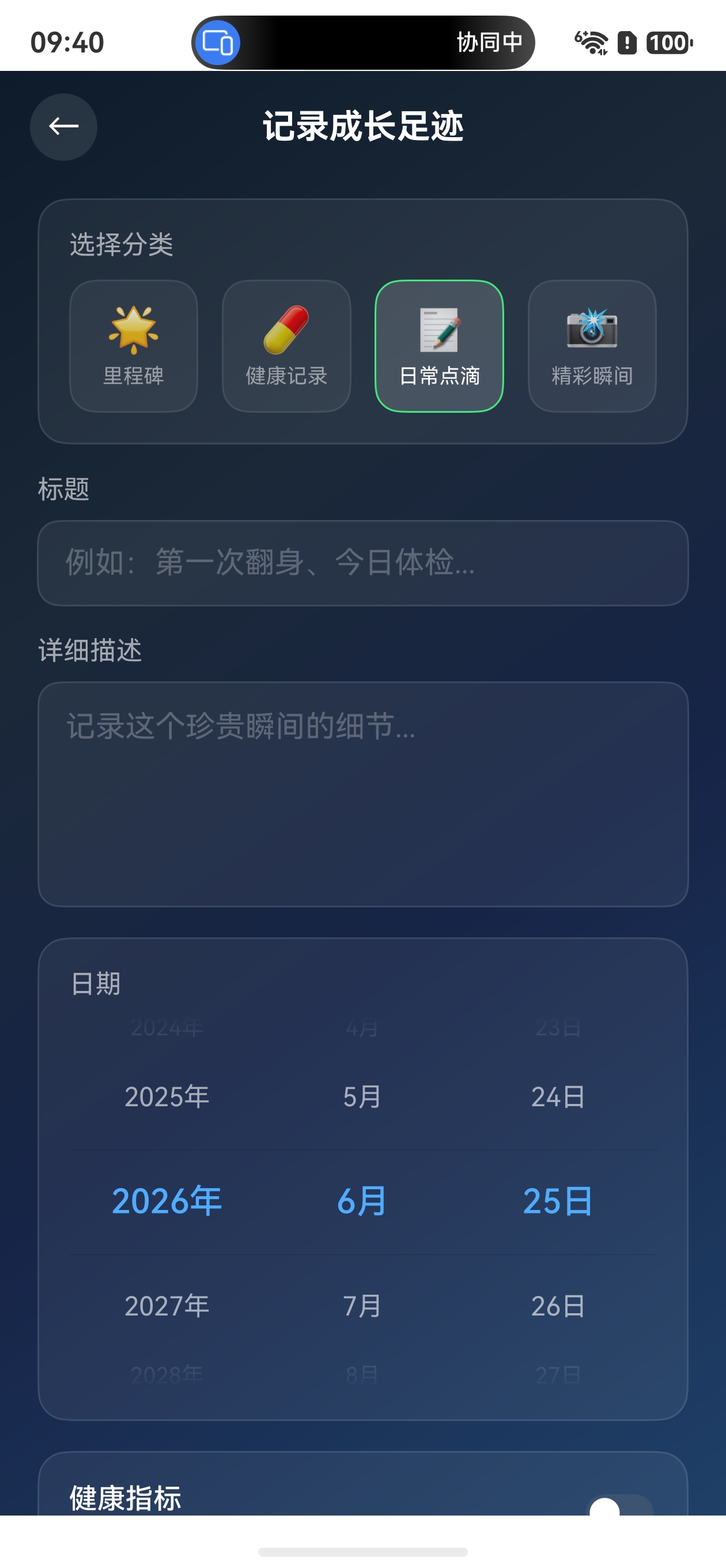
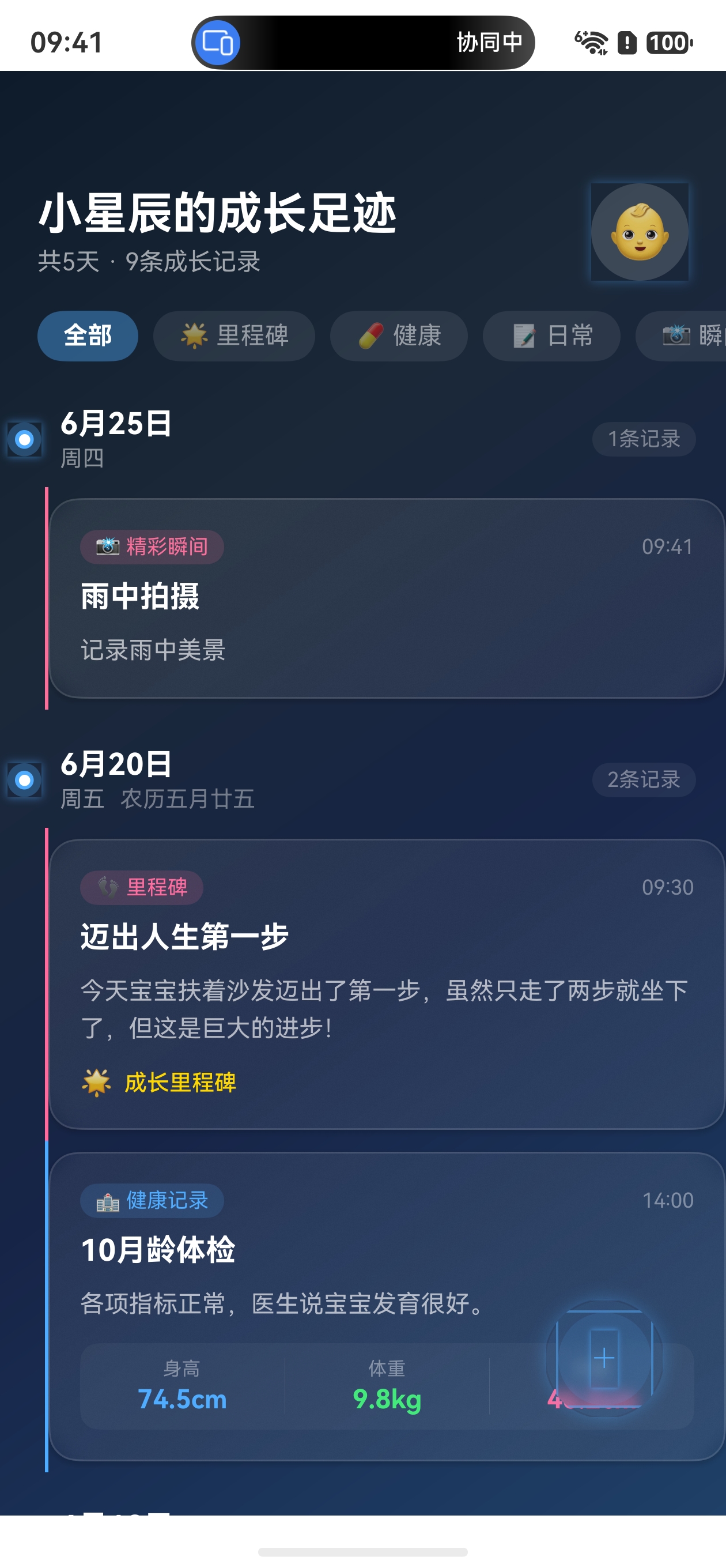
效果
 |
 |
 |
|---|
一、编译错误类(ArkTS严格模式)
坑1:对象字面量必须对应显式声明的类(arkts-no-untyped-obj-literals)
错误现象:
// ❌ 编译报错:arkts-no-untyped-obj-literals
const colorMap: Record<string, ColorConfig> = {
  'milestone': { start: '#FF6B9D', end: '#FF8E53' },
  'health': { start: '#4FACFE', end: '#00F2FE' }
}
原因分析:ArkTS严格模式禁止未对应显式声明的interface/class的对象字面量。即使声明了Record<string, ColorConfig>类型,对象字面量本身也无法通过编译。
正确写法:使用class + 工厂函数模式替代对象字面量:
class ColorConfig {
  start: string
  end: string
  constructor(start: string, end: string) {
    this.start = start
    this.end = end
  }
}

function getCategoryColor(category: string): ColorConfig {
  switch (category) {
    case 'milestone':
      return new ColorConfig('#FF6B9D', '#FF8E53')
    case 'health':
      return new ColorConfig('#4FACFE', '#00F2FE')
    default:
      return new ColorConfig('#4FACFE', '#00F2FE')
  }
}

// 使用
const color = getCategoryColor('milestone')
经验总结:在ArkTS中,凡是涉及"根据key获取配置"的场景,优先使用
switch工厂函数而非对象字面量映射表。
坑2:InputType枚举的命名规范
错误现象:
// ❌ 编译报错:Property 'NUMBER' does not exist on type 'typeof InputType'
TextInput({ text: $$this.value })
  .type(InputType.NUMBER)        // 不存在
  .type(InputType.NUMBER_DECIMAL) // 这个是正确的!
原因分析:HarmonyOS InputType枚举的命名不统一,纯数字类型使用PascalCase Number,而小数类型使用UPPER_SNAKE_CASE NUMBER_DECIMAL。
正确写法:
TextInput({ text: $$this.value })
  .type(InputType.Number)         // ✅ 纯数字输入
  .type(InputType.NUMBER_DECIMAL) // ✅ 小数输入(注意保持大写)
| InputType值 | 说明 | 命名风格 |
|---|---|---|
InputType.Number |
纯数字 | PascalCase |
InputType.NUMBER_DECIMAL |
含小数点数字 | UPPER_SNAKE_CASE |
InputType.Normal |
普通文本 | PascalCase |
InputType.Email |
邮箱 | PascalCase |
InputType.PhoneNumber |
电话号码 | PascalCase |
经验总结:使用枚举时先查官方API文档确认命名,不要凭直觉猜测。
坑3:List组件不存在scroller属性
错误现象:
// ❌ 编译报错:Property 'scroller' does not exist on type 'ListAttribute'
private scroller: Scroller = new Scroller()

build() {
  List() {
    // ...
  }
  .scroller(this.scroller)  // List没有这个属性!
}
原因分析:Scroller对象主要用于Scroll容器,List组件通过自身的属性和事件管理滚动,不支持.scroller()方法。
正确写法:
// ✅ List通过onScroll等事件监听滚动
List() {
  // ...
}
.onScroll((xOffset: number, yOffset: number) => {
  // 处理滚动事件
})
.onReachEnd(() => {
  // 滚动到底部
})

// ✅ 如需程序化控制滚动,使用Scroll容器
private scroller: Scroller = new Scroller()

Scroll(this.scroller) {
  Column() { /* 内容 */ }
}
坑4:Circle组件不支持blurStyle和BlurType
错误现象:
// ❌ 编译报错:Property 'blurStyle' does not exist on type 'CircleAttribute'
// ❌ 编译报错:Cannot find name 'BlurType'
Circle()
  .width(18).height(18)
  .fill('#4FACFE')
  .blurStyle(BlurType.BACKGROUND)  // 不存在!
原因分析:blurStyle不是Circle组件的属性,BlurType也不是ArkUI的有效类型。模糊效果应使用backdropBlur()或blur()。
正确写法:
// ✅ 在支持模糊的容器组件上使用backdropBlur
Column()
  .backdropBlur(30)  // 毛玻璃模糊半径

// ✅ 直接对图片使用blur
Image($r('app.media.bg'))
  .blur(10)

// ✅ 发光效果用shadow替代blur
Circle()
  .width(18).height(18)
  .fill('#4FACFE')
  .shadow({ radius: 12, color: 'rgba(79,172,254,0.6)', offsetY: 0 })
二、运行时崩溃类
坑5:@ObservedV2对象存入AppStorage导致崩溃
错误现象:
// ❌ 运行时可能崩溃或数据丢失
@ObservedV2
class TimelineRecord {
  @Trace id: number = 0
  @Trace title: string = ''
}

const record = new TimelineRecord()
AppStorage.setOrCreate<TimelineRecord>('newRecord', record)  // 危险!
原因分析:@ObservedV2装饰的类实例在跨页面传递时可能无法正确序列化,导致崩溃或数据丢失。
正确写法:拆分为简单类型字段分别存储:
// ✅ 将@ObservedV2对象的字段拆分为基本类型存入AppStorage
AppStorage.setOrCreate<number>('newRecordId', record.id)
AppStorage.setOrCreate<string>('newRecordTitle', record.title)
AppStorage.setOrCreate<string>('newRecordCategory', record.category)

// 在目标页面重建对象
const id = AppStorage.get<number>('newRecordId') ?? 0
const title = AppStorage.get<string>('newRecordTitle') ?? ''
const category = AppStorage.get<string>('newRecordCategory') as RecordCategory
const record = new TimelineRecord(id, category, title, ...)
经验总结:AppStorage适合存储基本类型(string/number/boolean),复杂对象应序列化为简单字段。
坑6:router.replaceUrl可能导致应用退出
错误现象:
// ❌ 点击保存后应用直接退出
saveAndNavigate(): void {
  // ... 保存逻辑
  router.replaceUrl({ url: 'pages/BabyTimeline' })  // 应用崩溃退出
}
原因分析:router.replaceUrl会替换当前页面在导航栈中的位置。当导航栈较浅或目标页面初始化逻辑复杂时,可能导致栈异常引发崩溃。
正确写法:
// ✅ 使用pushUrl安全跳转,保留导航栈
router.pushUrl({ url: 'pages/BabyTimeline' })

// 如果需要防止返回到填写页,可以在目标页面处理
// 或使用router.pushUrl + RouterMode.Standard
坑7:TextInput的$$双向绑定要求string类型
错误现象:
// ❌ 运行时绑定失败,输入框无法正常工作
@Local selectedYear: number = 2025

TextInput({ text: $$this.selectedYear })  // $$要求string类型
  .type(InputType.Number)
原因分析:TextInput的$$双向绑定要求变量类型为string,number类型会导致绑定失败。
正确写法:
// ✅ 声明为string类型,在需要时转换
@Local selectedYear: string = new Date().getFullYear().toString()

TextInput({ text: $$this.selectedYear })
  .type(InputType.Number)

// 使用时转换回number
const yearNum = parseInt(this.selectedYear) || 2025
三、数据逻辑类
坑8:页面每次打开都重新初始化数据(数据丢失)
错误现象:每次从AddRecord页面返回BabyTimeline,之前添加的记录都消失了,只剩下初始模拟数据。
原因分析:aboutToAppear中无条件调用initMockData(),每次页面实例化都会重置数据。
正确写法:使用AppStorage标记是否已初始化:
aboutToAppear(): void {
  const initialized = AppStorage.get<boolean>('timelineDataInitialized')
  if (initialized) {
    this.loadFromStorage()  // 已有数据,从AppStorage加载
  } else {
    this.initMockData()     // 首次进入,初始化模拟数据
    AppStorage.setOrCreate<boolean>('timelineDataInitialized', true)
  }
  this.checkNewRecord()
  this.saveToStorage()      // 保存当前状态
}
坑9:分类筛选只改状态变量,列表数据未过滤
错误现象:点击分类标签后,标签样式变了,但列表内容没有变化,仍然显示全部记录。
原因分析:ForEach直接遍历原始数据数组,没有根据selectedCategory进行过滤。
正确写法:在ForEach中使用过滤函数:
// ✅ 外层过滤分组(移除空分组)
getFilteredGroups(): DateGroup[] {
  if (this.selectedCategory === 'all') return this.dateGroups
  const result: DateGroup[] = []
  for (const group of this.dateGroups) {
    const filtered = group.records.filter(
      (r: TimelineRecord) => r.category === this.selectedCategory
    )
    if (filtered.length > 0) {
      const fg = new DateGroup(group.dateKey, group.displayDate,
        group.weekday, group.lunarInfo)
      fg.records = filtered
      result.push(fg)
    }
  }
  return result
}

// ✅ 内层过滤记录
getFilteredRecords(group: DateGroup): TimelineRecord[] {
  if (this.selectedCategory === 'all') return group.records
  return group.records.filter(
    (r: TimelineRecord) => r.category === this.selectedCategory
  )
}

// 在build中使用
List() {
  ForEach(this.getFilteredGroups(), (group: DateGroup) => {
    ListItemGroup({ header: this.dateGroupHeader(group) }) {
      ForEach(this.getFilteredRecords(group), (record: TimelineRecord) => {
        ListItem() { /* ... */ }
      })
    }
  })
}
四、UI显示异常类
坑10:Stack容器显示为矩形而非圆形
错误现象:由多个Circle叠加组成的悬浮按钮,点击区域和视觉形状是矩形而非圆形。
原因分析:Stack容器默认为矩形,即使内部是Circle组件,Stack的边界仍然是矩形。
正确写法:
Stack() {
  Circle().width(64).height(64).fill('rgba(79,172,254,0.1)')
  Circle().width(52).height(52).fill('rgba(79,172,254,0.12)')
  Text('+').fontSize(26).fontColor('#4FACFE')
}
.width(64)
.height(64)
.borderRadius(32)  // 宽高的一半,确保正圆
.clip(true)        // 裁剪溢出内容为圆形
.shadow({ radius: 24, color: 'rgba(79,172,254,0.35)', offsetY: 0 })
经验总结:Stack/Column/Row等容器组件默认是矩形,要显示为圆形必须同时设置
.borderRadius()+.clip(true)。
坑11:@Builder函数中$$双向绑定不生效
错误现象:在@Builder函数的参数上使用$$双向绑定,输入框无法输入或值不更新。
原因分析:$$双向绑定只能作用于组件自身的@Local/@State装饰的状态变量,不能绑定到@Builder函数的参数。
正确写法:直接在@Builder中引用@Local变量,而非通过参数传递:
// ❌ @Builder参数无法$$双向绑定
@Builder
inputRow(value: string) {
  TextInput({ text: $$value })  // 不生效!
}

// ✅ 直接在Builder中引用@Local变量
@Builder
healthSection() {
  TextInput({ text: $$this.heightValue })  // 直接绑定@Local
    .type(InputType.NUMBER_DECIMAL)
  TextInput({ text: $$this.weightValue })
    .type(InputType.NUMBER_DECIMAL)
}
坑12:十六进制颜色字符串无法直接转为rgba
错误现象:
// ❌ 对hex颜色执行replace无效,结果仍是原始hex字符串
const color = '#4FACFE'
const bgColor = color.replace(')', ',0.2)').replace('rgb', 'rgba')
// 结果: '#4FACFE'(未变化!)
原因分析:十六进制颜色字符串(如#4FACFE)不含)和rgb字符,replace操作无效。
正确写法:
// ✅ 直接使用预设的rgba字符串
const bgColor = 'rgba(79,172,254,0.15)'

// ✅ 或者使用函数根据分类返回固定rgba值
function getGlowBg(category: string): string {
  switch (category) {
    case 'milestone': return 'rgba(255,107,157,0.15)'
    case 'health': return 'rgba(79,172,254,0.15)'
    case 'daily': return 'rgba(67,233,123,0.15)'
    default: return 'rgba(79,172,254,0.15)'
  }
}
五、开发规范速查表
| 场景 | ❌ 错误做法 | ✅ 正确做法 |
|---|---|---|
| 配置映射 | Record<string, T> 对象字面量 |
class + switch 工厂函数 |
| 滚动控制 | List().scroller(scroller) |
Scroll(scroller) 或 List 事件 |
| 模糊效果 | Circle().blurStyle(BlurType.X) |
Column().backdropBlur(30) |
| 页面传值 | AppStorage.set(ObservedV2对象) |
拆分为基本类型字段存储 |
| 页面跳转 | router.replaceUrl 复杂页面 |
router.pushUrl 保留导航栈 |
| TextInput绑定 | $$numberVar |
$$stringVar + parseInt() |
| 日期选择 | 3个TextInput手动输入 | DatePicker 组件 |
| 数据持久化 | 每次initMockData() |
AppStorage标记初始化状态 |
| 分类筛选 | 只改状态变量 | ForEach中使用过滤函数 |
| 圆形按钮 | 只设borderRadius |
borderRadius + clip(true) |
六、调试技巧与最佳实践
6.1 编译错误快速定位
- arkts-no-untyped-obj-literals:检查所有对象字面量是否有对应的显式class/interface声明
- Property X does not exist:查阅官方API文档确认组件是否支持该属性
- Cannot find name:确认类型是否已导入,或者该类型是否真实存在
6.2 运行时问题排查
- 页面崩溃/退出:优先检查
router.replaceUrl和AppStorage中的复杂对象 - 数据丢失:检查
aboutToAppear中是否有无条件重置数据的逻辑 - UI不更新:确认状态变量是否有正确的装饰器(
@Local/@State/@Trace)
6.3 最佳实践清单
- 所有对象字面量都使用class实例化或switch工厂函数
- AppStorage只存基本类型,复杂对象通过序列化/反序列化传递
- TextInput的
$$绑定变量声明为string类型 - Stack容器需要圆形显示时同时设置
borderRadius+clip(true) - ForEach提供唯一key生成器提升diff效率
- 使用
AppStorage.get<boolean>('initialized')控制是否初始化数据 -
@Builder中不通过参数使用$$绑定,直接引用@Local变量
七、总结
ArkTS严格模式虽然增加了开发约束,但也帮助我们在编译阶段发现潜在问题。本文总结的12个高频问题可以归纳为四大原则:
- 类型显式化:对象字面量、枚举值、变量类型都要显式声明
- API先查后用:不要凭直觉假设组件属性,先查官方文档
- 数据简单化:跨页面传递数据优先使用基本类型
- 状态规范化:正确使用装饰器,筛选逻辑放在数据层而非UI层
掌握这些原则,你的HarmonyOS开发效率将大幅提升!
关键词:HarmonyOS、ArkTS、编译错误、arkts-no-untyped-obj-literals、AppStorage、状态管理V2、List组件、ArkUI避坑、鸿蒙开发

讨论HarmonyOS开发技术,专注于API与组件、DevEco Studio、测试、元服务和应用上架分发等。
更多推荐


 3
3 0
0- 0



 已为社区贡献66条内容

所有评论(0)