鸿蒙页面执行这段链接发送到后端接口的鸿蒙代码,出现code404,函数的转变,textinput的变量
·
配置的编译器是devceo5.1,sdk是5.1
接口返回404的意思是:
鸿蒙端调用 update 接口报 404,说明你的后端根本不存在这个接口或 URL 不对。
下面我给你:
-
后端 Spring Boot 完整可运行的 update 接口(返回修改后的数据)
-
鸿蒙 ArkTS 调用 update 接口 + 更新 UI 示例
操作:
使用 ohpm 安装(DevEco Studio 3.1+ 自带)
在代码里按实际路径引入
import axios, { AxiosResponse } from '@ohos/axios';
入口模块 module.json5 里打开网络权限:
"requestPermissions": [
  { "name": "ohos.permission.INTERNET" }
]
代码如下:
// entry/src/main/ets/pages/OrderUpdatePage.ets
import axios, { AxiosResponse } from '@ohos/axios';
// 1. 数据模型(与服务端字段保持一致)
interface Order {
  id: number;
  itemName: string;
  quantity: number;
  price: number;
}

@Entry
@Component
struct OrderUpdatePage {
  // 2. 双向绑定用
  @State orderId: string = '';
  @State itemName: string = '';
  @State quantity: string = '';
  @State price: string = '';

  // 回显结果
  @State resp: string = '等待更新…';

  // 3. 点击更新
  updateOrder = async () => {
    // 简单校验
    if (!this.orderId || !this.itemName || !this.quantity || !this.price) {
      this.resp = '请把信息填完整';
      return;
    }

    const order: Order = {
      id: Number(this.orderId),
      itemName: this.itemName,
      quantity: Number(this.quantity),
      price: Number(this.price)
    };

    try {
      // 4. 发 POST /order/update   返回 Order
      const res: AxiosResponse<Order> =
        await axios.post('http://localhost:8080/api/order', order);
      this.resp = `服务端已返回:\n${JSON.stringify(res.data, null, 2)}`;
      console.log("nihao",this.resp);
    } catch (err) {
      this.resp = `更新失败:${err}`;
    }
  };

  build() {
    Column({ space: 12 }) {
      Text('更新订单').fontSize(24).fontWeight(FontWeight.Bold).margin({ bottom: 12 });

      TextInput({ placeholder: '订单号', text: $$this.orderId })
        .type(InputType.Number);

      TextInput({ placeholder: '商品名', text: $$this.itemName });

      TextInput({ placeholder: '数量', text: $$this.quantity })
        .type(InputType.Number);

      TextInput({ placeholder: '单价(元)', text: $$this.price })
        .type(InputType.Number);

      Button('更新')
        .width('100%')
        .height(48)
        .onClick(this.updateOrder);


      Text('服务端回显:').fontSize(16).fontWeight(FontWeight.Medium);
      Text(this.resp)
        .fontSize(14)
        .width('100%')
        .padding(8)
        .backgroundColor('#F5F5F5')
        .borderRadius(6);
    }
    .padding(16)
    .width('100%')
    .height('100%')
    .backgroundColor('#FFFFFF');
  }
}
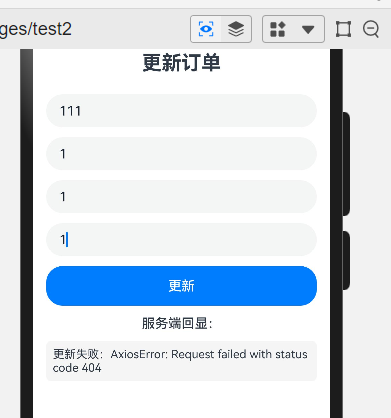
其中的下面这部分代码没有出现日志,而是出现下面的更新失败,try catch的catch部分。
try {
      // 4. 发 POST /order/update   返回 Order
      const res: AxiosResponse<Order> =
        await axios.post('http://localhost:8080/api/order', order);
      this.resp = `服务端已返回:\n${JSON.stringify(res.data, null, 2)}`;
      console.log("nihao",this.resp);
    } catch (err) {
      this.resp = `更新失败:${err}`;
    }
页面效果:
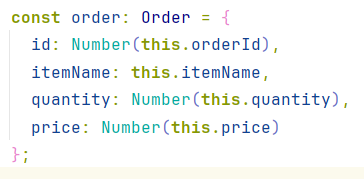
在这段代码中,实现了代码由字符串向数字的转化。
如
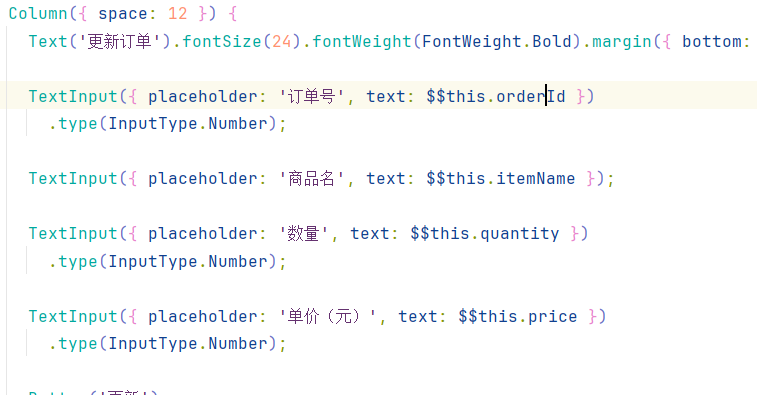
接下来的代码是将textinput的值text绑定到一个自己建的变量里,比如下面的text的变量this.orderId。

讨论HarmonyOS开发技术,专注于API与组件、DevEco Studio、测试、元服务和应用上架分发等。
更多推荐


 3
3 0
0- 0


 已为社区贡献41条内容

所有评论(0)